lights AUDI A3 2020 Owner´s Manual
[x] Cancel search | Manufacturer: AUDI, Model Year: 2020, Model line: A3, Model: AUDI A3 2020Pages: 400, PDF Size: 107.47 MB
Page 97 of 400

8V2012721BK
Driving dynamic
— To completely reactivate the ESC stabilization
function, press the button again. The indicator
lights turn off.
Z\ WARNING
— When the ESC is switched off or limited,
there will be no vehicle stabilization or it will
be limited. The driving wheels could spin
and the vehicle could swerve, especially on
slick or slippery road surfaces, which in-
creases the risk of an accident.
— Because of the increased risk of an accident,
only drive with the ESC switched off or Limit-
ed when it is necessary. Reactivate the ESC
as soon as possible.
G) Tips
— If the ESC is limited, switched off, or mal-
functioning, systems with an automatic
braking intervention function may not be
fully available.
— If malfunctions occur in other systems or
certain driver assist systems are active, the
ESC must be switched on by the system. The
ESC
may switch on automatically and can-
not be operated with the button.
B /ABS} if BA © Stabilization control (ESC/
ABS): malfunction! See owner's manual
There is a malfunction in the ABS or EDL. This al-
so causes the ESC to malfunction. The brakes still
function with their normal power, but ABS is not
active.
Drive to an authorized Audi dealer or authorized
Audi Service Facility immediately to have the
malfunction corrected.
95
Page 107 of 400
8V2012721BK
High-voltage system
> Unlock the vehicle if necessary > page 25.
> Make sure that the selector lever is in the “P”
position, the parking brake is set, and drive
ready mode is switched off > page 71.
> Turn the lock until it is vertical to open the cov-
er on the charging unit > fig. 102.
> Slide the cover carefully to the side if necessary.
> Remove the lock on the charging port
> fig. 103.
» Insert the plug @) or @) into the socket
=> page 101, fig. 96.
> Plug the vehicle charging connector ()
=> page 101, fig. 96 into the vehicle charging
port > fig. 103. The charging process starts au-
tomatically if no charging timer is set.
@) Tips
Remove ice and snow from the cover using a
hand brush and solvent-free deicing spray.
Audi e-tron compact
charging system
Charging overview
Applies to: vehicles with Audi e-tron compact charging sys-
tem
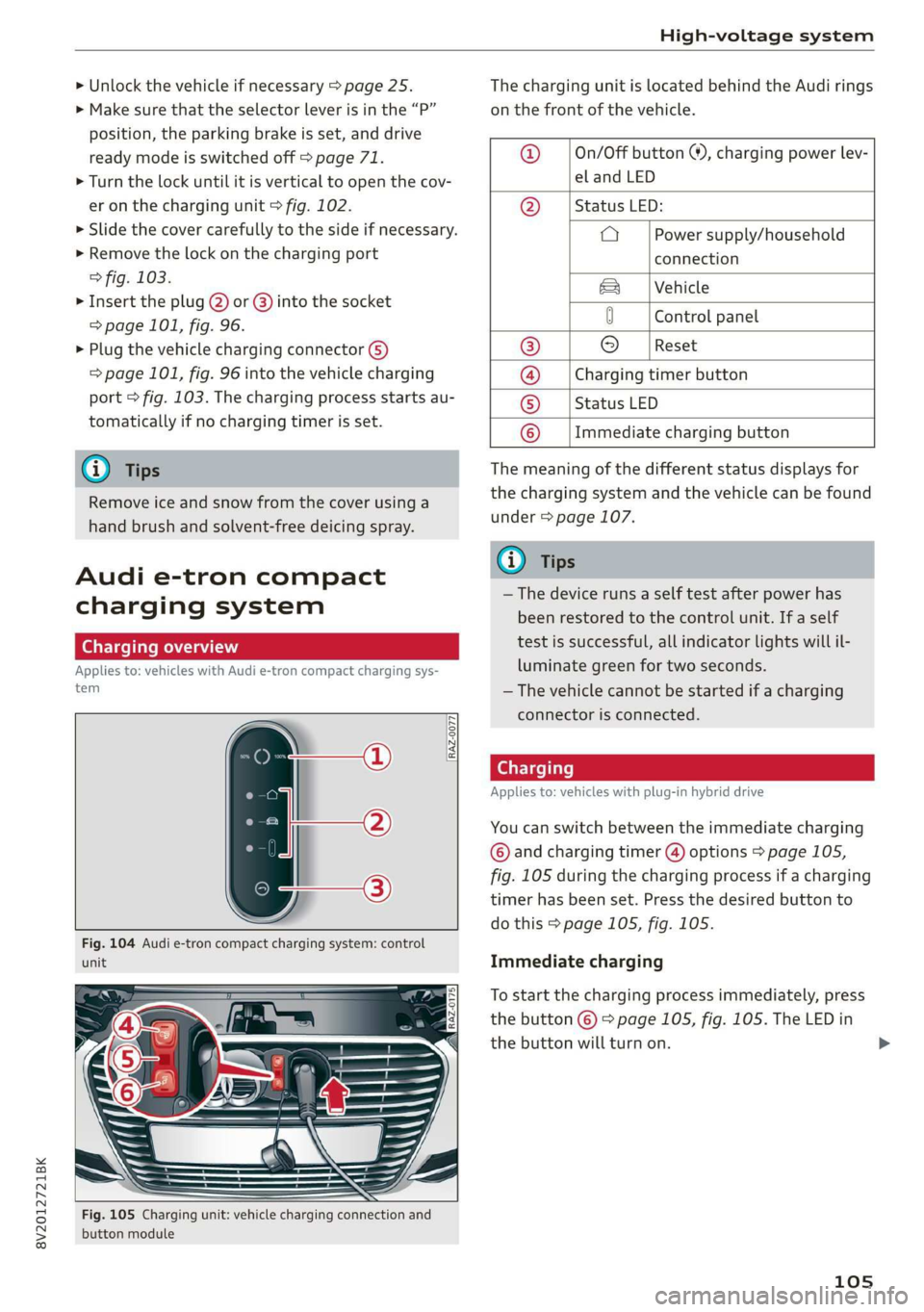
RAZ-0077,
unit
Fig. 105 Charging unit: vehicle charging connection and
button module
The charging unit is located behind the Audi rings
on the front of the vehicle.
@ ___|On/Off button ®, charging power lev-
el and LED
@ __ | Status LED:
a Power supply/household
connection
& | Vehicle
0 Control panel
® © [Reset
@ __ |Charging timer button
© __ |Status LED
© __ |Immediate charging button
The meaning of the different status displays for
the charging system and the vehicle can be found
under > page 107.
(i) Tips
— The device runs a self test after power has
been restored to the control unit. If a self
test is successful, all indicator lights will il-
luminate green for two seconds.
— The vehicle cannot be started if a charging
connector is connected.
Cee Testis)
Applies to: vehicles with plug-in hybrid drive
You can switch between the immediate charging
© and charging timer @) options > page 105,
fig. 105 during the charging process if a charging
timer has been set. Press the desired button to
do this > page 105, fig. 105.
Immediate charging
To start the charging process immediately, press
the button © % page 105, fig. 105. The LED in
the button will turn on.
105
>
Page 109 of 400
8V2012721BK
High-voltage system
Deactivating sleep mode
> Unlock the vehicle > page 25. Or
> Open the driver's door. Or
> Press the button © > page 105, fig. 105.
Unlocking the vehicle charging connector
when the vehicle is unlocked
> If necessary, deactivate sleep mode.
> Press the button with the illuminated LED @) or
© > page 105, fig. 105. Or
> Press the {@ button in the driver's door
= page 29, fig. 22 or the & button on the re-
mote control key.
> The connector will unlock for 30 seconds.
> Remove the connector.
> If the connector is not removed within 30 sec-
onds, it will lock again automatically.
Closing the charging unit
> Put the cap back on the charging port
=> page 104, fig. 103.
> Carefully slide the cover back in its original po-
sition.
> Turn the lock to the horizontal position
=> page 104, fig. 102.
@) Note
If you drive with an open charging unit, both
the cover and the electronics installed behind
it could be damaged.
G) Tips
The instrument cluster will indicate if the
charging unit is open while driving. Check be-
fore every drive after charging if the cover is
locked.
Semele
Applies to: vehicles with plug-in hybrid drive
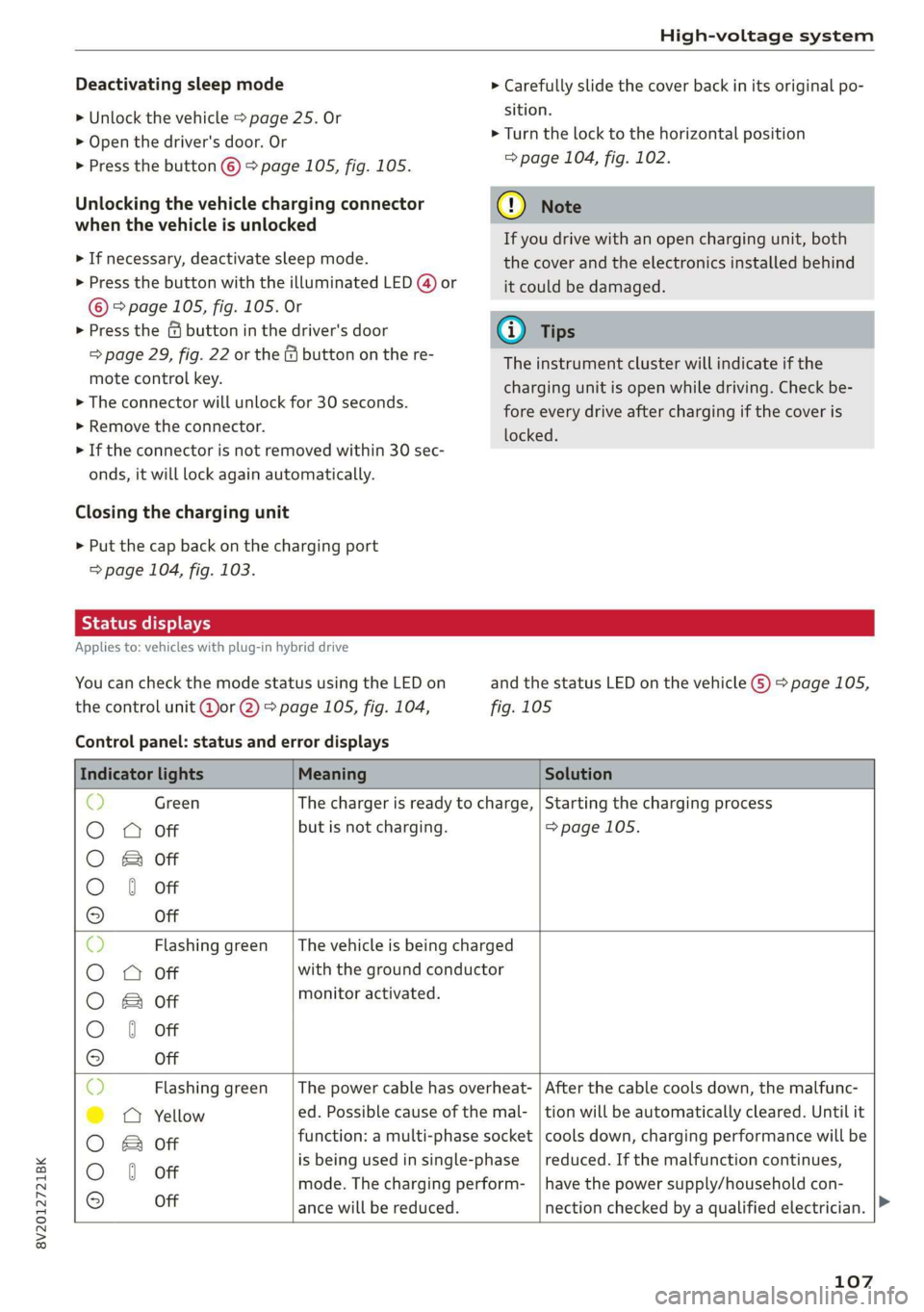
You can check the mode status using the LED on
the control unit @or @) > page 105, fig. 104,
Control panel: status and error displays
and the status LED on the vehicle G) > page 105,
fig. 105
Indicator lights Meaning Solution
© Green The charger is ready to charge, | Starting the charging process
O 0 Off but is not charging. => page 105.
O B&B off
O 0 of
9 Off
c) Flashing green __| The vehicle is being charged
O O off with the ground conductor
O Bor monitor activated.
O 0 Off
9 Off
Sy Flashing green _| The power cable has overheat- | After the cable cools down, the malfunc-
©) a Yellow ed. Possible cause of the mal- | tion will be automatically cleared. Until it
O B otf function: a multi-phase socket | cools down, charging performance will be
O 6 off is being used in single:phase reduced. If the malfunction continues,
mode. The charging perform- | have the power supply/household con-
© Off ance will be reduced. nection checked by a qualified electrician.
107
Page 110 of 400

High-voltage system
Indicator lights Meaning Solution
Q Flashing green |The control unit has overheat- | After the control unit cools down, the
O 0 off ed. The charging performance | malfunction will be automatically
will be reduced. cleared. Never leave the control panel in
O B Of P
direct sunlight for long periods or time.
© 1 Yeltow Until it cools down, charging perform-
9 Off ance will be reduced. If the malfunction
continues, have the control unit checked
by an authorized Audi dealer or author-
ized Audi Service Facility.
O Red The power cable has overheat- | After the cable cools down, the malfunc-
© © Yellow ed. The charging process has __| tion will be automatically cleared and the
been interrupted. charging process will resume. If the mal-
O & off
O 6 of function continues, have the control unit
checked by an authorized Audi dealer or
© Off authorized Audi Service Facility, or have
the power supply/household connection
checked by a qualified electrician.
O Red The control unit has overheat- | After the control unit cools down, the
O QO Off ed. The charging process has__| malfunction will be automatically cleared
been interrupted. and the charging process will resume.
O & Off
@ 0 Yew Never leave the control panel in direct
evo sunlight for long periods or time. If the
© Off malfunction continues, have the control
unit checked by an authorized Audi dealer
or authorized Audi Service Facility.
© Red The charging infrastructure of | After the power supply/household con-
© @ Flashing yellow |the power supply/household | nection stabilizes, the malfunction will be
connection is restricted. Possi- | automatically cleared and the charging
O & off
O 6 of ble cause of the malfunction: | process will resume. If the malfunction
low voltage or poor power fre- | continues, have the power supply/house-
© Off quency. The charging process | hold connection checked by a qualified
has been interrupted. electrician.
O Red There is a malfunction inthe | After the vehicle charging system stabiliz-
O 0 Off vehicle charging system. The | es, the malfunction will be automatically
: charging process has beenin- | cleared and the charging process will re-
© & Flashing yellow ging ging
O 0 of terrupted. sume. If the malfunction continues, have
the vehicle checked by an authorized Audi
© Off dealer or authorized Audi Service Facility.
O Red The power cable or vehicle ca- | Have the power or vehicle cable replaced
O Q Off ble is faulty. Possible cause of | by an authorized Audi dealer or author-
the malfunction: the coding ized Audi Service Facility.
O B&B off
. resistance of the power or ve-
© 0 Flashing yellow hicle cable is not compatible.
9 Off
The charging process has been
interrupted.
108
Page 111 of 400

8V2012721BK
High-voltage system
Indicator lights Meaning Solution
© Red There is a malfunction inthe | End the charging process at the vehicle
O O off vehicle charging system. The | and remove the vehicle cable from the ve-
@ B Red charging process has been in- | hicle charging port. Disconnect the charg-
O 6 of terrupted. er from the power supply and reconnect it
after 60 seconds. Restart the charging
9 Off process > page 105. If the malfunction
continues, have the vehicle checked by an
authorized Audi dealer or authorized Audi
Service Facility.
O Red There is an overvoltage inthe | Disconnect the charger from the power
© CQ Flashing red charging infrastructure of the | supply and reconnect it after 60 seconds.
power supply/household con- | If the malfunction continues, have the
O & off
O 6 off nection. The charging process | power supply/household connection
© has been interrupted. checked by a qualified electrician.
Off
© Red The control unit has atechni- | Disconnect the charger from the power
O 0 Off cal malfunction. The charging | supply and reconnect it after 60 seconds.
O Bot process has been interrupted. |If the malfunction continues, have the
@ 0 Red control unit checked by an authorized
© Audi dealer or authorized Audi Service Fa-
9 Off cility.
© Red The control unit has atechni- | Disconnect the charger from the power
O 0 off cal malfunction (self-test supply and reconnect it after 60 seconds.
O Bot failed). The charging process _ | If the malfunction continues, have the
© 6 Flashi d has been interrupted. control unit checked by an authorized
asning re Audi dealer or authorized Audi Service Fa-
© Off cility.
© Red The charging infrastructure of | Have the control unit checked by an au-
@ CO Red the power supply/household | thorized Audi dealer or authorized Audi
@ & Red connection is insufficient: the | Service Facility, and have the power sup-
O 6 of ground conductor is interrupt- | ply/household connection checked by a
ed or not present. The ground | qualified electrician. Do not use the pow-
9 Off conductor monitor has inter- | er supply/household connector until the
rupted the charging process. | malfunction is corrected.
© Red The indicator light in the reset | Have the control unit replaced by an au-
@ OC Red button on the control unit is | thorized Audi dealer or authorized Audi
@ B& Red faulty. The charging process _| Service Facility.
@ © Red has been interrupted.
e
9 Off
109
Page 112 of 400

High-voltage system
Indicator lights Meaning Solution
O Red The control unit has detected | Press and hold the © button for at least
@ X Red residual current. The charging | two seconds. If the malfunction contin-
@ EB Red process has been interrupted. | ues, have the control unit checked by an
@ © Red authorized Audi dealer or authorized Audi
€ / Service Facility, and have the power sup-
9 Flashing red ply/household connection checked by a
qualified electrician.
© Red The charging infrastructure is | Disconnect the charger from the power
© Q Flashing red wired incorrectly. The charging | supply. Have the power supply/household
© & Flashing red process has been interrupted. | connection checked by a qualified electri-
© § Flashing red eas
9 Off
O Red The control unit has a techni- | Disconnect the charger from the power
@ CX Red cal malfunction. Possible supply and reconnect it after 60 seconds.
@ EB Red cause of the malfunction: If the malfunction continues, have the
@ 0 Red software error or the load re-_ | control unit checked by an authorized
. lay has been switched incor- _| Audi dealer or authorized Audi Service Fa-
9 Red rectly. The charging process cility, and have the power supply/house-
has been interrupted. hold connection checked by a qualified
electrician.
O Flashing red The control unit has a serious | Have the control unit replaced by an au-
O 0 off malfunction. The charging thorized Audi dealer or authorized Audi
O Bot process has been interrupted. | Service Facility.
@ @ Red
9 Off
© Off The indicator light in the Have the control unit replaced by an au-
@ C Red On/Off button on the control | thorized Audi dealer or authorized Audi
@ B Red unit is faulty. The charging Service Facility.
@ 0 Red process has been interrupted.
e
© Red
Vehicle: charging unit
LED on vehicle G) Meaning Solution
. . Remove the charger, put the cap
On High voltage battery charging on and close the cover on the
process is completed. . .
charging unit.
The high-voltage battery is charg-
isan Flashing ing or the vehicle is being air con-
ditioned/heated.
Blinks for approxi-
mately one minute
after leaving the vehi-
cle
started yet.
Charging timer was programmed
but the charging process has not
110
Page 113 of 400

8V2012721BK
High-voltage system
LED on vehicle © Meaning Solution
Have the power supply or power
supply system inspected. Check
No power supply was recognized | the status display on the control
On even though the charging cable is | unit > table on page 107. See an
Yellow plugged in. authorized Audi dealer or author-
ized Audi Service Facility for assis-
tance if necessary.
‘ The selector lever in notin the P | Move the selector lever into the P
Flashing vps ue
position. position.
Check if the charging connector is
inserted correctly. Remove the
The charging connector could not | charging connector and insert it in-
On be correctly locked in the vehicle | to the charging port again. See an
charging port. authorized Audi dealer or author-
ized Audi Service Facility for assis-
Red tance if necessary.
Fault in the charging system. The
ong penne meme See an authorized Audi dealer or
Flashing cargec. . . authorized Audi Service Facility for
Or: the outside temperature is too . .
: assistance if necessary.
low. The high-voltage battery
could not be fully charged.
@) Tips
The operation status indicated by the LED G)
on the vehicle is also displayed in the instru-
ment cluster/Infotainment system.
Indicator lights and
messages
Applies to: vehicles with plug-in hybrid drive
If the Ey indicator light turns on, the high-volt-
age battery is charging or is already completely
charged.
If the EX indicator light stays on, there is a mal-
function in the charging system. Have the prob-
lem corrected immediately by an authorized Audi
dealer or authorized Audi Service Facility.
Charging connector still attached. Vehicle
cannot be driven
This message appears when the charging system
is still connected to the vehicle. Remove the con-
nector > page 106.
Incompatible charging system. Please check
charging system
This message appears when the charging system
is incompatible. Only charge using the charging
system that is designed for your vehicle.
Eg AC charging system: malfunction! Please
contact Service
This message appears if there is a malfunction in
the charging system. Have the problem corrected
immediately by an authorized Audi dealer or au-
thorized Audi Service Facility.
Warning! Charging unit cover is unlocked.
See owner's manual
This message appears if the charging unit cover is
open. Close the cover and lock it > page 107.
111
Page 116 of 400
Trailer towing
Exterior lighting
Follow the legal regulations regarding the light-
ing equipment on your trailer. Contact an author-
ized Audi dealer or authorized Audi Service Facili-
ty for more information.
Before you start driving, check all lighting equip-
ment on the trailer while it is hitched to the vehi-
cle.
The headlight range control automatically ad-
justs the light range of the headlights.
Safety chains
Make sure the safety chains are correctly applied
when pulling a trailer. The chains should hang
enough so that the trailer can drive around
curves. However, they must not touch the
ground.
G) Tips
— Block the wheels with chocks when parking
on inclines if the trailer is loaded.
— Having the vehicle inspected between the
inspection intervals is recommended if you
tow a trailer frequently.
— Avoid driving with a trailer during the vehi-
cle break-in period.
Driving with a trailer
Driving with a trailer requires extra caution.
Speed
Adhere to the legal speed limits. Follow the legal
regulations specific to the country.
As the speed increases, the driving stability of
the trailer decreases. Therefore you should not
exceed the maximum legal speed limit when
there are unfavorable road, weather, and/or wind
conditions. This especially applies when driving
downhill.
Hill
When you start driving uphill or downhill, trailers
may tilt or sway sooner than when driving ona
level surface. If small swaying movements have
already occurred, you can stabilize the trailer by
114
firmly braking immediately. Never attempt to
“straighten out” the trailer by accelerating.
Downshift before driving on hills to utilize the en-
gine braking effect > A\.
Brakes
When using a trailer with overrun brakes, first
brake gently then quickly. This reduces the risk of
jerking while braking if the trailer wheels lock up.
Engine coolant temperature
Pay attention specifically to the coolant tempera-
ture display when there are high outside temper-
atures, and when driving on long inclines
=> page 15. Shift to a higher gear in a timely man-
ner.
Z\ WARNING
Constant braking causes the brakes to over-
heat and can substantially reduce braking per-
formance, increase braking distance, or cause
complete failure of the brake system.
Page 117 of 400
8V2012721BK
Assist systems
Assist systems
Speed warning system
Applies to: vehicles with speed warning system
The speed warning system helps you to stay be-
low a specified maximum speed that can be set,
changed or deleted in the Infotainment system.
The speed warning system warns you if you are
exceeding the maximum speed that you have set.
A warning tone will sound as soon as your speed
exceeds the stored value slightly. The ow in-
dicator light will appear at the same time in the
instrument cluster display along with a message.
The fe) indicator light and the message turn
off if the speed falls back below the stored maxi-
mum speed.
Setting a threshold is recommended if you would
like to be reminded when you reach a certain
maximum speed. Situations where you may want
to do so include driving in a country with a gener-
al speed limit or if there is a specified maximum
speed for winter tires.
Setting the warning threshold
> Select in the Infotainment system: [MENU] but-
ton > Vehicle > left control button > Driver as-
sistance > Speed warning > Manual.
G) Tips
Regardless of the speed warning system, you
should always monitor your speed using the
speedometer and make sure you are following
the legal speed limit.
Messages
Applies to: vehicles with speed warning system
Manually set speed limit XX mph
(km/h) exceeded
The stored speed was exceeded.
Cruise control system
Applies to: vehicles with cruise control system
The cruise control system assists the driver in
maintaining a constant speed above approxi-
mately 15 mph (20 km/h). The system maintains
the desired speed by braking and accelerating.
ZA WARNING
— Always pay attention to the traffic around
your vehicle when the cruise control system
is in operation. As the driver, you are always
responsible for controlling your vehicle
speed and the distance between your vehicle
and
other vehicles.
— For safety reasons, cruise control should not
be used in the city, in stop-and-go traffic, on
winding roads, and when road conditions are
poor (such as ice, fog, gravel, heavy rain,
and conditions that could lead to hydroplan-
ing), because this increases the risk of an ac-
cident.
— Switch the cruise control off temporarily
when driving in turning lanes, highway exits,
or in construction zones.
—To reduce the risk of an accident, you should
only resume the stored speed if it is suitable
for the current traffic conditions.
@) Note
— Conventional drive system: before driving
downhill a long distance on a steep hill, de-
crease your speed and select a lower gear.
This makes use of the engine braking effect
and reduces the load placed on the brakes.
— Plug-in hybrid drive: before driving downhill
a long distance on a steep hill, decrease
your speed and use the recuperation braking
effect > page 78. This reduces the load on
the brakes.
(i) Tips
The brake lights turn on when the brakes are
applied automatically.
115
Page 122 of 400
Assist systems
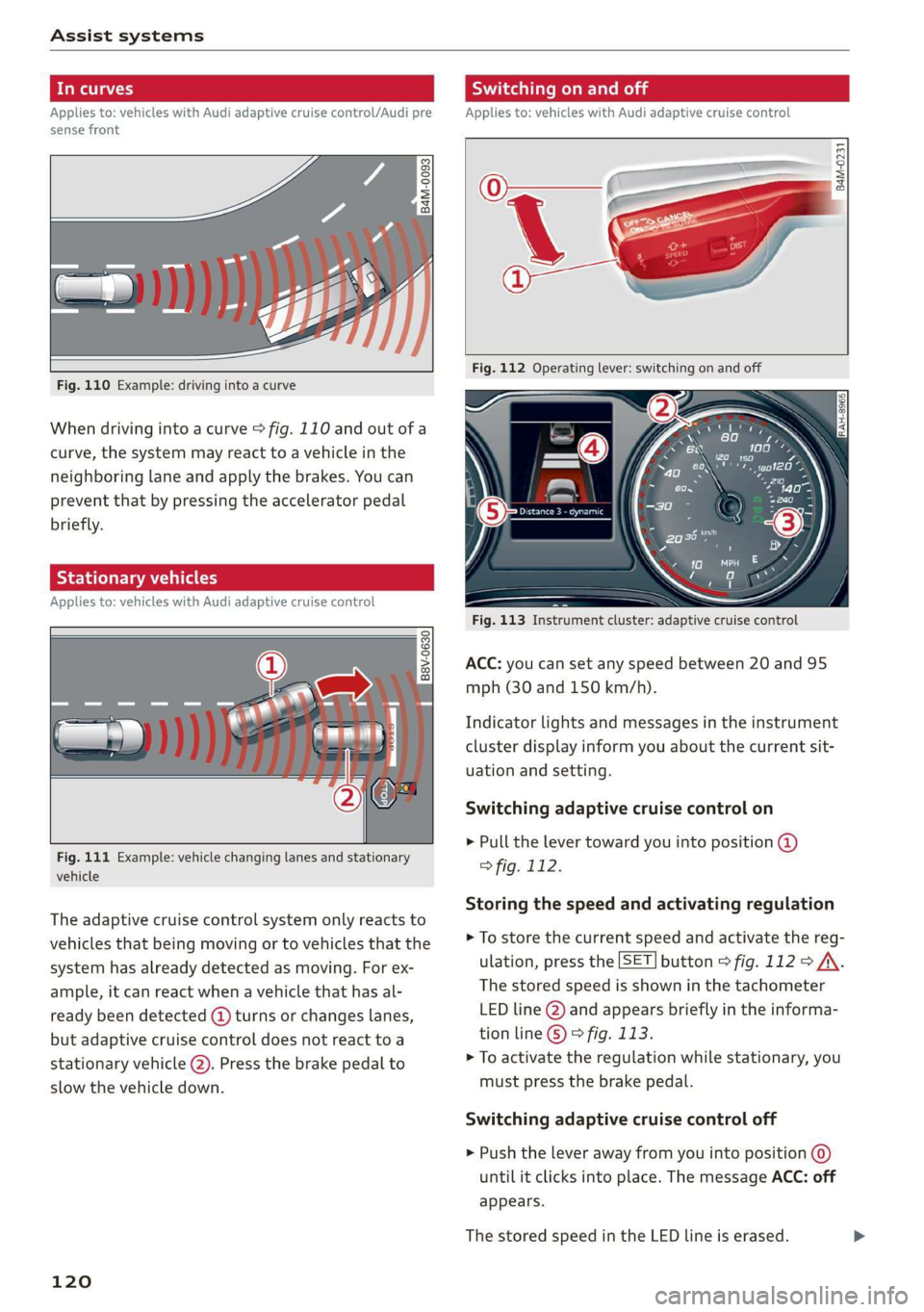
In curves
Applies to: vehicles with Audi adaptive cruise control/Audi pre
sense front
Fig. 110 Example: driving into a curve
When driving into a curve > fig. 110 and out of a
curve, the system may react to a vehicle in the
neighboring lane and apply the brakes. You can
prevent that by pressing the accelerator pedal
briefly.
Stationary vehicles
Applies to: vehicles with Audi adaptive cruise control
B8V-0630
Fig. 111 Example: vehicle changing lanes and stationary
vehicle
The adaptive cruise control system only reacts to
vehicles that being moving or to vehicles that the
system has already detected as moving. For ex-
ample, it can react when a vehicle that has al-
ready been detected (@ turns or changes lanes,
but adaptive cruise control does not react toa
stationary
vehicle @). Press the brake pedal to
slow the vehicle down.
120
Switching on and off
Applies to: vehicles with Audi adaptive cruise control
B4M-0231
Fig. 113 Instrument cluster: adaptive cruise control
ACC: you can set any speed between 20 and 95
mph (30 and 150 km/h).
Indicator lights and messages in the instrument
cluster display inform you about the current sit-
uation and setting.
Switching adaptive cruise control on
> Pull the lever toward you into position @)
> fig. 112.
Storing the speed and activating regulation
> To store the current speed and activate the reg-
ulation, press the [SET] button > fig. 112 > /\.
The stored speed is shown in the tachometer
LED line @) and appears briefly in the informa-
tion line © © fig. 113.
> To activate the regulation while stationary, you
must press the brake pedal.
Switching adaptive cruise control off
> Push the lever away from you into position @
until it clicks into place. The message ACC: off
appears.
The stored speed in the LED line is erased.