window AUDI A3 2020 Owner´s Manual
[x] Cancel search | Manufacturer: AUDI, Model Year: 2020, Model line: A3, Model: AUDI A3 2020Pages: 400, PDF Size: 107.47 MB
Page 69 of 400

8V2012721BK
Warm and cold
85/ 29/ @3 Air distribution and vents
The air distribution can adjusted with the but-
tons. To have the air distribution regulated auto-
matically, press the AUTO button.
The round air vents in the cockpit are adjustable
> page 68.
To keep the front side windows from fogging up
in damp weather, we recommend opening the
side air vents and tilting them to the side.
Foot vents are located under the front seats and
adjustable vents on the end of the center console
to heat the rear of the vehicle.
& Defrosting
The windshield and side windows are defrosted
or cleared of condensation as quickly as possible.
The maximum amount of air flows mainly from
the vents below the windshield. Recirculation
mode switches off. The temperature should be
set at +72°F (22°C) or higher. The temperature is
controlled automatically. In the & setting, the
A/C cooling mode switches on automatically, de-
pending on the outside air temperature.
The AUTO button switches the defroster off.
<> Recirculation mode
The recirculation mode can be turned on manual-
ly or automatically*.
— Switching manual recirculation mode on and
off: press the > button.
— Automatic* recirculation mode: auto recircula-
tion needs to be activated in the Infotainment
system. Select in the Infotainment system:
MENU] button > Vehicle > left control button >
Air conditioning > Auto recirculation. The air
quality sensor that is designed for diesel and
gasoline exhaust automatically switches the re-
circulation mode on or off depending on the
level of pollutants in the outside air.
In recirculation mode, the air inside the vehicle is
circulated and filtered. This prevents the unfil-
tered air outside the vehicle from entering the
vehicle interior. Switching recirculation mode on
when driving through a tunnel or when sitting in
traffic is recommended > A.
Pressing the <> button, AUTO or the ® button
switches recirculation mode off.
@ Rear window heating
If the rear window defogger is activated when
the ignition is switched on, the battery manage-
ment determines based on the battery charge if
it is possible to turn on. Otherwise, the rear win-
dow defogger functions with the engine running
and switches off automatically after approxi-
mately 10 - 20 minutes, depending on the out-
side temperature.
To prevent the rear window defogger from
switching off automatically, press and hold the
® button for more than two seconds.
#/ Seat heating*
Pressing the a button switches the seat heating
on at the highest setting (level 3). The LEDs indi-
cate the temperature level. To reduce the tem-
perature, press the button again. To switch the
seat heating off, press the button repeatedly un-
til the LED turns off.
After approximately 10 minutes, the seat heating
automatically switches from level 3 to level 2.
Z\ WARNING
— You should not use the recirculation mode
for an extended period of time, because no
fresh air is drawn in and the windows can
fog when cooling mode is switched off. This
increases the risk of an accident.
— Individuals with reduced sensitivity to pain
or temperature could develop burns when
using the seat heating function. To reduce
the risk of injury, these individuals should
not use seat heating.
@) Note
To reduce the risk of damage to the seat heat-
ing elements, do not kneel on the seats or
place heavy pressure on one area of the seat.
G) Tips
If the front passenger's seat heating is turned
on, it will not turn on again automatically if
more than 10 minutes have passed between
67
>
Page 81 of 400

8V2012721BK
Driving
strength can depend on various factors, for ex-
ample:
— If you are in tiptronic mode > page 76. Or
—If the sport driving mode "S" was selected.
Plug-in hybrid drive modes
Applies to: vehicles with plug-in hybrid drive
Adjusting the plug-in-hybrid mode
The <8" button is located above the selector lever
in the center console.
> Press the <$" button repeatedly until the de-
sired mode is displayed in the instrument clus-
ter.
The active mode is displayed the first time the
Hybrid driving
If the <8Y button does not turn on, you are driv-
ing in hybrid mode. The vehicle can be driven
with the combustion engine or with the electric
motor if the conditions for it have been met
=> page 79, Conditions for electric driving.
© e-tron mode: Hybrid - The electric motor and
combustion engine are working efficiently to-
gether. Hybrid mode is particularly effective for
long trips.
* e-tron mode: Battery Hold - The vehicle is
driven predominantly with the combustion en-
gine to maintain the high-voltage battery charge
level for as long as possible.
Electric driving
can be driven by the electric motor if the condi-
tions for this have been met > page 79, Condi-
tions for electric driving.
Conditions for electric driving
— Driving program “S” must not be selected.
— The charge level of the high-voltage battery
must be sufficient.
— The temperature of the high-voltage battery
must be adequate (outside temperatures not
below approximately 14°F / -10°C and not
above approximately 104°F / 40°C).
— The driving speed must be under approximately
80 mph (130 km/h).
— The accelerator pedal must not be pressed too
hard.
Indicator lights
Symbol |Meaning
EV mode is switched on and active.
You are driving only with electric
power.
EV mode is not available, because
the conditions for electric driving
have not been met.
The combustion engine is running.
The hybrid mode e-tron mode: Bat-
tery Hold is active.
The hybrid mode e-tron mode: Hy-
brid is active.
G) Tips
— When temperatures are below approximate-
ly 14 °F (-10 °C), the vehicle heat output in
EV mode is reduced in order to attain higher
ranges. If the windows fog up or a higher
heat output is desired, switch on the Hybrid
or Battery Hold mode.
— Applies to: Battery Hold mode: The high-
voltage battery charge level can still de-
crease depending on the driving behavior.
—If you select the sport driving mode "S", the
Battery Hold mode is automatically select-
ed
@
— It may be necessary for the gasoline engine
to run longer for technical reasons, such as
when condensation accumulates in the en-
gine. Driving exclusively in electric mode is
not possible in this phase.
— Before driving downhill a long distance ona
steep hill, decrease your speed and select a
lower gear. When driving with a trailer, the
"S" selector lever position must be selected.
This makes use of the engine braking effect
and reduces the load placed on the brakes.
Tips
79
>
Page 128 of 400
Assist systems
sense basic, the front safety belts are also re-
versibly tensioned when needed. The pre sense
front is also active when adaptive cruise con-
trol* is switched off.
ZA\ WARNING
Also follow the general instructions found in
= A in General information on page 119.
G) Tips
— Certain pre sense functions switch off when
driving in reverse.
— The pre sense functions may not be availa-
ble if there is a malfunction in the ESC sys-
tem or the airbag control module.
— Note that the reversible belt tensioner on
the front passenger's side deactivates when
the front passenger's airbag is deactivated.
— Certain Audi pre sense front functions are
unavailable or have limited availability for
approximately 20 seconds after starting the
vehicle (may be longer depending on the
driving situation).
— Switch the pre sense off when you are not
using public streets or when loading the ve-
hicle onto a vehicle carrier, train, ship, or
other type of transportation. This can pre-
vent an undesired intervention from the pre
sense system.
ONT ees
Applies to: vehicles with Audi pre sense basic
The pre sense basic functions are activated at a
speed of approximately 20 mph (30 km/h) or
higher.
The following functions can be triggered under
certain conditions within the limits of the sys-
tem:
—Tensioning of the safety belts (for example,
during heavy braking): the front safety belts
have reversible belt tensioners. If a collision
does not occur, the safety belts loosen slightly
and are ready to trigger again.
— Initiating the closing of the windows and the
panoramic glass roof* (for example when un-
der- or oversteering).
126
Audi drive select*: the trigger times are adjusted
depending on the mode selected.
Audi pre sense front
Applies to: vehicles with Audi pre sense front
RAH-8970
Audi pre sense
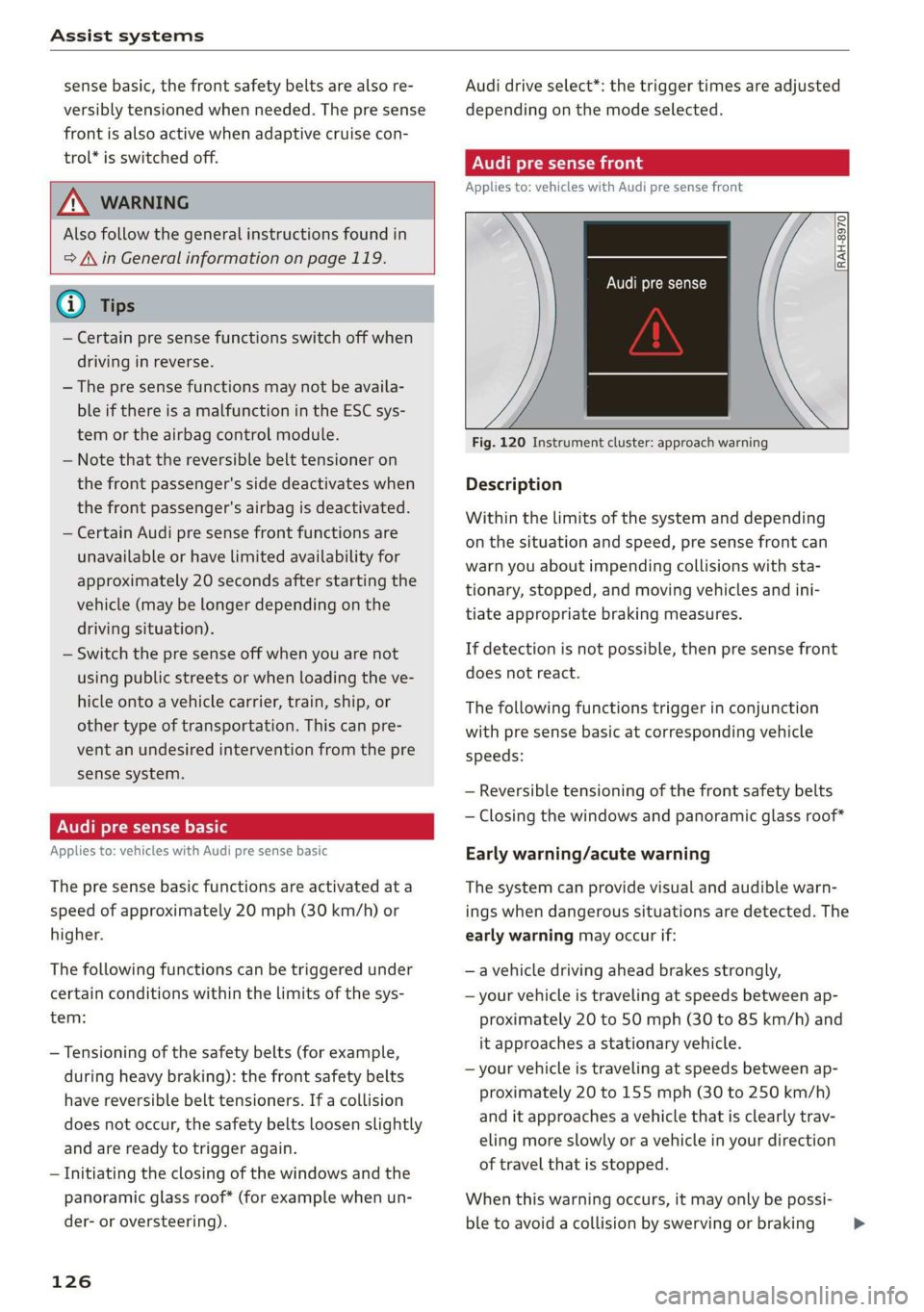
Fig. 120 Instrument cluster: approach warning
Description
Within the limits of the system and depending
on the situation and speed, pre sense front can
warn you about impending collisions with sta-
tionary, stopped, and moving vehicles and ini-
tiate appropriate braking measures.
If detection is not possible, then pre sense front
does not react.
The following functions trigger in conjunction
with pre sense basic at corresponding vehicle
speeds:
— Reversible tensioning of the front safety belts
— Closing the windows and panoramic glass roof*
Early warning/acute warning
The system can provide visual and audible warn-
ings when dangerous situations are detected. The
early warning may occur if:
—a vehicle driving ahead brakes strongly,
— your vehicle is traveling at speeds between ap-
proximately 20 to 50 mph (30 to 85 km/h) and
it approaches a stationary vehicle.
— your vehicle is traveling at speeds between ap-
proximately 20 to 155 mph (30 to 250 km/h)
and it approaches a vehicle that is clearly trav-
eling more slowly or a vehicle in your direction
of travel that is stopped.
When this warning occurs, it may only be possi-
ble to avoid a collision by swerving or braking >
Page 131 of 400

8V2012721BK
Assist systems
signal. In this case, it assumes that you are
changing lanes intentionally.
Z\ WARNING
— The system warns the driver that the vehicle
is leaving the lane using corrective steering.
The driver is always responsible for keeping
the vehicle within the lane.
— The system can help you keep the vehicle in
the lane, but it does not drive by itself. Al-
ways keep your hands on the steering wheel.
— Corrective steering may not occur in certain
situations, such as during heavy braking.
— There may be cases where the camera does
not recognize all lane marker lines. Correc-
tive steering can only take place on the side
of the vehicle where lane marker lines are
detected.
— Other road structures or objects could possi-
bly be identified unintentionally as lane
marker lines. As a result, corrective steering
may be unexpected or may not occur.
— The camera view can be restricted, for exam-
ple by vehicles driving ahead or by rain,
snow, heavy spray light shining into the
camera or by dirt on the window. This can
result in active lane assist not detecting the
lane marker lines or detecting them incor-
rectly.
— Under certain conditions such as ruts in the
road, an inclined roadway or crosswinds, the
corrective steering alone may not be enough
to keep the vehicle in the middle of the lane.
— For safety reasons, active lane assist must
not be used when there are poor road and/or
weather conditions such as slippery roads,
fog, gravel, heavy rain, snow and the poten-
tial for hydroplaning. Using active lane as-
sist under these conditions may increase the
risk of a crash.
SY iicealiaremelilie Rela
Applies to: vehicles with Audi active lane assist
B4M-0064|
Fig. 121 Turn signal lever: switching Active lane assist on
and off (example)
B4M-0090
Fig. 122 Windshield: camera window for active lane assist
> Press the button to switch the system on and
off > fig. 121. The indicator light in the instru-
ment cluster turns on or off.
129
Page 135 of 400

Assist systems
— If the lanes are narrow or if you are driving on display in the exterior mirror may be incor-
the edge of your lane. If this is the case, the rect.
system may have detected a vehicle in another —For an explanation on conformity with the
lane that is not adjacent to your current lane. FCC regulations in the United States and the
— If you are driving through a curve. Side assist Industry Canada regulations, see
may react to a vehicle that is one lane over from => page 377.
the adjacent lane.
— If side assist reacts to other objects (such as Switching on and off
high or displaced guard rails). Applies to: vehicles with Audi side assist
— In poor weather conditions. The side assist
Th te b itched on/off in the Info- Furiedionsara limited. e system can be switched on/off in the Info
tainment system.
Do not cover the radar sensors > fig. 127 with
stickers, deposits, bicycle wheels or other ob-
jects, because they will impair the function. For
information on cleaning, see > page 342.
If the system is activated, the displays in the ex-
terior mirrors will turn on briefly when the igni-
tion is switched on.
> Select in the Infotainment system: [MENU] but-
AN WARNING ton > Vehicle > left control button > Driver as-
— Always pay attention to traffic and to the sistance > Audi side assist. Off switches the
area around your vehicle. Side assist cannot system off.
replace a driver's attention. The driver alone
is always responsible for lane changes and Setting the display brightness
similar driving maneuvers. Applies to: vehicles with Audi side assist
—Insome situations, the system may not
The display bright be adjusted in the In-
function or its function may be limited. For Meee ea anor eee ee oN et
exainple: fotainment system.
—If vehicles are approaching or being left > Select in the Infotainment system: [MENU] but-
behind very quickly. The display may not ton > Vehicle > left control button > Driver as-
turn on in time. sistance > Audi side assist.
8V2012721BK
— In poor weather conditions such as heavy
rain, snow or heavy mist.
— On very wide lanes, in tight curves, or if
there is a rise in the road surface. Vehicles
in the adjacent lane may not be detected
because they are outside of the sensor
range.
() Note
The sensors can be displaced by impacts or
damage to the bumper, wheel housing and
underbody. This can impair the system. Have
an authorized Audi dealer or authorized Audi
Service Facility check their function.
@ Tips
— If the window glass in the driver's door or
front passenger's door has been tinted, the
> Adjust the brightness to a level where the dis-
play in the information stage will not disrupt
your view ahead. If you change the brightness,
the display in the exterior mirror will briefly
show the brightness level in the information
stage.
The brightness of the warning stage is linked to
the brightness in the information stage and is ad-
justed along with the information stage.
The display brightness adjusts automatically to
the brightness of the surroundings, both in the
information and in the warning stage. In very
dark or very bright surroundings, the automatic
adjustment will set the display to the minimum
or maximum level. In such cases, you may notice
no change when adjusting the brightness, or the
change may only be noticeable once the sur-
roundings change.
133
Page 164 of 400
Voice recognition system
Voice recognition system
General information
Applies to: vehicles with voice recognition system
You can operate many functions in the vehicle
easily using voice commands.
Using the voice recognition system optimally
> Speak clearly and distinctly at a normal volume.
Speak louder when driving faster.
> Emphasize the words in the commands evenly
and do not leave long pauses.
> Close the doors, the windows, and the sunroof*
to reduce background noise. Make sure that
passengers are not speaking when you are giv-
ing a voice command.
> Do not direct the vents toward the hands-free
microphone, which is in the roof headliner near
the front interior lights.
> Only the driver should speak to the system, be-
cause the handsfree microphone is aimed to-
ward this seating position.
ZA\ WARNING
— Direct your full attention to driving. As the
driver, you have complete responsibility for
safety in traffic. Only use the functions in
such a way that you always maintain com-
plete control over your vehicle in all traffic
situations.
— Do not use the voice recognition system in
emergencies because your voice may change
in stressful situations. The system may take
longer to dial the number or may not be
able to dial it at all. Dial the emergency
number manually.
G) Tips
There are no voice guidance* prompts when a
dialog is active.
Operating
Applies to: vehicles with voice recognition system
Requirement: the ignition and the MMI must be
switched on. A system language supported by
the voice recognition system must be set. There
162
must be no phone calls in progress and the park-
ing aid must not be active.
> Switching on: press the [2] button (2)
> page 19, fig. 13 or @) > page 20, fig. 15
briefly on the multifunction steering wheel and
say the desired command after the Beep.
> Switching off: press and hold the |] button,
‘OF:
> Press the |] button.
> Pausing: say the command Pause. To resume,
press the |%] button.
> Correcting: say the command Correction.
Input assistance
The system guides you through the input with
visual and audio feedback.
— Visual input assistance: after switching on
voice recognition, a display with a selection of
possible commands appears. This command
display can be switched on or off. Select:
MENU] button > Settings > left control button
> MMI settings > Speech dialog system.
— Audio input assistance: to have the possible
commands read, turn the voice recognition sys-
tem on and say Help.
Additional settings
See > page 235.
@) Tips
— The dialog pauses when there is an incom-
ing phone call and will continue if you ig-
nore the call. The dialog ends if you answer
the call.
— You can select an item in the list using ei-
ther the voice recognition system or the
control knob.
Command overview
information
Applies to: vehicles with voice recognition system
The following overviews describe the commands
that can be used to operate the MMI using the
voice recognition system.
Page 227 of 400
8V2012721BK
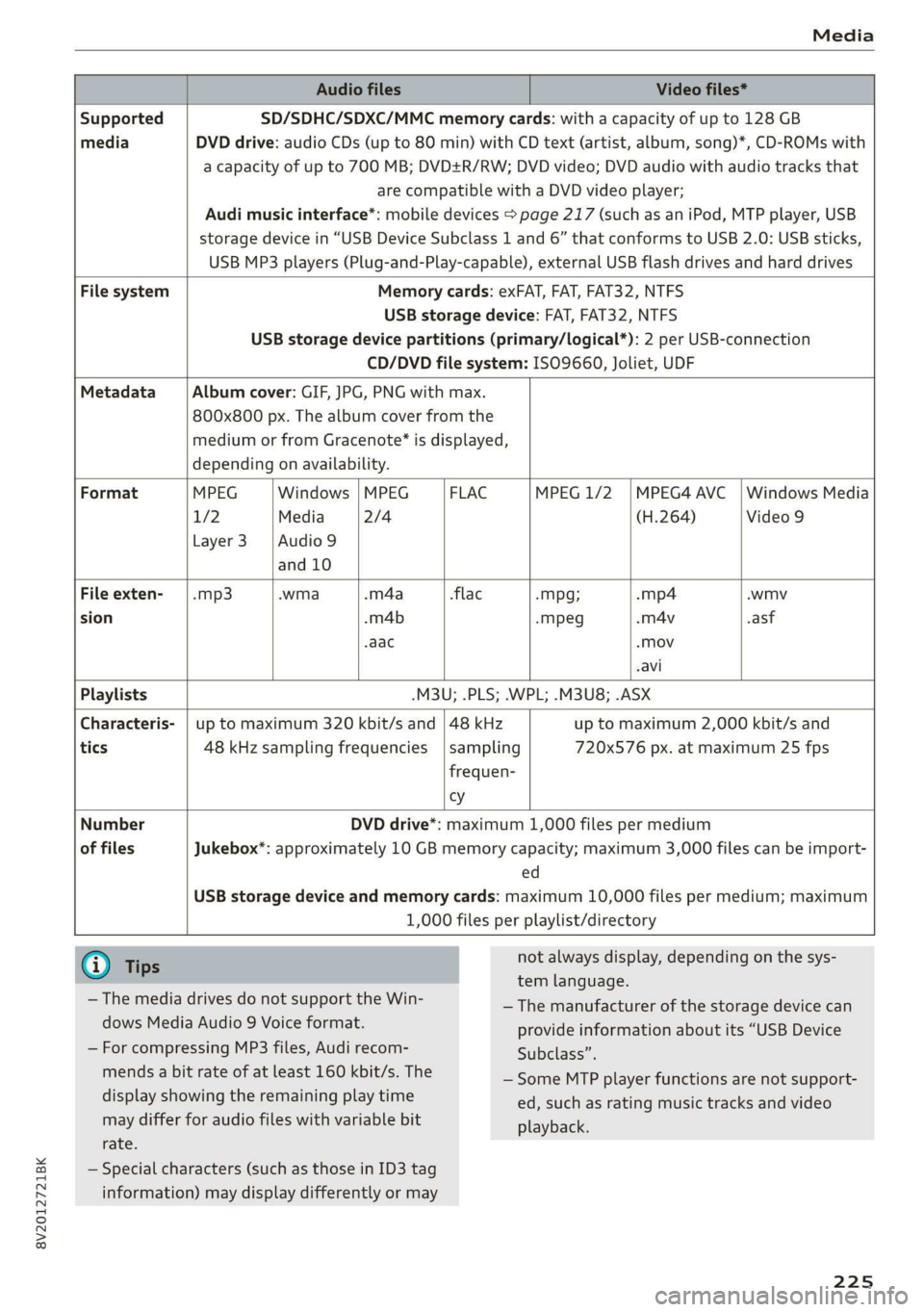
Media
Audio files Video files*
Supported SD/SDHC/SDXC/MMC memory cards: with a capacity of up to 128 GB
media DVD drive: audio CDs (up to 80 min) with CD text (artist, album, song)*, CD-ROMs with
a capacity of up to 700 MB; DVD+R/RW; DVD video; DVD audio with audio tracks that
are compatible with a DVD video player;
Audi music interface*: mobile devices > page 217 (such as an iPod, MTP player, USB
storage device in “USB Device Subclass 1 and 6” that conforms to USB 2.0: USB sticks,
USB MP3 players (Plug-and-Play-capable), external USB flash drives and hard drives
File system Memory cards: exFAT, FAT, FAT32, NTFS
USB storage device: FAT, FAT32, NTFS
USB storage device partitions (primary/logical*): 2 per USB-connection
CD/DVD file system: ISO9660, Joliet, UDF
Metadata Album cover: GIF, JPG, PNG with max.
800x800 px. The album cover from the
medium or from Gracenote® is displayed,
depending on availability.
Format MPEG |Windows |MPEG — | FLAC MPEG 1/2 |MPEG4 AVC_| Windows Media
1/2 Media 2/4 (H.264) Video 9
Layer3 |Audio9
and 10
File exten- | .mp3 .wma .m4a flac -Mpg; -mp4 .wmv
sion .m4b -mpeg -m4v .asf
.aac «Mov
-avi
Playlists .M3U; .PLS; .WPL; .M3U8; .ASX
Characteris- | up to maximum 320 kbit/s and | 48 kHz up to maximum 2,000 kbit/s and
tics 48 kHz sampling frequencies |sampling 720x576 px. at maximum 25 fps
frequen-
vy
Number
of files
DVD drive*: maximum 1,000 files per medium
Jukebox*: approximately 10 GB memory capacity; maximum 3,000 files can be import-
ed
USB storage device and memory cards: maximum 10,000 files per medium; maximum
1,000 files per playlist/directory
G) Tips
— The media drives do not support the Win-
dows Media Audio 9 Voice format.
— For compressing MP3 files, Audi recom-
mends a bit rate of at least 160 kbit/s. The
display showing the remaining play time
may differ for audio files with variable bit
rate.
not always display, depending on the sys-
tem language.
— The manufacturer of the storage device can
provide information about its “USB Device
Subclass”.
— Some MTP player functions are not support-
ed, such as rating music tracks and video
playback.
— Special characters (such as those in ID3 tag
information) may display differently or may
225
Page 228 of 400
Applies to: vehicles with a CD drive
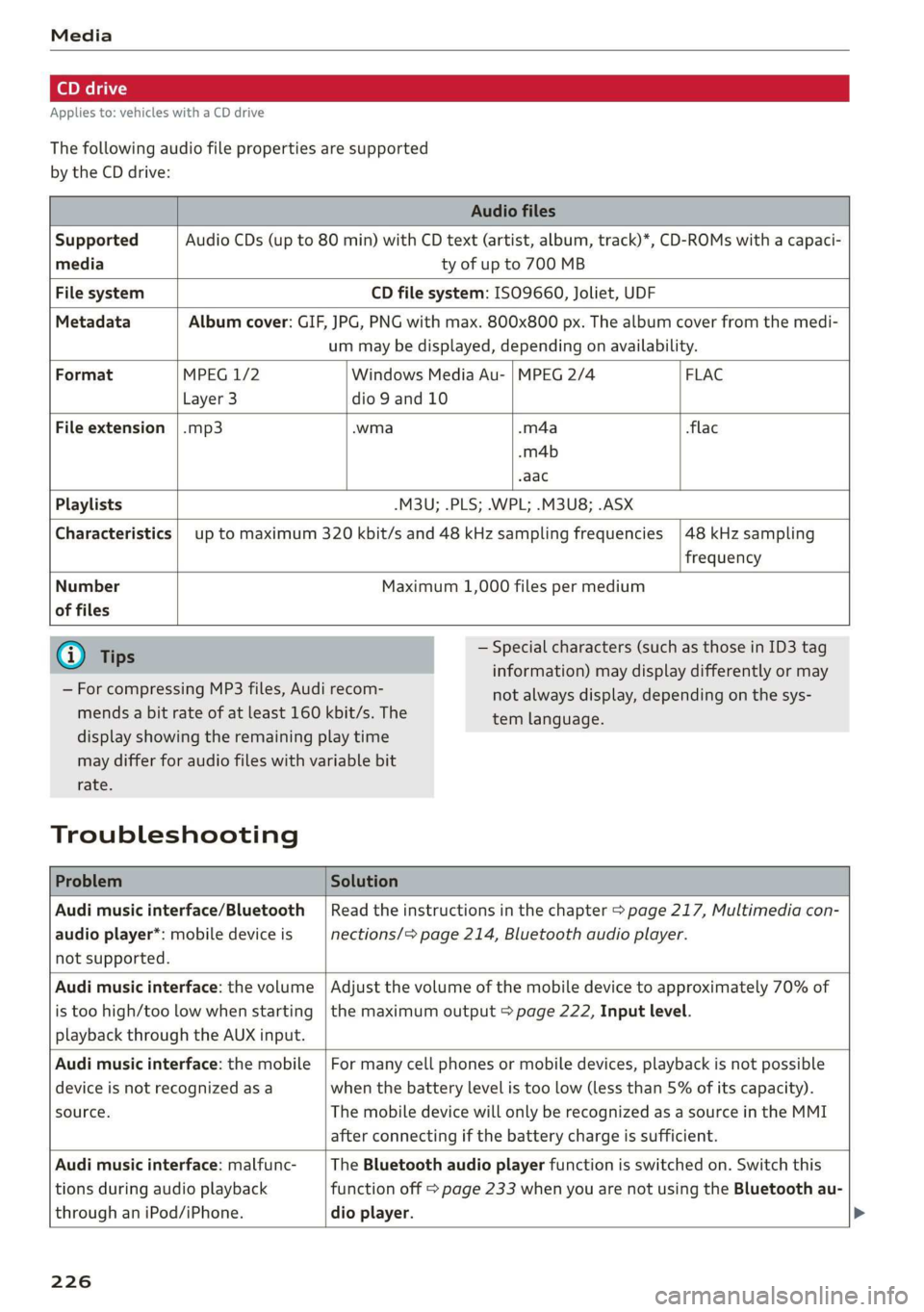
The following audio file properties are supported
by the CD drive:
Audio files
Supported Audio CDs (up to 80 min) with CD text (artist, album, track)*, CD-ROMs with a capaci-
media ty of up to 700 MB
File system CD file system: ISO9660, Joliet, UDF
Metadata Album cover: GIF, JPG, PNG with max. 800x800 px. The album cover from the medi-
um may be displayed, depending on availability.
Format MPEG 1/2 Windows Media Au- | MPEG 2/4 FLAC
Layer 3 dio 9 and 10
File extension |.mp3 -wma -m4a flac
-m4b
aac
Playlists -M3U; .PLS; .WPL; .M3U8; .ASX
Characteristics up to maximum 320 kbit/s and 48 kHz sampling frequencies 48 kHz sampling
frequency
Number
of files
Maximum 1,000 files per medium
@ Tips
— For compressing MP3 files, Audi recom-
mends a bit rate of at least 160 kbit/s. The
— Special characters (such as those in ID3 tag
information) may display differently or may
not always display, depending on the sys-
tem language.
display showing the remaining play time
may differ for audio files with variable bit
rate.
Troubleshooting
Problem Solution
Audi music interface/Bluetooth
audio player*: mobile device is
not supported.
Read the instructions in the chapter > page 217, Multimedia con-
nections/> page 214, Bluetooth audio player.
Audi music interface: the volume
is too high/too low when starting
playback through the AUX input.
Adjust the volume of the mobile device to approximately 70% of
the maximum output > page 222, Input level.
Audi music interface: the mobile
device is not recognized asa
source.
For many cell phones or mobile devices, playback is not possible
when the battery level is too low (less than 5% of its capacity).
The mobile device will only be recognized as a source in the MMI
after connecting if the battery charge is sufficient.
Audi music interface: malfunc-
tions during audio playback
through an iPod/iPhone.
The Bluetooth audio player function is switched on. Switch this
function off > page 233 when you are not using the Bluetooth au-
dio
player.
226
Page 239 of 400
8V2012721BK
Driving safety
Driving safety
Basics
SER Nails mali
Please remember - safety first!
The individual safety features of your vehicle can
work together as a system to help protect you
and
your passengers in a wide range of accidents.
These features cannot work as a system if they
are not always correctly adjusted and correctly
used.
This chapter contains important information,
tips, instructions and warnings that you need to
read and observe for your own safety, the safety
of your passengers and others. We have summar-
ized here what you need to know about safety
belts, airbags, child restraints as well as child
safety. Your safety is for us priority number 1. Al-
ways observe the information and warnings in
this section - for your own safety as well as that
of your passengers.
The information in this section applies to all
model versions of your vehicle. Some of the fea-
tures described in this sections may be standard
equipment on some models, or may be optional
equipment on others. If you are not sure, ask
your authorized Audi dealer.
ZA WARNING
— Always make sure that you follow the in-
structions and heed the WARNINGS in this
Manual. It is in your interest and in the in-
terest of your passengers.
— Always keep the complete Owner's Litera-
ture in your Audi when you lend or sell your
vehicle so that this important information
will always be available to the driver and
passengers.
— Always keep the Owner's literature handy so
that you can find it easily if you have ques-
tions.
Important things to do before driving
Safety is everybody's job! Vehicle and occupant
safety always depends on the informed and care-
ful driver.
For
your safety and the safety of your passen-
gers, before driving always:
> Make sure that all lights and signals are operat-
ing correctly.
> Make sure that the tire pressure is correct.
> Make sure that all windows are clean and afford
good visibility to the outside.
> Secure all luggage and other items carefully
= page 60, > page 60.
> Make sure that nothing can interfere with the
pedals.
> Adjust front seat, head restraint and mirrors
correctly for your height.
> Instruct passengers to adjust the head re-
straints according to their height.
> Make sure to use the right child restraint cor-
rectly to protect children > page 278, Child
safety.
» Sit properly in your seat and make sure that
your passengers do the same > page 54, Front
seats.
> Fasten your safety belt and wear it properly. Al-
so instruct your passengers to fasten their safe-
ty belts properly > page 245.
What impairs driving safety?
Safe driving is directly related to the condition of
the vehicle, the driver as well as the driver’s abili-
ty to concentrate on the road without being dis-
tracted.
The driver is responsible for the safety of the ve-
hicle and all of its occupants. If your ability to
drive is impaired, safety risks for everybody in the
vehicle increase and you also become a hazard to
everyone else on the road > /\. Therefore:
> Do not let yourself be distracted by passengers
or by using a cellular telephone.
> NEVER drive when your driving ability is im-
paired (by medications, alcohol, drugs, etc.).
> Observe all traffic laws, rules of the road and
speed limits and plain common sense.
237
Page 242 of 400
Driving safety
— Passengers who are unbelted, out of posi-
tion or too close to the airbag can be seri-
ously injured by an airbag as it unfolds with
great force in the blink of an eye.
— Always make sure that there are at least
10 inches (25 cm) between the front pas-
senger‘s breastbone and the instrument
panel.
— Always make sure that there are at least
4 inches (10 cm) between the front passen-
ger‘s knees and the lower part of the instru-
ment panel.
— Each passenger must always sit on a seat of
their own and properly fasten and wear the
safety belt belonging to that seat.
— Before driving, always adjust the front pas-
senger seat properly.
— For adjustable head restraints: before driv-
ing, always also adjust the head restraints
properly.
— Always keep your feet on the floor in front of
the seat. Never rest them on the seat, in-
strument panel, out of the window, etc. The
airbag system and safety belt will not be
able to protect you properly and can even in-
crease the risk of injury in a crash.
— Never drive with the backrest reclined or tilt-
ed far back! The farther the backrests are
tilted
back, the greater the risk of injury due
to incorrect positioning of the safety belt
and improper seating position.
— Children must always ride in child seats
= page 278. Special precautions apply when
installing a child seat on the front passenger
seat > page 253.
Proper seating positions for passengers in
israel -r- 1}
Rear seat passengers must sit upright with both
feet on the floor consistent with their physical
size and be properly restrained whenever the ve-
hicle is in use.
To reduce the risk of injury caused by an incorrect
seating position in the event of a sudden braking
maneuver or an accident, your passengers on the
rear bench seat must always observe the follow-
ing:
240
> For adjustable head restraints: adjust the head
restraint so the upper edge is as even as possi-
ble with the top of your head. If that is not pos-
sible, try to adjust the head restraint so that it
is as close to this position as possible
=> page 57.
> Keep both feet flat in the footwell in front of
the rear seat.
> Fasten and wear safety belts properly
=> page 248.
> Make sure that children are always properly re-
strained in a child restraint that is appropriate
for their size and age > page 278.
ZA WARNING
Passengers who are improperly seated on the
rear seat can be seriously injured in a crash.
— Each passenger must always sit on a seat of
their own and properly fasten and wear the
safety belt belonging to that seat.
— Safety belts only offer maximum protection
when the safety belts are properly posi-
tioned on the body and securely latched. By
not sitting upright, a rear seat passenger in-
creases the risk of personal injury from im-
properly positioned safety belts!
— For adjustable head restraints: always adjust
the head restraint properly so that it can
give maximum protection.
Examples of improper seating positions
The occupant restraint system can only reduce
the risk of injury if vehicle occupants are properly
seated.
Improper seating positions can cause serious in-
jury or death. Safety belts can only work when
they are properly positioned on the body. Im-
proper seating positions reduce the effectiveness
of safety belts and will even increase the risk of
injury and death by moving the safety belt to crit-
ical areas of the body. Improper seating positions
also increase the risk of serious injury and death
when an airbag deploys and strikes an occupant
who is not in the proper seating position. A driver
is responsible for the safety of all vehicle occu-
pants and especially for children. Therefore: >