service AUDI A3 2020 Owner´s Manual
[x] Cancel search | Manufacturer: AUDI, Model Year: 2020, Model line: A3, Model: AUDI A3 2020Pages: 400, PDF Size: 107.47 MB
Page 89 of 400

8V2012721BK
Driving
Electromechanical
parking brake
Operating the parking brake
The electromechanical parking brake is used to
secure the vehicle from rolling away
unintentionally.
The @) switch is located under the selector lever
in the center console. It turns on when the park-
ing brake is set. You can release the parking brake
manually or automatically when you start to
drive.
Setting and releasing the parking brake
> Setting: pull the ©) switch.
> ris @ appears, the parking brake is hold-
ing the vehicle. You can remove your foot from
the brake pedal.
> Releasing: when the ignition is switched on,
press and hold the brake pedal and press the ©)
button.
If the red indicator light flashes, the braking
force has not built up enough or it has decreased.
You can also secure the vehicle by selecting the
“P” gear or pressing the brake pedal. Make sure
the indicator light is off before you start driving.
Automatically releasing the parking brake
when starting to drive
Requirement: the driver's door must be closed
and the driver’s safety belt must be fastened.
> Press the accelerator pedal to start to drive.
ZA\ WARNING
—To reduce the risk of an accident, always
make sure the vehicle is situated safely
while stationary.
— If the parking brake is set, it can release au-
tomatically when the accelerator pedal is
pressed. To reduce the risk of an accident,
do not inadvertently press the accelerator
pedal and always shift into “P” when the ve-
hicle is stopped.
— If the power supply fails, you cannot set the
parking brake once it is released, or release
it if it is set. In this case, park the vehicle on
level ground and secure it by engaging the
"P” gear. Contact an authorized Audi dealer
or authorized Audi Service Facility for assis-
tance.
@) Tips
— On steep inclines, especially when in trailer
mode, the vehicle may roll backwards unin-
tentionally when starting to drive. To re-
duces the risk of this happening, pull and
hold the ©) switch while pressing the accel-
erator pedal. If enough drive power has
built up at the wheels and the vehicle does
not roll backwards, then release the switch
to start to drive.
— If you leave the vehicle when “D” or “R” are
engaged, the parking brake will be set auto-
matically.
— Noises when the parking brake is set and re-
leased are normal and are not a cause for
concern.
— The parking brake goes through a self-test
cycle at regular intervals when the vehicle is
stopped. Any noises associated with this are
normal.
Emergency braking function
Emergency braking should only be used in an
emergency, if the standard brake pedal is mal-
functioning or obstructed. When the emergency
braking function is activated, the braking effect is
similar to a heavy braking maneuver.
> Pull and hold the ©) switch while driving.
> An audio warning signal will sound and emer-
gency
braking will begin.
> If you press the accelerator pedal, emergency
braking will be canceled.
Z\ WARNING
Heavy braking while driving through curves or
in poor road or weather conditions can cause
the vehicle to slide or the rear of the vehicle to
swerve, which increases the risk of an acci-
dent.
87
Page 90 of 400
Driving
Messages
EG / @ Parking brake: malfunction! Safely
stop vehicle. See owner's manual
There is a malfunction in the parking brake. If the
message appears while stationary, check if the
parking brake is released and can be reset. If this
is the case, switch the ignition off and back on.
If the message continues to appear, if the park-
ing brake cannot be released, or if the message
appears while driving, then stop the vehicle on
level ground and shift to “P”. Do not continue
driving. See an authorized Audi dealer or author-
ized Audi Service Facility for assistance.
GG ti © Parking brake: malfunction! Please
release parking brake
There is a malfunction in the parking brake. If the
message appears while stationary, check if the
parking brake is released and can be reset. If this
is the case, switch the ignition off and back on.
If the message continues to appear, if the park-
ing brake cannot be released, or if the message
appears while driving, then stop the vehicle on
level ground and shift to “P”. Do not continue
driving. See an authorized Audi dealer or author-
ized Audi Service Facility for assistance.
ww Parking brake: malfunction! Safely stop ve-
hicle. See owner's manual
There is a malfunction in the parking brake. Drive
to an authorized Audi dealer or authorized Audi
Service Facility immediately to have the malfunc-
tion corrected. Do not park the vehicle on inclines
and shift to “P”.
FS / (GETING / (@) Parking brake: caution! Ve-
hicle parked too steep
The braking force may not be enough to secure
the vehicle from rolling away. Park the vehicle in
a place with less of an incline.
fa f Parking brake: applied
The parking brake is set. Press and hold the brake
pedal to release the parking brake.
838
Releasing the parking
lock using the
emergency release
Description
RAZ-0492
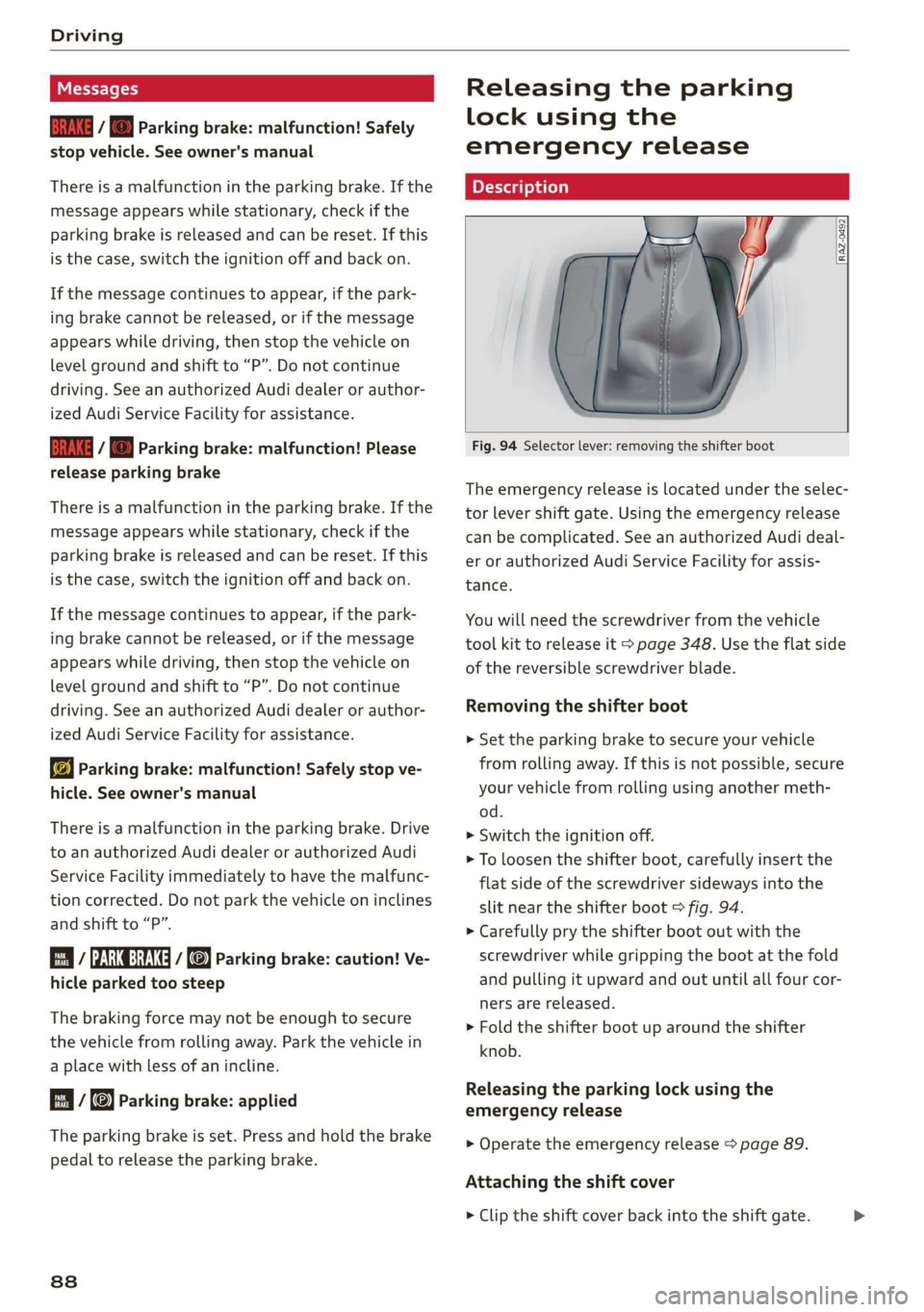
Fig. 94 Selector lever: removing the shifter boot
The emergency release is located under the selec-
tor lever shift gate. Using the emergency release
can be complicated. See an authorized Audi deal-
er or authorized Audi Service Facility for assis-
tance.
You will need the screwdriver from the vehicle
tool kit to release it > page 348. Use the flat side
of the reversible screwdriver blade.
Removing the shifter boot
> Set the parking brake to secure your vehicle
from rolling away. If this is not possible, secure
your vehicle from rolling using another meth-
od.
> Switch the ignition off.
> To loosen the shifter boot, carefully insert the
flat side of the screwdriver sideways into the
slit near the shifter boot > fig. 94.
> Carefully pry the shifter boot out with the
screwdriver while gripping the boot at the fold
and pulling it upward and out until all four cor-
ners are released.
> Fold the shifter boot up around the shifter
knob.
Releasing the parking lock using the
emergency release
> Operate the emergency release > page 89.
Attaching the shift cover
> Clip the shift cover back into the shift gate.
Page 94 of 400

Driving dynamic
Suspension
CET NRC Ld
Applies to: vehicles with suspension control
The adaptive dampers are an electronically-con-
trolled damping system. The firmness of the sus-
pension will adapt to the driving conditions and
the driving situation. The settings are dependent
on the selected Audi drive select* mode.
Ground clearance
The vehicle height and clearance can be influ-
enced by the following factors:
— Change in temperature
— Change in load
Z\ WARNING
To reduce the risk of injury, make sure no one
gets pinched when the vehicle level is chang-
ing, for example when cleaning the under-
body or the wheel housings.
@) Note
Always make sure there is enough clearance
above and below the vehicle. This is especially
important for entrances with height restric-
tions, for example, before driving into under-
ground garages. You could also scrape the
ground when driving over the edges of curbs
or on steep ramps, which could damage your
vehicle.
EET
| 8 | Suspension: malfunction! You can continue
driving
There is a malfunction. See an authorized Audi
dealer or authorized Audi Service Facility for as-
sistance.
Steering
Electromechanical steering supports the driver's
steering movements by electronically adapting
the power steering depending on the vehicle
92
speed. The settings are dependent on the select-
ed Audi drive select* mode.
Progressive steering
Applies to: vehicles with progressive steering
The driving dynamic and driving stability are in-
creased by the steering ratio based on the steer-
ing wheel angle. The steering is very direct when
the steering wheel angle is sharp, and indirect
when the angle is low. This enables comfortable
maneuvering and a precise steering response at
higher driving speeds.
Messages
a Steering: malfunction! Please stop vehicle
The power steering may have failed. Adapt your
driving style immediately to compensate for the
fact that it may be more difficult to turn the
steering wheel, and stop your vehicle in a safe lo-
cation as soon as possible. Do not continue driv-
ing. See an authorized Audi dealer or authorized
Audi Service Facility for assistance.
|2—| Steering: malfunction! Please stop vehicle
There is a malfunction in the electronic steering
lock. You cannot turn the ignition on. Do not tow
your vehicle because it cannot be steered. See an
authorized Audi dealer or authorized Audi Service
Facility for assistance.
a Steering: malfunction! You can continue
driving
There is a malfunction. Steering may be more dif-
ficult or more sensitive. Adapt your driving style.
Have the steering system checked immediately
by an authorized Audi dealer or authorized Audi
Service Facility. Please note that the red indicator
light may turn on after restarting the engine. Do
not continue driving if it does.
& Steering lock: malfunction! Please contact
Service
There is a malfunction in the electronic steering
lock. Drive immediately to an authorized Audi
dealer or authorized Audi Service Facility to have
the malfunction repaired.
Page 97 of 400

8V2012721BK
Driving dynamic
— To completely reactivate the ESC stabilization
function, press the button again. The indicator
lights turn off.
Z\ WARNING
— When the ESC is switched off or limited,
there will be no vehicle stabilization or it will
be limited. The driving wheels could spin
and the vehicle could swerve, especially on
slick or slippery road surfaces, which in-
creases the risk of an accident.
— Because of the increased risk of an accident,
only drive with the ESC switched off or Limit-
ed when it is necessary. Reactivate the ESC
as soon as possible.
G) Tips
— If the ESC is limited, switched off, or mal-
functioning, systems with an automatic
braking intervention function may not be
fully available.
— If malfunctions occur in other systems or
certain driver assist systems are active, the
ESC must be switched on by the system. The
ESC
may switch on automatically and can-
not be operated with the button.
B /ABS} if BA © Stabilization control (ESC/
ABS): malfunction! See owner's manual
There is a malfunction in the ABS or EDL. This al-
so causes the ESC to malfunction. The brakes still
function with their normal power, but ABS is not
active.
Drive to an authorized Audi dealer or authorized
Audi Service Facility immediately to have the
malfunction corrected.
95
Page 98 of 400

High-voltage system
High-voltage system
General information
Introduction
Applies to: vehicles with plug-in hybrid drive
All work done on the high-voltage system must
only be performed by certified high-voltage tech-
nicians at authorized Audi dealers or authorized
Audi Service Facilities in accordance with Audi
guidelines.
The high-voltage system is composed of the fol-
lowing high-voltage components, among other
things: the high-voltage battery, the power elec-
tronics, the electric motor, the high-voltage A/C
compressor, the high-voltage heater, the charg-
ing system and charging port, and the orange
high-voltage wiring.
The high-voltage battery is located on the vehicle
underbody in front of the rear axle and does not
require any maintenance from the driver.
ZA WARNING
The voltage in the high-voltage system is life-
threatening. Touching a damaged high-volt-
age component can result in a fatal electric
shock. The components in the high-voltage
system are marked with a warning label which
warns against the high-voltage.
— The voltage level in the high-voltage system
is still dangerous and potentially life-threat-
ening when the ignition is switched off.
— Never perform work on the orange high-
voltage cables or on other high-voltage
components. Only authorized repair facili-
ties that are certified may perform work on
the high-voltage system.
— Never damage, alter or remove the orange
high-voltage cable or disconnect it from the
high-voltage system.
— Never perform any work using cutting, shap-
ing or sharp-edged tools or heat sources
near the high-voltage system and high-volt-
age cables.
— Gases that escape from the high-voltage
battery can be poisonous or flammable.
96
— Damage to the high-voltage battery could
cause the high-voltage battery to leak im-
mediately or in the future, and poisonous or
flammable gases could escape. Do not in-
hale the gases!
— Do not expose yourself to any leaking fluids
and do not come into contact with them.
— The high-voltage battery electrolyte fluid is
caustic. If electrolyte fluid comes into con-
tact with the skin, flush the affected area for
at least 15 minutes with clean water. Then
wash the affected area with soap. Have the
affected area examined by a medical profes-
sional.
— In the event of a technical emergency, in-
form the responders that the vehicle is
equipped with a high-voltage battery.
@) Note
— The high-voltage system can be damaged if
the vehicle underbody comes into contact
with the ground. Immediately drive your ve-
hicle to an authorized repair facility and
have it inspected.
— The electric drive motor can become very
hot during operation. Do not stop the vehi-
cle if there is oil, fuel residue or other flam-
mable substances under or next to the vehi-
cle.
Special considerations for the high-voltage
battery
Applies to: vehicles with plug-in hybrid drive
Please first read and note the introductory infor-
mation and heed the warnings > page 96.
All batteries age with use and over time. There
are things you should know about the care of the
high voltage battery that will help it keep giving
you good service and reliability over time. Please
read and keep the following information in mind
while you enjoy the performance and economy of
your vehicle.
— Be sure to charge the high voltage battery be-
fore leaving the vehicle parked and unused for a
longer period of time. Ideally the high-voltage >
Page 100 of 400
High-voltage system
— Secure the charging equipment against any
strain, such as being run over, falling, pulling,
bending, and crushing.
— Do not submerge the charging equipment in
water and do not cover it with snow or ice.
— Only pull at the plugs when removing the
charging cable from the vehicle and from the
power supply.
— Put the cap on after using the charging cable.
— Only operate the Audi charging system ina
power supply system with a frequency of
50 Hz/60 Hz.
— Only operate the Audi charging system at a hu-
midity level between 5% and 95% (non-con-
densing).
— The Audi charging system is protected against
dust and splashing water (IP54 (USA: enclosure
3R)) or protected against dust and jet streams
of water (IP55 (USA: Enclosure 3))
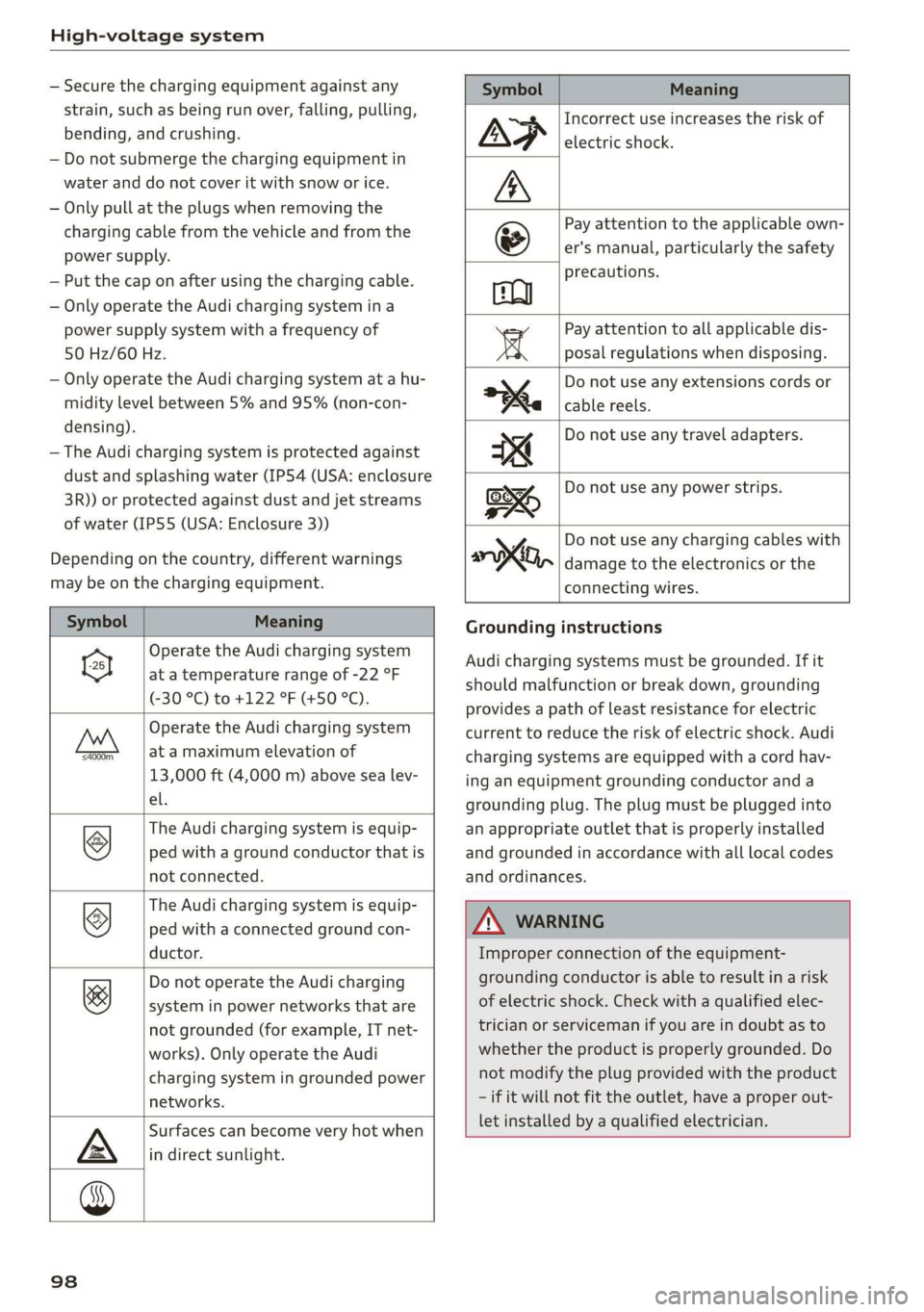
Depending on the country, different warnings
may be on the charging equipment.
Symbol Meaning
Operate the Audi charging system
el at a temperature range of -22 °F
(-30 °C) to +122 °F (+50 °C).
Operate the Audi charging system
FAN at a maximum elevation of
13,000 ft (4,000 m) above sea lev-
el.
The Audi charging system is equip-
ped with a ground conductor that is
not connected.
©
The Audi charging system is equip-
ped with a connected ground con-
ductor.
©
Do not operate the Audi charging
system in power networks that are
not grounded (for example, IT net-
works). Only operate the Audi
charging system in grounded power
networks.
&
Surfaces can become very hot when
in direct sunlight.
Symbol Meaning
Incorrect use increases the risk of
electric shock.
Pay attention to the applicable own
er's manual, particularly the safety
precautions.
Pay attention to all applicable dis-
posal regulations when disposing.
Do not use any extensions cords or
cable reels.
Do not use any travel adapters.
Do not use any power strips.
y Do not use any charging cables with
oo, damage to the electronics or the
connecting wires.
Grounding instructions
Audi charging systems must be grounded. If it
should malfunction or break down, grounding
provides a path of least resistance for electric
current to reduce the risk of electric shock. Audi
charging systems are equipped with a cord hav-
ing an equipment grounding conductor and a
grounding plug. The plug must be plugged into
an appropriate outlet that is properly installed
and grounded in accordance with all local codes
and ordinances.
ZA WARNING
Improper connection of the equipment-
grounding conductor is able to result in a risk
of electric shock. Check with a qualified elec-
trician or serviceman if you are in doubt as to
whether the product is properly grounded. Do
not modify the plug provided with the product
— if it will not fit the outlet, have a proper out-
let installed by a qualified electrician.
98
Page 102 of 400
High-voltage system
an authorized Audi dealer or authorized
Audi Service Facility.
— Audi charging systems are intended for use
in private and semi-private areas (for exam-
ple, private property and company parking
lots). Depending on the country, charging in
mode 2 may be forbidden in public areas
and public spaces. Contact an authorized
Audi dealer or authorized Audi Service Facili-
ty for more information.
— Do not disconnect the vehicle charging cable
from the socket or the vehicle charging port
while the vehicle is charging. End the charg-
ing process before removing the vehicle
charging cable from the socket in order to
reduce the risk of damaging the connector
contacts from sparks.
ZA\ WARNING
The components in the Audi charging system
can trigger sparks which can cause flammable
or explosive fumes to ignite.
—To reduce the risk of explosions, especially in
garages, make sure the control unit is at
least 19 inches (50 cm) above the floor
when charging.
— Do not use the Audi charging system in
areas at risk for explosions.
— The Audi charging system is only intended
for use on Audi vehicles and vehicles within
the Volkswagen Group. Using the device on
vehicles made by another manufacturer is
not authorized.
©) Note
—Aseverely drained high-voltage battery can
cause damage to the high-voltage battery
Once a O mi (0 km) electric range is dis-
played, charge the high-voltage battery
within two months. If the stationary time is
unknown with the electric range at 0 mi (0
km), charge the high-voltage battery imme-
diately. Even if the vehicle is not used, the
high-voltage battery charge level will natu-
rally reduce over time. To avoid a total bat-
tery drain during long periods without use
(more than one year), charge the high-volt-
100
age battery to the highest level possible be-
fore discontinuing driving it.
— Make sure that you always use the correct
power plug provided with the Audi charging
system for the country in which it is being
used. Contact an authorized Audi dealer or
authorized Audi Service Facility for more in-
formation.
G) Tips
— Only use the factory-provided charging ca-
ble from Audi or the Volkswagen Group to
charge your vehicle.
— For an uninterrupted charging process, we
recommend only charging using sockets
that are connected to a separately protected
circuit.
— Using either NEMA sockets with a current
rating of at least 30 A or industrial sockets
in accordance with IEC 60309 when charg-
ing is recommended.
— When charging the high-voltage battery us-
ing household or industrial* sockets, the
electrical installation can be used at full ca-
pacity. Having a qualified electrician regu-
larly inspect the electrical installations that
are used for charging is recommended.
— The vehicle radio and TV systems may have
limited reception when charging the vehicle.
Charging at public
charging stations
Applies to: vehicles with plug-in hybrid drive
Use
the charging cable supplied at the public
charging station for charging. Contact an author-
ized Audi dealer or authorized Audi Service Facili-
ty for more information.
> Follow the operating instructions at the charg-
ing station to charge the high-voltage battery.
> Unlock the vehicle if necessary > page 25.
» Make sure that the selector lever is in the P po-
sition and drive ready mode is switched off.
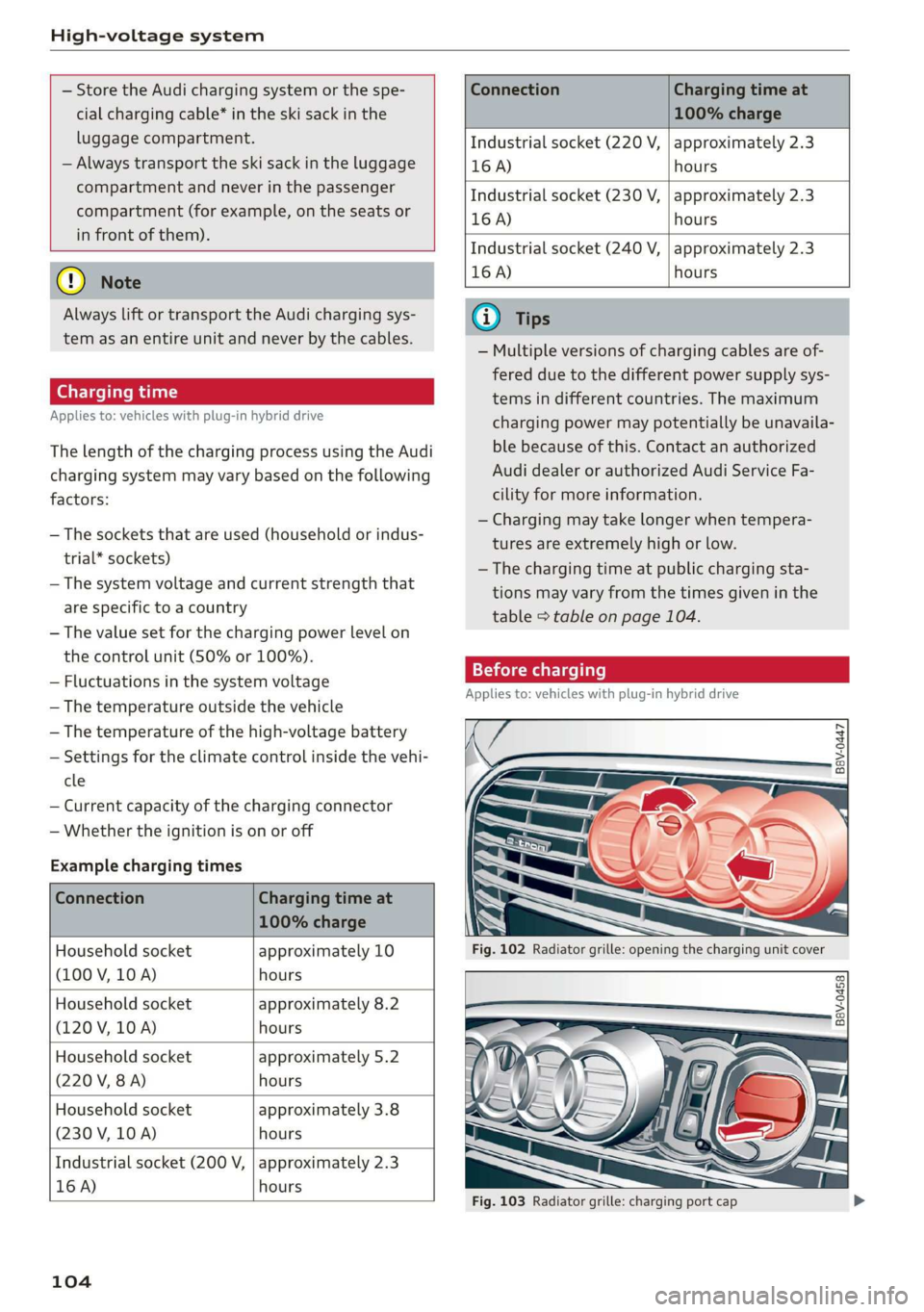
» To open the charging port door, turn the lock to
a vertical position > page 104, fig. 102.
> Slide the cover carefully to the side if necessary.
> Remove the lock on the charging port
=> page 104, fig. 103.
Page 106 of 400
High-voltage system
— Store the Audi charging system or the spe-
cial charging cable* in the ski sack in the
luggage compartment.
— Always transport the ski sack in the luggage
compartment and never in the passenger
compartment (for example, on the seats or
in front of them).
©) Note
Always lift or transport the Audi charging sys-
tem as an entire unit and never by the cables.
Charging time
Applies to: vehicles with plug-in hybrid drive
The length of the charging process using the Audi
charging system may vary based on the following
factors:
— The sockets that are used (household or indus-
trial* sockets)
— The system voltage and current strength that
are specific to a country
— The value set for the charging power level on
the control unit (50% or 100%).
— Fluctuations in the system voltage
— The temperature outside the vehicle
— The temperature of the high-voltage battery
— Settings for the climate control inside the vehi-
cle
— Current capacity of the charging connector
— Whether the ignition is on or off
Example charging times
Connection Charging time at
100% charge
Household socket
(100 V, 10 A)
approximately 10
hours
Household socket
(120 V, 10 A)
approximately 8.2
hours
Household socket
(220 V, 8A)
approximately 5.2
hours
Household socket
(230 V, 10 A)
approximately 3.8
hours
Industrial socket (200 V,
16 A)
approximately 2.3
hours
104
Connection Charging time at
100% charge
Industrial socket (220 V, | approximately 2.3
16 A) hours
Industrial socket (230 V, | approximately 2.3
16 A) hours
Industrial socket (240 V, | approximately 2.3
16 A) hours
@ Tips
— Multiple versions of charging cables are of-
fered due to the different power supply sys-
tems in different countries. The maximum
charging power may potentially be unavaila-
ble because of this. Contact an authorized
Audi dealer or authorized Audi Service Fa-
cility for more information.
— Charging may take longer when tempera-
tures are extremely high or low.
—The charging time at public charging sta-
tions may vary from the times given in the
table > table on page 104.
Before charging
Applies to: vehicles with plug-in hybrid drive
B8V-0447
Fig. 103 Radiator grille: charging port cap
Page 110 of 400

High-voltage system
Indicator lights Meaning Solution
Q Flashing green |The control unit has overheat- | After the control unit cools down, the
O 0 off ed. The charging performance | malfunction will be automatically
will be reduced. cleared. Never leave the control panel in
O B Of P
direct sunlight for long periods or time.
© 1 Yeltow Until it cools down, charging perform-
9 Off ance will be reduced. If the malfunction
continues, have the control unit checked
by an authorized Audi dealer or author-
ized Audi Service Facility.
O Red The power cable has overheat- | After the cable cools down, the malfunc-
© © Yellow ed. The charging process has __| tion will be automatically cleared and the
been interrupted. charging process will resume. If the mal-
O & off
O 6 of function continues, have the control unit
checked by an authorized Audi dealer or
© Off authorized Audi Service Facility, or have
the power supply/household connection
checked by a qualified electrician.
O Red The control unit has overheat- | After the control unit cools down, the
O QO Off ed. The charging process has__| malfunction will be automatically cleared
been interrupted. and the charging process will resume.
O & Off
@ 0 Yew Never leave the control panel in direct
evo sunlight for long periods or time. If the
© Off malfunction continues, have the control
unit checked by an authorized Audi dealer
or authorized Audi Service Facility.
© Red The charging infrastructure of | After the power supply/household con-
© @ Flashing yellow |the power supply/household | nection stabilizes, the malfunction will be
connection is restricted. Possi- | automatically cleared and the charging
O & off
O 6 of ble cause of the malfunction: | process will resume. If the malfunction
low voltage or poor power fre- | continues, have the power supply/house-
© Off quency. The charging process | hold connection checked by a qualified
has been interrupted. electrician.
O Red There is a malfunction inthe | After the vehicle charging system stabiliz-
O 0 Off vehicle charging system. The | es, the malfunction will be automatically
: charging process has beenin- | cleared and the charging process will re-
© & Flashing yellow ging ging
O 0 of terrupted. sume. If the malfunction continues, have
the vehicle checked by an authorized Audi
© Off dealer or authorized Audi Service Facility.
O Red The power cable or vehicle ca- | Have the power or vehicle cable replaced
O Q Off ble is faulty. Possible cause of | by an authorized Audi dealer or author-
the malfunction: the coding ized Audi Service Facility.
O B&B off
. resistance of the power or ve-
© 0 Flashing yellow hicle cable is not compatible.
9 Off
The charging process has been
interrupted.
108
Page 111 of 400

8V2012721BK
High-voltage system
Indicator lights Meaning Solution
© Red There is a malfunction inthe | End the charging process at the vehicle
O O off vehicle charging system. The | and remove the vehicle cable from the ve-
@ B Red charging process has been in- | hicle charging port. Disconnect the charg-
O 6 of terrupted. er from the power supply and reconnect it
after 60 seconds. Restart the charging
9 Off process > page 105. If the malfunction
continues, have the vehicle checked by an
authorized Audi dealer or authorized Audi
Service Facility.
O Red There is an overvoltage inthe | Disconnect the charger from the power
© CQ Flashing red charging infrastructure of the | supply and reconnect it after 60 seconds.
power supply/household con- | If the malfunction continues, have the
O & off
O 6 off nection. The charging process | power supply/household connection
© has been interrupted. checked by a qualified electrician.
Off
© Red The control unit has atechni- | Disconnect the charger from the power
O 0 Off cal malfunction. The charging | supply and reconnect it after 60 seconds.
O Bot process has been interrupted. |If the malfunction continues, have the
@ 0 Red control unit checked by an authorized
© Audi dealer or authorized Audi Service Fa-
9 Off cility.
© Red The control unit has atechni- | Disconnect the charger from the power
O 0 off cal malfunction (self-test supply and reconnect it after 60 seconds.
O Bot failed). The charging process _ | If the malfunction continues, have the
© 6 Flashi d has been interrupted. control unit checked by an authorized
asning re Audi dealer or authorized Audi Service Fa-
© Off cility.
© Red The charging infrastructure of | Have the control unit checked by an au-
@ CO Red the power supply/household | thorized Audi dealer or authorized Audi
@ & Red connection is insufficient: the | Service Facility, and have the power sup-
O 6 of ground conductor is interrupt- | ply/household connection checked by a
ed or not present. The ground | qualified electrician. Do not use the pow-
9 Off conductor monitor has inter- | er supply/household connector until the
rupted the charging process. | malfunction is corrected.
© Red The indicator light in the reset | Have the control unit replaced by an au-
@ OC Red button on the control unit is | thorized Audi dealer or authorized Audi
@ B& Red faulty. The charging process _| Service Facility.
@ © Red has been interrupted.
e
9 Off
109