battery AUDI A3 2020 Owner´s Manual
[x] Cancel search | Manufacturer: AUDI, Model Year: 2020, Model line: A3, Model: AUDI A3 2020Pages: 400, PDF Size: 107.47 MB
Page 326 of 400
Wheels
Production options weight
means the combined weight of
those installed regular production
options weighing over 5 lbs.
(2.3 kg) in excess of those stand-
ard items which they replace, not
previously considered in curb
weight or accessory weight, in-
cluding heavy duty brakes, ride
levelers, roof rack, heavy duty
battery, and special trim.
Radial ply tire
means a pneumatic tire in which
the ply cords that extend to the
beads are laid at substantially
90 degrees to the centerline of
the tread.
Recommended inflation
pressure
see > page 322, Cold tire infla-
tion pressure.
Reinforced tire
means a tire designed to operate
at higher loads and at higher in-
flation pressures than the corre-
sponding standard tire. Rein-
forced tires may be identified as
“XL”, “xl”, “EXTRA LOAD”, or “RF”
on the sidewall.
324
Rim
means a metal support for a tire
ora tire and tube assembly upon
which the tire beads are seated.
Rim diameter
means nominal diameter of the
bead seat. If you change your
wheel size, you will have to pur-
chase new tires to match the new
rim diameter.
Rim size designation
means rim diameter and width.
Rim width
means nominal distance between
rim flanges.
Sidewall
means that portion of a tire be-
tween the tread and bead.
Speed rating (letter code)
means the speed at which a tire is
designed to be driven for extend-
ed periods of time. The ratings
range from 93 mph (150 km/h)
to 186 mph (298 km/h) > table
on page 320. You may not find
this information on all tires be-
cause it is not required by law.
The speed rating letter code,
where applicable, is molded on
the tire sidewall and indicates the >
Page 349 of 400
8V2012721BK
Care and cleaning
—If there is damage to the webbing, the
connections, the retractors, or the buck-
les, have them replaced by an authorized
Audi dealer or authorized Audi Service Fa-
cility.
— Textiles, artificial leather, and Alcantara
— Never treat artificial leather or Alcantara
with leather care products, solvents, floor
polish, shoe polish, spot remover, or simi-
lar products.
— Have a cleaning specialist remove stub-
born stains to reduce the risk of damage.
— Never use steam cleaners, brushes, hard
sponges, etc. when cleaning.
— Do not turn on the seat heating* to dry
the seat.
— Objects with sharp edges, such as zippers
or rivets on clothing or belts, can cause
damage to the surface.
— Open hook and loop fasteners, for exam-
ple on clothing, can damage seat covers.
Make sure hook and loop fasteners are
closed.
— Natural leather
— Never treat leather with solvents, floor
polish, shoe polish, spot remover or simi-
lar products.
— Objects with sharp edges, such as zippers
or rivets on clothing or belts, can cause
damage to the surface.
— Never use steam cleaners, brushes, hard
sponges, etc. when cleaning.
— Do not turn on the seat heating* to dry
the seat.
—To help prevent the leather from fading,
do not leave the vehicle in direct sunlight
for long periods of time. If leaving the ve-
hicle parked for long periods of time, you
should cover the leather to protect it from
direct sunlight.
— Wall mount clip
— Do not us any abrasive cleaning products
or any that contain alcohol, because these
increase the risk of discoloration.
@) Tips
— Insects are easier to remove from paint that
has been freshly waxed.
— Regular waxing can prevent rust spots from
forming.
— Decorative decals can age due to environ-
mental conditions, which can result in dam-
age such as brittleness. The color may fade
if exposed to excessive sunlight.
Taking your vehicle out
of service
If you would like to take your vehicle out of serv-
ice for a long period of time, contact an author-
ized Audi dealer or authorized Audi Service Facili-
ty. They will advise you of important measures,
such as corrosion protection, service, and storage
procedures. Also follow the information about
the vehicle battery > page 315.
347
Page 363 of 400
8V2012721BK
Fuses and bulbs
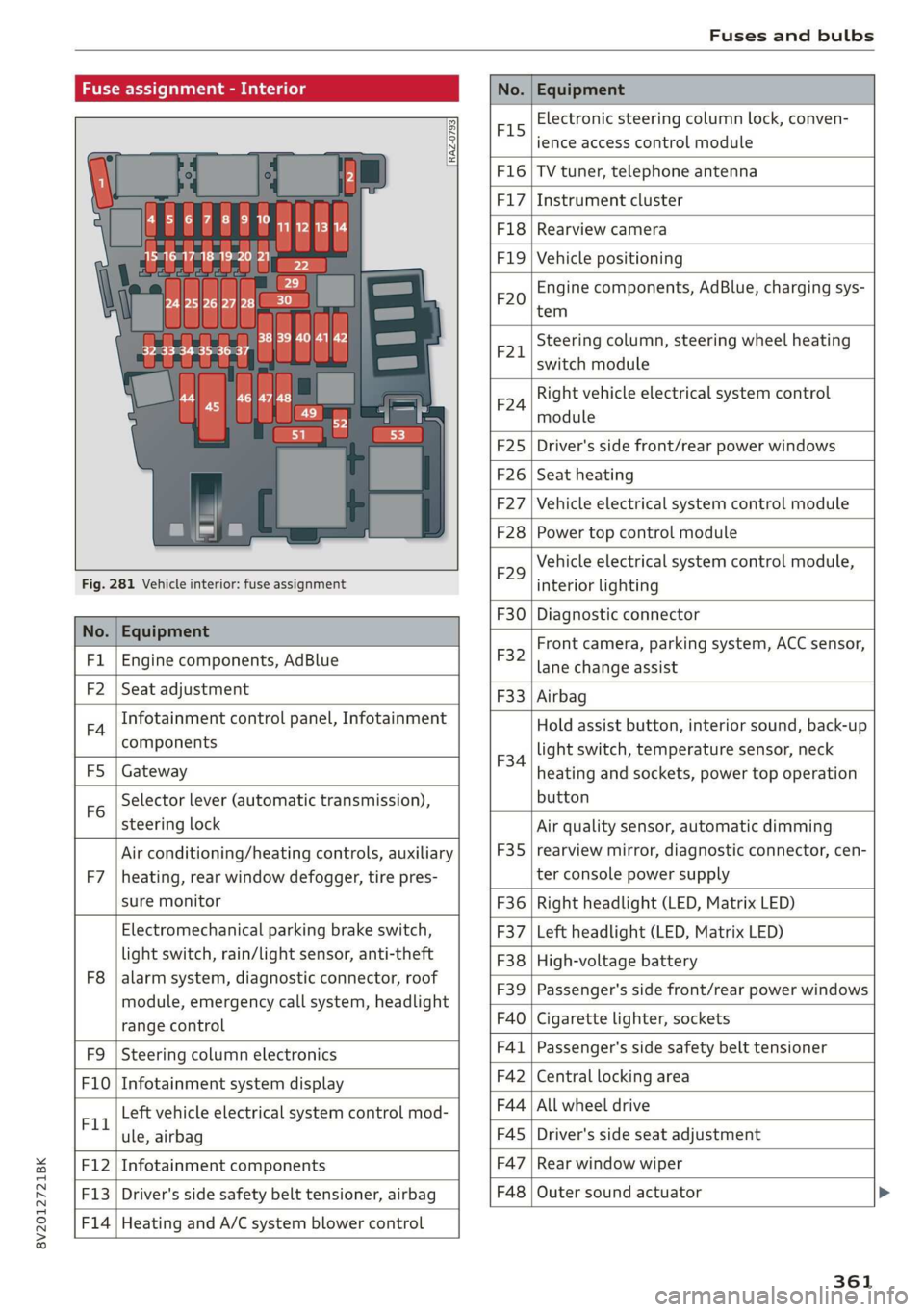
Fuse assignment - Interior
No. Equipment
RAZ-0793,
PO ee
15°16°17-18 19 20 21
PZ ply lip y ips}
ei Hes ole” So}
32°33 34 35 36 37
F15
Electronic steering column lock, conven-
ience access control module
F16 TV tuner, telephone antenna
F17 Instrument cluster
F18 Rearview camera
F1I9 Vehicle positioning
F20
Engine components, AdBlue, charging sys-
tem
F221
Steering column, steering wheel heating
switch module
F24
Right vehicle electrical system control
module
F25 Driver's side front/rear power windows
F26 Seat heating
F27 Vehicle electrical system control module
F28 Power top control module
Fig. 281 Vehicle interior: fuse assignment
F29
Vehicle electrical system control module,
interior lighting
No. Equipment
F30 Diagnostic connector
FL Engine components, AdBlue
F2 Seat adjustment
F32
Front camera, parking system, ACC sensor,
lane change assist
F4
Infotainment control panel, Infotainment
components
F33 Airbag
FS Gateway
Fo
Selector lever (automatic transmission),
steering lock
F34
Hold assist button, interior sound, back-up
light switch, temperature sensor, neck
heating and sockets, power top operation
button
Air conditioning/heating controls, auxiliary F35
Air quality sensor, automatic dimming
rearview mirror, diagnostic connector, cen-
F7 |heating, rear window defogger, tire pres- ter console power supply
sure monitor F36 | Right headlight (LED, Matrix LED)
Electromechanical parking brake switch, F37 | Left headlight (LED, Matrix LED)
light switch, rain/light sensor, anti-theft F38 | High-voltage battery
ae ene eee dent F39 | Passenger's side front/rear power windows
range control F40 | Cigarette lighter, sockets
F9 |Steering column electronics F41 | Passenger's side safety belt tensioner
F10 | Infotainment system display F42 | Central locking area
Tl Left vehicle electrical system control mod- F44 al ee
ule, airbag FAS | Driver's side seat adjustment
F12 | Infotainment components F47 | Rear window wiper
F13 | Driver's side safety belt tensioner, airbag F48 | Outer sound actuator
F14 | Heating and A/C system blower control
361
Page 364 of 400
Fuses and bulbs
No. | Equipment No. | Equipment
Clutch sensor, engine start, high-voltage
F49 3
battery, power electronics
F52 F53 Level control system control module
Rear window defogger
The power seats* are protected via circuit break-
ers that automatically switch on after a few sec-
onds after the overload has been reduced.
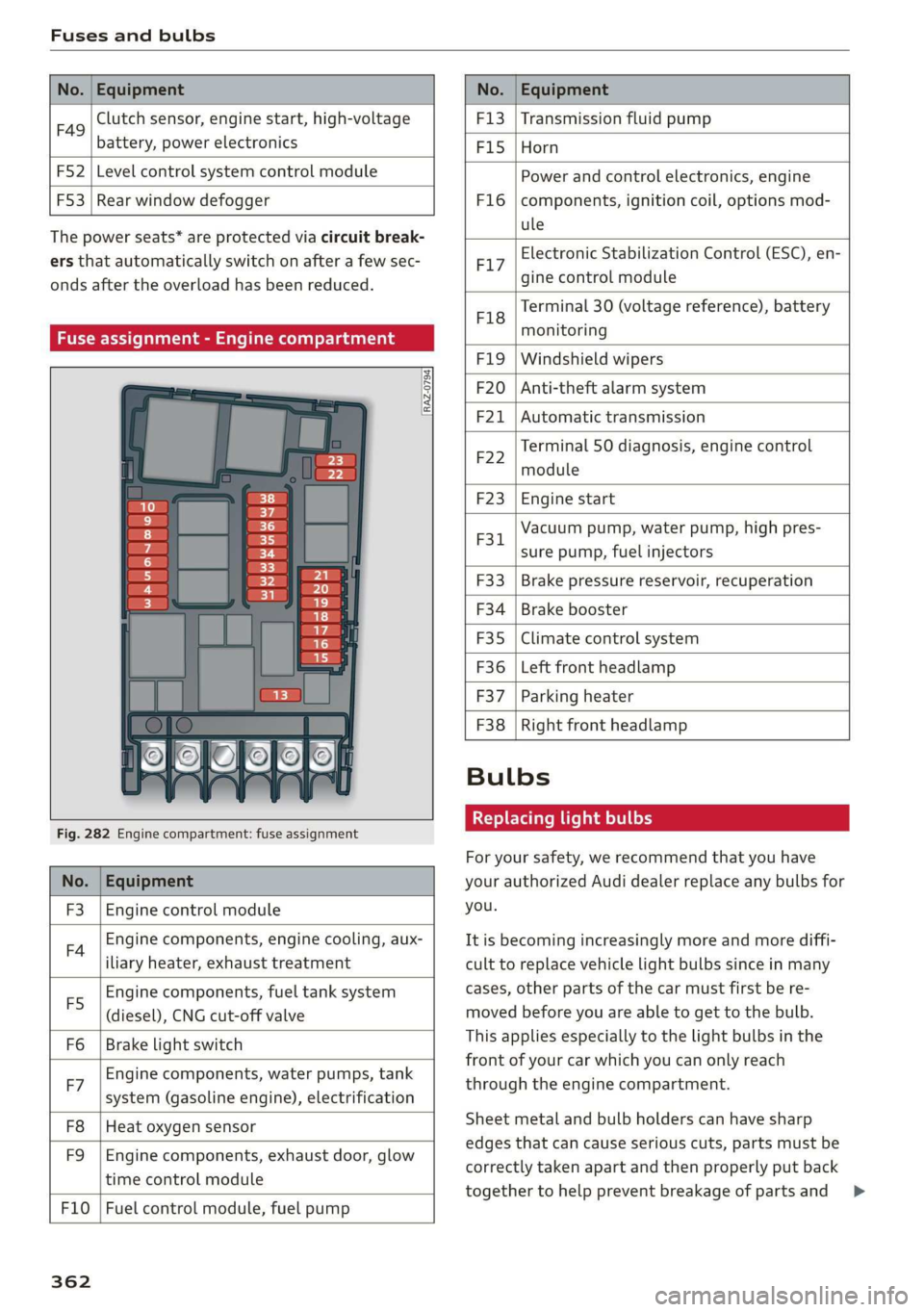
Fuse assignment - Engine compartment
RAZ-0794)
1 0
&
F:}
vi
6
5
4
5}
Fig. 282 Engine compartment: fuse assignment
No. | Equipment
F3 | Engine control module
FA Engine components, engine cooling, aux-
iliary heater, exhaust treatment
Engine components, fuel tank system
(diesel), CNG cut-off valve
Brake light switch
E5
Fo
Engine components, water pumps, tank
F7 ; . ee cae
system (gasoline engine), electrification
F8
F9
Heat oxygen sensor
Engine components, exhaust door, glow
time control module
F10 | Fuel control module, fuel pump
362
F13 | Transmission fluid pump
F15 |Horn
Power and control electronics, engine
components, ignition coil, options mod-
ule
F1l6
Electronic Stabilization Control (ESC), en-
F17
gine control module
Terminal 30 (voltage reference), battery
F18
es
monitoring
FIO F20
F21
Windshield wipers
Anti-theft alarm system
Automatic transmission
Terminal 50 diagnosis, engine control
F22
module
F23 | Engine start
Vacuum pump, water pump, high pres-
F31. 2
sure pump, fuel injectors
F33
F34
F35
F36
F37
Brake pressure reservoir, recuperation
Brake booster
Climate control system
Left front headlamp
Parking heater
F38 | Right front headlamp
Bulbs
Replacing light bulbs
For your safety, we recommend that you have
your authorized Audi dealer replace any bulbs for
you.
It is becoming increasingly more and more diffi-
cult to replace vehicle light bulbs since in many
cases, other parts of the car must first be re-
moved before you are able to get to the bulb.
This applies especially to the light bulbs in the
front of your car which you can only reach
through the engine compartment.
Sheet metal and bulb holders can have sharp
edges that can cause serious cuts, parts must be
correctly taken apart and then properly put back
together to help prevent breakage of parts and >
Page 366 of 400
Emergency situations
Emergency situations
General
This chapter is intended for trained emergency
crews and working personnel who have the nec-
essary tools and equipment to perform these
operations.
Starting by pushing or
towing
@) Note
Vehicles with an automatic transmission can-
not be started by pushing or towing.
Jump starting
If needed, the engine can be jump started by an-
other vehicle battery.
Applies to: vehicles with plug-in hybrid drive: The
connection points for the jump start cable are
different > page 365.
If the engine does not start because the vehicle
battery is drained, you can jump start your vehi-
cle using another vehicle. Jump start cables are
needed to do this.
Both vehicle batteries must have 12 V nominal
voltage. The voltage capacity (Ah) of the vehicle
battery that is giving power must not be less
than the capacity of the drained vehicle battery.
Jump start cable
Only use a jump start cable with a large enough
diameter. Note the manufacturer's specifica-
tions.
Only use a jump start cable with insulated termi-
nal clamps.
Positive cable - usually red.
Negative cable - usually black.
A WARNING
— A drained battery can freeze at tempera-
tures around 32 °F (0 °C). If the vehicle bat-
364
tery is frozen, it must be thawed before con-
necting the jump start cables. If it is not,
the risk of an explosion and chemical burns
increases. After jump starting the vehicle,
drive to an authorized Audi dealer or author-
ized Audi Service Facility immediately to
have the vehicle battery checked.
— Read the warnings when working in the en-
gine compartment > page 304.
— Handling the jump start cables incorrectly
may cause the vehicle battery to explode
and lead to serious injuries.
— Applies to: vehicles with plug-in hybrid
drive: You must not give a jump start with
your vehicle. This could cause significant
damage to the electrical system in your ve-
hicle > page 365.
— Applies to: vehicles with the battery in the
engine compartment: To reduce the risk of
chemical burns, do not bend over the vehicle
battery.
@) Note
Jump start cables can cause considerable
damage to the vehicle electrical system if
they are connected incorrectly.
G@) Tips
— There must be no contact between the
vehicles, or else voltage could flow when
connecting the positive terminal and drain
the vehicle battery of the vehicle providing
the jump start.
— The drained vehicle battery must be con-
nected correctly to the electrical system.
— Switch off electrical equipment that is not
needed.
Page 367 of 400

8V2012721BK
Emergency situations
Jump start
Applies to: vehicles with plug-in hybrid drive
The
term "vehicle battery" refers to the 12 volt
battery in your vehicle.
rr B z
BS 3 & C3
1 = AT
Fig. 283 Engine compartment: connectors for a charger
and jump start cables
The vehicle is equipped with one vehicle battery
and one high-voltage battery.
If the vehicle battery is drained, it can be charged
with a charger or you can jump start the vehicle
using another vehicle's battery in the same way
as a conventional vehicle.
Read the information about charging the vehicle
battery > page 316 and for jump starting the ve-
hicle > page 364.
> Open the hood > page 305.
» Remove the fuse box cover (8) to access the
positive terminal (4) > page 307.
> Clamp the terminal clamps from the charging
device or jump start cable to the positive termi-
nal @) and to the body ground point @).
(@) Note
You must not give a jump start with your vehi-
cle. This could cause significant damage to
the electrical system in your vehicle.
A3 models: jump starting
Applies to: vehicles with conventional drive system
Both jump start cables must be connected in the
correct order.
Fig. 284 Engine compartment: connecting the jump start
cable
The vehicle battery is located on the left front
side of the engine compartment. Open the cover
to access the positive terminal of the vehicle bat-
tery. The procedure for connecting jump start ca-
bles that is described next is designed to help
jump start your vehicle.
Follow the information about the vehicle battery
> page 315.
Preparations
1. Read the following carefully > page 364,
Preparation.
2. Set the parking brake and place the selector
lever in the "P" position.
3. Turn the ignition and electrical equipment off
in both vehicles.
Connecting/disconnecting the jump start
cable
4. Fold the battery cover upward.
5. Clamp the end of the red jump start cable to
the positive terminal @ > fig. 284 on your
vehicle >(@) in Preparation on page 364.
6. Clamp the other end of the red jump start ca-
ble to the positive terminal 2) on the vehicle
battery providing the current.
7. Clamp the black end of the jump start cable
preferably to the ground point, or to the
negative terminal of the vehicle battery @)
on the vehicle providing the current.
365
>
Page 368 of 400
Emergency situations
8. Clamp the other end of the black jump start
cable only to the ground point @) on your ve-
hicle >@.
9. Route the jump start cables so they cannot
get caught in the moving parts in the engine
compartment.
Starting the engine
10. First start the engine in the vehicle giving the
charge and let it run at idle.
11. Now start the engine in the vehicle with the
drained vehicle battery and wait two to three
minutes until it “runs smoothly”.
12.
procedure after 10 seconds and then repeat
it after approximately 30 seconds.
13. In the vehicle that is being jump started,
switch the heater fan and rear window de-
froster on to reduce any voltage peaks that
may occur when disconnecting the jumper ca-
bles. The headlights must be switched off.
While the engines are running, remove the
cables in reverse order from the way they
were installed, as described in > page 365.
Make sure the cables do not get caught in
moving engine components.
Fold the cover back on the battery correctly.
Switch the heater fan and rear window de-
froster off.
14.
15. 16.
If the engine does not start, stop the starting
ZX WARNING
— Do not touch the non-insulated parts of the
terminal clamps. The cable must also not
come into contact with vehicle components
that conduct electricity when it is connected
to the positive terminal. This can cause a
short circuit.
— The plugs on the battery cells must not be
opened.
— Keep ignition sources (such as open flames,
burning cigarettes, etc.) away from the vehi-
cle batteries to reduce the risk of an explo-
sion.
— Route the jump start cables so they cannot
get caught in the moving parts in the other
vehicle's engine compartment.
366
C@) Note
Do not use the negative terminal on the vehi-
cle battery for jump starting. A malfunction
could occur in the vehicle electrical system.
— Please note that the connecting process de-
scribed below for the jump start cables is in-
tended for when your vehicle is being jump
started.
G) Tips
Make sure that the connected positive termi-
nal clamps have sufficient contact with metal.
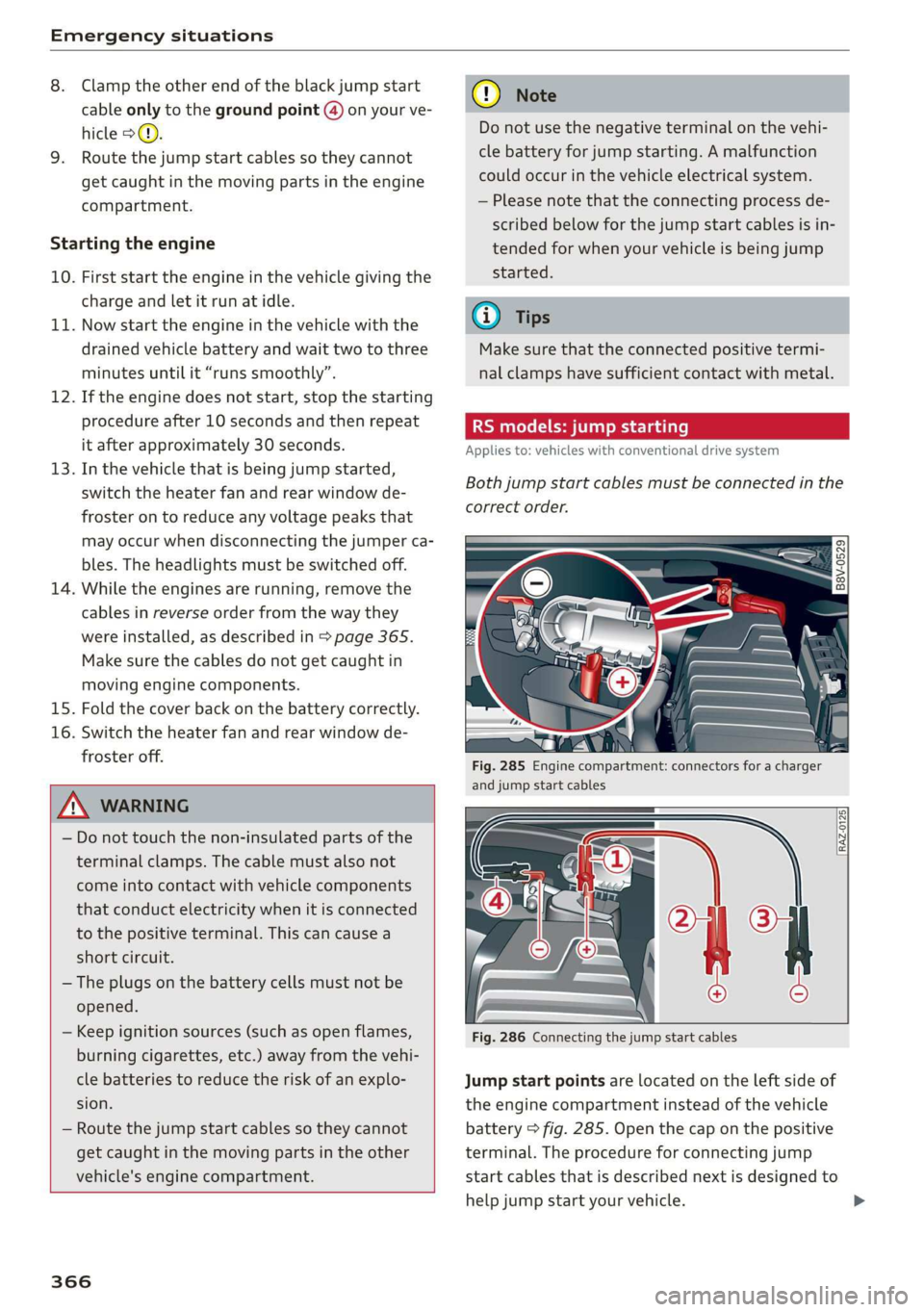
RS models: jump starting
Applies to: vehicles with conventional drive system
Both jump start cables must be connected in th
correct order.
Fig. 285 Engine compartment: connectors for a charger
and jump start cables
Fig. 286 Connecting the jump start cables
ie
2 a rte}
S| 3 & co
Jump start points are located on the left side of
the engine compartment instead of the vehicle
battery > fig. 285. Open the cap on the positive
terminal. The procedure for connecting jump
start cables that is described next is designed to
help jump start your vehicle.
>
Page 369 of 400
8V2012721BK
Emergency situations
Follow the information about the vehicle battery
=> page 315.
Preparations
1. Read the following carefully > page 364,
Preparation.
2. Set the parking brake and place the selector
lever in the "P" position.
3. Turn the ignition and electrical equipment off
in both vehicles.
Connecting/disconnecting the jump start
cable
4. Open the cover on the positive terminal.
5. Clamp the end of the red jump start cable to
the positive terminal @ > page 365, fig. 284
on your vehicle >@) in Preparation on
page 364.
6. Clamp the other end of the red jump start ca-
ble to the positive terminal (2) on the vehicle
battery providing the current.
7. Clamp the black end of the jump start cable
preferably to the ground point, or to the
negative terminal of the vehicle battery @)
on the vehicle providing the current.
8. Clamp the other end of the black jump start
cable only to the ground point (4) on your ve-
hicle.
9. Route the jump start cables so they cannot
get caught in the moving parts in the engine
compartment.
Starting the engine
10. First start the engine in the vehicle giving the
charge and let it run at idle.
11. Now start the engine in the vehicle with the
drained vehicle battery and wait two to three
minutes until it “runs smoothly”.
12. If the engine does not start, stop the starting
procedure after 10 seconds and then repeat
it after approximately 30 seconds.
13. In the vehicle that is being jump started,
switch the heater fan and rear window de-
froster on to reduce any voltage peaks that
may occur when disconnecting the jumper ca-
bles. The headlights must be switched off.
14. While the engines are running, remove the
cables in reverse order from the way they
were installed, as described in > page 365.
Make sure the cables do not get caught in
moving engine components.
15. Close the cap on the positive terminal.
16. Switch the heater fan and rear window de-
froster off.
ZA\ WARNING
— Never connect the jump start cable directly
to your vehicle battery. Only use the connec-
tions in the engine compartment.
— Do not touch the non-insulated parts of the
terminal clamps. The cable must also not
come into contact with vehicle components
that conduct electricity when it is connected
to the positive vehicle battery terminal. This
can cause a short circuit.
— The plugs on the battery cells must not be
opened.
— Keep ignition sources (such as open flames,
burning cigarettes, etc.) away from the vehi-
cle batteries to reduce the risk of an explo-
sion.
— Route the jump start cables so they cannot
get caught in the moving parts in the other
vehicle's engine compartment.
@) Note
Please note that the connecting process previ-
ously described for the jump start cables is in-
tended for when your vehicle is being jump
started.
(i) Tips
Make sure that the connected jump start ca-
bles have sufficient contact with metal.
Towing with a tow truck
General hints
Your Audi requires special handling for towing.
The following information is to be used by com-
mercial tow truck operators who know how to op-
erate their equipment safely.
— Never tow your Audi. Towing will cause dam-
age to the engine and transmission. >
367
Page 384 of 400
Index
Audio player
Bluetooth audio player................ 214
Wi-Fi audio player...............00005 214
AUGIOTISCK san 4 2 wees 2 a wea.8 2 Aas a ¢ 222
Audi phone box......... 0. ce eee eee eee 171
Audi presense......... 0.00. c eee eee 125
MESSAGES saree 5 x sens 5 x seme 5 e ewe = 124,128
AUGISIGGIASSISE sivas ¢ < wacom 3 § suas 4 § Sac & 131
Cleaning the sensors...............004 343
MGSSAGES caszass » « annsoice & 0: cones @ 0 ornare « 6 cnene 135
Rear cross-traffic assist................ 134
Audi smartphone interface.......... 228, 233
Audi virtual cockpit
refer to Instrument cluster.............. 14
AUTO
Automatic headlights .................. 43
Climate control system ...........-.000. 66
Auto Lock (central locking system) ......... 25
Automatic belt retractor... .......0...05 248
Automatic transmission............-...0- 75
Automatic wipe/wash system............. 49
Auxiliary climate control................. 68
AUX input... 06. eee eee 217
Average consumption................005 22
Average speed... 1... cece eee eee 22
B
BACKIBUTEOM « seseins
Bag hOoks®. « csssiecs «a seams ve connate vm eevee © # sees 60
Balance:(SOund) aii os weve av owe va neues « 234
Band
refer to Frequency band............... 206
Bassi(SOunG) «axes wo swivius 0 a awaweie w stamens oY nae 234
Battery, scorn so sccm 6 2 serene © x aor 6 MEER oo 315
Charge level display.................00. 14
CHANGING scx ¢ < sacs x § anes & ¢ Same Fk eR 316
High-voltage battery...............008. 96
Winter operation.............2.00 eee 315
Battery (vehicle)
refer to High-voltage battery............ 96
Before driving............-.0 eee eens 237
Belt temsiomensten «+ serene a axnuoe a 0 acme 0 0 ae 252
Better route (navigation)................ 205
BOWED. i seiiss a somunse a & anosans & % wwe Ho omemaun & 8 66
382
Bluetooth
Audio player... ..... cece eee eee eee 214
Connecting acell phone............... 169
SOEIAGS wines sx sesame vo arene cee a a comes 233
BOOStiis «een oo eer oo sore os ee ©» eee Y 23
Boosterséats.. « « can 2 ¢ ees os eeu ee ees 287
BOOSETUNGtION = wee < 2 seme 2 2 eee 2 e sees 76
Boost pressure indicator................. 23
Brake fluid
Checking brake fluid level
BRAKES cyecy: 2 aqme 2 ¢ atone go tem ye eee ye
Brake assist
Brake fluid
Emergency braking function
HOE ssicoes + a avo 3 orem oa Ta oe Ra BTR
New brake pads
Break-in security feature................. 30
Breaking in
New brake pads........... 00. c ee eee eee 85
NEW TIRES sc « = cows « 2 cares & eee ¢ v een 326
Newevelicles. « css: sv wns se wesc a 2 amenes 3 6 78
Browser
refer to Media center...............00. 220
BUDS: a i cconine 2 os cesnors & awanawe so avai 8 ans He 362
Buttons
Control panel (MMI)................-. 146
Multifunction steering wheel......... 17,20
Programming (multifunction steering
wheel)... 0.0.0... cece eee eee eee eens 19
Switching the Infotainment system display
ON/OFF iccen xo meron oo ee ae Se oo poe © 8 147
Cable (USB adapter/AUX connector cable).. 217
California Proposition 65 Warning........ 305
Battery specitt@inss + sccmss ux suas a 6 onawents x a 315
Galblists s secs 2 2 semen 2 waew v anor ee eR 173
Calloptions ess s seca ss pen & x dees 5 eee 180
Capacities
Fureltanke: « 2 wc 2s wise + meni os mie a oo 380
Washer fluid reservoir...............-5 380
Car key... cece eee eee eee 26
Care washes x sass i a seesiice 6 0 arovacs 6 w waneane 0 ane 342
Catalytic Converters « sesci ss wave a 8 eres 6 6 303
CD drive (media drives)................. 212
Page 385 of 400

8V2012721BK
Cell phone
refer to Telephone...........-0eee eee 169
Cell phone compartment
refer to Audi phone box............... 171
Central locking. ...... 0c. sce e cece eee ee 25
Convenience key........-.--. eee eee e ees 28
Convenience opening and closing......... 34
Mechanically unlocking and locking....... 30
MESSAGG% = saws 7 2 ques « 2 mE s F aS « RoE 29
Remote control key..........0 eee eee ee 27
Setting... 26... cece eee eee 29
Central locking switch..............20-0. 29
Gertifications. . « srw. © suscuas «2 soaneue uo wines 377
Changing'the'scale « ssewic « 5 wwe o # eae ¥ eave 18
Charging
refer to Power sourceS.........-- 000 eee 59
Charging clip..............02..00 ee eee 103
Charging the battery (mobile devi-
(o) 171, 217, 218
Charging (plug-in hybrid drive)............ 97
Child restraints
Danger of using child restraints in the front
SGA = s gcse c x secu = 2 Bees & x Sees eo ee 254
Where can I get additional information
about child restraints and their use?..... 297
Child restraint system anchors........... 292
Child safety........ 0.0.0.0... eee eee eee 278
Important safety instructions for using child
Safety S@ats + meus is ewe yo ees es ewww ee 282
Methemamchorshes = sxncams u water « 5 wens «4 ane 294
Tether straps ..... 2... eee eee eee eee 294
Child safety lock
POWErWIRGOWS): « = smu = 2 seems ss mu < ee 33
ReaMmdOOrsts + wena ov nasi 2 v sues oH sean 2 so 33
Child safety seats........ 00... eee eee eee 284
BoostersSeatstin. i. « scm «x score + x mnie so ane 287
Convertible child seats............20.. 285
Convertible locking retractor........... 290
How do I properly install a child safety seat
in my vehicle?......... 02... c eee eae 282
Infantis@atss « s seme x sews 5 a eames 2 oes 284
Installing a child restraint using the LATCH
SyStEM . 2... eee 293
LATGHISYStEM): = sews « « sewn 5 7 noups 4 «eee 293
Mounting and releasing the anchorage
Hook... . eee eee 293
Safety instructions. « «secs + eeee ey vee 282
SOGUTING)s » +: seomen + w enews ¥ views ¥ Hume ae oe 289
Unused safety belts on the rear seat..... 284
Child seats
Lower anchorages..............000005 293
Classic ViQW.. ieee 19
Cleaning ......... eee eee ee eee eee 342
Cleaning/removing ice from windows...... 344
Cleaning Alcantara...............00000. 345
Cleaning artificial leather............... 345
Cleaning carbon components........ 344, 345
Cleaning controls « 2.23 ss eees «epee ee ee 345
Cleaning decorative parts/trim........... 344
Cleaning exhaust tail pipes.............. 344
Cleaning plastic parts...............00. 345
Cleaning textiles...................00. 345
Cleaning the tail lights.................. 343
Cleaning the windshield...............0.. 49
Climate control system
refer to 2-zone deluxe automatic climate
GORTIOL = vem: 2 5 nem cs eR s HERR Ee REE 65, 66
Clock... eee eee eee eee 230
Closing
Convenience closing ess « vewa ss wwe se oex 34
HOO « & sissies sina 6 8 omnis a ewan ow tne 305
Luggage compartment lid............... 31
Panoramic glass roof................055 35
POWOr Opis ss vescine so cose ¥ x essa s mewens Zo a 36
Windows... 1... cee cece cece eee eee eee 33
COASEG sccrozs » vases wv winengs ou eomeeae 6 e exemene 8 78
Cockpit (overview)i. « cscs « erassue x 6 mmcem ae conse 8
Golormnumber. ss ssc xe sees ov eases ao mewn 379
Coming home/Leaving home
refer to Entry/exit lighting.............. 45
Command (voice recognition system) ...... 162
CompartMent Sie. ss coves ov wren «veers wo rare 60
Compass inthe mirror............-000005 52
Compliance. « s seg: ss sees se Rees ee eee as 377
CONNE Chie: « s seen ce sees vs eens + ReeR oe oe 182
Audi connect e-tron services............ 185
Data plans.......... 0... eee eee eee 187
Data Privacy sc se oss s ence ss paeu si eer 372
InfotainMentix «= svesow a 2 wavwe so voscue eo aes 182
Infotainment services............-.00% 183
connect e-tron services...............0- 185
Connection manager.................4. 231
383