battery AUDI A3 2020 Owner´s Manual
[x] Cancel search | Manufacturer: AUDI, Model Year: 2020, Model line: A3, Model: AUDI A3 2020Pages: 400, PDF Size: 107.47 MB
Page 4 of 400
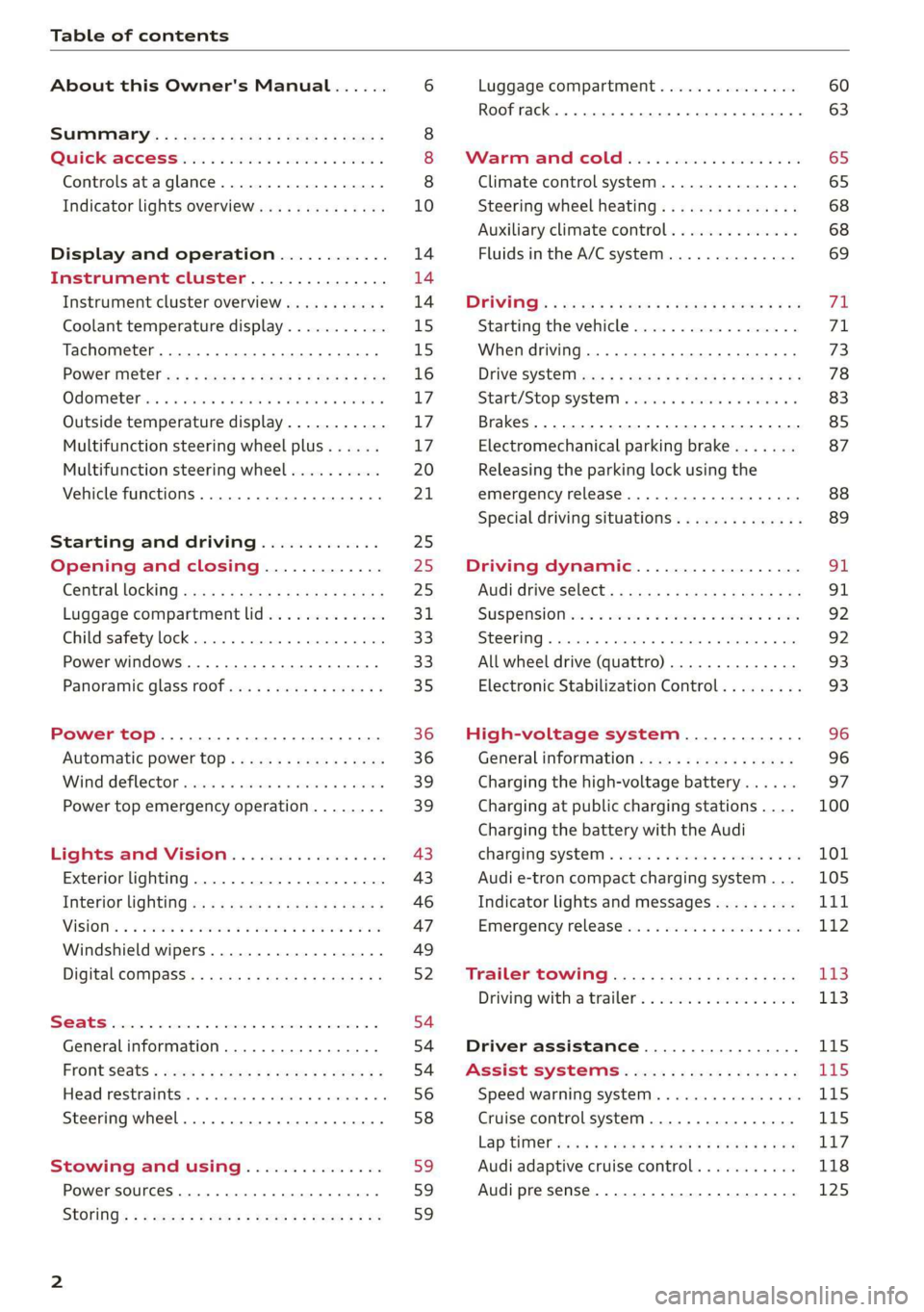
Table of contents
About this Owner's Manual......
SUMIMALY: ; « ss6% : osen ss sean cs poe s
QC CCeS Skis: si esis a 6 ores os ewe
Controls ataglance..................
Indicator lights overview...........0.
Display and operation............
Instrument cluster...............
Instrument cluster overview...........
Coolant temperature display...........
Tachometer.......... 0.0 eee eee eee
Power iiet@l ss « + wes + s wees 2 x ews 2 ae
Odometer icc oo sisiecs a wrens eo ooarae eo were
Outside temperature display...........
Multifunction steering wheel plus......
Multifunction steering wheel..........
Vehicle functions. ............000 000s
Starting and driving.............
Opening and closing.............
Central locking 2.2% ieee seven a eevee
Luggage compartment lid.............
Child safety lock... 0... 0... cece eee ee
Power windows..............2000005
Panoramic glass TOOf sis s « sayoe « x eoven xs
Power top........... 0. cece eee eee
Automatic power top.................
Wind deflector sicavi x 0 snare a 0 wesc a 0 acaven
Power top emergency operation........
Lights and Vision.................
Exterior lighting...................4.
Interior Ughtingcs « ¢ cean a cas cs ews 5
VISIONS « & comes oo man a 8 eee a a oa 3 oe
Windshield wipers...................
Digital compass.............0.-00 00
PrOntsS@ats = wise s x esven = ¢ eee + & ete os
Head restraimtst. +. coms + 0 anseans 4 2 omamm © # »
Steering wheel............00 2. eee ee
Stowing and using...............
Power sources ......... 00-00 e eee eaee
StOrinG’: « e meme =e sees + Sees Gy ee & Ee
10
14 14 14
15
15
16 17 17 17
20
21
25
25
25 31 33 33 35
36 36 39 39
43
43
46
47
49
52
54
54
54
56 58 59 59 59
Luggage compartment ...............
Roof rack... eee eee
MV APEC OUE 05 3 3 aise ¥ & maseen @ owe
Climate control system...............
Steering wheel heating.............-.
Auxiliary climate control.............-
Fluids in the A/C system. ...........-.
DFIVIFIG:: « yeas os « wow o ¢ Rome se RED oc ow
Starting the vehicle..................
Electromechanical parking brake.......
Releasing the parking lock using the
emergency release............2..000.
Special driving situations..............
Driving dynamic..................
Audi drive'select:, .c.icisiseicascnaene
SUSPONSIOM ac « 2 covsces so cmswsm oo soso oo cee
SEOORIIAG » sinsoes ue vanes a» wisenge ou upnenie & ¥ ote
All wheel drive (quattro)..............
Electronic Stabilization Control.........
High-voltage system.............
General information.................
Charging the high-voltage battery......
Charging at public charging stations....
Charging the battery with the Audi
ChargingsySteM « wsccuc x x sewers a w anaes vv oe
Audi e-tron compact charging system...
Indicator lights and messages.........
Emergency releases. & iseiis 6 + wae w 6 wos
Trailer towing....................
Driving with atrailer.................
Driver assistance.................
Assist systems...................
Speed warning system..............--
Cruise control system............0005
Lap timer eens so cong s pees ss ees oo eee
Audi adaptive cruise control...........
Audi presense............-.002-000-
60
63
65
65
68 68 69
FE 71 73
78
83 85
87
88 89
SI 91
92.
92
93 93
96 96 97
100
Page 13 of 400
8V2012721BK
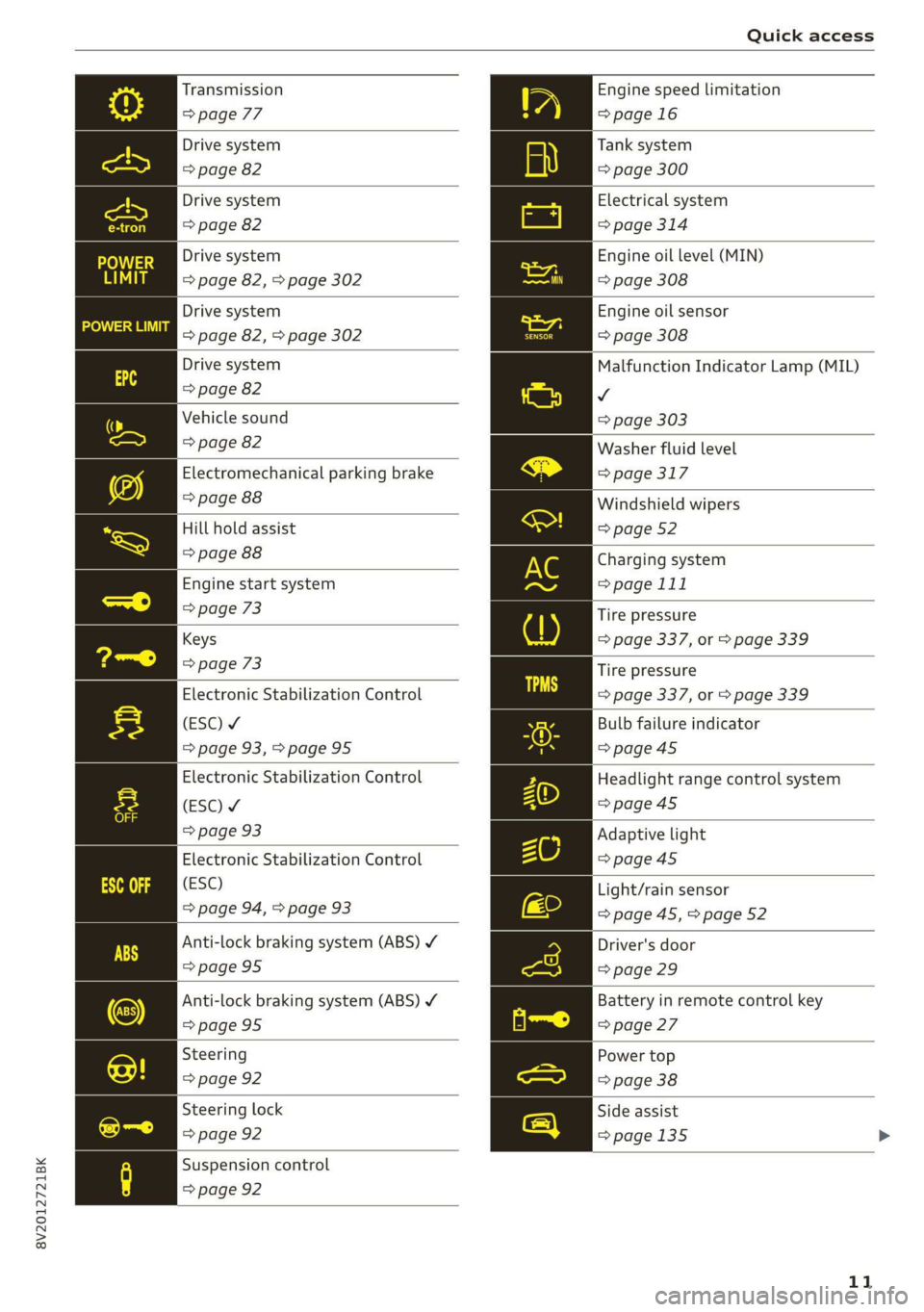
Quick access
Transmission
=> page 77
Drive system
=> page 82
Drive system
=> page 82
Drive system
=> page 82, > page 302
Drive system
=> page 82, > page 302
Drive system
=> page 82
Vehicle sound
=> page 82
Electromechanical parking brake
=> page 88
Hill hold assist
=> page 88
Engine start system
=> page 73
Keys
=> page 73
Electronic Stabilization Control
(ESC) ¥
=> page 93,>page 95
Electronic Stabilization Control
(ESC) ¥
=> page 93
Electronic Stabilization Control
(ESC)
=> page 94, > page 93
Anti-lock braking system (ABS) ¥
=>page 95
Anti-lock braking system (ABS) Y
=> page 95
Steering
=> page 92
Steering lock
=> page 92
Suspension control
=> page 92
Engine speed limitation
=>page 16
Tank system
=> page 300
Electrical system
=> page 314
Engine oil level (MIN)
=> page 308
Engine oil sensor
=> page 308
Malfunction Indicator Lamp (MIL)
v
=> page 303
Washer fluid level
=> page 317
Windshield wipers
=> page 52
Charging system
=> page 111
Tire pressure
=> page 337, or > page 339
Tire pressure
=> page 337, or > page 339
Bulb failure indicator
=> page 45
Headlight range control system
=>page 45
Adaptive light
=>page 45
Light/rain sensor
=> page 45, > page 52
Driver's door
=> page 29
Battery in remote control key
=> page 27
Power top
=> page 38
Side assist
=>page 135
11
Page 16 of 400
![AUDI A3 2020 Owner´s Manual Instrument cluster
Instrument cluster overview
The instrument cluster is the central information center for the driver.
| B8U-0400]
CHLOE
a YLY plese)
E ‘
Applies to: vehicles with Aud](/img/6/40265/w960_40265-15.png "AUDI A3 2020 Owner´s Manual Instrument cluster
Instrument cluster overview
The instrument cluster is the central information center for the driver.
| B8U-0400]
CHLOE
a YLY plese)
E ‘
Applies to: vehicles with Aud")
Instrument cluster
Instrument cluster overview
The instrument cluster is the central information center for the driver.
| B8U-0400]
CHLOE
a YLY plese)
E ‘
Applies to: vehicles with Audi virtual cockpit
Fig. 3 Instrument cluster overview
[e8u-0399]
Applies to: vehicles with analog instrument cluster
Fig. 4 Instrument cluster overview
Depending on the vehicle equipment, the follow- ) Status line (one or two lines)
ing items may appear in the instrument cluster: © Trip odometer reset button ...... 17
@ Display @ Right dial
— Engine coolant temperature
— High-voltage battery charge level 8) Display
@ Left dial —Fuellevel MY .............000. 300
—Tachometer ................- 15 Q) Right additional display with speed-
— Power meter ................2. 16 ometer
3 17,20 Left additional display with:
17, 20
14
Page 29 of 400
8V2012721BK
Opening and closing
— For an explanation on conformity with the
FCC regulations in the United States and the
Industry Canada regulations, see
=> page 377.
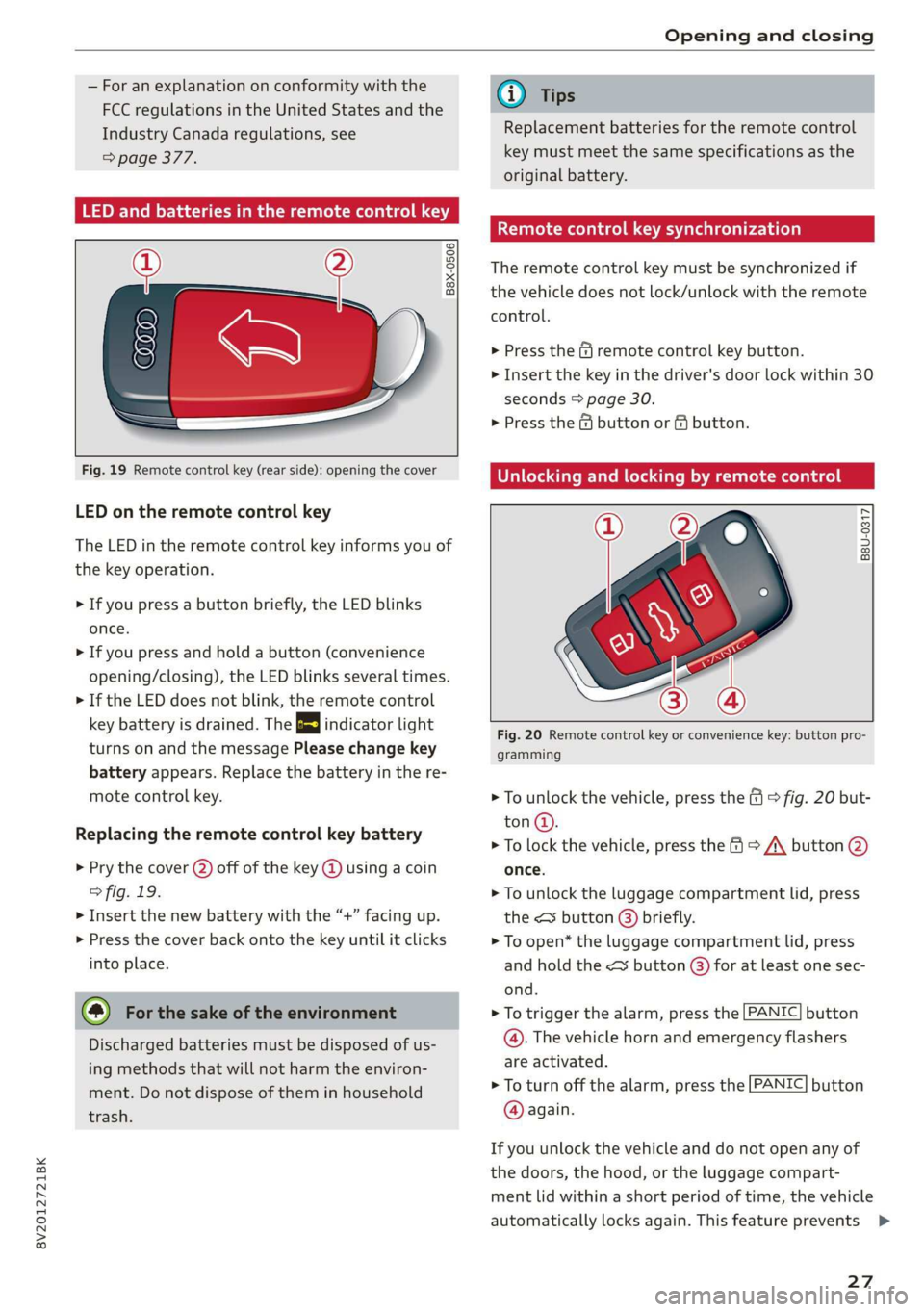
LED and batteries in the remote control key
B8X-0506
Fig. 19 Remote control key (rear side): opening the cover
LED on the remote control key
The LED in the remote control key informs you of
the key operation.
> If you press a button briefly, the LED blinks
once.
> If you press and hold a button (convenience
opening/closing), the LED blinks several times.
> If the LED does not blink, the remote control
key battery is drained. The 2} indicator light
turns on and the message Please change key
battery appears. Replace the battery in the re-
mote control key.
Replacing the remote control key battery
> Pry the cover (2) off of the key @ using a coin
> fig. 19.
> Insert the new battery with the “+” facing up.
> Press the cover back onto the key until it clicks
into place.
@ For the sake of the environment
Discharged batteries must be disposed of us-
ing methods that will not harm the environ-
ment. Do not dispose of them in household
trash.
@) Tips
Replacement batteries for the remote control
key must meet the same specifications as the
original battery.
Remote control key synchronization
The remote control key must be synchronized if
the vehicle does not lock/unlock with the remote
control.
> Press the & remote control key button.
> Insert the key in the driver's door lock within 30
seconds > page 30.
> Press the @ button or fj button.
Unlocking and locking by remote control
B8U-0317
Fig. 20 Remote control key or convenience key: button pro-
gramming
> To unlock the vehicle, press the (9 © fig. 20 but-
ton@.
> To lock the vehicle, press the > /\ button @
once.
> To unlock the luggage compartment lid, press
the <¥ button @) briefly.
> To open* the luggage compartment lid, press
and
hold the < button @) for at least one sec-
ond.
> To trigger the alarm, press the [PANIC] button
@. The vehicle horn and emergency flashers
are activated.
> To turn off the alarm, press the [PANIC] button
@ again.
If you unlock the vehicle and do not open any of
the doors, the hood, or the luggage compart-
ment lid within a short period of time, the vehicle
automatically locks again. This feature prevents
27
Page 31 of 400
8V2012721BK
Opening and closing
ZA WARNING
Read and following all warnings > A\ in De-
scription on page 25.
@ Tips
If your vehicle is left standing for a long peri-
od of time, note the following:
— The proximity sensor switches off after a
few days to save energy. You then have to
pull once on the door handle to unlock the
vehicle and a second time to open it.
—To prevent the vehicle battery from dis-
charging, the energy management gradual-
ly switches off convenience functions that
are not needed. You then may no longer be
able to unlock your vehicle with the sensors.
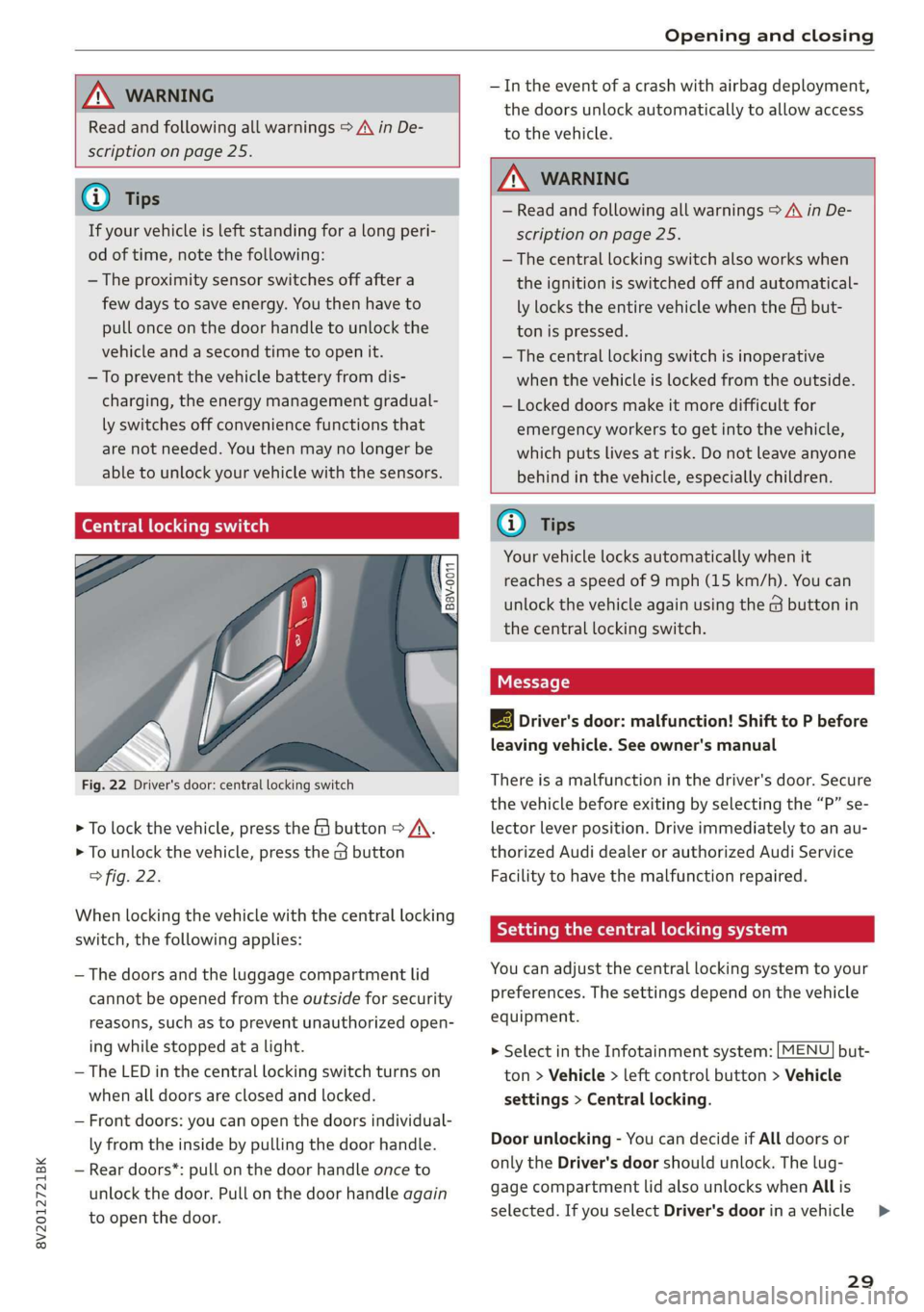
(eye eked Reauuia
Fig. 22 Driver's door: central locking switch
> To lock the vehicle, press the & button > A\.
> To unlock the vehicle, press the G button
fig. 22.
When locking the vehicle with the central locking
switch,
the following applies:
— The doors and the luggage compartment lid
cannot be opened from the outside for security
reasons, such as to prevent unauthorized open-
ing while stopped at a light.
— The LED in the central locking switch turns on
when all doors are closed and locked.
— Front doors: you can open the doors individual-
ly from the inside by pulling the door handle.
— Rear doors*: pull on the door handle once to
unlock the door. Pull on the door handle again
to open the door.
— In the event of a crash with airbag deployment,
the doors unlock automatically to allow access
to the vehicle.
ZA WARNING
— Read and following all warnings > A in De-
scription on page 25.
— The central locking switch also works when
the ignition is switched off and automatical-
ly locks the entire vehicle when the & but-
ton is pressed.
—The central locking switch is inoperative
when the vehicle is locked from the outside.
— Locked doors make it more difficult for
emergency workers to get into the vehicle,
which puts lives at risk. Do not leave anyone
behind in the vehicle, especially children.
@ Tips
Your vehicle locks automatically when it
reaches a speed of 9 mph (15 km/h). You can
unlock the vehicle again using the @ button in
the central locking switch.
2B Driver's door: malfunction! Shift to P before
leaving vehicle. See owner's manual
There is a malfunction in the driver's door. Secure
the vehicle before exiting by selecting the “P” se-
lector lever position. Drive immediately to an au-
thorized Audi dealer or authorized Audi Service
Facility to have the malfunction repaired.
Setting the central locking system
You can adjust the central locking system to your
preferences. The settings depend on the vehicle
equipment.
> Select in the Infotainment system: [MENU] but-
ton > Vehicle > left control button > Vehicle
settings > Central locking.
Door unlocking - You can decide if All doors or
only the Driver's door should unlock. The lug-
gage compartment lid also unlocks when All is
selected. If you select Driver's door inavehicle >
29
Page 39 of 400
8V2012721BK
Power top
sure the rear passengers keep enough dis-
tance from the power top to reduce the risk
of injury.
— Visibility to the rear is limited when operat-
ing the power top. Avoid operating the top
while driving in reverse.
@) Note
— To prevent damage to the power top:
— do not store any objects in the power top
storage compartment.
— make sure there is enough space above
the vehicle when opening or closing the
power top.
—To reduce the risk of damage, make sure
there are no sensitive objects in the power
top storage compartment's range of mo-
tion.
G) Tips
— To prevent the vehicle battery from draining
unnecessarily, do not open or close the pow-
er top repeatedly when the engine is switch-
ed off.
—A message will appear in the instrument
cluster if there is a malfunction in the power
top > page 38.
— The power top can also be operated manual-
ly temporarily if there is a malfunction
=> page 39, Power top emergency opera-
tion. An authorized Audi dealer or author-
ized Audi Service Facility should diagnose
and correct the cause of the malfunction as
soon as possible.
— If the vehicle is parked with the power top
open, the vehicle interior is not protected
from damaging weather or unauthorized ac-
cess. Lock any items you leave behind in the
luggage compartment. Close the power top
before leaving the vehicle.
— The side windows automatically lower
slightly when opening or closing the power
top.
Power top convenience opening and closing
Applies to: vehicles with power top
B8V-0009 @)
"A
4
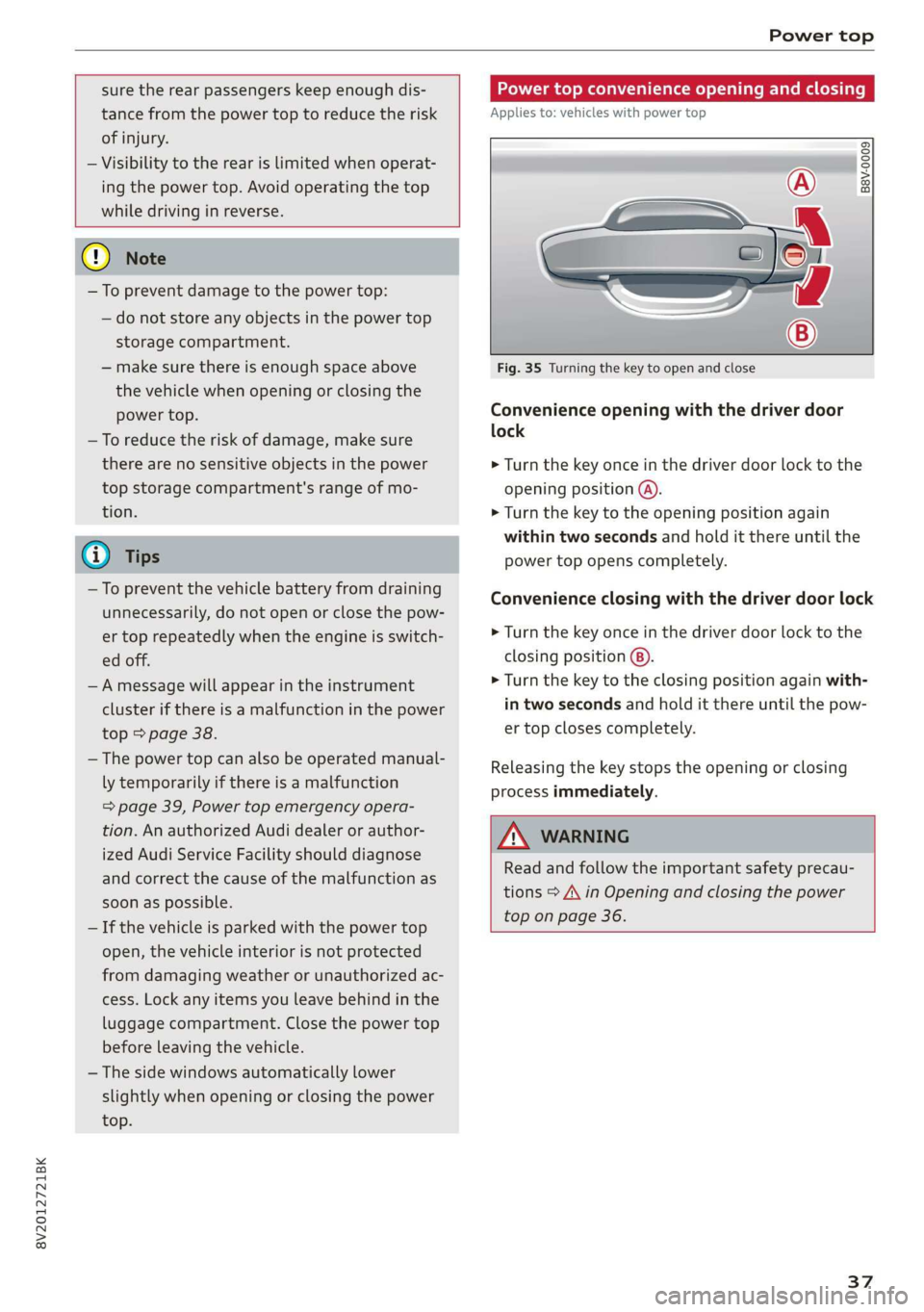
Fig. 35 Turning the key to open and close
Convenience opening with the driver door
lock
> Turn the key once in the driver door lock to the
opening position @).
> Turn the key to the opening position again
within two seconds and hold it there until the
power top opens completely.
Convenience closing with the driver door lock
> Turn the key once in the driver door lock to the
closing position @).
> Turn the key to the closing position again with-
in two seconds and hold it there until the pow-
er top closes completely.
Releasing the key stops the opening or closing
process immediately.
ZA\ WARNING
Read and follow the important safety precau-
tions > A\ in Opening and closing the power
top on page 36.
37
Page 45 of 400
8V2012721BK
Lights and Vision
Lights and Vision
Exterior lighting
Stare MUL Las eal
B8V-0430
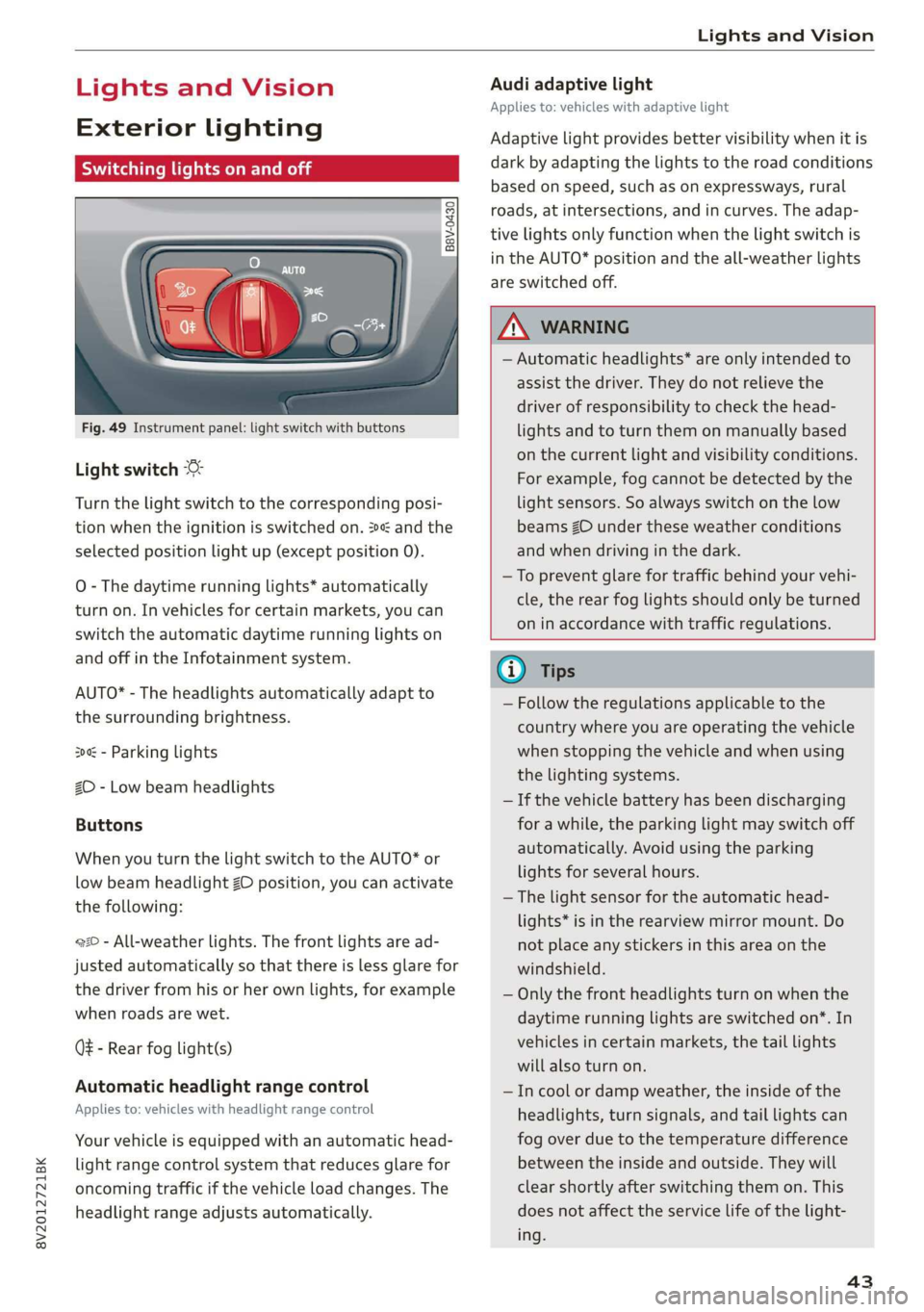
Fig. 49 Instrument panel: light switch with buttons
Light switch
Turn the light switch to the corresponding posi-
tion when the ignition is switched on. 2 and the
selected position light up (except position 0).
O
- The daytime running lights* automatically
turn on. In vehicles for certain markets, you can
switch the automatic daytime running lights on
and off in the Infotainment system.
AUTO* - The headlights automatically adapt to
the surrounding brightness.
300 - Parking lights
2D - Low beam headlights
Buttons
When you turn the light switch to the AUTO* or
low beam headlight ZO position, you can activate
the following:
220 - All-weather lights. The front lights are ad-
justed automatically so that there is less glare for
the driver from his or her own lights, for example
when roads are wet.
Q - Rear fog light(s)
Automatic headlight range control
Applies to: vehicles with headlight range control
Your vehicle is equipped with an automatic head-
light range control system that reduces glare for
oncoming traffic if the vehicle load changes. The
headlight range adjusts automatically.
Audi adaptive light
Applies to: vehicles with adaptive light
Adaptive light provides better visibility when it is
dark by adapting the lights to the road conditions
based on speed, such as on expressways, rural
roads, at intersections, and in curves. The adap-
tive lights only function when the light switch is
in the AUTO* position and the all-weather lights
are switched off.
Z\ WARNING
— Automatic headlights* are only intended to
assist the driver. They do not relieve the
driver of responsibility to check the head-
lights and to turn them on manually based
on the current light and visibility conditions.
For example, fog cannot be detected by the
light sensors. So always switch on the low
beams ZO under these weather conditions
and when driving in the dark.
—To prevent glare for traffic behind your vehi-
cle, the rear fog lights should only be turned
on in accordance with traffic regulations.
G) Tips
— Follow the regulations applicable to the
country where you are operating the vehicle
when stopping the vehicle and when using
the lighting systems.
— If the vehicle battery has been discharging
for a while, the parking light may switch off
automatically. Avoid using the parking
lights for several hours.
— The light sensor for the automatic head-
lights* is in the rearview mirror mount. Do
not place any stickers in this area on the
windshield.
— Only the front headlights turn on when the
daytime running lights are switched on*. In
vehicles in certain markets, the tail lights
will also turn on.
—Incool or damp weather, the inside of the
headlights, turn signals, and tail lights can
fog
over due to the temperature difference
between the inside and outside. They will
clear shortly after switching them on. This
does not affect the service life of the light-
ing.
43
Page 57 of 400
8V2012721BK
Seats
Adjusting the backrests
> To adjust the backrest forward or backward,
press the button @) forward or backward.
Adjusting the seat position
> To adjust the seat forward or backward, push
the button @) forward or backward.
> To adjust the seat upward or downward, push
the rear section of the button @) upward or
downward.
Adjusting the lumbar support
> To adjust the lumbar support, press the button
@) at the applicable location.
Adjusting the upper thigh support
> To can increase or decrease the upper thigh
support, lift the handle @). A spring moves the
support forward.
Adjusting the massage function
> Switching the massage function on or off ().
@) Tips
The massage function switches off automati-
cally after approximately 10 minutes.
Va
Applies
to: vehicles with entry assistance
Entry assistance makes it easier for the rear pas-
sengers to enter and leave the vehicle.
B8W-0269
ZA\ WARNING
—To reduce the risk of an accident, only adjust
the front seats when the vehicle is station-
ary.
— The power adjustment for the front seats al-
so works with the ignition switched off or
with the ignition key removed. To reduce the
risk of injury, children should never be left
unattended in the vehicle for this reason.
— Exercise caution when adjusting the seat
height. Unsupervised or careless seat adjust-
ment could cause parts of the body to get
pinched, which increases the risk of injury.
— The front seat backrests must not be re-
clined too far back when driving, because
this impairs the effectiveness of the safety
belts and airbag system, which increases the
risk of injury.
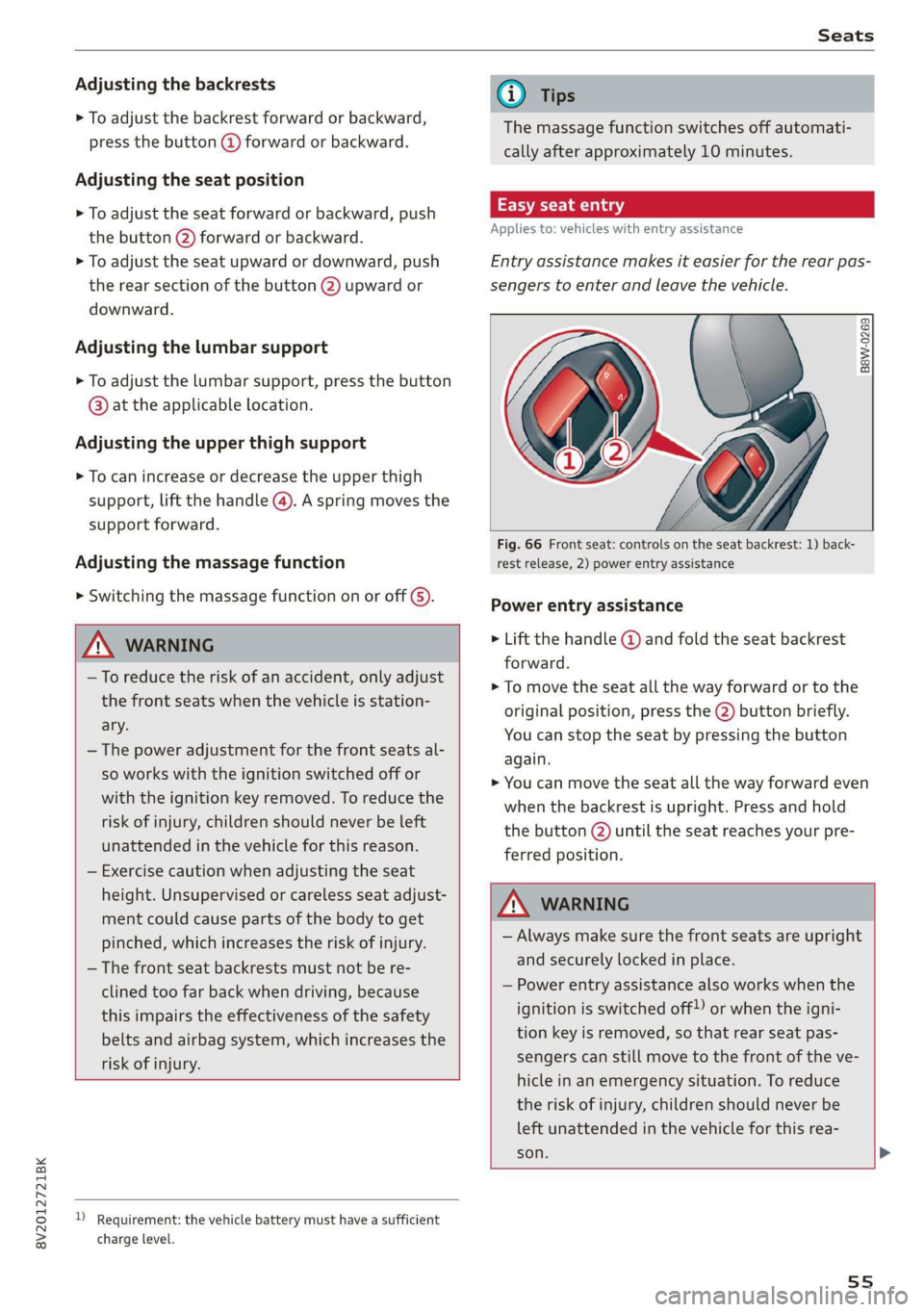
Fig. 66 Front seat: controls on the seat backrest: 1) back-
rest release, 2) power entry assistance
Power entry assistance
> Lift the handle @ and fold the seat backrest
forward.
> To move the seat all the way forward or to the
original position, press the @) button briefly.
You can stop the seat by pressing the button
again.
> You can move the seat all the way forward even
when the backrest is upright. Press and hold
the button 2) until the seat reaches your pre-
ferred position.
ZA WARNING
— Always make sure the front seats are upright
and securely locked in place.
— Power entry assistance also works when the
ignition is switched off!) or when the igni-
tion key is removed, so that rear seat pas-
sengers can still move to the front of the ve-
hicle in an emergency situation. To reduce
the risk of injury, children should never be
left unattended in the vehicle for this rea-
son.
D_ Requirement: the vehicle battery must have a sufficient
charge level.
55
Page 61 of 400
8V2012721BK
Stowing and using
Stowing and using
Power sources
When the ignition is switched on, you may be
able to use the electric power sources for exter-
nal devices, depending on the vehicle equipment.
12 volt sockets
You can connect electrical accessories to the 12
volt sockets. The power usage must not exceed
120 watts.
The 12 volt sockets are labeled with the 12V
symbol. They are located in the front center con-
sole, in the rear* and on the side trim panel in the
luggage compartment*.
USB ports
Applies to: vehicles with USB input
You can charge mobile devices using the USB
ports. The USB ports are labeled with the «<> or
(4 symbol or CHARGE ONLY.
ZX WARNING
— To reduce the risk of fatal injury, store all
connected devices securely when driving so
that they do not move around inside the ve-
hicle when braking or in the event of an acci-
dent.
— Incorrect usage can lead to serious injuries
or burns. To reduce the risk of injuries, never
leave children unattended in the vehicle
with the vehicle key.
© Note
— Read the operating manuals for the con-
nected devices.
—To reduce the risk of damage to the vehicle
electrical system, never attempt to charge
the vehicle battery by connecting accesso-
ries that provide power to the power sour-
ces.
— Do not connect any device whose network
class (voltage) does not match the network
class designed for the socket.
— Disconnect the connectors from the power
sources carefully to reduce the risk of dam-
aging them.
Storing
Cup holders
z z
S
g| = & ()
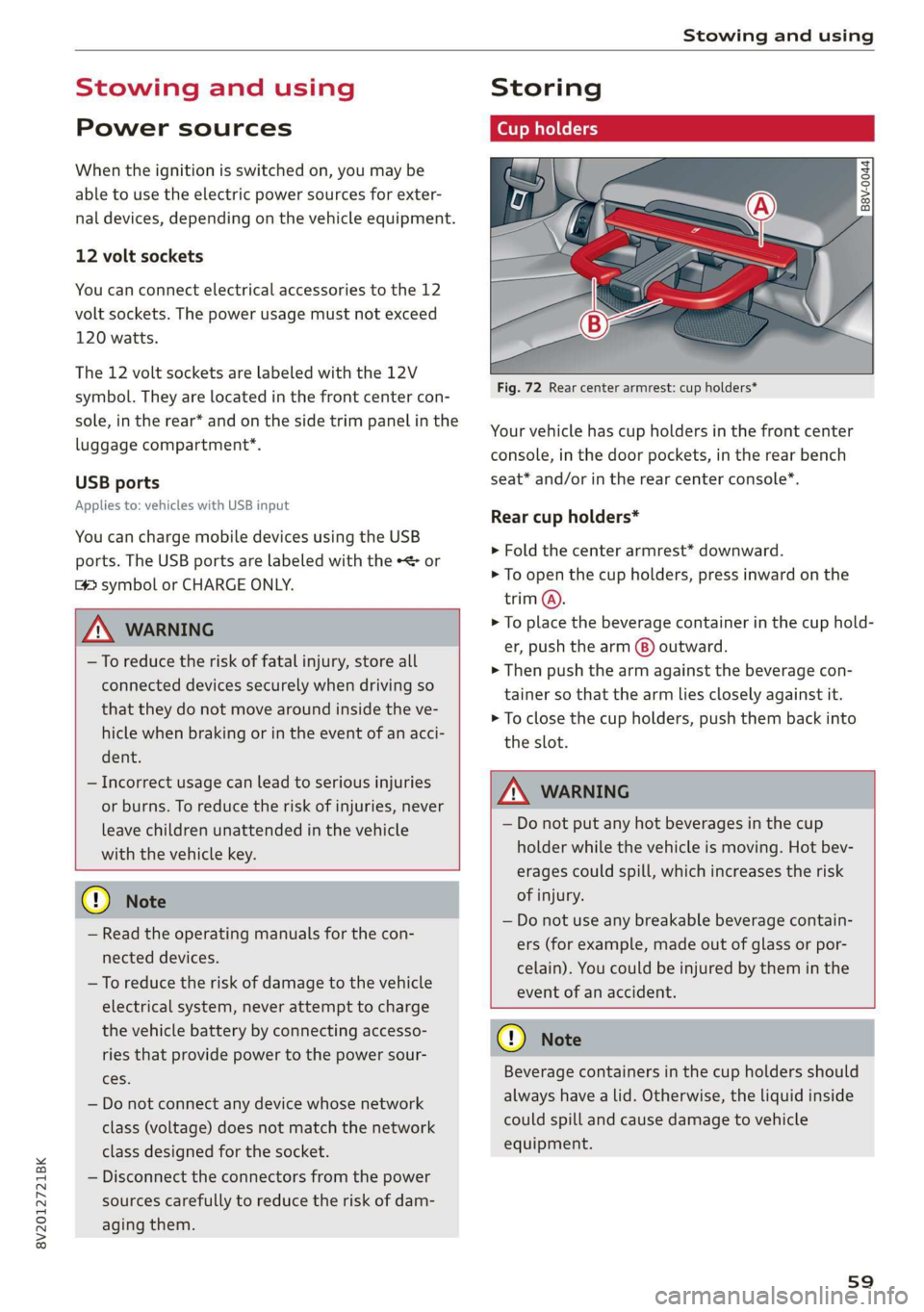
Fig. 72 Rear center armrest: cup holders*
Your vehicle has cup holders in the front center
console, in the door pockets, in the rear bench
seat* and/or in the rear center console”.
Rear cup holders*
> Fold the center armrest* downward.
> To open the cup holders, press inward on the
trim @.
> To place the beverage container in the cup hold-
er, push the arm (8) outward.
> Then push the arm against the beverage con-
tainer so that the arm lies closely against it.
> To close the cup holders, push them back into
the slot.
ZA\ WARNING
— Do not put any hot beverages in the cup
holder while the vehicle is moving. Hot bev-
erages could spill, which increases the risk
of injury.
— Do not use any breakable beverage contain-
ers (for example, made out of glass or por-
celain). You could be injured by them in the
event of an accident.
CG) Note
Beverage containers in the cup holders should
always have a lid. Otherwise, the liquid inside
could spill and cause damage to vehicle
equipment.
s9
Page 69 of 400

8V2012721BK
Warm and cold
85/ 29/ @3 Air distribution and vents
The air distribution can adjusted with the but-
tons. To have the air distribution regulated auto-
matically, press the AUTO button.
The round air vents in the cockpit are adjustable
> page 68.
To keep the front side windows from fogging up
in damp weather, we recommend opening the
side air vents and tilting them to the side.
Foot vents are located under the front seats and
adjustable vents on the end of the center console
to heat the rear of the vehicle.
& Defrosting
The windshield and side windows are defrosted
or cleared of condensation as quickly as possible.
The maximum amount of air flows mainly from
the vents below the windshield. Recirculation
mode switches off. The temperature should be
set at +72°F (22°C) or higher. The temperature is
controlled automatically. In the & setting, the
A/C cooling mode switches on automatically, de-
pending on the outside air temperature.
The AUTO button switches the defroster off.
<> Recirculation mode
The recirculation mode can be turned on manual-
ly or automatically*.
— Switching manual recirculation mode on and
off: press the > button.
— Automatic* recirculation mode: auto recircula-
tion needs to be activated in the Infotainment
system. Select in the Infotainment system:
MENU] button > Vehicle > left control button >
Air conditioning > Auto recirculation. The air
quality sensor that is designed for diesel and
gasoline exhaust automatically switches the re-
circulation mode on or off depending on the
level of pollutants in the outside air.
In recirculation mode, the air inside the vehicle is
circulated and filtered. This prevents the unfil-
tered air outside the vehicle from entering the
vehicle interior. Switching recirculation mode on
when driving through a tunnel or when sitting in
traffic is recommended > A.
Pressing the <> button, AUTO or the ® button
switches recirculation mode off.
@ Rear window heating
If the rear window defogger is activated when
the ignition is switched on, the battery manage-
ment determines based on the battery charge if
it is possible to turn on. Otherwise, the rear win-
dow defogger functions with the engine running
and switches off automatically after approxi-
mately 10 - 20 minutes, depending on the out-
side temperature.
To prevent the rear window defogger from
switching off automatically, press and hold the
® button for more than two seconds.
#/ Seat heating*
Pressing the a button switches the seat heating
on at the highest setting (level 3). The LEDs indi-
cate the temperature level. To reduce the tem-
perature, press the button again. To switch the
seat heating off, press the button repeatedly un-
til the LED turns off.
After approximately 10 minutes, the seat heating
automatically switches from level 3 to level 2.
Z\ WARNING
— You should not use the recirculation mode
for an extended period of time, because no
fresh air is drawn in and the windows can
fog when cooling mode is switched off. This
increases the risk of an accident.
— Individuals with reduced sensitivity to pain
or temperature could develop burns when
using the seat heating function. To reduce
the risk of injury, these individuals should
not use seat heating.
@) Note
To reduce the risk of damage to the seat heat-
ing elements, do not kneel on the seats or
place heavy pressure on one area of the seat.
G) Tips
If the front passenger's seat heating is turned
on, it will not turn on again automatically if
more than 10 minutes have passed between
67
>