lights AUDI A3 CABRIOLET 2015 User Guide
[x] Cancel search | Manufacturer: AUDI, Model Year: 2015, Model line: A3 CABRIOLET, Model: AUDI A3 CABRIOLET 2015Pages: 302, PDF Size: 73.83 MB
Page 26 of 302
24 Instruments and indicator lamps
Drive to an authorized Audi dea le r o r author
ized Audi Service Facility immediate ly to have
the malfunction corrected.
@ For the sake of the environment
Fuel should never enter the sewer system
or come into contact with the ground.
@ Tips
More info rmation on refueling is available
on page
i:!>poge 211.
~ Washer fluid level
1- ) Please add washer fluid
Fill the washer fluid with the ign ition switched
off ¢
page 22 7.
6 Windshield wipers
m Windshield wiper: system fault!
There is a malfunct ion with the w indshield
wipers.
Drive to an authorized Aud i dealer or author
ized Audi Service Facility immed iate ly to have
the ma lf uncti on corrected .
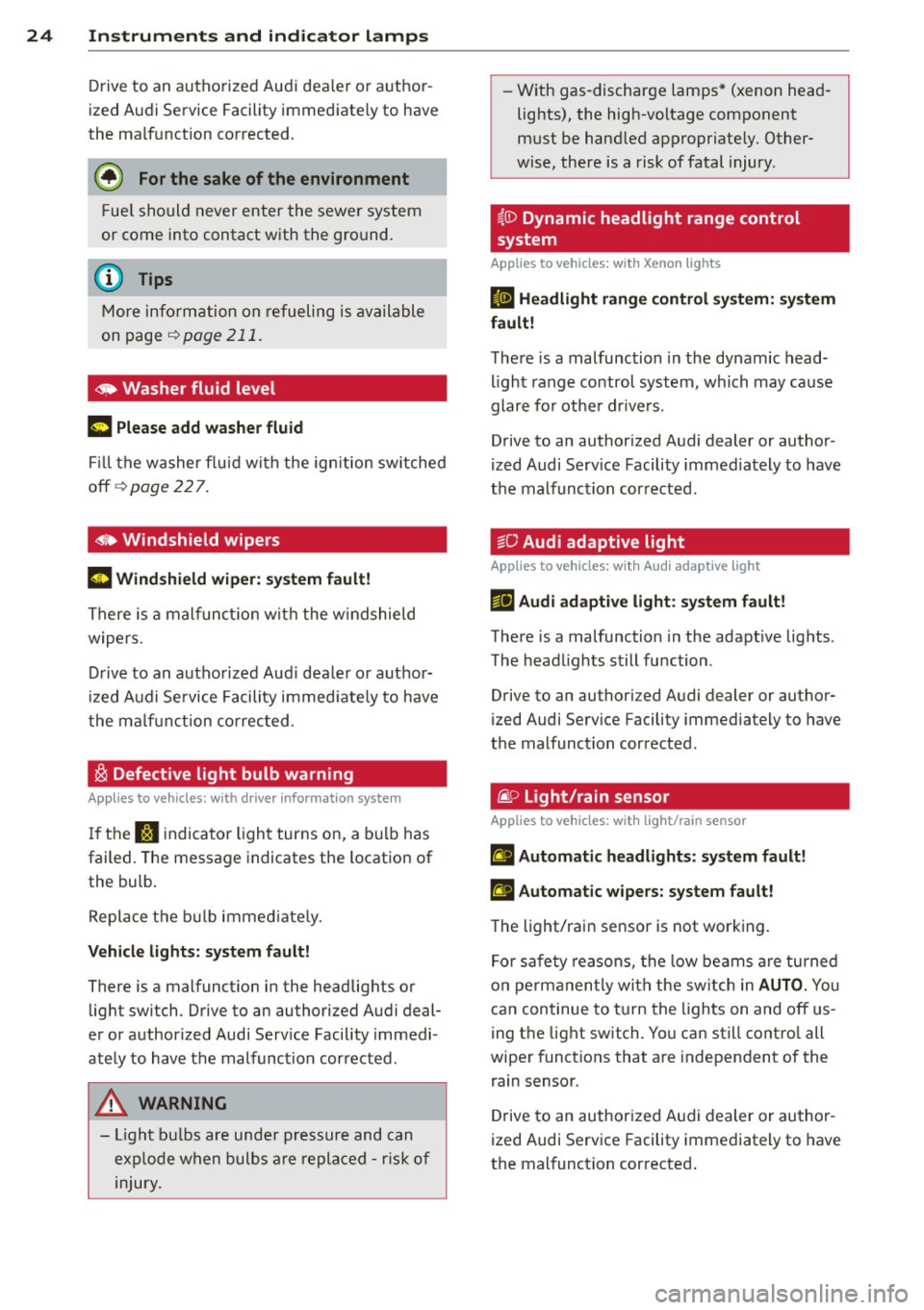
~ Defective light bulb warning
Applies to vehicles: with driver informatio n system
If the J:i indicator light turns on, a bulb has
failed. The message indicates the location of
the bulb .
Replace the bulb immed iately.
Vehicle lights: system fault!
There is a malfunction in the headlights or
light switch . Drive to an authorized Audi deal
er or authorized Audi Service Facility immedi
ately to have the malfunction corrected.
A WARNING
-
- Light bulbs are under pressure and can
exp lode when bulbs are replaced -risk of
injury. -
With gas-discharge lamps* (xenon head
lights), the high-voltage component
must be handled appropriately. Other
wise, there is a risk of fatal injury .
i,ID Dynamic headlight range control
system
Applies to vehicles: with Xenon lights
II Headlight range control system: system
fault!
There is a malfunction in the dynamic head
li ght range control system, which may cause
glare for other drivers.
Drive to an authorized Audi dealer or author
ized Audi Serv ice Facility immediately to have
the malfunction corrected.
go Audi adaptive light
Applies to vehicles: with Audi adaptive light
&fl Audi adaptive light: system fault!
There is a malfunction in the adapt ive lights .
The headlights still function .
Drive to an authori zed Audi dealer or author
ized Audi Service Facility immediately to have
the malfunction corrected .
@:> Light/rain sensor
Applies to vehicles : with light/rain sensor
El Automatic hea dlights: system fault!
t!I Automatic wipers: system fault!
The light/rain sensor is not working.
For safety reasons, the low beams are turned
on permanently with the switch in
AUTO. You
can continue to turn the lights on and off us
ing the light switch. You can still contro l all
wiper funct ions that are independent of the
rain sensor .
Drive to an authorized Audi dealer or author
ized Audi Service Facility immediately to have
the malfunction corrected .
Page 28 of 302
26 Driver information system
Driver information
system
Overview
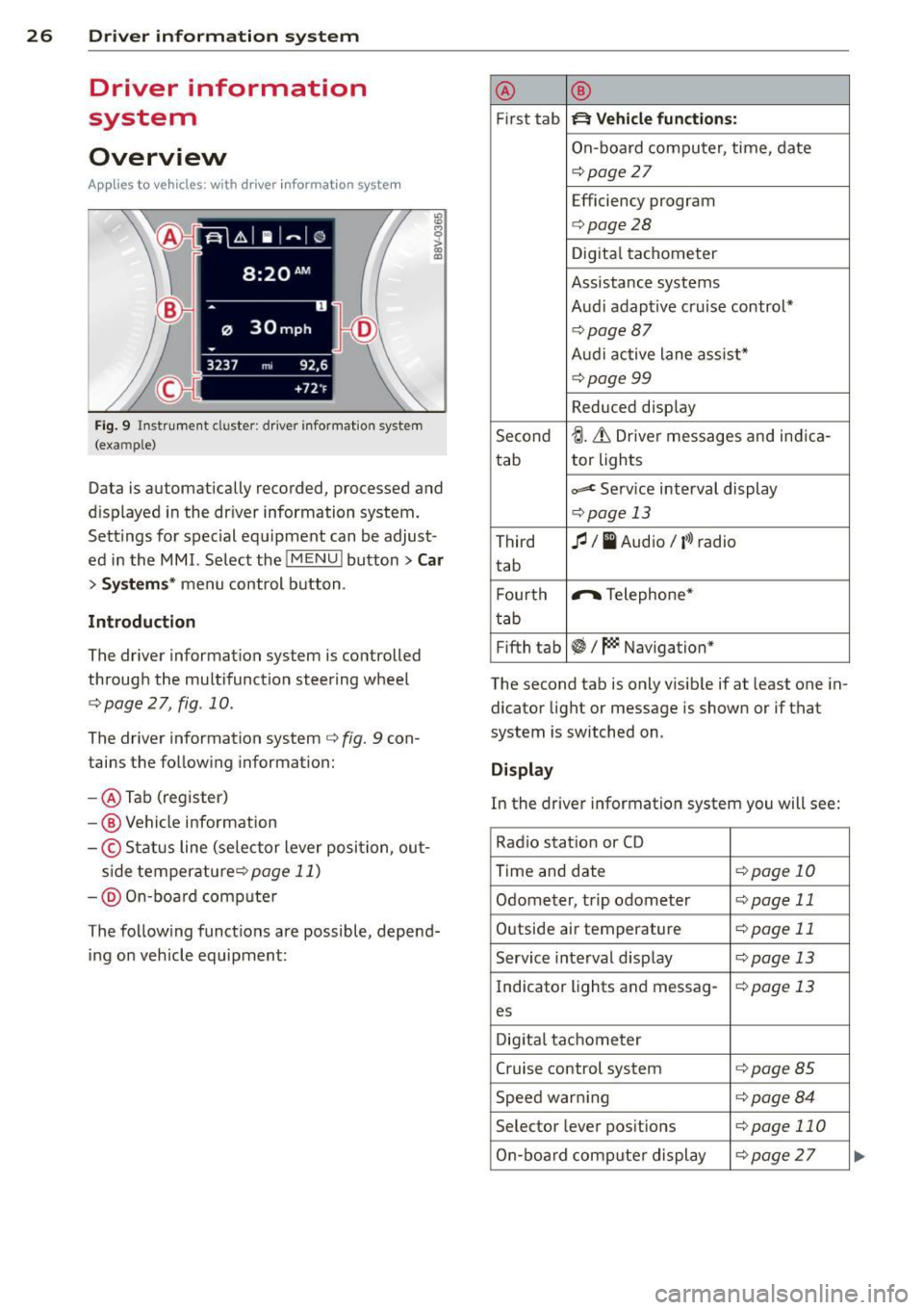
Ap plies to vehicles: with d river in format ion syste m
Fig. 9 Instrument cluster: driver informat ion system
(example)
Data is automatically recorded, processed and
d isplayed in the driver information system.
Sett ings for special equipment can be adjust
ed in the MMI. Select the
I MENU ! button> Car
> Systems* menu control button .
Introduction
The driver information system is controlled
through the multifunction steering wheel
c::;, page 2 7, fig. 10.
The driver information system c;, fig. 9 con
tains the following information:
- @ Tab (register)
-@ Vehicle information
-© Status line (se lector lever posi tion, out-
s ide temperaturec:=;,
page 11)
-@ On-board compute r
The following functions are possible, depend ing on vehicle equipment: @
®
First tab ~ Vehicle
functions:
On-board computer, time, date
c:=;,page 27
Efficiency program
c:=;,page28
Digital tachometer
Assistance systems
Audi adaptive cruise control*
¢page87
Audi active lane ass ist*
¢page99
Reduced display
Second
tJ. 6 Driver messages and ind ica-
tab tor lights
c,,..c Service interval display
c:=;,pag
e 13
Third fl I I Audio/ i»> radio
tab
F ourth .,..,.
Telephone*
tab
Fifth tab
~I~ Navigation*
The second tab is only visible if at least one in
dicator light or message is shown or if that
system is switched on .
Display
In the driver information system you will see:
Radio station or CD
Time and date
¢page 10
Odometer, trip odometer ¢page 11
Outside air temperature ¢page 11
Service interval display c::;, page 13
Indicator lights and messag-¢page 13
es
Digital tachometer
Cruise control system
c:=;,page 85
Speed warn ing c:=;,page 84
Selector lever positions c::;, page 110
On-board computer display c::;, page 27 ...
Page 30 of 302
28 Driver information system
• To access additional in formation be low or
above, rotate the thumbwheel @dow n or
up .
• To confirm a se lection, press the thumb
whee l@ .
• To select a fu nction programmed to a steer
i ng w heel button, p ress the bu tto n@ . Fo r
additional information, see
9 page 28, As
signing a fun ction to the programmable
s teering wheel button
Calling up the Vehicle functions
> Se lect the first tab w ith the button @.
• Press the button @. The
Vehicle functions
me nu is displayed 9 fig . 11 .
• To se lec t a menu item, turn and p ress the
t hu mbwheel @.
Resetting values to zero
• In the Vehicle functions menu, se lect On
board computer or Efficiency program .
• Se lect a va lue in th e desired t rip computer
o r i n the efficiency program.
• To reset the va lues i n a memo ry, press and
ho ld the thumbwhee l@ for one second.
Recalling indicator lights and messages
.. Pr ess the button CD repeate dly until the a
tab appears .
The
U tab is only vis ible whe n there is a mal
f u nction.
Assigning a functi on to the
programmable steering wheel button
> Se lect: the I MENU ! button >Car > Systems*
co ntrol button > Vehicle settings > Ste ering
wheel button programming .
The U tab is only visible whe n there is at
least one i ndicator light or message d is
p layed .
@ Tips
-If the vehicle battery is d iscon nected, all
memo ry values are e rased .
- Informati on on the efficiency program
¢ page 28.
- There is more in formation on the m ulti
function stee ring w heel in the
M MI*
owne r's manual.
Efficiency program
Description
Applies to vehicles: with driver informat ion system
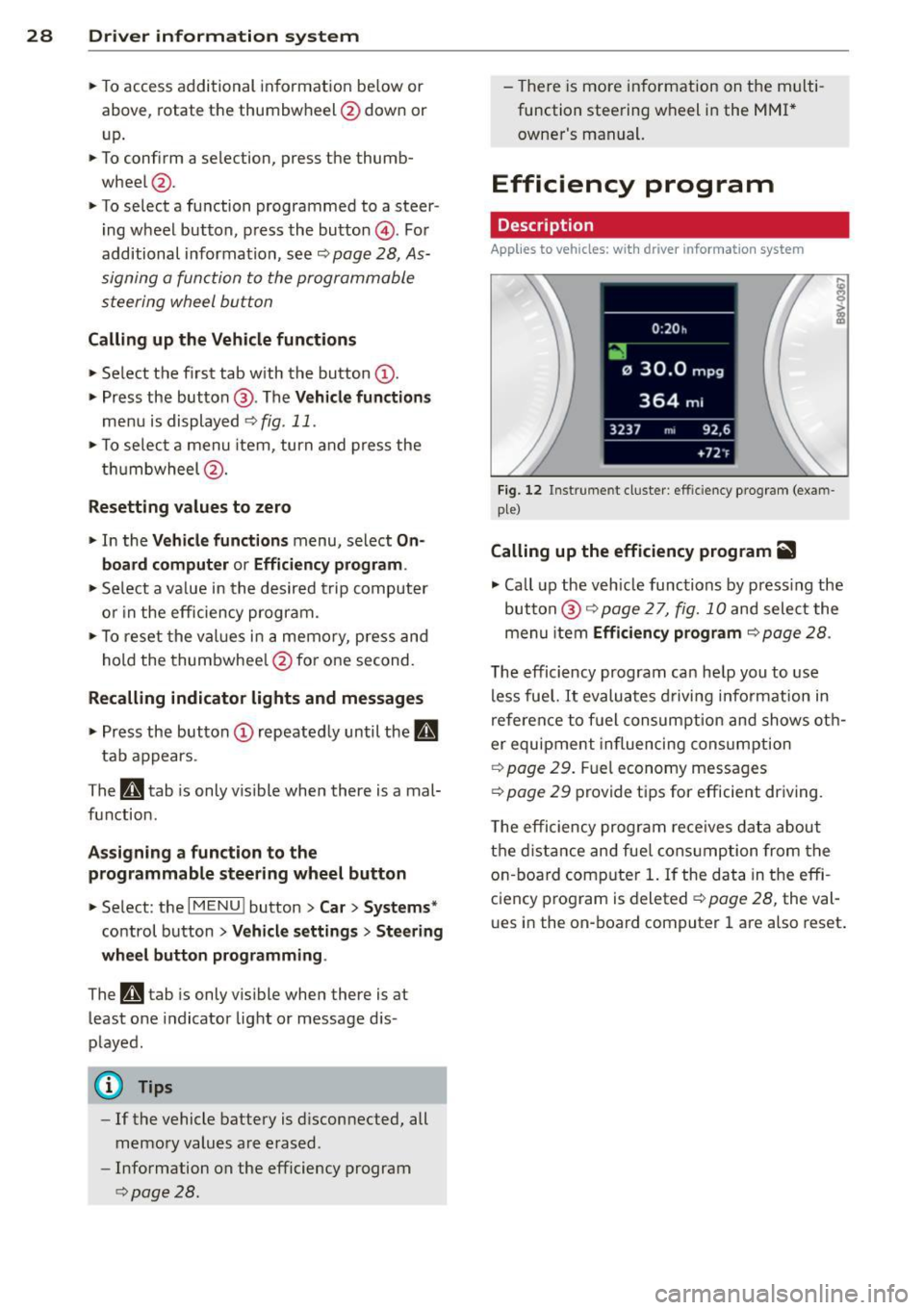
Fig . 12 Instrume nt cluste r: effi cie ncy progra m (exa m
p le)
Calling up the efficiency program ii
• Call up the veh icle func tions by press ing the
bu tton @
9 page 2 7, fig. 1 0 and select the
menu item
Efficiency program 9 page 28.
The effici ency program ca n he lp you to use
less fue l.
It evaluates d riving info rmation in
refe ren ce to f uel consum ption and shows ot h
er equipment in fluencing cons umption
9 page 2 9. Fuel economy messages
9 page 29 prov ide t ips for efficie nt dr iv ing .
T he efficiency progr am re ce ives da ta abou t
t h e di sta nce and fue l cons ump tion from the
on -board com puter
1. If the data in the effi
c iency p rog ram is deleted
¢ page 28, the va l
u es i n the on -board computer 1 are a lso reset .
Page 51 of 302
....,
N
r--. > co
rl I.O
"' rl
"' rl
Lights and Vision
Exterior Lighting
Switching lights on and off
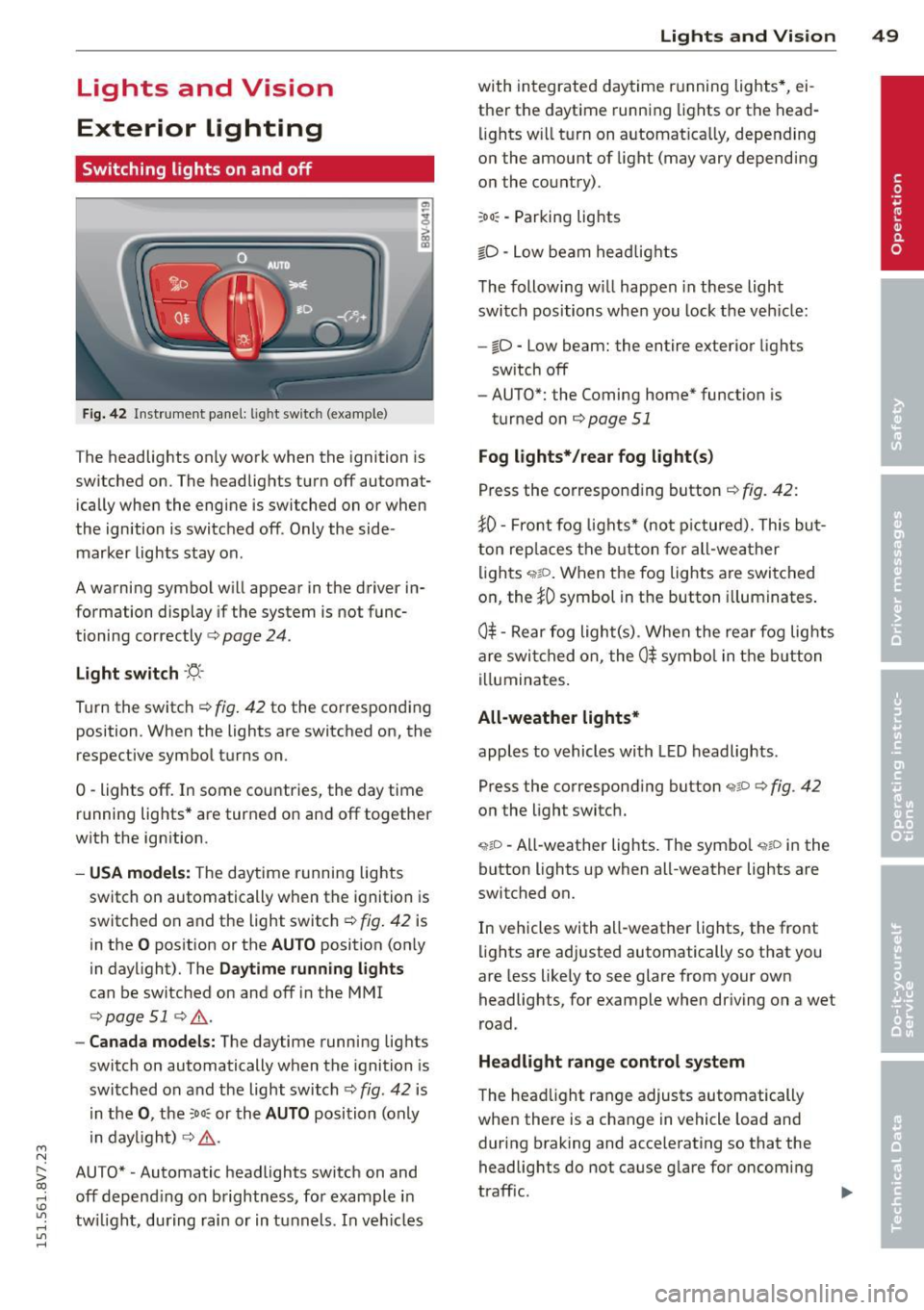
Fig. 42 Instrument panel: lig ht switc h (example)
The headlights only work when the ignition is
switched on. The headlights turn off automat ically when the engine is switched on or when
the ignition is switched off. Only the side marker lights stay on .
A warning symbol will appear in the driver in
formation display if the system is not func
tioning correctly <=>
page 24.
Light switch ·'ti- ·
Turn the switch¢ fig. 42 to the corresponding
position . When the lights are switched on, the
respective symbol turns on.
0 -lights off. In some countries, the day time
running lights* are turned on and off together
with the ign ition.
- USA models: The daytime running lights
switch on automatically when the ignition is
switched on and the light switch¢
fig. 42 is
in the
O position or the AUTO position (on ly
in daylight). The
Daytime running lights
can be switched on and off in the MMI
¢ page 51 ¢ ,& .
-Canada models: The daytime running lights
switch on automatically when the ignition is
switched on and the light switch¢
fig. 42 is
in the
0, the :Do: or the AUTO position (only
in daylight) ¢
,&.
AUTO* • Automatic headlights switch on and
off depend ing on brightness, for example in
tw ilight, during rain or in tunnels. In vehicles Lights
and Vision 49
with integrated daytime running lights*, ei
ther the daytime running lights or the head
li ghts will turn on automat ically, depending
on the amount of light (may vary depending
on the country).
: Do : -Parking lights
iD -Low beam headlights
The following w ill happen in these light
switch positions when you lock the vehicle:
-io -Low beam: the entire exterior lights
sw itch off
- AUTO*: the Coming home* function is
turned on ¢
page 51
Fog lights*/rear fog light(s)
Press the corresponding button¢ fig. 42:
JO· Front fog lights* (not pictured). This but
ton replaces the button for all-weather
lights
q;!D . When the fog lights are switched
on, the
JO symbol in the button illuminates.
0$ -Rear fog light(s) . When the rear fog lights
are switched on, the
0$ symbol in the button
illuminates.
All-weather lights*
apples to vehicles with LED headlights.
Press the corresponding button
<;?P c;, fig. 42
on the light switch.
~io -All-weather lights . The symbol <;;t,;D in the
button lights up when all-weather lights are
switched on.
In vehicles with all-weather lights, the front
lights are adjusted automatically so that you
are less likely to see glare from your own
headlights, for example when driving on a wet
road .
Headlight range control system
The head light range adjusts automatically
when there is a change in vehicle load and
during braking and accelerating so that the
headlights do not cause glare for oncoming
traff ic.
Page 52 of 302
50 Lights an d Vi sion
Audi adapt ive light *
The adaptive light on ly functions when the
light switch is in the AU TO position. You can
deactivate adaptive light in the MMI
r::!.> poge
51 .
When switched on, adapt ive light adjusts to
curves depending on the vehicle speed and
steering wheel ang le . This provides better
lighting throug h the curve . The system oper
ates in a speed r ange from approximately
6 mph (10 km/h) to 68 mph (110 km/h).
Static co rnering light* (vehicles with adaptive
light) -the corn ering light switches on auto
matica lly when the steering wheel is turned at
a certa in angle at speeds up to approximately
44 mph (70 km/h) and when the turn signal is
activated at speeds up to approximately
25 mph (40 km/h). The area to the s ide of the
vehicle is il luminated better when turning .
Speed dependent light distr ibution* -The
speed dependent light distribution adapts the
light in towns and on highways or express
ways. Intersect ions can also be ill uminated on
ve hicl es w ith a navigation system *.
Highwa y light funct ion *
(Vehicles with adaptive light or L ED head
lights) -This function adapts the light ing for
h ighway driving based on vehicle speed .
_&. WARNING
-Automati c headlights* are only intended
to assist the dr iver . T hey do not re lieve
the drive r of responsibility to check the
head lights and to turn them on man ually
according to the current light and visibili
ty conditions. For examp le, fog cannot
be detected by the light sensors. So al
ways switch on the low beam under
these weather conditions and when driv ing in the dark
fD.
- Acc idents could occur if you cannot see
the road ahead of you well and if others
on the road cannot see you . A lways
swit ch you r headlights o n so that yo u can see the road ahead of you and others can
see your vehicle from beh
ind.
- Please observe legal regulations when
using the lighting systems described.
(D Note
The rear fog lights shou ld only be turned
on in accordance with t raffic regu lations,
to prevent glare for traffic behind your ve hicle.
(D Tips
- The light sensor for the automatic head
lights * is in the rea rview mir ror mount.
Therefore, do not place any stickers in
this area o n the windshield .
- Some functions of the exterior lighting
can be adjusted
c> page 51.
-If you tu rn off the ignition whi le the ex
terior lights are on and open the door,
you will hear a warning tone.
- The tail lights do not sw itch on when the
daytime r unning lights switch on.
- In cool or damp weather, the inside of
the headlights, turn signals and tail
lights can fog over due to the tempera
ture difference between the inside and
outside. They w ill clear shortly after
switching them on . This does not affect
the serv ice life of the lighting.
- A message w ill appea r in the i nstrument
cluster if there is a malfunction in the
light senso r
r::!.> page 24.
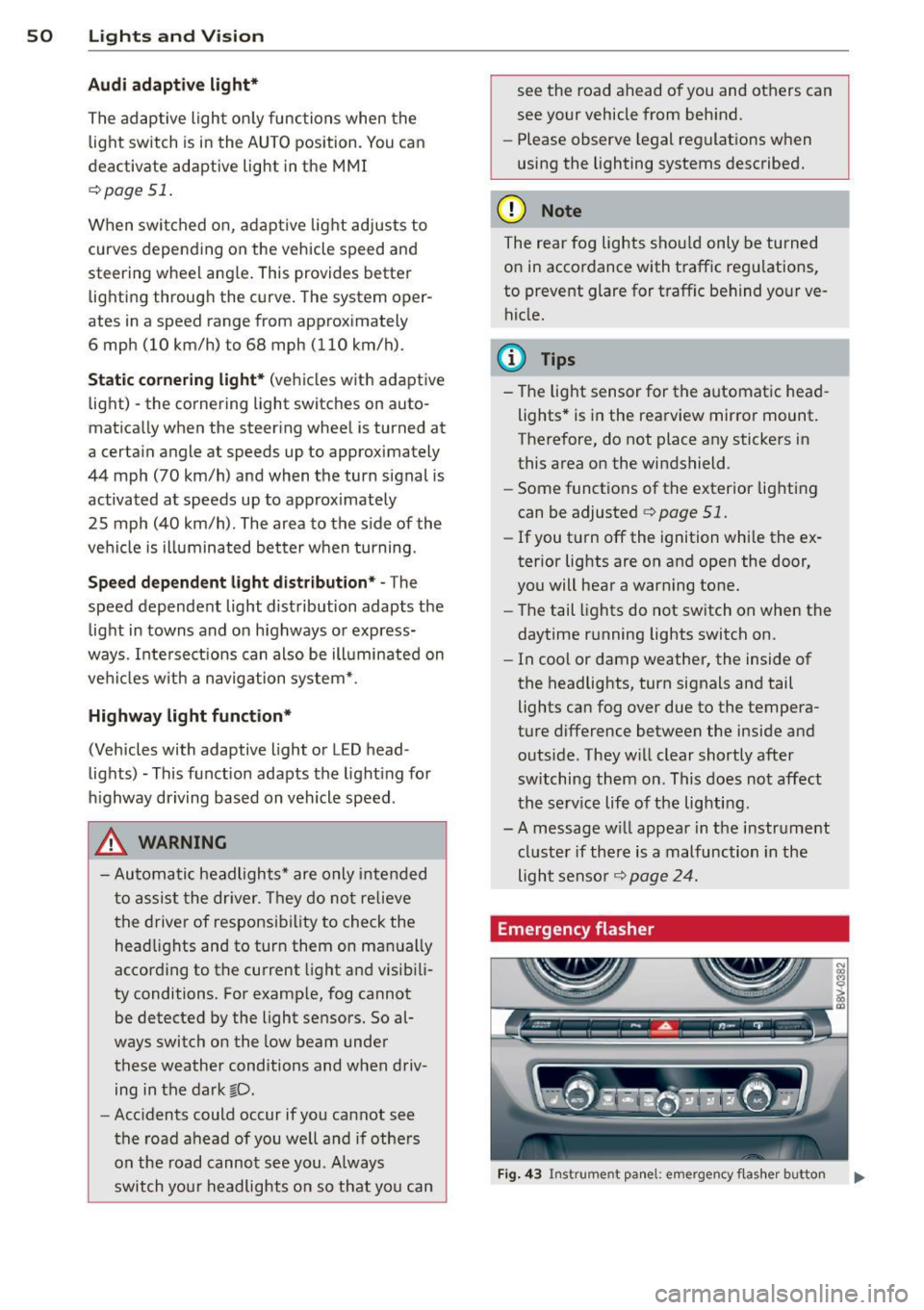
Emergency flasher
Fig . 4 3 Ins trume nt panel: e mergency f las her button
N
I
Page 53 of 302
M N ,....
> co ,...., \!) ..,.,
,...., ..,., ,....,
The emergency flashers makes other drivers
aware of your vehicle in dangerous situations.
.,. Press the~ button to sw itch the emergency
f lashers on or off.
You can indicate a lane change or a turn when
the eme rgency flashers are sw itched on by us
i ng the turn signa l lever. The emergency flash
ers stop temporarily .
The emergency flashers also work when the ignit io n is tu rned off.
(D Tips
You should switch the emergency flashers
on if:
- You are the last ca r in a traffic jam so
that all other veh icles approach ing from
behind can see you, or if
- Your vehicle has broken down or you are
having an emergency, or if
- Your vehicle is being towed or if you are
tow ing another vehicle .
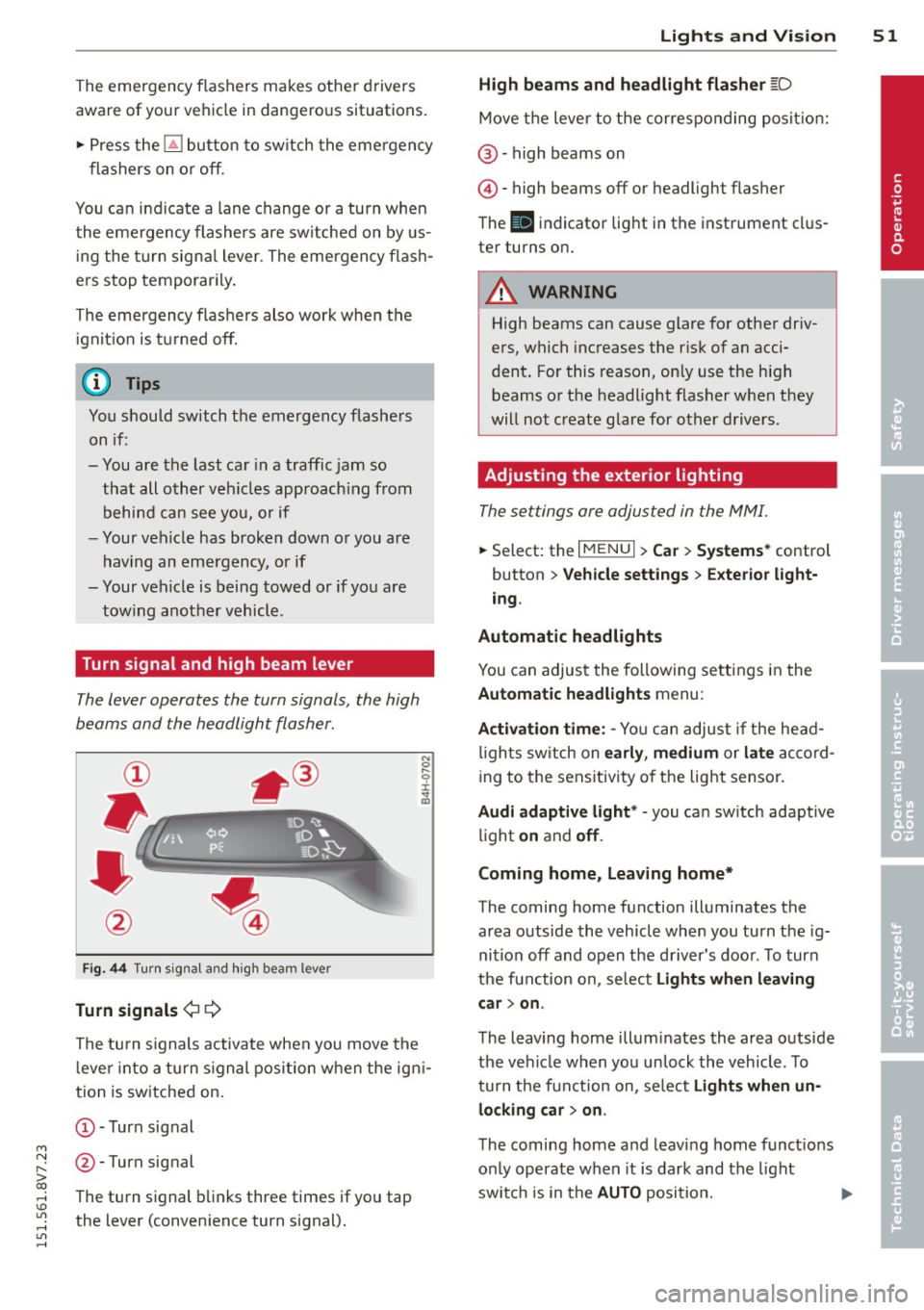
Turn signal and high beam lever
The lever operates the turn signals, the high
beams and the headlight flasher.
Fig. 44 Turn sig na l and high beam lever
Turn signal s¢¢
The turn s ignals activate when you move the
l ever into a turn s ignal position when the igni
tion is switched on.
(D-Turn signal
@-Turn signal
The turn signal blinks three times if you tap
the lever (convenience turn signal).
Lights and Visi on 5 1
High beams and headlight flasher [D
Move the lever to the correspo nding posit io n:
@ -high beams on
©-high beams off or headlight flasher
T he
II indicator light in the instrument cl us
ter turns on.
A WARNING
High beams can cause glare for other driv
ers, which increases the risk of an acci
dent. For this reason, on ly use the high
beams or the headlight flasher when they
will not create glare for other drivers.
Adjusting the exterior lighting
The settings ore adjusted in the MMI.
... Select: the I MENU I> Car> Syste ms* control
button
> Vehicle sett ings > Exte rior light
ing .
Automatic headlights
You can adjus t the following se ttings in the
Automatic headlights menu :
Activation time : -Yo u can adjust if the head
l igh ts sw itch on
ea rly , medium or la te ac co rd
ing to the sens itivity o f the light sensor.
Audi adapti ve light * -you ca n sw itch adaptive
li gh t
on and off .
Coming home, Leaving home*
The coming home function illuminates the
area outside the vehicle whe n you tu rn the ig
nition off and open the d river 's doo r. T o turn
the function on, se lect
Light s when l eaving
c ar > on .
The leaving home illum inates the area outs ide
the vehi cle when you un lock the vehicle . To
turn the function on, se lect
Light s when un
locking car > on .
The coming home and leaving home funct ions
on ly operate when it is dark and the light
switch is in the
AUTO position. ..,.
•
Page 54 of 302
52 Lights and Vision
Daytime running lights*
USA models:
The d ay time runni ng lights can
b e sw itche d on o r off using the MM I. Select
on or off .
Canada models:
T his funct ion can be switche d
off. They ac tiva te a utomat ic all y ea ch tim e the
igni tion is swit ched on. This menu item is
shown with a "gray backg ro und" .
Travel mode*
The headlight beam is asy mme trical. This pro
vides s tronger illum ina tio n on the s ide of the
ro ad o n wh ich you are driv ing. In vehicles wi th
Xenon headlights* with turning light* or LED
headlights* ,
you must adjust the hea dlights
when yo u are d riving in a country w here the
traffic direction is opposite from you r own
country. Othe rwise, oncom ing traffic w ill be
b lin ded by the gla re from the head lights. An
ad justment is not needed in vehicles with Xe
non head lights without t urning lights .
To prevent glare:
- Trave l mode m ust be act ivated in veh icles
with Xenon headlights* and turning light * or
LED headlights *. Select: the iME NUI b utton
> Car > Systems * contro l butto n > Vehicle
settings
> Exterior lighting > Light for driv
ing on left ,
for example .
After you have adjusted the headlights, the
following message will appear:
B Headlight converter active for driving on
left. Range reduced!
(D Tips
W hen trave l mode is activ ate d, a display in
the dr iver inf orm ation system i ndicates
this each time you switch t he ignit ion on .
Interior lighting
Interior l ight s
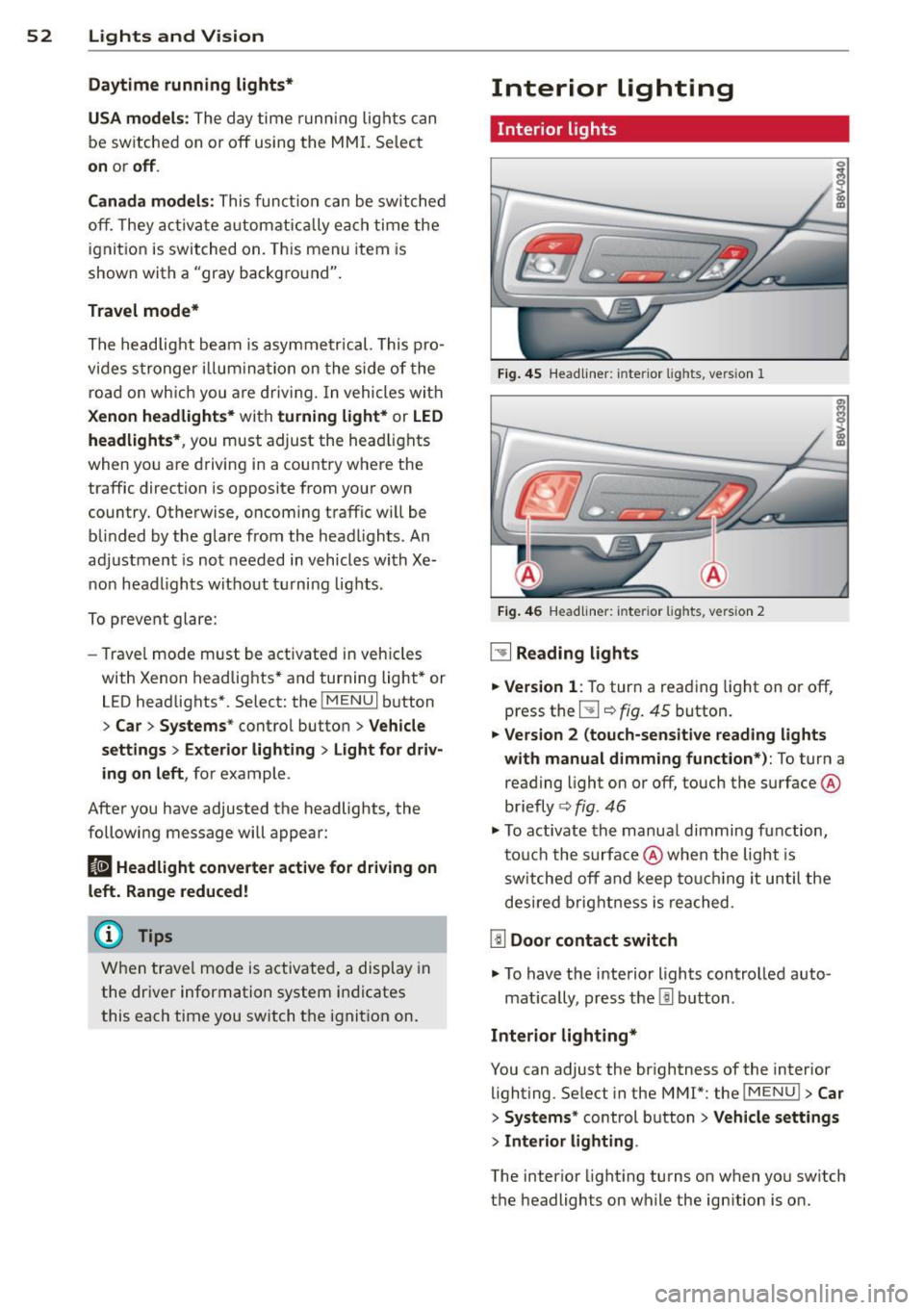
Fig. 4 5 Headliner: in te rior lights, vers ion 1
Fi g. 46
Headli ne r: int eri or ligh ts, versio n 2
~ Reading lights
.. Version
1: To tur n a reading light on or off,
press the
5J ¢ fig. 45 button.
.. Version 2 (touch-sensitive reading lights
with manual dimming function*):
To turn a
reading light on or off , touch the surface @
briefly ¢
fig. 46
.. To activate th e manua l dimming function,
t ouc h the surface @when the light is
s w itched off and keep to uchi ng it until the
des ired brig htn ess i s reached.
[ID Door contact switch
.. To have the interio r lights controlled auto -
mat ica lly, press the
l!l b utton .
Interior lighting*
You can adjust the brightness of the interior
lighting. Se lect in the MMI*: the iME NUI
> Car
> Systems* control b utton > Vehicle settings
> Interior lighting .
The interior light ing turns on when yo u sw itch
t h e headlights on while the ign ition is o n.
Page 55 of 302
....,
N
r--. > co
rl I.O
"' rl
"' rl
Instrument illumination
The brightness of the instrument cluster and
the center console can be adjusted.
"' 5 0
'
Fig. 47 Instrument illum ination
Requirement: The light must be switched on.
• Press the knob to release it.
• Turn the knob toward"." or"+" to reduce or
increase the brightness .
• Press the knob again to return it to i ts or ig i·
nal position.
(D Tips
The needles and gauges in the instrument
cluste r illuminate when the head lights are
off and the ign ition is switched one. Theil
lumination reduces automatically and
eventua lly turns off as brightness outside
decreases. This function reminds the driver
to turn the headlights on at the appropri·
ate t ime.
Vision
Sun visors
F ig. 48 Left s ide: sun vi sor
The s un visors can be moved out of their
b rackets and turned toward the doors
(D.
Lights and Vision 53
The mirror light switches on when the cover
over the vanity mirror* @opens.
Windshield wipers
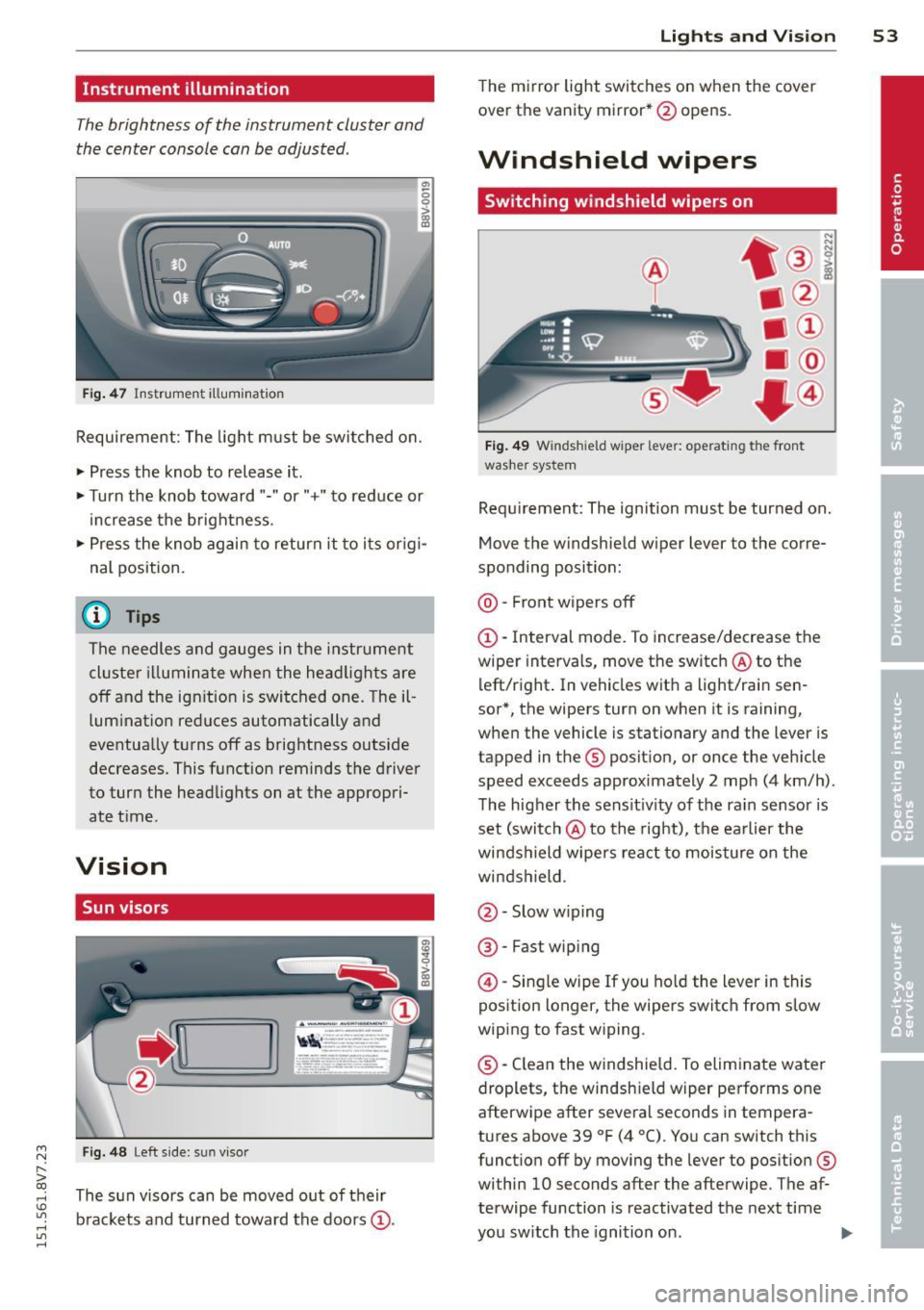
Switching windshield wipers on
Fig. 49 Windsh ield wiper lever: operating the front
washer system
Requ irement: The ignition must be turned on.
Move the windshield w iper lever to the corre
sponding position:
@ · Front wipers off
(D-Interval mode. To increase/decrease the
wiper intervals, move the switch @to the
left/right . In vehicles wit h a light/rai n sen
sor*, the wipers turn on when it is raining,
when the vehicle is stationary and the lever is
tapped in the ® position, or once the vehicle
speed exceeds approximately 2 mph (4 km/h).
The higher the sens itiv ity of the ra in sensor is
set (switch @to the right), the earlier the
winds hield wipers react to moisture on the
windshield.
@ · Slow w iping
@ · Fast wip ing
@ -Single wipe If you hold the lever in this
position longer, the wipers switch from slow
wiping to fast wiping.
® -Clean the windshield. To eliminate water
droplets, the windsh ield wiper performs one
afterwipe after several seconds in tempera
tures above 39 °F (4 °(). You can switch this
function off by moving the lever to position ®
within 10 seconds after the afterwipe . The af
terwipe function is reactivated the next time
you switch the ignition on.
II>
Page 57 of 302
....,
N
r--. > co
rl I.O
"' rl
"' rl
Removing the wiper blade
• Fold the windshield wiper arm away from
the windshie ld .
• Press the locking knob@¢
fig. 50 on the
wiper blade. Hold the wiper blade firm ly.
• Remove the wiper blade in the direction of
the arrow.
In sta ll ing th e wiper blade
• Insert the new wiper blade into the mount
on the wiper arm @until you hear it latch
into place.
• Place the wiper arm back on the windshie ld.
• Turn the service pos ition
off.
A WARNING
For safety reasons, the windshield wiper
blades should be replaced once or twice
each year.
(D Note
- The windshield wiper blades must only
be folded away when in the serv ice posi
tion. Otherw ise, you risk damaging the
paint on the hood or the wi ndshield wip
er motor.
- You should not drive your veh icle or
press the w indshield w iper lever when
the w iper arms are folded away from the
windsh ield . The w indshield w ipers would
move back into their origina l position
and could damage the hood and wind
shield.
- To prevent damage to the windshield
washer system, always loosen w iper
blades that have frozen to the wind
s h ield before turning the wipers on.
- To prevent damage to the wiper blades,
do not apply gasoline, petroleum, thin
ning agents or other solvents on the wip
er blades or near them.
- To prevent damage to the wiper arms or
other components, do not try to move
the windshie ld w ipers by hand .
-
Lights and Visi on 55
@ Tips
-Commercial hot wax such as t he types
used by car washes make it more d ifficult
to clean t he windshie ld.
- Yo u can also use the service position, for
example, if yo u want to protect the
w indshield from icing by using a cover .
- Yo u cannot activate the serv ice position
when the hood is open.
Outside mirror
Adjusting the exterior mirrors
Fi g. 51 Dr iver's door : knob for the ex te ri or mi rrors (ex
a m ple)
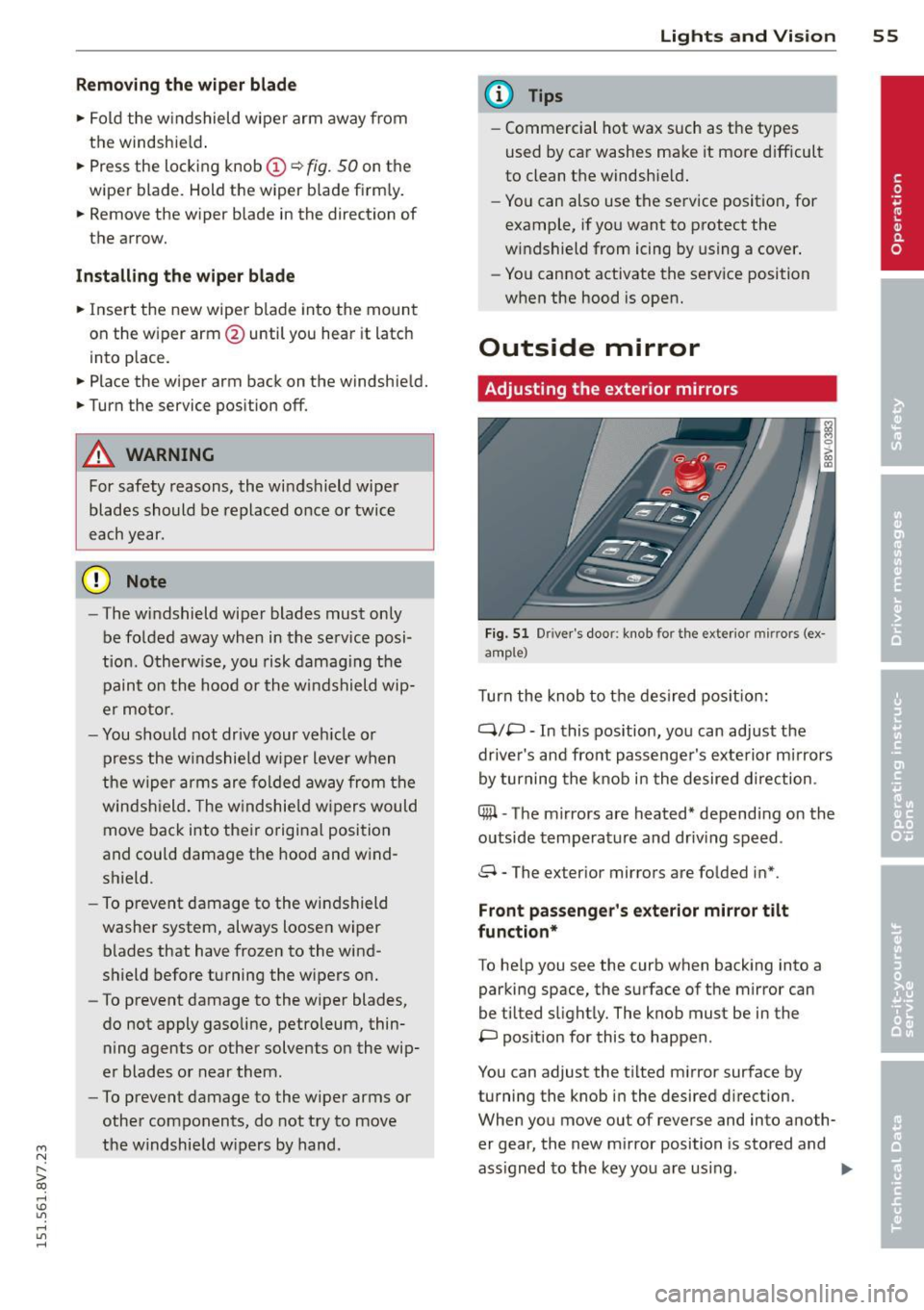
T urn the knob to t he des ired pos it io n:
Q/P -In this position, you can adjust the
driver's and front passenge r's exte rior mirrors
by turning the knob i n the desired d irection .
C@ -The mirrors are heated* depend ing on the
outside temperature and driv ing speed .
8 - The exterior mirrors are folded in* .
Front passeng er's exterior mirror tilt
fun ction*
To he lp you see the curb when backing into a
parking space, the surface of the mirror can
be tilted s light ly. The knob must be in the
P pos ition for this to happen .
You can adjust the t ilted mirror surface by
turning the knob i n the desired d irection.
When you move out of reverse and into anoth
er gear, the new m irror position is sto red and
ass igned to the key you are using .
II>
Page 58 of 302
56 Lig hts an d Vi sion
The mirror goes back into its origina l position
once you drive forward faster than 9 mph
(15 km/h) or turn the ign ition
off.
Folding mirr ors in and out
To fold the mirrors in w ith the knob, turn the
knob in the 8 pos ition.
To fold the m irrors out, turn the knob in the
q or
P or O position .
You can set in the MMI if the mirrors shou ld
fold in when locking the vehicle or not
c::> page 36. When you lock the vehicle , the
mirrors fold in . When you sta rt the ignit ion,
the m irrors fold out .
A WARNING
Curved mirror s urfaces (convex or asphe
ric*) enlarge the field of vision. However,
they make objects in the mirror appear sma ller and farther away . Your may esti
mate incorrectly when you use these m ir
rors to gauge your d istance from the
veh icles behind you when changing lanes -
accident risk!
@ Note
- For vehicles with power folding exterior
mirrors*: If the m irror housing was
moved by outside forces (such as an im
pact when maneuvering), you must use
the power folding function to fold the mirro r all the way out. You will hear a
l oud noise when the m irrors are latched
back in place. The mir ror housi ng must
not be moved back into place by hand
because this would affect the mirror
mechan ism.
- Applies to vehicles witho ut power fold
i ng exter ior mirrors: If the mirror hous
ing was moved by outside forces (suc h as
in impact during maneuvering), you
must move the m irror housing back into
place by hand.
- If you wash the vehicle in an automatic
car wash, yo u m ust fold the e xterior m ir
r o rs in to reduce the risk of damage to
the m irrors. Never fold power fo ld ing ex-
-
terior mirrors by hand . On ly fold them in
and out using the power controls.
(D Tips
If t he power ad justmen t fails, bot h mir
ro rs can be adjusted by hand by pressing
on the edge of the mirror surface.
Dimming the mirrors
Your vehicle is equipp ed with a manual or au
tomatic* dimming rearview mirror.
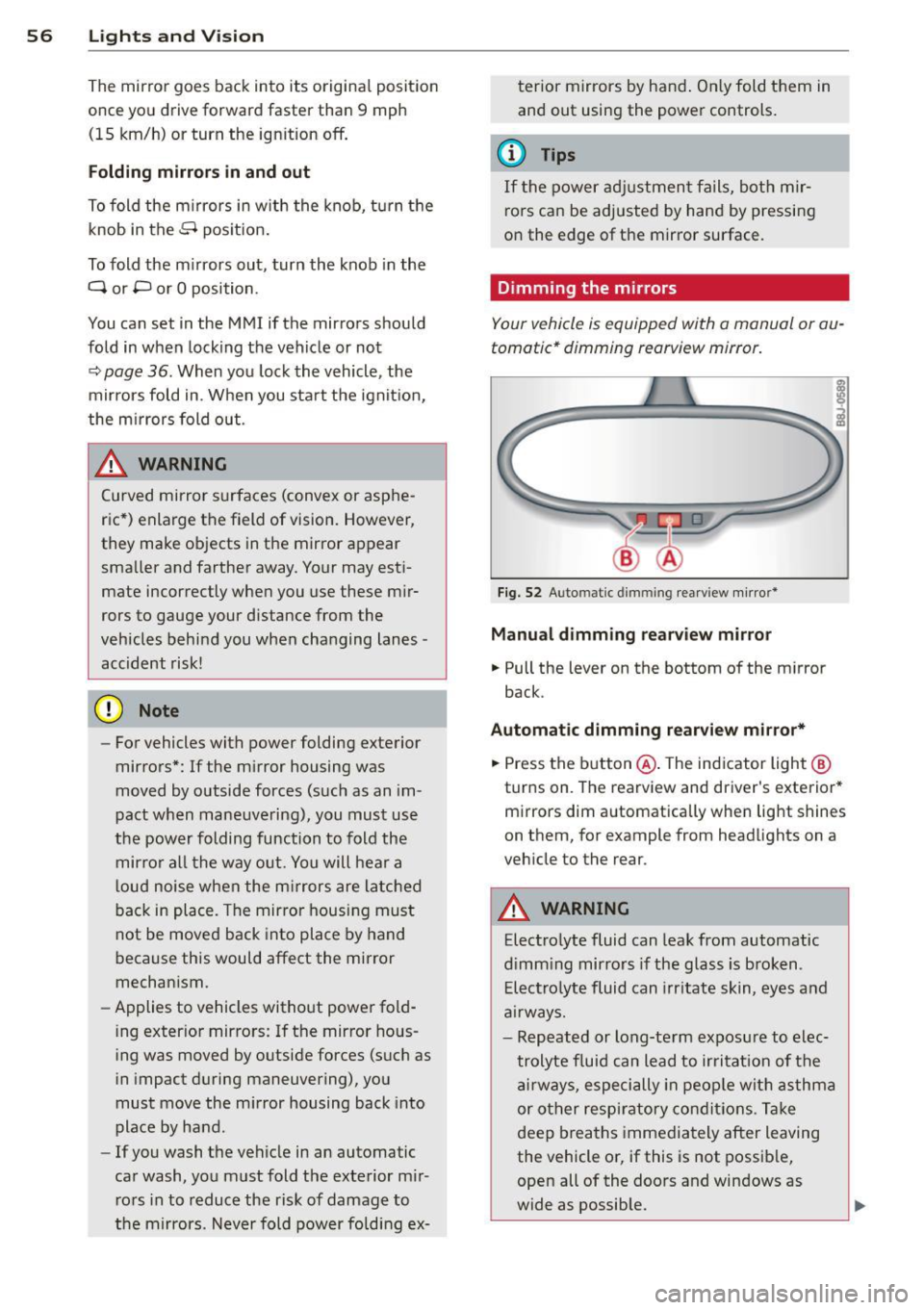
F ig . 52 A uto matic dimmin g rea rv iew mi rro r*
Manu al dimming rearv iew mirro r
.. Pull the lever on the bottom of the m irror
back .
Automat ic dimming r earview mirror*
.. Press the b utton @. The ind icator light @
turns on . The rearview and driver's exterior*
mirrors dim a utomatically when light shines
on them, for example from headlights on a
veh icle to the rear .
A WARNING
Electrolyte fluid can leak from automatic
d imm ing mirrors if the glass is b roken .
E le ctro lyte fluid can irr itate skin, eyes and
a irways.
- Repeated or long-te rm exposure to e lec
t rolyte f luid can lead to ir ritat io n of the
a ir ways, especi ally in peo ple wit h asthma
or other respiratory co nd it ions. T ake
deep breaths immediately after leaving
the vehicle or, if this is not possib le,
open all of the doo rs and windows as
wide as possible.