tow AUDI A3 CABRIOLET 2015 User Guide
[x] Cancel search | Manufacturer: AUDI, Model Year: 2015, Model line: A3 CABRIOLET, Model: AUDI A3 CABRIOLET 2015Pages: 302, PDF Size: 73.83 MB
Page 81 of 302
M N ,....
> co ,...., \!) 1.1'1 ,...., 1.1'1 ,....,
Switchin g th e ig nition on /off
If the> ,:r- u indicator l ight blinks and the mes
sage
Ple ase move s teering wheel appea rs
when switching the ignition on, the steering is locked by th e steering lock. In this case, turn
the steering wheel slight ly to the left/ right.
.. To switch the ignition on or
off, press the
I S TAR T ENG INE S T OPI button. Do not press
the brake pedal whil e doing this .
Starting the engin e
Your vehicle is equipped with launch cont ro l.
The engine starts automa tically when you
press the
I S T AR T ENG INE S T OP I button brief
l y.
.. Press the brake peda l and move the se lector
lever to the P or N pos ition .
.. Press the
I STAR T ENGINE STOP I button
briefly . The eng ine will star t.
Majo r electrical equ ipment switches
off tem
porarily when starting the eng ine .
I f the engine does not start immediately , stop
the starting procedu re by push ing the
I S TAR T ENGINE ST OP ! button again and re
peat after 30 seconds .
Automatic start m alfunction
If the Ila indicator l ight turns on (gasoline en
g ine) when you start the engine, there is an
automatic sta rt malfunction .
To start the eng ine, press and hold the
!STAR T ENGIN E STOP ! button until the eng ine
runs.
Drive to an authorized Aud i dealer or author
i z ed Audi Service Fac ility immed iately to have
the malfunction corrected .
A WARNING
-Never allow the engine to ru n in confined
spaces -there is a r isk of asphyxiation.
- Always take the veh icle key with you
when leaving the vehicle, even for a
short per iod of t ime . This applies partic
ularly when chi ldren remain in the vehi
cle . Otherwise the children could start
Dri vin g 79
the engine or operate electrical equip
ment such as power w indows.
- Please note that the brake booster and
power steering only work when the en
gine is running. When the engine
off, you
must use more force to steer or brake
the vehicle . Because the usual steer ing
and brak ing capability is not avai lable,
the risk of accidents or injur ies increases .
(D Note
-Avo id h igh engine speed, full throttle,
and heavy eng ine load as long as the en
gine has not reached operat ing tempera
ture yet. You could damage the engine .
- The engine cannot be started by pushing
or towing .
@ For the sake of the environment
Do not let the eng ine run wh ile parked to
warm up . Begin dr iv ing immediately . Th is
reduces unnecessary emissions .
(D Tips
-After starting a cold engine, there may
be a brief period of increased no ise be
cause the oil press ure must f irst bu ild up
in the hydraulic va lve ad justers. This is
normal and not a cause for concern.
- If the . indicator light blinks in the in
st rument cluste r before switching the ig
nition
off, the ignit ion wi ll not switch on
again .
qpoge 192
- If you leave your vehi cle wit h the ignition
switched on, the ign it ion w ill switch
off
after a certain amount of time . Make
sure that electrical equipment such as
the exterior lights are switched
off .
T · th · ff using the
button
App lies to vehicles: wit h convenience key
.. Bring the veh icle to a full stop .
.. Move the se lector lever into the P posit ion .
.. Press the
I STA RT E NGINE ST OP ! button
q page 78, fig. 80. ..,.
•
Page 88 of 302
86 Driving
• To store the speed, p ress the button @. T he
II (USA models) I i'I (Canada models)
turns on in the instrument cluster.
Changing speed
Applies to vehicles: with cru ise control system
• To increase or decrease the speed in incre
ments,
t ap the lever in the 010 direction
c:> page 85, fig. 83.
• To increase or decrease the speed qu ickly,
h o ld the leve r in the 010 direction until
the des ired speed is reached .
Overriding the speed
You can press the acce lerator pedal down to
increase your speed, for example if you want
to pass someone . The speed you saved earlier
will resume as soon as you release the acceler
ator pedal.
I f, however, you exceed your saved speed by 5
mph (10 km/h) for longer than 6 minutes, the
cruise contro l turns off temporari ly. The
Ill
(USA models) I El (Canada models) indicator
light in the instrument cluster turns off and
the stored speed is retained.
Preselecting the speed
Applies to vehicles: with cruise control system
You can preselect your desired speed when
the vehicle is stationary.
• Switch the ignition on.
• Pull the lever into position
(D c:> page 85,
fig. 83.
• To increase or decrease the speed, tap the
lever in the
0 10 d irect io n.
This funct ion makes it possible, for example,
to save the speed you want before driving on
the highway . Once on the highway, activate
the cruise contro l by pull ing the lever towa rd
(D .
Switching off
Applies to vehicles: with cruise control system
Temporary deactivat ion
• Press the brake pedal, or
• Press the leve r into position @(not clicked
into p lace)
~ page 85, fig. 83, or
Switching off completely
• Press the lever into position @(clicked into
place), or
• Switch the ignit ion off.
The speed you stored will be retained if the
c ruise control has been switched off tempora
rily . To resume the stored speed, re lease the
brake pedal and pu ll the lever into position
(D.
The stored speed is erased when the cruise
control is sw itched off complete ly or the igni
t ion is switched off .
,&. WARNING
You should only resume the stored speed if
i t is not too high for ex isting traffic con di
tions . Othe rwise you r is k an acc ident.
(D Tips
- If the bra kes become too heated whi le
dr iving, t he cr uise control sw itches off. If
t his happens w hile d riving downhill, you
can relieve t he b rakes by shifting into a
lower gear.
- W hen the cruise cont rol is activa ted, E SC
sport mode cannot be switched on .
Page 91 of 302
....,
N
r--. > co
rl I.O
"' rl
"' rl
What can adaptive cruise control do?
The adaptive cruise control system uses rada r
and a video camera. The radar is subject to
designated system limits ¢ page 87.
On open roads w ith no traffic, it functions l ike
a cruise control system . Th e stored speed is
maintained . When approaching an object
ahead and the system detects it, the adaptive
cr uise control system automatically brakes to
match that object's speed and then maintains
the stored distance. As soon as the system
does not detect an object ahead, adaptive
cru ise control accelerates up to the stored
speed .
With in the limits of the system, adaptive
cru ise control can brake in stop-and-go traff ic
until the vehicle is stationary and then begin
driving aga in under certa in conditions
¢ page 91, Driving in stop-and-go traffic.
Which functions can be controlled?
When you switch adaptive cruise control on,
you can set the current speed as the "control speed" ¢ page
89, Switching on/off.
When driving, you can stop cruise control
c::> page 91 or change the speed c::> page 90
at any time .
You can also adjust the following settings:
- Dis ta nee
c::> page 92
- Driving program c::>page
93
- Driving mode c::> page 93
l) Speed limit s depend on the country and the speedom
eter .
Audi adaptive cruise control 89
Switching on/off
Applies to vehicles: wit h Aud i adapt ive cr uise contro l
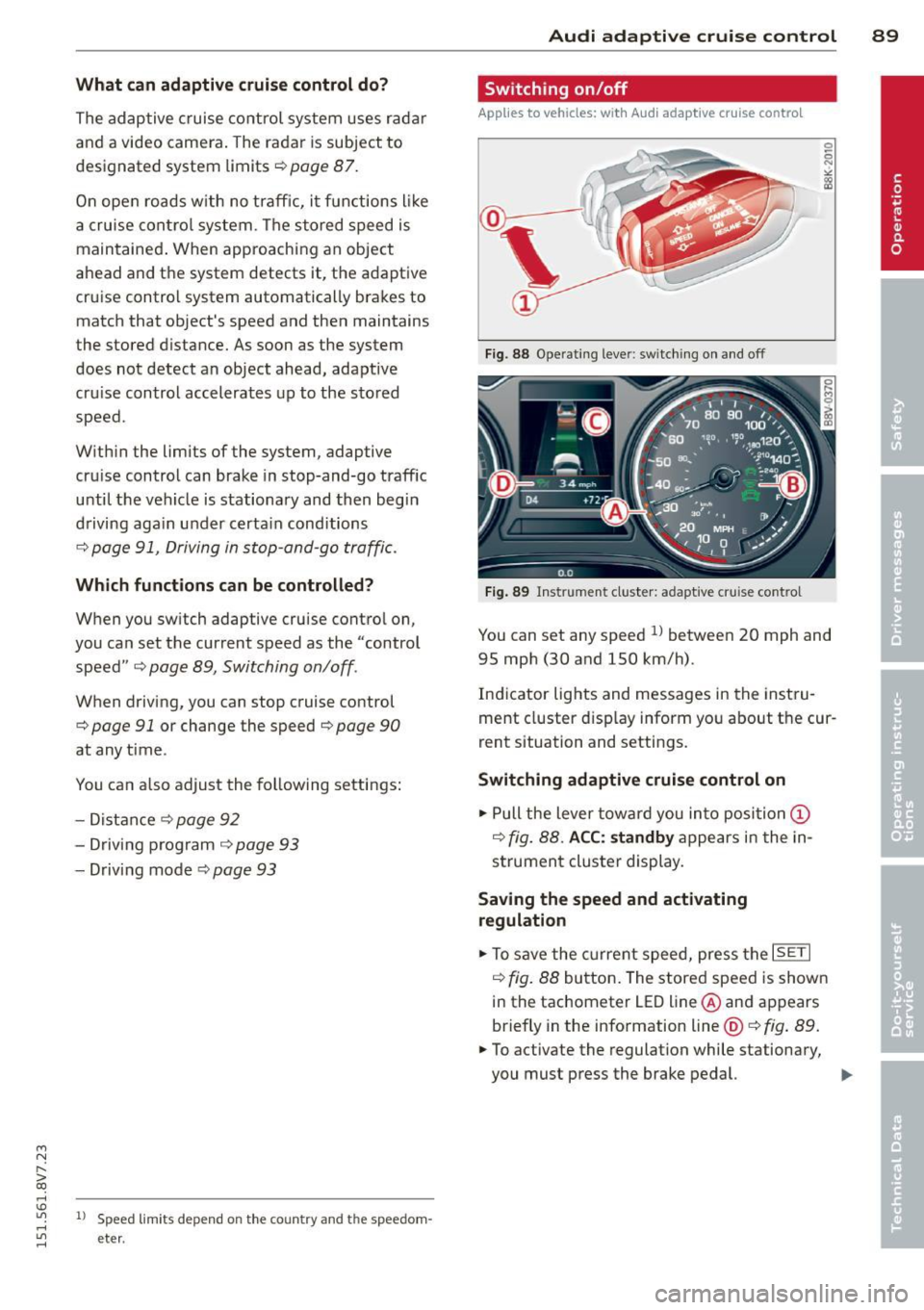
Fig. 88 Oper ating lever: swit c hing on and off
Fig. 89 Instrument cluster: adapt ive cruise control
You can set any speed ll between 20 mph and
95 mph (30 and 150 km/h).
Indicator lights and messages in the instru
ment cluster disp lay inform you about the cur
rent situation and settings.
Switching adaptive cruise control on
.,. Pull the lever toward you into posi tion (I)
c::> fig. 88. ACC: standby appears in the in
strument cluster display.
Saving the speed and activating regulation
.,. To save the current speed, press the ISETI
c::> fig. 88 button. The stored speed is shown
in the tachometer LED line@and appears
briefly in the information line @ c::>fig .
89 .
.,. To activate the regulation while stationary,
you must press the brake pedal. ..,.
Page 94 of 302
92 Audi adaptive cruise control
• press the brake peda l.
• To resume the stored speed, move the lever
i nto position @.
Interrupting cruise control when stopped
• Push the lever away from you into position
@. The message ACC : standby appears .
• To resume cru ise control, press the brake
pedal and pull the lever toward you into po
sition @.
A WARNING
It is dangerous to activate cruise control
and resume the stored speed when the
current road, traffic or weather conditions
do not permit th is . Th is could result in a
crash .
Setting the distance
Applies to vehicles: wit h Audi adapt ive cru ise co ntrol
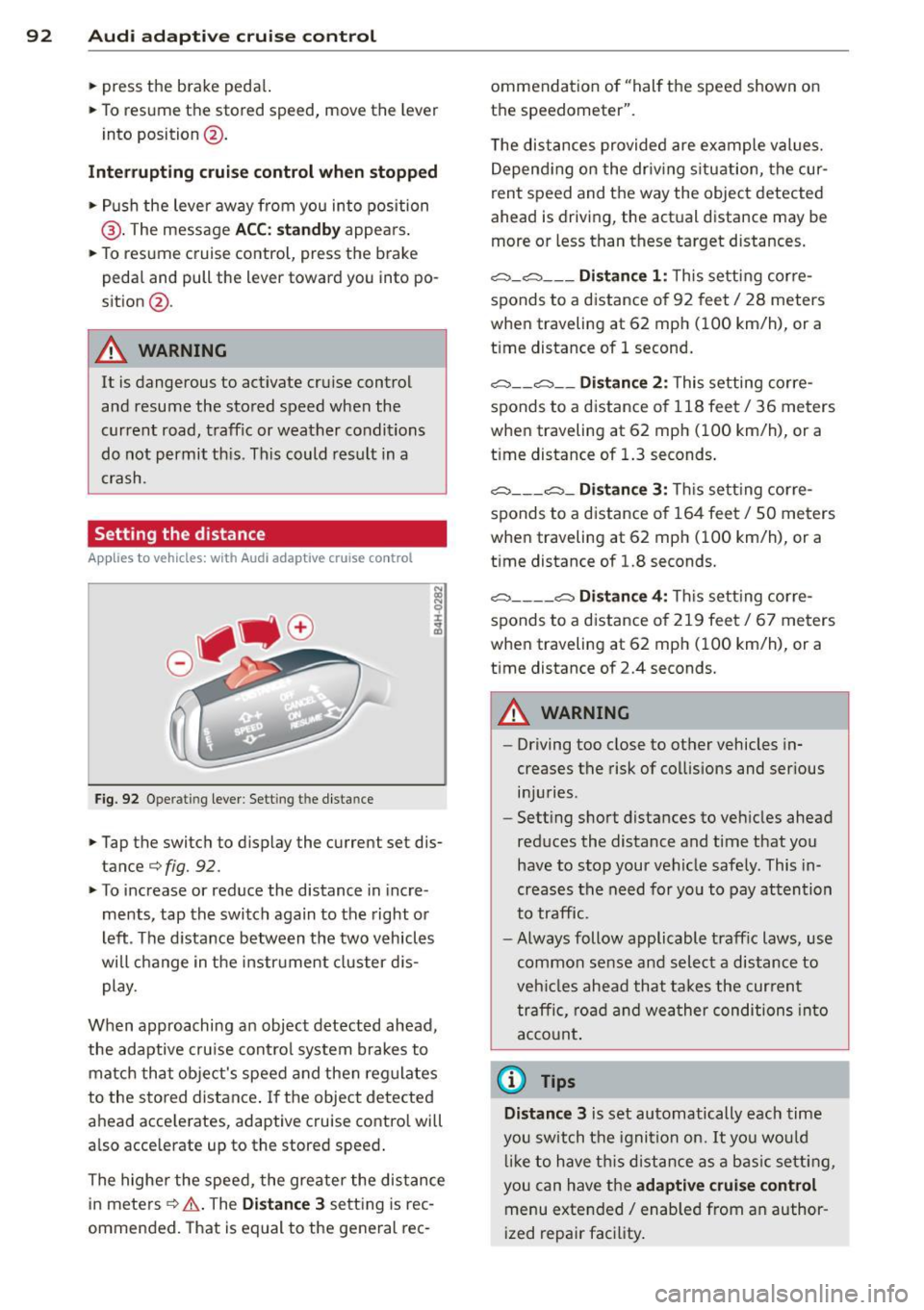
Fig. 92 Operat ing lever : Sett ing t he dist ance
-
• Tap the swit ch to display the current set dis
t ance
¢f ig. 92.
• To increase or reduce the distance in incre
ments, tap the switch again to the right or
left . The distance between the two vehicles
will change in the instrument cluster dis
play.
When approaching an object detected ahead,
the adaptive cruise con trol system brakes to
match that object's speed and then reg ulates
to the stored distance . If the object detected
ahead acce lerates, adapt ive cruise control will
a lso acce lerate up to the stored speed .
The highe r the speed, the greater the distance
in meters
c::;, & . The Distance 3 setting is rec
ommended. That is equal to the general rec- ommendation of "hal
f the speed shown on
the speedometer".
T he distances provided are example values.
Depending on the driv ing s ituation, the cur
rent speed and the way the object detected
ahead is driving, the actual distance may be
more or less than these target distances.
o:::::::, _o:::::::, ___ Distance 1: This setting cor re-
sponds to a distance of 92 feet
I 28 meters
when traveling at 62 mph (100 km/h), or a
t ime distance of 1 second.
o:::::::, __ o:::::::, __ Distance 2: This setting corre
sponds to a distance o f 118 feet/ 36 meters
when traveling at 62 mph (100 km/h), or a
t ime distance of 1.3 seconds .
o:::::::, ___ o:::::::,_ Distan ce 3: Thi s sett ing corre-
sponds to a distance of 164 feet/ 50 meters
when traveling at 62 mph (100 km/h), or a
t ime distance of 1.8 seconds.
o:::::::, ____ o:::::::, Distance 4: Thi s sett ing corre-
sponds to a distance of 219 feet/ 67 meters
when traveling at 62 mph (100 km/h), or a
t ime distance of 2.4 seconds.
A WARNING
--
- Driving too close to other vehicles in
creases the risk of collisions and ser ious
in jur ies.
- Sett ing short distances to vehicles ahead
reduces the distance and time that you
have to stop your vehicle safe ly . This in
creases the need for you to pay attention
to traffic.
- Always follow applicable traff ic laws , use
common sense and select a distance to
veh icles ahead that takes the current
traffic , road and weather conditions into
account.
{i) Tips
Distance 3
is set automatically each time
you switch the ignition on.
It you would
lik e to have this distance as a basic setting,
you can have the
adaptive cruise control
menu extended/ enabled from an author
ized repair facility .
Page 105 of 302
Audi side assist Side assist
Description
App lies to vehicles: with Audi side assist
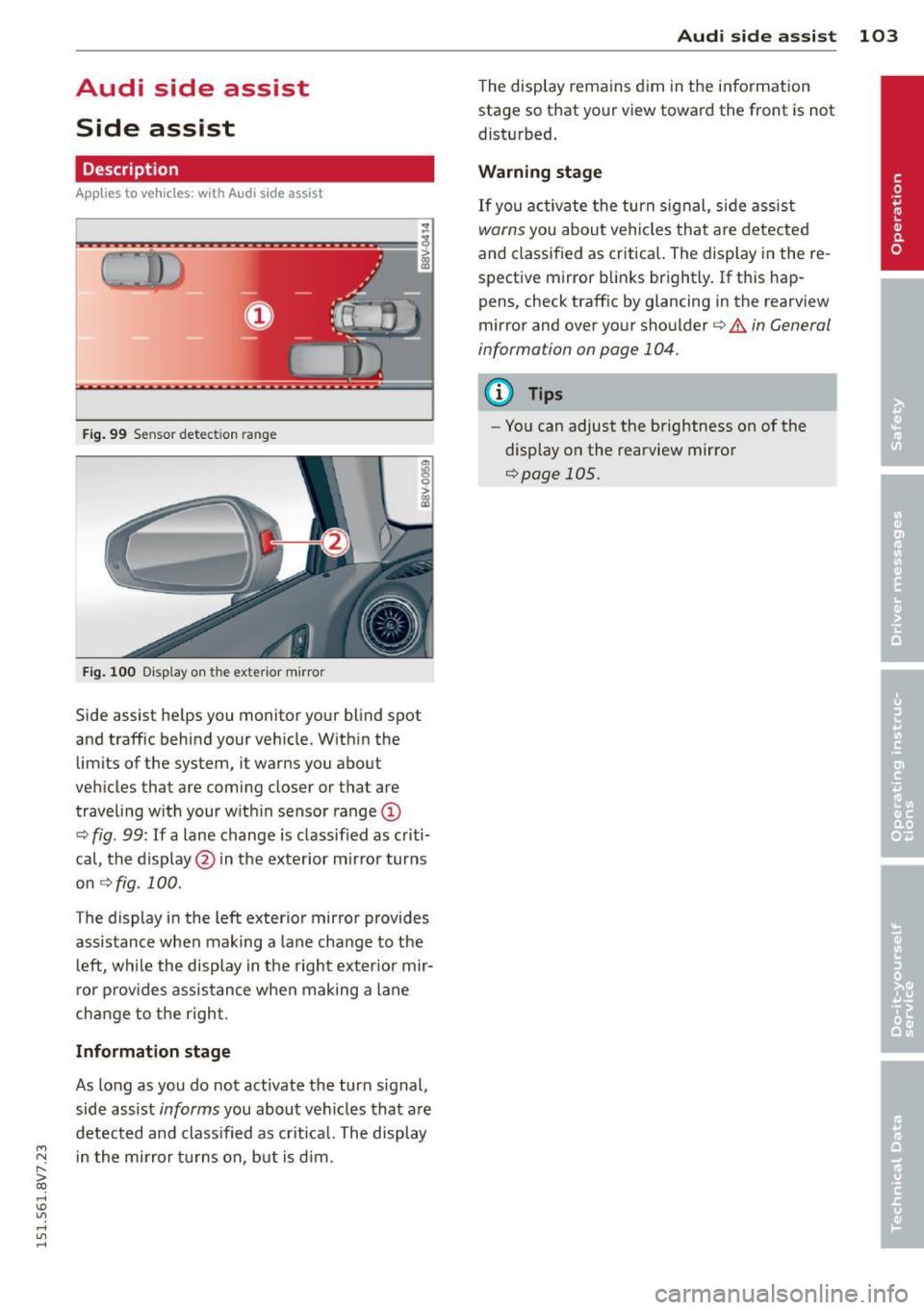
Fig. 99 Se nsor detect ion range
Fig. 10 0 Disp lay on the exterior mirror
Side assist he lps you monito r yo ur blind spot
and traffic behind your veh icle. W ith in the
limits of the system, it warns you about
vehicles that are coming closer or that are
traveling w ith your w it hi n sensor range@
¢
fig . 99: If a lane change is classified as cr iti
cal, the display @in the exterior m irror turns
on
~ fig . 100.
The display i n the left exterio r mirror provides
assistance when making a lane cha nge to t he
l eft, while the display in the right exter ior mir
r or p rov ides assistance when making a lane
change to t he righ t.
Information stage
As long as you do not activate the turn signal,
side assist
informs you about ve hicles that are
detected and class ified as crit ica l. The display
....,
N in t he mirror t urns on, but is d im . r--. > co
rl I.O
"' rl
"' rl
Aud i side assist 103
The display remains d im in the information
stage so that your view toward the front is not
disturbed .
Warning sta ge
If you activate the turn signal, s ide assist
warns you about veh icles tha t are detected
and classified as critical. The display in the re
spective mirror blinks brightly . If this hap
pens, check traffic by glancing in the rearview
mirror and over your shoulder ¢
A in General
information on page 104.
@ Tips
- Yo u can adjust the brightness on of the
display on the rearview mirror
¢page 105.
Page 106 of 302
104 Audi side assist
General information
A pplies to vehicles: with Audi side assist
®
®
©
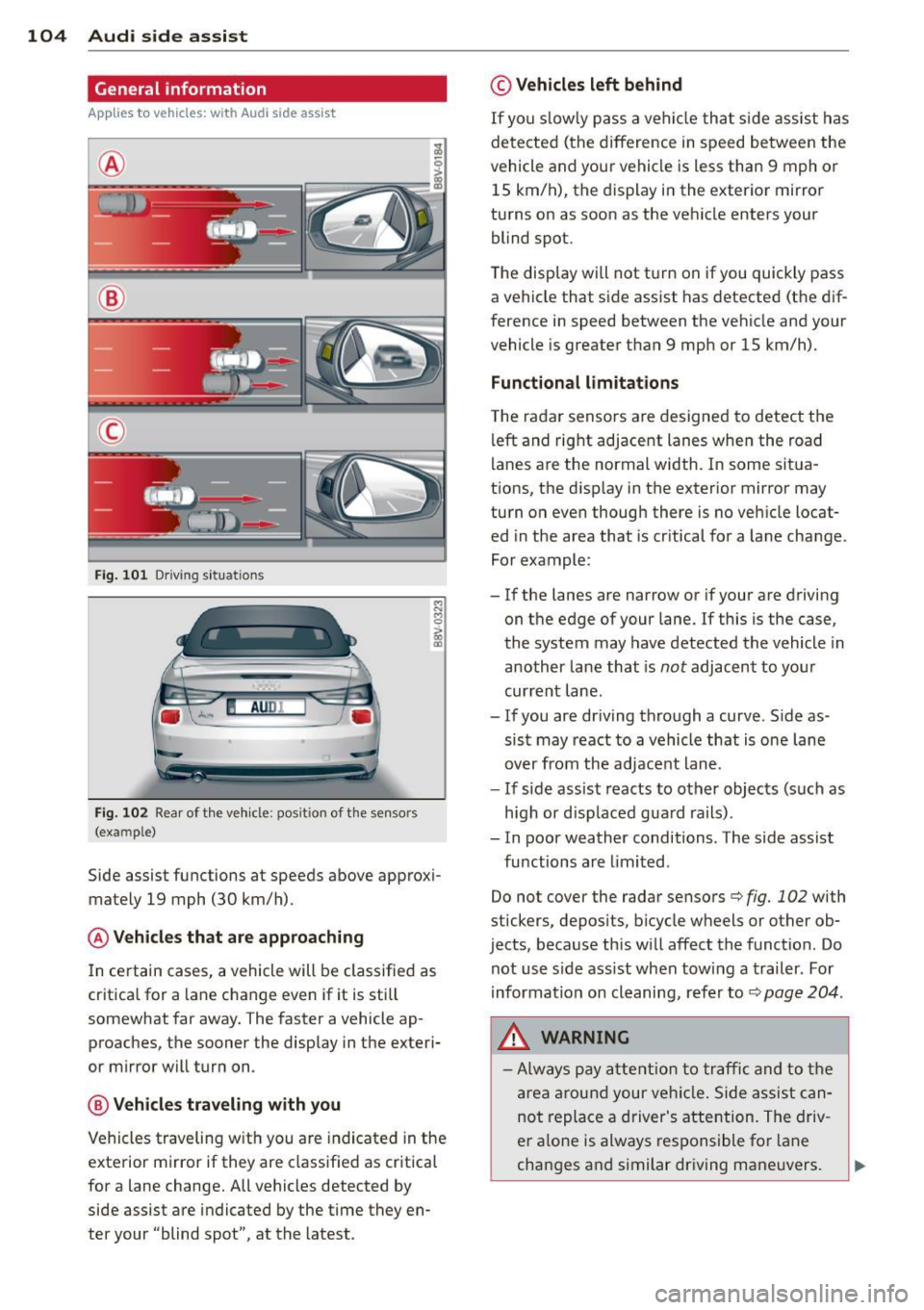
Fig. 101 D riving s it u at ions
AU DI
F ig . 102 Rea r of th e ve hicle: pos it io n of t he se nso rs
(exa mple)
Side assist functions at speeds above approx i
mately 19 mph (30 km/h).
@ Vehicle s that are approaching
In certain cases, a vehicle will be classifie d as
cr itica l for a lane change even if it is still
somewhat far away . The faster a vehicle ap
proaches, the sooner the display in the e xteri
or mirror will tur n on .
@ Vehicle s traveling with you
Vehicles traveling w ith you a re indicated in the
exterior m irror if they are classified as cr itical
for a lane change. All vehicles detected by
side assist are indicated by the time they en
ter your "blind spot", at the latest .
© Vehicles left behind
If you s low ly pass a ve hicl e th at sid e ass ist has
de te ct ed (t he difference in s peed be tween the
vehicle and you r vehi cle is less than 9 mph or
15 km/ h), the display i n the exterio r mirro r
turns on as soon as the ve hicle enters your
blind spot.
The disp lay wi ll not t urn on if you quickly pass
a ve hicle that s ide assist has detected (t he d if
f erence in speed between the ve hicle and your
vehicle is greater than 9 mph or 15 km/h).
Functional limitations
T he ra dar senso rs are designed to detect the
left and right adjacent lanes whe n the road
l anes a re the normal width. I n some sit ua
t ions, the d isp lay in the exterior mirror may
tu rn on even thoug h there is no ve hicle locat
ed in the area that is cr itical fo r a la ne cha nge.
Fo r exampl e:
- If the lanes are nar row or if your a re dr iving
o n t he e dge of your lane. If this is the case ,
the system may have detected the vehicle in
another la ne that is
not adjacent to you r
cur rent lane .
- If you are dr iving th ro u gh a curve . S ide as
sist may react to a vehicle that is one lane
over from the adj ace nt lane.
- If si de assist reacts to o ther objects (such as
h igh or d is pl ace d gua rd rails) .
- In poor weather conditions. The side assist
fu nctions are limited .
Do not cover the rada r senso rs
c::> fig. 102 with
stickers, depos its, bicycle w heels or other ob
jects, because this wi ll affect the funct io n. Do
not use s ide ass ist when tow ing a trailer . For
information o n cleaning, r efe r to
c::> page 204 .
&_ WARNING
-Always pay attention to traffic and to the
ar ea arou nd your ve hicl e. Si de a ssis t ca n
no t repla ce a driver's a tte ntion. The driv
er a lo ne is always res pons ible fo r lane
ch ang es a nd similar driving ma ne uvers.
Page 115 of 302
Stopping /p ar kin g
If the se lector lever is not in the P position
when you open the driver's door, the vehicle
could ro ll. In vehicles with a convenience key* ,
the following message appears:
S hift to P,
othe rwise veh icle c an roll away. Door s do not
lock if leve r is not in P .
You will also hear a
warn ing tone.
~ Press and ho ld the brake pedal c:> _& .
~ Set the parking brake.
~ Select the P selector lever pos ition.
Stopp ing on an inclin e
~ Always press the brake pedal to hold the ve
hicle in p lace and prevent it from "rolling
back"
c:> _& . Do not try to prevent the vehi
cle from "rolling back" when a gear is en
gaged by increasing the eng ine speed
c:> Q).
Starting on an incline in vehicle s wi thout
Hill Hold*
~ Set the parking brake.
~ With the driving gear se lected, press the ac
celerator pedal carefully. The parking brake
will release automat ically if your safety belt
is fastened .
Starting on an incline i n vehicle s with Hill
Hold*
~ With the driving gear selected, remove your
foot from the brake pedal and press the ac
celerato r pedal
c:> page 84, Hill hold.
Under certain circumstances, (such as driving
in the mountains or towing a tra iler), it may
be usefu l to switch temporarily to the manual
shift p rogram in order to adjust the gears to
the dr iving condit ions by hand
c:> page 115.
When parking on a level surface, simply place
the selector leve r in the P pos ition. On in
clines, activate the parking bra ke first and
then move the selector lever to the P posit ion
q page 82. This prevents the loc king mecha
nism from being loaded too heavily and wi ll
~ make it easier to move the selector lever out
" iii of the P position.
,...., \!) 1.1"1 ,...., 1.1"1 ,....,
Automa tic tran sm iss ion 113
A WARNING
- The vehicle can roll even when the en
gine is sw itched off.
- Unintended vehicle movement can lead
to serious injuries.
- Never leave your vehicle with the engine running while in gear. If you must leave
your veh icle when the engine is running,
set the parking brake and move these
lector lever to the P position.
- Power is still transferred to the wheels
when the engine is running at idle . To
prevent the vehicle from "c reeping", you
must keep your foot on the brake when
the engine is running and the se lector
lever is in the D, Sor R position or "tip
tronic" mode is selected .
- Do not inadvertently press the accelera
tor peda l when the vehicle is stationary.
Otherwise the vehicle wi ll start to move
immed iate ly, even if the parking brake is
set. Th is could resu lt in a crash.
- Do not press the accelerator pedal when
changing the selector lever position
while the vehicle is stationary and the engine is running.
- Never engage the R or P selector leve l
positions while dr iv ing. It could cause a
crash.
- Before driving down a steep slope, re
duce your speed and shift into a lower
gear with "tiptronic". -
- Do not ride the brakes or press the brake
pedal too often or too long when driving
downhill . Constant braking causes the
brakes to overheat and substantially re
duces braking pe rformance, increases
b ra ki ng distance or causes complete fa il
ure of the brake system.
- I f you must stop on an in cl ine, always
hold the vehicle in place with the foot
bra ke or parking brake to p reven t it from
rolling back .
- Neve r hold the vehicle on an incline with
a slipping clutch . The clutch opens a uto -
matica lly when it becomes too hot from
~
•
Page 116 of 302
114 Automatic tran smi ssion
the overload. The ml indicator light
turns on and a message appears
¢ page 116 when the clutch is overload
ed .
- If the engine must run while you are
working in the eng ine compartment with
the hood open, make sure a gear is not
engaged. The selector lever must be
firmly in the
P pos it ion and locked in
place and the pa rking brake must be set
¢ page 214. Otherwise, the veh icle
cou ld beg in moving when the eng ine
speed is high, even with the parking
brake set.
@ Note
- When stopping on an incline, do not try
to hold the vehicle in place by pressing
the accelerator peda l while a driving gear
i s selected. This can cause the automatic
transmission to overheat and can dam
age it. Set the park ing brake or press the
brake pedal to prevent t he veh icle from
r o lli ng .
- Allow ing the vehicle to roll when the en
gine is stopped and the selector lever is
i n the N pos ition will damage the auto
matic transmission beca use it is not lu
bricated unde r those circu mstances.
- The transm ission can ove rheat and be
damaged under certa in driving and traf
fic conditions such as frequent starts,
creeping for a long time, or s top-and -go
traff ic. W hen the
ml or . indicator
li ght turns on, stop the vehicle at the
next oppo rtunity and let the transmis
s ion coo l
¢ page 116 .
- Allow ing the ve hicle to roll when the en
gine is stopped w ill damage the 5 tron ic
transmission because it is not lubricated
¢ page 2 75, Emergency towing with
commercial tow truck.
(D Tips
For safety reasons, the park ing brake re
leases automatically only when the driver's
door is closed and dr iver's safety be lt is
fastened.
Hill descent control
Applies to veh icles: w ith S tronic transm iss io n
Hill descent control assists the driver when
driving down hills .
Hill descent contro l is activated when these
lector lever is in the Dor 5 position and you
press the brake pedal. The transm ission auto
matically selects a gear that is su itab le for the
incl ine. Hill descent cont ro l tries to ma inta in
t h e speed ac hieved at the t ime of b raking,
within physica l and tec hni cal limitations. If
may sti ll be necessary to ad just the speed
with the brakes . Because hill descent control
cannot shift down farther than 3rd gea r, it
may be necessary to sh ift into t iptronic mode
i n very steep areas . In this case, shift into 1st
or 2nd gear in t iptron ic mode to use the en
gine's brak ing force to relieve the brakes .
Hill descent contro l sw itches off once the h ill
levels out or you press the accelerator pedal.
On vehicles with a cruise contro l system*
¢ page 85, hill descent control is also activat
ed when the speed is set.
A WARNING
--
H ill descent control cannot overcome
physical lim itations, so it may not be ab le
to maintain a constant speed unde r a ll
conditions. A lways be ready to apply the
b rakes.
Page 118 of 302
116 Automatic tran smi ssio n
Launch Control-Program
Ap plies to vehicles: with launch co ntrol
The Launch Control Program enables maxi
mum acceleration .
Requirement: The engine must be at operat
ing temperature and the steering wheel must
not be turned .
• With the engine running, press the
l~ OFFI
button briefly one time ll .
• Pull the selector lever back out of the D/S
position briefly to select the S position, or
press it toward the rig ht into the tipt ronic
pos it ion or select the
dynami c driving mode
in drive select*
~ page 107.
• Press the brake peda l firmly with your left
f oot and hold it all the way down for at least
1 second .
.. At the same time, press the gas peda l all the
way down with your right foot unti l the en
gine reaches and stays at a high RPM level.
• Remove your left foot from the brake.
A WARNING
- Always adapt your driving to the traffic
flow.
- Only use Launch Contro l when road and
t raff ic conditions a llow it and othe r driv
ers w ill not be endangered or impacted
by you r driv ing and the veh icle's acceler
ation.
- Please note that the drive whee ls can
spin and the vehicle can brea k away
when sport mode is sw itched on, espe
cially when the road is slippery.
- Once the vehicle has s tarted moving,
press the
I ~ OFF ! button br iefly to turn
the sport mode off.
@ Tips
- The transm ission tempera ture may in
crease significantly after using the
l ) In vehicles with a drive r inform ation system, an ESC
l ig ht in t he in strume nt cl us te r stays on cont inuously
and the m essage
Stabili zatio n co ntrol (ESC): spo rt.
W arn ing! Restricted st ability
appears te mpo rarily.
Launch Control Program . If that hap
pens, the program may not be availab le
for a few minutes . It will be ava ilable
again after a cool-down period.
- When accelerating using the Launch
Contro l Program, all vehicle parts are
subject to heavy loads. Th is can lead to
increased wear.
Emergency mode
Applies to vehicles: wit h S tronic transm issio n
In the event of a system malfunction, there is
an emergency program.
If all of the selector lever positions are high
li ghted with a light background in the instru
ment cluster d isp lay, there is a system mal
funct ion and the S tronic transmission is run
ning in the emergency program . The vehicle
can still be driven in emergency mode, but on
ly w it h reduced speed and not in all gears. In
some cases, the ve hicl e
cann ot driv e in re
v e rs e .
d) Note
If the transmission runs in emergency
mode, drive to your author ized Audi dealer
or q ualified repa ir fa cility immed iate ly to
have the ma lf u nct ion corrected.
Transmission malfunction
• Tran smi ssion m alfu ncti on! Please st op
the vehicle and select P
T he re is a malfunction in the transmiss ion .
Park the ve hicle securely and do not continue
driv ing. See an authorized A udi dealer or au
thorized Audi Service Facility for assistance.
• Tran smi ssion o verheating! Plea se stop
the vehicle!
The transm iss ion is too hot and can become
damaged . Stop and let the t ransmission cool .,.
Page 120 of 302
118 Automatic transmission
Selector lever emergency release
.. Press and hold the yellow release button
with the screwdriver
r=>fig. 111 .
.. Press the release button in the selector lever
® and move the lever into the N position .
.. Clip the shift cover back into the shift gate
after using the emergency release.
If the vehic le must be pushed or towed due to
a power failure (for example, the battery is
dead), the selector lever must f irst be moved
to the N position using the emergency release
mechanism .
A WARNING
Only move the selector lever out of the P
position when the parking brake is set. If
that does not work, secure the vehicle with
the brake pedal. Otherwise, the vehicle
could start to move unintentiona lly when
the selector lever is moved out of the P po
sition.