light AUDI A3 CABRIOLET 2015 Owner's Manual
[x] Cancel search | Manufacturer: AUDI, Model Year: 2015, Model line: A3 CABRIOLET, Model: AUDI A3 CABRIOLET 2015Pages: 302, PDF Size: 73.83 MB
Page 31 of 302
....,
N
r--. > co
rl I.O
"' rl
"' rl
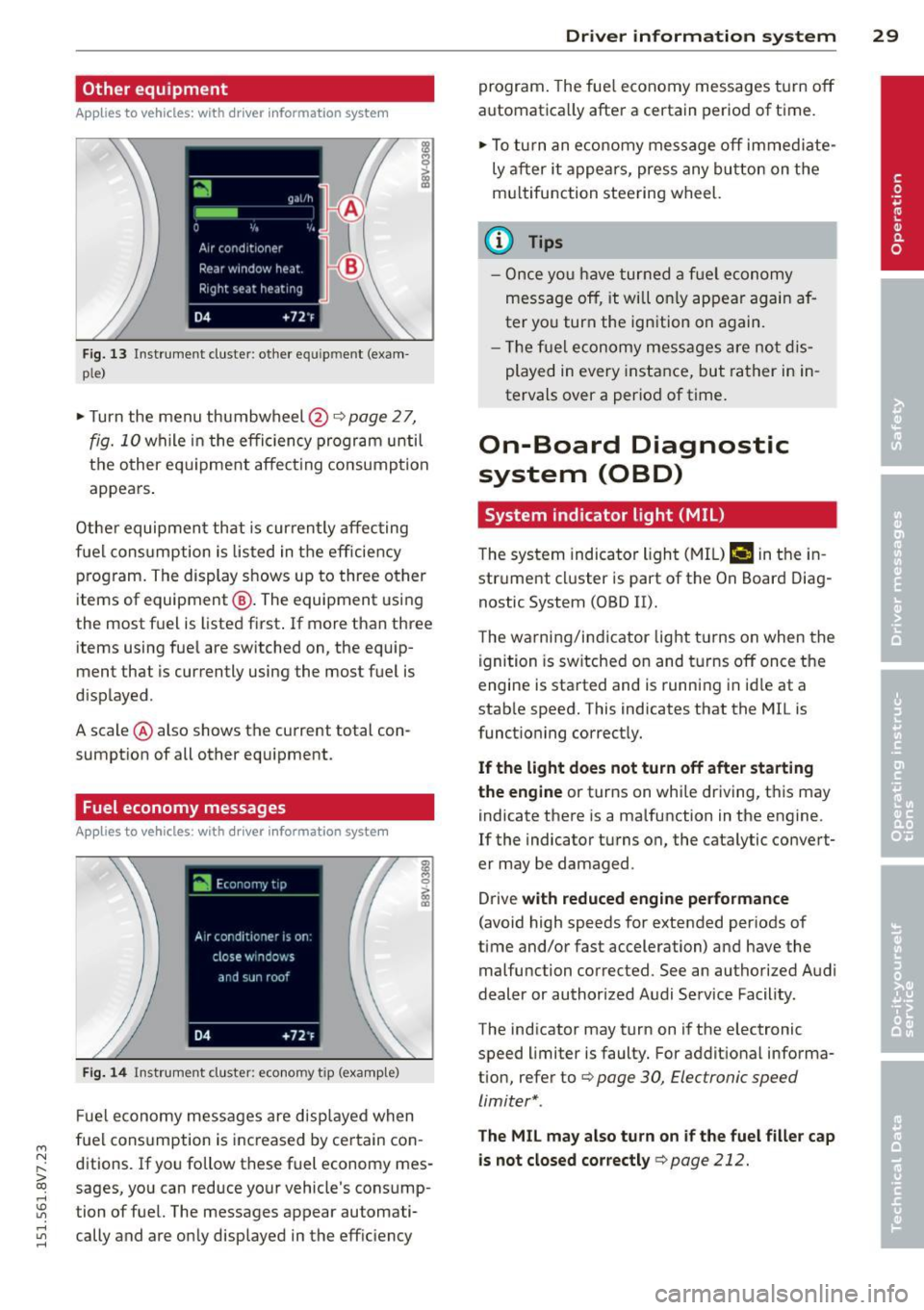
Other equipment
Applies to vehicles: with driver information system
F ig. 13 Instrument cluster : other equ ipment (exam
p le)
~ Turn the menu thumbwheel@Qpage 27,
fig. 10 while in the efficiency program until
t h e other eq uipme nt affect ing consump tion
appears .
Other equipmen t that is curren tly affecting
fuel cons umption is listed in t he eff iciency
p rog ram. The display shows up to three other
items of equipment @. The equipment using
the most f uel is listed first . If more than three
items using fue l are switched on, the equip
ment that is currently using the most fuel is
d isplayed .
A scale @ also shows the current total con
sumpt ion of all other equipment.
Fuel economy messages
App lies to vehicles: with driver information system
Fi g. 14 Instrument cluster : economy tip (examp le)
F ue l economy messages are disp layed when
fuel consumption is inc reased by certain con
ditions. If yo u follo w these fuel economy mes
sages, you can reduce your vehicle's consump
tion of fuel. The messages appear automati cally and are o nly displayed in the eff ic iency
Dr iver in formation system 29
program . The fue l economy messages t urn off
automatica lly after a certain period of time.
~ To tu rn an e conomy me ssage off immed iate
ly a fter it appea rs, press any bu tton on the
m ultifunction stee ring wheel.
(D Tips
- O nce yo u have turned a f uel economy
mess age off, it will o nly appear ag ain a f
ter yo u turn the ign ition on again.
- Th e fu el economy mess ages are no t dis
played in every instance, but rather in in
tervals over a period of time .
On-Board Diagnostic
system (OBD)
System indicator light (MIL)
The system indicator ligh t (M IL) ¢.§ in the in
str ument cl uster is part of the On Board Diag
nostic System (OBD II).
T he warni ng/i ndicator light t urns on when the
ignition is sw itched on and t urns off once the
engine is sta rted and is runn ing in id le at a
stab le speed. This indicates that the MIL is
funct ioning correct ly.
If the light does not turn off after sta rting
the engine
or turns on while driving, t his may
indicate there is a ma lfunction in the engine.
If the indicator turns on, the cata lytic convert
er may be damaged .
Drive
with reduced engine performance
(avoid high speeds for extended periods of
time and/or fast acceleration) and have the
malfunction corrected. See an authorized Audi
dealer or author ized Audi Service Facility.
The indicator may turn on if the electronic
speed limiter is faulty. For addit ional informa
tion, refer to Q
page 30, Electronic speed
limiter* .
The MIL may also turn on if the fuel filler cap
is not closed cor rectly
q page 212.
Page 32 of 302
30 Driver in formation sy ste m
On-Board Diagnostics
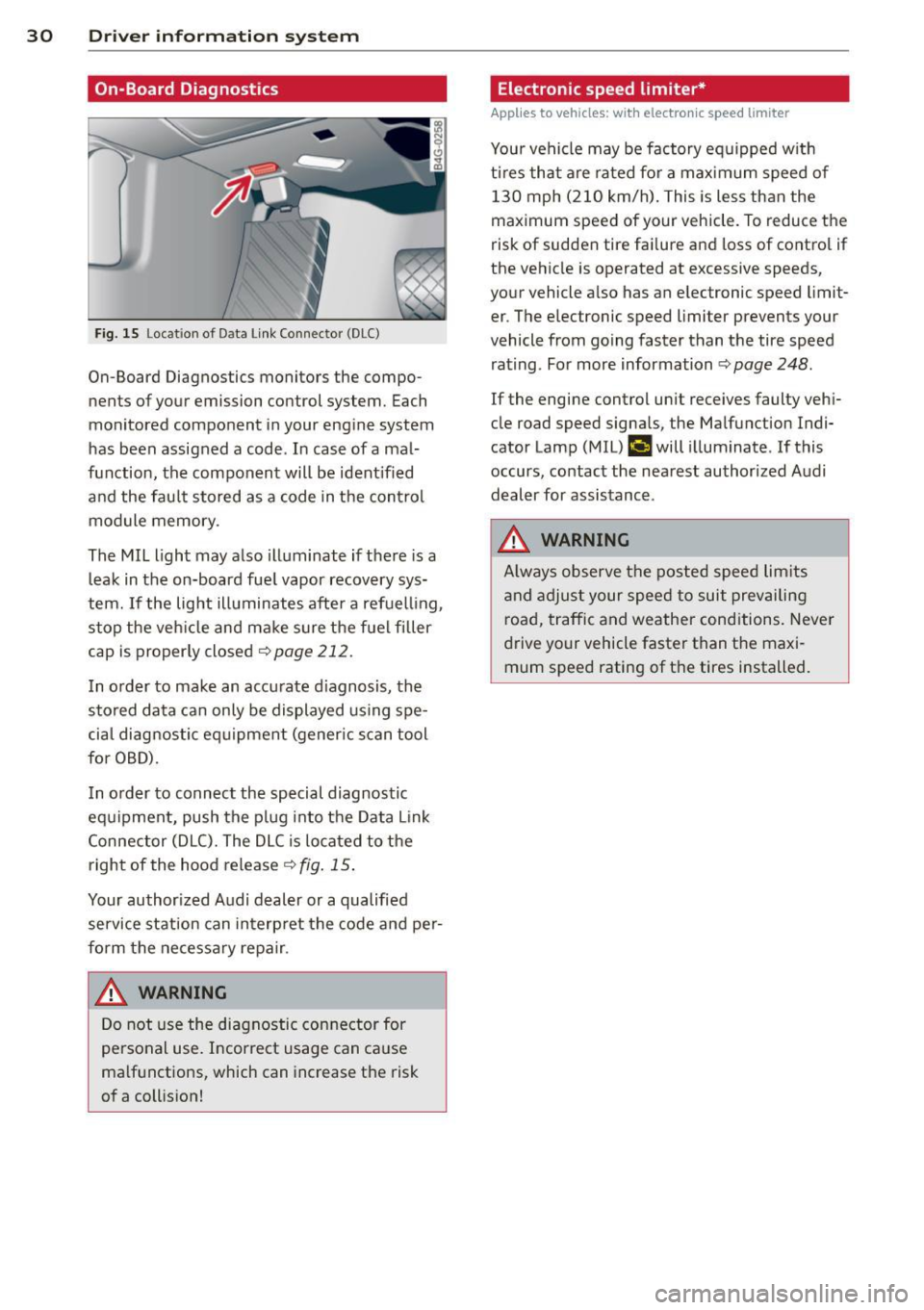
Fig. 15 Lo cat ion of D ata Link Connec tor (D LC)
On-Board Diagnostics monitors the compo
nents of your emission con trol system. Each
monitored component in your engine system
has been assigned a code . In case of a mal
function, the component will be ident ified
and the fau lt stored as a code in the control
module memory .
The MIL light may also illuminate if there is a
leak in the on-board fue l vapor recovery sys
tem.
If the lig ht illuminates after a refuelling ,
stop the veh icle and ma ke sure the fuel filler
cap is proper ly closed
<> page 212.
I n o rder to make an accurate d iagnosis, the
stored data can only be displayed using spe
cia l diagnostic eq uipment (gener ic s can tool
for OBD).
I n o rder to connect the special diagnostic
equipment, push the p lug i nto the Data Link
Connector (DLC). The DLC is located to the
right of the hood release¢
fig. 15 .
Your author ized A udi dealer or a qualified
service station can interp ret the code and pe r
form the necessary repa ir .
A WARNING
Do not use the diagnostic con nector for
personal use. Incorrect usage can ca use
ma lf u nctions, which can increase the risk
of a coll ision!
-
Electronic speed limiter*
Applies to vehicles: with electronic speed limiter
Your vehicle may be factory eq uipped w ith
t ir es that are rated fo r a max imum speed of
130 mph (210 km/h) . This is less than the
maximum speed of your vehicle. To reduce the
risk of sudden tire fa ilure and loss of contro l if
the vehicle is operated at excessive speeds,
your vehicle a lso has an electronic speed limit
er . The elec tronic speed limi ter prevents your
vehicle from going faster than the tire speed rating . For more information ¢
page 248.
If the engine control unit receives faulty veh i
cle road speed signa ls, the Malfunction Ind i
cator Lamp (M IL)
¢..fi will illuminate . If this
occurs, contact the nea rest authorized A udi
dealer for assistance .
A WARNING
Always observe the posted speed lim its
a nd adjust your speed to suit prevai ling
road, traffic and weather cond itions. Never
d rive your vehicle faster than the maxi
mum speed rating of the tires installed. -
Page 37 of 302
....,
N
r--. > co
rl I.O
"' rl
"' rl
WARNING
----Read and following all WARNINGS. ¢ & in
Key set on page 31
@ Tips
If your vehicle is left standing for a long
period of time, note the following:
- The proximity sensor switches off after a
few days to save energy. You then have
to pull once on the door handle to unlock
the vehicle and a second time to open it.
- To prevent the battery from draining and
to retain the starting ability of yo ur vehi
cle as long as possible, the energy man
agement system gradua lly tuns off un
necessary convenience functions You
may not be able to unlock your vehicle
using the convenience key .
- For an explanation on conformity with
the FCC regulations in the United States
and the Industry Canada regulations, re
fer to¢
page 285.
Unlocking/locking with the key
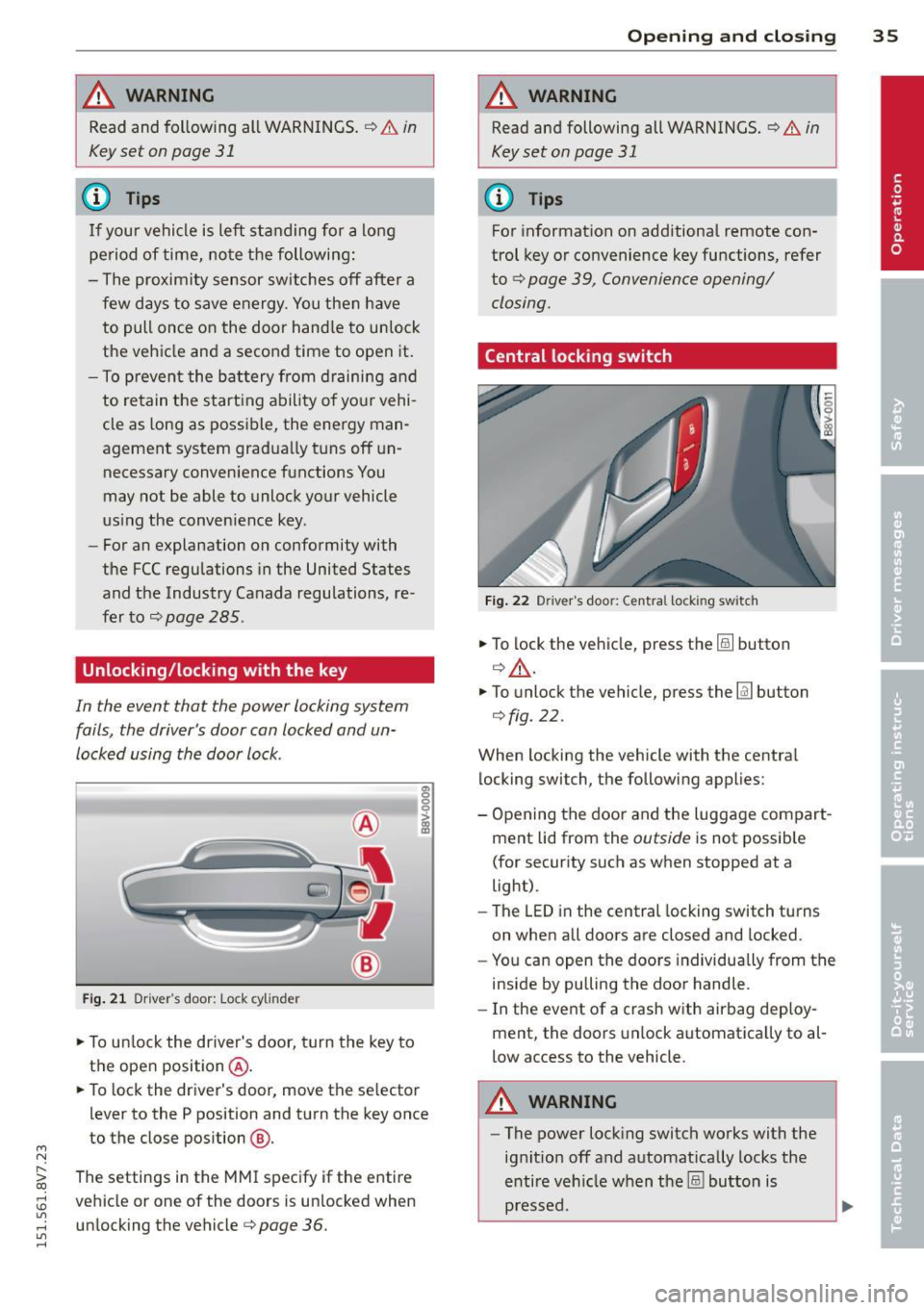
In the event that the power locking system
fails, the driver's door can locked and un
locked using the door lock .
Fig. 21 Driver 's door: Lock cy linder
.,. To unlock the driver's door, turn the key to
the ope n position @ .
en 0 g
~
.,. To lock the driver's door, move the se lector
lever to the P position and turn the key once
to the close position
@ .
The settings in the MMI specify if the entire
vehicle or one of the doors is un locked when
unlocking the vehicle¢
page 36.
Opening and closing 35
A WARNING
Read and following all WARNINGS. ¢ & in
Key set on page 31
(D Tips
For information on additional remote con
trol key or convenience key functions, refer
to ¢
page 39, Convenience opening/
closing.
Central locking switch
Fig. 22 Drive r's doo r: Centra l locki ng sw itch
.,. To lock the vehicle, press the@! button
¢.&, .
.,. To unlo ck the vehicle, press the @J button
¢fig. 22.
When locking the vehicle with the central
locking switch, the following applies:
- Opening the door and the Luggage compart
ment lid from the
outside is not possible
(for security such as when stopped at a
light).
- The
LED in the central locking switch turns
on when all doors are closed and locked .
- You can open the doors individually from the
inside by pulling the door handle.
- In the event of a crash with airbag deploy
ment, the doors unlock automatica lly to al
low access to the vehicle.
A WARNING
- The power locking switch works with the
ignit ion off and automat ically locks the
entire vehicle when the@! button is
pressed.
Page 44 of 302
42 Power top
-Make sure no one will be injured by the
power top supports and other moving
components when opening and closing
the top.
- The headroom in the rear is reduced
when opening and closing the power top. Make sure the rear passengers keep
enough distance from the power top to
reduce the risk of injury.
- When operating the power top, visibility
to the rear is limited . Avoid operating the
top while driving in reverse.
(D Note
-To prevent damage to the power top:
- do not store any objects in the power
top storage compartment.
- make sure there is enough space above
the vehicle when opening or closing
the power top.
- To reduce the risk of damage, make sure
there are no sensitive objects in the pow
er top storage compartment's range of motion.
@ Tips
- To prevent the battery from draining un
necessarily, do not open or close the
power top repeatedly when the engine is
switched off.
- A message will appear in the instrument
cluster if there is a malfunction in the
power top c:>
page 43.
-The power top can also be operated
manually temporarily if there is a mal
function c:>
page 45, Power top emer
gency operation.
An authorized Audi
dealer or authorized Audi Service Facility
should diagnose and correct the cause of
the malfunction as soon as possible .
- If the vehicle is parked with the power
top open, the vehicle interior is not pro
tected from damaging weather or unau
thorized access. Lock any items you leave
behind in the luggage compartment.
Close the power top before leaving the
vehicle. - The
side windows automatically lower
slightly when opening or closing the
power top.
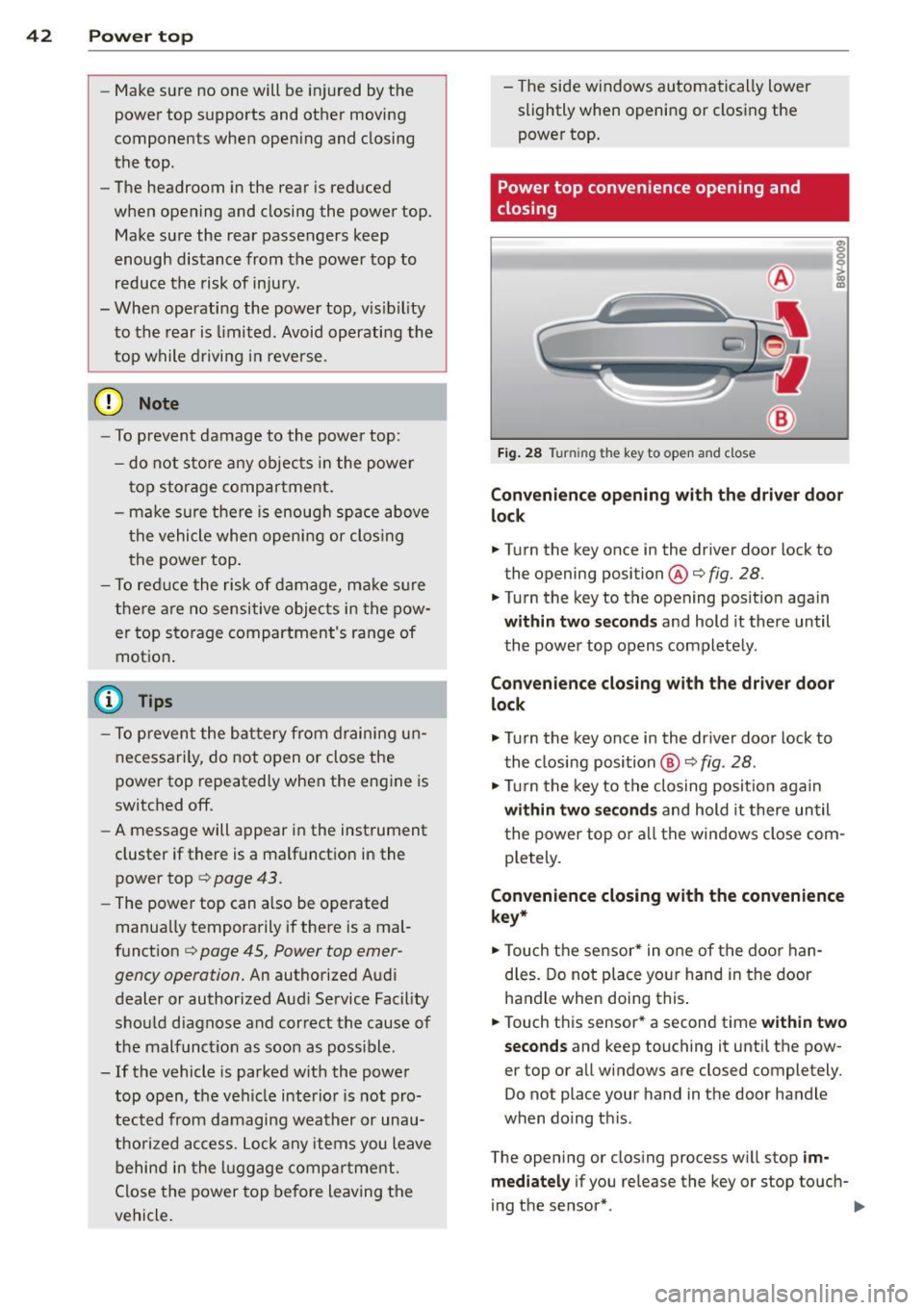
Power top convenience opening and
closing
Fig. 28 Tu rnin g the key to open and close
Convenience opening with the driver door
lock
.. Turn the key once in the driver door lock to
the opening position@c:>
fig. 28.
.. Turn the key to the opening position again
within two seconds and hold it there until
the power top opens completely.
Convenience closing with the driver door
lock
.,. Turn the key once in the driver door lock to
the closing position @
c:> fig. 28.
.,. Turn the key to the closing position again
within two seconds and hold it there until
the power top or all the windows close com
pletely .
Convenience closing with the convenience
key*
.. Touch the sensor* in one of the door han
dles. Do not place your hand in the door
handle when doing this.
.. Touch this sensor* a second time
within two
seconds
and keep touching it until the pow
er top or all windows are closed completely .
Do not place your hand in the door handle
when doing this .
The opening or closing process will stop
im
mediately
if you release the key or stop touch-
ing the sensor*. ..,.
Page 46 of 302
44 Power top
Soft top: operation not p ossible. Sp eed t oo
h igh
I f you go above 30 mp h (SO km/h), the power
top cannot be operated due to safety reasons. Reduce the vehicle speed to close or open the
power top.
S oft top: not at limit po siti on. s peed too
high
This m essage appears if you go above 30 mph
(50 km/h) when operati ng the power top. Re
d uce the vehicle speed and opera te the power
top again .
Soft top s ystem malfunction! You can con
tinue dri ving
This message appears if there is a malfunction
in the system . T ry to open or close the power
top again . If the message still appears, have
the ma lf u nction corrected by an aut horized
Aud i dealer o r aut ho rized Aud i Service Fac ility.
Soft top sys tem malfunction! You can con
tinue driving
This message appears if there is a malfunction
in the system . Try to open or close the power
top again.
If the message still appears, then
have an author ized Audi dealer or authorized
Aud i Service Fac ility co rrect the ma lfun ction.
D o not drive more t han 30 mph (50 km/h) u n
til it is corrected.
8_ WARNING
Never drive when the power top is not
locked correctly . The w ind from dr iv ing
co uld cause the power top to open. Th is
can result in injuries and damage to the
vehicle.
-
Wind deflector
App lies to veh icles: w ith wind deflecto r
The wind deflector reduces turbulence in the
passenger compartment and makes driving
more comfortable.
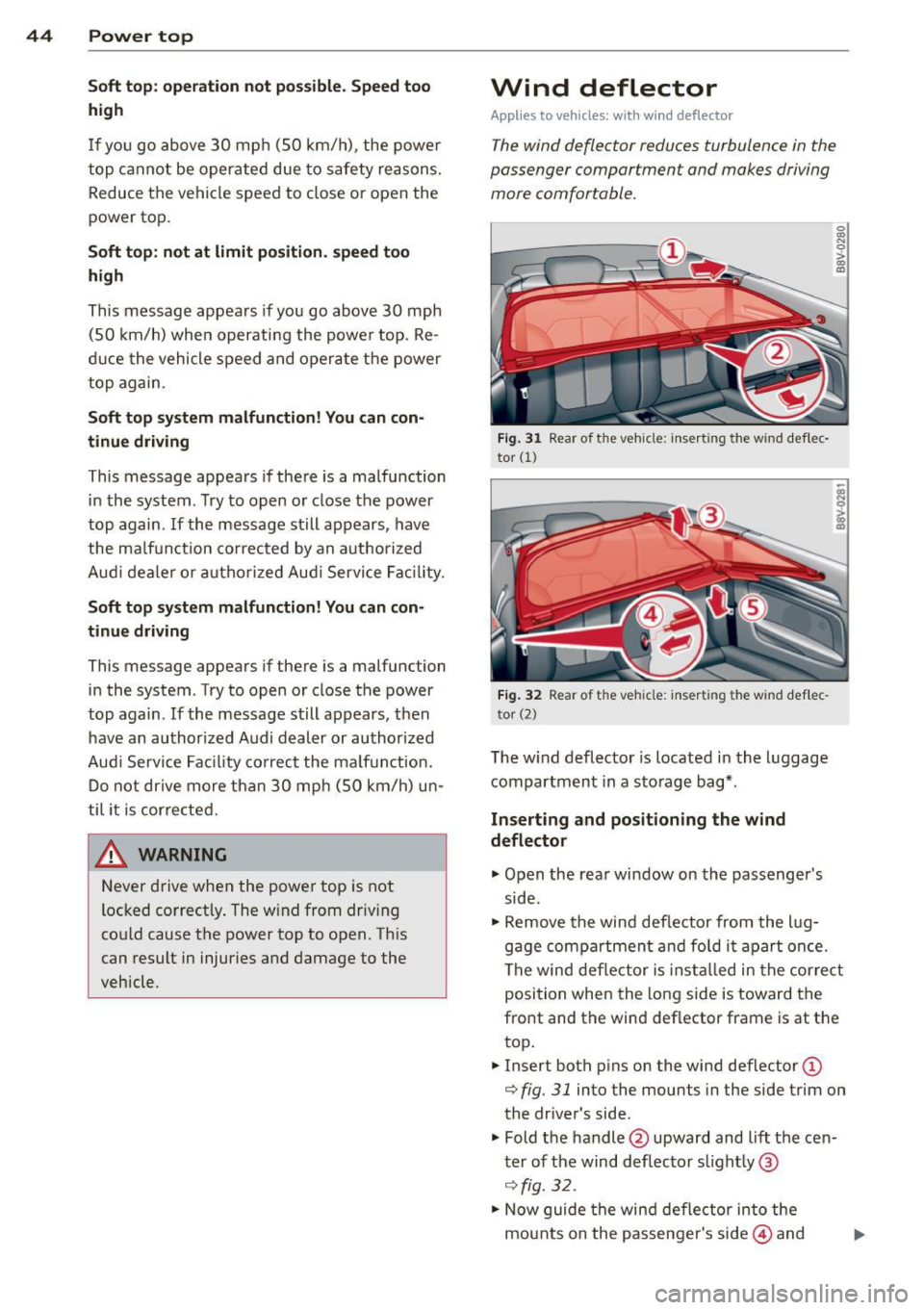
Fig . 31 Rear of t he veh icle: inse rt in g the wind de flec·
tor
(1)
F ig . 32 Rear of t he veh icle: insert ing the wind def lec
to r (2)
The w ind deflector is located in the l uggage
compartm ent in a sto rage bag*.
Inserting and positioning the wind
deflector
"" Open the rear window on the passenger's
side .
~ 0 > a,
"'
.. Remove the wind def lector from the l ug
gage compa rtment and fo ld i t a part once.
The wind deflector is insta lled in the cor re ct
position when the long side is toward the
front and the wind deflector frame is at the
top .
.. Insert both p ins on the wind def lector
(D
r::;, fig. 31 into the mounts in the side trim on
the dr ive r's side.
" Fold the handle @upward and lift the cen
t er of the wind d eflector s light ly @
¢ fig. 32 .
.,_ Now guide the wind deflector into the
mounts on the passenger's side@ and
Page 47 of 302
M N ,....
> co ...... \!) 1.1'1
...... 1.1'1 ......
press lightly in the midd le o f the wind de
flector ® until the hand le locks in place .
... Raise the wind deflector completely .
Removing the wind deflector
... Fold the hand le @ ¢fig. 31 upward and
f o ld the w ind deflector frame back .
... Fold the hand le @ ¢fig.
31 upward and lift
the center of the wind deflector slightly @
¢fig . 32.
... Remove the w ind deflector from the mounts
in the side trim on the passenger's side.
... Pull the wind deflector out of the mounts on
the driver side and lift it out .
... Fold the w ind deflector together and store it
secu rely.
A WARNING
- Do not use the w ind de flector to secure
cargo.
- Be careful when ins tall ing so yo u do not
pinch your finge rs .
- Pay atten tion to the traffic when instal
ling the wind deflector. Install the win d
deflecto r from the s ide of the vehicle
that is away from traffic .
(D Note
Do not lean against the veh icle when in
s t all ing the wind deflecto r. H ard objec ts
and decorations on clothing s uch as belt
buckles can scratch the pai nt.
(D Tips
- The wind defle ctor works best when al l
of the windows are ro lled up wh ile driv
ing.
- Only store the wind deflector in the stor
age bag* when it is dry.
Power top 45
Power top emergency
operation
General information
The power top can be closed manually if there
is a malfun ction.
... Set the park ing brake.
... Open a ll wi ndows.
... Switch the ignit ion off .
... Pull the but ton @ for app rox ima tely 10 to
15 seconds to reduce the pressure in the
power top hydraulics ¢
page 41, fig. 2 7 .
Only close the power top manually in an emer
gency . Have a second person assist. Drive to
an a uthorized Audi dea ler or a uthorized Audi
Service Facility immediately to have the ma l
function corrected.
A WARNING
- There is a r isk of pinching the hands or
other peop le during all of the power top
emergency operation steps.
- Make sure all windows are lowe red d ur
ing eme rgency ope ration .
- Do no t rea ch into t he power top sup
po rts or other mov ing components .
- Never d rive when the powe r top is not
loc ked correctly. The w ind from dr iving
could cause the power top to open. This
can result in injuries and damage to the
vehicle.
(D Tips
The powe r top storage compartmen t cover
i s not latched afte r the emergency opera
tion is complete . Drive to an a uthorized
A udi dealer or authorized A udi Service Fa
cility immediately to have the malfunct ion
corrected.
-
•
Page 51 of 302
....,
N
r--. > co
rl I.O
"' rl
"' rl
Lights and Vision
Exterior Lighting
Switching lights on and off
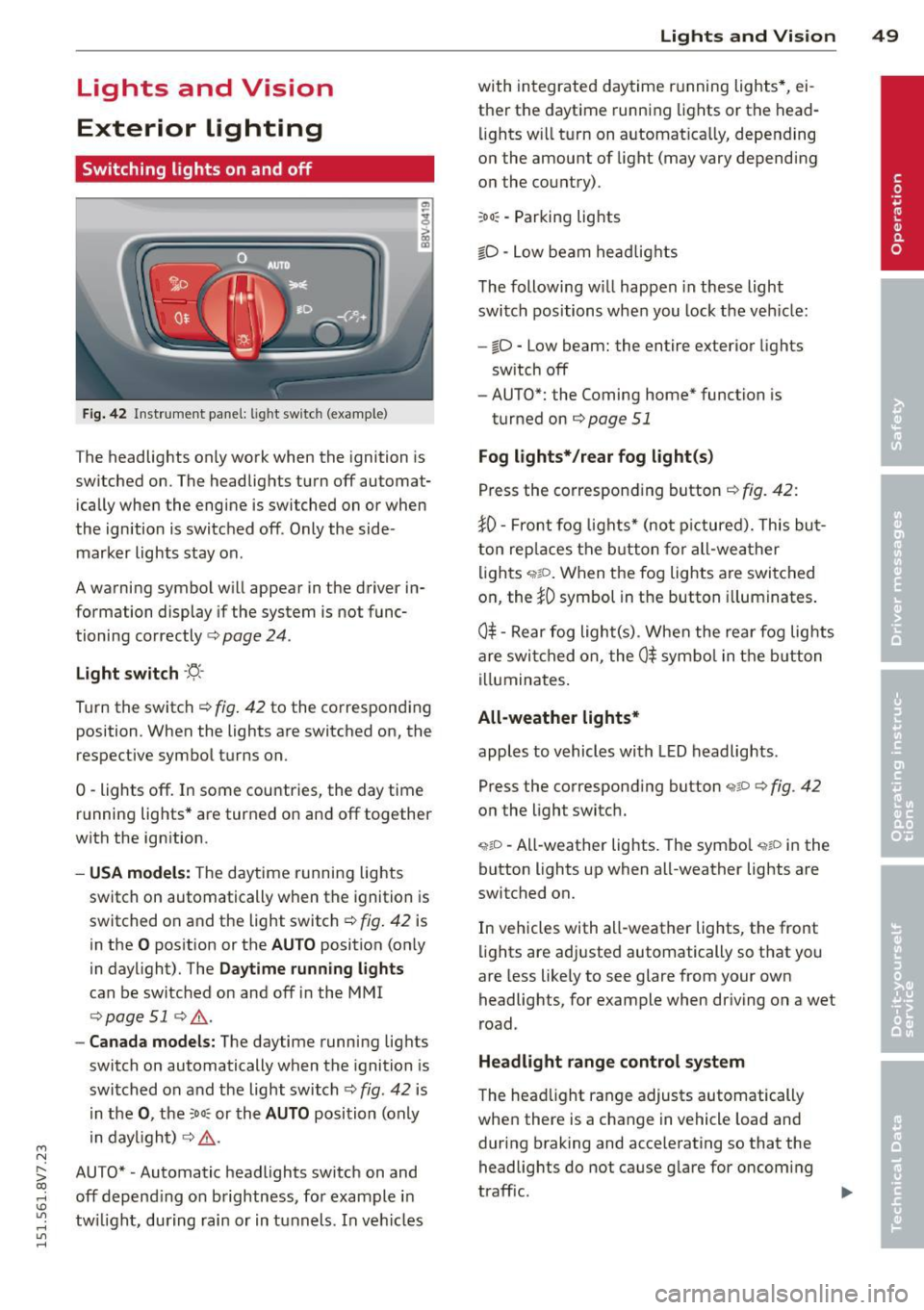
Fig. 42 Instrument panel: lig ht switc h (example)
The headlights only work when the ignition is
switched on. The headlights turn off automat ically when the engine is switched on or when
the ignition is switched off. Only the side marker lights stay on .
A warning symbol will appear in the driver in
formation display if the system is not func
tioning correctly <=>
page 24.
Light switch ·'ti- ·
Turn the switch¢ fig. 42 to the corresponding
position . When the lights are switched on, the
respective symbol turns on.
0 -lights off. In some countries, the day time
running lights* are turned on and off together
with the ign ition.
- USA models: The daytime running lights
switch on automatically when the ignition is
switched on and the light switch¢
fig. 42 is
in the
O position or the AUTO position (on ly
in daylight). The
Daytime running lights
can be switched on and off in the MMI
¢ page 51 ¢ ,& .
-Canada models: The daytime running lights
switch on automatically when the ignition is
switched on and the light switch¢
fig. 42 is
in the
0, the :Do: or the AUTO position (only
in daylight) ¢
,&.
AUTO* • Automatic headlights switch on and
off depend ing on brightness, for example in
tw ilight, during rain or in tunnels. In vehicles Lights
and Vision 49
with integrated daytime running lights*, ei
ther the daytime running lights or the head
li ghts will turn on automat ically, depending
on the amount of light (may vary depending
on the country).
: Do : -Parking lights
iD -Low beam headlights
The following w ill happen in these light
switch positions when you lock the vehicle:
-io -Low beam: the entire exterior lights
sw itch off
- AUTO*: the Coming home* function is
turned on ¢
page 51
Fog lights*/rear fog light(s)
Press the corresponding button¢ fig. 42:
JO· Front fog lights* (not pictured). This but
ton replaces the button for all-weather
lights
q;!D . When the fog lights are switched
on, the
JO symbol in the button illuminates.
0$ -Rear fog light(s) . When the rear fog lights
are switched on, the
0$ symbol in the button
illuminates.
All-weather lights*
apples to vehicles with LED headlights.
Press the corresponding button
<;?P c;, fig. 42
on the light switch.
~io -All-weather lights . The symbol <;;t,;D in the
button lights up when all-weather lights are
switched on.
In vehicles with all-weather lights, the front
lights are adjusted automatically so that you
are less likely to see glare from your own
headlights, for example when driving on a wet
road .
Headlight range control system
The head light range adjusts automatically
when there is a change in vehicle load and
during braking and accelerating so that the
headlights do not cause glare for oncoming
traff ic.
Page 52 of 302
50 Lights an d Vi sion
Audi adapt ive light *
The adaptive light on ly functions when the
light switch is in the AU TO position. You can
deactivate adaptive light in the MMI
r::!.> poge
51 .
When switched on, adapt ive light adjusts to
curves depending on the vehicle speed and
steering wheel ang le . This provides better
lighting throug h the curve . The system oper
ates in a speed r ange from approximately
6 mph (10 km/h) to 68 mph (110 km/h).
Static co rnering light* (vehicles with adaptive
light) -the corn ering light switches on auto
matica lly when the steering wheel is turned at
a certa in angle at speeds up to approximately
44 mph (70 km/h) and when the turn signal is
activated at speeds up to approximately
25 mph (40 km/h). The area to the s ide of the
vehicle is il luminated better when turning .
Speed dependent light distr ibution* -The
speed dependent light distribution adapts the
light in towns and on highways or express
ways. Intersect ions can also be ill uminated on
ve hicl es w ith a navigation system *.
Highwa y light funct ion *
(Vehicles with adaptive light or L ED head
lights) -This function adapts the light ing for
h ighway driving based on vehicle speed .
_&. WARNING
-Automati c headlights* are only intended
to assist the dr iver . T hey do not re lieve
the drive r of responsibility to check the
head lights and to turn them on man ually
according to the current light and visibili
ty conditions. For examp le, fog cannot
be detected by the light sensors. So al
ways switch on the low beam under
these weather conditions and when driv ing in the dark
fD.
- Acc idents could occur if you cannot see
the road ahead of you well and if others
on the road cannot see you . A lways
swit ch you r headlights o n so that yo u can see the road ahead of you and others can
see your vehicle from beh
ind.
- Please observe legal regulations when
using the lighting systems described.
(D Note
The rear fog lights shou ld only be turned
on in accordance with t raffic regu lations,
to prevent glare for traffic behind your ve hicle.
(D Tips
- The light sensor for the automatic head
lights * is in the rea rview mir ror mount.
Therefore, do not place any stickers in
this area o n the windshield .
- Some functions of the exterior lighting
can be adjusted
c> page 51.
-If you tu rn off the ignition whi le the ex
terior lights are on and open the door,
you will hear a warning tone.
- The tail lights do not sw itch on when the
daytime r unning lights switch on.
- In cool or damp weather, the inside of
the headlights, turn signals and tail
lights can fog over due to the tempera
ture difference between the inside and
outside. They w ill clear shortly after
switching them on . This does not affect
the serv ice life of the lighting.
- A message w ill appea r in the i nstrument
cluster if there is a malfunction in the
light senso r
r::!.> page 24.
Emergency flasher
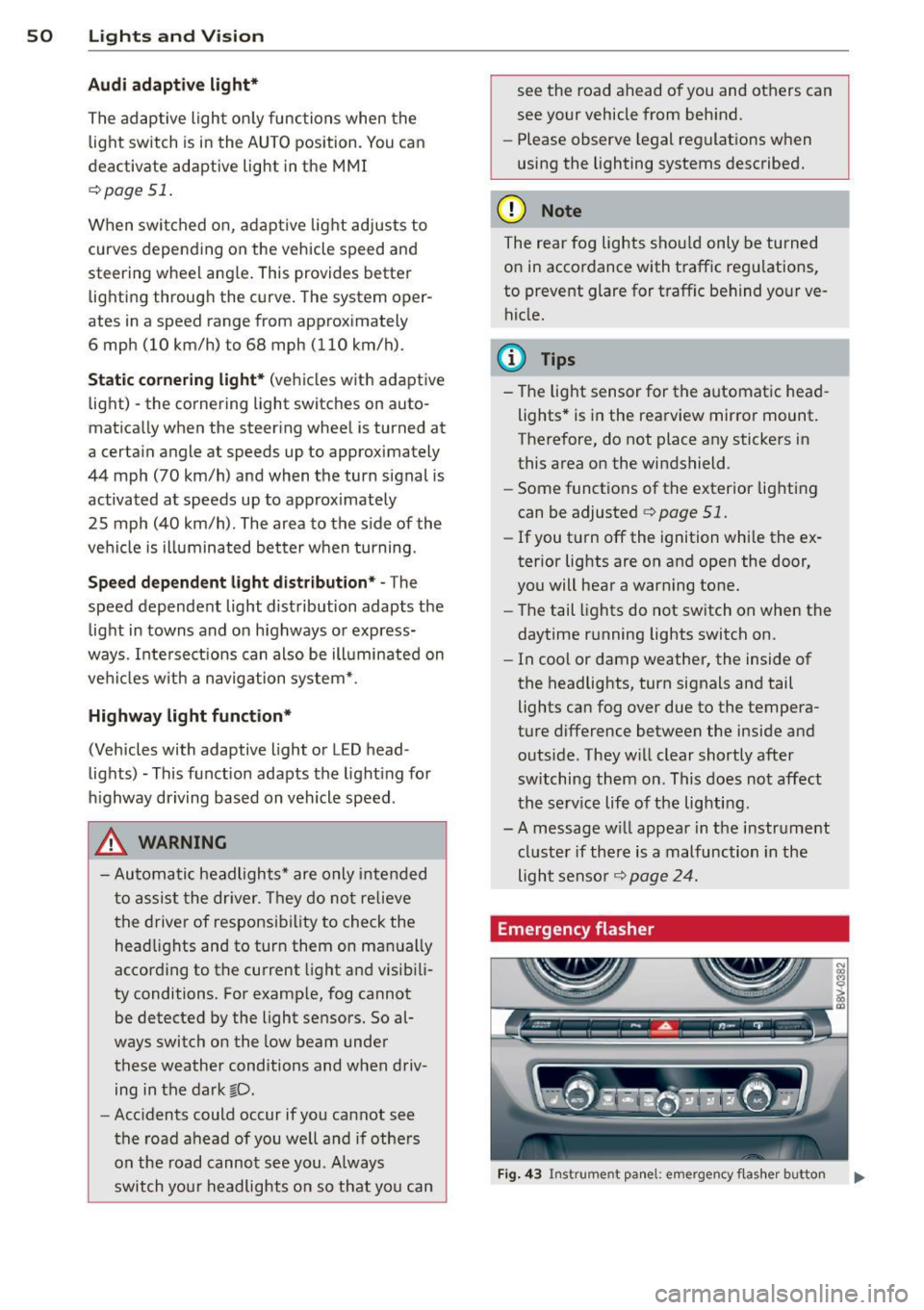
Fig . 4 3 Ins trume nt panel: e mergency f las her button
N
I
Page 53 of 302
M N ,....
> co ,...., \!) ..,.,
,...., ..,., ,....,
The emergency flashers makes other drivers
aware of your vehicle in dangerous situations.
.,. Press the~ button to sw itch the emergency
f lashers on or off.
You can indicate a lane change or a turn when
the eme rgency flashers are sw itched on by us
i ng the turn signa l lever. The emergency flash
ers stop temporarily .
The emergency flashers also work when the ignit io n is tu rned off.
(D Tips
You should switch the emergency flashers
on if:
- You are the last ca r in a traffic jam so
that all other veh icles approach ing from
behind can see you, or if
- Your vehicle has broken down or you are
having an emergency, or if
- Your vehicle is being towed or if you are
tow ing another vehicle .
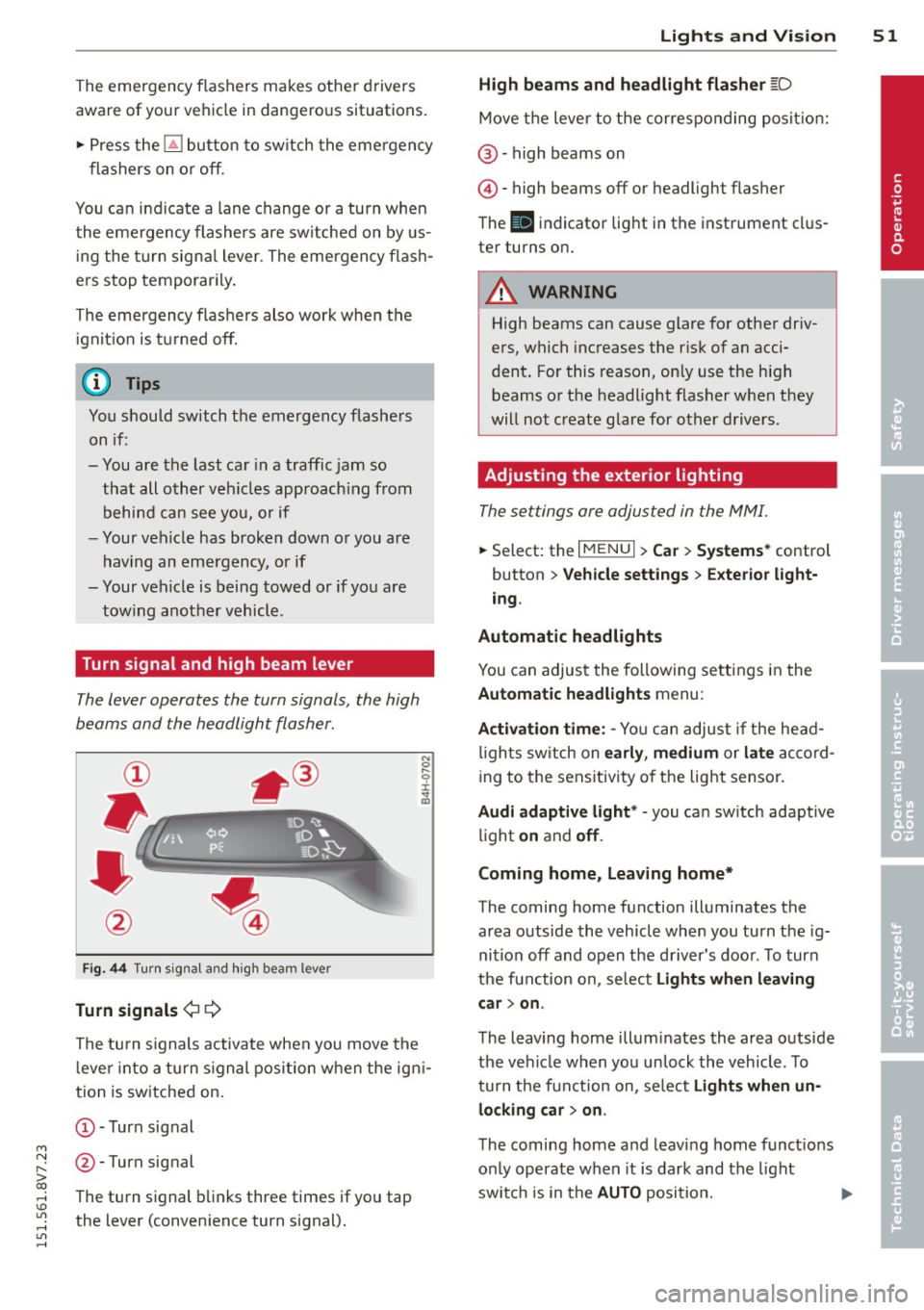
Turn signal and high beam lever
The lever operates the turn signals, the high
beams and the headlight flasher.
Fig. 44 Turn sig na l and high beam lever
Turn signal s¢¢
The turn s ignals activate when you move the
l ever into a turn s ignal position when the igni
tion is switched on.
(D-Turn signal
@-Turn signal
The turn signal blinks three times if you tap
the lever (convenience turn signal).
Lights and Visi on 5 1
High beams and headlight flasher [D
Move the lever to the correspo nding posit io n:
@ -high beams on
©-high beams off or headlight flasher
T he
II indicator light in the instrument cl us
ter turns on.
A WARNING
High beams can cause glare for other driv
ers, which increases the risk of an acci
dent. For this reason, on ly use the high
beams or the headlight flasher when they
will not create glare for other drivers.
Adjusting the exterior lighting
The settings ore adjusted in the MMI.
... Select: the I MENU I> Car> Syste ms* control
button
> Vehicle sett ings > Exte rior light
ing .
Automatic headlights
You can adjus t the following se ttings in the
Automatic headlights menu :
Activation time : -Yo u can adjust if the head
l igh ts sw itch on
ea rly , medium or la te ac co rd
ing to the sens itivity o f the light sensor.
Audi adapti ve light * -you ca n sw itch adaptive
li gh t
on and off .
Coming home, Leaving home*
The coming home function illuminates the
area outside the vehicle whe n you tu rn the ig
nition off and open the d river 's doo r. T o turn
the function on, se lect
Light s when l eaving
c ar > on .
The leaving home illum inates the area outs ide
the vehi cle when you un lock the vehicle . To
turn the function on, se lect
Light s when un
locking car > on .
The coming home and leaving home funct ions
on ly operate when it is dark and the light
switch is in the
AUTO position. ..,.
•
Page 54 of 302
52 Lights and Vision
Daytime running lights*
USA models:
The d ay time runni ng lights can
b e sw itche d on o r off using the MM I. Select
on or off .
Canada models:
T his funct ion can be switche d
off. They ac tiva te a utomat ic all y ea ch tim e the
igni tion is swit ched on. This menu item is
shown with a "gray backg ro und" .
Travel mode*
The headlight beam is asy mme trical. This pro
vides s tronger illum ina tio n on the s ide of the
ro ad o n wh ich you are driv ing. In vehicles wi th
Xenon headlights* with turning light* or LED
headlights* ,
you must adjust the hea dlights
when yo u are d riving in a country w here the
traffic direction is opposite from you r own
country. Othe rwise, oncom ing traffic w ill be
b lin ded by the gla re from the head lights. An
ad justment is not needed in vehicles with Xe
non head lights without t urning lights .
To prevent glare:
- Trave l mode m ust be act ivated in veh icles
with Xenon headlights* and turning light * or
LED headlights *. Select: the iME NUI b utton
> Car > Systems * contro l butto n > Vehicle
settings
> Exterior lighting > Light for driv
ing on left ,
for example .
After you have adjusted the headlights, the
following message will appear:
B Headlight converter active for driving on
left. Range reduced!
(D Tips
W hen trave l mode is activ ate d, a display in
the dr iver inf orm ation system i ndicates
this each time you switch t he ignit ion on .
Interior lighting
Interior l ight s
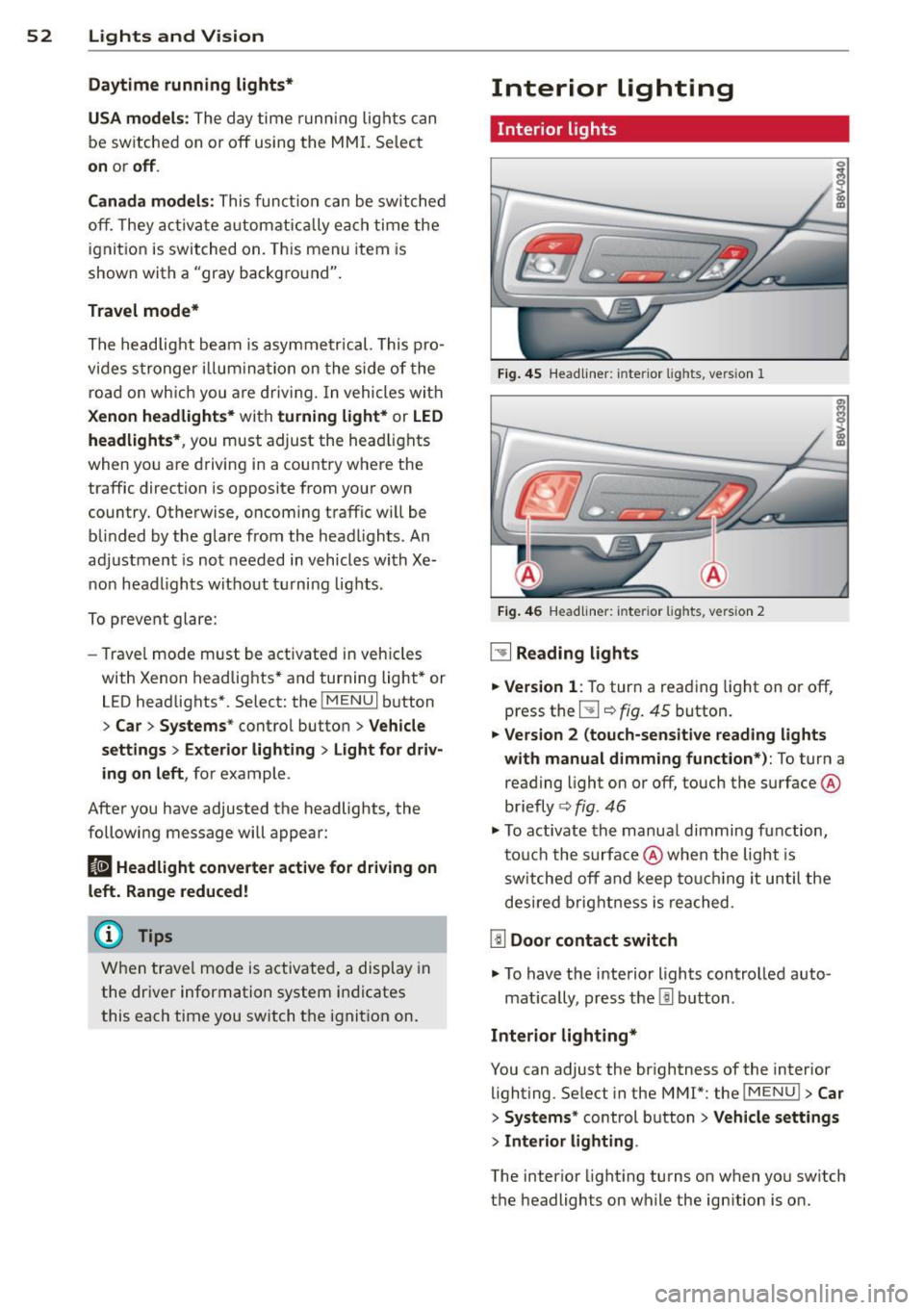
Fig. 4 5 Headliner: in te rior lights, vers ion 1
Fi g. 46
Headli ne r: int eri or ligh ts, versio n 2
~ Reading lights
.. Version
1: To tur n a reading light on or off,
press the
5J ¢ fig. 45 button.
.. Version 2 (touch-sensitive reading lights
with manual dimming function*):
To turn a
reading light on or off , touch the surface @
briefly ¢
fig. 46
.. To activate th e manua l dimming function,
t ouc h the surface @when the light is
s w itched off and keep to uchi ng it until the
des ired brig htn ess i s reached.
[ID Door contact switch
.. To have the interio r lights controlled auto -
mat ica lly, press the
l!l b utton .
Interior lighting*
You can adjust the brightness of the interior
lighting. Se lect in the MMI*: the iME NUI
> Car
> Systems* control b utton > Vehicle settings
> Interior lighting .
The interior light ing turns on when yo u sw itch
t h e headlights on while the ign ition is o n.