page 46 AUDI A3 CABRIOLET 2015 Owners Manual
[x] Cancel search | Manufacturer: AUDI, Model Year: 2015, Model line: A3 CABRIOLET, Model: AUDI A3 CABRIOLET 2015Pages: 302, PDF Size: 73.83 MB
Page 8 of 302
6 About this Owner's Manual
This owner's manua l contains important infor
mation, tips, suggestions and warnings for
using your veh icle.
Keep this owner's manual in your vehicle at all
times. This is especially important if you loan
your vehicle to others or sell it.
This owner's manual descr ibes the
equipment
range
specified for this mode l at the time of
printing. Individua l equipment options descri
bed may on ly be available at a later date or
may only be offered in certain countries .
Some sect ions in this owner's manua l do not
apply to a ll vehicles . When this is the case,
the beginning of the section indicates the
val
idity ,
for examp le "Applies to vehicles: with a
parking heater". Optional or vehicle-specific
equipment is also identified with an asterisk
"*"
The illustrations are designed as a general
guide and on your vehicle may look slightly
different than what is illustrated.
There is a
Table of Contents at the beginning
of this owner's manua l that lists all of the
topics covered in this book in the order that
they appear. There is also an alphabetical
In
dex at the end of this owner's manual.
All
directions, such as "left", "right", "front"
and "rear", are based on the vehicle's direc
tion of travel.
* Optional or vehicle-specific equipment
.,.. The section continues on the next page.
~ .&. Cross reference to a "WARNING" within
a sect ion.
If a page number is ind icated, the
WARNING is located outside of the sect ion.
& WARNING
T ext with this symbol contains important
information on safety and how to reduce
the risk of personal injury or death .
({I;) Note
Text with this symbol draws your attention
to potential sources of damage to your ve
hicle.
{® For the sake of the environment
Text with this symbo l contains information
about the environment and how you can
help protect it.
(D Tips
Text with this symbo l contains specia l tips
and other informat ion about gett ing the
most out of your vehicle and its features.
Page 12 of 302
10 Instrum ents a nd indi cato r lamp s
Instruments and indicator lamps
Instruments
Instrument cluster overview
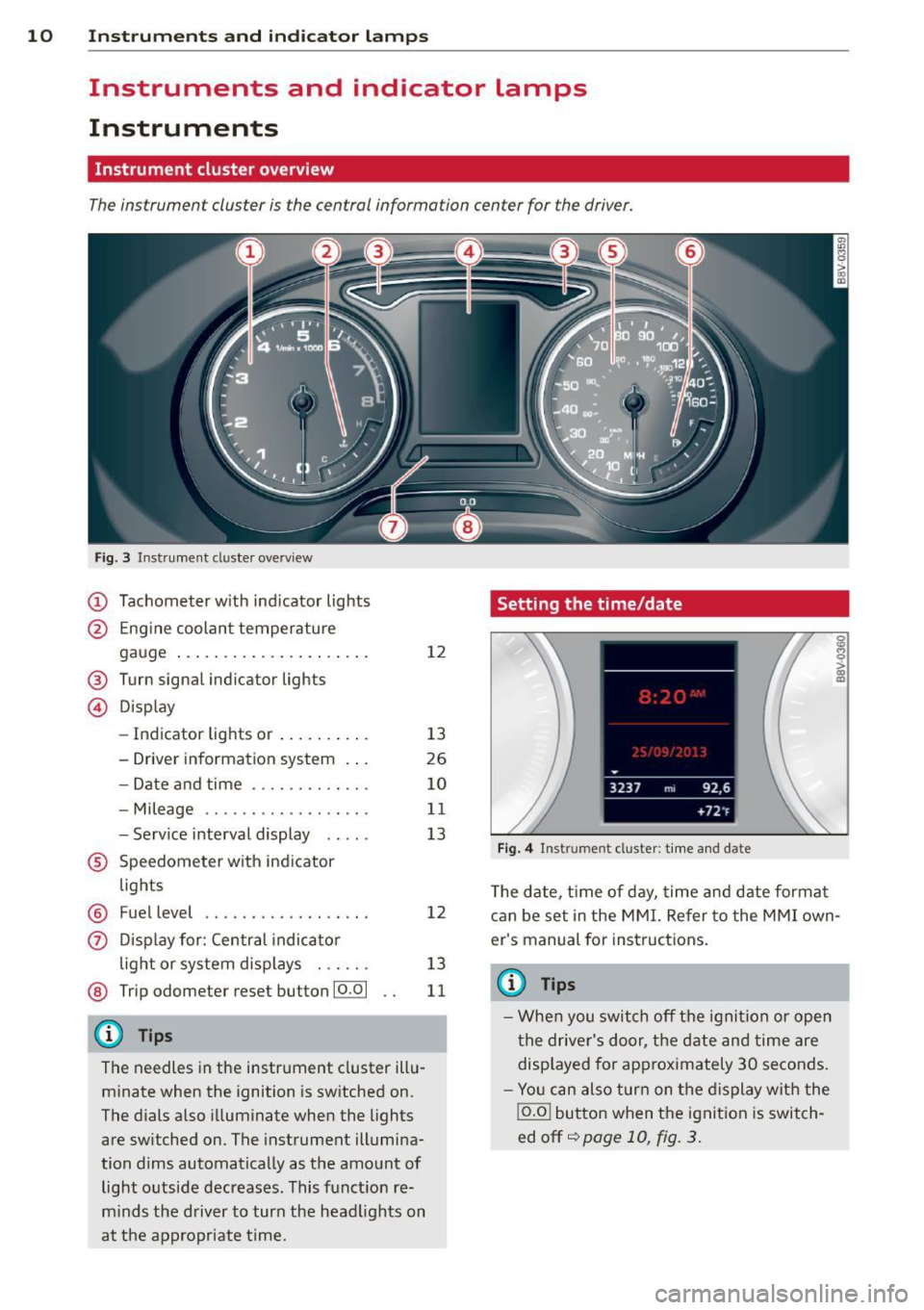
The instrumen t clus ter is the cen tral informa tion cen ter for the driver.
Fig . 3 In strument cl uster ove rv iew
(D Tachometer with ind icator lights
@ Eng ine coolant temperature
gauge .. ... .......... ... .. .
® Turn s ignal indi ca tor ligh ts
© D isplay
12
- Indicator light s or . . . . . . . . . . 13
- Driver information system . . . 26
- Date and time . .... .. ... .. .
- Mileage .. ... ..... .. ... .. .
- Serv ice interval disp lay .... .
® Speedometer with ind icator
lights
® Fuel level ................ . .
0 Disp lay for: Central indicator
l ight or system displays . .. .. .
@ Trip odome te r re se t bu tton 10.01
{D) Tips
The needles in the instrument cluster illu
minate when the ignition is switched on.
The dials also illuminate when the light s
are switched on . The instrument illumina
tion dims automatically as the amount of light outside decreases . This function re
m inds the driver to turn the head lights on
at the app ropriate time.
10
11
13
12
13
11
Setting the time/date
F ig. 4 Instrum en t cl ust er: tim e and date
T he date, t ime of day, time and date format
can be set in the MMI. Re fer to th e MMI own
er's manual for instruct ions.
(D Tips
- When you switch off the ignition or open
the driver's door, the date and time are
disp layed for approximately 30 seconds.
- Yo u can also turn on the display with the
j o.o j button when the ignition is switch
ed off ~
page 10, f ig. 3.
Page 13 of 302
....,
N
r--. > co
rl I.O
"' rl
"' rl
Tachometer
The tachometer displays the engine speed in
revolutions per minute .
The beginning of the red zone in the tachome
ter indicates the maximum permiss ible en
g ine speed for all gears once the engine has
been broken in and when it is warmed up to
operat ing temperature. You shou ld select the
"D/S" (Drive) selecto r lever pos ition or take
your foot off the accelerator peda l before
reaching th is area .
It is best to avoid high engine speeds, even
when dr iv ing in tiptron ic mode ~
page 115 .
(D Note
The tachometer needle
(D ¢ page 10,
fig. 3
shou ld only be in the red zone brief
ly: otherwise, this increases the risk of en
gine damage.
@) For the sake of the environment
Upshift ing early helps you to save fuel and
reduce operating no ise.
Odometer
Fig. S In strument cl uster: odo meter an d reset butto n
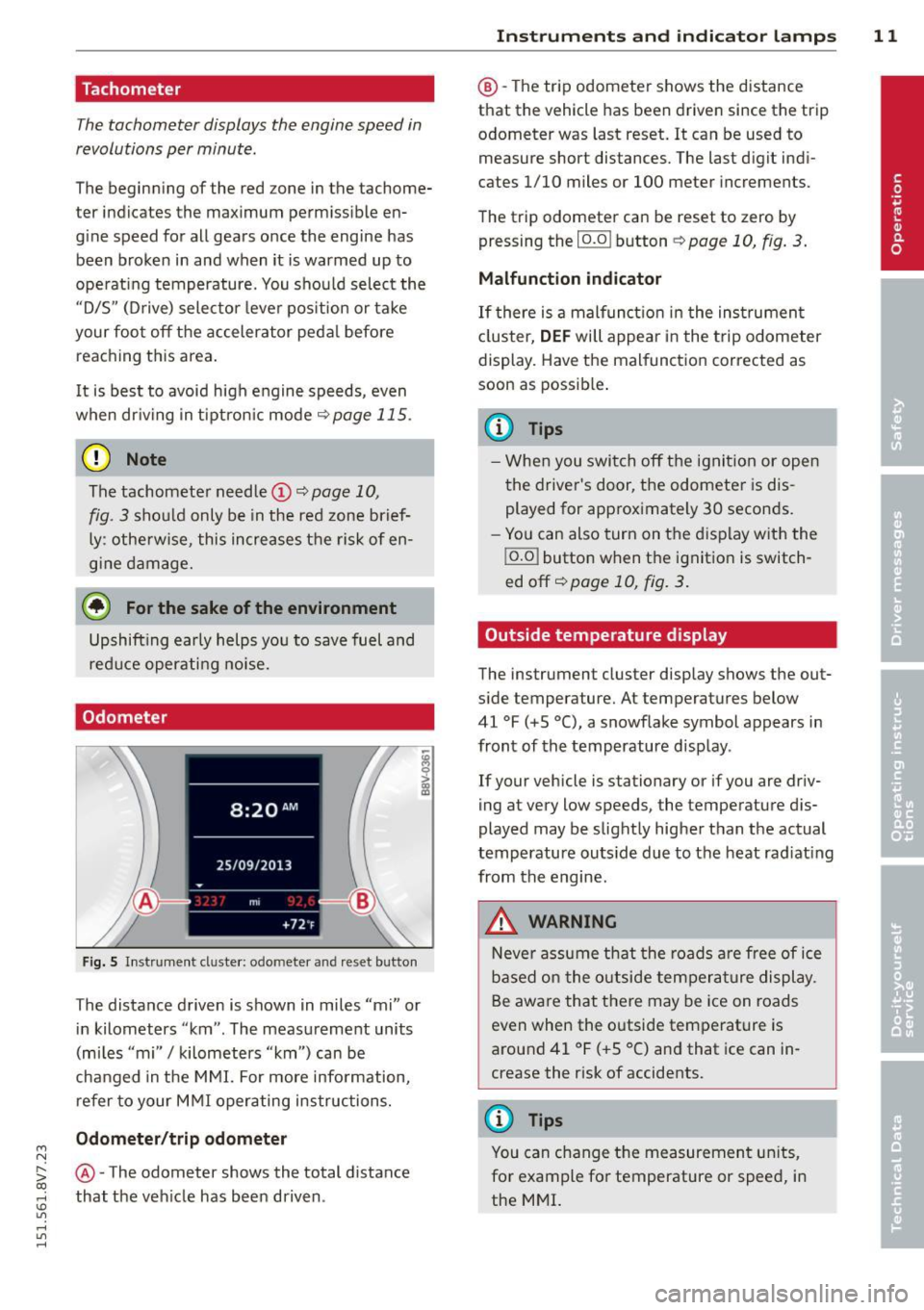
The distance driven is shown in miles "mi" or
in kilometers "km" . The measurement units
(mi les "mi"
I kilometers "km") can be
changed in the MMI. For more info rmation,
refer to your M MI operating instructions.
Odometer /trip odom eter
@ -The odometer shows the total d ista nee
that the veh icle has been driven .
Instrument s an d indi cat or l amp s 11
@ -The trip odometer shows the distance
that the vehicle has been driven since the trip
odometer was last reset. It can be used to measure short distances. The last digit ind i
cates 1/10 miles or 100 meter increments .
The trip odometer can be reset to zero by pressing the
I o.o I button ¢ page 10, fig. 3.
Malfunction indicator
If there is a malfunct io n in the ins trumen t
cl uster,
DEF will appear in the trip odometer
display. Have the malfunction corrected as
soon as possib le .
(D Tips
- Whe n you switch off the ignit ion or open
the driver's door, the odometer is dis
played for approximately 30 seconds.
- Yo u can also turn on the display with the
j o.o j button when the ignition is switch
ed off~
page 10, fig . 3.
Outside temperature display
The instrument cluster display shows the out
s ide temperature. At temperatu res below
41 °F (+S °C), a snowf lake symbol appears in
front of the temperature display .
If your vehicle is stationary or if you are driv
ing at very low speeds, the temperature d is
played may be slightly higher than the actual
temperatu re outs ide due to the heat rad iating
from the engine.
,&. WARNING
N eve r assume that the roads a re free of ice
based on the outside temperature display.
Be awa re that there may be ice on roads
even when the outside temperature is
around 41 °F ( +S °C) and that ice can in
crease the risk of accidents.
(D Tips
You can change t he measurement un its,
for example fo r temperature or speed, in
the MMI.
Page 14 of 302
12 Instrum ent s and indicator lamp s
Fuel level
The display @
c;, page 10, fig. 3 only works
when the ignition is sw itched on . When the
d isplay has reached the reserve mark, the bot
tom LED wi ll turn red and the
tD indicator
light turns on¢
page 23 . The bottom LED
blinks red when the fue l level is very low .
The on -board computer shows the range
based on the fuel leve l
c;, page 2 7, On-board
computer display.
F or the tank capac ity in yo ur vehicle , refer to
the Tec hnical Data ¢
page 280.
CJ) Note
Never d rive until the tank is completely
empty. The irregular supp ly of fuel that re
sults from that can cause the engine to
misfire. Uncombusted f uel will then enter
the exha ust system. This can cause over
heating and damage to the catalytic con
verter .
Coolant temperature indicator
The coolant temperature ind icator @
c::> page 10, fig . 3 only works when the ignition
is switched on . T o prevent engine damage, ob
serve the fo llow ing notes about the tempe ra
ture ranges.
Cold range
If only the LEDs at the bottom of the gauge
turn on, the engine has not reached operat ing
temperature yet . Avoid high engine speeds,
fu ll acce le rat ing and heavy engine loads.
Norm al range
The engine has reached its operating temper
ature once the LEDs up to the center of the
gauge turn on under normal driving condi
tions. The L EDs higher up may turn on if the
engine is under heavy load or the o uts ide tem
perat ure is h igh. This is not a cause for con
cern as long as the. indicator light in the
display does not t urn on. Hot range
If the L
EDs in the upper area of the d isp lay
and the. indicator light in the instrumen t
cluster disp lay t urn on, the coo lant tempe ra
ture is too high
c::> poge 19.
A WARNING
-Always observe the warning in
c;, page 214 before opening the hood
and checking the engine coolant level.
- Never open the eng ine hood if you see or
hear steam, or if you see engine coo lant
dripping from the engine compartment .
You could burn yourself. Let the engi ne
coo l off first until you can no longe r see
or hea r steam or coolant escaping.
([) Note
- Add itiona l headlights and other compo
ne nts in front of the a ir intake impairs
the cooling eff ect of the coolant. This in
creases the risk of the engine over heat
ing dur ing high outs ide temper atures
and heavy eng ine load .
- The front spoiler also he lps to distr ibute
cooling air correct ly wh ile driving.
If the
spoiler is damaged, the coo ling effect
wi ll be impai red and the risk of the en
gine overheating will increase. See an au
thorized Audi dealer o r authorized Aud i
Service Facility for ass istance.
Page 16 of 302
14 Instruments and indicator lamps
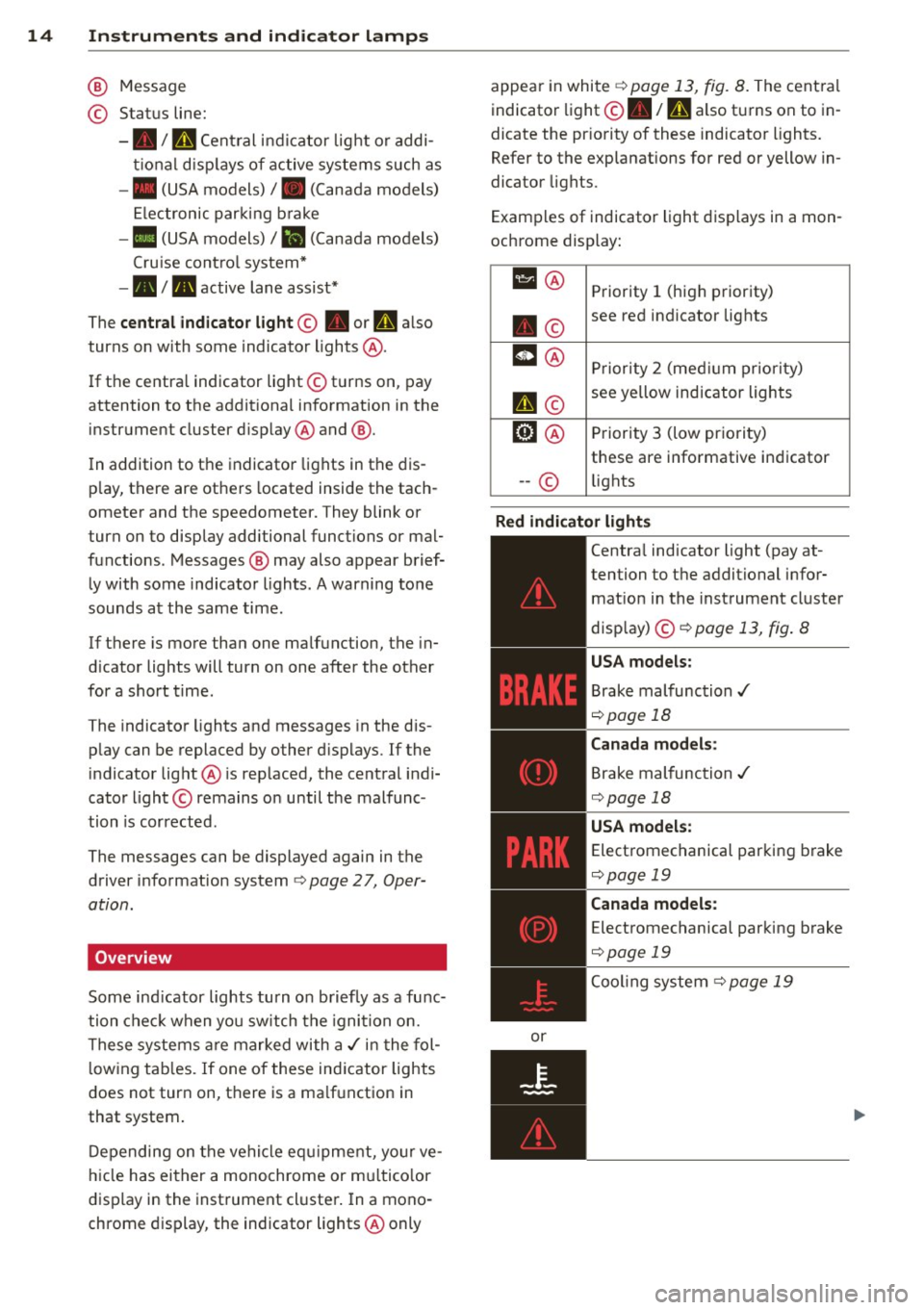
@ Message
© Status line:
-• I U Central indicator light or addi
tional displays of active systems such as
- • (USA models)/ . (Canada models)
El ectronic parking brake
-• (USA models)/
Iii (Canada models)
Cruise control system*
- • I. active lane assist*
The
central indicator light© • or I'll also
turns on with some indicator lights @.
If the centra l indicator light © turns on, pay
attention to the additional information in the
instrument cluster display @and @.
In addition to the indicator lights in the dis
p lay, there are others located inside the tach
ometer and the speedometer. They blink or
turn on to display additional funct ions or mal
functions. Messages@ may also appear brief
ly with some indicator lights. A warning tone
sounds at the same time .
If there is more than one malfunction, the in
d icator lights will turn on one after the other
for a short time.
The indicator lights and messages in the dis
p lay can be replaced by other displays. If the
indicator light@ is rep laced, the central indi
cator light © remains on until the malfunc
tion is corrected.
The messages can be displayed again in the
driver information system
<=>page 27, Oper
ation.
Overview
Some indicator lights turn on briefly as a func
tion check when you switch the ignition on.
These systems are marked with a./ in the fol
l owing tab les. If one of these indicator lights
does not turn on, there is a ma lfunction in
that system .
Depending on the vehicle equ ipment, your ve
hicle has either a monochrome or mu ltico lor
display in the instrument cluster. In a mono
chrome display, the indicator lights@only appear
in white
<=>page 13, fig. 8. The cent ral
indicator light@• /
mi also turns on to in
dicate the pr iority of these indicator lights.
Refer to the explanations for red or yellow in
dicator lights.
Examples of indicator light displays in a mon
ochrome display:
111 @ Priority 1 (high priority)
. © see red
indicator lights
m@ Priority 2 (medium priority)
I'll©
see yellow indicator lights
ml@ Priority 3 (low pr iority)
these are informative indicator
-- © lights
Red indicator lights
or
-------------
Centra
l indicator light (pay at-
tention to the additional infor mat ion in the instrument cluster
disp lay) ©<=>
page 13, fig . 8
USA models :
Brake malfunction ./
<=>page 18
Canada models:
Brake malfunction./
<=>page 18
USA models :
Electromechanical parking brake
<=>page 19
Canada models :
Electromechanical parking brake
<=>page 19
Coo ling system r=> page 19
Page 17 of 302
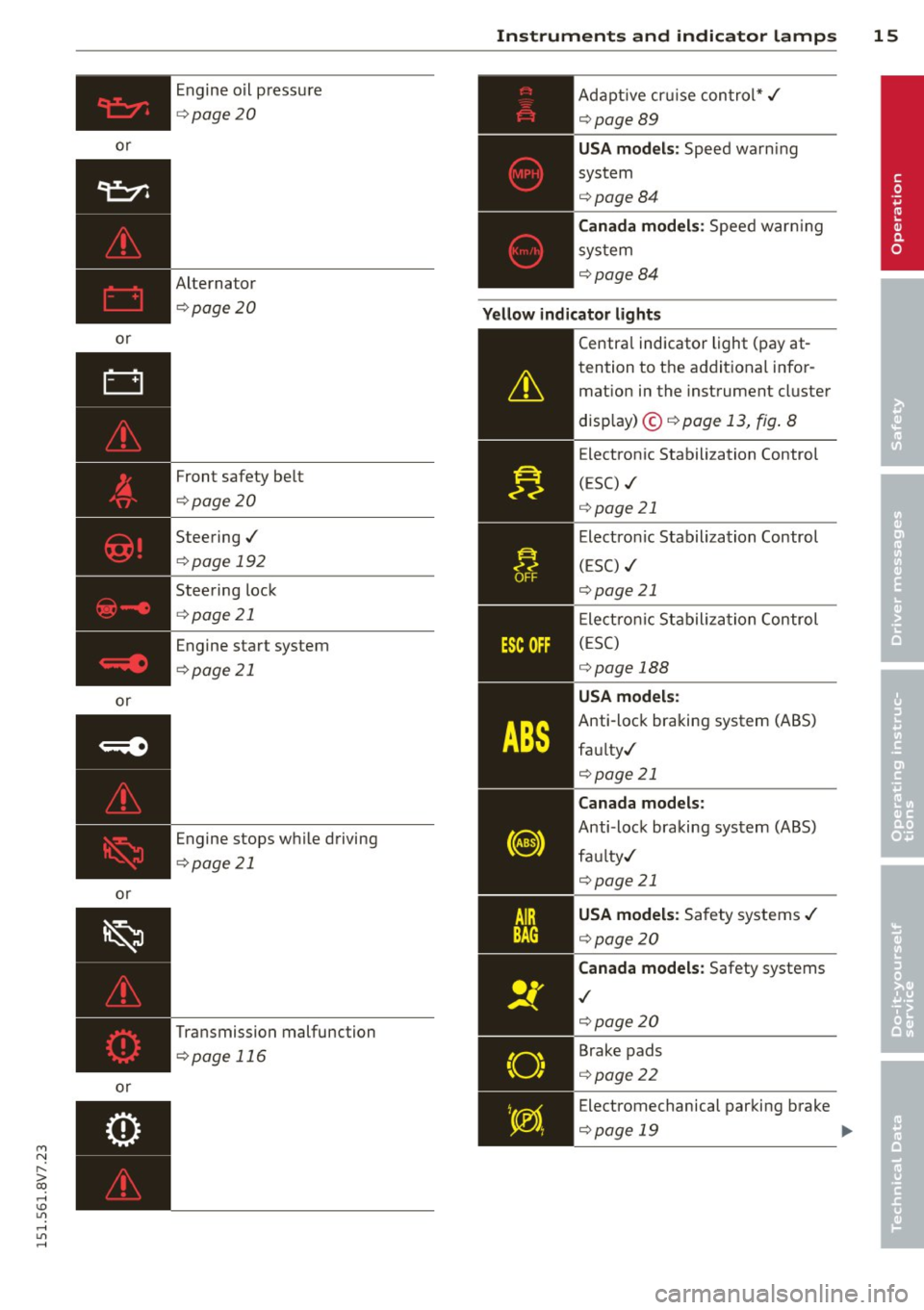
or
or
or
or
or Engine o
il p ress ure
¢ page 20
Alternator ¢page 20
Front safety be lt
¢page20
Steering./
¢page 192
Stee ring lock
¢ page 21
Engine start system
¢page 21
Engine stops w hile driving
¢page 21
Transmission malfunction ¢page 116
Instruments and indicator lamps 15
Ad aptive cr uise c on tro l*./
¢page89
USA models : Speed wa rn ing
sys tem
¢ page84
Canada models: Spee d war ning
sys tem
¢page84
Yellow indicator lights
"O~ I I ~ 'I
-------------
Centra l indicator light ( pay at-
tention to t he addit ional info r
mat ion in the instrument cluster
d isp lay) @ ¢ page 13, fig . 8
E lectron ic Stabilization Control
( E SC) ./
¢ page 21
Electro nic Stabilization Control
(ESC) ./
¢page 21
El ect ro nic Sta bili zat ion Control
(E SC )
¢page 188
USA models:
Anti-loc k bra king system (ABS)
fau lty ./
¢ page 21
Canada models:
Anti-lock braking sys tem (ABS)
fau lty./
¢page 21
USA model s: Sa fety systems ./
¢ page 20
Canada models: Safety systems
./
¢page2 0
Brake pads
¢ page22
E lectromechanical par king brake
¢page 19
lill-
M a N
" > co ,...., \!) ..,.,
,...., ..,., ,....,
Page 18 of 302
16 Instruments and indicator lamps
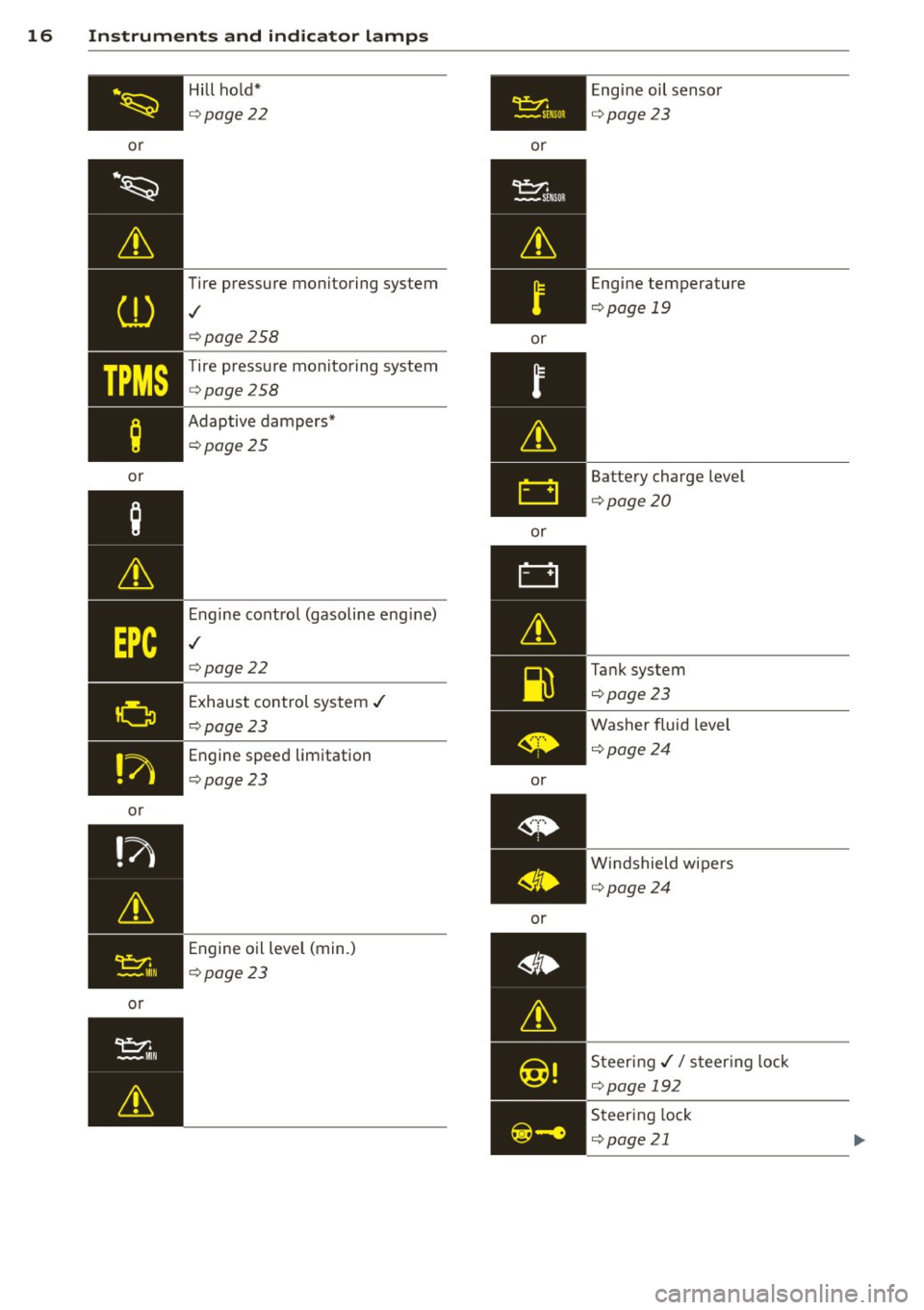
or
·~
Lt
CD
TPMS
;
or
or
or Hill ho
ld*
Q page 22
Tire pressure monitoring system
,/
Qpage 258
Tire pressure monitoring system
Q page 258
Adaptive dampers*
Qpage25
Engine control (gasoline eng ine)
,/
Q page 22
Exhaust control system ,/
Qpage 23
Engine speed limitation
Qpage 23
Engine oil level (min.)
Qpage 23
~ -SE NSOR
or
or
or
or
or Engine
oil sensor
Qpage23
Engine temperature
Qpage 19
Battery charge level
Qpage20
Tank system
Qpage23
Washer fluid level
Qpage24
Windshield wipers
Qpage24
Steer ing,// s teer ing lock
Qpage 192
Steering lock
Q page21
Page 19 of 302
M N
" > co ,...., \!) 1.1'1 ,...., 1.1'1 ,....,
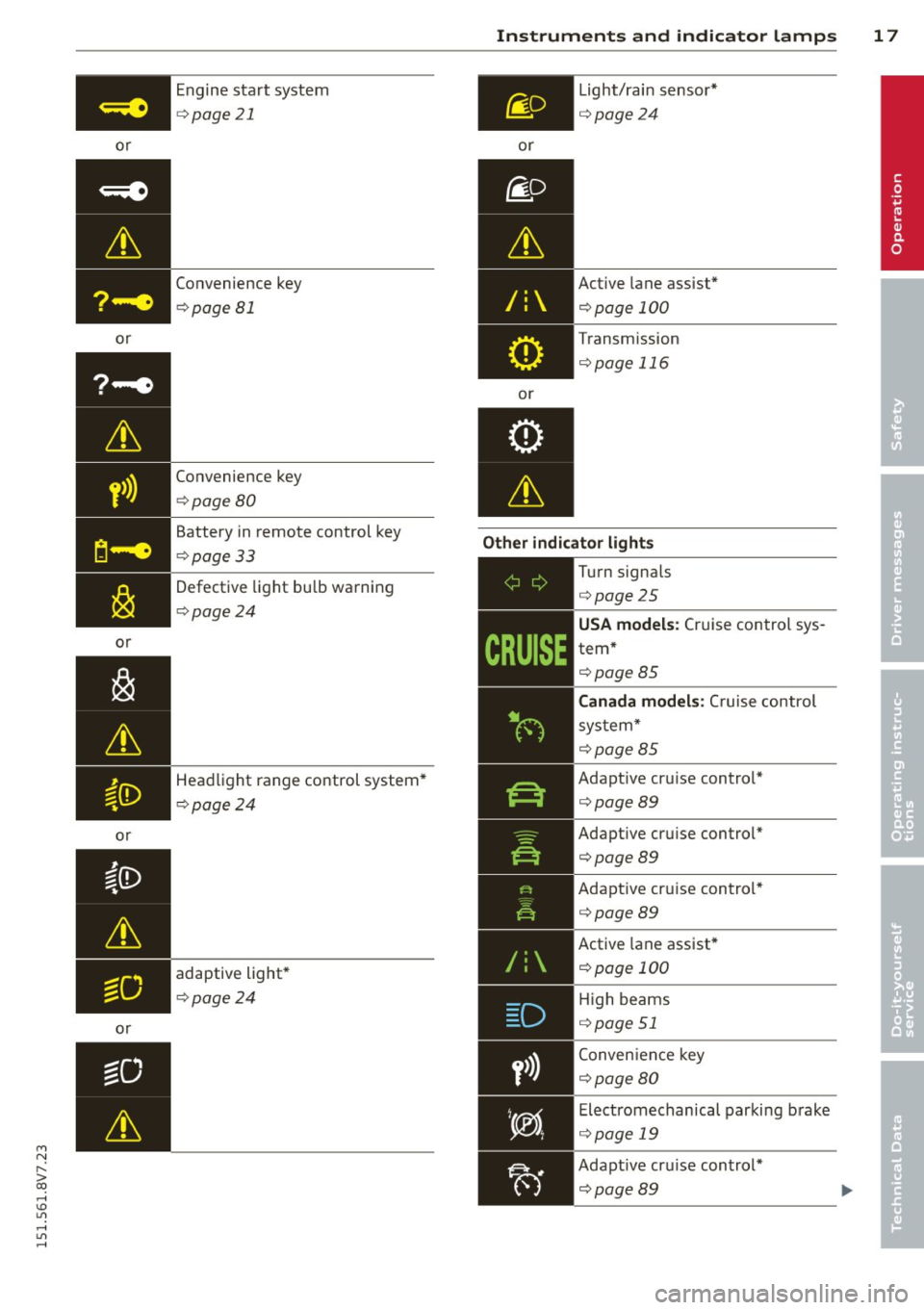
or
or
or
or
or Engine start system
¢
page 21
Convenience key
¢page Bl
Convenience key
¢page BO
Battery in remote control key
¢page 33
Defective light bulb warning
¢ page24
Headlight range control system*
¢ page 24
adaptive light*
¢ page24
Instruments and indicator lamps 17
or
/:
or Light/rain
sensor*
¢page24
Active lane assist*
¢page 100
Transmission
¢page 116
Other indicator lights
-------------
Turn signals
¢page25
USA models: Cruise control sys
tem*
¢ page BS
Canada models : Cruise control
system*
¢page BS
Adapt ive cru ise control*
¢ page89
Adaptive cruise control* ¢page89
Adaptive cruise control* ¢page89
Active lane assist*
¢page 100
High beams
¢ page 51
Conven ience key
¢page 80
Electromechanical parking brake
¢ page 19
Adapt ive cru ise control*
¢page89
•
Page 20 of 302
18 Instruments and indicator lamps
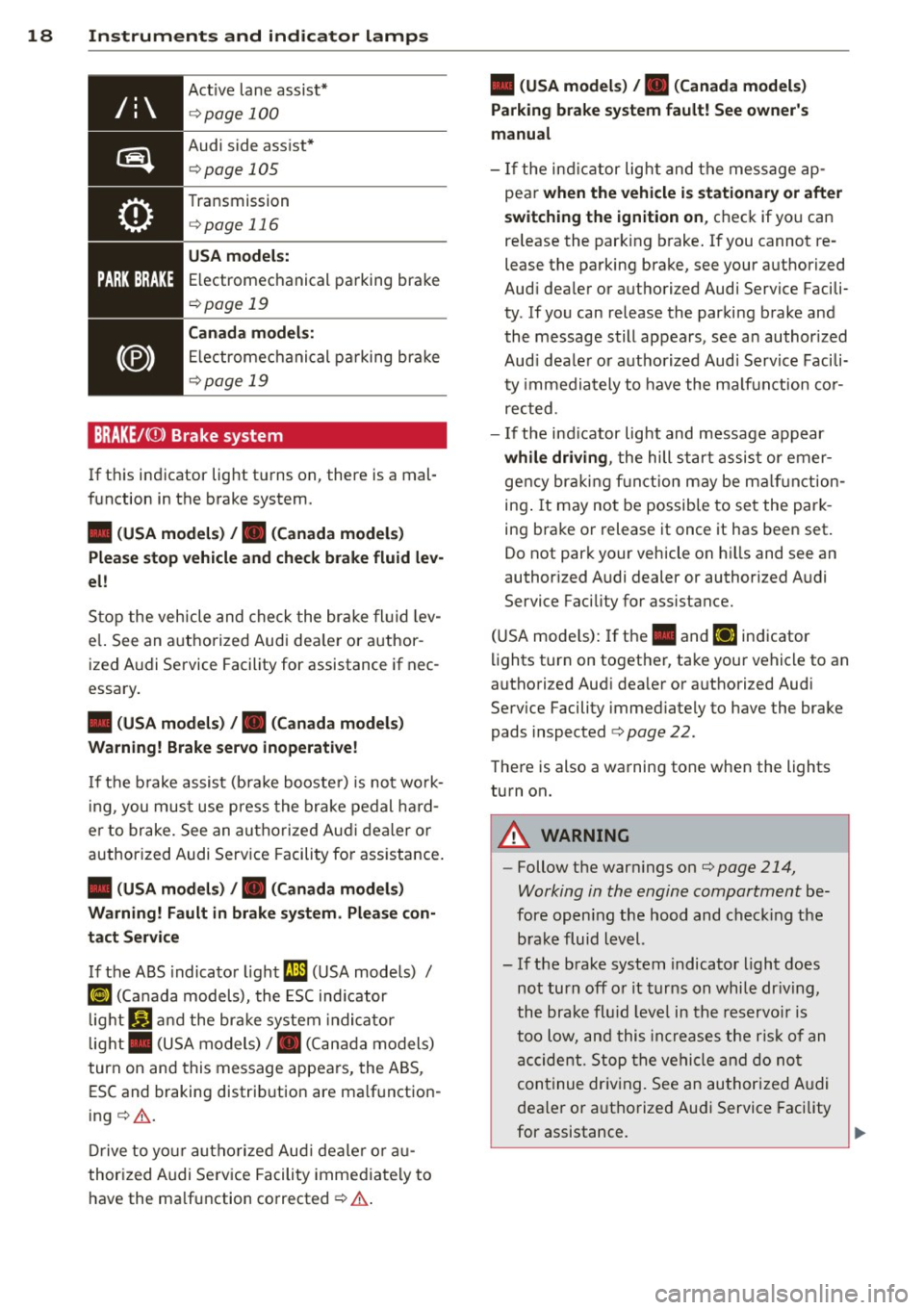
Active lane assist*
¢ page 100
Audi side assist*
¢page 105
Transmission
¢ page 116
USA model s:
Electromechanical parking brake
¢ page 19
Canada model s:
Electromechanical parking bra ke
¢page 19
BRAKE/((i)) Brake system
If this indicator light tu rns on, there is a mal
function in the brake system.
• (USA models) , • (Canada models)
Please stop vehicle and check brake fluid lev
el!
Stop the vehicle and check the brake fluid lev
e l. See an a uthorized Audi dea le r or author
ized Audi Service Facility for assistance if nec
essary.
• (USA models) , • (Canada models)
Warning! Brake servo inoperative!
If the b rake assist (bra ke booste r) is not wo rk
in g, you must use press the brake pedal hard
e r to brake. See an authorized Aud i dealer or
authorized Audi Serv ice Facility fo r ass istance.
• (USA models) , • (Canada models )
Warning! Fault in brake sy stem . Please con
tact Service
If the ABS indicator light (;I (USA models) /
KO) (Canada models), the ESC ind icator
light
Jil and the brake system indicator
light . (USA models)/ . (Canada models)
turn on and this message appears, the ABS,
ESC and braking distrib ution are ma lf u nction
ing ¢.&. .
Drive to your authorized Aud i dealer o r au
thorized Audi Service Facility immediately to
have the ma lfunction corrected ¢.&. .
• (USA models) , • (Canada models)
Parking brake system fault! See owner's
manual
- If the ind icator light and the message ap
pear
when the vehicle is stationary or after
switching the ignition on ,
check if you can
re lease the parking brake. If you cannot re
lease the parking brake, see your authorized
Aud i dealer or authorized Audi Service Facili
ty . If you can release the parking brake and
the message still appears, see an author ized
Aud i dea ler or a uthorized Audi Service Facili
ty immediately to have the ma lfunction cor
rected.
- If the ind icator lig ht and message appear
while driving , the hill start assist or emer
gency braking function may be malf uncti on
ing . It may not be possib le to set the park
ing brake or release it once it has been set.
Do not park your vehicle on hills and see an
author ized Audi dealer or authorized A udi
Service Facility for assistance.
(USA mode ls) : I f the . and
liJ indicator
lights turn on together, take your vehicle to an
authorized Aud i dea ler or a uthorized Audi
Serv ice Facility immed iately to have the brake
pads inspected ¢
page 22.
There is also a warning tone when the lights
turn on.
A WARNING
-- Follow the warn ings on¢ page 214,
Working in the engine compartment
be
fore opening the hood and check ing the
brake fluid level.
- If the brake system indicator light does
not turn off or it turns on while dr iving,
the brake fluid leve l in the reservo ir is
too low, and this increases the risk of an
accident. Stop the vehicle and do not
continue driving. See an authorized Aud i
dealer or authorized Aud i Service Facility
for assistance. ..,.
Page 21 of 302
M N ,....
> co ,...., \!) ..,.,
,...., ..,., ,....,
-If the brake system indicator light turns
on together with the ABS and ESC indica
tor lights, the ABS/ESC regulating func
t ion may be malfunct ion ing . Funct ions
that stabilize the vehicle are no longer
available . Th is could cause the rear of the
vehicle to swerve, wh ich increases the
risk that the vehicle will slide. Drive care
fully to the nearest authorized Audi deal
er or authorized Audi Service Facility and
have the malfunction corrected .
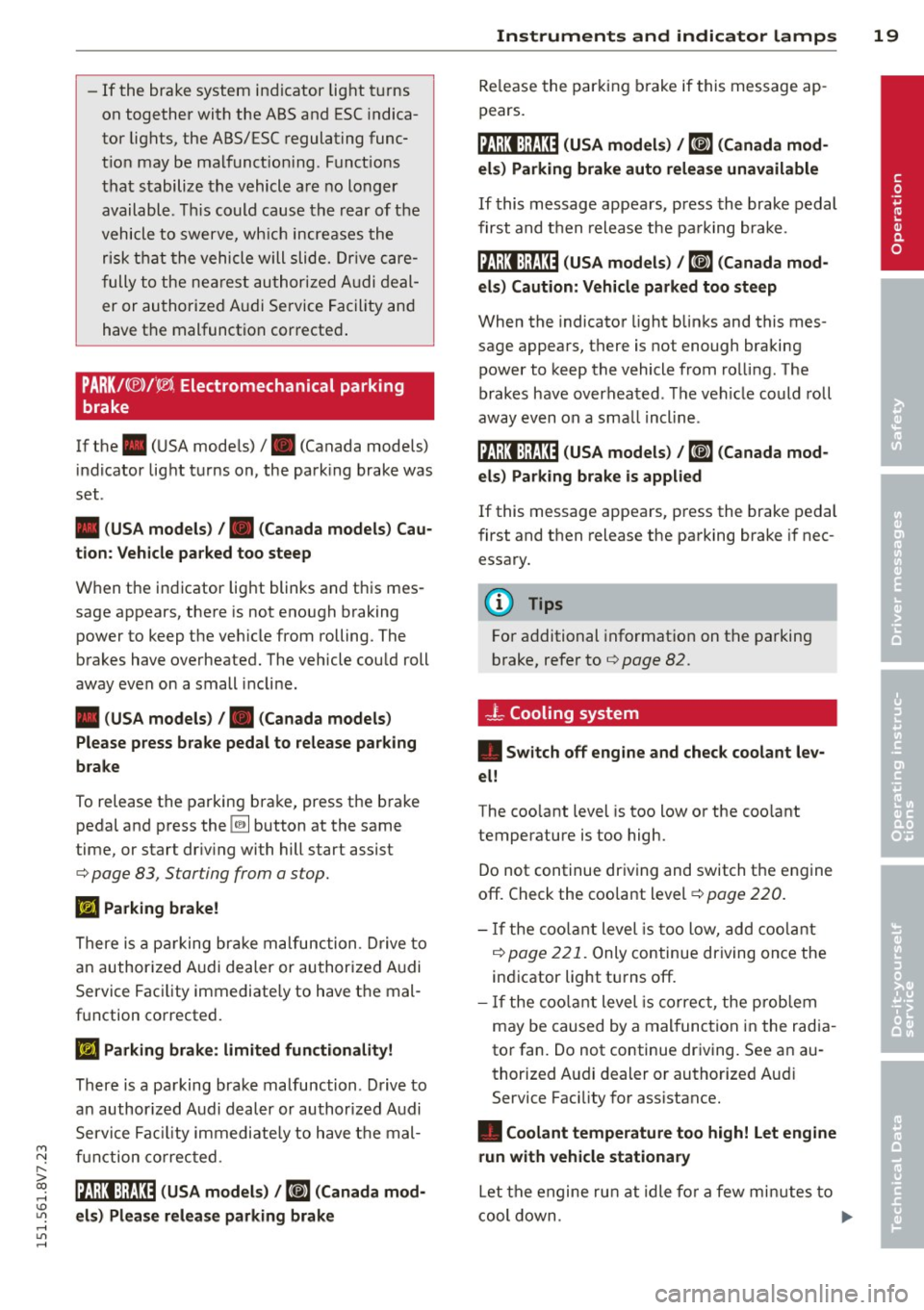
PARKl<® >f' l®i Electromechanical p arking
brake
If the . (USA models) I. (Canada models)
indicator light turns on, the park ing brake was
set .
• (USA models) /. (Canada models) Cau
tion: Vehicle parked too steep
When the indicator light blinks and this mes
sage appears, there is not enough braking
power to keep the veh icle from rolling. The
brakes have overheated. The vehicle could roll
away even on a small incline.
• (USA models) /. (Canada models)
Please press brake pedal to release parking
brake
To release the parking brake, press the brake
pedal and press the
[2] button at the same
time , or start dr iv ing wi th hill s tart assist
¢ page 83 , S tarting from a stop.
Ill Parking brake!
There is a parking brake malfunction. Drive to
an authorized Audi dealer or authorized Audi
Service Facility immediately to have the mal
function corrected .
Ill Parking brake: limited functionality!
There is a parking brake malfunction. Drive to
an author ized Audi dealer or authorized Audi
Service Facility immediately to have the mal
function corrected.
litJ;):t :);Q3~ (USA models ) / ~ (Canada mod
els) Please release parking brake
Instruments and indicator lamps 19
Release the parking brake if this message ap
pears.
j:lj;J:t:);JJJ~ (USA models) /~(Canada mod
els) Parking brake auto release unavailable
If this message appears , press the brake pedal
first and then release the pa rking brake .
j:(;j;)J:);J:1:0 (USA models) / ¢@'A
When the indicator light blinks and this mes
s a ge appears, there is not enough braking
power to keep the vehicle from rolling. The
brakes have overheated. Th e veh icle could roll
away even on a sma ll incline .
IIJ;):11:);J:1:0 (USA models) /~(Canada mod
els) Parking brake is applied
If this message appears, press the brake pedal
first and then release the parking brake if nec
essary.
(D Tips
For additional informat ion on the parking
brake, refer to¢
page 82.
-L Cooling system
• Switch off engine and check coolant lev
el!
The coolant level is too low or the coo lant
temperature is too high.
Do not continue driving and switch the engine
off . Check the coolant level¢
page 220.
- If the coolant level is too low, add coolant
¢page 221. Only continue driving once the
ind icator light turns off .
- If the coolant level is correct, the problem
may be caused by a malfunction in the radia
tor fan. Do not continue driving. See an au
thorized Audi dealer or authorized Audi
Service Facility for assistance.
• Coolant temperature too high! Let engine
run with vehicle stationary
Let the engine run at idle fo r a few minutes to
cool down . .,..
•