cruise control AUDI A3 CABRIOLET 2016 User Guide
[x] Cancel search | Manufacturer: AUDI, Model Year: 2016, Model line: A3 CABRIOLET, Model: AUDI A3 CABRIOLET 2016Pages: 272, PDF Size: 67.88 MB
Page 95 of 272
Ass is t
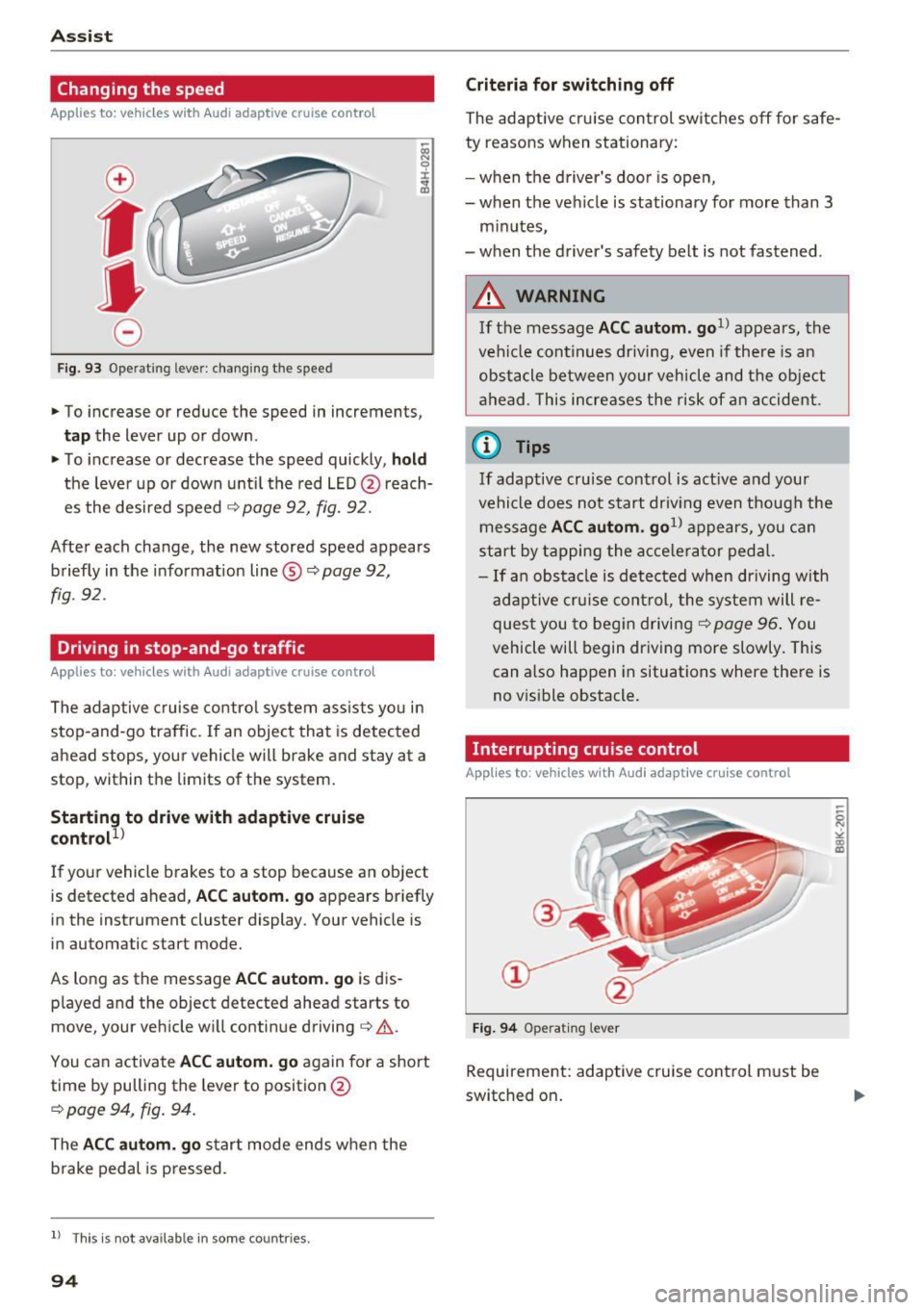
Changing the speed
Applies to: vehicles with Aud i adapt ive cruise contro l
0
f
•
0
Fig. 93 Operat ing lever: changing the speed
.,. To increase or reduce the speed in increments,
tap the lever up or down.
.,. To increase or decrease the speed quickly,
hold
the leve r up or down until the red LED @ reach
es the desired speed
¢ page 92, fig. 92.
After each change, the new stored speed appears briefly in the informat ion line ®¢
page 92,
fig. 92.
Driving in stop-and-go traffic
Applies to : vehicles with Aud i adapt ive cru ise control
The adaptive c ruise control system assists yo u in
stop-and-go traffic. If an object that is detected
ahead stops, your vehicle will brake and stay at a
stop, within the limits of the system.
Starting to drive with adaptive cruise
control!)
If your vehicle brakes to a stop because an object
is detected ahead,
AC C autom. go appears br iefly
in the instrument cluster display. Your vehicle is
in automatic start mode.
As long as the message
ACC au tom . go is dis
p layed and the object detected ahead starts to
move, your vehicle will continue driving¢ ,&..
You can activate
AC C autom. go again for a short
time by pulling the lever to position @
¢ page 94, fig. 94.
The ACC autom . go start mode ends when the
b rake pedal is p ressed.
l ) Th is is not ava ilab le in some countr ies .
94
Criteria for switching off
The adaptive cru ise con trol switches off for s afe
ty reasons when stationary:
- when the d river 's doo r is ope n,
- when the vehicle is stationary for more than 3
minutes,
- when the d river's safety belt is not fastened .
A WARNING
If the message ACC autom. go1> appears, the
vehicle continues driving, even if there is an
obstacle between your vehicle and the ob je ct
ahead. This increases the risk of an accident .
@ Tips
If adaptive cruise cont rol is act ive and your
vehicle does no t start driv ing even though the
message
AC C autom . go1> appears, you ca n
start by tapping the a cce le ra tor ped al.
- If an obstacle is detected when dr iving with
adaptive cruise cont rol, the system will re
ques t you to beg in driving¢
page 96 . You
vehicle will begin dr iving more slowly. This
can also happen in situations where there is
no v is ible obstacle.
Interrupting cruise control
Applies to : vehicles with Audi adaptive cruise control
Fi g. 94 Operat ing lever
Requirement: adaptive cruise cont rol must be
switched on .
Page 96 of 272
<( co .... N ,.__
N .... 0 ,.__
> co
Overriding cruise control
Ove rriding means ex ceeding the selected speed
when adaptive cruise control is active, for exam
p le when pressing the accelerator peda l when
pass ing.
"'T o accelerate manua lly, p ull the lever toward
you into position @and ho ld it there . T he mes
sage
ACC : over ride appears . Or
"' press th e accelerator pedal.
"' To resume cruise control, release the lever or
take your foot off the acce lerator pedal.
Inte rrupting cruise contr ol w hil e driving
"'Move the lever into position @. The message
ACC: standb y appears. Or
"' press th e brake pedal.
"' To resume the stored speed, move the lever in
to posit ion @.
Int errupting c rui se contr ol wh en stopped
"' Push the lever away from you into position @.
The message
ACC : stan dby appears.
"' To resume cruise control, press the brake pedal
and pull the lever toward you into position@.
A WARNING
It is dangerous to activate cruise control and
resume the stored speed when the current
road, traffic or weather conditions do not pe r
m it this. This could result in a crash.
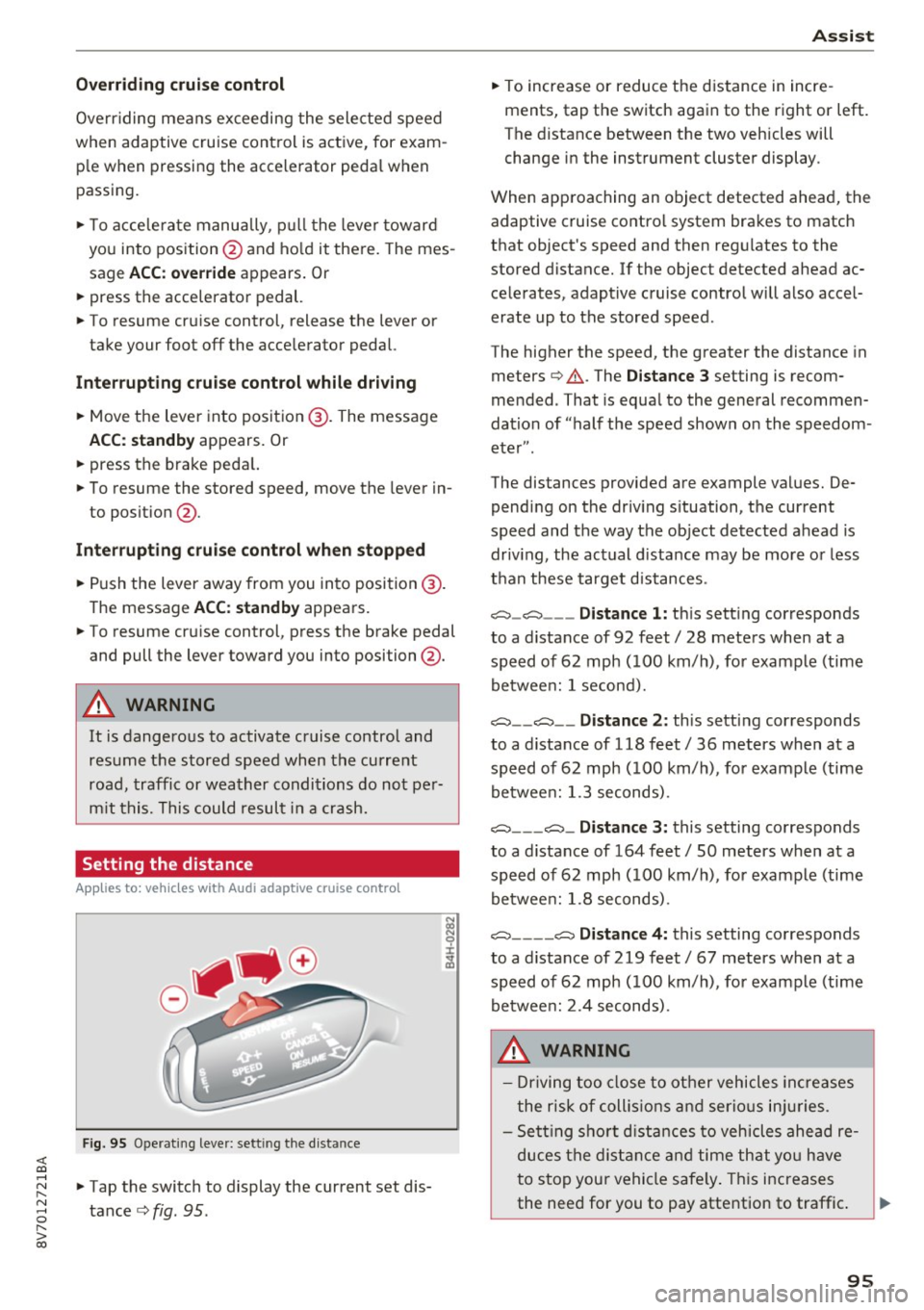
Setting the distance
App lies to: vehicles with Audi adaptive cruise control
F ig. 95 O perat ing leve r: sett ing the d ist an ce
"'Tap the switch to display the current set dis
tance
c> fig . 95 .
Assist
"'To increase or reduce the d istance in incre
ments, tap th e switch again to the right or left.
T he distance between the two veh icles will
change in the instrument cluster display.
When approaching an object detected ahead, the adaptive cruise contro l system brakes to match
that object's speed and then regul ates to the
stored distance. If the object detected ahead ac celerates, adaptive cruise contro l will also accel
erate up to the stored speed .
The higher the speed, the greater the distance in meters
c> & . The Distance 3 setting is recom
mended . That is equa l to the general recommen
dation of "half t he speed shown on the speedom
eter ".
The distances provided are example values. De pending on the driv ing s ituation, the current
speed and the way the object detected ahead is
driv ing, the actual d ista nce may be more or less
t h an these target d istances .
o::::::::,_o::::::::, ___ Distance 1: th is sett ing corresponds
to a distance of 92 feet/ 28 meters when at a speed of 62 mph ( 100 km/h), for example (time
betwee n: 1 second).
o::::::::, __ o::::::::, __ Distanc e 2: this setting corresponds
to a distance of 118 feet/ 36 meters when at a speed of 62 mph ( 100 km/h), for example (time
betwee n: 1.3 seconds) .
o::::::::, ___ o::::::::,_ Distance 3: this setting corresponds
to a distance of 164 feet
I SO meters when at a
speed of 62 mph ( 100 km/h), for example (time
betwee n: 1.8 seconds) .
o::::::::, ____ o::::::::, Distance 4: this setting corresponds
to a distance of 219 feet
I 67 meters when at a
speed of 62 mph ( 100 km/h), for example (time
betwee n: 2.4 seconds) .
A WARNING
-Driving too close to other vehicles increa ses
the risk of collis ions an d serio us inju ries .
- Sett ing sho rt d istances to vehicles ahead re
duces the dis tance an d time th at you have
to stop your vehicle safe ly . Th is increases
the need for you to pay attention to traffic . ..,.
95
Page 97 of 272
Ass is t
- Always follow applicable traffic laws, use
common sense and select a distance to
vehicles ahead that takes the current traffic,
road and weather conditions into account .
(D Tips
Distan ce 3
is set automatically each time you
switch the ignition on. If you would like to set
another d istance as the standard setting, you
can have the
Ad apti ve cruis e control menu
added/ enabled by an authorized Aud i dealer
or authorized Audi Service Fac ility.
Setting the driving program
Applies to: vehicles with Audi adaptive cruise control
A ad aptive cru ise cont rol d riving program is ad
justable on veh icles w ithout A udi drive selec t*.
• In the MMI, se lect: the
I MENU I b utton > C ar >
Sy stem s*
cont rol button > Drive r assi st >
Adaptiv e crui se c ontrol > Driving program >
Comfort /Standard /Dynamic .
Selecting the driving mode
Applies to: vehicles with Audi adaptive cruise control
The adaptive cruise contro l dr iving program is ad
justable for vehicles with Audi drive select usi ng
the driving mode.
• Se lect the des ired dr iving mode
C o mfort , Auto ,
Dynamic or Indi vidual *
with the knob
~page 106 .
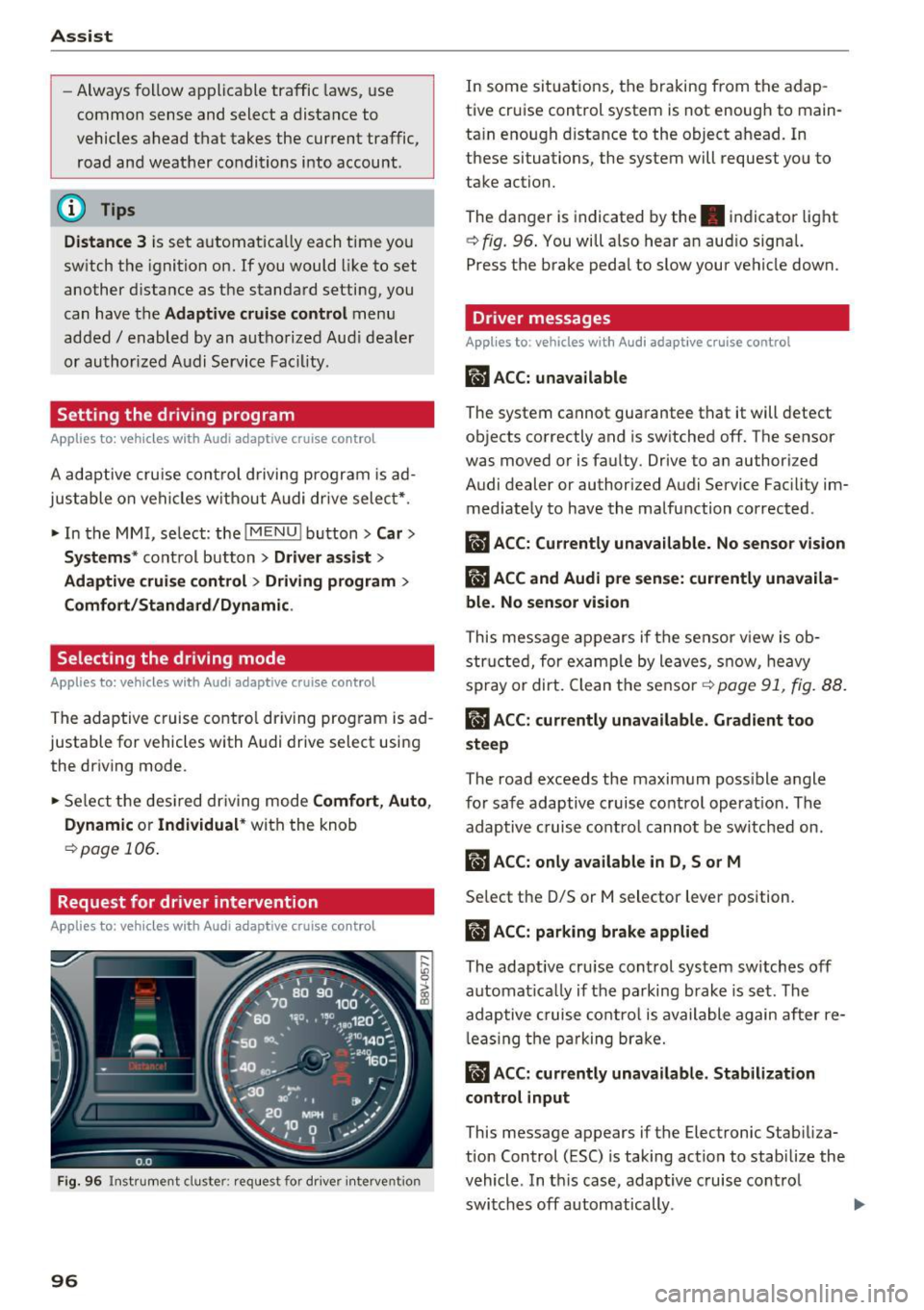
Request for driver intervention
Applies to: vehicles with Audi adaptive cruise control
Fig. 96 Instrument d uster : req uest for d river intervention
96
In some sit uations, the braking from the adap
tive cruise control system is not enough to main
ta in enough d istance to the object ahead. In
these situations, the system will request you to
take action.
The danger is indicated by the. indicator light
~fig. 96 . You will also hear an aud io signa l.
Press the brake pedal to slow your vehicle down.
Driver messages
Applies to : vehicles with Audi adaptive cruise control
m'J ACC: unava ilable
The system cannot guarantee that it will detect
objects correctly and is switched off. The sensor
was moved or is faulty. Drive to an author ized
Audi dealer or authorized Audi Service Fac ility im
med iate ly to have the malfunction corrected.
ilJ A CC: Cur rentl y una vailable. No sensor vision
ilJ ACC and Audi pre sense: currently unavaila
ble. No sensor vi sion
This message appears if the sensor v iew is ob
struc ted, for examp le by leaves, snow, heavy
spray or dirt. Clean the se nsor
r=.> page 91, fig. 88.
II ACC: currentl y una vailable . Gradient too
steep
The road exceeds the maxim um poss ible angle
fo r safe adaptive cruise control operat ion. The
adaptive cruise contro l cannot be sw itched on.
rlJ ACC: onl y available in D, Sor M
Select the D/S or M selector lever position.
ii ACC: parking brake applied
The adaptive cru ise control system sw itches off
automat ica lly if the parking brake is set. The
adap tive cruise co ntro l is available again after re
l eas ing the p arking brake.
ii ACC: curr ently unavailable . Stabilization
control input
This message appears if the Electronic Stab iliza
tion Control (ESC) is taking action to stab ilize the
vehicle . In th is case, adaptive cruise co ntrol
switches off automatically .
Page 98 of 272
<( co .... N r--N .... 0 r--> co
llJ ACC off: manual control!
This message appears if the vehicle rolls back
when starting on a slight incline, even though
ACC is active. Press the brake pedal to prevent
the vehicle from rolling or starting to move.
Ill ACC: engine speed
This message appears if the driver has not shift
ed up or down in time when the adaptive cruise
control is braking or accelerating, causing the ve
hicle to exceed or to not reach the permitted en
gine speed . The adaptive cruise control turns off.
A chime sounds as a reminder.
•••
Three white dots appear if a setting cannot be se
lected with the operating lever. For example, this
happens if adaptive cruise control cannot be acti
vated when stopped because the driver has not fastened the safety belt.
Door open
Adaptive cruise control cannot be switched on
when the vehicle is stationary and the driver's
door is open.
Audi pre sense
Introduction
Applies to: vehicles with Audi pre sense basic or Audi pre
sense front
Within the limits of the system, pre sense basic
and pre sense front can initiate steps to protect
vehicle occupants in certain dangerous situa
tions.
Critical driving situations can be recognized by
the pre sense front via a network of different ve
hicle systems and can take steps to prepare the
vehicle occupants for a potential collision.
The pre sense front works with a radar sensor
and a video camera*. It also functions within the
limits of the system when adaptive cruise con
trol* is switched off.
Assist
General information
General information
Applies to: vehicles with Audi pre sense front or Audi adaptive
cruise control
A WARNING
Also follow the general information found on
~ page 91, General information.
Audi pre sense basic
Description
Applies to: vehicles with Audi pre sense basic
The function of the pre sense basic is activated at
a speed of 20 mph (30 km/h) or higher.
The following functions can be triggered under
certain conditions within the limits of the sys
tem:
- Tensioning of the safety belts (for examp le,
during heavy braking): the front safety belts have reversible belt tensioners. If a collision
does not occur, the safety belts loosen slightly
and are ready to trigger again.
- Closing the windows (for example when over
or understeering): the windows close until
there is a small gap open.
Audi drive select: the deployment time is adapt ed in dynamic mode.
A WARNING
-The pre sense basic cannot overcome natural
physical laws. It is a system designed to assist
and it cannot prevent a collision. Do not let
the increased safety provided tempt you into
taking risks. This could increase your risk of a
collision.
- The system can dep loy incorrectly due to
system-specific limits.
@ Tips
-Certain pre sense basic functions switch off
when ESC is switched off (sport mode) or
when driving in reverse.
97
Page 99 of 272
<( co .... N r--N .... 0 r--> co
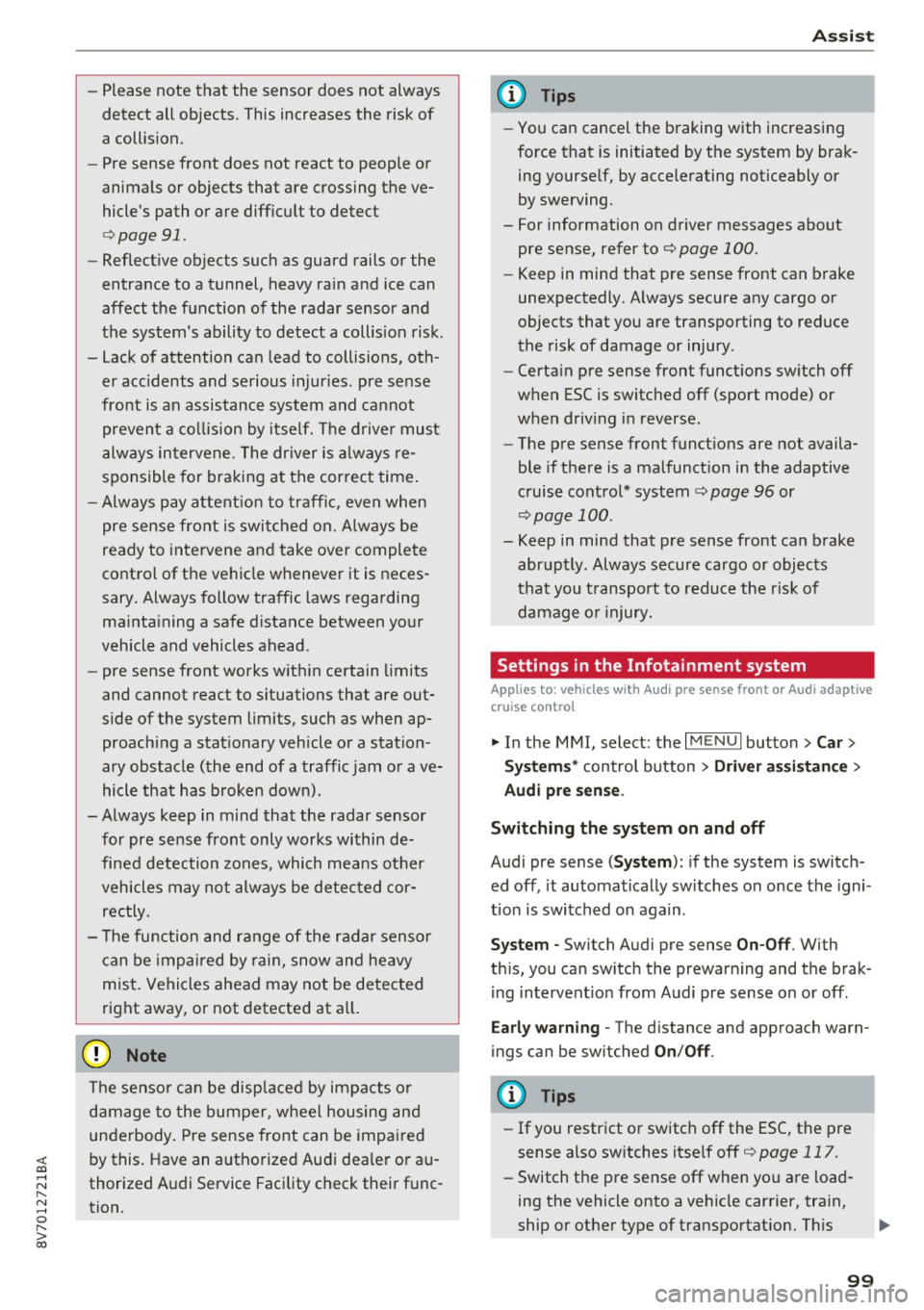
-Please note that the sensor does not always
detect all objects . This increases the risk of
a collision.
- Pre sense front does not react to people or
animals or objects that are crossing the ve
hicle's path or are difficult to detect
¢ page 91 .
-Reflective objects such as guard rails or the
entrance to a tunnel, heavy rain and ice can
affect the function of the radar sensor and
the system's ability to detect a collision risk.
- Lack of attention can lead to collisions, oth
er accidents and serious injuries. pre sense
front is an assistance system and cannot
prevent a collision by itself. The driver must
always intervene . The driver is always re
sponsible for braking at the correct time.
- Always pay attention to traffic , even when
pre sense front is switched on. Always be
ready to intervene and take over complete
control of the vehicle whenever it is neces
sary. Always follow traffic laws regarding
maintaining a safe distance between your
vehicle and vehicles ahead.
- pre sense front works within certain limits
and cannot react to situations that are out
side of the system limits, such as when ap
proaching a stationary vehicle or a station
ary obstacle (the end of a traffic jam or ave
hicle that has broken down).
- Always keep in mind that the radar sensor
for pre sense front only works within de
fined detection zones , which means other
vehicles may not always be detected cor
rectly.
- The function and range of the radar sensor
can be impaired by rain, snow and heavy
mist. Vehicles ahead may not be detected
right away, or not detected at all.
(1) Note
The sensor can be displaced by impacts or
damage to the bumper, wheel housing and
underbody. Pre sense front can be impaired
by this. Have an authorized Audi dea ler or au
thorized Audi Service Facility check their func
tion .
Assist
{!) Tips
-You can cancel the braking with increasing
force that is initiated by the system by brak
ing yourself, by accelerating noticeably or
by swerving.
- For information on driver messages about
pre sense, refer to
¢ page 100.
- Keep in mind that pre sense front can brake
unexpectedly. Always secure any cargo or
objects that you are transporting to reduce
the risk of damage or injury.
- Certain pre sense front functions switch off
when ESC is switched off (sport mode) or
when driving in reverse.
- The pre sense front functions are not availa
ble if there is a malfunction in the adaptive
cruise control* system
Q page 96 or
Q page 100 .
-Keep in mind that pre sense front can brake
abruptly . Always secure cargo or objects
that you transport to reduce the risk of
damage or injury.
Settings in the Infotainment system
Appl ies to: vehicles with Audi pre sense front or Audi adaptive
cruise contro l
.,. In the MMI, select: the I MENU I button >Ca r>
Systems*
control button > Driver assistance >
Audi pre sense.
Switching the system on and off
Audi pre sense (Syste m): if the system is switch
ed off , it automatically switches on once the igni
tion is switched on again .
System -Switch Audi pre sense On-Off. With
th is, you can switch the prewarning and the brak
ing intervention from Audi pre sense on or off .
Early warning -The distance and approach warn
ings can be switched
On/Off .
(D Tips
-If you restrict or switch off the ESC, the pre
sense also switches itse lf off ¢
page 117 .
-Switch the pre sense off when you a re load
ing the vehicle onto a vehicle carrier, train,
ship or other type of transportation. This ..,.
99
Page 106 of 272

Ass is t
- Your settings are automatically stored and
assigned to the remote control key being
used .
Driver messages
Applies to: ve hicles w ith Audi side assist
If the side assist switches off automatically, a
message appears in the instrument cluster dis
play.
(ij Audi side a ssi st : cur rentl y un ava ilable No
s en so r v isi on
The radar sensors' vision is affected. Do not cover
the area in front of the sensors with bike wheels,
stickers, dirt or other objects . Clean the area in
front of the sensors, if necessary~
page 104,
fig. 105.
@j Audi side assist : cur rently un available
Side assist cannot be switched on temporar ily be
cause there is a malfunction (for example, the
battery charge level may be too low).
@j Audi side a ssi st : S ystem fau lt!
The system cannot guarantee that it will detect
veh icles correctly and it is switched off. The sen
sors have been d isplaced or are faulty . Have the
system checked by an authorized Audi dealer or
author ized Audi Service Facility soon .
Audi drive select (drive
settings)
Introduction
App lies to: vehicles with Aud i drive select
Audi drive select makes it possible to experience
d ifferent types of vehicle settings in o ne veh icle .
The drive r can select from three
Comfort , Auto
and D ynam ic modes us ing the te'i:.1 button in the
center console or the MMI to switch between a
sporty and a comfortable driving mode, for ex
ample. In the
Ind ividu al* mode, the settings can
be adjusted to your personal preferences. This
makes it poss ible to combine settings such as a
sporty eng ine setting w ith smooth steering.
106
A WARNING ,_
Using Aud i drive select incorrectly can lead to
coll is ions, other accidents and serious inju
ries.
Description
App lies to: vehicles with Aud i drive se lect
The vehicle setup in each mode depends on the
vehicle's features. However, the engine a nd
steering are a lways affected.
Engine and automatic tr ansmiss ion
Depending on the mode, the engine and auto
matic transmission* respond more qu ickly or in a
more ba lanced manner to accelerator pedal
movements.
Adapt ive damper s (Audi magneti c ride )*
The adaptive dampers use sensors to record in
format ion regarding steering movements, brak
i ng and acceleration operations by the driver,
road surface, driving speed, and load . W ith Aud i
drive select you can adjust the adaptive dampers
spo rty (dynamic), comfortable (comfort) o r bal
anced (auto).
Ste ering
The steering adapts in terms of steering ass is
tance. There are d ifferent modes
~page 107.
Ind irect steering that moves easi ly as in comfort
mode is espec ially suited to long d rives on a h igh
way. The dynamic mode provides sporty, direct
steering.
Fo r vehicles with p rogress ive steering* the steer
i ng perfo rmance is more agile.
Corn ering light*
The cornering light adjusts when driv ing on
curves at speeds between 6 mph (10 km/h) and 68 mp h (1 10 km/h) . The pivoting act ion and the
li ght ing are also adapted to the mode.
Adapt ive cruise cont rol*
The behavior whe n accelerating can be adjusted
from comfortable to sporty, depending on the
Audi drive select mode . Adaptive cruise control ..,.
Page 108 of 272
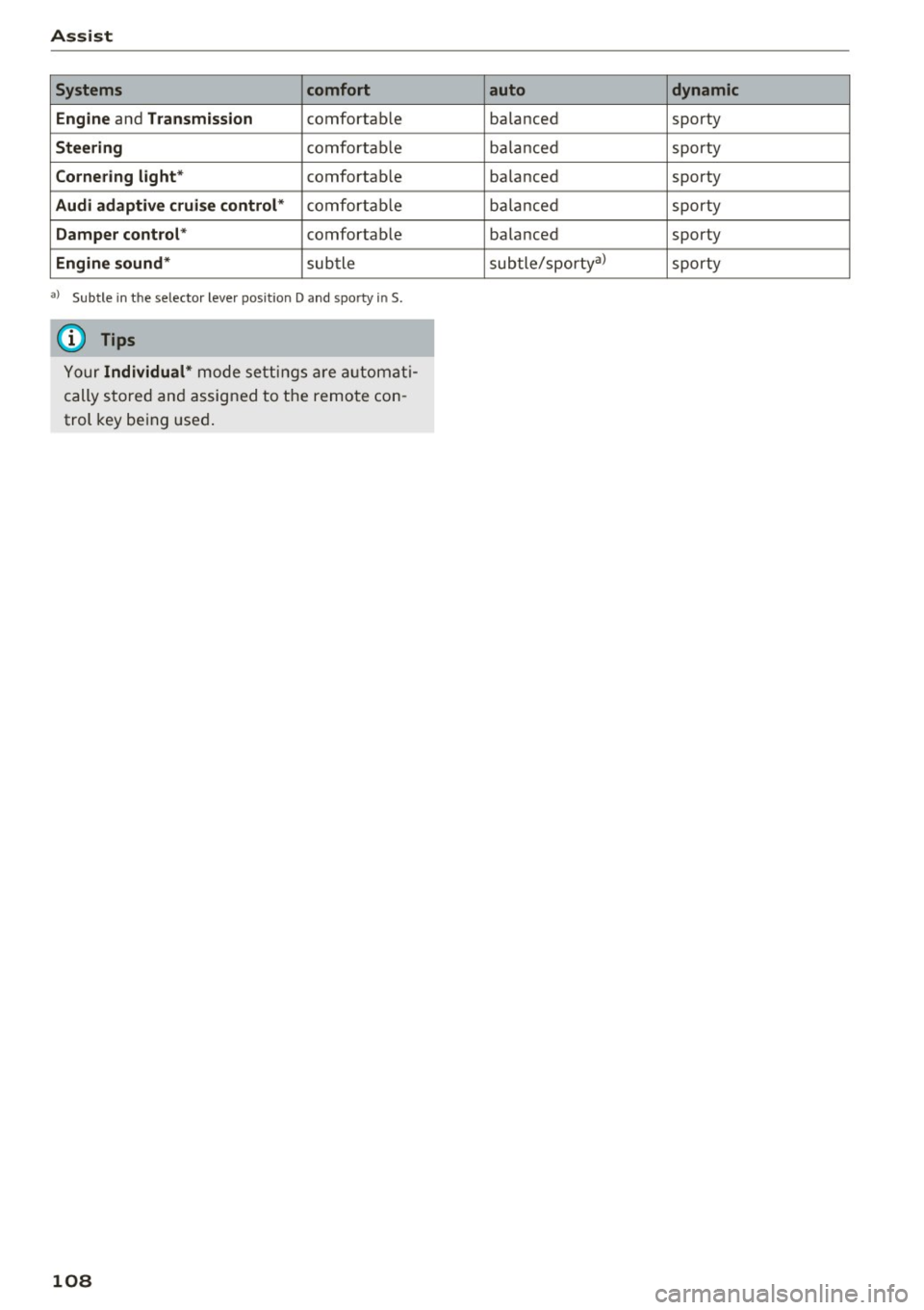
Assist Systems comfort
Engine
and Transmission comfortab le
Steering comfortable
Cornering light* comfortab le
Audi adaptive cruise control* comfortable
Damper control* comfortable
Engine sound* subtle
a) Subt le in th e se lector le ver pos it ion D and sporty in S.
(D Tips
Your Individual* mode settings are automati
cally stored and assigned to the remote con
trol key being used.
108
auto dynamic
balanced sporty
balanced sporty
balanced sporty
ba lanc ed sporty
balanced sporty
subtle/sporty a)
sporty
Page 118 of 272
Intelligent Technology
(D Tips
-ESC/ASR cannot be switched off or sport
mode cannot be switched on if the cruise
control system* or the adaptive cruise con
trol* is switched on.
- Malfunctions in the Audi magnetic ride may make it impossible to switch the ESC/ASR
off or to switch sport mode on.
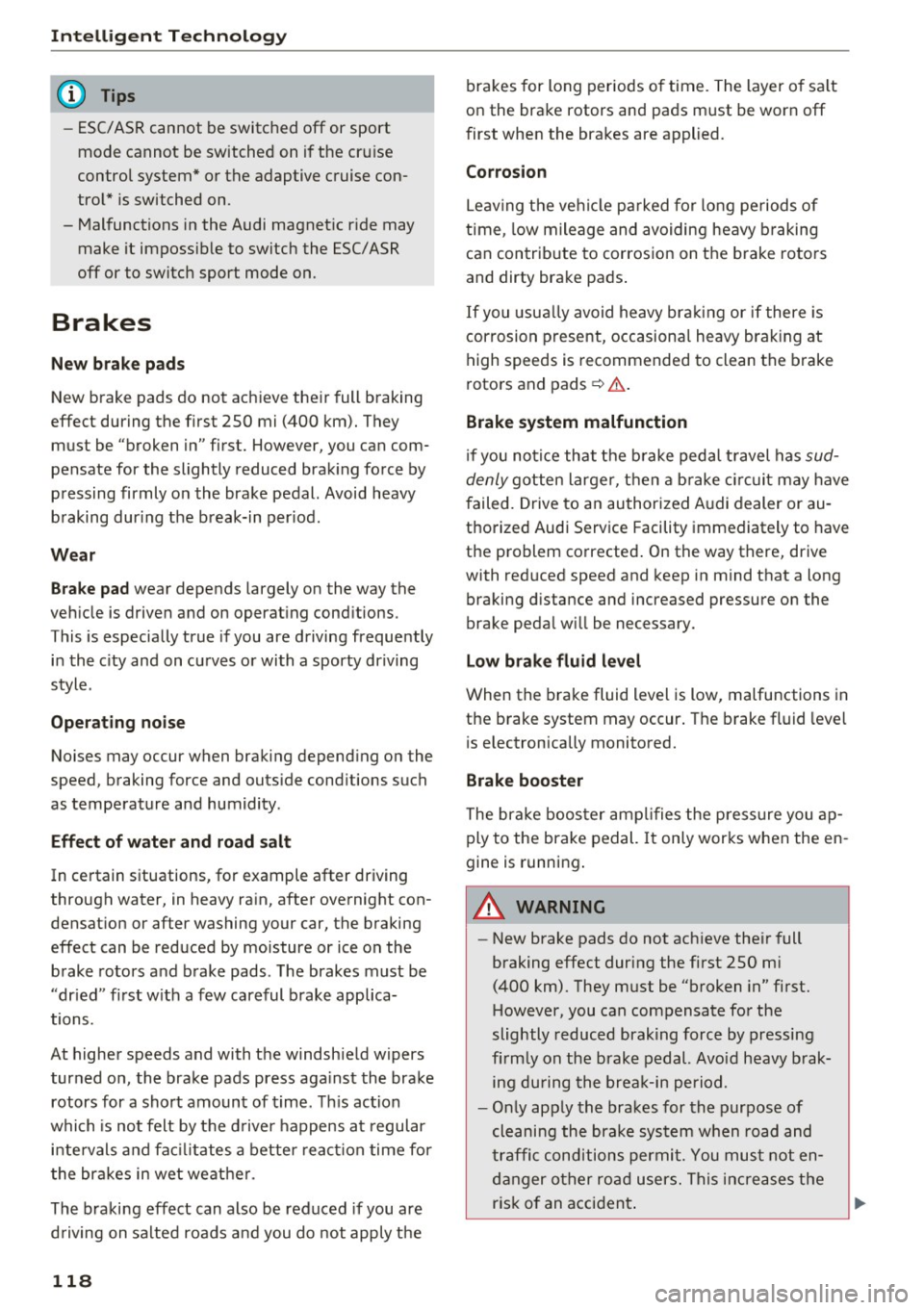
Brakes
New brake pads
New brake pads do not achieve their full braking
effect during the first 250 mi (400 km). They must be "broken in" first. However, you can com
pensate for the slightly reduced braking force by
pressing firmly on the brake pedal. Avoid heavy
braking during the break-in period .
Wear
Brake pad
wear depends largely on the way the
vehicle is driven and on operating conditions .
This is especially true if you are driving frequently
in the city and on curves or with a sporty driving
style .
Operating noise
Noises may occur when braking depending on the
speed, braking force and outside conditions such
as temperature and humidity .
Effect of water and road salt
In certain situations, for example after driving
through water, in heavy rain, after overnight con densation or after washing your car, the braking
effect can be reduced by moisture or ice on the
brake rotors and brake pads. The brakes must be
"dried" first with a few careful brake applica
tions.
At higher speeds and with the windshield wipers
turned on, the brake pads press against the brake
rotors for a short amount of time. This action
which is not felt by the driver happens at regular
intervals and facilitates a better reaction time for
the brakes in wet weather .
The braking effect can also be reduced if you are
driving on salted roads and you do not apply the
118
brakes for long periods of time. The layer of salt
on the brake rotors and pads must be worn off
first when the brakes are applied.
Corrosion
Leaving the vehicle parked for long periods of
time , low mileage and avoiding heavy braking
can contribute to corrosion on the brake rotors
and dirty brake pads.
If you usually avoid heavy braking or if there is
corrosion present, occasional heavy braking at
high speeds is recommended to clean the brake
rotors and pads¢.&. .
Brake system malfunction
if you notice that the brake pedal travel has sud
denly gotten larger, then a brake circuit may have
failed. Drive to an authorized Audi dealer or au
thorized Audi Service Facility immediately to have
the problem corrected. On the way there, drive
with reduced speed and keep in mind that a long
braking distance and increased pressure on the
brake pedal will be necessary.
Low brake fluid level
When the brake fluid level is low, malfunctions in
the brake system may occur. The brake fluid level
is electronically monitored.
Brake booster
The brake booster amplifies the pressure you ap
ply to the brake pedal.
It only works when the en
gine is running.
A WARNING
- New brake pads do not achieve their full
braking effect during the first 250 mi
(400 km). They must be "broken in" first.
However, you can compensate for the
slightly reduced braking force by pressing
firmly on the brake pedal. Avoid heavy brak
ing during the break-in period.
- Only apply the brakes for the purpose of
cleaning the brake system when road and
traffic conditions permit. You must not en
danger other road users. This increases the
risk of an accident.
Page 256 of 272
Consumer inf orm ation
means t hat yo u risk both a substantia l reduction
in the operational safety of your vehicle and an
increased wear of veh icle parts ~&. .
Author ized Audi dealers w ill perform this work in
a professional and competent manner or, in spe
cial cases, refer you to a professional company
that spec ializes in such modif icat ions.
A WARNING
Improper repairs and modifications can
change the way vehicle systems work and
cause damage to the veh icle and ser ious per
sonal injury.
([) Note
If emergency repa irs must be performed else
where, have the vehicle examined by an au thorized Audi dealer as soon as possib le.
Declaration of
Compliance, Telecom munication and
Electronic Systems
Radio Frequency Devices and Radiocommunica
tion Equipment User Manual Notice.
The manufacturer is not responsible for any radio
or TV interference caused by unauthor ized modi
fications to this equ ipment .
Devices
The fo llow ing devices each comp ly w ith FCC Part
15.19, FCC 15.21 and RSS-Gen Issue
1:
- Adaptive cruise contro l*
- Audi s ide ass ist*
- Cell phone package*
- Convenie nce key*
- Electronic immobilizer
- Remote control key
FCC Part 15 .19
This device complies with part 15 of the FCC
Ru les. Operation is subject to the following two
conditions:
256
(1) This dev ice may not cause ha rmf ul interfer
ence, and
( 2 ) this devi ce must accep t any i nte rference re
ce ived, in cl ud ing in terference tha t may c ause un
desired ope ration.
FCC Part 15.21
CAUTION :
Changes or modificat ions not express ly approved
by the pa rty responsible for compliance could
vo id the user's a uthority to operate t he equ ip
ment .
RSS-Gen Issue 1
Operat ion is subject to the following two cond i
tions:
(1) this device may not ca use interference, and
( 2 ) this devi ce must acc ep t a ny inte rference, in
cl ud ing interfe rence that may cause undesi red
operation of the device.
Page 257 of 272

<( co .... N ,.__
N .... 0 ,.__
> co
A
A/C
refer to Climate control system (automatic) .62
A/C (automat ic climate control system) . . . . 62
Accessories . . . . . . . . . . . . . . . . . . . . . . . 56, 255
Active lane assist . . . . . . . . . . . . . . . . . . . . . 100
Activating vibration warning . . . . . . . . . . . 102
Adjusting steering time . . . . . . . . . . . . . . . 102
C leaning the camera area . . . . . . . . . . . . . 225
Driver messages . . . . . . . . . . . . . . . . . . . . . 101
Indicator light . . . . . . . . . . . . . . . . . . . . . . 101
switching on and off . . . . . . . . . . . . . . . . . 101
Active rollover protection system . . . . . . . . 133
Retracting rollover protection . . . . . . . . . . 134
Adapt ive cruise control . . . . . . . . . . . . . . . . . . 90
Automatic transmission . . . . . . . . . . . . . . . 94
C leaning sensors . . . . . . . . . . . . . . . . . . . . 225
Driver messages . . . . . . . . . . . . . . . . . . . . . . 96
General Information . . . . . . . . . . . . . . . . . . 91
Request for driver intervention . . . . . . . . . . 96
Stop-and-go traffic . . . . . . . . . . . . . . . . . . . 94
Adaptive dampers . . . . . . . . . . . . . . . . . . . . . 106
Indicator light . . . . . . . . . . . . . . . . . . . . . . . 21
Adaptive light . . . . . . . . . . . . . . . . . . . . . 43 , 106
Indicator light . . . . . . . . . . . . . . . . . . . . . . . 21
Adjusting air distribution (Climate control sys-
tem) . . . . . . . . . . . . . . . . . . . . . . . . . . . . . . . . 63
Adjusting automatic headlights . . . . . . . . . . 45
Adjusting the air vents . . . . . . . . . . . . . . . . . . 63
Adjusting the center console lighting . . . . . . 47
Advanced key
refer to Convenience key . . . . . . . . . . . . . . . 70
Airbag . . . . . . . . . . . . . . . . . . . . . . . . . . . . . . 143
I ndicator light . . . . . . . . . . . . . . . . . . . . . . . 17
Airbag system . . . . . . . . . . . . . . . . . . . . . . . . 163
Advanced Airbag -System . . . . . . . . . . . . . . 147
Advanced Airbag System components . . . 150
Care . . . . . . . . . . . . . . . . . . . . . . . . . . . . . . 158
Ch ildr en . . . . . . . . . . . . . . . . . . . . . . . . . . . 167
Ch ild restraints . . . . . . . . . . . . . . . . . . . . . 167
Components (front airbags) . . . . . . . . . . . 150
Danger of fitting a child seat on the front
passenger seat . . . . . . . . . . . . . . . . . . . . . . 144
Disposal . . . . . . . . . . . . . . . . . . . . . . . . . . . 158
Front airbags . . . . . . . . . . . . . . . . . . . 147, 148
How do the front airbags work? . . . . . . . . 153
H ow many airbags does my vehicle have? 150
Index
How the Advanced Airbag System compo-
nents work together . . . . . . . . . . . . . . . . . 152
Important informat ion . . . . . . . . . . . . . . . 143
Important safety instructions on the knee
airbag system . . . . . . . . . . . . . . . . . . . . . . . 161
Knee airbags . . . . . . . . . . . . . . . . . . . . . . . . 159
Monitoring . . . . . . . . . . . . . . . . . . . . . . . . . 155
PASSENGER AIR BAG OFF light . . . . . . . . . 155
Repairs . . . . . . . . . . . . . . . . . . . . . . . . . . . . 158
Safety instructions . . . . . . . . . . . . . . . . . . . 157
Side airbags . . . . . . . . . . . . . . . . . . . . . . . . 161
Warning/Indicator lights . . . . . . . . . . . . . 155
When must the system be inspected? . . . 155
Alarm system
refer to Anti-theft alarm system . . . . . . . . . 27
Alignment pin (tire change) . . . . . . . . . . . . . 230
All-weather lights ( LED headlights) . . . . . . . 43
All season ti res . . . . . . . . . . . . . . . . . . . . . . . 219
All wheel drive . . . . . . . . . . . . . . . . . . . . . . . 120
Alternator
refer to Alternator (indicator light) . . . . . . 17
Alternator (indicator light) . . . . . . . . . . . . . . 17
Ambient lighting . . . . . . . . . . . . . . . . . . . . . . 46
Anti-lock braking system . . . . . . . . . . . . . . . 116
Indicator light . . . . . . . . . . . . . . . . . . . . . . . 18
Anti-slip regulat ion . . . . . . . . . . . . . . . . . . . 116
Indicator light . . . . . . . . . . . . . . . . . . . . . . . 18
Anti-theft alarm system . . . . . . . . . . . . . . . . . 27
Anti-theft protection Electronic immobilizer.............. .. . 31
Audi active lane assist
refer to Active lane assist . . . . . . . . . . . . . 100
Audi adaptive cruise control
refer to Adaptive cruise control . . . . . . . . . 90
Audi adaptive light
refer to Adaptive light . . . . . . . . . . . . . . . . . 43
Audi dr ive select
refer to Drive select . . . . . . . . . . . . . . . . . . 106
Audi Service Repair Manuals and Literature 253
Audi side ass ist
refer to Side assist . . . . . . . . . . . . . . . . . . . 103
AUTO Automat ic climate control system . . . . . . . 62
Automatic headlights . . . . . . . . . . . . . . . . . 43
Auto Lock (central locking system) . . . . . . . . 28
Automatic belt retractor . . . . . . . . . . . . . . . 138
257