mirror AUDI A3 CABRIOLET 2016 User Guide
[x] Cancel search | Manufacturer: AUDI, Model Year: 2016, Model line: A3 CABRIOLET, Model: AUDI A3 CABRIOLET 2016Pages: 272, PDF Size: 67.88 MB
Page 104 of 272
Assist
General information
Applies to: ve hicles w ith Audi side assis t
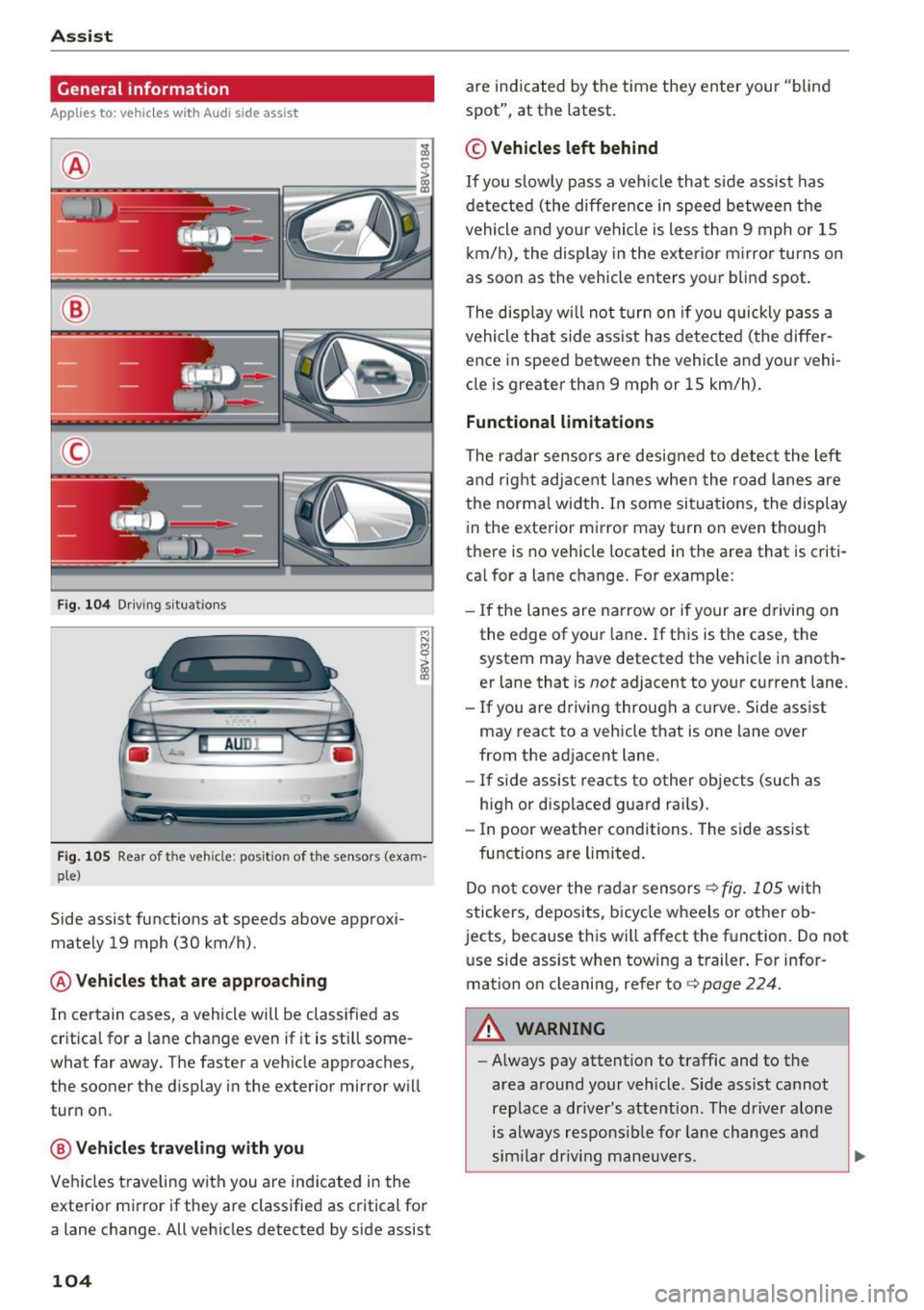
®
@
©
Fig. 104 Driving s itu atio ns
I! AU DI
Fig. 105 Rear of the vehicle: pos it ion of the senso rs (exa m·
pie)
Side assist functions at speeds above approxi·
mately 19 mph (30 km/h).
@ Vehicles that are approaching
In certain cases, a vehicle will be classified as
cr itical for a lane change even if it is still some·
what far away . The faster a veh icle approaches,
the sooner the display in the exterior mirror wi ll
turn on .
@ Vehicles traveling with you
Vehicles traveling with you are indicated in the
exterior mirror if they are classified as critical for
a lane change. All vehicles detected by side assist
104
are indicated by the time they enter your "blind
spot", at the latest .
© Vehicles left behind
If you slow ly pass a vehicle that side assist has
de tected (the diffe rence in speed between the
vehicle and your vehicle is less than 9 mph or 15
km/h), the display in the exterior mirror turns on
as soon as the vehicle enters your blind spot.
The display will not turn on if you quickly pass a
vehicle that side ass ist has detected (the differ
ence in speed between the vehicle and your vehi
cle is greater than 9 mph or 15 km/h).
Functional limitations
The radar sensors are designed to detect the left
and right adjacent lanes when the road lanes are
the normal width . In some situations, the display
in the exterior mirror may turn on even though
there is no vehicle located in the area that is criti·
cal for a lane c hange. For example:
- If the lanes are narrow or if your are driving on
the edge of your lane . If this is the case, the
system may have detected the vehicle in anoth·
er lane that is
not adjacent to your current lane.
- If you are driving through a curve . Side assist
may react to a vehicle that is one lane over
from the adjacent lane.
- If side assist reacts to other objects (such as
high or disp laced guard rai ls) .
- In poor weather conditions. The side assist
functions are limited.
Do not cover the radar sensors ¢
fig. 105 with
stickers, deposits, bicycle wheels or other ob
jects, because this will affect the function. Do not
u se side assist when towing a trailer . For infor·
mation on cleaning, refer to ¢
page 224.
A WARNING
-Always pay attention to traffic and to the
area around your veh icle . S ide assist cannot
replace a driver's attention. The driver alone
is always responsible for lane changes and
similar driving maneuvers .
ll>-
Page 105 of 272
<( co .... N r--N .... 0 ,.__
> co
-In some situations, the system may not
function or its function may be limited. For
example:
- If vehicles are approach ing or being left
behind very quickly. The display may not
turn on in time.
- In poor weather conditions such as heavy
rain, snow or heavy mist.
- On very wide lanes, in tight curves, or if
there is a rise in the road surface. Vehicles
in the adjacent lane may not be detected
because they are outside of the sensor
range.
- Audi side assist cannot detect all vehicles
under all conditions, which can increase the
risk of accidents.
- Please note that side assist only displays ap
proaching vehicles or vehicles in your blind
spot if your vehicle is traveling at least
19 mph (30 km/h).
- In certain situations, the system may not
work or its function may be limited. For ex ample:
- The display may not turn on at the right
time if veh icles are approaching or passing
very quickly.
- In poor weather conditions, such as heavy
rain, snow or fog.
- In very wide lanes, in tight curves or when
there are slopes in the roadway, vehicles
in the neighboring lanes may not be de
tected because they are outside of the
sensor range.
(D Note
The sensors can be displaced by impacts or damage to the bumper, wheel housing and
underbody. This can affect the system. Have
an authorized Audi dealer or authorized Audi
Service Facility check their function.
(D Tips
-If the window glass in the driver's door or
front passenger's door has been tinted, the
display in the exterior mirror may be misin
terpreted.
Assist
- For an explanation on conformity with the
FCC regulations in the United States and the
Industry Canada regulations, refer to
¢ page 256.
Switching on and off
Applies to : vehicles with Aud i s ide ass ist
The system and be switched on and off in the
MMI*.
.. Select: the I MENU I button> Car> Systems*
control button > Driver assistance> Audi side
assist .
With Off, the system is switched off.
An activated system will signal every time the ig
nition is switched on by turning the displays in
the exterior mirrors on briefly .
Adjusting the display brightness
Applies to: vehicles with Aud i s ide assist
The display brightness can be adjusted in the
MM!*.
.. Select: the I MENU I button >C ar> Systems*
control button > Driver assistance > Aud i side
assist .
The display brightness adjusts automatically to
the brightness of the surroundings, both in the
information and in the warning stage. In very
dark or very bright surroundings, the display is
already set to the minimum or max imum level by
the automatic adjustment . In such cases, you
may not ice no change when adjust ing the bright
ness , or the change may only be noticeable once
the surround ings change .
Adjust the br ightness to a level where the display
in the information stage will not disrupt your
view forward. If you change the brightness, the
display in the exterior m irror will briefly show the
brightness level in the information stage. The
brightness of the warning stage is linked to the
brightness in the information stage and is adjust
ed along with the information stage adjustment.
(D Tips
- Side assist is not active while you are mak
ing the adjustment.
105
Page 109 of 272
<( co .... N r--N .... 0 r--> co
Parking systems
General information
Applies to: ve hicles with a rea r parking sys te m /pa rking sys
tem plus/rearv iew camera
Depending on your vehicle's equipment, various
parking aids will help you when parking and ma
neuvering.
The
rear parking system is an audible parking aid
that warns you of obstacles
behind the vehicle
¢page 110.
The parking system plus assists you when park
ing by audibly and visually indicating objects de
tected
in front of and behind the vehicle
¢page 110.
The rearview camera shows the area behind the
vehicle in the MMI display. This display assists
you when you are cross or parallel parking. The parking system plus functions are also available
¢page 111.
A WARNING ,--
- Always look for traffic and check the area
around your vehicle by looking at it directly
as well. The parking system cannot replace
the driver's attention. The driver is always
responsible when entering or leaving a park
ing space and during similar maneuvers.
- Please note that some surfaces, such as
clothing, are not detected by the system.
- Sensors and cameras have blind spots in
which people and objects cannot be detect
ed . Be especially cautious of small children
and animals.
- Always pay attention to the area around the
vehicle -using the rearview mirror, too.
- The sensors can be displaced by impacts or
damage to the radiator grille, bumper,
wheel housing and the underbody . The park
ing system may become impaired as a re
sult. Have an authorized Audi dealer or au
thorized Audi Service Facility check their
function.
- Make sure the sensors are not obstructed by
stickers, deposits or other materials. If they
are the sensor function could be impaired.
I
Parking systems
For additional information on cleaning, re
fer to¢
page 224.
@ Note
-Some objects are not detected or displayed
by the system under certain circumstances:
- Objects such as barrier chains, trailer draw
bars, vertical poles or fences
- Objects above the sensors such as wall ex
tensions
- Objects with specific surfaces or struc
tures such as chain link fences or powder
snow
- If you continue driving closer to a low-lying
object, it may disappear from the sensor
range . Note that you will no longer be
warned about this obstacle.
- The sensors can be displaced by impacts or
damage to the radiator grille, bumper,
wheel housing and the underbody. The
parking system may become impaired as a
result . Have an authorized Audi dealer or
authorized Audi Service Facility check their
function.
(D Tips
- The system may provide a warning even
though there are no obstacles in the cover
age area in some situations, such as:
- certain road surfaces or for long grass .
- external ultrasonic sources e.g. from
cleaning vehicles.
- heavy rain, snow, or thick vehicle exhaust.
- We recommend that you practice parking in
a traffic-free location or parking lot to be
come familiar with the system. When doing
this, there should be good light and weath
er conditions .
- You can change the volume and pitch of the
signals as well as the display¢
page 115.
-What appears in the MMI display is some
what time-delayed.
- The sensors must be kept clean and free of
snow and ice for the park assist to operate.
109
Page 125 of 272
<( co ..... N
" N ..... 0 r--. > 00
.. Make sure that nothing can interfere with the
pedals.
.. Adjust front seat , head restraint and mirrors
correctly for your height.
.. Instruct passengers to adjust the head re
straints accord ing to their height .
.. Make sure to use the right ch ild restraint cor
rectly to protect children
~ page 165, Child
safety .
.,. Sit properly in your seat and make sure that
your passengers do the same
¢page 53, Front
seats .
.. Fasten your safety be lt and wear it properly. Al
so instruct your passengers to fasten their safe
ty belts properly ¢
page 135 .
What impairs driving safety?
Safe driving is directly related to the condition of
the vehicle , the driver as well as the driver's abili
ty to concentrate on the road without being dis
tracted.
The driver is responsible for the safety of the ve
hicle and all of its occupants. If your ability to
drive is impaired, safety risks for everybody in the
veh icle increase and you also become a hazard to
everyone else on the road
¢ ,&. Therefore :
.,. Do not let yourself be distracted by passengers
or by using a cellular telephone.
.. NEVER dr ive when your driv ing ability is im
paired (by medications, alcohol, drugs, etc.) .
.. Observe all traffic laws, rules of the road and
speed limits and plain common sense.
.. ALWAYS adjust your speed to road, traffic and
weathe r conditions.
.. Take frequent breaks on long trips. Do not drive
for more than two hours at a stretch .
.. Do NOT drive when you are tired, under pres
sure or when you are stressed.
A WARNING
Impaired dr iv ing safety increases the risk of
ser ious personal inj ury and death whenever a
vehicle is being used.
Driving safety
Correct passenger
seating positions
Proper seating position for the driver
The proper driver seating position is important
for safe, relaxed driving .
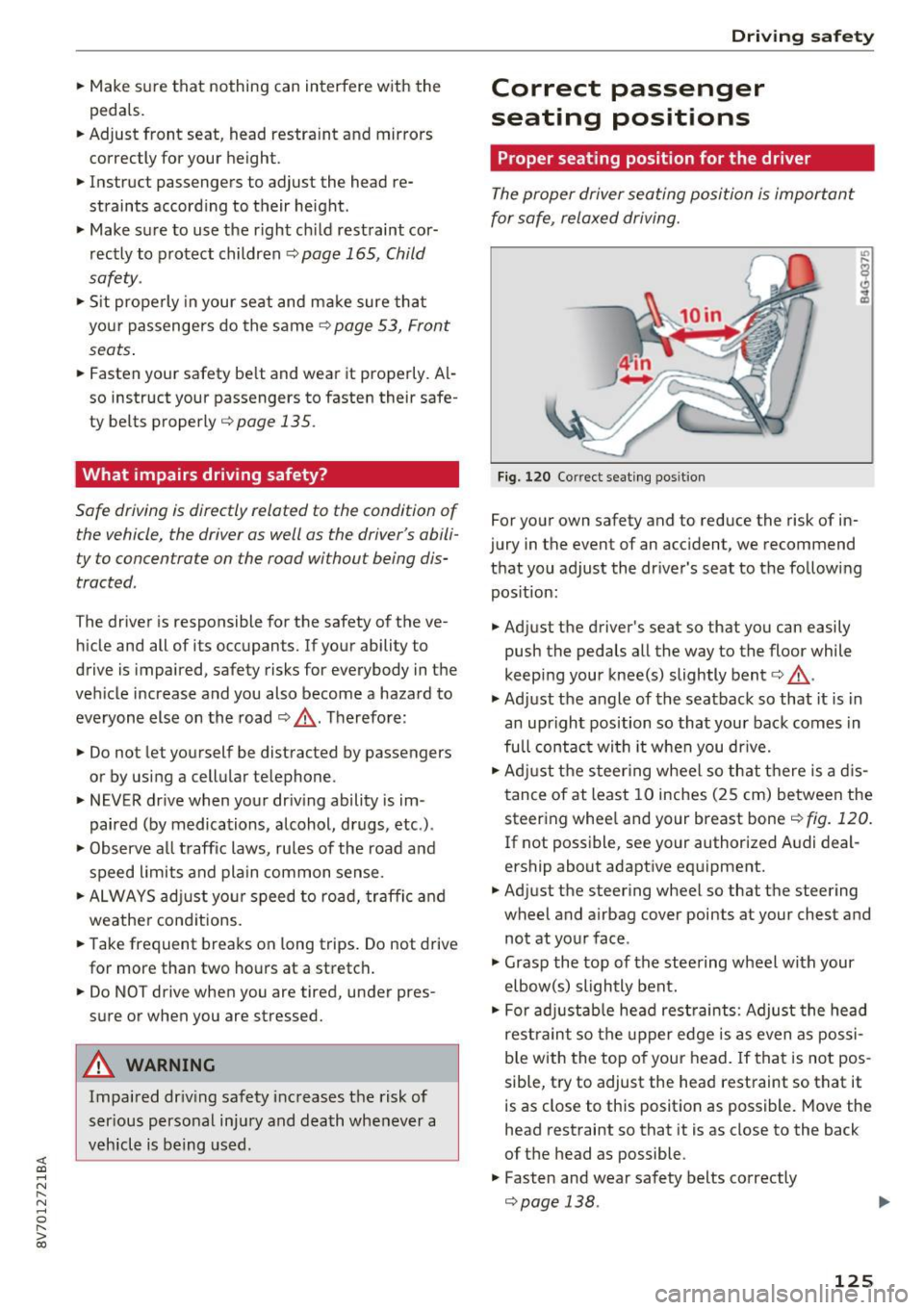
Fig. 120 Correct seating pos it ion
For your own safety and to reduce the risk of in
jury in the event of an accident, we recommend
that you adjust the driver 's seat to the following
position:
.. Adjust the driver's seat so that you can easily
push the pedals all the way to the floor while
keep ing your knee(s) slightly bent¢,& .
.,. Adjust the angle of the seatback so that it is in
an upright position so that your back comes in
full contact wi th it when you dr ive .
.. Adjust the steering wheel so that there is a dis
tance of at least 10 inches (25 cm) between the
steering whee l and your breast bone¢
fig. 120.
If not poss ible, see your author ized A udi deal
ership about adaptive equipment.
.. Adjust the steering wheel so that the steering
wheel and airbag cover points at your chest and
not at your face .
.,. Grasp the top of the steering wheel with your
elbow(s) slightly bent .
.. For adjustable head restraints: Adjust the head
restraint so the upper edge is as even as possi
b le with the top of your head. If that is not pos
sible, try to adjust the head restraint so that it
is as close to this posit ion as possible. Move the
head restraint so that it is as close to the back
of the head as possible.
.. Fasten and wear safety belts correctly
¢page 138. ..,.
125
Page 225 of 272
<( co .... N ,.__
N .... 0 ,.__
> co
A WARNING
-Only wash the vehicle when the ignition is
off and follow the instructions from the car
wash operator to reduce the risk of acci dents.
- To reduce the risk of cuts, protect yourself from sha rp metal components when wash
ing the underbody or the inside of the wheel
housings.
- After washing the vehicle, the bra king effect
may be de layed due to mo isture on the
bra ke rotors or i ce in the w inte r. The brake s
must be dried fi rst w ith a few care ful brake
applications .
Q) Note
-If yo u wash t he vehi cle in an au toma tic car
wash, yo u m ust fold the exte rior m irrors i n
to re duce the risk of damage to the mirrors .
Power folding exterior m irrors * must on ly
be fo lded in and out using the power folding
funct ion.
- To p revent paint damage, do not wash the
vehicle in d irect sunlight.
Ca re and cleaning
- To re duce the risk of damage, do not wash
the power top with a pressure washer .
- T o red uce the risk of damage to the surface,
do not use insect removing sponges, kitche n
sponges o r similar items .
- M atte finish painted veh icle components:
- To reduce the risk of damage to the sur-
face, do not use polishing agents or hard
wax.
- Never use protective wax. It can destroy
the matte finish effect.
- Do not place any stickers or magnetic
signs on vehicle parts painted with matte
finish paint. The paint could be damaged
when the stickers or magnets are re
moved.
@ For the sake of the environment
Only wash t he veh icle in facili ties s pec ially de
s igned for that pu rpose. This will reduce the
r isk of dirty wate r contamina ted with o il from
ente ring the sewe r sys tem.
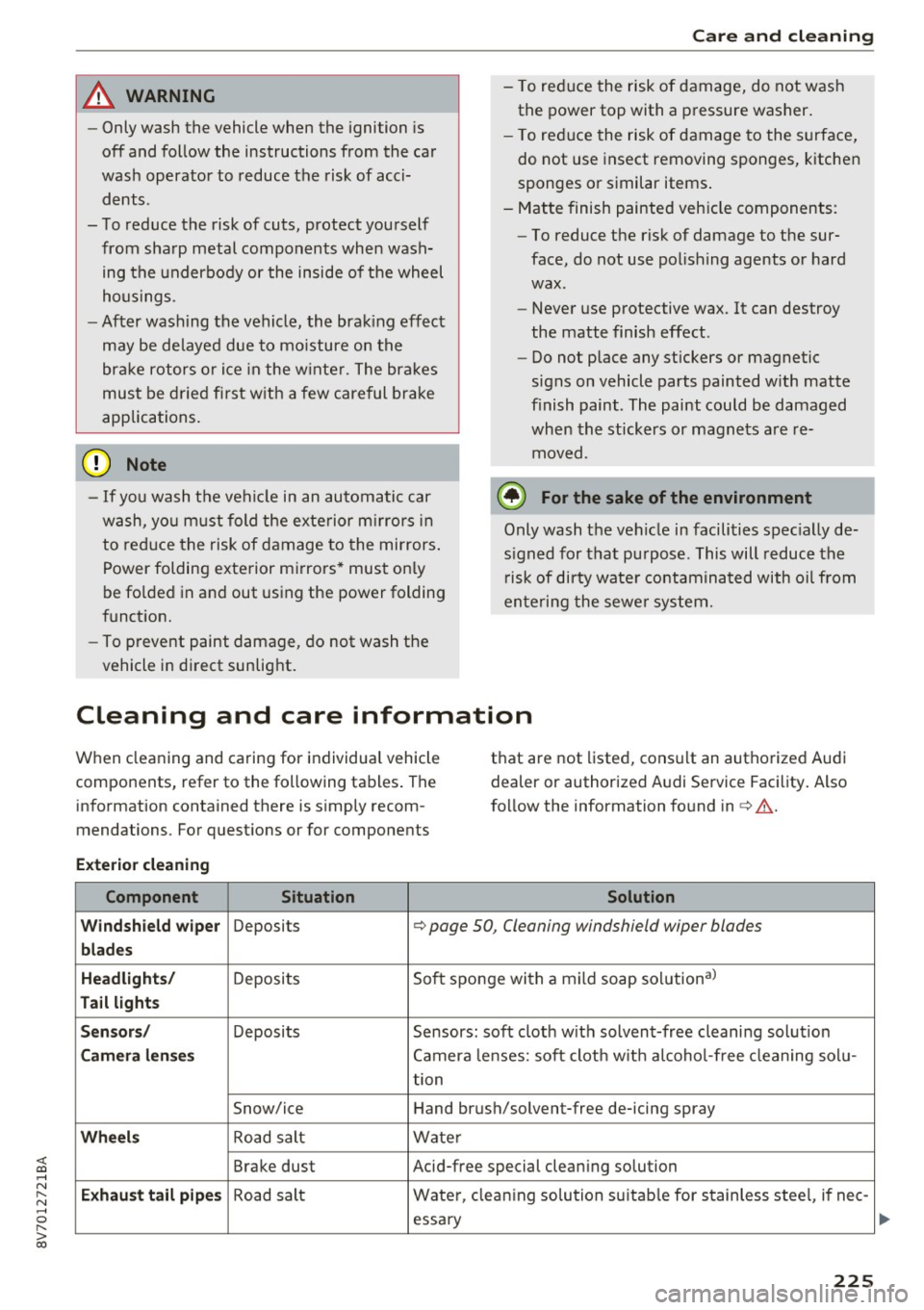
Cleaning and care information
When cleaning and caring for individua l vehicle
components, refer to the follow ing tables . The
information contained there is simp ly recom
mendations. For quest ions or for components t
h at are not listed, cons ult an authorize d Audi
dealer or authorized Audi Service Fac ility . Also
f o llow the information found in c> ,& .
Exterior cleaning
Component Situation Solution
Windshield wiper
Deposits <=> page 50 , Cleaning windshield wiper blades
blades
Headlights /
Deposits So
ft sponge with a mild soap solutiona)
Tail light s
Sensors /
Deposits Sensors: soft cloth w it h solvent-free cleani ng solut io n
Camera len ses Camera lenses: soft clot h w ith alcoho l-free cleaning sol u-
tion
Snow/ice Hand br ush/solvent-free de-icing spray
Wheels Road salt Water
Brake dust Acid-free special cleaning solution
Exhaust tail pipe s Road salt Wate
r, clean ing so lution su itab le for s tainless stee l, if ne e-
essa ry
225
Page 228 of 272
Care and cleaning
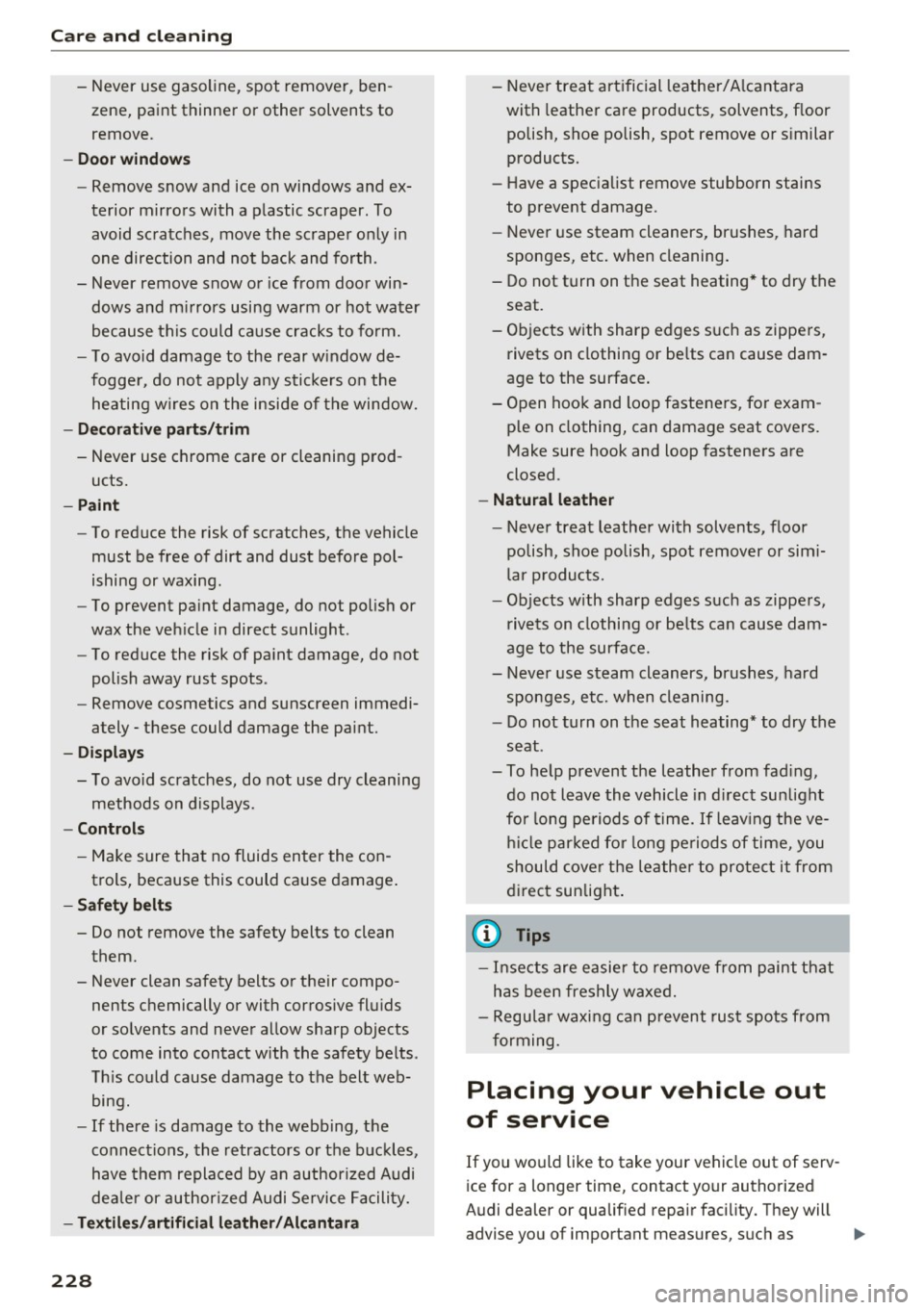
- Never use gasoline, spot remover, ben
zene, paint thinner or other solvents to
remove.
- Door window s
- Remove snow and ice on windows and ex-
terior mirrors with a p lastic scraper . To
avoid sc ratches, move the scrape r only in
one direction and not back and forth .
- Never remove snow or ice from door win
dows and m irrors using warm or hot water
because this could cause cracks to form.
- To avoid damage to the rear w indow de
fogge r, do not apply any stickers on the
heating w ires on the inside of the window.
- Decorati ve parts /trim
- Never use chrome care or cleaning prod- ucts.
- Paint
- To reduce the risk of scratches, the vehicle
must be free of dirt and dust before pol
ishing or waxing.
- To prevent pa int damage, do not polish or
wax the veh icle in direct sunlight.
- To reduce the risk of pa int damage, do not
polish away rust spots .
- Remove cosmetics and sunscreen immedi
ately- these could damage the paint.
- Displays
- To avoid scratches, do not use dry cleaning
methods on displays.
- Controls
- Make sure tha t no fluids enter the con-
trols, because this could ca use damage .
- Safet y belt s
- Do not remove the safety belts to clean them.
- Never clean safety belts or their compo nents chemically or with corrosive fl uids
or so lvents and never allow sharp objects
to come into contact w ith the safety belts .
Th is could cause damage to the belt web
bing.
- If there is damage to the webbing, the
connect ions, the retractors or the buckles,
have them replaced by an author ized Audi
dealer or author ized Audi Service Facility.
- Textiles /artificial leather / Alcantara
228
- Never treat art ificial leathe r/ A lcantara
with leather ca re products, solvents, f loor
polish, shoe polish, spot remove o r similar
products.
- Have a specialist remove stubborn stains
to prevent damage.
- Never use steam cleaners, brushes, hard
sponges, etc . when cleaning .
- Do not turn on the seat heating* to dry the seat.
- Objects w ith sharp edges s uch as zippers,
rivets on clothing or be lts can cause dam
age to the surface .
- Open hook and loop fasteners, for exam ple on clothing, can damage seat covers.
Make sure hook and loop fasteners are
closed.
- Natural le ather
- Never treat leather with solvents, floor
polish, shoe polish, spot remover or sim i
lar p roducts.
- Objects w ith sharp edges such as zippe rs,
rivets on clothing or be lts can cause dam
age to the surface.
- Never use steam cleaners, brushes, hard
sponges, etc. when cleaning.
- Do not turn on the seat heating * to dry the
seat .
- To help prevent the leather from fad ing,
do not leave the vehicle in d irect sunlight
for long periods of time.
If leav ing the ve
h icl e parked fo r long pe riods of time, you
should cover the lea the r to pro te ct it from
d irec t sunlight .
(D Tips
-Insects are easier to remove from paint that
has been freshly waxed.
- Regular waxing can prevent rust spots from
forming.
Placing your vehicle out
of service
If you would like to take your vehicle out of serv
ice for a longer time, contact your authorized
Audi dealer or qualified repair facility. They will
advise you of important measures, such as ..,.
Page 241 of 272
<( co ..... N
" N ..... 0 r--. > 00
-Some of the equipment listed in the follow
ing tables applies only to certain model ver
s ions or certain optional equipment .
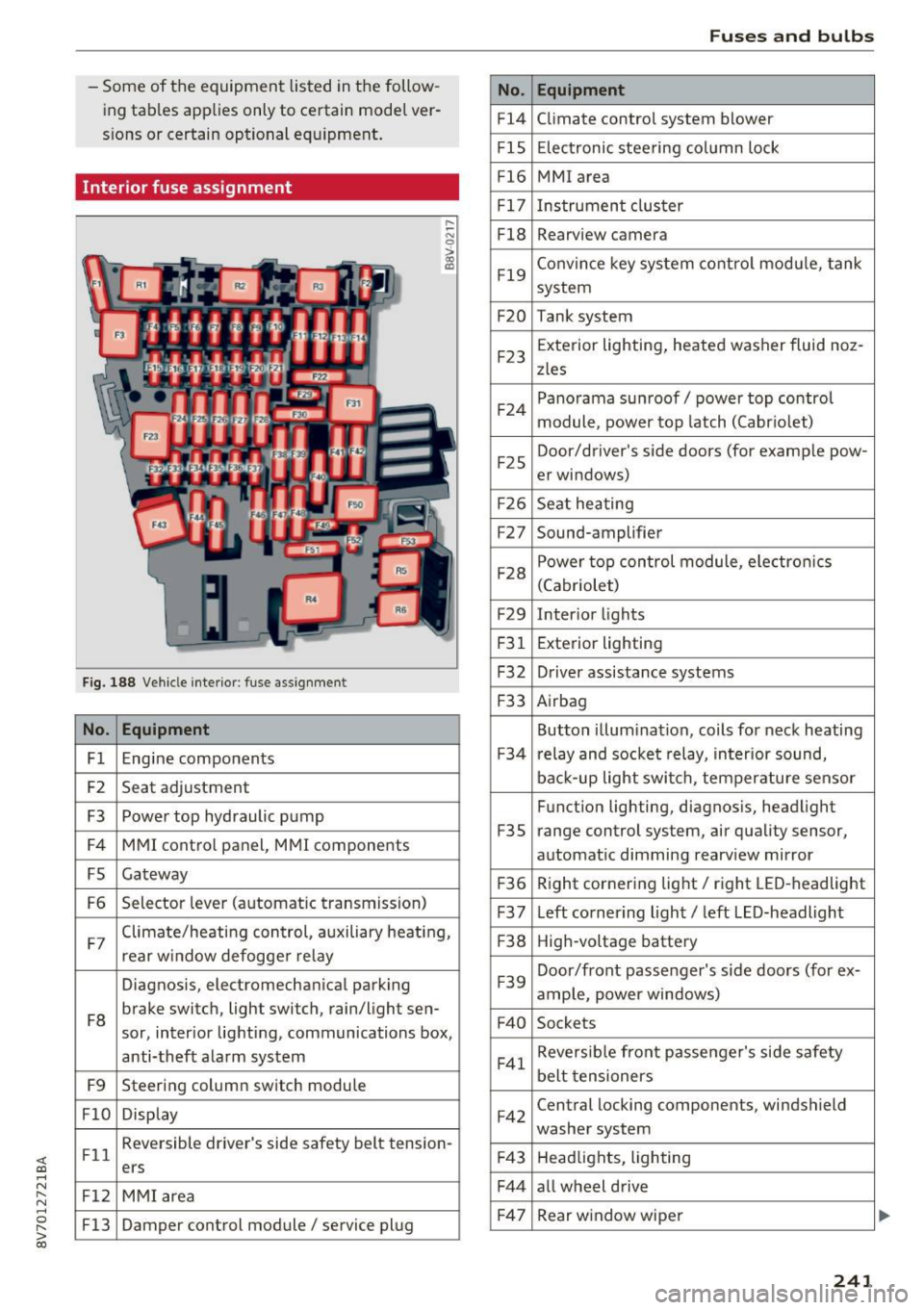
Interior fuse assignment
Fig. 188 Vehicle interior: fuse assignment
No. Equipment
Fl Engine components
F2 Seat
adjustment
F3 Power top hydraulic pump
F4 MMI control panel, MMI components
FS Gateway
F6 Selector
lever (automatic transmission)
.... ~ N
0
>
"' (0
F7 Climate/heating control, auxiliary heating,
rear w
indow defogger relay
Diagnosis, electromechanical parking
FB brake switch, light switch
, rain/light sen-
sor, inter ior lighting, communications box,
anti-theft alarm system
F9 Steering column switch module
FlO Display
Fll Reversible driver's side safety belt tension
-
ers
F12 MMI area
F13 Damper control module/ service plug
No.
Fl4
FlS
Fl6
F 17
FlB
F19
F20
F23
F 24
F2 5
F2 6
F27
F28
F29
F 31
F32
F 33
F 34
F35
F 36
F37
F38
F39
F40
F41
F42
F4 3
F44
F 47
Fuses and bulbs
Equipment
Climate control system blower
Electronic steering column lock
MMI area
Instrument cluster
Rearview camera
Convince key system control module, tank
system
Tank system
Exterior lighting, heated washer fluid noz -
zles
Panorama sunroof/ power top control
module, power top latch (Cabriolet)
Door/driver's side doors (for examp le pow-
er windows)
Seat heating
Sound-amplifier
Power top control module, electro nics
(Cabriolet)
Inter ior lights
Exterior lighting
Driver assistance systems
Airbag
Button illumination, coils for neck heating
r elay and socket relay, interior sound,
back-up light switch, temperature sensor
Function lighting, diagnosis, headlight
range control system, air quality sensor,
automat ic dimming rearview mirror
R ight cornering light/ right LED-headlight
Left cornering light/ left LED-headlight
High-voltage battery
Door/front passenger's side doors (for ex-
ample, power windows)
Sockets
Reversible front passenger's side safety
belt tensioners
Central locking components, windshield
washer system
Headlights, lighting
all wheel drive Rear w indow wiper
241
Page 259 of 272

<( co .... N ,.__
N .... 0 ,.__
> co
Remote control key . . . . . . . . . . . . . . . . . . . 29
Safety central locking . . . . . . . . . . . . . . . . . 32
Sett ing . . . . . . . . . . . . . . . . . . . . . . . . . . . . . 31
Certification . . . . . . . . . . . . . . . . . . . . . . . . . 256
Changing engine oil . . . . . . . . . . . . . . . . . . . 194
Child restraints Danger of using child restraints in the front
seat... .. .. .. ............... .. ..... 144
Where can I get additional information
about child restraints and their use? . . . . 183
Child restraint system anchors . . . . . . . . . . 179
Child safety . . . . . . . . . . . . . . . . . . . . . . . . . . 165
Important safety instructions for using chi ld
safety seats . . . . . . . . . . . . . . . . . . . . . . . . 169
Teth er anchors . . . . . . . . . . . . . . . . . . . . . . 181
Tether straps . . . . . . . . . . . . . . . . . . . . . . . 181
Child safety seats Booster seats . . . . . . . . . . . . . . . . . . . . . . . 17 4
Convertible ch ild seats . . . . . . . . . . . . . . . 172
Convertible locking retractor . . . . . . . . . . 177
How do I properly install a child safety seat
. h' l 7 169 in my ve rc e . ................. ..... .
Infant seats .. .. ............. .. .. .. . 171
Installing a child restraint using the LATCH
system . . . . . . . . . . . . . . . . . . . . . . . . . . . . 180
LATCH system . . . . . . . . . . . . . . . . . . . . . . 180
L ower anchorages . . . . . . . . . . . . . . . . . . . 180
Mounting and releasing the anchorage
hook . . . . . . . . . . . . . . . . . . . . . . . . . . . . . . 180
Safety instructions . . . . . . . . . . . . . . . . . . . 169
Unused safety belts on the rear seat . . . . 171
Child seats . . . . . . . . . . . . . . . . . . . . . . . . . . 171
Securing . . . . . . . . . . . . . . . . . . . . . . . . . . . 176
Cleaning . . . . . . . . . . . . . . . . . . . . . . . . . . . . 224
Cleaning/remov ing ice from windows . . . . . 226
Cleaning Alcantara . . . . . . . . . . . . . . . . . . . . 227
Cleaning artificial leather. . . . . . . . . . . . . . . 227
C leaning carbon parts . . . . . . . . . . . . . 226 , 227
Cleaning controls . . . . . . . . . . . . . . . . . . . . . 226
Cleaning decorative parts and trim . . . . . . . 226
Cleaning displays . . . . . . . . . . . . . . . . . . . . . 226
Cleaning exhaust tail pipes . . . . . . . . . . . . . 225
C lean ing plast ic parts . . . . . . . . . . . . . . . . . . 226
Clea ning seat covers . . . . . . . . . . . . . . . . . . . 227
C leaning tai l lights . . . . . . . . . . . . . . . . . . . . 225
C lea ning textiles . . . . . . . . . . . . . . . . . . . . . . 227
Cleaning the rims . . . . . . . . . . . . . . . . . . . . . 225
Index
Cleaning the wind deflector . . . . . . . . . . . . . 226
Climate control system Key recognition . . . . . . . . . . . . . . . . . . . . . . 61
Climate control system (automatic)
Adjusting air vents . . . . . . . . . . . . . . . . . . . . 63
Adjusting the air vents . . . . . . . . . . . . . . . . . 63
Air distribution, air vents . . . . . . . . . . . . . . . 63
AUTO (cl imate control system) . . . . . . . . . . 62
Blower . . . . . . . . . . . . . . . . . . . . . . . . . . . . . 63
Controls . . . . . . . . . . . . . . . . . . . . . . . . . . . . 62
D efrosting the windshield . . . . . . . . . . . . . . 63
Drive select . . . . . . . . . . . . . . . . . . . . . . . . . 106
Rear window defogger . . . . . . . . . . . . . . . . . 64
Recirculation mode . . . . . . . . . . . . . . . . . . . 63
Setting the temperatu re . . . . . . . . . . . . . . . 62
synchroniz ing . . . . . . . . . . . . . . . . . . . . . . . . 62
Clock . . . . . . . . . . . . . . . . . . . . . . . . . . . . . . . . 10
Clos ing
Hood . . . . . . . . . . . . . . . . . . . . . . . . . . . . . . 190
Windows . .. .. .. .. ............. .. .. . 34
Closing/ope ning
by remote control . . . . . . . . . . . . . . . . . . . . 29
with the central locking switch . . . . . . . . . . 31
with the conven ience key . . . . . . . . . . . . . . . 30
Cockp it (overview) . . . . . . . . . . . . . . . . . . . . . . 8
Coming home . . . . . . . . . . . . . . . . . . . . . . . . . 45
Compartments . . . . . . . . . . . . . . . . . . . . . . . . 57
Compass in the mirror . . . . . . . . . . . . . . . . . . 51
Compliance . . . . . . . . . . . . . . . . . . . . . . . . . . 256
Consumer information . . . . . . . . . . . . . . . . . 253
Consumer Information . . . . . . . . . . . . . . . . . 132
Consumption (fuel) . . . . . . . . . . . . . . . . . . . . 24
Contacting NHTSA . . . . . . . . . . . . . . . . . . . . 132
Conv enience key
Emergency operation . . . . . . . . . . . . . . . . . . 72
Indicator light . . . . . . . . . . . . . . . . . . . . . . . 72
Starting the engine (S TART ENGINE STOP
button) . . . . . . . . . . . . . . . . . . . . . . . . . . . . . 70
Stopping the engine (START ENGINE STOP
button) . . . . . . . . . . . . . . . . . . . . . . . . . . . . . 71
Switching the ignition on . . . . . . . . . . . . . . 70
unlocking/lock ing . . . . . . . . . . . . . . . . . . . . 30
Convenience opening/closing . . . . . . . . . . . . 34
Convert ible child safety seats . . . . . . . . . . . 172
259
Page 260 of 272
Index
Convertible locking retractor
Activating . . . . . . . . . . . . . . . . . . . . . . . . . . 177
Deactivating . . . . . . . . . . . . . . . . . . . . . . . . 178
Using to secure a child safety seat . . . . . . 177
Cooling mode (au toma tic climate con trol sys -
t em) . . . . . . . . . . . . . . . . . . . . . . . . . . . . . . . . 62
Cooling system Add ing coolant ... ............ .... .. . 195
Coolan t . . . . . . . . . . . . . . . . . . . . . . . . . . . . 195
Coolan t leve l check ing . . . . . . . . . . . . . . . . 195
Coolant temperature indicator . . . . . . . . . . 12
Indicator light . . . . . . . . . . . . . . . . . . . . . . . 1 6
Corner ing light . . . . . . . . . . . . . . . . . . . . . . . . 43
Cruise control system Changing speed . . . . . . . . . . . . . . . . . . . . . . 89
Descr ipt io n . . . . . . . . . . . . . . . . . . . . . . . . . . 88
Preselect ing speed . . . . . . . . . . . . . . . . . . . . 89
Sw itchi ng off . . . . . . . . . . . . . . . . . . . . . . . . 89
sw itch ing on . . . . . . . . . . . . . . . . . . . . . . . . . 89
Cup holders . . . . . . . . . . . . . . . . . . . . . . . . . . . 57
Curre nt cons umption . . . . . . . . . . . . . . . . 23, 24
D
D ata recorder . . . . . . . . . . . . . . . . . . . . . . . . 12 2
Date display . . . . . . . . . . . . . . . . . . . . . . . . . . 10
Daytime running lights . . . . . . . . . . . . . . . . . 43
D eclaration of compliance
Adapt ive cr uise control . . . . . . . . . . . . . . . 256
Aud i side assis t . . . . . . . . . . . . . . . . . . . . . 256
Ce ll phone package . . . . . . . . . . . . . . . . . . 256
Convenience key . . . . . . . . . . . . . . . . . . . . . 256
Elect ronic immob ilizer. . . . . . . . . . . . . . . . 256
Homelink universa l remote control . . . . . 256
Remote control key . . . . . . . . . . . . . . . . . . 256
Defective light bulb warning Indicator light . . . . . . . . . . . . . . . . . . . . . . . 20
Defrost ing (windsh ield)
automatic clima te con trol system . . . . . . . 63
DEF (instrument cluste r) . . . . . . . . . . . . . . . . 11
D eluxe a utomatic climate contro l
refer to Climate contro l system (automatic) .62
D etermin ing cor rec t load limit . . . . . . . . . . 2 18
Dig ita l compass . . . . . . . . . . . . . . . . . . . . . . . 51
D imensions . ..... ... .. ..... ... .. .. ... 251
Dimmi ng the rea rview mirror . . . . . . . . . . . . 48
Distance . . . . . . . . . . . . . . . . . . . . . . . . . . . . . 24
260
Door/luggage compartment lid wa rning . . . 23
Door contact switch . . . . . . . . . . . . . . . . . . . . 46
Doors Emergency locking . . . . . . . . . . . . . . . . . . . . 32
Driver in fo rmat ion system . . . . . . . . . . . . . . . 23
CD/radio display. . . . . . . . . . . . . . . . . . . . . . 23
Door/luggage compartment lid warning . . 23
E fficiency program . . . . . . . . . . . . . . . . . . . . 25
Ind icator lights . . . . . . . . . . . . . . . . . . . . . . 12
Messages . . . . . . . . . . . . . . . . . . . . . . . . . . . 12
On-board computer . . . . . . . . . . . . . . . . . . . 24
Outs ide temperature display . . . . . . . . . . . . 23
Se rvice in terva l display . . . . . . . . . . . . . . . 202
U sing the m ultifu nction stee ring wheel . . . 23
Driver seating position . . . . . . . . . . . . . . . . . 125
D rive select . . . . . . . . . . . . . . . . . . . . . . . . . . 106
Indicator light . . . . . . . . . . . . . . . . . . . . . . . 21
D rivi ng econom ica lly . . . . . . . . . . . . . . . . . . . 65
D riving safe ly . . . . . . . . . . . . . . . . . . . . . . . . 124
Drivin g throu gh wa ter . . . . . . . . . . . . . . . . . . 65
D rivi ng time . . . . . . . . . . . . . . . . . . . . . . . . . . 24
D ust filter
refer to Pollut ant fi lt er . . . . . . . . . . . . . . . . 61
E
ear window defogger . . . . . . . . . . . . . . . . . . . 64
E CO mode (a utomat ic cl ima te contro l
system) . . . . . . . . . . . . . . . . . . . . . . . . . . . . . . 62
Efficiency program . . . . . . . . . . . . . . . . . . . . . 25
Descnptron . . . . . . . . . . . . . . . . . . . . . . . . . . 25
Fuel economy messages . . . . . . . . . . . . . . . 26
Other equ ipment . . . . . . . . . . . . . . . . . . . . . 25
E lectr ical accessories
refer to Socket . . . . . . . . . . . . . . . . . . . . . . . 56
E lectromechanical parking brake
refer to Parking brake . . . . . . . . . . . . . . . . . 73
El ec trome chanical steering . . . . . . . . . . . . . 119
Ind icator lig hts . . . . . . . . . . . . . . . . . . . . . 119
E lectronic differentia l lock ........... .. . 116
Ind icator light . . . . . . . . . . . . . . . . . . . . . . . 18
E lectronic immobili zer . . . . . . . . . . . . . . . . . . 31
also refer to Immobili zer . . . . . . . . . . . . . . 27
E lec tronic spee d limiter . . . . . . . . . . . . . . . . . 88
E lec tronic stabiliza tion control (ESC)
Ind icator lig ht . . . . . . . . . . . . . . . . . . . . . . . 18
Spor t mode . . . . . . . . . . . . . . . . . . . . . . . . 11 7
Page 261 of 272
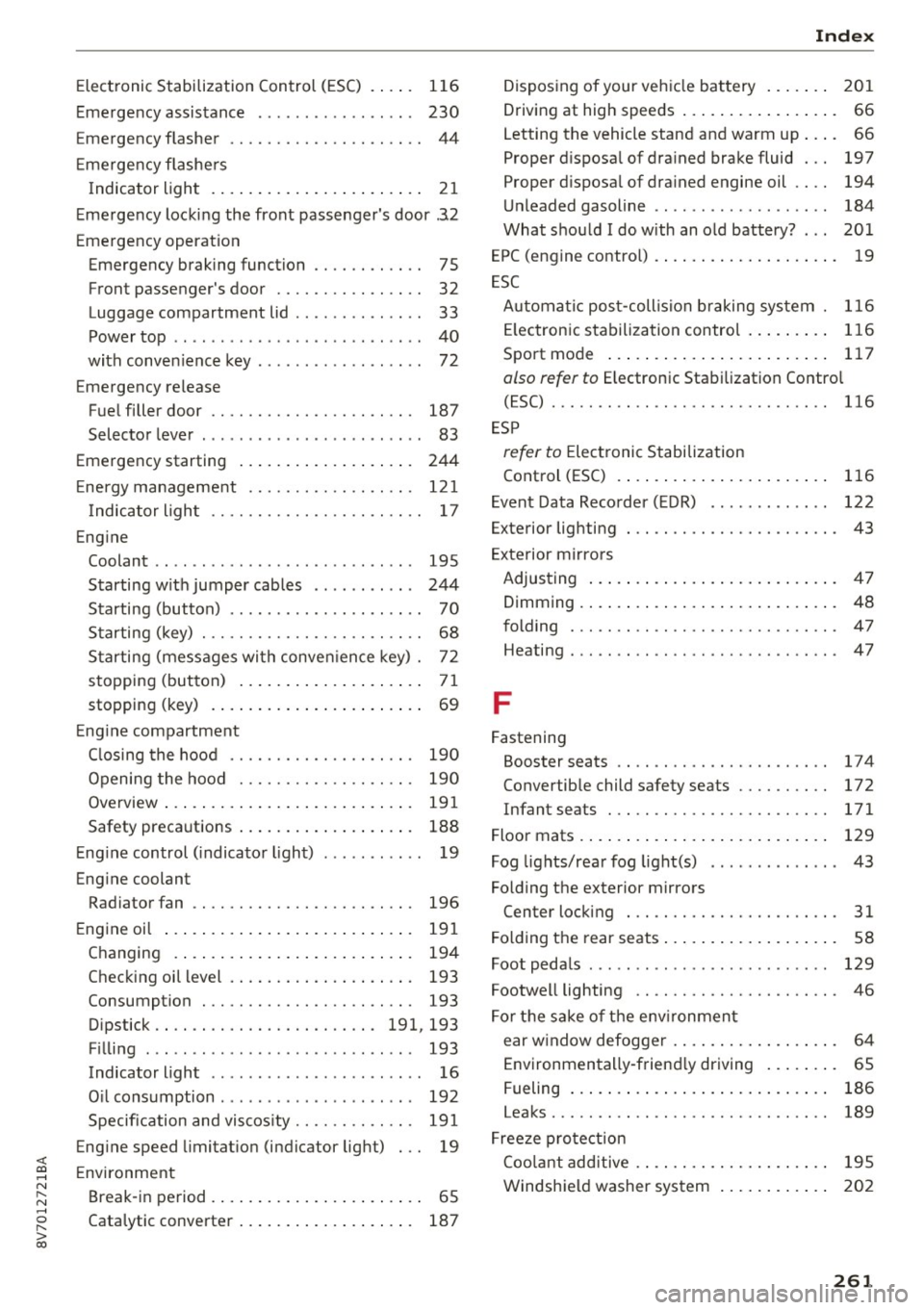
<( co .... N r--N .... 0 r--> co
Electronic Stabilization Control (ESC) . . . . . 116
Emergency assistance . . . . . . . . . . . . . . . . . 230
Emergency flasher . . . . . . . . . . . . . . . . . . . . . 44
E mergency flashe rs
I ndicator light . . . . . . . . . . . . . . . . . . . . . . .
21
Emergency locking the front passenger 's door .3.2
Emergency operat ion
Emergency braking function . . . . . . . . . . . .
75
Front passenger's door . . . . . . . . . . . . . . . . 32
Luggage compartment lid . . . . . . . . . . . . . . 33
Power top . . . . . . . . . . . . . . . . . . . . . . . . . . . 40
with conven ience key . . . . . . . . . . . . . . . . . . 72
Emergency release
Fuel filler door . . . . . . . . . . . . . . . . . . . . . .
187
Selector lever . . . . . . . . . . . . . . . . . . . . . . . . 83
Emergency starting 244
Energy management . . . . . . . . . . . . . . . . . . 121
Indicator light . . . . . . . . . . . . . . . . . . . . . . . 17
Engine
Coolant . . . . . . . . . . . . . . . . . . . . . . . . . . . .
195
Starting with jumper cables . . . . . . . . . . . 244
Starting (button) . . . . . . . . . . . . . . . . . . . . . 70
Starting (key) . . . . . . . . . . . . . . . . . . . . . . . . 68
Starting (messages with conven ience key) . 72
stopping (button) . . . . . . . . . . . . . . . . . . . . 71
stopping (key) . . . . . . . . . . . . . . . . . . . . . . . 69
Engine compartment
C losing the hood . . . . . . . . . . . . . . . . . . . .
190
Opening the hood . . . . . . . . . . . . . . . . . . . 190
Overview ... .................. ..... . 191
Safety precautions . . . . . . . . . . . . . . . . . . . 188
Engine control (indicator light) . . . . . . . . . . . 19
Engine coolant
Radiator fan
196
Engine oil . . . . . . . . . . . . . . . . . . . . . . . . . . . 191
Changing . . . . . . . . . . . . . . . . . . . . . . . . . . 194
Checking oil level . . . . . . . . . . . . . . . . . . . . 193
Consumption . . . . . . . . . . . . . . . . . . . . . . . 193
Dipstick . . . . . . . . . . . . . . . . . . . . . . . . 191, 193
F'll ' I mg . . . . . . . . . . . . . . . . . . . . . . . . . . . . . 193
Indicator light . . . . . . . . . . . . . . . . . . . . . . . 16
Oi l consumption . . . . . . . . . . . . . . . . . . . . . 192
Specification and viscosity . . . . . . . . . . . . . 191
Engine speed limitation (indicator light) . . . 19
Environment
Break-in period . . . . . . . . . . . . . . . . . . . . . . .
65
Catalytic converter . . . . . . . . . . . . . . . . . . . 187
Index
Disposing of your vehicle battery . . . . . . . 201
Driving at high speeds . . . . . . . . . . . . . . . . . 66
Letting the vehicle stand and warm up. . . . 66
Proper disposal of drained brake fluid . . . 197
Proper disposal of drained engine oil . . . . 194
Unleaded gasoline . . . . . . . . . . . . . . . . . . . 184
What should I do with an old battery? . . . 201
EPC (engine control) . . . . . . . . . . . . . . . . . . . . 19
ESC
Automatic post-collision braking system .
116
Electronic stabilization control . . . . . . . . . 116
Sport mode . . . . . . . . . . . . . . . . . . . . . . . . 117
also refer to Electronic Stabilization Control
(ESC) . . . . . . . . . . . . . . . . . . . . . . . . . . . . . .
116
ESP
refer to Electronic Stabilization
Control (ESC) . . . . . . . . . . . . . . . . . . . . . . .
116
Event Data Recorder (EDR) . . . . . . . . . . . . . 122
Exterior lighting . . . . . . . . . . . . . . . . . . . . . . . 43
Exterior mirrors
Adjusting . . . . . . . . . . . . . . . . . . . . . . . . . . .
47
Dimming . . . . . . . . . . . . . . . . . . . . . . . . . . . . 48
folding . . . . . . . . . . . . . . . . . . . . . . . . . . . . . 47
Heating... .. .. .. .. ............... .. . 47
F
Fastening
Booster seats . . . . . . . . . . . . . . . . . . . . . . .
17 4
Convertible child safety seats . . . . . . . . . . 172
Infant seats . . . . . . . . . . . . . . . . . . . . . . . . 171
Floor mats . . . . . . . . . . . . . . . . . . . . . . . . . . . 129
Fog lights/rear fog light(s) . . . . . . . . . . . . . . 43
Folding the exterior mirrors
Center locking . . . . . . . . . . . . . . . . . . . . . . .
31
Folding the rear seats . . . . . . . . . . . . . . . . . . . 58
Foot pedals . . . . . . . . . . . . . . . . . . . . . . . . . . 129
Footwell lighting . . . . . . . . . . . . . . . . . . . . . . 46
For the sake of the env ironment
ear w indow defogger . . . . . . . . . . . . . . . . . .
64
Environmentally-friend ly driving . . . . . . . . 65
Fueling . . . . . . . . . . . . . . . . . . . . . . . . . . . . 186
Leaks..... .... .. ................. .. 189
Freeze protection
Coo lant additive . . . . . . . . . . . . . . . . . . . . .
195
Windshield washer system . . . . . . . . . . . . 202
261