warning AUDI A3 CABRIOLET 2016 User Guide
[x] Cancel search | Manufacturer: AUDI, Model Year: 2016, Model line: A3 CABRIOLET, Model: AUDI A3 CABRIOLET 2016Pages: 272, PDF Size: 67.88 MB
Page 23 of 272
Instruments and indicator lights
fast acceleration) and have the malfunction cor
rected . See an authorized Audi dealer or
author ized Audi Service Facility .
The indica tor may turn on if the electronic speed
limiter is fau lty. For additional information, refer
to
¢ page 88, Electronic speed limiter .
The MIL may also turn on if the fuel filler cap is
not closed correctly
¢ page 186.
On-Board Diagnostics
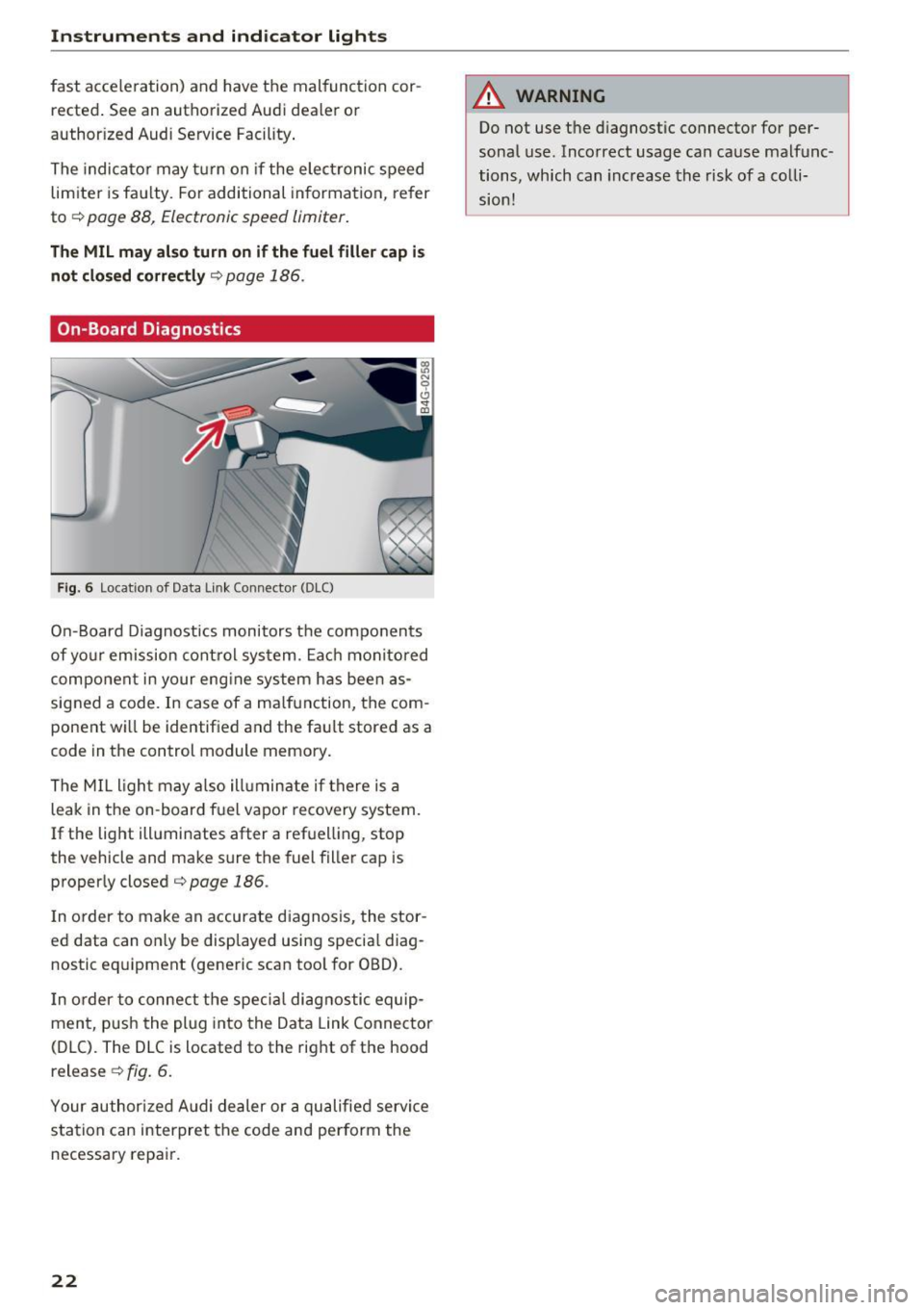
F ig. 6 Location of Data Link Connecto r (DLC)
On-Board Diagnostics monitors the components
of yo ur emission control system. Each monitored
component in your eng ine system has been as
signed a code. In case of a ma lfunction, the com
ponent wi ll be identified and the fault stored as a
code in the control module memory.
The MIL light may also ill uminate if there is a
leak in the on -board fuel vapor recovery system.
If the light illuminates after a refuelling, stop
the vehicle and make sure the fuel filler cap is
properly closed¢
page 186.
In order to make an accurate diagnosis, the stor
ed data can on ly be displayed using specia l diag
nostic eq uipment (generic scan tool for OBD).
I n order to connect the specia l diagnostic equip
ment, push the plug into the Data Link Connector
(DLC). The DLC is located to the right of the hood
release ¢
fig. 6.
Your authorized Audi dealer or a qualified servi ce
station can interpret the code and perform the
necessary repair.
22
A WARNING
Do not use t he diagnostic connector for per
sonal use. Incorrect usage can cause malfunc
tions, which can increase the risk
of a colli
sion!
Page 24 of 272
<( co ..... N
" N ..... 0 r--. > 00
Driver information
system
Overview
Applies to: ve hicles with driver information system
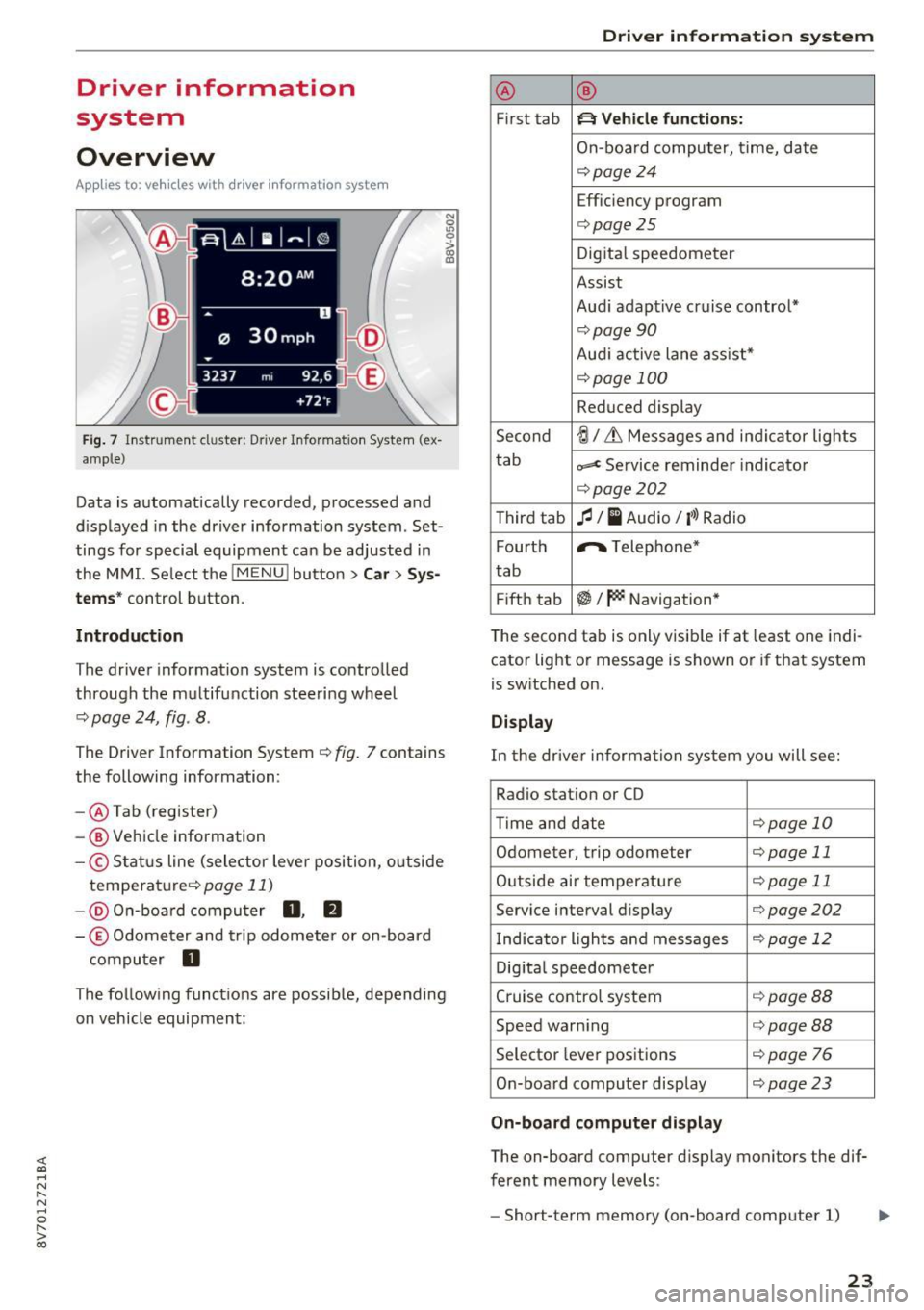
Fig. 7 Instrument cluster : Driver Information System (ex
ample)
Data is automatically recorded, processed and
displayed in the driver information system . Set·
tings for special equipment can be adjusted in
the MMI. Select the
I MENU I button >Car > Sys
tems*
control button.
Introduction
The driver information system is controlled
through the multifunction steering wheel
¢ page 24, fig . 8 .
The Driver Information System ¢ fig. 7 contains
the following information:
- @ Tab (register)
- @ Vehicle information
-© Status line (selector lever position, outside
temperat ure¢ page
11)
-@ On-board computer D , fJ
-© Odometer and trip odometer or on-board
computer
D
The following functions are possible, depending
on vehicle equipment:
Driver in forma tion system
@ ®
First tab ~ Vehicle functions:
On-boa rd computer, time, date
¢page24
Efficiency program
¢page25
Digital speedometer
Assist
Aud i adaptive cruise control*
¢page 90
Audi active lane ass ist*
¢ page 100
Reduced display
Second
ti/ & Messages and indicator lights
tab
c,,,d Service reminder indicator
¢ page202
Third tab fl I I Audio/ I'>) Radio
Fourth ,.,.
Telephone*
tab
Fifth tab
$I~ Navigation*
The second tab is only visible if at least one indi
cator light or message is shown or if that system
is switched on.
Display
In the driver information system you will see:
Radio station or CD
Time and date
¢page 10
Odometer, trip odomete r ¢page 11
Outside air temperature ¢page 11
Service interval display ¢page202
Indicator lights and messages ¢ page 12
Digital speedometer
Cruise control system
¢page BB
Speed warning <=:>page BB
Selector lever positions ¢ page 76
On-board computer display ¢page 23
On-board computer display
The on-board computer display monitors the dif
ferent memory levels :
- Short-term memory (on-board computer 1)
23
Page 28 of 272
<( co .... N r--N .... 0 r--> co
Opening and closing
Central locking
Key set
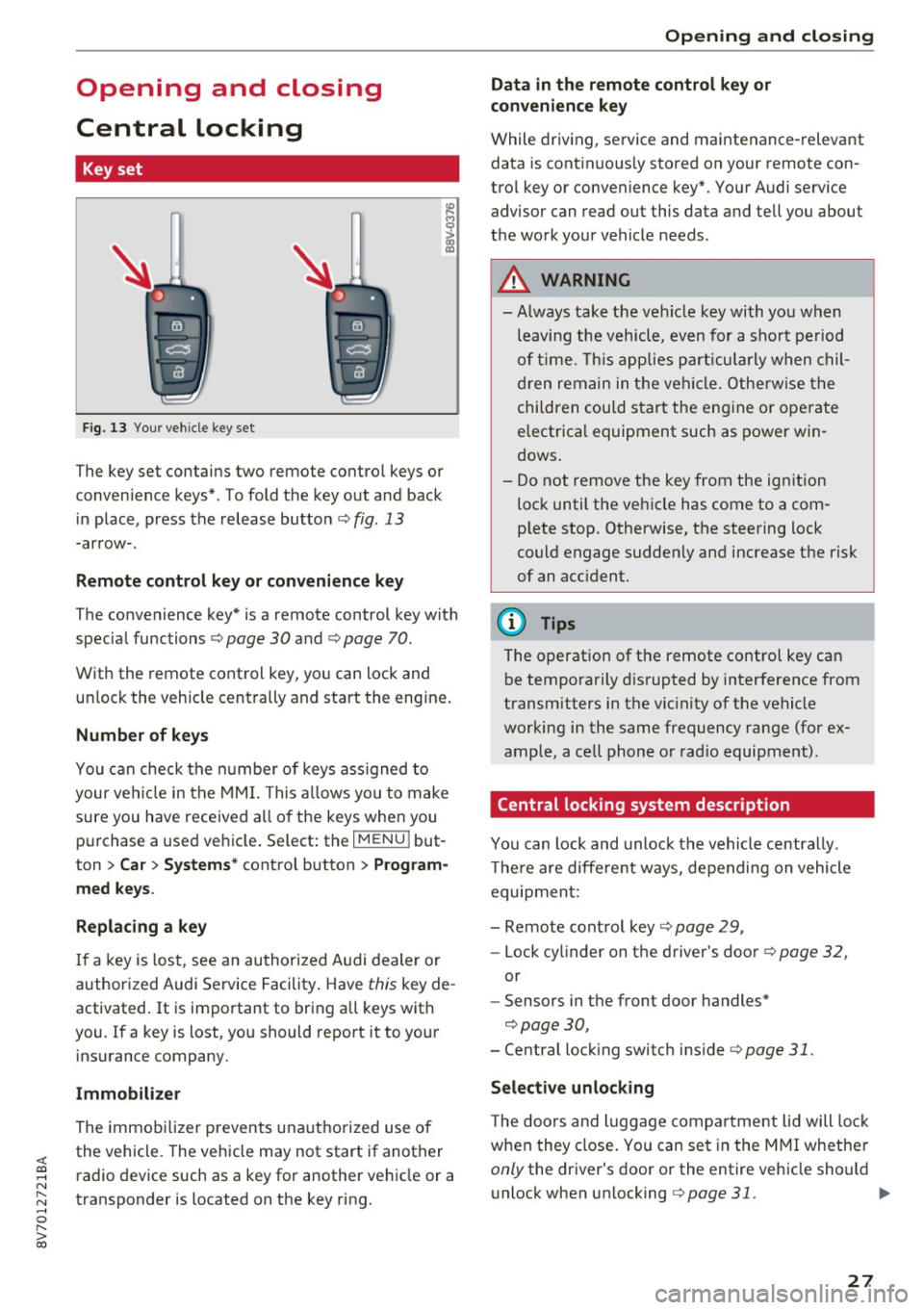
Fig. 13 Your vehicle key set
The key set contains two remote control keys or
conven ience keys*. To fold the key out and back
in place, press the release button ¢
fig. 13
-arrow-.
Remote control key or convenience key
The convenience key* is a remote control key with
special functions ¢
page 30 and¢ page 70.
With the remote control key, you can lock and
unlock the vehicle centrally and start the engine.
Number of keys
You can check the number of keys ass igned to
your vehicle in the MMI. This allows you to make
sure you have received all of the keys when you
purchase a used vehicle . Select: the
I MENU I but
ton
> Car > Systems* control button > Program
med keys.
Replacing a key
If a key is lost, see an authorized Audi dealer or
authorized Audi Service Facility. Have
this key de
activated.
It is important to bring all keys with
you . If a key is lost, you should report it to your
insurance company.
Immobilizer
The immobilizer prevents unauthorized use of
the vehicle . The vehicle may not start if another
radio device such as a key for another vehicle or a
transponder is located on the key ring.
Opening and closing
Data in the remote control key or
convenience key
While driving, service and maintenance-relevant
data is continuous ly stored on your remote con
trol key or convenience key*. Your Audi service advisor can read out this data and tell you about
the work your vehicle needs.
A WARNING
--- Always take the vehicle key with you when
leaving the vehicle, even for a sho rt period
of tim e. This applies particularly when chil
dren remain in the vehicle. Otherwise the
children could start the engine o r operate
electrica l equipment such as power win
dows .
- Do not remove the key from the ignition
lock until the veh icle has come to a com
p lete stop. Otherwise, the steering lock
could engage suddenly and increase the risk
of an acc ident.
(D Tips
The operation of the remote control key can
be temporarily disrupted by interference from
transmitters in the vicinity of the vehicle
working in the same frequency range (for ex
ample, a cell phone or rad io equipment) .
Central locking system description
You can lock and unlock the vehicle centrally.
T here are different ways, depending on vehicle
equipment:
- Remote control key¢
page 29,
-Lock cylinder on the driver's door ¢page 32,
or
- Sensors in the front door handles*
¢page 30,
- Central locking switch inside¢ page 31.
Selective unlocking
The doors and luggage compartment lid will lock
when they close. You can set in the MMI whether
only the dr iver 's door or the entire vehicle should
unlock when un locking
¢ page 31. .,..
27
Page 29 of 272
Opening and clo sin g
Autom atic locking (Auto L ock )
The Auto Lock funct ion locks all doors and the
luggage compartment lid once the speed has ex
ceeded approximately 9 mph (15 km/h).
The car is unlocked again once the ign ition key is
removed. In addition, the vehicle can be un locked
if the opening function in the power locking sys
tem switch is used or one of the door handles is
pu lled .
I n t he event of a crash with airbag deployment,
the doors automat ica lly unlock to allow access to
the v ehicle .
Anti-theft alarm system*
If t he anti- theft alarm system detects a vehicle
b reak-in, a udio and v isua l warning signals are
tr iggered.
The ant i-theft alarm system turns on automati
cally when you lock the vehicle .
It deactivates
when unlocking using the remote con trol key or
by to uch ing the sensor on the door handle (con
venience key) .
To sw itch the a la rm off, press the@ button on
the remote con trol key or convenience key or
sw itch the ignition on. The a la rm also stops auto
matica lly after a certain amou nt of time.
Turn signals
The turn s ignals flash tw ice when you un lock the
ve hicl e and flash once when you lock the vehicle .
I f the blinking continues, one of the doors or the
luggage compartment lid/hood is not closed or
the ignition is still switc hed on .
Unintentionall y locking your self out
There are safeguard s under the fo llow ing cond i
tions, which prevent you from lock ing your re
mote control key in the ve hicle:
- The vehicle will not lock when the driver 's door
is open
c> page 31.
- When locking using the~ button in the centra l
locking switch, the vehicle will not lock if a door
is open
c> page 31 .
-On vehicles with a convenience key*, the lug
gage compartment lid un locks aga in after do s-
28
ing if the most recent ly used key is in the lug
gage compartment.
Do no t lock your ve hicle w ith the remote cont rol
key or convenience key* until all doors and the
l uggage compartment li d are closed. This helps
to prevent you from locking yourself out acciden
ta lly.
{i) Tips
- Do not leave va luables unattended i n the ve
hicle. A locked ve hicle is not a safe!
- If the LED in the upper edge of the drive r's
door turns on for about 30 seconds after
the vehicle is locked, there is a malfunction
in the power locking or the anti-theft a larm
system* . Have the problem corrected by an
authorized Audi dealer or authorized Aud i
Service Facility.
LED and batteries in the remote control key
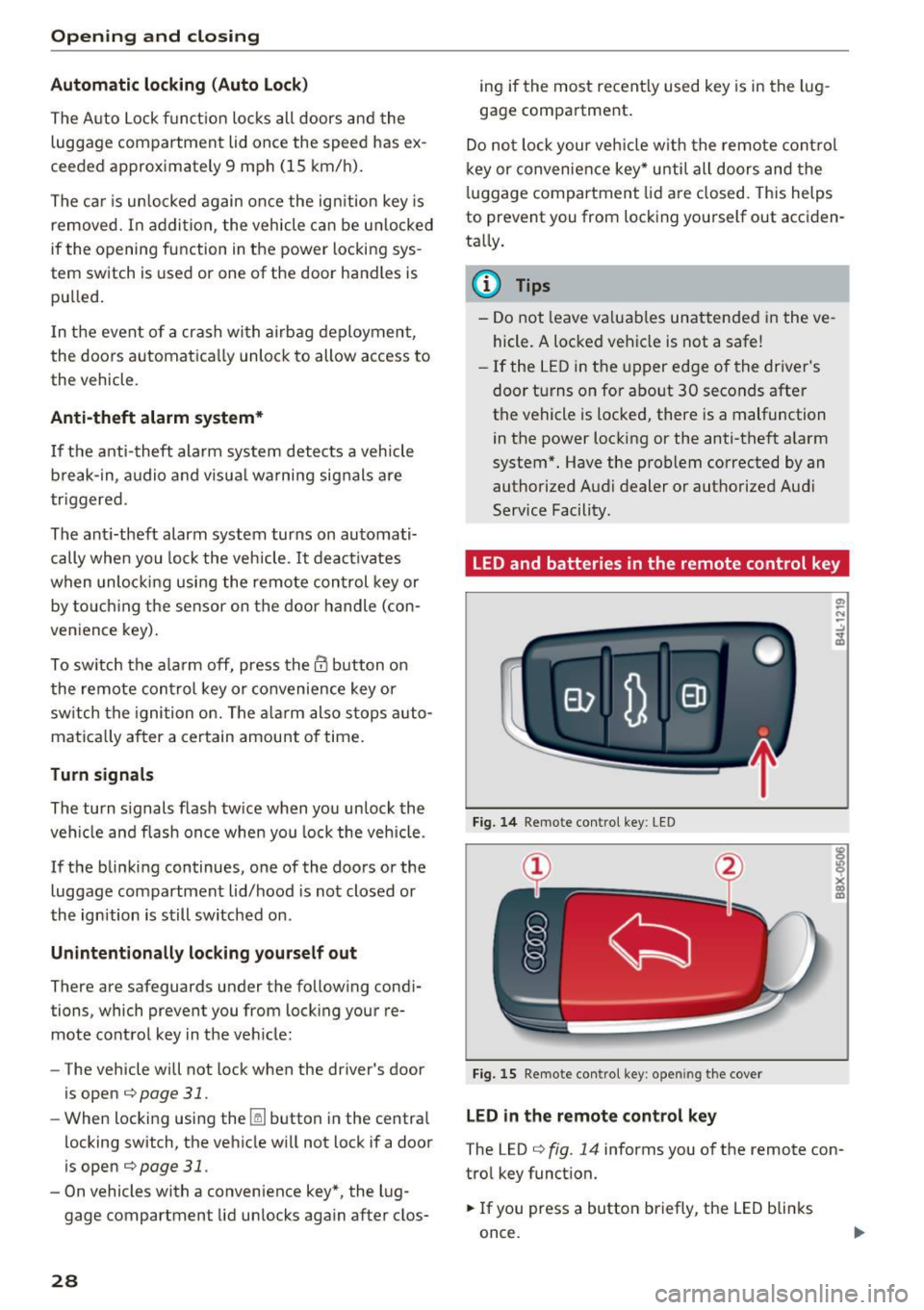
Fig. 14 Remote control key : LED
Fig. 15 Remote con tro l key : o penin g the cover
LED in the remote control ke y
The LED c> fig. 14 info rms you of the remote con
tro l key funct ion.
.,. If you press a button briefly, the LED blinks
once.
Page 31 of 272
Opening and clo sin g
&_ WARNING
Read and follow all WARNINGS¢.& in Key
set on page 2 7
@ Tips
- Only use the remote control key or conven
ience key within view of the vehicle.
- Do not use the remote contro l when you are
inside the vehicle. Otherwise, you could un
i ntent ionally lock the vehicle. If you then
tried to start the engine or open a door, the
alarm would be triggered . If this happens,
press the un lock button@ .
- The vehicle can only be locked when these
lector lever is in the P posit ion.
- Only use the panic function in an emergen
cy.
Locking and unlocking with the
convenience key
App lies to : ve hicles with conve nien ce key
The front doors and the luggage compartment
lid can be unlocked and locked without using the
remote control key.
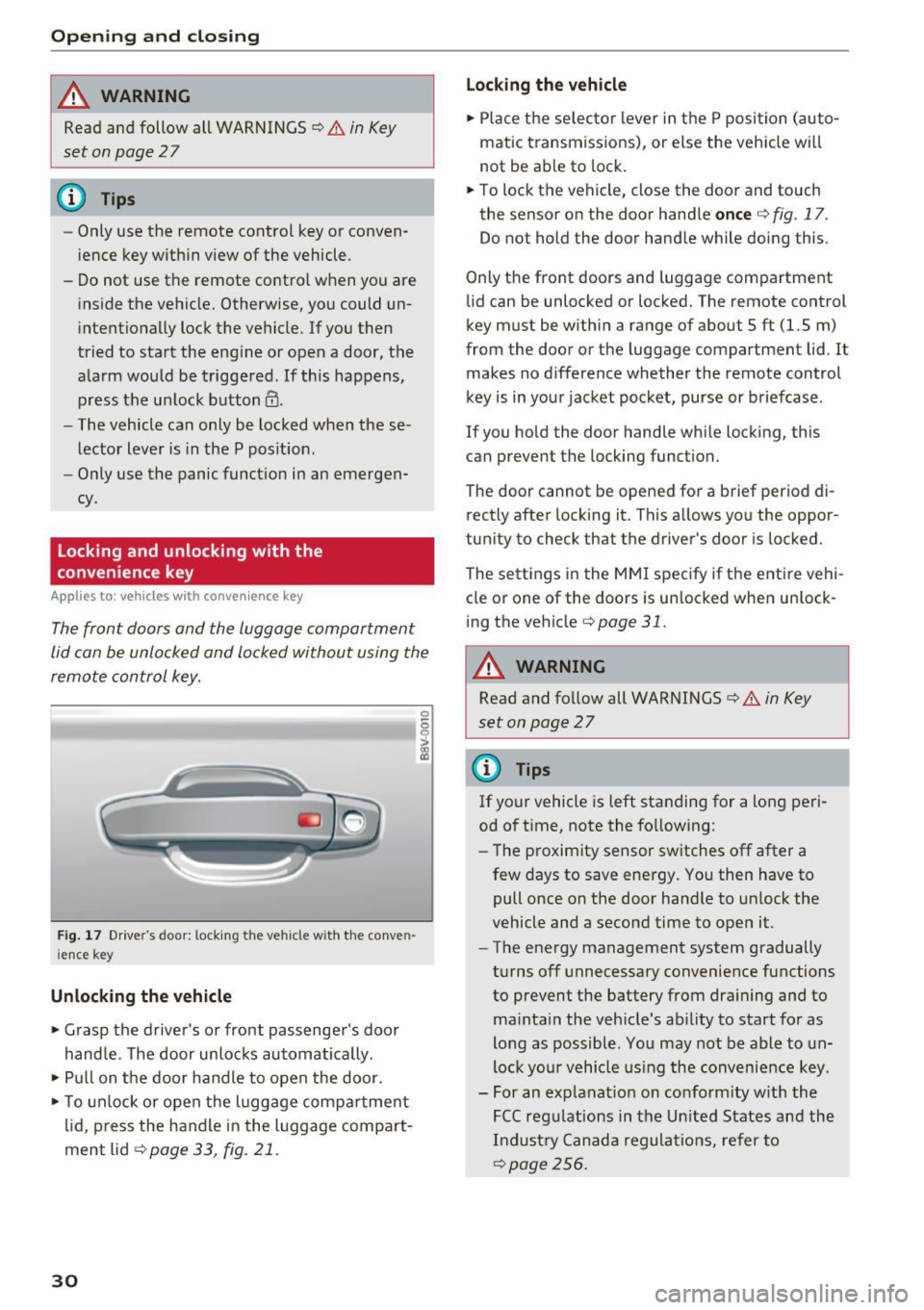
Fig . 17 Dr ive r's door: locking the ve hicle with the conve n
i ence key
Unlocking the vehicle
• Grasp the driver's or front passenge r's door
handle . The door unlocks automatically .
• Pull on the door handle to open the door.
• To unlock or open the luggage compa rtment
lid, p ress the handle in the luggage compart
ment lid ¢
page 33, fig. 21.
30
Lo cking the v ehicle
• Place the selecto r lever in t he P position (auto
matic transmiss ions), or else the veh icle wi ll
not be ab le to lock .
• To lock the vehicle, close the door and touch
the sensor on the door hand le
once ¢ fig. 17.
Do not hold the door handle while doing this.
Only the front doors and luggage compartment
li d can be unlocked or locked. The remote control
key must be within a range of about 5 ft (1.5 m)
from the door or the luggage compartment lid . It
makes no d ifference whether the remote control
key is in your jacket pocket, purse or briefcase .
If you ho ld the door handle wh ile locking, this
can prevent the locking function.
The door cannot be opened for a brief period di
rectly after locking it. This allows you the oppor
tun ity to check that the driver's door is locked .
The settings i n the MMI specify if the entire vehi
cle or one of the doors is un locked when un lock
ing the vehicle¢
page 31.
&_ WARNING
Read and follow all WARNINGS¢.& in Key
set on page
2 7
(D Tips
If your vehicle is left standing for a long peri
od of time, note the fo llowing:
- The proximity sensor switches off after a
few days to save energy. You then have to
pull once on the door handle to un lock the
vehicle and a second time to open it.
- The energy management system gradually
turns off unnecessary convenience functions
to prevent the battery from dra ining and to
ma inta in the vehicle's ab ility to start for as
long as possible. You may not be able to un
lock yo ur vehicle us ing the convenience key.
- For an explanat ion on co nfo rm ity w ith the
FCC reg ulations in the Un ited States and the
Industry Canada regulat ions, refer to
¢page 256.
Page 32 of 272
<( co ..... N
" N ..... 0 r--. > 00
Central locking switch
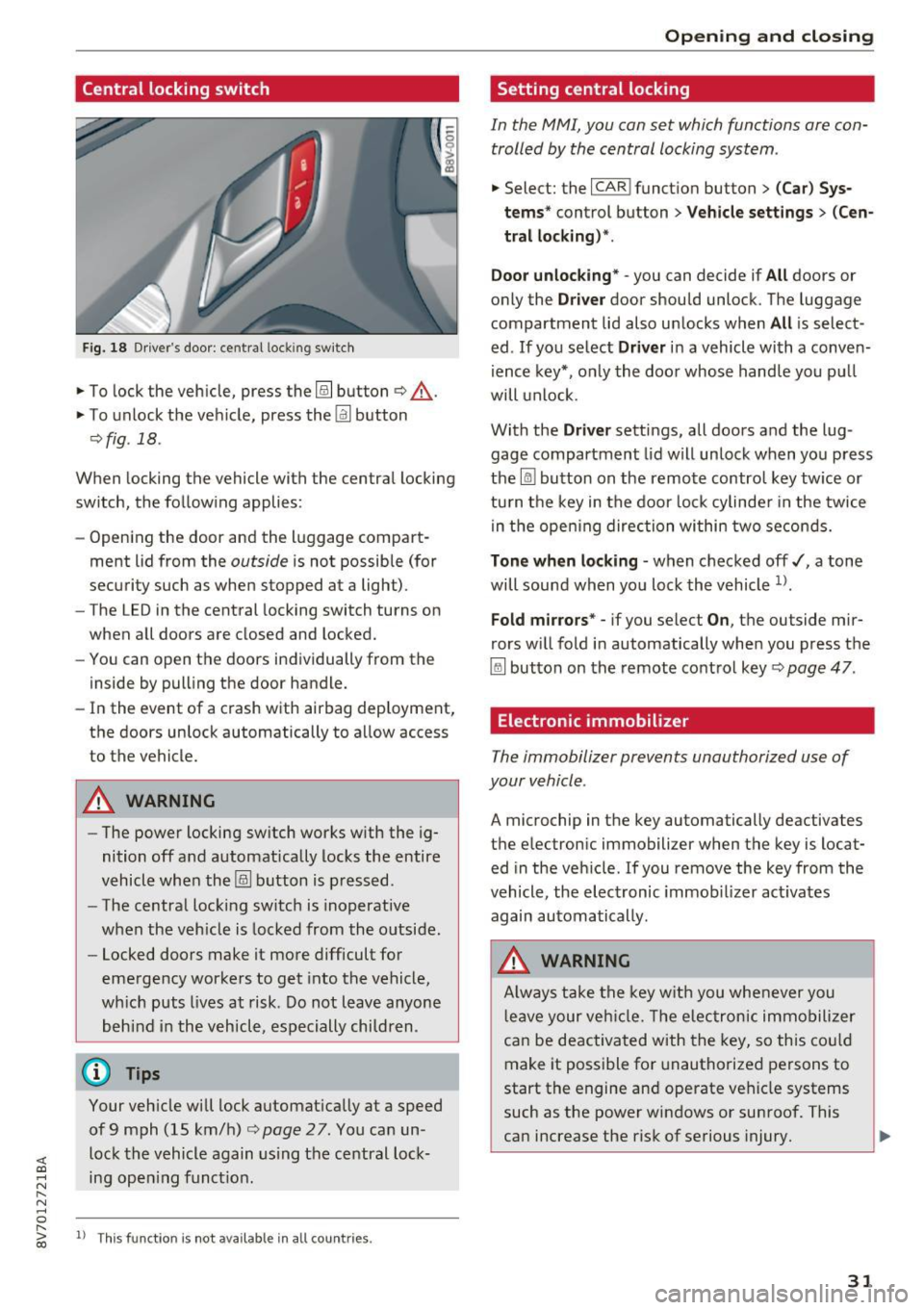
Fig. 18 Dr ive r's door: cent ral loc king sw itch
.,. To lock the veh icle, press the@! button ¢,&. .
.,. To unlock t he ve hicle, press the~ button
qfig . 18 .
When locking the vehicle with the centra l locking
switch, the follow ing applies :
- Open ing the door and the l uggage compart
ment lid from the
outside is not possible (for
security such as when stopped at a light) .
- The LED in the central locking switch turns on
when all doors are closed and locked.
- You can open the doors individually from the
inside by pull ing the door handle.
- In the event of a crash with a irbag dep loyment,
the doors un lock automatically to a llow access
to the vehicle.
A WARNING
- The power locking sw itch works w ith the ig
nition off a nd automatically locks the entire
vehicle wh en the@! button is p ressed.
- The centra l locking switch is inoperative
when the veh icle is locked from the o utside.
- Locked doors make it mo re difficult fo r
eme rgency wor kers to get into the vehicle,
wh ich puts l ives at risk . D o not leave anyone
be hin d in th e veh icl e, especially children .
(!) Tips
Your veh icle w ill lock a utomat ica lly at a speed
of 9 mph (15 km/h)¢
page 27. You can un
loc k the vehicle again using the ce ntral loc k
ing ope ning f unct ion .
ll Thi s fun ctio n is not a vail able in all coun tries.
Open ing and closing
Setting central locking
In the MMI, you can set which functions are con
trolled by the central locking system .
.,. Select: the I CAR ! funct ion button > (Car) Sys
t e ms *
control button > Vehicle settings > (Cen
tral locking)* .
Door unlocking * -
you can decide if All doors or
only the
Driver door shou ld unlock. The luggage
compartment lid also un locks when
All i s select
ed . If you se lect
Driver i n a vehicle wi th a conve n
i ence key*, o nly the doo r whose handle you p ull
will unlock .
Wi th the
Driver settings, all doors a nd the lug
gage compartment lid will un lock when yo u press
the ~ button on the remo te contro l key tw ice or
tu rn t he key in the door lo ck cylinde r in the twice
in the ope ning direc tion wi thin two secon ds.
Tone when locking -when checke d off ,/, a tone
will sound wh en yo u loc k the vehicle
1>.
Fold mirrors * -if you select On , the outside m ir
rors w ill fold in automatically when you press t he
~ but ton on the remote cont ro l key ¢ page 47 .
Electronic immobilizer
The immobilizer prevents unauthorized use of
your v ehicle .
A microchip in the key automatically deactivates
th e e lectron ic immobilizer when the key is locat
ed in the veh icle. If you remove the key from the
vehicle, the elec tronic im m ob ilizer act iva tes
again au tomatically .
A WARNING
Alw ay s t ake t he key w ith y ou whe never y ou
l e ave y our veh icle. The elec tron ic immo bili zer
c an be deactiv ated wit h th e key, so this c ould
make it possible fo r unauthorized persons to
start the engine an d operate veh icle systems
such as the powe r windows or sunroof. This
can increase the risk of se rious injury.
31
Page 34 of 272
<( co ..... N
" N ..... 0
" > 00
A WARNING
Read and follow all WARNINGS¢&. in Key
set on page 2 7
Luggage compartment
Lid
Opening/closing the luggage compartment
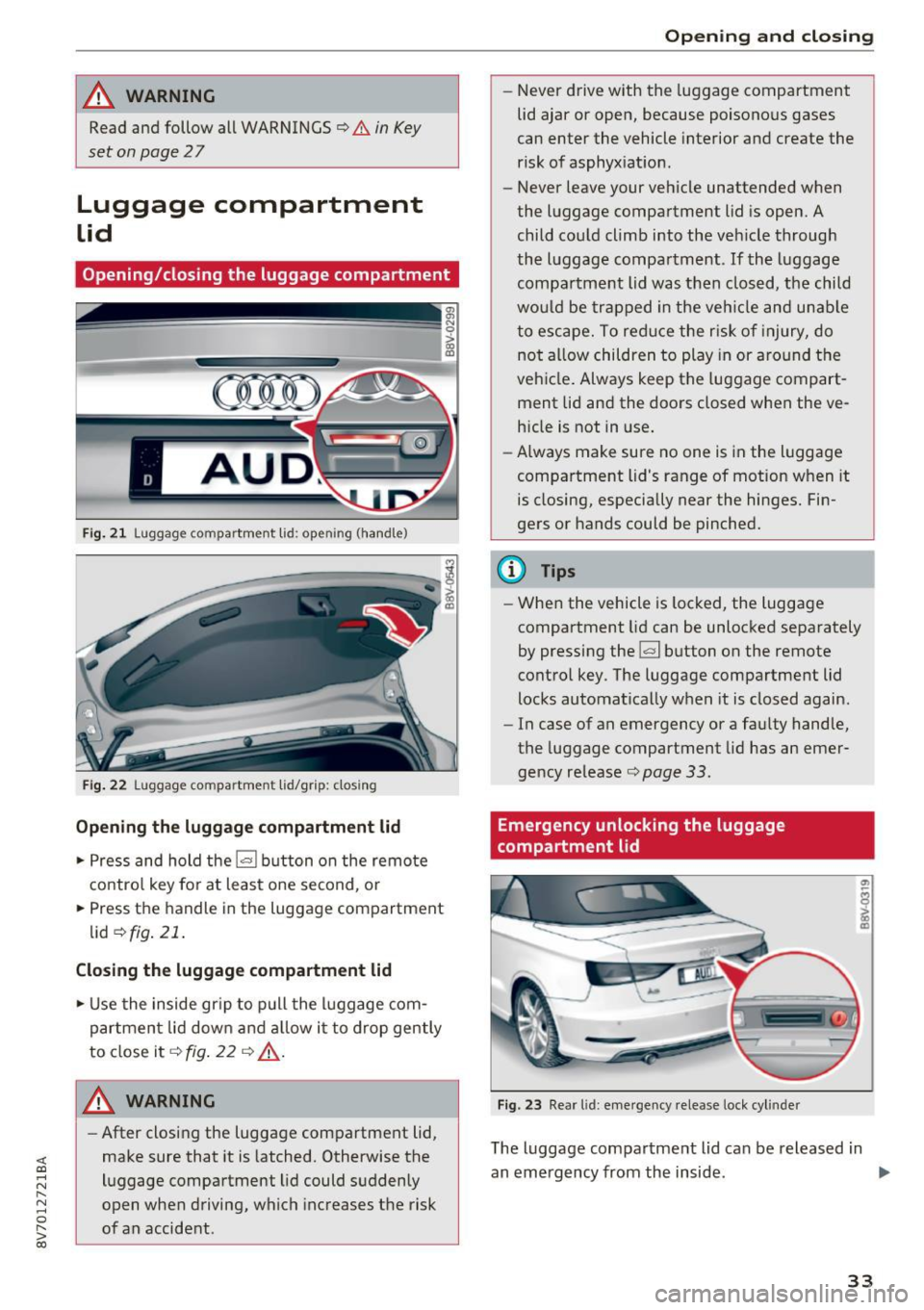
Fig . 21 Luggag e compartm ent lid : op enin g (handle)
Fig . 22 Luggage compartmen t lid/grip: closing
Opening the luggage compartment lid
... Press and hold the l= I button on the remote
control key for at least one second, or
... Press the handle in the luggage compartment
lid
¢ fig . 21.
Closing the luggage compartment lid
... Use the inside gr ip to pull the luggage com
partment lid down and allow it to drop gently
to close it¢
fig . 22 ¢ .&_.
A WARNING 1=
- After closing the luggage compartment lid,
make sure that it is latched. Otherwise the
luggage compartment lid could suddenly
open when driving, which increases the risk
of an accident .
Opening and closing
-Never drive with the luggage compartment
lid ajar or open, because poisonous gases
can enter the vehicle interior and create the
risk of asphyxiation .
- Never leave your vehicle unattended when
the luggage compartment lid is open. A
child could climb into the vehicle through
the luggage compartment .
If the luggage
compartment lid was then closed, the child
would be trapped in the veh icle and unab le
to escape. To reduce the r isk of injury, do
not al low children to play in or around the
vehicle. Always keep the luggage compart
ment lid and the doors closed when the ve hicle is not in use.
- Always make sure no one is in the luggage
compartment lid's range of motion when it
is closing, especially near the hinges. Fin
gers or hands could be pinched.
@ Tips
- When the vehicle is locked, the luggage
compartment lid can be unlocked separately
by pressing the
1£:1 button on the remote
control key. The luggage compartment lid
locks automatically when it is closed again.
- In case of an emergency or a faulty handle,
the luggage compartment lid has an emer
gency release¢
page 33.
Emergency unlocking the luggage
compartment lid
Fig. 23 Rear l id : eme rgency release lock cyl inder
The luggage compartment lid can be released in
an emergency from the inside . ..,_
33
Page 35 of 272
Opening and clo sin g
To reach the emergency release mechanism, the
rear bench seat backrest must be folded down .
¢page SB
.. Insert the key into the lock cylinder near the
handle.
.. Turn the key counterclockwise.
Power windows
Controls
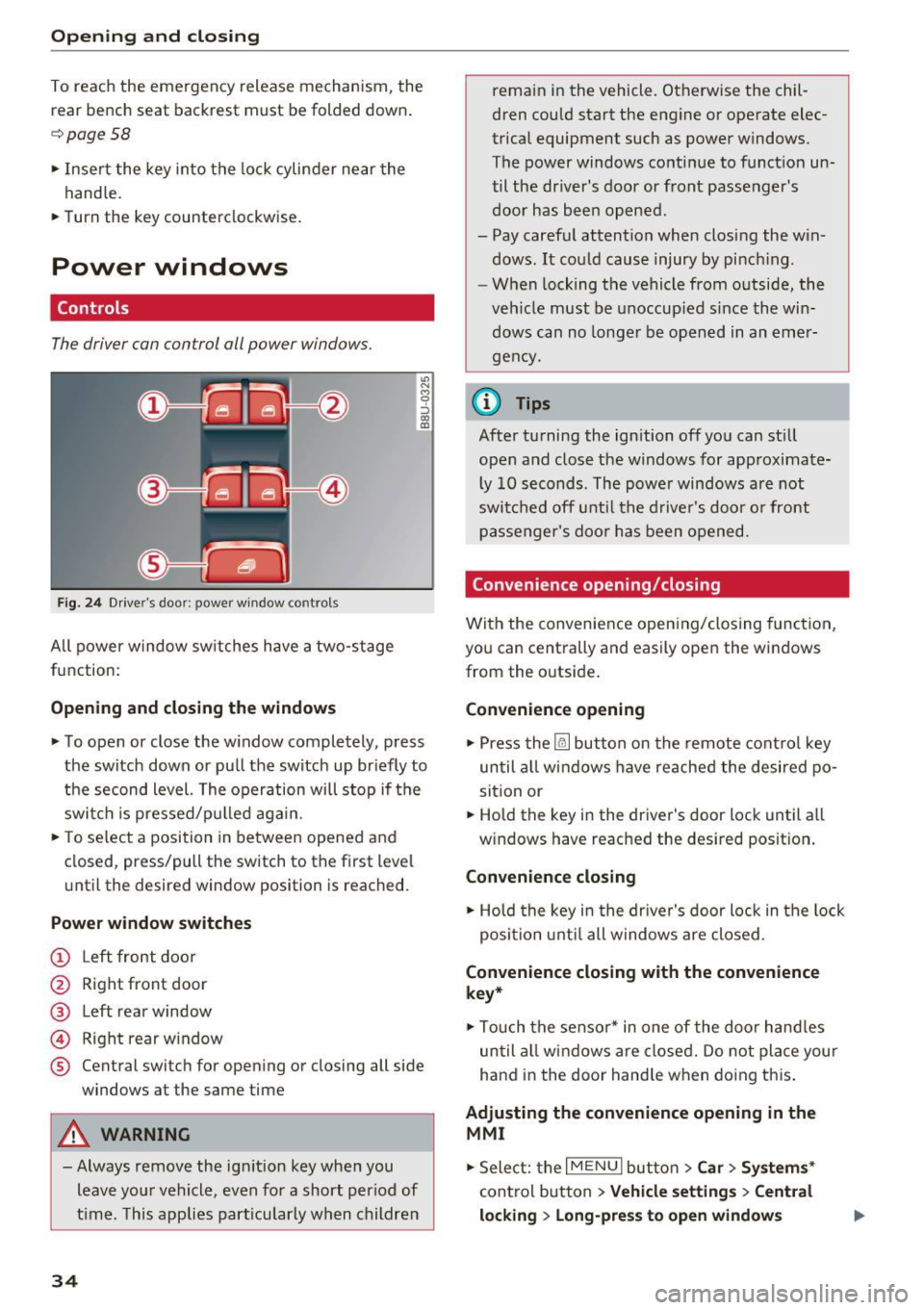
The driver can control all power windows.
F ig. 24 Driver's door: powe r w indow controls
All power w indow switches have a two-stage
function:
Opening and closing the windows
"' N M 9 ::J co (D
.. To open or close the w indow completely, press
the switch down or pull the switch up br iefly to
the second level. The operation will stop if the switch is pressed/p ulled aga in.
.. To se lect a position in between opened and
closed, press/pull the switch to the first level
u nt il the desired window position is reached.
Power window switche s
(!) Left front doo r
@ Right front door
@ Left rear window
@ Right rear window
® Central switch for open ing or closing all side
windows at the same time
A WARNING
- Always remove the ign it ion key when you
leave you r vehicle, even for a short period of
t ime . T his applies part icularly when children
34
remain in the vehicle. Ot herwise the chil·
dren could start the engine or operate elec
trical equipment such as power w indows.
The power windows cont inue to funct ion un
til the driver's door or front passenger's
door has bee n opened .
- Pay careful attention when closing the win dows. It cou ld cause injury by pinch ing .
- W hen lock ing the vehicle from o utside, the
veh icle must be unoccup ied since the win
dows can no longer be opened in an emer
gency.
{D Tips
After turning the ignition off you can st ill
open and close the windows for approximate l y 10 seconds . The powe r windows are not
swi tc h ed off u ntil t he drive r's doo r o r front
passenger's doo r has been opened.
Convenience opening/ closing
With the convenie nce opening/closing function,
you can centrally and easily open the windows
from the outside .
Convenience opening
.,. Press the ~ button on the remote cont rol key
until all windows have reached the desired po
sition or
.. Hold the key in the driver's door lock until a ll
w indows have reached the desired posit ion .
Convenience clo sing
.,. Ho ld the key i n the dr ive r's door lock in the lock
posi tion unti l all windows are closed .
Convenience closing with the convenience
key*
.,. Touch the senso r* in one of the door hand les
until all windows a re closed. Do not pla ce your
ha nd in the door hand le when do ing th is .
Adjusting the convenience opening in the
MMI
.. Sele ct: the I M ENU I button >Car > Systems *
control b utton > Vehicle setting s> Cent ral
lo cking > Long-pre ss to open windows
Page 36 of 272
<( co .... N ,.__
N .... 0 ,.__
> co
To enable convenience opening of the windows,
the
Front wi ndows and Rea r windo ws functions
must be switched
On .
A WARNING
- Never close the windows careless ly or in an
uncontrolled manner, because this increas
es the r isk of injury.
- For security reasons, the windows can only
be opened w ith the remote control key at a
maximum distance of approximately 6 feet
(2 mete rs) from the vehicle .
- Always watch the windows while they are
closing using the lock cylinder so that no
one is pinched in the w indow . Closing stops
when the key is moved into the start ing po
sit ion.
Correcting power window malfunctions
After disconnecting the vehicle battery, the one
touch up and down feature must be activated
again.
~ Pull the power window sw itch until the w indow
is comp lete ly ra ised.
~ Release the switch and pull it aga in for at least
one second.
Op ening and cl osing
35
Page 37 of 272
Power top
Power top
Automatic power top
General information
The power top opens and closes automatically .
When open, the powe r top is stored comp lete ly
in the power top compartment. The power top
can be opened or closed at speeds up to 30 mph
(SO km/h).
Unde r no rma l conditions, the power top is wind
and waterp roof. In rare cases, small d rople ts of
water may form under extreme weather condi
tions such as torrential o r prolonged rain. That is
normal and no cause for concern .
F ollow t he care instructions to keep the power
top free of leaks and to maintain its appearance
~ page 224, Core and cleaning. Also observe the
following:
- Open and s tow the power top only whe n it is
clean and dry . Sharp-edged dirt particles can
cause damage to the rear window and the pow
er top . Stowing the power top when it is damp
can create imprints in it, and if it is left that
way for long periods of time , mildew and other
damage can form .
- Do not leave the power top open for several weeks or the creases in it may become discol
ored.
- Remove ice and snow before open ing the power
top. Do not use any sharp edged objects to re move ice and snow or the powe r top could be
scratched or damaged . The rear window may be
clea red w ith a standard ice sc rape r.
- Do not open the power top when the tempera
ture is be low 32 °F (0 °C). The fabric in the
power top loses elast icity in sub-zero tempera
tu res .
&, WARNING
-When posi tioning the power top, avoid con
tact with the supports or other moving parts. Make sure all of the windows are low
ered. Otherw ise you could pinch your hands.
- Never dr ive when the power top is not
locked correctly. The wind from driving
36
could cause the power top to open. This can
result in injur ies and damage to the vehicle.
Opening and closing the power top
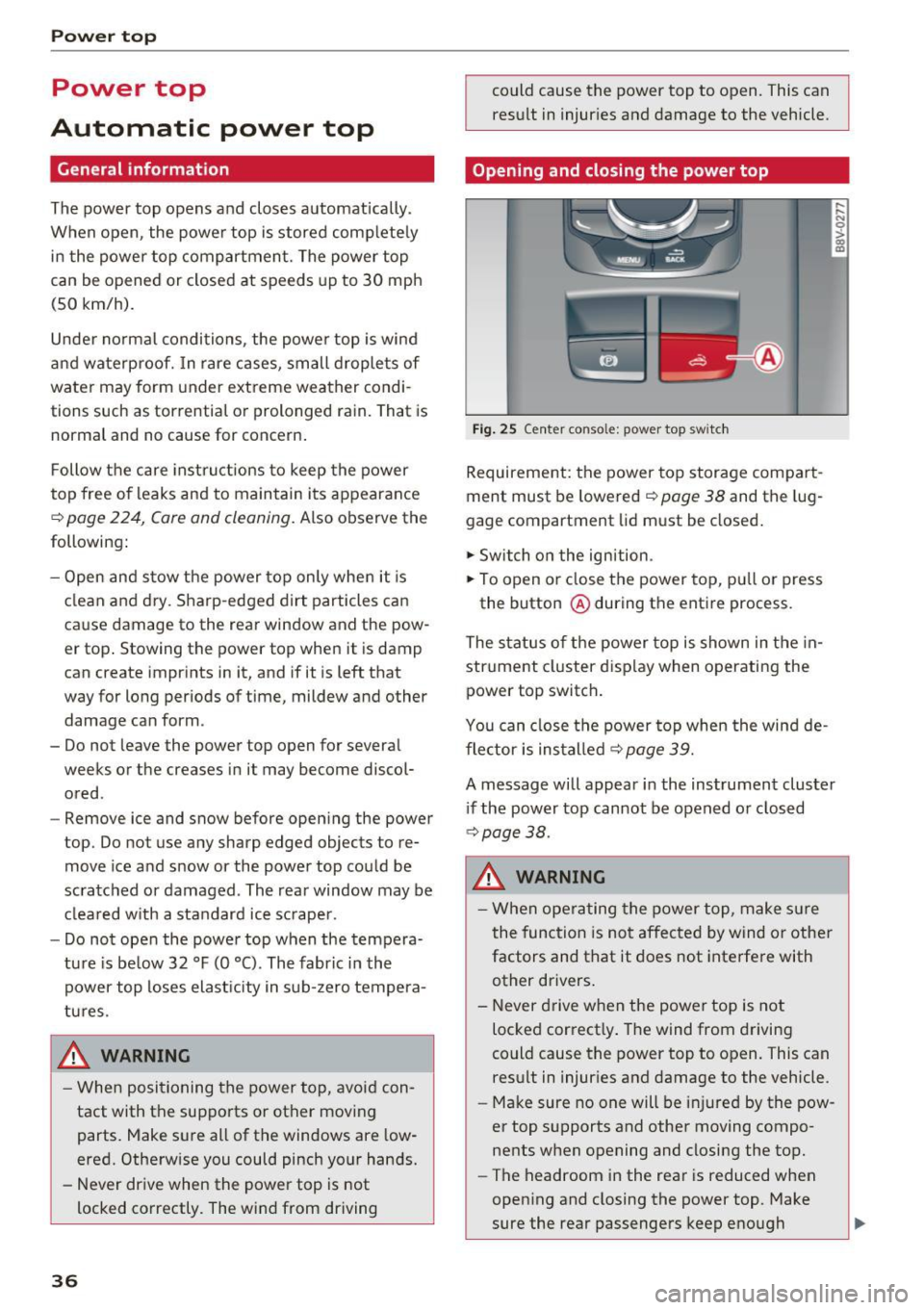
Fig . 25 Center conso le: power top sw itc h
Requirement: the power top storage compart
ment must be lowe red
~ page 38 and the lug
gage compartment lid must be closed.
.,. Switch o n the ignition .
.,. To open or close the power top, p ull or press
the button @during the ent ire process.
The status of t he power top is shown in the in
strument cluster d isp lay when o perating the
power top switch .
You can close the power top when the wind de
flector is installed
¢page 39.
A message will appear in the instrument cluster
i f the power top cannot be opened or closed
¢ page 38.
&, WARNING
-When operating the power top, make s ure
the function is not affected by wind or othe r
factors and that it does not interfere with
other drivers.
- Never drive w hen the power top is not
locked correct ly . The wind from driving
could cause the power top to open. This can
result in injur ies and damage to the vehicle .
- Make sure no one will be i njured by the pow
er top supports and other moving compo
nents when opening and closing the top.
- The headroom in the rear is reduced when
opening and closing the power top. Make
sure the rear passengers keep enough