air condition AUDI A3 CABRIOLET 2016 Owners Manual
[x] Cancel search | Manufacturer: AUDI, Model Year: 2016, Model line: A3 CABRIOLET, Model: AUDI A3 CABRIOLET 2016Pages: 272, PDF Size: 67.88 MB
Page 7 of 272
<( co .... N r--N .... 0 r--> co
In addition to this Owner's Manual, your Audi
comes with the
- MMI Operat ing Instructions
- Warranty
& Maintenance booklet.
If you are missing one of these publications , or if
you believe that the information is not complete,
contact your author ized Audi dealer for assis
tance .
MMI Operating Instructions
contain detailed description of the Aud i Mu lti
Media Interface (MMI) includ ing the nav igation
system, the sound system and the hand held
phone.
The Warranty & Maintenance booklet
explains how you can keep your Audi in top d riv
ing condition by having it serviced regu larly and
contains detailed information about the warran
ties covering your Aud i. Always have the booklet
with you when you take your veh icle to an author
iz ed A udi dealer for serv ice. Your Audi Serv ice Ad
visor w ill record each scheduled service and can
answer any questions you may have regarding
h ow to maintain your vehicle.
In Canada,
the vehicle literature is also available in French .
To obtain a copy, co nta ct you r dealer or write to:
Au Canada, on peut se procurer un exemplaire en
frarn;ais de ce document aupres du concession
naire ou de:
Aud i Canada
Client Assistance
Assistance a la Clientele
777 Bayly Street, West ,
Ajax, Ontario LlS 7G7
If you sell your Audi
all literature should be left in the vehicle to make
the Warranty terms as well as all operating, safe
ty and maintenance informat ion ava ilable to the
next owner.
Owner 's Literature
If you change your address or if you bought
this Audi used
be sure to send in a "Notice of Address Change" I
"Not ice of Used Car Purchase" post card. This
card can be found in the Warranty
& Mainte
nance booklet or obtained from your authorized
Audi dealer.
It is in your own interest that we are able to
contact you should the need arise.
5
Page 14 of 272
Instruments and indicator lights
Coolant temperature indicator
The coolant temperature indicator@¢ page 10,
fig . 3
only works when the ignition is switched
on. To prevent engine damage, please observe
the following notes about the temperature rang
es.
Cold range
If only the LEDs at the bottom of the gauge turn
on, the engine has not reached operating tem
perature yet. Avoid high engine speeds, full ac
celerating and heavy engine loads.
Normal range
The engine has reached its operating tempera
ture once the LEDs up to the center of the gauge
turn on under normal driving conditions. The
LEDs higher up may turn on if the engine is under
heavy load or the outside temperature is high.
This is no cause for conc ern as long as the. in
dicator light in the instrument cluster does not
turn on.
Hot range
If the LEDs in the upper area of the display and
the . indicator light in the instrument cluster
display turn on, the coolant temperature is too
high
¢ page 16.
A WARNING
-Never open the hood if you can see or hear
steam or coolant escaping from the engine
compartment. This increases the risk of
burns. Wait until you no longer see or hear
steam or coolant escap ing .
- The engine compartment in any vehicle can
be a dangerous area. Stop the engine and
allow it to cool before working in the engine
compartment. A lways follow the informa
tion found in ¢
page 188, Working in the
engine comportment.
(D Note
- Auxiliary headlights and other accessories in
front of the cooling-air intake impair the
cooling effect of the coolant. This increases
the risk of the engine overheating during
12
high outside temperatures and heavy en
gine load.
- Th e front spoiler also helps to distribute
cooling air correctly while driving. If the
spoiler is damaged, the cooling effect will
be impaired and the risk of the engine over
heating will increase. See an authorized
Audi dealer or authorized Audi Service Fa cility for assistance .
Indicator lights
Description
The indicator lights in the instrument cluster
blink or turn on. They indicate functions or mal
functions.
Messages may appear with some indicator lights.
A warning signal will sound at the same time. If
there is more than one malfunction, the indicator lights will turn on one after the other for a short
time . The indicator lights and messages in the in
strument cluster display can be covered by other
displays .
The messages can be displayed again in the driv
er information system*. With the multifunction
steering wheel, select the tab for indicator lights
and messages
c:> page 24 .
Some indicator lights in the display can display in
several colors.
& Central indicator light
If the . or D indicator light turns on, check
the instrument cluster display for more informa
tion.
App lies to: vehicles wi th mo nochrome disp lay
If a message appears together with a central in
dicator light. or
D. the central indicator light
will indicate the priority of the warning. If a
white indicator light also appears , the central in
dicator light will have its own color . For example,
i'"
@I ::ippears together with., read the descrip
tion for •.
Page 49 of 272
Lights and Vision
-Applies to vehicles without power folding
outside mirrors: if the mirror housing was
moved by outside forces (such as an impact
when maneuvering), you must move it back
in place by hand.
-If you wash the vehicle in an automatic car
wash, you must fold the exterior mirrors in to reduce the risk of damage to the mirrors.
Never fold power folding exterior m irrors*
by hand . Only fold them in and out using
the power controls.
@ Tips
If the power adjustment fails, both m irrors
can be adjusted by hand by pressing on the
edge of the mirror surface.
Dimming the mirrors
Your vehicle is equipped with a manual or auto
matic* dimming rearview mirror.
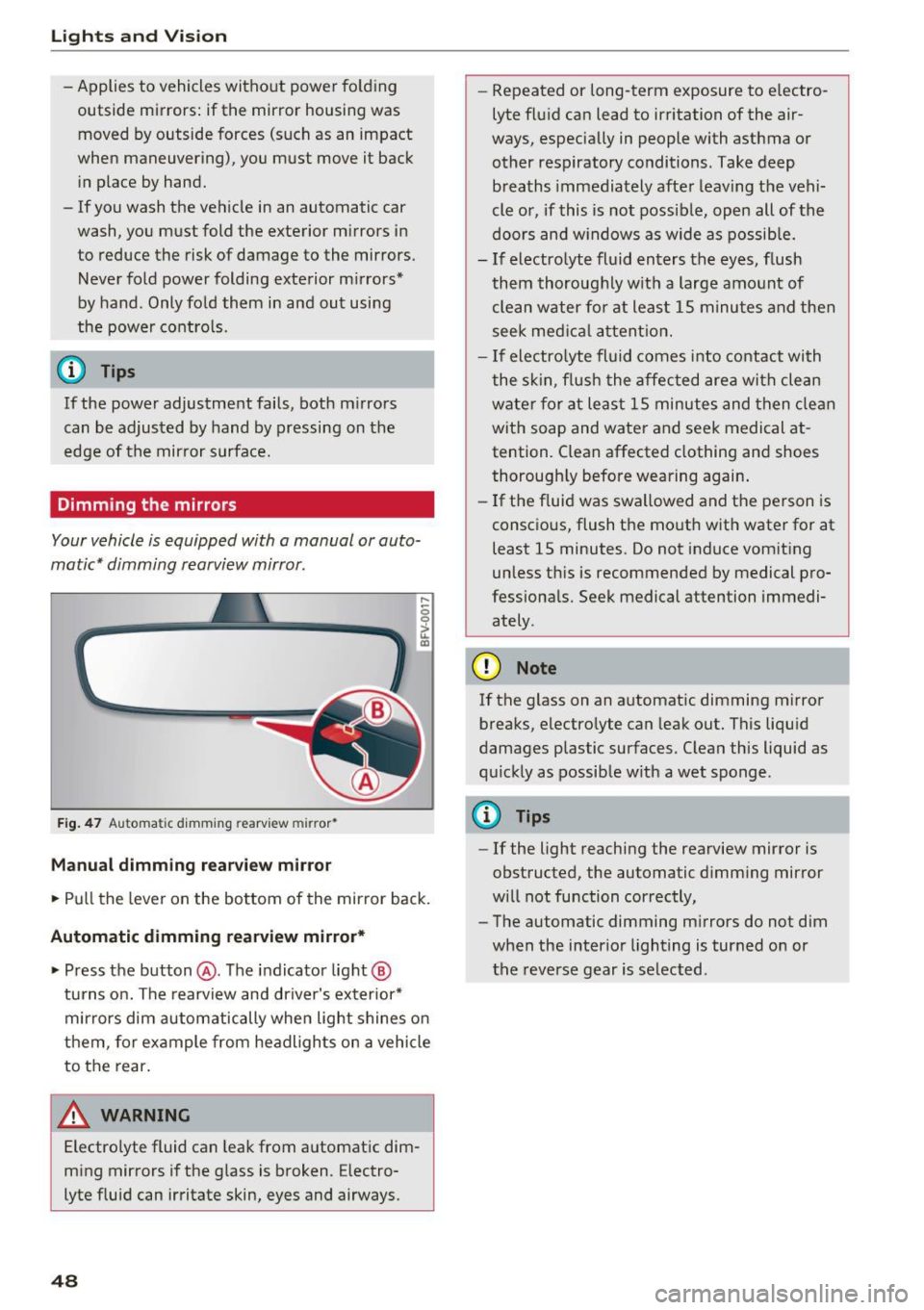
F ig . 47 Au toma tic dimming rearv iew mirr or•
Manual dimming rearvi ew mirror
,....
0 0
> u. a,
.. Pull the lever on the bottom of the mirror back.
Automatic dimming rearview mirror* .. Press the button @. The indicator light@
turns on. The rearview and driver's exterior*
mirrors dim automatically when light shines on
them, fo r example from headligh ts on a vehicle
to the rear.
A WARNING
Electrolyte fluid can leak from automatic dim
ming mirrors if the glass is broken. Electro
lyte fluid can irritate skin, eyes and airways.
48
- Repeated or long-term exposure to electro
lyte fluid can lead to irritation of the air
ways, especially in people with asthma or other respiratory conditions. Take deep breaths immediately after leaving the vehi
cle or, if this is not possible, open all of the
doors and w indows as wide as possible.
-If electrolyte fluid enters the eyes, flush
them thoroughly w ith a large amount of
clean water fo r at least 15 m inutes and then
seek medical attention.
- If electro lyte fluid comes into contact with
the skin, flush the affected area with clean
water for at least 15 minutes and then clean
with soap and water and seek medical at
tention. Clean affected clothing and shoes
thorough ly before wearing again .
- If the fluid was swallowed and the person is
consc ious, flush the mouth with water for at
least 15 minutes . Do not induce vomiting
unless th is is recommended by medical pro
fessionals. Seek medical attention immedi ately .
CI) Note
If the glass on an automatic dimming mirror
breaks, electro lyte can leak out. This liquid
damages plastic surfaces. C lean this liquid as
quickly as possible with a wet sponge .
(D Tips
- If the light reaching the rearview mirror is
obstructed, the automatic dimm ing mirror
will not function correctly,
- The automatic dimming m irrors do not dim
when the interior lighting is turned on or
the reverse gear is selected .
Page 64 of 272
<( co ..... N
" N ..... 0 r--. > 00
driver's side is transferred to the front passeng
er's side. This applies a temperature change to
the front passenger's side.
~ Adjusting the blower
To prevent the windows from fogging over, the
blower should always run at a low speed. You can
adjust the volume of air generated by the blower
to your preference. To have the blower regulated
automatically, press the
IAUTO ! button.
Adjusting the air distribution
The air distribution is adjusted wi th the ~' [M]
and ~ buttons . To have the air distribution regu
lated automatically, press the
!AUTOI button.
The round air vents in the cockpit are adjustable
c::>page 63.
To keep the front sid e windows from fogging up
in damp weather, we recommend opening the
side air vents and tilting them to the side
c::> page 63 , Adjusting the air vents.
Foot vents are located under the front seats and
adjustable vents on the end of the center console
to heat the rear of the vehicle.
Iii Switching the defroster on and off
The windshield and s ide windows are defrosted
or cleared of condensation as quickly as possible.
The maximum amount of air flows ma inly from
the vents below the windshie ld. Recirculation
mode switches off. The temperature is controlled
automatically. In the
00 setting, the I A/Cl cooling
mode switches on automatically, depending on
the outside air temperature.
The
IAUTOI button switches the defroster off.
16') 1 Switching recirculation mode on and off
The recirculation mode can be turned on manual
ly or automat ica lly* .
- Switching manual rec irculat ion mode on and
off: press
1 - 1 The LED light up when switched
on .
- Automatic* recirculation mode: auto rec ircula
t ion needs to be activated in the MMI. Select:
the
IM ENU I button > Car > Systems* control
button
> AC > Auto recirculation . The air quali-
Warm and cold
ty sensor that is designed for diesel and gaso
line exhaust automatically switches the recircu
lation mode on or off depending on the level of
pollutants in the outside air.
In recirculation mode, the air inside the vehicle is
circulated and filtered. This prevents the unfi l
tered air outside the vehicle from entering the
vehicle interior. We recommend sw itching recir
culation mode on when driving through a tunnel
or when sitt ing in traffic
c::> .&, .
The
l c
T he system switches to recircu lation mode w hen
driving in reverse when the engine is cold.
A WARNING
-
You should not use the recirculation mode for
an extended period since no fresh a ir is drawn
in. With the air-conditioning switched off, the
windows can fog up, which increases the risk
of an acc ident .
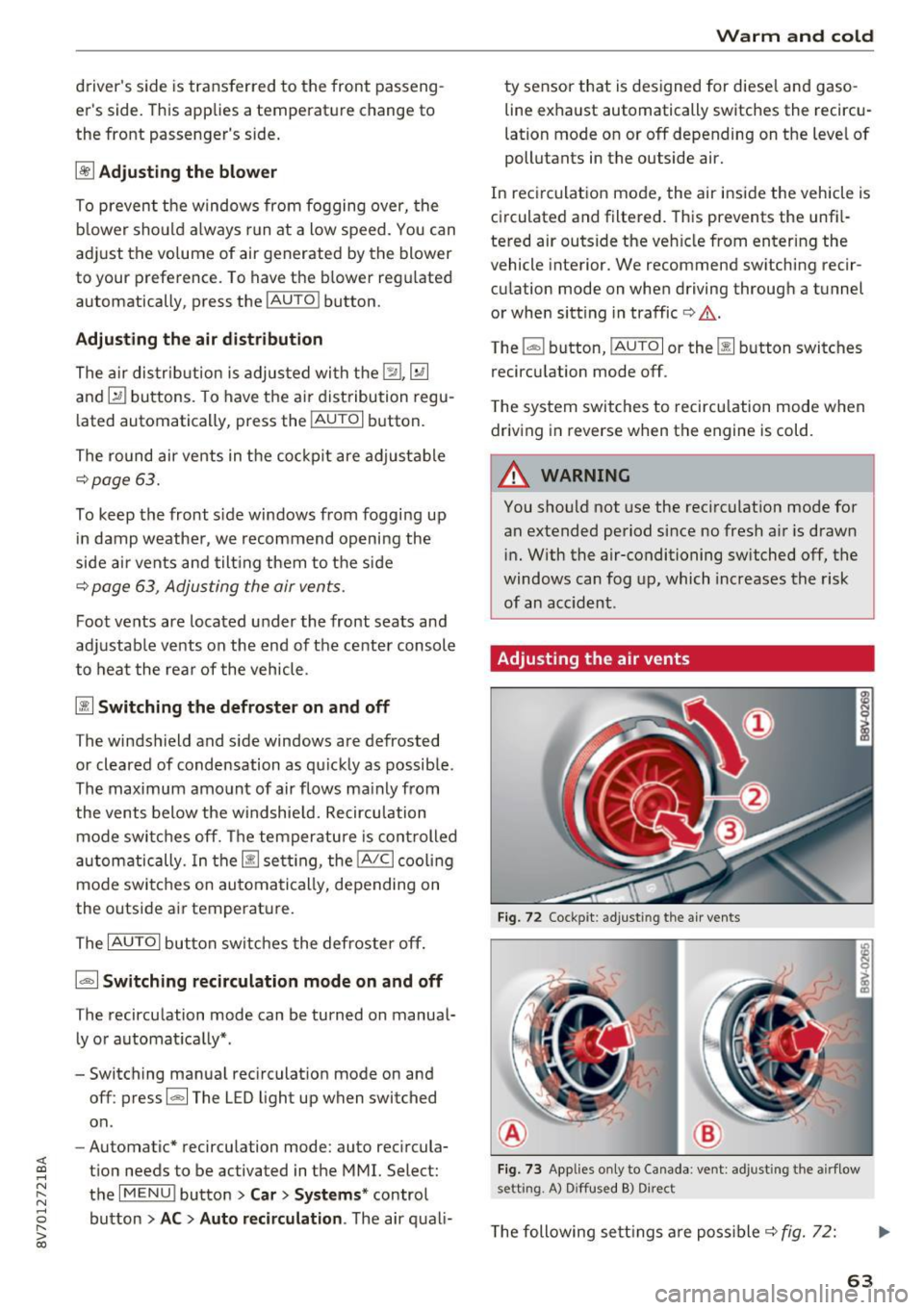
Adjusting the air vents
Fig. 72 Cockpit: adjust ing the a ir vents
®
®
Fig. 73 Applies only to Canada : vent : adjusting the airflow
setting. A) D iffused B) Direct
The following sett ings are possible c::> fig. 72:
63
Page 92 of 272
<( co ..... N
" N ..... 0 r--. > 00
General information
Appl ies to: ve hicles with Audi adaptive cruise contro l an d Audi
p re se nse front
Fig. 88 Front of vehicle: sensor
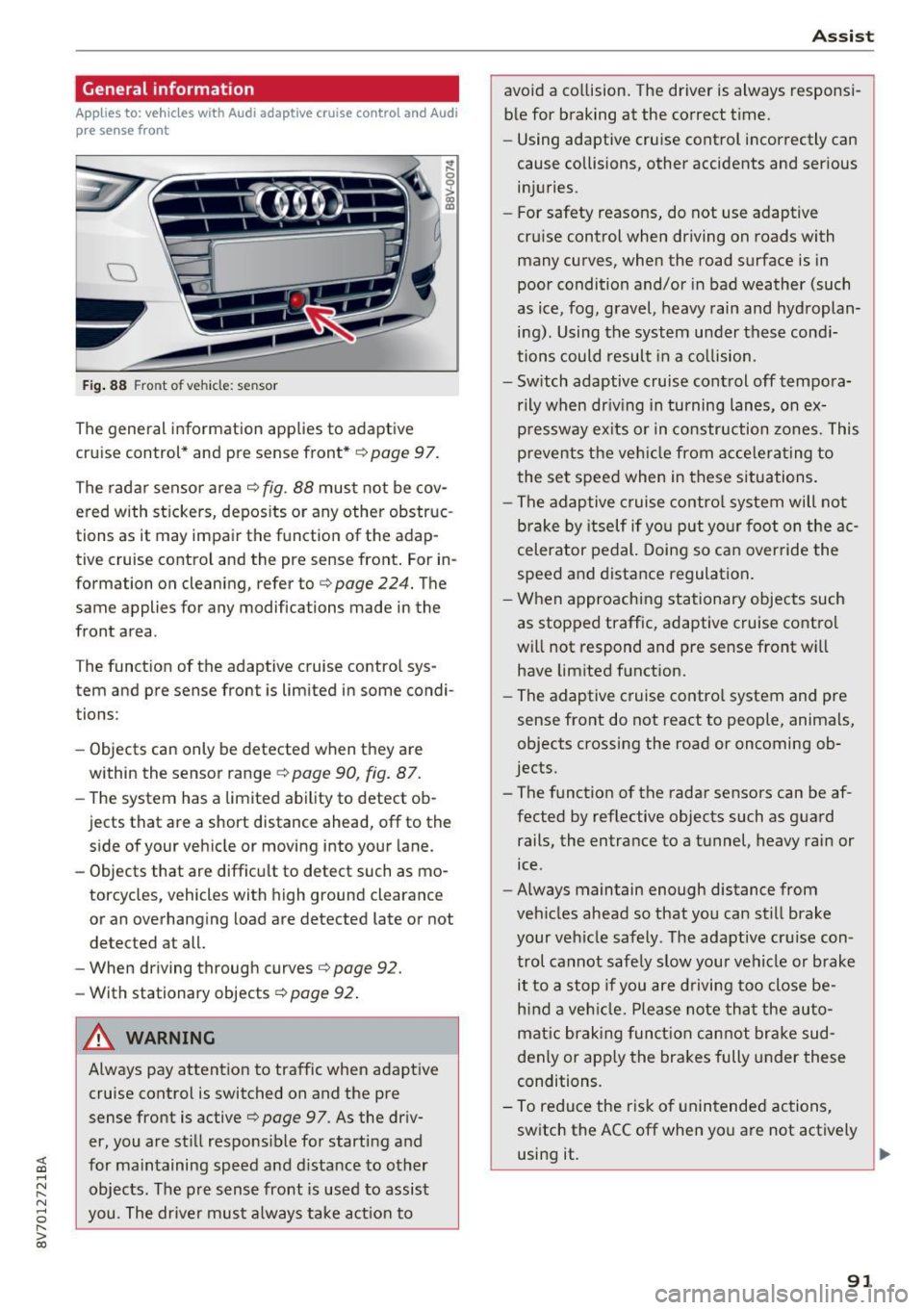
The general information applies to adaptive
cruise control* and pre sense front*
i::;, page 97.
The radar sensor area
i::!:> fig. 88 must not be cov
ered with stickers, deposits or any other obstruc
tions as it may impair the function of the adap
tive cruise control and the pre sense front. For in
formation on cleaning, refer to
c> page 224. The
same applies for any modifications made in the
front area .
The function of the adaptive cruise control sys
tem and pre sense front is limited in some condi
tions :
- Objects can only be detected when they are
within the sensor range ¢
page 90, fig. 87.
-The system has a limited ability to detect ob
jects that are a short distance ahead, off to the side of your vehicle or moving into your lane.
- Objects that are difficult to detect such as mo
torcycles, vehicles with high ground clearance
or an overhanging load are detected late or not detected at all.
- When driving through curves'=>
page 92.
- With stationary objects ¢
page 92.
A WARNING
Always pay attention to traffic when adaptive
cruise control is switched on and the pre
sense front is active
'=> page 9 7. As the driv
er, you are still responsible for starting and
for maintaining speed and distance to other objects. The pre sense front is used to assist
you. The driver must always take action to
Assist
avoid a collision. The driver is always responsi
ble for braking at the correct time.
- Using adaptive cruise control incorrectly can
cause collisions, other accidents and serious
injuries.
- For safety reasons, do not use adaptive
cruise control when driving on roads with
many curves, when the road surface is in
poor condition and/or in bad weather (such
as ice, fog, gravel, heavy rain and hydroplan
ing). Using the system under these condi
tions could result in a collision.
- Switch adaptive cruise control off tempora
rily when driving in turning lanes, on ex
pressway exits or in construction zones. This
prevents the vehicle from accelerating to
the set speed when in these situations.
- The adaptive cruise control system will not
brake by itself if you put your foot on the ac
celerator pedal. Doing so can override the
speed and distance regulation.
- When approaching stationary objects such
as stopped traffic, adaptive cruise control
will not respond and pre sense front will
have limited function.
- The adaptive cruise control system and pre
sense front do not react to people, animals,
objects crossing the road or oncoming ob
jects.
- The function of the radar sensors can be af
fected by reflective objects such as guard
rails, the entrance to a tunnel, heavy rain or
ice.
- Always maintain enough distance from
vehicles ahead so that you can still brake
your vehicle safely . The adaptive cruise con
trol cannot safely slow your vehicle or brake it to a stop if you are driving too close be
hind a vehicle. Please note that the auto
matic braking function cannot brake sud
denly or apply the brakes fully under these
conditions.
- To reduce the risk of unintended actions,
switch the ACC off when you a re not actively
using it.
~
91
Page 109 of 272
<( co .... N r--N .... 0 r--> co
Parking systems
General information
Applies to: ve hicles with a rea r parking sys te m /pa rking sys
tem plus/rearv iew camera
Depending on your vehicle's equipment, various
parking aids will help you when parking and ma
neuvering.
The
rear parking system is an audible parking aid
that warns you of obstacles
behind the vehicle
¢page 110.
The parking system plus assists you when park
ing by audibly and visually indicating objects de
tected
in front of and behind the vehicle
¢page 110.
The rearview camera shows the area behind the
vehicle in the MMI display. This display assists
you when you are cross or parallel parking. The parking system plus functions are also available
¢page 111.
A WARNING ,--
- Always look for traffic and check the area
around your vehicle by looking at it directly
as well. The parking system cannot replace
the driver's attention. The driver is always
responsible when entering or leaving a park
ing space and during similar maneuvers.
- Please note that some surfaces, such as
clothing, are not detected by the system.
- Sensors and cameras have blind spots in
which people and objects cannot be detect
ed . Be especially cautious of small children
and animals.
- Always pay attention to the area around the
vehicle -using the rearview mirror, too.
- The sensors can be displaced by impacts or
damage to the radiator grille, bumper,
wheel housing and the underbody . The park
ing system may become impaired as a re
sult. Have an authorized Audi dealer or au
thorized Audi Service Facility check their
function.
- Make sure the sensors are not obstructed by
stickers, deposits or other materials. If they
are the sensor function could be impaired.
I
Parking systems
For additional information on cleaning, re
fer to¢
page 224.
@ Note
-Some objects are not detected or displayed
by the system under certain circumstances:
- Objects such as barrier chains, trailer draw
bars, vertical poles or fences
- Objects above the sensors such as wall ex
tensions
- Objects with specific surfaces or struc
tures such as chain link fences or powder
snow
- If you continue driving closer to a low-lying
object, it may disappear from the sensor
range . Note that you will no longer be
warned about this obstacle.
- The sensors can be displaced by impacts or
damage to the radiator grille, bumper,
wheel housing and the underbody. The
parking system may become impaired as a
result . Have an authorized Audi dealer or
authorized Audi Service Facility check their
function.
(D Tips
- The system may provide a warning even
though there are no obstacles in the cover
age area in some situations, such as:
- certain road surfaces or for long grass .
- external ultrasonic sources e.g. from
cleaning vehicles.
- heavy rain, snow, or thick vehicle exhaust.
- We recommend that you practice parking in
a traffic-free location or parking lot to be
come familiar with the system. When doing
this, there should be good light and weath
er conditions .
- You can change the volume and pitch of the
signals as well as the display¢
page 115.
-What appears in the MMI display is some
what time-delayed.
- The sensors must be kept clean and free of
snow and ice for the park assist to operate.
109
Page 124 of 272
Driving sa fe ty
Driving safety
Basics
Safe driving habits
Please remember -safety first!
This chapter contains important information,
tips, instruct ions and warn ings that you need to
read and observe for your own safety, the safety
of your passengers and others. We have summar ized here what you need to know about safety
be lts, a irbags, child restra ints as well as child
safety. Your safety is for us
priority number 1 . Al
ways observe the i nfo rmation and wa rn ings in
this section - for your own safety as well as that
of your passengers.
The information i n this section applies to all
model versions of yo ur vehicle . Some of the fea
tures descr ibed in t his sections may be s tanda rd
equipment on some models, or may be optional
equipment on others . If you are not sure, ask
your authorized Audi dealer.
A WARNING
- Always make sure that you follow the in
structions and heed the WARNINGS in th is
Manual.
It is in your interest and in the in
te rest of your passengers.
- Always keep the comp lete Owner's Litera
ture in your A udi when you lend or se ll your
vehicle so that this important information
will always be available to the d river and
passenge rs.
- Always keep the Owner 's literature handy so
that you can find it easily i f you have ques
t ions.
- Always adjust your speed to the wea ther
t raff ic and conditions. Follow the speed lim
its.
- Always dr ive in such a way that you can s top
yo ur vehicle safely.
- Always adjust your speed to the genera l
flow of traffic. Follow the speed l imits.
124
· Safety equipment
The safety features are part of the occupant re
straint system and work together to help reduce the risk of injury in a wide variety of accident sit
uations.
You r safety and the safety of your passengers
should not be left to chance . Advances in tech
no logy have made a va riety of features available
to help red uce the risk of inj ury in an accident.
The following is a lis t of jus t a few of the safe ty
fea tures in yo ur Audi :
- sophisticated safety be lts fo r drive r and all pas-
senge r seat ing pos itions,
- safety belt pretensioners,
- safety bel t force lim ite rs fo r the front seats,
- front airbags,
- knee airbags for the front seats*
- side airbags in the front seats,
- special LATCH anchorages fo r child res trai nts,
- head rest raints fo r each seati ng position,
- adjustab le steering column.
- pre sense bas ic * (preventative passenger pro-
tect ion)
These ind iv idual safety features, can work to
gether as a system to he lp protect you and your
passengers i n a wide range of acc idents. These
fea tures cannot wo rk as a system if they are not
always correctly adjusted and cor rect ly used.
Safet y is e verybody's responsibility!
Important things to do before driving
Safety is everybody 's job! Vehicle and occupant
safety always depends on the informed and care
ful driver .
For your safety and the safety of your passen
gers,
be fo re dri ving always:
.. Make sure that a ll lights and signals a re operat
ing correctly.
.. Make sure that the tire pressure is correct.
.. Make sure that all windows are clean and afford
good vis ibility to the outs ide .
.. Secu re all luggage and other items carefully
,=;,page 58, ,=;,page 57 . .,.
Page 125 of 272
<( co ..... N
" N ..... 0 r--. > 00
.. Make sure that nothing can interfere with the
pedals.
.. Adjust front seat , head restraint and mirrors
correctly for your height.
.. Instruct passengers to adjust the head re
straints accord ing to their height .
.. Make sure to use the right ch ild restraint cor
rectly to protect children
~ page 165, Child
safety .
.,. Sit properly in your seat and make sure that
your passengers do the same
¢page 53, Front
seats .
.. Fasten your safety be lt and wear it properly. Al
so instruct your passengers to fasten their safe
ty belts properly ¢
page 135 .
What impairs driving safety?
Safe driving is directly related to the condition of
the vehicle , the driver as well as the driver's abili
ty to concentrate on the road without being dis
tracted.
The driver is responsible for the safety of the ve
hicle and all of its occupants. If your ability to
drive is impaired, safety risks for everybody in the
veh icle increase and you also become a hazard to
everyone else on the road
¢ ,&. Therefore :
.,. Do not let yourself be distracted by passengers
or by using a cellular telephone.
.. NEVER dr ive when your driv ing ability is im
paired (by medications, alcohol, drugs, etc.) .
.. Observe all traffic laws, rules of the road and
speed limits and plain common sense.
.. ALWAYS adjust your speed to road, traffic and
weathe r conditions.
.. Take frequent breaks on long trips. Do not drive
for more than two hours at a stretch .
.. Do NOT drive when you are tired, under pres
sure or when you are stressed.
A WARNING
Impaired dr iv ing safety increases the risk of
ser ious personal inj ury and death whenever a
vehicle is being used.
Driving safety
Correct passenger
seating positions
Proper seating position for the driver
The proper driver seating position is important
for safe, relaxed driving .
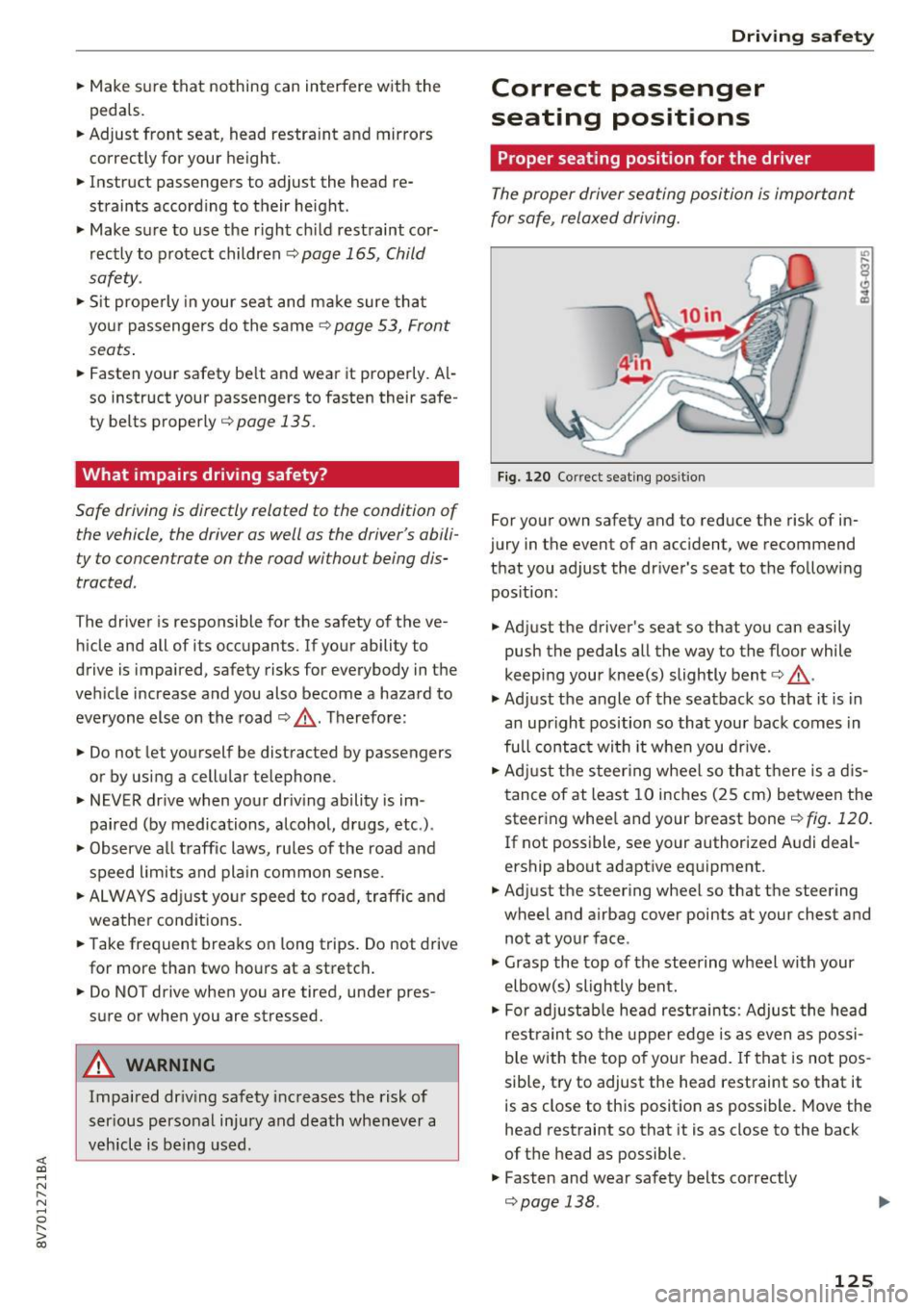
Fig. 120 Correct seating pos it ion
For your own safety and to reduce the risk of in
jury in the event of an accident, we recommend
that you adjust the driver 's seat to the following
position:
.. Adjust the driver's seat so that you can easily
push the pedals all the way to the floor while
keep ing your knee(s) slightly bent¢,& .
.,. Adjust the angle of the seatback so that it is in
an upright position so that your back comes in
full contact wi th it when you dr ive .
.. Adjust the steering wheel so that there is a dis
tance of at least 10 inches (25 cm) between the
steering whee l and your breast bone¢
fig. 120.
If not poss ible, see your author ized A udi deal
ership about adaptive equipment.
.. Adjust the steering wheel so that the steering
wheel and airbag cover points at your chest and
not at your face .
.,. Grasp the top of the steering wheel with your
elbow(s) slightly bent .
.. For adjustable head restraints: Adjust the head
restraint so the upper edge is as even as possi
b le with the top of your head. If that is not pos
sible, try to adjust the head restraint so that it
is as close to this posit ion as possible. Move the
head restraint so that it is as close to the back
of the head as possible.
.. Fasten and wear safety belts correctly
¢page 138. ..,.
125
Page 131 of 272
<( co .... N ,.__
N .... 0 ,.__
> co
-Open all air outlets in the instrument pan
el,
- Switch off the air recirculation,
- Set the fresh air fan to the highest speed.
& WARNING -
Always make sure that the doors, all win
dows, the power top and the rear lid are se
curely closed and locked to reduce the risk of
injury when the vehicle is not being used.
- After closing the rear lid, always make sure
that it is properly closed and locked.
- Never leave your vehicle unattended espe
cially with the rear lid left open. A child
could crawl into the vehicle through the lug
gage compartment and close the rear lid be
coming trapped and unable to get out. Be
ing trapped in a veh icle can lead to serious
personal injury.
- Never let children play in or around the vehi
cle.
- Never let passengers r ide in the luggage
compartment. Vehicle occupants must al
ways be properly restrained in one of the ve
hicle's seating positions.
(!) Tips
- Air c irculation helps to reduce window fog
ging . Stale air escapes to the outside
through vents in the trim panel. Be sure to
keep these slots free and open.
- The t ire pressure must correspond to the
l oad. The tire pressure is shown on the tire
pressure label. The tire pressure label is lo
cated on the driver's side B-pillar. The tire
pressure label lists the recommended cold
tire inflation pressures for the vehicle at its
maximum capacity weight and the tires that
were on your vehicle at the t ime it was man
ufactured. For recommended tire pressures
for normal load conditions, please see chap
ter
c> page 214.
Driving safety
Tie-downs
The luggage compartment is equipped with four
tie-downs to secure luggage and other items .
Use the tie-downs to secure your cargo properly
c> page 130, Loading the luggage compartment.
In a collision, the laws of physics mean that even
smaller items that are loose in the veh icle will
become heavy missiles th at can cause serious in
jury. Items in the vehicle possess energy which
vary w ith vehicle speed and the we ight of the
item . Vehicle speed is the most significant factor.
For example, in a frontal collision at a speed of
30 mph (48 km/h), the forces acting on a 10-lb
(4 .5 kg) object are about 20 times the normal
we ight of the item. This means that the we ight
of the item would sudden ly be about
200 lbs. (90 kg). You can imagine the injuries
that a 200 lbs. (90 kg) item flying freely through
the passenger compartment cou ld cause in a col
lision like this .
& WARNING
----
Weak, damaged or improper straps used to
secure items to tie-downs can fail during hard
braking or in a collision and cause serious per
sonal injury.
- Always use suitable mounting straps and
properly secure items to the tie-downs in
the luggage compartment to help prevent
items from shifting or flying forward as dan
gerous missiles.
- When the rear seat backrest is folded down,
always use suitable mounting straps and properly secure items to the tie-downs in
the luggage compartment to help prevent
items from flying forward as dangerous
missi les into the passenger compartment.
- Never attach a child safety seat tether strap
to a tie-down.
131
Page 143 of 272
<( co .... N ,.__
N .... 0 ,.__
> co
Airbag system
Important information
Importance of wearing safety belts and
sitting properly
Airbags are only supplemental restraints. For
airbags to do their job, occupants must always
properly wear their safety belts and be in a prop
er seating position.
For your safety and the safety of your passen
gers, before driving off, always :
.,. Adjust the driver's seat and steering wheel
properly
9 page 125,
.,. Adjust the front passenger's seat properly
¢page 126,
.,. Wear safety belts properly ¢ page 137,
.,. Always properly use the proper child restraint
to protect children
¢ page 165.
In a collision, airbags must inflate within the
blink of an eye and with considerable force. The
supplemental airbags can cause injuries if the
driver or the front seat passenger is not seated
properly. Therefore in order to help the airbag to
do its job, it is important, both as a driver and as
a passenger to sit properly at all times.
By keeping room between your body and the
steering wheel and the front of the passenger
compartment, the airbag can inflate fully and
completely and provide supplemental protection in certain frontal collisions¢
page 125, Correct
passenger seating positions .
For details on the
operation of the seat adjustment controls
¢page 53.
It's especially important that children are proper
ly restrained
¢page 165.
There is a lot that the driver and the passengers
can and must do to help the individual safety fea
tures installed in your Audi work together as a
system.
Proper seating position is important so that the
front airbag on the driver side can do its job. If
you have a physical impairment or condition that prevents you from sitting properly on the driver
seat with the safety belt properly fastened and
Airbag system
reaching the pedals, or if you have concerns with
regard to the function or operation of the Ad
vanced Airbag System, please contact your au
thori zed Audi dealer or qualified workshop, or
call Audi Customer Relations at 1-800-822-2834
for possible modifications to your vehicle.
When the airbag system deploys, a gas generator
will fill the airbags, break open the padded cov ers, and inflate between the steering wheel and
the driver and between the instrument panel and
the front passenger. The airbags will deflate im
mediately after deployment so that the front oc
cupants can see through the windshield again
without interruption.
All of this takes place in the blink of an eye, so
fast that many people don't even realize that the airbags have deployed. The airbags also inflate
with a great deal of force and nothing should be
in their way when they deploy. Front airbags in
combination with properly worn safety belts slow
down and limit the occupant's forward move
ment . Together they help to prevent the driver
and front seat passenger from hitting parts of
the inside of the vehicle while reducing the forces
acting on the occupant during the crash . In this
way they help to reduce the risk of injury to the
head and upper body in the crash. Airbags do not
protect the arms or the lower parts of the body.
Both front airbags will not inflate in all frontal
collisions . The triggering of the airbag system de
pends on the vehicle deceleration rate caused by
the collision and registered by the electronic con
trol unit . If this rate is below the reference value
programmed into the control unit, the airbags
will not be triggered, even though the car may be badly damaged as a result of the collision. Vehi
cle damage, repair costs or even the lack of vehi
cle damage is not necessarily an indication of
whether an airbag should inflate or not.
Since the circumstances will vary considerably
between one collision and another, it is not possi
ble to define a range of vehicle speeds that will
cover every possible kind and angle of impact
that will always trigger the airbags . Important
factors include, for example, the nature (hard or
soft) of the object which the car hits, the angle of
impact, vehicle speed , etc. The front airbags will
II>
143