park assist AUDI A3 SEDAN 2017 Owner's Manual
[x] Cancel search | Manufacturer: AUDI, Model Year: 2017, Model line: A3 SEDAN, Model: AUDI A3 SEDAN 2017Pages: 400, PDF Size: 67.32 MB
Page 152 of 400
Parking sy stem s
extension of the vehicle's outline by approxi
mately 16 ft (5 meters) to the rear.
~ While driv ing in reverse gear, adjust the steer
ing wheel ang le to fit the parking space using
the orange orientation lines for ass istance
c> .&. in General information on page 148, c> (D
in General information on page 149. ® repre
sents the rear bumper . Stop the veh icle, at the
latest, when the red or ientat ion line
@ bo rders
an object.
Adjusting the parking aid
Applies to: vehicles with parking system plus/rearview cam
era
The functions are adjusted in the Infotainment
system.
~ Select in the Infotainment system: IM ENU I but
ton
> Vehicle > left contro l button > Driv er a s
sistan ce > Parking aid . Or
~ When the parki ng aid is act ive, se lect in the I n-
fot ainment system : rig ht cont ro l bu tton* .
End system * -stop the parking aid
Acti vate automatically -switch automatic act iva
tion on/off
Front volume * -vo lume for the front area
Rear volume -volume for the rear area
Entertainment f ader -the volume of the aud io/
video source is lowe red w hen t he pa rking system
is tu rned on .
The newly selected level is demonstrated br iefly
by the sound generator.
(D Tips
- Seve ral menus can be accessed w ith the
right contro l button only when the park ing
a id is act ive.
- The settings for volume and automatic act i
vation are automatically stored and as
signed to the remote co ntrol key being
used.
150
Error messages
Applies to: vehicles with parking system plus/rea rv iew cam
era
Ill Rear park assi st : malfun ction! Ob stacles
cannot be detect ed
Ill Front park a ssist : malfunct ion! Ob st a cles
cannot be detected
Ill Park assist: mal function! Obstacles cannot
b e detect ed
When one of these messages appears, there is a
system malfunction. The LED in the
P'#! button al
so blinks when sw itching it on. The relevant mes
sage on ly appea rs again when you manually acti
vate the park ing aid with the button .
[ill Rear parking aid : obstacle detection restr ict
ed
The rear c ross-traffic assist* c> page 142, Rear
cross-traffic assist
is not available. Either the ESC
i s sw itched off, or the radar sensors may be cov
ered by a bike rack, stickers, leaves, snow or oth
er objects. Switch the ESC on, or clean the area in
front of the sensors if necessary c> page 140,
fig . 147 . If this message cont inues to be d is
played, drive immed iate ly to an authori zed A udi
dealer or au thor ized A udi Servi ce Fac il ity to have
t h e mal funct ion repaired .
Parking system plus*
If a senso r or speaker is faulty, the J¼ symbo l
will appear i n front of/behind the vehicle in the
I nfotai nment system d isplay. If a rear sensor is
faulty, only obs tacles th at are in areas @and @
a re shown
c> page 147, fig . 151. If a front sensor
is fa ulty, only obstacles that are in areas © and
@ are shown.
Page 172 of 400
Voice recognition system
Voice recognition system Operating
Applies to: vehicles with vo ice recognition system
You con operate many Infotainment functions
conveniently by speaking.
Requirements: the ignition and the MM I must be
sw itched
on~ page 158, the re must not be any
phone call in progress and the parking system
m ust not be active.
.. Switching on : press the~ button @
¢ page 15, fig. 11 or@ ~ page 16, fig . 13
briefly on the multifunct ion steer ing whee l and
say the desired command after the
Beep.
.. Switching off : press and hold the~ button.
Or : press the l2l butto n.
.,. Pausing : say the command Pause. To resume,
press
the~ button.
.,. Corre cting : say the command Correction .
Input assistance
The system guides you through the input with
visua l and audio feedback.
- Visual input as sistance : after switching on
vo ice recognit ion, a display with a selection of
poss ible commands appears. This command
display can be sw itched on or off . Se lect:
IMENU I button> Settings > left control button
> MMI settings > Speech dialog sy stem .
- Audio input as sis tance :
to have the poss ible
commands read, turn the voice recognition sys
tem on and say
Help .
For the system to understand you:
Speak clearly and distinct ly at a normal volume.
Speak louder when driving faster.
Emphasize the words in the commands even ly
and do not leave long pauses.
Close the doors, the windows and the sunroof* to
reduce background noise. Make sure th at passen
gers are not speaking when you are giving a voice
command.
D o not direct the air vents toward the hands-free
microphone, whic h is on the roof head liner near
the front interior lights.
170
Only use the system from the dr iver's seat be
cause the hands-free microphone is directed to
ward that seat.
Additional sett ings
Refer to~ page 246.
_&. WARNING
- Direct your full attention to dr iv ing. As the
driver, you have complete responsibility fo r
safety in t raffic. Only use the functions in
such a way that you a lways maintain com
plete contro l over your vehicle in all traffic
situations.
-
- Do not use the voice recognition system in
emergencies because your voice may change
in stressful s ituations.
It may take longer to
dial the numbe r or the system may not be
ab le to dia l it at all. Dial the emergency
number manually .
(D Tips
- The d ia log pauses when the re is an incom
ing phone call a nd will continue i f you ig
nore the cal l. The dia log ends if you answer
the ca ll.
- There are no vo ice gu idance* prompts when
a dialog is act ive.
- You can select an item in the list using ei
ther the vo ice recognit ion system or the
cont rol knob.
Command overview
information
Applies to: vehicles with voice recognition system
The following overv iews des cribe the commands
that can be used to operate the MMI using the
vo ice recog nit ion system.
Alte rnative commands are separated using a"/",
for example say:
Telephone / (or) Navigation /
(or) Radio.
Sequences of com mands used to perform an a c
tion are iden tified w ith a
">", fo r example say:
Ente r addre ss > (then) Enter country /state. IJ,,
Page 355 of 400
a, a, ..... N
" N ..... 0 N > 00
Emergency assistance
Trunk escape latch
Applies to: vehicles with trunk escape latch (Sedan and Cab
rio let)
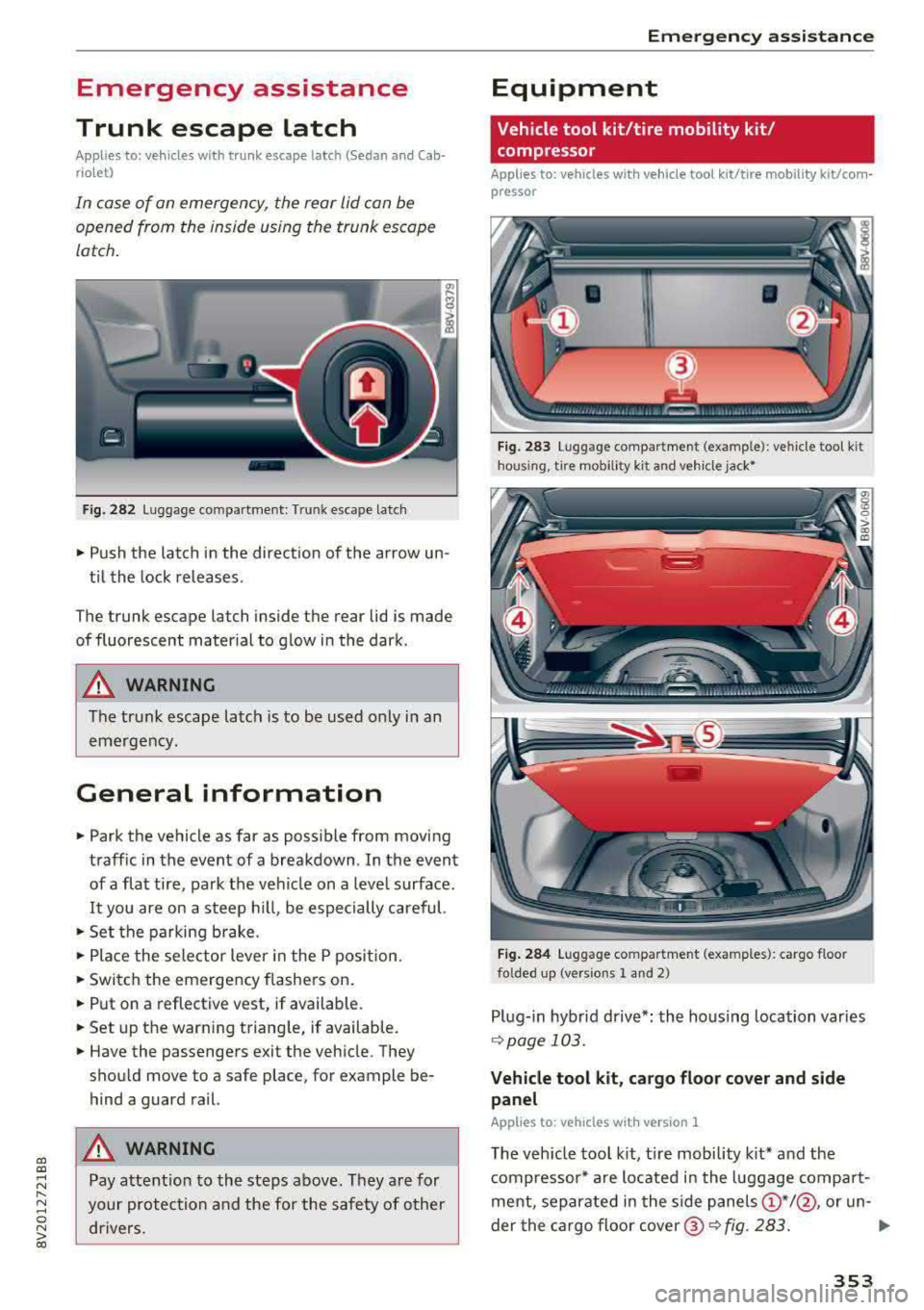
In case of an emergency, the rear lid can be
opened from th e inside using th e trunk escape
latch.
Fig. 282 Luggage co m partment: T runk escape latch
• Push the latch in the direction of the arrow un
t il the lock releases .
T he trunk escape latch inside the rear lid is made
of fluorescent mater ial to g low in the dark .
A WARNING
The trunk escape latch is to be used only in an
emergency .
General information
• Park the vehicle as far as possible from moving
traff ic in the event of a breakdown . In the event
of a flat tire, park the vehicle on a leve l surface .
It you are on a steep h ill, be especially careful.
• Set the parking b rake .
• Place the sele ctor lever in the P pos ition.
• Switch the emergency flashers on .
• Put on a reflective vest, if available.
•Setup th e warn ing triang le, if available.
• Have the passengers exit the vehicle . They
shou ld move to a safe place, for example be
hind a guard rail.
A WARNING
Pay attent ion to the steps above . They a re for
your protection and the for the safety of other drivers.
Em ergen cy a ssis tanc e
Equipment
' Vehicle tool kit/tire mobility kit /
compressor
Applies to: vehicles with vehicle tool kit/tire mobility kit/com
pressor
Fi g. 283 Lugg age compartme nt (ex ample): ve hicle too l kit
h o u sin g, tire mobili ty k it and vehicle
jac k*
F ig . 284 Luggage compar tmen t (exa mples ): cargo floor
fo lded up (ve rs ion s 1 and 2)
Plug- in hybr id drive*: the housing location var ies
~ page 103.
Vehicle t ool k it , ca rgo floor cover and s ide
panel
Applies to: vehicles with version 1
The vehicle tool k it, t ire mobility k it * an d the
compressor* are located in the l uggage compart
ment, separate d in the side
panels @*/@ , or un-
der the cargo floor
cover @~ fig. 283. ..,.
353
Page 356 of 400
Emergency assistance
• To open the side pane l, turn the lock and re
move the
cover @*/ @ ¢ fig. 283.
• Lift the cargo floor using the plastic handle @
un til the cargo floor engages behind the tabs
© in both side panels¢ fig. 284 (upper im
age) .
• Fold the cargo floor back before closing the
luggage compartment lid.
Vehicle tool kit and cargo floor cover
App lies to: ve hicles w ith versio n 2
The vehicle too l kit, tire mobility kit* and com
pressor* are stored in the luggage compartment
under the cargo floor
cover @¢ fig. 283 .
• Engage the plastic hook® in the luggage com
partment
seal ¢ fig. 284.
• Fold the cargo floor back before closing the
luggage compartment lid .
.&_ WARNING
Improper use of the vehicle jack can cause se
r ious personal injuries.
- Never use the screw driver hex head to
tighten wheel bolts, since the bolts cannot
attain the necessary tightening torque if you
use the hex head, potentially causing an ac
cident.
- T he factory-supplied jack is intended only
for your vehicle model. Under no circum
stances should it be used to lift heavy
vehicles or other loads; you risk injuring
yourself.
- Never start the engine when the vehicle is
raised, which could cause an accident.
- Support the vehicle securely with appropri
ate stands if work is to be performed under
neath the vehicle; otherwise, there is a po
tent ial risk for injury.
- Never use the jack supplied with your Audi
on another vehicle, particularly on a heavier
one. The jack is only suitable for use on the
vehicle it came w ith.
@ Tips
The vehicle jack* in your vehicle is mainte
nance-free.
354
Tire mobility kit
Preparation
App lies to: vehicles with tire mobility kit
• Read and fo llow the important safety precau-
tions
in ¢ page 353.
• Set the parking brake.
• Move the selector lever into the P position.
• Check if a repair with the tire mobility kit is pos
sible
¢ page 354.
Using the tire mobility kit
Applies to: vehicles wit h tire mobility kit
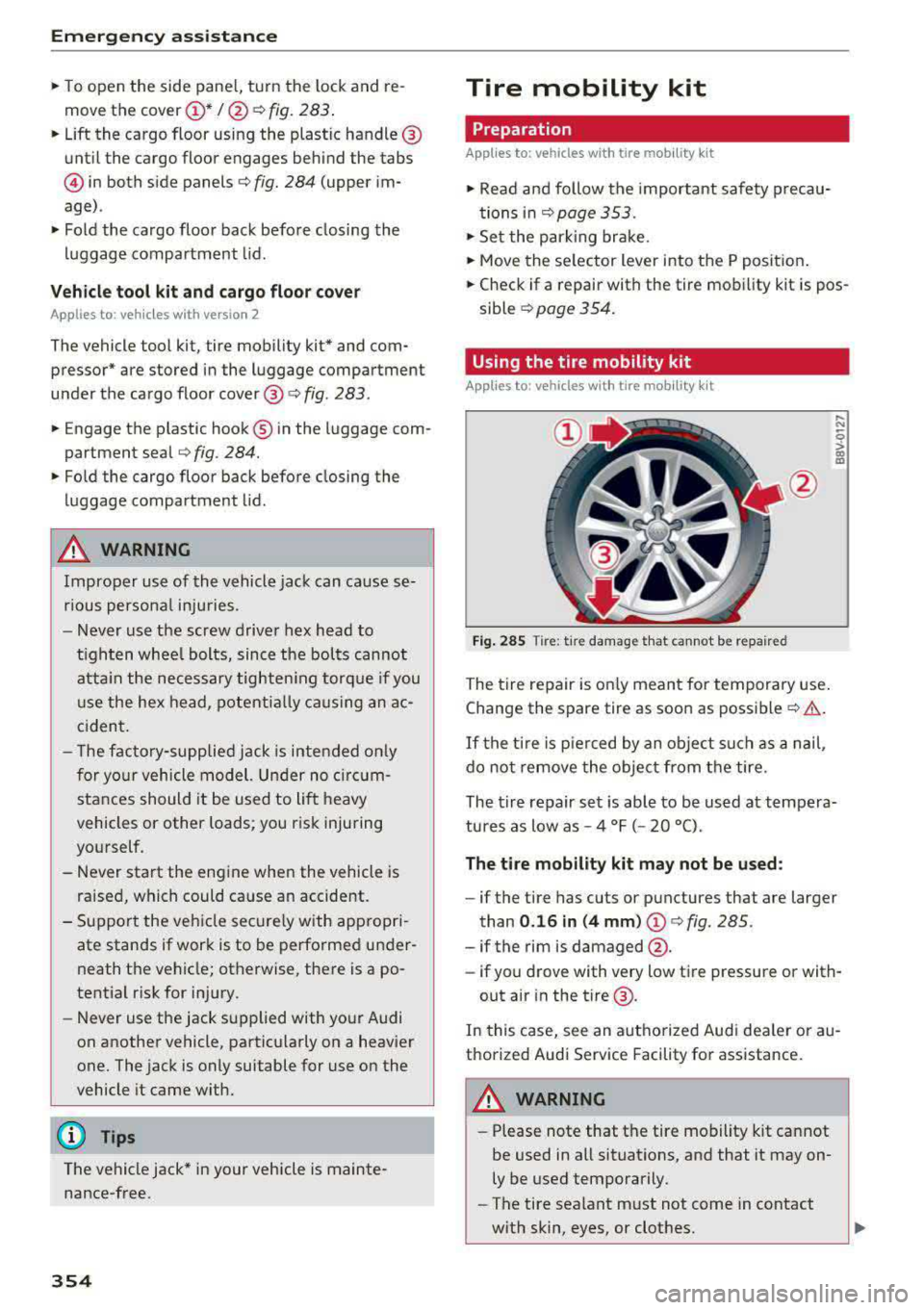
Fig. 285
Tire: t ir e damage that cannot be repaired
The tire repair is only meant for temporary use .
Change the spare tire as soon as possible
c:;> .&..
If the tire is pierced by an object such as a nail ,
do not remove the object from the tire.
..... N
0
> 00 m
The tire repair set is able to be used at tempera
tures as low as -4 °F ( -20 °C).
The tire mobility kit may not be used :
-if the tire has cuts or punctures that are larger
than
0.16 in (4 mm) (!)¢ fig. 285.
-if the rim is damaged @.
- if you drove with very low tire pressure or with-
out air in the tire @.
In this case, see an authorized Aud i dea ler or au
thorized Audi Service Facility for assistance.
~ WARNING
-Please note that the tire mobility kit cannot
be used in all situations, and that it may on
ly be used temporarily.
-The tire sealant must not come in contact
with skin, eyes, or clothes.
Page 358 of 400
Emergency assistance
A WARNING
-Read and follow the manufacturer's safety
precautions on the compressor and in the
instructions on the bottle of sealant .
- If a t ire pressure of 29 ps i (200 kPA) cannot
reached after inflating for 6 minutes, then
the tire is too severely damaged. Do not
continue driving.
- If the t ire cannot be repaired with the tire
sealant, see an authorized Audi dealer or au
thorized Aud i Serv ice Facility fo r ass istance.
@ Tips
Do not operate the compressor for more than
six m inutes continuously, or it can overheat.
Once the compressor has cooled, you can con
tinue to use it.
Completing
App lies to: vehicles with tire mobility kit
.,. Affix the sticker that says "max. SO mph (max .
80 km/h)" that is provided with the tire mobili
ty kit within the driver's field of vision .
.,. Stop the vehicle after driving for about 10 mi
nutes and check the tire pressure.
.,. If the tire pressure is lower than 19 ps i (130
kPA), then the tire is too severely damaged. Do
not cont inue driving. See an authorized Audi
dealer or authorized Audi Service Fac il ity for as
s istance.
.,. If the tire pressure is at least 19 psi (130 kPA),
adjust the tire pressure to the spec ified value
<:!'v page 336, Tire pressure . Store the tire pres
sures
¢ page 346, Storing tire pressures. Drive
to the nearest authorized Aud i dea le r or au
thorized Audi Service Facility to have the tire re placed.
A WARNING
If the tire pressure is less than 19 psi
(130 kPA) afte r 10 minutes of driving, then
the tire is too severely damaged. Do not con
tinue driving. See an authorized Audi dealer
or authorized Audi Service Facility for assis
tance.
356
A WARNING
-
Pay attention to the following after repairing
the tire:
- Do not drive faster than SO mph (80 km/h).
- Avoid hard acceleration, braking sharply,
and fast cornering.
- The vehicle may become more difficult to
control.
- If the tire is too severe ly damaged, see an
authorized Audi dealer or authorized Audi
Serv ice Facility for assistance.
@ For the sake of the environment
You can give the used tire sealant bottle to an
a uthorized Audi dea ler or authorized Audi
Service Facility for disposal.
(D Tips
Remember to obtain a new bott le of sealant
from an authorized Audi dealer or authorized
Audi Service Facility after repairing a tire .
Replacing wheels
Before changing a wheel
Observe the following precautions for your own
and your passenger's safety when changing a
wheel.
.,. After you experience a t ire failure, pull the car
well away from moving traffic and try to reach
level ground before you stop¢.&_ .
.,. All passengers should leave the car and move
to a safe location (for instance, behind the
guardrail)¢ .&_.
.,. Engage the parking brake to prevent your vehi
cle from rolling
unintentiona lly¢ ,&.
.,. Move selector lever to position P ¢ ,& .
.,. If you are towing a trai ler, unhitch the trailer
from your vehicle.
.,. Ta ke the jack ¢ page 353 and the spare tire
<:!'v page 362 out of the luggage compartment . ..,.
Page 359 of 400
a, a, ..... N
" N ..... 0 N > 00
_& WARNING
You or your passengers could be injured while
changing a wheel if you do not follow these
safety precautions:
- If you have a flat tire, move a safe distance
off the road. Turn off the engine, turn the emergency flashers on and use other warn
ing devices to alert other motorists.
- Make sure that passengers wait in a safe
place away from the vehicle and well away
from the road and traffic.
- To help prevent the vehicle from moving
suddenly and possibly slipping off the jack,
always fully set the parking brake and block
the wheel diagonally opposite the wheel be
ing changed. When one front wheel is lifted
off the ground, placing the Automatic
Transmission in P (Park) will
not prevent the
vehicle from moving.
- Before you change a wheel, be sure the
ground is level and firm. If necessary, use a
sturdy board under the jack.
- Always store the vehicle tool kit, the jack
and the replaced tire in the luggage com
partment
c:> page 253.
Changing a wheel
When you change a wheel, follow the sequence
described below step-by-step and in exactly that
order.
1. Remove the decorative wheel cover*. For
more details see also
c:> page 357, Decora-
tive wheel covers
or c:> page 358, Wheels
with wheel bolt caps.
2. Loosen the wheel bolts c:> page 358.
3 . Locate the proper mounting point for the
jack and align the jack below that point
c:> page359.
4. Raise the car with the jack c:> page 359.
5. Remove the wheel with the flat tire and then
install
the spare c:> page 360.
6. Tighten all wheel bolts lightly.
7. Lower the vehicle with the jack .
8 . Use the wheel bolt wrench and firmly tighten
all wheel bolts
c:> page 358 .
9. Replace the decorative wheel cover* .
Emergency assistance
_& WARNING
-Always read and follow all WARNINGS and in-
formation
c:> .&. in Raising the vehicle on
page 359
and c:> page 361.
After changing a wheel
A wheel change is not complete without the do
ing the following.
.. Always store the vehicle tool kit, the jack* and
the replaced tire in the lugg age compartment
c:> page 253.
.. Check the tire pressure on the spare wheel im
mediately after mounting it .
.. As soon as possible, have the tightening tor
ques
on all wheel bolts checked with a torque
wrench. The correct tightening torque is
90 ft lb (120 Nm).
.. Have the flat tire replaced as soon as possible.
@ Tips
-If you notice that the wheel bolts are cor
roded and difficult to turn while changing a
tire, they should be replaced before you
check the tightening torque.
- Drive at reduced speed until you have the tightening torques checked.
- After changing a wheel, the tire pressure in
all four tires must be checked/corrected and
the tire pressure monitoring indicator must
be stored in the MMI
c:>page 346.
Decorative wheel covers
Applies to : vehicles wit h decorative w heel covers
The decorative wheel covers must be removed
first to access the wheel bolts.
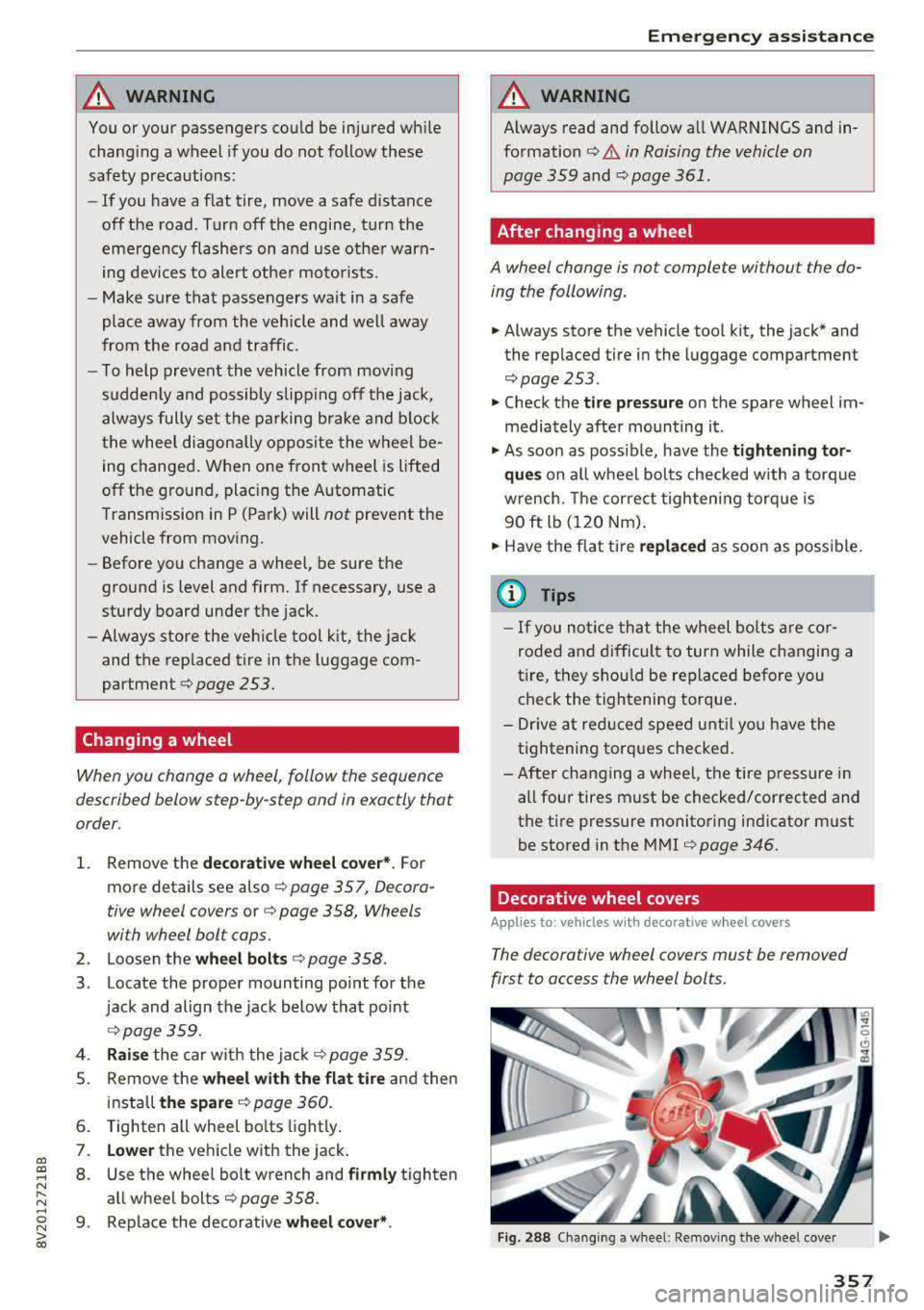
Fig. 288 Changing a wheel: Removing the wheel cover
357
Page 385 of 400
CXl CXl .... N ,.__
N .... 0 N > 00
Audi smartphone interface . . . . . . . . . 239, 243
Audi virtual cockpit
refer to Instrument cluster . . . . . . . . . . . . . 10
AUTO Automatic climate control system . . . . . . . 71
Automatic headlights . . . . . . . . . . . . . . . . . 51
Auto Lock (central locking system) . . . . . . . . 34
Automatic belt retractor . . . . . . . . . . . . . . . 262
Automatic climate control system
refer to Climate control system
(automatic) . . . . . . . . . . . . . . . . . . . . . . 70, 71
Automatic power top
refer to Power top . . . . . . . . . . . . . . . . . . . . 44
Automatic transm iss ion . . . . . . . . . . . . . . . . . 85
Driving tips . . . . . . . . . . . . . . . . . . . . . . . . . . 88
Emergency mode . . . . . . . . . . . . . . . . . . . . . 91
Hill descent control . . . . . . . . . . . . . . . . . . . 89
Kick-down . . . . . . . . . . . . . . . . . . . . . . . . . . . 90
Launch control program . . . . . . . . . . . . . . . 90
Malfunction . . . . . . . . . . . . . . . . . . . . . . . . . 86
Manual shifting (tiptronic mode) . . . . . . . . 90
Selector lever . . . . . . . . . . . . . . . . . . . . . . . . 88
Selector lever emergency release . . . . . . . . 92
Selector lever lock . . . . . . . . . . . . . . . . . . . . 86
Selector lever posit ions . . . . . . . . . . . . . . . . 86
Shift padd les . . . . . . . . . . . . . . . . . . . . . . . . 90
Automatic wipe/wash system . . . . . . . . . . . . 57
Auto Safety Hotline . . . . . . . . . . . . . . . . . . . 255
Auxiliary climate control . . . . . . . . . . . . . . . 118
AUX input . . . . . . . . . . . . . . . . . . . . . . . . . . . 229
Average consumption ............ .... 17, 18
Average speed . . . . . . . . . . . . . . . . . . . . . 17, 18
B
BACK button . . . . . . . . . . . . . . . . . . . . . . . . . 158
Bag hooks . . . . . . . . . . . . . . . . . . . . . . . . . 65, 67
Balance (sound) . . . . . . . . . . . . . . . . . . . . . . 245
Bass (sound) . . . . . . . . . . . . . . . . . . . . . . . . . 245
Battery In the key . . . . . . . . . . . . . . . . . . . . . . . . . . . 35
Jump starting . . . . . . . . . . . . . . . . . . . . . . . 368
also refer to High-voltage battery . . . . . . . 94
also refer to Vehicle battery . . . . . . . . . . . 325
Before driving . . . . . . . . . . . . . . . . . . . . . . . . 247
Belt tensioners . . . . . . . . . . . . . . . . . . . . . . . 265
Blended gasoline . . . . . . . . . . . . . . . . . . . . . 312
Index
Blower
Automatic climate control system . . . . . . . 72
Bluetooth Audio player . . . . . . . . . . . . . . . . . . . . . . . . 225
Connecting a ce ll phone . . . . . . . . . . . . . . 177
Settings . . . . . . . . . . . . . . . . . . . . . . . . . . . 244
Boost . . . . . . . . . . . . . . . . . . . . . . . . . . . . . . . . 11
Booster seats . . . . . . . . . . . . . . . . . . . . . . . . 302
Boost pressure ind icator . . . . . . . . . . . . . . . . 11
Brakes . . . . . . . . . . . . . . . . . . . . . . . . . . . . . . 153
Brake fluid . . . . . . . . . . . . . . . . . . . . . . . . . 325
Electromechanical parking brake . . . . . . . . 83
New brake pads . . . . . . . . . . . . . . . . . . . . . 153
Braking Brake assist . . . . . . . . . . . . . . . . . . . . . . . . 151
Emergency braking function . . . . . . . . . . . . 84
Breaking in New brake pads . . . . . . . . . . . . . . . . . . . . . 153
New engine . . . . . . . . . . . . . . . . . . . . . . . . . 74
New tires . . . . . . . . . . . . . . . . . . . . . . . . . . 335
Browser
refer to Media center . . . . . . . . . . . . . . . . . 231
Bulbs . . . . . . . . . . . . . . . . . . . . . . . . . . . . . . . 366
Buttons Control panel (MMI) . . . . . . . . . . . . . . . . . 158
Multifunct ion steer ing wheel . . . . . . . . 13, 16
Programming (multifunction steering
wheel) . . . . . . . . . . . . . . . . . . . . . . . . . . . . . . 15
C
Cable (USB adapter/AUX connector cable) 228
California Proposition 65 Warning ... .. .. 317
Battery specifi c . . . . . . . . . . . . . . . . . . . . . 326
Call list . . . . . . . . . . . . . . . . . . . . . . . . . . . . . 180
Call options . . . . . . . . . . . . . . . . . . . . . . . . . . 187
Capacities Fuel tank. . . . . . . . . . . . . . . . . . . . . . . . . . . 375
Washer fluid reservoir . . . . . . . . . . . . . . . . 375
Care . . . . . . . . . . . . . . . . . . . . . . . . . . . . . . . . 347
also refer to Cleaning . . . . . . . . . . . . . . . . 347
Car Finder Audi connect e -tron services . . . . . . . . . . . 199
Cargo area . . . . . . . . . . . . . . . . . . . . . . . . . . . 253
Caring for and cleaning leather . . . . . . . . . . 350
Catalytic converter . . . . . . . . . . . . . . . . . . . . 316
CD drive (media drives) . . . . . . . . . . . . . . . . 224
383
Page 388 of 400
Index
e-tron Navigation . . . . . . . . . . . . . . . . . . . . . . . . . 216
also refer to Plug-in hybrid drive . . . . . . . . 94
eco mode (automatic climate control system) .7.1
Economical route . . . . . . . . . . . . . . . . . . . . . 208
Efficiency program . . . . . . . . . . . . . . . . . . . . . 19
Electrical accessories
refer to Socket . . . . . . . . . . . . . . . . . . . . . . . 64
Electric drive . . . . . . . . . . . . . . . . . . . . . . . . . . 94
Electric range . . . . . . . . . . . . . . . . . . . . . . . . 216
Electromechanical parking brake . . . . . . . . . 83
E lectromechanica l steering . . . . . . . . . . . . . 154
Electronic Differential Lock (EDL) . . . . . . . . 151
El ectronic immobili zer . . . . . . . . . . . . . . . . . . 35
Electronic speed limiter . . . . . . . . . . . . . . . . 123
Electronic Stabilization Control ( ESC) . . . . . 151
Emergency assistance . . . . . . . . . . . . . . . . . 353
Emergency braking function . . . . . . . . . . . . . 84
Emergency flashers . . . . . . . . . . . . . . . . . . . . 53
Eme rgency starting . . . . . . . . . . . . . . . . . . . 368
Emissions control system
Cata lytic converter . . . . . . . . . . . . . . . . . . . 316
Energy consumers . . . . . . . . . . . . . . . . . . . . . 18
Energy management . . . . . . . . . . . . . . . . . . 155
Engine Coolant . . . . . . . . . . . . . . . . . . . . . . . . . . . . 323
Messages . . . . . . . . . . . . . . . . . . . . . . . . . . . 80
Start/Stop system . . . . . . . . . . . . . . . . . . . . 81
Starting/stopping (button) . . . . . . . . . . . . . 78
Starting/stopping (key) . . . . . . . . . . . . . . . . 77
Starting with jumper cables . . . . . . . . . . . 368
Engine compartment
Opening and closing the hood...... ... . 318
Overview ..... .................. .... 319
Safety precautions . . . . . . . . . . . . . . . . . . . 316
Engine coolant
Radiator fan . . . . . . . . . . . . . . . . . . . . . . . . 324
Engine oil . . . . . . . . . . . . . . . . . . . . . . . . . . . 319
Adding . . . . . . . . . . . . . . . . . . . . . . . . . . . . 321
Changing . . . . . . . . . . . . . . . . . . . . . . . . . . 322
Checking the oil level................. 321
Consumption . . . . . . . . . . . . . . . . . . . . . . . 321
D ipstick .. .. .... ................ 319,321
Oil change interval . . . . . . . . . . . . . . . . . . . 327
O il consumption . . . . . . . . . . . . . . . . . . . . . 320
386
Specification and viscosity............. 319
Temperature display . . . . . . . . . . . . . . . . . .
11
Ent ering characters/numbers (speller) . . . . 165
Entering lette rs (speller) . . . . . . . . . . . . . . . 165
Ente rtainment sliding menu . . . . . . . . . . . . 163
Entry/exit lighting . . . . . . . . . . . . . . . . . . . . . 53
Entry assistance . . . . . . . . . . . . . . . . . . . . . . . 62
Environment Proper disposal of drained engine oil . . . . 322
Unlead ed gasoline . . . . . . . . . . . . . . . . . . . 312
ESC
refer to Electronic Stabilization
Control (ESC) . . . . . . . . . . . . . . . . . . . . . . . 151
Event Data Recorder (EDR) . . . . . . . . . . . . . 156
Expanded view . . . . . . . . . . . . . . . . . . . . . . . . 15
Exterior lighting . . . . . . . . . . . . . . . . . . . . . . . S 1
Exterior mirrors . . . . . . . . . . . . . . . . . . . . . . . 55
Fo lding . . . . . . . . . . . . . . . . . . . . . . . . . . . . . 55
Folding settings . . . . . . . . . . . . . . . . . . . . . . 38
Externa l voice operation . . . . . . . . . . . . . . . . 175
F
Factory default settings
Multi Media Interface . . . . . . . . . . . . . . . . 242
Fader (sound) . . . . . . . . . . . . . . . . . . . . . . . . 245
Fastening Booster seats . . . . . . . . . . . . . . . . . . . . . . . 302
Convertible child safety seats . . . . . . . . . . 300
Infant seats . . . . . . . . . . . . . . . . . . . . . . . . 298
Fast forwarding/rewindi ng (audio/video
file) . . . . . . . . . . . . . . . . . . . . . . . . . . . . . . . . 230
Fast forwarding (audio/video file) . . . . . . . . 230
Fast route . . . . . . . . . . . . . . . . . . . . . . . . . . . 208
Favorites Media ....... ..... .. ............... 232
Navigation . . . . . . . . . . . . . . . . . . . . . . . . . 202
Telephone. . . . . . . . . . . . . . . . . . . . . . . . . . 182
File formats (media drives) . . . . . . . . . . . . . 235
Floor mats . . . . . . . . . . . . . . . . . . . . . . . . . . . 252
Fo lding the rear seats . . . . . . . . . . . . . . . . 67, 68
Foot pedals . . . . . . . . . . . . . . . . . . . . . . . . . . 252
Fo r the sake of the environment
Environmentally-friendly driving . . . . . . . . 74
Leaks ........ ... ... .............. .. 317
Roof rack . . . . . . . . . . . . . . . . . . . . . . . . . . . 69
Page 392 of 400
Index
Opening/closing
re fer to Unlocking/locking
36,37
Operating Multifunction steering wheel . . . . . . . . 13, 16
Multi Media Interface . . . . . . . . . . . . . . . . 159
Voice recognition system . . . . . . . . . . . . . 170
Options menu .. .. ............. 14, 160, 164
Outside temperatu re display . . . . . . . . . . . . . 10
Overview (Cockpit) . . . . . . . . . . . . . . . . . . . . . . 8
p
Paint damage . . . . . . . . . . . . . . . . . . . . . . . . 349
Paint number .. ...... .... ..... .... ... 374
Panorama glass roof. . . . . . . . . . . . . . . . . . . . 43
also refer to Convenience opening/closing 42
Parental control
DVD ... .. .. .. ... ..... ....... .... .. . 233
Parking aid Cleaning sensors/camera . . . . . . . . . . . . . 348
Parking brake
r e fer to Electromechanical parking brake . 83
Parking lights . . . . . . . . . . . . . . . . . . . . . . . . . 51
p k" ar ing systems . . . . . . . . . . . . . . . . . . . . . . 146
Malfunct ion . . . . . . . . . . . . . . . . . . . . . . . . 150
Rearview camera . . . . . . . . . . . . . . . . . . . . 148
Sett ings . . . . . . . . . . . . . . . . . . . . . . . . . . . 150
Parking (automatic transmission) . . . . . . . . . 88
Parts replacement . . . . . . . . . . . . . . . . . . . . 380
Pass -through . . . . . . . . . . . . . . . . . . . . . . . . . 68
PASSENGER AIR BAG OFF light . . . . . . . . . . 279
Paths (Owner's Manual) . . . . . . . . . . . . . . . . 160
Pause (audio/video file) . . . . . . . . . . . . . . . . 230
Pedals . . . . . . . . . . . . . . . . . . . . . . . . . . . . . . 252
Personal route assistance . . . . . . . . . . . . . . 206
Phonebook
refer to Contacts . . . . . . . . . . . . . . . . . . . . 185
Physical principles of a frontal collision . . . 259
Picture format (v ideo) . . . . . . . . . . . . . . . . . 233
Playback (media) . . . . . . . . . . . . . . . . . . . . . 230
Playlist . . . . . . . . . . . . . . . . . . . . . . . . . . . . . 232
Plug-in hybrid drive . . . . . . . . . . . . . . . . . . . . 94
12 Volt battery . . . . . . . . . . . . . . . . . . . . . . 104
Auxiliary climate control . . . . . . . . . . . . . . 118
Boost . . . . . . . . . . . . . . . . . . . . . . . . . . . . . 10 1
Charging . . . . . . . . . . . . . . . . . . . . . . . . . . . 106
Charging clip . . . . . . . . . . . . . . . . . . . . . . . 110
390
Charging dock . . . . . . . . . . . . . . . . . . . . . . 110
Charging system PIN . . . . . . . . . . . . . . . . . 117
Charging the high-voltage battery . . . . . . 108
Charging time . . . . . . . . . . . . . . . . . . . . . . 116
Cleaning the charging system . . . . . . . . . . 119
Climate control . . . . . . . . . . . . . . . . . . . . . 118
Coasting . . . . . . . . . . . . . . . . . . . . . . . . . . . 101
Coolant . . . . . . . . . . . . . . . . . . . . . . . . . . . . 104
Driving . . . . . . . . . . . . . . . . . . . . . . . . . . . . . 96
E-max (power availability) . . . . . . . . . . . . . 102
Efficient driving . . . . . . . . . . . . . . . . . . . . . 101
Ending drive ready mode . . . . . . . . . . . . . . . 96
Energy flow disp lay . . . . . . . . . . . . . . . . . . 102
E stablishing drive ready mode . . . . . . . . . . 96
EV mode .... .. .. .. .. ............. .. 100
High-voltage battery .. ......... 94 , 95, 117
High -voltage system . . . . . . . . . . . . . . . . . . 94
Indicator lights . . . . . . . . . . . . . . . . . . . . . . 98
Jump starting . . . . . . . . . . . . . . . . . . . . . . . 104
Power meter . . . . . . . . . . . . . . . . . . . . . . . . . 97
Range and statistics . . . . . . . . . . . . . . . . . . . 99
Range display . . . . . . . . . . . . . . . . . . . . . . . . 99
Recuperation . . . . . . . . . . . . . . . . . . . . . . . 101
Refueling . . . . . . . . . . . . . . . . . . . . . . . . . . 105
Setting the modes . . . . . . . . . . . . . . . . . . . 100
Starting the vehicle . . . . . . . . . . . . . . . . . . . 96
Sta tus dis plays . . . . . . . . . . . . . . . . . . . . . . 114
Switching the ignition on/off . . . . . . . . . . . 96
Tachometer . . . . . . . . . . . . . . . . . . . . . . . . . 97
T ire mobility kit . . . . . . . . . . . . . . . . . . . . . 103
Vehicle sound . . . . . . . . . . . . . . . . . . . . . . . . 96
Vehicle tool kit . . . . . . . . . . . . . . . . . . . . . . 103
Vehicle transport . . . . . . . . . . . . . . . . . . . . 104
Point of interest . . . . . . . . . . . . . . . . . . . . . . 203
Point of interest search . . . . . . . . . . . . . . . . 203
also refer to Point of interest . . . . . . . . . . 203
Polishing . . . . . . . . . . . . . . . . . . . . . . . . . . . . 349
Pollen filter
refer to Pollutant filter . . . . . . . . . . . . . . . . 70
Pollutant filter . . . . . . . . . . . . . . . . . . . . . . . . 70
Power meter . . . . . . . . . . . . . . . . . . . . . . . . . . 97
Power seat adjustment . . . . . . . . . . . . . . . . . 61
Power top . . . . . . . . . . . . . . . . . . . . . . . . . . . . 44
Cleaning . . . . . . . . . . . . . . . . . . . . . . . . . . . 349
Power windows . . . . . . . . . . . . . . . . . . . . . . . . 41
Child safety lock . . . . . . . . . . . . . . . . . . . . . . 41
Malfunction . . . . . . . . . . . . . . . . . . . . . . . . . 42