brake AUDI A3 SEDAN 2017 Owner's Guide
[x] Cancel search | Manufacturer: AUDI, Model Year: 2017, Model line: A3 SEDAN, Model: AUDI A3 SEDAN 2017Pages: 400, PDF Size: 67.32 MB
Page 103 of 400
CXl CXl .... N ,.__
N .... 0 N > 00
when condensation accumulates in the en
gine . Driving exclusively in electric mode is
not possible in this phase.
Plug-in hybrid functions
Applies to: ve hicles with plug- in hybrid drive
The funct ions descr ibed below act ivate automati
cally depend ing on the dr iv ing style.
Full -throttle acceleration (boost)
The boost function is activated by pressing the
accelerator pedal farther down (kick-down) . The
vehicle is powered by both the gaso line engine
and the electric motor when in full accelerat ion.
Boost is only available for a sho rt time, because it
uses a large amount of energy. Availab ility de
pends o n the high-voltage battery cha rge level.
Coasting
The gaso line engine switches off and disengages
at speeds up to approximately 112 mph
(180 km/h) if the accelerator pedal is not press
ed and the D position is selected. Dr iv ing conser
vative ly like this can reduce fuel consumption .
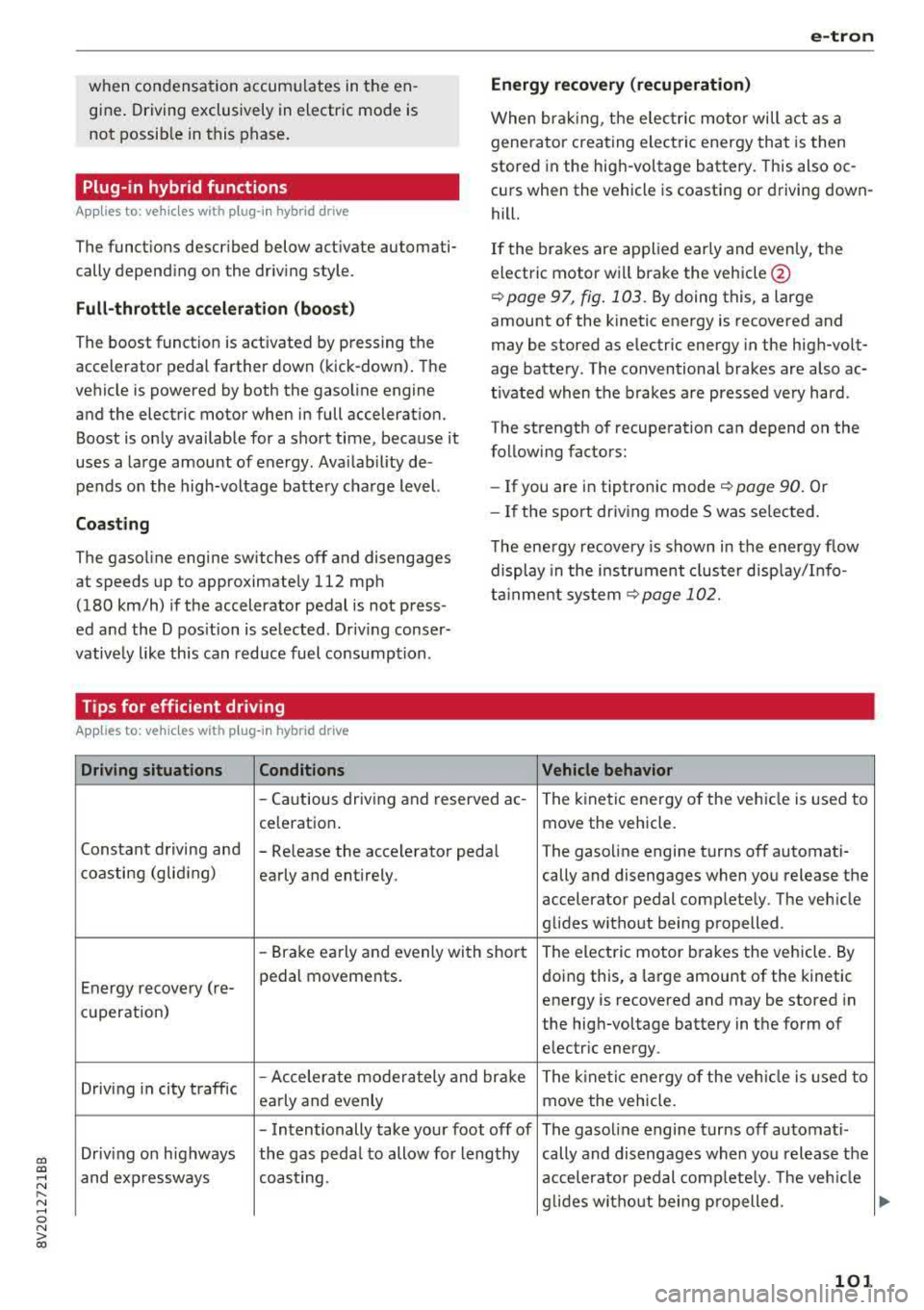
Tips for efficient driving
Applies to: vehicles with plug -in hybrid drive
Driving situations Conditions
e-tron
Energy recovery (recuperation)
When braking, the elec tric moto r will act as a
generato r creating ele ct ric energy that is then
stored in the high -voltage battery. This also oc
c ur s when the vehicle is coasting or driving down
hill.
If the brakes are applied early and evenly, the
electric motor w ill brake the vehicle @
¢page 97, fig. 103. By doing this, a large
amount of the kinetic energy is recovered and
may be stored as electric energy in the high-volt
age battery . The conventional brakes are also ac
t ivated when the brakes are pressed very hard .
The strength of recuperation can depend on the
follow ing factors:
- If you are in tiptron ic mode
¢page 90. Or
- If the sport dr iv in g mode S was se lected .
The energy recovery is shown in the energy flow
display in the instrument cluster display/I nfo
tainment system
¢page 102.
Vehicle behavior
-Cautious driving and reserved ac -The kinetic energy of the vehicle is used to
celeration .
move the vehicle.
Constant driving and
-Re lease the accelerator peda l The gasoline engine turns off automati-
coasting (gliding)
early and entirely . cally and disengages when you release the
accelerator pedal complete ly. The veh icle
glides without being propelled .
-Brake early and evenly with short The electric motor brakes the vehicle. By
Energy recovery (re- pedal movements.
doing this, a large amount of the kinetic
energy is recovered and may be stored in
cu peration) the high-voltage battery in the form of
electr ic energy .
Driv ing in city traffic
-Accelerate moderately and brake
The kine tic ene rgy o f the vehicle is used to
early and evenly move the vehicle.
-Intentionally take your foot off of The gasol ine engine turns off automati -
Driving on highways the gas peda l to allow fo r lengthy cally and disengages when you release the
and expressways coast ing . accelerator pedal complete ly. The veh icle
g lid es w ithout being p ropelled .
101
Page 122 of 400
Trailer towing
Trailer towing
Driving with a trailer
General information
Your Audi was designed primarily for passenger
transportation.
If you plan to tow a trailer, please remember that
the additional load will affect durability, econo
my and performance.
Trailer towing not on ly places more stress on the
ve hicle, it also ca lls for more concentration from
the dr iver.
F or this reason, always follow the operating and
driving instructions provided and use common
sense.
Technical requirements
Trailer hitch
Use a weight-carrying hitch conforming to the
gross tra iler weight. The hitch must be suitab le
for your veh icle and tra iler and must be mounted
securely on the vehicle's chassis at a technically
sound
locat ion . Use on ly a trailer hitch with a re
movable ba ll mount . Always che ck with the t rail
er hitch man ufac tur er to make s ure t hat you are
using the co rrect hi tc h.
Do not use a bumper hitch.
The hitch must be installed in such a way that it
does not interfere with the impact -absorbing
bumper system. No mod ificat ions should be
made to the vehicle exhaust and b rake systems .
Fr om t ime to t ime, che ck tha t all hitch mo unti ng
bol ts rem ain securely f aste ned.
W hen you are not tow ing a tra iler, remove the
tra ile r hitc h ba ll mount . This prevents the hit ch
from caus ing damage s hou ld your veh icle be
s truck from be hind
c> ,&. .
Trailer brakes
If your trailer is equipped with a brak ing system,
check to be su re that it conforms to all regula
tions .
120
The t rai ler hydraulic bra ke system must not be
directly connected to the vehicle's hydraulic
bra ke system.
Safety chains
A lways use s afety chains between you r vehi cle
and t he tra ile r.
Trailer lights
Traile r lights must meet all regula tions . B e s ure
to check w ith your Aud i dea le r fo r cor rect wir ing,
switches and relays .
Mirrors
If you are unable to see t he traffic behind you us
i ng t he regular outs ide mir rors, then yo u
must in
stall extended mirro rs . It is impo rtant that you
always have clear vision to the rear.
&, WARNING
Afte r remov ing the tr ailer hi tch, do not s to re
i t i n yo ur vehicle. In case o f su d den braking,
the hitch could fly fo rwa rd and injure you or
your passengers .
Operating instructions
Maximum trailer weight
A tra iler f or yo ur vehicle is lim ite d to a typical
class 1 or class 2 trailer.
Trailer load distribution
Be sure the load in the t rai le r i s he ld se curely in
pla ce to p revent i t from shi fting forward, bac k
ward or si deways.
Never allow a passenger to ride in a trailer c> &.
in Driving instructions on page 121.
Engine cooling system
Towing a tra iler makes the engine work harder. It
is important that the cooling system's perform
ance is up to the additional load . Make sure tha t
the coo ling system has enoug h flu id.
Tire pressure
When towing a trailer, inf late the tires of your
vehicle to the tire pressure listed under "Full load" on the label
c> page 336. Inflate trailer
Page 123 of 400
CXl CXl .... N ,.__
N .... 0 N > 00
tires to trailer and tire manufacturers' specifica
tions.
Lights
Check to make sure both vehicle and trailer lights
are working p roperly.
Safety chains
Be sure trailer safety chains are properly connect
ed from the tra iler to the hitch on the vehicle.
Leave enough slack in the chains to permit turn
in g corners . When you install safety cha ins, ma ke
sure they w ill not drag on the road when yo u are
driving .
The chains shou ld cross under the trailer tongue
to prevent it from dropping in case of separat ion
from the hitch.
Driving instructions
Driving with a trailer always requires extra care
and consideration.
Weight distribution
Towing a loaded trailer w ith an empty car results
in a highly unstable distribution of weight . If this
cannot be avo ided, drive at very low speeds only
to avoid the risk of losing steering control.
A "balanced" rig is easier to operate and control.
This means that the tow vehicle should be loaded
to the extent possible and permissible, while
keep ing the tra iler as light as possib le under the
circumstances. Whenever possib le, t ransfer
some cargo to the luggage compartment of the
tow vehicle whi le observing tongue load require
ments and vehicle loading considerations .
Speed
The higher the speed, the more difficult it be
comes for the driver to control the rig. Do not
drive at the maximum permissible speed. Reduce
your speed even more if load, weather or wind
conditions are unfavorable
-particu larly when
going downhill.
Reduce vehicle speed
immediately if the trailer
shows the s lightest sign of swaying .
Do not try
to stop the swaying by accelerating.
Tra iler towing
Observe speed limits. In some a reas, speeds for
vehicles towing trailers are lower than for regular
vehicles .
Always apply brakes early. When driving down
hill, shift into a lower gear to use the engine
braking effect to slow the vehicle. Use of the
brakes alone can cause them to overheat and fa il.
Coolant temperature
T he coo lant tempe rature gauge ~ page 11 must
be observed carefully . The coolant temperature
can increase if you drive on long inclines in a low
gear at high engine speeds. Reduce your speed
immediately if the LEDs in the top part of the dis
play turn on.
For more information about indicator lights, re
fer
to . ~page 28.
A WARNING ,-
Anyone not properly restrained in a moving
vehicle is at a much greater risk in an acci
dent. Never let anyone ride in your car who is
not properly wearing the restraints provided
by Aud i.
Trailer towing
information
Important to know
Your vehicle handles differently when towing a
trailer because of the addit ional weight and dif
ferent weight distribution . Safety, performance
and economy will g reatly depend on how careful
ly you load your trailer and operate yo ur rig.
Before you actually tow your trailer, pract ice
turning, stopping and backing up in an area away
from traffic. Keep practic ing until you have be
come complete ly familiar w ith the way your vehi
cle-trailer combination behaves and responds.
Backing up is difficult and requires practice.
Backing up with a t railer genera lly requires steer
i ng action opposite to that when backing up your
vehicle without a tra iler.
Maintain a greater distance between your vehicle
and the one in front of you. You will need more
.,,.
121
Page 124 of 400
Trailer towing
room to stop . To compensate fo r the trai ler, you
will need a larger than normal turning radius.
When pass ing, remembe r that you cannot accel
erate as fast as you norma lly would because of
the added load. Make s ure yo u have eno ugh room
to pass . After passing, allow plenty of room for
your tra ile r before chang ing lanes again.
Avoid jer ky s tar ts, sharp turns or rap id lane
changes .
{D) Tips
- Do not tow a trailer during t he b reak-in per i
od of yo ur vehicle.
- If you tow a trailer, your Aud i may require
more frequent m ain tenance d ue to the ex
tra load
r:!) page 3 78.
Parking on a slope
Do not park on a slope with a trailer. If it cannot
be avoided, do so only
a~er doing the following:
When parking:
.,. Apply the foot b rake .
.. Have someone place chocks under both t he ve
hicle and the trai le r wheels .
.. With chocks i n place, slowly release the brakes
u nt il the whee l cho cks absorb the load .
.. T urn the wheels towards the curb .
.. Apply the parking brake .
.. Select the P selector lever position.
When restarting after parking:
.,. Apply the foo t bra ke .
.. Start the engi ne .
.. Se lect the D/S selector lever position .
.. Release the parking brake and slowly pull out
and away from the wheel chocks .
.. Stop and have someone retrieve the wheel
chocks.
(D Tips
If you move the se lector lever of the a utomat
ic transm ission to P before apply ing t he park
ing brake and before block ing the wheels, you
may have to use more fo rce later to move the
lever ou t of the P position .
122
Page 125 of 400
a, a, ..... N
" N ..... 0 N > 00
Assistance systems Electronic speed limiter
Applies to: vehicles with electronic speed lim iter
Your vehicle may be factory equipped with tires
that are rated for a maximum speed of 130 mph
(210 km/h). This is less than the maximum speed
of your vehicle. To reduce the risk of sudden tire
failure and loss of control if the vehicle is operat
ed at excessive speeds, your vehicle also has an
electronic speed lim iter . The electronic speed
limiter prevents your vehicle from going faster
than the tir e speed rating. For more information
¢page 335.
If the engine control unit receives faulty vehicle
road speed s ignals, the Malfunction Indicator
L amp (MIL)
II! will illuminate . If this occurs,
contact the nearest authorized Audi dealer for
assistance .
& WARNING
Always observe the posted speed limits and
adjust your speed to suit prevailing road, traf
fic and weather conditions. Never drive your
vehicle faster than the max imum speed rat ing
of the tires installed.
Speed warning system
Applies to: vehicles with speed warning system
The speed warning system helps you to stay be
low a specified maximum speed that can be set,
changed or deleted in the Infotainment system .
The speed warning system warns you if you are
exceeding the maximum speed that you have set.
A warning tone will sound as soon as your speed
exceeds the stored value slightly . The
101 (USA
models) /
[01 (Canada mode ls) indicator light
and the corresponding message appear in the in
strument cluster display at the same time. The
[OJ (USA models)/ (•j (Canada models) indicato r
light and the message turn
off when the vehicle
speed drops below the stored maximum speed.
Setting a threshold is recommended if you would
like to be reminded when you reach a certain
maximum speed. Situations where you may want
to do so include driving in a country with a gener-
Assistance systems
al speed limit or if there is a specified maximum
speed for winter tires.
Setting the warning threshold
• Select in the Infotainment system: I MENU ! but
ton
> Vehicle > left control b utton > Driver as
sistance
> Speed warning > Manual.
(0 Tips
Regardless of the speed warning system, you
shou ld always monitor your speed using the
speedometer and make sure you are following
the lega l speed limit.
Cruise control system
Switching on
Applies to: vehicles wit h cruise control system
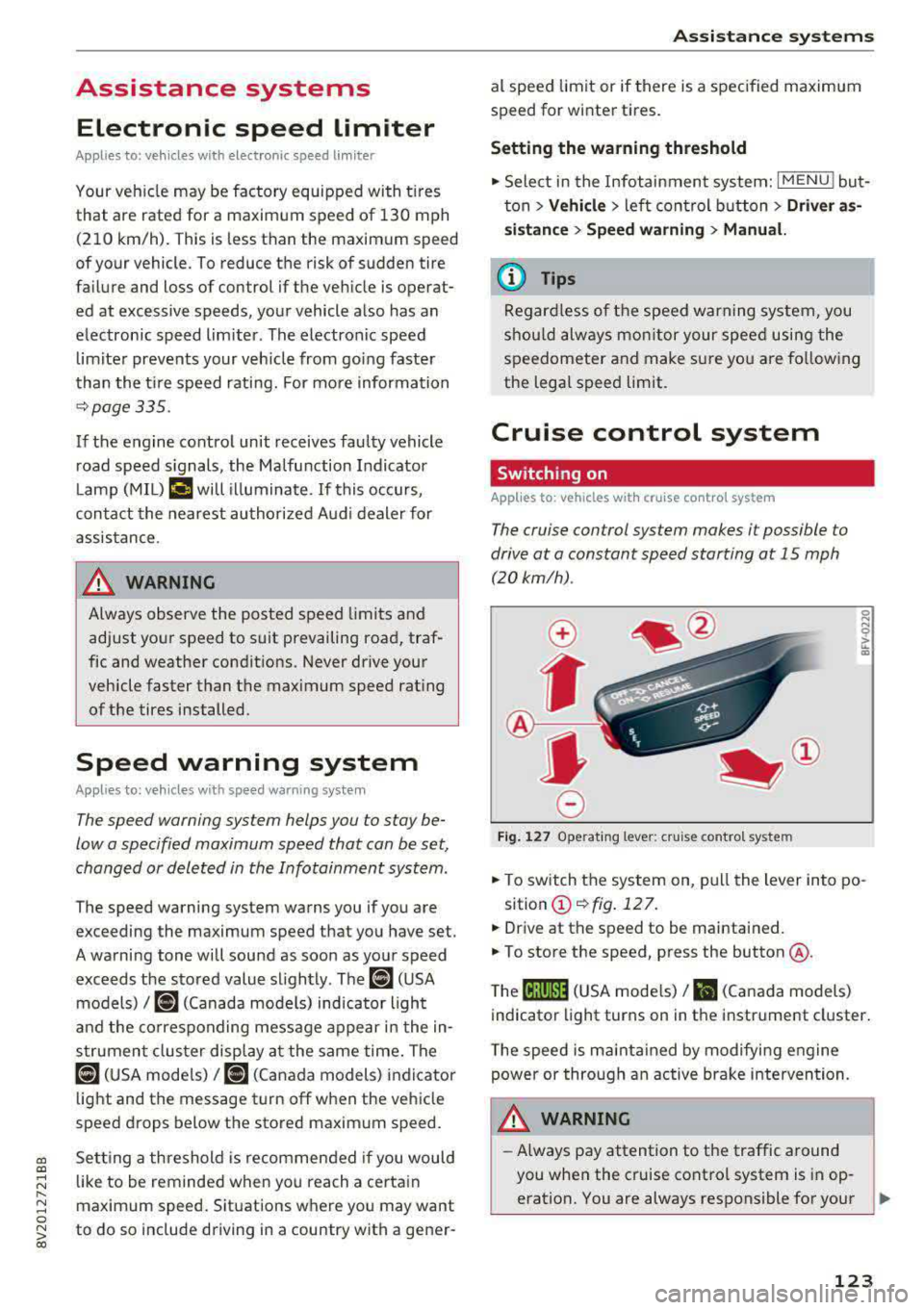
The cruise control system makes it possible to
drive at a constant speed starting at 15 mph (20kmlh) .
0
f
~
0
Fig. 127 Operat ing lever: cruise control system
i;:i N 0 > ... m
• To switch the system on, pull the lever into po-
sition
(D ¢fig . 127.
• Drive at the speed to be maintained.
.. To store the speed, press the button @.
T he
(ij;jl)~1i (USA mode ls)/ Bl (Canada models)
indicator light turns on in the instrument cluster.
T he speed is maintained by modifying engine
power or through an active brake intervention.
.i\, WARNING
-Always pay attention to the traffic around
-
you when the cruise control system is in op
eration. You are always responsible for your
..,
123
Page 126 of 400
Ass is tan ce sys tems
speed and the distance between your
vehicle and other vehicles.
- For safety reasons, cruise control should not
be used in the city, in stop-and-go traffic, on
winding roads and when road condit ions are
poor (such as ice, fog, gravel, heavy rain and
hydroplaning), because th is increases the
r isk of an accident.
- Switch the cruise control off temporar ily
when driving in turn ing lanes, h ighway exits
or in construction zones.
- Please note that unconsciously "resting" yo ur foot on the accelerator pedal prevents
the cruise control from braking. This is be
ca use p ressing the acce le rato r pedal ove r
rides the c ruise contro l system.
- If a bra ke system ma lf u nction such as over
heating occu rs when the c ruise contro l sys
tem is sw itched on, the braking function in
the system may be switched off . The rest of
the cr uise control system f unctions remain
active as long as the
(lj;(i)~i~ (USA models) /
Bl (Canada models) indicator light is on.
(D Note
Before driving downhill a long distance on a
steep hill, decrease your speed and select a
lower gear. Th is makes use of the eng ine
braking effect and relieves the brakes.
@ Tips
The brake lights turn on when the brakes a re
activated.
Changing the speed
A pp lies to: ve hicles w ith c ruise contro l system
.,. To increase or decrease the speed in incre
ments,
tap the lever in the 0 10 d irection
¢ page 123, fig . 127 .
.,. To inc rease o r decrease the speed quickly, hold
the leve r in the 0 / 0 direct io n until the de
s ir ed speed is reached.
124
' Overriding the speed
App lies to : vehicles wit h cruise co ntrol system
You can press the acce lera to r pedal to increase
you r speed, fo r example if you want to p ass
someone. The speed you set ear lier will resume
as soon as you release the acce lerator pedal.
However, if yo u are d rivi ng considerably faste r
t h an the s to red speed for a lo ng period of time
time, the cr uise con trol sys tem w ill temporari ly
switch off . The
(lj;(i)~i~ (USA models) !Bl (Canada
models) indicato r light in the instrument cluste r
turns off and the stored speed is maintained.
Preselecting a speed
App lies to : vehicles wi th cruise co ntrol system
You can pre -select your desired speed when the
vehicle is stationary.
.,. Switch the ignit io n on.
.,. Pull the lever into position (D ¢ page 123,
fig. 127 .
.,. To increase or decrease the speed, tap the lever
in the
0 10 direction.
This function makes it possible, for example, to
save the speed you want before d riving on t he
highway. Once on the highway, activate the
cruise contro l system by pu lling the lever toward
the position
(D .
' Switching off
App lies to: vehicles wit h cruise co ntrol system
Deactivating temporarily
.,. Press the brake pedal, or
.,. Press the lever into position @ (not clicked into
place) ¢ page 123, fig . 12 7, or
Switching off completely
.,. Press the lever into position @(clicked into
place), or
.,. Switch the ignit io n off.
The speed you stored will be maintained if the cruise contro l has been switched off temporarily .
To resume the stored speed, release the brake pedal and pull the lever to position
(D . ..,.
Page 128 of 400
Assistance systems
(D Tips
-A maximum of 30 lap times (ana log instru
ment cluster) or 99 lap t imes (Audi virtual
cockpit*) can be measured.
- If timing is paused, you can continue it later
even if you switch the ignition off.
- Saved lap times cannot be individually de
l eted from the total resu lts.
- The saved lap timer values will remain after
switching the ignition off .
Lap statistics
Applies to: vehicles with lap timer
Display ing lap statistics
You can d isplay the number of laps driven, the
fastest lap" +", the s lowest lap" -", and the aver
age time
"0" in the instrument cluster.
~ Applies to: vehicles with analog instrument
cluster: select
Statistics in the menu using the
multifunction steering wheel.
~ Applies to: vehicles with Audi virtual cockpit: on
the multifunction steering wheel, select: left
control button
> Lap statistics or Statistics .
~ Turn the thumbwheel down or up to display the
individual lap times.
~ To retur n to the lap t iming that was begun,
press the left thumbwheel.
Resetting lap statistics
Applies to: vehicles with Audi virtual cockpit
~ On the multifunction steer ing wheel, select:
the right control button
> Reset statistics.
(D Tips
- The lap statistics list the lap times for the
last 30 laps.
-Applies to: vehicles with Audi virtual cock
pit: the fastest and slowest lap times from
up to 99 timed laps will be disp layed.
126
Audi adaptive cruise
control
Description
Applies to: vehicles with Audi adaptive cruise control
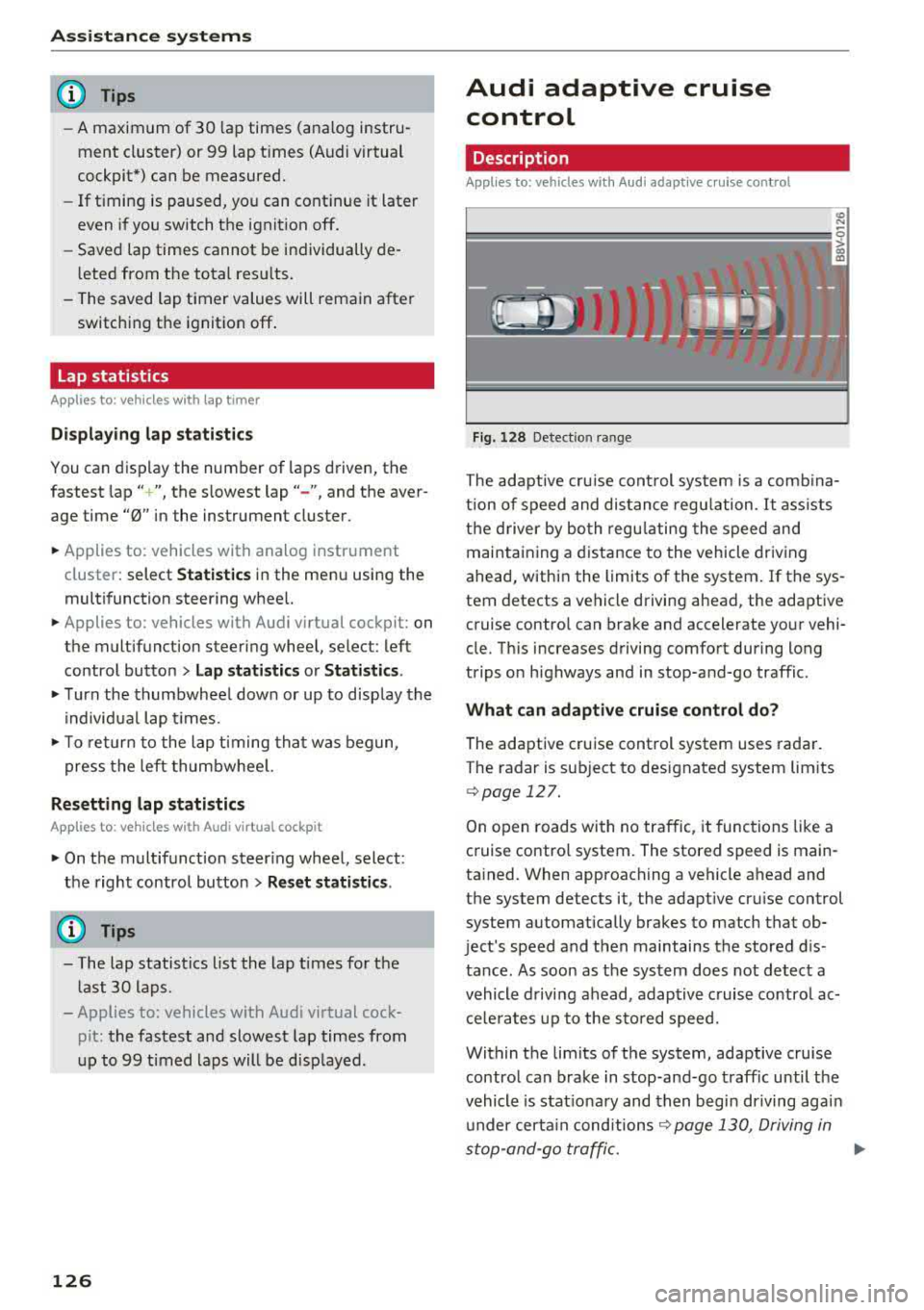
Fig. 128 Detect ion range
> (0 (0
The adaptive cru ise control system is a comb ina
tion of speed and dis tance regu lation.
It ass ists
the d river by both regulating the speed and
maintaining a distance to the vehicle driving
ahead, within the limits of the system. If the sys
tem detects a vehicle driving ahead, the adaptive
cruise contro l can brake and accelerate your vehi
cle. Th is increases driving comfort during long
trips on highways and in stop-and-go traffic.
What can adaptive cruise control do?
The adaptive cruise control system uses radar.
The radar is sub ject to designated system lim its
q poge 127.
On open roads with no traffic, it functions like a
cruise contro l system. The stored speed is main
tained. When approaching a vehicle ahead and
the system detects it, the adapt ive cru ise control
system automatically brakes to match that ob
ject's speed and then maintains the stored dis
tance. As soon as the system does not detect a
vehicle driving ahead, adaptive cruise contro l ac
celerates up to the stored speed.
Within the limits of the system, adaptive cruise control can brake in stop-and-go traffic until the
vehicle is stat ionary and then begin driving agai n
under certain
conditions ~ page 130, Driving in
stop-and-go traffic.
ll>
Page 129 of 400
a, a, ..... N
" N ..... 0 N > 00
Which functions can be contr oll ed?
When you sw itch adaptive cruise control on, you
can set the current speed as the "control speed"
¢ page 128 , Switching on/off .
When driving, you can stop cruise co ntro l
¢ page 130 or change the speed ¢ poge 129 at
any time .
You can also set the distance to the veh icle ahead
and set t he adaptive cruise contro l dr iv ing pro
g ram
¢ page 131 .
General information
Applies to: vehicles with Audi adaptive cruise control/Audi pre
sense front
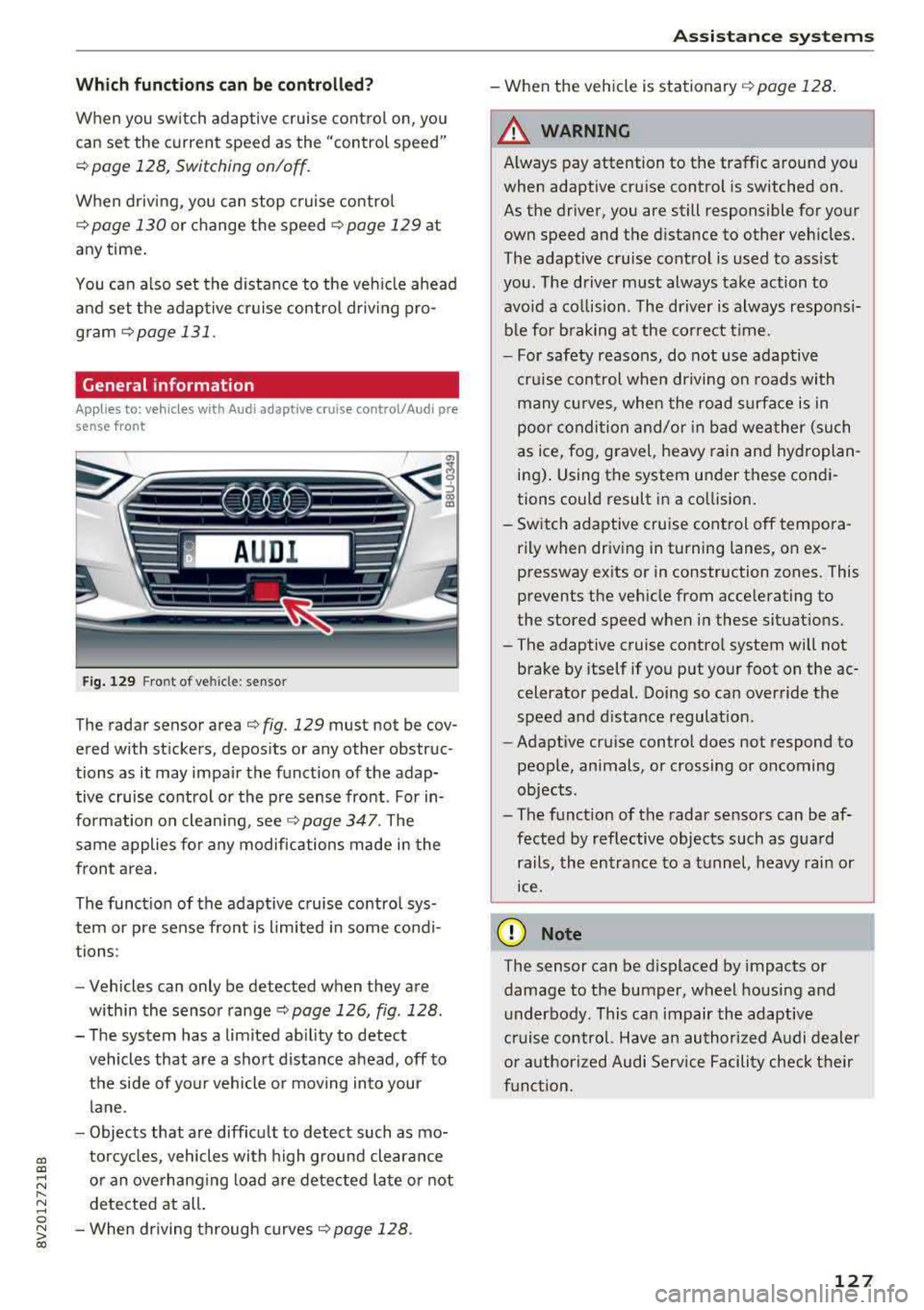
F ig. 129 Fro nt o f vehicl e: sensor
T he radar sensor area ¢ fig . 129 mus t not be cov
ered with st ickers, deposits or any other obstruc
tions as it may impair the function of the adap tive c ruise control or the pre sense front . For in
formation on clean ing ,
see ¢ page 347 . The
same applies fo r any modifications made in the
front area .
The funct ion of the adaptive cruise contro l sys
tem or pre sense fron t is l imited in some cond i
tions :
- Vehicles can only be detected when they are
within the senso r
range¢ page 126, fig . 128 .
- The system has a limited abil ity to detect
vehicles that are a short distance ahead, off to
t h e side of your vehicle or moving into your
lane .
- Objects that are difficu lt to detect such as mo
torcycles, vehicles with high ground clearance
or an overhanging load are detected late or not detected at all .
- When driving through curves
¢ page 128 .
Ass is ta nce syst ems
-When the vehicle is stationary ¢ page 128.
A WARNING
Always pay attention to the traffic around you
when adaptive cruise control is switched on.
As the driver , you are still responsible for your
own speed and the d istance to other veh icles .
The adaptive cruise control is used to ass ist
you . The driver m ust always take action to
avo id a co llision . The d river is always responsi
b le for b raking at the co rrect t ime.
- For safety reasons, do not use adaptive
cru ise control when driving on roads with
many cu rves , when the road s urface is in
poor conditio n and/or in bad wea ther (such
as ice, fog, gravel, heavy rain and hyd roplan
ing) . Using the system under these condi
tions could result in a co llision.
- Sw itch adaptive cruise control off tempora
rily when driving in turning lanes, on ex pressway ex its or in construction zones . This
prevents the veh icle from acce lerating to
the stored speed when i n these situat ions.
- The adaptive cruise contro l system will not
brake by itself if you put you r foot on the ac
celerator pedal. Doing so can override the
speed and d istance regulat ion .
- Adapt ive cruise control does not respond to
peop le, animals, or crossing or oncoming
objects .
- The funct ion of the radar sensors can be af
fected by reflective objects such as gua rd
rails, the en trance to a t unnel, heavy rain or
ice .
(D Note
The sensor can be displaced by impacts or
damage to the bumper, wheel housing and underbody. This can impair the adaptive
cruise control. Have an authorized A udi dealer
o r authorized Audi Service Facility check t heir
f u nct ion.
127
Page 130 of 400
Assistance systems
In curves
Applies to: vehicles with Audi adaptive cruise contro l/Audi pre
sense front
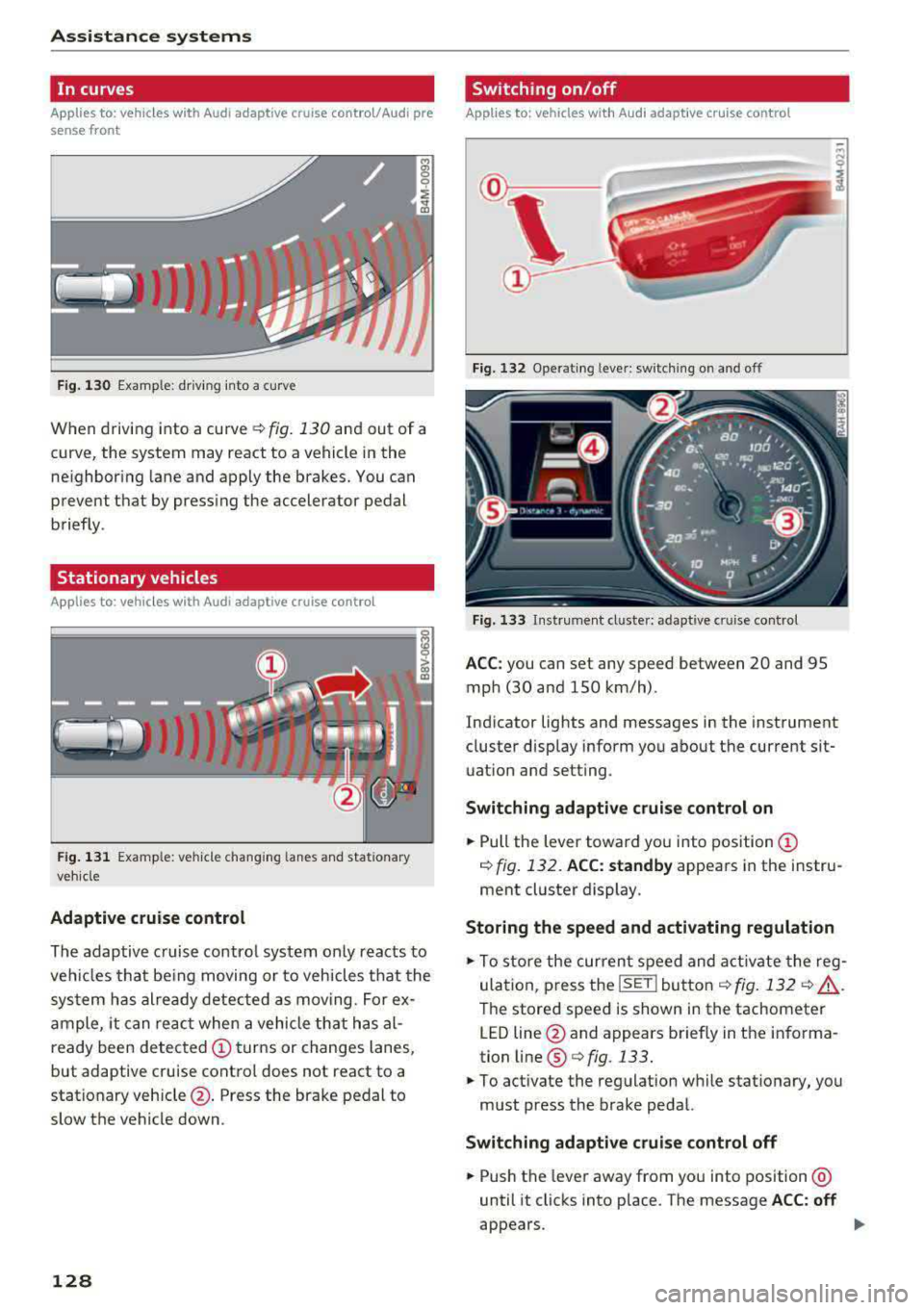
Fig . 130 Example: dr iv ing into a curve
When driving into a curve r:!;> fig. 130 and out of a
curve, the system may react to a vehicle in the
ne ighbor ing lane and apply the brakes. You can
prevent that by pressing the accelerator pedal briefly .
Stationary vehicles
Applies to: vehicles with Audi adaptive cruise control
))))
Fig. 131 Example: veh icle changing lanes and stationary
veh icle
Adaptive cruise control
The adaptive cruise control system only reacts to
ve hicl es that being moving or to vehicles that the
system has already detected as moving. For ex
ample, it can reac t when a vehicle that has al
ready been detected
@turns or changes lanes,
but adaptive cruise control does not react to a
stationary vehicle @. Press the brake pedal to
slow the vehicle down.
128
Switch ing on /off
Applies to: vehicles with Audi adaptive cruise control
Fig. 132 Ope rating leve r: sw itching on and o ff
Fig. 133 Instrument cl uste r: ad apt ive c ruise contro l
ACC: you can set any speed between 20 and 95
mph (30 and 150 km/h) .
Indicator lights and messages in the instrument
cluster disp lay inform you about the current sit
uation and setting .
Switching adaptive cruise control on
.,. Pull the lever toward you into position@
¢ fig. 132. ACC: standby appears in the instru
ment cluster display.
Storing the speed and activating regulation
.,. To store the current speed and activate the reg
ulation, p ress the
ISE TI button ¢ fig. 132 r:!;> .&,.
The stored speed is shown in the tachometer
LED line @and appears briefly in the informa
tion line ®
Q fig. 133.
.,. To activate the regulation while stationary, you
must press the brake pedal.
Switching adaptive cruise control off
.,. Push the lever away from you into position @
until it clicks into place . The message ACC: off
appears .
Page 131 of 400
a, a, ..... N
" N ..... 0 N > 00
The stored speed in the LED line is erased.
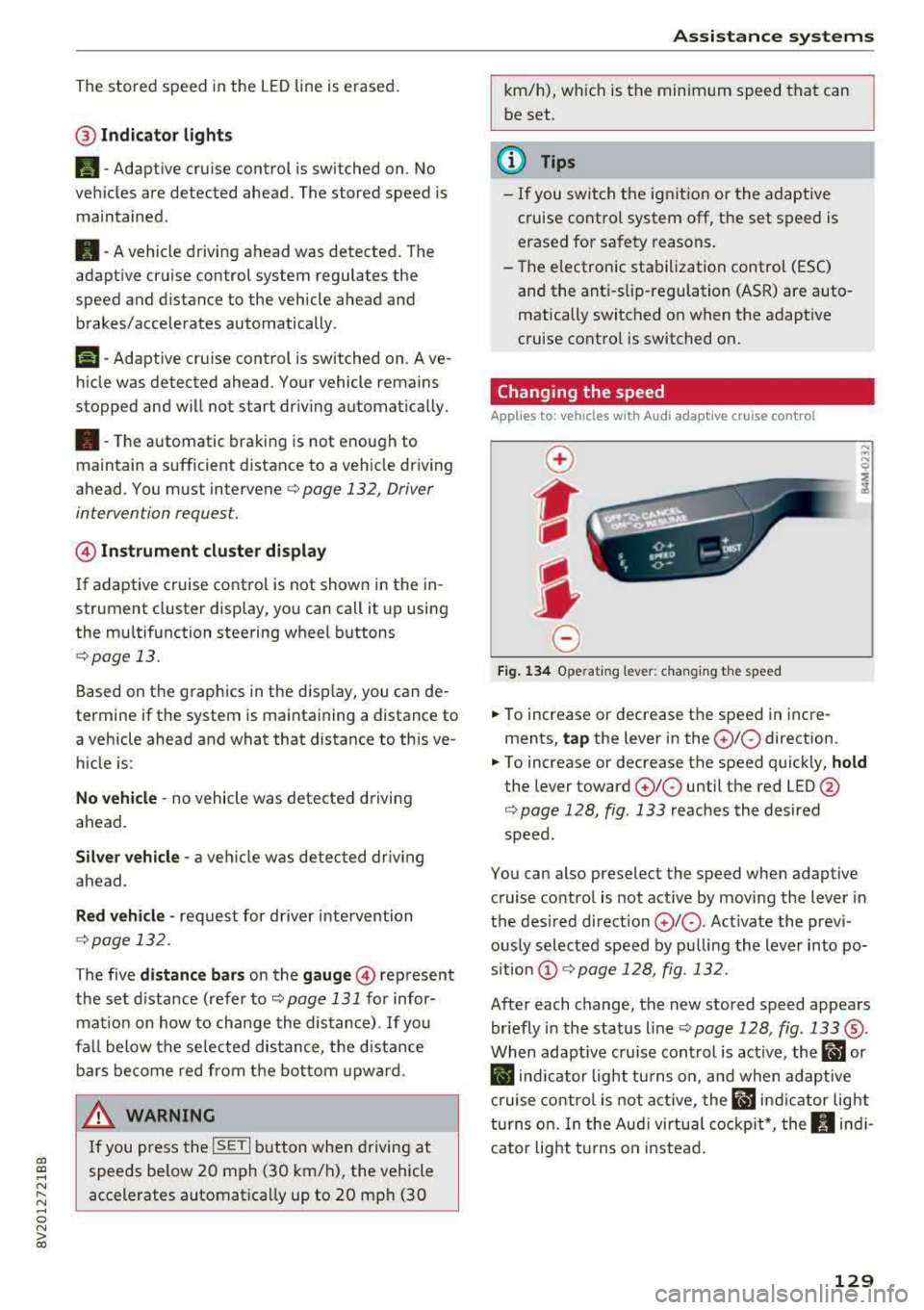
@ Indicator lights
It -Adaptive cruise control is switched on. No
vehicles are detected ahead. The stored speed is
maintained .
B-A vehicle driving ahead was detected. The
adaptive cruise control system regulates the
speed and distance to the vehicle ahead and
brakes/accelerates automatically.
r51 -Adaptive cruise control is switched on. Ave
hicle was detected ahead. Your vehicle remains
stopped and will not start driv ing automat ically.
•-The automatic braking is not enough to
maintain a sufficient distance to a veh icle driving
ahead. You must intervene
c::> page 132, Driver
intervention request.
@ Instrument cluster display
I f adaptive cruise control is not shown in the in
strument cluster display, yo u can call it up using
the mu ltifunction steering wheel buttons
c::> page 13.
Based on the g raphics in the disp lay, you can de
termine if the system is maintaining a distance to
a vehicle ahead and what that distance to th is ve
hicle is:
No vehicle -no vehicle was detected driving
ahead.
Silver vehicle -a veh icle was detec ted dr iv in g
ahead .
Red vehicle -request for driver intervention
<=:>page 132 .
The five distance bars on the gauge © represent
the set d istance (refer to
c::> page 131 for infor
mat ion on how to change the distance) .
If you
fal l below the selected distance, the distance
bars become red from the bottom upward.
A WARNING
If you press the !SETI button when driving at
speeds below 20 mph (30 km/h), the vehicle
accelerates automatically up to 20 mph (30
Assistance systems
km/h), which is the minimum speed that can
be set.
(D Tips
-If you switch the ignition or the adaptive
cruise control system off, the set speed is
erased for safety reasons .
-The e lectronic stabilization control (ESC)
and the anti-slip -regulation (ASR) are auto
matically switched on when the adaptive
cruise control is switched on.
Changing the speed
Applies to: vehicles with Audi adaptive cruise control
0
f
J
0
Fig. 134 Operat ing lever: changing the speed
.. To increase or decrease the speed in incre
ments,
tap the lever in the 0 10 direction .
.. To increase or decrease the speed quickly, hold
the lever toward 010 until the red LED @
c::> page 128, fig. 133 reaches the desired
speed.
You can also preselect the speed when adaptive cruise control is not active by moving the lever in
the desired direction
0 10 . Act ivate the previ
ously selected speed by pulling the lever into po
s ition
@ c::> page 128, fig . 132.
After each change, the new stored speed appears
briefly in the status line
c::> page 128, fig. 133 ®·
When adaptive cru ise control is active, the ill or
• indicator light turns on, and when adaptive
cruise control is not active, the
ill ind icator light
turns on. In the Audi virtual cockpit*, the
II indi
cator light t urns on instead.
129