distance sensor AUDI A3 SEDAN 2017 Owners Manual
[x] Cancel search | Manufacturer: AUDI, Model Year: 2017, Model line: A3 SEDAN, Model: AUDI A3 SEDAN 2017Pages: 400, PDF Size: 67.32 MB
Page 44 of 400
Opening and closin g
® Central switch* for opening or closing a ll side
windows at the same time
A WARNING
- Always remove the ignition key when you
leave your vehicle, even for a short period of
time. This applies particularly when children remain in the vehicle. Otherwise the chil
dren could start the engine or operate e lec
trical equipment such as power windows,
wh ich increases the r isk of injury. The power
windows continue to function until the dr iv
er's door or front passenger's door has been
opened .
- Pay ca refu l attent ion when closing the win
dows. Pinching cou ld cause serious injuries .
- When locking the vehicle from outside, the
vehicle must be unoccupied since the win
dows can no longer be opened in an emer
gency.
(D Tips
After turning the igni tion off you can still
open and close the windows for approximate ·
ly 10 seconds . The power w indows do not
switch off until the driver's door or front pas
senger's door has been opened.
Convenience opening/closing
App lies to: ve hicles w ith conve nien ce opening/clos ing
-
All of the windows and the panorama glass roof*
can be opened/closed at the same time.
For power top conven ience opening/closing, note
the information
in c:> page 45 .
Convenience opening feature
.,. Press and hold the open butto n[@] on the re
mote control key until all w indows and the pan
o rama g lass roof* have reached the desired po
sition . Or
.,. Hold the key in the driver's door lock unti l all
windows and the panorama glass roof * have
reached the desired pos ition.
42
Convenience closing fe ature
.,. Press the ~ button on the remote cont rol key
until a ll windows and the panorama g lass roof*
are closed
c:> A_ . Or
.,. Applies to: vehicles with convenience key: touch
the sensor on one of the front door handles and
cont inue touching it unti l all of the windows
and the panorama glass roof* are closed. Do
not place your hand in the door handle when
doing this .
.,. Hold the key in the dr ive r's door lock in the lock
position u ntil all w indows and the panorama
glass roof * are closed
c:> A_ .
The function can be sw itched on/off in the Info
ta inment system
c:> poge 38.
A WARNING
- Never close the w indows or panorama glass
roof* ca relessly or in an uncontrolled man
ner, because this increases the risk of injury.
- For secur ity reasons, the windows and the
pano rama g lass roo f* can only be opened
and closed with the remote control key at a
maximum distance of approximately 6.5
feet (2 m) away from the vehicle. Always
pay attention when using
the [@] button to
close the windows and the panorama g lass
roof* so that no one is pinched. The closing
process w ill stop immediately when
the@
button is re leased.
Correcting power window malfunctions
You con reactivate the one -touch up/down func
tion if it malfunctions .
.,. Pull the power window switch until the window
is completely raised .
.,. Release the switch and pull it up aga in fo r at
least one second .
Page 129 of 400
a, a, ..... N
" N ..... 0 N > 00
Which functions can be contr oll ed?
When you sw itch adaptive cruise control on, you
can set the current speed as the "control speed"
¢ page 128 , Switching on/off .
When driving, you can stop cruise co ntro l
¢ page 130 or change the speed ¢ poge 129 at
any time .
You can also set the distance to the veh icle ahead
and set t he adaptive cruise contro l dr iv ing pro
g ram
¢ page 131 .
General information
Applies to: vehicles with Audi adaptive cruise control/Audi pre
sense front
F ig. 129 Fro nt o f vehicl e: sensor
T he radar sensor area ¢ fig . 129 mus t not be cov
ered with st ickers, deposits or any other obstruc
tions as it may impair the function of the adap tive c ruise control or the pre sense front . For in
formation on clean ing ,
see ¢ page 347 . The
same applies fo r any modifications made in the
front area .
The funct ion of the adaptive cruise contro l sys
tem or pre sense fron t is l imited in some cond i
tions :
- Vehicles can only be detected when they are
within the senso r
range¢ page 126, fig . 128 .
- The system has a limited abil ity to detect
vehicles that are a short distance ahead, off to
t h e side of your vehicle or moving into your
lane .
- Objects that are difficu lt to detect such as mo
torcycles, vehicles with high ground clearance
or an overhanging load are detected late or not detected at all .
- When driving through curves
¢ page 128 .
Ass is ta nce syst ems
-When the vehicle is stationary ¢ page 128.
A WARNING
Always pay attention to the traffic around you
when adaptive cruise control is switched on.
As the driver , you are still responsible for your
own speed and the d istance to other veh icles .
The adaptive cruise control is used to ass ist
you . The driver m ust always take action to
avo id a co llision . The d river is always responsi
b le for b raking at the co rrect t ime.
- For safety reasons, do not use adaptive
cru ise control when driving on roads with
many cu rves , when the road s urface is in
poor conditio n and/or in bad wea ther (such
as ice, fog, gravel, heavy rain and hyd roplan
ing) . Using the system under these condi
tions could result in a co llision.
- Sw itch adaptive cruise control off tempora
rily when driving in turning lanes, on ex pressway ex its or in construction zones . This
prevents the veh icle from acce lerating to
the stored speed when i n these situat ions.
- The adaptive cruise contro l system will not
brake by itself if you put you r foot on the ac
celerator pedal. Doing so can override the
speed and d istance regulat ion .
- Adapt ive cruise control does not respond to
peop le, animals, or crossing or oncoming
objects .
- The funct ion of the radar sensors can be af
fected by reflective objects such as gua rd
rails, the en trance to a t unnel, heavy rain or
ice .
(D Note
The sensor can be displaced by impacts or
damage to the bumper, wheel housing and underbody. This can impair the adaptive
cruise control. Have an authorized A udi dealer
o r authorized Audi Service Facility check t heir
f u nct ion.
127
Page 135 of 400
CXl CXl .... N ,.__
N .... 0 N > 00
fall below t he warn ing t hreshold for an ex
tende d pe riod of time .
Messages
Applies to: veh icles with Audi adaptive cruise control
ll'J ACC: unavailable
The system ca nnot guaran tee that it will detec t
ve hicl es co rrectly a nd it h as sw it c he d off . T he
sensor was moved or is fau lty . Dr ive to an au tho r
i z ed A udi dealer or au thori zed A udi Service Fac ili
ty immediately to have the malfunction cor rect
ed .
Ill ACC : currently unavailable . No sensor vision
II ACC: currently unavailable. Sensor vision re
stricted due to surroundings . See owner's man
ual
This message appears if the sensor view is ob
structed, for example by leaves, snow, heavy
sp ray o r d i rt. C lean the sensor
r:::;, page 12 7,
fig. 12 9.
II ACC : currently unavailable . Gradi ent too
steep
The road exceeds the maximum possib le ang le
for safe adaptive cruise control operation . The
adapt ive cr uise control cannot be sw itched on .
II ACC: only available in D, Sor M
Select the D/S or M se lector lever posi tion.
Ill ACC : parking brake applied
The adaptive cruise co ntro l system switches off
automatically if the parking brake is set. T he
adapt ive cr uise control is ava ilable aga in a fter re
l easi ng the par king brake .
ll'J ACC: currently unavailable. Stabilization
c ontrol input
T his message appea rs if the Electronic Stabiliza
tion Control (ESC) is tak ing action to stabili ze the
ve hicle. In this case, adapt ive cruise control
sw itches off automatically.
II) ACC off: manual control!
This message appea rs if the veh icle rolls back
when sta rting on a slight in cline , even though
Assistance systems
ACC is ac tive . Press t he b rake pedal to preven t
t h e vehi cle from rolling o r starting to move.
Distance warning: malfunction! Please contact
Service
T he system canno t gua rantee that it will detect
vehicles cor rect ly and it has switc hed off. The ra
dar sensor was move d or is faulty. Drive to an a u
thorized Aud i de aler o r au thori zed Audi Service
F acility immed iate ly to have the ma lfunction co r
rected.
Distance warning: currently unavailable. Sensor
view restricted due to surroundings.
T h is message appears if the senso r view is ob
str ucted, for examp le by leaves, snow, heavy
s pra y or dirt. Cle an t he
sensor <> page 12 7,
fig. 129 .
Distance warning: currently unavailable. See
owner's manual
This message appears if the system has a tempo rary fa ilure.
If this occurs m ultiple t imes, drive to
an a uth orized Aud i dea le r or a uth orized Audi
Se rvice Facility i mmed ia te ly to h ave the ma lfu nc
t ion co rre cte d.
Fasten seat belt
The system is not complete ly ava ilable if the dr iv
er 's seat belt is unfastened.
Stat. obj. ahead
T h is m ess age appears if yo u wo uld like to switch
t h e sys tem on and t here is a s ta ti onary objec t di
rectly in front o f yo ur vehicle.
Door open
The system is not available whe n the vehicle is
stationary and the driver's door is open.
Audi pre sense
Introduction
Appl ies to : vehicles wit h Aud i pre sense
Within t he limits of the system, the pre sense
f unct ions can initiate measures in pa rtic ularly
dange rous situations to protect the vehicle pas-
sengers and other road users.
..,.
133
Page 148 of 400
Parking systems
Parking systems
General information
A ppl ies to: ve hicles w ith parking system plus/rearview cam
era
Depending on your vehicle's equipment , various
parking aids will help you when parking and ma
neuvering.
The
parking system plus assists you when park
ing by audibly and visually indicating objects de
tected
in front of and behind the vehicle
¢page 147.
The rearview camera shows the area behind the
vehicle in the Infotainment system display. This display assists you when you are cross or parallel parking. The parking system plus functions are
also available ¢
page 148.
A WARNING
-
-Always look for traffic and check the area
around your vehicle by looking at it directly
as well. The parking system cannot replace
the driver's attention. The driver is always
responsible when entering or leaving a park
ing space and during similar maneuvers .
-Please note that some surfaces, such as
clothing, are not detected by the system .
-Sensors and cameras have blind spots in
which people and objects cannot be detect
ed . Be especially cautious of small children
and animals .
-Always pay attention to the area around the
vehicle -us ing the rearview mirror, too.
-The sensors can be displaced by impacts or
damage to the radiator grille, bumper,
wheel housing and the underbody . The park
ing system may be impaired as a result.
Have an authorized Audi dealer or author
ized Audi Service Facility check their func
tion .
(D Note
-Some objects are not detected or displayed
by the system under certain circumstances:
-objects such as barrier chains, trailer draw
bars, vertical poles or fences
146
-objects above the sensors such as wall ex
tensions
-objects with certain surfaces or structures
such as chain link fences or powder snow
-If you continue driving closer to a low ob
ject, it may disappear from the sensor range. Note that you will no longer be
warned about this obstacle.
-Keep enough distance from the curb to re
duce the risk of damage to the rims.
(D Tips
-T he system may provide a warning even
though there are no obstacles in the cover age area in some situations, such as:
-certain road surfaces or when there is tall
grass .
-external ultrasonic sources such as from
cleaning vehicles.
-in heavy rain, snow, or thick vehicle ex
haust.
-We recommend that you practice parking in
a traffic-free location or parking lot to be
come familiar with the system . When doing
this, there shou ld be good light and weath
er conditions.
-You can change the volume and pitch of the
signals as well as the display¢
page 150.
-What appears in the infotainment display is
somewhat time-delayed .
-The sensors must be kept clean and free of
snow and ice for the parking aid to operate .
Page 149 of 400
Parking system plus
Description
Applies to: vehicles with parking system plus
Parking system plus provides audio and visual
signals when parking.
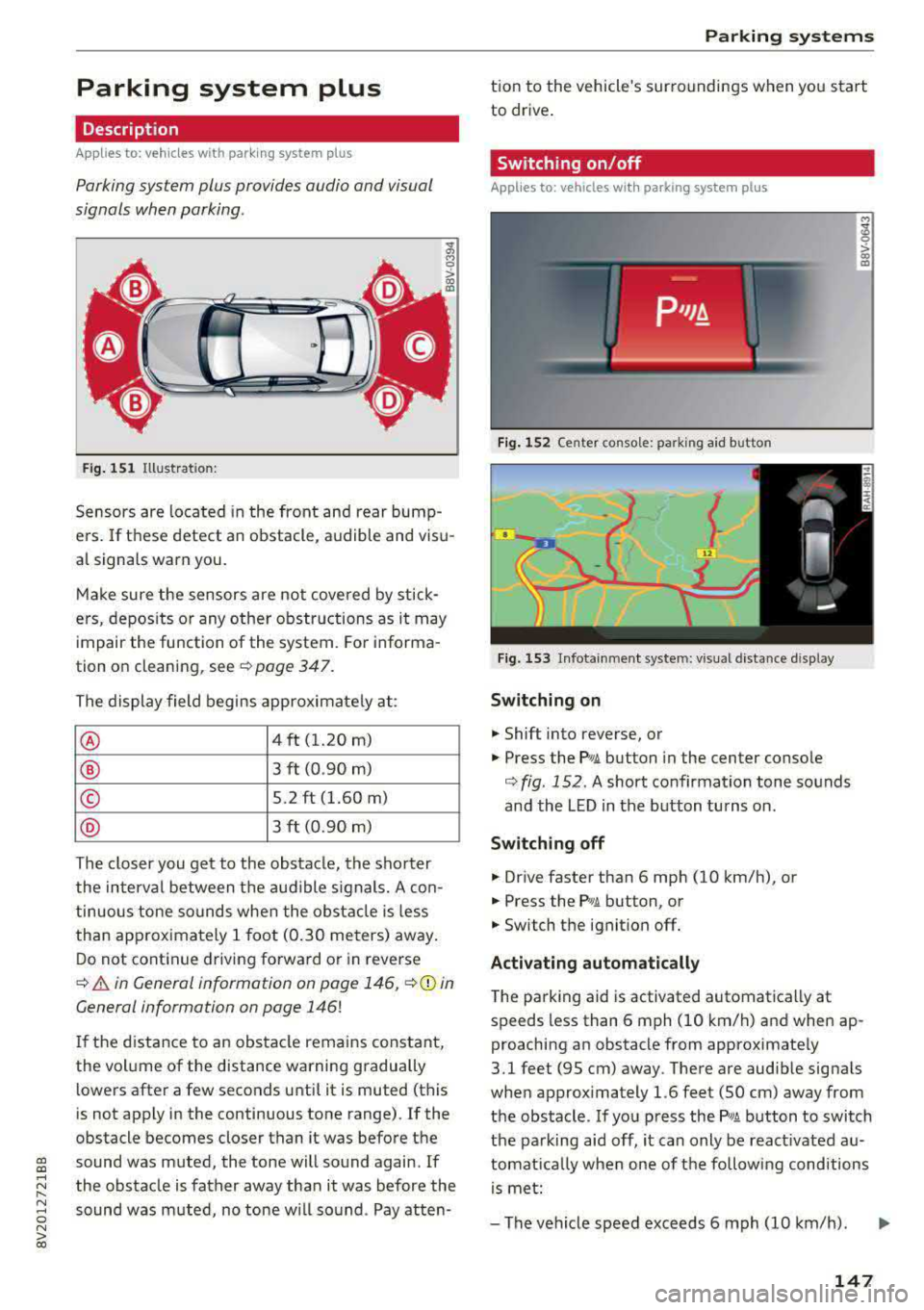
Fig. 151 Illustrat ion:
Sensors are located in the front and rear bump
e rs. If these detect an obstacle, audible and visu
al signa ls warn you.
Make sure the sensors are not covered by stick
ers, deposits or any other obstructions as it may
impair the function of the system. For informa
tion on cleaning, see
¢ page 347.
The display field begins approximately at:
® 4 ft (1.20 m)
® 3 ft (0.90 m)
© 5.2 ft (1.60 m)
® 3 ft (0.90 m)
The closer you get to the obstacle, the shorter
the interval between the audible signals. A con
tinuous tone sounds when the obstacle is less
than approximately 1 foot (0.30 meters) away.
Do not continue driving forward or in reverse
¢ & in General information on page 146, ¢0 in
General information on page 146!
If the distance to an obstacle remains constant,
the volume of the distance warning gradually
lo wers after a few seconds until it is muted (this
is not apply in the continuous tone range).
If the
obstacle becomes closer than it was before the
gi sound was muted, the tone will sound again. If
~ the obstacle is father away than it was before the
~ sound was muted, no tone will sound . Pay atten-o N > 00
Parking systems
tion to the vehicle's surroundings when you start
to drive.
Switching on/off
Applies to: vehicles with parking system plus
Fig. 152 Ce nter console: park ing aid b utton
Fig. 153 Infota inmen t system: visual distance display
Switching on
.,. Shift into reverse, or
.,. Press the P•1A button in the center console
¢ fig. 152 . A short confirmation tone sounds
and the LED in the button turns on.
Switching off
.,. Drive faster than 6 mph (10 km/h), or
.,. Press the Pwi button, or
.,. Switch the ignit ion off.
Activating automatically
The parking aid is activated automatically at
speeds less than 6 mph (10 km/h) and when ap
proaching an obstacle from approximately
3.1 feet (95 cm) away. There are audib le signa ls
when approximately 1.6 feet (50 cm) away from
the obstacle. If you press the
P wA button to switch
the parking aid off, it can only be react ivated
au
tomat ica lly when one of the following conditions
is met:
-The vehicle speed exceeds 6 mph (10 km/h).
147
Page 157 of 400
CXl CXl .... N ,.__
N .... 0 N > 00
Offroad vehicle?
Your Audi is not an offroad vehicle -th ere is not
enough ground clearance . For this reason, avoid
d ifficult terrain.
& WARNING
- Also, in vehicles with all wheel drive, adapt
your driv ing style to the current road and
traff ic conditions. Do not let the increased
safety provided tempt you into taking risks,
because th is increases the r isk of an acci
dent .
-The braking ability of your veh icle is limited
to the tract ion of the wheels . In this way, it
is not diffe rent from a two whee l dr ive vehi
cl e. Do not be tempted to accelerate to a
high speed when the road is slippe ry, be
cause this increases the risk of an accident.
-Note that on wet streets, the front wheels
c an "hyd roplane" if dr iving at speeds that
are too high . Unlike front whee l drive
vehicles, the eng ine does not rev higher su d
denly when the vehicle begins hyd roplaning .
For this reason, adapt your speed to the
road conditions to reduce the risk of an acc i
dent .
Energy management
The starting ability is optimized
The energy management system manages the
electrical energy distribution and optimizes the
availability of electrical energy for starting the
engine .
When a ve hicl e w ith a co nventional energy sys
tem is not d riven for a long time, the vehicle bat
tery is dra ined by equipment (for example, the
immobilizer). In certain circumstances, there
could may not be enough energy to start the en
g ine.
Your veh icle is equipped with an inte lligent ene r
gy managemen t system for d istr ibuting electrici
ty. This significantly improves the starting ability
and inc reases t he vehicle battery life.
Intellig ent Technology
The ene rgy management system Is made up o f
battery diagnosi s, idling cu rrent management ,
and dynamic energy management .
Battery diagnosis
T he battery diagnos is determines the vehicle ba t
te ry c harge level. The sensors de termine the bat
te ry vo ltage, the batte ry cu rrent, and the batte ry
temperat ure. The cur rent charge level and the
performa nee of the vehicle battery a re deter
mined based on this.
Idling current management
T he idling cur rent management decreases the
energy used while parked . With the engine
switched off, it ma nages the energy distribution
to the d ifferent e lectr ica l components . Data from
the battery d iagnosis is taken into account for
th is.
Depending on the vehicle battery charge level,
electr ical eq uipment is switched
off one item af
ter the other to prevent the vehicle battery from dra ining and to ma intain the starting ab ility .
Dynamic energy manag ement
While driving, dynamic ene rgy management dis
t ributes the appropr iate amo unt of energy to the
electrical eq uipment. It contro ls the battery
charge level so that the amount of energy is not
greater than the amount being generated in or
der to maintain an optimal vehicle battery charge
level.
(D Tips
-Energy management cannot overcome the
laws of physics . Note that the charge level
and length of the veh icle bat tery life are
li m ited.
-Whe n the sta rting ability is endangered, the
i•) i n dicator light t urns on r=v pag e 29.
What you should know
Maintaining the starting ability is the highest
priority .
A lot of stress is placed on the veh icle battery
whe n driving short distances, during city driving,
..,.
155
Page 384 of 400
Index
A
A/C (automatic climate control system) . . . . 71
Accessories . . . . . . . . . . . . . . . . . . . . . . . 64, 380
Active lane assist
refer to Audi active lane assist . . . . . . . . . 136
Active rollover protection system . . . . . . . . 256
Retracting rollover protection.......... 257
Adaptive cruise control
refer to Audi adaptive cruise control . . . . 126
Adaptive light
refer to Audi adaptive light . . . . . . . . . . . . . 51
Adjusting the air distribution Automatic climate control system . . . . . . . 72
Adjusting the air vents . . . . . . . . . . . . . . . . . . 73 Automatic climate control system . . . . . . . 72
Adjusting the sound . . . . . . . . . . . . . . . . . . . 245
Advanced key
refer to Convenience key . . . . . . . . . . . . . . . 78
Airbag .... .. .. ............... .... ... 267
Airbag system .. .... .............. 267,287
Advanced Airbag System components . . . 274
Care . . . . . . . . . . . . . . . . . . . . . . . . . . . . . . 282
Ch ildren . . . . . . . . . . . . . . . . . . . . . . . . . . . 294
Ch ild restraints . . . . . . . . . . . . . . . . . . . . . 295
Components (front airbags) . . . . . . . . . . . 274
Danger of fitting a child safety seat on the
front passenger seat . . . . . . . . . . . . . . . . . 268
Disposal . . . . . . . . . . . . . . . . . . . . . . . . . . . 282
Front airbags . . . . . . . . . . . . . . . . . . . . . . . 272
How do the front airbags work? . . . . . . . . 277
How many airbags does my vehicle have? 274
How the Advanced Airbag System compo -
nents work together . . . . . . . . . . . . . . . . . 276
Important safety instructions on the knee
airbag system . . . . . . . . . . . . . . . . . . . . . . . 285
Knee airbags . . . . . . . . . . . . . . . . . . . . . . . . 283
Monitoring . . . . . . . . . . . . . . . . . . . . . . . . . 279
PASSENGER AIR BAG OFF light . . . . . . . . . 279
Repairs . . . . . . . . . . . . . . . . . . . . . . . . . . . . 282
Safety instructions . . . . . . . . . . . . . . . . . . . 281
Side airbags . . . . . . . . . . . . . . . . . . . . . . . . 285
Warning/Indicator lights . . . . . . . . . . . . . 279
When must the system be inspected? . . . 279
Air pressure (tires) . . . . . . . . . . . . . . . . 336, 345
A lignment pin (tire change) . . . . . . . . . . . . . 353
All-weather lights..... ......... .... .. .. 51
382
All season tires
All wheel drive 342
refer to quattro (all wheel drive) . . . . .
. . 154
AMI
refer to Audi music interface . . . . . . . 228, 229
Android Auto
refer to Audi smartphone interface . . . . . 239
Ant i-freeze
Windshield washer system . . . . . . . . . . . . 327
Anti -Lock Braking System (ABS) . . . . . . . . . 151
Anti-Slip Regulation (ASR) . . . . . . . . . . . . . . 151
Apple CarP lay
refer to Aud i smartphone interface . . . . . 239
Audi active lane assist . . . . . . . . . . . . . . . . . 136
Cleaning the camera area . . . . . . . . . . . . . 348
Messages . .. .. .. ... .... ....... .... .
Audi adaptive cruise control ........... . .
Cleaning the sensor . .. .. ........... . . 138
126
348
Distance display, distance warning ..... . 132
Messages . . . . . . . . . . . . . . . . . . . . . . . . . . 133
Audi adaptive light . . . . . . . . . . . . . . . . . 51, 143
Audi connect e-tron services . . . . . . . . . . . . 198
Doors and lights .. .. .. .. ........... .. 198
Audi connect (Infotainment) ........ 190,195
Data protection . . . . . . . . . . . . . . . . . . . . . 196
Services overview . . . . . . . . . . . . . . . . . . . . 191
Start ing . . . . . . . . . . . . . . . . . . . . . . . . . . . 191
Audi drive select . . . . . . . . . . . . . . . . . . . . . . 143
Audi magnetic ride
refer to Suspension control . . . . . . . . . . . . 143
Audi music interface . . . . . . . . . . . . . . . . . . . 228
Audi music stream
refer to Wi-Fi . . . . . . . . . . . . . . . . . . . . . . . 226
Audio files . . . . . . . . . . . . . . . . . . . . . . . . . . . 230
Audio player Bluetooth audio player . . . . . . . . . . . . . . . 225
Wi-Fi audio player . . . . . . . . . . . . . . . . . . . 226
Audio track . . . . . . . . . . . . . . . . . . . . . . . . . . 233
Audi pre sense . . . . . . . . . . . . . . . . . . . . . . . 133
Messages . . . . . . . . . . . . . . . . . . . . . . 133, 136
Settings . . . . . . . . . . . . . . . . . . . . . . . . . . . 136
Audi Service Repair Manuals and Literature 378
Audi side assist . . . . . . . . . . . . . . . . . . . . . . . 139
Cleaning the sensors . . . . . . . . . . . . . . . . . 348
Messages . ....... ... ..... .........
.
Rear cross-traffic assist ... ........... . 143
142