brakes AUDI A3 SEDAN 2018 User Guide
[x] Cancel search | Manufacturer: AUDI, Model Year: 2018, Model line: A3 SEDAN, Model: AUDI A3 SEDAN 2018Pages: 404, PDF Size: 62.3 MB
Page 123 of 404
u. 00 .-< N l' N .-< 0 N > 00
the cruise control from braking. This is be
cause p ressing the acce lerato r pedal over
rides the cruise contro l system.
- If a brake system ma lf u nction such as over
heating occurs when the cruise contro l sys
tem is switched on , the braking function in
the system may be switched off . The rest of
the cr uise control system f unctions remain
act ive as long as
the @;(i)~14 (USA models) /
lll (Can ada models) indicato r light is o n.
@ Note
Before driving downhill a long distance on a
s teep hill, decrease yo ur speed and select a
lower gear. This makes use of the eng ine
b rak ing effect and re lieves the bra kes.
(D Tips
The b rake ligh ts turn on w hen the brakes a re
act ivated .
Changing the speed
Applies to: vehicles with cruise control system
"'T o inc rease o r decrease the speed in incre
ments,
tap t he lever in the 0 10 d irec tion
Q page 12 0, fig. 1 21 .
.. To increase or decrease the speed quickly, hold
the leve r in the 0 / 0 di rect io n until t he de
s ired speed is reached.
Overriding the speed
Applies to: vehicles with cruise control system
You can press the accelerator pedal to increase
your speed, for example if you want to pass someo ne. The s peed yo u set ea rlier will resume
as soo n as yo u release the accelerator pedal.
H owever, if you are driving cons iderably faster
tha n the stored s peed for a long period of time,
the c ruise cont rol system will tempora rily switch
off.
Th e@;(l)~i4 (USA models) 1B (Canada mod
e ls) indica to r li ght in the ins trumen t cluste r
turns off and t he stored s peed is main taine d.
A ss istance systems
Preselecting a speed
Applies to: vehicles with cruise control system
You can pre-select your desired speed when the
vehicle is stationary .
"'Switch the ignit ion on.
"' Pull the lever into pos ition (D Q page 120 ,
fig . 121 .
.. To increase or decrease the speed, tap the lever
in the
0 10 d irection .
This function makes it possible, for example, to
save the speed you want before driving on the highway . Once on the highway, activate the
cr uise co ntro l system by p ulling the lever towa rd
t h e position
(D .
Switching off
Applies to: vehicles with cruise control system
Deactivating temporarily
"' Press the br ake pe dal, or
"' Press the lever into position @(not clicked in to
p lace)
Qpage 1 2 0, fig. 1 21, or
Switching off completely
"' Press the lever into pos ition @(clicked into
p lace), o r
"'Swi tch the ignit ion off.
T he speed you stored will be ma intained if the
cr uise co ntro l has been switche d off tempora rily.
T o resume the sto red speed, re lease the br ake
ped al and pull the lever to posi tion
(D .
Switch ing the ignition off w ill erase the stored
speed.
Switching off automatically
[~;(1)~14 ( USA models )/EI (Canada models )
Crui se control syst em: currently unavailable .
Se e owner's manual
The cruise cont rol system was automatically
turned off because the system has detected a
malfu nction th at is impa iring the c ruise control
func tion. Try switching the cruise contro l system
o n aga in later .
.,.
121
Page 125 of 404
u. 00 .-< N l' N .-< 0 N > 00
Lap statistics
Applies to: vehicles with lap timer
Displaying lap statistics
You can d isplay the number of laps d riven, the
fastest
l ap "+ ", the s lowest lap "- ", and the ave r
age time
" 0 " in the inst rument cluste r.
.,. Applies to: vehicles with analog instrument
cluster: select
Statistic s in the menu using the
mult ifunction steering w heel.
.,. Applies to: vehicles with Audi virtual cockpit: on
the m ult if u nct io n steer ing whee l, select: left
contro l bu tton
> Lap sta ti stic s o r Stati stics.
.. T urn the thumbwhee l down or up to disp lay the
individ ua l lap times.
.. To return to the lap timing that was begun,
press the left thumbwheel.
Res etting lap statistics
Applies to: vehicles with Audi virtual cockpit
.. On the multifunction steering whee l, select:
the right contro l button
> Re set stati stic s.
(D Tips
-The lap statistics lis t the lap times for t he
l ast 30 laps.
- Applies to: vehicles with Audi virtual cock
pit: the fastest and slowest lap times from
u p to 99 timed laps will be disp layed .
Audi adaptive cruise
control
Description
Applies to: vehicles with Audi adaptive cruise control
)
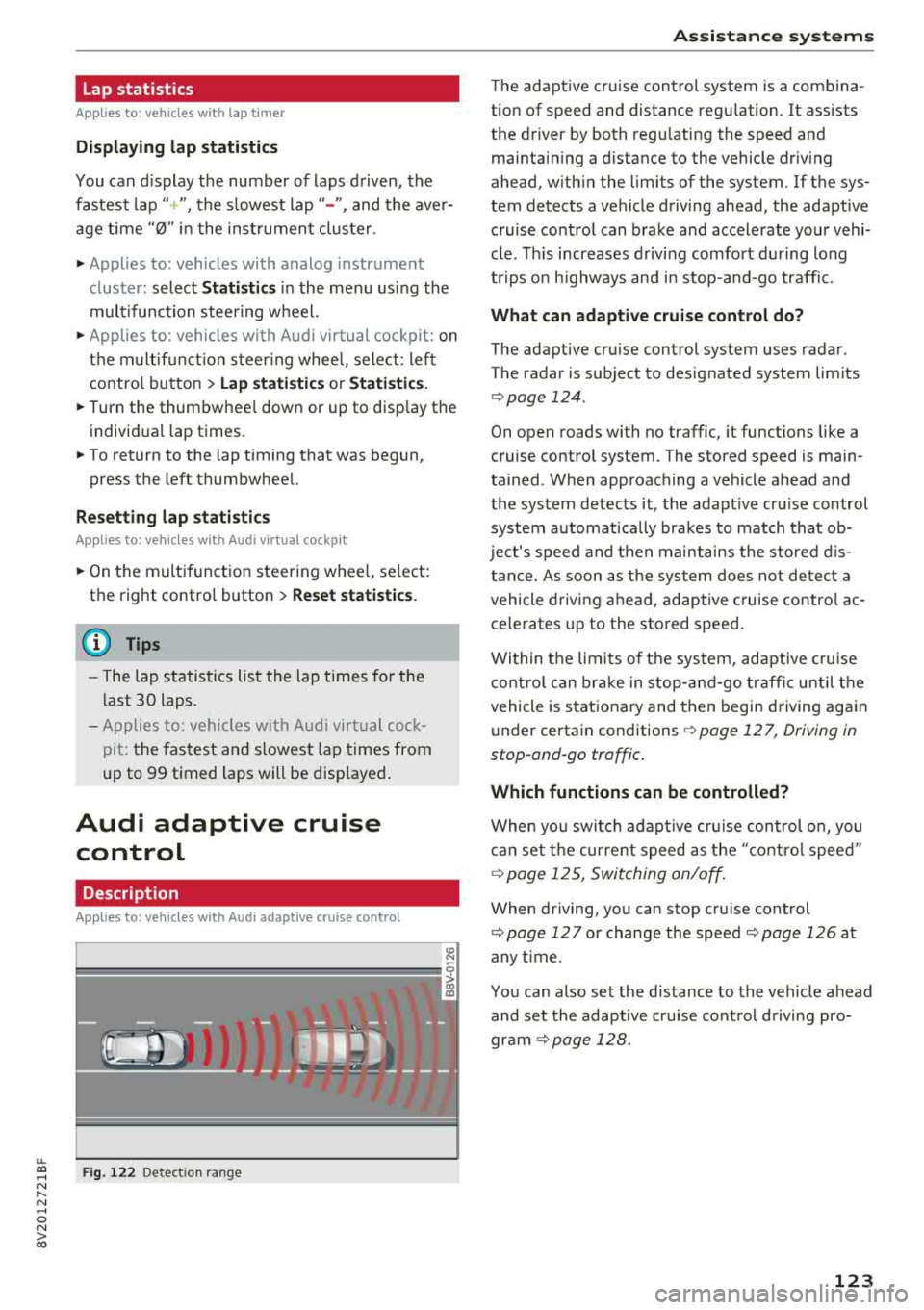
F ig . 122 De tect ion range
A ss istance systems
T he adaptive cruise cont rol system is a combina
tion of speed and distance regu lation.
It assists
the driver by both regu lating the speed and
maintain ing a d istance to the vehicle driv ing
ahead, w ith in the limits of the system. If the sys
tem detects a vehicle driving ahead, the adaptive cruise control can brake and accelerate your vehi
cle . T his increases d riving comfort during long
trips o n highways and in stop-and-go traffic.
What can adap tiv e crui se con trol do ?
The adaptive cru ise control sys tem uses radar .
The radar is subject to designated system limits
¢ page 124 .
On open roads with no traffic, it functions like a
cruise contro l system . The stored speed is main
ta ined . When approaching a vehicle ahead and
the system detects it, the adapt ive cruise control
system automat ically brakes to match that ob
ject's speed and t hen maintains the stored d is
t a nce. As soon as t he sys tem does not de tec t a
vehicle driving ahead, adaptive cruise cont ro l ac
ce lerates up to the stored speed .
Within the lim its of t he sys tem, adapt ive cru ise
contro l can brake in stop -and-go t raff ic until t he
vehicle is s tat iona ry and then begin driving again
under certain conditions ¢
page 12 7, Driving in
stop-ond-go traffic .
Which functions can be controlled?
When you switc h adap tive cr uise control o n, you
can set the cur rent speed as the "contro l speed"
¢ page 12 5, Switching on/off .
When driving, yo u can stop cru ise cont rol
¢ page 127 or change the speed ¢page 126 at
any t ime .
You can also set the distance to the vehicle ahead and set the adaptive c ruise cont rol d riving pro
gr am
~ page 128.
123
Page 127 of 404
LL co .... N
" N .... 0 N > co
In curves
Applies to: vehicles with Audi adaptive cruise control/Audi pre sense front
Fig. 124 Examp le: driving into a curve
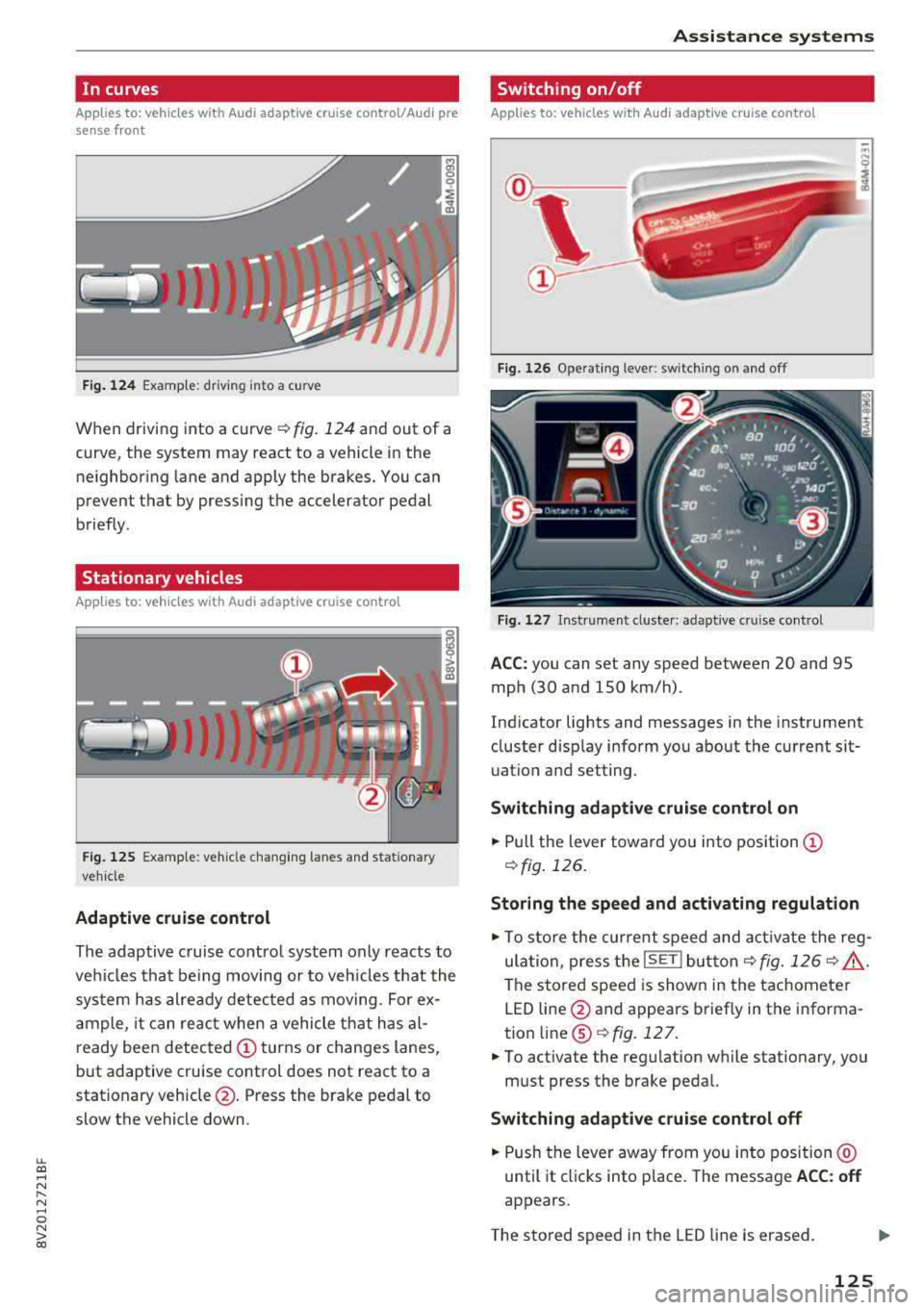
When driving into a curve ¢ fig. 124 and out of a
curve, the system may react to a vehicle in the ne ighboring lane and apply the brakes. You can
prevent that by pressing the accelerator pedal
briefly .
Stationary vehicles
Applies to: vehicles with Audi adaptive cruise control
J))
Fig . 12 5 Example: vehicle c hang ing lanes a nd statio nary
ve hicle
Adaptive cruise control
The adaptive c ruise contro l system only reacts to
ve hicles that be ing moving or to veh icles that the
sys tem has alre ady detected as moving. For ex
a mple, it can reac t when a vehicle that has al
ready been detected
CD turns or changes lanes,
but adaptive cruise control does not react to a
stationary vehicle @. Press the brake pedal to
slow the vehicle down.
A ssi st a nce systems
Switching on/off
Applies to: vehicles with Audi adaptive cruise control
Fig. 126 Ope rat ing lever: switch ing on and off
Fig . 1 27 In strume nt clus te r: adaptive cruise control
A CC: you can set any speed between 20 and 95
mph (30 and 150 km/h) .
Ind icator lights and messages in the instrument
cluster disp lay inform you about the current sit
uatio n and setting.
Switching adaptive crui se control on
"' Pull the lever towa rd yo u into pos ition CD
¢fig . 126.
Storing the speed and activating regulation
"'To store the cur rent speed and act ivate the reg
ula tion, press the
ISE TI but ton¢ fig. 126 ¢ .&_ .
The stored speed is show n in the tachometer
LED line @and appears briefly in the informa
tion
line @¢ fig. 127 .
"'To act ivate the reg ulation while stationary, you
must press the brake pedal.
Swi tching adaptive cruise control off
"' Push the lever away from you into position @
until it cl icks into place. The message
ACC : off
appears.
T he s tored speed in the LED line is erased.
125
Page 128 of 404
Ass is tance sy stem s
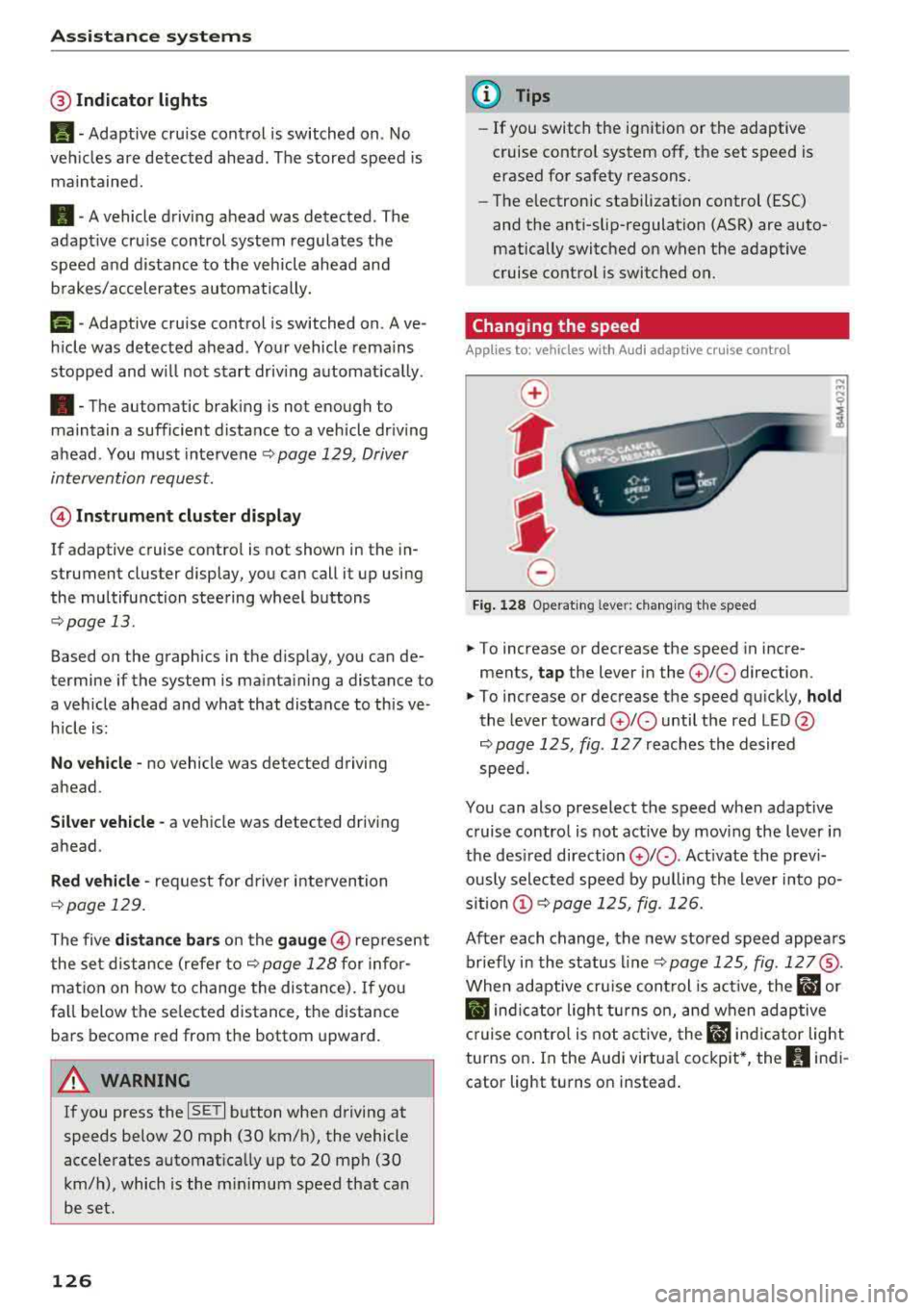
@Indicator lights
Ill-Adaptive cruise control is switched on . No
veh icles are detected ahead . The stored speed is
maintained.
• -A vehicle driving ahead was detected. The
adapt ive cruise control system regulates the
speed and d istance to the vehicle ahead and
brakes/accelerates automatically.
(-) -Adaptive cruise control is switched on. Ave
h icle was detected ahead . Yo ur vehicle remains
stopped and w ill not start driv ing automat ica lly .
• -The automatic braking is not enough to
maintain a sufficient distance to a vehicle dr iv ing
ahead . You must intervene
r:::;, page 129, Driver
intervention request .
© Instrument clu ster di splay
If adaptive cruise contro l is not shown in the in
strument cluster display, you can call i t up using
the multifunction steering wheel buttons
r:::;, page 13 .
Based on the graphics in the d isp lay, you can de
termine if the system is mainta ining a distance to
a vehicle ahead and what that distance to this ve
h icle is:
No vehicle -no vehicle was detected driving
ahead.
Sil ver vehicle -a vehicle was detected driving
ahead.
Red vehicle -request for driver intervention
r:::;, page 129.
The five distance bar s on the gauge@ represent
the set d istance (refer
to r:::;, page 128 for infor
mat io n on how to change the distance). If yo u
fa ll below the se lected distance, the distance
bars become red from the bottom upward.
A WARNING
If you press the ISE TI b utton when driving at
speeds below 20 mph (30 km/h), the vehicle
accelerates automat ica lly up to 20 mph (30
km/h), which is the m inimum speed that can
be set.
126
@ Tips
- If you switch the ignition or the adaptive
cruise control system off, the set speed is
erased for safety reasons.
- The electronic stabilization control (ESC)
and the anti-slip-regulation (ASR) are auto
matically switc hed on when the adaptive
cruise control is switched on.
Changing the speed
Applies to: vehicles with Audi adaptive cruise control
0
f
I
0
Fig . 12 8 Ope rat ing leve r: chang ing the speed
.. To increase or decrease the speed in incre
ments,
tap the lever in the 0 10 direction.
,... ... ,...
i
.. To increase or decrease the speed qu ick ly, hold
the lever toward 0 10 until the red LED @
r:::;,page 125, fig . 127 reaches the desired
speed.
You can also preselect the speed when adapt ive
c ruise control is not active by moving the lever in
the des ired direction
0 10 . Act ivate the prev i
ous ly selected speed by pulling the lever into po
s ition
(D r:::;, page 125, fig. 126.
After each change, the new stored speed appea rs
br iefly in the status l ine
r:::;, page 125, fig . 127@.
When adaptive cru ise cont rol is act ive , the flJ or
• ind icator light turns o n, and when adaptive
c ruise contro l is not a ctive, the
IIJ ind icator light
turns on . In the Audi virtua l cockpit*, the
II indi
cator light turns o n instead .
Page 130 of 404
Ass is tance sy stem s
Interrupting cruise contr ol while driving
• Move the leve r into position @. The message
AC C: s tandb y appears . Or
• Press the brake pedal.
• To resume th e stor ed speed, move the lever in
to position
@ .
Inter rupt ing crui se contr ol when stopped
• Push the lever away from you into position @.
The message
A CC : s tandb y appears.
• To resume cruise control , press the brake pedal
and pull the l ev er toward you into position @.
A WARNING
It is dangerous to activate cruise control and
resume the stored speed when the current
road, traffic or weather conditions do not per
mit this. This increases the risk of an accident.
Setting the distance
App lies to: vehicles with Audi adaptive cruise contro l
,
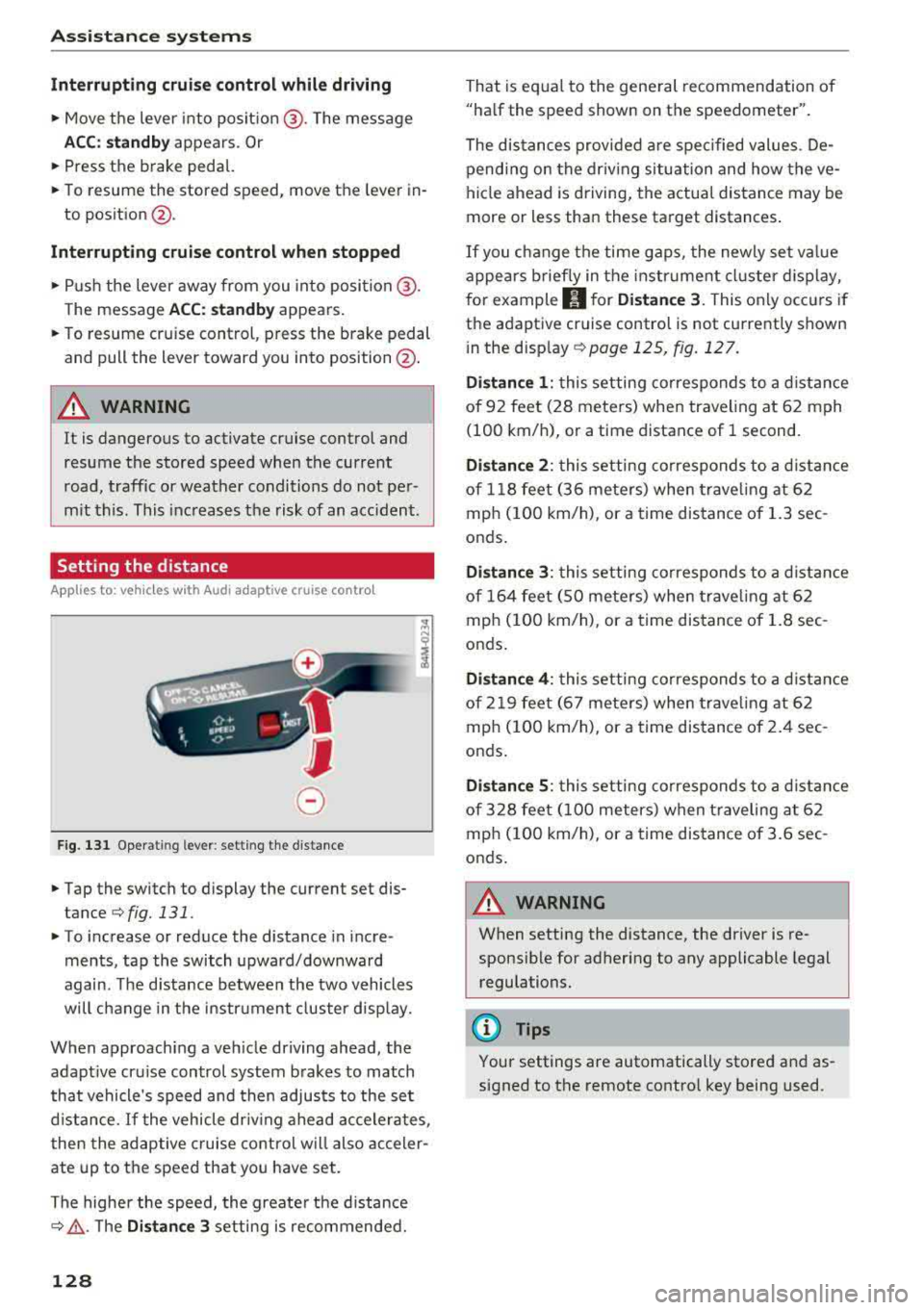
0
Fig. 131 Oper ating lever: setting the distance
• Tap the switch to display the current set dis
tance
¢fig. 131.
• T o increase or reduce the distance in incre
ments, tap the switch upward/downward
again. The d istance between the two vehicles
will change in the instr ument cluster disp lay.
When approaching a veh icle driving ahead, the
adaptive cru ise control system brakes to match
that vehicle's speed and then adjusts to the set
d istance.
If the vehicle dr iv ing ahead accelerates ,
then the adaptive cruise control will also acceler
ate up to the speed that you have set.
The higher the speed, the greate r the d istance
c::;, ,&. . The Di stan ce 3 setting is recommended.
128
That is equa l to the general recommendation of
"ha lf the speed shown on the spe edometer".
The distances provided a re spec ified values . De
pending on the dr iv ing situation and how the
ve
hicle ahead is driving, the actual distance may be
more or less than these target distances .
If you c hange the time gaps, the newly set va lue
appears b rief ly in the instrument cl uster d isplay,
for example
II for Di stan ce 3. This on ly occurs if
the adaptive cruise control is not currently shown
i n the display
c::;, page 125, fig. 127.
Di stance 1 : this setting corresponds to a d istance
of 92 feet (28 meters) when traveling at 62 mph
(100 km/h), or a time distance of 1 second.
Di stanc e 2: this setting corresponds to a d istance
of 118 feet (36 meters) when trave ling at 62
mph (100 km/h), or a time distance of 1.3 sec
onds.
Di stanc e 3: this setting corresponds to a d istance
of 164 feet ( SO meters) when trave ling at 62
mph ( 100 km/h), or a time distance of 1.8 sec
onds .
Distanc e 4: this setting corresponds to a d istance
of 219 feet (67 meters) when trave ling at 62
mph ( 100 km/h), or a time distance of 2 .4 sec
onds .
Distance 5 : this setting corresponds to a d istance
of 328 feet ( 100 meters) when t raveling a t 62
mph ( 100 km/h), or a time distance of 3 .6 sec
onds .
A WARNING
When setting the distance, the driver is re
sponsible for adhering to any applicable legal
regulations.
(D Tips
-
Your settings are automatically stored and as
signed to the remote contro l key being used.
Page 133 of 404
u. 00 .-< N l' N .-< 0 N > 00
-Due to t he interlinking o f various vehicle sys
tems, critica l driving situations can be detected
by
pre sense ba sic and meas ures for preventa
t ive occ upant protection are can be initiated.
- The
pre sense front uses the data from the ra
dar sensors and calc ulates the probab ility of an
acc ident
c::> page 124. An impending collision
with vehicles ca n be detected within the limits
of the system . In this case, the system warns
the driver v isually, acoustically and with a je rk
on the brakes if necessary. If needed, it ca n ini
tiate a part ia l o r full dece le ra tion to reduce the
co llision speed o r to avo id t he coll is io n unde r
ce rtain c ircumstances. In conjunc tion wi th pre
sense basic, the front safety belts are a lso re
versib ly tensioned w hen needed . The pre sense
front is a lso active when adaptive cruise con
trol* is sw itched off.
A WARNING
Also follow the genera l instructions fo und in
c::> .&. in G eneral information on page 124.
(D Tips
- Certain pre sense f unctions switch off when
d riving in reverse.
- The pre sense functions may not be avai la
b le if there is a ma lfunction in the ESC sys
tem or the airbag contro l modu le.
- Note t hat the revers ible belt tensioner on
t h e front passe nger's side deactivates w hen
the front passe nger's a irbag is deact ivated .
- Switch the pre sense off when you are not
us ing public streets or whe n loadi ng the ve
h icle onto a veh icle carrier, train, ship or
othe r type of t ransportation . T his can pre
vent a n un des ired intervent ion from the pre
sense sys te m .
Audi pre sense basic
App lies to: ve hicles with Audi pre sense basic
The pre sense basic funct io ns are activ ated a t a
speed of approximate ly 20 mph (30 km/h) or
h igher .
The fo llow ing funct io ns can be t rigge red unde r
cert ain cond itions withi n the limi ts of the sys
tem :
Ass istance systems
- Tensioning o f the safety belts (for examp le,
during heavy braking) : the front safety belts
have revers ib le be lt tens ione rs . If a collision
does not occu r, the safety belts loosen slig htly
and are ready to tr igger aga in.
- Initiat ing the clos ing of the w indows and the
panorama g lass roof* (for examp le when un
der- or oversteering).
Audi drive select*: the trigger times are adjusted depending on the mode selected .
Audi pre sense front
Applies to : vehicles wi th Audi pre sense fro nt
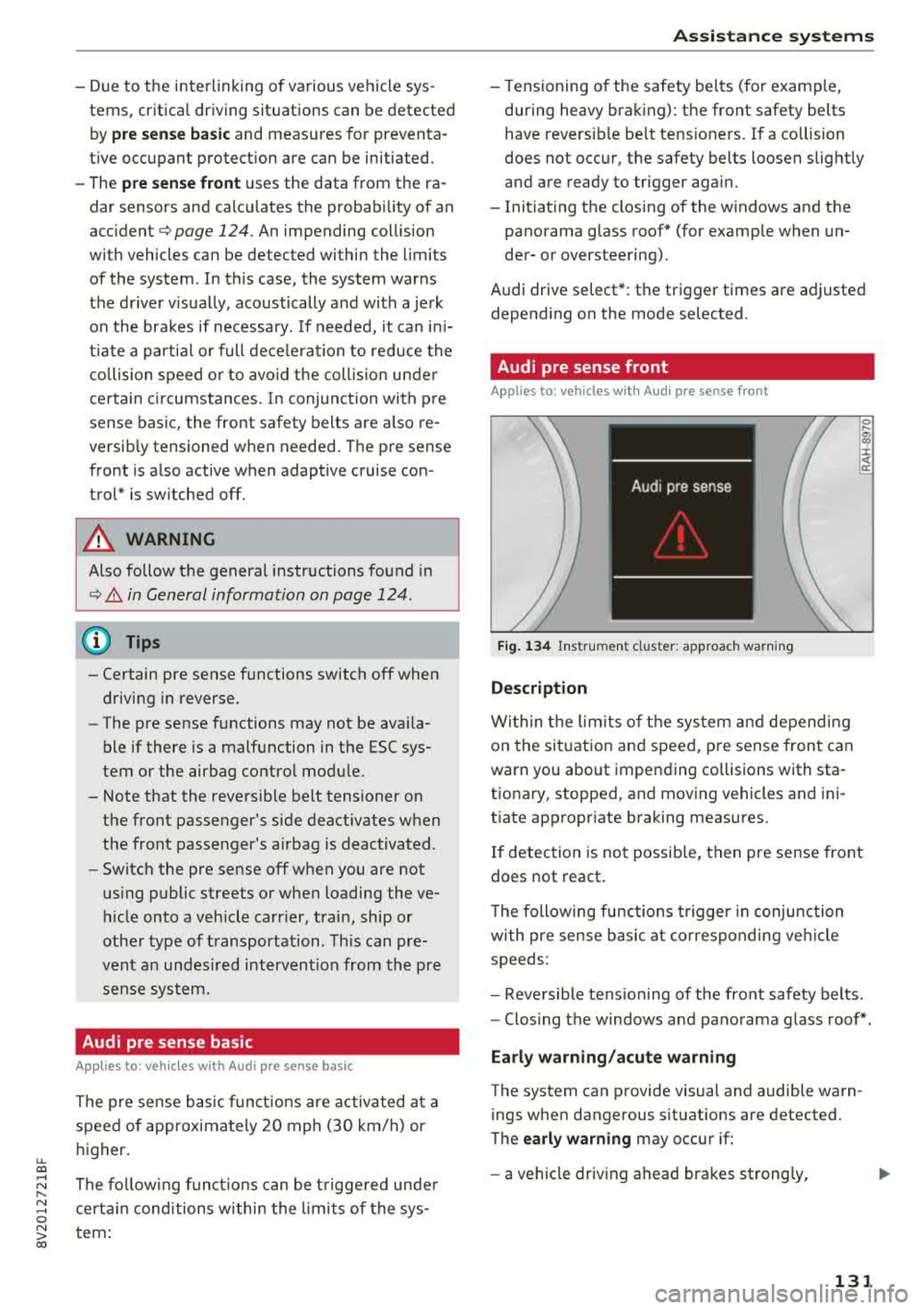
Fig. 134 In str u men t cluster : approac h warni ng
Description
Wi thin the lim its of t he sys tem and depending
on the sit uat ion and spee d, p re sense front can
warn you about impending collisions with sta
t iona ry, stopped, and moving vehicles and ini
tiate app ropr iate braking measu res.
0 .... a, "? :i:: ~ a:
If detection is not possib le, then pre sense front
does not react.
T he following fu nctions t rigge r in conjunction
wi th pre sense basic at co rresponding ve hicle
speeds :
- Reve rsible tens ion ing of the front safety belts.
- Clos ing the windows and pano rama g lass roof* .
Early warning /acute warning
The system can provide visual and audible warn
ings when dangerous situations are detected.
The
early warning may occur if:
- a vehicle driving ahead brakes st rong ly,
131
Page 141 of 404
LL co ..... N
" N ..... 0 N > co
(D Tips
-Side assist is not active w hile you are mak
i ng the ad justment.
- Your settings are automatically stored and
ass igned to the remote control key being
used.
Rear cross-traffic assist
App lies to: vehicles with rear cross-traff ic assist
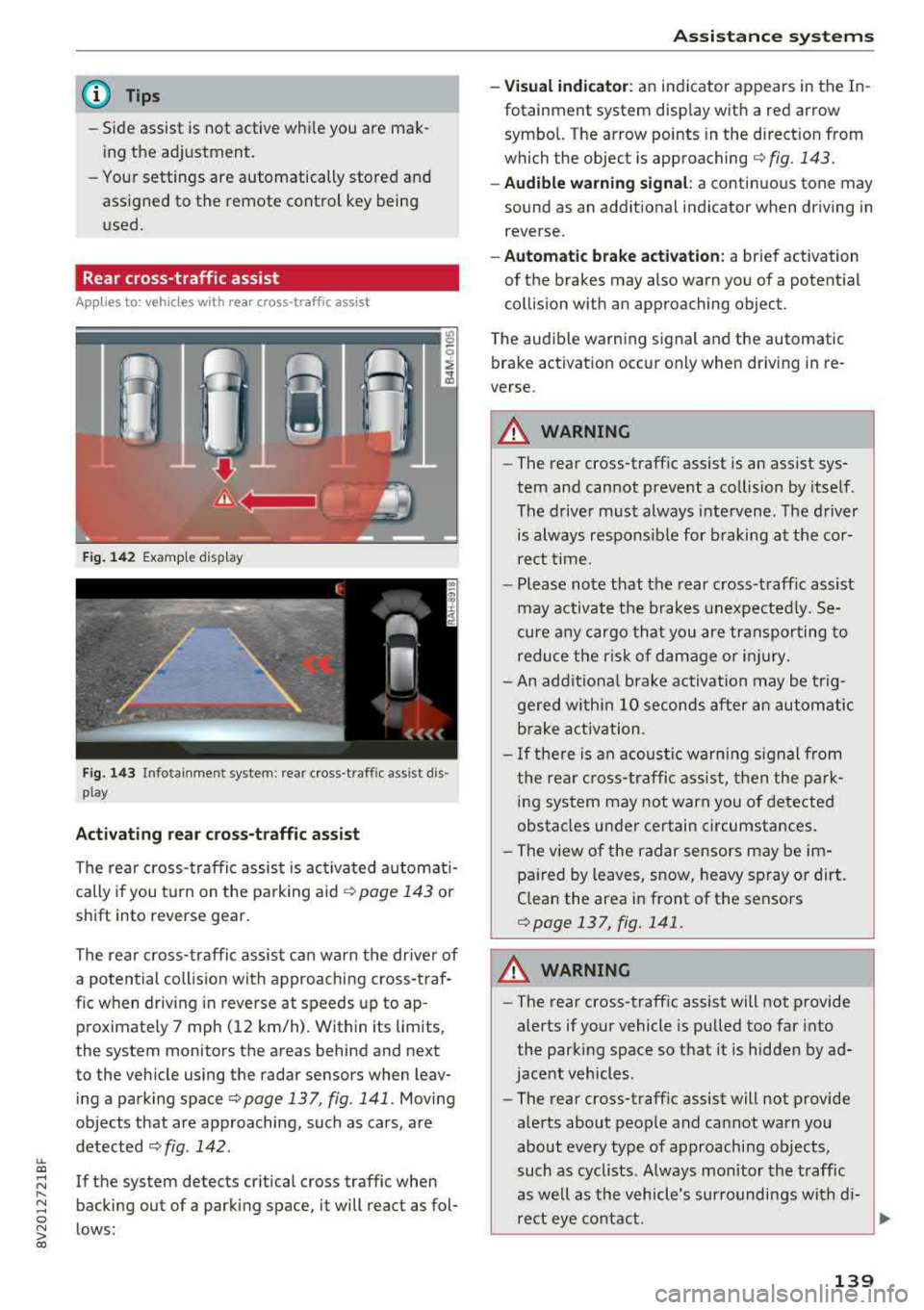
Fig. 14 2 Example display
Fig. 143 Infotainment system: rear cross -traffic ass ist dis
play
Activating rear cros s-traffic assist
The rear cross- traffic assist is ac tivated a utomat i
cally if you t urn on the pa rking aid
¢ page 143 or
shift into reverse gear.
The rea r cross- traffic assist can warn t he drive r of
a potential collis ion with approaching cross-traf
f ic when driving in reverse at speeds up to ap
proximately 7 mph ( 12 km/h). Within its limits,
the system monitors the areas behind and next
to the veh icle using the radar sensors when leav
ing a parking space
c:> page 137, fig . 141. Moving
objects that are approaching, such as cars, are
detected
c:> fig . 142.
If the system detects cr itical cross traffic when
backing out of a parking space, it will react as fol
lows:
A ssi st a nce systems
- Visual indicator : an indicator appears in the In
fotainment system disp lay with a red arrow
symbo l. The arrow points in the d irect ion from
which the object is
approaching ¢ fig. 143.
-Audible warning signal : a continuous tone may
sound as an addit ional indicator when dr iving in
reverse.
- Automat ic brake acti vation : a brief activation
of the brakes may also warn you of a potent ial
collision w ith an approaching object.
The audib le warning signal and the automatic
bra ke activation occur only when driv ing in re
verse.
A WARNING
-- The rear cross-traffic assist is an assist sys
tem and cannot prevent a co llision by itself .
The drive r must always intervene . T he d river
is always respons ible for b raking at the cor
rect t ime.
- Please note that the rear cross-traff ic assist
may activate the b rakes unexpe cted ly. Se
cure a ny cargo th at you are transpor ting to
redu ce t he risk of damage or i njury.
- An add itiona l brake activation may be t rig
ge red w ith in 10 seconds after an automatic
b rake activation.
- I f the re is an acoustic wa rn ing s ignal from
the rea r cross-traffic ass ist, t hen the p ark
ing sys tem may not warn you of detected
obstacles under certain circumstances.
- The v iew o f the radar sensors may be im
pa ired by leaves, s now, heavy sp ray or dirt.
Clean the area i n front of the sensors
c:>page 137, fig. 141 .
A WARNING
-
-The rear cross -traffic assist will not provide
alerts if your vehicle is pulled too far into
the parking space so that it is hidden by ad
jacent vehicles.
- The rear cross-traffic assist will not provide
alerts about people a nd can not warn you
about every type of approaching objects,
such as cyclists. Always monitor the t raff ic
as we ll as the vehicle's sur roundi ngs wit h di-
re ct eye contact .
~
139
Page 142 of 404
Assistance systems
-The rear cross-traffic assist will not provide
alerts if the veh icle is in a paralle l parking
space or an angled parking space.
(LlJ Note
Also read the information in <=:>@ in General
information on page 138 .
(D Tips
-You can cancel the automa tic brake activa
tion with increasing braking force if you ap
ply the brakes yourse lf or accelerate consid
erab ly.
- In some situations, rear cross-traffic assist
may warn you even if there is no cross traffic
i n a critical area, for example when backing
i nto a parking space or maneuver ing.
- The rear cross-traffic assist also switches off when you switch off the ESC.
- The system is not available when towing a
trailer.
Messages
A pp lies to: ve hicles w ith Audi side assis t
If the side assist sw itches off automatically, a
message appears in the instrument cluster dis
play.
@j Aud i side assist: malfunction! Please contact
Service
The system cannot guarantee that it wi ll detect
veh icles correctly and it has switched off. The
sensors have been moved or are faulty. Have the
system checked by an authorized Audi dealer or
author ized Audi Service Facility soon .
(ij Audi side assist: currently unavailable. No
sensor view
(ij Audi side assist: currently unavailable. Sen
sor vision restricted due to surroundings. See
owner 's manual
The radar sensor vis ion is impaired . Do not cover
the area in front of the sensors with bike wheels,
stickers, dirt or other objects. C lean the area in
front of the sensors, if necessary
c> page 13 7,
fig . 141.
140
(ij Audi side assist: currently unavailable
Sid e assist cannot be switched on at this time be
cause there is a malfunction (for ex am ple, the
battery charge level may be too low).
@j Audi side assist: unavailable in towing mode
(ij Audi side assist: unavailable in towing mode
Side assist switches off automatically after a
short time when a factory-insta lled trai ler hitch
i s connected to the electr ica l connector on the
trailer. There is no guarantee the system will
switch off when using a retrofitted trailer hitch .
Do not use side assist when tow ing a tra iler .
[I! Rear parking aid : obstacle detection restrict
ed
The rear cross-traffic assist is not available . Ei
ther t he ESC is switched off, or the radar sensors
may be covered by a bike rack, stickers, leaves,
snow or other objects. Switc h the ESC on, or
clean the area in front of the sensors if necessary
<=:>page 137 , fig . 141. If th is message continues
to be displayed, dr ive immed iate ly to an author
iz ed Audi dealer or authorized Audi Se rvice Facili
ty to have the malfunction repaired.
Audi drive select
Introduction
App lies to : vehicles wi th Audi drive se lec t
Audi drive select makes it poss ible to experience
different types of vehicle settings in one vehicle.
The dr iver can select from three modes,
Comfort ,
Auto
and Dynamic , using the ~.'/:.1 button in the
center console or by using the Infotainment sys
tem. This allo ws you to switch between a sporty
and a comfo rtable driving mode, for example. In
the
Individual* mode, the settings can be adjust
ed to your personal preferences . This makes it
possible to comb ine settings such as a sporty en
gine setting with light steering.
Description
Applies to: vehicles wit h Audi drive se lect
The vehicle setup in each mode depends on the
vehicle 's features. However, the engine and
steering are a lways affected .
Page 150 of 404
Intelligent Technology
Intelligent Technology Electronic Stabilization
Control (ESC)
Description
Elect ronic stabili zation control ( ESC) supports
driver safety. It red uces the risk of slipping and
improves dr iving stabi lity. ESC detects crit ica l sit
uations such as the vehicle overstee ring and un
dersteeri ng or the w heels are sp inning. The vehi
cle is stabilized by app lying the brakes or reduc
i n g e ngine torque . When the ESC engages, the
G1 indicato r light bli nks in t he instr ument clus
t er.
The fo llow ing systems are in tegrated in the ESC:
Anti-lock braking system (ABS)
ABS p reve nts the whee ls from lock ing whe n brak
ing. The vehicle can st ill be steered even d uring
hard brak ing. Apply steady press ure to the bra ke
pedal. Do not pump the pedal. A puls ing in t he
b rake pedal indicates that the system is act ing to
s tabili ze the vehicle .
Brake assist system
The brake assist system can decrease brak ing dis
tance . It inc reases brak ing power when the d river
presses the brake pedal q uick ly in eme rgency sit
uations . You must press and hold t he b rake pedal
until the dangerous si tuatio n is ove r. In veh icles
w ith adapt ive c ruise con trol*, the bra ke assist
sys te m is more sensitive if t he di stan ce detec ted
t o the veh icle dr iv ing ahead is too small.
Anti-Slip Regulation (ASR)
ASR reduces eng ine power when the drive wheels
beg in s pinning a nd adapts the force to the road
conditions . T his makes it easie r to sta rt, acceler
a te and dr ive u p hill s.
Electronic differential lock (EDL)
The EDL applies the brakes to a whee l t h at starts
sp inning and transfe rs t he d rive power to t he
other d riving wheel or wh eels ( if the veh icle is
eq uipped w ith all whee l dr ive*) . T his func tion is
no t a vailable at hig her s pee ds .
148
In extreme cases, ED L automat ica lly swi tches off
to keep the b rake o n the bra ked whee l from over
h eating. The ve hicle is still wo rking co rrect ly. ED L
will switc h on again automatically when condi
tions have returned to normal.
Power steering
The ESC can also support veh icle sta bility
th ro ugh stee ring .
Selective wheel torque control
Selective w heel to rque cont rol is used when driv
in g on curves. The fron t whee l on the in side of
t h e curve or both whee ls on t he i nsid e of the
cu rve are braked se lective ly as needed. This al
l ows mo re precise driving in cu rves .
Automatic post-collision braking system
The "automat ic pos t-coll is io n braking syste m"
c a n help t o reduce t he risk of sliding and of addi
tion al collisions a fter an acc iden t. If the a irbag
contro l modu le detects a collision above a certa in
vehicle speed, the ve hicle is braked by the ESC.
The
ve hicle does not br ak e automatically if;
- t he dr ive r presses the acce lerato r pedal, or
- the ESC, the b ra ke system or the ve hicle elect ri-
cal sys tem are not func tioning .
A WARNING
-The ES C and i ts in tegra ted systems can not
over co m e the li mits im posed by n atural
p hy sical laws. T h is is es peci ally i mpo rtan t
on s lippery or we t ro ad s. If the sy stem s be
gi n acting to stabilize yo ur vehicle, you
should immediately a lter your speed to
match the road and t raffic conditions. Do
not let the increased safety provi ded tempt
you into tak ing risks. This could increase
your r is k of a coll is io n.
- Please note the r is k of a coll is io n increases
when dr iv in g fast , especially t hrough c urves
and on s lippery or wet roads, and when dr iv
ing too close to obj ects ahead . T he ESC and
i t s in teg rated sys tems c annot alw ays pre
ve nt col lisio ns
-th ere i s still a r is k of acci-
d en ts!
..,.
Page 152 of 404
Intelligent Technology
-There is no vehicle stabilization when ESC/
ASR are switched off.
(D Tips
- ESC/ ASR cannot be switched off or sport
mode cannot be switched on if the cruise
control system * or the adaptive cruise con
tro l* is switched on.
- Malfunctions in the Audi magnetic ride*
may make it impossible to switch the ESC/
ASR off or to switch sport mode on.
Brakes
New brake pads
New brake pads do not achieve their full braking
effect during the first 250 mi (400 km). They
must be "broken in" first. However, you can com
pensate for the slightly reduced braking force by
pressing firmly on the brake pedal. Avoid heavy
braking dur ing the break-in per iod .
The break-in period can be considerably longer
for vehicles with ceramic brake rotors*. However,
you can compensate for the slightly reduced
braking force by pressing f irmly on the brake
pedal. Avoid heavy brak ing dur ing the break- in
pe riod .
Wear
Brake pad
wear depends largely on the way the
veh icle is driven and on operat ing cond itions .
This is especially true if you are driving frequently
in the city and on curves or with a sporty driving
style.
Operating noise
Noises may occur when braking depend ing on the
speed, braking force and outs ide cond itions such
as temperature and humidity.
Noises may become more apparent at lower
speeds due to the nature of the materials in the
ceramic brake rotors*.
Effect of water and road salt
In certain situations, for example after driving
through water, in heavy rain, after overnight con
densat ion or after washing your car, the braking
150
effect can be reduced by moisture or ice on the
brake rotors and brake pads . The brakes must be
"dried" first with a few carefu l brake applica
tions.
At higher speeds and with the windshield wipe rs
turned on, the brake pads press against the brake
rotors for a short amount of time . This action,
which is not felt by the dr iver, happens at regular
i ntervals and ensures a better reaction t ime for
the brakes in wet weather .
The brak ing effect can also be reduced if you are
driv ing on salted roads and you do not app ly the
brakes for long periods of time. The layer of salt
on the brake rotors and pads must be worn off
first whe n the brakes are applied .
Due to its surface, the ceram ic brake rotor* ab
sorbs moisture in certain s ituations . Therefore,
there will temporarily be less braking force than
when the brakes are dry . You can compensate for
th is by press ing the brake pedal harder.
Corrosion
Leaving the vehicle parked for long periods of
time, low mileage and avoiding heavy braking
can contribute to corros ion on the brake rotors
and to dirty brake pads.
If you usually avoid heavy braking or if there is
corrosion present, occasional heavy brak ing at
high speeds is recommended to clean the brake
rotors and
pads~.& .
Brake system malfunction
If you notice that the brake pedal travel has sud
denly
i ncreased, then a brake circuit in the dua l
c ir cuit brake system may have malfunctioned.
Drive to an authorized Audi dealer or authorized
Audi Service Fac il ity immed iately to have the
problem corrected. On the way there, drive with
r educed speed and keep in mind that you will
need a longer distance to stop and you will need
to press the brake pedal harder.
Low brake fluid level
When the brake fluid level is low, malfunctions in
t h e b rake system may occur. The b rake flu id level
is electronically monitored.
II>-