power steering AUDI A3 SEDAN 2018 User Guide
[x] Cancel search | Manufacturer: AUDI, Model Year: 2018, Model line: A3 SEDAN, Model: AUDI A3 SEDAN 2018Pages: 404, PDF Size: 62.3 MB
Page 97 of 404
LL co .... N
" N .... 0 N > co
(D Tips
The vehicle cannot sta rt when o utsi de tem
pe ra tures are be low -18 °F (-28 °C)
¢page 96.
Power meter overview
App lies to: ve hicles with plug-in hybrid drive
e-tron
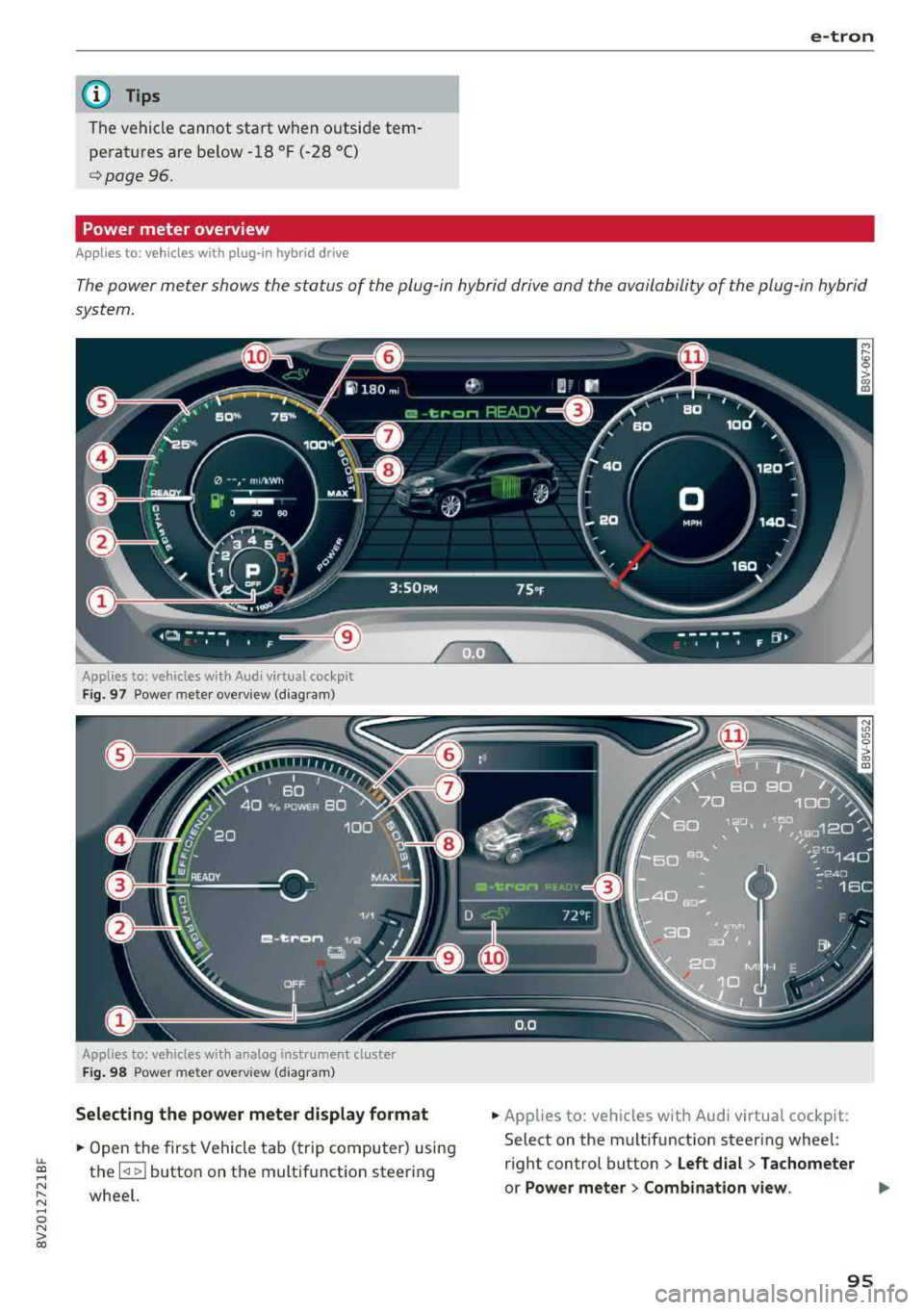
The power meter shows the status of the plug -in hybrid drive and the availability of the plug-in hybrid
system.
Applies to: vehicles with Audi virtual cockpit
Fig. 97 Powe r me te r overv iew (diag ra m )
Applies to: vehicles with analog instrument cluster
Fig. 98 Powe r mete r overv iew (diagram)
Selecting the power meter display format
• Open the first Vehicle tab ( trip computer) using
the
l
whee l.
• Applies to: vehicles with Audi virtual cockpit:
Select on the multif unction steering whee l:
r ight control button
> Left dial > Tachometer
or Power meter > Combination view . .,..
95
Page 98 of 404
e-tron
For additional information, see ¢ page 17, Trip
computer (Audi virtual cockpit).
~ Applies to: vehicles with analog instrument
cluster: Open the
Tachometer display by turn
ing the left thumbwheel on the multifunction
steering wheel.
When opening the driver's door, the charge level is shown in the instrument cluster when the igni
tion is switched on, or the charge level and the
remaining charge time for the high -voltage bat
tery is displayed when charging .
The power meter gives feedback about the partic ular accelerator pedal position and shows the
current demand
(%) for electricity or fuel regard
less of which engine is active.
An economical driving and recuperation range is
shown in green
¢ page 99, Energy recovery (re
cuperation) .
A driving range that is not economi
cal is shown in orange .
(D Vehicle not drive ready (OFF)
@ Recuperation (CHARGE)
@ Vehicle ready to drive (READY) or
coasting
© Efficient driving with electric motor
and/or gasoline engine (EFFICIEN
CY)
® Economic driving while the electric
motor or gasoline engine is in the
partial power range
@ Driving in full power range
0 100% output
@ BOOST: the electric motor supports
the combustion engine
® High-voltage battery charge level
@ EV mode: active a=,v, standby, a=,v
or currently unavailable. ~v
@ Speed limit for electric driving in EV
mode (80 mph/ 130 km/h)
Indicator lights and messages
Applies to: vehicles with plug -in hybr id drive
Also note the indicator lights in¢ page 20.
The gasoline engine is active when the II'§] indica
tor light turns on.
96
•• Drive system: system fault! Safely park
vehicle
There is a malfunction in the plug-in hybrid sys
tem. The brake booster and the power steering
may stop working. Stop the vehicle immediately
or as soon as possible. Park the vehicle in a safe place outdoors that is not near buildings, roof
overhangs, carports or similar structures. Switch
the ignition off. Have the problem corrected by
an authorized Audi dealer or authorized Audi
Service Facility.
•• Electric drive: overheated! Safely stop
vehicle and check coolant
The coolant level is too low or the coolant tem
perature is too high.
Stop the vehicle in the outdoors as soon as it is
safely possible. Switch the ignition off.
Read the important safety
precautions ¢.& in
Coolant on page 103
and check the coolant level
¢page 102.
If the coolant level is OK, the malfunction may be
caused by the system overheating. Let the vehi
cle's electric drive system cool down for some
time .
If the message turns off after cooling down and
switching the ignition back on, you can continue
driving. Contact an authorized Audi dealer or au
thorized Audi Service Facility immediately to have
the malfunction corrected.
If the indicator light stays on, contact an author
ized Audi dealer or authorized Audi Service Facili
ty.
lltll Drive system: system fault! Please con
tact workshop
There is a malfunction in the plug-in hybrid sys
tem . Drive to an authorized Audi dealer or au
thorized Audi Service Facility immediately to have
the malfunction corrected.
1/1111 Drive system: system fault! Restart not
possible. Please contact workshop
There is a malfunction in the plug-in hybrid sys
tem. Do not open the hood. Drive to an author- ized Audi dealer or authorized Audi Service
.,,_
Page 99 of 404
LL co ..... N
" N ..... 0 N > co
Faci lity immedi ately to have t he m alfunc tion cor
rected .
IIJII Battery temperature too low . Vehicle
cannot be started. See owner's manual
Th e outside tempe rature is too low . The vehicle
can no longe r st art at tempe ra tur es below - 18 °F
(- 28 °C). Con ta ct an a utho riz e d Audi d ealer o r au
thor ized A udi Se rvice Fac ility.
POWER LIMIT Warning! Limited performance
If t he indicator lig ht turns on and th is message
appears , th ere may be a n engine co ntro l ma l
f u nction. The
[3B* in d icator light in t he instr u
men t clus ter also tur ns on . The engine ou tput is
r educed . Dr ive to a n au thor ized Audi dealer or
a uthor ized Audi Se rvice Facili ty i mme diate ly to
ha ve the m alfunct ion co rre cted.
II e-tron mode: EV currently unavailable
This message appea rs whe n the 1.,,..1 button is
p ressed and the con ditions for elect ric d rive
mode a re not met.
Ill Vehicle sound: malfunction! Pedestrians
cannot hear vehicle . Please contact Service
The vehicle sou nd is no longer f unctio ning. D rive
e xtremely care fully, since ot he rs may not hea r
your veh icle. Dr ive to an author ized Audi dealer
or author ized Audi Se rvice Facility immed iate ly to
have the ma lf u nction corrected .
Range display
Applies to: ve hicles with plug-in hybrid drive
Fig. 99 Instr ume nt cluste r: ra nge disp lay
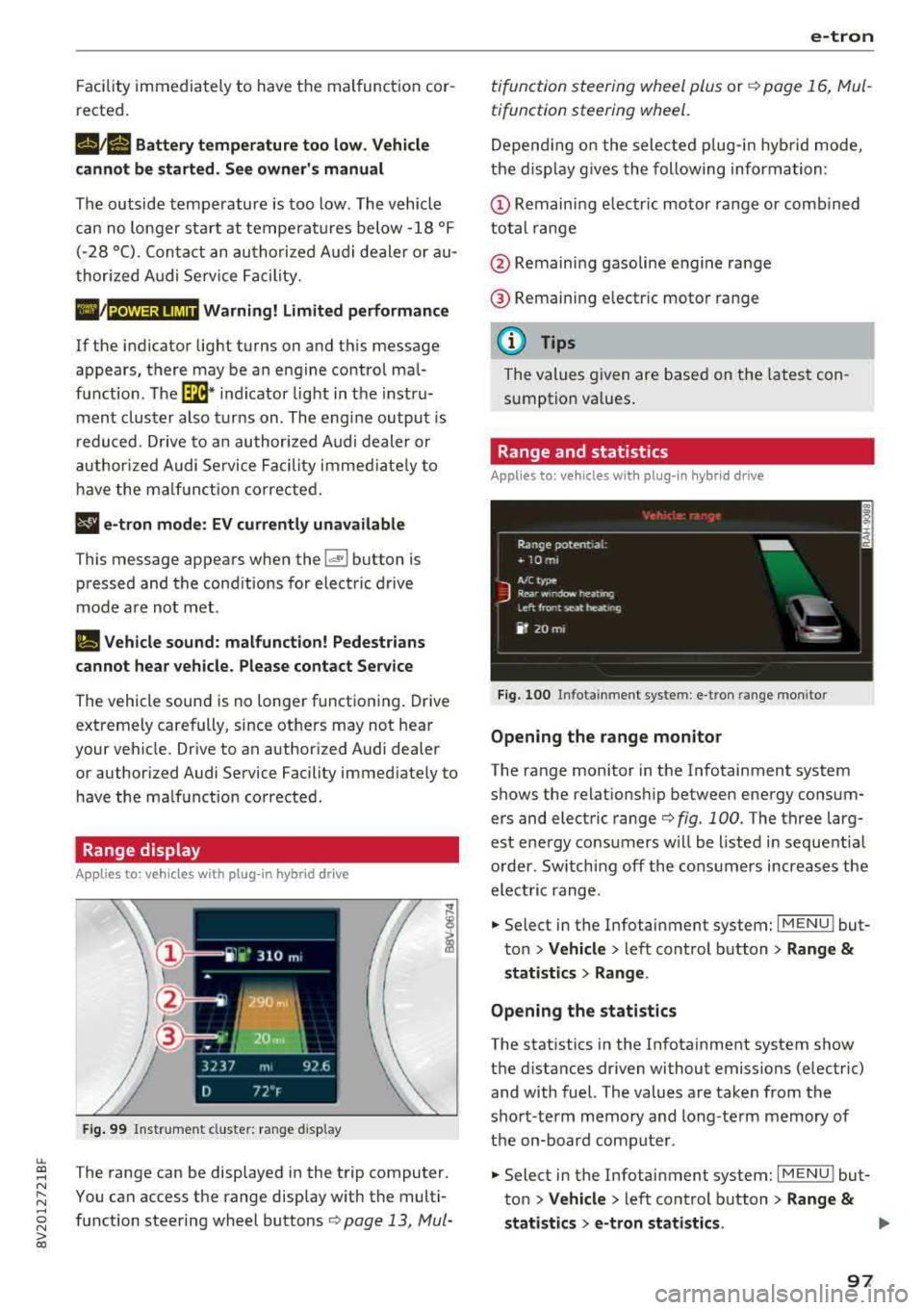
The range can be disp layed in the trip computer .
You can access t he range disp lay w ith the multi
fu nction steeri ng wheel buttons
c:;> page 13 , Mui-
e-tron
ti function s teeri ng whee l plus or r:::;> page 1 6, M ul
tifunction steering wheel.
D epen ding on t he sele cte d plug -in hy brid mo de,
t he disp la y g ives the foll owing informa tion:
(D Remaini ng e lec tric m otor range or comb ined
total range
@ Remaini ng gasoline eng ine range
® R emaini ng e lectr ic moto r ra nge
(D Tips
The va lues given are b ase d on t he lates t con
sum ption va lues .
Range and statistics
Applies to: vehicles with plug-in hybrid drive
Fig. 100 In fotainmen t system : e -tro n range mo nitor
Opening the range monitor
The range monitor in the Infotainment system
shows the relat ions hip between ene rgy co nsum
ers and elect ric range
c:;> fig. 100 . The three larg
est ene rgy consu mers w ill be l ist ed in sequent ia l
o rder. Sw itching off the cons umers increases the
elect ric range .
.. Select in the Infotai nment system: I MENU ! but
t o n
> Vehicle > left con trol button > Range &
statist ics > Range .
Opening the statistics
The stat istics in the In fotainment system show
t h e d ista nces dr iven without emissions (electric)
and with fuel. The values are taken from the
sho rt-term memory and long-te rm m emory of
the on-board comp ute r.
.. Select in the Infotai nment system: I MENU ! but
ton
> Vehicle > left con trol b utton > Range &
statistics > e-tron statistics . IJ,,
97
Page 103 of 404
LL co .... N
" N
~ Applies to: vehicles with analog instrument cluster: open the
Energy flo w ind icator disp lay
by turning the left thumbwhee l on the mult i
function steering wheel.
Component Color
(D Gasoline engine Orange
Gray
@ High-voltage battery Green
Green
(animated in the
Infota inment sys-
tern
al)
Gray
(§) Motion arrow Green
Orange
Green -orange
@ Motion arrow Green
a) Not avail ab le in all Infot ainmen t systems.
The power currently available in the electric drive
sys tem is displayed when you open the energy
flow disp lay.
The bars are filled in with different colors based
on the power
status @~ fig. 102:
- White : electric power currently availab le
- Green: electric power currently being used
The more ba rs that are filled in the E-max section
@ , the longe r the maximum power can be utiliz
ed . The bars turn off in the E-max section when
the maximum power can no longer be utilized.
When the elec tric dr ive power is greatly red uced,
the drive mode will automatically switch to using
the gasoline engine.
The availability of power is genera lly restr icted
under the fo llow ing cond itions:
- The temperature of the high-voltage battery is
very co ld or very hot.
- The high-voltage battery charge level is low.
.... 0 N ii'i l) Not availab le in al l Infota inment system s.
e-tron
Image in the Infota inment display1
)
~ In the Infotainment system, select: I MENU I
button > Veh icl e > left control button >Audi
d rive select .
M eaning
The gasoline engine is running
The gasoline engine is off
High-voltage battery charge level
The high-voltage battery is charging
The vehicle is not in drive ready mode
E lectric driv ing
Driving w ith the gasoline engine
Driving with the gasoline engine and electric mo-
tor (boost)
Recuperation
The power availability is not v is ible if the
111 ind i
cator light turns on.
(0 Tips
High power availability is necessary, for exam
ple, when need ing to acce lerate q uickly wh ile
i n e lectric driving mode to pass another vehi
cle.
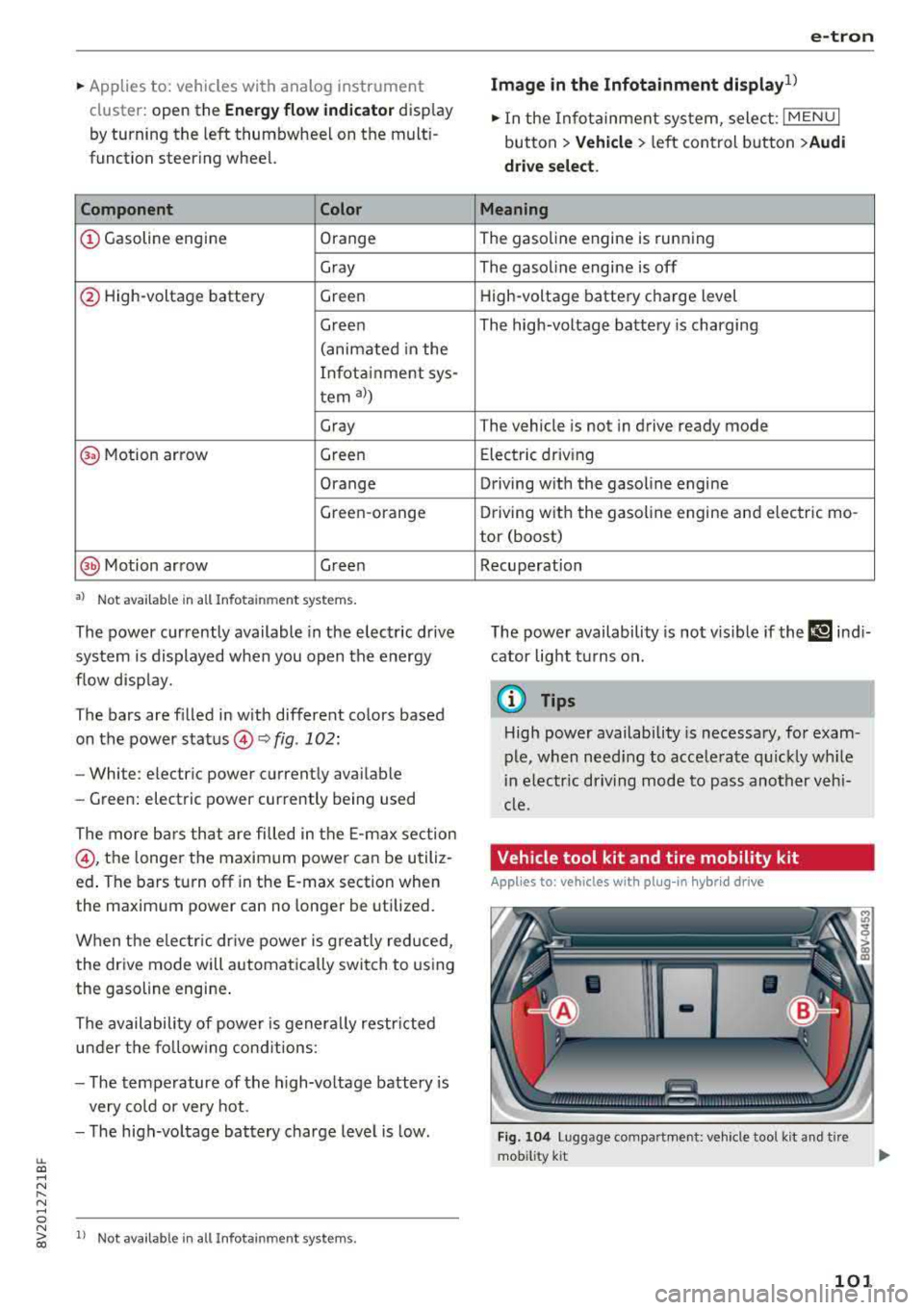
Vehicle tool kit and tire mobility kit
Applies to: vehicles wit h plug -in hybr id drive
F ig. 104 Lu ggage compartment: veh icle tool kit and tire
mob ility k it
101
Page 150 of 404
Intelligent Technology
Intelligent Technology Electronic Stabilization
Control (ESC)
Description
Elect ronic stabili zation control ( ESC) supports
driver safety. It red uces the risk of slipping and
improves dr iving stabi lity. ESC detects crit ica l sit
uations such as the vehicle overstee ring and un
dersteeri ng or the w heels are sp inning. The vehi
cle is stabilized by app lying the brakes or reduc
i n g e ngine torque . When the ESC engages, the
G1 indicato r light bli nks in t he instr ument clus
t er.
The fo llow ing systems are in tegrated in the ESC:
Anti-lock braking system (ABS)
ABS p reve nts the whee ls from lock ing whe n brak
ing. The vehicle can st ill be steered even d uring
hard brak ing. Apply steady press ure to the bra ke
pedal. Do not pump the pedal. A puls ing in t he
b rake pedal indicates that the system is act ing to
s tabili ze the vehicle .
Brake assist system
The brake assist system can decrease brak ing dis
tance . It inc reases brak ing power when the d river
presses the brake pedal q uick ly in eme rgency sit
uations . You must press and hold t he b rake pedal
until the dangerous si tuatio n is ove r. In veh icles
w ith adapt ive c ruise con trol*, the bra ke assist
sys te m is more sensitive if t he di stan ce detec ted
t o the veh icle dr iv ing ahead is too small.
Anti-Slip Regulation (ASR)
ASR reduces eng ine power when the drive wheels
beg in s pinning a nd adapts the force to the road
conditions . T his makes it easie r to sta rt, acceler
a te and dr ive u p hill s.
Electronic differential lock (EDL)
The EDL applies the brakes to a whee l t h at starts
sp inning and transfe rs t he d rive power to t he
other d riving wheel or wh eels ( if the veh icle is
eq uipped w ith all whee l dr ive*) . T his func tion is
no t a vailable at hig her s pee ds .
148
In extreme cases, ED L automat ica lly swi tches off
to keep the b rake o n the bra ked whee l from over
h eating. The ve hicle is still wo rking co rrect ly. ED L
will switc h on again automatically when condi
tions have returned to normal.
Power steering
The ESC can also support veh icle sta bility
th ro ugh stee ring .
Selective wheel torque control
Selective w heel to rque cont rol is used when driv
in g on curves. The fron t whee l on the in side of
t h e curve or both whee ls on t he i nsid e of the
cu rve are braked se lective ly as needed. This al
l ows mo re precise driving in cu rves .
Automatic post-collision braking system
The "automat ic pos t-coll is io n braking syste m"
c a n help t o reduce t he risk of sliding and of addi
tion al collisions a fter an acc iden t. If the a irbag
contro l modu le detects a collision above a certa in
vehicle speed, the ve hicle is braked by the ESC.
The
ve hicle does not br ak e automatically if;
- t he dr ive r presses the acce lerato r pedal, or
- the ESC, the b ra ke system or the ve hicle elect ri-
cal sys tem are not func tioning .
A WARNING
-The ES C and i ts in tegra ted systems can not
over co m e the li mits im posed by n atural
p hy sical laws. T h is is es peci ally i mpo rtan t
on s lippery or we t ro ad s. If the sy stem s be
gi n acting to stabilize yo ur vehicle, you
should immediately a lter your speed to
match the road and t raffic conditions. Do
not let the increased safety provi ded tempt
you into tak ing risks. This could increase
your r is k of a coll is io n.
- Please note the r is k of a coll is io n increases
when dr iv in g fast , especially t hrough c urves
and on s lippery or wet roads, and when dr iv
ing too close to obj ects ahead . T he ESC and
i t s in teg rated sys tems c annot alw ays pre
ve nt col lisio ns
-th ere i s still a r is k of acci-
d en ts!
..,.
Page 153 of 404
u. 00 .-< N l' N .-< 0 N > 00
Brake booster
The brake booster amplifies the pressu re yo u ap
p ly to the brake pedal. It only operates while the
engine is running or when the ignition is switched
on (plug-in hybrid drive*) .
A WARNING
- Only apply the brakes for the purpose of
cleaning the brake system when road and
traff ic conditions permit. You must not en
danger other road users. This increases the
r isk of an accident .
-
-Never let the vehicle roll while the engine is
stopped because this increases the risk of an
acc ident.
- Depend ing on the veh icle equipment, the
brake pedal may be pulled downward when
the vehicle automatically initiates b rak ing.
- Never place objects in the driver's footwell.
An object could end up in the area around
the pedals and prevent you from using
them. You wo uld not be able to use the ped
als if sudden driving or braking mane uvers
were needed, which increases the risk of an
accident.
- Only use floor mats that do not obstruct the
area around the pedals and that can be se
curely fastened in the footwe lls.
- T o reduce the risk of injury, do not place
your foot under the brake pedal.
(Llj) Note
-Never let the brakes "rub" by pressing the
pedal lightly when braking is not actually
necessary. This causes the brakes to over
heat and increases braking distance and
causes wear.
- Before driving on a long stretch with steep
slopes, reduce your speed and shift to the
next lower gear This makes use of the en
gine braking effect and relieves the brakes.
If you need to brake add it ionally, brake in
i ntervals and not cont inuously.
Intelligent Technology
(D Tips
- If the brake booster is not working, you
must press the brake pedal with much more
force than normal.
- If you retrofit your vehicle with a front spoi l
er, wheel covers or simi lar items, make sure
that the air flow to the front wheels is not
interrupted. Otherwise the brake system
can become too hot.
Electromechanical
steering
The electromechanical steering supports the
driver's steering movements.
Power steering adapts electronically based on
the ve hicle speed.
Indicator lights and messages
• Do not drive vehicle: steering defective
If this indicator light turns on and stays on and
th is message appears, the power steering may
have failed .
Stop the vehicle in a safe location as soon as pos
s ible. Do
not cont inue driving. See an authorized
Audi dealer or authorized Audi Service Fac ility for
ass istance .
l;r-ij Steering: system fault! You can continue
driving
If the indicator light turns on, the steering wheel
may be more difficult to move or more sensitive
than usual. The steering whee l may also be at an
angle when driving straight.
Drive slowly to an authorized Audi dea ler or au
thorized Audi Service Facility to have the mal
function corrected.
(D Tips
If the. or 'Tij indicator light on ly stays on
for a short time, you may continue driving .
151
Page 374 of 404
Fuses and bulbs
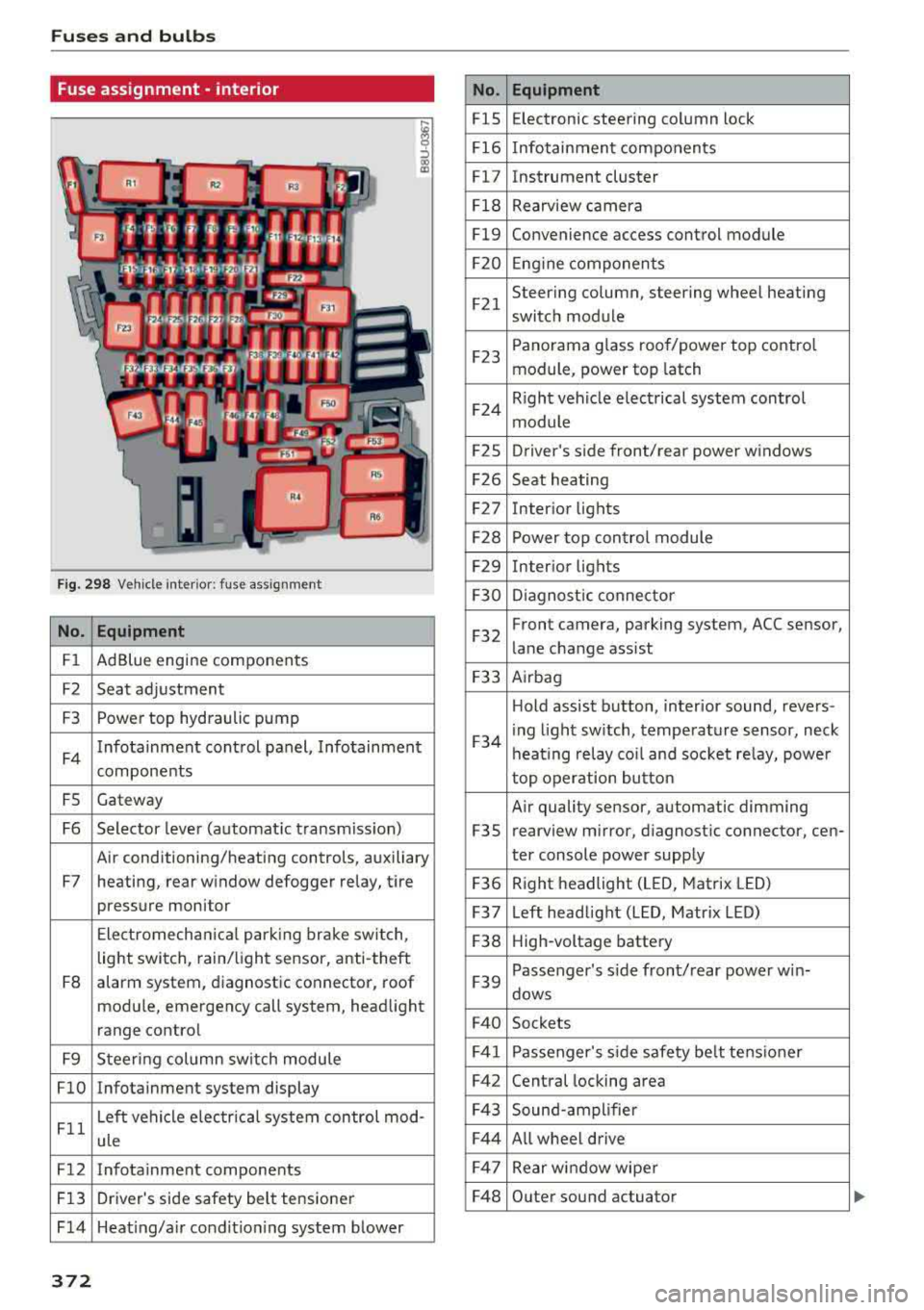
Fuse ass ignment - interior
ij
::, CX) ID
F ig. 298 Vehicle interior: fuse assignment
No. Equipment
Fl Ad Blue engine components
F2 Seat adjustment
F3 Power top hydraulic pump
F4 Infotainment control panel,
Infotainment
components
FS Gateway
F6 Selector lever (automat ic transm iss ion)
Air conditioning/heating controls, auxiliary
F7 heating, rear window defogger relay, tire pressure monitor
Electromechan ical park ing brake switch,
light switch, rain/light sensor, anti-theft
F8 alarm system,
diagnostic connector, roof
module, emergency call system, head light
range control
F9 Steering col umn sw itch module
FlO Infotainment system display
Fll Left vehicle electrica
l system control mod-
ule
F12 Infotainment components
F13 Driver's side safety belt tensioner
F 14 Heat ing/a ir condit ion ing system blower
372
No . Equipment
FlS Electronic
steering column lock
F16 Infotainment components
Fl7 Instrument cluster
Fl8 Rearview camera
Fl9 Convenience access control module
F20 Engine components
F21 Steering column, steering wheel heating
switch module
F23 Panorama glass
roof/power top control
module, power top latch
F24 R
ight vehicle electrical system control
module
F2S Driver
's side front/rear power windows
F26 Seat heating
F27 Interior
lights
F28 Power top control module
F29 Interior lights
F30 Diagnostic connector
F32 Front camera, parking
system, ACC sensor,
lane change assist
F33 Airbag
Hold assist button, interior sound, revers-
F34 i
ng light sw itch, temperature sensor, neck
heating relay coil and socket relay, power
top operation button
Air quality sensor, automatic dimming
F3S rearview
mirror, diagnostic connector, cen-
ter console power supply
F36 Right
headlight (LED, Matrix LED)
F37 Left headlight (LED, Matrix LED)
F38 High-voltage battery
F39 Passenger
's side front/rear power w in-
dows
F40 Sockets
F41 Passenger's sid e safe ty be lt tens ioner
F42 Central locking area
F43 Sound-amplifier
F44 All wheel drive
F47 Rear window wiper
F48 Outer sound actuator
Page 390 of 404
Index
Audi pre sense . . . . . . . . . . . . . . . . . . . . . . . 130
Messages . . . . . . . . . . . . . . . . . . . . . . 130, 133
Aud i Service Repair Manuals and Literature 383
Audi side assist . . . . . . . . . . . . . . . . . . . . . . . 136
Cleaning the sensors . . . . . . . . . . . . . . . . . 355
Messages . . . . . . . . . . . . . . . . . . . . . . . . . . 140
Rear cross-traffic assist . . . . . . . . . . . . . . . 139
Audi smartphone interface . . . . . . . . . 241, 245
Aud i virtual cockp it
refer to Instrument cluster . . . . . . . . . . . . . 10
AUTO
Automatic climate control system . . . . . . .
69
Automatic headlights . . . . . . . . . . . . . . . . . 49
Auto Lock (centr al locking system) . . . . . . . . 31
Automatic belt retractor . . . . . . . . . . . . . . . 264
Automatic climate control system
refer to Climate control system
(automatic) . . . . . . . . . . . . . . . . . . . . . .
68, 69
Automatic power top
refer to Power top . . . . . . . . . . . . . . . . . . . . 42
Automatic transmission . . . . . . . . . . . . . . . . . 83
Driving tips . . . . . . . . . . . . . . . . . . . . . . . . . . 86
Emergency mode . . . . . . . . . . . . . . . . . . . . . 89
Hill descent control . . . . . . . . . . . . . . . . . . . 87
Kick -down . . . . . . . . . . . . . . . . . . . . . . . . . . .
88
Launch control program . . . . . . . . . . . . . . . 89
Malfunction . . . . . . . . . . . . . . . . . . . . . . . . . 84
Manual shift ing (tiptronic mode) . . . . . . . . 88
Selector lever . . . . . . . . . . . . . . . . . . . . . . . . 86
Selector lever emergency re lease . . . . . . . . 90
Selector lever lock . . . . . . . . . . . . . . . . . . . . 84
Selector lever positions . . . . . . . . . . . . . . . . 84
Shift padd les . . . . . . . . . . . . . . . . . . . . . . . . 88
Automatic wipe/wash system . . . . . . . . . . . . 55
Auto Safety Hotline . . . . . . . . . . . . . . . . . . .
258
Auxiliary climate contro l . . . . . . . . . . . . . . . 116
AUX input . . . . . . . . . . . . . . . . . . . . . . . . . . . 230
Average consumption ........... .... . 17, 18
Average speed . . . . . . . . . . . . . . . . . . . . . 17, 18
B
BACK button . . . . . . . . . . . . . . . . . . . . . . . . . 154
Bag hooks . . . . . . . . . . . . . . . . . . . . . . . . .
63, 65
Balance (sound) . . . . . . . . . . . . . . . . . . . . . . 247
Bass (sound) . . . . . . . . . . . . . . . . . . . . . . . . . 247
388
Battery
In the key . . . . . . . . . . . . . . . . . . . . . . . . . . .
32
also refer to High-voltage battery . . . . . . . 92
also refer to Vehicle battery . . . . . . . . . . . 326
Before driv ing . . . . . . . . . . . . . . . . . . . . . . . . 249
Belt tensioners . . . . . . . . . . . . . . . . . . . . . . . 267
Blended gasoline . . . . . . . . . . . . . . . . . . . . . 314
Blower
Automat ic climate control system . . . . . . .
70
Bluetooth
Audio player . . . . . . . . . . . . . . . . . . . . . . . .
226
Connecting a cell phone . . . . . . . . . . . . . . 177
Settings . . . . . . . . . . . . . . . . . . . . . . . . . . . 246
Boost . . . . . . . . . . . . . . . . . . . . . . . . . . . . . . . . 19
Booster seats . . . . . . . . . . . . . . . . . . . . . . . . 304
Boost pressure indicator . . . . . . . . . . . . . . . . 19
Brakes . . . . . . . . . . . . . . . . . . . . . . . . . . . . . . 150
Brake assist . . . . . . . . . . . . . . . . . . . . . . . . 148
Brake fluid . . . . . . . . . . . . . . . . . . . . . . . . . 326
Electromechanical parking brake . . . . . . . . 81
Emergency braking function . . . . . . . . . . . . 82
New brake pads . . . . . . . . . . . . . . . . . . . . . 150
Break-in security feature . . . . . . . . . . . . . . . . 36
Breaking in
New brake pads . . . . . . . . . . . . . . . . . . . . .
150
New engine . . . . . . . . . . . . . . . . . . . . . . . . . 72
New tires . .... .. .. .. ............. .. 337
Browser
refer to Media center . . . . . . . . . . . . . . . . . 233
Bulbs . . . . . . . . . . . . . . . . . . . . . . . . . . . . . . . 373
Buttons
Control panel (MMI) . . . . . . . . . . . . . . . . .
154
Multifunction steering wheel . . . . . . . . 13, 16
Programming (multifunction steering
wheel) . . . . . . . . . . . . . . . . . . . . . . . . . . . . . . 15
Switching the Infotainment system display
on/off . . . . . . . . . . . . . . . . . . . . . . . . . . . . .
155
C
Cable (USB adapter/AUX connector cable) 229
California Proposition 65 Warning . . . . . . . 319
Battery specific . . . . . . . . . . . . . . . . . . . . . 327
Call list . . . . . . . . . . . . . . . . . . . . . . . . . . . . . 180
Call options . . . . . . . . . . . . . . . . . . . . . . . . . . 188
Page 397 of 404
u. 00 .-< N l' N .-< 0 N > 00
Online map update ................... . 214
Onl ine media . . . . . . . . . . . . . . . . . . . . . . . . . 228
Online services
refer to Audi connect (Infotainment) . . . . 190
Opening ..... .. ................ ..... .. 31
Doors . . . . . . . . . . . . . . . . . . . . . . . . . . . 33, 34
Fu el filler door ................ ..... . 315
Hood .. .. .. .. ............... .. .. .. . 320
Luggage compartment lid . . . . . . . . . . . . . . 37
Panorama glass roof . . . . . . . . . . . . . . . . . . 40
Power top . . . . . . . . . . . . . . . . . . . . . . . . . . . 42
Windows . . . . . . . . . . . . . . . . . . . . . . . . . . . 39
Opening/closing
refer to Unlocking/locking ..... .. 31, 33, 34
Operating Multifunction steering wheel . . . . . . . . 13, 16
Multi Media Interface . . . . . . . . . . . . . . . . 155
Voice recognition system . . . . . . . . . . . . . 170
Opt ions menu .. ............. .. 14, 156 , 160
Outside temperature display . . . . . . . . . . . . . 10
Overview (Cockpit) 8
p
Paint damage . . . . . . . . . . . . . . . . . . . . . . . . 356
Paint number . . . . . . . . . . . . . . . . . . . . . . . . 381
Panorama glass roof. . . . . . . . . . . . . . . . . . . . 40
also refer to Convenience opening/closing 40
Parental control
DVD ............................... 235
Parking aid . . . . . . . . . . . . . . . . . . . . . . . . . . 143
Adjusting . . . . . . . . . . . . . . . . . . . . . . . . . . 147
C leaning sensors/camera . . . . . . . . . . . . . 355
Malfunction . . . . . . . . . . . . . . . . . . . . . . . . 147
Rearview camera . . . . . . . . . . . . . . . . . . . . 145
Parking brake
refer to Electromechanical parking brake . 81
Parking lights . . . . . . . . . . . . . . . . . . . . . . . . . 49
Parking (automatic transmission) . . . . . . . . . 86
Parts replacement . . . . . . . . . . . . . . . . . . . . 385
Pass -through . . . . . . . . . . . . . . . . . . . . . . . . . 66
PASSENGER AIR BAG OFF light . . . . . . . . . . 281
Pause (audio/video file) . . . . . . . . . . . . . . . . 232
Pedals . . . . . . . . . . . . . . . . . . . . . . . . . . . . . . 254
Performance/torque display
refer to Sport displays . . . . . . . . . . . . . . . . . 20
Personal route assistance . . . . . . . . . . . . . . 206
Index
Phone book
refer to Contacts
186
Physical principles of a frontal col lision . . . 261
Picture format (video) . . . . . . . . . . . . . . . . . 235
Playback (media) . . . . . . . . . . . . . . . . . . . . . 232
Playlist . . . . . . . . . . . . . . . . . . . . . . . . . . . . . 234
Plug-in-Hybrid-Drive High-voltage battery . . . . . . . . . . . . . . . . . . 93
Plug-in hybrid drive . . . . . . . . . . . . . . . . . . . . 92
12 volt vehicle battery . . . . . . . . . . . . . . . . 102
Auxiliary climate control . . . . . . . . . . . . . . 116
Boost . . . . . . . . . . . . . . . . . . . . . . . . . . . . . . 99
Charging . . . . . . . . . . . . . . . . . . . . . . . . . . . 104
Charging clip . . . . . . . . . . . . . . . . . . . . . . . 108
Charging dock . . . . . . . . . . . . . . . . . . . . . . 108
Charging system PIN . . . . . . . . . . . . . . . . . 115
Charging the high-voltage battery . . . . . . 106
Charging time . . . . . . . . . . . . . . . . . . . . . . 114
Cleaning the charging system ........ .. 117
Climate control . . . . . . . . . . . . . . . . . . . . . 116
Coasting . . . . . . . . . . . . . . . . . . . . . . . . . . . . 99
Coo lant . . . . . . . . . . . . . . . . . . . . . . . . . . . . 102
Driving . . . . . . . . . . . . . . . . . . . . . . . . . . . . . 94
E-max (power availability) . . . . . . . . . . . . . 100
Efficient driving . . . . . . . . . . . . . . . . . . . . . . 99
Ending drive ready mode . . . . . . . . . . . . . . . 94
Energy flow display . . . . . . . . . . . . . . . . . . 100
Establishing drive ready mode . . . . . . . . . . 94
EV mode/hybrid mode . . . . . . . . . . . . . . . . . 98
High-vo ltage battery .............. 92, 115
High-vo ltage system . . . . . . . . . . . . . . . . . . 92
Indicator lights . . . . . . . . . . . . . . . . . . . . . . 96
Inserting the fuel pump nozzle . . . . . . . . . 103
Introduction . . . . . . . . . . . . . . . . . . . . . . . . . 92
Jump start . . . . . . . . . . . . . . . . . . . . . . . . . 102
Jump starting . . . . . . . . . . . . . . . . . . . . . . . 102
Power meter . . . . . . . . . . . . . . . . . . . . . . . . . 95
Range and statistics . . . . . . . . . . . . . . . . . . . 97
Range disp lay . . . . . . . . . . . . . . . . . . . . . . . . 97
Recuperation . . . . . . . . . . . . . . . . . . . . . . . . 99
Refueling . . . . . . . . . . . . . . . . . . . . . . . . . . 103
Setting the modes . . . . . . . . . . . . . . . . . . . . 98
Starting the vehicle . . . . . . . . . . . . . . . . . . . 94
Status dis plays . . . . . . . . . . . . . . . . . . . . . . 112
Switching the ignition on/off . . . . . . . . . . . 94
Tachometer . . . . . . . . . . . . . . . . . . . . . . . . . 95
Tire mobility kit . . . . . . . . . . . . . . . . . . . . . 101
Vehicle sound . . . . . . . . . . . . . . . . . . . . . . . . 94
395
Page 400 of 404
Index
Selector lever (automatic transmission)
Emergency release . . . . . . . . . . . . . . . . . . . .
90
Positions . . . . . . . . . . . . . . . . . . . . . . . . . . . . 84
Self -lear ning navigation
refer to Persona l rou te ass ista nce . . . . . . 206
Serv ice and d isposa l
Safety belt p retensioner . . . . . . . . . . . . . .
267
Serv ice interval d isplay . . . . . . . . . . . . . . . . . 328
Serv ice position
refer to Replacing w iper blades . . . . . . . . . 56
Sett ings
D ' t irec ory . . . . . . . . . . . . . . . . . . . . . . . . . . . 188
M ap. .. .. .. .. .. ............. .. .. .. . 2 12
M edia . . . . . . . . . . . . . . . . . . . . . . . . . . . . . 235
Navigat ion . . . . . . . . . . . . . . . . . . . . . . . . . 209
R adio ... ...... ... .. ..... ... .. .. ... 22 1
System (MMI) ...... .. ..... ... .. .. ... 243
Telephone . . . . . . . . . . . . . . . . . . . . . . . . . . 187
Voice recognition system . . . . . . . . . . . . . 243
Se tt ing t he lang uage . . . . . . . . . . . . . . . . . . 243
Sett ing t he temperature
Automatic cl imate control system . . . . . . .
69
Shift light indicator . . . . . . . . . . . . . . . . . . . . 20
Shift padd les (au tom atic transmission) . . . . 88
Shuffle . . . . . . . . . . . . . . . . . . . . . . . . . . . . . 235
Side airbags
Descr ipt ion . . . . . . . . . . . . . . . . . . . . . . . . .
287
How they wo rk . . . . . . . . . . . . . . . . . . . . . . 289
Side assis t
refer to Audi side assist . . . . . . . . . . . . . . . 13 6
Side cur tain airbags . . . . . . . . . . . . . . . . . . . 290
D ..
escnpt 1o n . . . . . . . . . . . . . . . . . . . . . . . . . 290
H ow t hey wo rk . . . . . . . . . . . . . . . . . . . . . . 29 2
s f t . t t' a e yins rue ions . . . . . . . . . . . . . . . . . . . 29 2
Sir iusXM alert notif icat ions . . . . . . . . . . . . . 220
Sliding/tilting sunroof
refer to Panorama glass roof . . . . . . . . . . . 40
Snow chains . . . . . . . . . . . . . . . . . . . . . . . . . 34 6
Socket
refer to Power sources . . . . . . . . . . . . . . . . . 62
So ftware updat e
refer to Map update . . . . . . . . . . . . . . . . . . 193
refer to System update (MMI) . . . . . . . . . . 246
So ftware ( MMI)
Licensing agreements . . . . . . . . . . . . . . . .
248
Update . . . . . . . . . . . . . . . . . . . . . . . . . . . . 246
Version . . . . . . . . . . . . . . . . . . . . . . . . . . . . 246
398
Sources o f information abo ut child restraints
and their use
. . .. .... .. ... .. ..... ... ..
Space-sav ing spa re t ire (compact spa re t ire)
Spare t ire .. .. .. .. .. .. ............. . .
Spare w heel . ... .... .. ... .. ..... ... . .
313
3 .69
369
369
Speed dependen t volume con trol . . . . . . . . 24 7
Speedometer . . . . . . . . . . . . . . . . . . . . . . . . .
10
Speed warning system . . . . . . . . . . . . . . . . . 120
Spel ler . . . . . . . . . . . . . . . . . . . . . . . . . . . . . . 161
Sport disp lays . . . . . . . . . . . . . . . . . . . . . . . . . 20
Sport view . . . . . . . . . . . . . . . . . . . . . . . . . . . . 14
Start/Stop system . . . . . . . . . . . . . . . . . . . . . 79
STAR T ENG IN E ST OP (conven ience key) . 76 , 7 7
Station scanning (rad io)
refer to Refresh stat io n list (radio) . . . . . . 221
Steering 151
Locking steering (ignit ion lock) . . . . . . . . . . 75
Locking the steering (button) . . . . . . . . . . . 77
also refer to E lectromechanical steering 151
Steering w heel
Adjusting . . . . . . . . . . . . . . . . . . . . . . . . . . .
74
S hi ft paddles (automatic transm iss ion) . . . 88
Steering wheel heat ing . . . . . . . . . . . . . . . . 71
also refer to Mult ifunct io n
stee ring wheel . . . . . . . . . . . . . . . . .
13 , 15, 16
Steps for determining correct load limit . . . 345
Stopover (nav iga tion) . . . . . . . . . . . . . . . . . . 2 05
Storage options . . . . . . . . . . . . . . . . . . . . . . . 63
Streaming
refer to On line media . . . . . . . . . . . . . . . . . 228
S tr onic (automat ic t ra nsmiss ion) . . . . . . . . . 83
Subtitles (DVD) . . . . . . . . . . . . . . . . . . . . . . . 235
Subwoo fer . ... .. .... .. ... .. .. 247, 3 69, 370
Sun visors . . . . . . . . . . . . . . . . . . . . . . . . . . . . 54
Surround . . . . . . . . . . . . . . . . . . . . . . . . . . . . 247
Suspension con trol . . . . . . . . . . . . . . . . . . . . 140
Swap ca ll . . . . . . . . . . . . . . . . . . . . . . . . . . . . 181
Switc hing tabs
refer to M ultifunction
steering wheel . . . . . . . . . . . . . . . . .
13, 15, 16
Symbols . . . . . . . . . . . . . . . . . . . . . . . . . . . . 163
Naviga tion . . . . . . . . . . . . . . . . . . . . . . . . . 210
T raffic . . . . . . . . . . . . . . . . . . . . . . . . . . . . . 215
also refer to Ind icator lights . . . . . . . . . . . . 20
System set tings (MMI) . . . . . . . . . . . . . . . . . 2 43
System update (MMI) . . . . . . . . . . . . . . . . . . 246