Stop start AUDI A3 SEDAN 2018 Owner's Manual
[x] Cancel search | Manufacturer: AUDI, Model Year: 2018, Model line: A3 SEDAN, Model: AUDI A3 SEDAN 2018Pages: 404, PDF Size: 62.3 MB
Page 88 of 404
Driving
- If the vehicle sti ll does not move in the de
sired direction, there is a system malfunc
tion. See an authorized Audi dealer or au
thori zed Audi Service Facility for assistance
to have the system checked.
(D Tips
Plug -in hybrid drive* : the transmission
switches automatically to the normal mode
" D" if the
l.,,f' I button ¢ page 98 is pressed
while i n sport mode "S" .
Driving tips
Applies to: ve hicles with a utomat ic transmissions
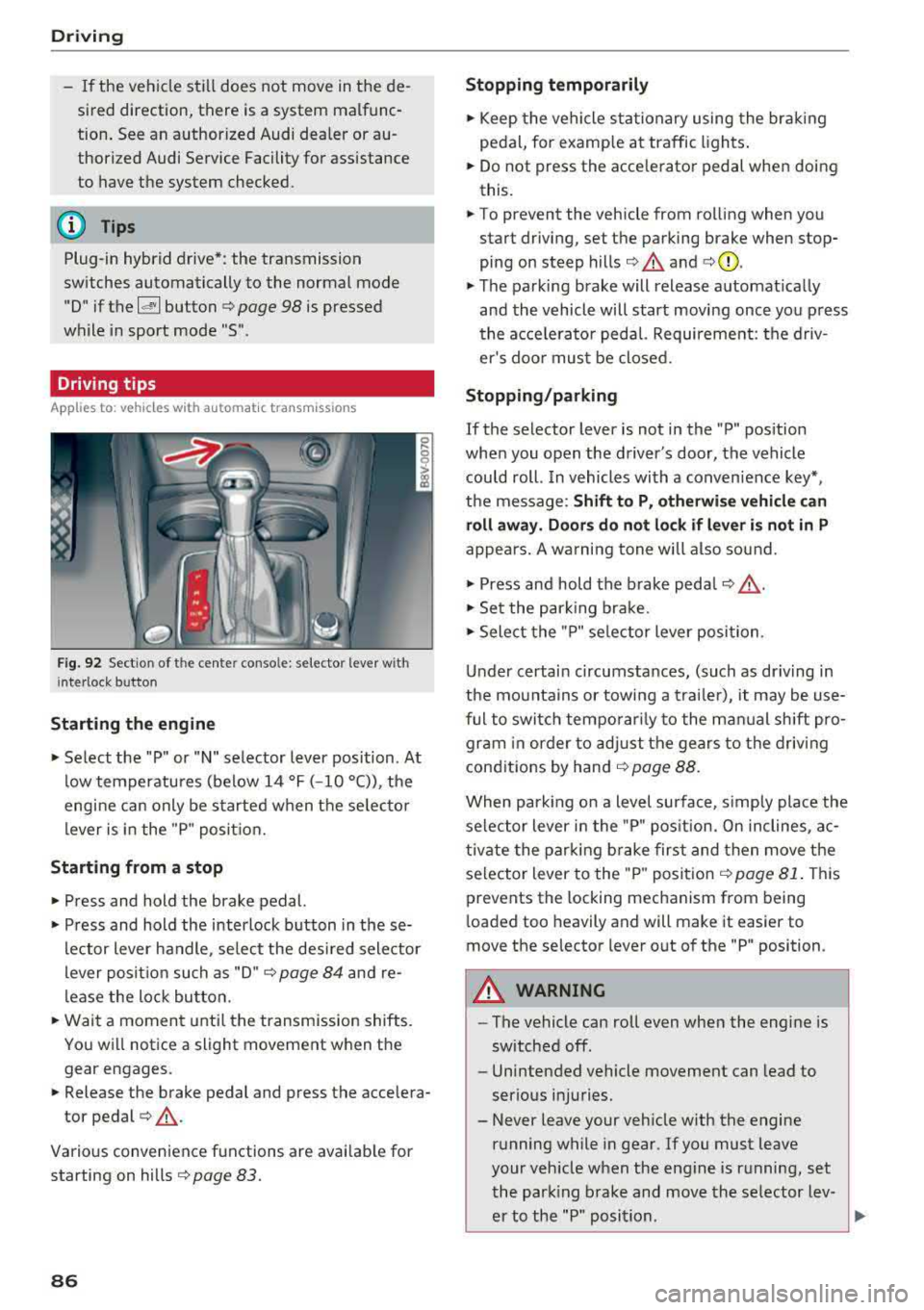
F ig . 9 2 Sect io n of the cente r co nso le: se le cto r lever w it h
i nte rlock butto n
Starting the engine
• Select the "P" or "N" selector lever position . At
low temperatu res (be low 14 °F ( -10 °C)), the
engine can only be started when t he se lec to r
l ever is in the "P " posit io n.
Starting from a stop
• Press and hold the brake pedal.
• Press and hold the interlock button in these
lector lever handle, se lect the des ired sele ctor
lever posit io n such as "D" ¢
page 84 and re
lease the loc k bu tton.
• Wait a moment unti l the transmission shifts.
Yo u w ill not ice a slight movement when the
gear engages.
• Release the brake pedal and press the accelera
tor
pedal ¢,&. .
Various convenience functions are avai lab le for
starting on hills ¢
page 83.
86
Stopping temporarily
• Keep the vehicle st ationary using the bra kin g
peda l, for examp le a t traffic ligh ts.
• Do not press the acce le rato r pedal when doing
this.
• To prevent the vehicle from rolling when you start driving, set the pa rking brake when stop
ping on steep
hills ¢.&. and ¢(Q).
• The parking brake will release a utomat ica lly
and the vehicle will start moving once yo u press
the acce le rato r pedal. Requirement: the d riv
er's doo r mus t be closed.
Stopping/parking
If the selector lever is not in the "P" pos ition
whe n you open the d river's door, the vehicle
could roll. In vehicles with a conven ience key *,
the message :
Shift to P, otherwise vehicle can
roll away. Door s do not lock if lever is not in P
appe ars . A wa rning tone wi ll also sound.
• Press and hold the brake peda l¢ ,&. .
• Set t he par king brake.
• Select the "P" se lector lever posi tion .
Un der certai n circumstances, (such as dr iving in
the mo unta ins or towi ng a trailer), it may be use
ful to switch temporar ily to the m an ual shift pro
gr am in or der to ad ju st t he gears to the driv ing
cond it ions by hand ¢
page 88.
When parking on a level surface, s imp ly place the
se le ct or lever i n the "P" pos ition. On inclines, a c
tivate the par king b rake first and then move the
se lector lever to the "P " posit ion ¢
page 81. Thi s
prevents the locking mechanism from being
l oaded too heavily and will make it easier to
move the selector lever out of the "P" position.
A WARNING
- The vehicle can roll even whe n the engi ne is
sw itched off .
- Unintended vehicle movement can lead to
serio us injuries.
- Never leave your veh icle with the engine
r u nning while in gear. If you must leave
your veh icle when the eng ine is r unning, set
t he par king brake and move the se lecto r lev
er to the "P " posi tion .
Page 89 of 404
u. 00 .-< N l' N .-< 0 N > 00
-Power is still transferred to the wheels
when the engine is running at idle. To pre
vent the vehicle from "creeping", you must keep your foot on the brake when the en
gine is running and the selector lever is in
the "D", "S" or "R" position or "tiptronic"
mode is selected.
- Do not inadvertently press the accelerator
peda l when the vehicle is stopped if a gear is
engaged. Otherwise the risk of an accident
increases because the vehicle will start to
move immediately, even if the parking brake
is set.
- To reduce the risk of an accident, do not
press the acce lerator pedal when changing
the selector lever position while the vehicle is stationary and the engine is running.
- Never engage the "R" or "P" selector leve l
positions while driving. It could cause a
crash.
- Before driving down a steep slope, reduce
your speed and shift into a lower gear with
"ti ptron i c".
- Do not ride the brakes or press the brake
pedal too often or too long when driving
downhill. Constant braking causes the
brakes to overheat and substantially re
duces braking performance, increases brak
ing distance or causes complete failure of
the brake system.
- If you must stop on an incline, always hold
the vehicle in p lace with the foot brake or
park ing brake to prevent it from rolling
back.
- Never hold the veh icle on an incline with a
sl ip ping clutch. The clutch opens automati
cally when it becomes too hot from the
overload. The
ml indicator light turns on
and a message appears
¢ page 89 when
the clutch is over loaded .
{LlJ) Note
- When stopping on an incline, do not try to
ho ld the vehicle in place by pressing the ac
ce lerator pedal while a driving gear is se
l ected. This can cause the automatic trans
mission to overheat and can damage it. Set
Driving
the parking brake or press the brake pedal
to prevent the vehicle from rolling.
- Allowing the vehicle to roll when the engine
is stopped while the selector lever is in the
"N" position will damage the automatic
transmission, because it is not lubricated
under those circumstances
¢ page 3 78,
Towing with a tow truck.
- The transmission can overheat and be dam
aged under certain driving and traffic condi
tions such as frequent starts, creeping for a
long time, or stop-and-go traffic. When the
ml or. indicator light turns on, stop the
vehicle at the next opportunity and let the
transmission cool¢
page 89.
(D Tips
For safety reasons, the park ing brake only re
l eases automatically when the driver's door is
closed.
Hill descent control
App lies to : vehicles wi th automatic transmiss ions
The hill descent control system assists the driver
when driving down hills.
Hill descent control is act ivated when the selec
tor lever is in the "D" or "S" posit ion and you
press the b rake pedal. The transmission auto
matically se lects a gear that is suitab le for the
hill. Hill descent contro l tries to ma inta in the
speed achieved at the time of braking, within
physical and technica l limitations. If may still be
necessary to adjust the speed with the brakes.
Because hill descent control cannot shift down
farther than 3rd gear, it may be necessary to
shift into tiptronic mode in very steep areas . In
th is case, shift into 2nd or 1st gear in t iptronic
mode to use the engine's braking force to rel ieve
the brakes.
Hill descent control switches
off once the hill lev
els out or you press the accelerator pedal.
On vehicles with a cruise control system*
¢ page 120, hill descent control is also activated
when the speed is set .
.,,.
87
Page 91 of 404
u. co ... N l' N
A WARNING
Please note that the wheels could spin on
slick or slippery roads when kick-down is ac
tive .
Launch control program
App lies to: ve hicles with S tro nic tra nsm issio n an d La unch
Co ntrol P rogram
-
The launch control program provides the best
possible acceleration when starting from a stop .
Requirement: the eng ine must be at operating
temperature and t he steer ing whee l must not be
turned.
.,. Deact ivate l) the S tart/Stop system*
~ page 81. The L ED in the ~ button turns on .
.,. Wi th the engine runn ing, p ress the I.!, O FF ! but
ton briefly one time . The
11 indicator light
turns on and the message
Stabili zation control
( ESC ): s port. W arning! Rest ricted st a bilit y
ap
pears in the instrument cluster display.
.,. Pull the selector lever back out of the "D/S" po
s it ion br iefly to select the S pos it ion, or press it
toward the right into the t iptronic pos ition or
select the
Dynamic d riving mode in d rive se
lect* ~ page 140.
.,. Press t he b rake peda l firmly with you r left foot
and hold it all the way down for at least one
second .
.,. At the same time, press the gas pedal a ll the
way down with your right foot unt il the engine
reaches and stays at a high RPM level.
.,. Remove your left foot from the brake pedal
within five
seconds ~,&. .
A WARNING
-Always adapt yo ur driv ing to the traffic flow.
- Only use Launch Control when road and traf-
fic cond itions allow it and other dr ivers will
not be endangered or impacted by you r driv
ing and the vehicle 's accele ration.
- Please note tha t the drive whee ls can sp in
and the vehicle can break away when sport
8 l ) It is n ot poss ib le to deac tiv ate t he system wit h all ve rs io n s N &j of th e tran sm iss ion.
Driving
mode is switched on, especially when the
road is slippery.
- Once the vehicle has started moving, press
the !.!> OFF I button briefly to turn the sport
mode off.
(D Tips
- The transmission temperat ure may increase
significant ly after using the launch control
program. If that happens, the program may
not be ava ilable for a few minutes. It will be
availab le aga in after a cool-down period.
- When accelerating using the launch contro l
program, all vehicle parts are subject to
heavy loads . This can lead to increased
wear .
Transmission malfunction
Applies to: vehicles wit h automatic transmissions
• Transmis sion : malfunction! Pl eas e s top ve
hicle and shift to P
There is a malfunction in the transmission . Park
the vehicle securely and do not cont inue driv ing .
See an author ized Audi dealer or author ized Audi
Se rvice Facility for assistance .
• Transmission o verhe ating! Plea se stop th e
vehicle!
The transmission is too hot and can become dam
aged. Stop and let the transmiss ion cool w ith the
engine running (at idle) i n the "P" selector lever
pos ition . T hen the ind icator light and the mes
sage turn off, d rive to an authorized Aud i dealer
o r auth o rized Aud i Serv ice Facility immediately to
have t he malfunct ion cor rected . If the indicato r
light and the driver message do not turn off, do
not continue driving . See an authorized Audi
dealer or authorized Audi Service Facility for as
s istance.
[O] Tran smission: malfunction! You can contin-
u e dri ving. See owne r's manual
.,.
89
Page 95 of 404
u. 00 ... N l' N ... 0 N > 00
injuries. When the vehicle enters drive ready
mode, the status message
e-no"' ~... ap
pears briefly in the instrument cluster display
and the needle in the power meter points to
READY ¢ page 9 5.
-Make sure that the selector lever is in the P
position and the ignition is switched off
when leaving the vehicle.
@ Note
-The high-voltage system can be damaged if
the vehicle underbody comes into contact
with the ground . Immediately drive your ve
hicle to an authorized repair facility and
have it inspected.
- The electric drive motor can become very
hot during operation . Do not stop the vehi
cle if there is oil, fuel residue or other flam
mable substances under or next to the vehi
cle.
Special considerations for the high-voltage
battery
Applies to: vehicles with plug-in hybrid drive
Please first read and note the introductory infor
mation and heed the warnings
¢page 92.
All batteries age with use and over time. There
are things you should know about the care of the
high voltage battery that will help it keep giving
you good service and reliability over time. Please
read and keep the following information in mind
while you enjoy the performance and economy of
your vehicle.
- Be sure to charge the high voltage battery be
fore leaving the vehicle parked and unused for a longer period of time. Ideally the high-voltage
battery should have a charge level between
40 % and 60 % when parked for a long t ime .
- If the battery charge level is below 3 %, never
park the vehicle for more than 21 days without
charging the high-voltage battery. Should you
have to park the vehicle for a long time, make
sure that the charge level is sufficient to help
prevent the battery from aging prematurely.
- Frequent and consecutive charging of the high
voltage battery when the charge level is above
e-tron
98 % can also decrease the capacity of the
high-voltage battery. Make sure the charge lev
el is be low 98 % when you start the charging
process.
- Should the vehicle be parked for longer than
2 days at temperatures below -13 °F ( -25 °C),
the high-voltage battery could free ze and not
be able to provide energy to the electric motor.
The battery will start working again, once it
warms up . The battery can be warmed up when
the outside temperature rises or when the vehi
cle is garaged appropriately. The battery will al
so warm up when being used (sw itching on the
air conditioner, the heater or by driving the ve
hicle) . Should you have to park your vehicle at
very low temperatures for longer than 1 day,
make sure that the high-voltage battery does
not freeze by parking the vehicle in a garage
that is heated or protected from the outside
temperature.
- The high-voltage battery can be damaged and
the capacity can be decreased when the vehicle
is parked for longer than 24 hours when the
ambient temperature is higher than 118 °F
(48 °C). Always make sure that the h igh-volt
age battery is not exposed to temperatures
above 118 °F (48 °C) for a long time.
- Never park the veh icle in areas that are lik ely to
be flooded, such as beaches or river banks, and
never drive the vehicle in WA TER, on flooded
roads or through water that is higher than the
bottom of the vehicle body. The high-voltage
battery, along with other vehicle components,
can be damaged severely if the high-voltage battery is exposed to open water especially for
a longer time. However, you can drive through
water on roads under certain conditions
~ page 72.
Failure to heed any of these requirements can
age the battery prematurely and lead to a perma
nent decrease of the high-vo ltage battery's ca
pacity.
(D Tips
Always make sure that the high-voltage bat
tery is not exposed to extremely low and high
temperatures as well as to water espec ially
for a longer time. Failure to protect and care
93
Page 96 of 404
e-tron
for the high voltage battery can lead to seri
ous damage and/or a decrease of the capacity
void coverage under the New Vehicle Limited
Warranty.
Starting/driving the vehicle
A pp lies to: ve hicles w ith plug- in hybrid drive
The vehicle is started and stopped with the
IS TAR T ENGINE STOP I button . Please also read
the information under
Q page 76, Starting the
engine.
Establishing drive ready mode
See Q .& in Introduction on page 92.
Requirement: a charging cable must not be con
nected to the vehicle
Qpage 115 and the selec
tor lever must be in the "P" or
"N" position.
- Press the brake peda l.
- Press th e
I START ENGINE STOPI button .
When the veh icle enters drive ready mode, the
status message
e-tron READY appears briefly in
the instrument cluster display and the needle in
the powe r meter points to
READY Q page 95.
Driving
The vehicle starts with the electr ic motor after
establishing the dr ive ready mode and if the con
ditions for electric drive mode have been met
Qpage98.
The cond itions to drive are essentially the same
as for the automat ic transmission
Q page 83 .
You and your passengers should anticipate the
possibility of a sporty acceleration.
Ending drive ready mode
- Place the selector lever in the P position.
- Switch the ign ition off with the
I START ENGINE STOP ! button.
Vehicle sound1>
The vehicle generates an electronic engine sound
so that you r vehicle can be heard from the out
side when in electr ic drive mode. The veh icle
l) Not available in all markets.
94
sound automatically fades out at higher speeds
when the sounds from the tires and wind start in
creasing .
Switching the ignition on/off
You can switch the ignition on without establish
in g drive ready mode.
- To switch the ign ition on or off, press the
!START ENGINE STOPI button. Do not press the
brake pedal while do ing this.
When the ignition is switched on, the needle
stays pointed at
OFF CD Q page 95, fig. 98 or
OFF is displayed CD~ page 95, fig. 98.
No indicator lights stay turned on when the igni
tion is switched off.
Ignition is switched off automatically
To prevent the vehicle battery from draining, the
i gnition will switch off automatically under the
follow ing cond it ions:
- The vehicle has already been driven.
- The vehicle is stationary.
- The gasoline engine is not runn ing.
- The driver's door is opened.
- The driver's safety belt is unbuckled .
- The brake pedal is not pressed.
In this case, the activated low beam is replaced
by the parking light. The message
Side marker
lights will switch off automatically in 30 mi
nutes. See owner 's manual
appears in the instru
ment cluster display . The parking lights will
switch off after approximately 30 minutes or
when you lock the veh icle.
If the gasoline engine was not stopped, the mo
tor continues running and the ignition does not
automat ically switch off
Q & .
A WARNING
To reduce the risk of poisoning, never allow
the engine to run in confined spaces .
-
Page 98 of 404
e-tron
For additional information, see ¢ page 17, Trip
computer (Audi virtual cockpit).
~ Applies to: vehicles with analog instrument
cluster: Open the
Tachometer display by turn
ing the left thumbwheel on the multifunction
steering wheel.
When opening the driver's door, the charge level is shown in the instrument cluster when the igni
tion is switched on, or the charge level and the
remaining charge time for the high -voltage bat
tery is displayed when charging .
The power meter gives feedback about the partic ular accelerator pedal position and shows the
current demand
(%) for electricity or fuel regard
less of which engine is active.
An economical driving and recuperation range is
shown in green
¢ page 99, Energy recovery (re
cuperation) .
A driving range that is not economi
cal is shown in orange .
(D Vehicle not drive ready (OFF)
@ Recuperation (CHARGE)
@ Vehicle ready to drive (READY) or
coasting
© Efficient driving with electric motor
and/or gasoline engine (EFFICIEN
CY)
® Economic driving while the electric
motor or gasoline engine is in the
partial power range
@ Driving in full power range
0 100% output
@ BOOST: the electric motor supports
the combustion engine
® High-voltage battery charge level
@ EV mode: active a=,v, standby, a=,v
or currently unavailable. ~v
@ Speed limit for electric driving in EV
mode (80 mph/ 130 km/h)
Indicator lights and messages
Applies to: vehicles with plug -in hybr id drive
Also note the indicator lights in¢ page 20.
The gasoline engine is active when the II'§] indica
tor light turns on.
96
•• Drive system: system fault! Safely park
vehicle
There is a malfunction in the plug-in hybrid sys
tem. The brake booster and the power steering
may stop working. Stop the vehicle immediately
or as soon as possible. Park the vehicle in a safe place outdoors that is not near buildings, roof
overhangs, carports or similar structures. Switch
the ignition off. Have the problem corrected by
an authorized Audi dealer or authorized Audi
Service Facility.
•• Electric drive: overheated! Safely stop
vehicle and check coolant
The coolant level is too low or the coolant tem
perature is too high.
Stop the vehicle in the outdoors as soon as it is
safely possible. Switch the ignition off.
Read the important safety
precautions ¢.& in
Coolant on page 103
and check the coolant level
¢page 102.
If the coolant level is OK, the malfunction may be
caused by the system overheating. Let the vehi
cle's electric drive system cool down for some
time .
If the message turns off after cooling down and
switching the ignition back on, you can continue
driving. Contact an authorized Audi dealer or au
thorized Audi Service Facility immediately to have
the malfunction corrected.
If the indicator light stays on, contact an author
ized Audi dealer or authorized Audi Service Facili
ty.
lltll Drive system: system fault! Please con
tact workshop
There is a malfunction in the plug-in hybrid sys
tem . Drive to an authorized Audi dealer or au
thorized Audi Service Facility immediately to have
the malfunction corrected.
1/1111 Drive system: system fault! Restart not
possible. Please contact workshop
There is a malfunction in the plug-in hybrid sys
tem. Do not open the hood. Drive to an author- ized Audi dealer or authorized Audi Service
.,,_
Page 122 of 404
Ass is tance sy stem s
Assistance systems
Speed warning system
Description
Applies to: veh icles with speed warning system
The speed warning system helps you to stay be
low a specified maximum speed that can be set,
changed or deleted in the Infotainment system.
The speed warning system warns you if you are
exceeding the maximum speed that you have set .
A warni ng tone will sound as soon as your speed
exceeds the sto red value slight ly. The
[OJ (USA
models) ;[;] (Canada models) indica to r li gh t and
the co rresponding message appear in the inst ru
ment cluster display at the same time. The
[C]
(USA models)/ [ej (Canada mode ls) indicator
light and the message turn off w hen the vehicle
speed drops below the stored maximum speed .
Sett ing a threshold is recommended if you would
like to be reminded when yo u reach a certa in
maximum speed . Situations where you may want
to do so include driving in a country with a ge ner
al speed limit or if there is a specified maximum
speed for winter tires.
Setting the warning thr eshold
.. Select in the Infotainment sys tem : IMENUI but
ton
> Vehicle > left contro l button > Driver a s
sistance
> S peed warning > Manual.
@ Tips
Regardless of the speed warning system, you
should always monitor yo ur speed using the
speedometer and make sure you are following
the legal speed limit.
120
Cruise control system
Switching on
Applies to: vehicles with cruise control system
The cruise control system makes it possible to
drive at a constant speed starting at 15 mph (20km/h) .
0
f
~
0
Fig . 1 21 Ope rat ing lev er : cru ise co ntrol sys te m
0
"' N
~ CD
.. To switch t he system on, pull the lever into po -
sition
CD ¢ fig. 121 .
.. Drive at the speed to be maintained .
.. To store the speed, press the button @.
The
[ij;(l)~1j ( U SA mode ls) / 51 (Canada models)
indicator light turns on in the instr ument cluster .
The stored or prese lec ted speed w ill be displayed
briefly in the instrument cluster .
The speed is mainta ined by modifyi ng engine
power or through an active bra ke intervention.
&_ WARNING
- Always pay at ten tion to the traffic a ro und
you whe n the cruise contro l system is in op
erat ion . You are always respons ible fo r your
speed and the distance between your vehi
cle and other vehicles.
-For safety reaso ns, cruise cont rol should not
be used in the city, in stop-and-go traff ic, on
w inding roads and when road conditions are
poor (such as ice, fog, gravel, heavy rai n and
hydroplaning), because this increases the
r isk of an accident.
-Switch t he cr uise control off temporarily
when dr iv ing in turning lanes, highway exits
or in construction zones .
- Please note that unconsciously
"rest ing"
your foot on the accelerator pedal prevents
-
Page 124 of 404
Ass is tanc e system s
A WARNING
You should only resume the stored speed if it
is not too high for existing traffic condit ions.
Otherwise you can increase the r isk of an acci
dent .
Lap timer
Introduction
Applies to: vehicles with lap timer
You can measure and analyze lap times with the
lap timer in the display.
Opening th e lap timer
i.. Open the first Vehicle tab (t rip computer) using
t h e
l
whee l.
i.. Applies to: vehicles with analog instrument
cluster: Press the
[gJ button on the m ultifunc
tion steering whee l and select
Lap t imer in the
menu .
... Applies to: vehicles with Audi virtual cockpit: on
the multifunction steering wheel, select: left
contro l button
> Lap times .
Operating the lap t ime r
... On the multifunction steering whee l, turn the
l eft thumbwhee l
(J) ¢page 13 or (D ¢page 16
unt il the desired menu item is d isplayed in the
instrument cluster .
... Press the left thumbwheel to confirm the selec
tion .
A WARNING
Your foc us should always be on d riving your
vehicle safely. As the drive r, you have com
ple te responsibi lity for safety in traffic. Only
use the functions s uch as the lap timer in such
a way that you always maintain comp lete con
trol over your vehicle in all traffic situations.
(D Tips
You can ret rieve information from the trip
computer while the lap timer stopwatch is
running .
122
-
Lap times and timing
Applies to: vehicles with lap timer
Requirement: the lap time r must be open
¢ page 122.
Timing laps
... To start timing, select Lap 1 - pre ss OK or S tart
lap 1
in the menu .
i.. Applies to: vehicles with Audi virtual cockpit: to
start t iming au tomatically when yo u start dr iv
ing, select
S tart lap 1 by driving off or St art by
dri ving off in the menu .
... To measure the lap time, select New lap - pre ss
OK or New lap
in t he menu . This starts timing
the next lap at the same t ime .
After completing, the d ifference between the
l ast lap and the previous best lap time will be in
dicated with
a" -"/ . or "+ "fll .
Pausing timing and displaying a split time
i.. To insert a pause m , sele ct Pau se in the menu.
i.. To cont inue tim ing, select Pre ss OK to re sume
or Re sume in the menu .
... T o display a sp lit time, select Split time in the
menu. The split time
r~1 appears for approxi
mate ly 10 seconds in the instrument cluster .
The timing of the current lap continues.
Re setting timing
... Using the mult ifunct ion steer ing whee l, select
Reset or Reset time s in the menu.
(D Tips
-A max imum of 30 lap t imes (analog instru
ment cl uster) or 99 lap times (Audi virtua l
cockpit*) can be measured.
- If tim ing is paused, you can continue i t later
even if you switch the ignition off.
- Saved lap times cannot be individually de
leted from the total results .
- T he save d la p timer va lues w ill remain after
switching the ignition off.
Page 128 of 404
Ass is tance sy stem s
@Indicator lights
Ill-Adaptive cruise control is switched on . No
veh icles are detected ahead . The stored speed is
maintained.
• -A vehicle driving ahead was detected. The
adapt ive cruise control system regulates the
speed and d istance to the vehicle ahead and
brakes/accelerates automatically.
(-) -Adaptive cruise control is switched on. Ave
h icle was detected ahead . Yo ur vehicle remains
stopped and w ill not start driv ing automat ica lly .
• -The automatic braking is not enough to
maintain a sufficient distance to a vehicle dr iv ing
ahead . You must intervene
r:::;, page 129, Driver
intervention request .
© Instrument clu ster di splay
If adaptive cruise contro l is not shown in the in
strument cluster display, you can call i t up using
the multifunction steering wheel buttons
r:::;, page 13 .
Based on the graphics in the d isp lay, you can de
termine if the system is mainta ining a distance to
a vehicle ahead and what that distance to this ve
h icle is:
No vehicle -no vehicle was detected driving
ahead.
Sil ver vehicle -a vehicle was detected driving
ahead.
Red vehicle -request for driver intervention
r:::;, page 129.
The five distance bar s on the gauge@ represent
the set d istance (refer
to r:::;, page 128 for infor
mat io n on how to change the distance). If yo u
fa ll below the se lected distance, the distance
bars become red from the bottom upward.
A WARNING
If you press the ISE TI b utton when driving at
speeds below 20 mph (30 km/h), the vehicle
accelerates automat ica lly up to 20 mph (30
km/h), which is the m inimum speed that can
be set.
126
@ Tips
- If you switch the ignition or the adaptive
cruise control system off, the set speed is
erased for safety reasons.
- The electronic stabilization control (ESC)
and the anti-slip-regulation (ASR) are auto
matically switc hed on when the adaptive
cruise control is switched on.
Changing the speed
Applies to: vehicles with Audi adaptive cruise control
0
f
I
0
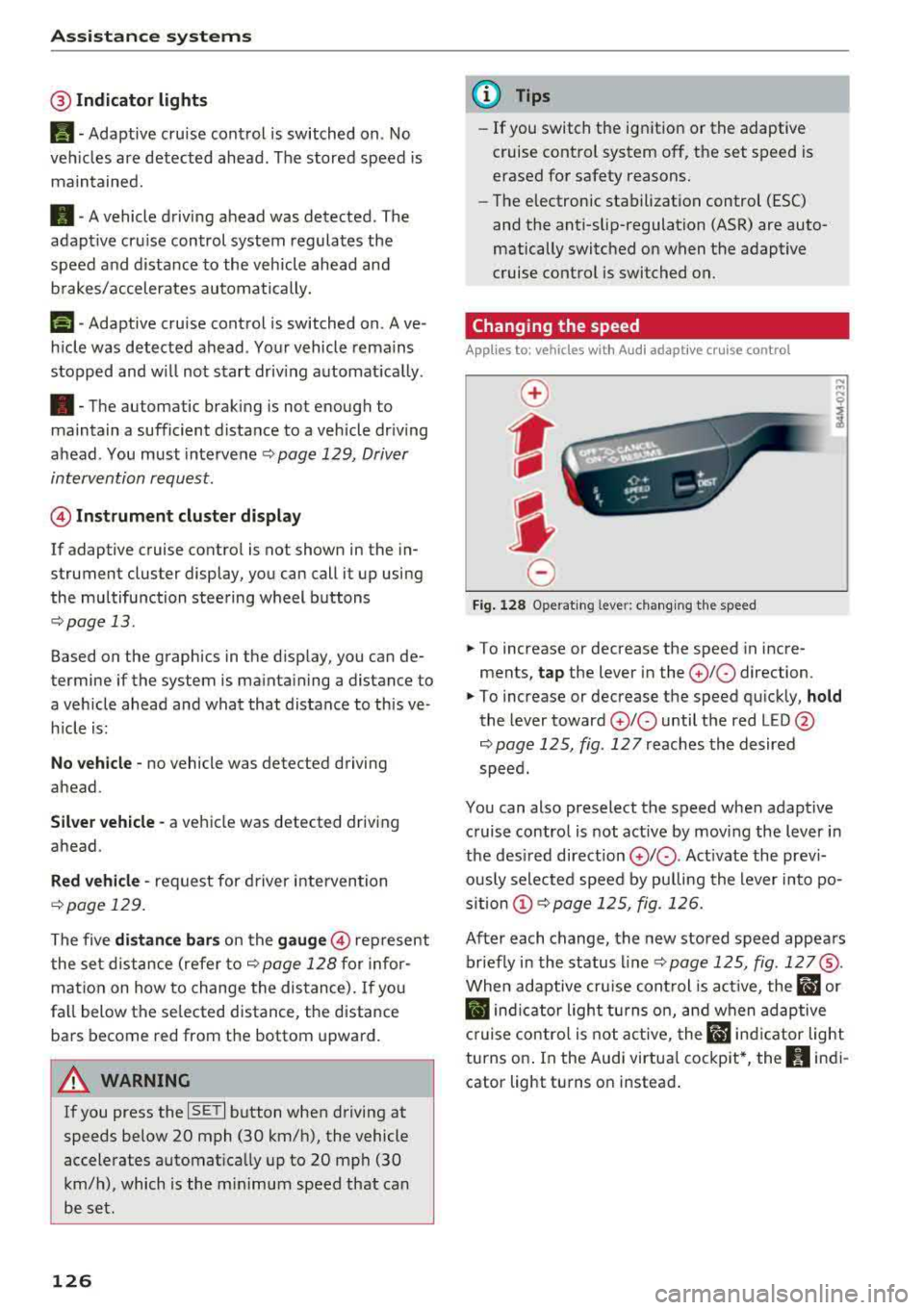
Fig . 12 8 Ope rat ing leve r: chang ing the speed
.. To increase or decrease the speed in incre
ments,
tap the lever in the 0 10 direction.
,... ... ,...
i
.. To increase or decrease the speed qu ick ly, hold
the lever toward 0 10 until the red LED @
r:::;,page 125, fig . 127 reaches the desired
speed.
You can also preselect the speed when adapt ive
c ruise control is not active by moving the lever in
the des ired direction
0 10 . Act ivate the prev i
ous ly selected speed by pulling the lever into po
s ition
(D r:::;, page 125, fig. 126.
After each change, the new stored speed appea rs
br iefly in the status l ine
r:::;, page 125, fig . 127@.
When adaptive cru ise cont rol is act ive , the flJ or
• ind icator light turns o n, and when adaptive
c ruise contro l is not a ctive, the
IIJ ind icator light
turns on . In the Audi virtua l cockpit*, the
II indi
cator light turns o n instead .
Page 129 of 404
LL co .... N
" N .... 0 N > co
Driving in stop-and-go traffic
A pplies to: ve hicles with Audi adaptive cruise co ntro l
Fig. 12 9 In str ument clust er: s afe star t mo nito r
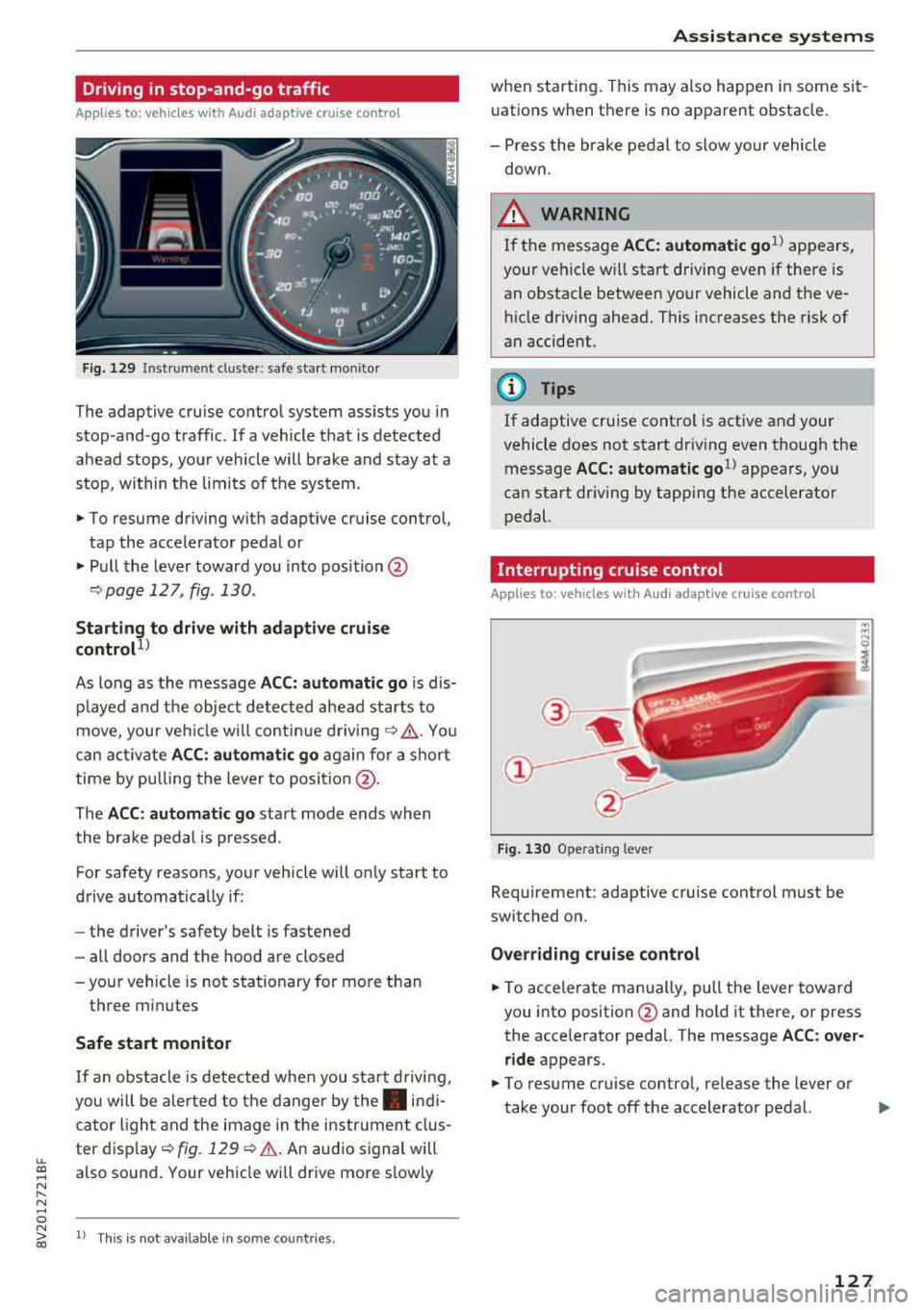
The adaptive cruise control system assists you in
stop -and -go traffic . If a vehicle that is detected
ahead stops, your vehicle will brake and stay at a
stop , within the lim its of the system.
.,. To resume driving w ith adapt ive cruise control,
tap the accelerator pedal or
.,. P ull the lever toward you into position @
¢page 127 , fig. 130.
Starting to drive with adapti ve cruise
controt
1>
As long as the message ACC: a utomatic go is dis
p layed and the objec t detected ahead starts to
move, your veh icle w ill contin ue
d riving ~.&. . You
can act iva te
A CC: automatic go again for a sho rt
time by pu lling the lever to position @.
The
AC C: autom ati c go sta rt mode ends whe n
the brake pedal is pressed.
For safety reasons, your vehicle will o nly start to
d rive automatically if:
- the driver 's safety belt is fastened
- all doors and the hood are closed
-your vehicle is no t stationary for mo re than
t h ree m inutes
Safe start monitor
I f an obstacle is detec ted when you sta rt drivi ng,
you will be a le rted to the danger by
the . indi
cator ligh t and the image in the instr ument clus
ter
d isp lay ~ fig. 129 ¢.&. .An aud io signal will
also sound . Your veh icle wi ll drive more s lowly
l) Th is is no t av aila ble in so m e co untries.
A ssi st a nce systems
when starting . This may also happen in some sit
uations when there is no apparent obstacle.
- Press the br ake pedal to slow yo ur vehicle
down.
_& WARNING ~
If the message ACC: automatic go1> appears,
your vehicle w ill start driving even if there is
an obstacle between your vehicle and the ve
hicle driving ahead. This increases the risk of
an accident.
(D Tips
If adaptive cruise control is active and your
vehicle does not start dr iving even though the
message
ACC: automatic go1> appears, yo u
can start driving by tapping the accelerator
pedal.
Interrupting cruise control
Applies to : vehicles wit h Audi ada ptive cr uise control
Fig . 130 Opera ting leve r
Requirement: adaptive cruise control must be
switched on.
Overr iding cruise control
.,. To accelerate man ua lly, pull the lever toward
you into position @and hold it there, or press
the acce lerator pedal. The message
A CC: over
ride
appears.
.,. To resume cruise contro l, re lease the lever or
take your foot off the accelerator pedal.
.,..
127