instrument cluster AUDI A3 SEDAN 2018 Owner's Manual
[x] Cancel search | Manufacturer: AUDI, Model Year: 2018, Model line: A3 SEDAN, Model: AUDI A3 SEDAN 2018Pages: 404, PDF Size: 62.3 MB
Page 98 of 404
e-tron
For additional information, see ¢ page 17, Trip
computer (Audi virtual cockpit).
~ Applies to: vehicles with analog instrument
cluster: Open the
Tachometer display by turn
ing the left thumbwheel on the multifunction
steering wheel.
When opening the driver's door, the charge level is shown in the instrument cluster when the igni
tion is switched on, or the charge level and the
remaining charge time for the high -voltage bat
tery is displayed when charging .
The power meter gives feedback about the partic ular accelerator pedal position and shows the
current demand
(%) for electricity or fuel regard
less of which engine is active.
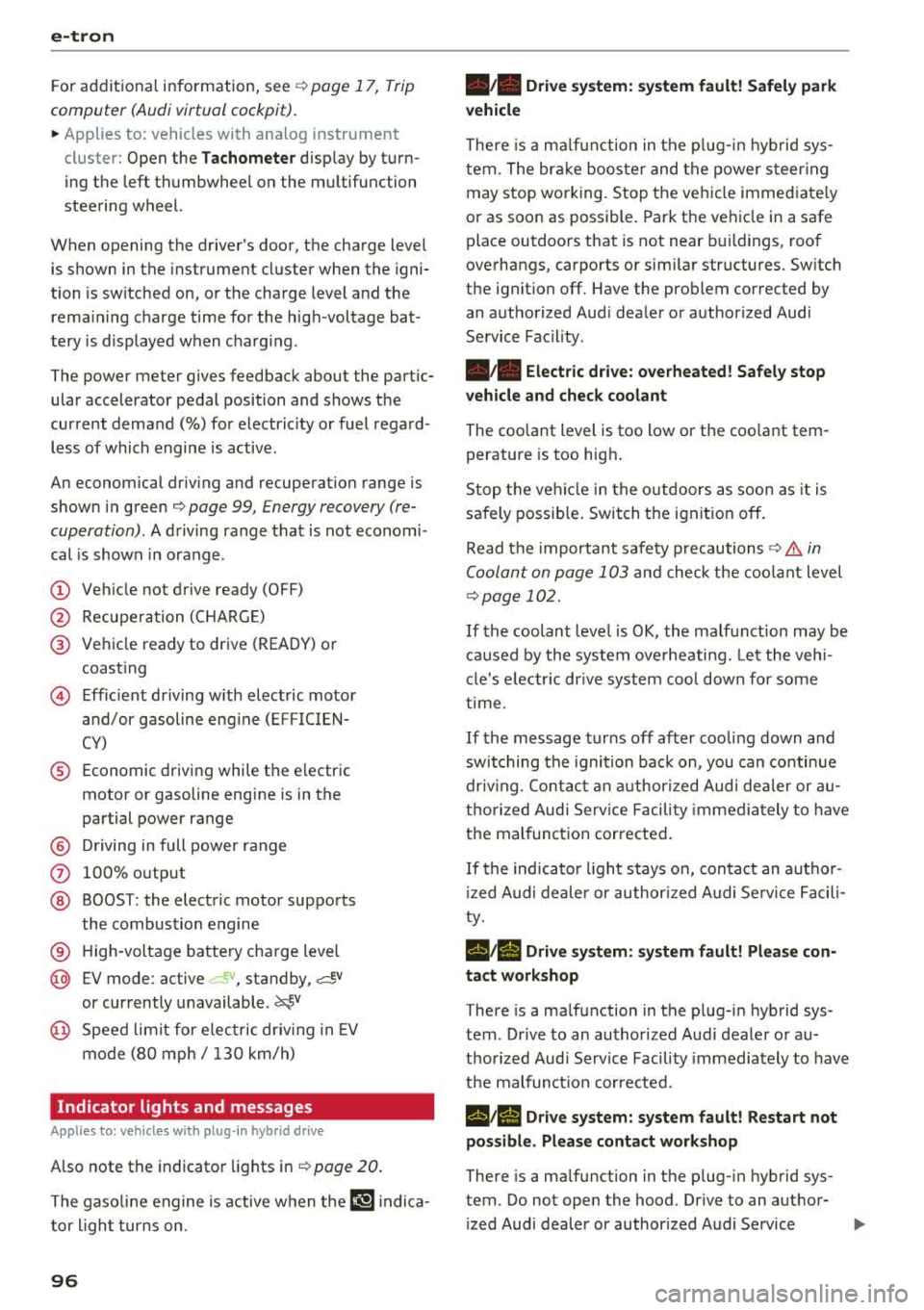
An economical driving and recuperation range is
shown in green
¢ page 99, Energy recovery (re
cuperation) .
A driving range that is not economi
cal is shown in orange .
(D Vehicle not drive ready (OFF)
@ Recuperation (CHARGE)
@ Vehicle ready to drive (READY) or
coasting
© Efficient driving with electric motor
and/or gasoline engine (EFFICIEN
CY)
® Economic driving while the electric
motor or gasoline engine is in the
partial power range
@ Driving in full power range
0 100% output
@ BOOST: the electric motor supports
the combustion engine
® High-voltage battery charge level
@ EV mode: active a=,v, standby, a=,v
or currently unavailable. ~v
@ Speed limit for electric driving in EV
mode (80 mph/ 130 km/h)
Indicator lights and messages
Applies to: vehicles with plug -in hybr id drive
Also note the indicator lights in¢ page 20.
The gasoline engine is active when the II'§] indica
tor light turns on.
96
•• Drive system: system fault! Safely park
vehicle
There is a malfunction in the plug-in hybrid sys
tem. The brake booster and the power steering
may stop working. Stop the vehicle immediately
or as soon as possible. Park the vehicle in a safe place outdoors that is not near buildings, roof
overhangs, carports or similar structures. Switch
the ignition off. Have the problem corrected by
an authorized Audi dealer or authorized Audi
Service Facility.
•• Electric drive: overheated! Safely stop
vehicle and check coolant
The coolant level is too low or the coolant tem
perature is too high.
Stop the vehicle in the outdoors as soon as it is
safely possible. Switch the ignition off.
Read the important safety
precautions ¢.& in
Coolant on page 103
and check the coolant level
¢page 102.
If the coolant level is OK, the malfunction may be
caused by the system overheating. Let the vehi
cle's electric drive system cool down for some
time .
If the message turns off after cooling down and
switching the ignition back on, you can continue
driving. Contact an authorized Audi dealer or au
thorized Audi Service Facility immediately to have
the malfunction corrected.
If the indicator light stays on, contact an author
ized Audi dealer or authorized Audi Service Facili
ty.
lltll Drive system: system fault! Please con
tact workshop
There is a malfunction in the plug-in hybrid sys
tem . Drive to an authorized Audi dealer or au
thorized Audi Service Facility immediately to have
the malfunction corrected.
1/1111 Drive system: system fault! Restart not
possible. Please contact workshop
There is a malfunction in the plug-in hybrid sys
tem. Do not open the hood. Drive to an author- ized Audi dealer or authorized Audi Service
.,,_
Page 100 of 404
e-tr on
~ To switch between the short -term and long
term memory, turn the left thumbwhee l on the
multifunction steering whee l.
Setting plug-in hybrid drive modes
Applies to: vehicles with plug-in hybrid drive
You con select between one electric mode and
two hybrid modes .
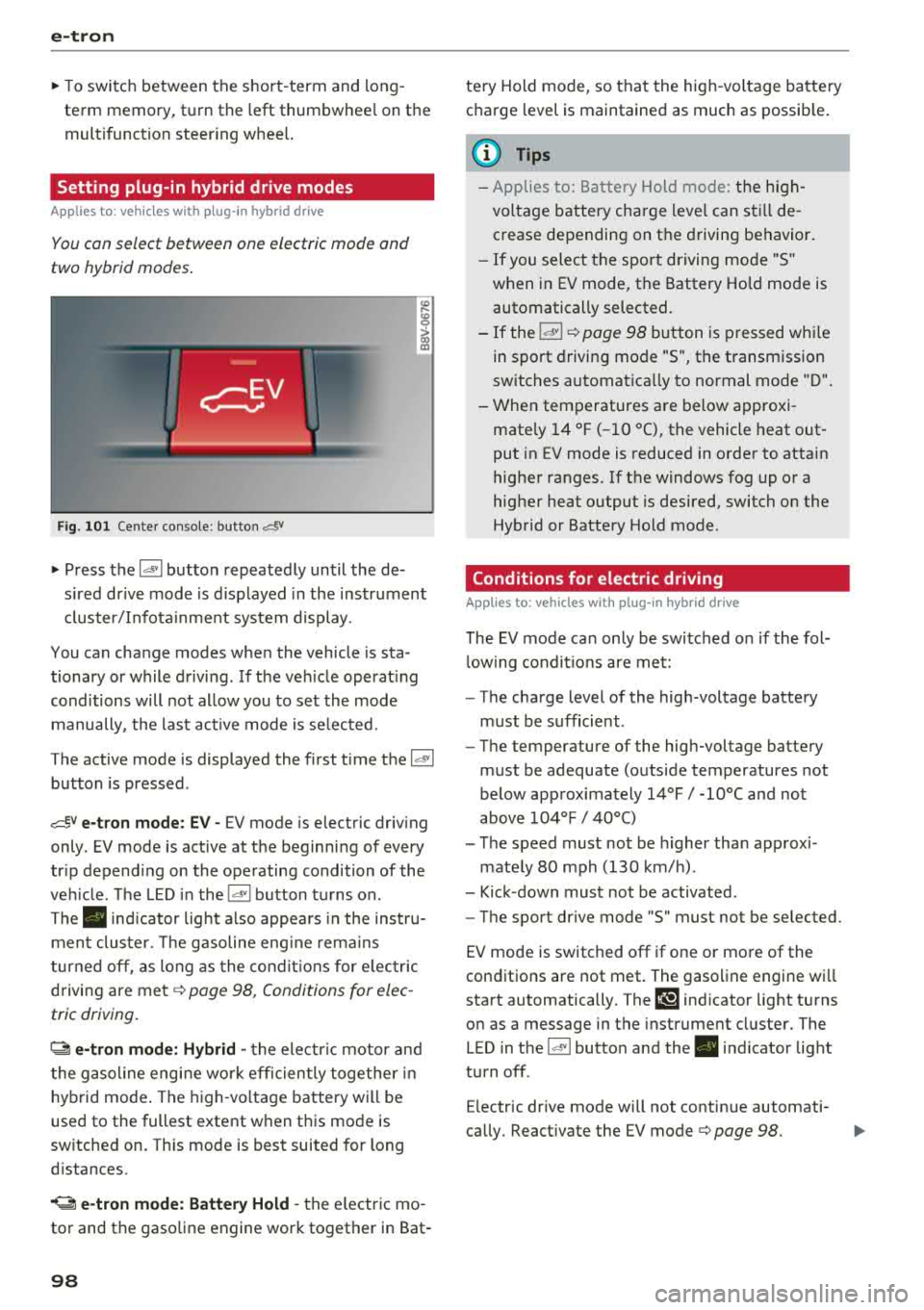
Fig . 1 01 Center console: but ton c:=!i'
~ Press the 14• 1 button repeatedly until the de
s ired dr ive mode is d isplayed in the instrument
cluster/Infota inment system display .
You can change modes when the vehicle is sta
tionary or while driving . If the veh icle operat ing
conditions will not allow you to set the mode
manually , the last act ive mode is se lected.
The active mode is displayed the first t ime the
14' 1
button is pressed .
,cf,V e-tron mod e: E V -EV mode is electric driv ing
only . EV mode is active at the beginning of every
tr ip depend ing on the operating condition of the
veh icle . T he LED in the
14"1 button turns on .
The. indicator light also appea rs in the instru
ment cluste r. T he gasoline eng ine rema ins
t urned off, as long as the cond it io n s for electr ic
driving are
met ¢ page 98, Conditions for elec
tric driving.
~ e- tron m ode : H ybrid -the electr ic motor and
t he gasoline engine wo rk efficien tly toge ther in
hybrid mode . The high -vo ltage battery will be
used to the fullest extent when t his mode is
switched on. This mode is best suited for long
d istances .
.. ~ e -t ro n mode: Batt ery Hold -the electric mo
tor and the gasoline engine work together in Bat -
98
tery Hold mode, so that the high -voltage battery
charge level is maintained as much as possib le .
(D Tips
- Applies to: Battery Hold mode: th e h igh
vo ltage battery charge level can sti ll de
crease depending on the driving behavior.
- If you select the sport driving mode "S"
when in EV mode, the Battery Ho ld mode is
automatically selected.
- If the
14"1 ¢ page 98 button is pressed w hile
in sport driving mode "S", the transmission
switches automatica lly to normal mode "D".
- When temperatures are below approxi
mate ly
14 °F ( -10 °C), the vehicle heat out
put in EV mode is reduced in order to attain
higher ranges. If the windows fog up or a
hig her heat output is desired, switch on the
Hybrid or Battery Hold mode .
Conditions for electric driving
Applies to: vehicles with plug-in hybrid drive
The EV mode ca n only be switched o n if the fol
l ow ing condit ions are met:
- The charge level of the high-voltage battery
must be sufficient .
- The temperature of the high-voltage battery
must be adequate (outside temperatures not
below approx imately
14°F / -10°( and not
above
1 04°F / 40°C)
- The speed must not be h igher than approxi -
mate ly
80 mph (130 km/h) .
- Kick -down must not be activated .
- The sport drive mode "S " must not be selected .
EV mode is switched off if one or more of the
conditions are not met. The gasoline engine wi ll
start automatically. The
l!'§'J indi cator light turns
on as a message in the instrument cluster. The
LED in the
14" 1 butto n and the . indicator light
turn off .
E lectric drive mode will not contin ue automati -
cally. React ivate the EV
mode ¢ page 98. Ill-
Page 101 of 404
u. 00 ... N l' N ... 0 N > 00
(D Tips
It may be necessary for the gasoline engine to
r u n longer for technical reasons, such as
when condensation accumu lates in the en
gine. Driving exclusively in electric mode is
not possible in this phase.
Plug-in hybrid functions
Applies to: vehicles with plug-in hybrid drive
The funct ions descr ibed below act ivate automati
cally depending on the driv ing sty le.
Full-throttle acceleration (boost)
The boost funct ion is act ivated by pressing the
accelerator pedal farther down (kick-down). The
vehicle is powered by both the gasoline engine
and the electric motor when in full accelerat io n.
Boost is only availab le for a sho rt time , because it
uses a large amou nt of energy. Ava ilability de
pends on the high-voltage battery charge level.
Coasting
The gasoline engine switches off and disengages
at speeds up to approximate ly 112 mph
(180 km/h) if the accelerator pedal is not p ress-
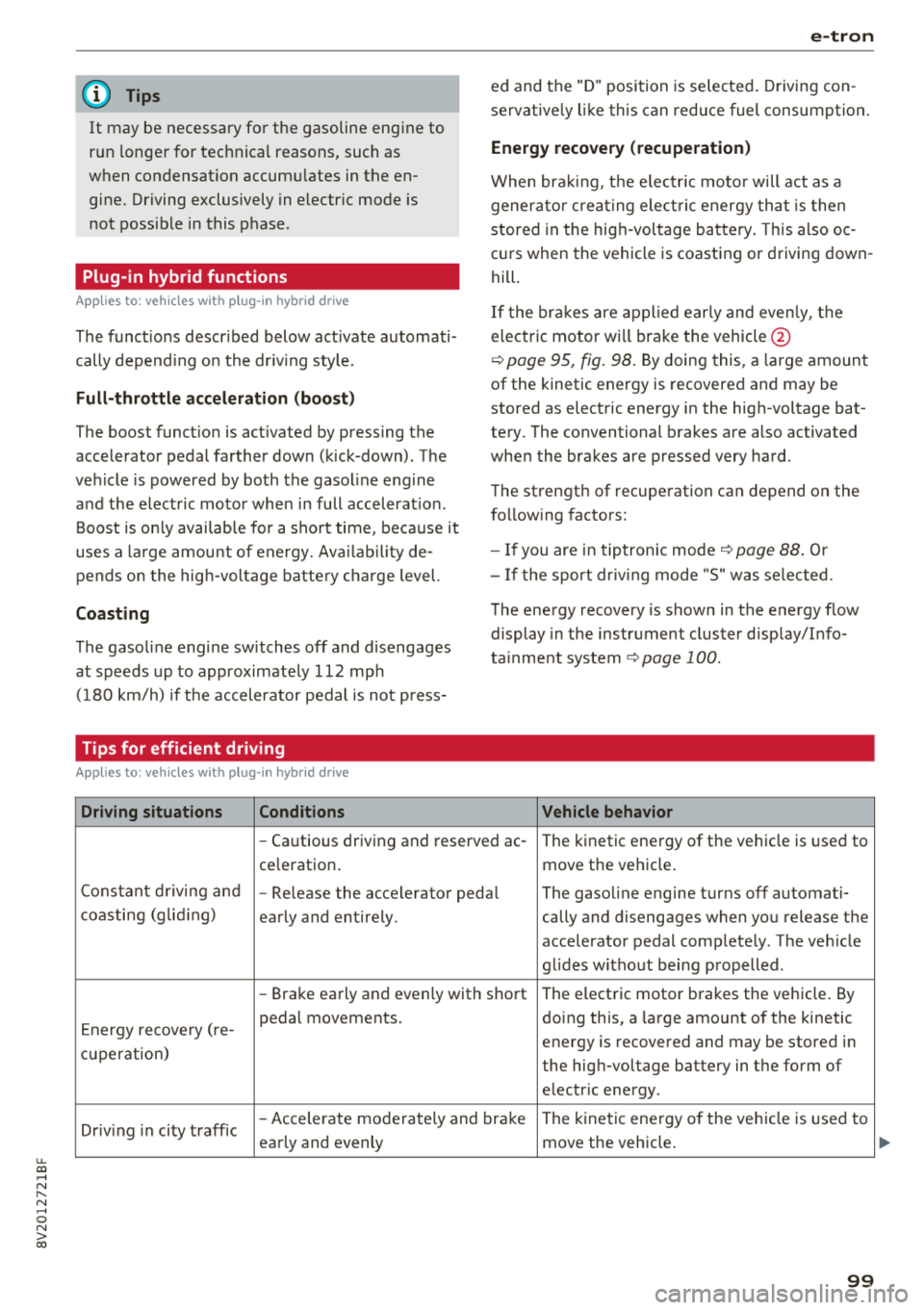
Tips for efficient driving
Applies to: vehicles with plug-in hybrid drive
Driving situations Conditions
e-tron
ed and the "D" position is selected. Driving con
servative ly like this can reduce fuel consumption .
Energy recovery (recuperation)
When braking, t he e lectr ic moto r will act as a
generato r creat ing elect ric energy that is then
stored in the hig h-voltage battery. This also o c
curs when the vehicle is coasting or driving down
hill .
If the brakes are applied early and evenly, the
electric motor w ill brake the vehicle @
¢
page 95, fig. 98. By doing this, a large amount
of the kinetic energy is recovered and may be
stored as electric energy in the high-voltage bat
tery . The conventional brakes are also activated
when the brakes are pressed very hard.
The strength of recuperation can depend on the
following factors:
- If you are in tiptronic mode ¢
page 88. Or
- I f the sport dr iv ing mode "S" was se lected.
The energy recovery is shown in the energy flow
display in the instrument cluster display/Info
ta inment system
¢ page 100.
Vehicle behavior
-Cautious driving and reserved ac- The kinetic energy of the ve hicle is used to
ce leration . move the vehicle.
Constant driving and
-Re lease the accelerator pedal The gasoline engine turns off automati-
coasting (gliding)
early and entirely. cally and disengages when you release the
accelerator pedal completely . The veh icle
glides w ithout being propelled .
-Brake early and evenly with short The electric motor brakes the vehicle. By
E nergy recove ry ( re- pedal movements.
doing this, a large amount of the kinetic
energy is recovered and may be stored in
cu perat ion)
the high-voltage battery in the form of
electr ic energy .
Driv ing in city traffic
-Accelerate moderately and brake The kinetic energy o f the ve hicle is used to
early and evenly move the vehicle.
99
...
Page 102 of 404
e-tron
Driving situations Conditions Vehicle behavior
-Intentionally take your foot off of The gasoline engine turns off automati-
the gas pedal to allow for pro- cally and disengages when you release the longed coasting. accelerator pedal completely. The veh icle
Driving on highways glides without being propelled
.
- Reduce the vehicle speed by re-Fuel consumption can be reduced by
and expressways
leasing the accelerator pedal and coasting.
not by braking.
- Use the "S" selector lever position A sporty driving style increases fue l con-
and tiptron ic mode sparingly.
sumption.
- Do not run the gasoline engine to The temperature of the gasoline engine
warm the engine while the vehicle rises very s lowly and the fuel consump-
is parked tion increases considerably.
- Use the rear window/exterior This conserves the energy in the high-volt-
Driving in cold weath- mirror defogger and the seat heat-
age battery so that it is availab le to run
ing sparing ly. the vehicle in electric mode.
er
- Park the vehicle in a garage over-This reduces exposure of the high-voltage
n ight battery to cold temperatures. The re-
quired temperature range for the high-
voltage battery will then be reached more quickly after you start dr iving.
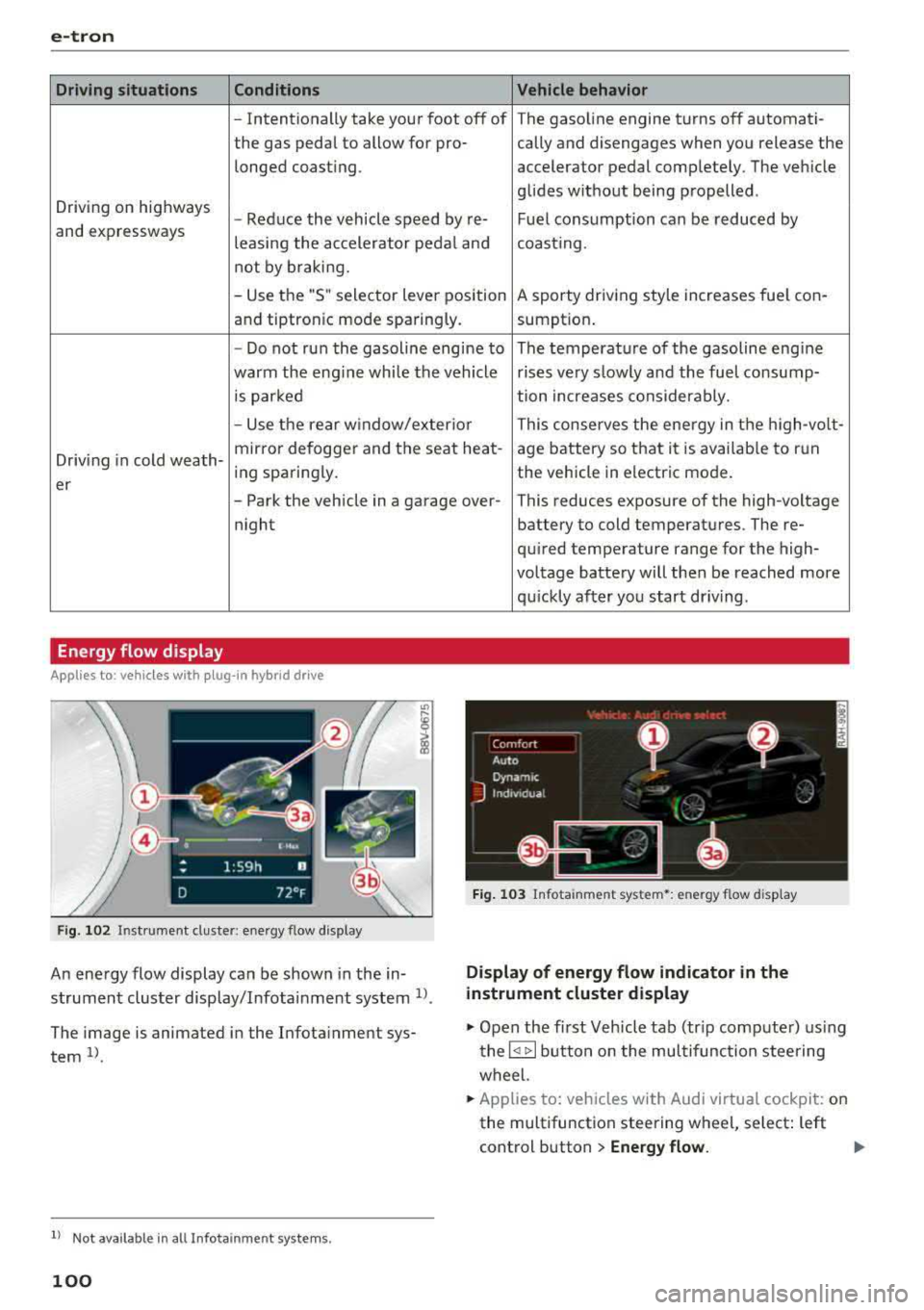
Energy flow display
Applies to : vehicles with plug-in hybrid drive
Fig. 102 Inst rument duster: energy flow display
An energy flow display can be shown in the in
strument cluster display/Infotainment system
1>.
The image is animated in the Infota inment sys
tem
1> .
l l Not available in all Infota inme nt syste ms.
100
Fig. 103 Infota inment system•: energy flow disp lay
Display of energy flow indicator in the
instrument cluster display
.,. Open the first Veh icle tab (tr ip compute r) using
the
l q 1> I button on the multifunction steering
wheel.
.,. Applies to: vehicles with Audi virtual cockpit: on
the multifunction steering wheel, select: left
control button
> Energy flow.
Page 103 of 404
LL co .... N
" N
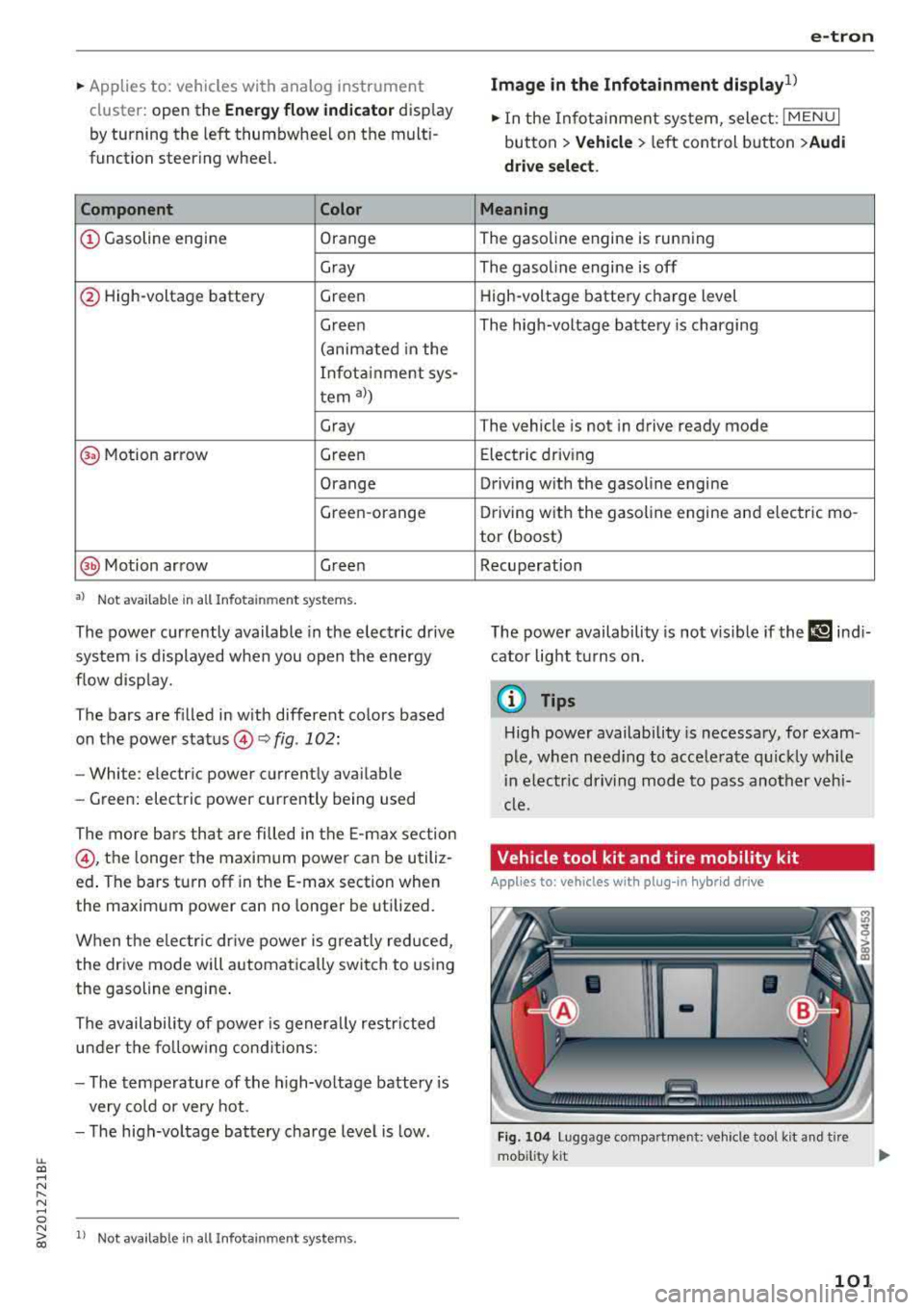
~ Applies to: vehicles with analog instrument cluster: open the
Energy flo w ind icator disp lay
by turning the left thumbwhee l on the mult i
function steering wheel.
Component Color
(D Gasoline engine Orange
Gray
@ High-voltage battery Green
Green
(animated in the
Infota inment sys-
tern
al)
Gray
(§) Motion arrow Green
Orange
Green -orange
@ Motion arrow Green
a) Not avail ab le in all Infot ainmen t systems.
The power currently available in the electric drive
sys tem is displayed when you open the energy
flow disp lay.
The bars are filled in with different colors based
on the power
status @~ fig. 102:
- White : electric power currently availab le
- Green: electric power currently being used
The more ba rs that are filled in the E-max section
@ , the longe r the maximum power can be utiliz
ed . The bars turn off in the E-max section when
the maximum power can no longer be utilized.
When the elec tric dr ive power is greatly red uced,
the drive mode will automatically switch to using
the gasoline engine.
The availability of power is genera lly restr icted
under the fo llow ing cond itions:
- The temperature of the high-voltage battery is
very co ld or very hot.
- The high-voltage battery charge level is low.
.... 0 N ii'i l) Not availab le in al l Infota inment system s.
e-tron
Image in the Infota inment display1
)
~ In the Infotainment system, select: I MENU I
button > Veh icl e > left control button >Audi
d rive select .
M eaning
The gasoline engine is running
The gasoline engine is off
High-voltage battery charge level
The high-voltage battery is charging
The vehicle is not in drive ready mode
E lectric driv ing
Driving w ith the gasoline engine
Driving with the gasoline engine and electric mo-
tor (boost)
Recuperation
The power availability is not v is ible if the
111 ind i
cator light turns on.
(0 Tips
High power availability is necessary, for exam
ple, when need ing to acce lerate q uickly wh ile
i n e lectric driving mode to pass another vehi
cle.
Vehicle tool kit and tire mobility kit
Applies to: vehicles wit h plug -in hybr id drive
F ig. 104 Lu ggage compartment: veh icle tool kit and tire
mob ility k it
101
Page 122 of 404
Ass is tance sy stem s
Assistance systems
Speed warning system
Description
Applies to: veh icles with speed warning system
The speed warning system helps you to stay be
low a specified maximum speed that can be set,
changed or deleted in the Infotainment system.
The speed warning system warns you if you are
exceeding the maximum speed that you have set .
A warni ng tone will sound as soon as your speed
exceeds the sto red value slight ly. The
[OJ (USA
models) ;[;] (Canada models) indica to r li gh t and
the co rresponding message appear in the inst ru
ment cluster display at the same time. The
[C]
(USA models)/ [ej (Canada mode ls) indicator
light and the message turn off w hen the vehicle
speed drops below the stored maximum speed .
Sett ing a threshold is recommended if you would
like to be reminded when yo u reach a certa in
maximum speed . Situations where you may want
to do so include driving in a country with a ge ner
al speed limit or if there is a specified maximum
speed for winter tires.
Setting the warning thr eshold
.. Select in the Infotainment sys tem : IMENUI but
ton
> Vehicle > left contro l button > Driver a s
sistance
> S peed warning > Manual.
@ Tips
Regardless of the speed warning system, you
should always monitor yo ur speed using the
speedometer and make sure you are following
the legal speed limit.
120
Cruise control system
Switching on
Applies to: vehicles with cruise control system
The cruise control system makes it possible to
drive at a constant speed starting at 15 mph (20km/h) .
0
f
~
0
Fig . 1 21 Ope rat ing lev er : cru ise co ntrol sys te m
0
"' N
~ CD
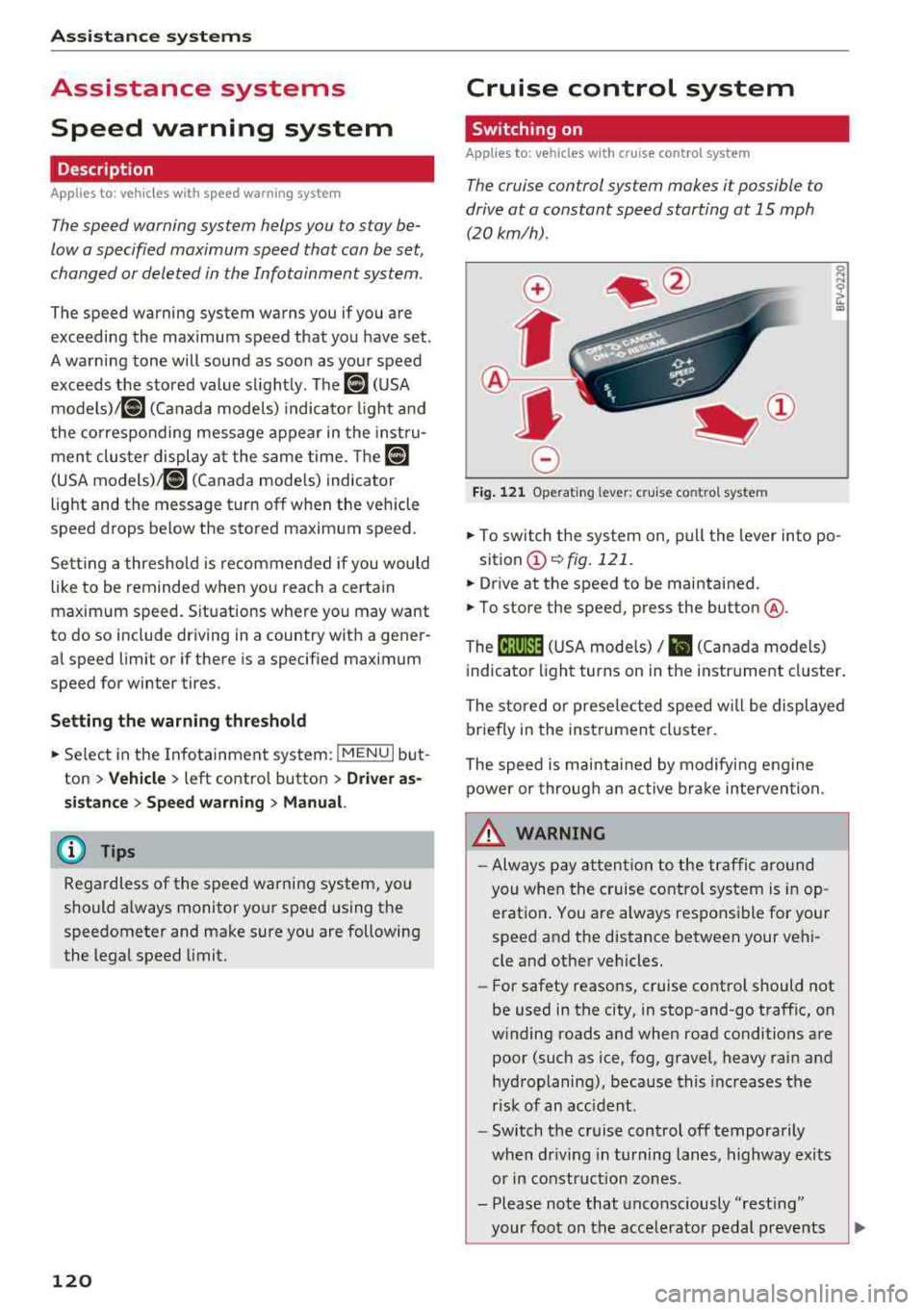
.. To switch t he system on, pull the lever into po -
sition
CD ¢ fig. 121 .
.. Drive at the speed to be maintained .
.. To store the speed, press the button @.
The
[ij;(l)~1j ( U SA mode ls) / 51 (Canada models)
indicator light turns on in the instr ument cluster .
The stored or prese lec ted speed w ill be displayed
briefly in the instrument cluster .
The speed is mainta ined by modifyi ng engine
power or through an active bra ke intervention.
&_ WARNING
- Always pay at ten tion to the traffic a ro und
you whe n the cruise contro l system is in op
erat ion . You are always respons ible fo r your
speed and the distance between your vehi
cle and other vehicles.
-For safety reaso ns, cruise cont rol should not
be used in the city, in stop-and-go traff ic, on
w inding roads and when road conditions are
poor (such as ice, fog, gravel, heavy rai n and
hydroplaning), because this increases the
r isk of an accident.
-Switch t he cr uise control off temporarily
when dr iv ing in turning lanes, highway exits
or in construction zones .
- Please note that unconsciously
"rest ing"
your foot on the accelerator pedal prevents
-
Page 124 of 404
Ass is tanc e system s
A WARNING
You should only resume the stored speed if it
is not too high for existing traffic condit ions.
Otherwise you can increase the r isk of an acci
dent .
Lap timer
Introduction
Applies to: vehicles with lap timer
You can measure and analyze lap times with the
lap timer in the display.
Opening th e lap timer
i.. Open the first Vehicle tab (t rip computer) using
t h e
l
whee l.
i.. Applies to: vehicles with analog instrument
cluster: Press the
[gJ button on the m ultifunc
tion steering whee l and select
Lap t imer in the
menu .
... Applies to: vehicles with Audi virtual cockpit: on
the multifunction steering wheel, select: left
contro l button
> Lap times .
Operating the lap t ime r
... On the multifunction steering whee l, turn the
l eft thumbwhee l
(J) ¢page 13 or (D ¢page 16
unt il the desired menu item is d isplayed in the
instrument cluster .
... Press the left thumbwheel to confirm the selec
tion .
A WARNING
Your foc us should always be on d riving your
vehicle safely. As the drive r, you have com
ple te responsibi lity for safety in traffic. Only
use the functions s uch as the lap timer in such
a way that you always maintain comp lete con
trol over your vehicle in all traffic situations.
(D Tips
You can ret rieve information from the trip
computer while the lap timer stopwatch is
running .
122
-
Lap times and timing
Applies to: vehicles with lap timer
Requirement: the lap time r must be open
¢ page 122.
Timing laps
... To start timing, select Lap 1 - pre ss OK or S tart
lap 1
in the menu .
i.. Applies to: vehicles with Audi virtual cockpit: to
start t iming au tomatically when yo u start dr iv
ing, select
S tart lap 1 by driving off or St art by
dri ving off in the menu .
... To measure the lap time, select New lap - pre ss
OK or New lap
in t he menu . This starts timing
the next lap at the same t ime .
After completing, the d ifference between the
l ast lap and the previous best lap time will be in
dicated with
a" -"/ . or "+ "fll .
Pausing timing and displaying a split time
i.. To insert a pause m , sele ct Pau se in the menu.
i.. To cont inue tim ing, select Pre ss OK to re sume
or Re sume in the menu .
... T o display a sp lit time, select Split time in the
menu. The split time
r~1 appears for approxi
mate ly 10 seconds in the instrument cluster .
The timing of the current lap continues.
Re setting timing
... Using the mult ifunct ion steer ing whee l, select
Reset or Reset time s in the menu.
(D Tips
-A max imum of 30 lap t imes (analog instru
ment cl uster) or 99 lap times (Audi virtua l
cockpit*) can be measured.
- If tim ing is paused, you can continue i t later
even if you switch the ignition off.
- Saved lap times cannot be individually de
leted from the total results .
- T he save d la p timer va lues w ill remain after
switching the ignition off.
Page 125 of 404
u. 00 .-< N l' N .-< 0 N > 00
Lap statistics
Applies to: vehicles with lap timer
Displaying lap statistics
You can d isplay the number of laps d riven, the
fastest
l ap "+ ", the s lowest lap "- ", and the ave r
age time
" 0 " in the inst rument cluste r.
.,. Applies to: vehicles with analog instrument
cluster: select
Statistic s in the menu using the
mult ifunction steering w heel.
.,. Applies to: vehicles with Audi virtual cockpit: on
the m ult if u nct io n steer ing whee l, select: left
contro l bu tton
> Lap sta ti stic s o r Stati stics.
.. T urn the thumbwhee l down or up to disp lay the
individ ua l lap times.
.. To return to the lap timing that was begun,
press the left thumbwheel.
Res etting lap statistics
Applies to: vehicles with Audi virtual cockpit
.. On the multifunction steering whee l, select:
the right contro l button
> Re set stati stic s.
(D Tips
-The lap statistics lis t the lap times for t he
l ast 30 laps.
- Applies to: vehicles with Audi virtual cock
pit: the fastest and slowest lap times from
u p to 99 timed laps will be disp layed .
Audi adaptive cruise
control
Description
Applies to: vehicles with Audi adaptive cruise control
)
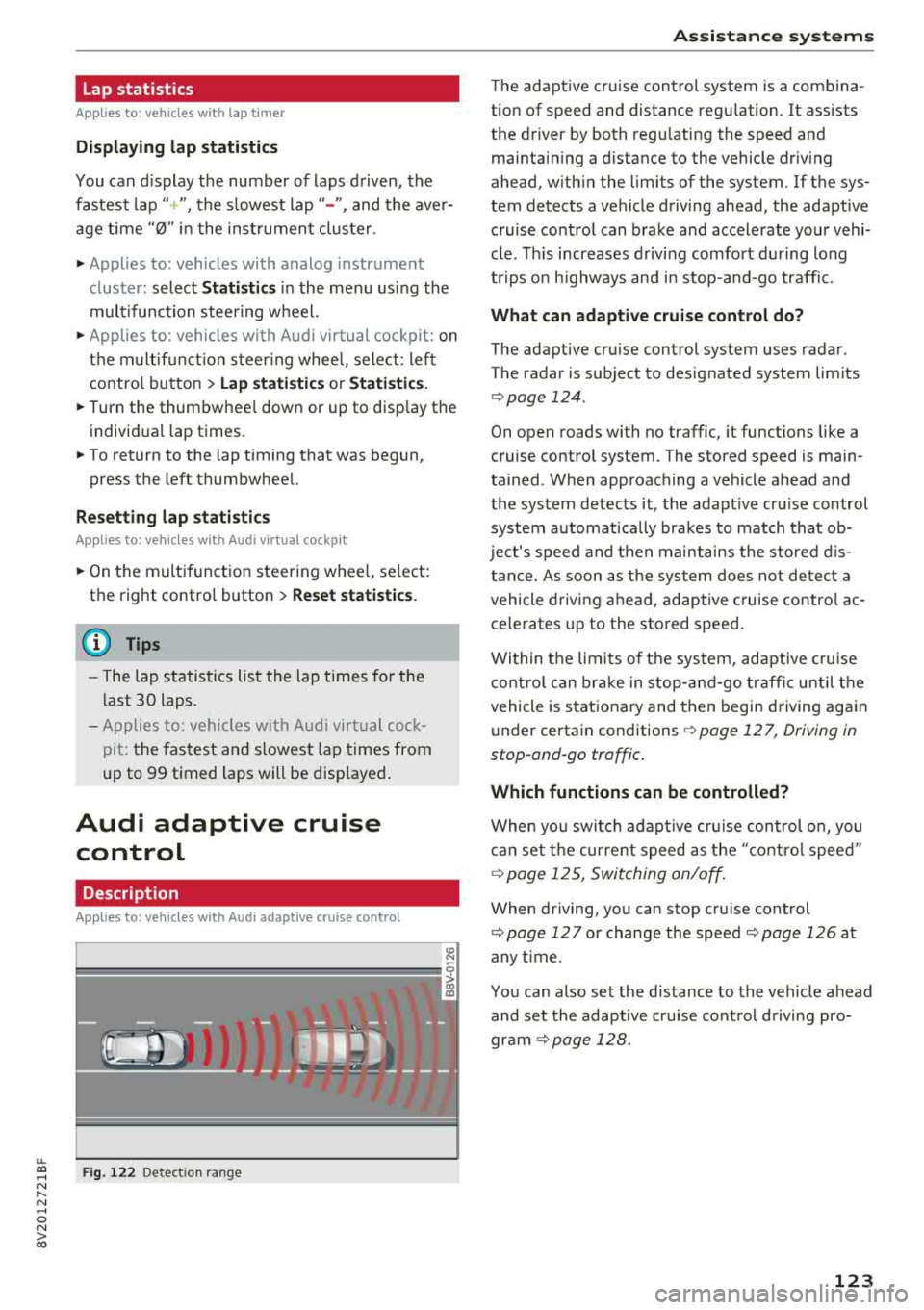
F ig . 122 De tect ion range
A ss istance systems
T he adaptive cruise cont rol system is a combina
tion of speed and distance regu lation.
It assists
the driver by both regu lating the speed and
maintain ing a d istance to the vehicle driv ing
ahead, w ith in the limits of the system. If the sys
tem detects a vehicle driving ahead, the adaptive cruise control can brake and accelerate your vehi
cle . T his increases d riving comfort during long
trips o n highways and in stop-and-go traffic.
What can adap tiv e crui se con trol do ?
The adaptive cru ise control sys tem uses radar .
The radar is subject to designated system limits
¢ page 124 .
On open roads with no traffic, it functions like a
cruise contro l system . The stored speed is main
ta ined . When approaching a vehicle ahead and
the system detects it, the adapt ive cruise control
system automat ically brakes to match that ob
ject's speed and t hen maintains the stored d is
t a nce. As soon as t he sys tem does not de tec t a
vehicle driving ahead, adaptive cruise cont ro l ac
ce lerates up to the stored speed .
Within the lim its of t he sys tem, adapt ive cru ise
contro l can brake in stop -and-go t raff ic until t he
vehicle is s tat iona ry and then begin driving again
under certain conditions ¢
page 12 7, Driving in
stop-ond-go traffic .
Which functions can be controlled?
When you switc h adap tive cr uise control o n, you
can set the cur rent speed as the "contro l speed"
¢ page 12 5, Switching on/off .
When driving, yo u can stop cru ise cont rol
¢ page 127 or change the speed ¢page 126 at
any t ime .
You can also set the distance to the vehicle ahead and set the adaptive c ruise cont rol d riving pro
gr am
~ page 128.
123
Page 127 of 404
LL co .... N
" N .... 0 N > co
In curves
Applies to: vehicles with Audi adaptive cruise control/Audi pre sense front
Fig. 124 Examp le: driving into a curve
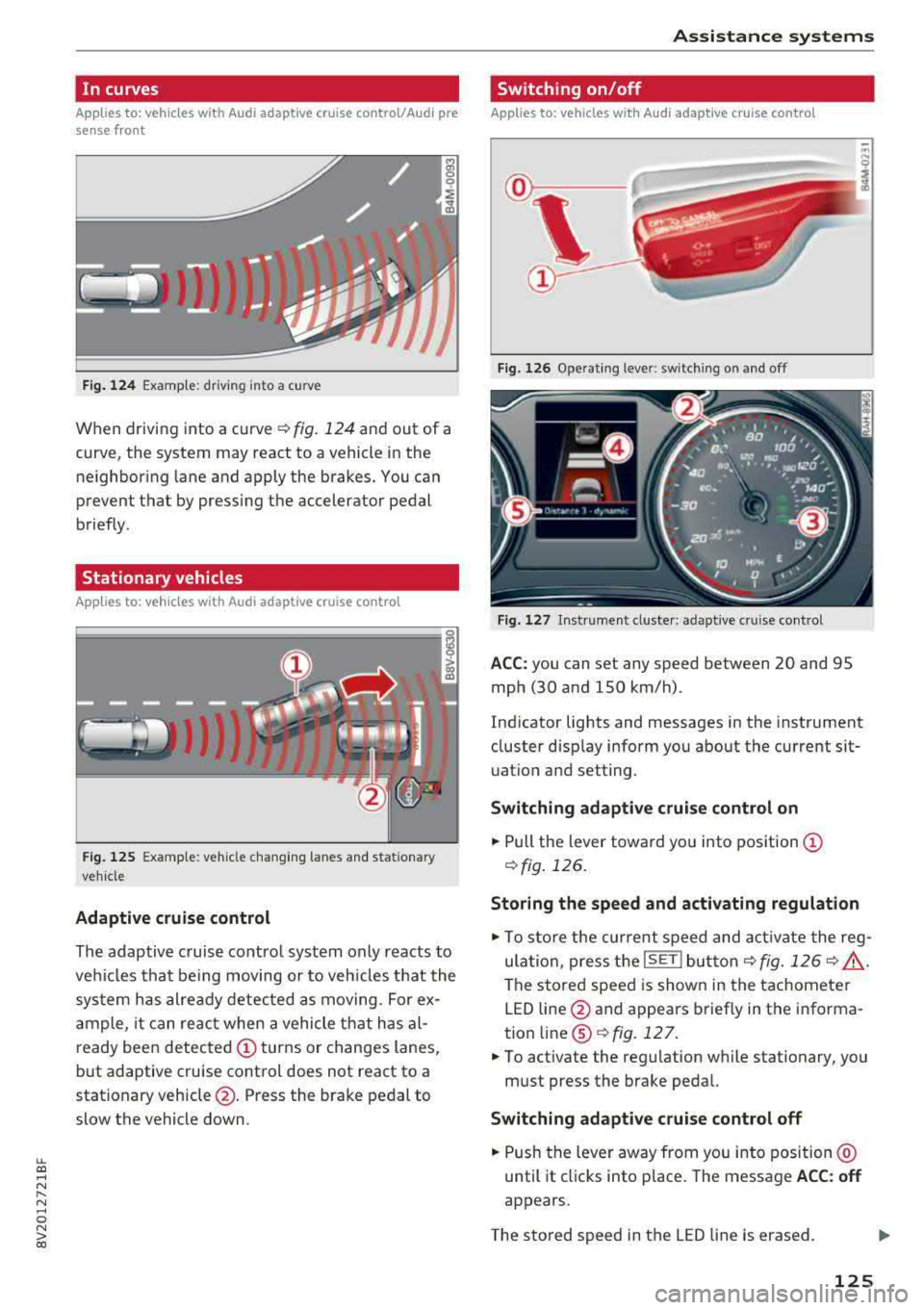
When driving into a curve ¢ fig. 124 and out of a
curve, the system may react to a vehicle in the ne ighboring lane and apply the brakes. You can
prevent that by pressing the accelerator pedal
briefly .
Stationary vehicles
Applies to: vehicles with Audi adaptive cruise control
J))
Fig . 12 5 Example: vehicle c hang ing lanes a nd statio nary
ve hicle
Adaptive cruise control
The adaptive c ruise contro l system only reacts to
ve hicles that be ing moving or to veh icles that the
sys tem has alre ady detected as moving. For ex
a mple, it can reac t when a vehicle that has al
ready been detected
CD turns or changes lanes,
but adaptive cruise control does not react to a
stationary vehicle @. Press the brake pedal to
slow the vehicle down.
A ssi st a nce systems
Switching on/off
Applies to: vehicles with Audi adaptive cruise control
Fig. 126 Ope rat ing lever: switch ing on and off
Fig . 1 27 In strume nt clus te r: adaptive cruise control
A CC: you can set any speed between 20 and 95
mph (30 and 150 km/h) .
Ind icator lights and messages in the instrument
cluster disp lay inform you about the current sit
uatio n and setting.
Switching adaptive crui se control on
"' Pull the lever towa rd yo u into pos ition CD
¢fig . 126.
Storing the speed and activating regulation
"'To store the cur rent speed and act ivate the reg
ula tion, press the
ISE TI but ton¢ fig. 126 ¢ .&_ .
The stored speed is show n in the tachometer
LED line @and appears briefly in the informa
tion
line @¢ fig. 127 .
"'To act ivate the reg ulation while stationary, you
must press the brake pedal.
Swi tching adaptive cruise control off
"' Push the lever away from you into position @
until it cl icks into place. The message
ACC : off
appears.
T he s tored speed in the LED line is erased.
125
Page 128 of 404
Ass is tance sy stem s
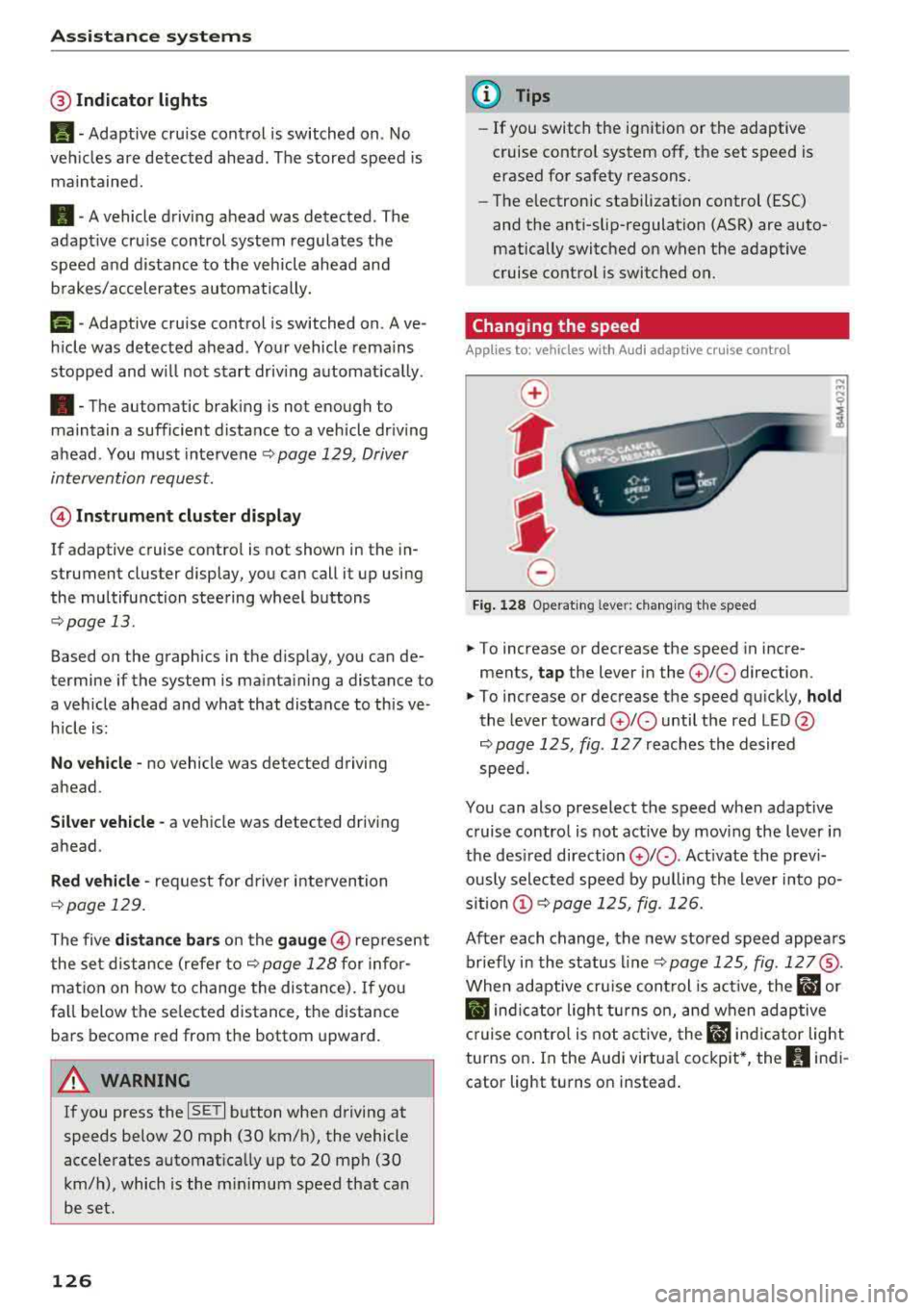
@Indicator lights
Ill-Adaptive cruise control is switched on . No
veh icles are detected ahead . The stored speed is
maintained.
• -A vehicle driving ahead was detected. The
adapt ive cruise control system regulates the
speed and d istance to the vehicle ahead and
brakes/accelerates automatically.
(-) -Adaptive cruise control is switched on. Ave
h icle was detected ahead . Yo ur vehicle remains
stopped and w ill not start driv ing automat ica lly .
• -The automatic braking is not enough to
maintain a sufficient distance to a vehicle dr iv ing
ahead . You must intervene
r:::;, page 129, Driver
intervention request .
© Instrument clu ster di splay
If adaptive cruise contro l is not shown in the in
strument cluster display, you can call i t up using
the multifunction steering wheel buttons
r:::;, page 13 .
Based on the graphics in the d isp lay, you can de
termine if the system is mainta ining a distance to
a vehicle ahead and what that distance to this ve
h icle is:
No vehicle -no vehicle was detected driving
ahead.
Sil ver vehicle -a vehicle was detected driving
ahead.
Red vehicle -request for driver intervention
r:::;, page 129.
The five distance bar s on the gauge@ represent
the set d istance (refer
to r:::;, page 128 for infor
mat io n on how to change the distance). If yo u
fa ll below the se lected distance, the distance
bars become red from the bottom upward.
A WARNING
If you press the ISE TI b utton when driving at
speeds below 20 mph (30 km/h), the vehicle
accelerates automat ica lly up to 20 mph (30
km/h), which is the m inimum speed that can
be set.
126
@ Tips
- If you switch the ignition or the adaptive
cruise control system off, the set speed is
erased for safety reasons.
- The electronic stabilization control (ESC)
and the anti-slip-regulation (ASR) are auto
matically switc hed on when the adaptive
cruise control is switched on.
Changing the speed
Applies to: vehicles with Audi adaptive cruise control
0
f
I
0
Fig . 12 8 Ope rat ing leve r: chang ing the speed
.. To increase or decrease the speed in incre
ments,
tap the lever in the 0 10 direction.
,... ... ,...
i
.. To increase or decrease the speed qu ick ly, hold
the lever toward 0 10 until the red LED @
r:::;,page 125, fig . 127 reaches the desired
speed.
You can also preselect the speed when adapt ive
c ruise control is not active by moving the lever in
the des ired direction
0 10 . Act ivate the prev i
ous ly selected speed by pulling the lever into po
s ition
(D r:::;, page 125, fig. 126.
After each change, the new stored speed appea rs
br iefly in the status l ine
r:::;, page 125, fig . 127@.
When adaptive cru ise cont rol is act ive , the flJ or
• ind icator light turns o n, and when adaptive
c ruise contro l is not a ctive, the
IIJ ind icator light
turns on . In the Audi virtua l cockpit*, the
II indi
cator light turns o n instead .