lights AUDI A3 SEDAN 2018 Owner's Manual
[x] Cancel search | Manufacturer: AUDI, Model Year: 2018, Model line: A3 SEDAN, Model: AUDI A3 SEDAN 2018Pages: 404, PDF Size: 62.3 MB
Page 75 of 404
u. 00 ... N l' N ... 0 N > 00
-Avoid dr iving throu gh salt wat er, because
th is can ca use corros io n.
Economical and environmentally-friendly
driving
The amount of fue l cons umption, t he e nvir on
men tal impac t an d the wea r to the engine,
b rak es and t ires depen ds mos tly on yo ur dr iv ing
s tyle. W it h an anticipatory and econom ic dr iv ing
s tyle, f uel consum ption can be re du ced by ap
p roximate ly 1 0-15% . The followi ng tips will help
you conse rve the environment and you r money at
the same time .
Anticipatory driving
A vehicle uses the mos t fu el when a ccele ra tin g.
W hen yo u dr ive wi th a ntici pat ion, you do not
need to brake as ofte n an d so yo u acceler ate less .
W hen possi ble, let your vehi cle coast w it h a
gear
engaged ,
for example when you notice that the
next tra ffic light is red . This p roduces an engine
b raking effect, wh ich helps to protect the brakes
a n d tires a nd reduces t he emissions a nd f uel con
sumpt io n to zero (fuel shut-off dur ing decelera
tion) .
Shift efficiently
Upshift ing earlier is an effective way to save fue l.
Staying in a gear too long uses fue l unnecessari
l y .
Press down on the acce le rato r peda l slowly and
avoid "k ic k-dow n".
Avoid full acceleration
You s hould rare ly tr ave l a t t he m axim um ve hicle
speed . High speeds cause a d isp roportionately
h ig h inc rease in fuel consumption, emissions an d
traffic no ise . Slower driving saves fuel.
Reduce idling time
T h e St art /S top system * he lps t o redu ce the i dlin g
time autom atically . In vehicles wi tho ut the Start /
Sto p system, it is eff ic ient to sw itch t he engine
off w hen stopped at ra ilroad cross ings a nd long
red lights . Depending on t he ve rsion of the en
g ine, stopping the eng ine for as litt le as five sec
onds once it has reached ope rat ing tempe rature
Driving
st ill saves mo re fue l th an leav ing t he en gine run
ning -even when taking into acco unt the amount
of ext ra fuel t hat is use d to restart t he e ngi ne.
It tak es a ve ry long time in idl e to warm the en
gine up to o peratin g tem perature . Wear an d
emissions are especially high in the warm -up
phase. The refore, you s hould begin drivi ng im
med iate ly after starting the eng ine. Avoid h igh
RPMs wh ile doing this.
Have maintenance performed regularly
By hav ing maintenance pe rformed reg ularly o n
yo ur vehicle, you can help to reduce fue l con
s u mption before you even sta rt to drive. The
maintenance cond ition of your vehicle not on ly
affects traffic safety and long-term va lue b ut al
so impacts
fuel consumption . A poorly ma in
ta ined engi ne ca n lead to fue l co nsump tion that
i s 1 0% hig her th an no rmal.
Avoid short trips
The eng ine and emissions contro l system must
r each their optima l
operating temperature to ef
fec tively reduce consump tion and emissions .
A cold engine uses a disp roportionately high
amount of fue l. The e ngine reac hes operat ing
temperat ure and cons umption no rma lizes on ly
after app roxima tely 2 .5 m iles (4 km).
Check the tire pressure
To save f ue l, ma ke sure the ti res are always i n
f lated to t he correct press ure
c> page 339. The
fuel consumpt io n can increase by 5% if the pres
s ur e is on ly 0 .5 bar too low . Due to t he increased
r oll ing resis tance, low tire pressures w ill also
l ead to greate r tire
wear an d will affect dr iving
behav ior.
Do not d rive on
winter tires year- ro und , as this
will consume u p to 10% more f uel.
Eliminate unnecessary weight
S ince eve ry pou nd of ext ra weight inc reases fuel
consumption, a quick inspect io n of the luggage
compartment may be wo rth it to avoid un neces-
sary we ight .
..,.
73
Page 76 of 404
Driving
When not being used, a roof rack should be re
moved to decrease the wind resistance of the ve
hicle. This will save you approximately 12% fuel
at speeds from 62
-75 mph (100 -120 km/h).
Save energy
The engine drives the generator, which generates
electricity; the fuel consumption also increases
with the demand for electricity. Therefore, switch
electrical equipment
off when you no longer
need it. Examples of equipment that uses a lot of
energy are air blowers at a high setting, the rear
window defogger and seat heating* .
(D Note
-Do not leave engine idling unattended after
starting. If warning lights should come on
to indicate improper operation, they would
go unheeded. Extended idling also produces
heat, which could result in overheating or
other damage to the vehicle or other prop erty.
- Have your vehicle maintained properly and
in accordance with the service recommenda
tions in your Warranty
& Maintenance book
let . Lack of proper maintenance as well as
improper use of the vehicle will impair the
function of the emission control system and
could lead to damage.
- Do not alter or remove any component of
the Emission Control System unless ap
proved by the manufacturer.
- Do not alter or remove any device, such as
heat shields, switches, ignition wires,
valves, which are designed to protect your
vehicle's Emission Control System and other
important vehicle components.
@ Tips
The consumpt ion estimates as published by
ENVIRONMENTAL PROTECTION AGENCY
(EPA) and Transport Canada may not corre
spond to your actual consumption on the
road, which will vary depending upon vehicle
load and speed, road and weather conditions,
trip length, etc.
74
Steering
Adjusting the steering wheel position
The steering wheel position is fully adjustable up
and down and forward and back.
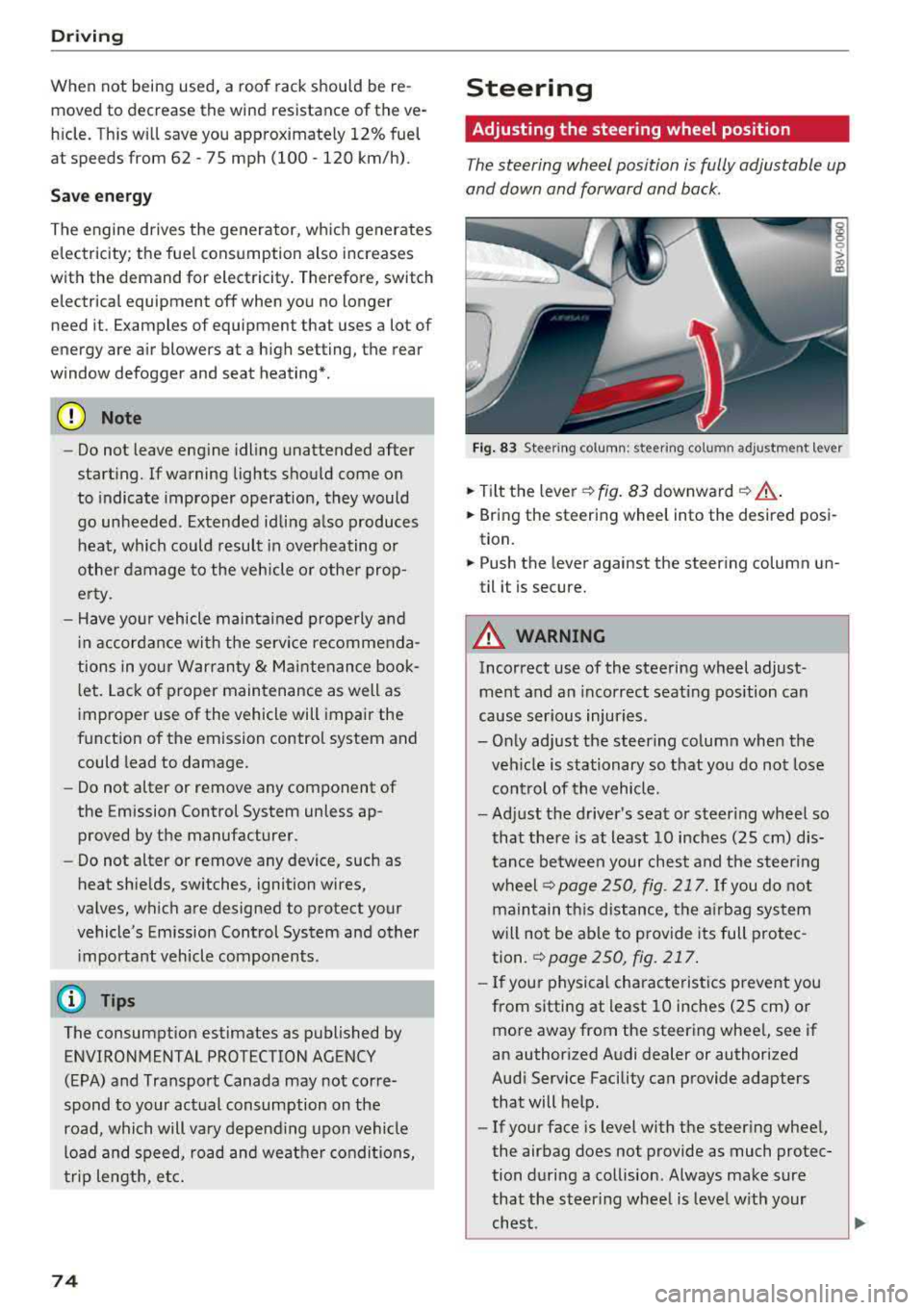
Fig . 83 Steering column : steering column adjustment lever
.. Tilt the lever -c> fig. 83 downward¢ ,&..
.. Bring the steering wheel into the desired posi
tion.
.. Push the lever against the steering column un
til it is secure.
A WARNING
Incorrect use of the steering wheel adjust
ment and an incorrect seating position can
cause serious injuries.
- Only adjust the steering column when the veh icle is stationary so that you do not lose
control of the vehicle.
-
-Adjust the driver's seat or steer ing wheel so
that there is at least 10 inches
(25 cm) dis
tance between your chest and the steering
wheelr::!>page250, fig. 217. If you do not
maintain this distance, the airbag system
will not be able to provide its full protec tion.
c:> page 250, fig. 217.
- If your physical characteristics prevent you
from sitting at least 10 inches
(25 cm) or
more away from the steering wheel, see if
an authorized Audi dealer or authorized
Audi Service Facility can provide adapters that will help.
- If your face is level with the steering wheel,
the airbag does not provide as much protec
tion during a collision. Always make sure
that the steering wheel is level with your
chest.
Page 82 of 404
Drivin g
~ Brake the vehicle to a stop . The engine stops
shortly before the vehicle comes to a stop or if
the ve hicle is stationary
1>. Keep your foot on
the brake pedal. The
D] ; D] ind icator light ap
pears in the display. The need le in the tachome
ter also moves into the
READ Y position .
~ The engine starts again when you take your
foot off the brake pedal. The ind icator light
tu rns off.
Add ition al informa tion
The engine stops in the "P", "N" and "D" selector
lever positions .
If you select the "R" selector lever position during
a Stop phase, the engine will start again.
Shift to "P" quickly to prevent the engine from
starting unintentiona lly when shifting t hrough
IIRII.
You can determ ine for you rself if the engine will
stop or not by reducing or increasing the amount
of force you use to press the brake pedal. For ex
ample, if you only light ly press on the brake ped
al in stop-and-go traff ic or when turning, the en
g ine will not switch off when the vehicle is sta
tionary . As soon as you press the brake down
harder, the eng ine will switch off .
(D Tips
-Press the brake pedal during a Stop phase
to keep the veh icle from roll ing.
- The ignition will turn off if you press the
I STAR T ENGINE ST OP ! button* during a
stop phase . The needle in the tachometer
moves into the
OFF pos it ion .
General information
App lies to: ve hicles w ith Sta rt/Stop system
Engine does not switch off
Before and during each stop phase, the system
checks if certa in cond itions have been met. If the
fjj i ndicato r light appears in the instr ument clus
t er d isp lay, the engine w ill no t be s topped, for
examp le in the fo llowing situations:
1) Ma rket -spe cific
80
- T he engine has not reached the minim um re
quired temperature for Start/Stop mode.
- The interior temperature selected by the cli-
mate control system* has not been reached.
- The ou tside tempe rat ure is extremely high/low.
- The windsh ield is being
defrosted® .
-The parking system* is switched on .
- The vehicle battery charge level is too low .
- The steering wheel is turned at a sharp angle or
is moving.
- After engaging the reverse gear.
- On sharp inclines .
- At high altitudes .
Engine automaticall y restarts
The standard Start/Stop mode w ill be canceled
d u ring a stop p hase in the following situat ions.
The eng ine res tarts witho ut any act ion by the
drive r.
- The vehicle ro lls, for example while on a slope .
- The interior temperature differs from the tem -
peratu re selected in the A/C system .
- The windsh ield is being
defrosted® .
-The brake pedal is pressed several times in a
row.
- The vehicle battery charge level is too low.
- Power consumption is hig h.
The eng ine ca n tur n off aga in when the cond i
t ions for Sta rt/S top mode a re met
l ).
Ignition is switched off automaticall y
To prevent the vehicle battery from dra ining, the
i gnition will sw itch off
a ut omaticall y under the
fo llow ing cond it ions:
- The Start/Stop system has stopped the engine .
- The vehicle is stationary.
- You exited the vehicle .
In this case, the activated low beam is rep laced
by the pa rking light . The parking lights wi ll
switch off after approximately 30 minutes or
when you lock the veh icle.
.,.
Page 96 of 404
e-tron
for the high voltage battery can lead to seri
ous damage and/or a decrease of the capacity
void coverage under the New Vehicle Limited
Warranty.
Starting/driving the vehicle
A pp lies to: ve hicles w ith plug- in hybrid drive
The vehicle is started and stopped with the
IS TAR T ENGINE STOP I button . Please also read
the information under
Q page 76, Starting the
engine.
Establishing drive ready mode
See Q .& in Introduction on page 92.
Requirement: a charging cable must not be con
nected to the vehicle
Qpage 115 and the selec
tor lever must be in the "P" or
"N" position.
- Press the brake peda l.
- Press th e
I START ENGINE STOPI button .
When the veh icle enters drive ready mode, the
status message
e-tron READY appears briefly in
the instrument cluster display and the needle in
the powe r meter points to
READY Q page 95.
Driving
The vehicle starts with the electr ic motor after
establishing the dr ive ready mode and if the con
ditions for electric drive mode have been met
Qpage98.
The cond itions to drive are essentially the same
as for the automat ic transmission
Q page 83 .
You and your passengers should anticipate the
possibility of a sporty acceleration.
Ending drive ready mode
- Place the selector lever in the P position.
- Switch the ign ition off with the
I START ENGINE STOP ! button.
Vehicle sound1>
The vehicle generates an electronic engine sound
so that you r vehicle can be heard from the out
side when in electr ic drive mode. The veh icle
l) Not available in all markets.
94
sound automatically fades out at higher speeds
when the sounds from the tires and wind start in
creasing .
Switching the ignition on/off
You can switch the ignition on without establish
in g drive ready mode.
- To switch the ign ition on or off, press the
!START ENGINE STOPI button. Do not press the
brake pedal while do ing this.
When the ignition is switched on, the needle
stays pointed at
OFF CD Q page 95, fig. 98 or
OFF is displayed CD~ page 95, fig. 98.
No indicator lights stay turned on when the igni
tion is switched off.
Ignition is switched off automatically
To prevent the vehicle battery from draining, the
i gnition will switch off automatically under the
follow ing cond it ions:
- The vehicle has already been driven.
- The vehicle is stationary.
- The gasoline engine is not runn ing.
- The driver's door is opened.
- The driver's safety belt is unbuckled .
- The brake pedal is not pressed.
In this case, the activated low beam is replaced
by the parking light. The message
Side marker
lights will switch off automatically in 30 mi
nutes. See owner 's manual
appears in the instru
ment cluster display . The parking lights will
switch off after approximately 30 minutes or
when you lock the veh icle.
If the gasoline engine was not stopped, the mo
tor continues running and the ignition does not
automat ically switch off
Q & .
A WARNING
To reduce the risk of poisoning, never allow
the engine to run in confined spaces .
-
Page 98 of 404
e-tron
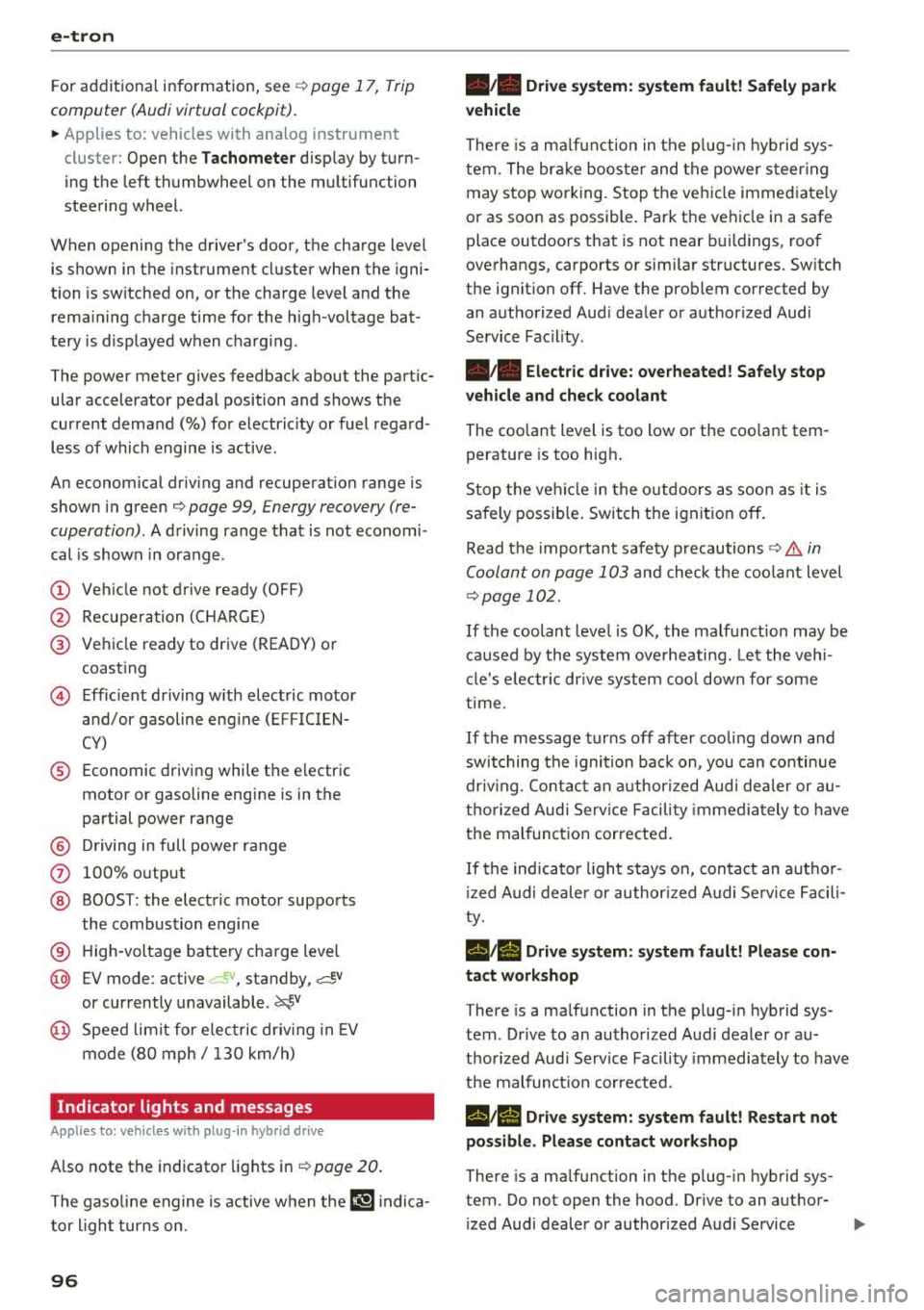
For additional information, see ¢ page 17, Trip
computer (Audi virtual cockpit).
~ Applies to: vehicles with analog instrument
cluster: Open the
Tachometer display by turn
ing the left thumbwheel on the multifunction
steering wheel.
When opening the driver's door, the charge level is shown in the instrument cluster when the igni
tion is switched on, or the charge level and the
remaining charge time for the high -voltage bat
tery is displayed when charging .
The power meter gives feedback about the partic ular accelerator pedal position and shows the
current demand
(%) for electricity or fuel regard
less of which engine is active.
An economical driving and recuperation range is
shown in green
¢ page 99, Energy recovery (re
cuperation) .
A driving range that is not economi
cal is shown in orange .
(D Vehicle not drive ready (OFF)
@ Recuperation (CHARGE)
@ Vehicle ready to drive (READY) or
coasting
© Efficient driving with electric motor
and/or gasoline engine (EFFICIEN
CY)
® Economic driving while the electric
motor or gasoline engine is in the
partial power range
@ Driving in full power range
0 100% output
@ BOOST: the electric motor supports
the combustion engine
® High-voltage battery charge level
@ EV mode: active a=,v, standby, a=,v
or currently unavailable. ~v
@ Speed limit for electric driving in EV
mode (80 mph/ 130 km/h)
Indicator lights and messages
Applies to: vehicles with plug -in hybr id drive
Also note the indicator lights in¢ page 20.
The gasoline engine is active when the II'§] indica
tor light turns on.
96
•• Drive system: system fault! Safely park
vehicle
There is a malfunction in the plug-in hybrid sys
tem. The brake booster and the power steering
may stop working. Stop the vehicle immediately
or as soon as possible. Park the vehicle in a safe place outdoors that is not near buildings, roof
overhangs, carports or similar structures. Switch
the ignition off. Have the problem corrected by
an authorized Audi dealer or authorized Audi
Service Facility.
•• Electric drive: overheated! Safely stop
vehicle and check coolant
The coolant level is too low or the coolant tem
perature is too high.
Stop the vehicle in the outdoors as soon as it is
safely possible. Switch the ignition off.
Read the important safety
precautions ¢.& in
Coolant on page 103
and check the coolant level
¢page 102.
If the coolant level is OK, the malfunction may be
caused by the system overheating. Let the vehi
cle's electric drive system cool down for some
time .
If the message turns off after cooling down and
switching the ignition back on, you can continue
driving. Contact an authorized Audi dealer or au
thorized Audi Service Facility immediately to have
the malfunction corrected.
If the indicator light stays on, contact an author
ized Audi dealer or authorized Audi Service Facili
ty.
lltll Drive system: system fault! Please con
tact workshop
There is a malfunction in the plug-in hybrid sys
tem . Drive to an authorized Audi dealer or au
thorized Audi Service Facility immediately to have
the malfunction corrected.
1/1111 Drive system: system fault! Restart not
possible. Please contact workshop
There is a malfunction in the plug-in hybrid sys
tem. Do not open the hood. Drive to an author- ized Audi dealer or authorized Audi Service
.,,_
Page 117 of 404
(D Tips
- Multip le versions of charging cables are of
fered d ue to the different power s upply sys
tems in d ifferent countries. The maximum
charging power may potentially be unavaila
ble because of this . Contact an author ized
Audi dealer or authorized Aud i Service Fa
c ility fo r more info rmat ion .
- Charg ing may take longer when tempera
tures a re extremely high o r low .
- The charging t ime at pub lic charging sta
t ions may vary from the times g iven in the
tab le
o table on page 114 .
Audi e-tron charging system PIN
Applies to: vehicles with plug-in hybrid drive
The contro l unit ca n be loc ked by enter ing a 4-
d ig it PI N of yo ur cho ice. If a PIN is act ivated, the
se lected PIN must be entered before every use.
We recommend lock ing you r contro l unit to pro
tect it against unautho rized access by a third pa r
ty .
Activating the PIN
.,. Press the I OKI @ o page 109, fig . 1 1 S button
on the control un it .
POWER and SET P IN ap
pear in the display field .
.,. Select SET PIN u sing the a rrow b utton @.
.,. Press t he IOK I button @. ENTER PIN appea rs in
the disp lay fie ld .
.. Se lect the desired value by pressing the arrow
buttons © up or down .
.. Use the right arrow button © to go to the next
digi t .
.. Press the left arrow button © to go to the pre-
v ious menu .
.,. Enter a ll of the d ig its .
.,. Press t he IOKI button @afte r the last d ig it.
.,. REPEAT PIN appears in the display field .
.,. Ente r th e PI N aga in using the arrow but tons
© -
.. Press th e IOK I button @ .
.. PIN OK appears in the display field if both en-
::li tries match. ...
~ .. The PIN is now activ ated.
N ... 0 N > 00
e-tron
D eactivating the PIN
Requirement: the con trol uni t must be unloc ked.
.,. Enter the numerical code 0 000 . Proceed as if
you were activating the PIN
o page 115.
.. The PIN is deactivated.
Locking the control uni t
Requirement: the PIN must be activated .
.,. Press the Iii button @ o page 109, fig. 11 Son
the contro l unit .
Unlocking th e control unit
Requirement: the PIN must be act ivated .
.,. Press any button on the control unit .
.,. PIN? appears in the display field.
.,. Enter the PIN .
.. Press the I OK! button @.
(j) Tips
- Th e PI N is deactivated in t he factory defa ult
se tt ings.
- If you do not remembe r yo ur PIN, contact
an au tho riz ed A ud i d ealer o r autho rized
Audi Serv ice Facili ty .
- If the fi rst PIN entry differs from the second
en try, the first PIN en try is d isplayed .
- If nothi ng is entered within 20 seconds of
t his, the se t val ue is not changed .
Indicator Lights and
messages
Applies to: vehicles with plug-in hybrid drive
If the B indicator light turns on, the high -volt
age battery is charging or is a lready comp letely
charged .
If
the . indicator light stays on , there is a ma l
function in the charging system . Have the prob
l em corrected immediately by an a uthorized Audi
dealer or authorized Audi Service Facility.
l!i1 Ch arging conn ecto r still attached . Vehicle
cannot be dri ven
T his message appears when t he cha rging system
is s till connec ted to the vehicle. Remove the con -
nector
o page 112, A~er charging . ..,.
115
Page 127 of 404
LL co .... N
" N .... 0 N > co
In curves
Applies to: vehicles with Audi adaptive cruise control/Audi pre sense front
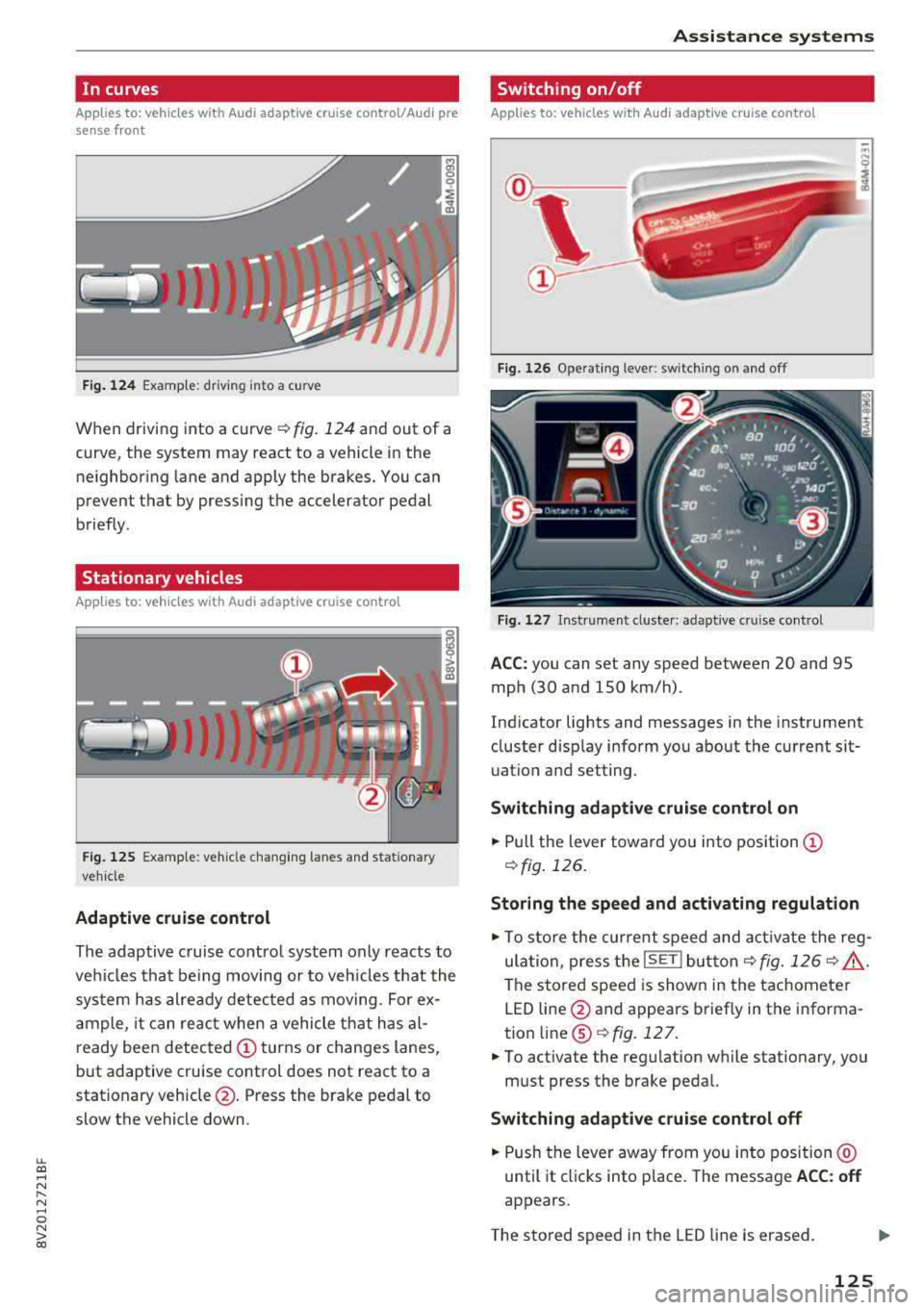
Fig. 124 Examp le: driving into a curve
When driving into a curve ¢ fig. 124 and out of a
curve, the system may react to a vehicle in the ne ighboring lane and apply the brakes. You can
prevent that by pressing the accelerator pedal
briefly .
Stationary vehicles
Applies to: vehicles with Audi adaptive cruise control
J))
Fig . 12 5 Example: vehicle c hang ing lanes a nd statio nary
ve hicle
Adaptive cruise control
The adaptive c ruise contro l system only reacts to
ve hicles that be ing moving or to veh icles that the
sys tem has alre ady detected as moving. For ex
a mple, it can reac t when a vehicle that has al
ready been detected
CD turns or changes lanes,
but adaptive cruise control does not react to a
stationary vehicle @. Press the brake pedal to
slow the vehicle down.
A ssi st a nce systems
Switching on/off
Applies to: vehicles with Audi adaptive cruise control
Fig. 126 Ope rat ing lever: switch ing on and off
Fig . 1 27 In strume nt clus te r: adaptive cruise control
A CC: you can set any speed between 20 and 95
mph (30 and 150 km/h) .
Ind icator lights and messages in the instrument
cluster disp lay inform you about the current sit
uatio n and setting.
Switching adaptive crui se control on
"' Pull the lever towa rd yo u into pos ition CD
¢fig . 126.
Storing the speed and activating regulation
"'To store the cur rent speed and act ivate the reg
ula tion, press the
ISE TI but ton¢ fig. 126 ¢ .&_ .
The stored speed is show n in the tachometer
LED line @and appears briefly in the informa
tion
line @¢ fig. 127 .
"'To act ivate the reg ulation while stationary, you
must press the brake pedal.
Swi tching adaptive cruise control off
"' Push the lever away from you into position @
until it cl icks into place. The message
ACC : off
appears.
T he s tored speed in the LED line is erased.
125
Page 128 of 404
Ass is tance sy stem s
@Indicator lights
Ill-Adaptive cruise control is switched on . No
veh icles are detected ahead . The stored speed is
maintained.
• -A vehicle driving ahead was detected. The
adapt ive cruise control system regulates the
speed and d istance to the vehicle ahead and
brakes/accelerates automatically.
(-) -Adaptive cruise control is switched on. Ave
h icle was detected ahead . Yo ur vehicle remains
stopped and w ill not start driv ing automat ica lly .
• -The automatic braking is not enough to
maintain a sufficient distance to a vehicle dr iv ing
ahead . You must intervene
r:::;, page 129, Driver
intervention request .
© Instrument clu ster di splay
If adaptive cruise contro l is not shown in the in
strument cluster display, you can call i t up using
the multifunction steering wheel buttons
r:::;, page 13 .
Based on the graphics in the d isp lay, you can de
termine if the system is mainta ining a distance to
a vehicle ahead and what that distance to this ve
h icle is:
No vehicle -no vehicle was detected driving
ahead.
Sil ver vehicle -a vehicle was detected driving
ahead.
Red vehicle -request for driver intervention
r:::;, page 129.
The five distance bar s on the gauge@ represent
the set d istance (refer
to r:::;, page 128 for infor
mat io n on how to change the distance). If yo u
fa ll below the se lected distance, the distance
bars become red from the bottom upward.
A WARNING
If you press the ISE TI b utton when driving at
speeds below 20 mph (30 km/h), the vehicle
accelerates automat ica lly up to 20 mph (30
km/h), which is the m inimum speed that can
be set.
126
@ Tips
- If you switch the ignition or the adaptive
cruise control system off, the set speed is
erased for safety reasons.
- The electronic stabilization control (ESC)
and the anti-slip-regulation (ASR) are auto
matically switc hed on when the adaptive
cruise control is switched on.
Changing the speed
Applies to: vehicles with Audi adaptive cruise control
0
f
I
0
Fig . 12 8 Ope rat ing leve r: chang ing the speed
.. To increase or decrease the speed in incre
ments,
tap the lever in the 0 10 direction.
,... ... ,...
i
.. To increase or decrease the speed qu ick ly, hold
the lever toward 0 10 until the red LED @
r:::;,page 125, fig . 127 reaches the desired
speed.
You can also preselect the speed when adapt ive
c ruise control is not active by moving the lever in
the des ired direction
0 10 . Act ivate the prev i
ous ly selected speed by pulling the lever into po
s ition
(D r:::;, page 125, fig. 126.
After each change, the new stored speed appea rs
br iefly in the status l ine
r:::;, page 125, fig . 127@.
When adaptive cru ise cont rol is act ive , the flJ or
• ind icator light turns o n, and when adaptive
c ruise contro l is not a ctive, the
IIJ ind icator light
turns on . In the Audi virtua l cockpit*, the
II indi
cator light turns o n instead .
Page 151 of 404
u. 00 .-< N l' N .-< 0 N > 00
Intelligent Technology
-Press the accelerator pedal carefully when
accelerating on even, slippery surfaces such
as ice and snow. The drive wheels can spin
even when these control systems are instal
led and this can affect dr iv in g stab ility and
increase the risk of a collision. condition. Different tire
sizes can lead to a
reduction in engine power.
- You may hear noises when the systems de
scribed are working .
(D Tips
-The ABS and ASR only function correctly
when all four wheels have a s imilar wear
Switching on/off
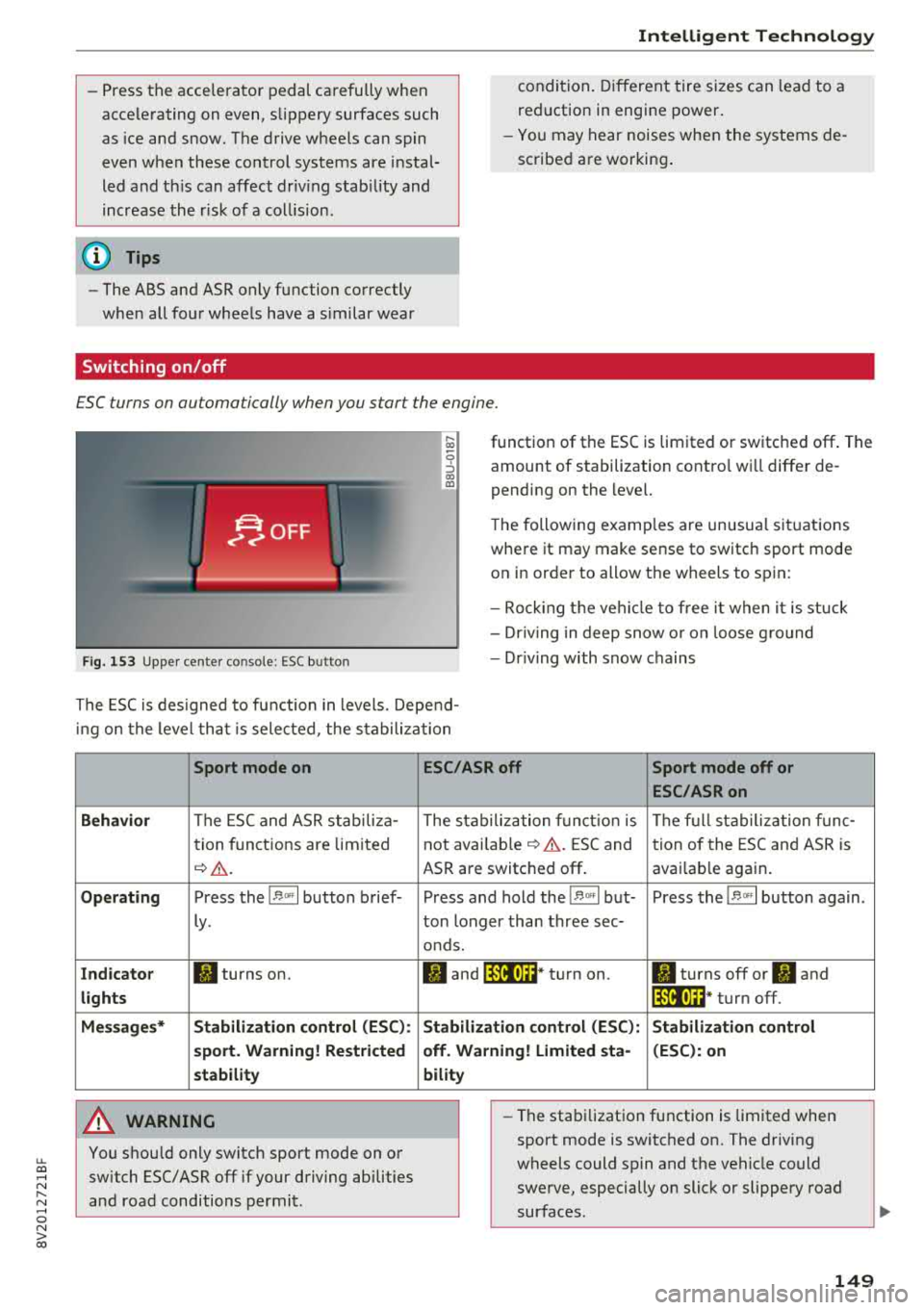
ESC turns on automatically when you start the engine.
F ig. 153 Upper center console: ESC button
function of the ESC is limited or switched off. The
amount of stabilization contro l wi ll differ de
pending on the level.
The following examp les are unusua l situations
where it may make sense to switch sport mode on in order to allow the wheels to spin:
- Rocking the vehicle to free it when it is stuck
- Dr iving in deep snow o r on loose g round
- Dr iving with snow chains
The ESC is designed to function in levels. Depend
ing on the level that is selected , the stabilization
Sport mode on
Behavior
The ESC and ASR stab iliza-
tion functions are limited
~ &..
Operating Press the 11> .. , I button brief-
ly .
Indicator II turns on.
lights
Messages* Stabilization control (ESC):
sport. Warning! Restricted
stability
A WARNING
You should only switch sport mode on or switch ESC/ ASR
off if your driving abilities
and road conditions permit.
ESC/ASR off Sport mode off or
ESC/ASRon
The stabilization function is The full stabilization func-
not
avai lab le~ A . ESC and tion of the ESC and ASR is
ASR are switched off . availab le again.
Press and hold the
! 1> °',1 but- Press the 11> .. , I button again .
ton longer than three sec-
onds.
II and lfil•)~~* turn on. II turns off or II and
lfil•)~~ * turn off.
Stabilization control (ESC): Stabilization control
off. Warning! Limited sta- (ESC): on
bility
-
- The stabilization function is limited when
sport mode is switched on. The driving
wheels could spin and the vehicle could swerve, especially on slick or slippery road
surfaces .
149
Page 153 of 404
u. 00 .-< N l' N .-< 0 N > 00
Brake booster
The brake booster amplifies the pressu re yo u ap
p ly to the brake pedal. It only operates while the
engine is running or when the ignition is switched
on (plug-in hybrid drive*) .
A WARNING
- Only apply the brakes for the purpose of
cleaning the brake system when road and
traff ic conditions permit. You must not en
danger other road users. This increases the
r isk of an accident .
-
-Never let the vehicle roll while the engine is
stopped because this increases the risk of an
acc ident.
- Depend ing on the veh icle equipment, the
brake pedal may be pulled downward when
the vehicle automatically initiates b rak ing.
- Never place objects in the driver's footwell.
An object could end up in the area around
the pedals and prevent you from using
them. You wo uld not be able to use the ped
als if sudden driving or braking mane uvers
were needed, which increases the risk of an
accident.
- Only use floor mats that do not obstruct the
area around the pedals and that can be se
curely fastened in the footwe lls.
- T o reduce the risk of injury, do not place
your foot under the brake pedal.
(Llj) Note
-Never let the brakes "rub" by pressing the
pedal lightly when braking is not actually
necessary. This causes the brakes to over
heat and increases braking distance and
causes wear.
- Before driving on a long stretch with steep
slopes, reduce your speed and shift to the
next lower gear This makes use of the en
gine braking effect and relieves the brakes.
If you need to brake add it ionally, brake in
i ntervals and not cont inuously.
Intelligent Technology
(D Tips
- If the brake booster is not working, you
must press the brake pedal with much more
force than normal.
- If you retrofit your vehicle with a front spoi l
er, wheel covers or simi lar items, make sure
that the air flow to the front wheels is not
interrupted. Otherwise the brake system
can become too hot.
Electromechanical
steering
The electromechanical steering supports the
driver's steering movements.
Power steering adapts electronically based on
the ve hicle speed.
Indicator lights and messages
• Do not drive vehicle: steering defective
If this indicator light turns on and stays on and
th is message appears, the power steering may
have failed .
Stop the vehicle in a safe location as soon as pos
s ible. Do
not cont inue driving. See an authorized
Audi dealer or authorized Audi Service Fac ility for
ass istance .
l;r-ij Steering: system fault! You can continue
driving
If the indicator light turns on, the steering wheel
may be more difficult to move or more sensitive
than usual. The steering whee l may also be at an
angle when driving straight.
Drive slowly to an authorized Audi dea ler or au
thorized Audi Service Facility to have the mal
function corrected.
(D Tips
If the. or 'Tij indicator light on ly stays on
for a short time, you may continue driving .
151