navigation AUDI A3 SEDAN 2018 Owner's Manual
[x] Cancel search | Manufacturer: AUDI, Model Year: 2018, Model line: A3 SEDAN, Model: AUDI A3 SEDAN 2018Pages: 404, PDF Size: 62.3 MB
Page 206 of 404
Navigat ion
-If a contact is grayed out in the directory,
this contact has neither a destination nor an
address assigned to them.
Point of interest search
Applies to: ve hicles w ith navigation system
.. Press the I NAV /MAPI bu tton repeatedly until
t he
E nte r d estination menu is displayed
¢page 201 , fig . 1 82 .
.. Select : left cont rol button > Point s of intere st.
-C hanging the search area : select and confirm
Sear ch ar ea > a search area from the list .
The following search categories are avai lab le:
Nearb y: points o f interes t can be sele cted from
different categories . The points o f interest are
list ed starting from the immediate vicinity of the
vehicle up to a radi us of approximate ly 124
miles (200 km).
Along the route: points of inte rest a long the
route can on ly be select ed during active rout e
gu idance. The points of interest are located d i
rect ly along or in the immediate vicinity of the
calcul ated route. The points of interest can like
wise be selected from various categor ies . For ex
ample, you can search for a hotel or park ing lot
at the destination .
Near destin ation /Near stopo ver : po ints of inter
est near a destination or a stopover can only be
selected dur ing active route guidance . T he poi nts
of interest can likewise be se lected from va rious
ca tegor ies. For examp le, you ca n search fo r a ho
tel or parking lot a t the destination.
In new city : select a country/state or searc h in a
new c ity . Ente r the name of the des ired c ity .
P oints of i nte rest can be selected from var ious
ca tegor ies. Th is f unction allows you to searc h for
points of interes t in any ci ty regardless of the ac
tive route guidance or the vehicle position.
-Sea rch for a p oint of inter est name in these
lec ted search are a:
en ter the name of the po int
of inte rest .
-Sear ching f or a poin t of inter est in a specifi c
ca tegory :
select Select cat egory . Select and
confirm a ca tegory such as
Restaurant s.
204
(D Tips
-Distances to points of interest are displayed
as a stra ight -line d istance from your current
location. The actual d istance from your cur
rent location to the point of interest is up
dated automatically. The list of found
points of interest is not resorted when this
happens.
-T here may be entr ies in the l ist that cannot
be displayed comp letely due to t heir length .
Select the cor respond ing ent ry from the
list. Select: r ight cont rol b utton> Show des
ti na tion det ails. De tailed informa tion fo r
the se lected entry in the list is then dis
played .
Online point of interest search (online
search)
App lies to: vehicles wit h a navigation system and Audi co n
nect (Infota inment)
You can search for points of interest on the In
t e rnet .
Requirement: the requirements for Aud i connect
(Infotai nment) must be met
¢ page 190 .
.. Press the I NAV/MAPI button repeatedly until
the
Enter des tination me nu is displayed
~ page 201, fig. 182 .
.. Select: left control button > Online sear ch . Th e
searc h area last set is displayed in the inpu t
fie ld .
-C hanging the search area : select: right cont rol
bu tton >
S elect sear ch are a.
-Searching for onlin e destinations in thes e
l ec ted search ar ea :
ente r a new c ity/state if
necessary. En ter the search term, such as hotel.
Press the contro l knob. Se lect and confirm an
online destination from the list.
-Sea rching for online de stinations in a specific
categor y:
se lect and confirm Sele ct category.
Select and confirm a category such as Re stau
rants .
Find w hich search areas are avai lab le under
¢ page 204 , Point of interest search .
You can search for online destinations using the
vo ice recog nitio n
sys tem ¢ table on page 173. .,..
Page 207 of 404
LL co ..... N
" N ..... 0 N > co
(D Tips
Always read the chapter¢ page 196, Audi
connect (Infotainment) general information .
Accessing destinations from myAudi
account
Applies to: veh icles with a navigation system and Audi con
nect (Infotainment)
Import individual destinations from your myAudi
account into the
MMI.
Req uirement:
The requ iremen ts for Aud i connect (Infotain
ment) must be met
¢ page 190 .
You must have a registered myAudi account at
www .audiusa .com/myaudi . You must have
ave
hicle assigned to your myAudi account and yo u
must have sto red one or mo re destinations .
... Press the I NAV/MAPI button repeatedly until
the
Ent er destination menu is displayed
¢ page 201, fig . 182 .
... Select: left cont rol button > myAudi contacts .
... If necessary, enter your myAudi user data o r
yo ur myAud i PIN¢
page 190 . The contacts
stored in myAudi are d isp layed.
- Se lect and confir m a conta ct.
- Se lect and confirm a priva te or b usiness desti-
nation .
- Select and co nfirm
Start route guidance .
(D Tips
-You only need to enter the myAud i user data
one time.
- You can receive your myA udi PIN if you have
set up a myAudi account.
- Fo r additional informat ion, visit
www.audiusa.com .
Entering a destination using geo
coordinates
App lies to: vehicles with navigation system
... Press the I N AV/MAPI but ton repeated ly un til
t h e
Enter de stination menu is dis played
¢page 201 , fig . 182.
Na viga tion
... Sele ct: left control button > Geographi cal coor
dinates .
-Sele ct Latitude /Longitude .
-Press the cont ro l knob to set the individ ual va l-
ue s.
- Tur n the control knob to the left/ right to
change the selected va lue.
- Select and confirm
Start route guidance .
Adding a stopover
Applies to: vehicles with navigation system
You can enter an additional destination when
route guidance is active .
Fig. 184 Example: act ive route gu ida nce w it h stopover
Requireme nt: route guidance must already be ac
t ive.
... Press the ! NAV/MAP I button repeatedly unti l
the
Enter destination menu is displayed
¢ page 201 , fig.182 .
Entering a destination as a stopove r
-Enter a destination in the input line
¢ page 201 .
-Select an d confirm a destinat ion from the re -
sults list .
- Select and confirm
Add as stopover.
Deleting a stopover
- Push the contro l knob up. Fre e tex t sea rc h and
ac tive route g uidance are disp laye d.
Or : turn
t he co ntro l knob to t he left un til the act ive
route guid ance is shown.
- Sele ct and confirm
Delete stopover @
¢ fig. 184 .
-The stopove r is deleted .
205
Page 208 of 404
Navigation Cancel route guidance
App lies to: vehicles with navigation system
Requirement: route guidance must be active.
.,. Press the I NAV/MAPI button repeatedly until
the
Enter destination menu is displayed
c:::> page201, fig .182 .
.,. Turn the control knob to the left until the active
route gui dance is shown
c:::> page 205, fig. 184 .
.,. Select and confirm Cancel route guidance (D
c:::> page 205, fig. 184 . The destination is delet
ed.
Or : select the right control button > Cancel
route guidance .
Additional options when entering a
destination
Applies to: vehicles with navigation system
.,. Press the right control button .
Depending on the selected function, the follow
ing options may be available when entering a
destination:
Cancel route guidance : Requirement: route guid
ance must be active. Route guidance is canceled. For addit ional information, see
c:::> page 206 .
Country information: you can d isp lay the appli
cable urban and rural speed limits for any coun
try/state. If this function is activated, the infor
mat ion will be automatically shown to you in the
route information
(z) c:::> page 210, fig . 189 when
the speed limit is exceeded
c:::> page 212 .
Country/state selection: see c::> page 202, Nar
rowing the search area.
Route criteria: see c:::> page 209, Route criteria.
Show location on map : Requirement: you must
have se lected a destination from the results list.
The destination entered is displayed on the map .
Parking at this lo cation *: Requirement: you
m ust have selected a destination from the re
sults list . All parking options near the selected
location are displayed in the Infotainment sys
tem .
Delete : th e selected en try is deleted. You can de
lete individua l entries or all entries (for example,
favorites or last destinations).
206
Audi connect at this location* : Requirement: yo u
must have se lected a destination from the re
su lts list. A llows you to search for items in the v i
cinity of the selected location, such as
Travel in
formation.
Online traffic data *:
the on line traffic informa
tion
c:::> page 216 can be sw itched on or off .
Add destination to contact: see c:::> page 208.
Store as favorite: see c:::> page 208 .
Voice guidance : see c:::> page 210.
Navigation settings: see c:::> page 209.
(D Tips
Information on on line traff ic data* can also
be found on line at www.audiusa .com .
Personal route
assistance
Applies to: vehicles with navigation system and personal
ro ute assistance
Your MMI con learn the routes that you drive fre
quently and, depending on the current vehicle
position, suggest route guidance (for example,
your daily commute to work and back).
Fig. 185 E xample : personal route disp lay
Fig. 186 Info rmation o n personal route
Page 209 of 404
u. 00 .-< N l' N .-< 0 N > 00
~ Press the I NAV/MAPI button repeated ly until
the
Enter de sti na tion menu is displayed
¢page 201, fig. 182 .
~ Select : right contro l button > Per son al rout e
a ss is tance .
When the function is switched on~, the MMI re
cords the frequently-driven routes regardless of
whether a destination was entered and reached
or not .
As long as route guidance is not active, your per
sonal routes are listed in the
Enter destination
menu under the home address and indicated with
the
symbol ~@ ¢ fig. 185 . When persona l
route assistance is sw itched on, th is symbol is
d isplayed in the Navigation menu a nd in the Info
tainment system d isp lay stat us line at the same
time.
The distance to the destination and the calculat
ed arr ival t ime are also displayed for you r person
a l routes. W ithout sta rt ing route gu idance, you r
MMI mo nitors the t raff ic condi tions fo r you r pe r
sona l routes a nd s hows possib le t raff ic incidents
for the possible routes to be driven in the Info
tainment system
disp lay @ ¢ fig. 185 .
A message will be d isp layed if the re is a large
traffic inc iden t (more than 12 m inute de lay) re
gardless of which menu is se lected
¢ fig. 186.
Select and confirm one of the following options :
-Start route guidance : the MMI starts the route
guida nce for the persona l route displayed and
searches for a fas ter route i f available.
- Ignor e this rout e and this m essage: the d is
played destination with a ll app licab le personal
routes is no longer factored into the current
trip. No more messages are shown for the dis
played destination. The displayed destination
with all applicable personal routes w ill be fac
tored into the trip again only after stopp ing the
vehicle and switching the ignition on aga in .
- Igno re all mes sages : all persona l routes are no
longer factored into the current trip . No more
messages are d isplayed . Messages for personal
r outes when there is increased traffic will ap
pear aga in afte r the vehicle is stopped and t he
i gnition is sw itched on aga in.
Na vigation
As soon as you switch off personal route assis
tance, the symbol in the status line turns off and
your trips are no longer recorded. Trips that were
already stored remain stored.
Deleting per sonal routes :
-Select the desired pe rsonal route in the Enter
de stination
menu @¢ fig. 185.
-Select: r ight control button > Delete d estina
tion .
D elet ing all per sonal rout es:
-Select: !MENU I button> Settings > left control
button >
MMI set tings > Factory setting s.
-Select: Navigation and online memory > Re
store fa ctory
sett ing s¢ page 244.
(D Tips
- Persona l routes are learned based on the ve
hicle position. The ro ute is p rioritized ac
cording to how freq uent ly you drive to a
destination.
- A maximum of three personal ro utes are
displayed in the
Enter dest ination menu.
Based o n the current vehicle position, the
traff ic situat ion for the route that is most
likely to be drive n out of the three routes
w ill always be monitored .
- Please note that personal routes that have
already been stored will rema in stored after
the ignition is sw itched off and they must
be deleted ma nually.
Home address
App lies to : vehicles wit h navigat ion syste m
~ Press the INAV/MAPI button repeatedly unti l
the
Enter de stination menu is disp layed
¢ page 201, fig.182 .
Storing a home address
-Select and confirm Home address @
¢ page 201, fig. 182 . After opening the home
add ress fo r th e fi rst time, you will be as ked to
create a home add ress.
- Select and confirm
Creat e now .
-Enter a dest ination or select a destination from
the l ist .
Or : .,.
207
Page 210 of 404
Navigation
-Select: a destination> right control button>
Store as home address.
Editing the home address
-Select the Home address@¢ page 201,
fig. 182.
-Se lect: right contro l button > Edit home ad
dress .
-Select and confirm a new desti nat io n as the
home address.
The selected destination is stored as the new home address .
Favorites
Applies to: veh icles with navigation system
.,. Press the I NAV/MAPI button repeatedly until
the
Enter destination menu is displayed
t::> page201 , fig .182 .
-Storing a destinat ion as a favorite: search for
the desired destination us ing the input field.
Or: select and confirm a destination from the
list . Se lect: right control button >
Store as fa
vorite .
-Renaming a favorite : select the left control
button >
Favorites > a favorite from the list >
right control button >
Rename favorite .
-Move favorite: select a favorite from the list >
right control button>
Move favorite . Select
and confirm the location of the selected favor
ite .
-Deleting a favorite : select a favorite from the
list>
r ight control button > Delete favorite >
Delete this favorite or Delete all favorites.
Directory contacts
Applies to: vehicles with navigation system
Two addresses (private/business) con be as
signed as destinations for each contact in the di rectory .
.. Press the I NAV/MAPI button repeatedly until
the
Enter destination menu is displayed
¢page 201, fig . 182.
208
Storing a destination as a contact in the
directory
Requirement: a cell phone must be connected to
the MMI
¢page 177 .
-Select: o destination > right contro l button >
Add destination to contact.
-Select and confirm Add business destination or
Add private destination.
-Enter a name. Or: select and confirm a directo
ry contact from the list .
- Select and confirm
Save business card.
Alternative routes
Applies to: vehicles with navigat ion system
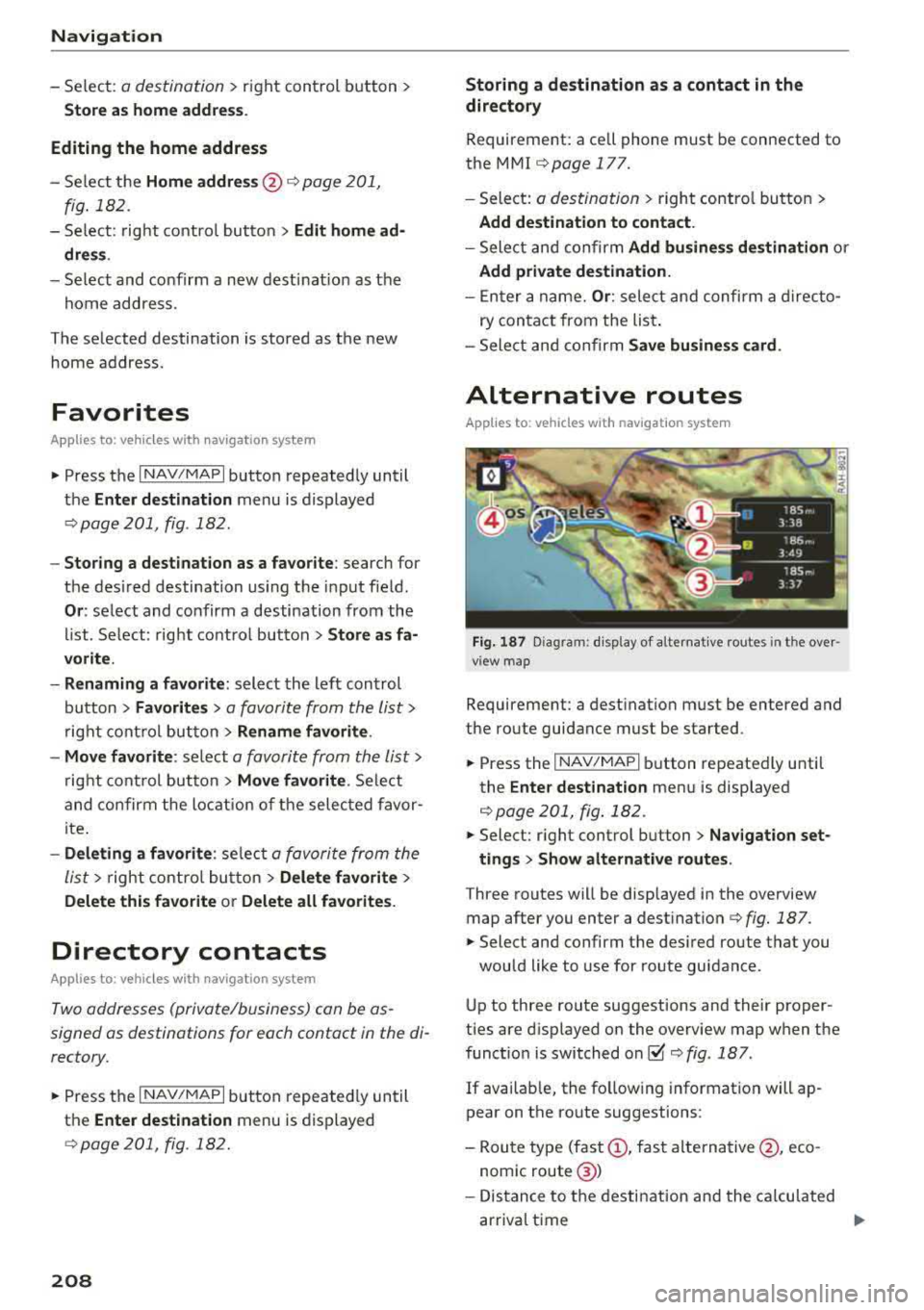
Fig. 187 Diagram: d isp lay of a lternat ive routes in t he ove r
view map
Requirement: a destination must be entered and
the route guidance must be started .
.. Press the I NAV/MAPI button repeatedly until
the
Enter destination menu is displayed
¢page 201, fig. 182 .
.. Select: right control button> Nav igation set-
tings
> Show alternative routes.
Three routes will be displayed in the overview
map after you enter a
dest ination ¢ fig. 187 .
.. Select and confirm the des ired route that you
would like to use for route guidance.
Up to three route suggestions and their proper
ties are d isplayed on the overview map when the
function is switched
on~¢ fig. 187.
If available, the fo llow ing information will ap
pear on the route suggestions :
-Route type (fast(!), fast alternative @, eco
nomic route @)
- Distance to the destination and the calculated
arrival time
...
Page 211 of 404
u. 00 .-< N l' N .-< 0 N > 00
- Traffic congestion along the ro ute including
time delays
The route that was calcu lated acco rding to the
ro ute criter ia you sele cted is shown on the over
view map . The special propert ies of the route are
a lso
displayed @~ fig. 187 and given as a spo
k en message.
Using the contro l knob , you can se lect t he possi
b le routing for the alternative routes and show
them on map Select and confirm the desired ro ute that you would like to use for route guid
ance.
Additional settings
Navigation settings
Applies to: vehicles with navigation system
.,. Press the I NAV /MAPI but ton repe ated ly un til
the
Enter de stination menu is displayed
¢ page 201, fig.182 .
.,. Select : rig ht contro l button > Navigation set-
tings .
Depending on the se lected function, the follow ·
ing settings can be se lected :
Show alternative routes
Up to three suggested ro utes are shown on the
map whe n this funct ion is switched
on~
~ page 208, Alternative routes.
Low fuel warning
A message is disp layed if the fuel gauge goes be
l ow the reserve mar king when this funct ion is
sw itched
on~-Co nfirm ing th is m essage displays
a lis t of gas stations in the area. When a gas sta
t ion is selec ted, route g uidance from the c urren t
ve hicl e position is calc ulated .
Trailer mode*
Tra iler mode is sw itched off at the factory .
When the function is switched
on~. the maxi
mum permitted speed for vehicles with trailers is
i ncorporated into the route guidance and the cal
culated arr ival time is adjusted acco rding ly . T rail
e r mode is d isp layed using symbols
-Pe' in the side
menu on the m ap .
Na vigation
Personal route as sistance*
Persona l rou te ass istance is swi tched off at the
f actory.
You r trips a re recorded and dest inations a re s ug
gested by the M MI w hen th is fu nction is sw itched
o n ~¢ page 206.
Notification when nearby*
The not ification when nearby is switched off at
the factory .
The MM I not ifies you when you are approaching
selected points of interest when t his function is
switched
on~ -You can also have a Notification
tone .
Presentation mode
The Presentation mode he lps you to effectively
plan a tr ip and fo llow the planned route without
moving the vehicle . You can use
Select starting
point
when you wou ld like to calculate a ro ute
sta rt ing from a location othe r than the ve hicle
pos it ion, for examp le. Sta rt
Presentation mode
to s imula te rou te g uidance .
Route criteria
Applies to: vehicles with navigation system
Jl
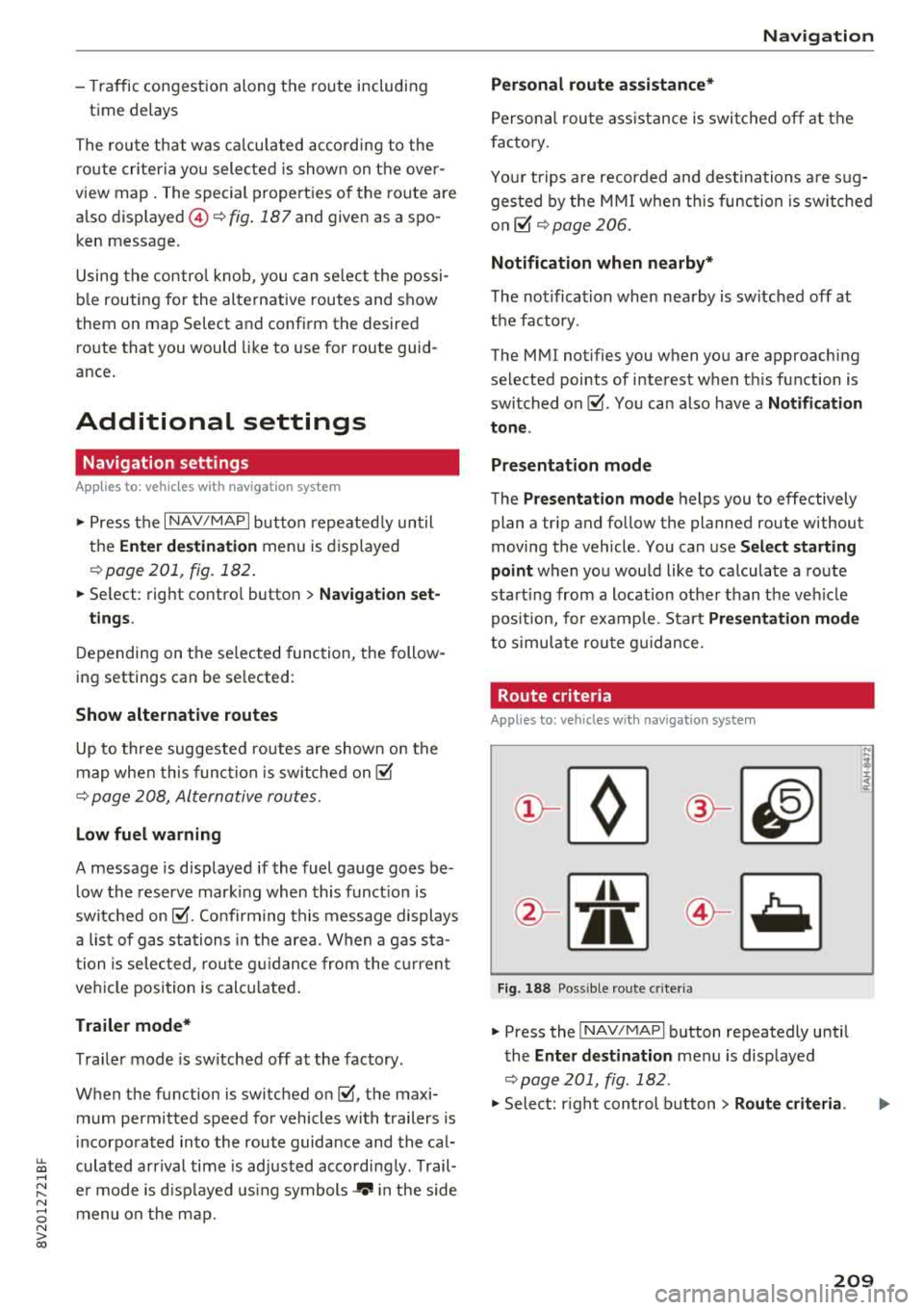
Fig. 18 8 Possible ro ute c rit e ri a
.,. Press the INAV/MAPI button repeatedly unti l
the
Enter destination men u is displayed
¢page 201, fig . 182 .
.,. Select: r ight cont rol b utton> Route criteria .
209
Page 212 of 404
Navigation
CD HOV/carpool lanes 1): with the Avoid fu nc
tion, HOV lanes are excluded when calculating
ro utes . When
Allow is se lected, t he MMI will
ro ute you thro ugh HOV lanes and show them on
the map.
@Highways /@ Toll roads /@ Ferries : if the nav
igation system sho uld not incl ude highways, to ll
roads or ferr ies
-if possib le -when calcu lating
routes, yo u can select the
Avoid function .
Voice guidance
Applies to: ve hicles with navigation system
• Press the I N AV/MAPI button repeated ly until
the
Enter destination menu is d isplayed
¢ pag e 201, fig. 182.
• Se lect: rig ht cont rol butto n > Voice guidance .
Voice guidance :
voice guidance can be Complete
or Shortened. With the Traffic function, voice
gu idance p romp ts are only given when the re are
traffic inc iden ts o n yo ur route. When
Off is se
lec ted, no voice g uidance is given .
Voice guidance during phone call: voice guid
a nce du ring a phone c all can be swi tc h ed o n or
off.
Enterta inment fader : see ¢ page 248.
Voice guidance volume : you can adjust the vo l
ume during voice guidance using the On/Off knob
¢ page 154 Yo u can also find additional informa
tion
u nder¢page248 .
ll High occupancy ve hicle
210
Map
Map operation
App lies to: vehicles with navigation system
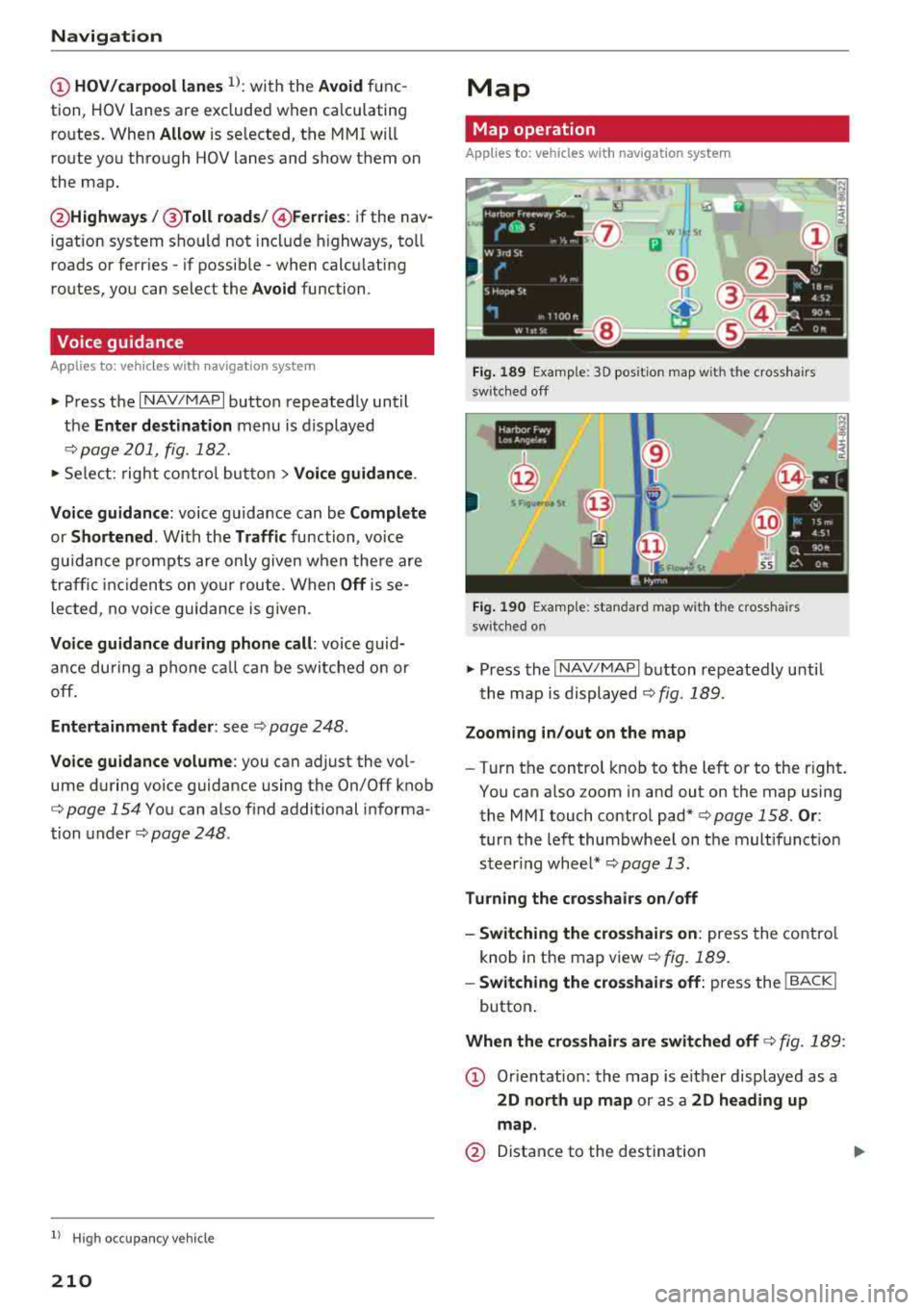
Fig. 189 Examp le: 3D pos ition map w ith the cross hairs
switc hed off
•IN
@
Fig. 190 Examp le: standard map with the crosshairs
switc hed on
~ Press the I NAV/MAPI b utton repeatedly until
t he map is
d isplayed¢ fig . 189.
Zooming in /out on the map
-T ur n the control knob to the left or to the right.
You can also zoom in and out on the map using
the MMI touch control
pad*¢ page 158. Or:
turn the left thumbwheel on the mult ifunct ion
s t eer ing whee l*
¢page 13 .
Turning the crosshairs on/off
-Switching the cro sshairs on : press the contro l
knob in the map v iew
¢fig. 189 .
-Swit ching the crosshairs off: p ress the ! BACKI
button .
When the crosshairs are switched off¢ fig. 189:
CD Orien tation: the map is e it h er displayed as a
2D north up map or as a 2D heading up
map .
@ Distance to the destination
Page 213 of 404
u. co .-< N l' N
@ When the trailer m ode fu nction is switched
on~' the corresponding symbo l is displayed
next to the arriva l time.
© Scale: turn the cont rol knob to the left or
right to decrease or increase the scale . When
the
Automa tic zoom fu nct ion is swit ched on
~' an "A" fo r "Automatic" is displayed in the
magnifying glass .
® Altitude
@ Ve hicle posit ion
(J) Route information: various information wi ll
be disp layed during active route guidance
(for example, the upcoming maneuver in
cluding calculated d istance and street
names) . The disp lay also prov ides traffic in
formation or po ints of interest on the current
route.
@ Street being driven on: displayed here as
"offroad" w hen the vehicle is stationary .
When th e crosshair s ar e swit ch ed on ¢ fig. 190:
® Crosshairs: move the cross ha irs in t he de
sired direction us ing the MMI touch control
pad* o r the control knob and set a po int on
the map as the dest inat ion or have i nfo rma
tion about the foca l point displayed .
@) Speed limit disp lay1>: display of the maxi
mum permitted speed on the expressways
and highways .
@ Enterta inme nt s liding men u*: see
¢ page 159.
@ Addit ional information on the crosshairs po
sition: if you move the crosshairs to a loca
tion on the map, ava ilable information for
the current crossha irs pos ition is displayed .
Pr ess the cont rol knob to open destination
det ails o r to sta rt ro ute gu idance. When the
crossh airs a re tur ned off, the road being cur
ren tly driven on is shown .
@ Map contents (points of interest, favorites).
When there are multip le points of i nterest in
the immed iate vicinity, the symbols are
shown stacked on the map.
8 l ) O nly applies to vehicles without camera-based speed limit N
ii; display.
Na vigation
@ Better route~: if a better route is available
for the current route guidance, it will be indi
cated on the map including the t ime t hat
would be saved. Mo re information can be
found
under¢page215.
Map functions
Applies to: vehicles with navigation system
"Press the !NAV/MAPI button repeatedly until
the map is displayed
¢page 210, fig . 189 .
" Press the left control button .
The following map functions can be se lected:
Switch to de stination input
T he free text search in the Enter destination
men u is displayed ¢ page 201, fig. 182.
Traffic messages
Cu rren t traffic informa tion is disp layed i n the In
f ota inment system display. You can a lso find ad
ditional information under
¢ page 215 .
Route list
The route list can o nly be disp layed when route
guidance is a ctive and con ta ins informat io n re
gard ing the ro ute, the names of t he s treets and
the lengt h of the ro ute sec tions . W hen traveling
on highways, possible parking lots and rest areas
are shown, which you can se lect as a stopover.
POis along the route
Requirement: rou te g uid ance must be active.
Searching for po ints of inte rest a long your cur
r e nt route Fo r additional informat ion, see
¢ page 20 4.
Additional options on the map
Applies to: vehicles with navigation system
"Press the !NAV/MAPI button repeatedly u nti l
the map is displayed
¢page 210, fig . 189.
" Press the right control button.
211
Page 214 of 404
Navigation
Depending on the function selected, the follow
ing options can a lso be selected under the
Map
menu :
Cancel route guidance : see c:;, page 206.
Adjust position : you can manually move the veh i
cle position on the map to change the route.
Map settings: see c:;,page 212 .
Route criteria: see c:;, page 209.
Voice guidance: see c:;,page 210.
Navigation settings: see c:;, page 209.
Show alternative routes: see c:;, page 208.
Parking along the route*: parking options near
the vehicle are displayed.
Save current position* : you can save your current
vehicle position as a favorite
c:;, page 208 or save
it as a contact in th e directory
¢ page 208 .
Audi connect at this location *: allows you to
sea rch for
Travel information at the entered lo
cation (events, weather at the destination, etc.).
Online traffic data *: you can switch the on lin e
traffic data on or
off~.
Country information: see c:;, page 206 .
Avoid route* : when route guidance is act ive, the
calculated route w ill avoid the area you have
specified (max imum : 12 mi (20 km)), if possible .
The navigation system calculates an alternat ive
ro ute . The route to be avoided that you have en
tered applies only to the current route and must
be set again, if needed. The areas you have se
lected to avoid will appear with red and wh ite
shading on the map .
Move route *: move your finge r over the MMI
touch control pad* or use the con trol knob to ad
just the ro ute on the overview map .
ll AUDI AG pr ovide s access to se rvices from third part y p ro
v ider s. Pe rma ne nt ava ilabil ity c ann ot be g uara nteed , be
c a use that depen ds on the th ird party p ro vide r.
212
Map settings
Applies to: vehicles with navigation system
.,. Press the I NAV /MAPI button repeatedly unti l
the map is displayed.
.,. Select: r ight control button> Map settings.
Depend ing on the selected fu nction, the follow
in g settings can be selected:
Map colors
Day /Night :
the map is displayed wit h a light/
dark background .
Automatic: the map display adapts to the light
i ng condit ions (for examp le, changing from
Day
to Night when dr iving through a tunnel).
Map display
Standard :
see c:;, page 210, fig. 190.
Satellite map1>: see c:;, page 213.
Electric range : see c:;, page 217.
Map orientation
Destination :
the map indicates the destination
and is oriented to the north.
2D heading up map /2D north up map : the cur
rent vehicle position is displayed. The map is ori
ented in the direction of trave l or to the north.
3D position map *: the cur rent veh icle position is
shown on a three-dimensional map and is aligned
to the direction of travel. At a scale of 62 mi
(100 km) and larger, the map orientation is to
the north.
Overview map : the entire route from the vehicle
position to the destination or the next stopover is
displayed on the map. The map scale depends on
the length of the route and adapts automatically.
The map is oriented to the north.
Route information
The disp lay o f route information, such as the cur
rent street being driven on or points of interest
a long the current route, can be switched on/off
..,.
Page 215 of 404
LL co .... N
" N .... 0 N > co
or can be minimized on the display of upcoming maneuvers.
Automatic zo om
On : the map scale is adapted a utomat ica lly de
pending on the type of road being trave led (ex
pressway, hig hway, other roads) so that you al
ways have an optimal overview o f the road ahead.
The sca le is also automatica lly adapted when
there are upcoming maneuvers to provide a bet ter detailed view.
Inter section : when route guidance is active, the
map temporarily zooms in to a detailed scale
when there are upcom ing maneuvers so that you
can see the street or turn better.
Off: the map sca le you have chosen is main
tained.
M ap content
Map content such as weathe r, traff ic information
or favorites can be displayed or hidden .
The weather forecast* is d isplayed o n a 3 m i (5
km) scale on the map ¢
page 208, fig. 187.
Satellite map
Appl ies to: ve hicles with a nav igatio n system an d Audi con
nect (I nfotainment)
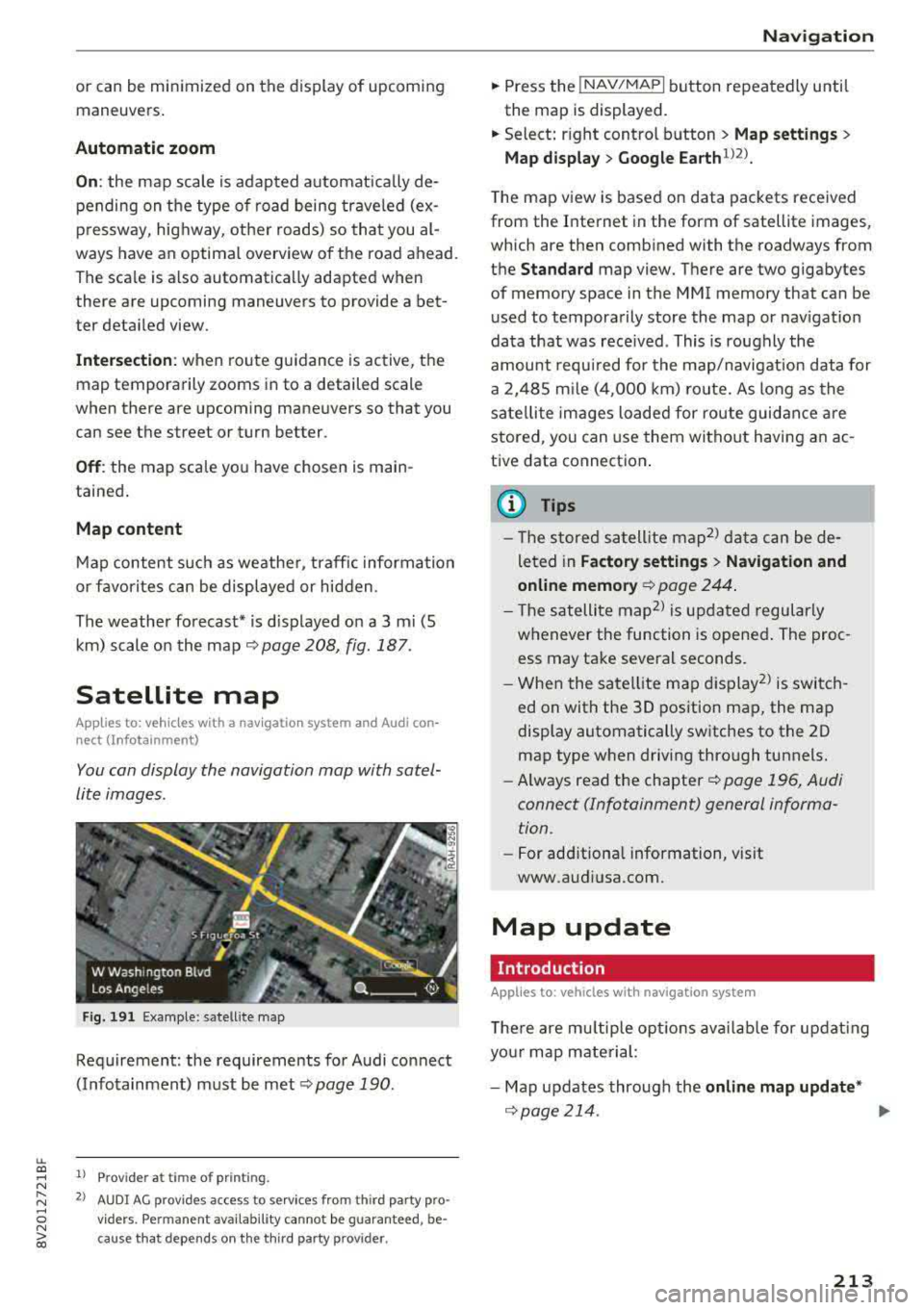
You can display the navigation map with satel
lite images .
Fig. 191 Example: satellite map
Requirement: the requirements for Audi connect
(Infotainment) must be met
¢ page 190.
1> Prov ider at time of printing .
2> AUDI AG provides access to se rvices from th ird party pro ·
v iders . Pe rman ent ava ilability cannot be guaran teed , be
c ause that depe nds on th e th ird party provider.
Na viga tion
.. Press the !NAV/MAPI button repeatedly until
the map is displayed.
.. Select: r ight control b utton > M ap settings >
Map displa y> Google Earth ll2l_
T he map v iew is based on data packets received
from the Internet in the form of satellite images,
which are then combined with the roadways from
the
Standard map view. There are two gigabytes
of memory space in the MMI memory that can be
u sed to temporarily store the map or nav igat io n
data that was received . This is roughly the
amount requ ired for the map/navigation data for
a 2, 485 m ile ( 4,000 km) ro ute. As long as the
sate llite images loaded for route guidance are
stored, you can use them witho ut having a n ac
tive data connection .
(D Tips
- The sto red sa tell ite map2> d ata can be de
leted in
Factory setting s> Navigation and
online memory ¢
page 244.
- The s atellite map2> is updated regularly
whenever the function is opened . The proc
ess may take several seconds.
- When the satellite map d isplay
2> is switch
ed on with the 30 position map, the map
display automatically sw itches to the 20
map type when driving through tunnels.
- Always read the chapter¢
page 196, Audi
connect (Infotainment) general informa tion .
-For add itiona l information, v is it
www.audiusa.com.
Map update
Introduction
Applies to: vehicles wi th navigat ion syste m
The re are mu ltip le opt io ns avai lab le for updat ing
yo ur map mate rial:
- Map updates through the
online map upd ate *
¢page 214 . ..,_
213