check AUDI A4 1996 B5 / 1.G ATW Engine Readiness Code Workshop Manual
[x] Cancel search | Manufacturer: AUDI, Model Year: 1996, Model line: A4, Model: AUDI A4 1996 B5 / 1.GPages: 35, PDF Size: 0.11 MB
Page 1 of 35
01-67
Readiness code
The readiness code appears as an 8-digit display
in measuring value block 086, display field 1.
Each of the 8 digits is allocated to a specific
exhaust related system.
During a test sequence which must be performed
completely, On Board Diagnostic (OBD) checks
the function of each of these systems and then
changes the character assigned to it in the 8-digit
indication from "1" to "0" once test has been
performed successfully.
When the readiness code is generated after a
successfully completed test sequence, it reads "0
0 0 0 0 0 0 0" (measuring value block 086,
display field 1).
If a single test is completed entirely, but indicated
as "not OK", a DTC will be stored in DTC
memory. Check DTC Memory Page 01
-16
.
Pa
ge 1 of 35 Readiness code
11/21/2002 htt
p://127.0.0.1:8080/audi/servlet/Dis
play?action=Goto&t
yp
e=re
pair&id=AUDI.B5.FU06.01.8
Page 3 of 35
01-69
Read readiness code
Test sequence
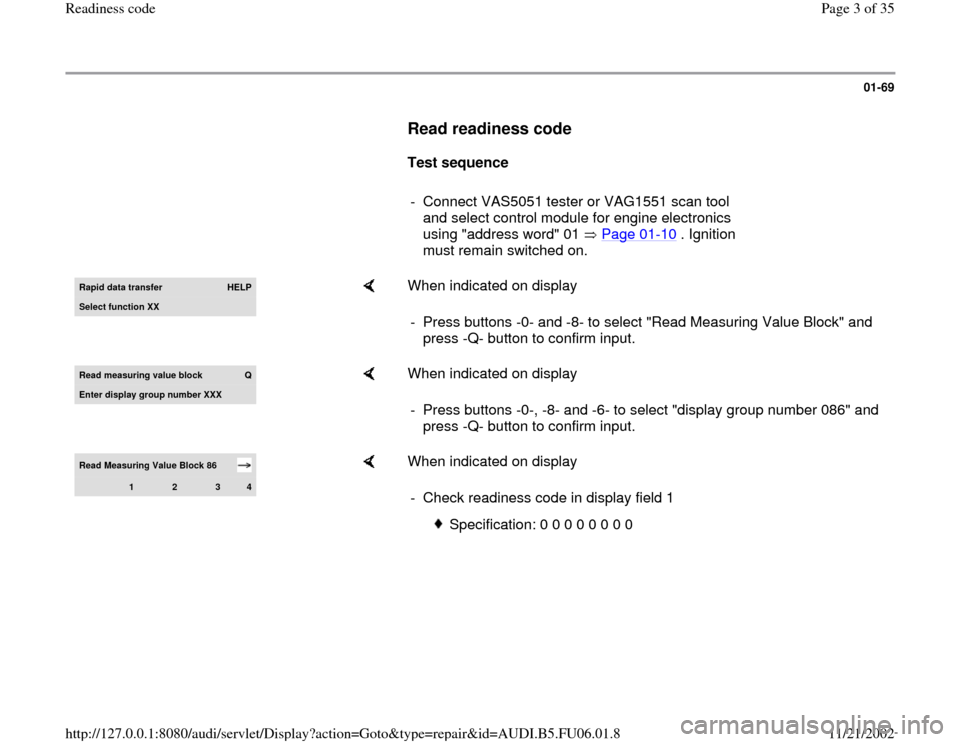
- Connect VAS5051 tester or VAG1551 scan tool
and select control module for engine electronics
using "address word" 01 Page 01
-10
. Ignition
must remain switched on.
Rapid data transfer
HELP
Select function XX
When indicated on display
- Press buttons -0- and -8- to select "Read Measuring Value Block" and
press -Q- button to confirm input.
Read measuring value block
Q
Enter displa
y group number XXX
When indicated on display
- Press buttons -0-, -8- and -6- to select "display group number 086" and
press -Q- button to confirm input.
Read Measuring Value Block 86
1
2
3
4
When indicated on display
- Check readiness code in display field 1
Specification: 0 0 0 0 0 0 0 0
Pa
ge 3 of 35 Readiness code
11/21/2002 htt
p://127.0.0.1:8080/audi/servlet/Dis
play?action=Goto&t
yp
e=re
pair&id=AUDI.B5.FU06.01.8
Page 4 of 35
01-70
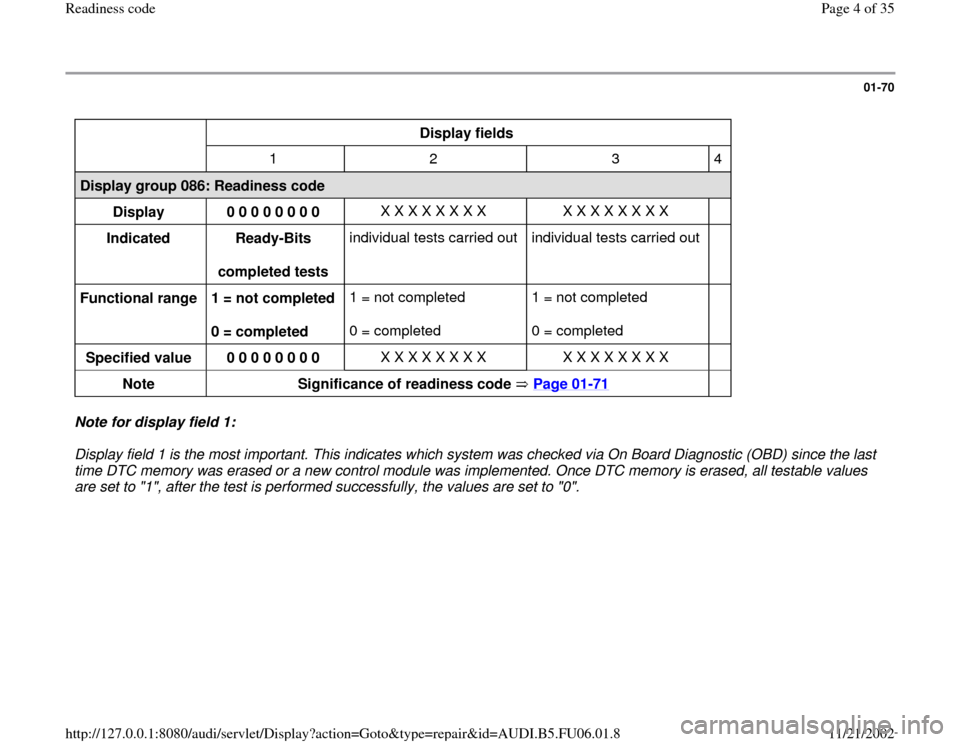
Display fields
1 2 3 4
Display group 086: Readiness code
Display
0 0 0 0 0 0 0 0 X X X X X X X X X X X X X X X X
Indicated
Ready-Bits
completed tests individual tests carried out individual tests carried out
Functional range
1 = not completed
0 = completed 1 = not completed
0 = completed 1 = not completed
0 = completed
Specified value
0 0 0 0 0 0 0 0 X X X X X X X X X X X X X X X X
Note
Significance of readiness code Page 01
-71
Note for display field 1:
Display field 1 is the most important. This indicates which system was checked via On Board Diagnostic (OBD) since the last
time DTC memory was erased or a new control module was implemented. Once DTC memory is erased, all testable values
are set to "1", after the test is performed successfully, the values are set to "0".
Pa
ge 4 of 35 Readiness code
11/21/2002 htt
p://127.0.0.1:8080/audi/servlet/Dis
play?action=Goto&t
yp
e=re
pair&id=AUDI.B5.FU06.01.8
Page 7 of 35
01-72
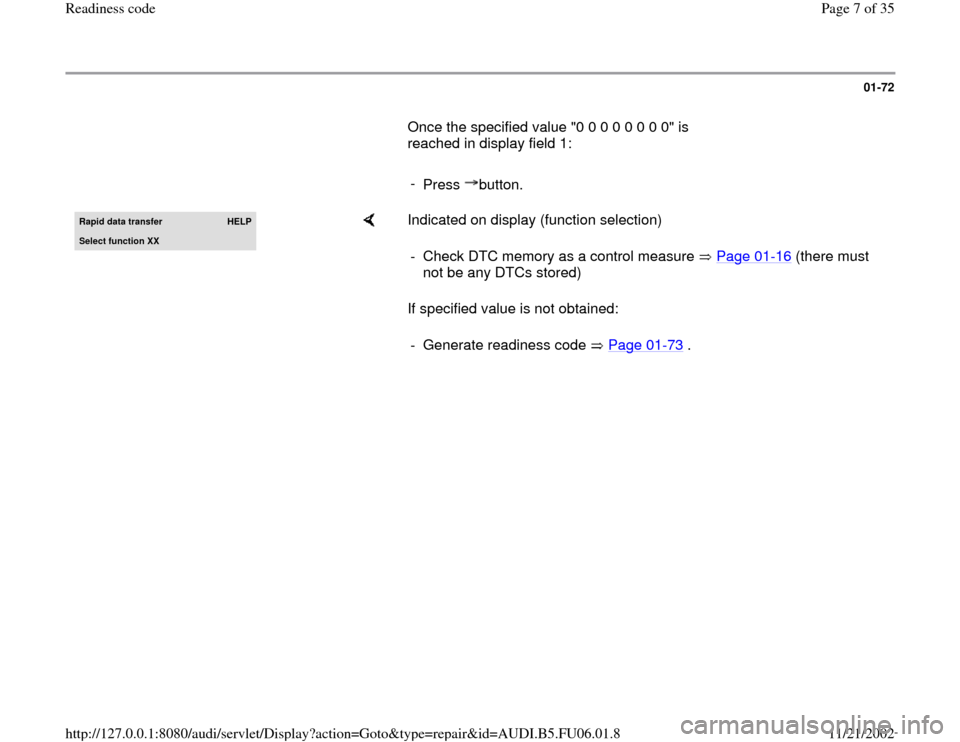
Once the specified value "0 0 0 0 0 0 0 0" is
reached in display field 1:
-
Press button.Rapid data transfer
HELP
Select function XX
Indicated on display (function selection)
If specified value is not obtained: - Check DTC memory as a control measure Page 01
-16
(there must
not be any DTCs stored)
- Generate readiness code Page 01
-73
.
Pa
ge 7 of 35 Readiness code
11/21/2002 htt
p://127.0.0.1:8080/audi/servlet/Dis
play?action=Goto&t
yp
e=re
pair&id=AUDI.B5.FU06.01.8
Page 9 of 35
01-74
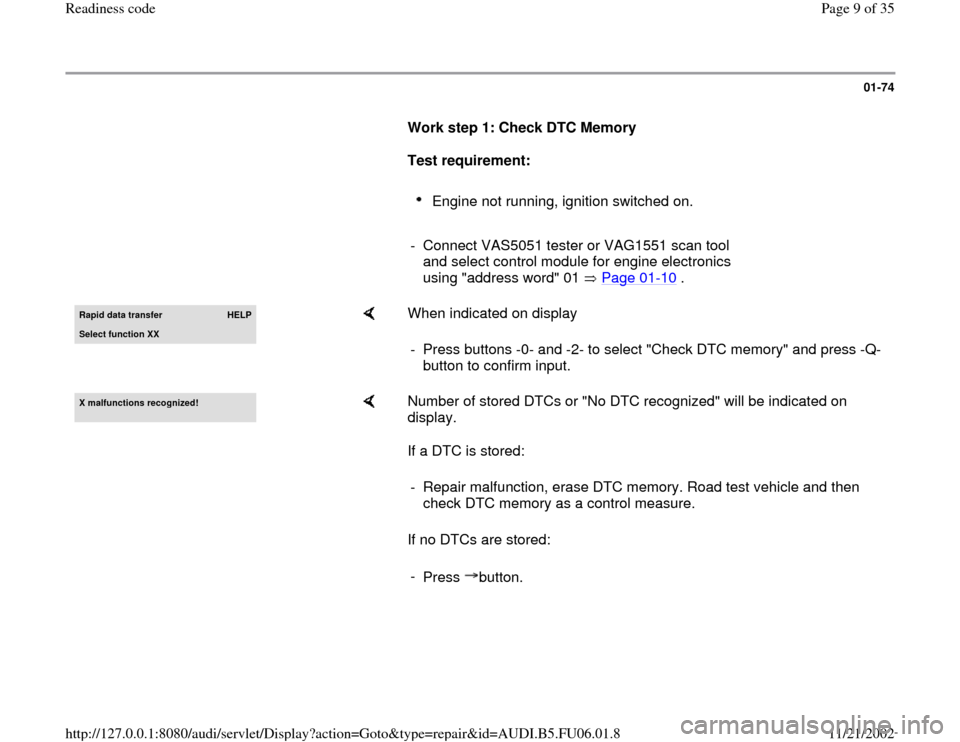
Work step 1: Check DTC Memory
Test requirement:
Engine not running, ignition switched on.
- Connect VAS5051 tester or VAG1551 scan tool
and select control module for engine electronics
using "address word" 01 Page 01
-10
.
Rapid data transfer
HELP
Select function XX
When indicated on display
- Press buttons -0- and -2- to select "Check DTC memory" and press -Q-
button to confirm input.
X malfunctions reco
gnized!
Number of stored DTCs or "No DTC recognized" will be indicated on
display.
If a DTC is stored:
If no DTCs are stored: - Repair malfunction, erase DTC memory. Road test vehicle and then
check DTC memory as a control measure.
-
Press button.
Pa
ge 9 of 35 Readiness code
11/21/2002 htt
p://127.0.0.1:8080/audi/servlet/Dis
play?action=Goto&t
yp
e=re
pair&id=AUDI.B5.FU06.01.8
Page 11 of 35
01-76
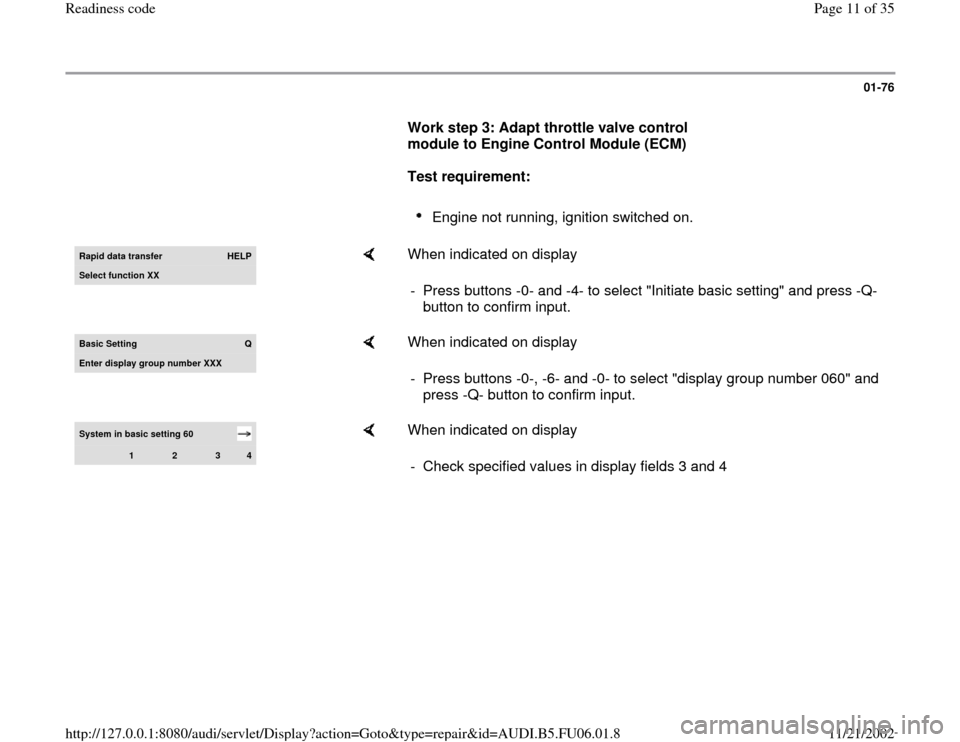
Work step 3: Adapt throttle valve control
module to Engine Control Module (ECM)
Test requirement:
Engine not running, ignition switched on.
Rapid data transfer
HELP
Select function XX
When indicated on display
- Press buttons -0- and -4- to select "Initiate basic setting" and press -Q-
button to confirm input.
Basic Setting
Q
Enter display group number XXX
When indicated on display
- Press buttons -0-, -6- and -0- to select "display group number 060" and
press -Q- button to confirm input.
System in basic setting 60
1
2
3
4
When indicated on display
- Check specified values in display fields 3 and 4
Pa
ge 11 of 35 Readiness code11/21/2002 htt
p://127.0.0.1:8080/audi/servlet/Dis
play?action=Goto&t
yp
e=re
pair&id=AUDI.B5.FU06.01.8
Page 12 of 35
01-77
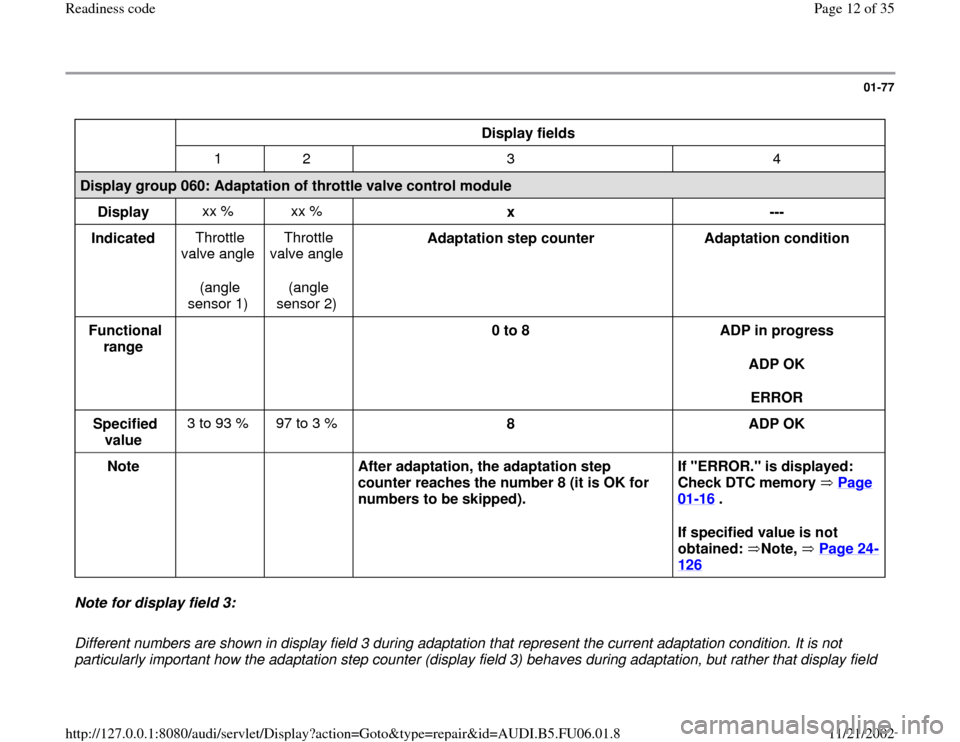
Display fields
1 2 3 4
Display group 060: Adaptation of throttle valve control module
Display xx % xx %
x
---
Indicated Throttle
valve angle
(angle
sensor 1) Throttle
valve angle
(angle
sensor 2) Adaptation step counter
Adaptation condition
Functional
range
0 to 8
ADP in progress
ADP OK
ERROR
Specified
value 3 to 93 % 97 to 3 %
8
ADP OK
Note
After adaptation, the adaptation step
counter reaches the number 8 (it is OK for
numbers to be skipped). If "ERROR." is displayed:
Check DTC memory Page
01
-16
.
If specified value is not
obtained: Note, Page 24
-
126
Note for display field 3:
Different numbers are shown in display field 3 during adaptation that represent the current adaptation condition. It is not
particularly important how the adaptation step counter (display field 3) behaves during adaptation, but rather that display field
Pa
ge 12 of 35 Readiness code11/21/2002 htt
p://127.0.0.1:8080/audi/servlet/Dis
play?action=Goto&t
yp
e=re
pair&id=AUDI.B5.FU06.01.8
Page 14 of 35
01-78
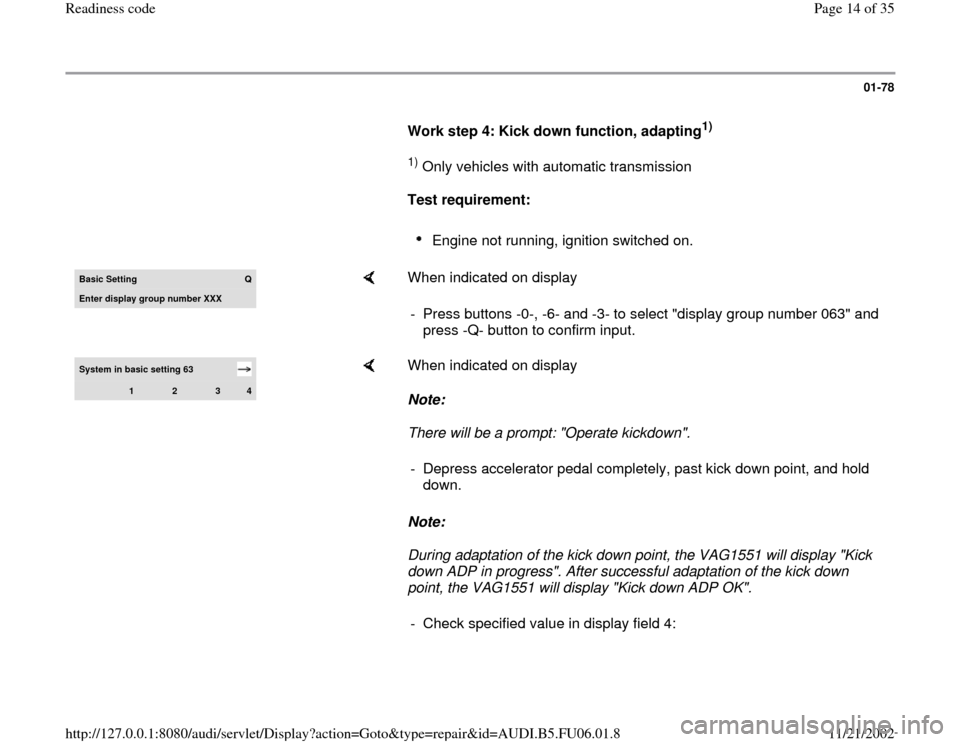
Work step 4: Kick down function, adapting
1)
1) Only vehicles with automatic transmission
Test requirement:
Engine not running, ignition switched on.
Basic Setting
Q
Enter displa
y group number XXX
When indicated on display
- Press buttons -0-, -6- and -3- to select "display group number 063" and
press -Q- button to confirm input.
System in basic setting 63
1
2
3
4
When indicated on display
Note:
There will be a prompt: "Operate kickdown".
Note:
During adaptation of the kick down point, the VAG1551 will display "Kick
down ADP in progress". After successful adaptation of the kick down
point, the VAG1551 will display "Kick down ADP OK". - Depress accelerator pedal completely, past kick down point, and hold
down.
- Check specified value in display field 4:
Pa
ge 14 of 35 Readiness code11/21/2002 htt
p://127.0.0.1:8080/audi/servlet/Dis
play?action=Goto&t
yp
e=re
pair&id=AUDI.B5.FU06.01.8
Page 15 of 35
01-79
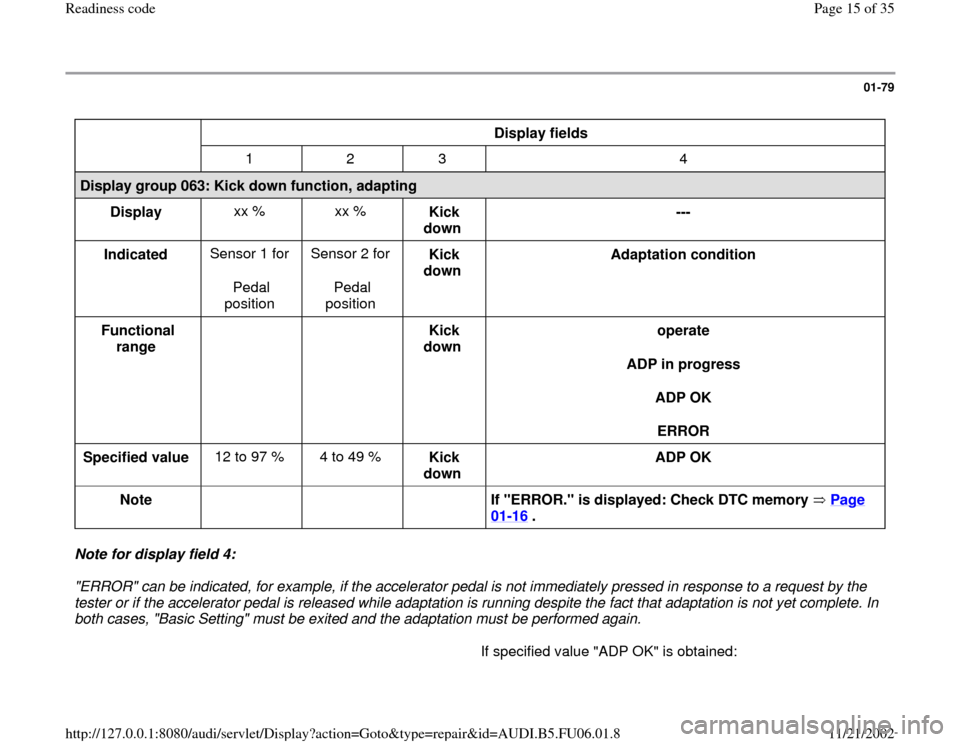
Display fields
1 2 3 4
Display group 063: Kick down function, adapting
Display xx % xx %
Kick
down ---
Indicated Sensor 1 for
Pedal
position Sensor 2 for
Pedal
position Kick
down Adaptation condition
Functional
range
Kick
down operate
ADP in progress
ADP OK
ERROR
Specified value 12 to 97 % 4 to 49 %
Kick
down ADP OK
Note
If "ERROR." is displayed: Check DTC memory Page
01
-16
.
Note for display field 4:
"ERROR" can be indicated, for example, if the accelerator pedal is not immediately pressed in response to a request by the
tester or if the accelerator pedal is released while adaptation is running despite the fact that adaptation is not yet complete. In
both cases, "Basic Setting" must be exited and the adaptation must be performed again.
If specified value "ADP OK" is obtained:
Pa
ge 15 of 35 Readiness code11/21/2002 htt
p://127.0.0.1:8080/audi/servlet/Dis
play?action=Goto&t
yp
e=re
pair&id=AUDI.B5.FU06.01.8
Page 17 of 35
01-80
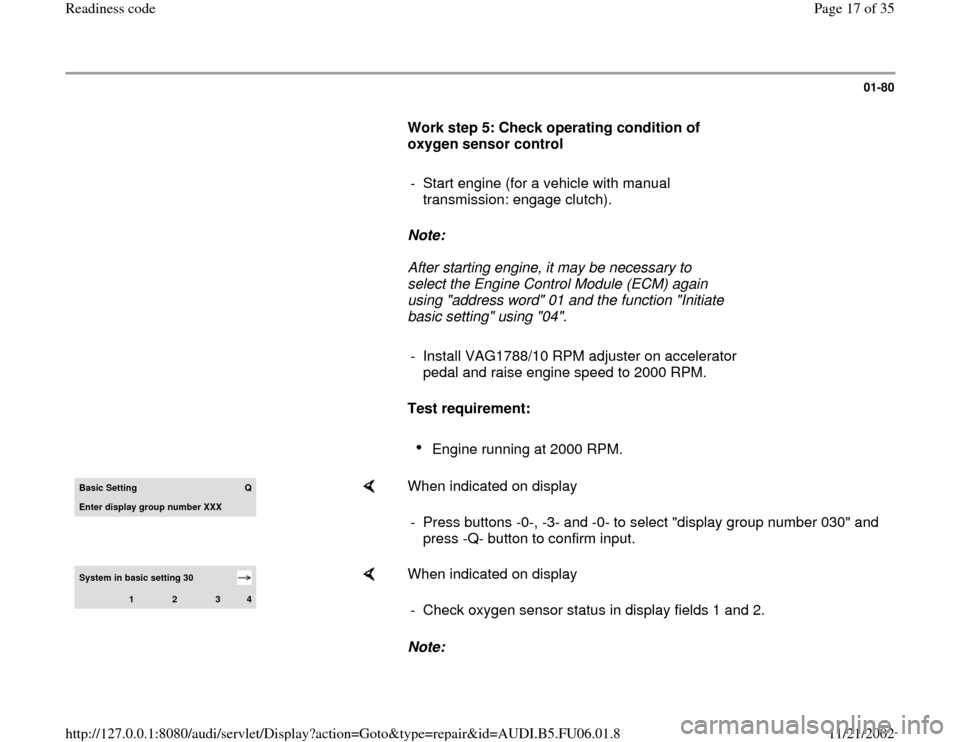
Work step 5: Check operating condition of
oxygen sensor control
- Start engine (for a vehicle with manual
transmission: engage clutch).
Note:
After starting engine, it may be necessary to
select the Engine Control Module (ECM) again
using "address word" 01 and the function "Initiate
basic setting" using "04".
- Install VAG1788/10 RPM adjuster on accelerator
pedal and raise engine speed to 2000 RPM.
Test requirement:
Engine running at 2000 RPM.
Basic Setting
Q
Enter display group number XXX
When indicated on display
- Press buttons -0-, -3- and -0- to select "display group number 030" and
press -Q- button to confirm input.
System in basic setting 30
1
2
3
4
When indicated on display
Note: - Check oxygen sensor status in display fields 1 and 2.
Pa
ge 17 of 35 Readiness code11/21/2002 htt
p://127.0.0.1:8080/audi/servlet/Dis
play?action=Goto&t
yp
e=re
pair&id=AUDI.B5.FU06.01.8