lock AUDI A4 2013 Owner's Manual
[x] Cancel search | Manufacturer: AUDI, Model Year: 2013, Model line: A4, Model: AUDI A4 2013Pages: 302, PDF Size: 75.61 MB
Page 44 of 302
42 Opening and closing
• Remove the cover from the luggage com
partment lid.
• Remove the mechanical key¢
page 34.
• Press the lever in the direction of the arrow
with the mechanical key until the luggage
compartment lid re leases.
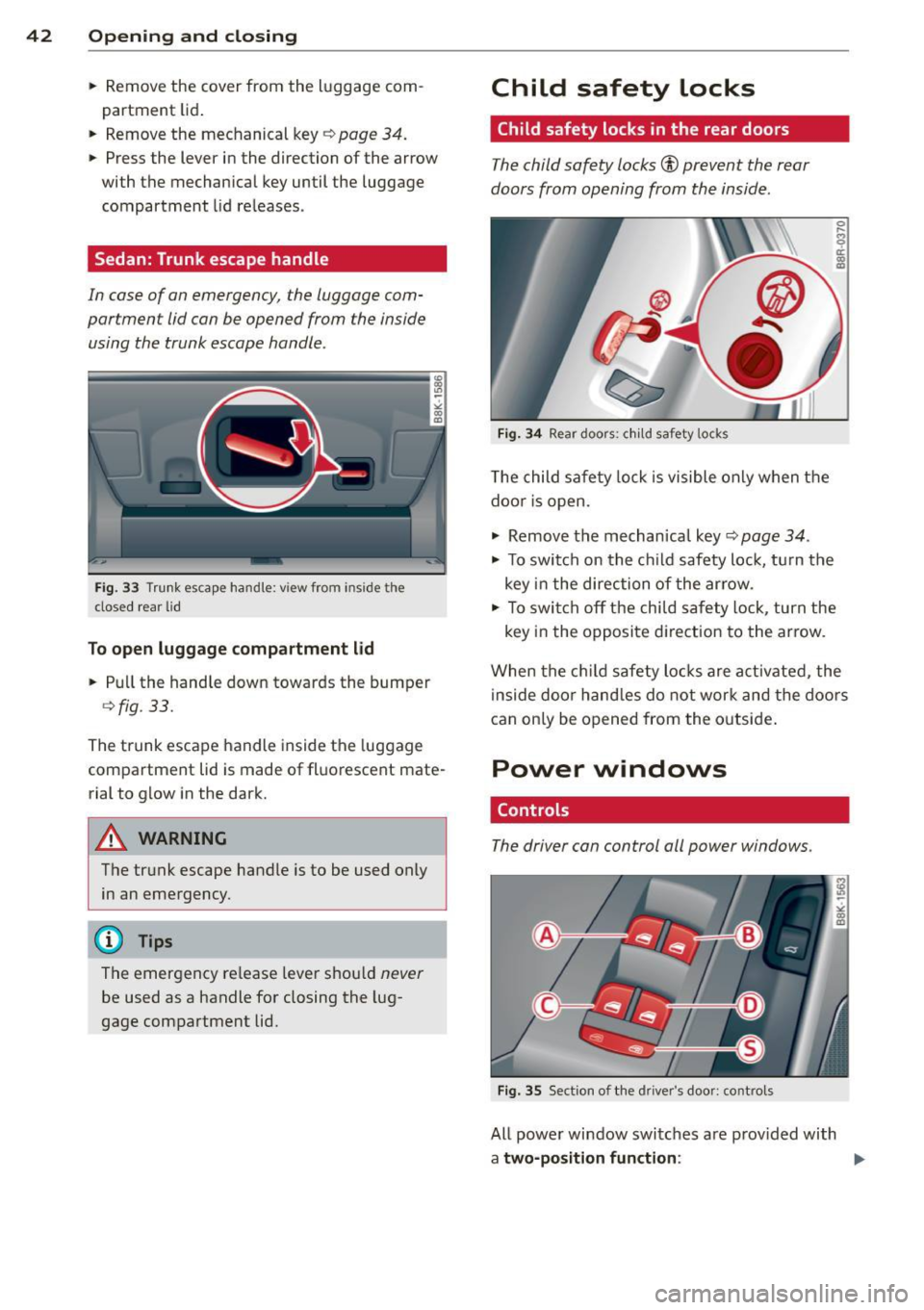
Sedan: Trunk escape handle
In case of on emergency, the luggage com
portment lid can be opened from the inside
using the trunk escape handle.
Fig. 33 Trunk escape handle: vi ew from inside the
closed rear lid
To open luggage compartment lid
• Pull the hand le down towards the bumper
¢ fig. 33.
The trunk escape handle inside the luggage
compartment lid is made of fluorescent mate
rial to glow in the dark.
A WARNING
The trunk escape handle is to be used only
in an emergency.
(D Tips
The emergency release leve r shou ld never
be used as a handle for closing the lug
gage compartment lid.
Child safety Locks
Child safety locks in the rear doors
The child safety locks® prevent the rear
doors from opening from the inside.
Fig. 34 Rear doors: c hild safety locks
The child safety lock is visible only when the
doo r is open.
• Remove the mechanical key¢
page 34.
• To switch on the child safety lock, turn the
key in the direction of the arrow .
0
s ti:
"' "'
• To swi tch off the child safety lock, turn the
key in the opposite direction to the arrow.
When the child safety locks are acti vated, the
inside door handles do not work and the doors
can only be opened from the outside .
Power windows
Controls
The driver con control all power windows.
Fig. 35 Section of the driver's door: con trols
All power window switches a re provided with
a two-position function :
Page 45 of 302
Opening th e windows
"' Press the switch to the firs t stop and hold it
until the window reaches the desi red posi
tion.
"' Press the switch briefly to the se cond stop
to automatically open the window .
Cl os ing th e windows
"' Pull the swi tch to the first sto p and hold it
until the window reaches the desi red posi
tion .
"' Pu ll the switch brief ly to the sec on d st op to
automatica lly close the window.
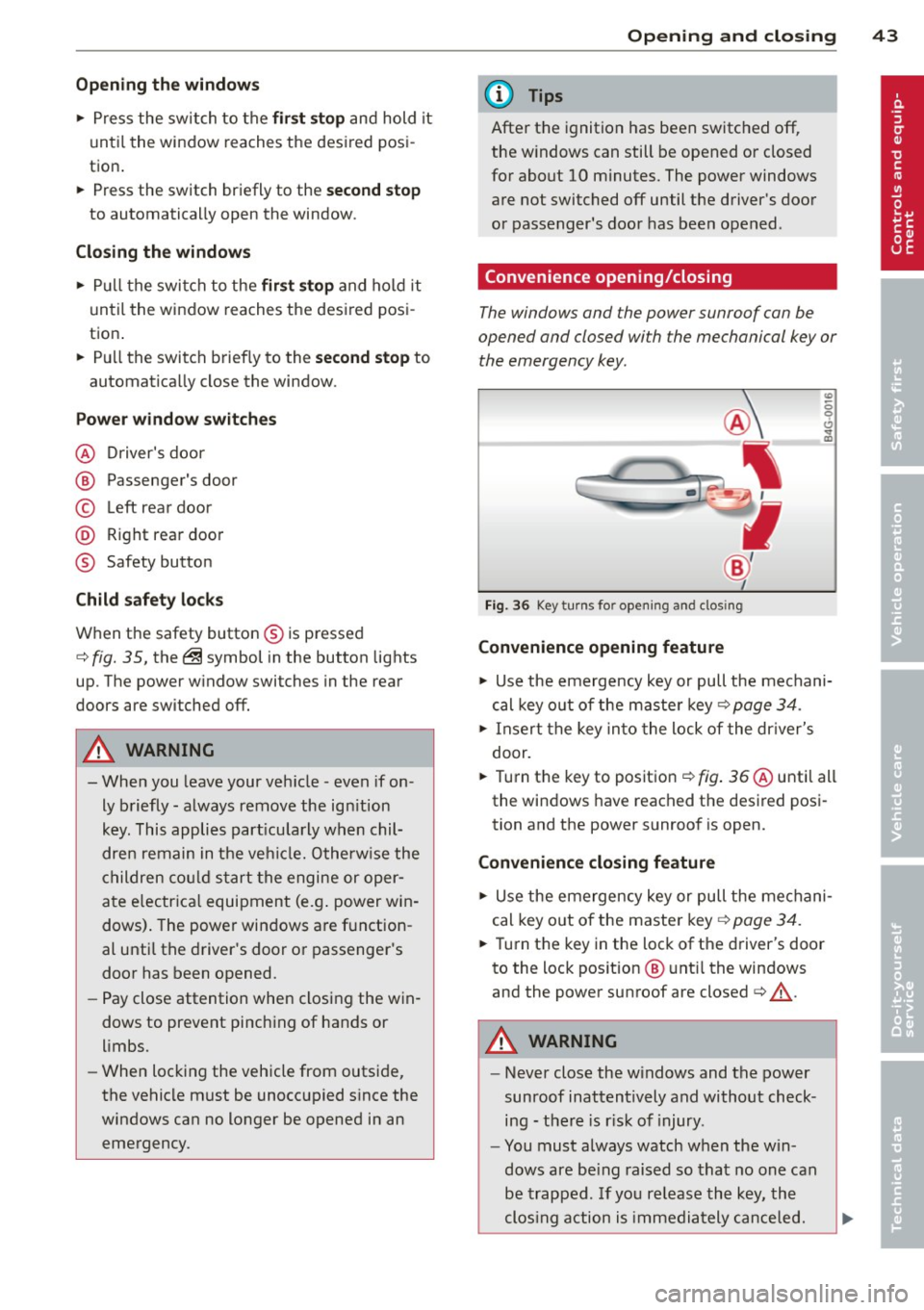
P ow er w ind ow switch es
@ Driver's door
@ Passenger's door
© Left rea r door
@ R ight rear door
® Safety button
Child safety loc ks
When the safety button® is pressed
c::> fig. 35, the ~ symbol in the button lights
up . The power w indow switches in the rear
doors are switched off.
A WARNING
- When you leave your veh icle - even if on
ly briefly - always remove the ign ition
key. This applies part icularly when chil
dren remain in the vehicle. Otherw ise the
children cou ld s tart the engine or oper
ate e lectr ica l equipment (e.g . power win
dows). The power windows a re f unction
al until the driver's door or passenger's
door has been opened.
- Pay close attention when closing the win
dows to prevent pinching of hands or
limbs.
- When locking the vehicle from outside,
the vehicle must be unoccupied s ince the
windows can no longer be opened in an
emergency.
Opening and clo sin g 43
(D Tips
After the ignition has been switched off,
the w indows can still be opened or closed
for about 10 minutes. The power windows
are not switched off until the driver's door
or passenger's door has been opened .
Convenience opening/closing
The windows and the power sunroof can be
opened and closed with the mechanical key or the emergency key.
Fig. 36 Key turns for opening and clos ing
Convenience opening feature
"' -0 0 t!, ., a,
"' Use the emergency key or pull the mechani
cal key out of the maste r key
c:? page 34.
"' Insert the key into the lock of the dr iver's
door.
"' Turn the key to position ¢
fig. 36 @until all
the windows have reached the desired posi
tion and the power sunroof is open.
Convenience closing f eature
"' Use the emergency key or pull the mechani
cal key out of the maste r key ¢
page 34.
"' Turn the key in the lock of the driver's door
to the lock position @ unt il the windows
and the power sunroof are closed¢
A.
A WARNING
- Never close the w indows and the power
sunroof inattentively and without check ing - the re is r isk of injury.
- You must always watch when the win
dows are be ing raised so that no one can
be trapped. If you re lease the key, the
clos ing action is immediately canceled.
Page 47 of 302
Tilting
• The sunroof can be tilted or closed only in
switch position @¢
fig. 38
• To tilt it , brief ly press the switch ¢ page 44,
fig. 37.
• To close it, briefly pull the switch ¢ .&, .
• To set an intermediate position, press/pull
the switch until the roof reaches the desired
pos ition .
Opening
• To open the sunroof complete ly, turn and
hold the switch against the resistance in po
s ition (!).
• To close the sunroof, turn the rotary sw itch
to posit ion @ ¢.&, .
• An intermediate position can be set by turn
ing the rotary swit ch to the des ired position.
Opening /closing the sunshade
• Press the switch®¢ page 44, fig . 37 in
the des ired arrow direction .
• To stop the sunshade in an intermed iate po-
sit ion, press the switch again .
After the ignit ion is switched off, you can st ill
operate the sunroof for about 10 minutes. As
soon as the driver's or passenger's door is
opened, the sw itch is inoperative.
T he power sunshade can also be closed when
the sunroof is open.
A WARNING
Pay careful attention when clos ing the
sunroof- otherwise serious injury could re
sult! For this reason, always remove the ig
nition key when leav ing the veh icle.
(D Note
Always close your sunroof when leaving
your veh icle. Sudden rain can cause dam
age to the inter ior equipment of yo ur vehi
cle, particularly the electronic equipment.
@ Tips
-Information regarding convenience
opening/closing¢
page 43.
Opening and closing 45
Emergency closing of the sunroof
If the sunroof detects an object in its path
when it is clos ing, it will open again automati
ca lly. In this case, you can close the roof with
the power emergency closing function.
• Within five seconds after the sunroof opens
automatically , pull the switch until the roof
closes.
Valet parking
Applies to vehicles: with fo lding and lockab le rear seat
backs
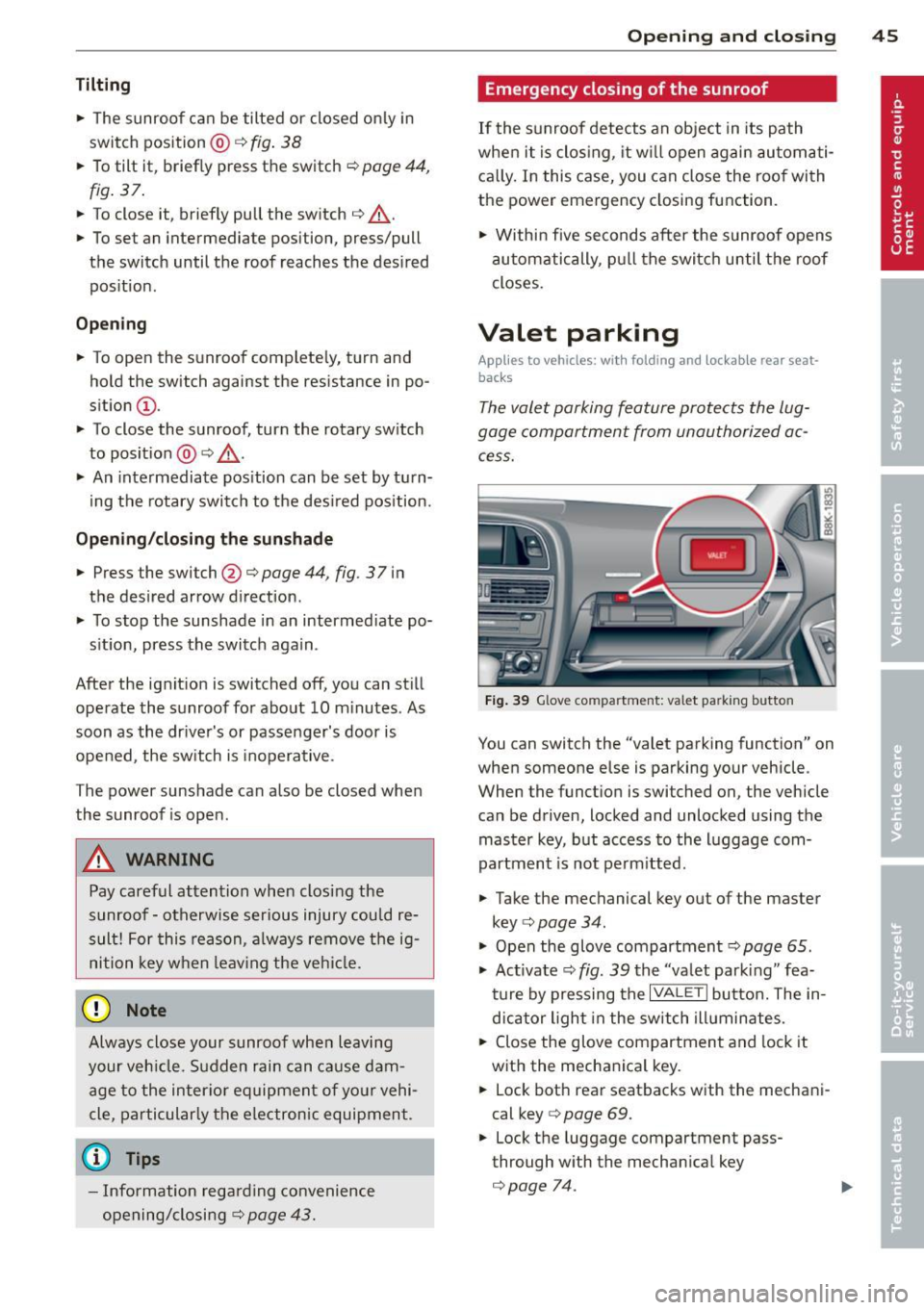
The valet parking feature protects the lug
gage compartment from unauthorized ac
cess.
-
Fig. 39 Glove co mpartment: valet pa rking butto n
You can switch the "valet parking function" on
when someone else is parking your vehicle .
When the funct ion is switched on , the vehicle
can be driven, locked and unlocked using the master key, but access to the luggage com
partment is not perm itted .
• Take the mechanical key out of the master
key ¢
page 34.
"' Open the glove compartment¢ page 65.
"' Act ivate ¢
fig. 39 the "valet park ing" fea
ture by pressing the
I VALET I button. The in
dicator light in the switch illuminates.
• Close the glove compartment and lock it
with the mechanical key.
• Lock both rear seatbacks with the mechani
cal key
c> page 69.
• Lock the luggage compartment pass
through w ith the mechan ica l key
c> page 74.
Page 50 of 302

48 Clear vis ion
@ Tips
- The light sensor* for headlight control is
located in the rear view m irror mount.
You should therefore not apply any st ick
ers to the windsh ield in this area in order
to prevent malfunctions or failures.
- Some exterior lighting functions can be
adjusted
c> page 48.
- When you remove your key from the igni
tion while the vehicle's lights are turned
on, a buzzer sounds as long as the driv
er's door is open .
- In cool or damp weather, the ins ide of
the headlights, turn signals and tail lights can fog over due to the tempera
ture difference between the inside and
outside. They will clea r shor tly after
switching them on. This does not affect
the service life of the lighting.
- In the even t of a light sensor malfunc
tion, the driver is no tified in the instru
ment cluster disp lay ¢
page 22.
Turn signals and high beam lever
The lever operates the turn signals , the high
b eams and th e headlight flash er.
Fig . 4 1 Tu rn s ig na l an d h ig h beam leve r
Turn sign als ¢i ¢
The turn signals activate when you move the
l ever into a turn s ignal pos ition when the ign i
tion is switched on.
(D -right turn signal
@-left tur n signa l
The turn s ignal blinks three times if you just
tap the lever .
High be ams and headlight flasher [D
Move the lever to the correspon ding posit io n:
@ -high beams on
@ -high beams off o r headligh t fla sher
The indicator light
II in the i nstr ument clus
ter turns on .
Notes on thes e features
- The turn signals on ly work w ith the ign ition
t ur ned on. The indicator lights
B or II in
t he instrument cluster also blink.
- After you have turned a co rner, the tu rn s ig
na l switches off au toma tically .
- The
high beam works on ly w hen the head
lights a re o n. The indicator light
II in the
instrument cluster illuminates when the
high beams are on .
- The
headlight flasher works o nly as long as
you ho ld the lever -even if the re a re no
lights switched on . The ind icator light
II i n
the instrument cluster illum inates when you
use the headlight flasher.
A WARNING
--
Do not use the h igh beam or headlight
flashe r if you know that these could blind
oncom ing traffic.
Adjusting exterior lighting
The functions ore selected in the radio or
MMI" .
.,. Select: I CAR ! function button > Ext erio r
light ing .
Or
.,. Select: !CAR I function button > Car sys
tem s*
contro l button > Ve hicle settings >
Ext eri or lighting .
Coming home (light when leav ing car }* ,
L e aving home (light when unlocking car)*
The coming home function illuminates the
area around the vehicle when the ignition is
switched off and the dr ive r's door is opened .
Depend ing on vehicle equ ipment, the function
can be switched on and off or the length of
time the lights remain on* can be ad justed . ..,_
Page 51 of 302
The leavin g home function i lluminates the
area around the vehicle when unlock ing it.
T his function can be switched on and off.
The
c o ming h om e and lea ving home func
tions on ly operate when it is dark and the
light switch is in the AUTO posit ion
¢ page 47 , fig. 40 .
Auto headlight s*
When the light switch is in the A UTO
¢
page 47 posi tion, the switch-on po int of the
lights can be changed in the automatic driving
light function.
Daytime running lights
USA m odel s:
You can switch the dayt ime run
ni ng lights
on and o ff .
Canada mod els:
The function cannot be
turned off .
It is activated a utomat ica lly each
time the ignition is switched on.
Travel mode*
T he headlig ht beam is asymmetrical. This pro
v ides stronger illum ination on the s ide of the
road on wh ich you are driving .
If you are driv
i ng in a count ry that d rives on the opposite
side of the road from your own country, th is
will cau se glare for on coming dr ivers. To pre
vent glare:
- Trave l mode must be selected in vehicles
with Xenon headlights*.
- In veh icles with halogen headlights, ce rtain
areas of the head light lenses must be cov
ered w ith wate rproof adhesive covers that
prevent light from passing thro ugh. Fo r
more informat ion, please see your author
i z ed Audi dea ler or author ized repa ir faci lity .
(D Tips
When trave l mode is activated, a display in
the dr iver information system in dicates
this each time you switch the ignit io n on.
Clear vi sion 49
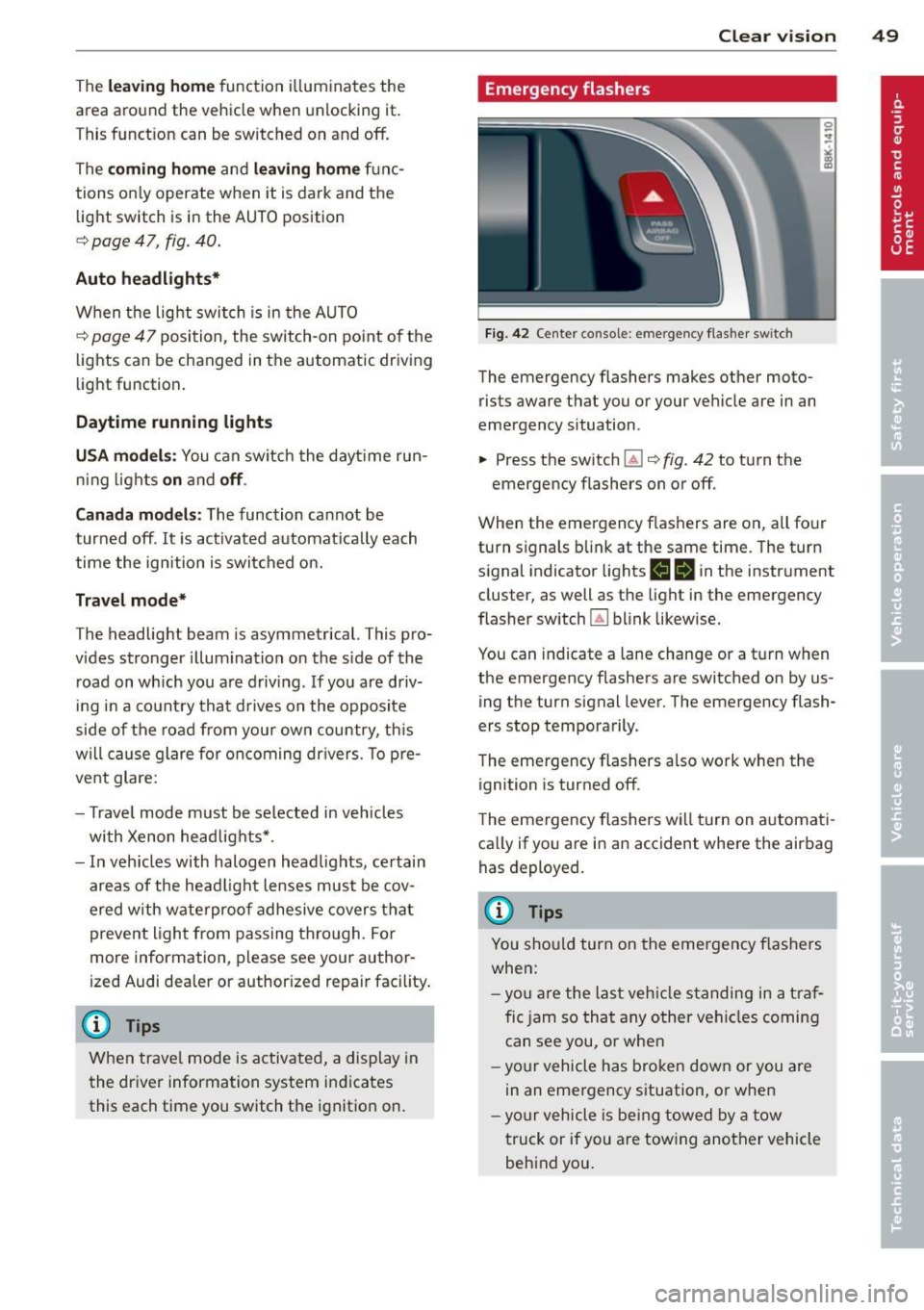
Emergency flashers
Fi g. 42 Center co n sole : em erge ncy flasher sw itc h
The emergency flashers makes other moto
rists aware that you or your vehicle are in an
emergency situation .
.,. Press the switch~¢
fig. 42 to turn the
emergency flashers on or off .
When the emergency f las hers are on, all four
turn s ignals b link at the same time. The turn
s ignal indicator lights
1111 in the instr ument
cluster, as well as the light in the emergency
fla sher switch ~ blink likewise.
You can indicate a lane change or a t urn w hen
the emergency flashers are switched on by us
ing the turn signal lever. The emergency flash
ers stop temporarily .
T he emergency flashers a lso work when the
ign ition is turned off .
T he emergency flashers wi ll turn on a utomat i
ca lly if yo u are in an accident where the airbag
has deployed.
(D Tips
You sho uld turn on the emergency f las hers
when:
- yo u are the last veh icle standing in a t ra f
fic jam so that any other vehi cles coming
can see you , or whe n
- your vehicle has bro ken down or you are
in an eme rgency s ituation, o r when
- yo ur vehicle is be ing towed by a tow
truck or if you are tow ing another vehicle
beh ind you .
Page 52 of 302
50 Clear vis ion
Interior lights
Front /rear interior lights
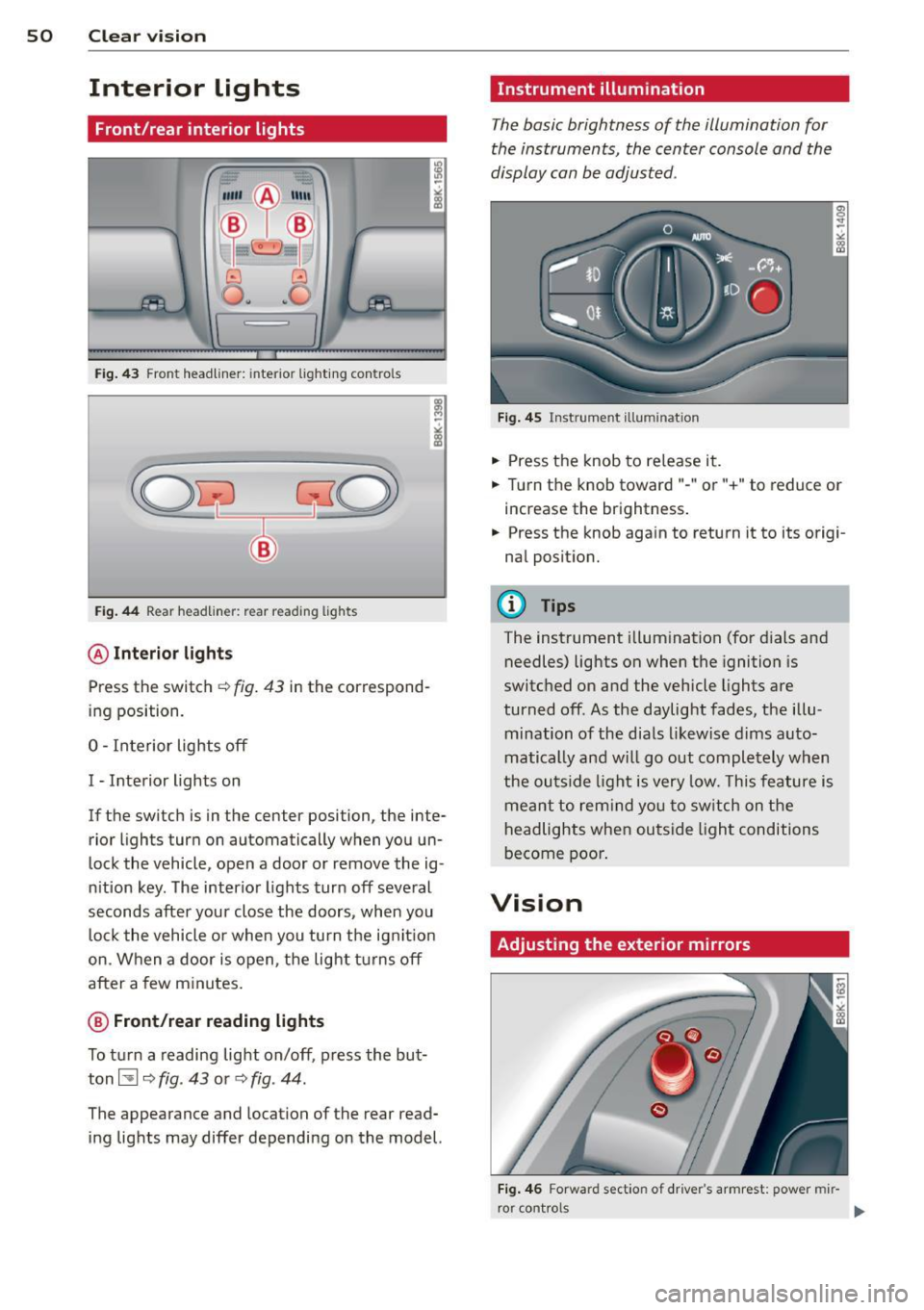
Fig . 43 Fro nt headliner : interior lig htin g con tro ls
Fig. 44 R ear headlin er: r ear rea ding lights
@ Interio r ligh ts
Press the switch ~ fig. 43 in the correspond
ing position.
0 -Interior lights off
I -Interior lights on
If the switch is in the cente r position, the inte
rior l ights turn on automatically when you un
lock the vehicle, open a door or remove the ig
n ition key . The interior lights turn off several
seconds after your close the doors , when you
lock the vehicle or when you turn the ign it ion
on. When a door is open, the light tu rns off
after a few m inutes.
@ Fr ont /rear r eading lights
To turn a reading light on/off , press the but
ton~
c::> fig . 43 or c::> fig . 44.
The appearance and location of the rear read
ing lights may differ depending on the model.
Instrument illumination
T he basic brightness of the illumination for
the instruments, the center console and the
display can be adjusted .
Fig . 45 Ins trum ent ill umin atio n
.,. Press the knob to re lease it .
.,. Turn the knob toward " -" or"+" to reduce or
increase the brightness .
.,. Press the knob aga in to return it to its origi
nal posit ion.
(!') Tips
The instrument illumination (for dials and
needles) lights on when the ignition is
switc hed on and the vehicle lights are
turned off . As the daylight fades, the illu
mination of the dia ls likewise dims auto
matically and wi ll go out completely when
the ou tside light is very low. This feature is
meant to rem ind yo u to sw itch on the
headlights when ou tside light conditions
become poo r.
Vision
Adjusting the exterior mirrors
Fig . 4 6 Forwar d sect io n of drive r's armr est: powe r mir
r o r contro ls
Page 53 of 302
Turn the knob to the desired position:
Q/ P -In this position , you can adjust the
driver's and front passenger's exterior mirrors
by turning the knob in the desired direction.
(ijjl -The mirrors are heated depending on the
outside temperature.
8 -The exterior mirrors fold in*. You can ad
just whether or not the mirrors fold in auto
matically when locking the vehicle using the
radio/MM I*
c::> page 3 7.
Passenger exterior mirror tilt function*
(only with memory for exterior mirrows)
To help you see the curb when backing into a
parking space, the surface of the mirror tilts
slightly . The knob must be in the
P position
for this to happen .
You can adjust the tilted mirror surface by
turning the knob in the desired direction .
When you move out of reverse and into anoth
er gear, the new mirror position is stored and
assigned to the key you are using.
The mirror goes back into its original position
once you d rive forward faster than 9 mph
(15 km/h) or switch the ignition off .
,&. WARNING
Curved mirror surfaces (convex or spheri
cal*) increase your field of view. Remem
ber that vehicles or other objects will ap
pear smaller and farther away than when
seen in a flat mirror. If you use this mirror
to estimate distances of following vehicles
when changing lanes, you could estimate incorrectly and cause an accident.
(D Note
- If the mirror housing is moved uninten
tionally (for example, while parking your
vehicle), then you must first fold the mir ror electrically. Do not readjust the mir
ror housing manually. You could damage
the motor which controls the mirror .
-If you wash the vehicle in an automatic
car wash, you must fold the exterior mir
rors in to reduce the risk of damage to
-
Clear vision 51
the mirrors . Never fold power folding ex
terior mirrors* by hand. Only fold them
in and out using the power controls.
(D Tips
- The exterior mirror settings are stored
with the memory function*
c::> page 62.
- If there should be a malfunction in the
electrical system, you can still adjust the
exterior mirrors by pressing the edge of
the mirror.
Dimming the mirrors
N
:!
"' ~:::====~~=~====~ :ll
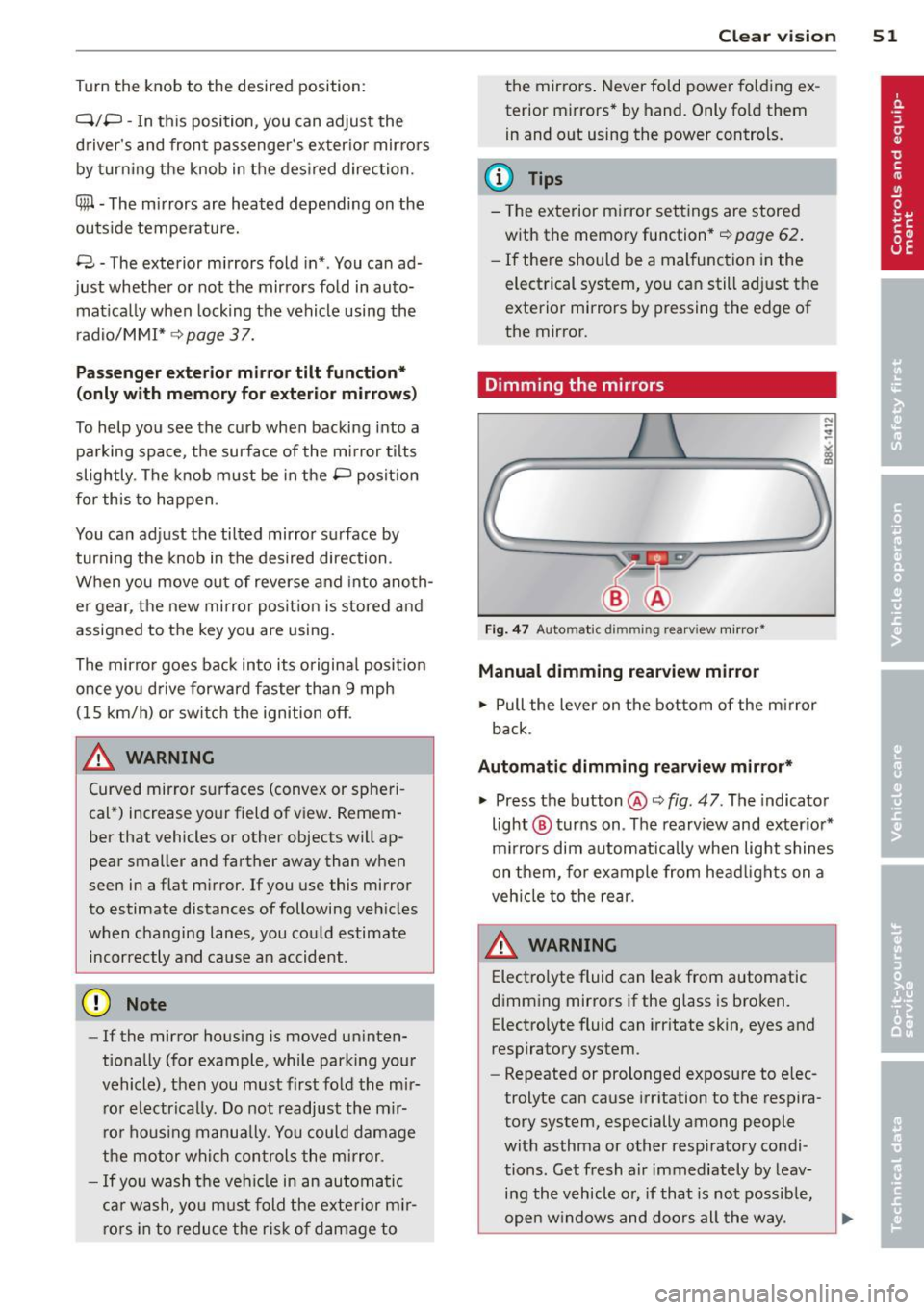
Fig. 47 Auto mat ic dimming re arv iew mirror*
Manual dimming rearview mirror
.. Pull the lever on the bottom of the mirror
back .
Automatic dimming rearview mirror*
.. Press the button @c::> fig. 47. The indicator
light @ turns on . The rearview and exterior*
mirrors dim automatically when light shines
on them, for example from headlights on a
vehicle to the rear.
A WARNING -
Electrolyte fluid can leak from automatic
dimming mirrors if the glass is broken. Electrolyte fluid can irritate skin, eyes and
respiratory system .
- Repeated or prolonged exposure to elec
trolyte can cause irritation to the respira
tory system, especially among people
with asthma or other respiratory condi
tions. Get fresh a ir immediately by leav
ing the vehicle or, if that is not possible,
open windows and doors all the way.
Page 57 of 302
Wiper servi ce position /b lade r eplac ement
po sition
• Switch the windshield wipers off (position
@ c:> page 53, fig. 52).
• Se lect: ICARlfunction button> Windsh ield
wi pers > Ser vice posit io n
> on . Or
• Select: I CAR I funct ion button >
C ar sy s
t e m s*
control button > Se rvicing & check s >
Wip er servic e po sit ion > On . The windshield
wipers move into the service position.
Rem oving the wiper b lade
• Lift the w indshield wiper arm up from the
wi ndshield.
• Press the locking knob
(D c:> fig. 54 on the
wiper blade. Hold the wiper blade firm ly.
• Remove the w iper blade in the direction of
t h e a rrow.
Attaching th e wiper blade
• Install the new wiper blade in the retainer
on the w iper arm @until you hear it cl ick in
to place on the wiper arm.
• Place the wiper arm bac k on the windshie ld.
• To bring the wipers back in to the or ig inal
position, press the windsh ield wiper lever .
Or
• Se lect: ICARlfunction button>
Windsh ield
w ipers > Serv ice posit ion
> off. Or
• Select: ICARI funct ion button>
Car sy s
t e m s*
control button > Servi cing & ch e ck s >
Wipe r serv ice po sition > Off .
A WARNING
-If the w indshield wipe rs smear the wind
shield, clean the w iper blades with wind
shield washer fl uid. If the wiper blades
are extremely dirty, yo u can also clean
them with a soft sponge or cloth .
- For yo ur safety, you should replace the
wiper blades once or twice a year. See
your authorized Aud i dealer for replace
ment blades.
(D Note
- The windshield wiper blades must only
be replaced when in the service position!
Otherwise, yo u risk damaging the paint
Clear vision 55
on the hood or the windshie ld w iper mo
tor .
- Yo u should not move your vehicle or
press the windshield wiper lever when
the wiper a rms are folded away from the
windshield. The windsh ield wipers wou ld
move back into their original position
and could damage the hood and wind
shield.
- To help prevent damage to the wiper sys
tem, always loosen blades wh ich are fro
zen to the windshield before operating
w ipers.
- To help prevent damage to wiper blades, do not use gasoline, kerosene, paint
thinner, or other solvents on or near the
w iper blades.
- To help p revent damage to the w iper
arms or other components, do not at
t empt to move the wipe rs by hand.
(D Tips
- Comme rcial hot waxes applied by auto
matic car washes affect the how easily
t he glass surface can be cleaned.
- Yo u can also use the service posi tion, for
example, if you want to p rotec t the
w indshield from icing by us ing a cover.
Replacing the rear wiper blade
App lies to vehicles: wi th rear wiper
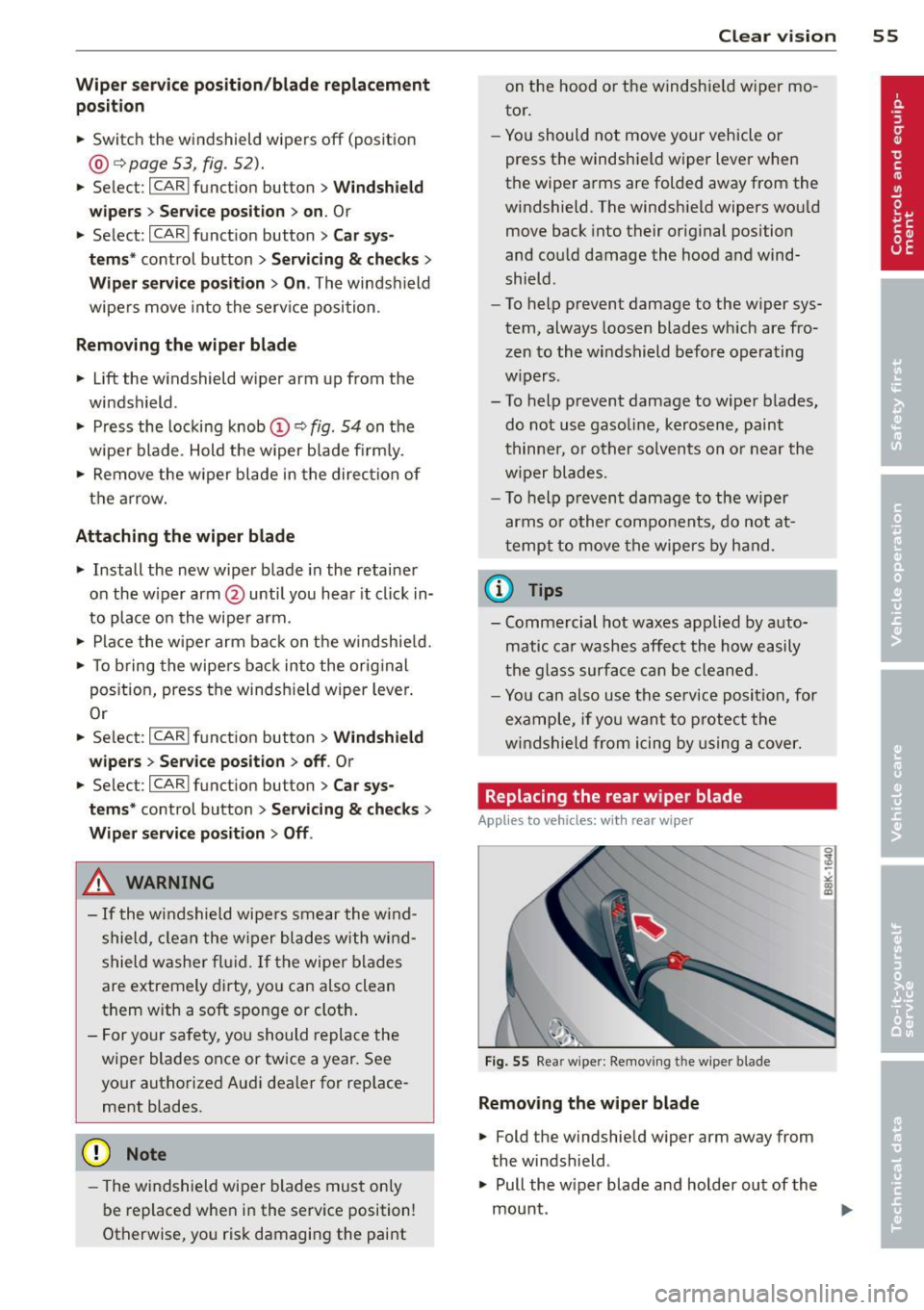
Fig. 55 Rear w ipe r: Removing the wipe r blade
Removing the wiper bl ade
• Fold the windshield wiper arm away from
the windshield .
• Pull the w iper blade and holder out of the
mount.
Page 63 of 302
Head restraints
Front head restraints
Applies to vehicles: with adj ustable head restraints
Head restraints that ore adjusted according
to body size, along with the seat belt , offer
effective protection .
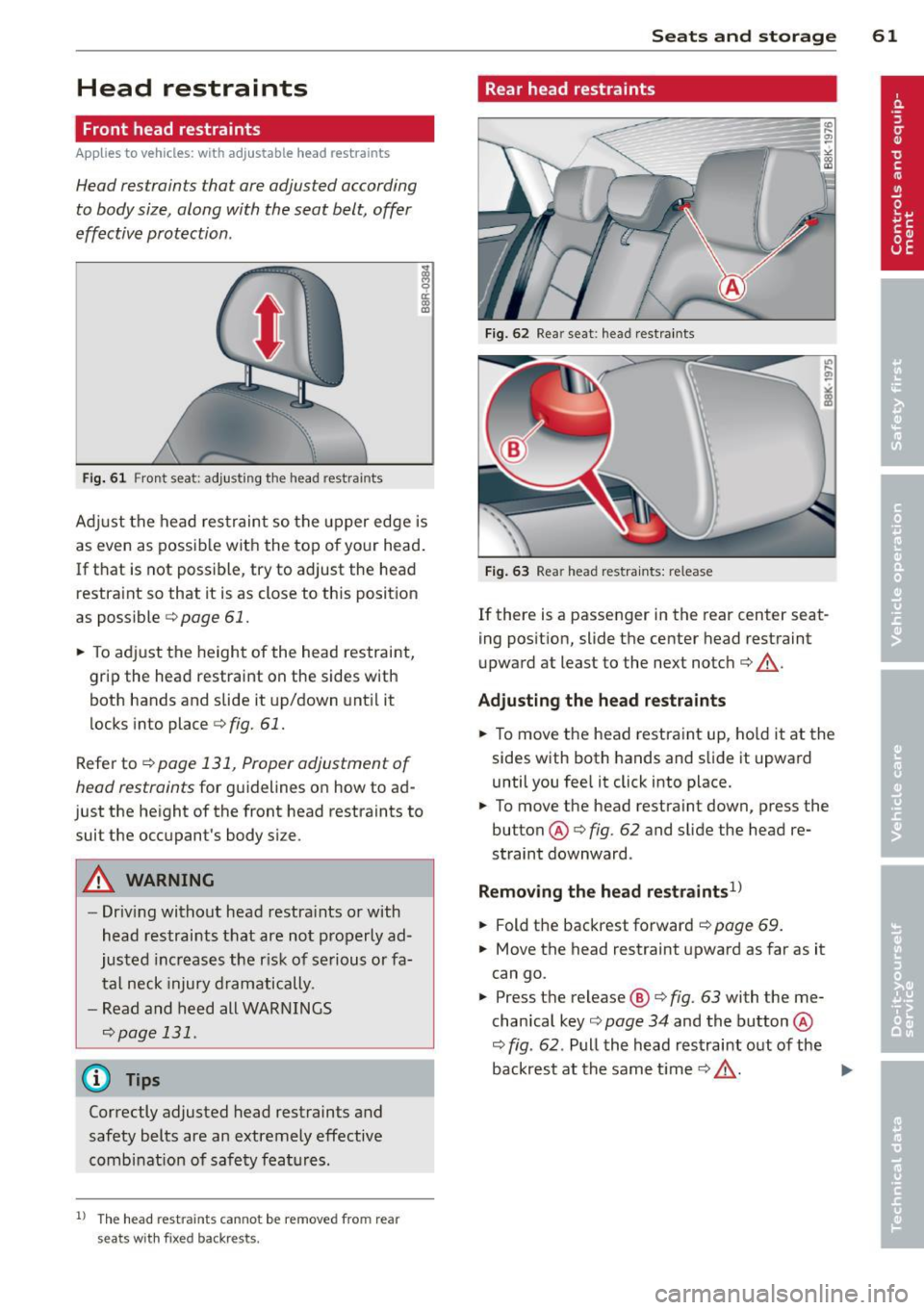
Fig. 61 Fron t seat: adjusting the head rest ra in ts
Ad just the head restraint so the upper edge is
as even as possible with the top of your head.
If that is not poss ible, try to adjust the head
restraint so that it is as close to this position
as possible
c> page 61.
~ To adjust the height of the head restraint,
grip the head restraint on the sides with
both hands and slide it up/down until it
locks into place
c>fig. 61.
Refer to¢ page 131, Proper adjustment of
head restraints
for guidelines on how to ad
just the height of the front head restraints to
suit the occupant's body size .
A WARNING
-Driving without head restra ints or with
head restraints that are not properly ad
justed increases the r isk of serious or fa
tal neck injury dramatically.
- Read and heed all WARNINGS
c>page 131.
@ Tips
Correctly adjusted head restraints and
safety belts are an extremely effective
combinat ion of safety features .
l) The head restra ints cann ot be re move d fro m rear
se ats with fixe d backr ests.
-
Seats and storage 61
Rear head restraints
Fig. 62 Rear seat : head restraints
Fig. 63 Rear head restraints: release
If there is a passenger in the rear center seat
ing position, slide the center head restraint
upward at least to the next notch¢&_.
Adjusting the head restraints
~ To move the head restraint up, hold it at the
sides with both hands and slide it upward
until you feel it click into place.
~ To move the head restraint down, press the
button @¢
fig. 62 and slide the head re
straint downward .
Removing the head restraints1>
~ Fold the backrest forward¢ page 69.
~ Move the head restraint upward as far as it
can go.
~ Press the release@¢ fig. 63 with the me
chanical key¢
page 34 and the button @
¢
fig . 62 . Pull the head restraint out of the
backrest at the same time¢&_ .
~
Page 64 of 302
62 Seats and storage
Installing the head restraints
.. Slide the posts on the head restra int down
into the guides until you feel the posts click
into place.
.. Press the button @
Q fig. 62 and slide the
head restraint all the way down. You should
not be able to pull the head restraint out of
the backrest .
So that the driver can have a better view to
the rear, the head restraints should be pushed
down completely when the rear seats are not
occupied.
A WARNING
- Read and heed all WARNINGS
~page 131.
-Only remove the rear seat head restraints
when necessary in order to install a child
seat ~
page 174. Install the head re
straint again immediately once the child
seat is removed. Driving without head re
straints or with head restra ints that are
not properly adjusted increases the risk
of serious or fata l neck injury dramatical
ly.
@ Tips
Correctly adjusted head restraints and
safety belts are an extremely effective
comb inat ion of safety features .
Seat memory
Description
Applies to vehicles: with memory function
The memo ry function allows you to quickly
and easily sto re an d recall personal seating
profiles for the driver. The memory function is
operated through the master key and the memory buttons in the driver's door.
The drive r's sea ting profi le is stored and as
signed to the master key each time the vehicle
is locked. The seating profile is recalled auto
matica lly when the vehicle is unlocked. If two
peop le use one vehicle, it is recommended that each person always uses "their own"
master key .
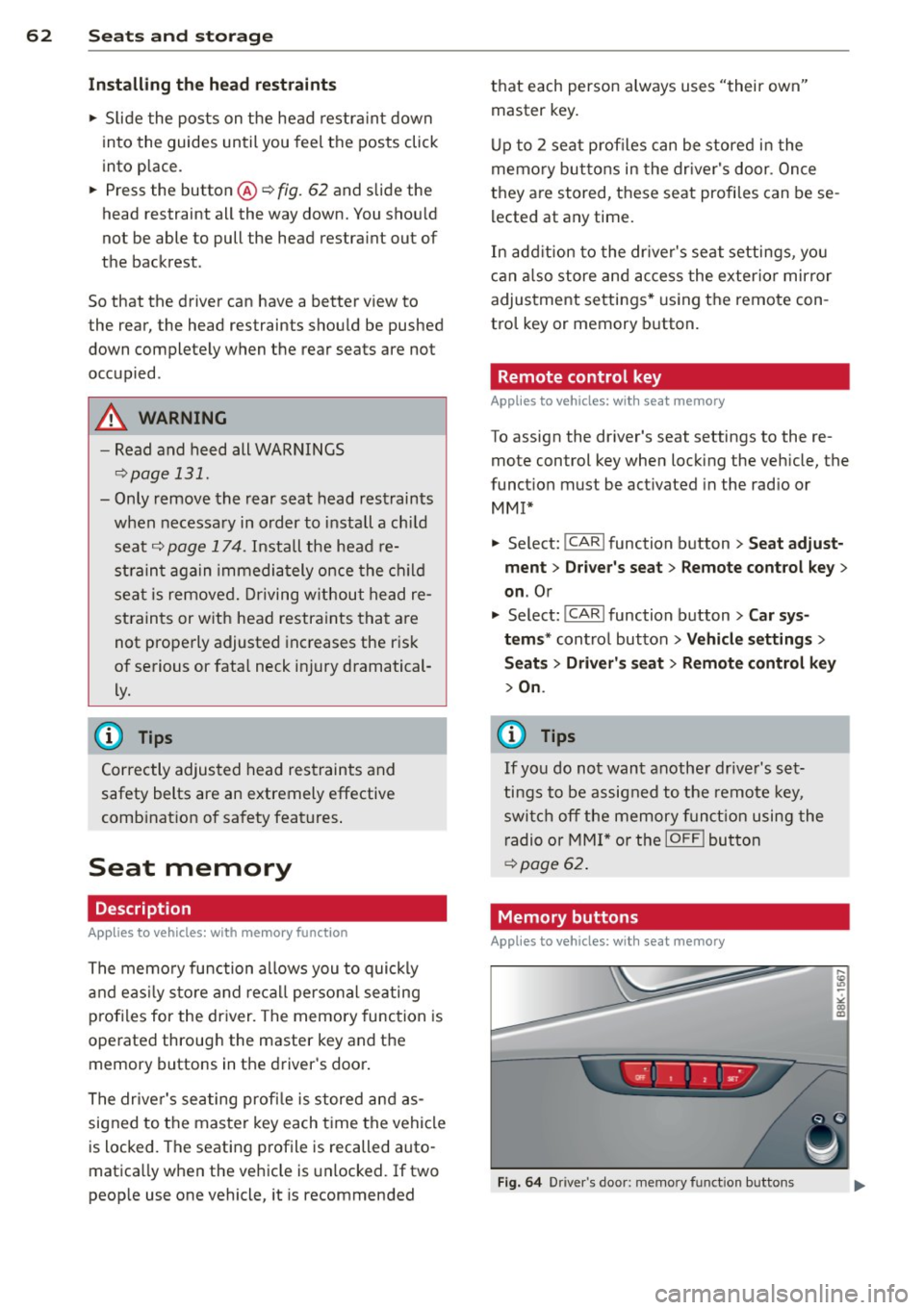
Up to 2 seat profil es can be stored in the
memory buttons in the driver's door. Once
they are stored, these seat profiles can be se
lected at any time.
In addition to the driver's seat settings, you
can also store and access the exterior mirror
adjustment settings* using the remote con
tro l key or memory button.
Remote control key
Applies to vehicles: with seat memory
To assign the dr iver 's seat settings to the re
mote control key when locking the veh icle, the
funct ion must be act ivated in the rad io or
MMI*
.. Select: I CAR I function button > Seat adjust
ment
> Driver's seat > Remote control key >
on.Or
.. Select:
!CAR ! function button> Car sys
tems *
control button > Vehicle settings >
Seats > Driver 's seat > Remote control key
> On.
@ Tips
If you do not want another driver's set
tings to be assigned to the remote key,
switch off the memory function using the
radio or
MMI* or the !OFFI button
~page 62.
· Memory buttons
Appl ies to vehicles: wit h seat memory
Fig. 64 Driver's door: memory function buttons