change time AUDI A4 2016 User Guide
[x] Cancel search | Manufacturer: AUDI, Model Year: 2016, Model line: A4, Model: AUDI A4 2016Pages: 278, PDF Size: 70.26 MB
Page 110 of 278

Audi side assist
General information
Applies to veh icles: w ith Aud i s ide ass ist
®
@
©
F ig . 125 Driving s ituations
I AU DI
•
Fig. 126 Rear of the veh icle: pos it ion of the sensors
Side assist functions at speeds above approxi
mately 19 mph (30 km/h).
@ Vehicles that are approaching
In certain cases, a vehicle will be classified as
critical for a lane change even if it is still some
what far away. The faster a veh icle approaches,
the sooner the display in the exterior mirror w il l
turn on.
@ Vehicles traveling with you
Vehicles traveling with you are indicated in the
exterior mirror if they are classified as critical for
a lane change. All vehicles detected by side assist
108
are indicated by the time they enter your "blind
spot", at the latest .
© Vehicles left behind
If you slow ly pass a vehicle that side assist has
de tected (the diffe rence in speed between the
vehicle and your vehicle is less than 9 mph
(15 km/h)), the display in the exterior mirror
turns on as soon as the vehicle enters your blind
spot .
The display wi ll not turn on if you quickly pass a
vehicle that side assist has detected (the differ ence in speed between the vehicle and your vehi
cle is greater than 9 mph (15 km/h)) .
Functional limitations
The radar sensors are designed to detect the left
and right adjacent lanes when the road lanes are
the normal width . In certain situations, the dis
play in the exterior mirror may turn on even
though there is no vehicle located in the area
that is crit ical for a lane change. For example:
- if the lanes are narrow or if your are driving on
the edge of your lane. If this is the case, the
system may have detected the vehicle in anoth
er lane that is
not adjacent to your current lane.
- if you are driv ing through a curve. Side assist
may react to a vehicle that is one lane over
from the adjacent lane .
- if side assist reacts to other objects (such as
high or displaced guard rails) .
- In poor weather conditions. The side ass ist
functions are limited.
Do not cover the radar sensors
c:> fig. 126 with
stickers, deposits, bicycle wheels or other ob
j ects, because this w ill affect the function . Do not
use side assist when towing a trailer. For infor
mation on cleaning, refer to
c:> page 193.
A WARNING
- Always pay attention to traff ic and to the
area around your vehicle. Side assist cannot
replace a driver's attention . The driver alone
is always responsible for lane changes and
-
similar driving maneuvers . IJ>-
Page 111 of 278

.... N
0
""' CX)
.... I.Cl U"I
.... I.Cl ....
-Improper reliance on the side assist system
can cause collisions and serious personal in
jury:
- Never rely only on side assist when chang
ing lanes.
- Always check rear view mirrors to make
sure that it is safe to change lanes.
- Side assist cannot detect all vehicles under
all conditions- danger of accident!
- Please note that side assist indicates there
are approaching vehicles, or vehicles in your
blind spot, only after your vehicle has
reached a driving speed of at least 19 mph
(30 km/h).
- In certain situations, the system may not
function or its function may be limited. For
example:
- if vehicles are approaching or being left
behind very quickly. The display may not
turn on in time.
- in poor weather conditions such as heavy
rain, snow or heavy mist.
- on very wide lanes, in tight curves or if
there is a rise in the road surface. Vehicles
in the adjacent lane may not be detected
because they are outside of the sensor
range.
(D Note
The sensors can be displaced by impacts or
damage to the bumper, wheel housing and
underbody. This can affect the system. Have
your authorized Audi dealer or authorized
Audi Service Facility check their function.
(D Tips
-If the window glass in the driver's door or
front passenger's door has been tinted , the
display in the exterior mirror may be misin
terpreted.
- For Declaration of Compliance to United
States FCC and Industry Canada regulations
¢page 261.
Audi side assist
Activating and deactivating
Applies to vehicles: with A udi side ass ist
Fig. 127 Driver 's do or: Sid e assis t button
.,. Press the button ¢ & in General information
on page 108
to switch the system on/ off . The
LED in the button turns on when side assist is
switched on .
Adjusting the display brightness
Applies to vehicles: with Audi side assist
The signal brightness can be set in the radio or
MM!*.
.,. Select: !CAR ! function button> Audi side assist .
.,. Select: I CAR I function button > Car systems*
control button > Driver assist > Audi side as
sist.
The display brightness adjusts automatically to
the brightness of the surroundings, both in the
information and in the warning stage . In very
dark or very bright surroundings, the display is
already set to the minimum or maximum level by
the automatic adjustment. In such cases, you
may notice no change when adjusting the bright
ness, or the change may only be noticeable once
the surroundings change.
Adjust the brightness to a level where the display
in the information stage will not disrupt your
view forward. If you change the brightness, the
display in the exterior mirror will briefly show the
brightness level in the information stage. The
brightness of the warning stage is linked to the
brightness in the information stage and is adjust
ed along with the information stage adjustment.
Ill>
109
Page 113 of 278

..... N
0 ::..:: co .....
Introduction
Applies to vehicles: with Audi drive select
Drive select provides the possibility to experience
d iff erent types of vehicle settings in one veh icle.
F or instance, using the three
Comfort, Auto and
Dynamic modes, the driver can switch from a
sporty to a comfortab le driving mode with the
press of a button.
Addit ionally, in vehicles with MM I*, the vehicle
setup for
Individual* mode can be customized by
you. This makes it possible to combine settings
such as a sporty engine tuning with comfortable
steering.
A WARNING
-
Improper use of the Audi drive select can
cause collisions, other accidents and serious
personal injury .
Description
Applies to vehicles: with Audi drive select
The vehicle setup in each mode depends on the
veh icle's features . However, the engine, auto
matic transmission* and steering are always in
volved.
Engine and automatic transmission*
Depending on the mode, the engine and the au
tomatic transm ission respond quicker or in a
more balanced manner to accelerator pedal
movements . In the sporty dynamic mode, the au
tomatic transmission shifts at higher RPMs.
Steering
The steering adapts in terms of steering effort
and steering ratios. Indirect steer ing that moves
eas ily, like the steering in comfort mode, is best
suited to long drives on a highway. In contrast,
dynamic mode provides sporty, direct steering.
The follow ing applies to vehicles with dynam ic
steer ing*: the steering rat io changes based on
vehicle speed in order to maintain optimum
steer ing effort for the driver at all times. This
Audi drive select
sets the steering to be less sensitive at higher
speeds in order to provide improved vehicle con
trol. At reduced speeds, however, steering is
more direct in order to keep the steering effort as
minimal as possible when the driver is maneuver
ing the vehicle. At low and average speeds, dy
nam ic steering additionally prov ides more re
spons ive steering performance .
Adaptive dampers*
The adaptive dampers* use sensors to record in
formation regarding steering movements, brak
ing and acceleration operations by the driver,
road surface, driving speed, and load . This makes
it possible to adapt damping to the driving situa
tion virtua lly in real time. Drive select also makes
it possible to sat isfy the desire for sporty suspen
sion (Dynamic) and comfortable suspension
(Comfort) without giving up balanced tuning (Au
to).
Sport differential*
As a component of the all whee l dr ive system
(quattro)
c::> page 182, the sport different ial* dis
tributes the driving power to the rear axle de
pending on the situation. The distribution of
power varies depending on the mode selected.
The goal is a high level of ag ility and ability to ac
celerate on curves. The vehicle is very responsive
to steering.
Audi adaptive cruise control*
The behavior when accelerating can be adjusted
from comfortable to sporty, depending on the
drive select mode. Adaptive cruise control also
responds to the driving behavior of the vehicle
ahead in a more conservative or sporty manner .
Engine sound*
The sound of the engine is adapted to the select
ed mode and ranges from subtle to sporty.
(D Tips
- In some models, the maximum vehicle
speed can only be reached in the
Auto and
Dynamic modes.
- For vehicles with an automatic transmis-
sion, se lecting the
Dynamic mode resu lts in ...,
111
Page 114 of 278
Audi drive select
sporty shifting characteristics . The S gear
position engages automatically.
- In vehicles that have dynamic steering*, op
erating noise is heard when starting or stop
ping the engine. This does not ind icate a
problem.
Selecting the driving mode
Applies to veh icles: w ith Aud i d rive select
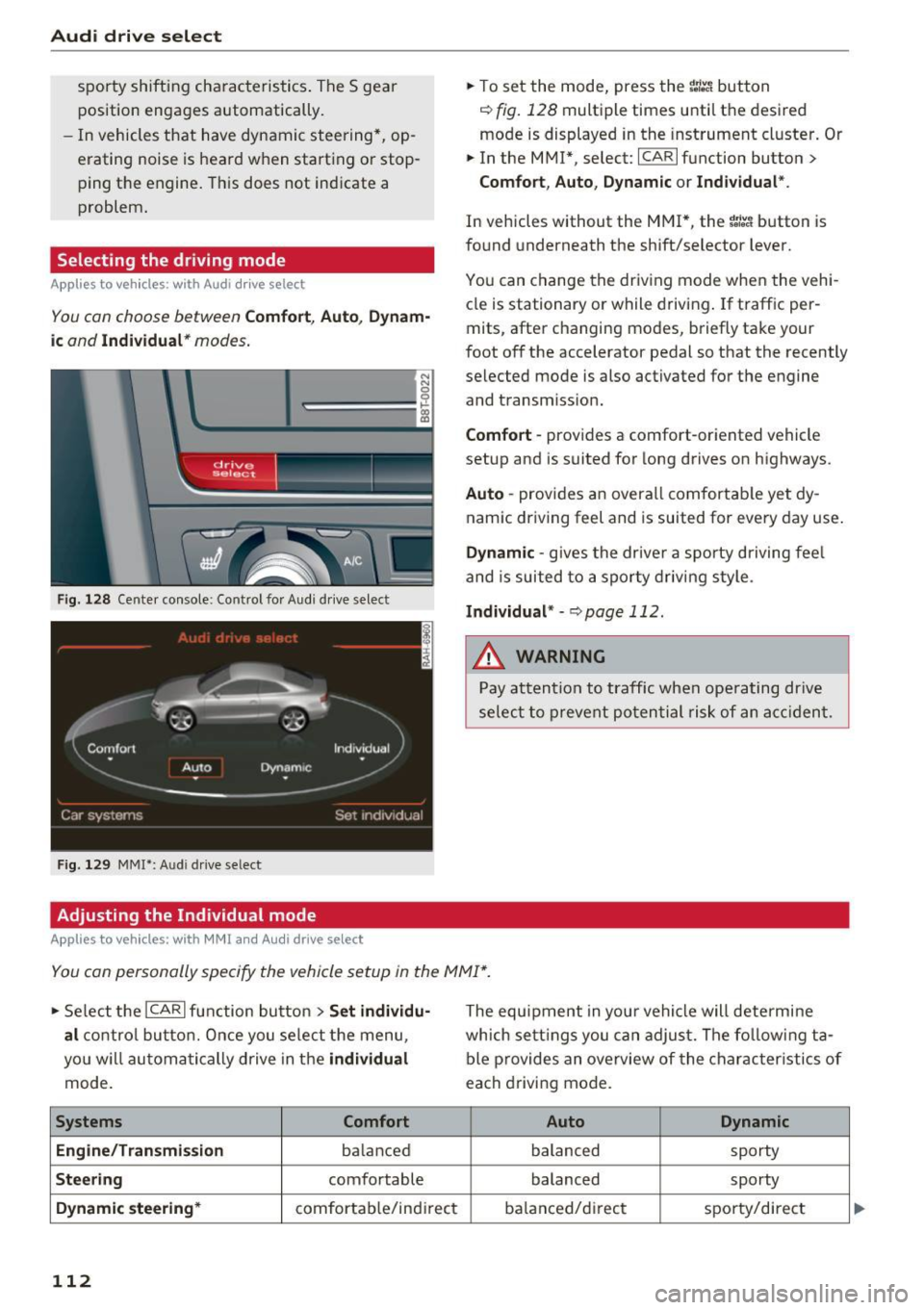
You con choose between Comfort, Auto , Dynam
ic and Individual * modes.
N N 0
0
'l::=====:::: 1-'gi
drive I sel,.c,ct _ J -~-
F ig . 128 Ce nter console : Co ntrol for Aud i dr ive select
Fig . 129 MMI*: A udi drive select
Adjusting the Individual mode
Applies to vehicles : w ith MMI a nd Audi drive select
.,. To set the mode, press the ~:i:a button
c::> fig. 128 multiple times until the desired
mode is displayed in the instrument cluster. Or
.,. In the MMI* , select: ICARlfunction button>
Comfort, Auto, Dynamic or Individual".
In vehicles without the MMI*, the ~:/:a button is
found underneath the shift/selector lever.
You can change the driving mode when the vehi
cle is stationary or while driving. If traff ic per
mits, after changing modes, briefly take your
foot off the accelerator pedal so that the recently
selected mode is also activated for the engine
and transm iss ion.
Comfort -provides a comfort-oriented vehicle
setup and is suited for long drives on highways.
Auto -provides an overall comfortable yet dy
namic driving feel and is suited for every day use.
Dynamic -gives the drive r a sporty driving fee l
and is suited to a sporty driving style .
Individual* -c::, page 112.
&_ WARNING
Pay attention to traffic when operating drive
select to prevent potential risk of an accident.
You can personally specify the vehicle setup in the MMI* .
.,. Select the ICAR I function button > Set individu
al
control button. Once you select the menu,
you w ill automatically drive in the
individual
mode.
Systems Comfort
Engine/Transmission
ba lanced
Steering comfortable
Dynamic steering* comfortab le/indi rect
112
The equipment in you r vehicle will determine
which settings you can adjust. The following ta
ble provides an overview of the characteristics of
each driving mode.
Auto Dynamic
balanced
sporty
balanced sporty
ba lanced/d irec t sporty/direct
Page 119 of 278
..... N
0 :.:: co ..... oJ) Lil
..... oJ) .....
-Dampen the lens wi th a house ho ld alcoho l
based glass cl eaner , and clean the l ens with a
dry cloth
¢ (i) .
-Remove snow with a hand brush and ice pref
erab ly with a de-icing spray
¢ (i).
A WARNING
- The parking aid cannot replace the driver's
attent ion. The driver a lone is responsible for
park ing and s imilar driving maneuvers.
-Always keep your eyes on the vehicle's sur round ings, using the rear view m irror as
we ll.
- Do not a llow yourse lf to be d istracted from
traff ic by the rear view camera p ictures.
- If the posit ion and the installat ion ang le of
the camera has changed, for example, after
a rear end collision, do not continue to use
the system for safety reasons. Have it
checked by a qualified dealersh ip .
@ Note
- Low obstacles already s ignaled by a warn ing
ca n disappear from the system's detection
range as they are approached and will not
continue to be signa led. Objects such as
barrier chai ns, t rai ler d raw ba rs, thin pa int
ed verti cal poles o r fences may not be de
tec ted by t he sys tem, posing r isk o f dam
age.
- Neve r use warm or hot water to remove
snow or ice from the rear view camera lens -
danger of crack format ion on t he lens!
- When cleaning the lens, never use p roduc ts
that are abrasive.
Switching on/off
Applies to vehicles: with pa rk ing system (rear, with rear view
camera)
The rear view camera switches on automatically
togeth er with the acoustic park assist when you
put the vehicle in reverse.
Sw itching on
.,. Put the vehicle in reverse gear , th e acoustic
parking system w it h rear view camera is acti
vated a utomat ically . Act ivation of the acoust ic
Parking S ystem
parking system is confirmed by a brief acknow l
edgement sound.
Switching off
.,. Dr ive faste r than 9 mp h (15 km/h), o r
.,. take the ve hicle out of reve rse gear. The acous
t ic parking sys tem is immed iately deactivated,
and the rear view camera pictu re is deactivated
automatically after a period of abo ut 15 sec
onds, or
.,. sw itch off the ignit ion.
The delay in deactivating the camera provides an u ninterrupted view be hind th e vehicle especia lly
when maneuvering in t ight pa rking spaces and
prevents the picture from turning off the every
t ime you shift o ut of reverse .
If the warning messag e appears in the display
but not the rear view camera picture, read and
confirm the warning message . The acoustic dis
tance sig nal is always active.
If you press a f unction button on the M MI control
console , the rear view camera picture disappears.
The rear view camera picture reappears the next
time you pa rk .
Further in format ion on th e warning message and
the MMI control console can be found in the MMI instruct ion booklet.
A WARNING
--
- On ly use the rearv iew camera to ass ist you if
it shows a good, clear pictu re . Fo r example,
the image may be affected by the sun shin i n g into the lens, dirt on the lens o r if t he re
is a defec t.
- Us e th e rearv iew cam era on ly w ith th e rear
lid comple tely closed . Make s ure any obje cts
you m ay h ave moun ted on t he rear lid do
not block the rearv iew camera.
(D Tips
- The rear view camera picture is available as
soo n as the M MI D ispla y or the MM I is
s w itched on, or the s tart- up phase is com
p le ted.
- Th e se nsors m ust be kep t clean and free of
s now and ice fo r th e park ass is t to operate .
117
Page 120 of 278
Parking System
-You can change the volume and pitch of the
signals as well as the display ¢
page 120.
-What appears in the display is time-de
layed.
Reverse Parking
Applies to veh icles: with park ing system (rear, with rear view
camera)
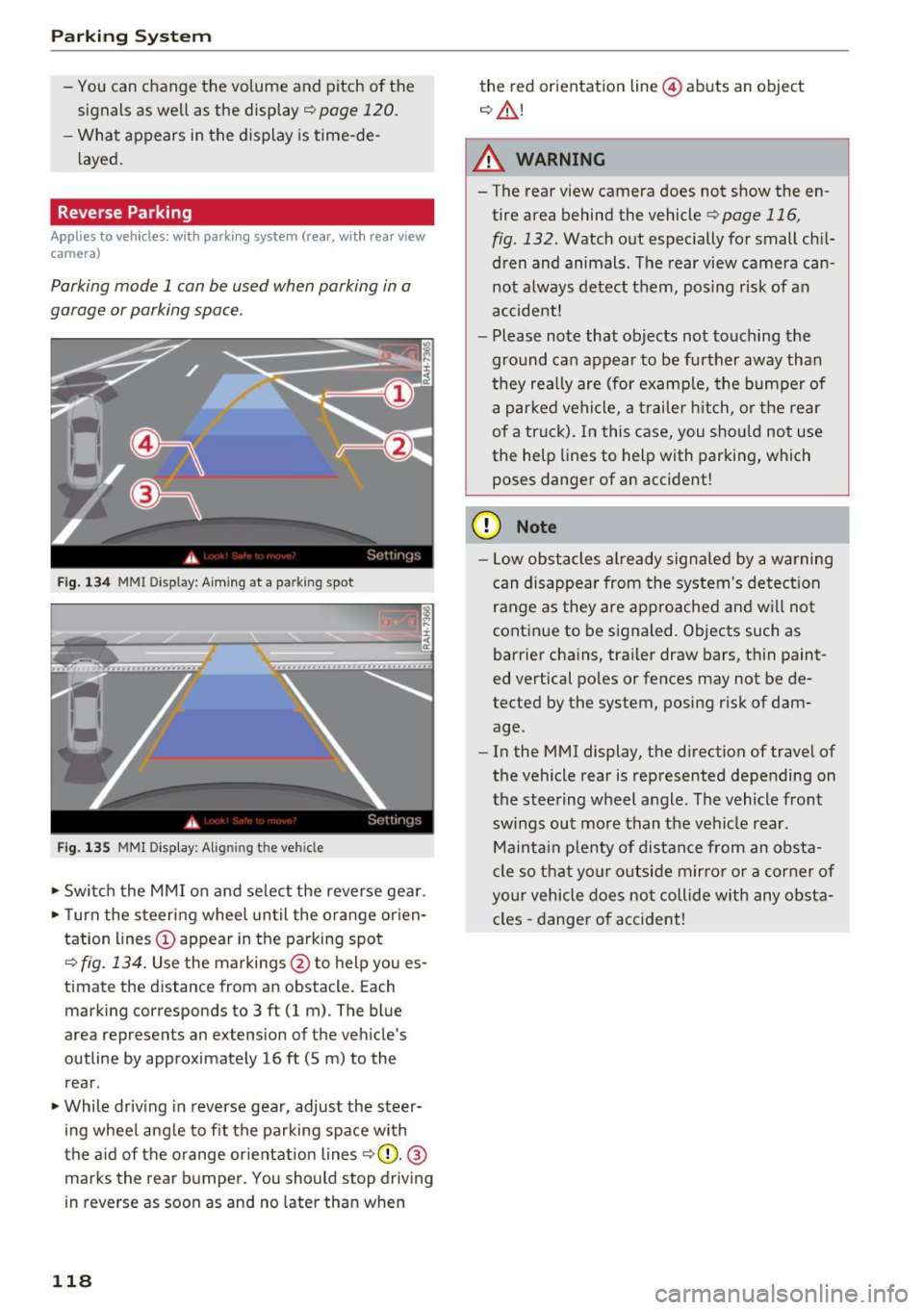
Parking mode 1 can be used when parking in a
garage or parking space .
Fig. 134 MMI Di spla y: Aiming at a pa rk in g spot
Fig. 135 MM I Di splay: Alig ning the ve hicle
.-Switch the MMI on and select the reverse gear .
.- Turn the steering wheel until the orange orien
tation lines(!) appear in the parking spot
¢
fig. 134. Use the markings @to h elp you es
timat e the distance from an obstacl e. Each
marking corresponds to 3 ft (1 m). The blue
area represents an ex tension of the vehicle 's
outline by approximately 16
ft (5 m) to the
rear .
.- While driving in reverse gear, adjust the steer
ing wheel angle to fit the parking space with
the aid of the orange orientation lines
~ CD. @
marks the rear bumper. You should stop driving
in reverse as soon as and no later than when
118
the red orientation line@ abuts an object
¢ ,&. !
A WARNING
-The rear view camera does not show the en
tire area behind the vehicle
¢ page 116,
fig . 132.
Watch out especially for small chil
dren and animals. The rear view camera can
not always detect them, posing risk of an
accident!
- Please note that objects not touching the
ground can appear to be further away than
they really are (for example, the bumper of
a parked vehicle, a trailer hitch, or the rear
of a truck). In this case, you should not use
the help lines to help with parking, which
poses danger of an accident!
(D Note
- Low obstacles already signaled by a warning
can disappear from the system's detection
range as they are approached and will not
continue to be signaled. Objects such as
barrier chains, trailer draw bars, thin paint
ed vertical poles or fences may not be de
tected by the system , posing risk of dam
age .
- In the MMI display, the direction of travel of
the vehicle rear is represented depending on
the steering wheel angle. The vehicle front
swings out more than the vehicle rear .
Maintain plenty of distance from an obsta
cle so that your outside mirror or a corner of
your vehicle does not collide with any obsta
cles -danger of accident!
Page 129 of 278
..... N
0 ::..:: co .....
Improperly stored luggage or other items can
fly through the vehicle causing serious per
sonal injury in the event of hard braking or an
accident . To help reduce the risk of serious
personal injury:
- Always put objects, for example, luggage or
other heavy items in the luggage compart
ment.
- Always secure objects in the luggage com
partment using the tie-down eyelets and
suitable straps.
A WARNING
Heavy loads will influence the way your vehi
cle handles. To help reduce the risk of a loss
of control leading to serious personal injury:
- Always keep in mind when transporting
heavy objects, that a change in the center of
gravity can also cause changes in vehicle
handling:
-Always distribute the load as evenly as
possible .
- Place heavy objects as far forward in the
luggage compartment as possible.
- Never exceed the Gross Axle Weight Rating
or the Gross Vehicle Weight Rating specified
on the safety compliance sticker on the left
door jamb. Exceed ing permissible weight
standards can cause the veh icle to slide and
hand le differently.
- Please observe information on safe driving
qpage 121.
A WARNING
To help prevent poisonous exhaust gas from
being drawn into the vehicle, always keep the
rear lid closed while driving.
- Never transport objects larger than those
fitting completely into the luggage area be
cause the rear lid cannot be fully closed.
- If you absolutely must drive with the rear lid
open, observe the fo llowing notes to reduce
the risk of poisoning:
- Close all windows,
- Close the sunroof,
Driving safety
-Open all air outlets in the instrument pan
el,
- Switch off the air recirculation
,
- Set the fresh air fan to the highest speed .
A WARNING
=
Always make sure that the doors, a ll win-
dows, the sunroof and the rear lid are secure
ly closed and locked to reduce the risk of in
jury when the vehicle is not being used.
- After closing the rear lid, always make sure
that it is properly closed and locked .
- Never leave your vehicle unattended espe
cially with the rear lid left open . A child
could crawl into the vehicle through the lug
gage compartment and close the rear lid be
coming trapped and unable to get out . Be
ing trapped in a vehicle can lead to ser ious
personal injury.
- Never let children play in or around the vehi cle .
- Never let passengers ride in the luggage
compartment . Vehicle occupants must al
ways be properly restrained in one of the ve
h icle 's seat ing positions.
(D Tips
-Air circulation helps to reduce window fog
ging . Stale air escapes to the outs ide
through vents in the tr im panel. Be sure to
keep these slots free and open.
- The tire pressure must correspond to the
load. The t ire pressure is shown on the tire
pressure label. The tir e pressure label is lo
cated on the driver's side B-pillar . The tire
pressure label lists the recommended cold
tire inflation pressures for the vehicle at its
maximum capacity weight and the tires that
were on your vehicle at the time it was man
ufactured. For recommended tire pressures
for normal load conditions, please see chap
ter
q page 22 7
127
Page 154 of 278

Airbag system
@ For the sake of the environment
Undeployed airbag modu les and pretension
ers might be classified as Perchlorate Materi
al -special handling may apply, see
www.dtsc.ca.gov/hazardouswaste/perchlo rate . When the vehicle or parts of the re
straint system including airbag modules safe
ty belts with pretens ioners are scrapped, all
applicable laws and regulat ions must be ob
served. Your authorized Audi dealer is familiar
with these requirements and we recommend
that you have your dealer perform this service
for you.
Other things that can affect Advanced
Airbag performance
Changing the vehicle's suspension system can
cha nge the way that the Advanced Airbag System
pe rforms in a crash. For example, using tire-r im
comb inat ions not approved by Audi, lower ing the
veh icle, changing the stiffness of the suspens ion,
including the spr ings, suspension struts, shock
absorbers etc . can change the forces that are
measured by the airbag sensors and sent to the
electronic control unit . Some suspens ion changes
can, for example, increase the force levels meas
ured by the sensors and make the airbag system
deploy in crashes in wh ich it would not deploy if
the changes had not been made. Other ki nds of
changes may reduce the force levels measured by
the sensors and preven t the airbag from deploy
ing when it should .
A WARNING
Changing the vehicle's suspension including
use of unapproved tire-rim combinations can
change Advanced A irbag performance and in
crease the risk of serious personal injury in a
crash.
- Never install suspension components that
do not have the same performance charac
teristics as the components originally insta l
led on your veh icle.
- Never use tire-rim comb inations that have
not been approved by Audi.
152
A WARNING
Items stored between the safety belt buckle
and the center console can cause the sensors in the buckle to send the wrong information
to the electronic control module and prevent
the Advanced A irbag System from working
properly.
- Always make sure that nothing can inte rfe re
w ith the safety belt buckles and that they
are not obstructed.
Side airbags
Description of side airbags
The airbag system can provide supplemental
protection to properly restrained occupants.
Fig. 156 S ide ai rbag locatio n in the dr ive r's seat
The side airbags are located in the sides of the
front seat backrests
¢ fig . 156 and the rear back
rest facing the doors. They are identified by the
word "AIRBAG".
The side airbag system basically consists of:
-the electronic control module and external side
impact sensors
- the two airbags located in the sides of the front
backrests and the two airbags" located in the
rear backrest
- the airbag warning light in the instrument clus-
ter.
The airbag system is monitored electronica lly to
make certain that it is functioning proper ly at all
times. Each time you turn on the ignition, the air
bag system indicator light will come on for a few
seconds (self diagnostics). .,,.
Page 179 of 278
..... N
0 ::..:: co .....
wireless telecommunications provider and the
"About Aud i connect" tab in your vehicle's
MMI*:
IMENU I button> Audi connect > About
Audi conn ect.
Electronic Stabilization
Control (ESC)
Description
ESC helps to improve road ho ld ing and vehicle
dynamics to help reduce the probability of skid
d ing and loss of veh icle control. It works only
when the engine is runn ing . E SC detects certain
d ifficult dr iving sit uat ions, including when t he
ve hicl e is begin ning to spin (yaw) out of co ntro l
a nd helps you to ge t the veh icle back under con
tro l by se lective ly bra king the wheels, and/or re
d ucing engine powe r and provid ing steering as
sistance to help hold the vehicle on the dr iver's
intended course. The indicator light
GJ in the in
strument cluster blinks when ESC is taking action
to help you co ntro l the vehicle.
ESC has limitations. It is important to remember
that ESC cannot overcome the laws of physics. It
will not a lways be able to help out under all con
d itions you may come up aga inst. For example,
ESC may not always be able to help you master
situations where there is a sudde n change in the
coeff icient of friction of the road surface. When
there is a section of dry road that is sudde nly cov
e red with wate r, slush o r snow, ESC cannot pe r
form the same way i t wo uld on the dry s urface . If
the vehicle hydrop lanes (rides on a cushion of wa
ter i nstead of t he road su rface), ESC wi ll not be
ab le to he lp you steer the ve hicle because contact
with the pavement has been interrupted and the
ve hicle cannot be b raked or steered. Dur ing fast
cornering, pa rticula rly on w inding roads, ESC
cannot always deal as effect ively w it h difficult
d riving si tuations tha n at lowe r speeds. When
tow ing a t raile r, ESC is no t able to help you re
g ai n con trol as it would if you we re not towing a
tra iler .
A lways adjust yo ur speed and driving sty le to
road, traffic and weathe r co nd itions. ESC canno t
override the vehicle's physical lim its, increase the
Intellig ent Technology
available t ract ion, or keep a vehicle on the road if
road depart ure is a resu lt of driver inattention .
Instead, ESC improves the possib ility o f keeping
the vehicle under contro l and on the road d uring
extreme maneuvers by us ing the driver's steer ing
i nputs to help keep the veh icle go ing in the in
tended direction.
If you are traveling at a speed
that causes you to run off the road before ESC
c an p rovide any assistan ce, you may not exper i
en ce the benefi ts of ESC.
ESC is swi tched o n all the time . In certa in s itua
t ions when you need less tract ion, you can sw itch
off AS R by press ing the button
11) c:> page 178,
fig. 173 o r c:> page 178, fig . 174. Be s ure to
swi tch ASR on again w hen you no longe r need
l ess trac tion.
T he following systems are integ ra ted in the ESC:
Anti-lock brak ing system (ABS)
ABS prevents the wheels from locking up w hen
braking. The vehicle can still be steered even d ur
i ng hard braking. Apply steady p ressure to the
brake pedal. Do not pump the peda l. A p uls ing in
t h e br ake peda l indicates that the system is help
i ng yo u to b rake the vehi cle.
Brake assist system
T he brake assist system can decrease braking dis
tance . It increases b raking powe r when the dr iver
presses the b rake peda l quickly in emergency sit
u at io ns. You mus t press and ho ld the br ake pedal
u nt il t he s ituat ion is ove r. In vehicles wi th adap
tive cru ise control *, the brake assist system is
more sensitive if the distance detected to the ve
hicle ahead is too sma ll.
Anti-slip regulation (ASR )
ASR reduces engine powe r whe n the dr ive whee ls
begi n to spin and adapts the fo rce to the road
co ndit ions . Thi s makes it easier to start, acce ler
ate and d rive up hills .
Electronic differential lock (EDL)
T he ED L brakes wheels t hat are spi nning and
transfe rs the dr ive power to the o ther dr ive
whee l or wheels if the vehicle is equ ip p ed with
all -wheel drive*. This function is not ava ilab le at
higher speeds. .,.
177
Page 207 of 278
,....,
N
0
""' CX) ,....,
I.Cl U"I ,....,
I.Cl ,....,
Checking and Filling
Engine compartment
Engine compartment
These are the most important items that you can check.
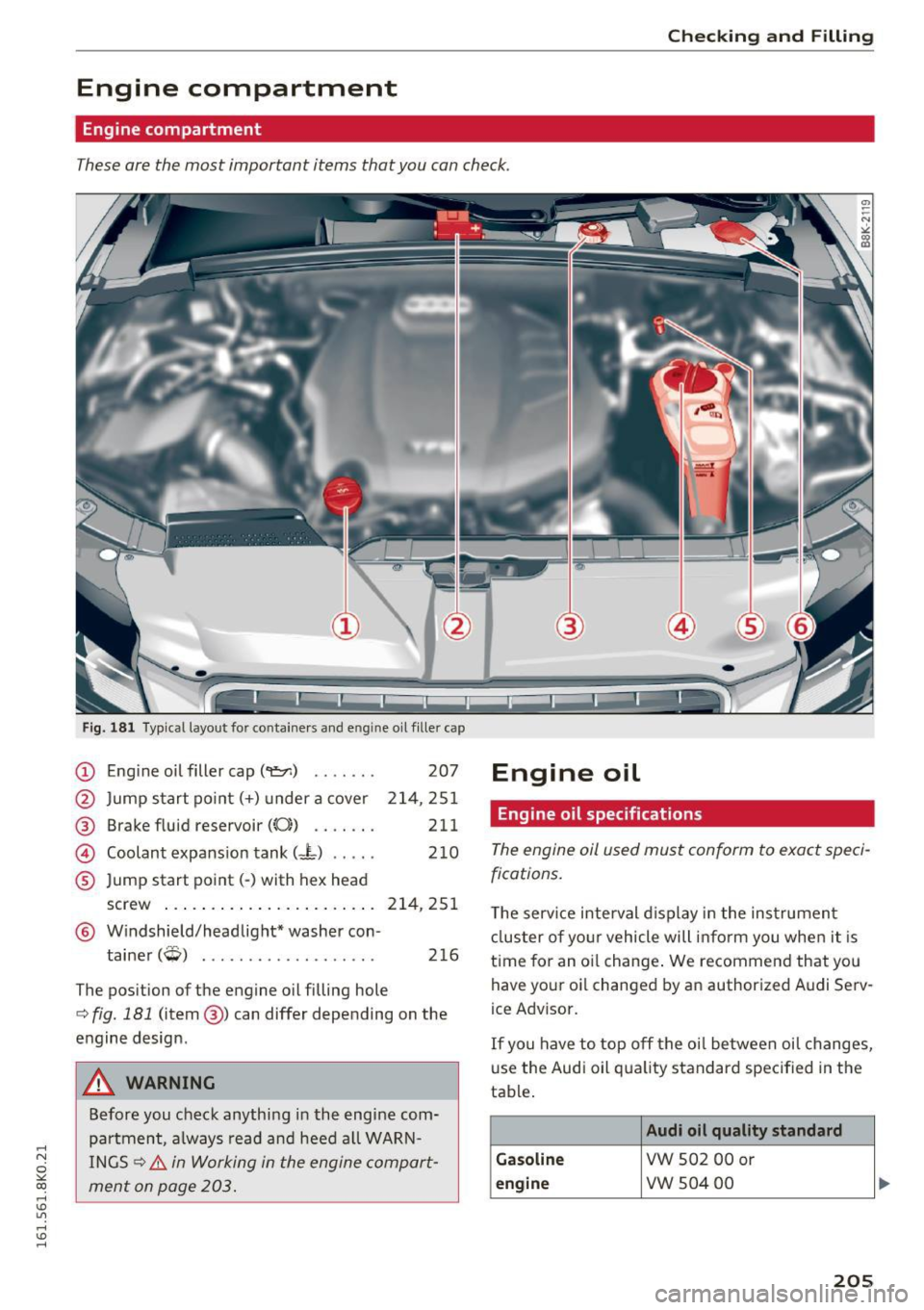
Fig. 181 Typical layout for containers and e ngin e oil fille r cap
(D Eng ine o il filler cap (
@ Brake fluid reservoir
((0) ...... .
@ Coolant expansion tank (- L) .... .
® Jump start point( -) with hex head 207
214,251
211 210
screw . . . . . . . . . . . . . . . . . . . . . . . 214, 251
@ Windshield/headlight* washer con-
tainer
(W) . . . . . . . . . . . . . . . . . . . 216
The position of the engine oil filling hole
c:> fig. 181 (item @) can differ depending on the
engine design .
A WARNING
Before you check anything in the engine com
partment, always read and heed all WARN
INGS
c:> &. in Working in the engine compart
ment on page 203.
Engine oil
Engine oil specifications
The engine oil used must conform to exact speci
fications.
The service interval display in the instrument
cluster of your vehicle will inform you when it is
time for an oi l change . We recommend that you
have your oi l changed by an authorized Audi Serv
ice Advisor.
If you have to top off the oil between oil changes,
use the Audi oil quality standard specified in the
table .
Audi oil quality standard
Gasoline
VW 502 00 or
engine vw 504 00
205