clutch AUDI A4 2016 User Guide
[x] Cancel search | Manufacturer: AUDI, Model Year: 2016, Model line: A4, Model: AUDI A4 2016Pages: 278, PDF Size: 70.26 MB
Page 102 of 278

Audi adaptive cruise control and braking guard
When the adaptive cruise control is turned on,
you must press the clutch to shift gears (as usu
al) . When shifting normally or when press ing the
clutch, the adaptive cruise control remains
turned on.
After you have engaged the gear, you do
not
need to press the gas pedal. The adaptive cruise
control accelerates automatically if necessary.
If you press down on the clutch for too long or
shift/coup le improperly , the adaptive cruise con
trol may turn off automatica lly.
@ Tips
You cannot turn on the adaptive cruise con
trol during a shifting operation .
Audi adaptive cruise
control
Description
Applies to vehicles: with Audi adaptive cruise control
Fig . 115 De tect ion range
What can Audi adaptive cruise control do?
The adaptive cruise control works in conjunction
with a radar sensor installed in the front of the
veh icle
,::;,page 98, fig. 112, wh ich is subject to
designated system limits
r::;, page 100. Stationary
objects are disregarded.
On open roads with no traffic, adaptive cru ise
control works like a reg ular cruise control sys
tem. The stored speed is ma inta ined. When ap
proaching a moving vehicle detected up ahead,
the adaptive cruise cont rol system automatically
slows down to match that vehicle's speed and
then maintains the distance that the driver previ ously stored. As soon as the system does not de-
100
tect a ve hicle up ahead, adaptive cruise control
acce lerates back up to the stored speed.
Which functions can be controlled?
When you switch adapt ive cru ise control on, you
can set the current speed as the "control speed"
9 page 100, Switching on and off.
When dr iving, you can stop cruise control
9 page 102 or change the speed r::;, page 101 at
any time .
You can also set the distance to the object ahead
and set the adaptive cruise control driving pro
gram
9 page 102.
Switching on and off
Applies to vehicles: with Audi adaptive cruise control
Fig. 116 Selector lever : sw it ch ing on/off
0
~ co ID
Fig. 117 In strume nt cl uster : Aud i adaptive cru ise con trol Ill-
Page 107 of 278

..... N
0 ::..:: co .....
promptly detected or may not be detected
at all.
- Reflective surfaces including crash barriers
or tunnel entrances may impair the function
of the radar sensor.
(D Tips
- You can cancel the braking that is initiated
by the system by braking yourse lf, by accel
erating noticeably or by swerving.
- Braking guard error messages ~page
105 .
-Keep in mind that braking guard can brake
unexpected ly. Always secure any cargo or
objects that you are transporting to reduce
the risk of damage or injury.
Settings in the radio/MM!
A ppl ies to vehicles: with Audi adaptive cruise co ntro l
... Se lect : I CARI funct ion button > C ar s ystem s*
control button > Driver a ssi st > Audi brak ing
guard .
Or
... Select:
~I C-A-R~I funct ion button > A udi braking
g uard .
S ystem -
Switch Audi braking guard On and Off.
When you sw itch the ignition on, the message
Audi bra king gua rd off appears if the system is
switched off.
Ea rly warn ing -The distance and approach warn
ings in the display can be switched
On /Off .
(D Tips
-Your settings are automatically stored and
ass igned to the remote control key being
used at the times the sett ings are made.
- If you restrict or sw itch off the ESC, the
braking guard also sw itches itself off
~ page
178 .
- Switch braking guard off when you are load
ing the veh icle onto a vehicle ca rr ier, train,
sh ip or other type of transportation . This
can p revent undesired warnings from the
braking gua rd system .
Messages
Applies to vehicles: wi th Aud i adapt ive c ruise control
Braking guard : Off
This dr iver message appears if the system is
tu rned off via the radio/MM I*. O therwise, if the
system is turne d off, the information appears ev
ery time shortly after t he start o f the trip .
T he driver message a lso appea rs if the system is
not avai lab le due to a ma lfunction o r if the ES C i s
not switched on¢ page
178 . If th is is the case,
the system wi ll not provide warnings about a
possib le collision .
Braking guard : A ctivated
This dr iver message appears if sharp brake pres
su re was applied due to an acute warning .
•••
Three white dots appear if a setting cannot be se
l ected with the operating lever. For example, this
happens if you want to raise/lower the speed
even though there was no previously saved
speed .
ACC: Deacti vation
The driver message appears in vehicles wi th ma n
u al transmission. If the clutch pedal was pressed
down for too long , the adaptive cr uise control
tu rns off. A chime sounds as a reminder.
ACC : Sen sor blocked
This message appears if the senso r view is ob
structed, for examp le by leaves, snow, heavy
spray or dirt. Clean the sensor¢ page
98,
fig. 112 .
ACC : not availa ble
The driver message appears if there is a malfunc
tion. The adaptive cruise control turns off . A
chime so unds as a reminder . Have the system
c h ecked by an author ized Audi dealer or au thor
ized Audi Service Facili ty.
A CC: una vailable
The driver message appears if, for examp le, the
brake temperature is too high. The adapt ive .,.
105
Page 213 of 278
,....,
N
0
""' CX) ,....,
I.Cl U"I ,....,
I.Cl ,....,
-To avoid being burned, do not spill anti
freeze or coolant on the exhaust system or hot engine parts. Under certain condi
tions, the ethylene glycol in engine cool ant can catch fire.
- Antifreeze is poisonous. Always store anti
freeze in its original container and well out
of the reach of children.
- If you drain the coolant, it must be caught
and safely stored in a proper container
clearly marked "poison".
(D Note
-Do not add coolant if the expansion tank is
empty . Air could enter the cooling system
and damage the engine. If this is the case,
do not continue driving. Seek professional
assistance.
- Coolant pollutes the environment and could
cause an engine fire. Excess coolant will be
forced out through the pressure relief valve
in the cap when the engine becomes hot.
- If, in an emergency, only water can be add
ed, the correct ratio between water and an
tifreeze
c::> page 208 must be restored as
soon as possible.
@) For the sake of the environment
Drained coolant should not be reused. Always
dispose of used coolant while observing all
environmental regulations.
Radiator fan
The radiator fan switches on automatically by it
self.
The radiator fan is driven by the engine via the V
belt . The viscous clutch regulates the speed of
the fan according to the temperature of the cool
ant.
An auxiliary electric radiator fan* switches on and
off depending on coolant temperature and other
vehicle operating conditions.
After you switch the engine off, the auxiliary fan
can continue running for up to 10 minutes -even
Checking and Filling
with the ignition off. It can even switch on again
later by itself
c::> & , if
- the temperature of the engine coolant rises due
to the heat build-up from the engine in the en
gine compartment, or
- the engine compartment heats up because the
vehicle is parked in intense sunlight.
A WARNING
-To reduce the risk of personal injury never
touch the radiator fan.
- The auxiliary electric fan is temperature
controlled and can switch on suddenly even
when the engine is not running.
- The auxiliary radiator fan switches on auto
matically when the engine coolant reaches a
certain temperature and will continue to run
until the coolant temperature drops.
Brake fluid
Checking brake fluid level
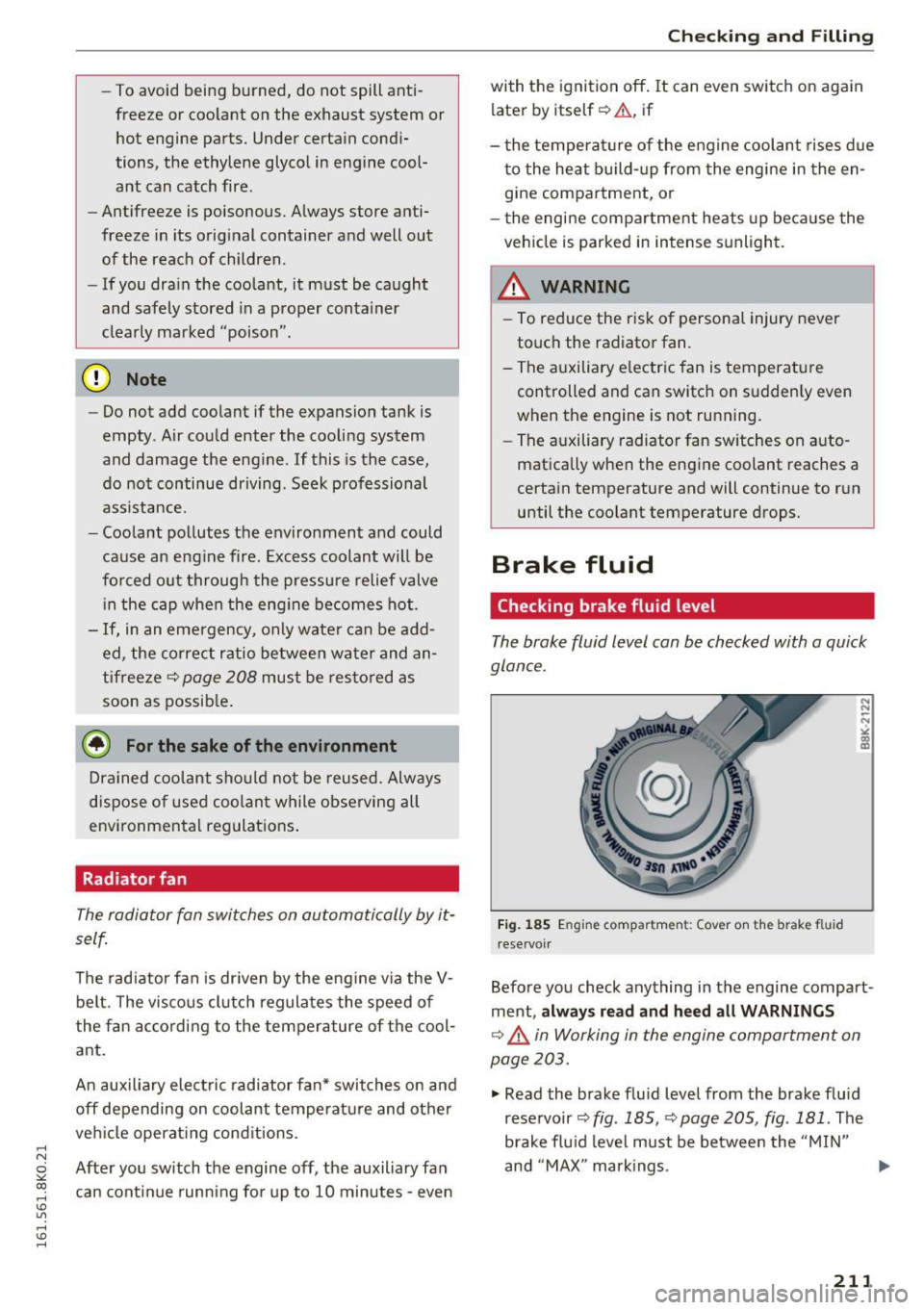
The broke fluid level con be checked with o quick
glance .
Fig. 185 En gi ne compartmen t: Cover on the b rake fl uid
reservoir
Before you check anything in the engine compart
ment,
always read and heed all WARNINGS
c::> _.& in Working in the engine comportment on
page 203.
.,. Read the brake fluid level from the brake fluid
reservoir
c::> fig. 185, c::> page 205, fig . 181 . The
brake fluid level must be between the "MIN"
and "MAX" markings.
211
Page 249 of 278

.... N
0
""' CX)
.... I.Cl U"I
.... I.Cl ....
Fuse panel @ (black)
No . Consumer
1 Dynamic steering
2 Electronic Stabilization Cont rol (mod ule)
A/C system press ure sensor, elect rome -
chan ica l park ing brake , Homelink, auto-
3 mat
ic dimming interior rear v iew mirror,
air q uality/outside a ir sensor, Electronic
Stabili zation Cont rol (button)
5 Sound actuator
6 Headlight range control/
headlight (cor-
ne ring light)
7 Headlight (corner ing light)
Con trol modules (e lectrom echan ica l par k-
8 ing brake , s hock ab so rbe r, q uattro s port),
DCDC converter
9 Adapt ive cru ise control
1 0 Shift ga te/clu tch se nsor
1 1 Side assist
12 Headlight range control
, p arkin g sys tem
13 Airbag
14 Rear wiper (a
llroad)
1 5 Auxiliary fuse (instrument panel)
1 6 Auxiliary fuse terminal 15 (engine area
)
Fuse panel@ (brown)
No . Consumer
2 Brake light senso r
3 Fuel pump
4 Clutch sensor
5
Left seat heating w it h /w it h out seat venti-
l a tion
6 Electronic Stabili zation Cont rol (e lectr ic)
7 Ho rn
8
F ront left door (window regulator, central
locki ng, mirror, switch, lig hting)
9 Windshield wiper moto r
10 Electronic Stabilization Cont rol (va lves)
Fuses and bulbs
No . Consumer
Two-door mode ls: rear left w indow reg ula-
1 1 tor; Four-door mode
ls: rear left door (w in-
dow regu lator, central locking, switch,
li ght ing)
1 2 Rain and
light sensor
Fuse panel © (red)
No . Consumer
3 Lumbar support
4 Dynam ic steering
5 Inter
io r ligh ting ( Cabr io let)
6 W
indshie ld washer system, headlight
wash er system
7 Vehicle e lectrica l system control module 1
8 Ve hicl e e lec trica l sy stem con trol module 1
9
Left rear window regu lator motor (Cabr io-
l et)/s unroof
1 0 Vehicle e lec tric al system con trol module 1
1 1 R
ight rear window regulator (Cabriolet)/
su n shade motor
1 2 A
nti- theft alarm warning system
Right cockpit fuse assignment
Fig. 20 7 Rig h t cockp it : f use pane l wit h plast ic cl ip
247