instrument cluster AUDI A4 2016 User Guide
[x] Cancel search | Manufacturer: AUDI, Model Year: 2016, Model line: A4, Model: AUDI A4 2016Pages: 278, PDF Size: 70.26 MB
Page 87 of 278
.... N
0
""' CX)
engine can only be star ted with the se lector in
these positions .
!I Is the key in the v ehicle?
This message appears if the master key is re
moved from the vehicle with the engine run ning .
If the maste r key is no longer in the veh icle, you
cannot swi tch on the ignition after stopping the
engine and yo u also cannot start the engine
again. Moreover, you cannot lock the vehicle
from the outside with the key .
Shift to P otherwise vehicle can roll away . Door s
do not lo ck if l ever i s not in
P.
This message appears fo r safety reasons a long
with a warning signal. It appears if the selec to r
l eve r fo r th e automatic transmission is not in the
P posit ion when switching off the ignition . M ove
the selector leve r to the P position, otherwise the
ve hicle is not secured against rolling away. You
also cannot lock the vehicle using the locking button* on the door handle or using the remote
key.
Con venien ce key d efectiv e! Use ignition lo ck
This message appea rs if the engine mus t be
s t arted or stopped us ing t he igni tion key and no t
the
! START ENGINE STOPI button .
Electromechanical
parking brake
Operation
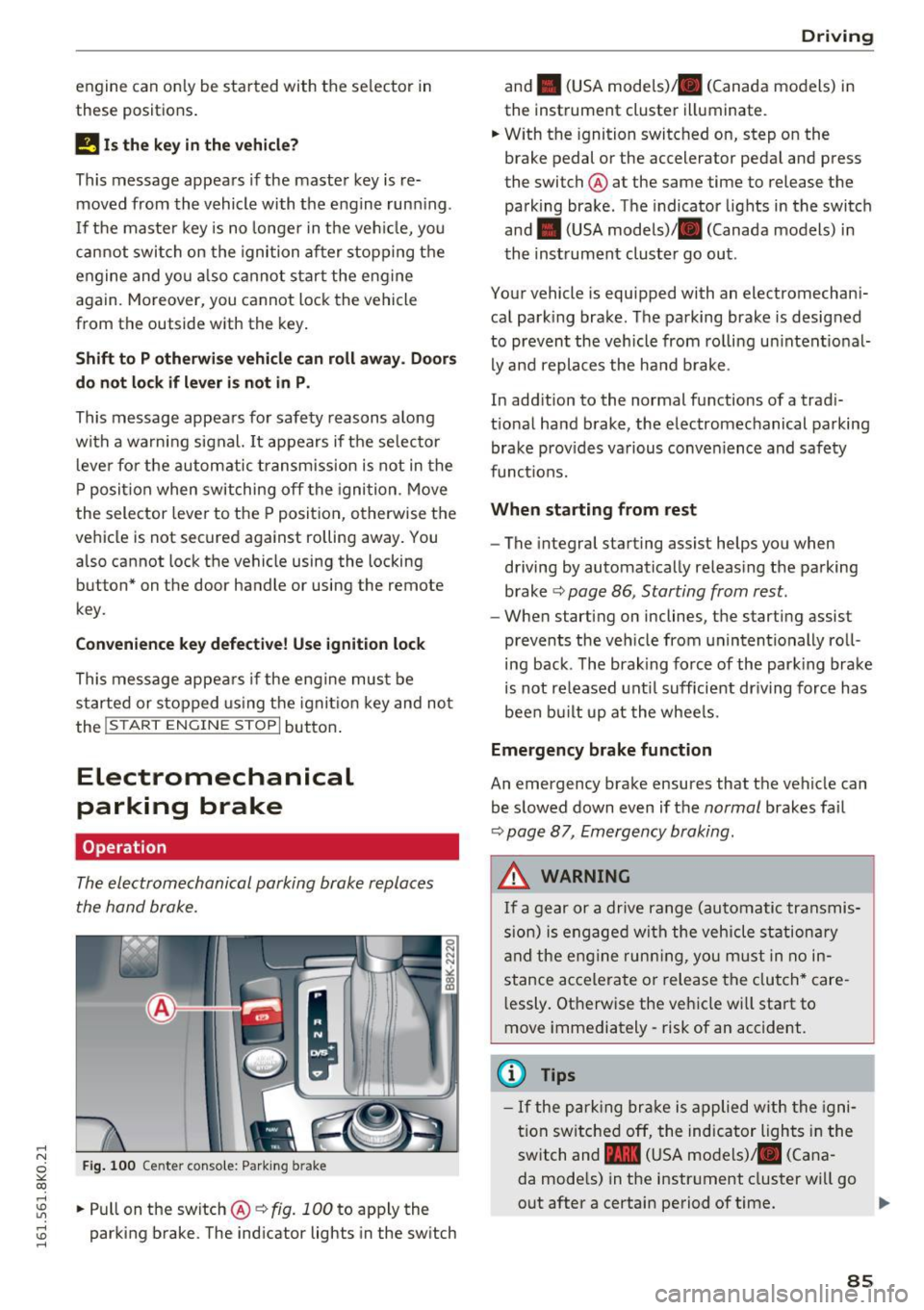
The electromechanical parking brake replaces
the hand brake.
Fig . 100 Ce nter conso le: Park ing b rake
....
~ .. Pull on the switch@~ fig. 100 to apply the
~ parking brake. The ind icator lights in the sw itch ....
D rivi ng
and . (USA mode ls)/ . (Canada models) in
the instrument cluster illuminate.
.. W ith the ignition switc hed on, step on the
brake pedal or the accelerator pedal and press
the switch @ at the same time to release the
parking brake . The indicator lights in the switch
and . (USA models)/ . (Canada models) in
the instrument cluster go out .
Your vehicle is equipped with an electromechani
cal park ing brake. The parking brake is designed
to prevent the vehicle from rolling un intent ional
ly and replaces the ha nd b rake .
In add ition to the normal functions of a trad i
t ional ha nd brake, the electromechanical parking
brake prov ides va rious conven ience and safety
funct ions.
When starting from rest
- The integral starting assist helps you when
driving by automatically releas ing the parking
brake ~
page 86 , Starting from rest.
- When start ing on inclines, the starting assist
prevents the veh icle from unintentionally roll
ing back . T he brak ing force of the park ing brake
is not re leased unt il sufficient dr iving force has
been bu ilt up at the whee ls.
Emergency brake function
An emergency brake ensures that the veh icle can
be slowed down even if the
normal brakes fa il
~ page 8 7, Emergency braking .
A WARNING
If a gear or a drive range (automatic transmis
s ion) is engaged wi th the vehicle stationa ry
a nd the engine runn ing, you must in no in
stance acce lera te or release the clutch* care
l essly. Otherwise the vehicle wi ll sta rt to
move immediately- risk of an accident.
(1) Tips
- If the pa rk ing br ake is a pplied with the igni
tion swi tche d off, the indicator lights i n the
switch and -(USA models) . (Cana
da mode ls) in the instr ument cluster wi ll go
out after a certain period of time .
85
Page 93 of 278
,....,
N
0
""' CX) ,....,
I.Cl U"I ,....,
I.Cl ,....,
tiptronic transmission
In the tiptron ic tr ansmission, power is transfer
red by a torque converter.
Selector lever positions
Applies to vehicles: with multitronic/S tronic/tiptronic
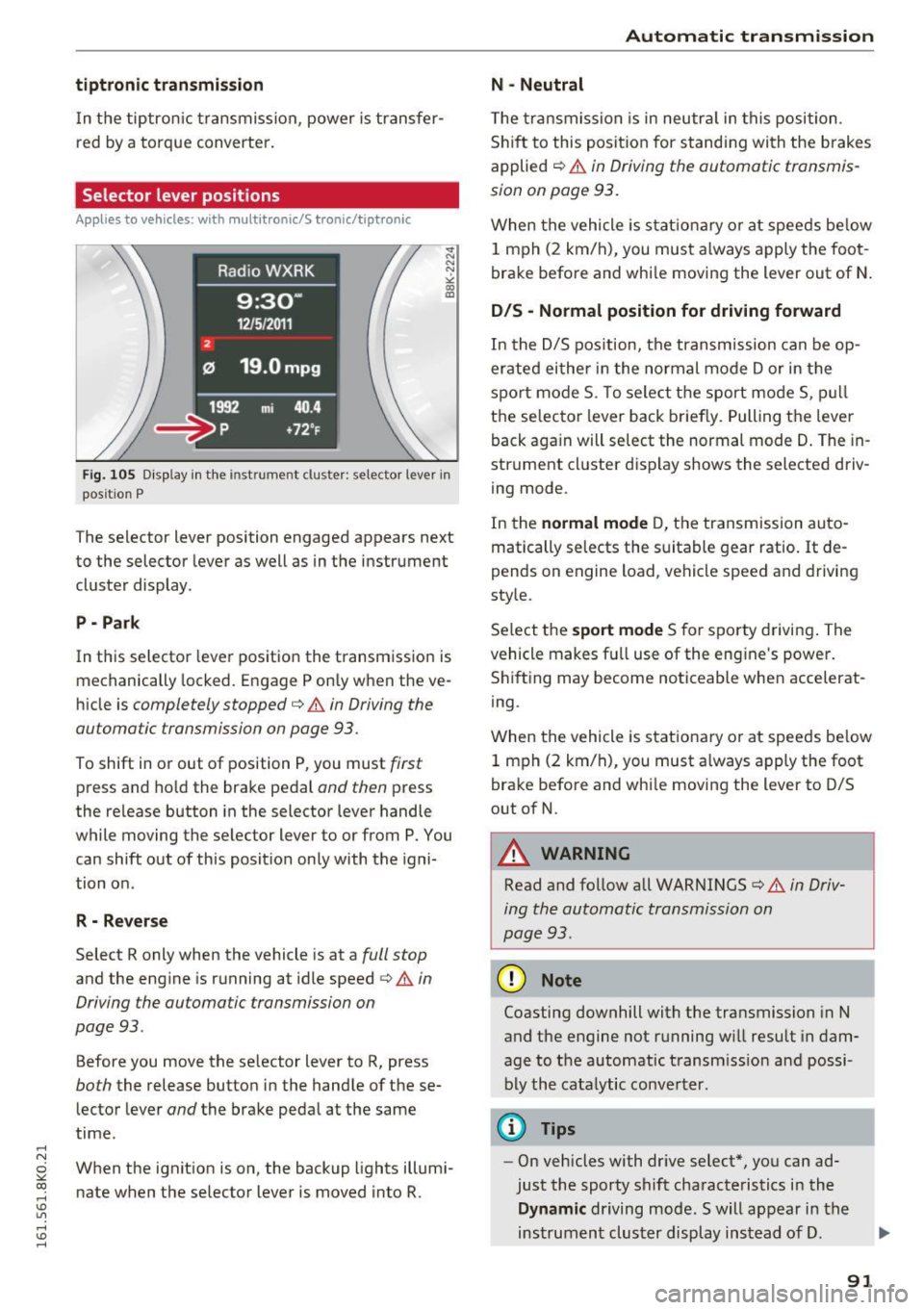
Fig. 105 Display in the instrume nt clus ter: selector lever in
pos it io n P
The selector lever position engaged appears next
to the selector lever as well as in the instrument
cluster display .
P • Pa rk
In this selector lever pos ition the transmission is
mechanically locked. Engage P only when the ve
hicle is
completely stopped¢ A in Driving the
automatic transmission on page 93.
To shift in or out of position P, you must first
press and ho ld the brake pedal and then press
the re lease button in the selector lever handle
while moving the selector lever to or from P. You can shift out of this position only with the igni
tion on .
R - Reverse
Select R only when the vehicle is at a full stop
and the engine is running at idle speed ¢&. in
Driving the automatic transmission on
page 93 .
Before you move the se lector lever to R, press
both the release button in the handle of these
lector lever
and the brake pedal at the same
time.
When the ignition is on, the backup lights illumi
nate when the selector lever is moved into R.
Automatic transmission
N -Neutral
The transmission is in neutra l in this position.
Shift to this position for stand ing with the brakes
applied
c:> A in Driving the automatic transmis
sion on page 93.
When the vehicle is stationary or at speeds below
1 mph (2 km/h), you must always apply the foot
brake before and whi le moving the lever out of N.
DIS -Normal position for driving forward
In the D/S position, the transmission can be op
erated either in the normal mode Dor in the
spo rt mode S. To select the sport mode S, pull
the selector lever back briefly. Pulling the lever
back aga in will select the normal mode D. The in
strument cluster display shows the selected driv
ing mode.
In the
normal mode D, the transmission auto
matically selects the suitable gear ratio.
It de
pends on engine load , vehicle speed and driving
style.
Se lect the
sport mode S for sporty driving. The
vehicle makes fu ll use of the engine 's power.
Shifting may become noticeable when accelerat
ing.
When the vehicle is stationary or at speeds be low
1 mph (2 km/h), you must always apply the foot
brake before and whi le moving the lever to D/S
out of N.
A WARNING
-Read and follow all WARNINGS¢ & in Driv-
ing the automatic transmission on
page 93 .
(D Note
Coasting downhill with the transmission in N
and the engine not running w ill result in dam
age to the automatic transmiss ion and possi
bly the catalytic converter.
@ Tips
-On vehicles with dr ive select*, you can ad
just the sporty shift characteristics in the
Dynamic driving mode.Swill appear in the
instrument cluster display instead of D.
91
Page 97 of 278
..... N
0 ::..:: co .....
An M appears in the instrument cluster display as soon as the transmiss ion has shifted.
~ To upshift, push the selector lever forward to
the p lus position
0 ¢ fig. 108.
~ To downshift, push the lever to the minus posi -
t ion
0 .
Gear selection with shift paddles*
The shift paddles are act ivated when the se lector
lever is in D/S or the tiptronic manual shift pro
gram.
~ To upshift, touch the shift padd le on the right
G) ¢fig.109 .
~ To downshift, touch the shift paddle on the left
0.
~ If you do not press a shift paddle within a short
t ime while in the D/S position, the transmission
will return to automatic mode. To keep shift ing
using the sh ift paddles, move the selector lever
to the right out of the D/S position.
The transm ission automatically shifts up or down
before critical engine speed is reached.
The transm ission only allows manual shifting
when the engine speed is within the permitted
range.
{O) Tips
- When you sh ift into the next lower gear, the
transmission will downsh ift only when there
i s no poss ibility of over-rew ing the engine.
- When the kick-down comes on, the trans
mission will shift down to a lower gear, de
pending on vehicle and engine speeds.
- Tiptron ic is inoperative when the transmis
s ion is in the fail-safe mode.
Kick-down
Appl ies to vehicles: with multitronic/S t ronic/tiptronic
Kick-down enables maximum acceleration .
Applies to vehicles with a multitronic
transmission
When you depress the accelerator pedal beyond
the res istance point, the transmission downshifts
in to a lower gear rat io depending on the vehicle
Automatic transm ission
speed and engine speed. As long as the accelera
tor pedal is depressed, the engine speed is auto
matically regulated for maximum accelerat ion .
Applies to vehicles with a S tronic-/ tiptronic
transmission
When you depress the accelerator pedal beyond
the resistance point, the automat ic transmission
downsh ifts into a lower gear, depending on vehi
cle speed and engine speed. The upsh ift into the
next higher gear takes place once the maximum
specified engine speed is reached .
A WARNING
Please note that the drive wheels can spin if
kick-down is used on a smooth slippery road -
there is a risk of skidding.
Launch Control Program
Applies to vehicles: wi th S tronic
The Launch Control Program provides the best
acceleration possible when starting from a stop .
Requirement: The engine must be at operating
temperature and the steering wheel must not be
turned .
~ Sedan: Press the I~ OF FI button¢ page 178
while the eng ine is running. The II indicator
light illuminates in the instrument cluster and
Stabilization control (ESC): Sport. Warning!
Restricted stability
appears in the driver infor
mation system display.
~ allroad: Press the I~ OFFI button¢ page 178
while the engine is ru nning . The II indicator
light illuminates in the instrument cluster and
Stabilization control (ESC): Offroad . Warning!
Restricted stability
appears in the driver infor
mation system display .
~ Move the selector lever to the D/S posit ion to
select sport mode (S) or select the
dynamic
driving mode in drive select*¢ page 112.
~ Press the brake pedal strongly w ith your left
foot and hold i t down for at least 1 second.
~ At the same time, press the accelerator pedal
down comp lete ly with your right foot unti l the
engine reaches and maintains a h igh RPM.
~ Remove your foot from the brake peda l within
S seconds¢ ,&. ..,.
95
Page 104 of 278
Audi adaptive cruise control and braking guard
• To increase or reduce the speed in increments,
tap the lever up or down.
• To increase or reduce the speed quickly,
hold
the lever up or down until the red LED @ reach
es the desired speed
Q page 100, fig . 117.
Following any changes, the new stored speed will
be displayed briefly in the display@Qpage
100,
fig . 117.
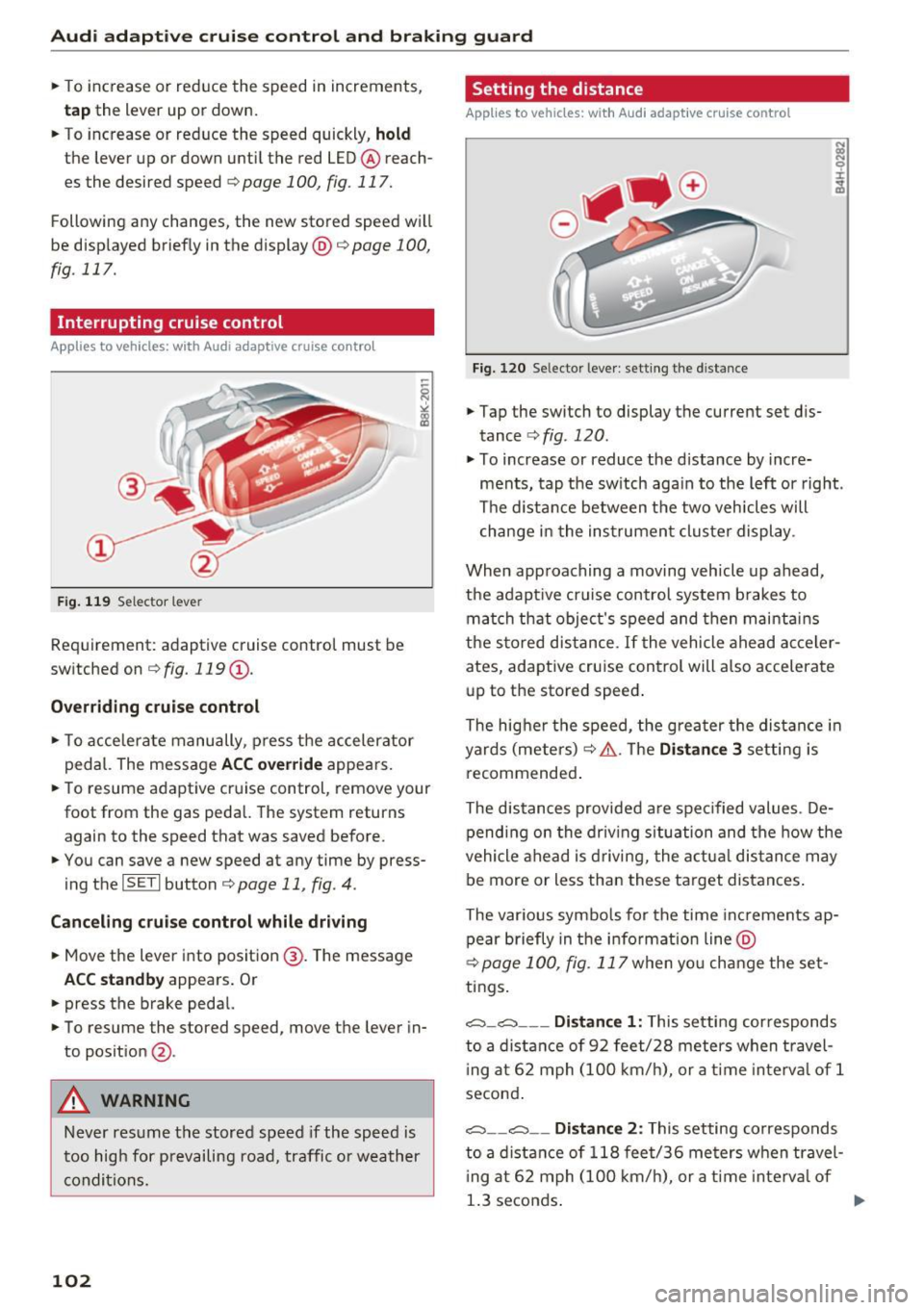
Interrupting cruise control
App lies to vehicles: with Audi adaptive cruise control
Fig. 119 Selector leve r
Requirement: adaptive cruise control must be
switched on Q
fig. 119 (J).
Overriding cruise control
• To accelerate manually, press the accelerator
pedal. The message
ACC override appears.
• To resume adaptive cruise control, remove your
foot from the gas pedal. The system returns
again to the speed that was saved before.
• You can save a new speed at any time by press
ing the
ISETI button Q page 11, fig. 4.
Canceling cruise control while driving
• Move the lever into position @. The message
ACC standby appears . Or
• press the brake pedal.
• To resume the stored speed, move the lever in
to position
@ .
A WARNING
Never resume the stored speed if the speed is
too high for prevailing road, traffic or weather
conditions.
102
Setting the distance
Applies to vehicles: with Audi adaptive cruise control
Fig. 120 Selector lever: setting the distance
.,. Tap the switch to display the current set dis
tance Q
fig. 120 .
.,. To increase or reduce the distance by incre
ments, tap the sw itch again to the left or right.
The distance between the two veh icles will
change in the instrument cluster display .
When approaching a moving vehicle up ahead,
the adapt ive cruise control system b rakes to
match that object's speed and then mainta ins
the s tored distance.
If the vehicle ahead acceler
ates, adaptive cruise control will also accelerate up to the stored speed .
The higher the speed, the greater the distance in
yards (meters) Q
&.. The Distance 3 setting is
recommended .
The distances provided are spec ified values . De
pending on the driving situation and the how the
vehicle ahead is driving, the actua l distance may
be more or less than these target distances .
The var ious symbo ls for the time increments ap
pear briefly in the information line @
Q
page 100, fig. 117 when yo u change the set
tings.
c::::,_ c::::, __ _ Distance 1 : This setting cor responds
to a distance of 92 feet/28 meters when travel
in g at 62 mph (100 km/h), or a time interval of 1
second .
c::::, __ c::::, __ Distanc e 2: This setting corresponds
to a distance of 118 feet/36 meters when travel
i ng at 62 mph (100 km/h), or a time interval of
1.3 seconds .
Page 105 of 278
,....,
N
0
""' CX) ,....,
I.Cl U"I ,....,
I.Cl ,....,
Audi adaptive cruise control and braking guard
~--- ~-Di stance 3: This setting corresponds
to a distance of 164 feet/SO meters when travel
ing at 62 mph (100 km/h), or a time interval of
1.8 seconds.
~ ---- ~ Distance 4: This setting corresponds
to a distance of 210 feet/64 meters when travel
ing at 62 mph (100 km/h), or a time interval of
2 .3 seconds.
A WARNING
Following other vehicles too closely increases
the risk of collisions and ser ious personal in
jury.
- Setting short distances to the traffic ahead
reduces the time and distance available to
br ing your vehicle to a safe stop and makes
it even more necessary to pay close atten
tion to traffic.
- Always obey applicable traffic laws, use
good judgment, and select a safe following
distance for the traffic, road and weather
conditions.
¢j) Tips
- Distance 3
is set automatically each time
you switch the ignition on.
- Your standard sett ings are automat ically
stored and assigned to the remot e control
k ey be ing used.
Setting the driving program
Applies to vehicles: with Audi adaptive cruise control
Depending on the selected dr iv in g program and
d istance, driving behav ior when accelerating w ill
vary from dynamic to comfortable.
Setting the driving program for vehicles
without Audi drive select*
~ In the radio/MM!*, select: !CARI function but
ton >
Adaptive cruise control > Driving prog. >
comfort, standard or dynamic . Or
~ Select: ICARI function button> Car systems*
contro l button > Driver ass ist > Adaptive cruise
control > Driving program* > Comfort, Stand
ard or Dynamic . Setting the driving mode for vehicles with
Audi drive select*
Refer to c!:>poge 112 .
(D Tips
Your settings are automatically stored and as
s ig ned to the remote control key being used.
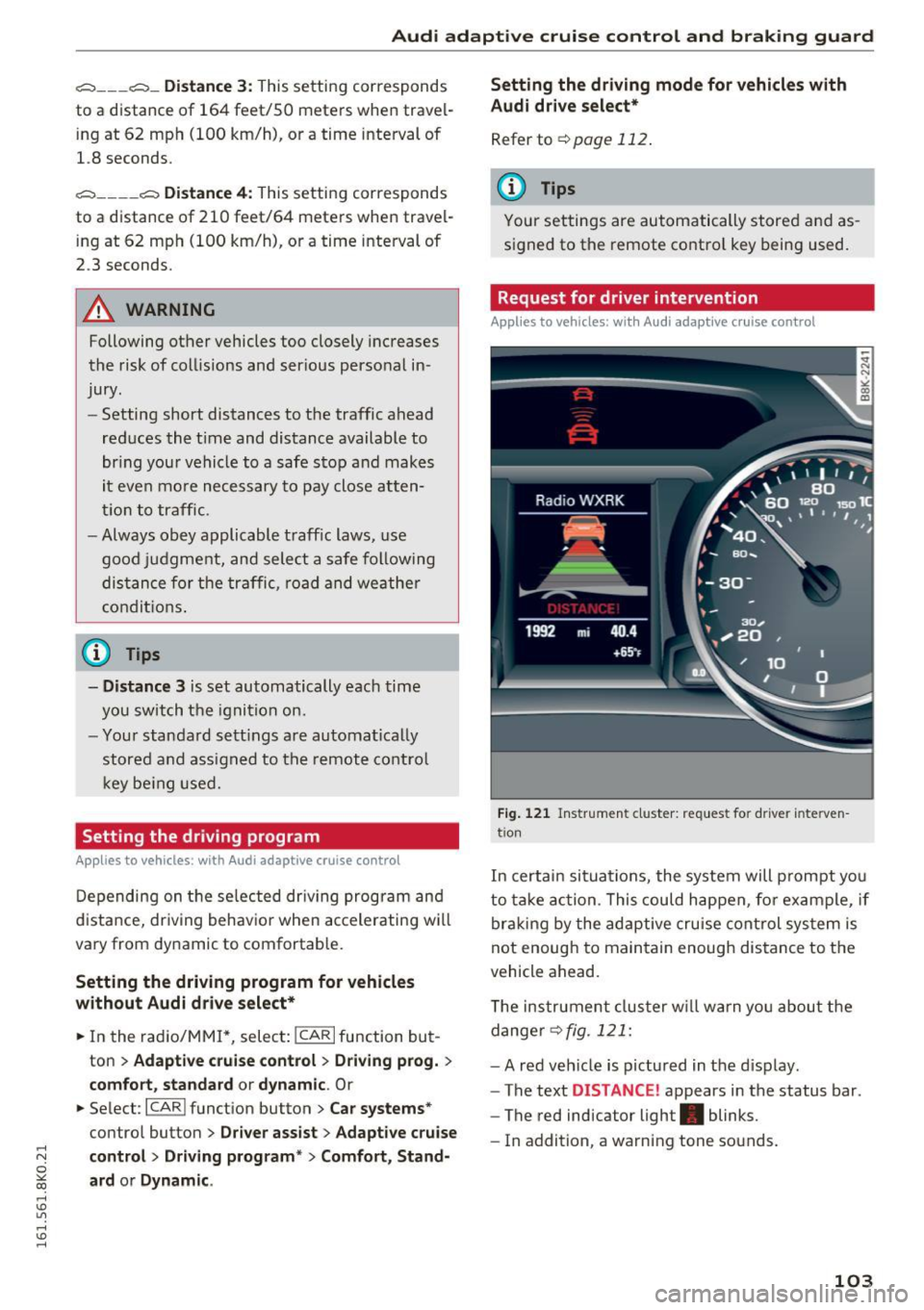
Request for driver intervention
Applies to vehicles: with Audi adapt ive cruise control
Fig. 121 Ins trumen t cluster: request for driver interve n
tio n
In certain situa tions, the system will prompt yo u
to take action . This could happen, for example, if
braking by the adaptive cruise control system is
not enoug h to maintain enough dis tance to the
vehicle ahead.
T he instrument cluster will warn you about the
danger
c!:> fig. 121:
-A red vehicle is pictured in the display.
- The text
DISTANCE ! appears in the status bar.
- The red indicator light. blinks.
- In addition, a warning tone sounds.
103
Page 114 of 278
Audi drive select
sporty shifting characteristics . The S gear
position engages automatically.
- In vehicles that have dynamic steering*, op
erating noise is heard when starting or stop
ping the engine. This does not ind icate a
problem.
Selecting the driving mode
Applies to veh icles: w ith Aud i d rive select
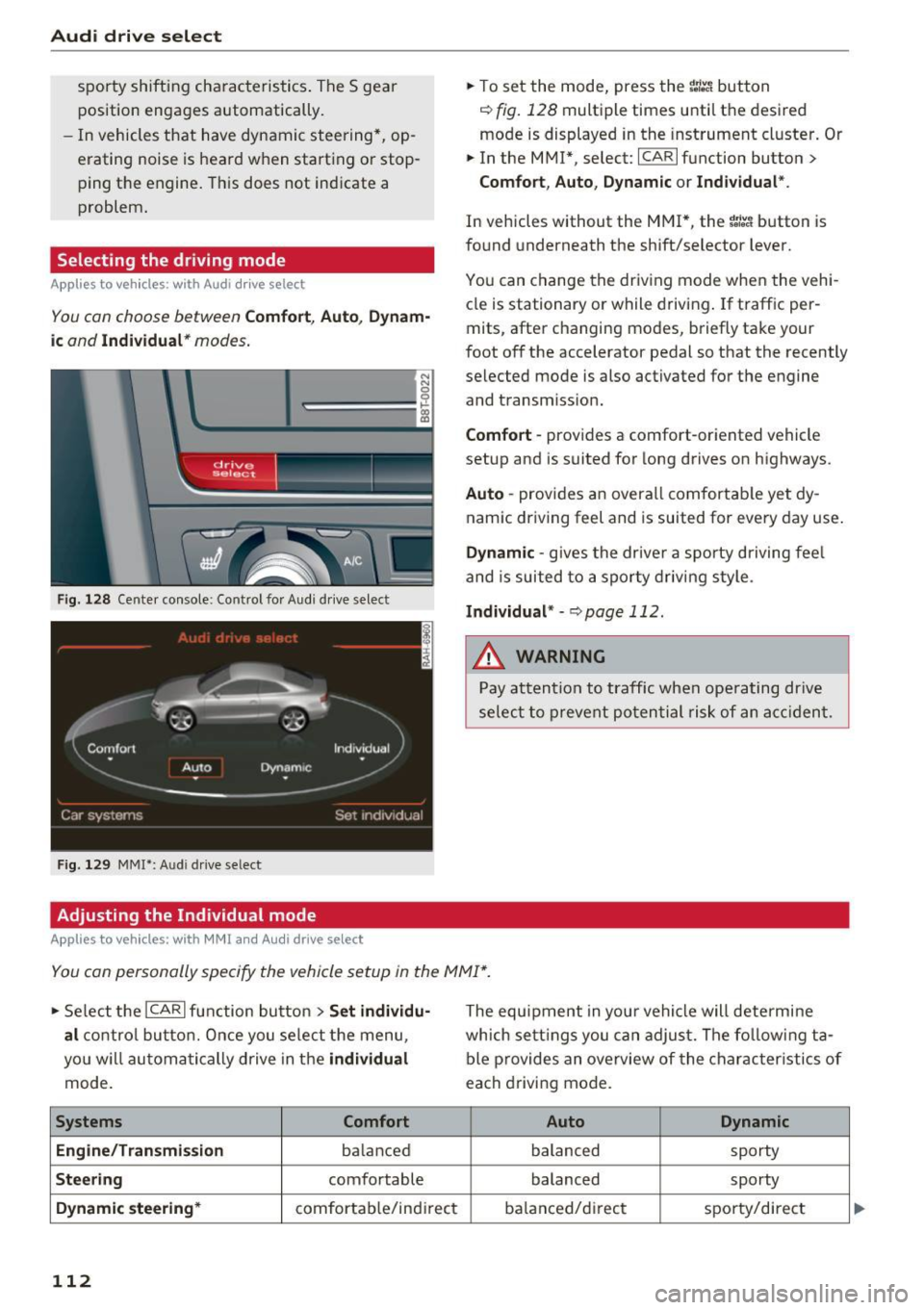
You con choose between Comfort, Auto , Dynam
ic and Individual * modes.
N N 0
0
'l::=====:::: 1-'gi
drive I sel,.c,ct _ J -~-
F ig . 128 Ce nter console : Co ntrol for Aud i dr ive select
Fig . 129 MMI*: A udi drive select
Adjusting the Individual mode
Applies to vehicles : w ith MMI a nd Audi drive select
.,. To set the mode, press the ~:i:a button
c::> fig. 128 multiple times until the desired
mode is displayed in the instrument cluster. Or
.,. In the MMI* , select: ICARlfunction button>
Comfort, Auto, Dynamic or Individual".
In vehicles without the MMI*, the ~:/:a button is
found underneath the shift/selector lever.
You can change the driving mode when the vehi
cle is stationary or while driving. If traff ic per
mits, after changing modes, briefly take your
foot off the accelerator pedal so that the recently
selected mode is also activated for the engine
and transm iss ion.
Comfort -provides a comfort-oriented vehicle
setup and is suited for long drives on highways.
Auto -provides an overall comfortable yet dy
namic driving feel and is suited for every day use.
Dynamic -gives the drive r a sporty driving fee l
and is suited to a sporty driving style .
Individual* -c::, page 112.
&_ WARNING
Pay attention to traffic when operating drive
select to prevent potential risk of an accident.
You can personally specify the vehicle setup in the MMI* .
.,. Select the ICAR I function button > Set individu
al
control button. Once you select the menu,
you w ill automatically drive in the
individual
mode.
Systems Comfort
Engine/Transmission
ba lanced
Steering comfortable
Dynamic steering* comfortab le/indi rect
112
The equipment in you r vehicle will determine
which settings you can adjust. The following ta
ble provides an overview of the characteristics of
each driving mode.
Auto Dynamic
balanced
sporty
balanced sporty
ba lanced/d irec t sporty/direct
Page 142 of 278
Airbag syste m
safety seat. It can be a very dangerous p lace for
an infant or a child in a rearward-facing seat.
The Advanced Airbag System i n your veh icle has
been ce rt ified to comp ly with the requirements
of United States Federal Motor Vehicle Safety
Standard (FMVSS)
208, as well as Canada Motor
Veh icle Safety Standard (CMVSS)
208 as applica
b le at the time your vehicle was manufactured.
According to requirements, the front Advanced
Airbag System on the passenger s ide has been
certified for "suppression " for infants of about
12 month old and younger and for "low risk de
p loyment " for children aged
3 to 6 years o ld (as
defined in the standard).
The
PA SSENGER AIR BAG OFF light in the instru
ment panel tells you when the front Advanced
Ai rbag on the passenger side has been tu rned off
by the elect ronic cont rol unit.
Each t ime you tur n on the ignit ion , the
PASSEN
GER AIR BAG OFF
light will come on fo r a few
seconds and :
- will stay on if the front passenger seat is not
occupied,
- will s tay on if there is a small c hild or child re
straint on the front passenger seat,
- will go off if the front passenger seat is occu
pied by an adult as reg istered by the weight
sensing mat¢
page 148, Monitoring the Ad
vanced Airbag System .
The PAS SENGER AIR BAG O FF light comes on
when the control unit detects a total we ight on
the front passenger seat that requires the front
airbag to be turned off.
If the tota l weight on the front passenger seat is
more than that of a typical 1 year -old child but
less than the we ight of a small adult, the front
a irbag on the passenger side can deploy (the
PAS SENGER AIR BAG OFF light does not come
on) .
If the PAS SENGER AIR BAG OFF light does
not come on, the front a irbag on the passenger
side has not been turned off by the electronic
control unit and can deploy if the control unit
senses an impact that meets the condit ions stor
ed in its memory.
For e xample, the airbag may deploy if:
140
- a small chi ld that is heavier than a typica l 1
year-o ld child is on th e front passenger seat
(regard less of whether the child is in one of the
child safety seats listed ¢
page 160), or
- a child who has outgrown c hild restraints is on
the front passenger seat.
If the front passenger a irbag is t urned off, the
PASSENGER AIR BAG OFF light comes on in the
instrument cluster and stays on.
The fro nt airbag on the passenge r side may
not
deploy (the PAS SENGER AIR BAG OFF light does
not ill uminate and stay lit) even if a small adu lt
or teenager, or a passenger who is not sitting up
right with thei r back against a non-recl ined back
rest with the ir fee t on the vehicle floor in front of
the sea t is on the fron t passenger sea t
<=> page 122, Proper seating position for the driv
er .
If the front passenger a irbag deploys, the Feder
al Standard requires the airbag to meet the "low
risk" deployment cr iteria to reduce the r isk of in
jury through interaction w ith the airbag . '' low
risk " deployment occurs in those crashes that
take place at lowe r de cele rations as defined in
the e lec tronic co ntro l unit ¢
page 148, PASSEN
GER AIR BAG OF F light.
Always remembe r, a chi ld safety seat or infant
c ar rie r ins talled on the front seat may be s truck
and knocked ou t of posit ion by t he rap idly i nflat
i ng passenge r's airbag in a frontal coll is ion . The
airbag could greatly red uce the effectiveness of
the child restraint and even seriously injure the child during inflation.
Fo r th is reason, and beca use the back seat is the
safest place for children -when properly restrain
ed according to their age and size -we strongly
recommend that children always sit in the back
seat
c> page 158, Child safety .
A WARNING
A child in a rearward-facing child safety seat
installed on the front passenger seat will be
seriously injured and can be killed if the front
a ir bag inflates - even with an Advanced Airbag
Sys tem.
Ill>
Page 147 of 278

..... N
0 ::..:: co .....
ger seat contains important parts of the Ad
vanced A irbag System, you must take care to pre
vent it from being damaged. Damage to the seat may prevent the Advanced Airbag for the front
passenger seat from doing its job in a crash .
The front Adv anced Airb ag Sy stem con sist s
of the following :
-Crash sensors in the front of the vehicle that
measure vehicle accelerat ion/decelerat io n to
provide information to the Advanced Airbag
System about the severity of the crash .
- An electronic control un it, with integrated
crash sensors fo r front and side impacts . The
contro l unit "decides" whether to fire the front
airbags based on the information received from
the crash sensors. The control unit also "de
cides" whether the safe ty be lt pretens ioners
sho uld be activated.
- An Advanced Airbag wi th gas generato r and
contro l valve for the driver ins ide the steer ing
whee l hub .
- An Advanced Airbag with gas generator and
contro l valve inside the instrument pane l for
the front passenger.
- A weight -sensing mat under t he upho lstery
padding of the front passenger seat cushion
that meas ures the total weight on the seat . The
information registered is sent continuously to
the electron ic control unit to regulate dep loy
ment of the front Adva need A irbag on the pas
senger side.
- An airbag monitoring system and indicator
light i n the instrument cluster
¢ page 148.
-A sensor in each front seat registers the dis
tance between the respective seat and the
steering wheel or instrument panel. The infor
mation reg istered is sent cont inuous ly to the
electroni c control unit to regulate deployment
of the fro nt Adv a need A irbags.
- T he
PASS EN GE R AIR BAG OFF light comes on
and stays on in the center of the instrument
pane l¢
page 148, fig . 155 a nd tells you when
the fron t Advan ced Airbag on the passenge r
side has been turned off.
- A se nsor below the safe ty bel t lat ch fo r th e
front seat passenger to meas ure the tens ion on
Airb ag sys tem
the sa fe ty belt. The tension on the safety belt
and the weight registered by the weight-sens
ing mat help the contro l unit "decide" whether
the front airbag for the front passenger seat
should be turned off or not¢
page 139, Child
restraints on the front seat -some important
things to know.
- A sensor in the safety belt latch for the driver
and for the front seat passenger that senses
whether that safety belt is latched o r not and
t ransmits this information to t he electronic
cont rol un it.
_& WARNING
Da mage to the front passenge r seat can pre
vent the front airbag from working properly.
- Imp roper repair or disassembly of the fro nt
passenger and driver seat will p revent the
Advanced Airbag System from f unct ioning
p roperly.
- Repairs to the front passenger seat must be
performed by qualified an d properly trained
wo rkshop personne l.
- Never remove the front passenge r or driver
seat from the vehicle.
- Never remove the upholstery from the front
passenger seat.
- Never disassemble o r remove par ts from the
seat o r disconnect w ires from it.
- Never ca rry sharp objects in your pocke ts or
p la ce them on the seat. If the weight-sens
ing mat in the passenger seat is punctu red
it cannot work proper ly.
- Never carry things on your lap or carry ob
jects on the passenge r seat. S uch items can
increase the weight reg istered by the
weight-sensing mat and send the wrong in
formation to the a irbag control unit.
- Never store items unde r the front passenger
seat. Parts of the Advanced Airbag System
under the passenger seat could be dam
aged, p reventing them and the airbag sys
tem from worki ng p roper ly.
- Never p lace seat covers or replacement up
holstery tha t have not been specifically ap
p roved by A udi on the front seats.
- Seat covers can prevent the Advanced A ir
bag Sys tem from recognizing chi ld
145
Page 152 of 278
Airbag syste m
-the adu lt on the front passenger seat is proper
ly seated on the center of the seat cushion with
his or her back up against the backrest and the
backrest is not reclined
c> page 122, Correct
passenger seating positions,
-the adu lt is not taking weight off the seat by
holding on to the passenger assist handle
above the front passenger door or supporting
their we ight on the armrest,
- the safety belt is being properly worn and that
there is not a lot of slack in the safety belt web
bing,
- accessory seat covers or cushions or other
th ings that may cause an incorrect read ing or
impression on the weight-sensing mat under
the upho lstery of the seat have been removed
from the front passenge r seat,
- a safety be lt extender has not been left in the
safety belt latc h for the front passenge r seat.
In addition to the
PASSE NGER AIR BAG OFF
light in the center of the instrument panel, the
message
PASSENGER AIR BAG OFF or PASSEN
GER AIR BAG ON
w ill briefly appear in the inst ru
ment cluster display . T his is to inform the driver
of the current front passenger airbag status.
Important safety instructions on
monitoring the Advanced Airbag System
A WARNING
An airbag system that is not funct ion ing prop
er ly cannot p rovide supplemental p rotection
in a frontal crash.
- If the airbag indicato r light
r=>page 19
comes when the vehicle is be ing used, h ave
the system inspected immediate ly by yo ur
authorized Aud i dealer. It is possible that
the airbag will inflate when it is not s up
posed to, or will not inflate when it should.
A WARNING
If the front airbag inflates, a child without a
child restraint, in a rearward-facing child safe
ty seat or in a forward-facing child restraint
that has not been properly installed will be
ser iously injured and can be killed .
150
-Even though your vehicle is equipped with
an Advanced A irbag System, make certain
that all children, espec ia lly 12 years and
younger, always ride on the back seat prop
erly restrained for their age and s ize.
- Always install forward or rear-facing child
safety seats on the rear seat -even with an
Advanced A irbag System.
- If you must install a rearward-facing child
safety seat on the front passenger seat be
cause of exceptional circumstances and the
PASSENGER AIR BAG OFF l ight does not
appear and s tay on, immedi ately ins tall the
rear-facing child safety seat in a re ar seat ing
position and have the a irbag system in
spected by your a uthorized Audi dea ler.
- A t ight tether or other s trap on a rearward
facing chi ld restraint attached to the front
passenger seat can put too much pressure
on the weight-sensing mat in the seat and
register more weight than is actually on the
seat. The heavier weight registered can
make the system work as thoug h an adu lt
were on the seat and deploy the Advanced
Airbag when it must be suppressed causing
serious or even f atal injury to the child.
- If, in exceptional circumstances, you must
install a forward-fa cing child res traint on
the front p assenge r seat, always move the
seat into i ts rearmost posi tion in the sea t's
fore and aft ad justment range, as far away
from the ai rbag as possible . The back rest
must be adjusted to an upr ight position.
Make sure that the
PASSENGER AIR BAG
OFF
li ght comes on and stays on all the time
wheneve r the ignit ion is switched on.
A WARNING
- If the PASSENGER AIR BAG OFF light does
not go out when an adult is sitting on the
front passenger seat afte r taking the steps
described above, make s ure the adult is
p roper ly sea ted and restra ined at one o f the
rear sea ting posit ions .
- Have the ai rbag system inspec ted by your
author ized Audi dealer befo re t ransporting
anyone on the front passenger seat.
Page 207 of 278
,....,
N
0
""' CX) ,....,
I.Cl U"I ,....,
I.Cl ,....,
Checking and Filling
Engine compartment
Engine compartment
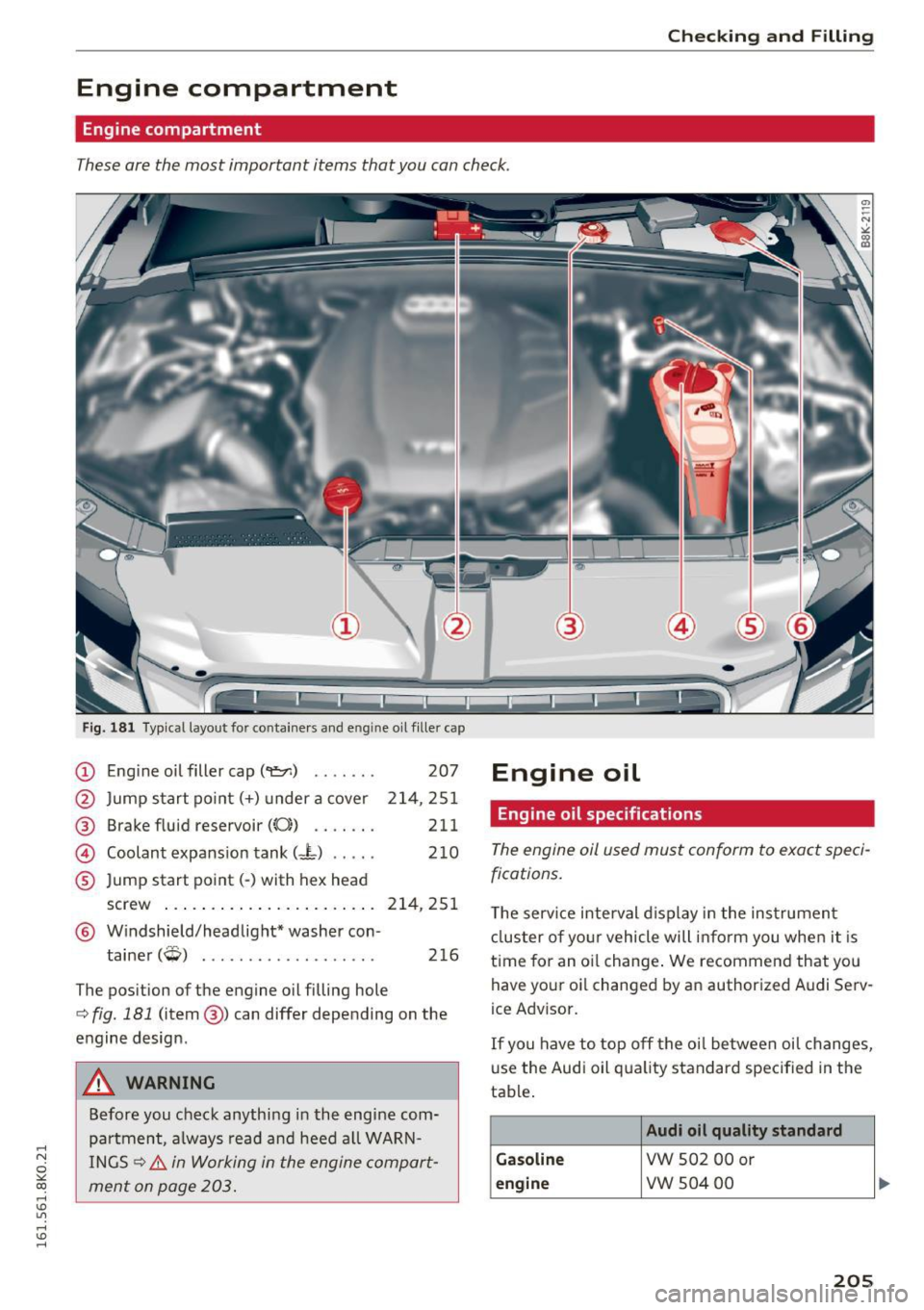
These are the most important items that you can check.
Fig. 181 Typical layout for containers and e ngin e oil fille r cap
(D Eng ine o il filler cap (
@ Brake fluid reservoir
((0) ...... .
@ Coolant expansion tank (- L) .... .
® Jump start point( -) with hex head 207
214,251
211 210
screw . . . . . . . . . . . . . . . . . . . . . . . 214, 251
@ Windshield/headlight* washer con-
tainer
(W) . . . . . . . . . . . . . . . . . . . 216
The position of the engine oil filling hole
c:> fig. 181 (item @) can differ depending on the
engine design .
A WARNING
Before you check anything in the engine com
partment, always read and heed all WARN
INGS
c:> &. in Working in the engine compart
ment on page 203.
Engine oil
Engine oil specifications
The engine oil used must conform to exact speci
fications.
The service interval display in the instrument
cluster of your vehicle will inform you when it is
time for an oi l change . We recommend that you
have your oi l changed by an authorized Audi Serv
ice Advisor.
If you have to top off the oil between oil changes,
use the Audi oil quality standard specified in the
table .
Audi oil quality standard
Gasoline
VW 502 00 or
engine vw 504 00
205