turn signal AUDI A4 2016 User Guide
[x] Cancel search | Manufacturer: AUDI, Model Year: 2016, Model line: A4, Model: AUDI A4 2016Pages: 278, PDF Size: 70.26 MB
Page 111 of 278

.... N
0
""' CX)
.... I.Cl U"I
.... I.Cl ....
-Improper reliance on the side assist system
can cause collisions and serious personal in
jury:
- Never rely only on side assist when chang
ing lanes.
- Always check rear view mirrors to make
sure that it is safe to change lanes.
- Side assist cannot detect all vehicles under
all conditions- danger of accident!
- Please note that side assist indicates there
are approaching vehicles, or vehicles in your
blind spot, only after your vehicle has
reached a driving speed of at least 19 mph
(30 km/h).
- In certain situations, the system may not
function or its function may be limited. For
example:
- if vehicles are approaching or being left
behind very quickly. The display may not
turn on in time.
- in poor weather conditions such as heavy
rain, snow or heavy mist.
- on very wide lanes, in tight curves or if
there is a rise in the road surface. Vehicles
in the adjacent lane may not be detected
because they are outside of the sensor
range.
(D Note
The sensors can be displaced by impacts or
damage to the bumper, wheel housing and
underbody. This can affect the system. Have
your authorized Audi dealer or authorized
Audi Service Facility check their function.
(D Tips
-If the window glass in the driver's door or
front passenger's door has been tinted , the
display in the exterior mirror may be misin
terpreted.
- For Declaration of Compliance to United
States FCC and Industry Canada regulations
¢page 261.
Audi side assist
Activating and deactivating
Applies to vehicles: with A udi side ass ist
Fig. 127 Driver 's do or: Sid e assis t button
.,. Press the button ¢ & in General information
on page 108
to switch the system on/ off . The
LED in the button turns on when side assist is
switched on .
Adjusting the display brightness
Applies to vehicles: with Audi side assist
The signal brightness can be set in the radio or
MM!*.
.,. Select: !CAR ! function button> Audi side assist .
.,. Select: I CAR I function button > Car systems*
control button > Driver assist > Audi side as
sist.
The display brightness adjusts automatically to
the brightness of the surroundings, both in the
information and in the warning stage . In very
dark or very bright surroundings, the display is
already set to the minimum or maximum level by
the automatic adjustment. In such cases, you
may notice no change when adjusting the bright
ness, or the change may only be noticeable once
the surroundings change.
Adjust the brightness to a level where the display
in the information stage will not disrupt your
view forward. If you change the brightness, the
display in the exterior mirror will briefly show the
brightness level in the information stage. The
brightness of the warning stage is linked to the
brightness in the information stage and is adjust
ed along with the information stage adjustment.
Ill>
109
Page 116 of 278

Parking System
Parking System
Parking system
Appl ies to veh icles: w ith pa rk in g system
Different pork assist systems may be used for
parking or maneuvering, depending on the vehi
cle's features.
Parking system (rear )* :
For the parking system (rear), the aco ustic park
assist system is insta lled i n the rear of the vehicle
¢ page 114.
The rear parking assis t sys tem uses ultrason ic
sensors to determine the distance of the veh icle
from a detected obstacle . There are a tota l of
four sensors located on the rear b umpe r (two in
the middle and two on the sides).
Parking system (rear , with rear v iew
c a me ra)*:
For the parking system (rear, with rear view cam
era),
the rear acoustic park assist system is inte
grated in the rear of the ve hicle and the rear v iew
camera is integrated in the rear lid ¢
page 117.
The parking system (rear, with rear view camera)
uses ultrasonic sensors to determine the distance
of the vehicle from a detected obstacle. There are
a total of four sensors located on the rear bump
er (two in the middle and two on the sides).
A WARNING -
Make sure the sensors are not covered by
st ic ke rs, depos its o r any othe r obstr uctions as
i t may impa ir the sensor function. For infor
mation on clean ing, refe r to¢
page 193 .
Rear parking system
Rear acoustic park assist
App lies to veh icles : w ith pa rking system (rea r)
The rear acoustic pork assist warns you of obsta
cles or objects behind your car.
Description
The rear acous tic p arking assist system de ter
mines t he d istance o f the veh icle from an obsta -
114
cle using ultrasonic sensors . There are 4 sensors
in the rear bumper.
The range at whi ch the sensors s tart to measure
i s
abou t:
To the s ide 2 ft (0 .60 m)
Cente r rear 5.2 ft (1.60 m)
Activation
Acoustic parking assist is act ivated automatically
whe n
revers e gear is engaged. A brief tone con
firms that the system is a ctivated.
Warning tones
D istance warning is give n by warni ng tones wh ich
are generated by the rear signal generator . The
vo lume and the p itch of the warn ing tones can be
adjus ted in the M MI*
¢ page 115.
Rever sing
D istance warning when reversing starts when an
obstacle is detected in t he range of the parking
ass ist system . As the distance dec reases, the
time interva l between the audib le tones becomes
sho rter.
When the distance is less than 1ft (0 .30 m), the
tone becomes cont inuo us. At th is point you
shou ld stop backing up .
Please note that low objects already s ignalled by
a war ning can d isappear from the system's detec
tion range and wi ll not cont inue to be s ignalled .
If the distance to an obstacle remains the same,
the volume of the d istance warning is gradually
reduced after about 4 seconds (th is does not ap
ply i n the continous to ne range) . Approaching an
othe r obstacle will result in the distance warn ing
sounding at the normal volume aga in.
Malfunctions in the system
If a warning tone is audible for about five sec
o nds when you turn on the ignition, there is a
malfunction in the system . Have the prob lem
cor rected by you r authorized Audi dea le r.
Keep the sensors in the rear bumper clean and
free from ice so that the acoustic park ass ist sys -
tem can function properly . .,.
Page 120 of 278
Parking System
-You can change the volume and pitch of the
signals as well as the display ¢
page 120.
-What appears in the display is time-de
layed.
Reverse Parking
Applies to veh icles: with park ing system (rear, with rear view
camera)
Parking mode 1 can be used when parking in a
garage or parking space .
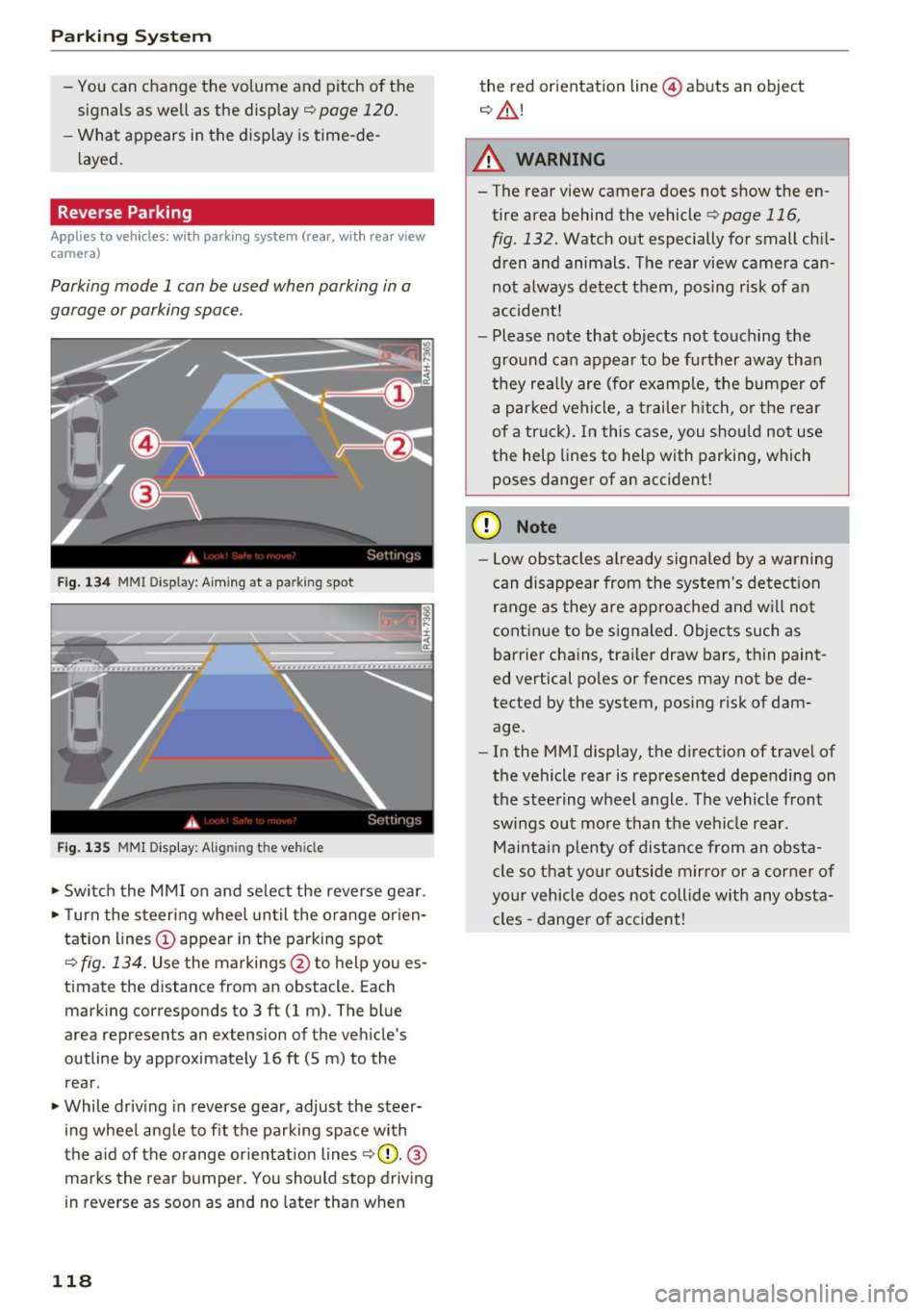
Fig. 134 MMI Di spla y: Aiming at a pa rk in g spot
Fig. 135 MM I Di splay: Alig ning the ve hicle
.-Switch the MMI on and select the reverse gear .
.- Turn the steering wheel until the orange orien
tation lines(!) appear in the parking spot
¢
fig. 134. Use the markings @to h elp you es
timat e the distance from an obstacl e. Each
marking corresponds to 3 ft (1 m). The blue
area represents an ex tension of the vehicle 's
outline by approximately 16
ft (5 m) to the
rear .
.- While driving in reverse gear, adjust the steer
ing wheel angle to fit the parking space with
the aid of the orange orientation lines
~ CD. @
marks the rear bumper. You should stop driving
in reverse as soon as and no later than when
118
the red orientation line@ abuts an object
¢ ,&. !
A WARNING
-The rear view camera does not show the en
tire area behind the vehicle
¢ page 116,
fig . 132.
Watch out especially for small chil
dren and animals. The rear view camera can
not always detect them, posing risk of an
accident!
- Please note that objects not touching the
ground can appear to be further away than
they really are (for example, the bumper of
a parked vehicle, a trailer hitch, or the rear
of a truck). In this case, you should not use
the help lines to help with parking, which
poses danger of an accident!
(D Note
- Low obstacles already signaled by a warning
can disappear from the system's detection
range as they are approached and will not
continue to be signaled. Objects such as
barrier chains, trailer draw bars, thin paint
ed vertical poles or fences may not be de
tected by the system , posing risk of dam
age .
- In the MMI display, the direction of travel of
the vehicle rear is represented depending on
the steering wheel angle. The vehicle front
swings out more than the vehicle rear .
Maintain plenty of distance from an obsta
cle so that your outside mirror or a corner of
your vehicle does not collide with any obsta
cles -danger of accident!
Page 122 of 278

Parking System
swings out more than the vehicle rear. Main
tain plenty of distance from an obstacle so
that your outside mirror or a corner of your
vehicle does not collide with any obstacles -
danger of accident!
(D Tips
The left or right orientation lines and surfaces
will be displayed, depending on the turn sig
nal being used.
Adjusting the display and warning tones
Applies to vehicles: w ith parking system (rear, with rear view
camera)
The display and warning tones ore adjusted in
the radio or MMI*.
.,. Select: ICARlfunction button> Parking system.
Or
.. Select: ICARI function button> Car systems*
control button > Driver assist > Parking aid.
Display
- Off -when the parking system is switched on,
only audible signals are given.
-On -when the parking system is switched on,
the picture from the rear view camera is dis
played.
Warning tones
- Rear volume -
rear sensor volume
-Rear frequency -rear sensor frequency
-Music volume while parking -when the park-
ing system is switched on, the volume of the
active audio source is lowered.
The newly adjusted value is briefly heard from
the signal generator. The settings are automati
cally stored and assigned to the remote control
key.
A WARNING
- Always make sure that the volume and fre quency of the warning tones is adjusted so
that you can easily hear the acoustic dis
tance signal even if the radio is playing, the
air-conditioner blower is on High or there is
a high level of outside noise.
120
- Check the settings whenever someone else
has driven the vehicle before you.
@ Tips
-The warning tones can also be adjusted di
rectly from the rear view camera image.
Simply press the Settings* control button.
- Changed settings are activated when park
ing assist is switched on again.
Error messages
Applies to vehicles: with parking system (rear, with rear view
camera)
If a warning tone is audible for about five sec
onds when you turn on the ignition, there is a
malfunction in the system. Have the problem
corrected by your authorized Audi dealer .
Keep the sensors in the rear bumper clean and
free from ice so that the acoustic park assist sys
tem can function properly.
Page 270 of 278
Index
K
Key........... .................. ..... 32
Battery replacement . . . . . . . . . . . . . . . . . . 33
Check light . . . . . . . . . . . . . . . . . . . . . . . . . . 33
E mergency key . . . . . . . . . . . . . . . . . . . . 32, 82
Ignition/engine on/off . . . . . . . . . . . . . . . . 80
Key replacement . . . . . . . . . . . . . . . . . . . . . 32
Mechanical key . . . . . . . . . . . . . . . . . . . . 32, 33
removing . . . . . . . . . . . . . . . . . . . . . . . . . . . 82
un locking/locking . . . . . . . . . . . . . . . . . 34, 36
Kick-down . . . . . . . . . . . . . . . . . . . . . . . . . . . . 95
L
Lane Change Assistant
refer to side assist . . . . . . . . . . . . . . . . . . . 10 7
LATCH . . . . . . . . . . . . . . . . . . . . . . . . . . . . . . 171
Description . . . . . . . . . . . . . . . . . . . . . . . . . 172
Installing a child restraint......... .... 172
Location . . . . . . . . . . . . . . . . . . . . . . . . . . . 171
Mounting and releasing the anchorage
hook . . . . . . . . . . . . . . . . . . . . . . . . . . . . . . 172
Launch Control Program . . . . . . . . . . . . . . . . 95
Leather care/cleaning . . . . . . . . . . . . . . . . . 196
Leaving home . . . . . . . . . . . . . . . . . . . . . . . . . 49
Left hand dr ive . . . . . . . . . . . . . . . . . . . . . . . . 50
Lifting jack . . . . . . . . . . . . . . . . . . . . . . . . . . 242
Light adaptive light . . . . . . . . . . . . . . . . . . . . . . . . 48
Coming/Leaving home......... .. .. .... 49
Daytime running lights . . . . . . . . . . . . . 48, 49
Exterior lighting . . . . . . . . . . . . . . . . . . . . . . 49
Fog lights/rear fog light(s) . . . . . . . . . . . . . 48
Interior/reading lights . . . . . . . . . . . . . . . . 51
L ow beam .. .. .... ........... .. .. .. .. 48
Rear fog lights .. .. .. .. .. .. .. .. .. .. .. . 48
Side marker lights . . . . . . . . . . . . . . . . . . . . 48
Travel mode . . . . . . . . . . . . . . . . . . . . . . . . . 50
Light/rain sensor Headlights . . . . . . . . . . . . . . . . . . . . . . . . . . 48
I ntermittent (w indshield wipers) . . . . . . . . 54
Sensor defective . . . . . . . . . . . . . . . . . . . . . . 21
Lighting Exterior . . . . . . . . . . . . . . . . . . . . . . . . . . . . . 48
Interior . . . . . . . . . . . . . . . . . . . . . . . . . . . . . 51
268
Lights
Emergency flashers . . . . . . . . . . . . . . . . . . . 50
High beam . . . . . . . . . . . . . . . . . . . . . . . . . . 49
Turn signals . . . . . . . . . . . . . . . . . . . . . . . . . 49
Locking Rear lid . . . . . . . . . . . . . . . . . . . . . . . . . . . . . 37
Locking/unlocking at the lock cylinder . . . . . . . . . . . . . . . . . . . . 36
by remote control . . . . . . . . . . . . . . . . . . . . 34
with the central lock ing switch . . . . . . . . . . 35
with the convenience key. . . . . . . . . . . . . . . 34
Low beams . . . . . . . . . . . . . . . . . . . . . . . . . . . 48
Lower anchorage locator button 172
Luggage compartment Cargo net . . . . . . . . . . . . . . . . . . . . . . . . . . . 71
Cover........ ... .. .. ................ 69
Enlarging . . . . . . . . . . . . . . . . . . . . . . . . . . . 69
Floor . . . . . . . . . . . . . . . . . . . . . . . . . . . . . . . 75
Lid . . . . . . . . . . . . . . . . . . . . . . . . . . . . . . . . . 37
Loading . . . . . . . . . . . . . . . . . . . . . . . . . . . . 126
Partition net . . . . . . . . . . . . . . . . . . . . . . 70, 71
Pass-through . . . . . . . . . . . . . . . . . . . . . . . . 7 4
Reversible mat . . . . . . . . . . . . . . . . . . . . . . . 73
Securing attachments . . . . . . . . . . . . . . . . . 73
Ski sack . . . . . . . . . . . . . . . . . . . . . . . . . . . . . 74
Storing cargo correctly . . . . . . . . . . . . . . . 126
Tie-downs . . . . . . . . . . . . . . . . . . . . . . . 72, 128
Valet parking . . . . . . . . . . . . . . . . . . . . . . . . 44
Lumbar support . . . . . . . . . . . . . . . . . . . . . . . 60
M
Maintenance . . . . . . . . . . . . . . . . . . . . . . . . . 258
Malfunction Indicator Lamp (MIL) . . . . . 20, 29
Manua l transmiss ion . . . . . . . . . . . . . . . . . . . 90
Mechanical key . . . . . . . . . . . . . . . . . . . . . 32, 33
Memory function . . . . . . . . . . . . . . . . . . . . . . 63
Mileage Average . . . . . . . . . . . . . . . . . . . . . . . . . . . . 24
Instantaneous . . . . . . . . . . . . . . . . . . . . . . . 24
Mirrors Compass ........ ... ............. .... 57
dimming .. .. .. .. .. .. ... .. ..... ... .. . 52
Exterior mirrors . . . . . . . . . . . . . . . . . . . . . . 51
Vanity mirrors . . . . . . . . . . . . . . . . . . . . . . . 53
Monitoring the Advanced Airbag System . . 148
Page 274 of 278
Index
Starting from rest . . . . . . . . . . . . . . . . . . . . . . 86
Starting off with a trailer . . . . . . . . . . . . . . . . 86
Starting the engine . . . . . . . . . . . . . . . . . 80, 83
Steer ing
L ocking the steering . . . . . . . . . . . . . . . . . . 80
also refer to Electro-mechanical power as-
sist . . . . . . . . . . . . . . . . . . . . . . . . . . . . . . . 181
Steering wheel
Adjusting steering column . . . . . . . . . . . . . 80
Indicator light . . . . . . . . . . . . . . . . . . . 18, 181
Steps for determining correct load limit . . . 231
St . th ·
opping e engine . . . . . . . . . . . . . . . . . 82, 84
Storage . . . . . . . . . . . . . . . . . . . . . . . . . . . . . . 65
Storage compartments . . . . . . . . . . . . . . 66, 75
S tronic . . . . . . . . . . . . . . . . . . . . . . . . . . . . . . 90
Selector lever . . . . . . . . . . . . . . . . . . . . . . . . 91
S tronic transmission
Emergency release . . . . . . . . . . . . . . . . . . . . 97
La unch Control Program . . . . . . . . . . . . . . . 95
Sunroof . . . . . . . . . . . . . . . . . . . . . . . . . . . . . . 42
also refer to Sliding/tilting sunroof 42, 43
Sun shades Rear doors 53,54
Rear window . . . . . . . . . . . . . . . . . . . . . . . . . 54
Sun visors . . . . . . . . . . . . . . . . . . . . . . . . . . . . 53
Symbo ls
refer to Warning/indicator lights . . . . . . . . 13
T
Tachometer . . . . . . . . . . . . . . . . . . . . . . . . . . . 11
Technical data . . . . . . . . . . . . . . . . . . . . . . . . 255
Technical modifications . . . . . . . . . . . . . . . . 260
Tether anchors . . . . . . . . . . . . . . . . . . . . . . . 173
Tether strap ..... ................ .... 173
Tie-downs . . . . . . . . . . . . . . . . . . . . . . . . 72, 128
tiptronic . . . . . . . . . . . . . . . . . . . . . . . . . . . . . 90
Automatic Shift Lock (ASL) . . . . . . . . . . . . . 92
Driving . . . . . . . . . . . . . . . . . . . . . . . . . . . . . 92
Emergency mode . . . . . . . . . . . . . . . . . . . . . 96
Manual shift program . . . . . . . . . . . . . . . . . 94
Selector lever . . . . . . . . . . . . . . . . . . . . . . . . 91
Tires .. ...... .. .. .................... 217
Low aspect ratio tires . . . . . . . . . . . . . . . . 233
Replacing . . . . . . . . . . . . . . . . . . . . . . . . . . 240
272
Service life . . . . . . . . . . . . . . . . . . . . . . . . . 225
Tire pressure . . . . . . . . . . . . . . . . . . . 227, 236
Tire pressure monitoring system . . . . . . . 235
Tire pressure table . . . . . . . . . . . . . . . . . . . 228
Treadwear indicators . . . . . . . . . . . . . . . . . 22S
Unidirectional .. ... ... ..... .......... 219
Uniform tire quality grading . . . . . . . . . . . 234
Tires and wheels Glossary of tire and loading terminology . 219
Tires and vehicle load limits . . . . . . . . . . . 229
Tool kit . . . . . . . . . . . . . . . . . . . . . . . . . . . . . 237
Torn or frayed safety belts . . . . . . . . . . . . . . 132
Towing Front eyelet . . . . . . . . . . . . . . . . . . . . . . . . 252
Rear eyelet . . . . . . . . . . . . . . . . . . . . . . . . . 253
Tow trucks . . . . . . . . . . . . . . . . . . . . . . . . . 252
TPMS (tire pressure monitoring system) . . . 235
Trailer mode . . . . . . . . . . . . . . . . . . . . . . . . . 190
Notes . . . . . . . . . . . . . . . . . . . . . . . . . . . . . 192
Trailer towing Operating instructions. ..... ....... ... 190
Technical requirements ........... 190, 191
Transmission 6-speed manual transmission . . . . . . . . . . . 90
Transmission ma lfunction (indicator light) . . 96
Transport Canada . . . . . . . . . . . . . . . . . . . . . 129
Travel mode . . . . . . . . . . . . . . . . . . . . . . . . . . SO
Tr ip computer
Fuel consumption . . . . . . . . . . . . . . . . . . . . 24
Mileage...... ... .. .. ................ 24
s· 1 t · 1ng e-rip memory . . . . . . . . . . . . . . . . . . . 24
Total-trip memory . . . . . . . . . . . . . . . . . . . . 24
Tr ip odometer . . . . . . . . . . . . . . . . . . . . . . . . . 12
Trunk
refer to Luggage compartment . . . . . . 69, 126
Trunk escape handle . . . . . . . . . . . . . . . . . . . . 40
Trunk lid
refer to Rear lid .. .. .... ........... 37 ,38
Turn signals . . . . . . . . . . . . . . . . . . . . . . . . . . 49
Warning/indicator lights . . . . . . . . . . . . . . . 22
u
Unfastening safety belts
13S
Uniform tire quality grading . . . . . . . . . . . . 234
Unlocking Rear lid . . . . . . . . . . . . . . . . . . . . . . . . . . . . . 37