warning lights AUDI A4 2016 Owner's Manual
[x] Cancel search | Manufacturer: AUDI, Model Year: 2016, Model line: A4, Model: AUDI A4 2016Pages: 278, PDF Size: 70.26 MB
Page 87 of 278
.... N
0
""' CX)
engine can only be star ted with the se lector in
these positions .
!I Is the key in the v ehicle?
This message appears if the master key is re
moved from the vehicle with the engine run ning .
If the maste r key is no longer in the veh icle, you
cannot swi tch on the ignition after stopping the
engine and yo u also cannot start the engine
again. Moreover, you cannot lock the vehicle
from the outside with the key .
Shift to P otherwise vehicle can roll away . Door s
do not lo ck if l ever i s not in
P.
This message appears fo r safety reasons a long
with a warning signal. It appears if the selec to r
l eve r fo r th e automatic transmission is not in the
P posit ion when switching off the ignition . M ove
the selector leve r to the P position, otherwise the
ve hicle is not secured against rolling away. You
also cannot lock the vehicle using the locking button* on the door handle or using the remote
key.
Con venien ce key d efectiv e! Use ignition lo ck
This message appea rs if the engine mus t be
s t arted or stopped us ing t he igni tion key and no t
the
! START ENGINE STOPI button .
Electromechanical
parking brake
Operation
The electromechanical parking brake replaces
the hand brake.
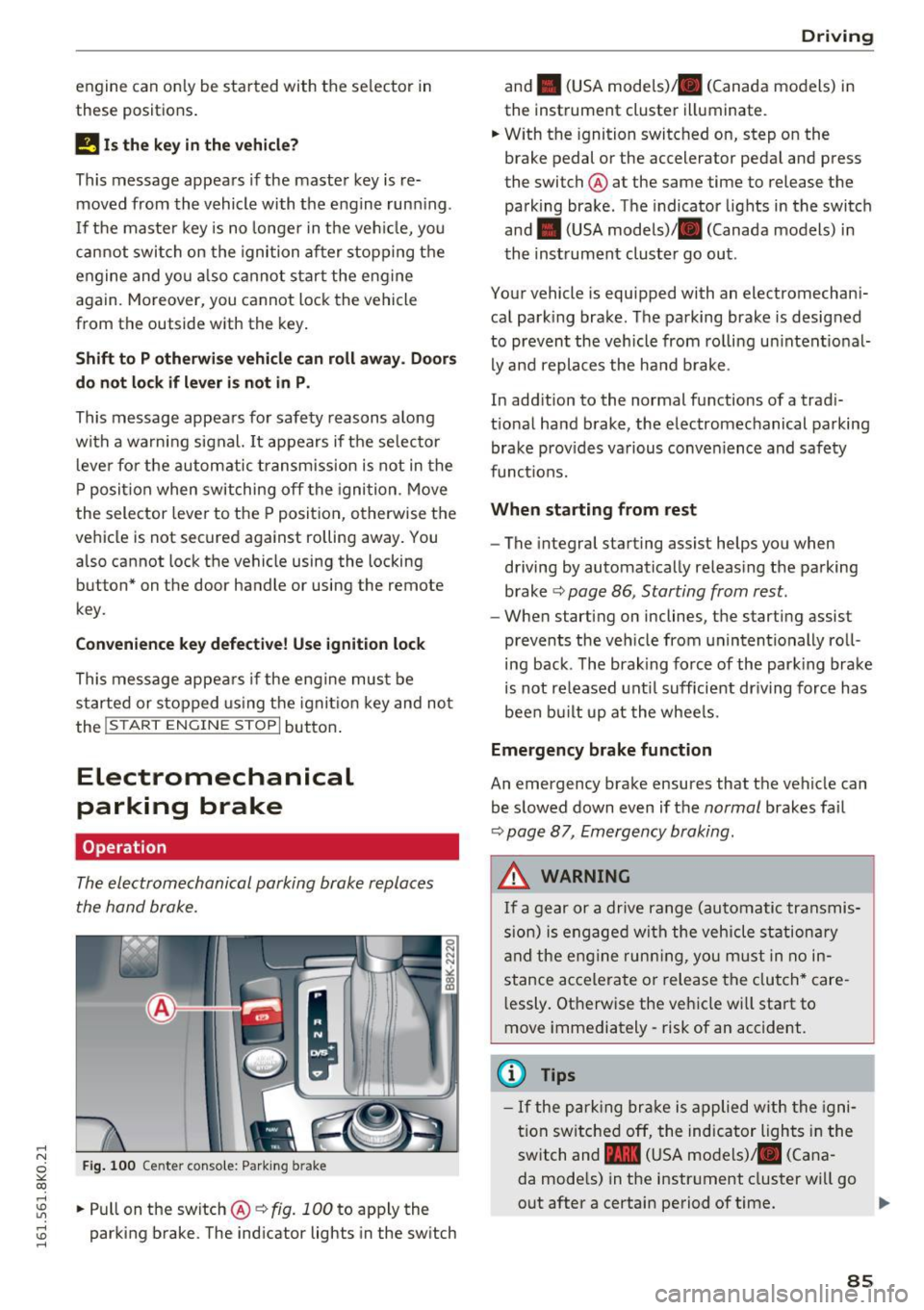
Fig . 100 Ce nter conso le: Park ing b rake
....
~ .. Pull on the switch@~ fig. 100 to apply the
~ parking brake. The ind icator lights in the sw itch ....
D rivi ng
and . (USA mode ls)/ . (Canada models) in
the instrument cluster illuminate.
.. W ith the ignition switc hed on, step on the
brake pedal or the accelerator pedal and press
the switch @ at the same time to release the
parking brake . The indicator lights in the switch
and . (USA models)/ . (Canada models) in
the instrument cluster go out .
Your vehicle is equipped with an electromechani
cal park ing brake. The parking brake is designed
to prevent the vehicle from rolling un intent ional
ly and replaces the ha nd b rake .
In add ition to the normal functions of a trad i
t ional ha nd brake, the electromechanical parking
brake prov ides va rious conven ience and safety
funct ions.
When starting from rest
- The integral starting assist helps you when
driving by automatically releas ing the parking
brake ~
page 86 , Starting from rest.
- When start ing on inclines, the starting assist
prevents the veh icle from unintentionally roll
ing back . T he brak ing force of the park ing brake
is not re leased unt il sufficient dr iving force has
been bu ilt up at the whee ls.
Emergency brake function
An emergency brake ensures that the veh icle can
be slowed down even if the
normal brakes fa il
~ page 8 7, Emergency braking .
A WARNING
If a gear or a drive range (automatic transmis
s ion) is engaged wi th the vehicle stationa ry
a nd the engine runn ing, you must in no in
stance acce lera te or release the clutch* care
l essly. Otherwise the vehicle wi ll sta rt to
move immediately- risk of an accident.
(1) Tips
- If the pa rk ing br ake is a pplied with the igni
tion swi tche d off, the indicator lights i n the
switch and -(USA models) . (Cana
da mode ls) in the instr ument cluster wi ll go
out after a certain period of time .
85
Page 91 of 278
-For reasons of safety, cruise control should
not be used in the city, in stop-and-go traf
fic, on twisting roads and when road condi
t ions are poor (such as ice, fog, gravel,
heavy ra in and hydroplan ing) -risk of acci
dent .
- Turn
off the cruise control temporar ily when
enter ing turn lanes, h ighway exit lanes o r in
construction zones.
- Please note that inadvertently "rest ing"
your foot on the accelerator pedal causes
the cruise control not to brake. This is be
cause the cruise cont rol is overridden by the
dr iver's acceleration.
- If a brake system ma lf u nction such as over
heating occu rs when the c ruise contro l sys
tem is switched on, the braking function in
the system may be switched
off . The other
cruise contro l functions remain active as
long as the indicator light
[lj;(i )~i~ (US mod
els)/ .. (Canadian models) is on .
(D Tips
-Vehicles with manual transmission: You can
attain the set speed only if the gear that is
currently engaged will allow it, or if it does
not tax the engine and allows it to run
smooth ly. Therefore sh ift into a higher or
lower gear in a timely ma nner.
- The brake lights illuminate as soon as the
brakes apply automatically .
Changing speed
.,. To inc rease/decrease the speed in increments,
tap the lever in the
0 10 direction r:!> page 88,
fig. 102.
.,. To inc rease/decrease the speed qu ickly , ho ld
the leve r in the
0 10 direction until the de
si red speed is displayed .
You can a lso press the accelerator pedal down to
increase yo ur speed, e.g. if you want to pass
someone . The speed you saved earlier wi ll re -
,.... sume as soon as you let
off of the acce lerator N
~ pedal.
co
I f, however, you exceed your saved speed by
6 mph
( 1 0 km/h) for longer than 5 minutes, the
D riv ing
cruise contro l wi ll be turned off temporarily. The
green symbol in the display turns white. The
saved speed remains t he same.
Presetting your speed
You can preset your desired speed while the vehi
cle is not moving.
.,. Switch on the ign ition.
.,. Pull lever into position
(D r:!> page 88, fig . 102.
.,. Press the lever in the 0 or 0 direction to in-
crease or decrease your speed.
.,. Release the lever to save that speed.
This function makes it possible, for example, to save the speed you want before driving on the
highway . Once on the highway, activate the
cruise contro l by pull ing the lever toward
(D .
Switching off
Temporar y de acti vation
.,. Press the brake pedal, or
.,. Manual transmission: Keep the clutch pedal
pressed down
longer, or
.,. Press the lever into position @ (not clicked into
place)
~ page 88, fig. 102, or
.,. Dr ive fo r longer than 5 m inutes a t more than
6 mph (1 0 km/h) above the s to red speed.
Switching off completely
.,. Press lever into posit ion @ (clicked into p lace),
or
.,. Switch the ignit ion
off .
T he speed you saved will be retained if the cruise
control has been switched off temporarily . To re
s u me the saved speed , let up on the bra ke or
cl utch pedal and pull the lever to position
(D .
Switch ing the ignition off erases the saved speed .
A WARNING
--
You should only return to the saved speed if it
i s not too fast for the current t raffic condi
tions -ris k of an accident!
89
Page 93 of 278
,....,
N
0
""' CX) ,....,
I.Cl U"I ,....,
I.Cl ,....,
tiptronic transmission
In the tiptron ic tr ansmission, power is transfer
red by a torque converter.
Selector lever positions
Applies to vehicles: with multitronic/S tronic/tiptronic
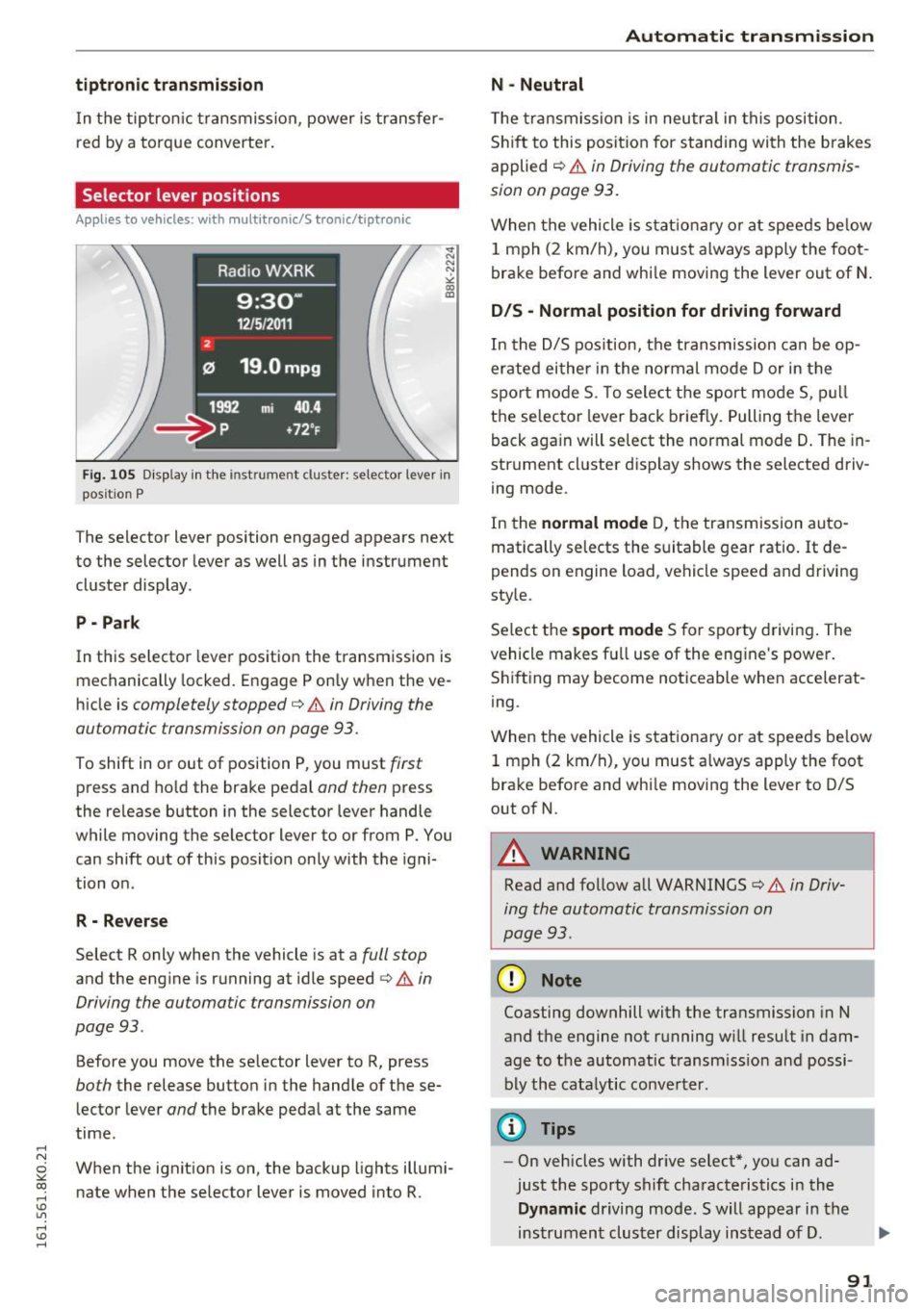
Fig. 105 Display in the instrume nt clus ter: selector lever in
pos it io n P
The selector lever position engaged appears next
to the selector lever as well as in the instrument
cluster display .
P • Pa rk
In this selector lever pos ition the transmission is
mechanically locked. Engage P only when the ve
hicle is
completely stopped¢ A in Driving the
automatic transmission on page 93.
To shift in or out of position P, you must first
press and ho ld the brake pedal and then press
the re lease button in the selector lever handle
while moving the selector lever to or from P. You can shift out of this position only with the igni
tion on .
R - Reverse
Select R only when the vehicle is at a full stop
and the engine is running at idle speed ¢&. in
Driving the automatic transmission on
page 93 .
Before you move the se lector lever to R, press
both the release button in the handle of these
lector lever
and the brake pedal at the same
time.
When the ignition is on, the backup lights illumi
nate when the selector lever is moved into R.
Automatic transmission
N -Neutral
The transmission is in neutra l in this position.
Shift to this position for stand ing with the brakes
applied
c:> A in Driving the automatic transmis
sion on page 93.
When the vehicle is stationary or at speeds below
1 mph (2 km/h), you must always apply the foot
brake before and whi le moving the lever out of N.
DIS -Normal position for driving forward
In the D/S position, the transmission can be op
erated either in the normal mode Dor in the
spo rt mode S. To select the sport mode S, pull
the selector lever back briefly. Pulling the lever
back aga in will select the normal mode D. The in
strument cluster display shows the selected driv
ing mode.
In the
normal mode D, the transmission auto
matically selects the suitable gear ratio.
It de
pends on engine load , vehicle speed and driving
style.
Se lect the
sport mode S for sporty driving. The
vehicle makes fu ll use of the engine 's power.
Shifting may become noticeable when accelerat
ing.
When the vehicle is stationary or at speeds be low
1 mph (2 km/h), you must always apply the foot
brake before and whi le moving the lever to D/S
out of N.
A WARNING
-Read and follow all WARNINGS¢ & in Driv-
ing the automatic transmission on
page 93 .
(D Note
Coasting downhill with the transmission in N
and the engine not running w ill result in dam
age to the automatic transmiss ion and possi
bly the catalytic converter.
@ Tips
-On vehicles with dr ive select*, you can ad
just the sporty shift characteristics in the
Dynamic driving mode.Swill appear in the
instrument cluster display instead of D.
91
Page 95 of 278
..... N
0 ::..:: co .....
tor lever handle, select the desired selector lev
er position such as D/5 and release the button.
~ Wait briefly until the transmission has shifted
(you w ill fee l a slight movement) .
~ Remove your foot from the brake pedal and ac
celerate .
Stopp ing tem pora ril y
~ Keep the vehicle stationary using the braking
pedal, for example at traffic lights.
~ Do not press the accelerator pedal when doing
th is .
~ To prevent the vehicle from rolling when you
start driving, set the park ing brake when stop
ping on steep inclines ¢
,&.
~ The pa rking brake w ill release automatically
and the vehicle will start moving once you press
the accelerator pedal.
Stopping /park ing
If the se lecto r lever is not in the P position when
you open the d river 's door, the vehicle could roll.
The message
Tr an smi ssion: Car ma y roll! Shift
t o pa rk!
appears .
~ Press and hold the brake pedal unt il the vehicle
has come to a comp lete stop.
~ Apply the pa rking brake ¢ page 86, Parking .
~ Select the P selector leve r position ¢ .&,.
Stopp ing on an incline
~ Always press the brake peda l to hold the vehi
cl e in place and prevent it from "rolling back"
¢
,& . Do not try to prevent the vehicle from
"ro lling back" when a gear is engaged by in
c reasing the eng ine speed ¢(!).
Starting on an incline
~ Activate the parki ng b rake .
~ With the driving gea r se lected, press the acce l
erator pedal caref ully. The parking b rake will
r e lease automatically if your seat belt is fas
tened .
Unde r ce rtain c ircumstances, suc h as dr iv ing in
the mountai ns, it may be usef ul to switch tempo
rari ly to the manua l shift program in order to ad-
Autom atic tran sm iss ion
just the gears to the driv ing conditions by hand
¢ page 94.
On slopes, act ivate the park ing brake first and
then move the selec to r l ever to the P posi tion .
T his prevents too m uch stress from being placed
on the locking mechanism .
Vehicles with mult itro nic tr ansmission : Your ve
hicle is equipped wi th
hill hold assist allowing
you to start whi le on an incl ine. The system is ac
tivated when the brake peda l is pressed down
and held
for a few second s. The brake pressure
will ho ld for
a momen t after the brake peda l
loosens to prevent the veh icle from rolling back
wards while starting up .
A WARNING
--The vehicle can also ro ll when the eng ine is
stopped .
- Unintended vehicle movement can cause se rious injury .
- Never leave your veh icle with the engine
running while in gear .
If you must leave
your ve hicle when the eng ine is running, ac
tivate t he pa rking brake and move the selec
tor lever to P.
- Power is still transmi tted to the wheels
when the engine is runn ing at idle. To pre
vent the vehicle from "creepi ng", yo u m ust
keep your foot on the brake when the en
gine is running and the selector lever is in D/
Sor R or "tiptronic" mode is se lected .
- Do not press the acce le ra t or peda l when
changing the se lector lever position while
the vehicle is stationary and the engine is
running.
- Never sh ift into R or P whi le driving.
- Before driving down a steep slope, reduce your speed and sh ift into a lower gear w ith
"t i ptronic".
- Do not ride the brakes or press the brake
pedal too often or too long when driving
down a hi ll. Constant brak ing causes the
brakes to overheat and substant ially re
duces brak ing performance, increases brak
ing d istance or causes comp lete failure of
the brake system.
~
93
Page 123 of 278
..... N
0 ::..:: co ,....,
Basics
Safe driving habits
Please remember -safety first!
This chapter contains important information,
tips, instructions and warnings that you need to
read and observe for your own safety, the safety
of your passengers and others . We have summar
ized here what you need to know about safety
belts, airbags, child restraints as well as child
safety. Your safety is for us
priority number 1. Al
ways observe the information and warnings in
this section - for your own safety as well as that
of your passengers.
The information in this section applies to all
model versions of your vehicle. Some of the fea
tures descr ibed in this sections may be standard
equipment on some models, or may be optional
equipment on others. If you are not sure, ask
your authorized Audi dealer.
A WARNING
- Always make sure that you follow the in
structions and heed the WARNINGS in this
Manual. It is in your interest and in the in
terest of your passengers .
-
-Always keep the complete Owner's Litera
ture in your Audi when you lend or sell your
vehicle so that this important information
will always be available to the driver and
passengers.
- Always keep the Owner's literature handy so
that you can find it easily if you have ques
tions.
Safety equipment
The safety features are part of the occupant re
straint system and work together to help reduce
the risk of injury in a wide variety of accident sit
uations.
Your safety and the safety of your passengers
should not be left to chance. Advances in tech
nology have made a var iety of features available
to help reduce the risk of injury in an accident.
Driving safety
The following is a list of just a few of the safety
features in your Audi:
- sophisticated safety belts for driver and all pas-
senger seat ing pos itions,
- be lt force limiters for the front seats,
- belt pretensioners for the seats,
- head restraints for each seating position,
- front airbags,
- side airbags in the front seats,
- side curtain airbags,
- specia l LATCH anchorages for child restraints,
- adjustable steering column.
These individual safety features, can work to gether as a system to help protect you and your
passengers in a w ide range of accidents. These
features cannot work as a system if they are not
always correctly adjusted and correctly used.
Safety is everybody's responsibility!
Important things to do before driving
Safety is everybody's job! Vehicle and occupant
safety always depends on the informed and care
ful driver.
For your safety and the safety of your passen
gers,
before driving always:
.. Make sure that all lights and signals are operat
ing correctly.
.. Make sure that the tire pressure is correct.
.. Make sure that all windows are clean and afford
good visibility to the outside .
.. Secure all luggage and other items carefully
c:::>page 65.
.. Make sure that nothing can interfere with the
pedals .
.. Adjust front seat, head restraint and mirrors
correctly for your height.
.. Instruct rear seat passengers to adjust the
head restraints according to their height.
.. Make sure to use the right child restraint cor
rectly to protect children
c:::> page 158, Child
safety .
.. Sit properly in your seat and make sure that
your passengers do the same
c:::> page 59, Seats
and storage.
121
Page 181 of 278
..... N
0 ::..:: co .....
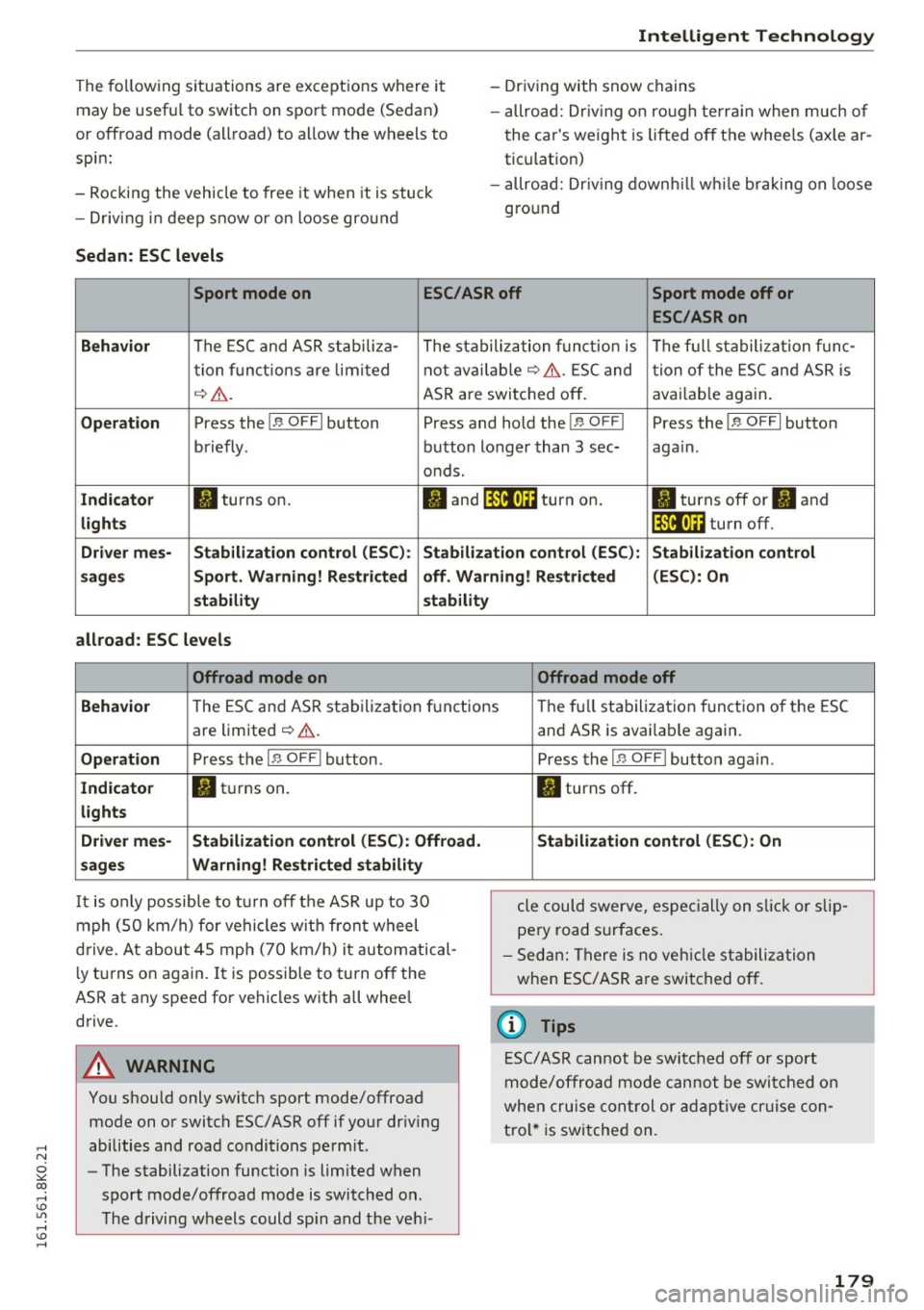
may be useful to switch on sport mode (Sedan)
or offroad mode (allroad) to allow the wheels to
spin:
- Rocking the vehicle to free it when it is stuck
- Driving i n deep snow or on loose gro und
Sedan : ESC levels
Intellig ent Technology
- Driving with snow chains
- allroad: Dr iv ing o n ro ugh te rra in when much of
the car's weight is lifted off the whee ls (axle ar
tic ulation)
- allroad: Dr iv ing down hill while brak ing on loose
gro und
Sport mode on ESC/ASR off Sport mode off or
ESC/ASRon
Behavi or
The ESC and ASR stabili za- The stabilization funct io n is The f ull stabilization f unc -
t ion f unct ions are lim ited not avai lab le
~ &. . ESC and tion of the ESC and ASR is
~ &. . ASR are switched off . avai
lab le aga in.
Op eration Press the!.$ OFFI button Press and hold the!.$ OFFI Press the!.$ OFFI button
briefly . button longer than 3 sec- aga in .
o nds.
Ind icato r II turns on. fl and It'll•)~~ turn on. II turns off or II and
lights It'll•)~~ turn off.
D river me s-Stabilization contr ol (ES C): Stabilization cont rol (ESC ): S tabilization control
s age s Sport. Warning! Re stricted off. W arning! Restricted (ESC
): On
s tability stabilit y
all road: ESC levels
Offroad mode on Offroad mode off
Behavio r
The ESC and ASR stabilization f unctions The fu ll stabiliza tion f unction of the ESC
are limited
¢ & .
Operation Press the I.$ OFF I button .
In d icato r fl turns on .
light s
Driv er me s- Stabi lization control (E SC): Offro ad .
sage s Warning! Re stri cted stabili ty
It is only possible to turn off the ASR up to 30
mph (50 km/h) for vehicles w it h front wheel
drive. At about 45 mph (70 km/h) it automatical
l y turns on again. It is possible to turn off the
ASR at any speed for vehicles with all whee l
drive.
A WARNING
You should only switch sport mode/offroad mode on or switch ESC/ ASR off if your dr iv ing
abilities and road conditions perm it .
- The stabilization function is limited when
sport mode/offroad mode is switched on .
The driving wheels could sp in and the veh i-
-
and ASR is avai lable again.
Press the I.$ OF FI button aga in .
II turns off.
Stabilizat ion control (ESC ): On
cle could swerve, espe cially on s lick o r slip
pery road surfaces.
- Sed an: There is no veh icle stabili zation
when ESC/ASR are switched off .
(D Tips
ESC/ASR cannot be switched off or sport
mode/offroad mode cannot be swi tched on
when cru ise cont rol or adapt ive cr uise con
tro l* is switched on.
179
Page 183 of 278
..... N
0 ::..:: co .....
the p urpose of clean ing the brake system
only if road conditions permit. Other road
users must not be put at risk - you may
cause an accident!
- Before descend ing a steep grade, reduce
speed and shift transm iss io n into a lower
gear or lowe r d riv ing range. Do not ride the
bra kes or hold the pedal down too long or
t oo often. This could ca use the bra kes to get
hot an d diminish brak ing efficiency.
- Do not "r ide t he b rakes" by resting your foot
on the pe dal when yo u do not inten d to
br ak e. This may cause the br akes to over
heat, p remat ure wea r and increased stop
ping distance.
- Under certa in climatic and operating condi
tions such as passing thro ugh water, driving
in heavy ra in or after washing the vehicle,
the effectiveness of the brakes can be re
duced. In w inte r, ice can acc umulate on the
brake pads, linings, discs and drums. Care
fully apply brakes for a test. Brakes will dry and ice coatings w ill be cleaned off after a
few careful b rake applica tions.
- Driv ing for an ex tended period of time on
salt-covered roads witho ut using your
bra kes can also affe ct bra king efficie ncy .
C le an off a ccumula ted s alt co ating from
bra ke discs and pads with a few caref ul
bra ke app lications.
- If you dam age the fro nt sp oiler, or if yo u in
st all a diff erent spoi le r, be sure the ai r flow
to the front brakes is not obstr ucte d. Othe r
wise the bra ke system could overheat reduc
ing the e ffectiveness of the entire b rake sys
tem.
- Failure of one brake circuit will impair the
brak ing capability resulting in an increased
stopp ing distance. Avoid driving the vehicle
and have it towed to the nearest authorized
Audi dealer or qualif ied workshop.
- Never let the veh icle roll to a stop w ith the
engi ne shut off .
-If the brake booster is not working, the
bra ke pedal m ust be pressed conside rably
harder to make up for the lac k of booster
assista nee .
Intellig ent Technology
Electro-mechanical
power assist, dynamic
steering
The ele ctro-mechanical power a ssist helps the
driver when steering .
P ower s teer ing adapts electronically based on
t h e veh icle spee d.
Indicator lights and messages
• Steering defective! Do not drive vehicle!
If this indicator light turns on and stays on and
t hi s message appears, the power steering may
have failed.
Do
not continue driving. See your author ized
Audi dealer or a qualified repair facility for assis
tance.
' :r, y Dynamic steering: System fault! You can
continue d riving
If the indic ator l igh t turns on and the message
appe ars, the steering may be more diffic ult to
move o r more sensitive than usu a l. T he steering
whee l may a lso be at an angle w hen d riving
straight .
Drive slowly to you r autho rized Audi dea le r or
qualified wo rks hop to have the malfunction cor
rected .
,T u Dynamic steering: initializing
If this drive r message appea rs and t he indicator
li ght is flashing on t he instrument pane l, dynam
ic s teer ing* is being re ini tialized. After s tarting
t h e engine, t he steer ing w heel w ill move sligh tly.
Re- ini tializa tion might be necessary if the s teer
ing wheel was moved hard to the left a nd right
whi le the vehicle was not moving . The display
goes out as soon as initialization is comp lete.
A WARNING ~
Have the dynam ic steeri ng* system malfunc -
tion repaired as soon as poss ible by an au
thor ized Audi dealer or qualified workshop -
r isk of acc ident!
181
Page 191 of 278
..... N
0 ::..:: co ,....,
lights and the license plate .
- Perform a brake test (especially after dr iving
t h rough water) .
& WARNING
-Be espec ially aware and attentive when driv
ing under difficult conditions. Damages to
the vehicle and injuries may occur when
dr iv ing at an excessive ly high speed or w ith
incorrect dr iving maneuvers.
- Always adjust your speed and handling to
the roads, terrain, traffic and weather con
ditions. Drive especially slow if offroad wit h
low v is ibility.
- Please note that the wheels can spin and
the vehicle can break away when the ESC
Off road Mode is switched off, especia lly
w he n t he roa d is slippery.
- Driv ing stabi lity is reduced in the ESC Off
road mode.
@) For the sake of the environment
Avoid harming the environme nt and take na
ture into conside ra tion .
(D Tips
Only drive where it is allowed and always stay
on t he p rovided roads and paths.
Driver messages
App lies to vehicles: allroad
There is only one right way to drive in difficult
conditions: slowly and with caution!
When driving offroad, observe the fo llowing:
.. Never dr ive the veh icle in te rrai n which is not
s ui tab le for the vehicle, o r which exceeds your
driving skills. Never ta ke any unnecessary risks!
.. Drive slowly and ca utiously!
.. Pay attention to the
ground clearance of yo ur
vehicle! This may vary depending on the load and compos it io n of the ground and the environ
me nt. The driver is therefore responsible for
deciding whether a vehicle can handle a specif ic
s itu atio n.
Driving and the envir onment
.. Activate the ESC-Offroad-Mode ¢ page 178 as
needed .
Difficult terrain
Never dr ive in areas t hat are not fam ilia r to you
and dr ive slow ly when off road and be prepare d
and expect the unexpected (e .g. potho les, bould
ers, t ree stumps, etc.)
T o p reve nt the vehicle from bottom ing and avoid
damage to t he un derbody, you shou ld dr ive
straight ac ross seve re bumps in the ground w ith
on ly one side of the vehicle so tha t on ly two of
your whee ls cross the bumps .
Dr ive quickly th ro ugh sandy o r m ars hy off road
sections and do not stop, if at all possible .
Driving through water on roads
Read the informa tion on ¢ page 185.
189
Page 192 of 278
Trailer mod e
Trailer mode
Driving with a trailer
General information
Your Audi was designed primarily for passenger
transportation.
If you plan to tow a trailer, please remember that
the additional load will affect durability, econo
my and performance.
Trailer towing not only places more stress on the
vehicle, it also calls for more concentration from
the driver.
F or this reason, always follow the operating and
driving instructions provided and use common
sense.
Technical requirements
Tr aile r hitch
Use a weight-carrying hitch conforming to the
gross trailer weight. The hitch must be suitable
for your veh icle and trailer and must be mounted
securely on the vehicle's chassis at a technically
sound
location . Use only a trailer hitch with a re
movable ball mount . Always check w ith the t rail
er hitch man ufact urer to make su re that you are
using the co rrect hitch .
Do not use a bump er hit ch .
The hitch must be installed in such a way that it
does not interfere with the impact -absorbing
bumper system. No mod ificat ions should be
made to the vehicle exhaust and brake systems .
From t ime to t ime, check that a ll hitch mount ing
bolts rema in securely fastened.
When you are not tow ing a tra iler, remove the
tra iler hitch ba ll mount . This prevents the hitch
from caus ing damage shou ld your veh icle be
s truck from be hind ¢
,&..
Trailer brakes
If your trailer is equipped with a brak ing system,
check to be sure that it conforms to all regula
tions .
190
The trailer hydraulic brake system must not be
directly connected to the vehicle's hydraulic
brake system ¢&. .
Safety chains
Always use safety chains between you r vehicle
and the trailer.
Trailer lights
Traile r lights must meet all regulations . Be sure
to check w ith your author ized Audi dealer for cor
r ec t wiring , switches, and relays.
M irrors
If you are unable to see the traffic behind you us
ing the regular outs ide mirrors, then you
must in
stall extended mirrors . It is important that you
always have clear vision to the rear.
.&_ WARNING
- If a tra ile r has e lectr ica l brakes p lease no te
t hat these brakes are not activated by the
factory-fit ted contro l unit -risk of accident!
'
- After removing the trai ler hitch, do not
store it in your vehicle. In case of sudden
braking, the hitch co uld fly forward and in
jure you or yo ur passengers.
Operating instructions
Ma ximum traile r we ight
A trailer for your vehicle is limited to a typical
class 1 or class 2 trailer.
Trailer load distribution
Be sure the load in the trai ler is held securely in
place to p revent i t from shifting forward, back
ward or sideways.
Nev er allow a pa ssen ger to rid e in a trailer ¢ &.
in Driving instructions on page 191.
Engine cooling system
Towing a tra iler makes the engine work harder . It
i s important that the cooling system's perform
ance is up to the additional load. Make sure that
the cool ing system has enoug h fluid.
Page 193 of 278
..... N
0 ::..:: co ..... oJ) Lil
..... oJ) .....
Tire pressure
When tow ing a tra ile r, infl ate the tires of yo ur
ve hicl e to the co ld tire press ure listed under "Fu ll
l oad" on the label located on the driver's side B
pi llar (visib le when th e door is open). Inflate
tra ile r tir es to t railer and tire manufacture rs'
specifications.
Light s
The headlight settings should be checked wi th
the trai ler attached before driv ing
off . Check to
make sure both veh icle and trai ler lights are
wo rking prope rly .
Safety chains
Be s ure trai ler s afety chains are p ro p erly conne ct
ed from the trailer to the hitc h on the vehicle .
L eave enough slack in the chains to permit turn
ing corners . When you install safety cha ins, make
sure they w ill not drag on the road when yo u are
driving.
The chains s hou ld cross under the t railer tongue
to p revent it from dropp ing in case of separat ion
from t he hitc h.
Driving instructions
Driving with a trailer always requires extra core
and consideration.
To ob tain the best possible handling of vehicle
and trailer, please note the fo llowing :
.,. Do no t tow a lo ad ed t railer w hen yo ur car i tse lf
i s not lo ad ed.
.,. Be especia lly caref ul when passing ot he r
vehicles .
.,. Observe speed limits.
.,. Do not d rive at the maximum permissible
speed .
.,. Always apply brakes early .
.,. Moni to r th e temperature gauge .
Weight distribution
T owing a loaded trailer w ith an empty car res ults
in a high ly unstable distribution of weight . If this
cannot be avo ided, drive at very low speeds o nly
to avoid the risk of losing steering control.
Trailer mode
A "ba lanced" rig is easier to opera te and co ntrol.
This means that the tow vehicle sho uld be loaded
to the extent possib le and permissib le, w hile
keeping the trailer as light as possible under the
cir cumstances . Wheneve r poss ib le, transfer
some cargo to the luggage compartment of the
tow ve hicle while observing tongue load require
ments and vehicle loa ding consi de rations .
Speed
The higher the speed, the mo re diff icult it be
comes for the driver to control the r ig. Do not
drive at t he max imum permissib le speed. Reduce
you r sp eed even more if load, weathe r or wind
cond it ions are u nfavo rab le -pa rticularly when
go ing down hill.
Reduce vehicle speed
immediately if the trailer
shows the slightes t sign of sway ing .
Do not try
to stop the swaying by accelerating .
Observe speed limits . In some a reas, speeds fo r
vehicles towing trailers are lower tha n for regular
vehicles .
Always apply bra kes early . When d riving down
hill, shift into a lower gear to use the e ngine
braki ng effect to slow the vehicle . Use of the
brakes alone can cause them to overhea t and fa il.
Coolant temperature
The coo lant tempe rature gauge c:> page 10 m ust
be obse rved caref ully. If the needle moves close
to the upper end of the scale, reduce speed im
me diate ly and/or t urn
off th e a ir cond it io ne r .
If the coolant temperat ure warning light . in
t h e instr ument cluster starts flashing, pull
off
the road, stop and let the engine idle for about
two m inu tes to pre vent heat build -u p .
A WARNING ,.__ -
A nyone not prope rly restr ained in a moving
ve hicl e is at a m uch grea te r risk in an a cci
d ent. Never le t anyon e ride in your car w ho is
n o t pr ope rly we arin g th e res tra ints p ro vid ed
by Au di .
191