speed AUDI A4 2016 Owners Manual
[x] Cancel search | Manufacturer: AUDI, Model Year: 2016, Model line: A4, Model: AUDI A4 2016Pages: 278, PDF Size: 70.26 MB
Page 4 of 278
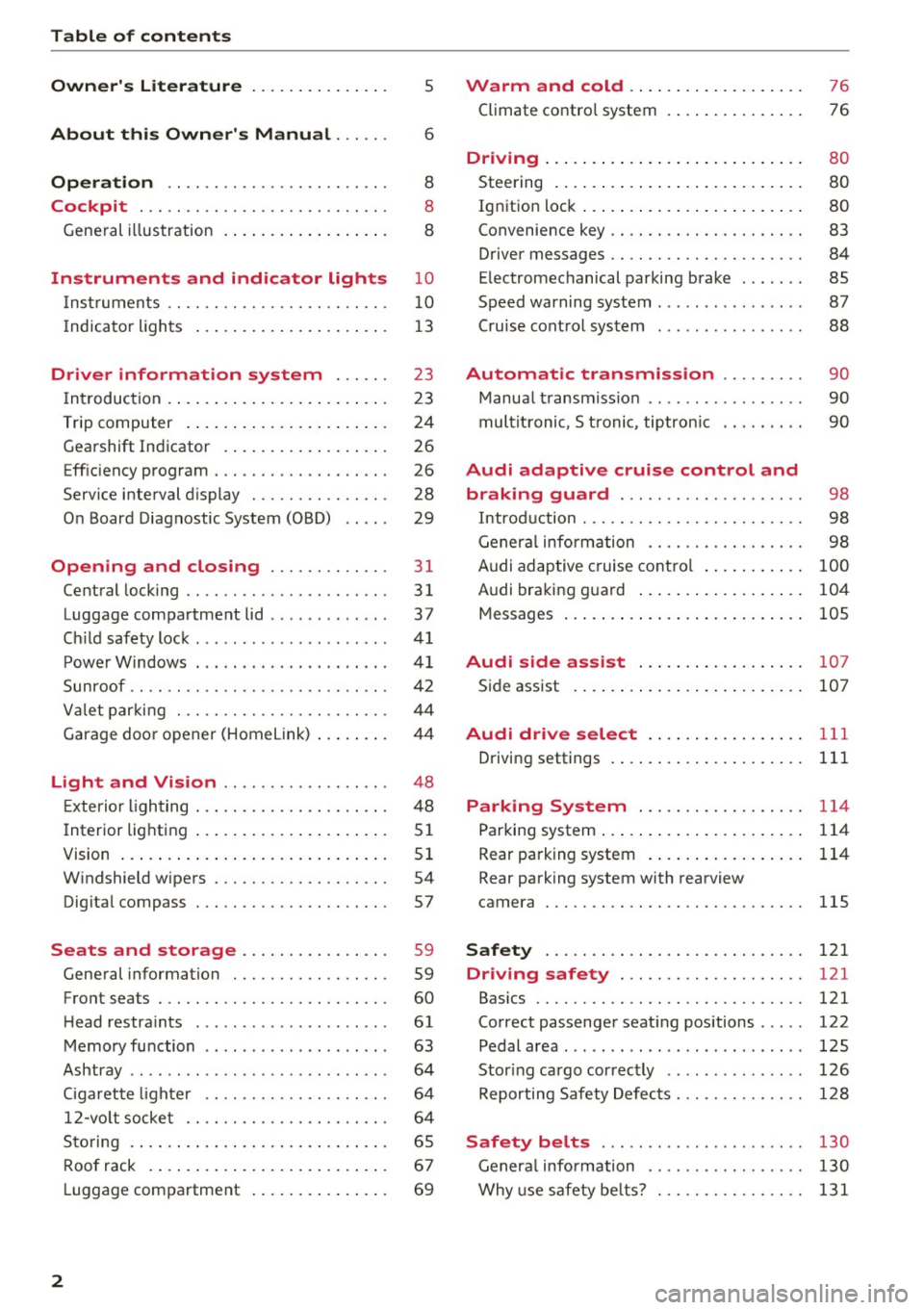
Table of contents
Owner's Literature
5
About this Owner's Manual . . . . . . 6
Operation . . . . . . . . . . . . . . . . . . . . . . . . 8
Cockpit . . . . . . . . . . . . . . . . . . . . . . . . . . . 8
General illustration . . . . . . . . . . . . . . . . . . 8
Instruments and indicator lights 10
I nstruments . . . . . . . . . . . . . . . . . . . . . . . . 10
I ndicator lights . . . . . . . . . . . . . . . . . . . . . 13
Driver information system . . . . . . 23
I n tr oduc tion . . . . . . . . . . . . . . . . . . . . . . . . 23
Trip computer . . . . . . . . . . . . . . . . . . . . . . 24
Gearshift Indicator . . . . . . . . . . . . . . . . . . 26
Eff iciency program . . . . . . . . . . . . . . . . . . . 26
Service interval display . . . . . . . . . . . . . . . 28
O n Board Diagnostic System (OBD) . . . . . 29
Opening and closing . . . . . . . . . . . . . 31
Central locking . . . . . . . . . . . . . . . . . . . . . . 31
Luggage compa rtment lid . . . . . . . . . . . . . 37
C hild safety lock . . . . . . . . . . . . . . . . . . . . . 41
Power Windows . . . . . . . . . . . . . . . . . . . . . 41
Sunroof .. .. .. .. .. . .......... .. .. .. . 42
Valet parking . . . . . . . . . . . . . . . . . . . . . . . 44
Garage door opener (Home link) . . . . . . . . 44
Light and Vision . . . . . . . . . . . . . . . . . . 48
E xterior lighting . . . . . . . . . . . . . . . . . . . . . 48
I nterior lighting . . . . . . . . . . . . . . . . . . . . . 51
V1s1on . . . . . . . . . . . . . . . . . . . . . . . . . . . . . 51
W indshield wipers . . . . . . . . . . . . . . . . . . . 54
Digital compass . . . . . . . . . . . . . . . . . . . . . 57
Seats and storage . . . . . . . . . . . . . . . . 59
General information . . . . . . . . . . . . . . . . . 59
Front seats . . . . . . . . . . . . . . . . . . . . . . . . . 60
H ead restra ints . . . . . . . . . . . . . . . . . . . . . 61
Memory function . . . . . . . . . . . . . . . . . . . . 63
Ashtray . . . . . . . . . . . . . . . . . . . . . . . . . . . . 64
Ciga rette light er . . . . . . . . . . . . . . . . . . . . 64
12 -vo lt socket . . . . . . . . . . . . . . . . . . . . . . 64
Storing . . . . . . . . . . . . . . . . . . . . . . . . . . . . 65
Roof rack . . . . . . . . . . . . . . . . . . . . . . . . . . 67
L uggage compartment . . . . . . . . . . . . . . . 69
2
Warm and cold .. .. ... . .. .... ... . .
Climate contro l system . ... .. .... ... . . 76
76
Dr1v1ng ..... .. .. .. .. .. ........... .. 80
Steering . . . . . . . . . . . . . . . . . . . . . . . . . . . 80
Ignition lock . . . . . . . . . . . . . . . . . . . . . . . . 80
Convenience key . . . . . . . . . . . . . . . . . . . . . 83
Driver messages . . . . . . . . . . . . . . . . . . . . . 84
E le ctromechanical parking brake . . . . . . . 8S
Speed warning system . . . . . . . . . . . . . . . . 87
Cru ise control system . . . . . . . . . . . . . . . . 88
Automatic transmission . . . . . . . . . 90
Manual transmission . . . . . . . . . . . . . . . . . 90
multitronic, S tronic, tiptronic . . . . . . . . . 90
Audi adaptive cruise control and
braking guard . . . . . . . . . . . . . . . . . . . .
98
Introduction . . . . . . . . . . . . . . . . . . . . . . . . 98
General informat ion . . . . . . . . . . . . . . . . . 98
Audi adaptive cruise control . . . . . . . . . . . 100
Audi braking guard . . . . . . . . . . . . . . . . . . 104
Messages . . . . . . . . . . . . . . . . . . . . . . . . . . 105
Audi side assist . . . . . . . . . . . . . . . . . . 107
Side assist . . . . . . . . . . . . . . . . . . . . . . . . . 107
Audi drive select . . . . . . . . . . . . . . . . . 111
Driving settings . . . . . . . . . . . . . . . . . . . . . 111
Parking System . . . . . . . . . . . . . . . . . . 114
Parking system . . . . . . . . . . . . . . . . . . . . . . 114
Rear parking system . . . . . . . . . . . . . . . . . 114
Rear parking system with rearview
camera
llS
Safety . . . . . . . . . . . . . . . . . . . . . . . . . . . . 121
Driving safety . . . . . . . . . . . . . . . . . . . . 121
Bas ics . . . . . . . . . . . . . . . . . . . . . . . . . . . . . 121
Correct passenger seat ing positions . . . . . 122
Pedal a rea . . . . . . . . . . . . . . . . . . . . . . . . . . 125
Stor ing ca rgo cor rectly . . . . . . . . . . . . . . . 126
Reporting Safety Defects. . . . . . . . . . . . . . 128
Safety belts . . . . . . . . . . . . . . . . . . . . . . 130
General information . . . . . . . . . . . . . . . . . 130
Why use safety belts? . . . . . . . . . . . . . . . . 131
Page 12 of 278
Instruments and indicator lights
Instruments and indicator Lights
Instruments
Instrument cluster and controls
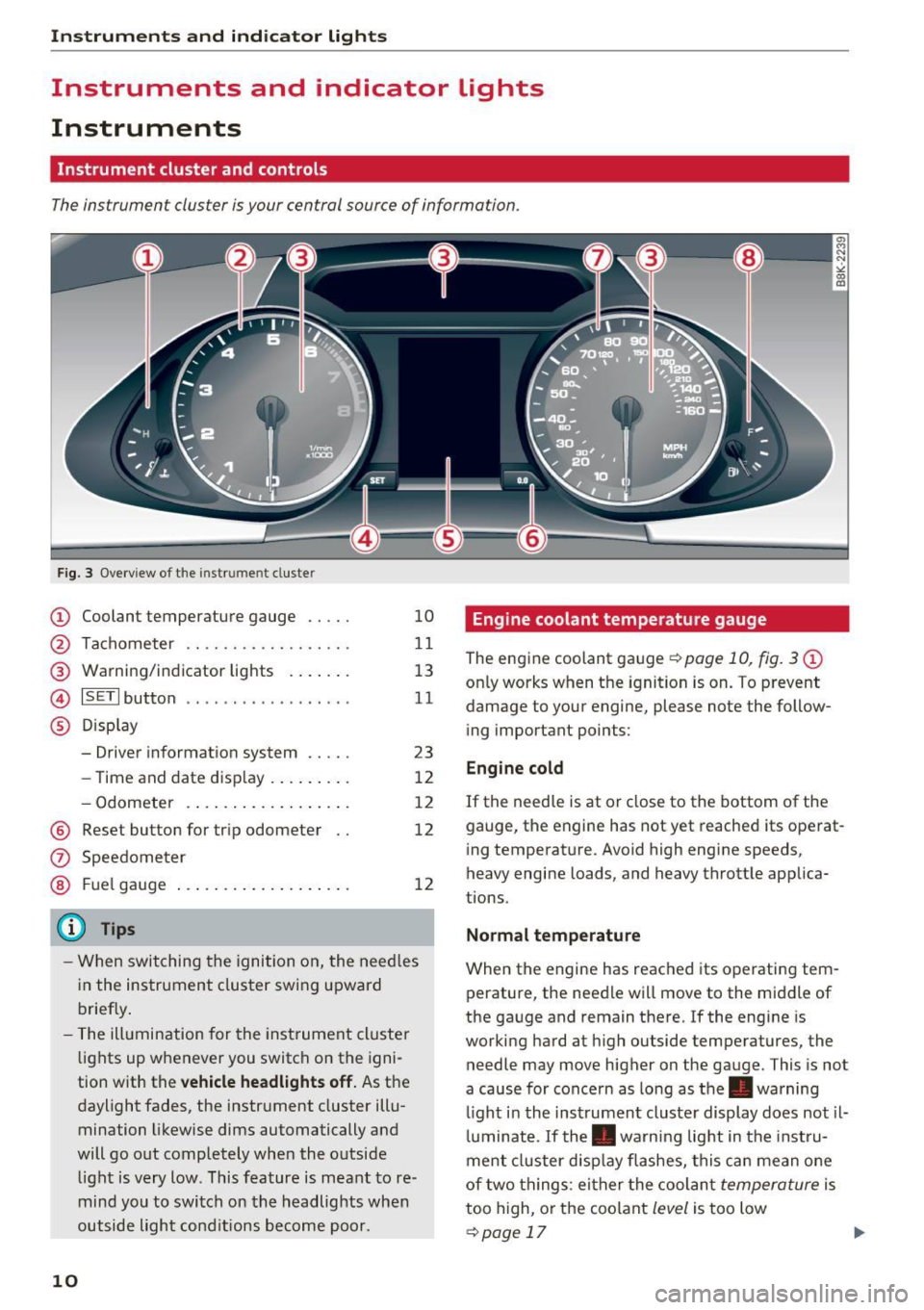
The instrument cluster is your central source of information.
Fig. 3 Overview of the instr ume nt cluste r
(D Coolant temperature gauge .. .. .
@ Tachometer .... .. .. ..... .... .
@ Warning/indicator lights ...... .
@ ISETI button ....... ...... .... ·
® Display
- Driver information system .... .
- Time and date display ........ .
- Odometer .... ............ . .
® Reset button for trip odometer
10
11
13
11
23
12
12
12
12
-When switching the ignition on, the needles
in the instrument cluster swing upward
briefly.
- The illumination for the instrument cluster
lights up whenever you switch on the igni
tion with the
vehicle headlights off. As the
daylight fades, the instrument cluster illu
mination likewise dims automatically and
will go out completely when the outside
light is very low . This feature is meant to re
mind you to switch on the headlights when
outside light conditions become poor.
10
Engine coolant temperature gauge
The engine coolant gauge¢ page 10, fig. 3@
only works when the ignition is on. To prevent
damage to your engine, please note the follow ing important points:
Engine cold
If the needle is at or close to the bottom of the
gauge, the engine has not yet reached its operat
ing temperature. Avoid high engine speeds,
heavy engine loads, and heavy throttle applica
tions .
Normal temperature
When the engine has reached its operating tem
perature, the needle will move to the middle of
the gauge and remain there. If the engine is
working hard at high outside temperatures, the
needle may move higher on the gauge . This is not
a cause for concern as long as the . warning
li ght i n the inst rument cluster display does not il
luminate . If the . warning light in the instru
ment cluster display flashes, this can mean one
of two things : either the coolant
temperature is
too high, or the coolant
level is too low
¢page 17 ..,.
Page 13 of 278
,....,
N
0
""' CX) ,....,
I.Cl U"I ,....,
I.Cl ,....,
A WARNING
-Always observe the warning in ¢ page 203,
before opening t he hood and checking the
engine coolant level.
- Never open the engine hood if you see or
hear steam, or if you see engine coolant
dr ipping from the engine compartment. You
cou ld burn yourself. Let the engine cool off
firstsothatyoucannothearo rseeany
steam or engine coo lant.
0 Note
- Mounting additional lights or accessories in
front of the air inlets reduces the cooling ef
fect of the radiator. At h igh outside temper
atu res or high engine load, the engine could
overheat.
- The front spoiler has been designed to prop
erly distribute the cooling air when the vehi
cle is moving. If the spoiler is damaged, this
could reduce the cooling effect and the en
gine could then overheat. Ask your author
ized Audi dealer for assistance.
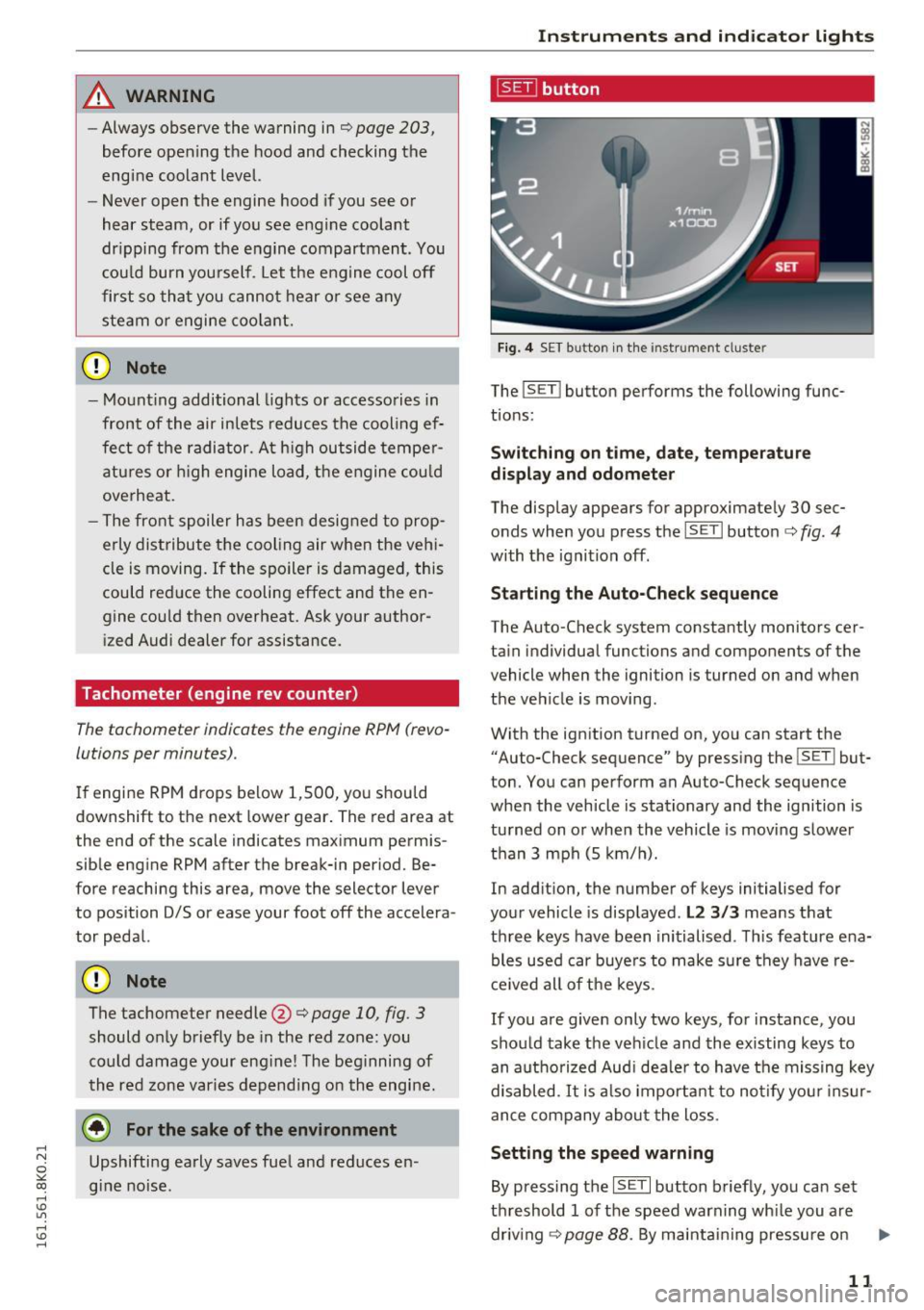
Tachometer (engine rev counter )
The tachometer indicates the engine RPM (revo
lutions per minutes).
If engine RPM drops below 1,500, you should
downshift to the next lower gear. The red area at
the end of the scale indicates maximum permis
sible eng ine RPM after the break-in period. Be
fore reaching this area, move the selector lever
to position D/5 or ease your foot off the accelera
tor pedal.
(D Note
The tachometer needle@¢ page 10, fig. 3
should only briefly be in the red zone: you
could damage your eng ine! The beginning of
the red zone varies depending on the engine.
@ For the sake of the environment
Upshifting early saves fuel and reduces en
gine noise.
Instruments and indicator lights
~button
Fig. 4 SET button in the instrument cluster
The !SET I button performs the following func
tions:
Switching on time, date, temperature
display and odometer
The display appears for approximately 30 sec
onds when you press the
ISETI button¢ fig . 4
with the ignition off.
Starting the Auto-Check sequence
The Auto-Check system constantly monitors cer
tain indiv idual functions and components of the
vehicle when the ignition is turned on and when
the vehicle is moving.
With the ignition turned on, you can start the
"Auto-Check sequence" by pressing the
! SETI but
ton. You can perform an Auto-Check sequence
when the vehicle is stat ionary and the ignition is
turned on or when the vehicle is moving slower
than 3 mph (5 km/h).
In addition, the number of keys initialised for
your vehicle is displayed.
L2 3/3 means that
th ree keys have been initialised. This feature e na
bles used car buye rs to make su re they have re
ceived all of the keys.
If you are given only two keys, for instance, you
should take the veh icle and the existing keys to
an authorized Audi dealer to have the missing key
disabled. It is also important to notify your insur
ance company about the loss.
Setting the speed warning
By pressing the ISETI button briefly, you can set
threshold 1 of the speed warning wh ile you are
driv ing
¢page 88. By ma intaining pressure on
11
Page 15 of 278
..... N
0 ::..:: co .....
Description
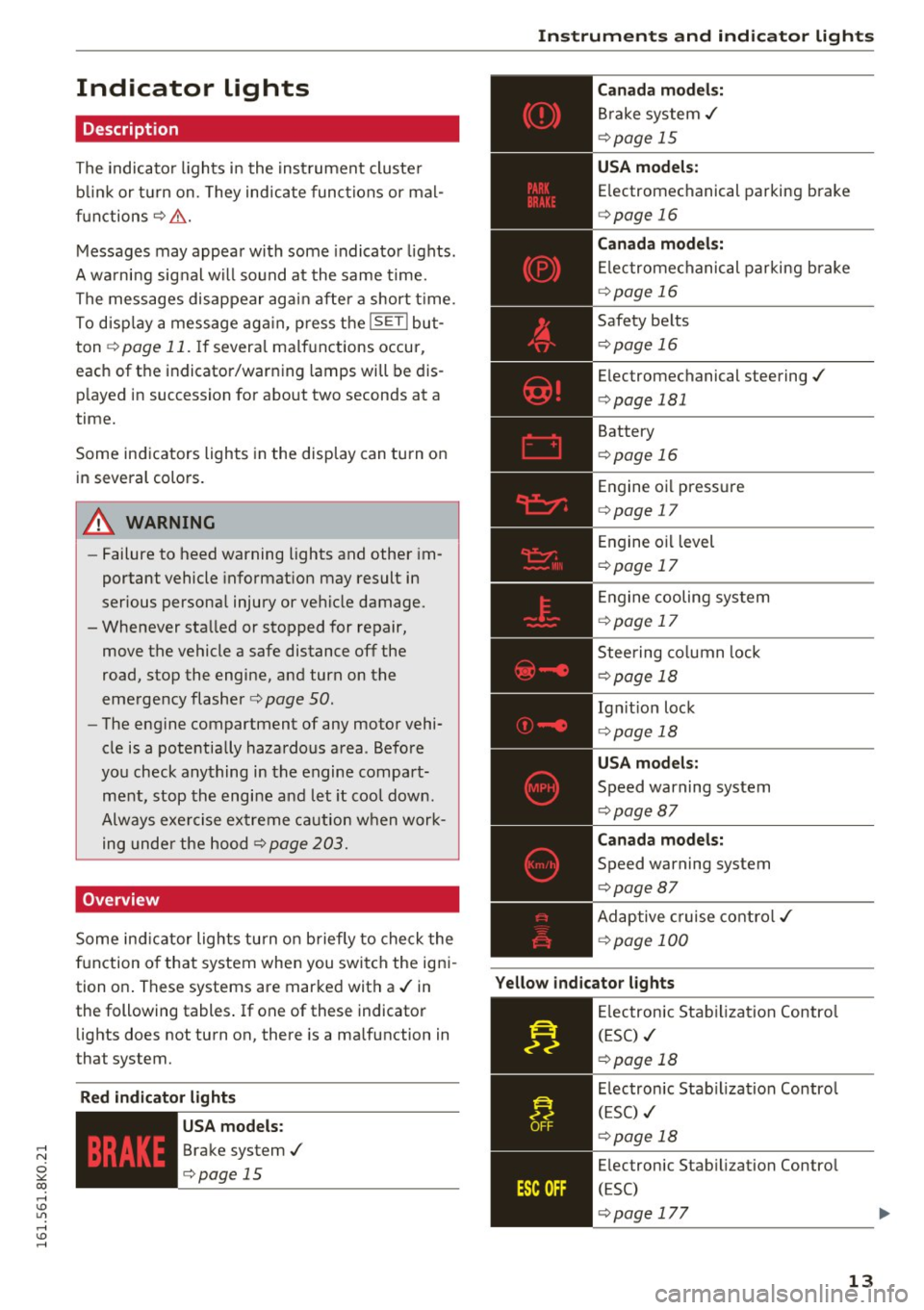
The indicator lights i n the inst rument cluste r
b link or t urn on. They ind icate func tions or ma l
f u nctions ¢& .
Messages may appea r with some indica to r li ghts.
A wa rni ng sig nal w ill sound at the same time.
The messages disappear aga in after a short t ime.
To d isp lay a mess age ag ai n, p ress t he
ISE TI bu t
ton ¢
page 11. If severa l ma lf u nctions occur,
each of the indicator/warning lamps will be dis
p layed i n succession for abo ut two seconds at a
time.
Some ind icators ligh ts in the disp lay can turn o n
in several colo rs.
8_ WARNING
- Failure to heed warning lights and other im
portant vehicle informat ion may result in
serious persona l injury or vehicle damage.
- Whenever sta lled or stopped for repair,
move th@ vehicle a safe distance off th@
road , stop the engine, and turn on t he
eme rgency flasher ¢
page 50.
-The engine compartment of any motor vehi
cle is a potentia lly hazardous a rea . Befo re
yo u check any thing in the engine compart
m en t, stop the engi ne a nd let it cool dow n.
Alway s exe rcise ex treme c aution w hen work
ing unde r the hood¢
page 203.
Overview
Some in dicator lights turn o n briefly to che ck the
f u nction o f that system when you swi tch the ig ni
tion o n. These systems are marke d with a ./ in
the following tables . If one of these indicator
lights does not turn on, there is a malfunction in
that system.
Red indicator lights
--------------
US A models:
Brake system ./
¢page 15
Instruments and ind icator lights
Canada model s:
Br ake system ./
¢page 15
USA models:
Electromechanical parking brake
¢ page 16
Canada models:
El ectromec hanic al p arking b rake
¢ page 16
Safety be lts
¢ page 16
Electromechanical steering ./
¢page 181
Battery
¢page 16
Engine oi l pressu re
¢ page 17
En gine o il level
¢ page 17
En gine cooling sys tem
¢ page 17
Steering co lumn lock
¢ page 18
Ig nitio n lock
¢ page 18
USA models:
Speed warning system
¢page 87
Canada models:
Speed warning system
¢page 87
Ad ap tive cruise cont ro l./
¢ page 100
Yellow indicator lights
--------------
Elec tronic Stab ilizati on Contro l
(ESC) ./
¢page 18
El ec tronic Stab ilization Contro l
( ES C) ./
¢page 18
Electronic Stab ilization Contro l
(ESC)
¢ page 177
13
Page 16 of 278
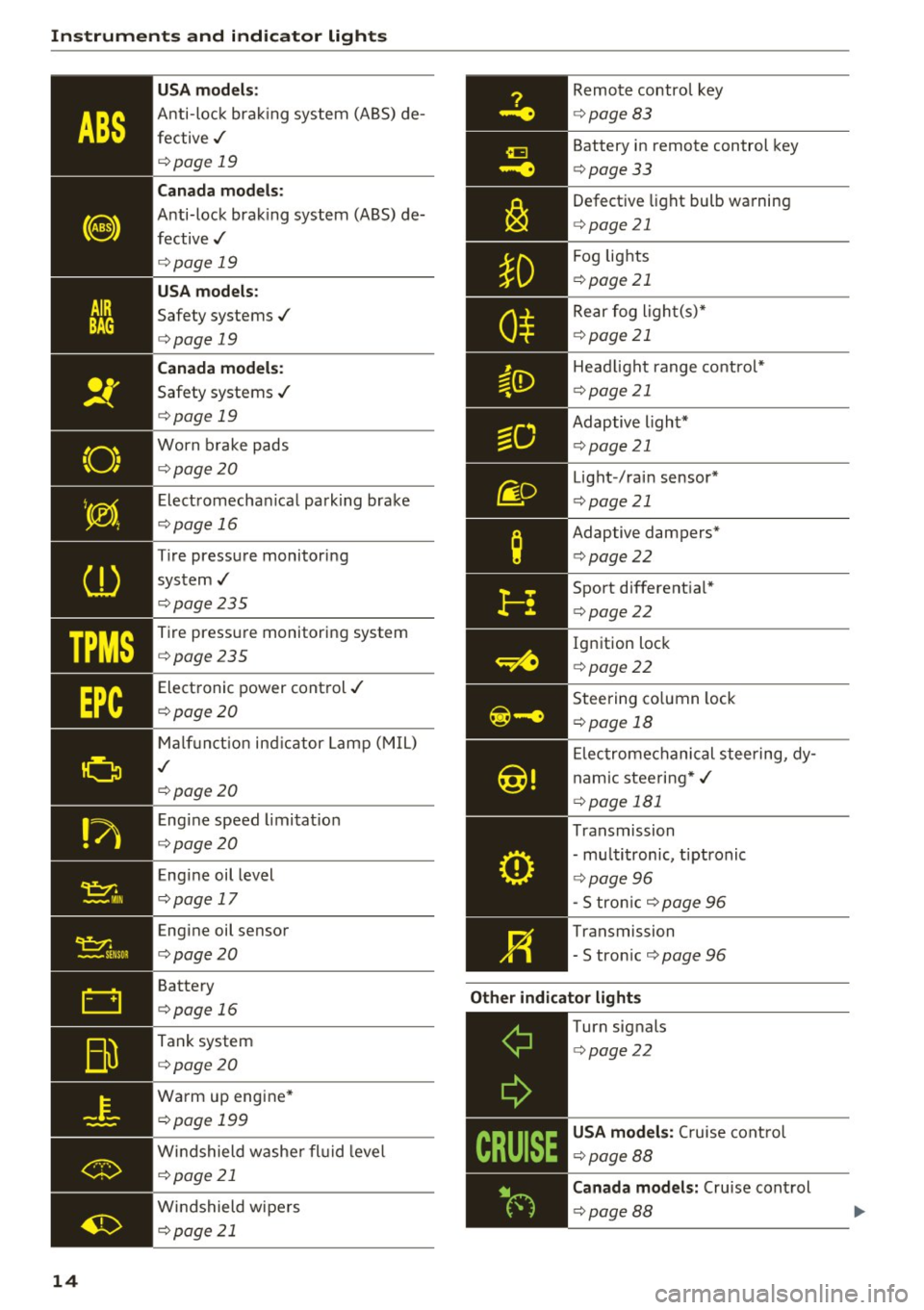
Instruments and indicator lights
TPMS
14
USA models:
Anti-lock brak ing system (ABS) de
fective,/
¢ page 19
Canada mod els :
Anti-lock brak ing system (A BS) de
fective,/
¢ page 19
USA models :
Safety systems ./
¢page 19
Canada models :
Safety systems ./
¢page 19
Worn brake pads
¢page20
Elect romechan ical park ing brake
¢page 16
Tire pressure monitoring
system ,/
¢page 235
Tire pressure monitor ing system
¢page235
Electronic power control ./
¢page20
Malf unct io n ind icator Lamp (MIL)
,I
c::> page 20
Engi ne speed limitat ion
c::> page20
Engine oil level
c::> page 17
Engine oil sensor
c::>page20
Battery
c::>page 16
Tank system
c::>page20
Wa rm up engine *
¢page 199
Windshield washe r fl uid leve l
¢page 21
Windshield wipers
¢page 21
Remote control key
¢ page 83
Battery in remote control key
¢page 33
Defect ive light bulb wa rning
<=> page 21
Fog lights
¢page 21
Rear fog light(s)*
Head light range control*
<=> page 21
Adaptive light*
Light -/rai n sensor*
<=> page 21
Adaptive dampers*
¢page22
Sport different ial*
<=> page22
Ig nition loc k
¢page22
Steering co lumn lock
¢ page 18
Elec tromechanical stee ring, dy
nam ic stee ring *,/
c>page 181
Transmission
- mu ltitronic, tiptronic
¢ page 96
-S tro n ic c::> page 96
Transmission
-S tron ic
¢ page 96
Other indicator light s _ ___::__ ________ _
Turn signals
<=>page 22
USA models : Cruise control
c> page88
Canad a mod els : Cruise control
¢ page88
Page 17 of 278
..... N
0 ::..:: co .....
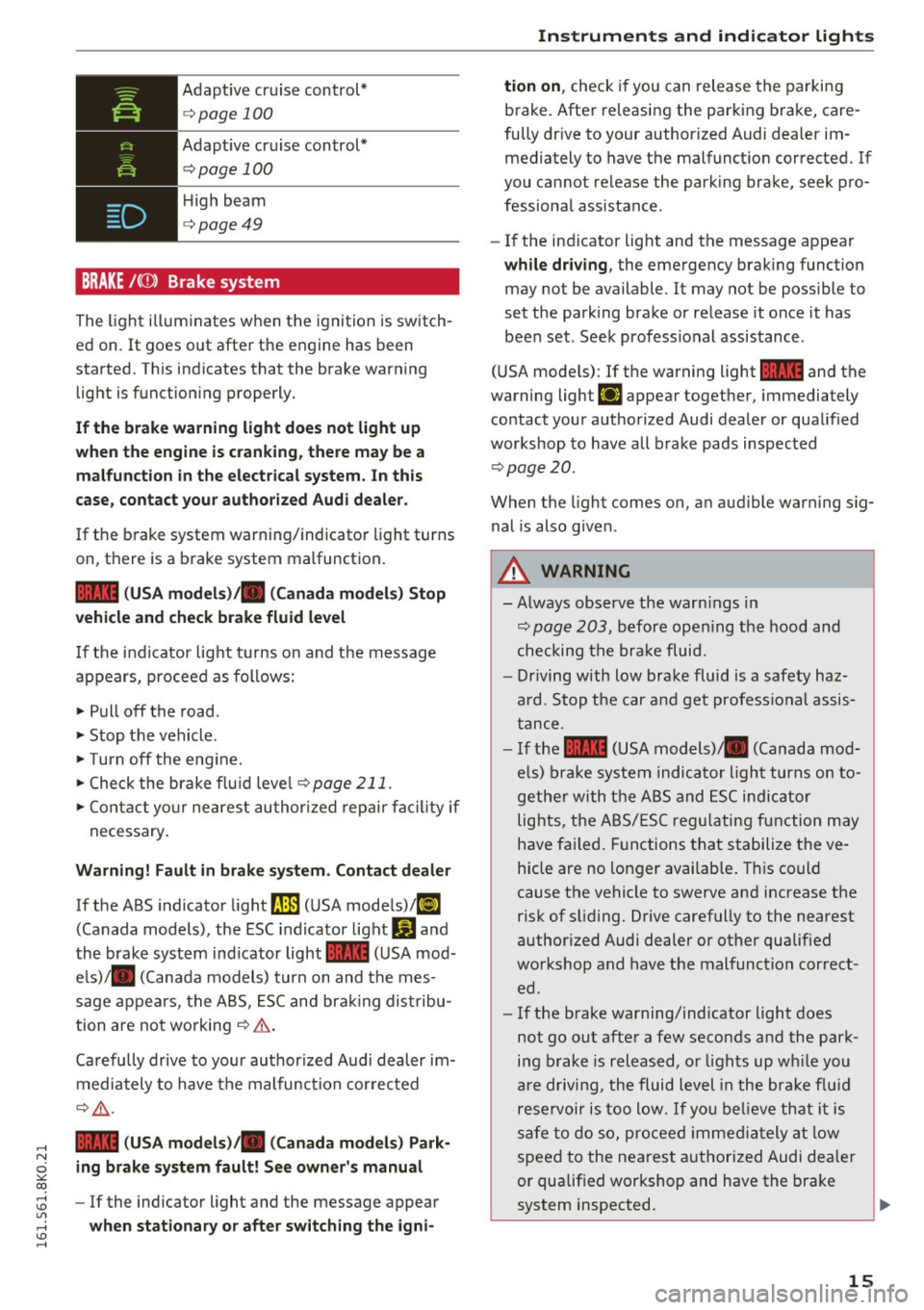
c:>page 100
Adaptive cr uise control*
c:>page 100
High beam
c:>page49
BRAKE /((J)) Brake system
The light illuminates when the ignition is switch
ed on.
It goes out afte r the engine has been
started. T his indicates that the brake warn ing
light is f unct ion ing properly.
If the brake warning light does not light up
when the engine i s crank ing , there may be a
malfunction in the electrical system. In th is
case , contact your author ized Audi dealer .
If the b rake system warn ing/indicato r light turns
on, there is a b rake system malfunction.
1111 ( USA models )/. (Canada models) Stop
vehicle and check brake fluid level
I f the in dicator lig ht t urns on and t he message
appears, procee d as follows:
.,. Pull off the road .
.. Stop t he vehicle .
.,. Turn off the eng ine.
.,. Check the brake flu id leve l
c:>page 211.
.,. Con tact yo ur nearest au thor ized rep air f aci lity if
ne cessary.
Warning! Fault in brake system. Contact dealer
If the ABS indicato r light fJIE) (U SA mode ls)/ li]
(Canada models), the ESC indica tor light Wand
the brake sys tem ind icator light
1111 (USA mod
e ls)/ . (C anada models) tur n on and the mes
sage appears, t he A BS, ES C and bra king dis tribu
tion are no t wo rking
c:> .&. .
Ca refully drive to your author ized Audi dealer im
m ediately to have t he m alf unc tion cor rec ted
¢ .&, .
1111 (USA models )/. (Canada models ) Park
ing brake system fault! See owner's manual
- If the indicator light and the message appear
when stationary or after switching the igni-
Instruments and ind icator lights
tion on , check if you can rele ase the parki ng
brake. After releasing the par king brake, care
fully dr ive to your author ized Audi dealer im
mediately to have the malfunct ion corrected. If
you cannot re lease the park ing bra ke, seek pro
fessiona l assistance.
- If the ind icator light and the message appear
while driving , the emergency brak ing funct ion
may not be available. It may not be poss ible to
set the pa rk ing brake or re lease it once it has
been set . See k profess ional assis tance.
( U SA mode ls) : If the warning light
1111 and the
warning light
EiJ appear togethe r, immediately
contact your author ized Audi dea ler or qualified
workshop to have all b rake pads inspec ted
c:> page20 .
When the light comes on, an audible warning sig
nal is also g iven .
A WARNING
--Always observe the warn ings in
c:> pag e 203 , befo re open ing the hood and
checking the bra ke fluid.
- Driving with low bra ke fluid is a safety haz
ard. Stop the car an d get profess io nal assis
t a nce .
- I f the
1111 (USA models)/ . (Canada mo d
els) brake sys te m indic at or li ght tur ns on to
ge the r with the A BS and ESC indic ator
lig hts , the A BS/ES C regu latin g fun ction m ay
h ave fa iled . Functions t hat s ta b ilize the ve
hicle are no longer availab le . T his co uld
cause t he ve hicle to swerve an d increase the
risk of s liding. Drive carefully to the nearest
author ized Audi dealer or ot her qualified
wo rkshop and have t he malfunc tion c orrect
e d .
- If the b rake warning/indicator light does
not go ou t aft er a f ew seco nds and th e park
ing b rake is r eleased, o r lights up wh ile you
a re drivi ng, the flui d level in the bra ke f lu id
rese rv o ir i s too lo w.
If yo u be lieve th at it is
saf e to do so, proceed immedia tely at lo w
speed to the ne ares t au thorized Au di de aler
or qualified workshop and have the bra ke
sys tem inspected .
15
Page 22 of 278
Instruments and indicator lights
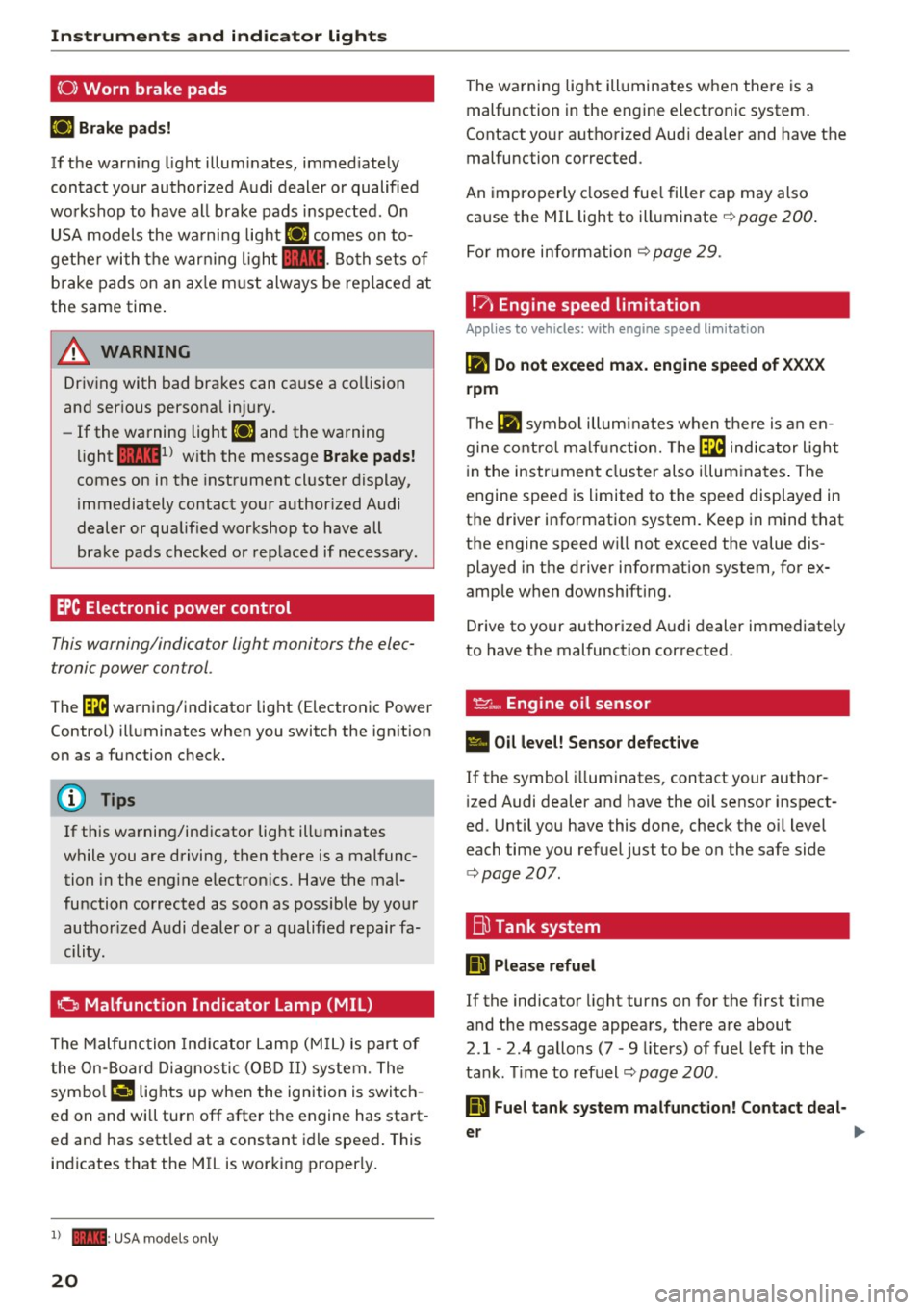
(0) Worn brake pads
EiJ Brake pads!
If the warn ing light illum inates, immed iate ly
contact your authorized A ud i dealer o r qualified
wo rkshop to have all brake pads inspected. O n
USA models the wa rni ng lig ht
EiJ comes on to
gethe r wi th the war ning l igh t
1111 . Both sets of
b rake pads on an ax le m ust always be rep lace d at
the same time .
A WARNING
Driv ing with bad bra kes can ca use a co llision
and ser ious personal in jury.
- If the wa rning light
EiJ and the warning
light
11111 ) w ith the message Brake pads !
comes on in the instrument cl uster display,
i mmediately contact your author ized Audi
dealer or qualified workshop to have all
bra ke pads checked o r rep laced if necessary.
EPC Electronic power control
This warning/indicator light monitors the elec
tronic power control .
-
The~ warni ng/indicator light (Electronic Powe r
Control) ill uminates when you switch the ign ition
on as a function check.
(D} Tips
If this wa rning/in dicator light ill uminates
wh ile you are driving, then there is a mal func
tion in the eng ine electron ics. Have the ma l
function corrected as soon as possib le by yo ur
author ized A udi dealer or a qualified repair fa
cility .
0 Malfunction Indicator Lamp (MIL)
The Malfunc tion Ind ica tor Lam p (M IL) is part of
the On-Boa rd Di ag nosti c (O BD II) system. The
symbo l
('4 lights up whe n the ignition is swi tch
e d on and wi ll turn off after the engine has sta rt·
e d and has sett led at a constant idle speed . This
i n dicates that the MIL is working p roperly.
l ) - : USA mode ls o nly
20
The wa rning lig ht ill uminates w hen the re is a
malfunction in the engine electronic system.
Contact yo ur aut ho rized Aud i dea le r and have the
malfunction corrected.
An impro per ly closed fue l filler cap may also
ca use the MIL light to illuminate ¢
page 200 .
For more info rm ation c::> page 29 .
!?) Engine speed limitation
App lies to vehicles : wi th engine speed limitatio n
lfl Do not exceed max. engine speed of XXXX
rpm
The lfl symbo l illu min ates when the re is an en
gine co ntro l ma lf u nct ion. The~ indica tor ligh t
in the instrument clus ter also illum ina tes . T he
engine spee d is limited to the s peed displayed in
the d river info rmation system. Keep in mind t hat
the engine speed w ill not exceed the value dis
played in the driver information system, for ex
amp le w hen downshifting.
D rive to your authorized A udi dealer immediate ly
to have the mal function cor rected .
~~. Engine oil sensor
• Oil level! Sensor defective
If the symbol illuminates, contact your author
i zed Audi dealer and have the oil sensor inspect
ed. Until yo u have this done, chec k the oi l level
each time you refuel just to be on the safe side
¢ page 207.
Bu Tank system
Ii] Please refuel
If the indicato r light turns on for the first time
and t he message appea rs, the re are about
2.1- 2.4 gallons (7 • 9 lite rs) of fuel left in the
ta nk. Time to refuel¢
page 200 .
Ii] Fuel tank system malfunct ion! Contact deal -
er ..,.
Page 25 of 278
,....,
N
0
""' CX) ,....,
I.Cl U"I ,....,
I.Cl ,....,
Driver information
system
Introduction
The Driver information display inside the instru
ment cluster provides you, the driver, with im
portant information.
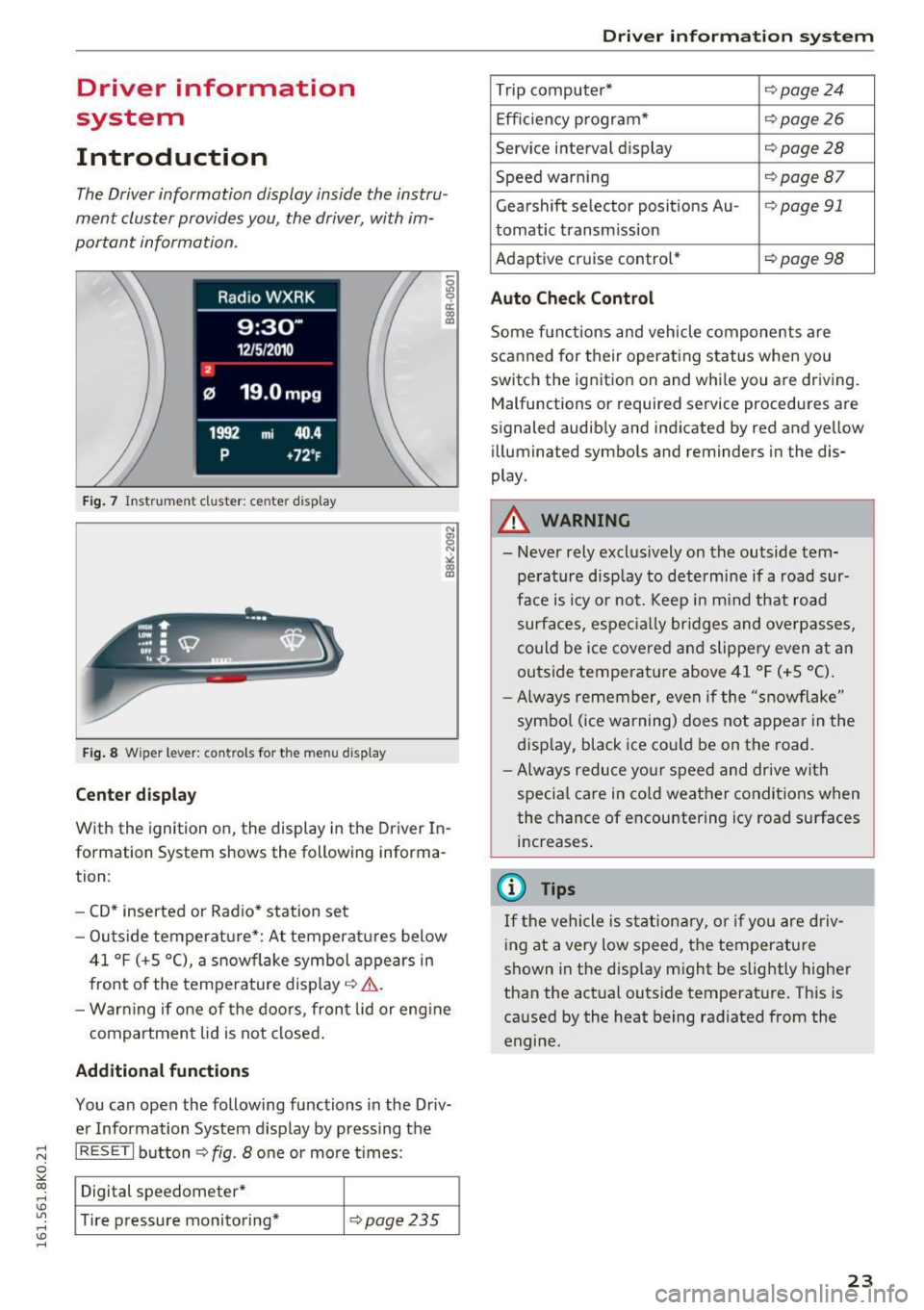
Fig. 7 Instrument cluster: ce nter display
Fig. 8 Wipe r lever: contro ls for the menu display
Center display
With the ignition on, the display in th e Driver In
formation System shows the following informa
tion :
- CD* inserted or Radio* station set
- Outs ide temperature*: At temperatures below
41 °f (+S
0
(), a snowflake symbol appears in
front of the temperature display¢ ,1,. .
- Warning if one of the doors, front lid or engine
compartment lid is not closed.
Additional functions
You can open the following functions in the Driv
er Information System display by pressing the
I RESETI button¢ fig. 8 one or more t imes :
Digital speedometer*
Tire pressure monitoring*
¢pag e235
Driver in forma tion system
Trip computer* ¢page24
Efficiency program* ¢page26
Service interval display ¢page28
Speed warning ¢page Bl
Gearshift selector posit ions Au -i=>page 91
tomatic transm ission
Adaptive cruise control*
¢ page 98
Auto Check Control
Some functions and vehicle components are
scanned for their operating status when you
switch the ignition on and while you are driving. Malfunctions or required service procedures are
signaled audibly and indicated by red and yellow
illum inated symbols and reminders in the dis
play.
A WARNING
--
- Never rely exclus ively on the outside tem
pe rature display to determine if a road sur
face is icy or not. Keep in m ind that road
surfaces, especially bridges and overpasses,
could be ice covered and slippery even at an
outside temperat ure above 41 °f (+S °C).
- Always remember, even if the "snowflake"
symbol (ice warning) does not appear in the
display, black ice could be on the road.
- Always reduce your speed and dr ive with
specia l care in cold weather conditions when
the chance of encountering icy road surfaces
increases.
(j) Tips
If the vehicle is stationary, or if you are driv
ing at a very low speed, the temperature
shown in the disp lay might be slightly higher
than the actual outside temperature. This is
caused by the heat being radiated from the
engine.
23
Page 26 of 278
Driver information system
Trip computer
Introduction
Applies to vehicles: with trip computer
The trip computer gives you information on cur
rent and average fuel mileage, average speed ,
fuel range and driving tim e.
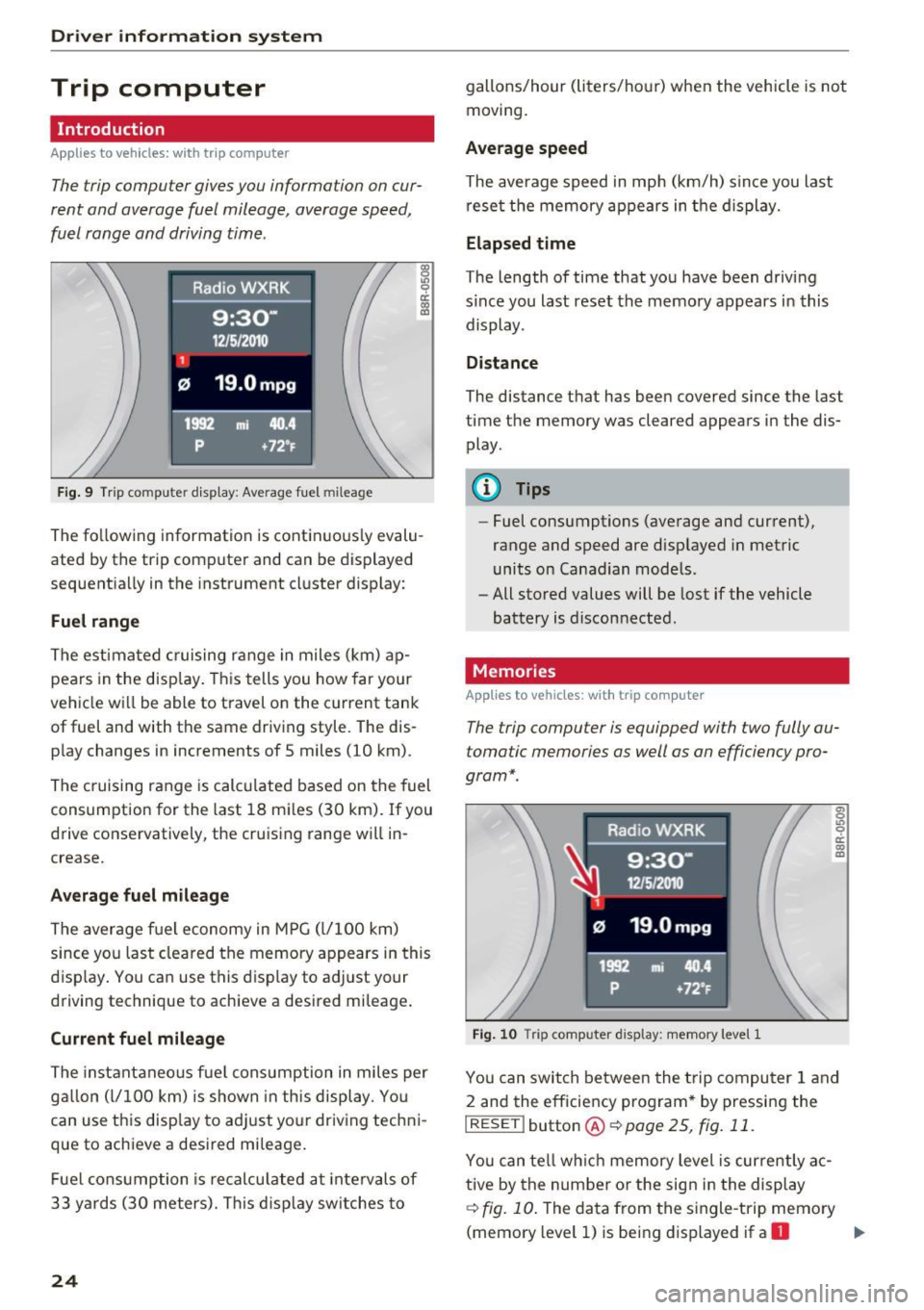
F ig. 9 Tri p computer display: Average fuel mileage
~ 9 a: co a,
The fo llow ing information is cont in uously evalu
ated by the trip comp uter and can be displayed
sequent ia lly in the instrument cl uster display:
Fuel range
T he est ima ted c ruising range in miles ( km) ap
pears in the d isp lay. Thi s tells you how far your
veh icle w ill be able to t ravel o n the cu rrent tank
of fuel and with the same driv ing style . The dis
p lay changes in increments of 5 miles (10 km).
T he cruising r ange is calc ulated based on the fuel
consumption for the last 18 m iles (30 km). If you
drive conse rvatively, the cruis ing range will in
crease.
Average fuel mileage
T he aver age f uel economy in MPG (l/ 100 km)
since you last cleared the memo ry appears in this
disp lay . You ca n use this display to a djust your
d riving technique to achieve a desired mi leage .
Current fuel mileage
T he inst antaneo us f ue l cons umption in miles per
g all on ( l/ 10 0 km) i s show n in th is display . Yo u
can use t his disp lay to ad just yo ur driv ing tech ni
que to ach ieve a desi red mileage .
Fue l cons umption is re cal culat ed a t inte rv a ls of
33 y ards (30 meters). T his d isp lay sw itches to
24
gallons/hour (liters/ho ur) when the vehicle is not
moving .
Average speed
The average s peed in mp h (km/h) s in ce you last
re se t t he memory ap pears in t he di sp lay.
Elapsed time
The length of time that yo u have been drivi ng
s ince you last reset the me mory a ppears in this
display .
Distance
The distance th at has been covered since the last
time the memory was cleared appears in the dis
play .
(D Tips
- Fu el consumptions (ave rage and cur rent),
range and speed are d isp layed in metric
units on Canadian mod els.
- All stored values will be lost if the vehicle
battery is disconnected.
Memories
Applies to vehicles: with trip computer
The trip computer is equipped with two fully au
tomatic memories as well as an efficiency pro
gram* .
Fig. 1 0 Trip compute r display: mem ory level 1
"' 0 .,, 0 ci: co a,
Yo u c an swit ch between the t rip compu ter 1 a nd
2 and the efficiency pro gram * by pressing the
I RESET I butto n® ~ page 25, fig. 11 .
You can tell w hich memory level is currently a c
tive by the number o r th e sig n in t he display
~fig. 10. The da ta from the single -trip memory
(memory level 1) is bei ng d isplayed if a
D ..,.
Page 31 of 278
,....,
N
0
""' CX) ,....,
I.Cl U"I ,....,
I.Cl ,....,
vehicle, particularly the engine, and main
taining its value. Even if the mileage driven
is low, the maximum period of one year
from one service to the next must not be ex
ceeded.
@ Tips
The informat ion in the Service Rem inder re
mains stored even when the vehicle battery is
disconnected.
On Board Diagnostic
System (OBD)
Malfunction Indicator Lamp (MIL)
The Malfunction Indicator Lamp (MIL) ¢..ift in the
instrument cluster is part of the On-Board Diag
nostic (OBD II) system .
The warning/indicator light illuminates when the
ignition is switched on and goes out after the en
gine starts and the idle has stabilized. This indi
cates that the MIL is working properly .
If the light does not go out after the engine is
started, or illuminates while you are driving, a malfunction may exist in the engine system.
If
the light illuminates, the catalytic converter
could be damaged.
Continue driving
with reduced power (avoiding
sustained high speeds and/or rapid accelera
tions) and have the condition corrected. Contact
your authorized Audi dealer.
If the light illuminates, the electronic speed limiter may also be malfunctioning. For more infor
mation
¢ page 29, Electronic speed limiter.
An improperly closed fuel filler cap may also
cause the MIL light to illuminate ¢
page 200.
Driver in forma tion system
On-Board Diagnostics
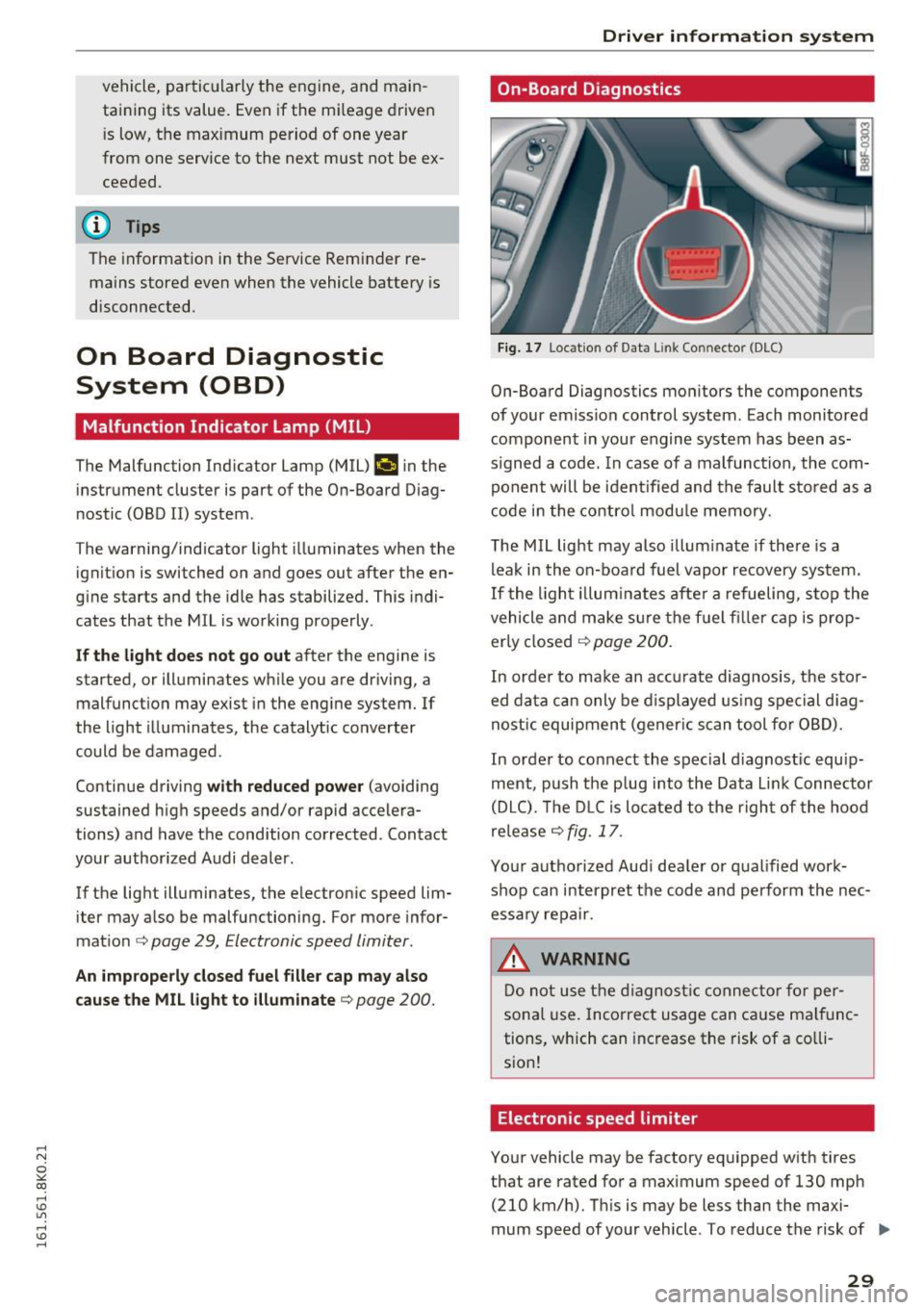
Fig. 17 Loca tion of Data Link Connector (DLC)
On-Board Diagnostics monitors the components
of your emission control system. Each monitored
component in your engine system has been as
s igned a code. In case of a malfunction, the com
ponent will be identified and the fault stored as a
code in the control module memory.
The MIL light may also illuminate if there is a
leak in the on-board fuel vapor recovery system.
If the light illuminates after a refueling, stop the
vehicle and make sure the fuel f iller cap is prop
erly closed
¢ page 200.
In order to make an accurate diagnosis, the stor
ed data can only be displayed using special diag
nostic equipment (gener ic scan tool for OBD).
In order to connect the special d iagnost ic equip
ment, push the p lug into the Data L ink Connector
(DLC). The DLC is located to the right of the hood
release
¢ fig. 17.
Your authorized Audi dealer or qualified work
shop can interpret the code and perform the nec
essary repair.
.&, WARNING
Do not use the diagnostic connector for per
sonal use. Incorrect usage can cause malfunc
tions, which can increase the risk of a co lli
sion!
Electronic speed limiter
Your vehicle may be factory equipped with tires
that are rated for a maximum speed of 130 mph (210 km/h). This is may be less than the maxi
mum speed of your vehicle . To reduce the risk of .,.
29