instrument cluster AUDI A4 2017 User Guide
[x] Cancel search | Manufacturer: AUDI, Model Year: 2017, Model line: A4, Model: AUDI A4 2017Pages: 386, PDF Size: 96.32 MB
Page 53 of 386
-If you turn off the ignition while the exterior
lights are on and open the door, a warning
tone sounds.
- In cool or damp weather, the inside of the
headlights , turn signals and tail lights can
fog over due to the temperature difference between the inside and outside. They will
clear shortly after switching them on. This
does not affect the service life of the light
ing .
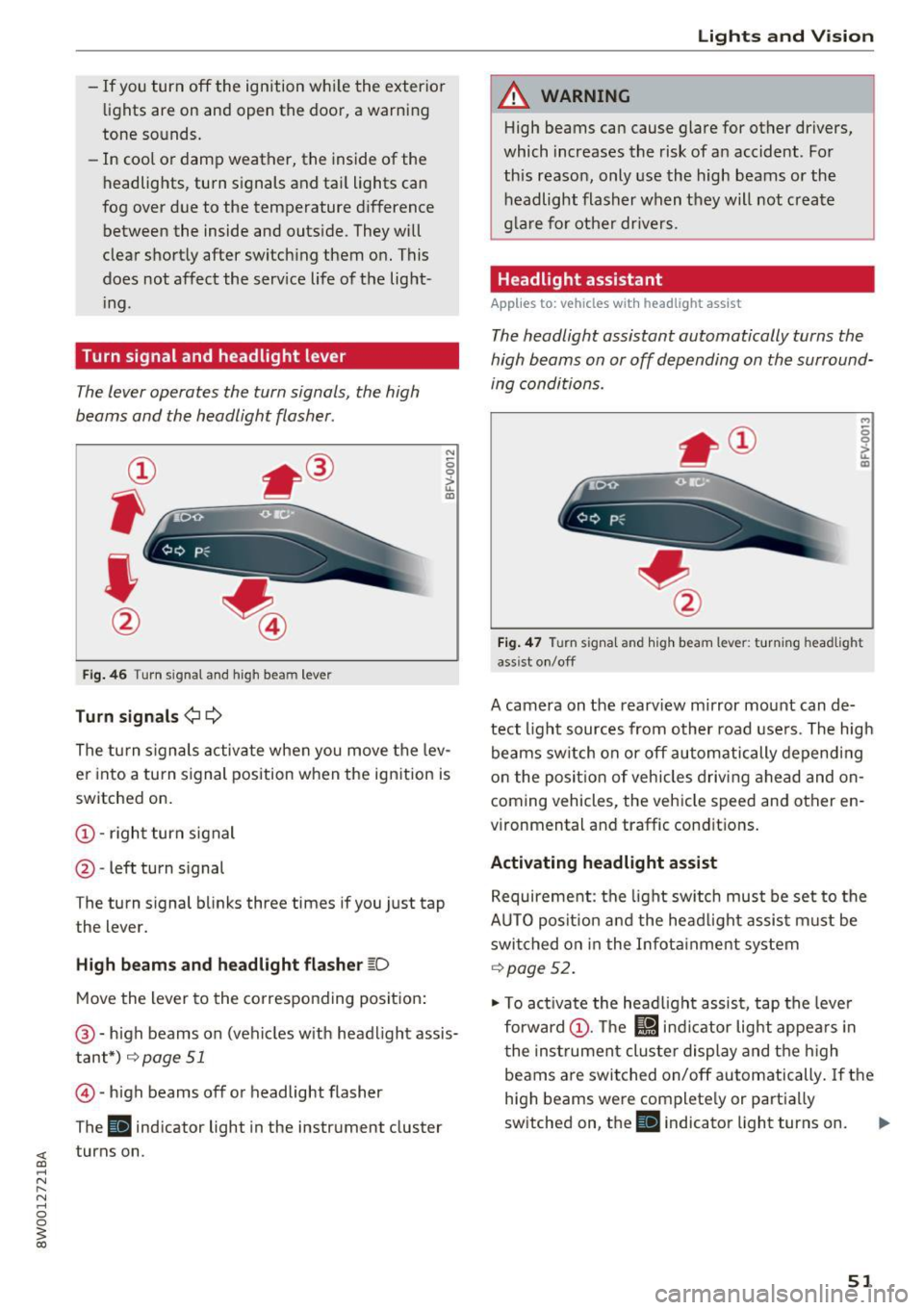
Turn signal and headlight lever
The lever operates the turn signals, the high
beams and the headlight flasher.
Fig. 46 T urn signal and high beam lever
Turn signals¢¢
N
0 0
> u. IXl
The turn signals activate when you move the lev
er into a turn signal position when the ignition is
switched on.
@ -right turn signal
@ -left turn signal
The turn signal blinks three times if you just tap
the lever.
High beams and headlight flasher ~D
Move the lever to the corresponding position:
@-high beams on (vehicles with headlight assis
tant*)
r=;, page 51
© -high beams off or headlight flasher
The
Ill indicator light in the instrument cluster
turns on.
Lights and Vision
A WARNING
-High beams can cause glare for other drivers,
which increases the risk of an accident . For
this reason, only use the high beams or the
headlight flasher when they will not create
glare for other drivers.
Headlight assistant
Applies to: vehicles wit h headlight assist
The headlight assistant automatically turns the
high beams on or off depending on the surround
ing conditions .
..,
0 0
it m
Fig. 47 Turn signal and high beam lever: turning headlig ht
ass ist on/off
A camera on the rearview mirror mount can de
tect light sources from other road users. The high
beams switch on or off automatically depending
on the position of vehicles driving ahead and on
coming vehicles, the vehicle speed and other en
vironmental and traffic conditions.
Activating headlight assist
Requirement: the light switch must be set to the
AUTO position and the headlight assist must be switched on in the Infotainment system
r=;, page 52.
"'To activate the headlight assist, tap the lever
forward @. The
l!J indicator light appears in
the instrument cluster display and the high
beams are switched on/off automatically. If the
high beams were completely or partially
switched on, the
Ill indicator light turns on. Ill>
51
Page 54 of 386
Lights and Vi sion
Switching the h igh beams on/off manually
If th e h igh beams did no t swi tch on/off automat
ically as expec ted, you may sw itch them on or off
manually instead :
~ To swi tch the hig h beams o n manually, tap th e
l ever forw ard @ . The
Bl in di cator lig ht turns
on .
~ To switc h the hig h beams off manually , pull the
l ever back @. T he headlight assistant is deacti
vated.
Operating the headlight flasher
~ P ull t he leve r towar d the rear @ to ope ra te the
headlight flashers when the headlight ass ist is
activated an d the high beams a re switched off.
The head light assistant rema ins active.
Messages in the instrument cluster display
r!/1 Audi adaptive light: malfunction! See own
er's manual
Headlight assist: malfunction! See owner' s
manual
Drive to an a uth o rized Aud i dea le r or authorized
Aud i Serv ice Facility immediately to have the
malfunct io n corrected. You can still sw itc h t he
h igh beams on or off ma nually.
Headlight assist: currently unavailable. Camera
view restricted due to surroundings. See own
er' s manual
The camera view is blocked, for example by a
sticker o r debr is .
The senso r is locate d between the interior rear
view mir ror and the win dshield. Do not place any
sticke rs in th is area on the windshield.
A WARNING
Headlight assistant is only intended to assist
t he driv er. The dr iver is still r esp onsible for
cont ro llin g th e headl igh ts a nd may ne ed to
switch them on an d off manu ally depe ndin g
o n lig ht a nd visib ility con dition s.
It m ay be
necess ary to ope ra te them manually in s itu a
tions such as :
- In ad verse we ather conditi ons such as fo g,
h eavy r ain, b low in g snow or sp rayin g wa te r.
52
- On roads where oncomin g tra ffic may be
pa rtially obscured, such as expressways.
- W hen the re are roa d users that do not have
suff icient lighting, such as b icyclers or
veh icles with dirty tail lamps.
- In tig ht curves an d on steep h ills.
- In poorly li t areas.
- Wi th st ro ng ref le ctor s, such as s igns .
- If th e area of the w inds hield ne ar the sensor
is fogged over, di rty, icy or covered with a
s tick er.
Adjusting the exterior lighting
Th e functions are adjust ed in th e Infotainment
sys tem .
~ Select in the Infotainment system : IMENU! but
t on
> Vehicle > left cont rol b utton > Vehicle
settings > Exterior lighting .
Automat ic headlights
You can adjust the following sett ings in the Au
tomatic headlights
men u:
Acti vation time -you can adjust if the headlights
switch on
Early , Med or Late accord ing to the
sensit ivity of t he lig ht sensor.
Headlight assistant * -you can switch the hea d
li ght assistant * on and off.
Entry/exit lighting
Whe n it is da rk , the Entry/exit lighting ill um i
na tes the area a ro und t he vehi cle when unlo cki ng
the ve hicle an d after switc hing off the ig nitio n
and o pening the dr iver's door.
The
Entry/exit lighting only wo rks when i t is
d ar k and the light sw itch is in the
AUTO p osit io n.
Daytime running lights
USA models:
the dayti me r unning lig hts can be
swi tched on/off. Select
On or Off.
Canada models : this function ca nnot be switched
off . They act ivate automatically eac h time the ig
nit ion is switched on .
Page 73 of 386

To keep the rear window defogger on continuously, press the
Qi!) REAR button longer than 3 sec
onds. Th is is stored until the ignition is sw itched
off.
SYNC
Synchronizat ion
Use the rocker switch ® to select the fu nct ion .
When synchronization is switched on, the set
tings for the driver's side are applied to the front
passenger's side and the rear (except for seat
heating/ventilation*). When the settings on the
front passenger's s ide or in the rear are changed,
the synchronization is automatically sw itched off
and
3-zone appears in the display .
SET REAR
function
Use the rocker switch ® to select the funct ion.
When the function is switched on, you can adjust
all settings for the rear using the climate control
system controls in the cockpit . The rear climate
control system controls can not be operated at
the same time. This function switches off a uto
matically after a certain period of time or after
l eav ing the menu.
Air vents
You can open or close the center and rear vents in
the cockpit and the vents in the rear center con
sole using the ridged thumbwheels. The levers
adjust the direction of the airflow from the vents.
The wide ve nt is opened and closed using the
rocker switch ®·
Residual heat
You can activate the residual heat funct ion when
the ignition is switched off by pressing the knob
(D. The res idual heat from the coolant is used to
h eat the vehicle inte rior. The residual heat fu nc
tion switches off automatically after about 15
minutes .
A WARNING
-You should not use the recirculation mode
for an extended period of time since no
fresh a ir is drawn in. With the air-condition
ing switched off, the windows can fog up,
wh ic h increases the r isk of an accident.
Warm and cold
-Individuals with reduced sensit ivity to pain
or temperature could develop burns when
using the seat heating function. To reduce
the risk of injury, these individuals should
not use seat heating.
(D Note
To avoid damage to the heating elements in
the seats, do not knee l on the seats or place
heavy loads on a small area of the seat.
Basic settings
The climate control system basic settings are ac
cessed in the Infotainment system.
.,. Select in the Infotainment system: I MENU ! but
ton
> Vehicle > left control button > Air condi
tioning
Automatic recirculation
When switched on, automatic rec irculat ion con
trols the recircu lation mode automatically . You
must press the@
MAX button if fog forms on
the windows.
Automatic auxiliary heater*
T he auxi liary heater he lps to warm the vehicle in
terior more quickly.
Steering wheel heating
Applies to: veh icles w ith stee ring w hee l heat ing
The steering wheel rim can be heated.
Fi g. 75 Steering whee l: steer ing whee l heating button
.,. Press the button to sw itch the steering wheel
heating on and off~-The message
Steering
wheel heating: on /Steering wheel heating: off
appears in the instrument cluster displa y. IJ,,
71
Page 81 of 386

Stopping and starting the engine
Applies to: vehicles with Start-Stop system
Fig. 79 Instrument cluster : eng ine sw itched off (s top
p hase)
~ B rake the ve hicle to a stop. The engine stops
shortly before the vehicle comes to a stop or if
the vehicle is stationa ry
1l. Keep your foot on
the brake pedal. The
II indicator light appears
in the stat us line at the bottom of the instru
ment cluster d isplay. The needle in the tachom
eter also moves into the READY
1l position .
~ The engine starts aga in when you take your
foot off the b rake pedal.
If the park ing brake is
set, the engine w ill only start aga in when the
a cce le rator pedal is p ressed
1>. The indica tor
li gh t turns off.
Additional information The engine stops i n the P, N and D selector lever
positions .
If you select the R pos ition dur ing a Stop phase ,
the eng ine will start again .
Select the P pos ition quickly to p revent the en
g ine from starting unintentionally when sh ift ing
through R.
You can determine for yourself if the engine will
stop or not by reducing or increasing the amount
of force you use to press the brake pedal. For ex
ample, if you only lig htly press on the brake ped
al in stop-and-go traff ic or when turning, the en
g ine will not switch off when the vehicle is sta
tionary . As soon as you press the brake down
ha rder, the eng ine will switch off.
l l Ma rket -spe cific
Drivi ng
(D Tips
- Press the bra ke peda l during a Stop phase
to keep the vehicle from rolling.
- The ignition will turn off if yo u press the
!START ENGINE STOPI butto n dur ing a stop
phase. The needle in the tachometer moves
into the
OFF position.
General information
Applies to: vehicles with Start-Stop system
The standard Start/Stop mode con be canceled
for different system-related reasons.
F ig. 80 Instrument cluste r: eng ine stop temporarily un
ava ilable
Engine does not switch off
Before and dur ing each stop phase, the system
checks if certain conditions have been met. For
example, the eng ine will not switch off in the fol
lowing situations:
- The engine has not reached the minim um re
quired temperature for Start/Stop mode.
- The inte rior temperature selected by the A/C
system has not been reached.
- The outside temperature is extremely high/low.
- The windsh ield is being defrosted .
- The battery charge level is too low .
- The steering wheel is turned at a sharp angle o r
is moving .
- After engaging the reverse gear .
- On sharp incl ines.
- At high altitudes .
r,jj also appears in the instrument cl uster d is
play.
79
Page 82 of 386
Driving
Engine automatically r esta rt s
The standard Start/Stop mode will be canceled
during a stop phase in the follow ing situations.
The engine restarts without any action by the driver .
- The vehicle rolls, for examp le while on a slope.
- The inter io r temperatu re differs from the tem-
perature se lected in the A/C system.
- The w indshield is being defrosted.
- The brake pedal is pressed several t imes in a
row .
- The battery charge level becomes too low .
- Power consumption is high .
The engine can turn off again when the condi
tions for Start/Stop mode are met .
Ignition is swit ched off aut omaticall y
To prevent the battery from dra ining, the ignition
will sw itch off
aut omati cally under the following
conditions:
- T he Sta rt/Stop system has stopped the engine.
- The vehicle must be stationary .
- You left the veh icle and the engine was not re-
started within approximately 30 seconds.
If this happens, you will see the message
I gni
tion turn s off automatically in the instrument
cluster and the activated low beams are replaced
by the parking light. The parking lights will
sw itch off after approximately 30 minutes or
when you lock the vehicle .
The ignition also switches off when you lock the
veh icle from the outs ide dur ing a stop phase.
If the Start/Stop system has not turned off the
engine or if you have sw itched the Start/Stop sys
tem off manually, the ignition will not be auto
mat ically switched off and the engine w ill cont in
ue to run~& .
.&, WARNING
To red uce the risk of poisoning, neve r allow
t he engine to r un in confined spaces.
80
-
@ Tips
-If you leave the ve hicle with the D/S or R se
lector lever position engaged, the parking
brake is automatically set.
- If you select the D or N selector lever posi
tion after shifting into reverse, the vehicle must be driven faster than 6 mph (10 km/h)
in order for the engine to switch off again.
Manually switching the Start/Stop system
off/on
App lies to: vehicles wit h Start -Stop system
If you do not wish to use the system, you can
switch it off manually.
- -
. !.. r' '!. .:-,/'"~ ~
tJ .,. -,J
-----::::I
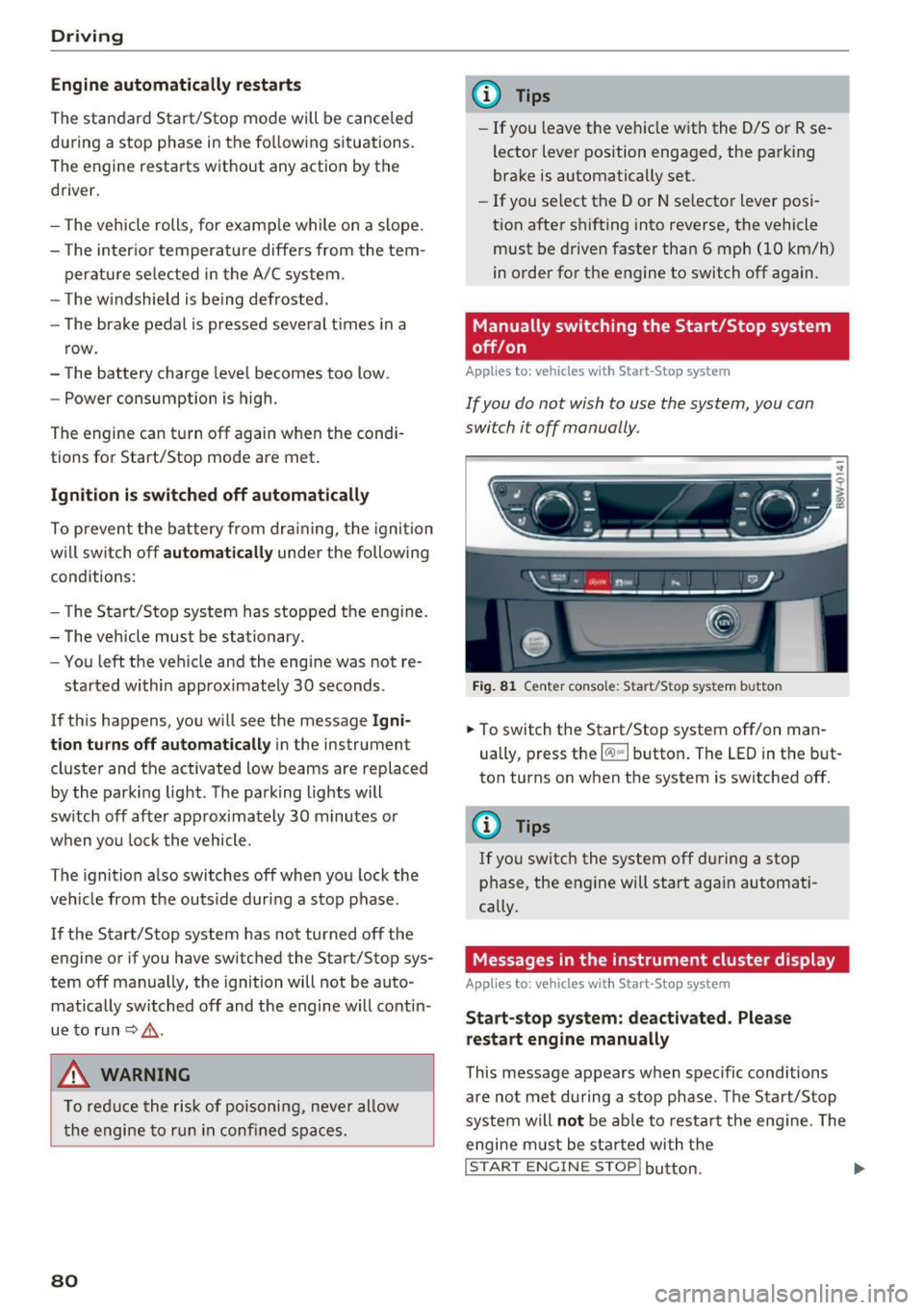
F ig . 81 Cen te r conso le: S tart/Stop system butto n
..
.,. To switch the Start/Stop system off/on man
ually, press the
l (A) "'I button . The LED in the but
ton turns on when the system is switched off.
(l} Tips
If you switch the system off during a stop
phase, the engine will start again automati
cally.
Messages in the instrument cluster display
App lies to: vehicles wit h Start-Stop system
St art- stop system: de activated . Please
restart engin e manually
This message appears when spec ific conditions
a re not met during a stop phase . The S tart/Stop
system will
not be ab le to res tart the eng ine . The
engine m ust be sta rted with t he
I STAR T ENGINE STOP! button. ....
Page 83 of 386
Automatic start /stop syst em: malfunct ion!
F unction una vailabl e. Please contact Ser vic e
There is a malfunction in the Start/Stop system .
Drive the vehicle to an authorized Audi dealer or
authori zed Service Facility as soon as possible to
have the malfunction corrected.
Electromechanical
parking brake
Operating
The electromechanical parking brake replaces
the hand brake.
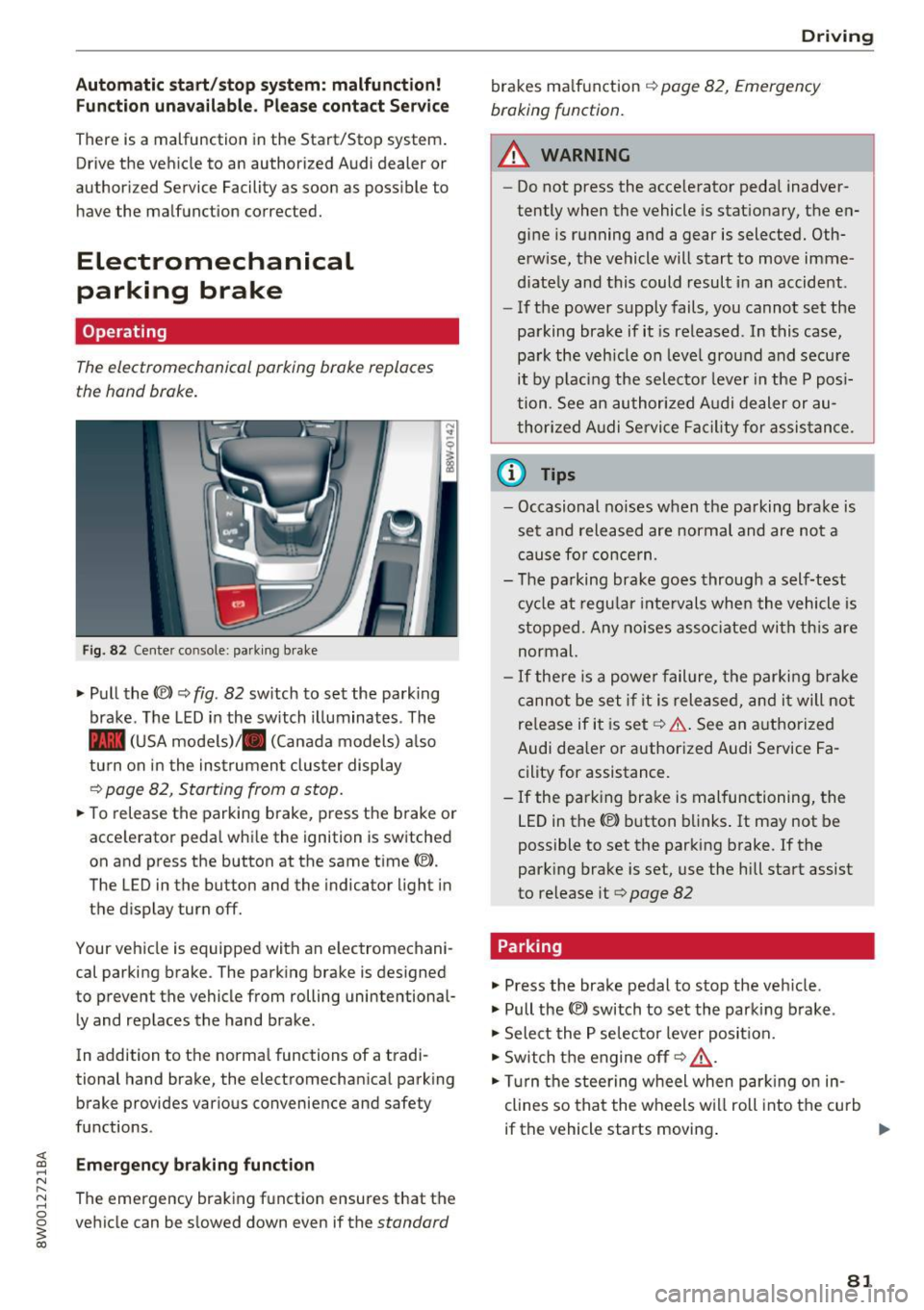
Fig. 82 Center co nsole: parking brake
"'Pull the(®) ~ fig. 82 sw itch to set the park ing
brake . The LED in the switch illuminates . The
- (USA models)/ . (Canada models) a lso
turn on in the instrument cluster display
Q page 82, Starting from a stop .
"'To release the parking brake, press the brake or
accelerator pedal while the ignition is switched
on and press the button at the same time(®).
The LED in the button and the indicator light in
the display turn off.
Your vehicle is equipped with an electromechani
cal parking brake . The parking brake is designed
to prevent the vehicle from rolling unintentional
l y and replaces the hand brake .
In addition to the normal functions of a tradi
tional hand brake, the electromechanical parking brake provides various convenience and safety
functions .
Emerg enc y braking function
The emergency braking fu nction ensures that the
vehicle can be slowed down even if the
standard
D rivi ng
brakes ma lfunction Q page 82, Emergency
braking function.
.&_ WARNING
-
- Do not press the acce lerator pedal inadver-
tently when the vehicle is stationary, the en
gine is running and a gear is selected. Oth
erwise, the vehicle will start to move imme
diate ly and this could result in an accident .
- If the power supply fails, you cannot set the
parking brake if it is released . In this case,
park the veh icle on leve l ground and secure
it by p lac ing the selector leve r in the P posi
tion. See an authorized A udi dealer or au
thorized A udi Se rvice Fa cil ity for assis tance.
(D Tips
- Occasional noises when the parking brake is
set and released are normal and are not a
cause fo r concern.
- The pa rking brake goes through a self-test
cy cle at regu lar inte rvals when the vehicle is
stopped . Any no ises asso ciated wi th th is are
normal.
- If there is a powe r failure, the parki ng brake
canno t be set if it is rele ased, and i t will not
re lease if it is set ~& . See an a uthorized
Audi dealer or authorized Audi Service Fa
cility for assistance.
- If the parking brake is malfunctioning, the
LED in the
C® button blinks . It may not be
possible to set the parking brake . If the
park ing brake is set, use the hill start assist
to release it
Q page 82
Parking
.,. Press the brake pedal to stop the veh icle.
.,. Pull the
C® switch to set the parking b rake .
.,. Select the P se lector lever position .
.,. Switch the engine off
Q _&. .
.,. Turn the steering w heel when par king o n in
clines so that the wheels w ill roll into the cu rb
if the vehicle starts moving .
81
Page 85 of 386
slow your vehicle down as if you had made a
full braking maneuver. ESC and the associat
ed components (ABS, ASR, EDL) cannot over
come the laws of physics . In corners and
when road or weather conditions are bad , a
full brake application can cause the vehicle to skid or the rear end to swerve, which increas
es the risk of an accident.
Hill hold assist
Hill hold assist makes it easier to start on hills .
The system is activated when the brake pedal is pressed for a
few seco nds. The vehicle must be in
an uphill direction of travel.
After releasing the brake pedal , the brake power
is held for a
brief moment to prevent the vehicle
from rolling back when starting. During this
time , you can easily begin to
move your vehicle.
& WARNING
- If you did not begin moving immediately af
ter releasing the brake pedal, the vehicle
could begin to roll backward under certain
conditions . Press the brake pedal or set the
parking brake immediately .
-If the engine stalls, press the brake pedal or
set the parking brake immediately.
- To prevent the vehicle from rolling back un
intentionally when starting in stop-and-go
traffic, keep the brake pedal pressed for a
few seconds before you start driving.
- Switch the ignition off when you leave the
vehicle, even for a short period of time. Also
set the
parking brake to prevent the vehicle
from rolling unintentionally . This applies
particularly when children remain in the
ve
hicle, because there is the risk of an acci
dent .
Automatic transmission
Introduction
The automati c transmission is controlled elec
tronically . The transmission shifts up or down au
tomatically depending on which drive program is
selected .
Driving
When a moderate driving style is used, the
transmission selects the most economical driving
mode. The transmission shifts up at a lower RPM
and shifts down at a higher RPM to improve fuel
efficiency.
The transmission switches to a sporty mode after
a kick-down or when the driver uses a
sporty
driving style
characteri zed by quick accelerator
pedal movements, heavy acceleration, frequent
changes in speed and t raveling at the maximum
speed .
If desired, the driver can also select the gears
manually (tiptronic mode) ¢ page 86.
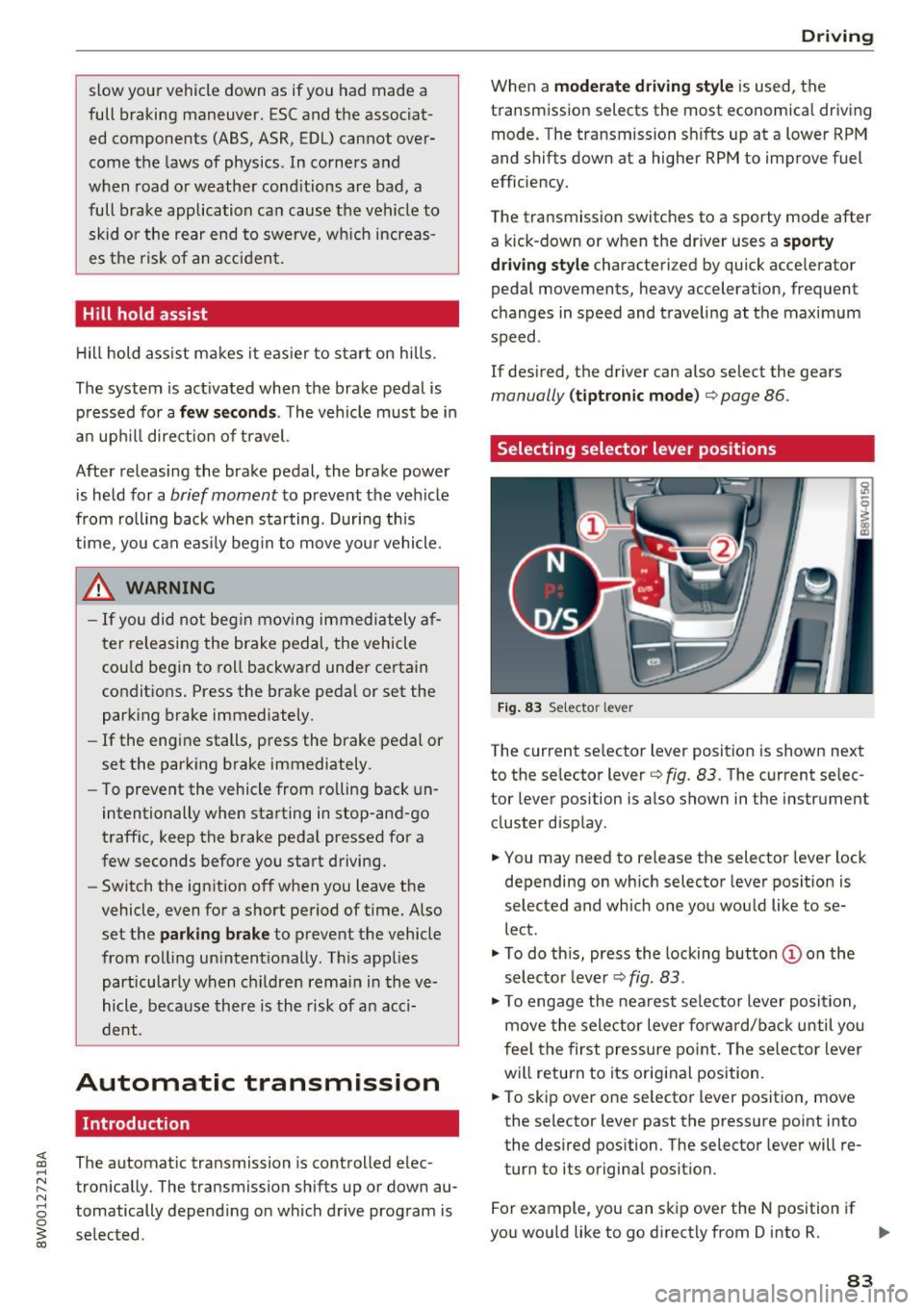
Selecting selector lever positions
Fig. 83 Selecto r lever
The current selector l ev e r pos ition is shown next
to the selector lever¢
fig. 83 . The current selec
tor lever position is also shown in the instrument
cluster d isplay .
.,. You may need to release the selector lever lock
depending on which selector lever position is
selected and which one you would like to se
lect .
.,. To do this, press the locking button (Don the
selector lever¢
fig. 83.
.,. To engage the nearest se lector lever position,
move the selector lever forward/back until you
feel the first pressure point. The selector lever
will return to its original position.
.,. To skip
over one selector lever position, move
the selecto r lever past the pressure point into
the desired position . The selector lever will re
turn to its original position.
For example, you can skip
over the N position if
you would like to go directly from D into R. ..,.
83
Page 89 of 386

<( a, .... N ,....
N .... 0 0
3 a,
-tiptronic does not work if the transmission
is running in emergency mode.
Kick-down
Kick-down enables maximum acceleration.
When you press the accelerator pedal down be
yond the resistance point, the automatic trans
mission shifts down into a lower gear and the en
gine utilizes its full power, depending on vehicle
speed and engine RPM. It shifts up into the next
higher gear once the maximum specified engine
RPM is reached .
A WARNING
Please note that the wheels could spin on
slick or slippery roads when kick-down is ac
tive.
Launch control program
The launch control program provides the best
possible acceleration when starting from a stop.
Requirement: The engine must be at operating
temperature and the steering wheel must not be
turned .
~ Deactivate the Start/Stop system* ¢ page 80.
The LED in the 10 ml button turns on.
~ With the engine running, press the ~l.i; -o~FF =! but
ton briefly ¢
page 135. The II indicator light
turns on and the message
Stabilization control
(ESC): Sport. Warning! Restricted stability
ap
pears in the instrument cluster display.
~ Pull the selector lever back out of the D/S posi
tion briefly to select the S position or select the
Dynamic driving mode in drive select*
¢page 122.
~ Press the brake pedal firmly with your left food
and hold it all the way down for at least 1 sec
ond.
~ At the same time, press the gas pedal all the
way down with your right foot until the engine
reaches and stays at a high RPM level.
~ Remove your foot from the brake pedal within
S seconds ¢
,&..
Driving
A WARNING
-Always adapt your driving to the traffic flow.
- Only use the Launch control program when
road and traffic conditions allow it and oth
er drivers will not be endangered or both
ered by your driving and the vehicle's accel
eration.
- Please note that the drive wheels can spin
and the vehicle can break away when sport
mode is switched on, especially when the
road is slippery.
- Once the vehicle has started moving, press
the
1 .$ OFFI button briefly to turn the sport
mode off.
(D Tips
- The transmission temperature may increase
significantly after using the launch control
program. If that happens, the program may
not be available for a few minutes. It will be
available again after a cool-down period.
- When accelerating using the launch control
program, all vehicle parts are subject to
heavy loads. This can lead to increased
wear.
Transmission malfunction
• Transmission: too hot. Please stop vehicle
Do not continue driving . Select the P selector lev
er position and contact an authorized Audi dealer
or authorized Audi Service Facility for assistance.
• Transmission: malfunction! Please stop ve
hicle and shift to P
Do not continue driving . Select the P selector lev
er position and contact an authorized Audi dealer
or authorized Audi Service Facility for assistance.
@] Selector lever: malfunction! You may contin
ue driving. Please contact Service
There is a system malfunction in the transmis
sion. Drive to an authorized Audi dealer or au
thorized Audi Service Facility immediately to have
the malfunction corrected .
[O] P button: malfunction! Auto P when engine
off. Please contact Service ..,.
87
Page 91 of 386
Parking lock emergency release
The parking lock must be released using the
emergency release before towing the vehicle .
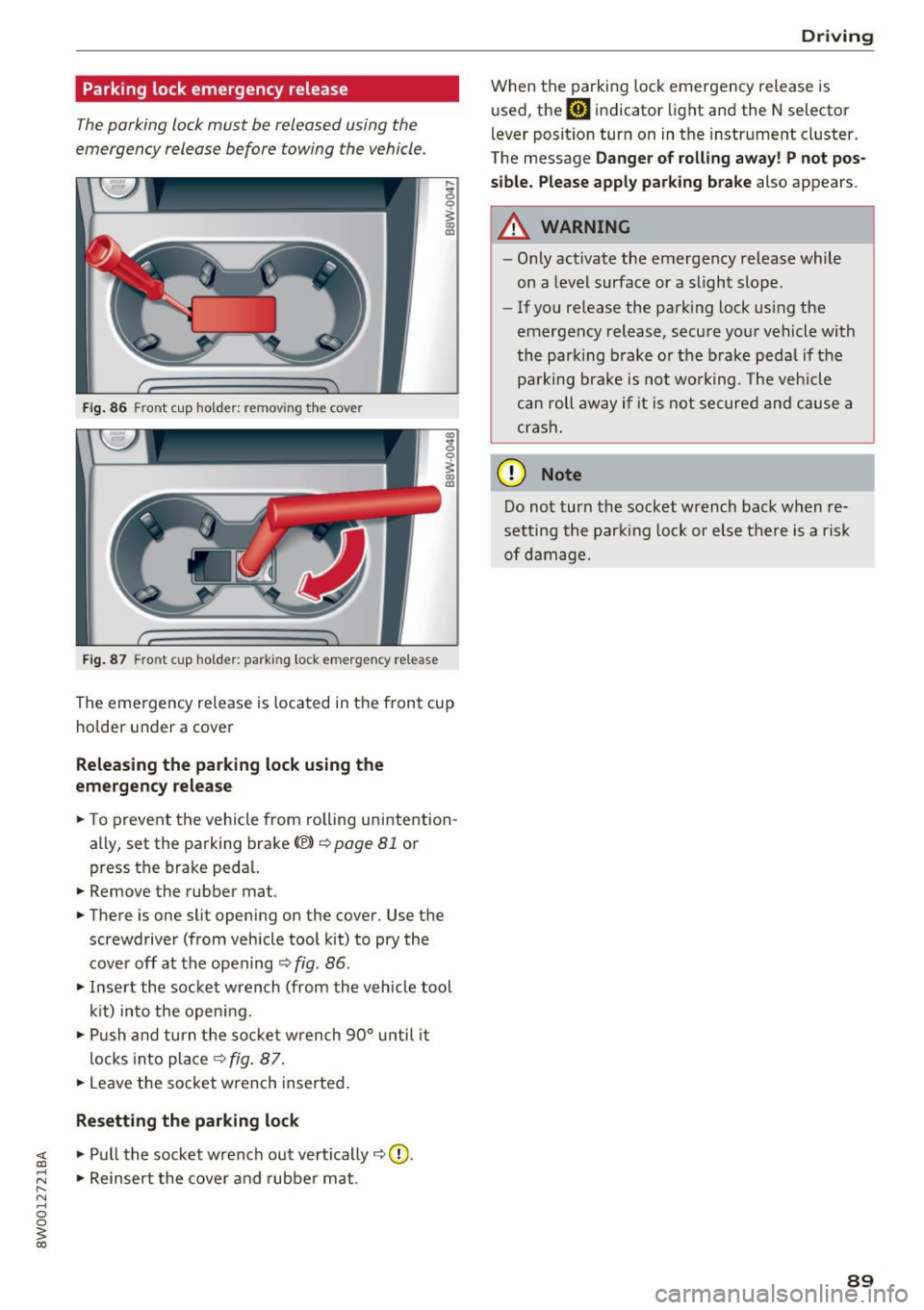
Fig. 86 Front cup holder: removing the cover
Fig. 87 Front cup holder : parking lock eme rge ncy release
~ 0
~ a, ID
The eme rgency re lease is located in the fron t cup
ho lde r under a cover
Releasing the parking lock using the
em ergency r ele ase
.. To prevent the vehicle from rolling unintention
ally, set the parking brake<®>
c::>page 81 or
press the brake peda l.
.. Remove the rubber mat.
.. There is one slit open ing on the cover . Use the
screwdriver (from vehicle tool kit) to pry the
cove r off at the opening
c::> fig . 86 .
.. Inse rt the socket wrench (from the vehicle tool
k it) into the opening .
.,. Push and turn t he so cket w rench 90° until it
locks into place
c::> fig. 87 .
.. Leave the socket wrench inserted .
Resetting the parking lock
~ .. Pull the socket wrench out ve rtically c::> 0.
;:::: .. Reinsert the cover and rubber mat . ...... N ..... 0 0
~ co
Drivi ng
When the parking lock emergency release is
used, the
mJ indicator light and the N selector
l ever posit ion turn on in the instrument cluster .
The message
Da nger of rolli ng away ! P not po s
sible. Please apply park ing bra ke
also appears.
A WARNING
-- Only activate the emergency release while
on a level surface or a slight slope.
- If you release the park ing lock us ing the
emergency release, secu re your vehicle with
the park ing b rake or the brake pedal if the
pa rking brake is not wo rking . T he veh icle
c a n roll away if it is not se cure d and cause a
crash.
(D Note
Do not tur n the socket wrench back when re
setting the parking lock or else there is a risk
of damage.
89
Page 95 of 386

Assist Electronic speed limiter
Your vehicle may be factory equipped with t ires
that are rated for a maximum speed of 130 mph (210 km/h). This is less than the maximum speed
of your vehicle. To reduce the risk of sudden tire
failure and loss of control if the vehicle is operat
ed at excessive speeds, your vehicle also has an
electronic speed limiter . The electronic speed
limiter prevents your vehicle from going faster
than the t ire speed rating. For mo re information
¢page 317.
If the engine control unit receives faulty vehicle
road speed s ignals, the Malfunction Indicator
L amp (M IL)
¢..ij will illuminate. If this occurs,
contact the nearest autho rized Audi dealer for
assistance.
_& WARNING
Always observe the posted speed limits and
adjust you r speed to suit prevailing road, traf
fic and weather condit ions. Never drive your
vehicle faster than the max imum speed rating
of the tires installed.
Speed warning system
Introduction
Applies to: vehicles with speed warning system
The speed warning system helps you to stay un
der a specified maximum speed. -
The
speed warning system warns you if you are
exceeding the maximum speed that you have
stored . You will hear a warning tone when yo ur
speed exceeds the sto red va lue by approximate ly
3 mp h (3 km/h). The indi cator light also tur ns on
in the instrument cluster display
Eel (USA mod
e ls)/
Hll (Canada mode ls) as well as the message
Manually set speed limit XXX mph (km /h ) ex
c eeded .
The ind icator light [01 / (OJ turns off
when the speed decreases below the stored max
imum speed.
Sett ing a threshold is recommended if you would
like to be reminded when you reach a certain
maximum speed. Situations where you may want
A ss ist
to do so include driving in a co untry with a gener
al speed limit or if there is a specified maximum
speed for winte r tires.
(D Tips
Regardless of t he speed warning system, you
s h ou ld always monitor your speed using the
speedometer and make s ure yo u are fo llow ing
the lega l speed limit.
Setting the warning threshold
Appl ies to : vehicles with speed warni ng system
You can set, change and delete the warning
threshold in the Infotainment system.
.,. Sele ct in the Infotai nment system: I MENU ! but
ton
> Vehicle > left control b utton > Driver as
sistance
> Speed warning > Manu al.
You can set a ny thresho ld between 20 mp h
(30 km/h) and lS0 mph (240 km/h) . Settings
can eac h be adjusted in increments of 5 mph (10
km/h).
Cruise control system
Switching on
Applies to: vehicles with cruise control system
The cruise control system makes it possible to
drive at a constant speed starting at 15 mph (20kmlh).
0
f
~
0
Fig. 88 Operating lever: cru ise control system
.,. To switch t he system on, pull the lever into po
sition
(D ¢ fig. 88.
.,. Drive at the speed to be maintained.
.,. To store the speed, press the button @.
93