key AUDI A4 2017 User Guide
[x] Cancel search | Manufacturer: AUDI, Model Year: 2017, Model line: A4, Model: AUDI A4 2017Pages: 386, PDF Size: 96.32 MB
Page 45 of 386
Luggage compartment
lid
Opening and closing the luggage
compartment lid
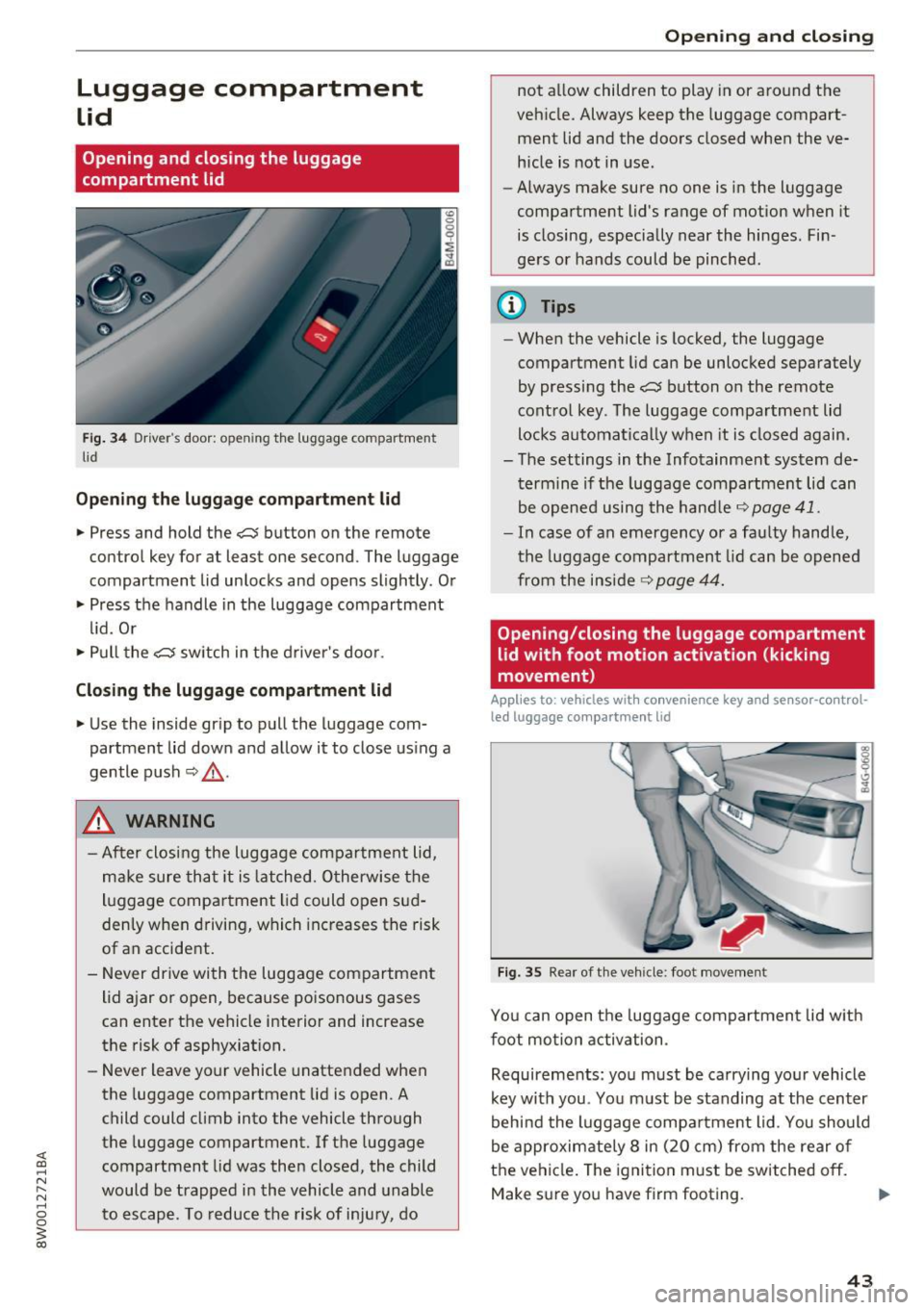
Fig. 34 Driver 's door : opening the luggage compartment
li d
Opening the luggage compartment lid
.. Press and hold the c::$ button on the remote
control key for at least one second . The luggage
compartment lid unlocks and opens slightly. Or
.. Press the handle in the luggage compartment
lid. Or
.. Pull the
c::$ switch in the driver 's door .
Closing the luggage compartment lid
.. Use the inside gr ip to pull the luggage com
partment lid down and allow it to close using a
gentle push
Q _&. .
A WARNING
-After closing the luggage compartment lid,
make sure that it is latched. Otherwise the
luggage compa rtment lid could open sud
denly when driving, which increases the risk
of an accident.
- Never drive with the luggage compartment
lid ajar or open, because poisonous gases
can enter the vehicle interior and increase
the risk of asphyxiation.
- Never leave your vehicle unattended when
the luggage compartment lid is open. A
child could climb into the vehicle through
the luggage compartment. If the luggage
compartment lid was then closed, the child
would be trapped in the vehicle and unable
to escape . T o reduce the risk of injury, do
Open ing and closing
not allow children to play in or around the
vehicle. Always keep the luggage compart
ment lid and the doors closed when the ve
hicle is not in use.
- Always make sure no one is in the luggage
compartment lid's range of motion when it
is closing, especially near the hinges. Fin
ge rs or hands could be pinched .
@ Tips
-When the vehicle is locked, the luggage
compartment lid can be unlocked separately
by pressing the
c::$ button on the remote
control key . The luggage compartment lid
locks automatical ly when it is closed again.
- The settings in the Infotainment system de
termine if the luggage compartment lid can
be opened using the hand le
c::> page 41.
- In case of an emergency or a faulty handle,
the luggage compartment lid can be opened
from the inside~
page 44.
Opening/closing the luggage compartment
lid with foot motion activation (kicking
movement)
Applies to : vehicles wit h convenience key an d senso r-co ntrol
led luggage compa rt m ent lid
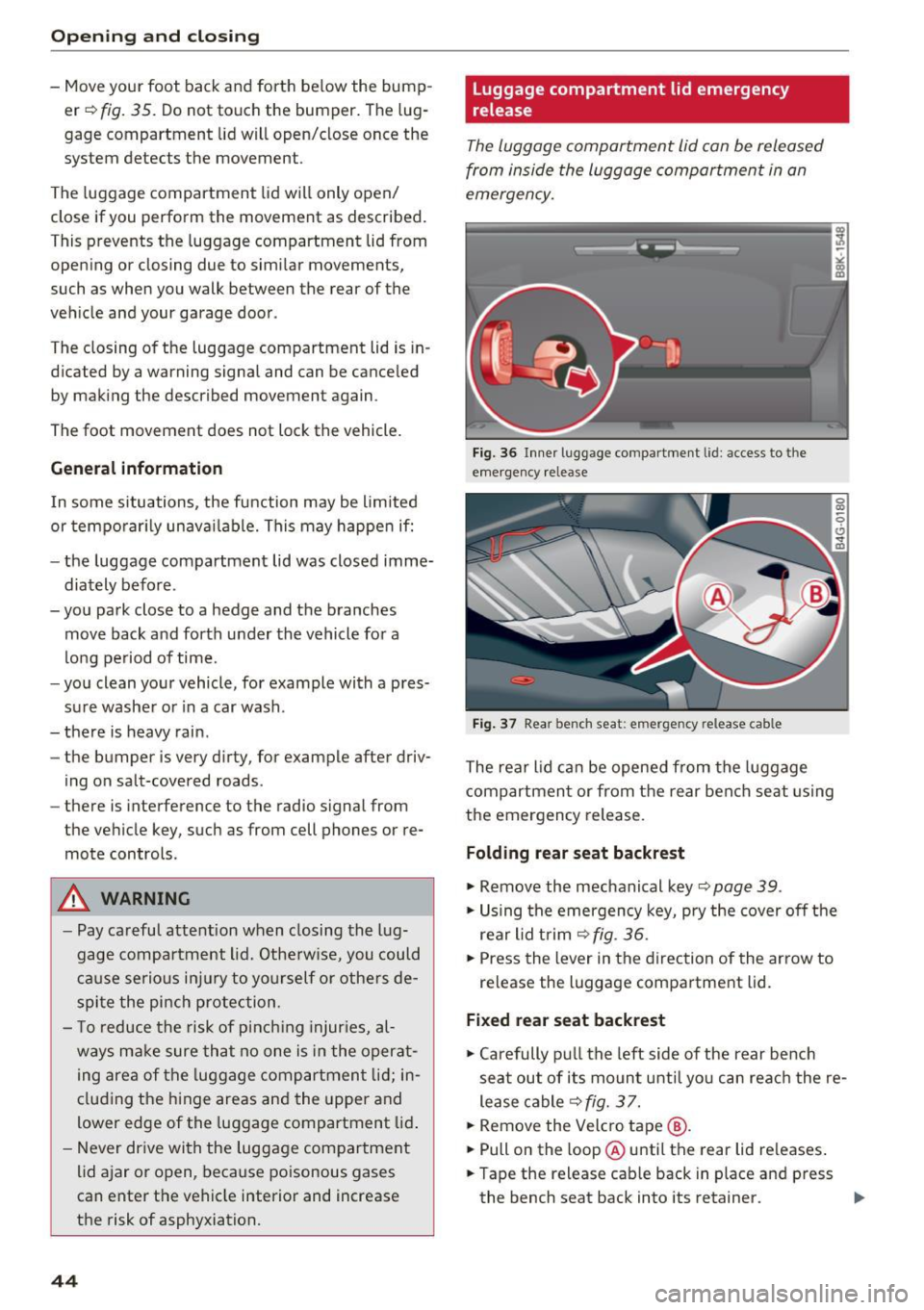
Fig. 35 Rear of the vehicle : foot movement
You can open the luggage compartment lid with
foot motion activation .
Requirements: you must be carrying your vehicle
key with you . You must be standing at the center
behind the luggage compartment lid . You should
be approximately 8 in (20 cm) from the rear of
the vehicle. The ignition must be switched
off.
Make sure you have firm footing.
43
Page 46 of 386
Opening and clo sin g
- Move your foot back and forth below the bump
er¢
fig. 35. Do not touch the bumper. The lug
gage compartment lid will open/close once the
system detects the movement .
The luggage compartment lid will only open/
close if you perform the movement as described.
This prevents the luggage compartment lid from
open ing or closing due to similar movements,
such as when you walk between the rear of the
veh icle and your garage doo r.
The closing of the luggage compartment lid is in
d icated by a warning signal and can be canceled
by mak ing the described movement again.
The foot movement does not lock the vehicle.
General information
I n some s ituations, the function may be limited
or temporar ily unavai lable. This may happe n if:
- the luggage compartment lid was closed imme
diately before .
-you park close to a hedge and the branches
move back and forth under the vehicle for a
long pe riod of time.
- you clean your vehicle, for example with a pres
su re washe r or in a car wash.
- there is heavy rain .
- the bumper is
very dirty , for example after driv-
ing on salt-covered roads .
- there is interference to the radio signal from
the vehicle key, such as from cell phones or re
mote controls.
A WARNING
-Pay careful attention when closing the lug
gage compartment lid. Othe rw ise, you could
ca use serious in jury to yo urself or othe rs de
spite the pi nch protection.
- T o reduce the risk of pinch ing injur ies, al
ways m ake sure that no one is in the operat
ing area of the luggage compartmen t lid; in
cluding the h inge areas and the upper and
lower edge of the luggage compartment lid .
- Never dr ive with the luggage compartment
lid ajar or open, because poisonous gases
can enter the vehicle interior and increase
the risk of asphyxiation.
44
luggage compartment lid emergency
release
The luggage compartment lid can be released
from inside the luggage compartment in an
emergency.
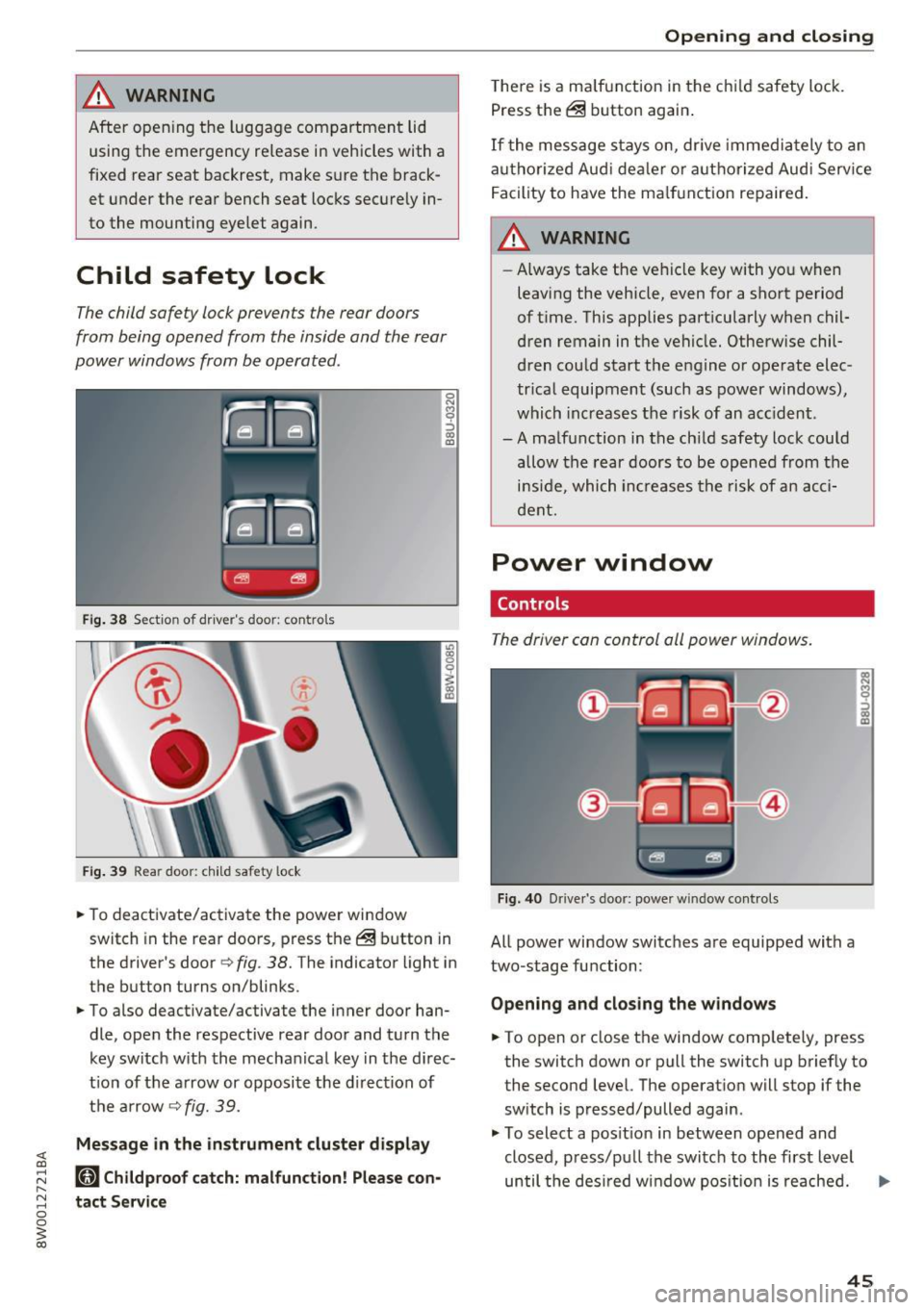
Fig. 36 Inner luggage compartment l id: access to the
emergency release
F ig . 37 Rea r bench seat: emergency release cable
The rear lid can be opened from the luggage
compartment or from the rear bench seat using
the emergency release.
Folding rear seat backrest
• Remove the mechanical key¢ page 39.
• Using the emergency key, pry the cover off the
rear lid trim ¢
fig. 36.
• Press the lever in the direction of the arrow to
release the luggage compartment lid.
Fixed rear seat backrest
• Carefully pu ll the left side of the rear bench
seat out of its mount until you can reach the re
lease cable¢
fig. 3 7.
• Remove the Velcro tape @.
• Pull on the loop @ until the rear lid releases .
• Tape the release cab le back in place and press
the bench seat back into its retainer.
Page 47 of 386
,&_ WARNING
After opening the luggage com partment lid
using the emergency release in vehicles with a
fixed rear seat backrest, make s ure the brack
et under the rea r bench seat loc ks sec urely in
to the mounting eyelet again.
Child safety Lock
-
The child safety lock prevents the rear doors
from being opened from the inside and the rear
power windows from be operated.
F ig. 38 Section of driver's door: co ntrols
Fi g. 39 Rear door: child safety lock
0
N
9 :::, a, a,
"'To deactivate/ac tivate the power wi ndow
switch in the rear doo rs, press the @ button in
the driver's door
r=> fig . 38. The indicator light in
the button turns on/blinks.
"' To also deactivate/activate the inner door han
dle, open the respective rear door and turn t he
key switch w ith the mecha nical key in the d irec
t ion of the a rrow or opposi te the d irec tion of
t h e ar row
r=> fig. 39.
Message in the instrument cluster display
(81 Childproof catch: malfunction! Please con
tact Service
Open ing and closing
T he re is a ma lf u nction in the c hild safety lock.
Press th e @ button again .
If the me ssage s tay s on, dr ive immedia tely to an
a uth o rized Aud i de aler o r a uth o rized Aud i Serv ice
F acility to have the ma lf u n ction repaired .
,&_ WARNING
-Always take the ve hicl e key with yo u when
leavi ng the vehicle, even for a sho rt period
of t ime. This applies part icularly when chil
dren remain in t he vehicle. Otherwise chil
d ren cou ld start t he e ngine o r operate elec
tr ica l equipment (such a s power windows) ,
which inc reas es t he risk of an ac cident.
-A ma lf u nction in the ch ild safety lock cou ld
allow the rear doors to be opened from the
i n si de, which inc reases the ris k of an acc i
d ent.
Power window
Controls
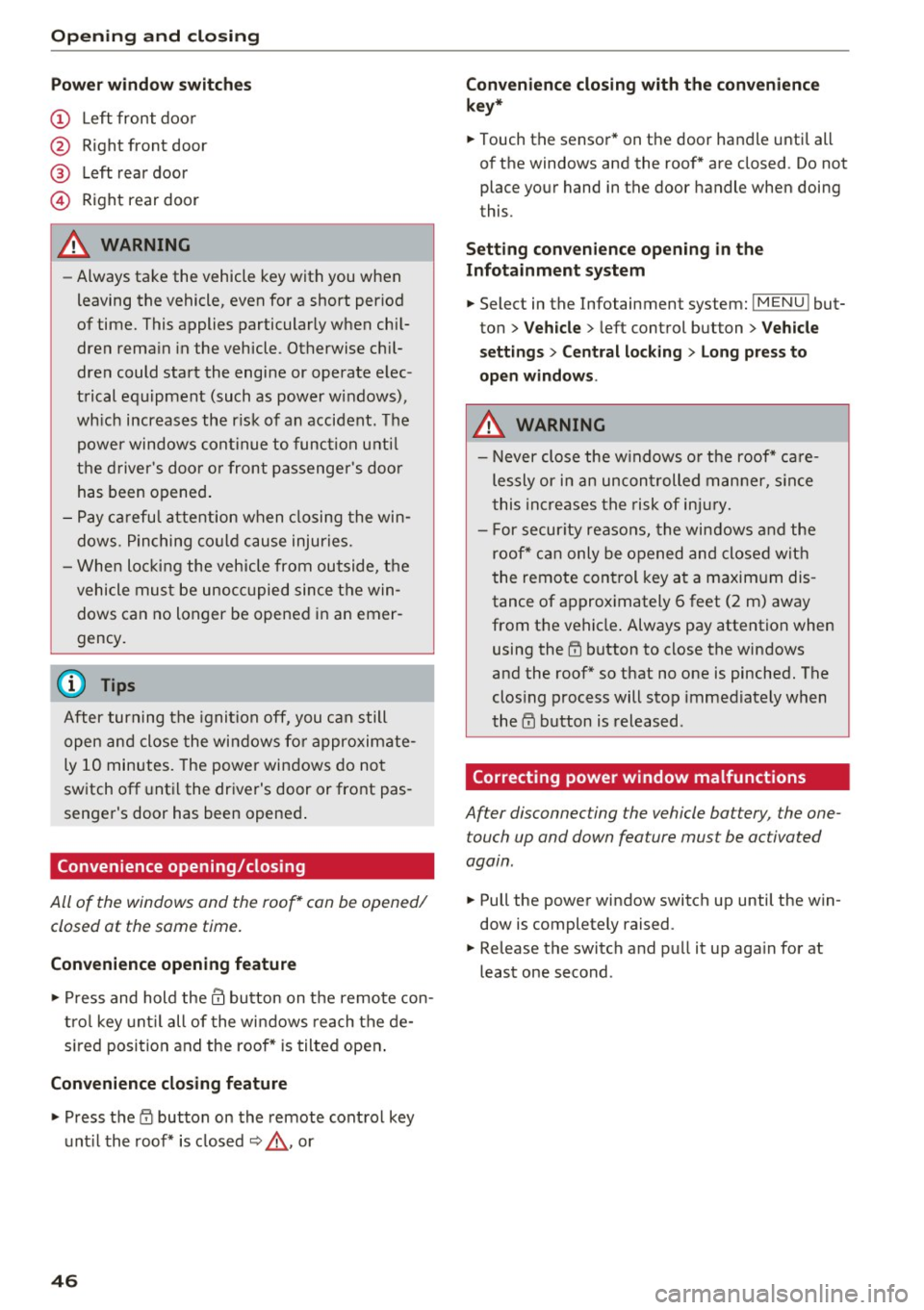
The driver can control all power windows.
Fig. 40 Drive r's door: power w indow controls
All power window switc hes are equipped with a
two-stage fu nction:
Opening and clos ing the w indows
-
"' To open or close the window comp letely, press
the switch down or pull the switch up briefly to
the second level. The operat ion will stop if the
sw itch is pressed/pulled again.
"' To select a pos it ion in between opened and
closed, p ress/p ull the switch to the first level
until the des ired w indow pos ition is reache d. ..,.
45
Page 48 of 386
Opening and closin g
Pow er wind ow s witch es
® Left rear door
© Right rear door
A WARNING
- Always take the vehicle key with you when
leaving the vehicle, even for a short period
of time. This applies particularly when chil
dren rema in in the vehicle . Otherwise ch il
dren could start the engine or operate elec
trical equipment (such as power windows),
wh ich increases the r isk of an accident. The
power windows continue to function unti l
the driver 's door or front passenger 's doo r
has been opened .
- Pay carefu l attention when closing the win
dows . Pinching co uld cause injuries.
- When loc king the vehicle from outside, the
vehicle must be unoccupied since the win dows can no longer be opened in an emer
gency .
(D Tips
After turning the ignition off, you can still
open and close the windows for approximate
ly 10 minutes. The power windows do not
switch off unt il the driver's door or front pas
senger's door has been opened .
Convenience opening/closing
-
All of the windows and the roof* can be opened/
closed at the same time.
Conv eni ence opening feature
.,.. Press and hold them button on the remote con
tro l key unt il all of the windows reach the de
s ired position and the roof* is tilted open .
Conveni ence closing feature
.. Press the i'.D button on the remote control key
unt il the roof* is closed¢,& , or
4 6
Conveni ence closing with the convenience
k ey*
.. Touch the sensor* on the door handl e until all
of the windows and the roof* are closed . Do not
place your hand in the door handle when doing
this .
Setting conv en ience openin g in the
Infota inment system
.. Select in the Infotainment system: IMENU l but
ton
> Veh icle > left control button > V ehicle
se tting s
> Centr al lo cking > Lon g press to
op en windo ws.
A WARNING
-Never close the w indows or the roof* ca re
lessly or in an uncontrolled manner, s ince
this increases the risk of inju ry.
- For secur ity reasons, the windows and the
roof* can only be opened and closed with
the remote control key at a maxim um dis
tance of approximately 6 feet (2 m) away
from the vehicle . Always pay attention when
using the
rn button to close the windows
and the roof* so that no one is pinched. The
clos ing process will stop immediately when
the
l'.D button is released .
Correcting power window malfunctions
After disconnec ting the vehicle bat tery , the one
touch up and down fea ture mus t be ac tiva ted
again .
.. Pull the power window switch up until the win
dow is completely raised .
.. Release the switch and pull it up aga in for at
least one second .
-
Page 50 of 386
Opening and clo sin g
You can switch the valet parking function on l )
when someone else is parking you r veh icle . When
the function is sw itched on, the vehicle can be
driven, locked and unlocked us ing the master
key, but access to the luggage compartment is not permitted .
.. Remove the mechan ica l key from the remote
control key¢
page 39 .
.. Open the glove compartment¢ page 64 .
.. Press the I VA LET I button to switch the valet
parking function on . The LED in t he button
turns on .
.,. lock the glove compartmen t with the mechani
ca l key .
.. For vehicles with lockable pass-thro ugh and
lockable rear seat backrests : to secure the lug
gage compartment from the veh icle interior as
well, lock the pass-through and the rear seat
backrest s using the mechanical key
¢
page 66 or¢ page 65.
.. Give your maste r key to the personnel who are
parking your ve hicle and keep the mecha nical
key.
The follow ing buttons are deactivated when the
valet parking funct ion is switched on:
- C::J button in the dr iver 's door
- C::J button on the remote control key
- Handle in the rear lid
When the valet parki ng f unction is swi tched on,
the message Valet parking a cti va te d appears in
the instrument cluster display when you switch
the ignition on .
(l) Tips
Please note that the luggage compartment
c a n sti ll be accessed from t he vehi cle interior
in vehicles with fixed rear seat backres ts or
ones t hat cannot be locked, even when the
valet parking function is switched on .
l) This fun ctio n is not a vailab le in a ll coun tries.
48
Garage door opener
(Homelink)
Description
Applies to: vehicles with garage door opene r (Horne Link)
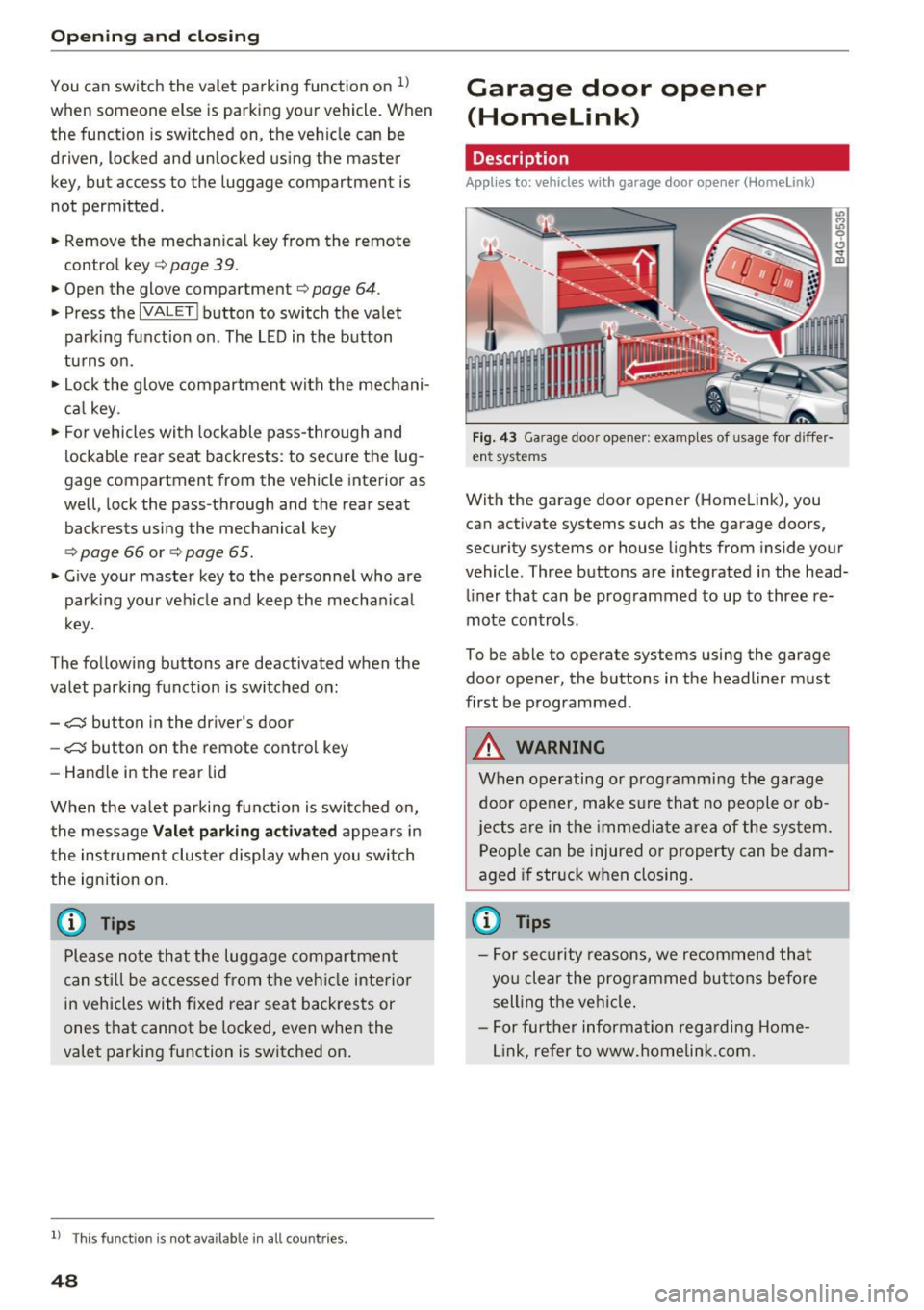
F ig. 43 Ga rage doo r opene r: exa mples of usage fo r di ffer·
en t syste ms
With the garage door op ener (Homelink) , you
can activate systems such as the garage doors,
security systems or house lights from inside your
vehicle. Three buttons are integrated i n the head
liner that can be programmed to up to three re
mote controls .
To be able to operate systems using the garage door opener, the buttons in the headliner must
first be programmed .
A WARNING
When operating or programming the garage
door opener, make sure that no people o r o b
jects a re in the immediate area of the sys tem.
P eop le can be injured or property can be dam
aged i f str uck when closing.
(D Tips
- For sec urity reasons, we recommend that
yo u clear the prog rammed but tons before
sell ing t he ve hicl e.
- For furthe r information rega rding Home
link, refer to www.homelink .com.
Page 56 of 386
Lights and Vision
Interior lighting
Applies to: ve hicles w ith amb ient light ing
.,. Select in the Infotainment system: IMENU I but
ton
> Vehi cle> left contro l bu tton > Vehicle
settings > Interior lighting.
The interior lighting turns on when you switch
the head ligh ts on while the igni tion is on .
Version 1
To adjust the brightness of individua l zones, se
lect
Front brightness *, Door brightne ss or Foot
w ell brightness .
Turn the control knob to the left
or to the right. Press the contro l knob to confirm
the br igh tness.
Version 2
Select and confirm one of the displayed profiles.
Individual: you can customize the brightness and
color of individual zones.
Press the right control button. Se lect and con
fi rm one of the disp layed options. To change the
brightness or the color, turn the control knob to
the left or right . Press the control knob to con
f irm the brightness or the color.
drive select : the interior and conto ur lighting col
or changes in drive se lect depending on these
lected driving mode in drive select*
¢ page 121.
To adjust t he brightness of other profiles, press
the contro l knob to confirm the profile again.
T urn the contro l knob to the left or to the right.
Press the control knob to confirm the brightness .
(D Tips
The setting is a utomatica lly stored and as
signed to the remote control key that is be ing
used.
54
Instrument illumination
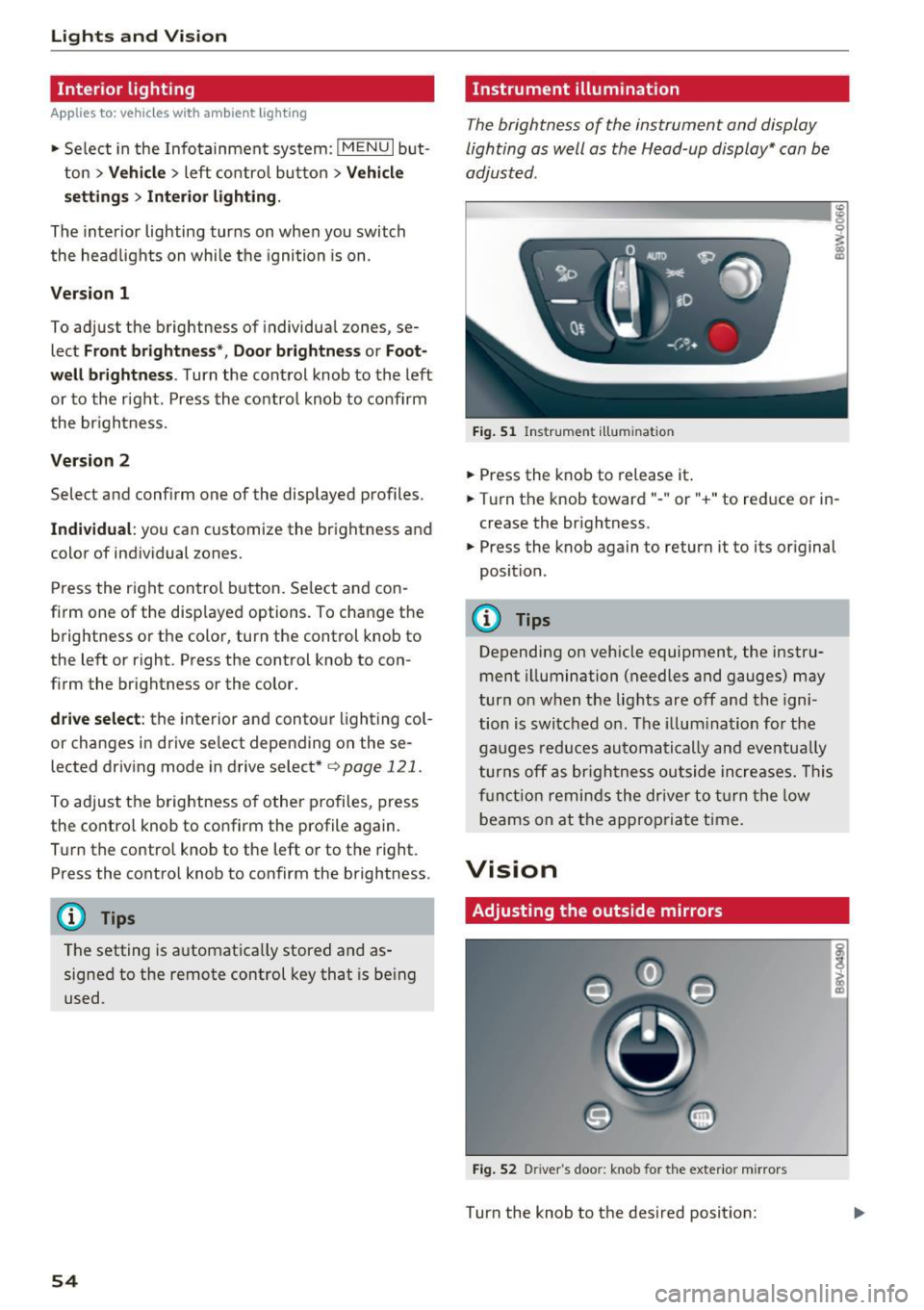
The brightness of the instrument and display
lighting as well as the Head-up display* can be
adjusted.
ID __ ________ _.:g
Fig. 51 Ins trumen t ill umi nat ion
.,. Press the knob to release it .
0
~
"° CD
.,. Turn the knob toward" -" or" +" to reduce or in
crease the br ightness.
.,. Press the knob again to return it to its original
position.
(!) Tips
Depending on vehicle equipment, the instru
ment illumination (needles and gauges) may
turn on when t he lig hts are off and the igni
tion is switched o n. T he i llum ination for the
gaug es reduces automa tically and eve ntua lly
turn s off a s br igh tne ss ou tside increases. Thi s
f u nct io n remin ds the dr ive r to tur n the low
b eams on at the appropria te t ime.
Vision
Adjusting the outside mirrors
Fi g. 52 D river 's doo r: knob for the exter io r mirrors
Turn the knob to the des ired position:
Page 64 of 386

Seats and storage
Head restraints
Front head restraints
•
Fig. 61 Front seat : adjust ing the comfo rt head restra in t*
Adj ust the head restraints so the upper edge is as
even as possible wi th the top of your head. If that
is not possible, try to adjust as close to this posi
tion as possible.
~ To adjust the head restraint, press the side but
ton and place the head restraint in the desired
position until it locks into place
i:::.> fig. 61.
_& WARNING
Always read and fo llow the applicable warn
ings ¢
page 239, Proper adjustment of head
restraints.
Rear head restraints
Fig. 62 Rear seat: adjust ing th e hea d restra int
62
Fig. 63 Rear seat: removing the head restrai nt
If passengers are sitting in the outer rear seats,
adjus t the head restraints so that the upper edge
of the head restraint is as level as possible with
the upper part of their head.
If that is not possi
bl e, try to adjust as close to this position as pos
sible. Adjust the head restraint in the center seat
to be all the way up
c:> _& .
Adjusting the head restraints
~ To move the head restraint upward, hold it at
th e sides with both hands and slide it upward
until it clicks into place
c:> fig. 62.
~ To move the head restraint downward, press
the button -arrow-
c:> fig. 62 and slide the head
restraint downward .
Removing the head restraints
~ Move the head restraint upward as far as it can
go .
~ Press the re lease point ,:::., fig. 63 using the me
chanical key
c:> page 38, Key set and press the
button
c:> fig. 62. Pull the head restraint out of
the backrest at the same time ¢_& .
Installing the head restraints
~ Slide the posts on the head restraint down into
the guides until the posts click into place.
~ Press the button -arrow-c:> fig. 62 and slide the
head restraint all the way down. You should not
be able to remove the head restraint from the
backrest without pressing the button .
_& WARNING
-Always read and follow the applicable warn
ings
i:::.> page 239, Proper adjustment of
head restraints.
Page 65 of 386
-Only remove the head restraints from the
rear seats when it is necessary for installing
a child seat¢
page 2 77, Child safety. In
stall the head restra int aga in immediately
once the child seat is removed. D riving w ith
the head restra ints removed o r not in the
upr ight position in creases the risk of ser io us
lnJUry.
Memory function
Description
Applies to: vehicles with memory function
Using the memory funct ion, you can quickly and
eas ily store a personal seat profile for the driver
and recall the settings later. The memory func
tion is controlled by the remo te control key and
the memory bu ttons in the drive r's door.
The driver's seat profile is stored again and as
signed to t he remote contro l key each time the
ve hicle is locked . Whe n you open the door, the
seat profi le is automat ically reca lled. If two peo
p le use t he vehi cle, it i s recomme nded that each
person always uses "their own" remote cont ro l
key.
Up to 2 seat prof iles can be stored in the memory
bu tto ns in the dr iver's door. O nce they are sto r
ed, these sea t profiles can be sele cted at any
time .
The fo llow ing settings are stored :
Remote con-Memory but-
trot key ton
Driver Dr iver
Seat X X
Both exterior
X X mirrors*
Remote control key
Applies to: vehicles with memory function
The driver's sea t profile can be assigned to the
remo te control key when the vehicle is locked .
.. Se lect in the Infotainment system: !MENUI b ut
ton
> Vehicle > left contro l bu tto n > Vehicle
Seats and storag e
setting s > Seats > Driver 's seat > Store set
ting s on remo te control key.
(D Tips
If you do not wish to have t he seat profi le for
another drive r assigned to the remote cont rol
key, switch the memory fu nction off in t he In
fotainment system.
Memory buttons
Applies to: vehicles with memo ry function
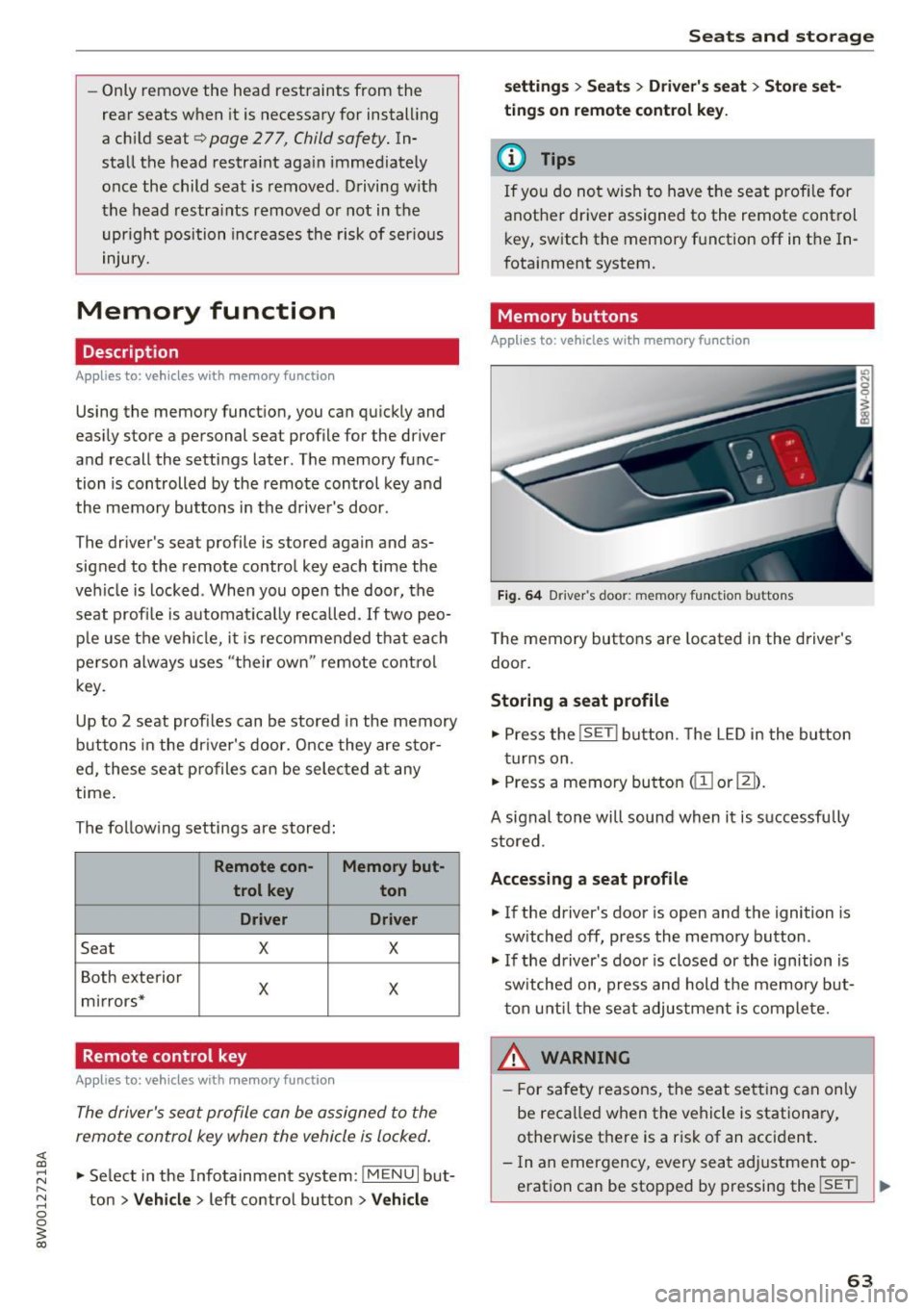
Fig. 64 Drive r's door : memory function buttons
The memory butto ns are located in the driver's
doo r.
Storing a seat profile
.. Press the !SET I button. The LED in the button
t ur ns on .
.. Press a memory bu tton
dil or~).
A signal tone will sound when it is s uccessfu lly
stored.
Accessing a seat profile
.. If the driver's door is open and the ignition is
sw itched off, press the memory button .
.. If the driver's door is closed or the ignition is
sw itched on, press and hold the memory but
t on u nti l the seat adjustment is com plete.
,&_ WARNING
- F or s afety reasons, the seat se tting can on ly
be reca lled when the vehicle is stationa ry,
otherwise t here is a risk of an accident.
- In an emergency, every sea t ad justment op
eration can be stopped by pressing the
!SET ! ..,.
63
Page 66 of 386
Sea ts and stor age
button or the buttons @or@ <* page 61,
fig. 59.
Sockets
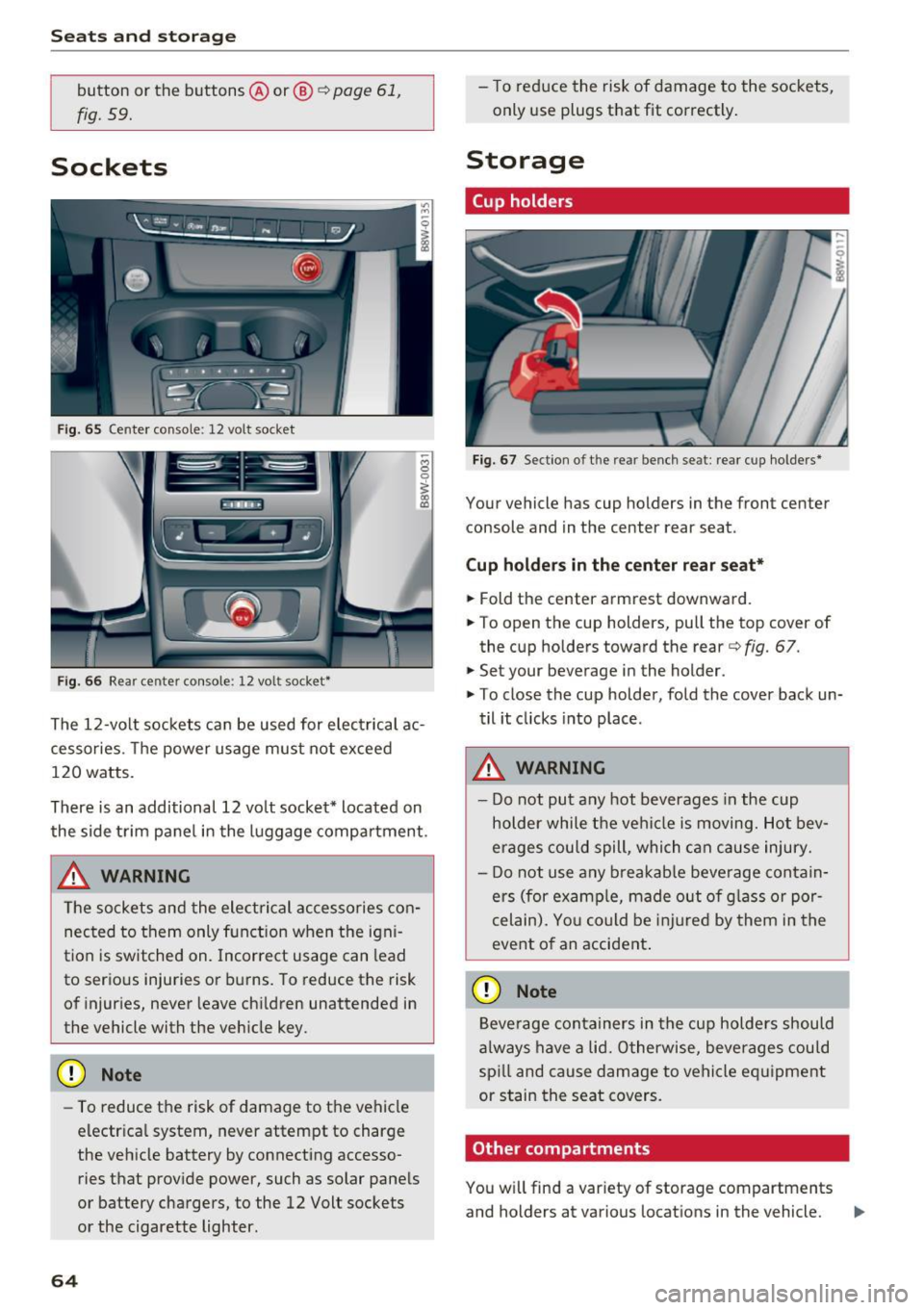
Fig. 65 Center console: 12 volt socket
Fig. 66 Rear center console: 12 volt socket*
The 12 -volt sockets can be used for electrical ac
cessories. The power usage must not exceed
120 watts.
There is an additional 12 vo lt socket* located on
the side trim panel in the luggage compartment .
_& WARNING
The sockets and the electrical accessories con
nected to them only function when the igni
tion is switched on. Incorrect usage can lead
to serious injuries or burns. To reduce the risk
of injuries, never leave ch ildren unattended in
the vehicle with the veh icle key.
(D Note
- To reduce the risk of damage to the vehicle
electr ica l system, never attempt to charge
the vehicle battery by connecting accesso ries that provide power, such as solar pane ls
or battery chargers, to the 12 Volt sockets
or the cigarette lighter.
64
- To reduce the risk of damage to the sockets,
only use plugs that fit correctly .
Storage
Cup holders
Fig. 67 Section o f th e rear bench seat: rear cup holde rs *
Your vehicle has cup holders in the front center
console and in the center rear seat .
Cup ho ld ers in the cent er rear seat*
.,. Fold the center armrest downward .
.,. To open the cup holders, pull the top cover of
the cup holders toward the rear<=>
fig. 67 .
.,. Set your beverage in the holder.
.,. To close the cup holder, fold the cover back un
til it clicks into place .
_& WARNING
-
-Do not put any hot beverages in the cup
holder while the vehi cle is moving. Hot bev
erages could spill, which c an cause injury.
- Do not use any b reakab le beve rage contain
ers (for examp le, made out of g lass or por
celain). Yo u co uld be injured by them in the
event o f an accident .
(D Note
Beverage containers in the cup holders should
a lways have a lid. Otherwise, beve rages could
sp ill and cause damage to vehicle eq uipment
or stain the seat covers.
Other compartments
You will find a var iety of storage compartments
and holders at various locations in the vehicle. ..,.
Page 67 of 386

- Glove compartment: the glove compartment can be locked using the mechanical key
¢ page 38, Key set.
-In the door trim panels
- Storage compartment under the front center
armrest
- Storage compartment* in the rear center arm-
rest
- Storage compartment* under the light switch
- Garment hooks above the rear doors
- Nets* on the backrests of the front seats
- Nets* on the left/right luggage compartment
trim panel
A WARNING
-Always leave the lid on the glove compart
ment cover closed while driving to reduce
the risk of injury.
- Make sure that the view to the rear is not
obstructed by hanging garments.
- Hang only lightweight cloth ing and be sure
that there are no heavy or sharp-edged ob
jects in the pockets.
- Do not use clothes hangers to hang gar
ments, because this could reduce the effec
tiveness of the side curtain airbags*.
- Only use the storage compartments in the
door trim panels to store small objects that
will not stick out of the compartment and
impair the range of the side airbags.
Luggage compartment
General information
A WARNING
Read and follow the important safety precau
tions in ¢
page 242, Storing cargo correctly.
-
Seats and storage
Increasing the size of the luggage
compartment
Applies to : vehicles wit h folding backrests
The rear seat backrests can be folded forward ei
ther separately" or together.
Fig. 68 Backrest: release lever, securing knob an d lock*
Fig. 69 Backrest: fold ing in the center backrest
Folding the outer rear backrests forward and
backward
.,. Pull the release lever @in the direction of the
arrow and fold the backrest forward .
.,. Fold the backrest back up again until it latches
and the red marking @ is no longer visible
¢&, .
Folding the center rear backrest forward and
backward
.,. Pull on the upper release lever© and fold the
backrest forward@¢
fig. 69 .
.,. Fold the backrest backward until it locks into
place.
The engaged backrest can be locked © using the
mechanical key¢
page 39. This would block ac
cess into the luggage compartment from the ve
hicle interior. You can only enlarge the luggage
compartment if the backrest is not locked. .,..
65