fuel AUDI A4 2018 User Guide
[x] Cancel search | Manufacturer: AUDI, Model Year: 2018, Model line: A4, Model: AUDI A4 2018Pages: 403, PDF Size: 66.81 MB
Page 82 of 403

Driving
Driving
General information
Breaking in
A new vehicle must be broken in for the first 1,000 mi les (1,500 km). Do not drive at speeds
that will exceed 2/3 of the maximum perm itted
engine speed (RPM) for the first 600 miles
(1,000 km), and avoid full acceleration during
this period . You may gradually start increasing
the RPM and the speed between 600 miles (1,000 km) and 1,000 miles (1,500 km) .
During the first hours of use, the engine has a
h igher internal friction than later on when all
moving parts have settled into place with each
other.
How the vehicle is driven during the first 1,000
miles (1,500 km) also affects the engine quality.
Drive at moderate engine speeds after the initial
break-in period, particularly when running a cold
engine. This will reduce engine wear and improve
the mileage .
Do not drive at too low of an engine speed (RPM) .
Shift down if the engine stops running "smooth ly". Extremely high engine speeds are automati
cally reduced .
Reducing the risk of vehicle damage
(D Note
When driving on poor roads, by curbs and on
steep ramps, make su re that low-hang ing
components such as the spoi ler and exhaust
system do not come into contact with these
or they could be damaged. This especially ap
plies to vehicles with low ground clearance
and vehicles that are heavily loaded.
Driving through water on roads
Note the following to reduce the risk of vehicle
damage when driv ing through water, for example
on flooded roads:
-The water must not be any higher than the bot
tom of the vehicle body .
80
-Do not drive faster than walking speed .
A WARNING
After driving through water or mud, the effec
tiveness of the brakes may be reduced due to
moisture on the brake rotors and brake pads.
A few careful brake applications should dry
off the brakes and restore the full braking ef
fect .
{CT) Note
-Vehicle components such as the engine,
transmission, suspension or electrical sys-
tem can be severely damaged by driving
through water .
-Always switch the Start/Stop system* off
when driving through water <=:>page
85.
@ Tips
-Determine the depth before driving through
water.
-Do not stop the vehicle, drive in reverse or
switch the engine off when driving through
water .
'
-Keep in mind that oncoming vehicles may
create waves that raise the water level and
make it too deep for your vehicle to drive
through safe ly .
-Avoid driving through salt water, because
this can cause corrosion .
Economical and environmentally -friendly
dr iving
The amount of fuel consumption, the environ
mental impact and the wear to the engine,
brakes and tires depends mostly on your driving
style. With an anticipatory and economic driving
style, fuel consumption can be reduced by ap proximately 10-15%. The following tips will help
you conserve the environment and your money at the same time .
Anticipatory driving
A vehicle uses the most fuel when accelerating.
When you drive with anticipation, you do not need to brake as often and so you accelerate less.
When possible, let your vehicle coast with a gear
..,.
Page 83 of 403
a co .... N ,....
N .... 0 0
3 co
engaged, for example when you notice that the next traffic light is red . This produces an engine
braking effect, which helps to protect the brakes
and tires and reduces the emissions and fuel con
sumpt ion to zero (fuel shut-off dur ing decelera
tion) .
Shift efficiently
Upshifting earlier is an effective way to save fuel.
Staying in a gear too long uses fuel unnecessari
ly.
Applies to: vehicles with manual transmission
Shift as soon as possible from first to second
gear. S hifting to the next highest gear at approxi
mately 2,000 RPMs if poss ible is recommended.
Applies to: vehicles with automatic transmissions
Press down on the acce le rator peda l slowly and
avoid "kick -down".
Avoid full acceleration
You should rarely travel at the maximum vehicle
speed. High speeds cause a disproportionately
high increase in fuel consumption, emissions and
traffic noise. Driving more slowly saves fuel.
Reduce idling time
The Start/Stop system* he lps to reduce the idling
time automatically. In vehicles without the Start/
Stop system*, it is efficient to switch the engine
off when stopped at railroad cross ings and long
r ed lights. Stopping the engine for 30-40 sec
onds already saves more fuel than the amount of
extra fuel needed to restart the eng ine.
It takes a very long time in idle to warm the en
g ine up to operating temperature. Wear and
emissions are especially h igh in the wa rm-up
phase . Therefore, you should begi n driving im
mediately a fter starting the engine . Avoid high
RPMs while do ing this .
Have maintenance performed regularly
By having maintenance performed regu larly on
your veh icle, yo u ca n he lp to reduce f uel con
sumption before yo u even start to drive. The
maintenance condition of your vehicle not only
affects traffic safety and long-term value but a l-
Driving
so impacts fuel consumption . A poorly main
tained engine can lead to fuel consumption that is 10% higher than norma l.
Avoid short trips
The eng ine and exhaust cleaning system must
reach their optimal operat ing temperatu re to ef
f ectively reduce consumption and emissions.
A cold engine uses a disproportionately high
amount of fue l. The engine reaches operating
temperat ure and consumption normalizes on ly
after approximate ly 2.5 miles (4 km).
Check the tire pressure
To save fuel, make sure the tires are always in
flated to the correct press ure
~ page 344. The
fuel consumption can increase by 5% if the pres
s u re is only 0.5 bar too low. Due to the increased
rolling resistance, low tire pressures wi ll also
l ead to greater tire wear and will affect driving
behavior.
Do not drive on winter tires year-round, as this
will consume up to 10% more fuel.
Eliminate unnecessary weight
S in ce eve ry po und of ext ra weight increases f uel
consumption , a quick inspection of the luggage
compartment may be worth it to avoid unneces
sary weight .
When not be ing used , a roof rack should be re
moved to decrease the wind resistance of the ve
hicle. This will save you approximately 12% fuel
at speeds from 62 -75 mph (100 - 120 km/h) .
Save energy
The eng ine drives the generator, which generates
electric ity; the fuel consumpt io n also incr eases
with the demand for electr icity. The refore, switch
electrical eq uipment off when you no longer
need it . Examples of equipment that uses a lo t of
energy are air blowers at a high setting, the rear
window defogger and seat heating* .
@ Note
Do not leave engine idling unattended after
starting. If warning lights shou ld come on to
indicate improper operation, they would go
81
Page 93 of 403
.. Only drive in terrain that is suitable for the ve
hicle and your driving ability. Never take any
unnecessary risks!
.. Drive slowly and carefully.
.. Pay attention to the ground cl eara nce of your
vehicle .
.. Activate the o ffroad mod e as needed
~page 147 .
.,. Use the hill de sce nt ass is t when dr iving down
steep h ills
¢page 148.
Difficult ter rain
When driving in unfamiliar areas and offroad,
drive slowly and keep on the watch for unexpect
ed obstacles (such as potholes, rocks, tree
stumps, etc.).
To prevent the veh icle from bottoming out and to
reduce the risk of underbody damage, you sho uld
d rive across uneven ground on only one side of
the veh icle so that only two of your wheels cross
the uneve n are a, instead of driving across the
center of the uneven area with a ll four wheels .
Drive quick ly through sandy or marshy off-road
sections and do not stop, if at all possible.
Driving through water
Also read the information found i n¢ page 80.
Automatic transmission
Introduction
Applies to: vehicles with automatic transm issions
The automat ic transmission is controlled elec
tronically. The transmission shifts up o r down au
tomatically depend ing on which drive program is
se lected .
When a
moderate drivi ng style is used, the
transmission selects the most economical driving
mode. The transmiss ion upshifts at a lower RPM
and downshifts at a higher RPM to improve fuel
efficiency .
The transm ission switches to a sporty mode after
a kick-down or when the driver uses a
s po rty
d rivi ng style
character ized by quick accelerator
pedal movements, heavy acceleration, frequent
D rivi ng
changes in sp eed and traveling at the maximum
speed.
If des ired, t he d river can also se lect the gea rs
manually (tiptronic mo de) ¢ page 94 .
S tronic transmission
The S tron ic is a dual-clutch transmission . Power
is transferred using two clutches that work inde
pendent ly from one another. They rep lace the
torque conve rter used in convent io nal automatic
transm issions and allow the vehicle to accelerate
without a noticeable interruption in traction.
tiptronic transmission
In th e tiptronic transmission, power is t ransfer
red by a torque conve rter.
Selecting a selector lever position
Applies to: vehicles with automatic transmissions
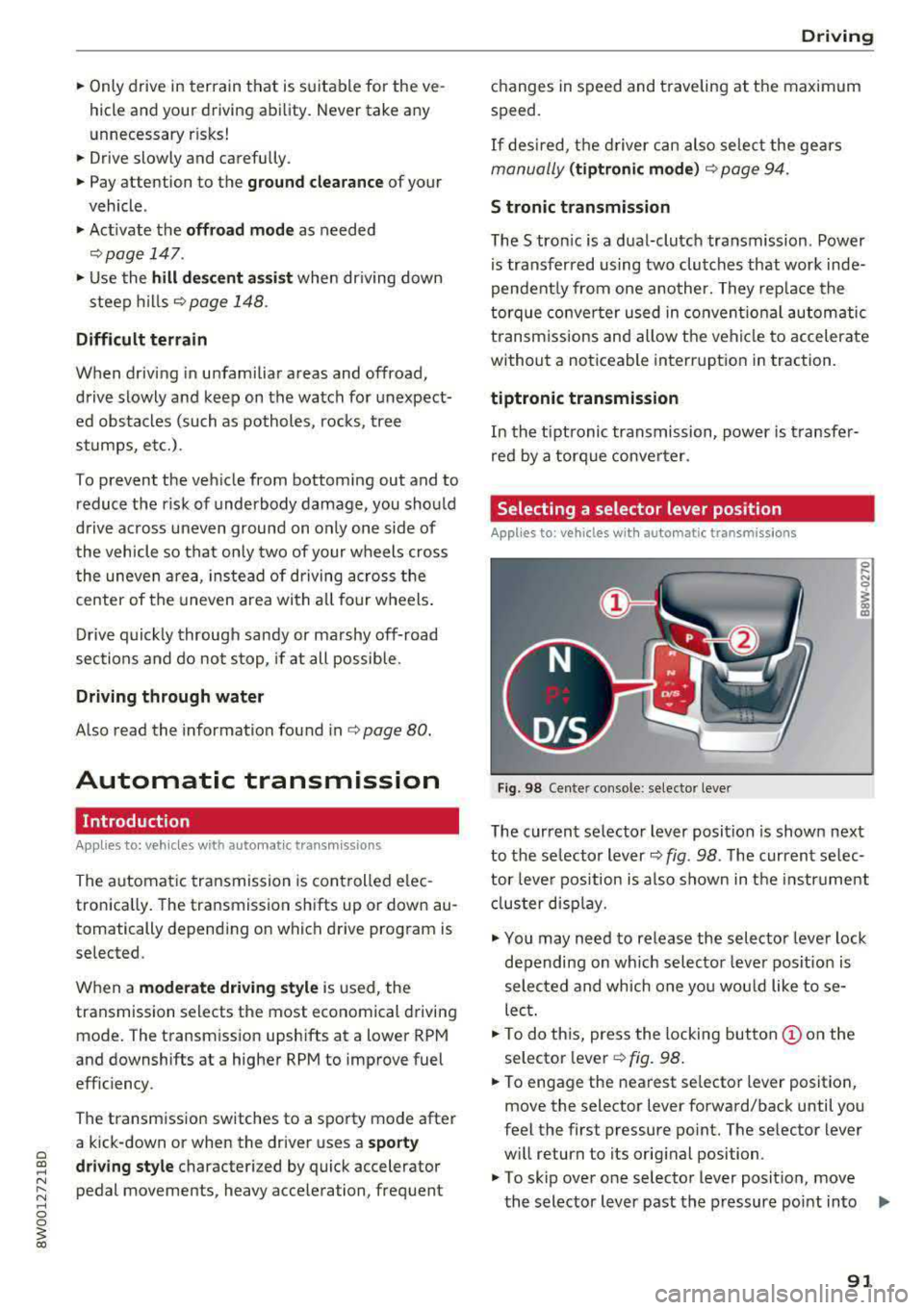
Fig. 98 Center console : se lector lever
The current se lector lever position is shown next
to the se lector lever
c::> fig. 98 . The current se lec
tor leve r position is a lso shown in the instr ument
cl uster disp lay.
.. You may need to release the selector lever lock
depending on wh ich selector leve r pos ition is
selec ted and which one you would like to se
lect.
.. To do th is, press the locking button (!) on the
selector
l ever¢ fig. 98.
.,. To engage the nearest se lector lever position,
move the selector lever forward/back until you
feel the first pressure po int. The selector lever
w ill return to its original position .
.,. To skip over one selector lever position, move
the selector lever past the pressure point into .,,.
91
Page 109 of 403

a co .... N ,....
N .... 0 0
3 co
Resetting lap statistics
"'On the mult ifunction steering whee l, select:
the right contro l button
> Reset statistics .
(D) Tips
The lap statistics list the lap times for the last
30 laps. The fastest and slowest lap time out
of up to 99 measured laps are also displayed .
Predictive efficiency
assist
Descript ion
Applies to: vehicles with predictive efficiency assist
General information
The pred ictive eff ic iency assist helps the driver to
d rive w ith anticipation and therefore helps to
save fuel. The system accesses predictive trip da
ta (including speed limits, inclines and the radius
of curves) from the navigation system*. Informa
tion from the camera-based traff ic sign recogni
tion* is also applied to recognize traffic signs
r;;:;ipage 104.
The messages displayed depend on the naviga
tion data* being up-to-date and the correct iden
tification by the traffic sign recognition*.
When adaptive cruise contro l* is switched off,
the predictive efficiency assist only provides noti
fications without controlled interventions. When
adaptive cruise control* is switched on, the sys
tem responds to upcoming situations automati
cally.
Vehicles with adaptive cruise control*
Refer to predictive control c> page 115.
Indicator in the instrument cluster display
Predictive messages appea r in the instr ument
cluster display to show the driver the appropriate
time to coast when a situation ahead requires
you to drive at a lower speed.
The messages are only shown if the cr uise control
system* or adaptive cruise control* is switched
off .
Assistance systems
An additional indicator appears in the head-up
display* .
Symbol Meaning
Remove your foot from the acceler -
"
ator pedal to slow down, because
there is a situation ahead that re- quires a lower speed.
If you see Driver assistance in the instrument
cluster disp lay, the following symbols will indi
cate which situation the system is currently re
acting to.
Symbol Meaning
MPH
USA models:
Speed limit
km/h
Canada models:
speed limiter
_J!L Intersection
1:1
w
Traffic circle
If there are multiple s ituations, then these situa
tions w ill appear in order in the display.
.&, WARNING ~ -
Pay attention to traffic and the area around
your vehicle when the efficiency assist is
switched on. The driver is always respons ible
for assessing the traffic situation.
(D Tips
- The wording of the message may vary de
pending on the driving mode set in drive se
lect* c> page 133 and the current selector
lever position (automatic transmiss ion*).
No messages are displayed when in the S
selector lever position or in
Dynamic mode.
- When a route is planned using the naviga
tion system*, then the message feed is based on this route. Without route guid
ance, the system uses an assumed route fo r
the message feed.
- There will not be a message for every s itua
tion ahead, for example if there is not
enough distance remaining to react to the
situation.
107
Page 169 of 403
0
"' .-< N r-N .-< 0
~ CX)
Voice recognition system
• Telephone
• Audi connect •
Favorites
• Call (XY)
• Navigation
• Directory
• Radio
• Media
• Sound •
Enter number
• Redial
• Read new tex t message
• N avigate to (XV)
• Enter address/destination
• Help • Onhne destinations
• Help Speech dia log system
• Help Telephone •
Cancel route guidance
• M ap
• Help Audi connect •
Line (XY)
• Help Naviga tion
• Help Map
• Help Radio
• Help Media •
Next page/ previous page
• Cancel
• N o, l meant
()(Y)
• Correction
TELEPHONE
• Enter number • Call list
• Delete number/ correc tion
• Redial
•
Oltectory
• Call (XY) •
Call mailbox
• Telephone favorites
· business/ private/ land line/ mobile
NAVIG:ATI0N
• N avigate to CXV)
• Start/ cancel route guidance
• Directory
• Last destinations •
Bloc k route for
(XYJ miles/ Block
the next section
• Route list
• Calculate alternative routes
• Navigation favorites
• Drive home
• Enter address •
Online destinations
• Special destination
• Enter country/ town/ street/ state
• Exclude route / Exclude route for (XY)
km / m
M~P
• M ap
• Day map/ Night map
• 20 driving position map/ 20 north posi tion map/ 30 map/ Destination map/ Overview map
AllJDI G QNNECT
• Audi connect
• Travel Information/ Parking Information
• Fuel prices
• Weather
RADIO
• Radio presets
• FM
• FM/ AM/ SIRIUS XM
• Station (XY) / Frequency
(XYJ
• T raffic announcement on/ off
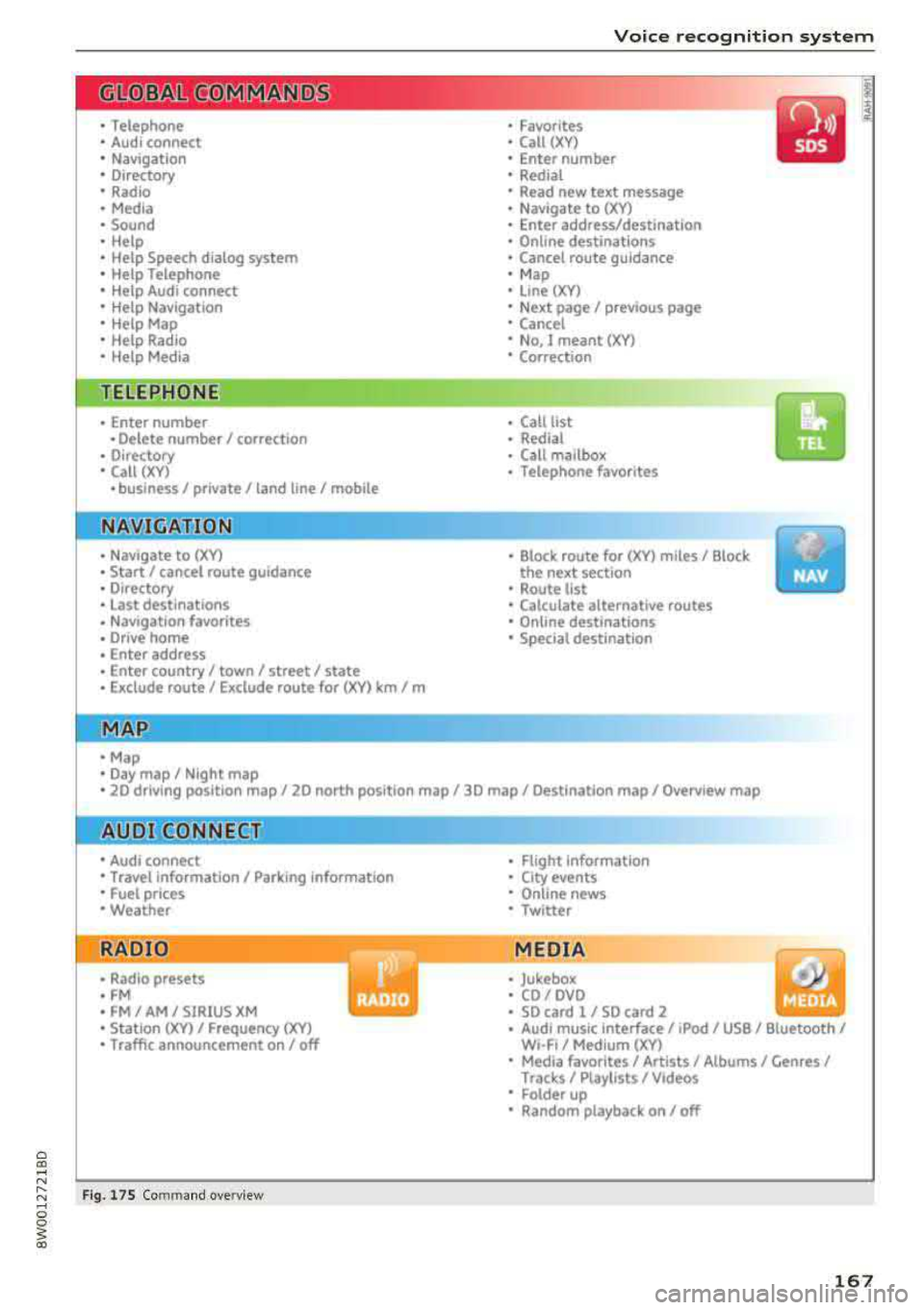
Fig . 17 S Co mmand overv ie w
• Flight Information
• City events
• Online news
• Twitter
MEDIA
• Jukebo x
• CO/ DVD .))
• SD card 1 / SD card 2
• Audi music Interface/
IPod I use / Bluetooth /
WI-Fl/ Medium ( XV)
• Media favorites/ Artists/ Albums/ Genres/
Trac ks/ Ptaylls ts / Videos
· Folder up
• Random playback on / off
167
Page 172 of 403
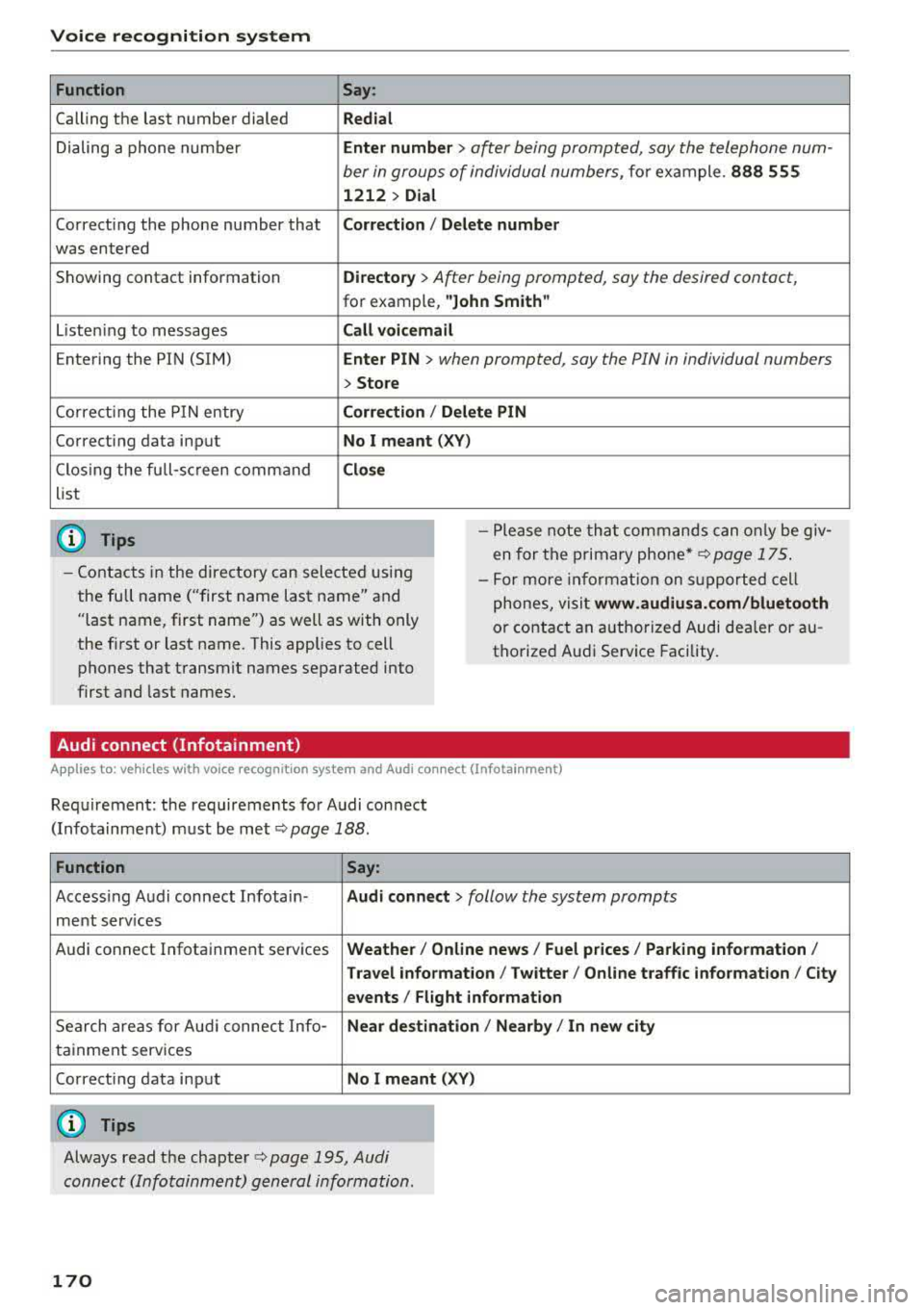
Voice recognition system Function
Calling the last number dialed
Dialing a phone numbe r
Correcti ng the phone number that
was entered
Showing contact information
L iste ning to messages
Entering the PIN (SIM)
Co rrecting the P IN entry
Correcting data input
C los ing the full-sc reen command
list
(D Tips
Say :
Redial
Enter number
> ofter being prompted, soy the telephone num-
ber in groups of individual numbers,
fo r example. 888 555
1212 > Dial
Corr ect ion / Delete numb er
Director y
> After being prompted, soy the desired contact,
for example, "John Smith "
Call voicemai l
Ente r PIN
> when prompted, soy the PIN in individual numbers
> Store
Corr ection / Delete PIN
No I meant ( XV)
Clos e
-Please note th at commands can on ly be giv
en for the primary
phone *¢ page 175 .
-Contacts in the directory can sele cted us ing
the full name ("first name las t name" and
"last name, first name") as well as with only
the fi rst or last name. This applies to cell
phones that transmit names separated into
first and last names. -
For more informat ion on s upported cell
phones, visit
www .audiusa. com /bluetooth
or contact an authorized Audi dealer or au
thorize d Audi Service Facility.
Audi connect (Infotainment)
A ppl ies to: ve hicles w ith vo ice recognition system and Audi co nnect (Infota inment)
Req uirement: the requirements for Audi connect
(Infotainment) must be met
¢page 188.
Function Say:
Accessing Audi connect Infotain-Audi connect > follow the system prompts
ment serv ices
Audi connect Infotainment services
Weather/ On line new s/ Fuel p rice s/ Parking info rmation /
T rav el info rmat ion / Twitter / Online tr affic info rmation / City
e v ents / Fl ight informat ion
Search areas for Aud i connect Info-Near de stination / Nearb y/ In n ew city
ta inment serv ices
Correcting data input
No I meant (XV)
(0 Tips
Always read the chapter ¢ page 195, Audi
connect (Infotainment) general information.
170
Page 177 of 403
a co .... N ,....
N .... 0 0
3 co
Telephone Introduction
A pp lies to: ve hicles with telep hone
To make phone coils in your vehicle using the
MMI, connect your cell phone to the
MMI via
Bluetooth.
H and sfree
Afte r you have connected your cell phone to the
MMI via Bluetooth, you can use the handsfree
system and operate telephone functions through
your MMI. You can make calls using the antenna
on your cell phone.
A WARNING
- Medical experts warn that cell phones can
interfere w ith the function of pacemakers.
Always ma inta in a m inimum distance of 20
centimeters between the cell phone anten
na and the pacemaker.
- Do not carry the cell phone in a pocket di
rectly over the pacemaker when the phone
is switched on.
- Sw itch the cell phone off immediately if
you suspect it may be interfering with the pacemaker.
- Do not use the voice recognition system*
c::> page 168 in emergencies because your
voice may change in stressful situations. It may take longer to dial the number or the
system may not be able to dia l it at all. Dial
the emergency n umber manua lly.
- Switch your cell phone off in areas where
there is a risk of an exp losion. These loca
tions are not always clea rly marked. This
may include gas stations, fuel and chemical
storage facilities or transport vehicles, or lo
cations where fuel vapors (such as propane
or gasoline vapor in vehicles or bu ildings),
chem icals or large quantities of dust parti
cles (such as flour, sawdust or metal) may
be present in the air. Th is also applies to all
other locations where you would normally
tu rn your vehicle engine off.
- The demands of traffic requ ire your full at
tent io n. Always read t he chapter
c::> page 155, Traffic safety information.
-
T e le ph on e
(D Note
Always fo llow the information found in Q (!) in
Wi-Fi hotspot on page 194.
(D Tips
- The Bluetooth connect ion range is limited
to inside the vehicle. It can also be affected
by local condit ions and interference with
other devices.
- To learn which Bluetooth connections and
wh ich of the functions in your cell phone are
supported, check with your cell phone serv
ice provider or the database for mobile devi
ces at
www .audiu sa.com /bl uetooth .
Setup
Connecting a cell phone using Bluetooth
Applies to: vehicles wi th telepho ne
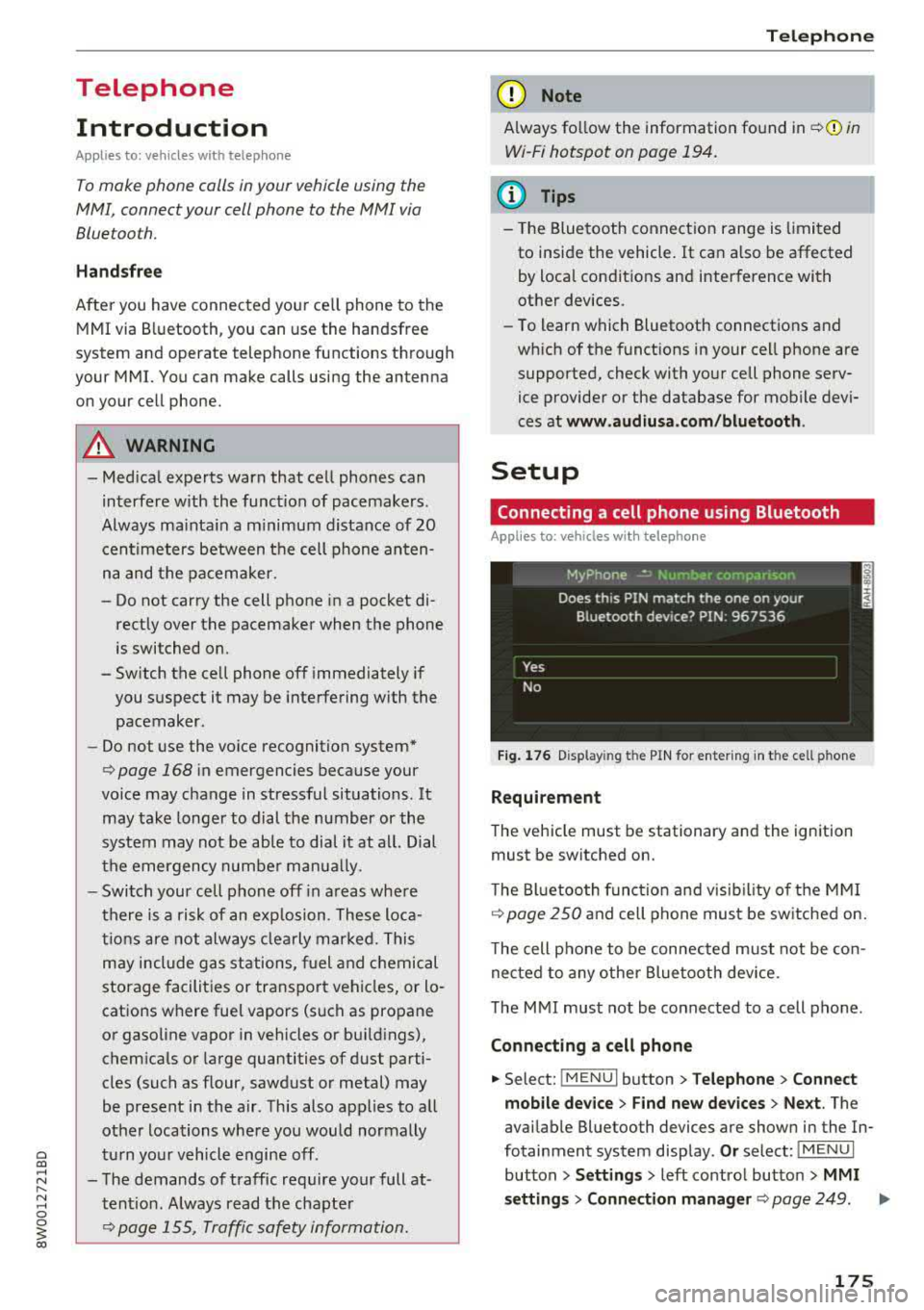
Fig . 17 6 Display ing t he PIN for enter ing in t he cell ph one
R equirem ent
The vehicle must be stationary and the ignition
must be switched on.
T he Bl uetoo th funct ion and v isib ility o f the MMI
¢ page 250 and cell phone must be sw itched on.
T he cell phone to be connected must not be con
nected to any other Bluetooth device.
T he
MMI must not be connected to a cell phone .
Connecting a cell phone
.,. Select: !MENUI button> T elephone > Co nnect
mobile dev ice
> Find new de vices > Ne xt. The
avai lable Bluetooth devices are shown in the In
fotainment system display .
Or select: !MENUI
button > S etting s> left contro l button > MMI
s etting s
> Connec tion manag er ¢ page 249 . .,..
175
Page 192 of 403
Audi connect (Infotainment)
Closing Audi connect Infotainment services
Regardless of the fu nction se lected, you c an
close an Aud i connect Infotainmen t se rvice at any
time and ret urn to the home screen¢
page 189,
fig. 184 .
Parking information
App lies to veh icles with Aud i co nn ect (Infotainment)
Information on parking locations and fees in the
selected search area (for example
Nearby ) .
.,. Select and confirm Park ing information .
You can use the rig ht cont rol but ton to sort the
pa rking loc ations
By distance or By availability.
Travel information
Applies to veh icles with Audi co nnect (Infotainment)
Information on att ractions in the selected search
area .
.,. Select and confirm Travel information .
.,. Select an d confirm an attraction to display the
details .
Fuel prices
Appli es to veh icles with Audi co nnect (Infotainment)
Information on gas stations with the lowest fue l
prices for your vehicle in the selected search area .
.,. Select and confirm F uel prices.
You can use the rig ht cont ro l button to sort the
f u e l pri ces
By price or By distance .
1l Service in preparat ion at t he t ime of print ing. Ca n add lat
e r or is only availab le in certa in regio ns.
190
Traffic light information
App lies to vehicles w it h Au di connect (I nfo tainme nt)
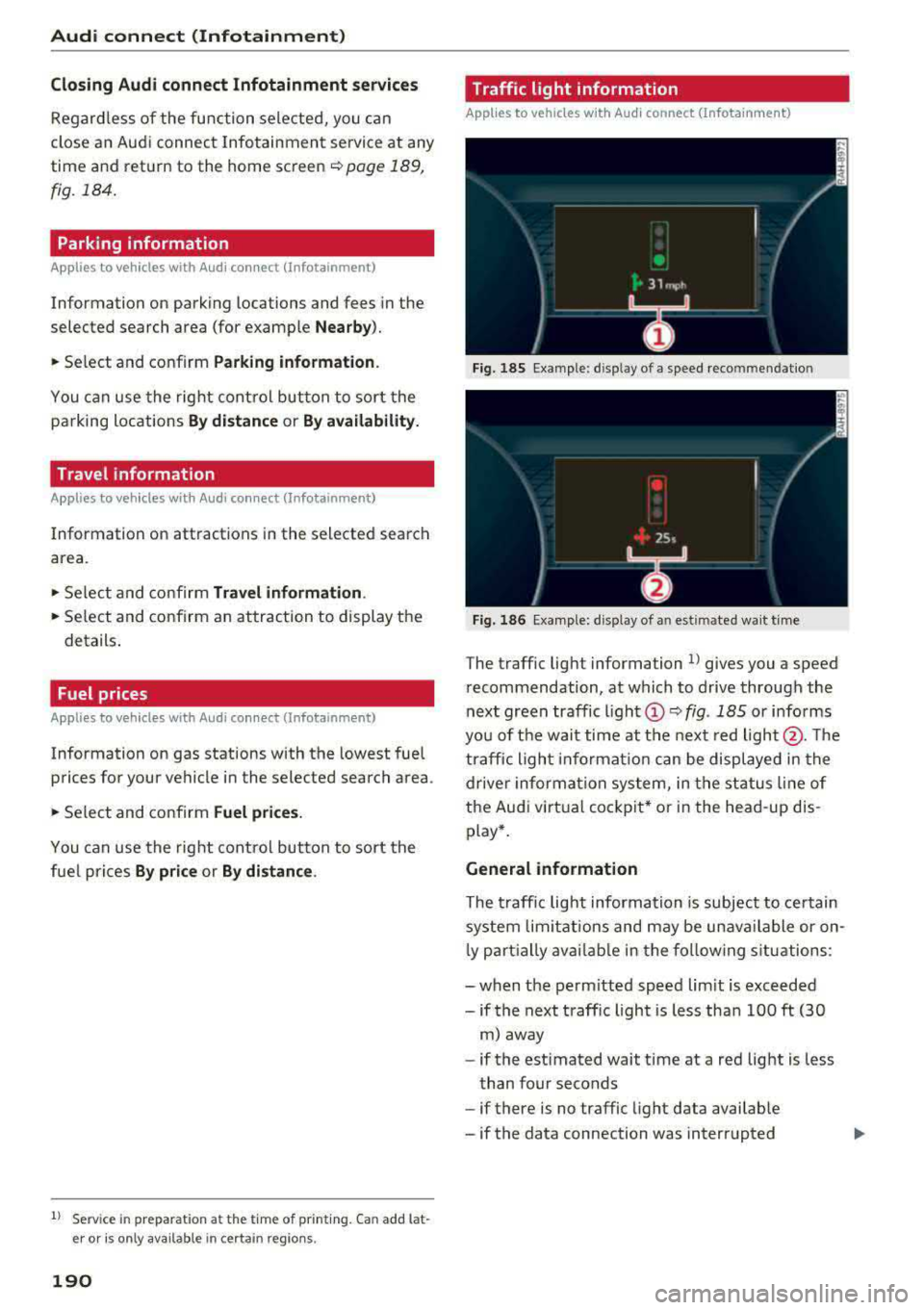
Fi g. 185 Examp le : display of a speed recommenda tion
Fig . 186 Examp le: display of an estimated wa it t im e
The t raffic light information l) g ives you a speed
r ecommendation, at which to drive through the
next green traffic
li gh t@ ~ fig. 185 or informs
yo u of t he wai t time at the next red light @. Th e
tr affic ligh t info rm ati on ca n be displ aye d in the
dr ive r in forma tio n sy stem, in t he sta tus line of
the Audi virt ua l coc kp it* or in the he ad-up dis
p lay *.
General information
The traff ic lig ht inform ation is subject to ce rtain
sy stem lim itation s and may be un avail able or on
l y part ially ava ilable in the fo llow ing s itu ations:
- when t he pe rm itted speed lim it is exceeded
-if the next t raffic light is less tha n 100 ft (30
m) away
- if the estimated wait time at a red lig ht is less
t han four seconds
- if there is no traffic light data avai lab le
- if the data connection was interrupted
Page 213 of 403
Navigation
Additional settings
Home address
App lies to: ve hicles w ith navigation system
~ Press the I NAV/MAPI button repeated ly until
the
Enter destination menu is displayed
¢page 204, fig. 189.
Storing a home address
-Select and confirm Home address @
¢ page 204 , fig . 189 . After opening the home
address for the first t ime, you will be asked to
create a home address.
-Se lec t and confirm Create now .
-Enter a destination or select a dest ination from
the list . Or :
-Select and confirm a destination > right control
button
> Store as home address .
Editing the home address
-Select the Home address @¢ page 204,
fig. 189 .
-Select the right control button > Edit home ad·
dress .
-Select and confirm a new destination as the
home address.
The selected destination is stored as the new
home address.
Favorites
App lies to: ve hicles w ith navigation system
~ Press the I NAV/MAPI button repeated ly until
the
Enter destination menu is displayed
¢ page 204, fig . 189.
-Storing a destination as a favorite: search for
the desired destination using the input fie ld.
Or : se lect a destinat ion from the list. Select:
right control button
> Store as favorite .
-Renaming a favorite : select the left control
button
> Favorites > a favorite from the list >
right control button> Rename favorite .
-Move favorite: select a favorite from the list>
right control button > Move favorite . Select
and confirm the location of the selected favor
i te .
212
-Deleting a favorite : select a favorite from the
list>
right control button > Delete favorite >
Delete this favorite or Delete all favorites.
Directory contacts
App lies to: vehicles wit h nav igat ion syste m
Two addresses (private/business) can be as
signed as destinations for each contact in the di
rectory.
~ Press the I NAV/MAP I button repeatedly until
the
Enter destination men u is displayed
¢page 204, fig . 189.
Storing a destination as a contact in the
directory
Requirement: a ce ll phone must be connected to
the MMI
¢page 175 .
-Select: a destination > right control button >
Add destination to contact.
-Enter the first letters of the desired contact in
the free text search input field
¢ page 204,
fig. 189
and then select a contact from the list.
= Select and confirm Add business destination or
Add private destination.
Navigation settings
App lies to: vehicles wi th navigat ion syste m
~ Press the I NAV/MAP I button repeatedly until
the
Enter destination menu is displayed
¢page 204, fig. 189 .
~ Select: right control button> Navigation set-
tings .
Depend ing on the selected function, the follow
i ng settings can be selected:
Show alternative routes
Up to three suggested routes are shown on the
map when this function is switched
on~
¢ page 211.
Low fuel warning
A message is displayed if the fuel gauge goes be
lo w the rese rve marking when this function is
switched
on~-Confirming this message disp lays ..,
Page 249 of 403
System settings
System settings
Setting the date and
time
You con set the cloc k time manually or using the
CPS*.
"' Se lect : I MENU I button> Settings > left contro l
button >
MMI settings > Date & time .
"'Or: select : I MENU I but ton> Vehicle > lef t con-
t ro l button >
Vehicle settings > Date & time .
Automatic setting
W hen th is function is sw itched on~. the time
a nd date are a utomatically set.
Time
R equi rement: the Automatic setting must be
sw itche d off .
Pr ess the cont ro l knob . Yo u can set t he
Time
manu ally by tur ning and press ing the co ntr ol
knob.
Date
R equir em en t: the Automatic setting mus t be
s w itche d off .
P ress th e cont rol knob . Yo u ca n set the
Date
manually by tur ning and pr ess ing the cont rol
knob .
Time zone
When se lecting the approp riate t ime zone, a
sampling of countr ies in this zo ne will be lis ted .
Automatic time zone*
Wh en th is function is sw itche d on~, the t ime
w ill automatically a djust to the correspon ding
time zone .
Automatic daylight saving time*
When th is function is sw itche d on~, the tim e
wi ll automatically sw itch to day light saving time .
Time format
If yo u se lec t 24h , th e cl ock w ill disp lay, for ex
am ple,
13:00 . If you s elec t AM/PM , the clock
w ill di sp la y, for examp le,
1:00 PM .
248
Date format
If you se le ct DD.MM.YYYY , the d ate di spl ay will
show, fo r exam ple ,
31.08.2018. If you select
MM/DD/YYYY , th e date displ ay wi ll show, for ex
amp le,
08/31/2018. If you s elect YYYY -MM
DD ,
the date display will show, fo r example,
2018-08 -31 .
MMI settings
"'Select: !ME NUI button> Settings > left cont rol
button >
MMI settings .
Language
Y o u c an chan ge the display langua ge as well as
t h e lan guage fo r th e voice guidance * and vo ice
r ecognition system *.
The num ber o f langu ages av a ila ble depe nds on
t h e mar ket.
Measurement units
The following meas uremen t uni ts can be set d e
pend ing on av a ilab ility:
Speed , Distance , Tem
perature , Fuel consumption , Volume , Pressure.
Tool tips
Whe n this f unction is switched on ~' you r MMI
shows you tips fo r inpu t. The fre quency of how
oft en it displays decr ease s w it h tim e.
Speech dialog system
App lies to : vehicles with voice recog nitio n syste m
Depend ing on veh icle equipment, the following
funct io ns may be ava ilable:
Command display : when this function is switch
ed
on ~. the MMI will show yo u the p ossible
commands for voice input in the respective
menu.
Short dialog : when this function is sw itche d on
~' a shorter form of the promp ts is used .
Command during voice output* : thi s f un ction is
swi tc h ed on at t he factory . When this func tion is
switc hed
on ~' you can say new command s dur-
i ng announcements . You do no t need to wait for
the signal tone (beep) dur ing an anno unceme nt.
When the funct io n is swi tched off
0, you need to .,,.