remote control AUDI A4 2018 User Guide
[x] Cancel search | Manufacturer: AUDI, Model Year: 2018, Model line: A4, Model: AUDI A4 2018Pages: 403, PDF Size: 66.81 MB
Page 46 of 403

Opening and clo sin g
Automatic luggage compartment lid
Applies to: vehicles with automatic luggage compartment lid
The luggage compartment lid can be opened and
closed electrically.
F ig. 33 Driver's doo r: opening the luggage compartment
lid
Fig. 34 Luggage compartment lid: @clos ing button*, @
l ock button (vehicles with convenience key*)
Applies to: vehicles with automatic transmission:
The luggage compartment lid can only open
when the se lector lever is in
P .
Applies to: vehicles with manual transmission:
The luggage compartment lid can only ope n
when the parking brake is set. Pull
the© switch
¢ page 88 to set the parking brake .
Opening the luggage compartment lid
... Press and hold the ~ b utton on the remote
contro l key fo r at leas t one second . Or
... Pu ll the~ switch in the driver 's door briefly
¢ fig. 33 . Or
... Press the handle in the luggage compartment
lid.
Cl osing th e luggage compartment lid
... When the ignition is sw itched on, pull the~
switch in the driver's door until the luggage
compartment lid is closed
¢ ,& . Or
44
... Press the~ button in the luggage compart
ment lid
¢ fig. 34. The luggage compartment
lid wi ll automat ica lly lower and
close ¢,& . Or
... Applies to: vehicles with convenience key: Press
the~ button on the remote control key until
the luggage compartment l id
closes ¢.&, .
Make sure there is enough distance between
you and the luggage compartment lid . The re
should be a maxim um 9 feet (3 m) of distance.
Or
... Applies to: vehicles with convenience key: Press
the
tf) button in the luggage compartment lid
¢ fig. 34 . The remote control key m ust not be
more than approx imately
4 feet (1.5 m) away
from the luggage compartment and it must not
be inside the vehicle. The luggage compart
ment lid will automatically lower and close. The
veh icle
locks ¢.&_ . Or
... Lightly p ull the luggage compartment lid at the
in ner gr ip. The luggage compartment lid wi ll
automatically lowe r and close
¢ .&_ . Or
... Press the hand le in the luggage compartment
lid. The luggage compartment lid will automat
ically lower and close
¢ .&, .
Storing the luggage compartment lid
opening position
... Bring the luggage compartment lid into the de
sired open position. The position must be at a
certain height or higher to store .
... Press and hold the~ button for at least four
seconds to store the new open position . A visu
al and audio s ignal will follow .
... To set a higher open pos it ion, wa it at least five
seconds and then carefully p ress the luggage
compa rtment lid upward .
... Press and hold the~ butto n aga in fo r at leas t
four seconds to store the desired opening posi
tion.
The opening/clos ing process will stop immedi
ate ly if:
- You pu ll/re lease
the~ sw itch in the drive r's
door, or
- Applies to: vehicles with convenience key:
Press/re lease
the~ b utton o n the remote
con trol key, o r
Page 47 of 403

-Applies to: vehicles with convenience key: Press
the~ button or the lr! button in the luggage
compartment lid, or
- You push the handle in the luggage compart
ment lid, or
- When something blocks the luggage compa rt
ment lid or makes it difficu lt for the lid to
move.
I f you press the handle or one of
the~ or lr! but
tons (vehicles w ith convenience key*) now, the
luggage compartment lid will either open or
close, depending on its angle .
_&. WARNING
-After closing the luggage compartment lid,
make sure that it is latched. Otherwise the
luggage compartment lid could open sud
denly when driving, which increases the risk
of an accident.
- Pay careful attent ion when closing the lug
gage compartment lid . Otherw ise, you could
cause serious inj ury to yourself or othe rs de
spite the pinch protection .
- To reduce the risk of p inch ing injur ies, al
ways make sure that no one is in the operat
ing area of the luggage compartment lid; in
cluding the hinge areas and the upper and
lower edge of the luggage compartment lid .
- Never dr ive with the luggage compartmen t
lid ajar or open, because poisonous gases
can enter the vehicle interior and create the
risk of asphyxiation.
- If there is a luggage rack (such as a bicycle
rack) on the luggage compartment lid, the
luggage compartment lid may not open
completely under certain circumstances or it
could close by itself if open due to the extra
weight. To reduce the r isk of injury, the
open luggage compartment l id must there
fore have add itiona l support or the cargo
must first be removed from the rack.
(D Tips
- The settings in the Infota inment system de
termine if the luggage compartme nt lid ca n
be opened us ing the
handle <=> page 41.
Openin g an d clos ing
-There are audio signa ls when closing the
luggage compartment lid with the remote
control key (vehicles with convenience key*)
or with
the~ button in the dr iver's door.
- When the vehicle is locked, the luggage
compartment lid can be unlocked separately
by pressing
the~ button on the remote
control key. The luggage compartment lid
locks automatically when it is closed again.
- Applies to: vehicles with convenience key:
The luggage compartment lid can be closed
w ith the convenience from a distance up to
approximately 9 ft (3 m).
- The luggage compartment lid can be oper
ated manually if the vehicle battery is low.
It is necessary to use more force when doing
this. Move the lid s low ly to reduce the
amount of fo rce needed.
- When the t railer socket is being used (for
example, for a bicycle rack), the luggage
compar tment lid can be opened a nd closed
using the handle or the foot mot ion activa
tion (vehicles w ith convenience key*) .
- In case of an emergency o r a fau lty handle,
the luggage compartment lid can be opened
manually from the
insider=> page 46.
Opening /closing the luggage compartment
lid with foot motion activation (kicking
movement )
Applies to: vehicles with convenience key and sensor-control
led luggage compartment lid
Fig . 35 Rear of the veh icle: foot movement
Applies to: sedan
You can open the luggage compartment lid with
foot motion activation.
.,.
45
Page 51 of 403

_& WARNING
-Always take the vehicle key with you when
leaving the vehicle, even for a short period
of time . This applies particularly when chil
dren remain in the vehicle . Otherwise chil
dren could start the engine or operate e lec
trical equipment (such as power windows),
which increases the risk of an accident . The
power windows continue to function until
the driver's door or front passenger's door
has been opened.
- Pay careful attent ion when closing the win
dows . Pinching could cause serious injuries .
- When locking the vehicle from outside, the vehicle must be unoccupied since the win
dows can no longer be opened in an emer
gency .
@ Tips
You can still open and close the w indows for
approximately 10 minutes after turning the
ignition
off . The power windows do not switch
off until the driver's door or front passenger's
door has been opened.
Convenience opening/closing
Applies to: vehicles with convenience key
All of the windows and the roof* con be opened/
closed at the some time .
Convenience opening feature
.. Press and hold the CD button on the remote con
trol key until all of the windows reach the de
sired position and the
roof* is tilted open.
Convenience closing feature
.. Press the @ button on the remote control key
until the roof* is closed
c::> .&,, or
.. Touch the sensor* on the door handle until a ll
of the windows and the roof* are closed. Do not
place your hand in the door handle when doing
this.
Setting convenience opening in the
Infotainment system
.. Select in the Infotainment system: !MENUI but
ton
> Vehicle > left control button > Vehicle
Open ing and closing
settings > Central locking > Long press to
open windows.
_& WARNING
- To reduce the r isk of injury, never close the
windows or the roof* carelessly or in an un
controlled manner .
- For secur ity reasons, the windows and the
roof* can only be opened and closed with
the remote control key at a maximum dis
tance of approx imately 6.5 feet (2 m) away
from the vehicle. Always pay attent ion when
using
the@ button to close the windows
and the roof* so that no one is pinched. The
closing process will stop immediately when
the@ button is released.
(D Tips
Applies to: vehicles with panorama glass roof:
the power sunshade also opens/closes when
opening/closing the roof.
Correcting power window malfunctions
You can reactivate the one-touch up/down func
tion if it malfunctions.
"' Pull the power window switch up until the win
dow is comple tely raised .
.. Release the switch and pull it up again for at
least one second.
Sliding/tilting sunroof
Operating
Applies to: vehicles with sliding/tilting sunroof
Fig. 43 Section of front head lin er: sliding/tilt ing sunroof
button
....
49
Page 53 of 403
a co .... N ,....
N .... 0 0
3 co
© Opening and clo sing th e sunshad e
"'To open the sunshade comp lete ly, slide the -:<'-'.i.
switch back briefly to the second level.
"' To close the sunshade complete ly, slide the .-;- ;, .
switch forward briefly to the second level.
"' To se lect a partially open position, slide the -:c ,,.
switch to the first level until the sunshade
reaches the desired position.
A WARNING
To reduce the risk of injury, always pay atten
tion when closing the panorama glass roof.
Always sw itch off the ignit io n when exiting
the vehicle.
(D Note
Always close the panorama glass roof when
leaving your veh icle. Rain can cause damage
to the inter ior equipment of yo ur vehicle, par
ticularly the e lectronic equipment.
@ Tips
- Fo r informat ion about convenience open
i ng/closing,
see~ page 49.
- You can still operate the panorama glass
r oof fo r abo ut 10 m inutes afte r the ig nitio n
i s sw itched off. The switch is deact ivated
once the dr ive r's or front passenger's door is
opened.
- The panorama glass roof will only open
down to -4°F (-20°) .
Panorama glass roof emergency operation
Applies to: vehicles with panorama glass roof
If an object is detected when closing, the roof
will open again automatically. In this case, yo u
can then close it with the power emergency clos ing function.
"' Within five seconds after the sunroof opens au
tomatica lly, pull the applicable button until the
roof is closed.
l ) Th is function is not available in all countr ies.
Op ening and cl osing
Valet parking function
Applies to: vehicles with valet parking function
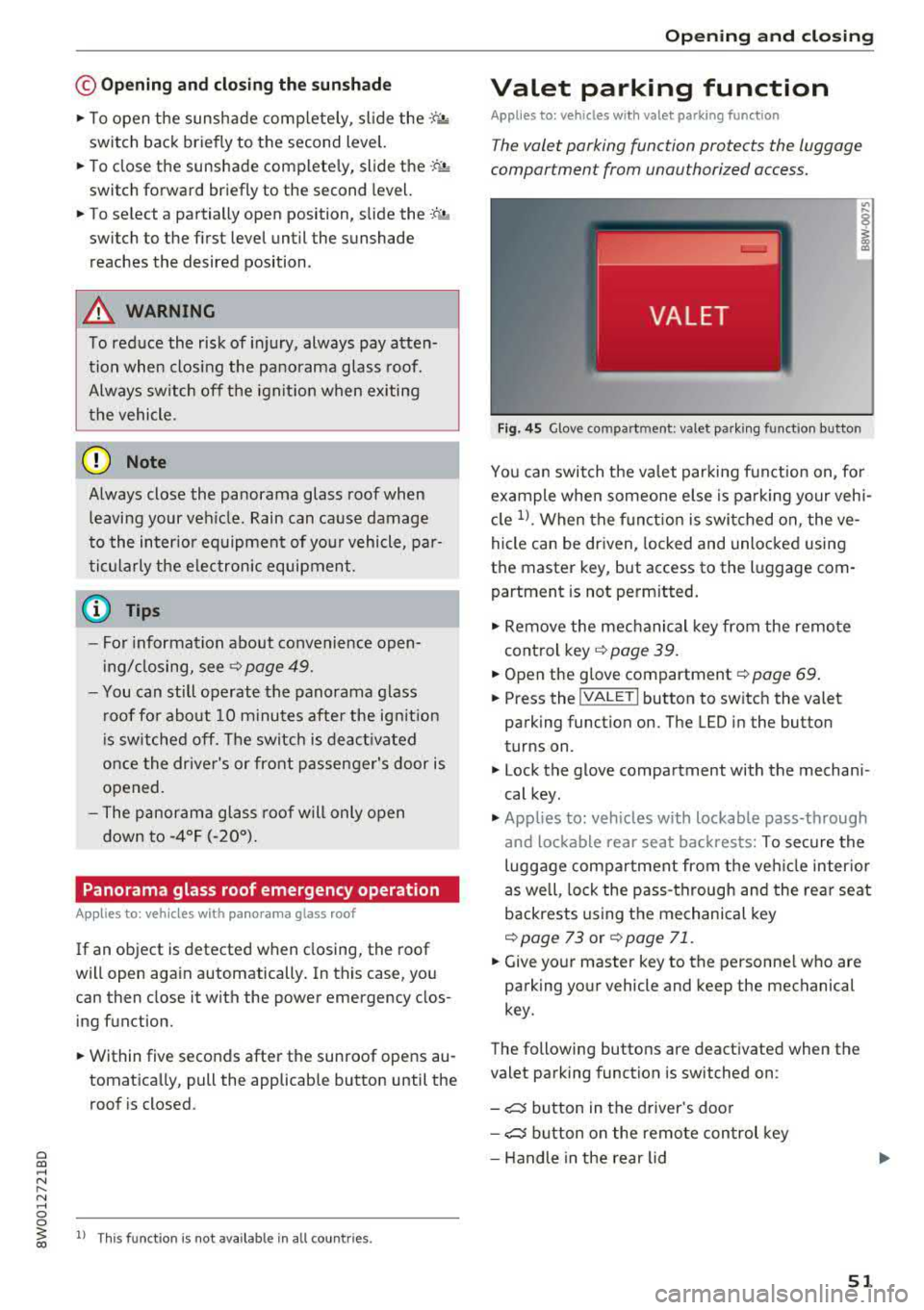
The valet parking function protects the luggage
compartment from unauthorized access.
"'
I
F ig . 4 5 Glove compartment: valet parking funct io n button
You can switch the valet par king function on, fo r
example when someone e lse is pa rking your vehi
cle
1> . When the f unct ion is swi tched on, the ve
hicle can be driven, locked and unlocked using
the master key, but access to the luggage com partment is not perm itted.
"' Remove the mechanical key from the remote
control key
~ page 39.
"'Open the g love compartment~ page 69 .
"'Press the !VA LET I button to switch the valet
parking function on. The LED in the button
turns on .
"' Lock the glove compartment with the mechani
cal key.
"' Applies to: vehicles with lockable pass-through
and lockable rear seat backrests: To secure the
luggage compartment from the veh icle inter io r
as well, lock the pass-through and the rear seat
backrests using the mechanical key
~page 73 or ~ page 71.
"'Give yo ur master key to the personne l who are
parking your vehicle and keep the mechanical
key.
The following buttons are deactivated when the
valet parking function is switched on :
- ,:::::::, button in the driver 's door
- ,:::::::, button on the remote con trol key
- Handle in the rear lid
51
Page 60 of 403

Lights and Vision
@ Tips
The setting is automatica lly stored and as
signed to the remote control key that is be ing
used.
Instrument illumination
The brightness of th e illumination for the instru
ments , display and head-up display* can be ad
jus ted.
F ig . 53 Instru ment i llumi natio n
"' Press the knob to release it.
"'T urn the knob toward"-" o r"+" to reduce or in
crease the brightness .
,,, Press the knob again to return it to its or iginal
pos ition .
(D Tips
Depending on vehicle equipment, the inst ru
ment illumination (needles and gauges) may
turn on when the lights are off and the igni
tion is switched on . The illumination for the
gauges reduces automatically and eventually
tur ns off as brightness outside increases . This
function reminds the driver to turn the low
beams on at the app ropr iate time.
58
Vision
Adjusting exterior mirrors
Fig. 54 Driver 's doo r: kno b fo r t he e xterio r mirrors
Turn the knob to the des ired position:
0
-a ll adjustment functions are deactivated.
q / P -adjus ts the left/right exter io r mirror.
Move the knob in the desired direct ion.
(@ -Heats* the mir ror glass depend ing on the
outside temperature.
8 -F olds the exterior mirrors* . To fold the m ir
rors out, turn the knob to one of the other posi
tions . In the I nfota inment system, you can select
i f the m irro rs fo ld in au tomatically when yo u lock
the
ve hicl e~ page 41 .
Front passenger's exterior mirror tilt
function *
To help you see the curb when backing into a
parki ng space, the su rface of the m irro r til ts
slight ly. For this to happen, the knob must be in
the position for the front passenger's exterior
mirror.
Yo u can adjust the tilte d mir ror s urface by t urn
i ng t he knob in the desired di rect io n. When you
move out of reverse and into another gear, the
new m irror position is stored and assigned to the
key you are using .
The m irror goes back into its or iginal pos ition
once you drive forward faster than 9 mp h
(15 km/h) or turn the ignition off.
&_ WARNING
Cu rved mi rror sur faces (for example convex)
enla rge the field of vision. However, they
Page 65 of 403

Replacing rear wiper blade
Applies to: vehicles with rear window wiper
Fig . 60 Rear window w iper : in stall ing the wiper b lade
Removing the wiper blade
... Fold the w iper arm away from the rear window .
... Remove the wiper blade from its holder.
Installing the wiper blade
... Press the wiper blade mount into the retainer.
... Fold the window wiper arm back onto the rear
window.
A WARNING
For safety reasons, the windshield wiper
blades should be replaced once or tw ice each
year .
Digital compass
Switching the compass on and off
Applies to: vehicles with digital compass
Fig. 61 Rearview mirror: digita l compass is sw itc hed on
Lights and Vision
.,. To turn the compass on or off, press the button
@ until the compass in the mirror appears or
disappears.
T he dig ital compass only works when the ignition
is turned on . The directions are indicated with ab
breviations:
N (north), NE (northeast), E (east),
SE (southeast), S (south), SW (southwest), W
(west), NW (northwest).
(0 Tips
To prevent inaccurate compass readings, do
not bring any remote controls, electrical devi
ces or metallic objects near the mirror.
63
Page 69 of 403
Rear head restraints
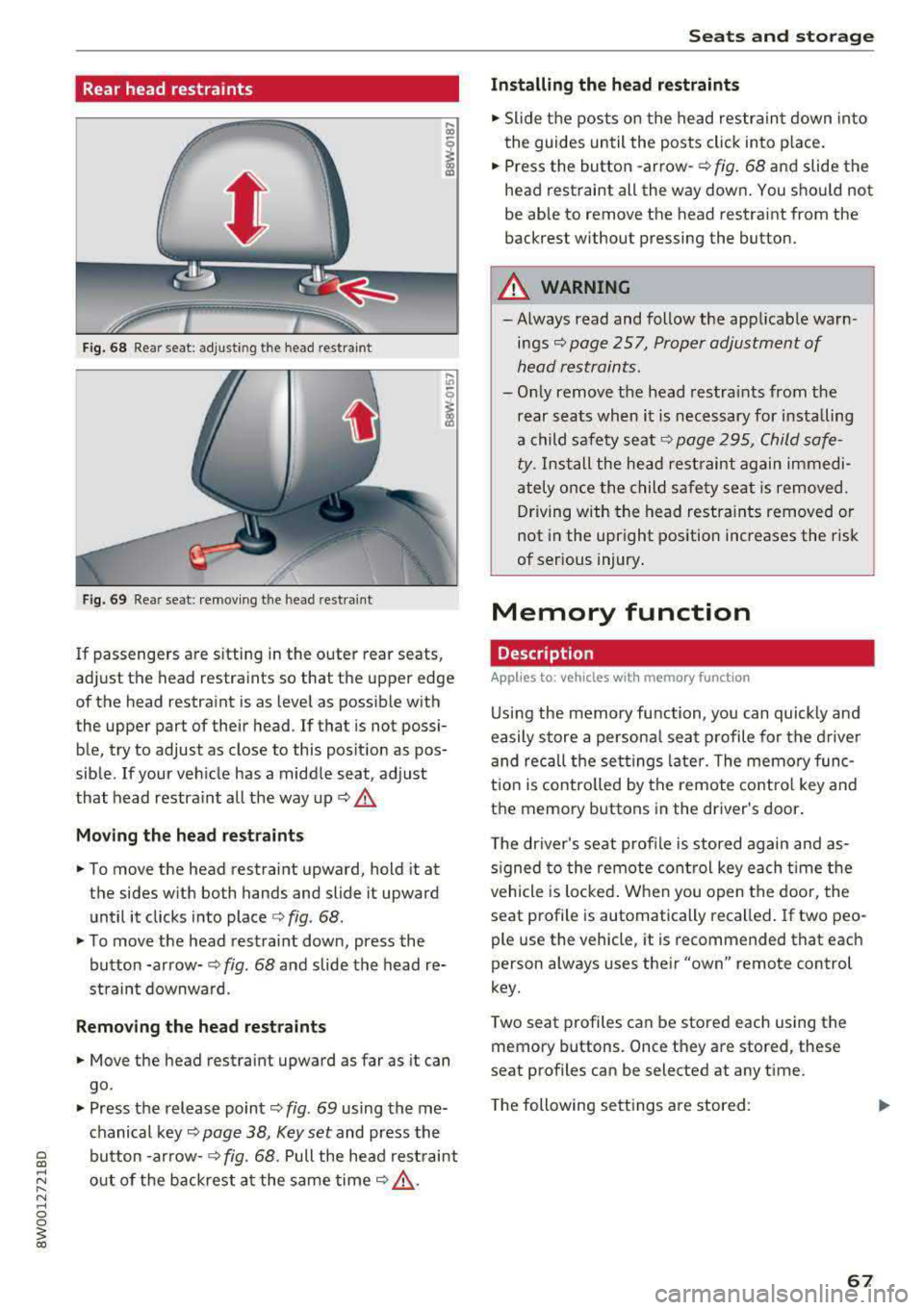
Fig. 68 Re ar seat : adjus ting the head re stra in t
Fig. 69 Re ar seat: remov ing the head rest ra in t
If passenge rs are s itting in the outer rear seats ,
ad just the head restraints so that t he upper edge
of the head restraint is as level as possib le with
the upper part of their head . If that is not possi
ble, try to adjust as close to this posit ion as pos
sible . If your ve hicle has a midd le seat, adjust
that head restraint all the way up
c:> A_
Mo ving the head rest raint s
.. To move the head restraint upward, hold it at
the sides w it h both hands and slide it upward
until it clicks into place
c:> fig . 68 .
.. To move the head restraint down, press the
button -arrow-
c:> fig . 68 and slide the head re
straint downwa rd.
Remo ving the head restraints
.. Move the head restraint upward as far as it can
go .
.. Press the release point c:> fig. 69 using the me
chanical key
c:> page 38, Key set and press the
bu tton -arrow-
c:> fig. 68. Pull the head rest raint
out of the backrest a t the same time
c:> &_ .
Seats and storag e
Installing the head restraints
.. Slide the pos ts on the head restrain t down into
the guides until the posts click into p lace .
.. Press the button -arrow-c:> fig. 68 and slide the
head rest raint all the way down . You shou ld not
be able to remove the head restraint from the
back rest without pressing the button.
_& WARNING ~
-Always read and follow the applicable warn
ings
c:> page 257, Proper adjustment of
h ead restraints .
-Only remove the head restra ints from the
rear seats when it is necessary for installing
a child safety seat
c:> page 295 , Child safe
ty .
Install the head restraint again immedi
ately once the child safety seat is removed. D riving with the head restra ints removed or
not in the upright position increases the risk
of serious injury .
Memory function
Description
Applies to: vehicles with memory function
Using the memory function, you can quickly and
easily store a persona l seat p rofile for the d river
and recall the set tings late r. The memo ry func
t ion is controlled by the remote contro l key and
the memory buttons in the driver 's door .
T he driver's se at profile is stored again and as
s igned to the remote con trol key each t ime the
vehicle is locked . W hen you open the door, the
seat profile is automatically recalled . If two peo
ple use the v ehicle , it is recommended that each
person always uses the ir
"own" remote control
key.
T wo seat p rofiles can be stored each using the
memory buttons . Once they are stored, these
seat p rofiles can be selected at any t ime .
T he following se tt ings a re stored :
67
Page 70 of 403
Seats and storage
Remote con- Memory but-
trol key ton
Driver Driver
Seat X X
Both exterior
X X mirrors*
Remote control key
Applies to: vehicles with memory function
The driver's seat profile can be assigned to the
remote control key when the vehicle is locked .
.,. Select in the Infotainment system : IMENUI but
ton >
Vehicle > left control button > Vehicle
settings > Seats > Driver's seat > Store set
tings on remote control key .
(D Tips
If you do not wish to have the seat profile for
another driver assigned to the remote control
key, switch the memory function off in the In
fotainment system.
Memory buttons
Applies to: vehicles with memory function
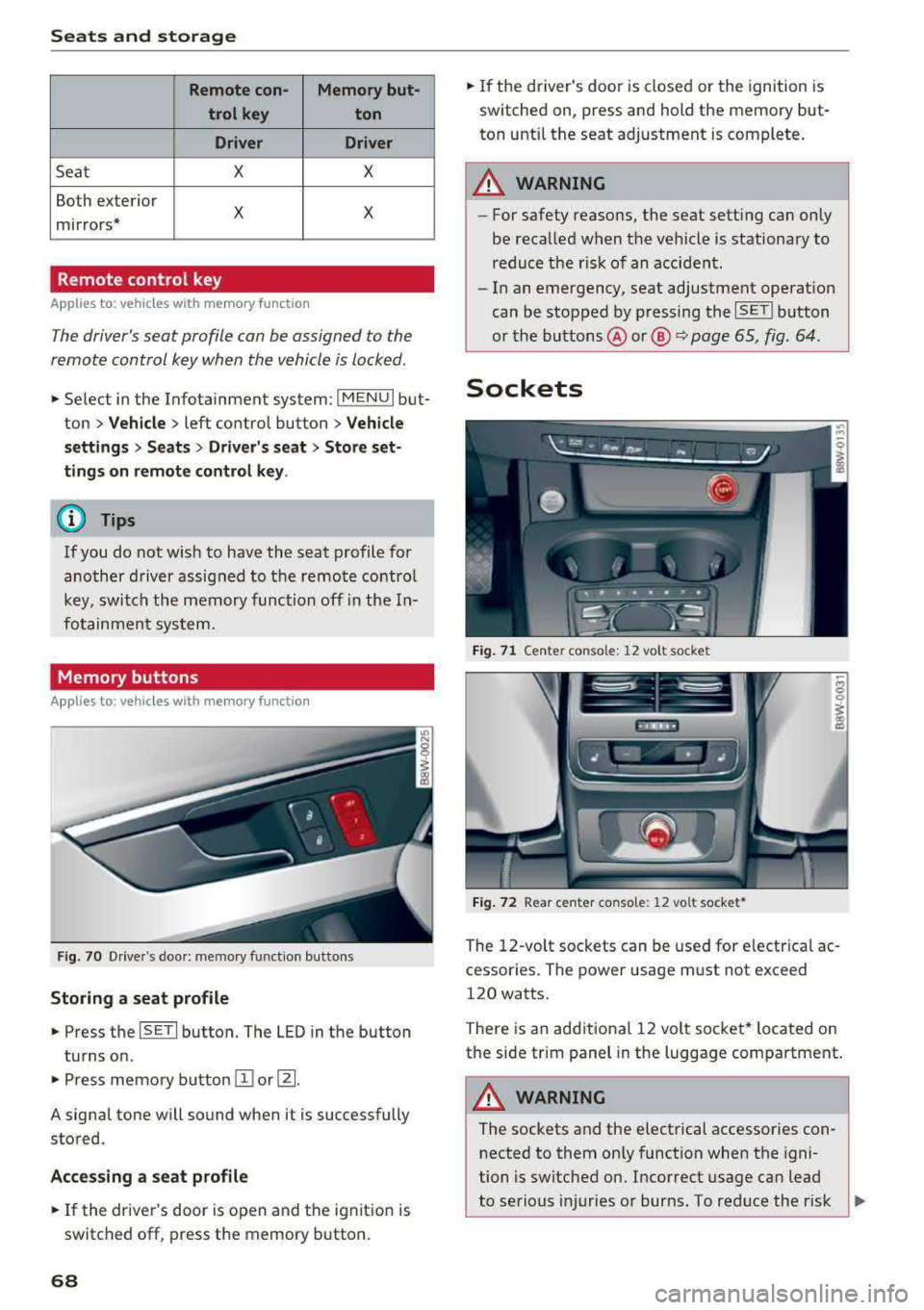
Fig. 70 Drive r's doo r: me mory function butto ns
Storing a seat profile
.,. Press the ISETI button. The LED in the button
turns on .
.,. Press memory button II] or [Ii.
A signal tone will sound when it is successfully
stored.
Accessing a seat profile
... If the driver's door is open and the ignition is
switched off, press the memory button.
68
.,. If the driver's door is closed or the ignition is
switched on, press and hold the memory but
ton until the seat adjustment is complete .
A WARNING
-For safety reasons, the seat sett ing can only
be recalled when the vehicle is stationary to reduce the r isk of an accident.
- In an emergency, seat adjustment operat ion
can be stopped by p ressing the
ISETI button
or the buttons @or@
Q page 65, fig . 64 .
Sockets
Fig. 71 Cente r conso le: 12 vo lt socke t
Fig. 72 Rear center co nso le: 12 vo lt socket *
The 12-volt sockets can be used for electrical ac
cessor ies. The power usage must not exceed
120 watts.
There is an additional 12 volt socket* located on
the side trim panel in the luggage compartment.
A WARNING
The sockets and the electrical accessories con
nected to them only function when the igni
tion is switched on. Incorrect usage can lead
to serious i njuries or burns. To reduce the r isk
,..
Page 78 of 403
Warm and cold
Warm and cold
Climate control system
Description
The climate control system warms, cools and re moves humidity from the air in the vehicle interi
or. It is the most effective when the windows and
sunroof * are closed. If there is a bui ld-up of heat
inside the vehicle, ventilation can he lp to speed
up the cooling process.
I n all heating mode f unctions except for
defrost,
the blower only switches to a higher speed once
the engine coolant has reached a sufficient tem
perature .
Pollutant filt er
The po llutant filter removes poll utants such as
dust and pollen from the a ir .
Ke y recognit ion
The climate control settings are automatically
stored and assigned to the remote contro l key
that is in use .
76
® For the sake of the environment
-If you would like to reduce fuel consump
t ion, sw itch the air conditioning
off. This
will also reduce emissions.
- In veh icles with a diesel engine, you can
switch the auxiliary heater
off in the Info
tainment system.
(D Tips
- To prevent interference with the heating
and cooling output and to prevent the win
dows from fogging over, the air intake in
front of the windshie ld must be free of ice,
snow or leaves.
- Condensation from the cooling system can
dr ip and form a pudd le of water under the
vehicle . This is norma l and does not mean
there is a leak.
- The energy management system may tem porarily switch
off certain functions, such as
the seat heating* o r rear window defogger.
T hese systems are ava ilable again as soon
as the ene rgy supply has been restored.
Page 86 of 403

Driving
St ee ring lock1
)
The stee ring locks when you t urn the engine off
using the
! S T A RT ENGINE ST OP I button and
open the driver 's door. The locked steering helps
prevent v ehicle theft .
Emergency off function*
If it is abso lutely necessary, the engine can also
be turned off while dr iv ing at speeds star ting at
4 mph (7 km/h). To switch the eng ine off, press
the
! S TAR T ENGINE ST OP I button tw ice in a row
briefly or press and hold for longer than two sec
onds.
A WARNING
- Never turn off the engine before the veh icle
has come to a comp lete stop . The full func
t ion of the brake booster and the power
stee ring is not guaranteed. Yo u must use
more force to turn or b rake . Because you
cannot s teer an d brake as you usu ally
would, t his co uld lead to accidents and ser i
ous in juries.
- Alw ays t ake the key wi th you w henever you
leave you r vehicle . Othe rw ise, the engi ne
cou ld be started o r electrical equipment
s uch as the power windows cou ld be operat
ed . This can lead to se rious injury.
- For safety reasons, always park the vehicle
with the se lector lever in the P position
(a u
tomat ic transmission) or with 1st gear en
gaged (manual transmission). Otherwise
the vehicle could roll away u nintent ionally .
(D Note
If the eng ine has been under heavy load for
an extended per iod of t ime, heat builds up in
the engine compartment after the engine is
sw itched off and there is a risk of damaging
the engi ne . For this reason, let the engi ne run
for at idle for approximately two minutes
be
fore shutting it off.
l) Th is fun ction is not avai la bl e in al l co un tries.
84
(D Tips
Fo r u p to 10 minutes after stopping the en
g ine, the radiator fan may turn on again auto
matically or it may continue to r un (even if
the ig nition is switched off) for the following
r easons:
- The coolant temperature is increas ing due
to trapped heat.
- If the eng ine is wa rm and the eng ine com
partment a lso heats up from strong sun
light .
- Applies to: vehicles with diesel particulate
filter: The emissions control system is heat
ed through the regeneration process, even if
the engine has not reached its operat ing
tempe rature yet.
Messages
Engin e running . Warning! Turn off ignition be
fore leavin g vehicle
This message appears and a warning tone sounds
i f you open the drive r's door w hen the eng ine is
r un ning .
Applies to: vehicles with manual transmission
Please pres s clutch pedal
This message appears if you do not press the
clutch pedal to start the eng ine. The engine can
o nly be started w hen the clutch pedal is pressed.
Applies to: vehicles with automatic transmissions
Plea se pres s brake pedal
This message appears if you do not press the
bra ke peda l when sta rting t he eng ine .
Ill Remote control key : key not recognized. Is
the key still in the vehicle ?
This indicator light turns on and this message ap
pears if the ignition key was removed from the
vehicle when the engine was running . If the igni
tion key is no longer in the vehicle, you cannot
switch on the ignition or start the engine once