steering AUDI A4 2018 User Guide
[x] Cancel search | Manufacturer: AUDI, Model Year: 2018, Model line: A4, Model: AUDI A4 2018Pages: 403, PDF Size: 66.81 MB
Page 28 of 403
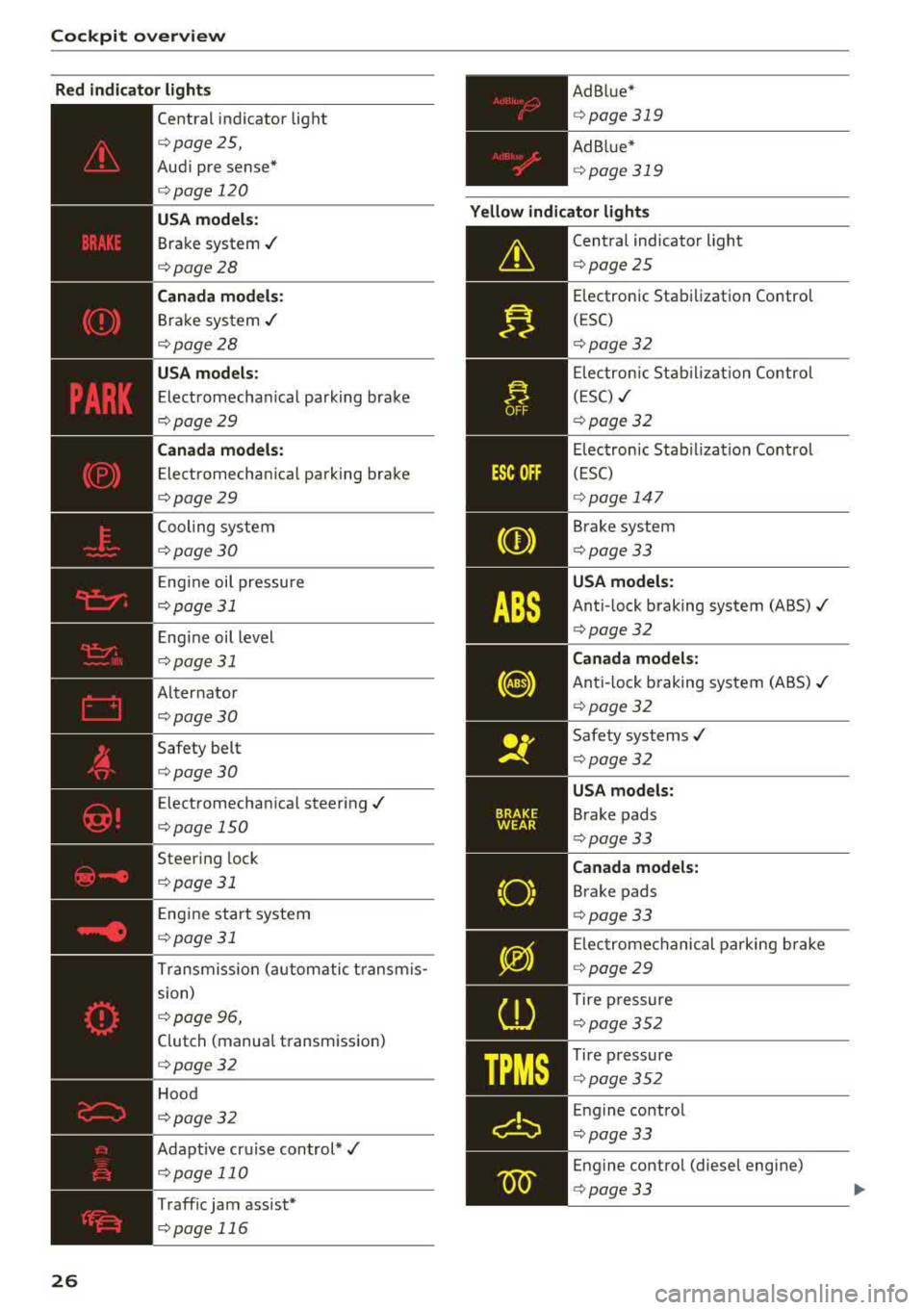
Cockpit over view
Red indicator ligh ts
26
--------------
Central indicator light
¢page 25,
Aud i pre sense*
¢ page 120
USA model s:
Brake system ./
¢page28
Cana da m od els:
Brake system ./
¢ page28
USA models :
Electromechan ical parking brake
¢ page29
Canada models:
Electromechan ica l parking brake
¢page29
Cooling system
¢ page30
Engine oil pressure
¢ page 31
E ngine oil level
¢ page 31
Alter nator
¢ page30
Safety belt
¢page30
Electromechan ica l steering ./
¢page 150
Steering lock
¢ page 31
Engine start system
¢ page 31
Transmiss ion (automatic t ransm is
sion)
¢ page 96,
Clutch (manual transmission)
¢page32
Hood
¢ page32
Adapt ive cr uise control*./
¢ page 110
Traffic jam assist*
¢ page 116 Ad B
lue*
¢ page 319
Ad Bl ue*
¢ pag e 319
Yellow indi cator lights
--------------
Central indicator light
¢ page25
Electronic Stabi lization Control
( E SC)
¢ page32
Elec tronic Stab il izat io n Contro l
(ESC)
./
¢ page32
Electronic Stab ilizat ion Control
(ESC)
¢ page 147
Brake system
¢ page 33
USA models:
Ant i- lock braking system (ABS)./
¢ page32
Canad a model s:
Ant i-lock b raking system (ABS) ./
¢ page32
Safety systems ./
¢page32
USA mode ls:
Brake pads
¢ page33
Ca nad a model s:
Brake pads
¢ page 33
E lec tromechanical parking brake
¢ page29
Tire p ressure
¢ page352
Tire pressure
¢page 352
Engine contro l
¢page 33
Engine contro l (diesel engine)
¢ page 33
Page 29 of 403
a co .... N ,....
N .... 0 0
3 co
'
-Yli-, I '
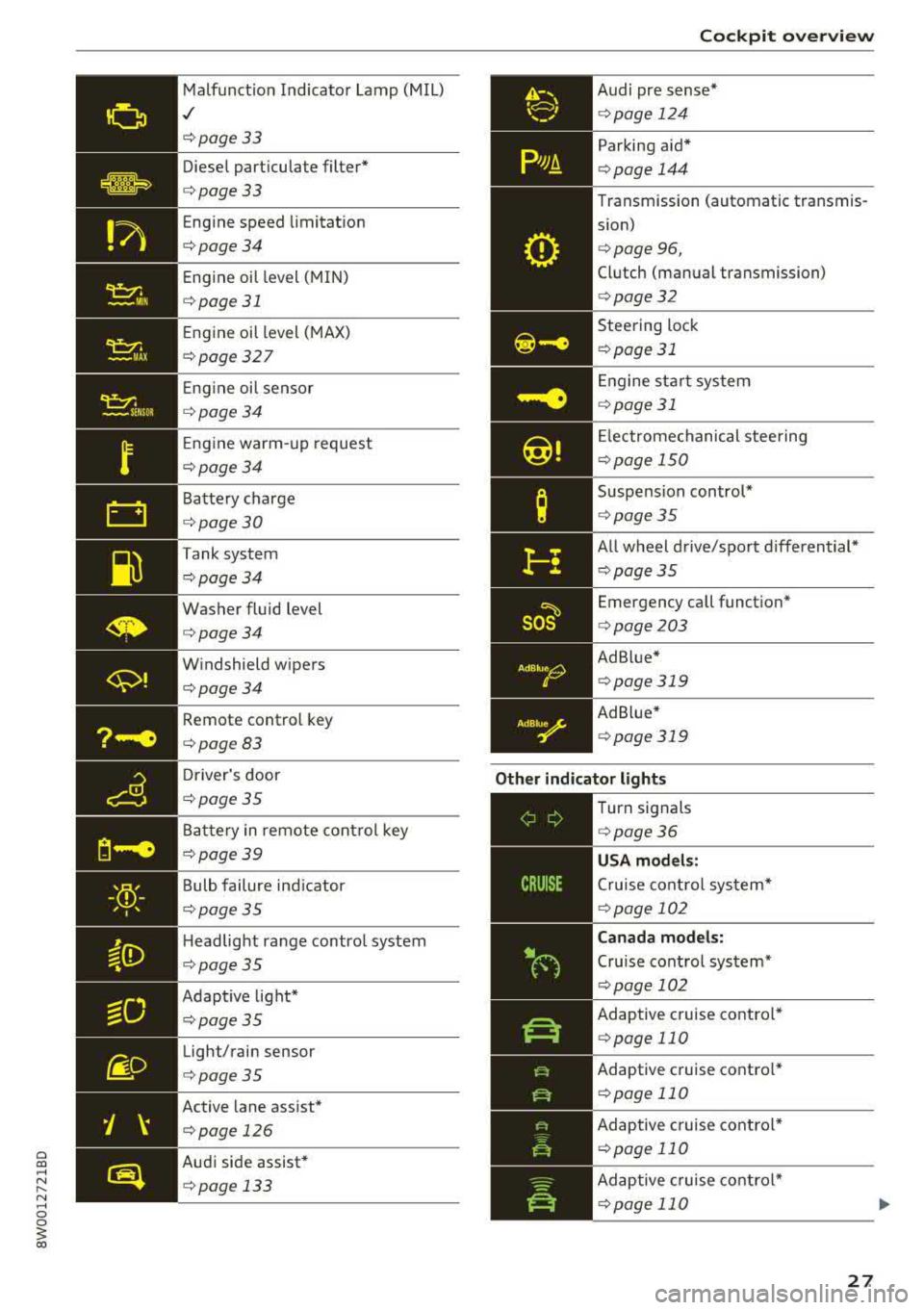
Malfunct ion Indicato r Lamp (MIL)
,/
¢page 33
Diese l part icu late filter*
¢page33
Eng ine speed limitat ion
¢page34
Eng ine oil level (MIN)
¢ page 31
Eng ine oil level ( MAX)
¢ page 327
Eng ine oi l sensor
¢ page34
Eng ine warm-up request
¢ page34
Battery charge
¢page 30
Tank system
¢page34
Washer fluid level
¢page34
W indshield w ipers
¢page34
Remote control key
¢ page83
Driver's door
¢page35
Battery in remote cont rol key
¢ page39
Bulb failure ind icator
¢ page 35
Headlight range control system
¢ page 35
Adapt ive light*
¢ page35
Light/rain sensor
¢page35
Active lane ass ist*
¢page 126
Audi side assist*
¢ pag e 133
AdBlue0
0
Coc kpit o ve rv iew
Audi pre s ense *
¢page 124
Parking aid*
¢page 144
Transmission (automatic transmis
s ion)
¢ page 96,
Clutch (manual transmission)
¢page 32
Steering lock
¢ page 31
Engine sta rt system
¢page 31
Electrome chanical steering
¢ page 150
Suspension control*
¢page 35
All wheel drive/sport differential*
¢page35
Emergency call funct ion*
¢ page 203
Ad Blue *
¢page 319
Ad B lue*
¢ page 319
Other indicator light s
--------------
Turn signals
¢ page 36
USA models :
Cruise cont rol sys tem*
¢ page 102
Canad a model s:
Cru ise control system*
¢ page 102
Adaptive c ruise contro l*
¢ page 110
Adaptive c ruise contro l*
¢ page 110
Adaptive c ruise contro l*
¢ page 110
Ad aptive c ruise contro l*
¢ page 110
27
Page 30 of 403
Cockpit over view
28
_J:L
1:1
y>))
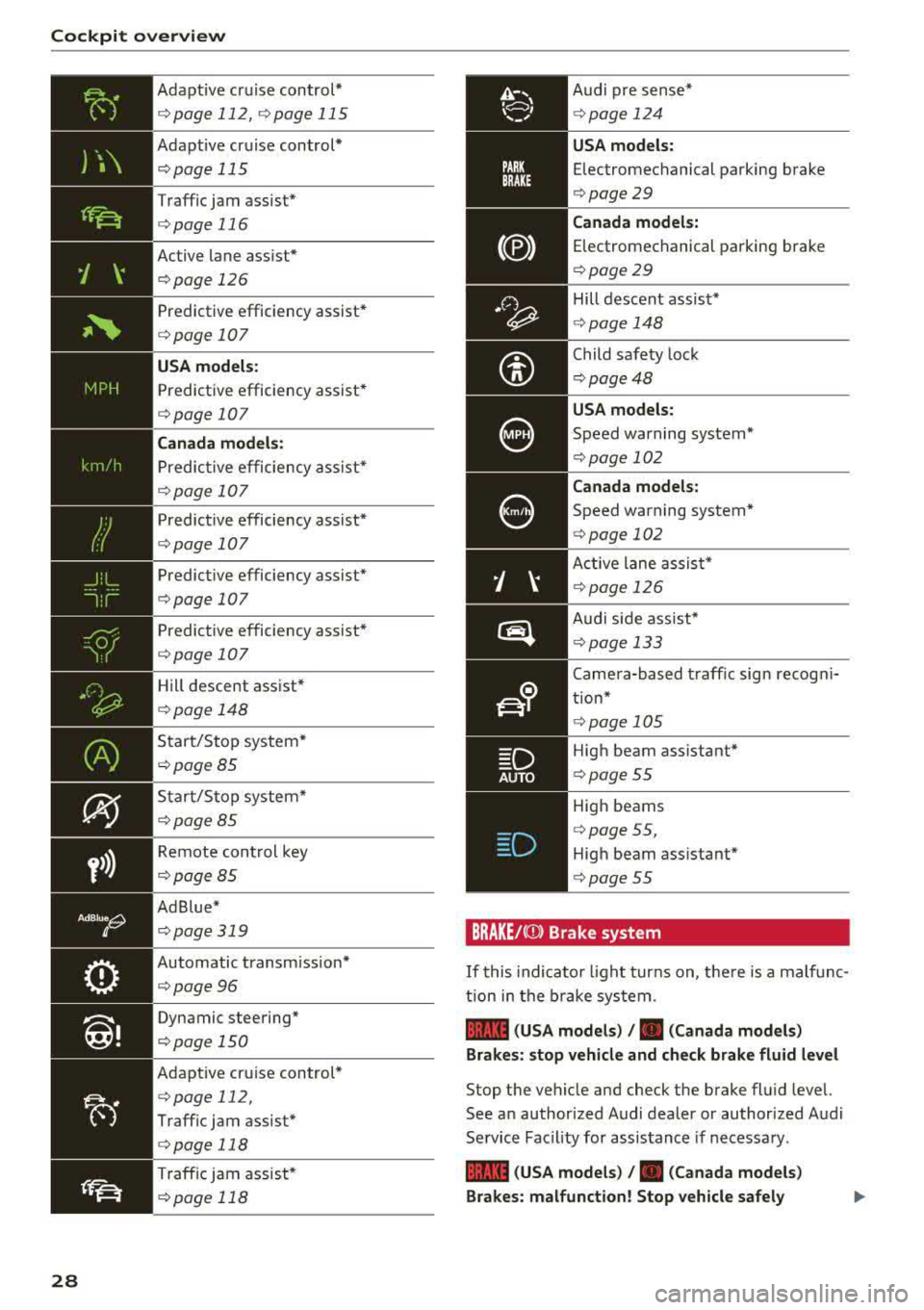
Adapt ive cruise control*
¢ page 112, ¢page 115
Adapt ive cruise control*
¢ page 115
Traffic jam assist*
¢page 116
Active lane assist*
¢page 126
Predictive efficiency assist*
¢page 107
USA model s:
Predictive efficiency assist*
¢page 107
Canada mod els:
P redictive efficiency assist*
¢ page 107
Predictive efficiency assist*
¢page 107
Predictive efficiency assist*
¢page 107
Predictive efficiency assist*
E!)page 107
Hill descent assist*
¢page 148
Start/S top system *
¢page85
Start/Stop system*
¢ page 85
Remote cont rol key
¢ page85
Ad B lue *
¢page319
Automatic transm ission*
¢ page96
Dynamic steering"
¢page 150
Adapt ive cr uise control*
¢ page 112,
Traffic jam assist*
¢ page 118
Traffic jam assist *
¢page 118
D AUTO
Audi pre sense *
¢page 124
USA models:
Electromechanical parking brake
¢ page 29
Canad a models:
Electromechanical parking brake
¢ page29
Hill descent assist*
¢page 148
Child safety lock
¢ page48
USA models:
Speed warning system*
¢ page 102
Canada model s:
Speed warning system*
¢ page 102
Active lane assis t*
¢ page 126
Audi s ide assist*
¢ page 133
Camera-based traff ic sign recog ni
tion*
High beam ass istant*
¢ page 55
High beams
¢ page 55,
High beam ass istant*
¢ page 55
BRAKE /CCD) Brake system
If this indicato r light turns on, t here is a malf unc
t ion in the b rake system .
1111 (USA model s) /. (Canada model s)
Brakes : stop vehicle and chec k brake fluid level
Stop the vehicle and check the brake flu id leve l.
See an author ized Audi dealer or authorized Audi
Service Facility for assis tance if necessary .
1111 (USA models ) /. (Can ada model s)
Brakes : malfunction! Stop veh icle safely
..,.
Page 33 of 403
a co .... N ,....
N .... 0 0
3 co
charge. Drive to an authorized Audi dealer or au
thorized Audi Service Facility immediate ly.
Do not stop the eng ine, or you will not be able to
start it aga in. If yo u can no longer sta rt the en
gine, see an authorized A udi dealer or authorized
Audi Service Facility for assistance .
(•) Elec trical system : malfunction! Plea se c on
tact Se rvic e
Drive to an authorized Aud i dea le r or authorized
Aud i Service Faci lity immediately . Because the ve
h icle battery is discharg ing , turn off all unneces
sary e lectr ica l equipment s uch as the radio . See
an authorized Audi dealer or authorized A udi
Service Facility if the battery charge level is too
l ow .
(•) Ele ctrical system : low battery charge . B at
tery w ill be charg ed while driv ing
The start ing ability may be impaired .
If th is message turns off after a little while, the
vehicle battery charged enough wh ile driving .
If the message does not turn off and stay off
when dr iving, have an authori zed Aud i dea ler or
author ized Audi Service Facility repair the mal
function.
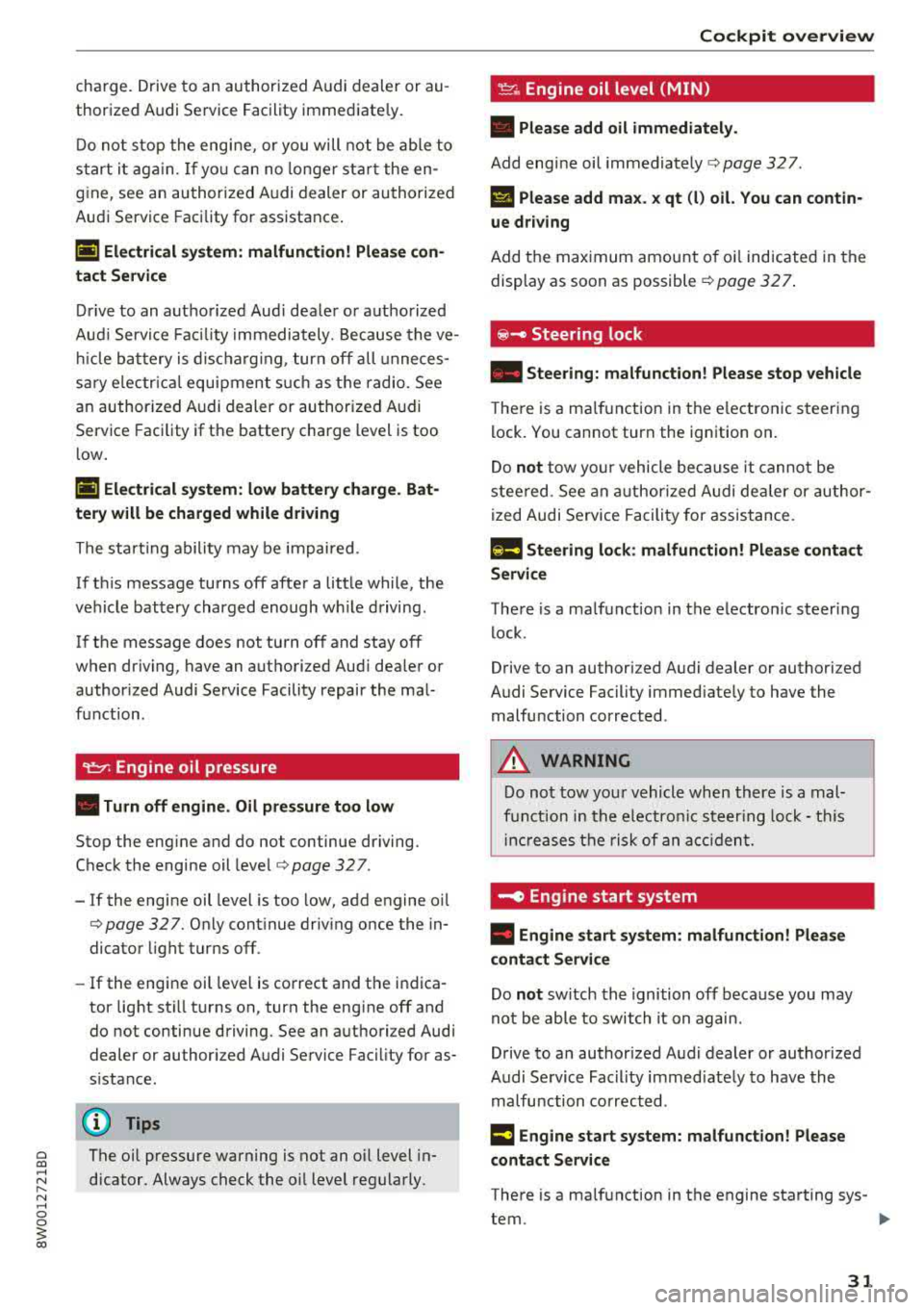
~ Engine oil pressure
• T u rn off engine . O il pr essure too low
Stop the eng ine and do no t continue driving.
Check the engine oil
level ¢ page 32 7.
-If the engine oil level is too low, add engine oil
¢ page 327. Only cont inue driv ing once the in
dica tor light turns off.
- If the engine oil level is correct and the indica
tor light sti ll turns on, turn the engine off and
do not continue driving. See an authori zed Audi
dealer or au thor ized Audi Service Facility for as
s istance.
@ Tips
The oil pressure warning is not an o il level in
dicator. Always check the oil level regularly.
Coc kpit o ve rv iew
~ Engine oil level (MIN)
• Plea se add oil imm ediatel y.
Add engine oil immediately ¢ page 327 .
Ill Please add ma x. x qt (l) oil. You can contin ·
ue d riv ing
Add the maximum amount o f oi l indicated in the
display as soon as possible
¢ page 32 7 .
@ -Steering lock
• Steering: m alfunction! Ple ase stop vehicle
T he re is a ma lfunction in the e lectronic steering
l ock. You cannot turn the ignition on.
Do
not tow your vehicle because it cannot be
stee red. See an authorized Audi dea ler or author
ized Audi Se rvice Facili ty for assistance.
Em Ste ering lo ck : malfunct ion! Pl eas e contact
Ser vic e
There is a malfunction in the electron ic steering
lock.
Drive to an au thori zed Audi dealer or authori zed
Audi Service Facility immed iately to have the
malfunction corrected .
_& WARNING ,-
Do not tow your vehicle when there is a mal-
f u nction in the electro nic steer ing lock· t his
i n cr eases the risk of an a cc ident.
~ Engine start system
• Engine s tart sy stem: malfun ction! Ple ase
cont act S erv ice
Do not switch the ignition off because you may
not be able to switch it on again.
Drive to an authorized Audi dealer or authorized
Audi Se rvice Facility immed iately to have the
malfu nction corrected .
= Engine sta rt system: mal function! Ple ase
cont act S erv ice
-
There is a ma lf u nction in the engine starting sys-
tem.
~
31
Page 40 of 403
Opening and closing
Key set
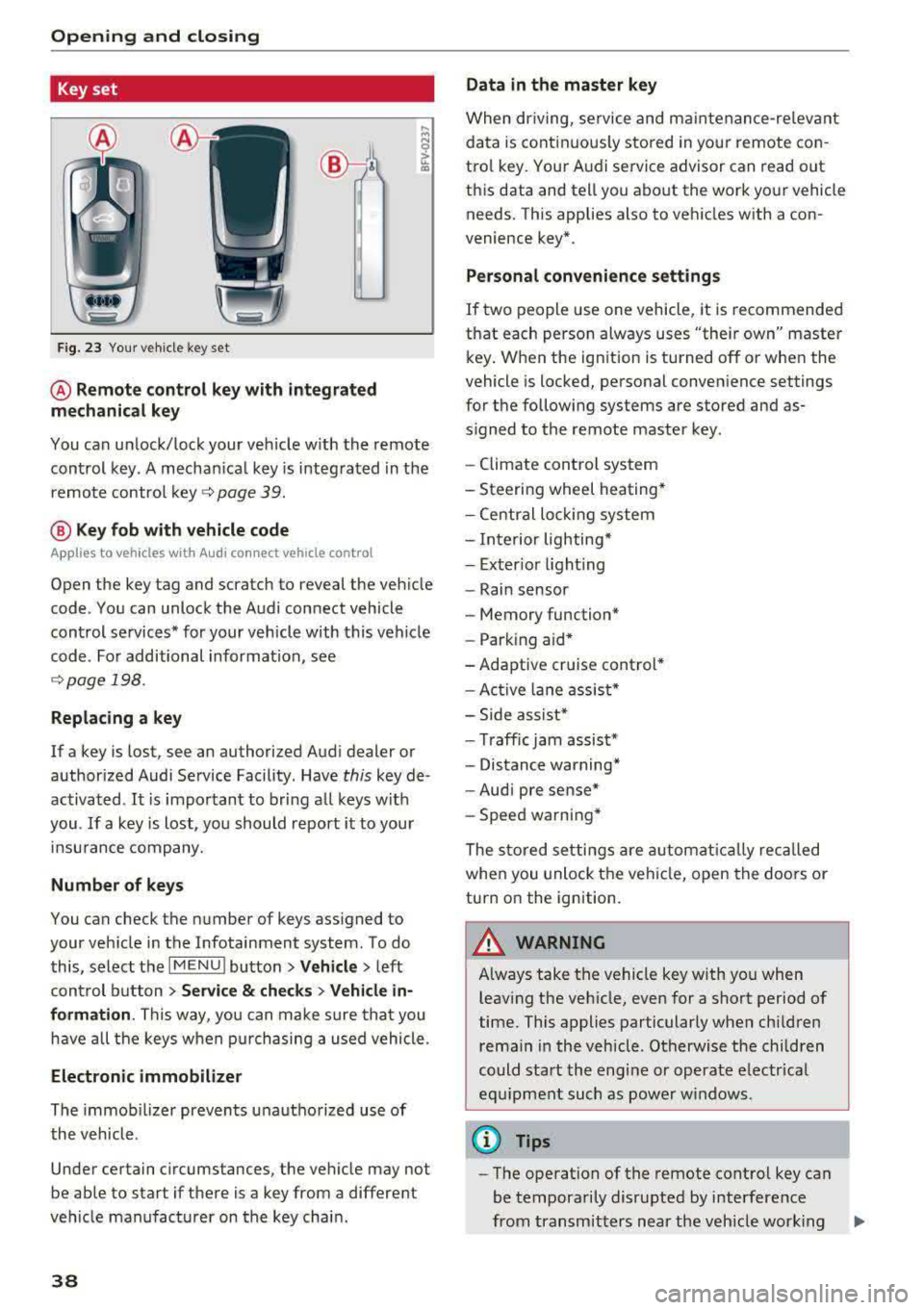
Fig. 23 Your veh icle key set
@ Remote control key with integrated
mechanical key
You can unlock/lock your veh icle w ith the remote
control key . A mechan ical key is integrated in the
remote control
key ~ page 39.
@ Key fob with vehicle code
Appl ies to veh icles with A udi co nnect vehicle con trol
Open the key tag and scratch to reveal the veh icle
code . You can unlock the Audi connect vehicle
control se rvices* for your vehicle with this vehicle
code . For additional information, see
~ page 198 .
Replacing a key
If a key is lost, see an authorized Audi dealer or
authorized Audi Service Facility. Have
this key de
activated .
It is important to bring all keys with
you .
If a key is lost, you should report it to your
insu rance company.
Number of keys
You can check the number of keys assigned to
your vehicle in the Infotainment system . To do
this, select the
IM ENU I button > Vehicle > left
control button
> Service & checks> Vehicle in·
formation . This way, you can make sure that you
have all the keys when purchasing a used vehicle.
Electronic immobilizer
The immob ilizer prevents unauthorized use of
the vehicle .
Under certain circumstances, the vehicle may not
be able to start if there is a key from a different
veh icle manufacturer on the key chain.
38
Data in the master key
When dr iving, service and maintenance-re levant
data is continuously stored in your remote con
trol key. Your A udi service advisor can read out
this data and tell you about the work your vehicle needs . This applies also to vehicles with a con
venience key*.
Personal convenience settings
If two people use one vehicle, it is recommended
that each person always uses "their own" master
key . When the ign ition is turned off or when the
vehicle is locked, personal convenience settings
for the following systems are stored and as
s igned to the remote master key.
- Climate control system
-Steering wheel heating*
-Central lockin g system
-Interior lighting*
-Exter ior lighting
- Rain sensor
- Memory function*
- Park ing a id *
-Adaptive cr uise control *
-Active lane assist*
-Side assist*
-Traff ic jam assist*
- Distance warning*
-Audi pre sense*
- Speed warning *
The stored settings are automatically recalled
when you unlock the vehicle, open the doors or
turn on the ignition .
~ WARNING
Always take the vehicle key with you when
leaving the vehicle, even for a short period of
time. This applies particularly when children
rema in in the vehicle . Otherwise the children
could start the engine or operate electrical
equipment such as power windows .
(© Tips
-
-The operation of the remote control key can
be temporarily disrupted by interference
from transmitters near the veh icle work ing
1J11,
Page 81 of 403

a co .... N ,....
N .... 0 0
3 co
20 minutes, depending on the outside
temperature.
To keep the rear window defogger on contin uous
l y, press and hold the
QWREAR button longer
than
3 seconds. This is stored unti l the ignition is
switched off .
SYNC Synchronization
Use the rocker switc h® to sele ct the funct ion.
When synch ronization is switched on, the set
tings for the driver's side are applied to the front
passenger's side and the rear (except for seat
heating/venti lation*) . When the settings on the
front passenger's side or in the rear are changed,
the synchron iz at ion is automatically sw itched off
and
3 -z one appears in the display .
SET REAR function
Use t he rocker switch ® to select the function .
When the function is switched on, you can adjust
all settings for the rear us ing the climate control
system controls in the cockpit. The rear climate
control system controls cannot be operated at
the same time . This function switches off auto
mat ically after a certain period of time or after
leaving the menu.
Vent s
You can open or close the center and rear vents in
the cockpit and the vents in the rear center con
sole us ing the r idged thumbwheels . The levers
adjust the d irection of the airflow from the vents.
The wide vent is opened and closed using the
r ocker switch
® ·
Residu al heat
You can activate the residual heat funct ion when
the ignition is switched off by pressing the knob
(D . The res idual heat from the coolant is used to
h eat the vehicle inte rior. The residual heat func
tion swi tches off automatically afte r abou t 15
minu tes .
A WARNING
- You should not use the recirculation mode for an exten ded period of time, because no
fresh a ir is drawn in and the w indows can
Warm and c old
fog when cooling mode is switched off. This
increases the r isk of an accident.
- Individuals with reduced sensitivity to pain
or temperature could develop burns when
using the seat heat ing* function. To reduce
the risk of injury, these individua ls should
not use seat heating*.
(D Note
To avoid damaging the seat heat ing* ele
ments, do not knee l on the seats or place
heavy pressure on one area of the seat.
Setup
The climate control system basic settings ore ac
cessed in the Infotainment system .
.,. Select in the Infotainment system : I MENU! but
ton
> Vehicle > l eft control button > Ai r co ndi
tioning
Auto recircu lation
When switched on, a utomat ic rec irculat ion con
trols the recircu lation mode automatically . You
must press the
®MAX button if fog forms on
the windows.
Automatic auxiliary heater*
T he aux iliary hea ter he lps to wa rm the vehicle in
terior more q uickly.
Steering wheel heating
Applies to: vehicles with steering wheel heating
The steering wheel rim con be heated.
.,. Press the bu tton on the m ultif unct ion steeri ng
wheel to switch the steering whee l heating on
and
off~ r=:> poge 15, fig . 11 . The message
Steering wheel heating : on /Steering wheel
heating: off
appears in the instrument cluster
disp lay.
The temperature is maintained at a constant lev el when steering wheel heating is switched on .
T he s teer ing whee l heating se tt ings a re stored
automat ica lly and assigned to the remo te control
key that is in use.
79
Page 84 of 403
Driving
unheeded. Extended idling also produces
heat, which could result in overheating or
other damage to the vehicle or other proper
ty.
(D Note
- Have your vehicle maintained properly and
in accordance with the service recommenda
tions in your Warranty
& Maintenance book
let . Lack of proper maintenance as well as
improper use of the vehicle will impair the
function of the emission control system and
could lead to damage.
- Do not alter or remove any component of the Emission Control System unless approved by the manufacturer .
- Do not alter or remove any device, such as
heat shields, switches, ignition wires,
valves, which are designed to protect your
vehicle's Emission Control System and other
important vehicle components.
(D Tips
The consumption estimates as published by
ENVIRONMENTAL PROTECTION AGENCY (EPA) and Transport Canada may not corre
spond to your actual consumption on the
road, which will vary depending upon vehicle
load and speed, road and weather conditions,
trip length, etc.
Steering
Adjusting the steering wheel position
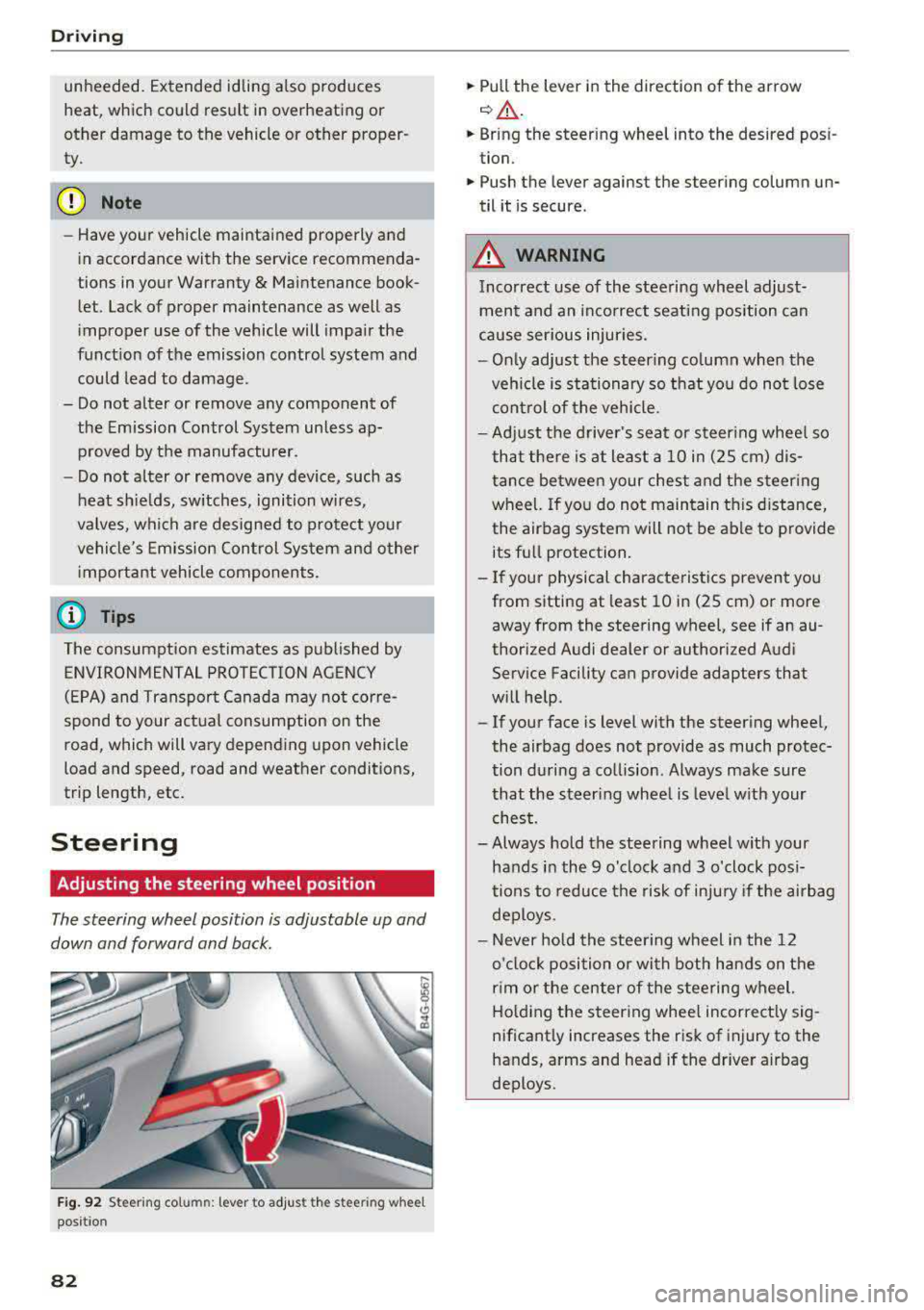
The steering wheel position is adjustable up and
down and forward and back.
Fig. 92 S tee rin g col umn : le ver to adjus t the stee ring w heel
posit ion
82
.,. Pull the lever in the direction of the arrow
c::, A -
... Bring the steering wheel into the desired posi
tion .
.,. Push the lever against the steering column un
til it is secure .
_&. WARNING
Incorrect use of the steering wheel adjust
ment and an incorrect seating position can
cause serious injuries.
- Only adjust the steering column when the
vehicle is stationary so that you do not lose
control of the vehicle.
-
-Adjust the driver's seat or steering wheel so
that there is at least a 10 in (2S cm) dis
tance between your chest and the steering
wheel. If you do not maintain this distance,
the airbag system will not be able to provide
its full protection.
-If your physical characteristics prevent you
from sitting at least 10 in (2S cm) or more
away from the steering
wheel, see if an au
thorized Audi dealer or authorized Audi
Service Facility can provide adapters that
will help .
- If your face is level with the steering wheel,
the airbag does not provide as much protec
tion during a collision . Always make sure
that the steering wheel is level with your
chest.
- Always hold the steering wheel with your
hands in the 9 o'clock and 3 o'clock posi
tions to reduce the risk of injury if the airbag
deploys.
- Never hold the steering wheel in the 12
o'clock position or with both hands on the
rim or the center of the steering wheel.
Holding the steering wheel incorrectly sig
nificantly increases the risk of injury to the
hands, arms and head if the driver airbag
deploys .
Page 86 of 403

Driving
St ee ring lock1
)
The stee ring locks when you t urn the engine off
using the
! S T A RT ENGINE ST OP I button and
open the driver 's door. The locked steering helps
prevent v ehicle theft .
Emergency off function*
If it is abso lutely necessary, the engine can also
be turned off while dr iv ing at speeds star ting at
4 mph (7 km/h). To switch the eng ine off, press
the
! S TAR T ENGINE ST OP I button tw ice in a row
briefly or press and hold for longer than two sec
onds.
A WARNING
- Never turn off the engine before the veh icle
has come to a comp lete stop . The full func
t ion of the brake booster and the power
stee ring is not guaranteed. Yo u must use
more force to turn or b rake . Because you
cannot s teer an d brake as you usu ally
would, t his co uld lead to accidents and ser i
ous in juries.
- Alw ays t ake the key wi th you w henever you
leave you r vehicle . Othe rw ise, the engi ne
cou ld be started o r electrical equipment
s uch as the power windows cou ld be operat
ed . This can lead to se rious injury.
- For safety reasons, always park the vehicle
with the se lector lever in the P position
(a u
tomat ic transmission) or with 1st gear en
gaged (manual transmission). Otherwise
the vehicle could roll away u nintent ionally .
(D Note
If the eng ine has been under heavy load for
an extended per iod of t ime, heat builds up in
the engine compartment after the engine is
sw itched off and there is a risk of damaging
the engi ne . For this reason, let the engi ne run
for at idle for approximately two minutes
be
fore shutting it off.
l) Th is fun ction is not avai la bl e in al l co un tries.
84
(D Tips
Fo r u p to 10 minutes after stopping the en
g ine, the radiator fan may turn on again auto
matically or it may continue to r un (even if
the ig nition is switched off) for the following
r easons:
- The coolant temperature is increas ing due
to trapped heat.
- If the eng ine is wa rm and the eng ine com
partment a lso heats up from strong sun
light .
- Applies to: vehicles with diesel particulate
filter: The emissions control system is heat
ed through the regeneration process, even if
the engine has not reached its operat ing
tempe rature yet.
Messages
Engin e running . Warning! Turn off ignition be
fore leavin g vehicle
This message appears and a warning tone sounds
i f you open the drive r's door w hen the eng ine is
r un ning .
Applies to: vehicles with manual transmission
Please pres s clutch pedal
This message appears if you do not press the
clutch pedal to start the eng ine. The engine can
o nly be started w hen the clutch pedal is pressed.
Applies to: vehicles with automatic transmissions
Plea se pres s brake pedal
This message appears if you do not press the
bra ke peda l when sta rting t he eng ine .
Ill Remote control key : key not recognized. Is
the key still in the vehicle ?
This indicator light turns on and this message ap
pears if the ignition key was removed from the
vehicle when the engine was running . If the igni
tion key is no longer in the vehicle, you cannot
switch on the ignition or start the engine once
Page 89 of 403

a co .... N ,....
N .... 0 0
3 co
@j indicator light appears in the instrument clus
ter disp lay, the engine will not be stopped, for
examp le in the following situations:
- T he eng ine has not reached the minimum re
quired temperature for Start/Stop mode.
- T he interior temperature selected by the cli-
mate contro l system has not been reached .
- T he outs ide temperature is ext remely h igh/low.
- The windshield is being defrosted.
- The vehicle battery charge level is too low.
- The steering whee l is turned at a sharp angle or
is mov ing .
- After engaging the reverse gear.
- On sharp inclines.
- At high a ltitudes.
Engine automatically restarts
The standard Start/Stop mode will be cance led
during a stop phase in the follow ing s ituations .
The engine restarts without any action by the
d river.
- The vehicle rolls, for examp le while on a slope.
- The interior temperature differs from the tem-
perature se lected in the A/C system .
- The windshield is being defrosted .
- The brake pedal is pressed several times in a
row.
- The vehicle battery charge level is too low.
- Power consumption is high.
The engine can t urn off again when the condi
tions for Start/Stop mode are met.
Ignition is switched off automatically
To prevent the veh icle battery from drain ing, the
ignition will switch off automat ica lly under the
following conditions :
- The Start/Stop system has stopped the engine .
- The veh icle is stationary.
- You left the vehicle and the engine was not re -
started within approximately 30 seconds .
I f this happens, you wi ll see the message
Igni
tion turns off automatically
in the instrument
cluster and the activated low beams are replaced by the parking light. The parking lights will
sw itch off after approximately 30 minutes or
when you lock the vehicle .
Driving
The ignition also switches off when you lock the
vehicle from the outside during a stop phase.
If the Start/Stop system has not turned off the
engine or if you have switched the Start/Stop sys
tem off manually, the ignition will not be auto
matically switched off and the engine will contin
ue to run
¢ .&..
A WARNING
To reduce the risk of poisoning, never allow
the eng ine to run in confined spaces .
(D Tips
Applies to : vehicles with auto matic transmissions
-
- If you leave the vehicle with the D/S or R se
lector lever position engaged, the parking
brake is automatically set.
- If you select the D or N selector lever posi
tion after shifting into reverse, the vehicle
must be driven faster than 6 mph ( 10 km/h)
in o rder fo r the engine to switch off again .
' Manually switching the Start/Stop system
, off/on
Applies to: vehicles wi th Start/Stop syste m
If you do not wish to use the system, you can
switch it off manually.
Fig. 96 Cente r console : Start/Stop system button
.,. To switch the Start/Stop system off/on man
ually, press the
l v'> ~I button. The LED in the but
ton turns on when the system is switched off .
(D Tips
If you switch the system off during a stop
phase, the engine will start aga in automati
cally .
87
Page 91 of 403
a co .... N ..... N .... 0 0
3 co
~ Applies to: automatic transmission: Select the
P selector lever position .
~ Turn the eng ine off ¢,&. .
~ Applies to: manual transmission: Engage 1st
gear.
~ Turn the steering wheel when parking on in
clines so that the wheels will roll into the curb
if the veh icle starts moving .
A WARNING
-Never accelerate or release the clutch pedal
carelessly when a gear or a selector lever
posit ion (automatic transmission) is engag
ed whi le the vehicle is stationary and the en
gine is running. Otherwise, the vehicle will
start to move immediately and this cou ld re
sult in an accident.
- Emergency braking should only be used in
an emergency, when the normal brake peda l
has failed or the brake pedal is obstructed.
During emergency braking, your veh icle will
brake sim ilar to heavy brak ing . ESC and the
associated components (ABS, ASR, EDL)
cannot overcome the laws of physics,
Around curves and when road or weather
conditions are bad, a full brake application
can cause the vehicle to skid or the rear end
to swerve, which increases the risk of an ac
c ident.
- If the power supply fails, you cannot set the
park ing brake if it is released . If th is is the
case, stop the veh icle on leve l ground and
secure it by engaging 1st gear (manual
transmiss ion) or select ing the P selector lev
er position (automatic transm iss ion). See an
authorized Aud i dealer or autho rized Aud i
Service Facility for assistance .
- Always take the vehicle key with you when
leaving your vehicle, even if for a short pe ri
od of time. This applies particu larly when
children remain in the vehicle. Otherwise,
children could start the engine, release the
parking brake or operate electrical equip
ment such as powe r windows, which in
creases the risk of an acc ident.
- No one, especially children, shou ld remain
in the vehicle when it is locked. Locked
doors make it more difficult for emergency
D riving
workers to get into the vehicle, which puts
lives at risk.
(D Tips
Ap plies to : vehicles with auto matic transmissions
When stopp ing at a traff ic signa l or stopp ing
i n city traffic, you can set the park ing brake
manually . The vehicle does not have to be
held with the brake pedal. The park ing brake
eliminates the tendency to creep when a se
l ector lever position is engaged. As soon as
you press the a ccelerator peda l, the parking
brake releases automatically and your vehicle
starts to move r=;,
page 89.
(j) Tips
-Occasional noises when the pa rking brake is
set and released are normal and are no t a
cause for concern.
- The parking brake goes through a self-test
cycle at regular intervals when the vehicle is
stopped. Any noises assoc iated with this are
normal.
- If there is a power failure, the parking brake
wi ll not set if it is released, and it will not
re lease if it is
set ¢.&. . See an a uthorized
Audi dealer or authorized Audi Service Fa cility for assistance.
Starting to drive
Various convenience and safety funct ions may be
available when the vehicle begins driving, de
pending on vehicle equipment .
Starting on hills with the p arking brake set
Requirement: the driver's door must be closed .
~ To start driving comfortably when on a hill , set
the parking brake and begin driving as usual.
The braking force of the parking brake does not
release a utomatically until the wheels build up
enough driving force.
Starting on hills with hill hold assist
Hi ll ho ld assist makes it easier to start on hills.
Requirement: the driver's door must be closed
and the engine must be running.
89