key AUDI A4 2018 Owner's Manual
[x] Cancel search | Manufacturer: AUDI, Model Year: 2018, Model line: A4, Model: AUDI A4 2018Pages: 403, PDF Size: 66.81 MB
Page 71 of 403
of injuries, never leave children unattended in
the vehicle with the vehicle key.
(D Note
-To reduce the risk of damage to the vehicle
electrical system, never attempt to charge
the vehicle battery by connecting accesso
ries that provide power, such as solar panels
or battery chargers, to the 12 Volt sockets
or the cigarette lighter.
-To reduce the risk of damage to the sockets,
only use plugs that fit correctly.
Storage
Cup holders
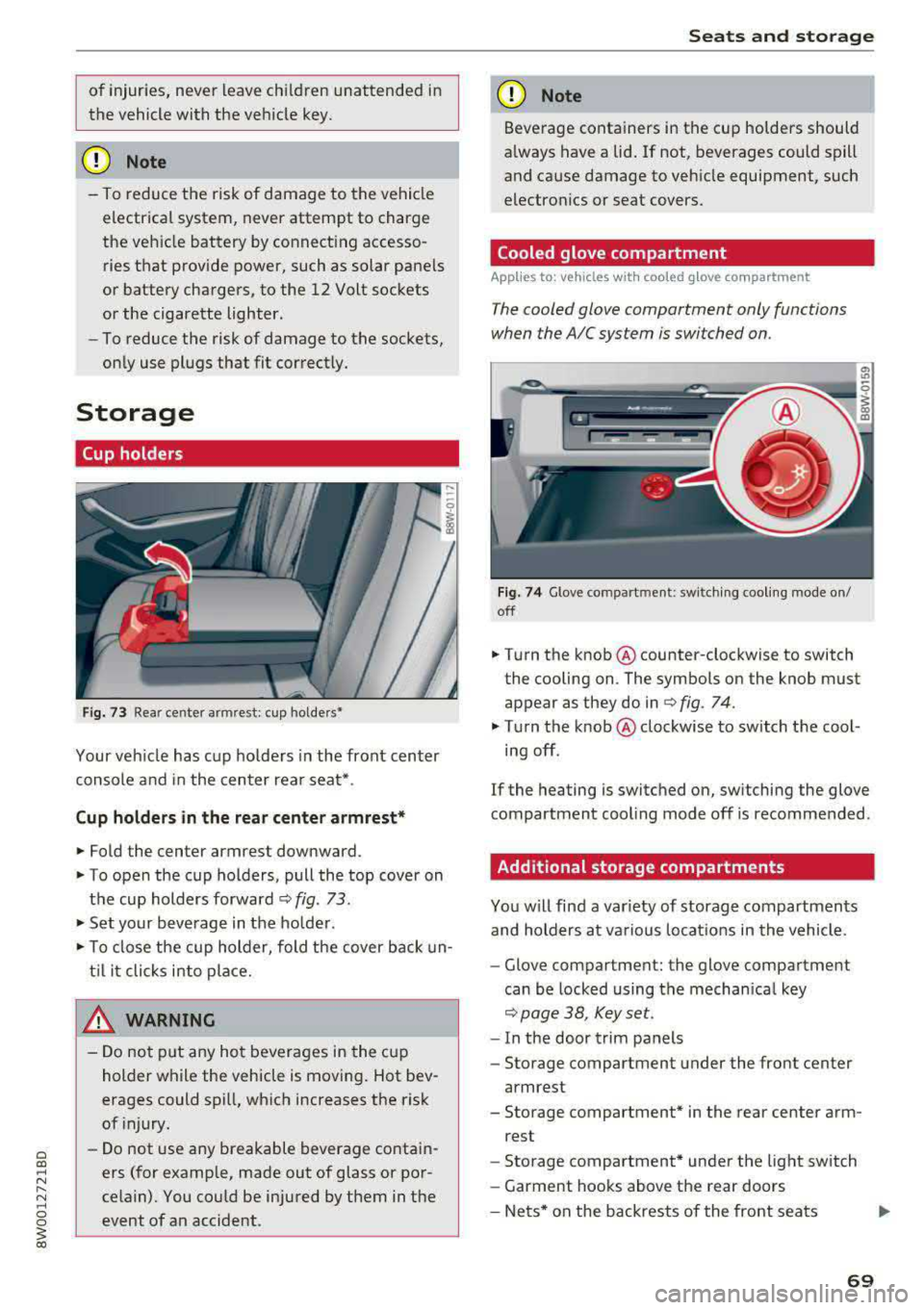
Fig. 73 Rea r cente r arm rest: cup holde rs•
Your vehicle has cup holders in the front center
console and in the center rear seat* .
Cup holders in the rear center armrest*
.,. Fold the center armrest downward.
.,. To open the cup holders, pull the top cover on
the cup holders forward
c::> fig. 73.
.,. Set your beverage in the holder .
.,. To close the cup holder, fold the cover back un
til it clicks into place.
& WARNING
-Do not put any hot beverages in the cup
holder while the vehicle is moving. Hot bev
erages could spill, which increases the risk
of injury.
-Do not use any breakable beverage contain
ers (for example, made out of glass or por
celain). You could be injured by them in the event of an accident.
Seats and storage
(D Note
Beverage containers in the cup holders should
always have a lid. If not, beverages could spill
and cause damage to vehicle equipment, such
electronics or seat covers.
Cooled glove compartment
App lies to: vehicles wit h coo led g love co mpartment
T he cooled glove compartment only functions
when the AIC system is switched on .
Fig. 74 Glove compart ment : swi tching cooling mode on/
off
.,. Turn the knob @counter-clockwise to switch
the cooling on . The symbols on the knob must
appear as they do in
r=> fig. 74.
.,. Turn the knob @clockwise to switch the cool
ing off.
If the heating is switched on, switching the glove
compartment cooling mode off is recommended .
Additional storage compartments
You will find a var iety of storage compartments
and holders at various locations in the vehicle .
-Glove compartment: the glove compartment
can be locked using the mechanical key
c::> page 38, Key set.
-In the door trim panels
- Storage compartment under the front center
armrest
- Storage compartment* in the rear center arm-
rest
- Storage compartment* under the light switch
- Garment hooks above the rear doors
-Nets* on the backrests of the front seats
69
Page 73 of 403
Increasing the size of the vehicle interior
Applies to: vehicles with fold ing backrests
The rear seat backrests can be folded for ward ei
the r separately* or together .
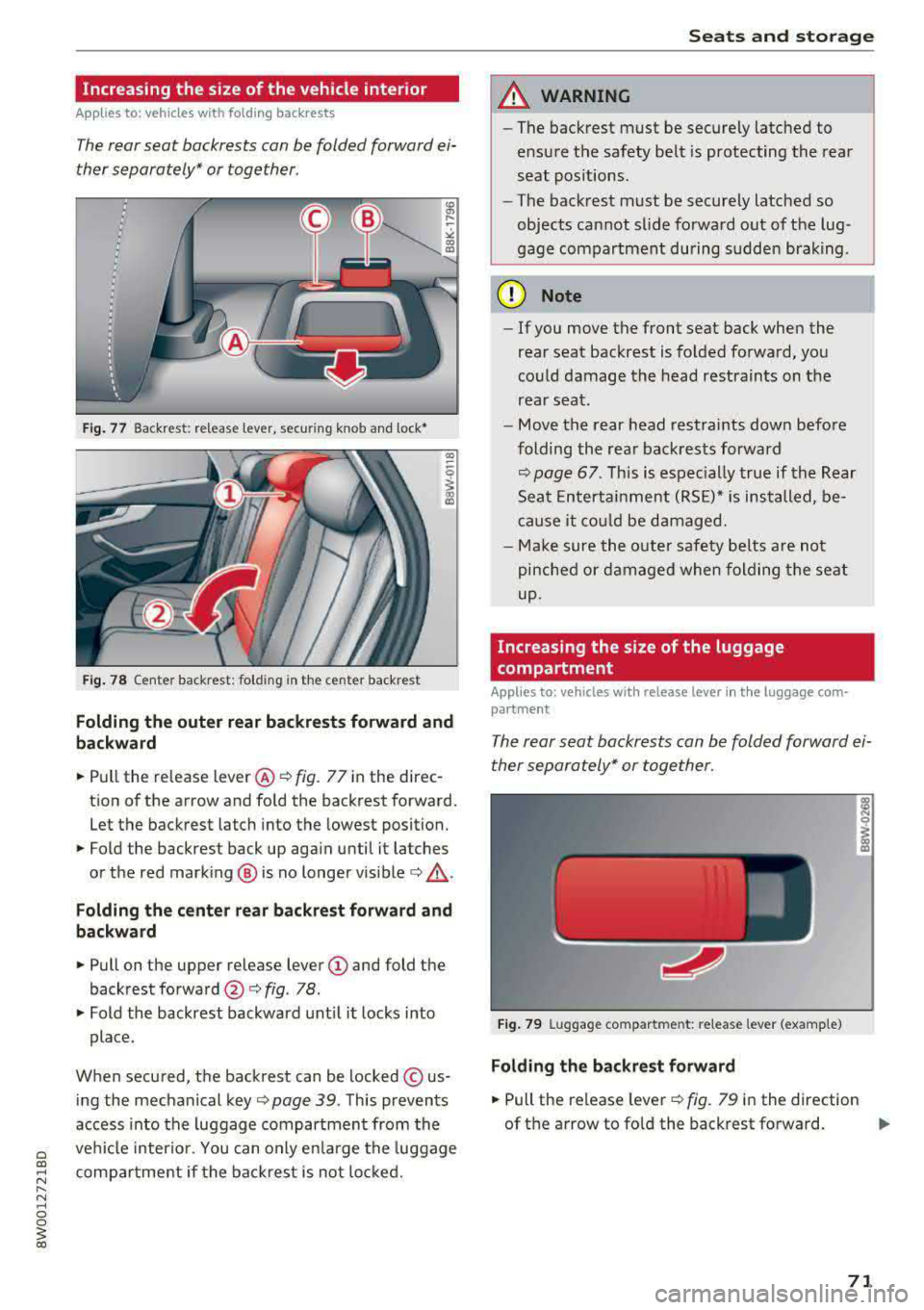
Fig. 77 Back rest: release lever, securing knob and lock•
F ig. 78 Center backrest: folding in the center backrest
Folding the outer rear backr ests forward and
backward
.,.. Pull the release lever @¢ fig. 77 in the direc
tion of the arrow and fo ld the backrest forward .
Let the backrest latch into the lowest position .
.,.. Fold the backrest back up aga in until it latches
or the red mark ing @ is no longer
vis ible ¢,&. .
Folding the center rear backrest forward and
backward
.,.. Pull on the upper re lease lever (D and fold the
backrest
forward @c::> fig. 78 .
.,.. Fold the backrest backward unt il it l ocks into
place.
When secured, the backrest can be locked © us
ing the mechanical
key ¢ page 39 . This prevents
access into the luggage compartment from the
ve hicl e interio r. You can only e nlarge the luggage
compa rtme nt if the backr est is not loc ke d .
Seats and storag e
A WARNING
-~
-The backrest must be securely latched to
e nsu re the safety belt is protecting the rea r
seat pos itions .
- The bac krest must be securely latched so
objects cannot slide fo rwa rd out of the lug
gage compartment during sudde n braking.
(D Note
- If you move the front seat back when the
rear seat backrest is fo lded fo rward, you
could damage the head restraints on the
rear seat .
- Move the rear head restrai nts down befo re
folding the rea r back rests forward
c::> page 67. Th is is espec ially true if the Rear
Sea t Enterta inment (RS E)* is ins talled, be
cause it co uld be damaged.
- Ma ke sure the o ute r safety be lts are not
pinched or d am age d when fol ding the seat
up.
Increasing the size of the luggage
compartment
Applies to: vehicles with release lever in the luggage com·
partment
The rear seat backrests can b e folded forward ei
ther separately* or together .
Fig. 7 9 Luggage co mpartme nt: re lease lever (example)
Folding the backre st fo rward
.,.. Pull the release leve r ¢fig. 79 in the direction
of th e arrow to fo ld the backrest forward.
.,.
71
Page 78 of 403
Warm and cold
Warm and cold
Climate control system
Description
The climate control system warms, cools and re moves humidity from the air in the vehicle interi
or. It is the most effective when the windows and
sunroof * are closed. If there is a bui ld-up of heat
inside the vehicle, ventilation can he lp to speed
up the cooling process.
I n all heating mode f unctions except for
defrost,
the blower only switches to a higher speed once
the engine coolant has reached a sufficient tem
perature .
Pollutant filt er
The po llutant filter removes poll utants such as
dust and pollen from the a ir .
Ke y recognit ion
The climate control settings are automatically
stored and assigned to the remote contro l key
that is in use .
76
® For the sake of the environment
-If you would like to reduce fuel consump
t ion, sw itch the air conditioning
off. This
will also reduce emissions.
- In veh icles with a diesel engine, you can
switch the auxiliary heater
off in the Info
tainment system.
(D Tips
- To prevent interference with the heating
and cooling output and to prevent the win
dows from fogging over, the air intake in
front of the windshie ld must be free of ice,
snow or leaves.
- Condensation from the cooling system can
dr ip and form a pudd le of water under the
vehicle . This is norma l and does not mean
there is a leak.
- The energy management system may tem porarily switch
off certain functions, such as
the seat heating* o r rear window defogger.
T hese systems are ava ilable again as soon
as the ene rgy supply has been restored.
Page 81 of 403

a co .... N ,....
N .... 0 0
3 co
20 minutes, depending on the outside
temperature.
To keep the rear window defogger on contin uous
l y, press and hold the
QWREAR button longer
than
3 seconds. This is stored unti l the ignition is
switched off .
SYNC Synchronization
Use the rocker switc h® to sele ct the funct ion.
When synch ronization is switched on, the set
tings for the driver's side are applied to the front
passenger's side and the rear (except for seat
heating/venti lation*) . When the settings on the
front passenger's side or in the rear are changed,
the synchron iz at ion is automatically sw itched off
and
3 -z one appears in the display .
SET REAR function
Use t he rocker switch ® to select the function .
When the function is switched on, you can adjust
all settings for the rear us ing the climate control
system controls in the cockpit. The rear climate
control system controls cannot be operated at
the same time . This function switches off auto
mat ically after a certain period of time or after
leaving the menu.
Vent s
You can open or close the center and rear vents in
the cockpit and the vents in the rear center con
sole us ing the r idged thumbwheels . The levers
adjust the d irection of the airflow from the vents.
The wide vent is opened and closed using the
r ocker switch
® ·
Residu al heat
You can activate the residual heat funct ion when
the ignition is switched off by pressing the knob
(D . The res idual heat from the coolant is used to
h eat the vehicle inte rior. The residual heat func
tion swi tches off automatically afte r abou t 15
minu tes .
A WARNING
- You should not use the recirculation mode for an exten ded period of time, because no
fresh a ir is drawn in and the w indows can
Warm and c old
fog when cooling mode is switched off. This
increases the r isk of an accident.
- Individuals with reduced sensitivity to pain
or temperature could develop burns when
using the seat heat ing* function. To reduce
the risk of injury, these individua ls should
not use seat heating*.
(D Note
To avoid damaging the seat heat ing* ele
ments, do not knee l on the seats or place
heavy pressure on one area of the seat.
Setup
The climate control system basic settings ore ac
cessed in the Infotainment system .
.,. Select in the Infotainment system : I MENU! but
ton
> Vehicle > l eft control button > Ai r co ndi
tioning
Auto recircu lation
When switched on, a utomat ic rec irculat ion con
trols the recircu lation mode automatically . You
must press the
®MAX button if fog forms on
the windows.
Automatic auxiliary heater*
T he aux iliary hea ter he lps to wa rm the vehicle in
terior more q uickly.
Steering wheel heating
Applies to: vehicles with steering wheel heating
The steering wheel rim con be heated.
.,. Press the bu tton on the m ultif unct ion steeri ng
wheel to switch the steering whee l heating on
and
off~ r=:> poge 15, fig . 11 . The message
Steering wheel heating : on /Steering wheel
heating: off
appears in the instrument cluster
disp lay.
The temperature is maintained at a constant lev el when steering wheel heating is switched on .
T he s teer ing whee l heating se tt ings a re stored
automat ica lly and assigned to the remo te control
key that is in use.
79
Page 86 of 403

Driving
St ee ring lock1
)
The stee ring locks when you t urn the engine off
using the
! S T A RT ENGINE ST OP I button and
open the driver 's door. The locked steering helps
prevent v ehicle theft .
Emergency off function*
If it is abso lutely necessary, the engine can also
be turned off while dr iv ing at speeds star ting at
4 mph (7 km/h). To switch the eng ine off, press
the
! S TAR T ENGINE ST OP I button tw ice in a row
briefly or press and hold for longer than two sec
onds.
A WARNING
- Never turn off the engine before the veh icle
has come to a comp lete stop . The full func
t ion of the brake booster and the power
stee ring is not guaranteed. Yo u must use
more force to turn or b rake . Because you
cannot s teer an d brake as you usu ally
would, t his co uld lead to accidents and ser i
ous in juries.
- Alw ays t ake the key wi th you w henever you
leave you r vehicle . Othe rw ise, the engi ne
cou ld be started o r electrical equipment
s uch as the power windows cou ld be operat
ed . This can lead to se rious injury.
- For safety reasons, always park the vehicle
with the se lector lever in the P position
(a u
tomat ic transmission) or with 1st gear en
gaged (manual transmission). Otherwise
the vehicle could roll away u nintent ionally .
(D Note
If the eng ine has been under heavy load for
an extended per iod of t ime, heat builds up in
the engine compartment after the engine is
sw itched off and there is a risk of damaging
the engi ne . For this reason, let the engi ne run
for at idle for approximately two minutes
be
fore shutting it off.
l) Th is fun ction is not avai la bl e in al l co un tries.
84
(D Tips
Fo r u p to 10 minutes after stopping the en
g ine, the radiator fan may turn on again auto
matically or it may continue to r un (even if
the ig nition is switched off) for the following
r easons:
- The coolant temperature is increas ing due
to trapped heat.
- If the eng ine is wa rm and the eng ine com
partment a lso heats up from strong sun
light .
- Applies to: vehicles with diesel particulate
filter: The emissions control system is heat
ed through the regeneration process, even if
the engine has not reached its operat ing
tempe rature yet.
Messages
Engin e running . Warning! Turn off ignition be
fore leavin g vehicle
This message appears and a warning tone sounds
i f you open the drive r's door w hen the eng ine is
r un ning .
Applies to: vehicles with manual transmission
Please pres s clutch pedal
This message appears if you do not press the
clutch pedal to start the eng ine. The engine can
o nly be started w hen the clutch pedal is pressed.
Applies to: vehicles with automatic transmissions
Plea se pres s brake pedal
This message appears if you do not press the
bra ke peda l when sta rting t he eng ine .
Ill Remote control key : key not recognized. Is
the key still in the vehicle ?
This indicator light turns on and this message ap
pears if the ignition key was removed from the
vehicle when the engine was running . If the igni
tion key is no longer in the vehicle, you cannot
switch on the ignition or start the engine once
Page 87 of 403

you stop it. You also cannot lock the vehicle from
the outside .
Applies to: vehicles with au tomatic transm issions
Shift to P , otherwise vehicle can roll away.
Doors do not lock if gearshift is not in P
This message appears for safety reasons if the
selector lever is in the N position when you
sw itch the ignition off. Move the selector leve r to
the P position. Otherwise the vehicle is not pro
tected from ro lling and it cannot be locked .
DJ Remote control key: hold back of key
against the designated area . See owner 's man
ual
If the indicator light turns on and th is message
appears, there is a malfunction
q page 85 .
Applies to: vehicles with automatic transmissions
Shift to P before leaving car, otherwise vehicle
can roll away
This message appears if the driver's door is
opened while the ignition is switched on and the
transmission has not been shifted to the P posi
tion . Sh ift the transmiss ion into the P position
and turn off the ignition if you are leaving the ve
hicle . Otherwise the vehicle could roll. Also see
c::> page87 .
Starting the engine when there is a
malfunction
It may not be possible to start the engine under
certain circumstances, for example if the battery
in the vehicle key is drained, if interference is af
fected the key or if there is a system malfunc
tion .
Fig. 94 Cente r console/ remote contro l key: starting t he
eng ine if there is a malfunc tion
Driving
Requirement: the message Remote control key:
hold back of key against the designated area .
See owner's manual
must display and the DJ i n
dicator light must turn on.
.,. Place the remote control key on the location
shown in the illustration
y >l) c::> fig . 94.
Applies to: vehicles with manual transmission
.,. Press the clutch pedal.
Applies to: vehicles with automatic transmissions
• Press the brake pedal.
.. Press the !START ENGINE STOP ! button. The
engine will start.
.,. Drive to an authorized Audi dea ler or author
ized Aud i Service Facility immediately to have
the malfunction corrected.
@ Tips
You can view the message again by pressing
the
I S TART ENGINE STOP I button.
Start/Stop system
Description
Applies to: vehicles with Start/Stop system
The Start/Stop system can help increase fue l
economy and reduce CO2 emissions.
In Sta rt/Stop mode, the engine shuts off auto
matically when the vehicle is stopped, such as at
a traffic light. The ignition remains switched on
during this stop phase . The engine wi ll restart
automatica lly when needed .
Th e Start/Stop system is a utomaticall y activated
as soon as the ignition is switched on.
Basic requirements for Start/Stop mode
-The driver's door must be closed .
-The driver's seat belt much be fastened.
- The hood must be closed.
- The vehicle must have driven faster than
2 mph
(3 km/h) since the last time it stopped .
- A trailer must not be hitched to the vehicle.
If you leave the vehicle during a stop phase, the
engine can be restarted within approximately 30
seconds if the following requi rements are met:
IJ>
85
Page 91 of 403
a co .... N ..... N .... 0 0
3 co
~ Applies to: automatic transmission: Select the
P selector lever position .
~ Turn the eng ine off ¢,&. .
~ Applies to: manual transmission: Engage 1st
gear.
~ Turn the steering wheel when parking on in
clines so that the wheels will roll into the curb
if the veh icle starts moving .
A WARNING
-Never accelerate or release the clutch pedal
carelessly when a gear or a selector lever
posit ion (automatic transmission) is engag
ed whi le the vehicle is stationary and the en
gine is running. Otherwise, the vehicle will
start to move immediately and this cou ld re
sult in an accident.
- Emergency braking should only be used in
an emergency, when the normal brake peda l
has failed or the brake pedal is obstructed.
During emergency braking, your veh icle will
brake sim ilar to heavy brak ing . ESC and the
associated components (ABS, ASR, EDL)
cannot overcome the laws of physics,
Around curves and when road or weather
conditions are bad, a full brake application
can cause the vehicle to skid or the rear end
to swerve, which increases the risk of an ac
c ident.
- If the power supply fails, you cannot set the
park ing brake if it is released . If th is is the
case, stop the veh icle on leve l ground and
secure it by engaging 1st gear (manual
transmiss ion) or select ing the P selector lev
er position (automatic transm iss ion). See an
authorized Aud i dealer or autho rized Aud i
Service Facility for assistance .
- Always take the vehicle key with you when
leaving your vehicle, even if for a short pe ri
od of time. This applies particu larly when
children remain in the vehicle. Otherwise,
children could start the engine, release the
parking brake or operate electrical equip
ment such as powe r windows, which in
creases the risk of an acc ident.
- No one, especially children, shou ld remain
in the vehicle when it is locked. Locked
doors make it more difficult for emergency
D riving
workers to get into the vehicle, which puts
lives at risk.
(D Tips
Ap plies to : vehicles with auto matic transmissions
When stopp ing at a traff ic signa l or stopp ing
i n city traffic, you can set the park ing brake
manually . The vehicle does not have to be
held with the brake pedal. The park ing brake
eliminates the tendency to creep when a se
l ector lever position is engaged. As soon as
you press the a ccelerator peda l, the parking
brake releases automatically and your vehicle
starts to move r=;,
page 89.
(j) Tips
-Occasional noises when the pa rking brake is
set and released are normal and are no t a
cause for concern.
- The parking brake goes through a self-test
cycle at regular intervals when the vehicle is
stopped. Any noises assoc iated with this are
normal.
- If there is a power failure, the parking brake
wi ll not set if it is released, and it will not
re lease if it is
set ¢.&. . See an a uthorized
Audi dealer or authorized Audi Service Fa cility for assistance.
Starting to drive
Various convenience and safety funct ions may be
available when the vehicle begins driving, de
pending on vehicle equipment .
Starting on hills with the p arking brake set
Requirement: the driver's door must be closed .
~ To start driving comfortably when on a hill , set
the parking brake and begin driving as usual.
The braking force of the parking brake does not
release a utomatically until the wheels build up
enough driving force.
Starting on hills with hill hold assist
Hi ll ho ld assist makes it easier to start on hills.
Requirement: the driver's door must be closed
and the engine must be running.
89
Page 107 of 403

-Under some circumstances, traffic sign rec
ognition may not detect traffic s igns cor
rectly or detect them at all. As a result, the
system may not display the correct speed
limit or any speed limit.
- Traffic sign recognition does not adapt your
vehicle's speed to match the speed
limit!
-The display in the instrument cluster is
based on the units of measurement used for
speed in that country. As a result, the d is
play
50 in the instrument cluster can mean
either km/h o r mph, depending on the coun
try .
Operation
Applies to: ve hicles with camera-based traffic sign recogni
tio n
Fig . 106 In strument cluste r: add it iona l display
Accessing traffic sign recognition
• Select: the first tab > Traffic signs.
Setting a speed warning
You can set a warn ing threshold down to 10 mph
(lS km/h). The traffic sign fo r the current detect
ed speed limit w ill blink in the display if you ex
ceed the set threshold .
• Select in the Infotainment system: !MENUI but
ton
> Vehicle > left control button > Driver as
sistance
> Speed warning > Traffic sign based
warning.
Additional display
If a v iew other than the traffic sign recognition is
selected in the ins trument cluster display, the
speed limit will be shown in another display
co fig. 106 . The current applicable speed limit will
Assistance systems
be shown there, if possible within the limits of
the system.
(D Tips
- An additional indicator appea rs in the head
up display* .
- Your speed warning settings are stored au
tomatically and assigned to the remote con
trol key in use.
Messages
Appl ies to: vehicles with camera-based traff ic sig n recog ni·
tio n
f!ji Traffic sign recognition : currently unavaila
ble . Camera view restricted due to surroundings
Function currently unavailable. Camera view re
stricted due to surroundings
This message appears if the camera's visual field
is covered
<:::>page 104, fig . 105. The system w ill
switch itself off.
f!ji Traffic sign recognition: currently restricted.
See owner's manual
This message appears if there is a malfunction in
the navigation system, for examp le. The speed
limit display is limited, which increases the risk
of an incorrect d isplay .
lj Traffic sign based speed warning: currently
unavailable. See owner's manual
There is no warning when the set th reshold is ex
ceeded.
No traffic sign information available
There is no valid navigation data and do speed
li mits were detected . Or there is a recommended
speed but the re is not a speed limit (for examp le
driv ing on and off the expressway).
Malfunction! See owner's manual
The system cannot guarantee correct function
and is switched
off. See an authorized Audi deal
er or authorized Audi Service Facility for assis
tance .
Function not available in this country
105
Page 116 of 403
Ass is tance sy stems
That is equal to the general recommendation of
"half the speed shown on the speedometer" .
The distances provided are specified val ues. De
pending on the d riving si tuat ion and how the ve
hicle ahead is driving, the actual distance may be
mo re or less than these target distances.
If you change the time gaps, the new ly set value
appears br iefly in the instrument clus ter display
II for example, for Di stance 3. T his only occurs
if the
Dr iver a ssistance display is not current ly
shown in the display
r:!:> page 110, fig. 112.
Distance 1 : this setting corresponds to a d istance
of 92 feet (28 meters) when traveling at 62 mp h
(100 km/h), or a time distance of 1 second.
Distan ce 2 : this setting co rresponds to a d istance
of 118 feet (36 meters) when traveling at 62
mph (100 km/h), or a time distance of 1.3 sec
onds.
Distan ce 3 : this setting corresponds to a d istance
of 164 feet (SO meters) when traveling at 62
mph (100 km/h), or a time distance of 1.8 sec
onds.
Distan ce 4 : this setting co rresponds to a d istance
of 219 feet (67 meters) w hen t raveling a t 62
mph (100 km/h), or a time distance of 2 .4 sec
onds.
Distan ce 5 : this setting co rresponds to a d ista nce
of 328 feet (100 me ters) when traveling at 62
mph (100 km/h), or a time distance of 3 .6 sec
onds.
A WARNING
When setting the distance, the driver is re sponsible for adhering to any applicab le legal
regulat ions.
(D Tips
- Depending on the selected driving mode in
drive select* and the set distance , the driv
i ng behavior will vary from dynamic to com
fortable when accelerating
¢ page 134.
- Distance 3 is set automatically each time
you switch the ignit ion on. If you would like
to set another d istance as the default set
ting, you can have the
adaptiv e cruis e con-
114 trot
menu enabled by an authorized Aud
i
dea ler or authorized Audi Service Facility .
- Your settings are a utomat ica lly stored and
assigned to the remote control key being
used.
Setting the driving program
Applies to: vehicles with Aud i adaptive cru ise control
Depend ing on the selected driving program and
distance, driving behavior when accelerating will
vary from dynam ic to comfortable .
Setting the driv ing program on vehicle s
without drive select*
.,. Select in the Infotainment system: IMENU j but
ton
> Veh icle > left control button > Driver as
si stance
> Audi adapti ve crui se control > Dr iv
ing program > Comfort, Standard or Dynamic .
Setting the d riving mode on veh icles w ith
drive sel ect*
See r:!:> page 134.
@ Tips
Your settings are automatically stored and as
signed to the remote control key being used.
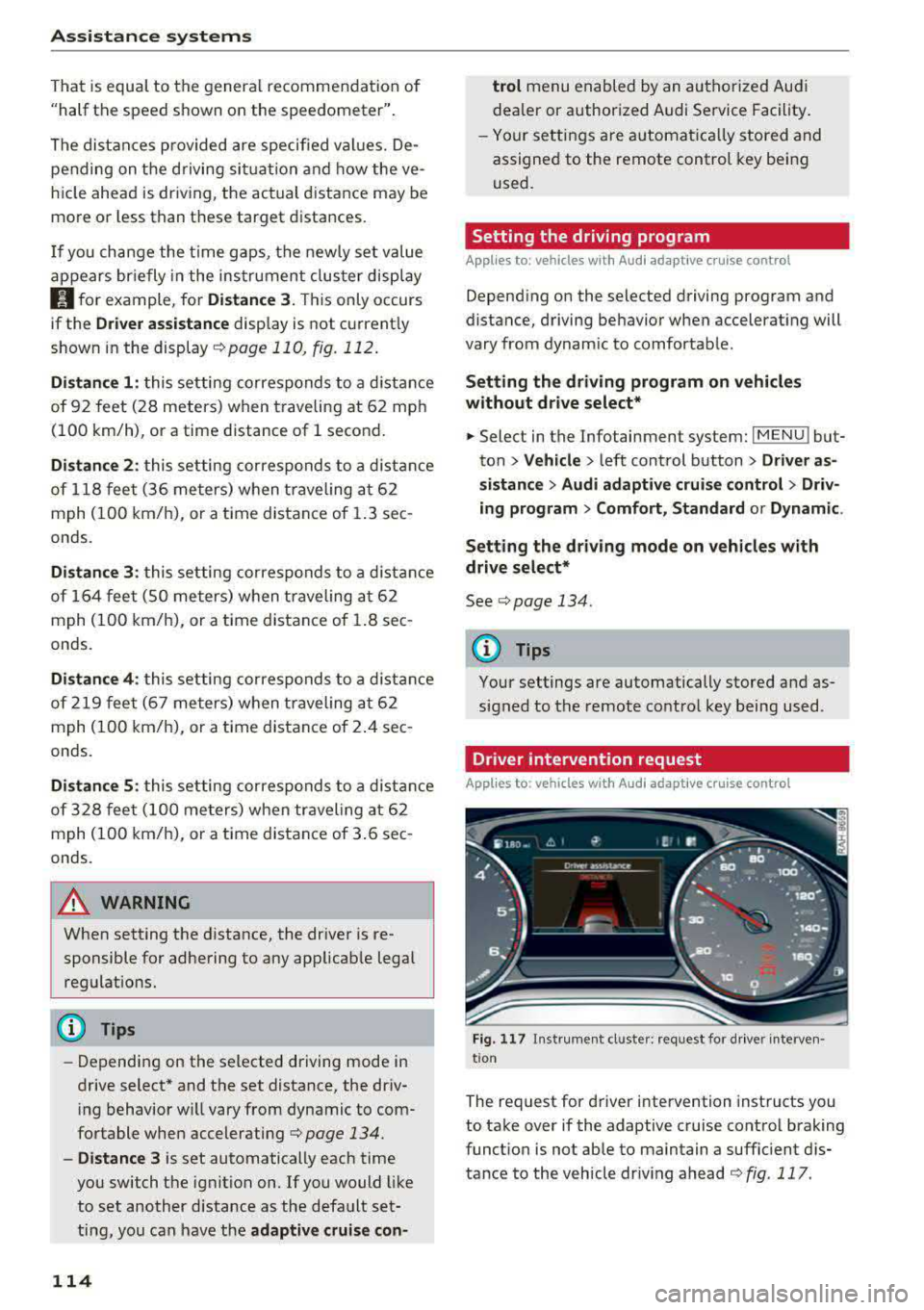
Driver intervention request
App lies to : vehicles with Aud i adapt ive cru ise control
F ig . 117 In strument cl uster: request for d river interven·
t ion
The request for d river intervention instructs you
to take over if the adaptive cruise control braking
funct ion is not able to maintain a suffic ient d is
tance to the vehicle dr iv ing ahead
r:!:> fig. 117 .
Page 126 of 403

Assistance systems
-when there are visual obstr uctions, such as
glare, reflections or variations in light
- when it is dark
- if the camera window or the windshie ld is
dirty, iced over, damaged or covered
- when driving on snow, ice or loose ground
- in curves
- if the ESC was restricted or switched off
- when towing a tra iler
- when the driver's seat belt is unfastened
- up to ten seconds after switching on the ig-
nition
(D Note
Impacts or damage to the camera mount on
the windshield can disp lace the sensor . Pre
sense city can be impa ired by this. Have an au
thorized Audi dealer or authorized Aud i Serv
ice Facility check the ir funct ion.
{D) Tips
- You can cancel the system braking interven
tion if you accelerate considerably or swerve
away.
- Keep in mind that pre sense city can brake
unexpectedly. Always secure any cargo or
objects that you are transport ing to reduce
the r isk of damage or injury.
- Specific pre sense city funct ions sw itch off
when the ESC is limited or switched
off
¢ page 147 or the hill descent assist* is
switched on
¢page 148.
-When there is a malfunction in the camera,
the pre sense city funct ions also switch off.
Settings in the
Infotainment system
A pp lies to: ve hicles w ith Audi p re se nse
.,. Select in the Infotainment system: IMENU I but
ton
> Vehicle > left control button > Driver as
sistance
> Audi pre sense.
Turn on/off Audi pre sense
-the pre sense func
tions can be turned on and
off.
124
If the system is switched off, it switches on again
automatica lly once the ignition is switched on
again.
Early warning -the early warning can be switch
ed
off or the pre sense city/front warning point
can be set
( Early /Medium /Late ).
Set the warning time for the early warning to
Early at first . If this causes undesi red early warn
ings to appear, then set the warning time to
Me
dium .
The Late warning time should only be set
i n spec ial circumstances, for example, when driv
i ng with a very dynamic style.
(D Tips
Your settings are automatically stored and as
signed to the remote control key being used.
Messages
Applies to: vehicles wi th Audi pre sense
II Audi pre sense: malfunction! Please contact
Service
This message appears when the pre sense func
tion is affected . For example, th is could be
ca used by a faulty sensor. Drive to an authorized
Audi dealer or authorized Audi Service Facility im mediately to have the malfunction corrected.
II Audi pre sense currently restricted . Restrict
ed sensor vision due to surroundings. See own
er 's manual
This message appears if the radar sensor and
camera view is obstructed, for example by leaves,
snow, heavy spray or dirt. If necessary, clean the
sensors and the area around the camera
¢ page 109, fig . 108 or ¢page 129, fig. 130 .
II Audi pre sense: currently restricted. Towing
mode
For vehicles wi th a trailer hitch installed at the
factory, the pre sense rear functions switch
off
when the electrical connector at the socket is
plugged in. There is no guarantee the functions
will switch
off when using a retrofitted trailer
hitch.
II Audi pre sense: currently restricted