manual transmission AUDI A4 2018 Owner's Manual
[x] Cancel search | Manufacturer: AUDI, Model Year: 2018, Model line: A4, Model: AUDI A4 2018Pages: 403, PDF Size: 66.81 MB
Page 157 of 403
Multi Media Interface
Traffic safety information
Audi recommends performing certain Infotain
ment system functions, such as entering a desti
nation, only when the vehicle is stationary . Al
ways be prepared to stop operating the Infotain
ment system in the interest of your safety and
the safety of other road users.
A WARNING
Only use the Infotainment system when traf
fic conditions permit and always in a way that
allows you to maintain complete control over
your vehicle.
@ Tips
Certain functions are not available while driv
ing .
Introduction
The Multi Media Interface, or MMI for short,
combin es various systems for communication,
navigation* and entertainment in your Audi. You
can operate the MMI using the MMI control pan
el, the multifunction steering wheel or the voice
recognition system*.
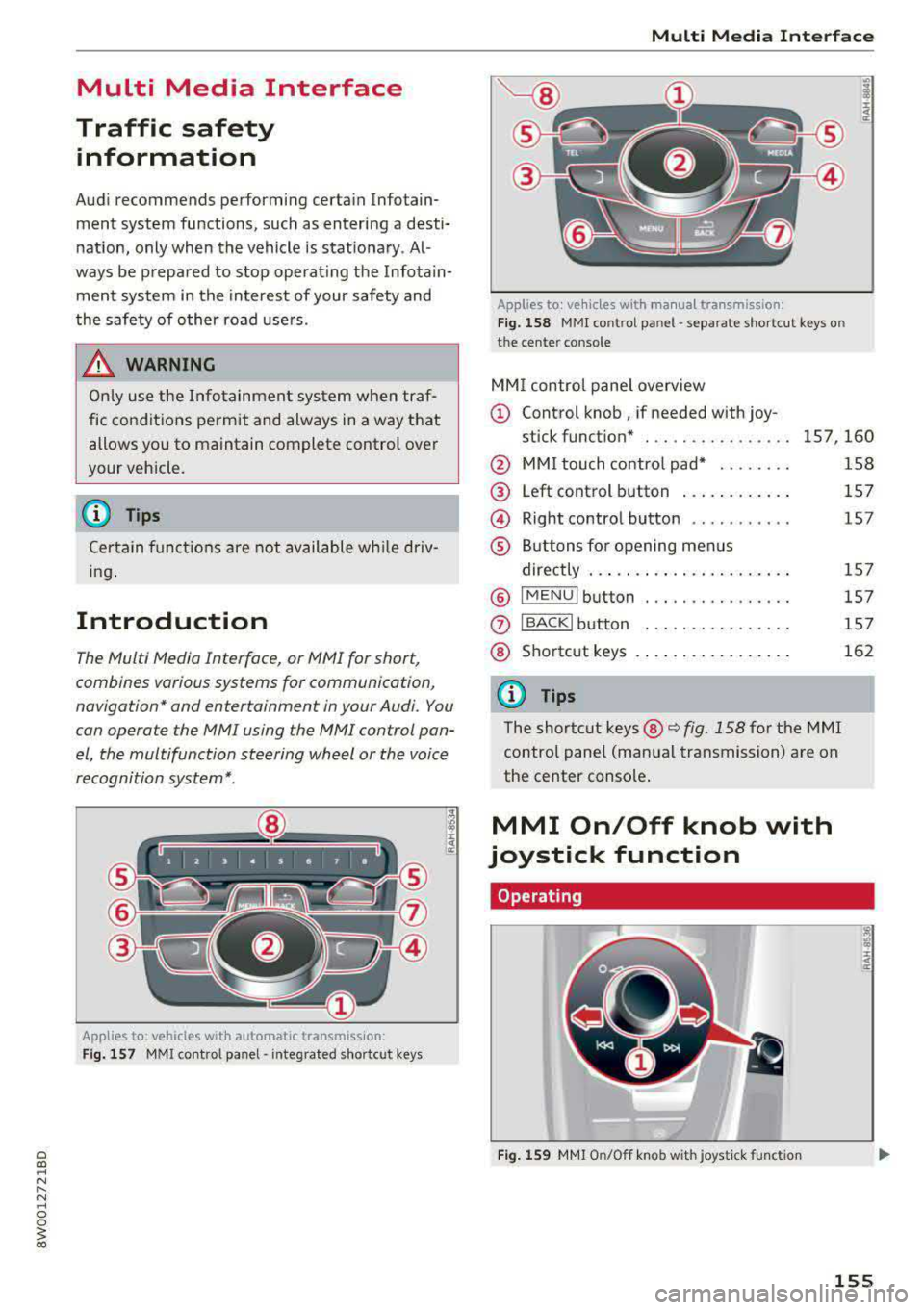
Applies to: vehicles with automatic transmiss ion:
Fig. 157 MMI contro l panel· integrated shortc ut keys
Multi Media Interface
Applies to: ve hicles w ith manua l transmission:
Fig . 158 MMI cont rol p anel
-separa te shortcut keys o n
t he ce nte r conso le
MM I control panel overview
(D Control knob , if needed with joy-
stick funct ion* . .. .. .... .. .... . 157 ,160
@ MMI touch control pad* ....... .
@
@
®
Left control button ........... .
Right control button .......... .
Buttons for opening menus
directly .. ... .. .. ............ .
® IMENUI button . .. .. .... ...... .
0
®
I BA CKI button
Shortcut keys
@ Tips
The shortcut keys @~ fig. 158 for the MMI
control panel (manual transmission) are on
the center console .
MMI On/Off knob with
joystick function
Operating
Fig. 159 MMI On/O ff knob with jo ystick f unction
158
157
1 5 7
15 7
157
157
162
155
Page 203 of 403
Emergency call
Emergency call
Introduction
The following functions may be available depend
ing on the vehicle and the market.
- Emergency call
¢page 202.
- Online roadside assistance Q page 203 .
(D Tips
-The services are provided through a SIM
card installed in the vehicle. The cost of the
call and data connections is included in the
price for the services. Services are provided
assuming that the cell phone network re
quired for the installed SIM card is function
ing and ready to operate. The available serv
ices set by Audi AG are only available within
the cell phone network coverage area for
the cell phone service provider selected by
Audi AG.
- You can find what data will be transferred
at www.aud iusa.com.
- These services cannot be deactivated using
the settings in the Infotainment system .
Emergency call
Description
Applies to: vehicles with emergency call function
You can request help when in an emergency or
dangerous situation using the emergency call
function
l) _ An emergency call is a combination
of data transmission and a phone call. The data
transmission from your vehicle forwards impor
tant information, such as the vehicle and position
data, to the emergency call center.
1l The avai lability of the serv ices o ffere d de pen ds on t he
c oun try a nd may chang e ove r tim e.
202
Making an emergency call
Applies to: vehicles with emergency call function
The emergency call can be made two different
ways .
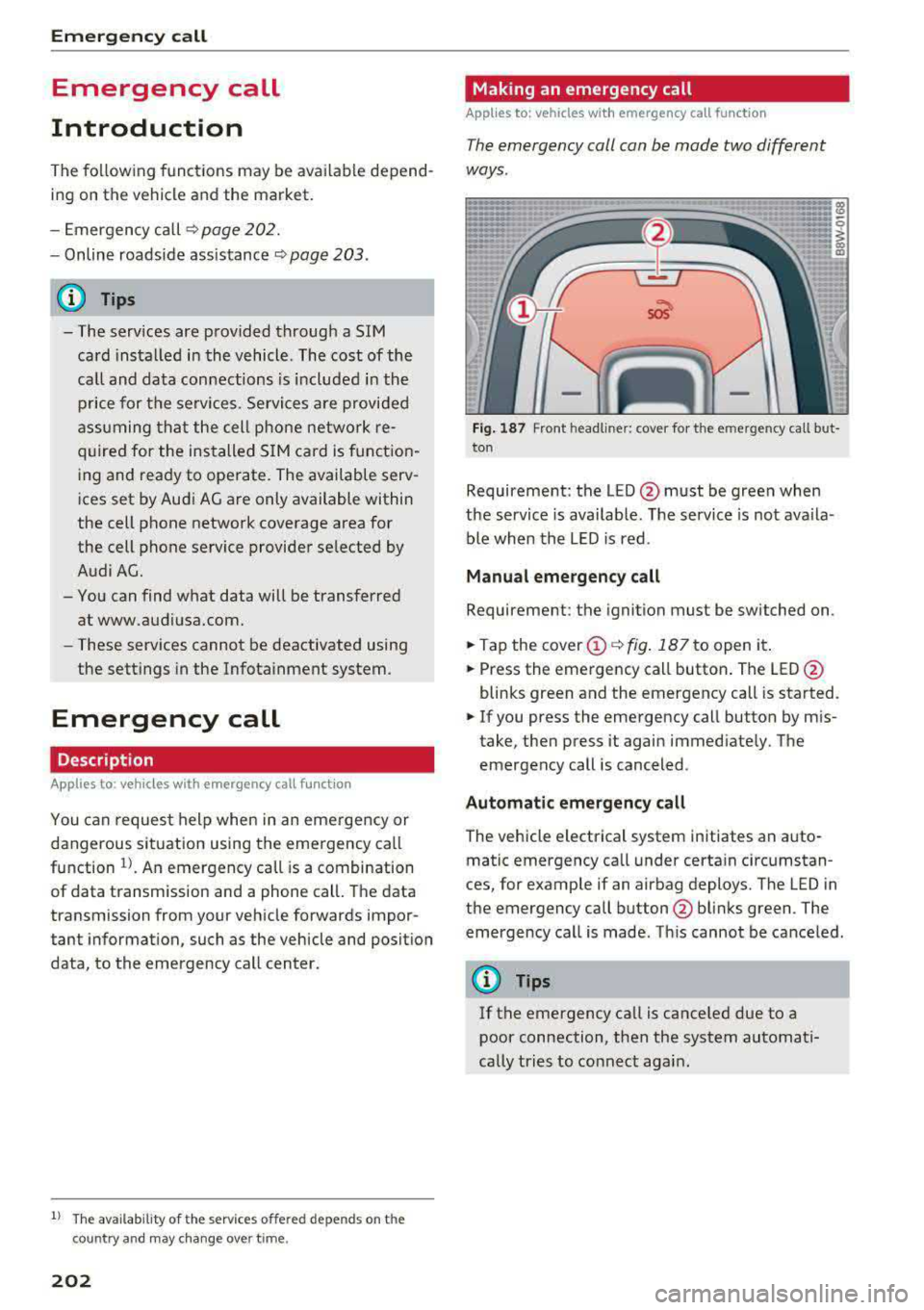
Fig. 187 Front headli ner: cover for the e mergency cal l but
ton
Requirement: the LED @must be green when
the service is available. The service is not ava ila
ble when the LED is red .
Manual emergency call
Requirement: the ignition must be switched on.
.. Tap the cover@¢ fig. 187 to open it .
.. Press the emergency call button. The LED@
blinks green and the emergency call is started.
.. If you press the emergency call button by mis
take, then press it again immediate ly. The
emergency call is canceled .
Automatic emergency call
The vehicle electrical system initiates an auto
matic emergency call under certain circumstan
ces, for example if an airbag deploys. The LED in
the emergency call button @blinks green . The
emergency call is made . Th is cannot be canceled.
(D Tips
If the emergency call is canceled due to a
poor connection, then the system automati
cally tries to connect again .
Page 204 of 403
a co .... N ,....
N .... 0 0
3 co
Messages
Appl ies to: ve hicles with emergency call f unctio n
II Emergency call function : malfunction! Re
stricted functionality . Pl ease contact Servi ce
If the indicator lig ht turns on and the message
appears, you ca n only make an emergency ca ll
wit h restricted f unc tion. For examp le, yo u ca nnot
call the emergen cy c all cente r, b ut d ata may st ill
b e tra nsmi tted under cert ain circumst ances/
D rive to an autho rized Aud i dea le r or a uthorized
Audi Service Facility immediately to have t he
mal funct ion corrected.
II Emergency call function : malfunction! Fun c
tion unavailable. Plea se contact Servi ce
If t he i ndi cator lig ht tur ns on and t he message
ap pears, yo u ca nn ot m ake a n eme rge ncy call.
D rive to an autho rize d Aud i de aler or au th orized
Au di Service Facility immediately to have the
malfunct ion corrected.
Online roadside
assistance
Description
A pp lies to: ve hicles with online roads ide ass istance
You can request help if you are in an accident o r
b reakdown situation using on line roadside assis
tance
l) _ A roads ide ass istance call is a comb ina
tion of data transmission and a ph one call. The
data tra nsmission from your vehicle fo rwards im
portant information to the A udi se rvice cente r,
such as the vehicle and posit io n d ata.
l) The ava ilab ility of the services offered depends on t he
c oun try and may ch an ge over tim e.
Emergency call
Calling online roadside assistance
App lies to : vehicles wit h on li ne roa dside assista nce
The roadside assistance call can be made two
diff ere nt ways .
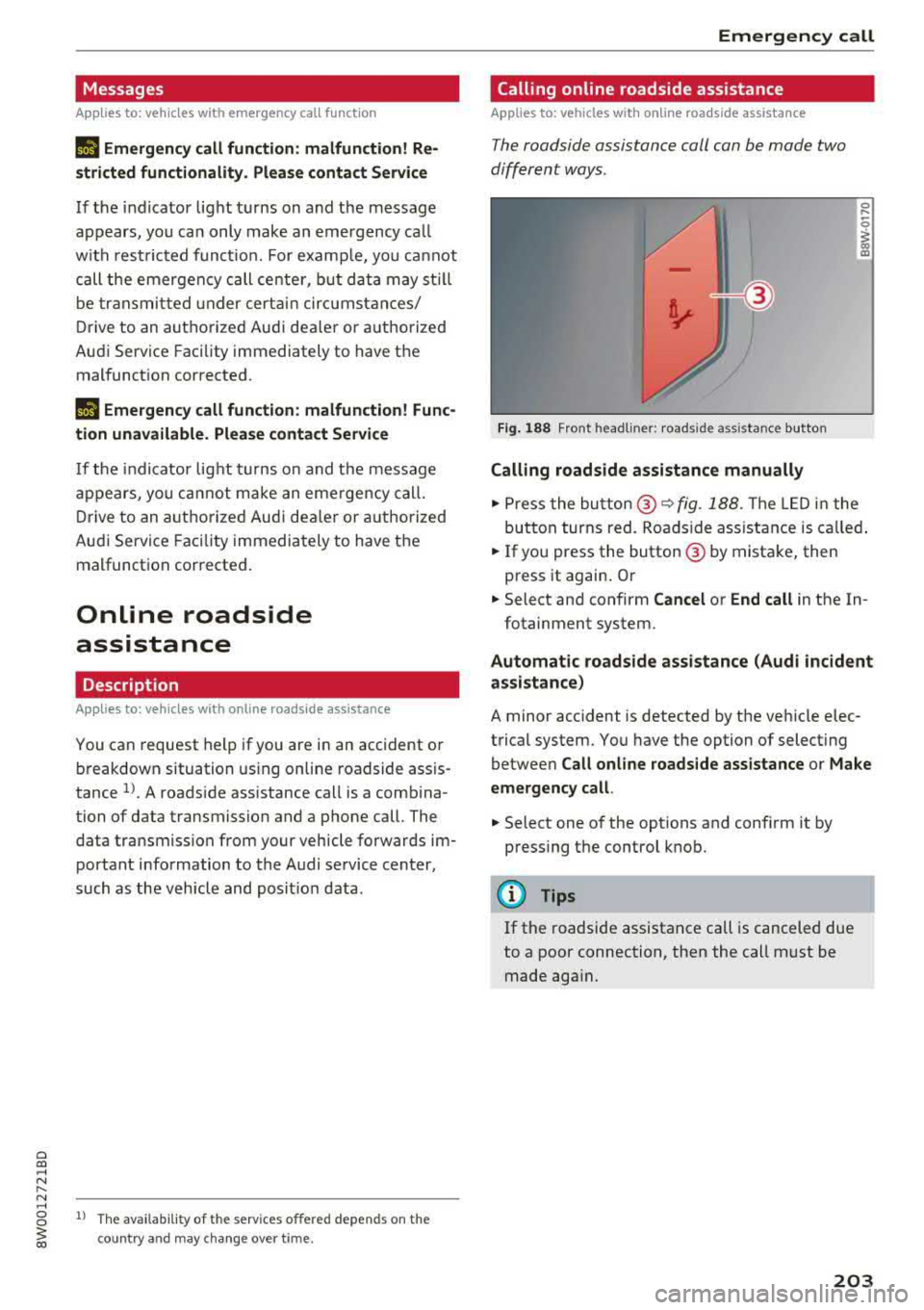
Fig. 188 Front headl ine r: roads ide assistance button
Calling roadside assistance manually
.,. Press the bu tton @~ fig. 188. The LED in t he
but ton turns red. Roadside ass ist an ce is c alled.
.,. If you press the button @ by mista ke , then
press it again. Or
.,. Select an d confirm Cancel or End call in the In -
fotainment system.
Automatic roadside assistance (Audi incident
assistance)
A minor accident is detected by the ve hicle elec
trical system. You have the option of select ing
betwee n
Call online roads ide assistance o r Make
emergency call.
.,. Select one of the options and conf irm it by
press ing the control knob.
(D Tips
If the roadside assistance call is canceled due
to a poor connection, then the call m ust be
made aga in.
203
Page 324 of 403
a co .... N ,....
N .... 0 0
3 co
Engine compartment
Working in the engine compartment
Special care is required if you are working in the
engine compartment
F or wo rk in th e en gine c ompar tment , suc h as
ch eckin g and fi llin g flu id s, th ere is a risk of in
j u ry , sca lding , acci dent s, a nd b urn s. Fo r this
re aso n, follow all the warnin gs and ge nera l
safet y pr eca uti ons pr ov ided in the follow ing in
form ation . Th e e ng ine c ompartm en t is a d an
ger ous a re a .
~ ,&. .
_& WARNING
- T urn the engine off.
- Switch the ign ition off .
- Set the parking brake .
- Shift the gearshift lever to neutral in vehicles with a manual transm ission and se
lect the P selector lever posit ion in vehicles
with an automatic transmission .
- Let the engine coo l down.
- Never open the hood when there is steam or coolant escaping from the eng ine compart
ment, because there is a risk that you cou ld
be burned . Wait until no steam or coolant is
escaping.
- Keep children away from the engine com
partment.
- Never spill flu ids on a hot engine. These flu
ids (such as the anti-freezing agent con
tained in the coolant) can ignite.
- Avoid sho rt circu its in the e lectrical system.
- When working in the engine compartment,
remember that the radiator fan can sw itch
on even if the ign ition is switched off , which
increases the risk of inj ury .
- Never open the cap on the coolant expan
sion tank when the eng ine is warm. The
cooling system is under press ure.
- T o protect your face, hands, and arms from
hot steam or coolant, cover the cap with a
large cloth when opening.
- Do not remove the eng ine cover under any
c ircumstances . This increases the risk of
burns .
Check ing and Filling
-If tests need to be performed with the en
gine running, there is add itiona l danger due
to mov ing components (such as the ribbed
belt, alternator and radiator fan) and from
the high-voltage ignition system.
-Do not under any circumstances activate the
throttle inadvertently (for example, by hand
from the engine compartment) if the veh i
cle is stat ionary but the eng ine is running
and a gea r is engaged. Otherwise, the veh i
cle will start to move immed iate ly and this
could result in an accident.
- Pay attent ion to the following warn ings
when wor k on the fue l system is required :
- Do not smoke.
- Never work near open flames.
-Always have a working fi re extinguisher
nearby.
-All work on the battery or electrical system in your vehicle can result in injuries, chemi
cal burns, accidents or burns. Because of
this, all work must be performed
o nly by an
author iz ed Audi dealer or author iz ed Audi
Serv ice Facility.
-To reduce the r isk of electric shock and in
jury, never touch the following components
when the engine is runn ing or is being start
ed:
- Ign ition cable
- Other components in the e lectronic high-
vo ltage ign ition system
-I f you must check or perform wo rk on the
engine wh ile it is running:
-First, set the parking brake and and move
the gearshift lever to neutral (for manual
transm issions) or select the P selector lev
er position (for automatic transm iss ions).
- Always proceed w ith extreme caution so
that clothing, jewelry or long hair do not become caught in the radiator fan, fan
belt or other moving components or do
not come into contact with hot compo
nents. Tie bac k long hair befo re beginning
work and do not wear clothing that can hang down into the engine.
-Lim it your exposure to exhaust and chemi
cals to as short a time as possible
¢ .&. .
32 3