tow AUDI A4 2018 Owner's Manual
[x] Cancel search | Manufacturer: AUDI, Model Year: 2018, Model line: A4, Model: AUDI A4 2018Pages: 403, PDF Size: 66.81 MB
Page 131 of 403

detected and classified as crit ical. The display in
the mirror turns on, but is dim .
The display remains dim in the information stage
so that your view toward the front is not distur
bed.
Warning stage If the d isplay in a mirror blinks brightly when you
activate a turn signal, side assist is
warning you
about detected vehicles that it has classified as
critical. If this happens, check traffic by gla nc ing
in the exterior m irrors and over your shoulder
c::> .&. in General information on page 130 .
Applies to: vehicles with active lane assist : the
d isplay i n the mirror can also blink if you have not
act ivated a turn signal: if you are app roaching a
detected lane marker line and it appears you will
be leaving the lane, side assist will warn you
about detected vehicles that it ha s classified as
critical.
(D Tips
You can ad just the brightness on of the dis
play on the rearview mirror
c::;, page 130 .
General information
Applies to: vehicles with Audi side assist
®
®
©
Fig. 129 Drivi ng situat ion s
Assistance systems
0
r AUD I
• •
Fig. 130 Rear of the veh icle: pos it ion of th e se nso rs
S id e assist functions at speeds above approxi
mately 9 mph (15 km/h).
@ Vehicles that are approaching
In certain cases, a vehicle will be classified as
critical for a lane change even if it is still some
what far away . The faster a vehicle approaches,
the sooner the display in the exterior m irror will
turn on.
@ Vehicles traveling with you
Vehicles traveling with you are indicated in the
exter ior mirror if they are classified as cr itical for
a lane change . A ll vehicles detected by side assist
are ind icated by the time they enter your "blind
spot" , at the latest .
© Vehicles you are passing
If you s lowly pass a veh icle that s ide assist has
detected (the difference in speed between the
vehicle and your vehicle is less than approximate
ly 9 mph ( 15 km/h)) , the disp lay in the exter ior
mirror turns on as soon as the vehicle en ters your
blind spot.
The display w ill not turn on if you quickly pass a
vehicle that side assist has detected (the differ
ence in speed is greater than approximately 9
mph (15 km/h)) .
Functional limitations
T he radar sensors are designed to detect the left
and right adjacent lanes when the road lanes are
the normal width. In some situations, the display
in the exterior mirror may turn on even though
there is no vehicle located in the area that is criti-
cal for a lane change. For example :
..,.
129
Page 132 of 403

Ass is tan ce sys tems
-If the lanes are narrow or if your are driving on
the edge of your lane. If this is the case, the system may have detected a vehicle in another
lane that is
not adjacent to your current lane.
-If you are driving through a curve . Side assist
may react to a vehicle that is in the same lane
or one lane over from the adjacent lane.
-If side assist reacts to other objects (such as
roadside structures like guard rails).
- In poor weather condit ions . The side assist
funct ions are limited.
Do not cover the radar
sensors ¢ fig. 130 with
stickers, deposits, bicycle wheels or other ob
jects, because this will impair the function. Do
not use side assist when towing a trailer. For in
formation on cleaning,
see¢ page 354 .
A WARNING
-Always pay attention to traffic and to the
area around your vehicle. Side assist cannot
replace a dr iver's attention . The driver alone
is a lways responsible for lane changes and
similar d riving maneuvers.
-In some situat ions, the system may not
function or its funct ion may be limited. For
example :
-If vehicles are approach ing or being left
behind very quickly. The display may not
turn on in t ime .
-In poor weather conditions such as heavy
rain, snow or heavy mist.
-On very wide lanes, in tight curves, or if
there is a rise in the road surface. Vehicles in the adjacent lane may not be detected because they are outs ide of the sensor
range .
(D Note
The sensors can be displaced by impacts or
damage to the bumper, whee l housing and
underbody. Th is can impa ir the system. Have
an authorized A udi dealer or authorized Audi
Serv ice Facility check their function .
(i) Tips
-If the window glass in the driver's door or
front passenger's door has been tinted, the
130
-
display in the exterior mirror may be incor
rect.
-For an exp lanation on conform ity with the
FCC reg ulations in the United States and the
Industry Canada regulations, see
¢ page 386.
Switching on/off
App lies to: vehicles with A udi side ass ist
The system con be switched on/off in the Info
tainment system .
If the system is activated, the displays in the ex
terior mirrors wi ll turn on briefly when the igni
tion is switched on .
.,. Select in the Infotainment system: IMENU! but
ton
> V ehicl e > left control button > D riv er as·
s is tance
> Audi side a ssist. Off switches the
system off.
(D Tips
When yo u switch side assist on or off, the ex it
warning system activates or deact ivates
¢ page 131.
Setting the display brightness
App lies to: vehicles wit h Aud i side ass ist
The display brightness con be adjusted in the In
fotainment system.
.,. Select in the Infotainment system: IMENU ! but
ton
> Veh icle > left control button > Dri ver as
s ist ance
> Audi side a ssist.
The disp lay br igh tness adjusts au tomatically to
the brightness of the surroundings, both in the
information and in the warning stage. In very
dark or very bright surround ings, the automatic
adjustment will set the display to the minim um
or max imum level. In such cases, you may notice
no change when adjusting the br ightness, or the
c h ange may only be noticeable once the sur
r oundings change .
Adjust the br ightness to a leve l where the display
i n the information stage will not disrupt your
view ahead . If you change the br ightness, the dis-
play in the exterior mirror w ill briefly show the
.,.
Page 134 of 403

Ass is tance sy stems
- The display brightness for the ex it warning
system cannot be adjusted.
- The system is not available when towing a
trailer.
Rear cross-traffic assist
A pp lies to: ve hicles w ith rea r cross-tra ffic ass ist
F ig. 1 33 Example d is play
F ig . 134 In fo ta in me nt system : re ar cro ss -tra ffic ass ist dis
p lay
The rear cross -traffic assis t can warn the drive r of
a po tential collis ion with approaching cross -traf
f ic when driv ing i n reverse . Within its limits, the
system monitors the areas beh ind and n ext to
the vehicle using the radar sensors when leaving
a park ing space
c::> page 129, fig. 130. Moving ob
jec ts tha t are approach ing, such as cars, are de
tected
c::> fig . 133 .
If the system detects cr itical cross traffic when
ba cking out of a parking space, it will react as fol
lows :
-Visual indicator : an indicator appea rs in the In
fotainment system display with a red arrow
symbol. The arrow points in the direction from
which the object is approach ing
c::> fig. 134 .
-Audible warning signal : a continuous tone may
sound as an additional indicator when driving in reverse .
132
-Automat ic brake acti vati on: a brief activation
of the brakes may also warn you of a potentia l
co llision w ith an approaching object .
Requirements for using the rear cross -traffic
a ss is t :
-The parking aid must be switched on
<=> pag e 136.
-Reverse gear must be engaged.
- The speed mus t not be higher th an approxi-
mate ly 9 mph (15 km/h) .
&_ WARNING
-The rear cross-traffic assist is an assist sys
tem and cannot prevent a collision by itself.
The drive r must always intervene. The driver
is always responsible for braking at the cor
rect t ime .
-Please note that the rear cross-traff ic assist
may activate the brakes unexpected ly. Se
cure any cargo that you are transporting to
reduce the ris k of damage or injury .
-An add itiona l brake activation may be trig
ge red w ith in 20 seconds after an automatic
brake activation .
-If there is an acoust ic warning signal from
the rea r cross-traffic assist, then the park
ing system may no t warn you of detected
obs tacles under certain circumstances.
- The v iew of the radar sensors may be im
pa ired by leaves, snow, heavy sp ray o r dirt .
C lean the area in front of the sensors
c::> page 129, fig. 130 .
&_ WARNING
The re ar cross- traffi c assist is subject to limi
tations and cannot warn yo u before every im
pending collision:
- I f the ve hicle is too wide for the parking
space and covered by the neighboring
veh icles.
- People, such as cyclists, joggers, inline skat
ers and pedestrians, may not be detected
under certain circumstances.
- If you are in a paralle l parking space or diag
onal parking space .
Page 135 of 403

a co .... N ..... N .... 0 0
3 co
(D Note
Also read the informat ion in c::> (D in General
information on page 130 .
@ Tips
-You can can ce l the au toma tic b rake activa
tion w ith increasing braki ng fo rce if you ap
p ly the brakes yourse lf or accelerate cons id
erab ly.
-In some situations, rea r cross-traffic assist
may warn yo u even if there is no cross t raffic
i n a cr itical area, for examp le when back ing
i nto a parki ng space or maneuver ing.
-The rea r cross-traffic ass ist also switches of f
when you switch off the ESC.
-The rea r cross traffic assist switc hes on and
off thro ugh t he pa rking aid
c::>page 136.
-The system is not available when towin g a
trailer.
Messages
App lies to: ve hicles with Audi side assist
A message appears in the instrument cluster dis
p lay if the s ide assist switches off automatically .
@t Audi side assist: malfunction! Please contact
Service
@t Audi side assist and exit warning : malfunc
tion! Please contact Service
The system c annot guarantee th at it will detec t
ve hicl es co rrectly and i t has switched off. The
sensors have been moved o r are faul ty. Have the
system checked by an a uth orized Audi dea ler or
author ized Audi Service Facility soon.
@t Audi side a ssist: currently unavailable. Sen
sor vision restricted due to surround ings . See
owner 's manual
at Audi side a ssis t and exit warning : currently
unavailable. Sensor vision restricted due to sur roundings
The rada r se nso r vis io n is impaire d. T he ar ea in
fr on t of the senso rs must no t be covered by b ike
ra ck s, st ick ers, leaves, snow or any othe r o bj ects.
C lea n the area i n front of the senso rs, if necessa
ry
c::> page 129, fig . 130 .
Assistance systems
@t Audi side assist : currently unavailable. See
owne r's manual
at Audi side assist and exit warning: currently
unavailable. See owner's manual
S id e assist ca nnot be sw itched on at this time be
c a u se the re is a ma lfun ction ( for ex ample, the
ba ttery ch arge leve l may be too low).
@t Audi side assist: unavailable in towing mode
(it Audi side assist and exit warning: currently
unavailable. Towing mode
Sid e assist switches off automatically when the
electrica l connecto r in the factory-installed t rail
er hitch is connected. There is no guarantee the
system will sw itch off when using a retrofitted
t railer h itch . Do not use side assist and the ex it
warning w hen tow ing a traile r.
111 Rear parking aid: obstacle detection restrict
ed
T he rear cross-traffic ass ist is not available. E i
t h er the ESC is sw itched off, or the rada r senso rs
may be cove red by a bike rack, sticke rs, leaves,
snow or other objects. Switc h the ESC on , or
clean the area in front of the senso rs if necessary
c::> pag e 129, fig . 130 . If thi s m essage continues
to be displayed, dr ive immedia tely to an author
i z ed Audi de aler or author ized Audi Se rvice Facili
ty to ha ve the mal fu ncti on re paire d.
Audi drive select
Introduction
Applies to : vehicles with Aud i drive se lect
Drive select makes it possib le to exper ience dif
ferent types of ve hicle sett ings in one ve hicle .
T he driver can select
Offroad *, Comfort , Auto
and Dynamic mod es in the Info tainm ent system
t o swi tch b etwee n a sp orty and a comfo rtable
dr iv ing mo de, fo r ex ample . In t he
Individual
mode, the settings can be a djusted to you r per
sona l p references . This makes it possible to com
bine settings such as a sporty engine setting with
li ght steer ing.
133
Page 138 of 403

Parking systems
Parking systems
General information
A ppl ies to: ve hicles w ith a rea r parking sys te m /pa rking sys
tem p lus/rearv iew camera/peripheral ca meras
Depending on your vehicle's equipment , various
parking aids will help you when parking and ma
neuvering.
The
rear parking system is an audible parking aid
that warns you of obstacles
behind the vehicle
¢ page 137.
The
parking system plus assists you when park
ing by audibly and visually indicating objects de
tected
in front of and behind the veh icle
¢ page 137.
The
rearview camera shows the area behind the
vehicle in the Infotainment system display . The
lines in the rearview camera image help you to
park or
maneuver ¢ page 138. The parking sys
tem plus functions are also available
¢ page 137.
The
peripheral cameras give various views to
help you when parking or maneuvering
¢ page 140. The parking system plus functions
are also available
¢page 137.
A WARNING ,..__ -
- Always look for traffic and check the area
around your vehicle by looking at it directly
as well. The parking system cannot replace
the driver's attention. The driver is always
responsible when entering or leaving a park
ing space and during similar maneuvers.
- Please note that some surfaces , such as
clothing, are not detected by the system .
- Sensors and cameras have blind spots in
which people and objects cannot be detect
ed . Be especially cautious of small children
and animals .
- Always keep your eyes on the vehicle's sur
roundings, using the rearview mirror as
well.
- The sensors can be displaced by impacts or
damage to the radiator grille, bumper,
wheel housing and the underbody. The park ing system may be impa ired as a result.
136
Have an authorized Audi dealer or author
ized Audi Service Facility check their func
tion.
(D Note
- Some objects are not detected or displayed
by the system under certain circumstances:
- objects such as barrier chains, trailer draw
bars, vertical poles or fences
- objects above the sensors such as wall ex
tensions
- objects with certain surfaces or structures
such as chain link fences or powder snow
- If you continue driving closer to a low ob
ject, it may disappear from the sensor
range. Note that you will no longer be
warned about this obstacle.
- Keep enough distance from the curb to re
duce the risk of damage to the rims.
{i) Tips
- The system may provide a warning even
though there are no obstacles in the cover
age area in some situations, such as:
- certain road surfaces or when there is tall
grass
- external ultrasonic sources such as from
cleaning vehicles
-in heavy rain, snow, or thick vehicle ex
haust
- We recommend that you practice parking in
a traffic-free location or parking lot to be
come familiar with the system . When doing
this, there should be good light and weath
er conditions.
- You can change the volume of the signals
and the display ¢
page 143.
- Please refer to the instructions for towing a
trailer located in
¢page 144.
- What appears in the infotainment display is
somewhat time-delayed.
- Th e sensors must be kept clean and free of
snow and ice for the parking aid to operate .
- Th e rearv iew camera is automatically
cleaned when cleaning the rear window*
¢ page 60 .
Page 141 of 403
Cl al ..... N
" N ..... 0 0
~ al
General information
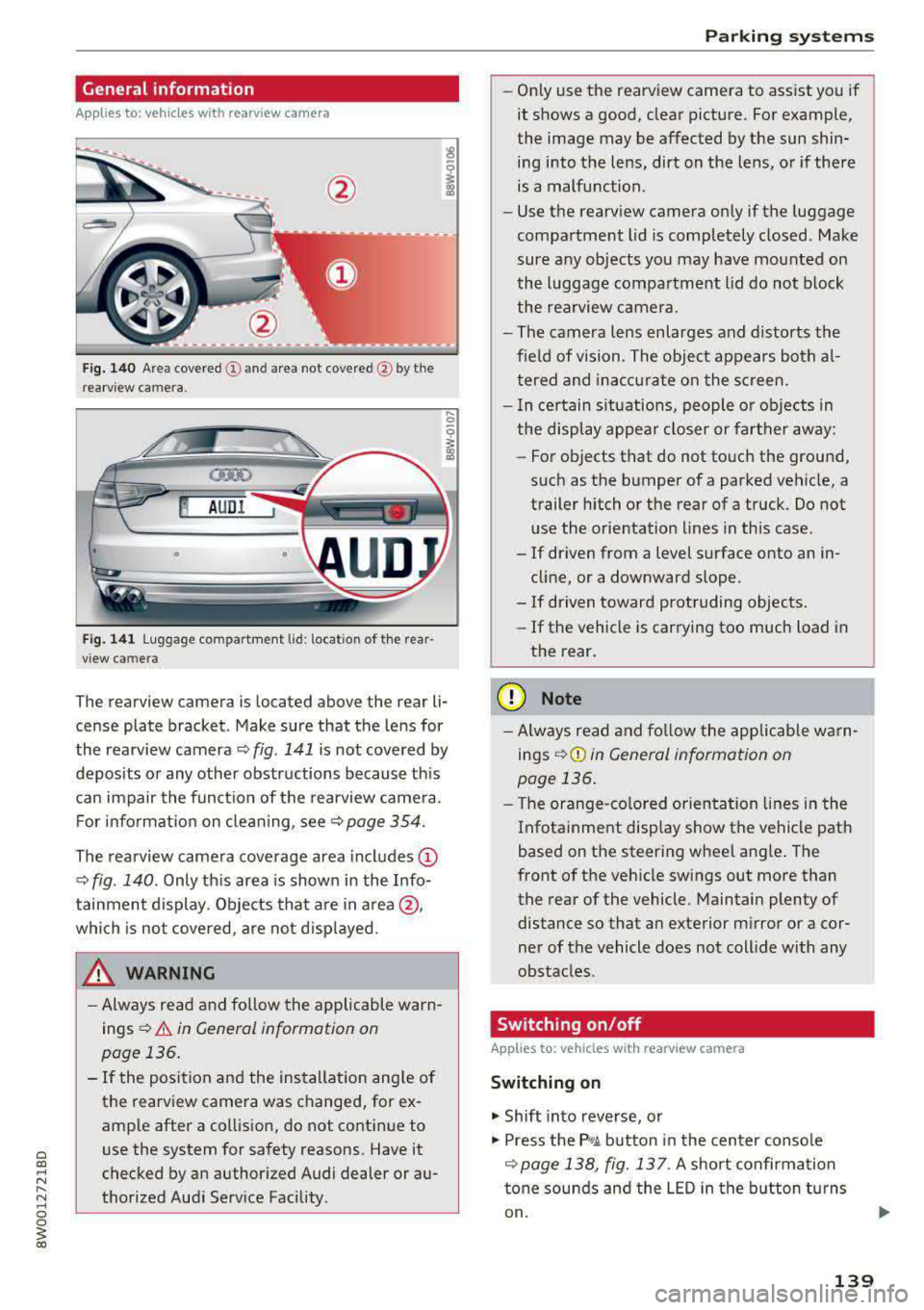
Appl ies to: ve hicles with rearview ca mera
Fig . 140 Area covered (D and area not covered @by the
rea rv iew camera.
@ AUDI
•
Fig. 141 Luggage compartment lid: locatio n of the rear
view camera
..... 0
i
The rearview camera is located above the rear li
cense plate bracket. Make sure that the lens for
the rearview camera
~ fig. 141 is not covered by
deposits or any other obstructions because this
can impair the function of the rearview camera.
For information on cleaning, see<=>
page 354.
The rearview camera coverage area includes (D
~ fig. 140 . Only this area is shown in the Info
tainment display. Objects that are in area @,
which is not covered, are not displayed.
A WARNING
-Always read and follow the applicable warn
ings
<=> A in General information on
page 136.
- If the position and the installation angle of
the rearview camera was changed, for ex
ample after a collision, do not continue to
use the system for safety reasons. Have it
checked by an authorized Audi dealer or au
thorized Audi Service Facility .
Parking systems
-Only use the rearview camera to assist you if
it shows a good, clear picture. For example,
the image may be affected by the sun shin
ing into the lens, dirt on the lens, or if there
is a malfunction.
- Use the rearview camera only if the luggage
compartment lid is completely closed. Make
sure any objects you may have mounted on
the luggage compartment lid do not block
the rearview camera.
- The camera lens enlarges and distorts the
field of vision. The object appears both al
tered and inaccurate on the screen.
- In certain situations, people or objects in
the display appear closer or farther away:
- For objects that do not touch the ground,
such as the bumper of a parked vehicle, a
trailer hitch or the rear of a truck. Do not
use the orientation lines in this case .
- If driven from a level surface onto an in
cline, or a downward slope .
- If driven toward protruding objects.
- If the vehicle is carrying too much load in
the rear.
(D Note
-Always read and follow the applicable warn
ings
r::!> (D in General information on
page 136.
- The orange-colored orientation lines in the
Infotainment display show the vehicle path
based on the steering wheel angle. The
front of the vehicle swings out more than
the rear of the vehicle. Maintain plenty of distance so that an exterior mirror or a cor
ner of the vehicle does not collide with any
obstacles.
Switching on/off
App lies to : vehicles wi th rearv iew camera
Switching on
.. Shift into reverse, or
.. Press the P, qA button in the center console
r::!> page 138, fig. 13 7. A short confirmation
tone sounds and the LED in the button turns
on.
139
Page 142 of 403
Parking system s
Swit c hing off
.. Drive faster than 6 mph (10 km/h), or
.. Press the P" 1A button, or
.. Switch the ignition off.
(D) Tips
- The visual d isplay in the right part of the
display should help you detect the critical
vehicle area.
- You can change the volume of the s ignals
and the d isp lay
¢page 143 .
Perpendicular parking
Applies to: vehicles with rearview camera
This view may be used when parking in a garage
or in a parking space.
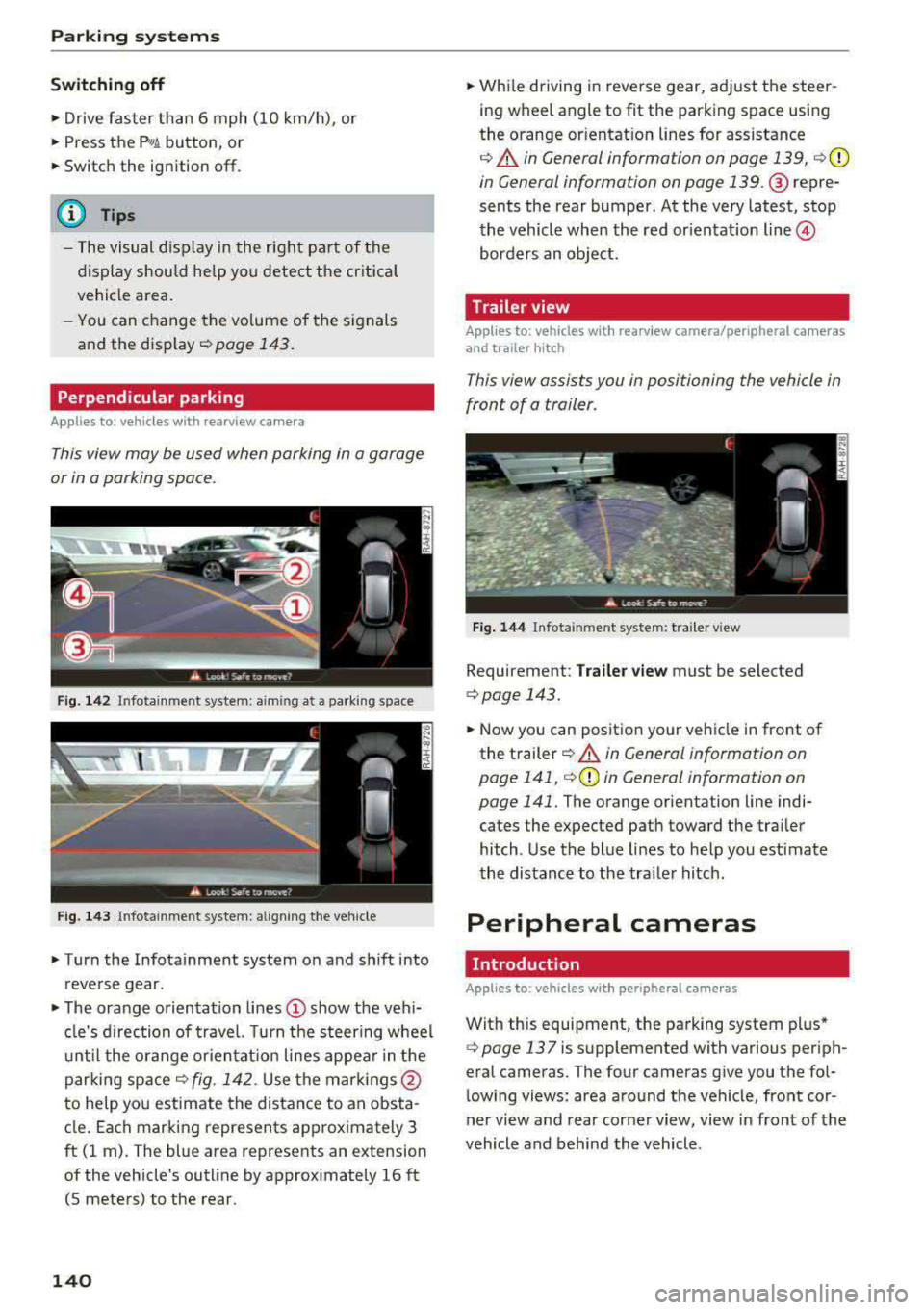
F ig. 1 42 Infotainment system: aiming at a parking space
Fig. 143 In fotainme nt syste m: al ign ing the ve hicle
.. Turn the Infotainment system on and sh ift into
reverse gear.
.. The orange orientation lines (!) show the veh i
cle's d irection of trave l. Turn the steering wheel
u nt il the o range or ientat ion lines appear in the
parking
space¢ fig. 142. Use the mar kings @
to help you estimate the distance to an obsta
cle . Each marking represents approximately 3
ft (1 m). The blue area represents an extension
of the vehicle's outline by approx imately 16 ft
(5 meters) to the rear.
140
.. While driving in reverse gear, adjust the steer
ing wheel angle to fit the parking space using
the orange or ientat ion lines for assistance
¢ .&. in General information on page 139, c:>(D
in General information on page 139. @ repre
sents the rear bumper . At the very latest, stop
the vehicle whe n the red or ientation
line @
borders an object.
Trailer view
Applies to: vehicles with rearview camera/peripheral cameras
and trailer hitch
This view assists you in positioning the vehicle in
front of a trailer.
Fig . 144 Infota inment system: tra iler v iew
Requirement: Tra iler v ie w must be selected
c:> page 143.
.. Now you can position your ve hicle in front of
the t railer
¢ .&. in General information on
page 141,
i=> (D in General information on
page 141.
The orange orientation line indi
cates the expected path toward the tra iler
hitch . Use the blue lines to help you est imate
the distance to the tra iler hitch .
Peripheral cameras
. Introduction
Applies to: vehicles with peripheral cameras
With this equipment, the parking system plus*
¢ page 137 is supplemented with various periph
eral cameras. The four cameras give you the fol
lowing views: area around the vehicle, front cor
ner view a nd rear corner view, view in front of the
vehicle and behind the vehicle .
Page 144 of 403
Parking systems
Switching on
.. Shift into reverse , or
.. Press the P 1JJA button in the center console
c::> fig. 146 . A short conf irmation tone sounds
and the LED in the button turns on .
Selecting the mode
.. Turn the con trol knob to the symbol fo r the de
s ir ed
mode @thr ough @¢ fig. 147 and press
the control knob .
Switching off
.. Drive faster than 6 mph (10 km/h) , or
.. Press the P1#A button, or
.. Switch the ignition off .
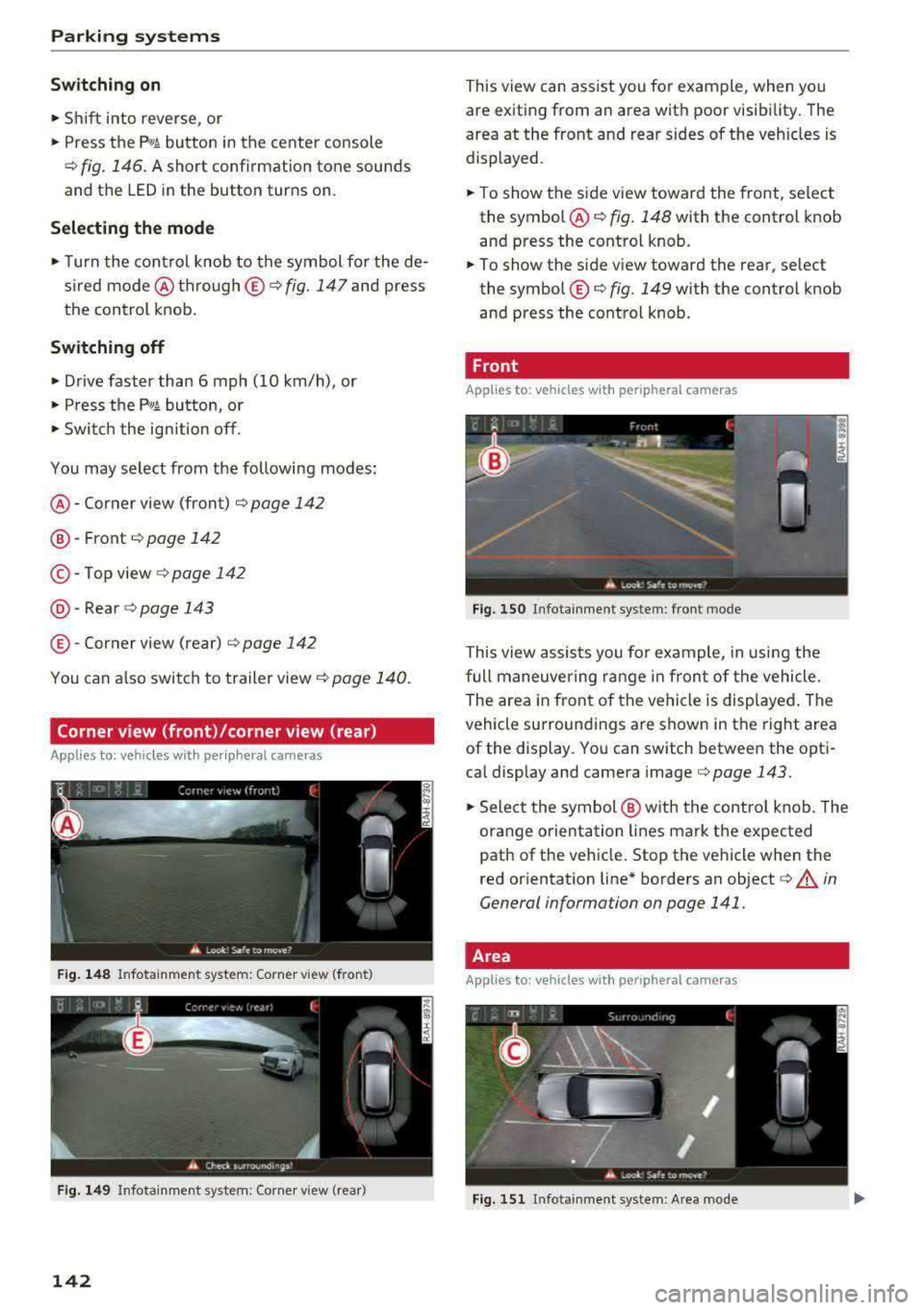
You may select from the following modes:
@ -Corner view (front) ¢ page 142
@-Front ¢ page 142
©-Top view ¢page 142
@ -Rear c::> page 143
© -Corner view (rear) ¢ page 142
You can also sw itch to trailer view¢ page 140.
Corner view (front)/corner view (rear)
Applies to: veh icles w ith per ip heral cameras
F ig . 148 In fotainme nt system: Corner view (front)
F ig . 149 Infotainment sys tem: Corner view (rear)
142
This view can assist you fo r example, when you
are exiting from an area with poor visibility. The
area at the front and rear sides of the veh icles is
displayed.
.. To show the side view toward the front, select
the symbol @
c::> fig. 148 with the control knob
and press the control knob .
.. To show the side view toward the rear, select
the symbol ©
c::> fig. 149 with the control knob
and press the control knob .
Front
Applies to: vehicles with peripheral cameras
Fig. 150 Infota inment sys tem: front mode
This view assists you fo r example, in using the
full maneuvering range in front of the vehicle.
The area in front of the vehicle is displayed . The
vehicle surround ings are shown in the right area
of the display. You can switch between the opti
cal display and camera
image ¢ page 143 .
.. Select the symbol @ with the control knob. The
orange orientation lines mark the expected
path of the vehicle. Stop the vehicle when the
red orientation line* borders an object
c::> .&. in
General information on page 141 .
Area
Applies to: vehicles with peripheral ca meras
Fig. 151 In fota inment system: Area mode
Page 158 of 403
Multi Media Interface
Switching the MMI on /off : the M MI can be
switched on/off manua lly.
- Switching on manu ally : press the On/Off knob
@ c> fig. 159 briefly . Or: press the I MENU ! but
ton ®
c> page 155 , fig. 157 or c> page 155,
fig . 158,
or one of the buttons to open the me
nus d irectly @.
-Switching off manually : press and hold the
On/Off knob
@ c> fig. 159 until the MMI
switches
off. If the MMI has bee n switched off
manually, it does not switch on again au tomati
ca lly the next time the ignit io n is switched on .
Additional functions :
- Adjusting the volume :
tu rn the On/Off k nob @
.:>fig. 159.
-Muting : press the O n/Off knob @.:> fig. 159
briefly.
-Selecting the previou s/next function (for ex
ample, a radio stat ion /tra ck ):
press the On/Off
kn ob @ .:> fig. 159 briefly toward the le ft l«l or
rightt>C>I .
-Fast forwarding /re winding (for example
song s):
p ress and hold the On/ Off knob @
c> fig. 159 toward the left l«l or right t>C>I.
A WARNING
Adjust the volume of t he a udi o system so that
signa ls from outside t he ve hicle, such as po
lice and fire sirens, can be heard easily at all
times .
@ Tips
The MMI sw itches off automatically if the en
gine is not r unning and the vehicle battery is
low .
Infotainment system
display
Switching on and off
- Switching on and off manually :
press the roJ
button @ c> page 8, fig. 2.
When the M MI i s switched o n and the disp lay is
sw itched off, you can operate certa in f unct io ns
using the On/Off knob with t he M MI joystick
function
.:> page 155.
156
Information on display images
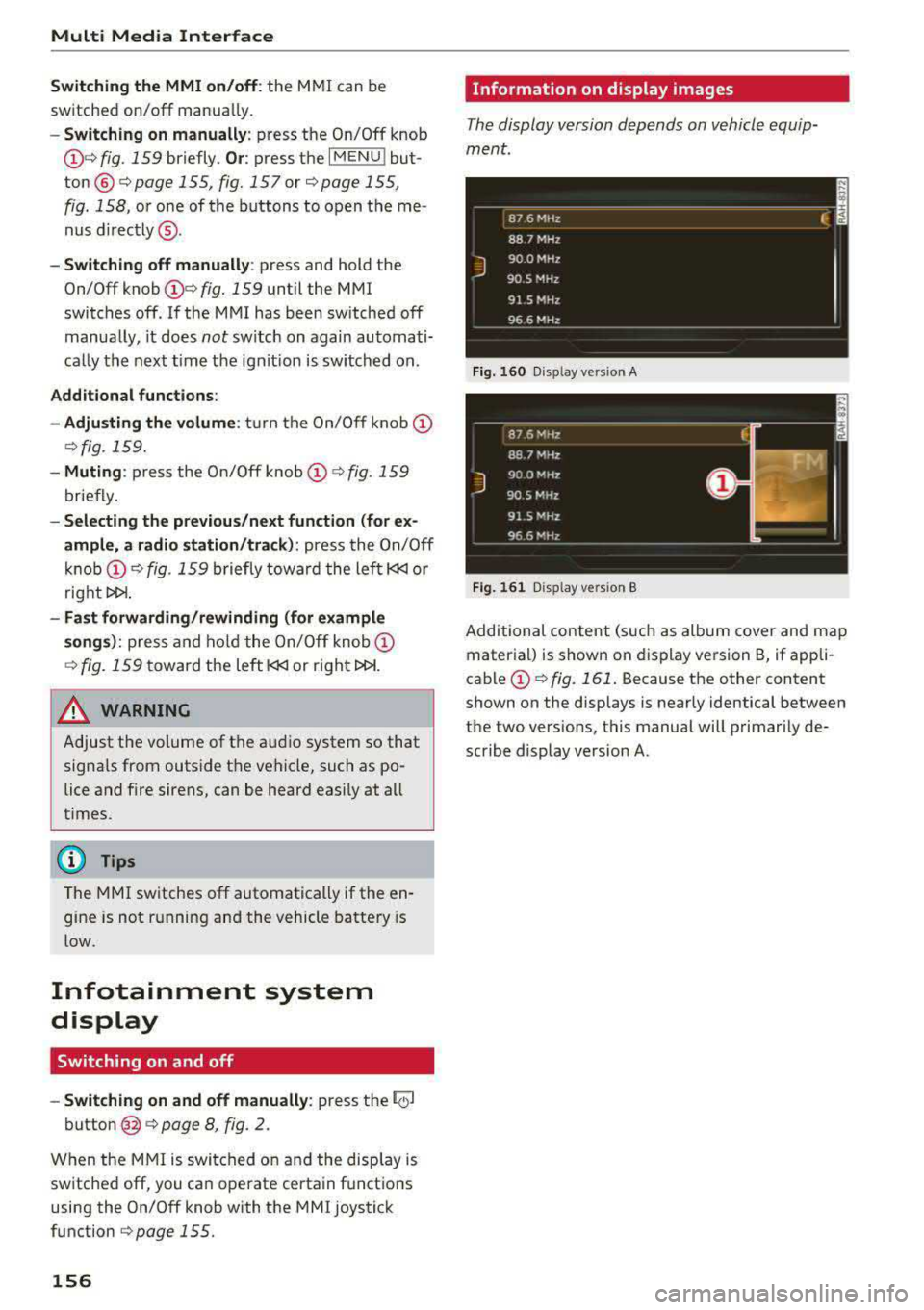
The display version depends on vehicle equip
ment .
Fig. 16 0 Disp lay ve rs ion A
F ig. 161 Disp lay ve rs ion B
Additional content (such as album cover and map
mater ial) is shown on display ve rsion
B, if appli
cable@.:> fig. 161 . Because the other content
shown on the displays is nearly identical between
the two vers ions, this manual will p rimari ly de
scribe display version A .
Page 169 of 403
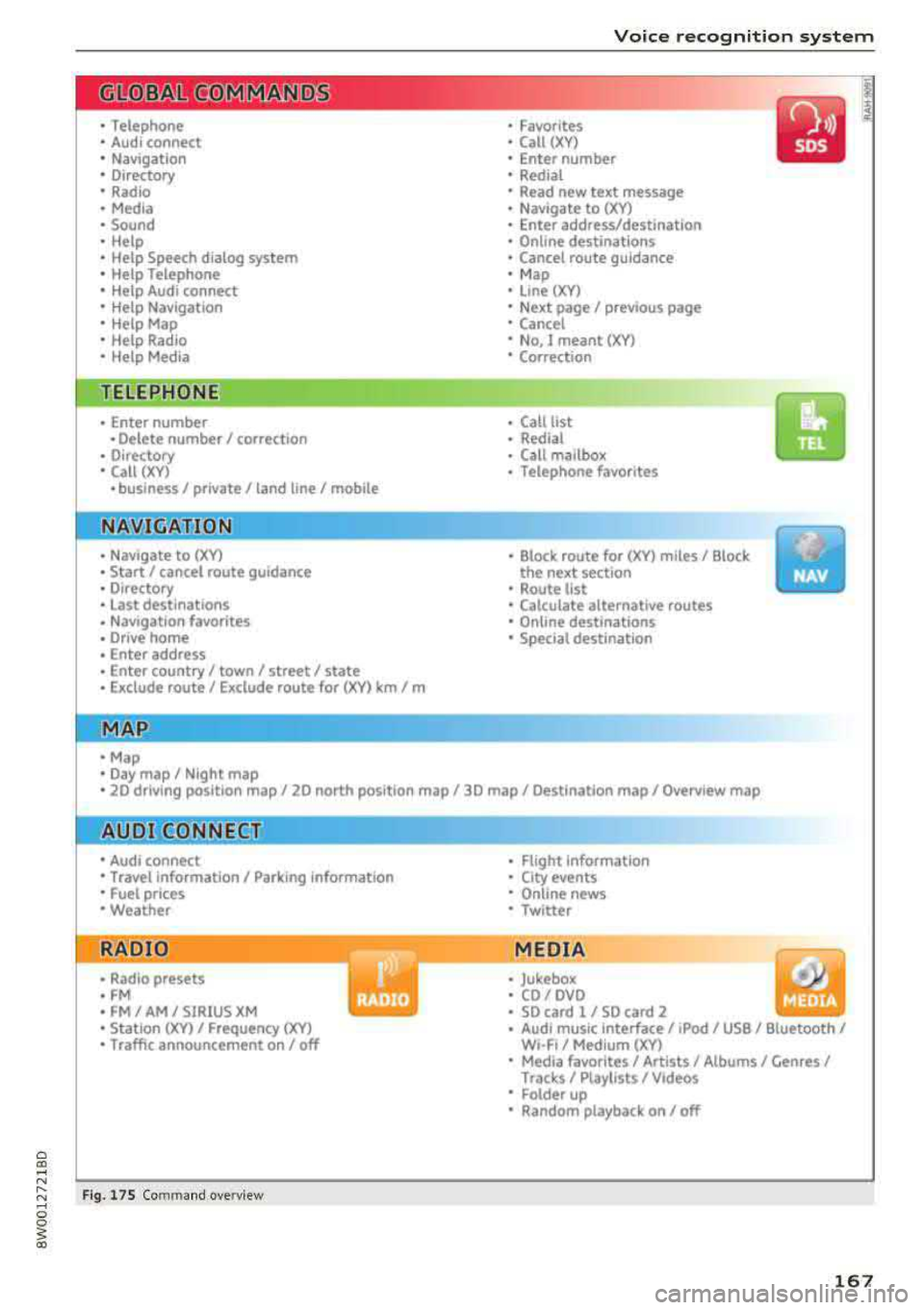
0
"' .-< N r-N .-< 0
~ CX)
Voice recognition system
• Telephone
• Audi connect •
Favorites
• Call (XY)
• Navigation
• Directory
• Radio
• Media
• Sound •
Enter number
• Redial
• Read new tex t message
• N avigate to (XV)
• Enter address/destination
• Help • Onhne destinations
• Help Speech dia log system
• Help Telephone •
Cancel route guidance
• M ap
• Help Audi connect •
Line (XY)
• Help Naviga tion
• Help Map
• Help Radio
• Help Media •
Next page/ previous page
• Cancel
• N o, l meant
()(Y)
• Correction
TELEPHONE
• Enter number • Call list
• Delete number/ correc tion
• Redial
•
Oltectory
• Call (XY) •
Call mailbox
• Telephone favorites
· business/ private/ land line/ mobile
NAVIG:ATI0N
• N avigate to CXV)
• Start/ cancel route guidance
• Directory
• Last destinations •
Bloc k route for
(XYJ miles/ Block
the next section
• Route list
• Calculate alternative routes
• Navigation favorites
• Drive home
• Enter address •
Online destinations
• Special destination
• Enter country/ town/ street/ state
• Exclude route / Exclude route for (XY)
km / m
M~P
• M ap
• Day map/ Night map
• 20 driving position map/ 20 north posi tion map/ 30 map/ Destination map/ Overview map
AllJDI G QNNECT
• Audi connect
• Travel Information/ Parking Information
• Fuel prices
• Weather
RADIO
• Radio presets
• FM
• FM/ AM/ SIRIUS XM
• Station (XY) / Frequency
(XYJ
• T raffic announcement on/ off
Fig . 17 S Co mmand overv ie w
• Flight Information
• City events
• Online news
• Twitter
MEDIA
• Jukebo x
• CO/ DVD .))
• SD card 1 / SD card 2
• Audi music Interface/
IPod I use / Bluetooth /
WI-Fl/ Medium ( XV)
• Media favorites/ Artists/ Albums/ Genres/
Trac ks/ Ptaylls ts / Videos
· Folder up
• Random playback on / off
167