service AUDI A4 2018 Repair Manual
[x] Cancel search | Manufacturer: AUDI, Model Year: 2018, Model line: A4, Model: AUDI A4 2018Pages: 403, PDF Size: 66.81 MB
Page 195 of 403
a co .... N ,....
N .... 0 0
3 co
The follow ing Audi connect In fota inment services
are current ly available:
- Naviga tion wi th
online map view an d Street
View ¢ page 216.
-Point of Interest (POI) online search with
voi ce re cognition
(such as res taur ants): plan
rou te g uidance using t he M MI con trol panel
¢ page 208 and the voice recognition system
¢ page 168 .
-Set up des tina tions i n your M MI using yo ur
myAudi account or online map view
¢page 216 .
-Online traffic information : receive up-to -the
minute traffic info rmation about accidents,
road constr uction and other incidents
¢ page 220.
- Map update : import navigation map updates
directly to yo ur vehicle using an SD ca rd or as
an on line
update ¢ page 218.
(D Tips
-Fo r the map update A udi connect Infotain
ment service via SD card, check the current
software vers ion in your vehicle and t hen
check
www .audiusa.com/myaudi to see if a
newe r version is ava ilable. You can a lso have
t h e new navigation da ta insta lled by an Audi
dealer , w hich can be done for an add itio nal
c ha rge.
- Y ou can also find addi tiona l info rmation
abo ut the
map update onl ine a t
www.audiusa .com/myaudi .
Audi connect (Infotainment) on the phone
Applies to vehicles with Audi connect (Infotainment)
~ Se lect : I MENU I button > Audi connect > left
contro l button >
Communication .
The follow ing A udi con nect In fot ainm ent service s
a re cu rrent ly availab le:
- Stor ing contacts on yo ur computer using yo ur
myAudi Account and load ing the con ta cts in to
t h e M MI
direct ory ¢ page 185.
Audi connect (Infotainment)
Audi connect (Infotainment) in Media
menu
Applies to vehicles with Audi connect {Infota inment}
~ Sele ct : iME NUI button> Audi connect > right
control button >
Entertainment.
- Online media and Internet radio :
offers acce ss
t o d ifferent online media se rvices as well as I n
ternet radio an d ope ration th ro u gh the MMI us
ing the
Audi MMI connect app ¢ page 232.
Applies to: vehicles with Wi·Fi audio player
- Wi-Fi audio player : you can access the med ia
cen ter through a Wi-Fi connec ted med ia p layer
(su ch as a smartp hone)
¢ page 231.
_&. WARNING
It is only safe to use table ts, l aptops , m obile
d evi ces and other simila r devices whe n the ve
hicl e is stationary beca use, like a ll loose ob
j ects, they could be thrown aroun d the inside
of the vehicle in a crash an d cause serious in
jur ies. Store these types of devices sec urely
while driv ing .
(D Note
Always fo llow the information fo und in ¢ 0 in
Wi-Fi hotspot on page 194 .
(D Tips
-Also see the cha pter ¢ page 195, Audi con
nect (Infotainment) general information .
- For more in forma tion on the Wi -Fi a ud io
p layer a nd sup ported devices, contact an
authorized A udi dealer or authorized Audi
Service Facility.
Additional options
Applies to vehicles with Audi connect (Infotainment}
~ Select: ! M EN UI button> Audi connect > right
cont rol button .
The following options a re available in the Aud i
connect Infota inment serv ices overv iew :
Log in*
See ¢ page 188, Logging into myAudi in the vehi -
de. ~
193
Page 196 of 403
a co .... N ,....
N .... 0 0
3 co
Configuring the data
connection
Applies to vehicles with Aud i connect (Infotainment)
The data connection for Audi connect Infotain·
ment services is pre-configured at the factory .
However , if a configuration should be necessary,
you can adjust the following settings .
.,. Select: I MENU I button > right control button>
Connection manager .
.,. Select: right control button > Online settings>
Data connection settings .
Using the Data connection settings menu, you
can set when an Internet connection should be
made . T he Internet connect ion disconnects auto
matica lly on ce the requested Audi connect Info
tainment service no longer requires any data.
The fol low ing settings can be selected:
Audi connect (MMI)
With the Audi connect (MMI) f unction, you can
Allow or Deny the use of Audi connect Infotain ·
ment services if the connection is set to No re·
quest or With request .
Wi-Fi devices*
Using the Wi-Fi devices function, you can Allow
or Deny a connection to the In ternet.
A WARNING
-As the driver, do not allow usage of the Wi
Fi hotspot to distract you from driving, as
this could increase the risk of an accident.
-It is only safe to use tablets, laptops, mo·
bile devices and other s imilar dev ices when
the vehicle is stationary because, like all
loose objects, they could be thrown around
the inside of the vehicle in a crash and cause
serious injuries . Store these types of devices
securely whi le driving.
-Do not use any wireless devices on the front
seats within range of the airbags while driv·
ing. Also read the warnings in the chapter
t::> page 275, Front airbags.
Audi connect (Infotainment)
(D Note
Always fo llow the information found in ~0 in
Wi-Fi hotspot on page 194.
Audi connect (Infotainment) general
information
Audi connect Infotainment services
Applies to vehicles wit h Aud i connect (Infota inment)
@ Tips
-You can only use services supported by Aud i
connect (Infotainment) if you have the
op·
tional MMI Navigation plus equipment w ith
MMI touch* and Audi connect (Infotain
ment).
-Use of the L TE* mobile network standard is
not available in every country. Contact an
authorized Audi dealer or authorized Audi
Service Facility or your cell phone service
provider for additional information.
-Usage of Audi connect Infotainment serv
ices depends on the ava ilability of services
through third party providers.
-Audi connect Infotainment services are only
availab le within the cell phone network cov
erage from your cell phone service provider.
-Audi connect Infotainment services are
available in the USA. Audi connect Infotain·
ment services are currently not availab le in
Canada or in Mexico.
- Also read the information in the chapter
t::> page 175, Telephone.
- Availability, scope, providers, screen display
and costs of services may vary depending on
the country, model, model year, end device
and rates. For add itional information, v is it
www.audiusa.com .
-An initial registration/activation on the
myAudi platform at
www.audiusa.com/
myaudi
is requ ired to use individual serv
ices . You can contact an authorized Audi
dealer or Aud i connect (Infotainment) cus
tomer service at (87 7) SOS-AUDI (2834) to
195
Page 197 of 403
Audi connect (Infotainment)
receive information on options for expand
ing your usage and any costs that may re
sult.
- The Audi connect Infotainment services are
a Wi-Fi/Internet-based system . If the sys
tem does not function correctly even
though all of the requirements are met, please try again later or contact Audi con
nect customer service at 877-505-AUDI
(2834).
- For detailed information on Audi connect
(Infotainment) and the Terms of Use, refer
to
www.audiusa.com .
Data protection
App lies to veh icles with Audi connect (Infotainment)
(D Tips
- You can find additional information in your
MMI in the options menu for the selected
Audi connect Infotainment service and also
on line at
www.audiusa.com.
- Your privacy is important to us.
-AUDI AG collects, processes, shares
and
transmits your personal information in ac
cordance with legal regulations in order to
ensure proper function and availability of
the individual Audi connect Infotainment
services. You can view the complete, current
and valid Audi connect data protection poli
cy in your MMI. The myAudi platform is
available for to you to activate additional
Audi connect Infotainment services and to
transfer data to your vehicle, among other
services. A one-time registration is required
to establish a connection to your vehicle.
For this purpose, AUDI AG collects, process
es, transmits and uses your required per
sonal information as required for you to use
the services provided by AUDI AG. Your in
formation is not distributed to third parties .
Using your cell phone with your myAudi
196
platform allows you to transmit data for
your Audi connect Infotainment services
functions to your vehicle and you can allow
specific vehicle data to be transmitted from
your vehicle.
- By activating special information services
that are part of your Audi connect portfolio,
you can use these functions directly in your
vehicle by entering data to confirm your identity (to use social networks, for exam
ple) . To do this, the identification informa
tion you provided is forwarded with the re
quest to the respective service provider.
T hen you can access your personal content
using a secure connection. This content is
displayed in the vehicle for your use. Your
personal content is not stored within Audi
AG. The necessary connection information is processed and used for providing services
and the proper function of the services in
accordance with applicable legal guidelines.
- You can find additional information in your MMI in the options menu for the selected
Audi connect Infotainment service and also
online at
www.audiusa.com.
- By providing Audi connect Infotainment
services, Audi of America is authorized to
collect , process, transmit and transfer infor
mation about you and your vehicle. Addi
tional information can also be found in your
MMI in the options menu for the selected
Audi connect Infotainment service.
- Information on our data protection meas ures in conjunction with the mobile Audi
connect (Infotainment) application can be
found in the application's privacy policy. For additional information about the
www.audiusa.com/myaudi website or oth
er applications, websites or online services
connected to Audi, visit
www.audiusa.com/
privacy .
Page 198 of 403
a co .... N ,....
N .... 0 0
3 co
Audi connect (Infotainment)
Troubleshooting
Applies to vehicles with Audi connect (Infotainment)
Problem Solution
Audi connect Infotainment serv-
Some Aud i connect Infotainment services m ust be act ivated/con -
ices: individual Aud i connect Info- figured thro ugh your personal myAudi account before us ing
tainment serv ices are grayed out or them for the first time. You can find deta iled informat ion on line
not ava ilable. at
www.audiu sa .com /myaudi.
Wi-Fi hotspot :
it is not possible to De
lete all existing Wi -Fi connections on your mobi le device and
co nnect throug h W i-Fi. restart it.
197
Page 199 of 403

Audi connect vehicle control
Audi connect vehicle
control
Introduction
Applies to veh icles with Audi co nnect vehicle control
With the Audi connect vehicle control services 1>,
you can access various information or use individ
ual functions in the
Audi MMI connect app or in
myAudi .
Audi connect vehicle control includes the follow
ing services:
- Remote locking and unlocking ¢
page 199.
-Vehicle status report <:!>page 199 .
-Parking location o page 199.
-Geofencing Alert r::!> page 200.
-Speed Alert o page 200 .
-Valet Alert o page 200 .
- Stolen Vehicle Locator o page 200.
-Online Audi service request o page 200.
(D Tips
-Accessing specific data or controlling func
tions remote ly depends on the charge level
of the vehicle battery. Therefore, these
funct ions only have limited availability after
switching off the ignit ion.
- The services are provided through a SIM
card installed in the vehicle. The cost of the
call and data connections is included in the
price for the services . Services are provided
assuming that the cell phone network re
quired for the installed S IM card is funct ion
in g and ready to operate. The available serv
ic es set by Aud i AG are only available within
the cell phone network coverage area for
the cell phone service provider selected by
Audi AG .
- You can also find more information on Audi
connect on line at www .audiusa .com .
ll In pr ep aratio n at t he tim e of p rinting. The ava ilab ilit y o f
the serv ice s offe re d depends on th e co untry and may
c han ge ove r tim e.
198
Setup
Applies to vehicles w it h Aud i connect vehicle control
To use Audi connect vehicle control services l),
please note the fo llowing :
Creating and verifying a user account
""Create an account at www.audiusa.com/myaudi
and verify it.
Setting a key user in the vehicle
Requirements : the ignit ion must be switched on .
Anothe r key user must not be set in the veh icle .
If necessary, reset the key user ¢
page 199.
""Select in the Infotainment system: IMENU ! but-
ton >
Audi connect > if necessary, Display
available functions >
right control button>
Audi connect user management > Key user >
Set key user .
"" Enter the user name for your ve rified account
and enter the IO-digit vehicle code. You can rub
the key tag for your remote control key to re
veal the vehicle code
r::!> page 38.
"" Select and confirm Log in .
You can now use the veh icle control services
through the
Audi MMI connect app or through
www.audiusa.com/myaudi .
Using vehicle control services in the Audi
MMI connect app
Requirement: your mobile devices must be com
patible.
"" Insta ll and start the
Audi MMI connect app on
your mobi le device .
"" Log in to the
Audi MMI connect app using your
user name and Audi online password and select
your vehicle .
(D Tips
-Store the vehicle code in a secure place. It
may be necessary to re-enter the vehicle
code.
Page 200 of 403
a co .... N ,....
N .... 0 0
3 co
-Pay attention to upper-an d lowe r-case let
ters when enter ing the ve hicl e code.
-If yo u do no t have the 10- digit ve hicle code,
contact a n author ized A udi dealer or author
i zed Audi Se rvice Facility .
Additional options
Applies to vehicles with Audi connect vehicle control
License subscription
Th e validi ty and expirat io n date o f yo ur sub scr ip
tions a re displaye d. When
Warning before sub
scr iption expires
is activated, a message w ill be
d isp layed warning yo u that you r license is about
to expire.
Select:
IME NU! button> Audi connect > Display
available function s>
right control button> Li
cense subscription .
Resetting the primary user
F or example, y ou ca n rese t the key use r whe n
se lling your vehicle in o rder to dea ctivate these
services .
R eq uirement: the ign it ion mu st be swi tched on.
Select:
IMENU ! button> Audi connect > right
control b utton >
Audi connect user management
> Key user > Reset key user .
Warning levels
Req uirement: the primary use r must have set one
or more warning levels. Secondary users can only
see if a warning level is active or not .
Select:
IMENU ! button> Audi connect > right
control b utton >
Alerts .
Remote locking and
unlocking
Applies to vehicles with Audi connect vehicle control
You can lock a nd u nlock your vehicle using this
service .
Requirement
- This requires the 4-dig it PIN that you specified
dur ing the verification on www.audiusa.com/
myaud i .
- The veh icle must be stationary.
Audi connect veh icle control
- The ignition must be sw itched off.
Vehicle status report
Applies to vehicles with Audi connect vehicle control
T he Dr iver Info rmat ion System collec ts da ta u n
der certai n conditions and sends it to a serve r.
When data is sto red, you ca n access va lues such
as the se u sing the se rvice:
- Remaining range
- Fue l tank leve l
- O il level
- Veh icle doors a re open/closed or locked/un -
loc ke d
- Mileage
- Next o il ch ange
- N ext inspec tion
- Wa rning messages
- Side marker lights/parking lights on/off
For additional information on the D river Informa
t ion System, refe r to
c:> page 17, Driver informa
tion system .
A WARNING
Do not ignore messag es and wa rni ng or indi
cator lights that t urn on i n the vehicle be
cau se o f th e i nfo rmation in the status report .
Thi s could lea d to brea k downs in on the roa d,
a cci dents a nd ser iou s injuries.
Parking location
Applies to vehicles with Audi connect vehicle control
The vehicle collec ts data unde r ce rtain co ndit ions
and sends it to a serve r.
When data is sto red, you ca n access va lues such
as these using the se rvice:
- Veh icle location display,
- Display of one's own location,
- Rou te to you r vehicle .
If your mob ile dev ice also has a navigation func
t io n, you c an navigate to y our la st k nown par kin g
l oc ation .
199
Page 201 of 403
Audi connect vehicle control
Deactivating and activating parking position
-Se lect: I MENU I> Audi connect > Car Finder
parking position.
I f you do not set./, no location informat io n will
be sent to the se rver.
(D Tips
- The new parking location cannot be deter
mined w ith this service if the vehicle is
moved after shutting the vehicle off and
without switching the ignition on and off
again, for example when being towed or if
the veh icle is stolen.
- If the vehicle is moved and shut off again
using the second key, for example, the new
parking location is transmitted to the server
after switching the ignition off.
Geofencing Alert
Applies to vehicles with Audi connect vehicle control
You can set approved and forbidden zones for
your vehicle using this service. If your vehicle
leaves an approved :zone or enters a forbidden
zone, you will be notified by a push notificat ion
and/or an e-ma il. You can set up to five zones
and also ass ign time limits.
Requirement
-You must be verified as the primary user of your
vehicle on myAudi.
(D Tips
You can set on myAudi if you would like to be
notified via push notifications and/or e-mail.
Speed Alert
Applies to vehicles with Audi connect vehicle control
You can set up to two speed limits for your vehi
cle using this service . If your vehicle exceeds a set
speed limit, you will be notified by a push not ifi
cation and/or e-mail.
Requirement
- You must be verified as the primary user of your
vehicle on myAudi.
200
(D Tips
You can set on myAudi if you would like to be notified via push notifications and/or e-mail.
Valet Alert
Applies to vehicles with Audi connect vehicle control
If you give your vehicle over to a parking service,
you can set a zone and a speed limit using the
Audi MMI connect app. If the vehicle leaves the
zone or the exceeds the speed lim it, you will be
notified by a push notification and/or e-mail.
Requirement
- You must be verified as the primary user of your
veh icle on myAudi.
(D Tips
You can set on myAudi if you would like to be
notified via push notifications and/or e-mail.
Stolen Vehicle Locator
Applies to vehicles with Audi connect vehicle control
This service helps you to track your vehicle if it is
stolen.
Proceed as follows if there is a theft:
.. Contact the police . You receive a Case ID .
.. Call the service hotline and give your Case ID .
The service hotline will forward the established data to the police .
(D Tips
You receive the Audi Service hotline number
when you purchase your vehicle.
Online Audi service
request
Applies to vehicles with Audi connect vehicle control
Requirement: to be able to use on line Aud i serv
ic e request, you must activate the service at
www .audiusa.com/myaudi and select an author
iz ed Audi dealer or authorized Audi service facili
ty .
Page 202 of 403
a co .... N ,....
N .... 0 0
3 co
Online A udi se rvice req uest transm its se rv ice -rel
evant data to yo ur se lecte d author ized Audi deal
e r or a uthorized Audi serv ice facility . They w ill
contact you before your next serv ice appo int
ment.
You can deactivate t he on li ne A udi service re
quest at www .a u diusa.com/myaudi.
Audi connect veh icle control
201
Page 203 of 403
Emergency call
Emergency call
Introduction
The following functions may be available depend
ing on the vehicle and the market.
- Emergency call
¢page 202.
- Online roadside assistance Q page 203 .
(D Tips
-The services are provided through a SIM
card installed in the vehicle. The cost of the
call and data connections is included in the
price for the services. Services are provided
assuming that the cell phone network re
quired for the installed SIM card is function
ing and ready to operate. The available serv
ices set by Audi AG are only available within
the cell phone network coverage area for
the cell phone service provider selected by
Audi AG.
- You can find what data will be transferred
at www.aud iusa.com.
- These services cannot be deactivated using
the settings in the Infotainment system .
Emergency call
Description
Applies to: vehicles with emergency call function
You can request help when in an emergency or
dangerous situation using the emergency call
function
l) _ An emergency call is a combination
of data transmission and a phone call. The data
transmission from your vehicle forwards impor
tant information, such as the vehicle and position
data, to the emergency call center.
1l The avai lability of the serv ices o ffere d de pen ds on t he
c oun try a nd may chang e ove r tim e.
202
Making an emergency call
Applies to: vehicles with emergency call function
The emergency call can be made two different
ways .
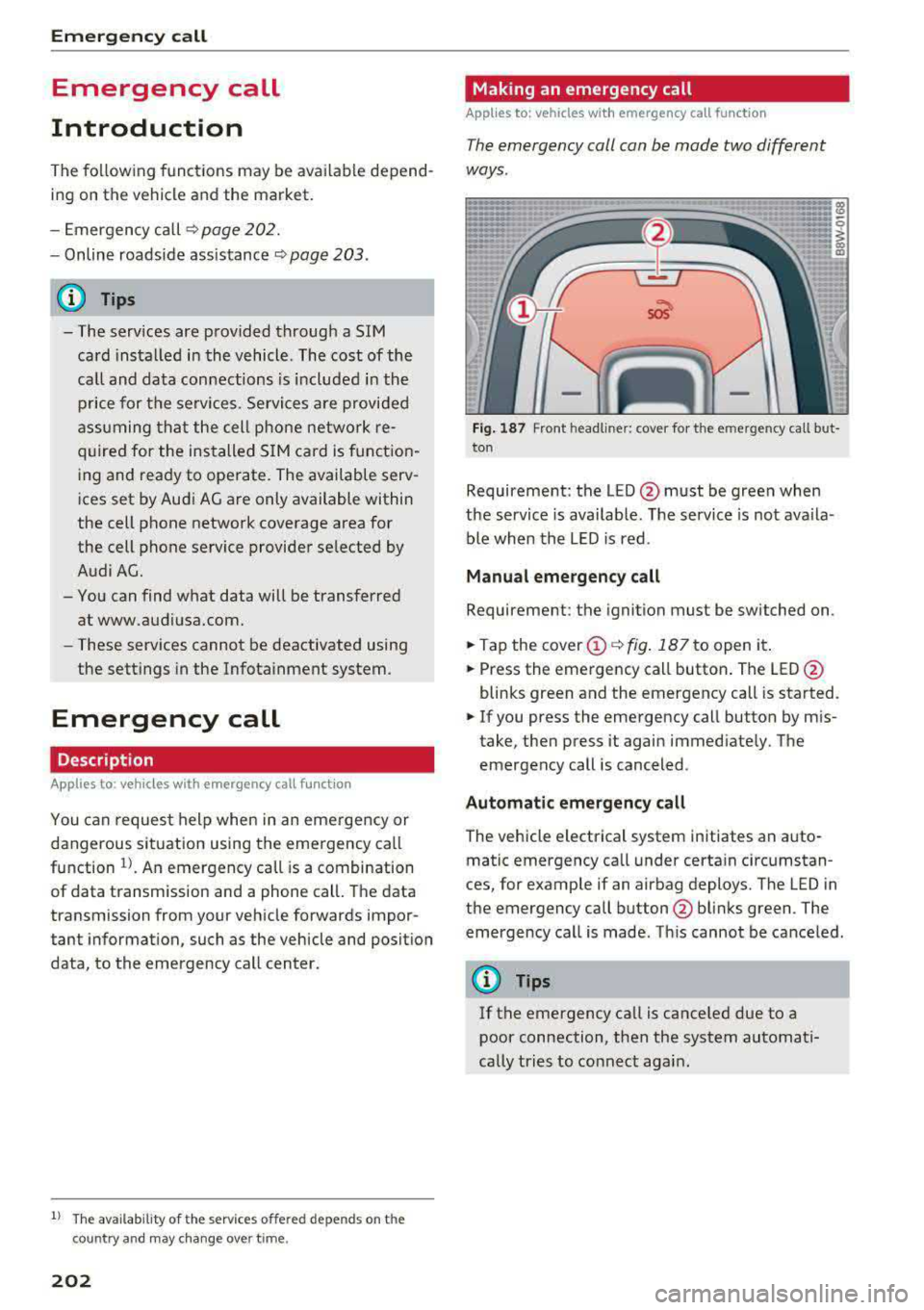
Fig. 187 Front headli ner: cover for the e mergency cal l but
ton
Requirement: the LED @must be green when
the service is available. The service is not ava ila
ble when the LED is red .
Manual emergency call
Requirement: the ignition must be switched on.
.. Tap the cover@¢ fig. 187 to open it .
.. Press the emergency call button. The LED@
blinks green and the emergency call is started.
.. If you press the emergency call button by mis
take, then press it again immediate ly. The
emergency call is canceled .
Automatic emergency call
The vehicle electrical system initiates an auto
matic emergency call under certain circumstan
ces, for example if an airbag deploys. The LED in
the emergency call button @blinks green . The
emergency call is made . Th is cannot be canceled.
(D Tips
If the emergency call is canceled due to a
poor connection, then the system automati
cally tries to connect again .
Page 204 of 403
a co .... N ,....
N .... 0 0
3 co
Messages
Appl ies to: ve hicles with emergency call f unctio n
II Emergency call function : malfunction! Re
stricted functionality . Pl ease contact Servi ce
If the indicator lig ht turns on and the message
appears, you ca n only make an emergency ca ll
wit h restricted f unc tion. For examp le, yo u ca nnot
call the emergen cy c all cente r, b ut d ata may st ill
b e tra nsmi tted under cert ain circumst ances/
D rive to an autho rized Aud i dea le r or a uthorized
Audi Service Facility immediately to have t he
mal funct ion corrected.
II Emergency call function : malfunction! Fun c
tion unavailable. Plea se contact Servi ce
If t he i ndi cator lig ht tur ns on and t he message
ap pears, yo u ca nn ot m ake a n eme rge ncy call.
D rive to an autho rize d Aud i de aler or au th orized
Au di Service Facility immediately to have the
malfunct ion corrected.
Online roadside
assistance
Description
A pp lies to: ve hicles with online roads ide ass istance
You can request help if you are in an accident o r
b reakdown situation using on line roadside assis
tance
l) _ A roads ide ass istance call is a comb ina
tion of data transmission and a ph one call. The
data tra nsmission from your vehicle fo rwards im
portant information to the A udi se rvice cente r,
such as the vehicle and posit io n d ata.
l) The ava ilab ility of the services offered depends on t he
c oun try and may ch an ge over tim e.
Emergency call
Calling online roadside assistance
App lies to : vehicles wit h on li ne roa dside assista nce
The roadside assistance call can be made two
diff ere nt ways .
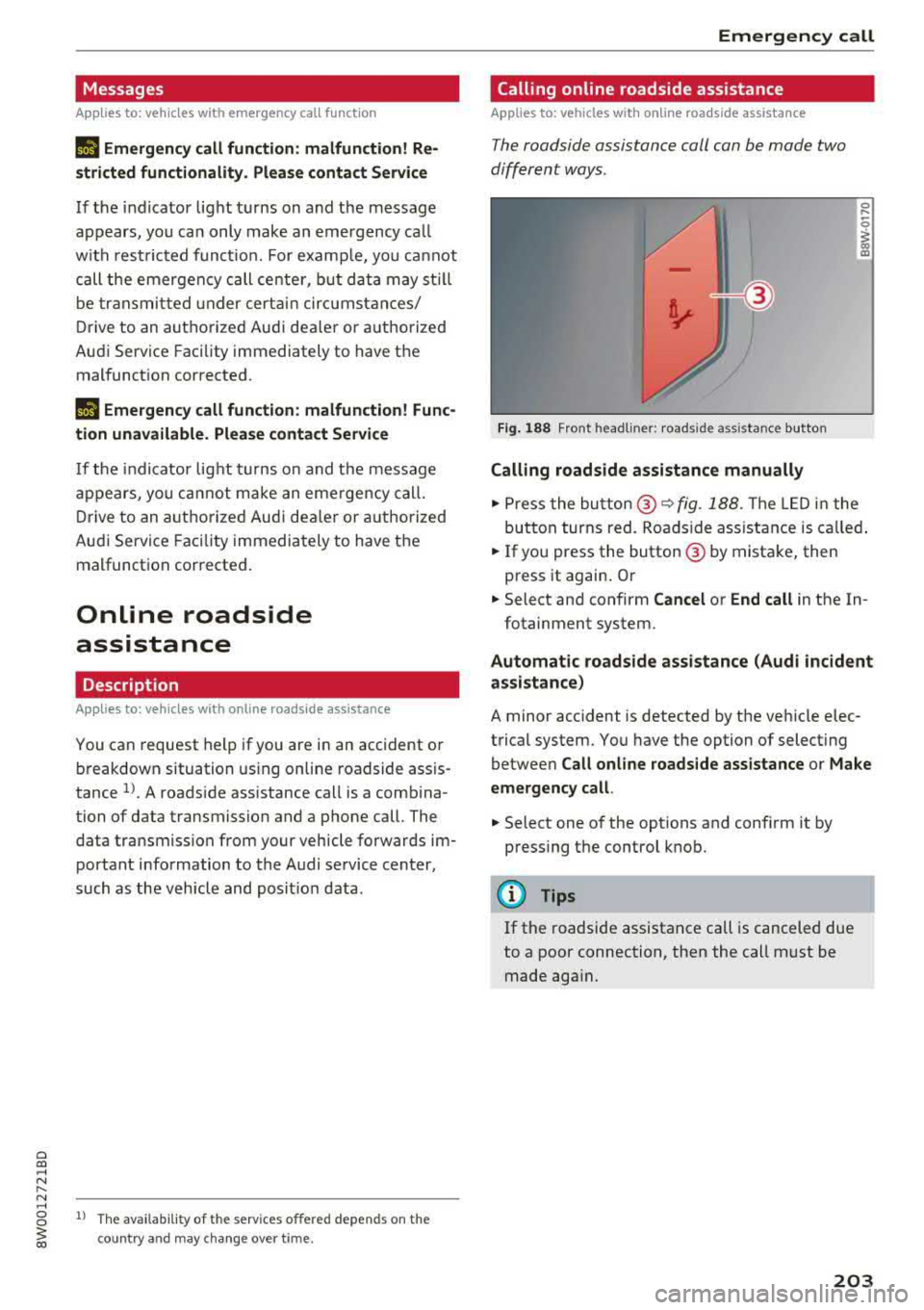
Fig. 188 Front headl ine r: roads ide assistance button
Calling roadside assistance manually
.,. Press the bu tton @~ fig. 188. The LED in t he
but ton turns red. Roadside ass ist an ce is c alled.
.,. If you press the button @ by mista ke , then
press it again. Or
.,. Select an d confirm Cancel or End call in the In -
fotainment system.
Automatic roadside assistance (Audi incident
assistance)
A minor accident is detected by the ve hicle elec
trical system. You have the option of select ing
betwee n
Call online roads ide assistance o r Make
emergency call.
.,. Select one of the options and conf irm it by
press ing the control knob.
(D Tips
If the roadside assistance call is canceled due
to a poor connection, then the call m ust be
made aga in.
203