ad blue AUDI A4 2018 Owners Manual
[x] Cancel search | Manufacturer: AUDI, Model Year: 2018, Model line: A4, Model: AUDI A4 2018Pages: 403, PDF Size: 66.81 MB
Page 6 of 403
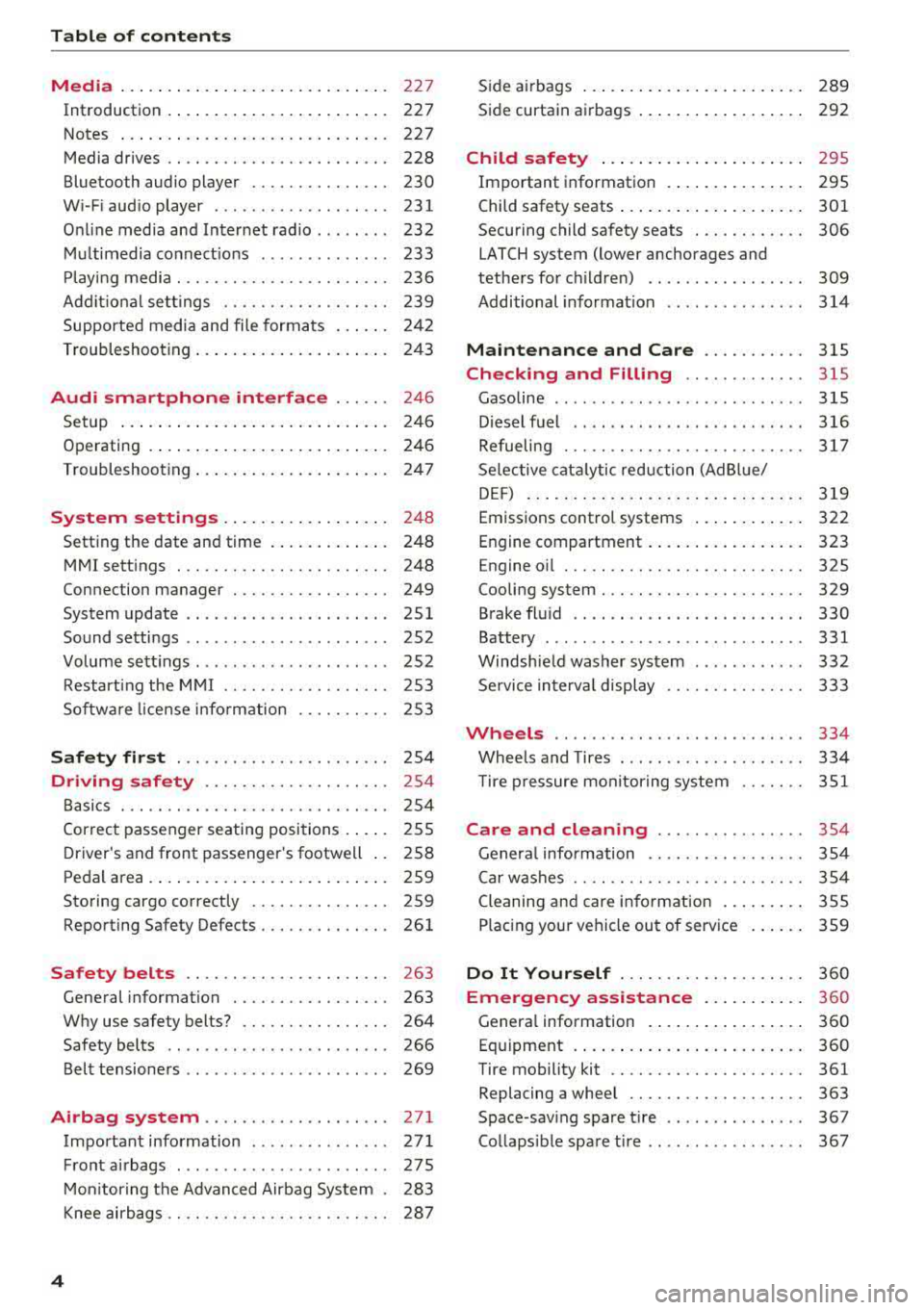
Table of content s
Media ... . ... ... .. .. ..... ... .. .. ...
227
Introduction . . . . . . . . . . . . . . . . . . . . . . . . 227
Notes . . . . . . . . . . . . . . . . . . . . . . . . . . . . . 227
Media drives . . . . . . . . . . . . . . . . . . . . . . . . 228
Bluetooth audio player . . . . . . . . . . . . . . . 230
W i- F i aud io player . . . . . . . . . . . . . . . . . . . 231
O nline med ia and Internet radio . . . . . . . . 232
Mu ltimedia connect io ns . . . . . . . . . . . . . . 233
P lay ing media . . . . . . . . . . . . . . . . . . . . . . . 236
Addit io nal sett ings . . . . . . . . . . . . . . . . . . 239
Supporte d media and file formats . . . . . . 242
Troubleshooting . . . . . . . . . . . . . . . . . . . . . 243
Audi smartphone interface ...... 246
Se tup ... .. .... ... . ...... ... .. .. ... 246
Operating . . . . . . . . . . . . . . . . . . . . . . . . . . 246
Troubleshoot ing . . . . . . . . . . . . . . . . . . . . . 24 7
System settings . . . . . . . . . . . . . . . . . . 248
Setting the date and time . . . . . . . . . . . . . 248
MMI sett ings . . . . . . . . . . . . . . . . . . . . . . . 248
Connection manager . . . . . . . . . . . . . . . . . 249
System update . . . . . . . . . . . . . . . . . . . . . . 251
Sound settings . . . . . . . . . . . . . . . . . . . . . . 252
Volume sett ings . . . . . . . . . . . . . . . . . . . . . 252
Restart ing the M MI . . . . . . . . . . . . . . . . . . 253
Sof twa re license i nfo rm at ion 253
Safety first . . . . . . . . . . . . . . . . . . . . . . . 2 54
Driving safety . . . . . . . . . . . . . . . . . . . . 254
B asics . . . . . . . . . . . . . . . . . . . . . . . . . . . . . 254
Correct passenger se ating positions . . . . . 255
D river's and front passenger 's footwell . . 2S8
Pedal area . . . . . . . . . . . . . . . . . . . . . . . . . . 259
Storing cargo correctly . . . . . . . . . . . . . . . 259
Reporting Safety Defects . . . . . . . . . . . . . . 261
Safety belts . . . . . . . . . . . . . . . . . . . . . . 263
Gene ral information . . . . . . . . . . . . . . . . . 263
Why use safety belts? . . . . . . . . . . . . . . . . 264
Safety belts . . . . . . . . . . . . . . . . . . . . . . . . 266
Belt tensioners . . . . . . . . . . . . . . . . . . . . . . 269
Airbag system .................... 271
Important information . . . . . . . . . . . . . . . 27 1
Front airbags ....................... 275
M on itor ing the Advan ced Airbag System . 283
Knee airbags . . . . . . . . . . . . . . . . . . . . . . . . 28 7
4
Side a irbags . . . . . . . . . . . . . . . . . . . . . . . . 289
Side curtain airbags . . . . . . . . . . . . . . . . . . 292
Child safety . . . . . . . . . . . . . . . . . . . . . . 295
Important information . . . . . . . . . . . . . . . 295
Child safety seats . . . . . . . . . . . . . . . . . . . . 301
Securing child safety seats . . . . . . . . . . . . 306
LATCH system (lower anchorages and
tethers for c hildren) . . . . . . . . . . . . . . . . . 309
Additional informat ion . . . . . . . . . . . . . . . 314
Maintenan ce and Care ........... 31S
Checking and Filling . . . . . . . . . . . . . 31S
Gasoline ........................... 315
D iesel fue l . . . . . . . . . . . . . . . . . . . . . . . . . 316
Refueling . . . . . . . . . . . . . . . . . . . . . . . . . . 31 7
Se lective cata lytic red uction (AdBlue/
DE F) . . . . . . . . . . . . . . . . . . . . . . . . . . . . . . 3 19
Emissions control systems . . . . . . . . . . . . 322
Engine compartment . . . . . . . . . . . . . . . . . 323
Engine o il . . . . . . . . . . . . . . . . . . . . . . . . . . 325
Cooling system . . . . . . . . . . . . . . . . . . . . . . 329
Brake fluid . . . . . . . . . . . . . . . . . . . . . . . . . 330
Battery . . . . . . . . . . . . . . . . . . . . . . . . . . . . 331
Windshie ld washer system . . . . . . . . . . . . 332
Se rvice interva l display 333
Wheels ........ ................ ... 334
Whee ls and Tires . . . . . . . . . . . . . . . . . . . . 334
T ire p ressure mo nitoring system 351
Care and cleaning . . . . . . . . . . . . . . . . 354
Genera l information . . . . . . . . . . . . . . . . . 354
Car w ash es . . . . . . . . . . . . . . . . . . . . . . . . . 35 4
Cleaning an d care information . . . . . . . . . 355
Placing your vehicle out of service . . . . . . 3 59
Do It Yourself ... .. .. ........... .. 3 60
Emergency as sistance . . . . . . . . . . . 360
Genera l information . . . . . . . . . . . . . . . . . 360
Eq uipment . . . . . . . . . . . . . . . . . . . . . . . . . 360
Tire mobility kit . . . . . . . . . . . . . . . . . . . . . 361
Replacing a whee l . . . . . . . . . . . . . . . . . . . 363
Space-sav ing spare t ire . . . . . . . . . . . . . . . 367
Collaps ible spa re ti re . . . . . . . . . . . . . . . . . 367
Page 19 of 403

a co .... N ,....
N .... 0 0
3 co
Third tab Rad io ¢page 18
Media ¢ page 18
Fourth tab Telephone ¢
page 19
a) This tab is only v isible when there is at least one ind icato r
l ight or mess age disp layed.
- Switching tabs : press the !MODE ! button
<=> fig. 12 on the mult ifunction steering wheel
repeatedly unti l the des ired tab is d isp layed .
-Se lect ing a function in the m enu /list : turn the
left thumbwheel on the mult ifunct ion steer ing
whee l to the desired funct ion.
- Confirming a sel ection : press the left thumb
wheel on the multifunction steer ing wheel to
confirm your se lec tion.
- Scrolling within th e lists: turn the left thumb
wheel on the mult if u nction steer ing wheel
quick ly to scroll wi thin the lists.
@ button @;]
- Switching the voice recogn it ion sy stem on :
briefly press the 51 button¢ fig. 13 . Say the
desired command after the
B eep .
- Switching th e vo ice recogn ition sy stem off :
press and hold the 51 button. Or: say the com
ma nd
Cancel.
For more information about the vo ice recognit ion
system, see
<=> page 168, Voice recognition sys
tem
or ¢ page 248.
@ Right thumbwheel
The volume of an audio source or a system mes
sage (such as traffic announcements) can be di
rectly adjusted dur ing the aud io output.
- Inc rea sin g o r decrea sing the volume : turn the
rig ht thumbwhee l
¢ fig. 13 up or down.
- Muting or pausing : turn the right thumbwheel
down.
Or : press the right thumbwhee l.
-Unmuting or resuming : turn the right thumb
whee l up.
Or : press the right thumbwhee l.
Cockpit o ve rv iew
Driver information
system
On-board computer
F ig. 14 Instrument cluster: fuel co nsumpt io n display
Resetting values to zero
Requirement: the Fue l consumption , Short -term
memory or Long-t erm mem ory
d isplay must be
selected.
.. To reset the value for the respective memory to
zero, press and hold the left thumbwheel
(i)
¢ page 13, fig. 7 or @ <=> page 16, fig. 12 on
the multifunction stee ring wheel for one sec
ond. Or
.,. On the multifunction stee ring wheel, select:
the right control button>
Re set value s*.
Ad justing additional displays (Audi virtual
c ockpit)*
.,. On the multifunction stee ring wheel, select the
right control button >
Additional di splay .
.. Select the desired additional display .
In the first tab (on -board comp ute r), you can c all
u p the following disp lays one after the other by
turning the left thumbwheel on the multifunc
tion steer ing wheel.
- Time and
da ter=> page 248
- Dig ita l speedomete r*
- Average consumption
- Remaining range*
- AdBlue range*
<=>page 319
- Short-term memory overview
- Long-term memory overview
- Energy consumers
r=> page 18
- Dr iver assistan ce* ¢ page 108
-Traff ic sign recog nition* ¢ page 104
17
Page 29 of 403
a co .... N ,....
N .... 0 0
3 co
'
-Yli-, I '
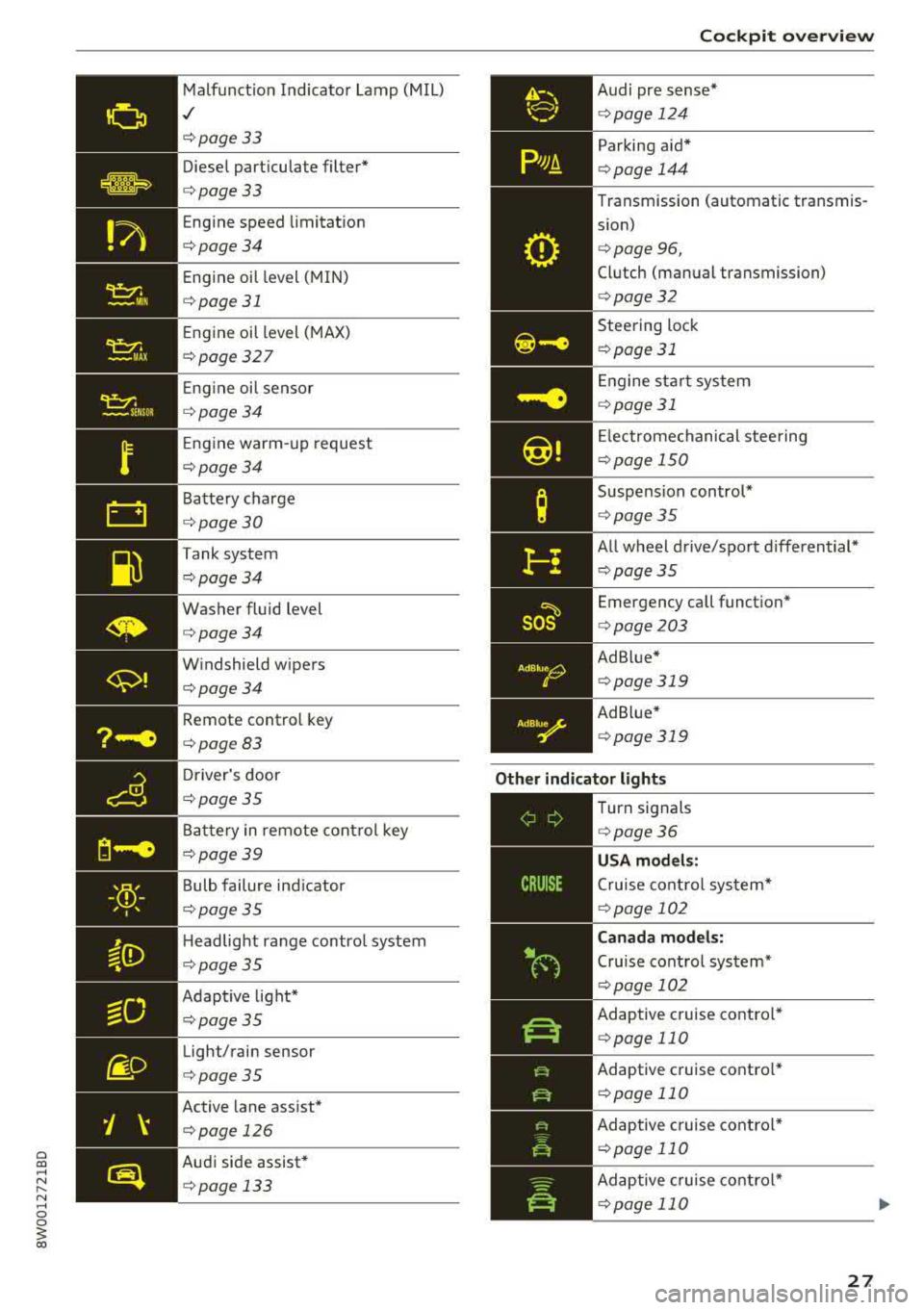
Malfunct ion Indicato r Lamp (MIL)
,/
¢page 33
Diese l part icu late filter*
¢page33
Eng ine speed limitat ion
¢page34
Eng ine oil level (MIN)
¢ page 31
Eng ine oil level ( MAX)
¢ page 327
Eng ine oi l sensor
¢ page34
Eng ine warm-up request
¢ page34
Battery charge
¢page 30
Tank system
¢page34
Washer fluid level
¢page34
W indshield w ipers
¢page34
Remote control key
¢ page83
Driver's door
¢page35
Battery in remote cont rol key
¢ page39
Bulb failure ind icator
¢ page 35
Headlight range control system
¢ page 35
Adapt ive light*
¢ page35
Light/rain sensor
¢page35
Active lane ass ist*
¢page 126
Audi side assist*
¢ pag e 133
AdBlue0
0
Coc kpit o ve rv iew
Audi pre s ense *
¢page 124
Parking aid*
¢page 144
Transmission (automatic transmis
s ion)
¢ page 96,
Clutch (manual transmission)
¢page 32
Steering lock
¢ page 31
Engine sta rt system
¢page 31
Electrome chanical steering
¢ page 150
Suspension control*
¢page 35
All wheel drive/sport differential*
¢page35
Emergency call funct ion*
¢ page 203
Ad Blue *
¢page 319
Ad B lue*
¢ page 319
Other indicator light s
--------------
Turn signals
¢ page 36
USA models :
Cruise cont rol sys tem*
¢ page 102
Canad a model s:
Cru ise control system*
¢ page 102
Adaptive c ruise contro l*
¢ page 110
Adaptive c ruise contro l*
¢ page 110
Adaptive c ruise contro l*
¢ page 110
Ad aptive c ruise contro l*
¢ page 110
27
Page 142 of 403
Parking system s
Swit c hing off
.. Drive faster than 6 mph (10 km/h), or
.. Press the P" 1A button, or
.. Switch the ignition off.
(D) Tips
- The visual d isplay in the right part of the
display should help you detect the critical
vehicle area.
- You can change the volume of the s ignals
and the d isp lay
¢page 143 .
Perpendicular parking
Applies to: vehicles with rearview camera
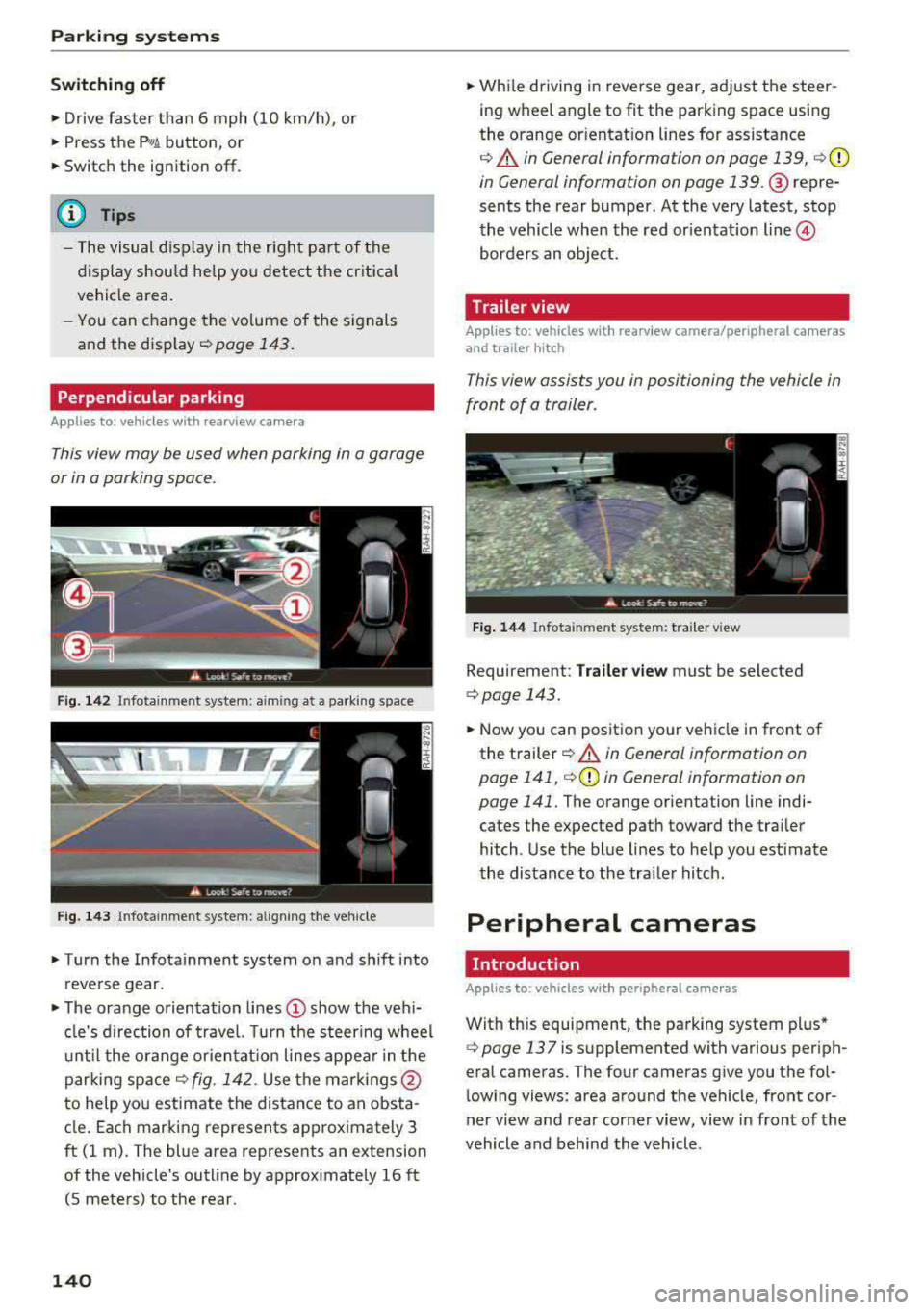
This view may be used when parking in a garage
or in a parking space.
F ig. 1 42 Infotainment system: aiming at a parking space
Fig. 143 In fotainme nt syste m: al ign ing the ve hicle
.. Turn the Infotainment system on and sh ift into
reverse gear.
.. The orange orientation lines (!) show the veh i
cle's d irection of trave l. Turn the steering wheel
u nt il the o range or ientat ion lines appear in the
parking
space¢ fig. 142. Use the mar kings @
to help you estimate the distance to an obsta
cle . Each marking represents approximately 3
ft (1 m). The blue area represents an extension
of the vehicle's outline by approx imately 16 ft
(5 meters) to the rear.
140
.. While driving in reverse gear, adjust the steer
ing wheel angle to fit the parking space using
the orange or ientat ion lines for assistance
¢ .&. in General information on page 139, c:>(D
in General information on page 139. @ repre
sents the rear bumper . At the very latest, stop
the vehicle whe n the red or ientation
line @
borders an object.
Trailer view
Applies to: vehicles with rearview camera/peripheral cameras
and trailer hitch
This view assists you in positioning the vehicle in
front of a trailer.
Fig . 144 Infota inment system: tra iler v iew
Requirement: Tra iler v ie w must be selected
c:> page 143.
.. Now you can position your ve hicle in front of
the t railer
¢ .&. in General information on
page 141,
i=> (D in General information on
page 141.
The orange orientation line indi
cates the expected path toward the tra iler
hitch . Use the blue lines to help you est imate
the distance to the tra iler hitch .
Peripheral cameras
. Introduction
Applies to: vehicles with peripheral cameras
With this equipment, the parking system plus*
¢ page 137 is supplemented with various periph
eral cameras. The four cameras give you the fol
lowing views: area around the vehicle, front cor
ner view a nd rear corner view, view in front of the
vehicle and behind the vehicle .
Page 147 of 403
a co .... N ,....
N .... 0 0
3 co
Parking system plus*
There is no distance warning for the rear. The
front sensors remain activated. The visual display
switches to trailer mode.
Rearview camera* /peripheral cameras*
There is no distance warning for the rear. The
front sensors remain activated. The visual display
switches to trailer mode. The rearview camera
image will not show the orientation lines and the
blue surfaces.
(D Tips
Trailer hitches that are not installed at the
factory may cause the parking system to mal
function or they may restrict its function.
Parking systems
145
Page 168 of 403
Multi Med ia Int erfac e
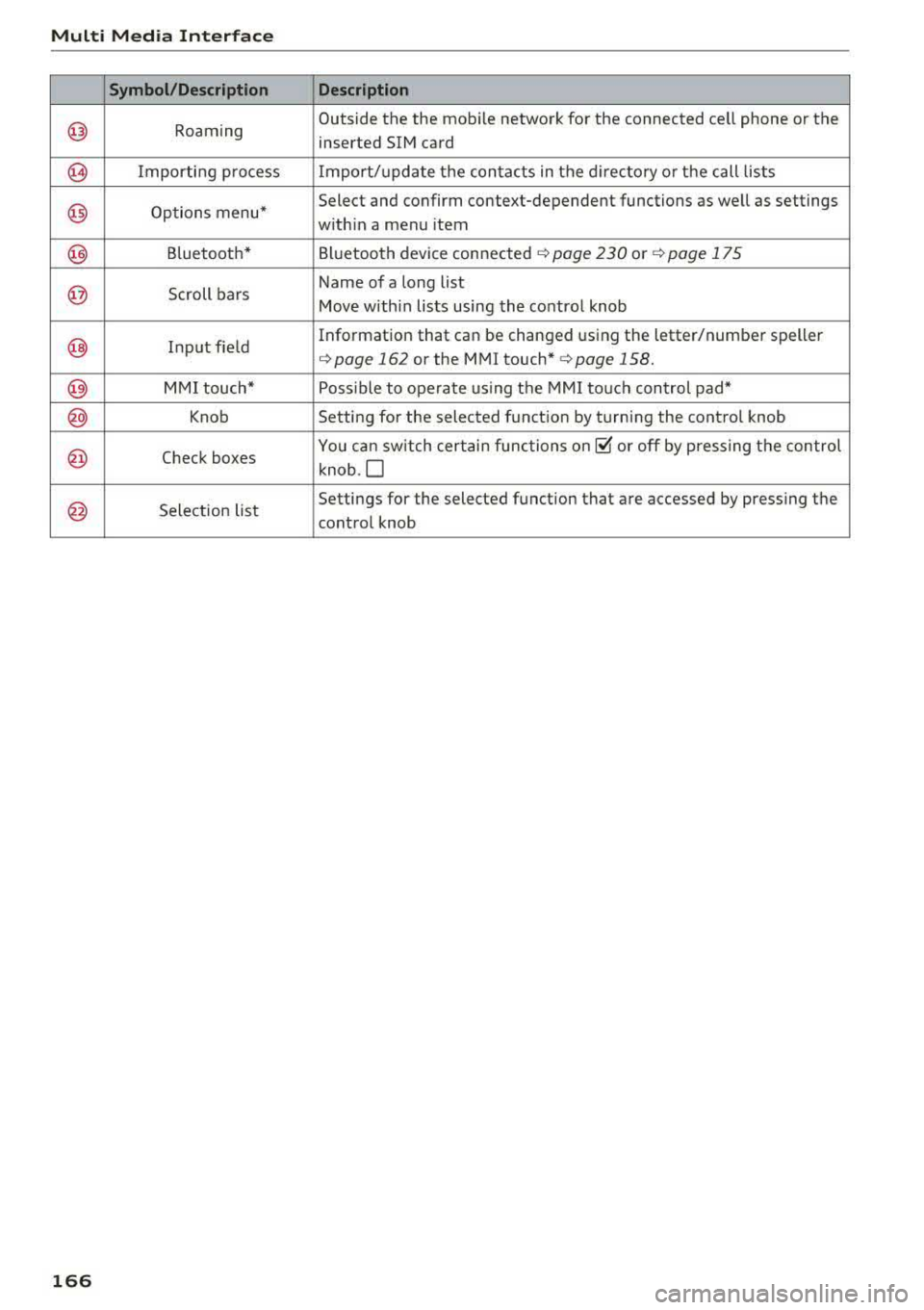
Symbol /Description Descr ipt ion
@ Roaming Outside
the the mobile network for the connected cell phone or the
inserted SIM card
@ Importing process Import/update the contacts in the directory or the call lists
@) Options menu* Select and
confirm context-dependent functions as well as settings
w ith in a menu item
@) Bluetooth* Bluetooth device connected ¢ page 230 o r¢ page 175
@ Scroll bars Name of
a long list
Move within lists using the control knob
@ Input field Information that
can be
changed using the letter/number speller
¢page 162 or the MMI touch* ¢page 158.
@) MMI touch* Poss ible to operate us ing the MMI touch control pad*
@) Knob Setting for the selected funct ion by turning the control knob
@ Check boxes You can sw
itch certain functions on~ or off by pressing the control
knob .O
@ Selection list Settings
for the selected function that are accessed by pressing the
control knob
1 66
Page 169 of 403
0
"' .-< N r-N .-< 0
~ CX)
Voice recognition system
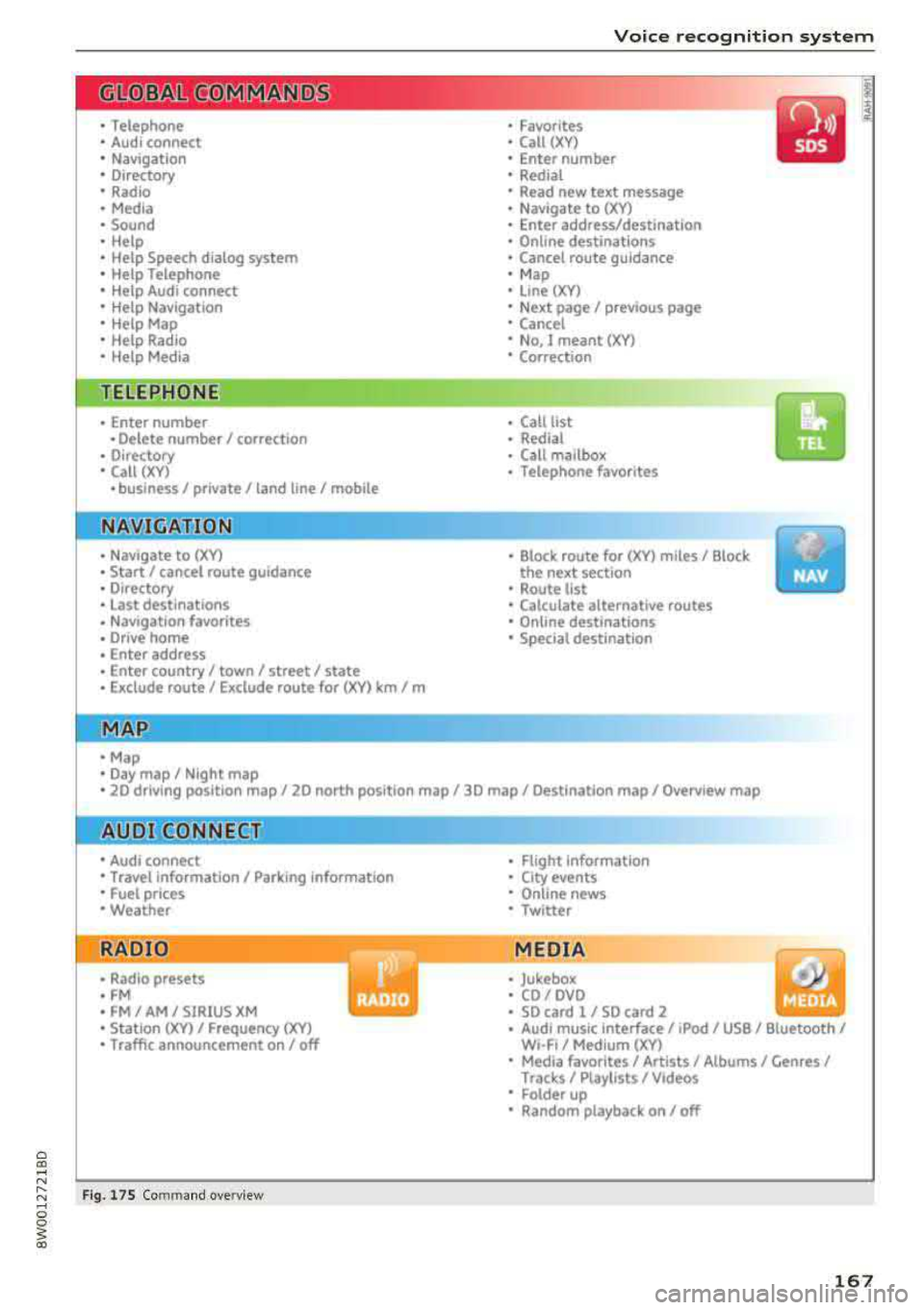
• Telephone
• Audi connect •
Favorites
• Call (XY)
• Navigation
• Directory
• Radio
• Media
• Sound •
Enter number
• Redial
• Read new tex t message
• N avigate to (XV)
• Enter address/destination
• Help • Onhne destinations
• Help Speech dia log system
• Help Telephone •
Cancel route guidance
• M ap
• Help Audi connect •
Line (XY)
• Help Naviga tion
• Help Map
• Help Radio
• Help Media •
Next page/ previous page
• Cancel
• N o, l meant
()(Y)
• Correction
TELEPHONE
• Enter number • Call list
• Delete number/ correc tion
• Redial
•
Oltectory
• Call (XY) •
Call mailbox
• Telephone favorites
· business/ private/ land line/ mobile
NAVIG:ATI0N
• N avigate to CXV)
• Start/ cancel route guidance
• Directory
• Last destinations •
Bloc k route for
(XYJ miles/ Block
the next section
• Route list
• Calculate alternative routes
• Navigation favorites
• Drive home
• Enter address •
Online destinations
• Special destination
• Enter country/ town/ street/ state
• Exclude route / Exclude route for (XY)
km / m
M~P
• M ap
• Day map/ Night map
• 20 driving position map/ 20 north posi tion map/ 30 map/ Destination map/ Overview map
AllJDI G QNNECT
• Audi connect
• Travel Information/ Parking Information
• Fuel prices
• Weather
RADIO
• Radio presets
• FM
• FM/ AM/ SIRIUS XM
• Station (XY) / Frequency
(XYJ
• T raffic announcement on/ off
Fig . 17 S Co mmand overv ie w
• Flight Information
• City events
• Online news
• Twitter
MEDIA
• Jukebo x
• CO/ DVD .))
• SD card 1 / SD card 2
• Audi music Interface/
IPod I use / Bluetooth /
WI-Fl/ Medium ( XV)
• Media favorites/ Artists/ Albums/ Genres/
Trac ks/ Ptaylls ts / Videos
· Folder up
• Random playback on / off
167
Page 172 of 403
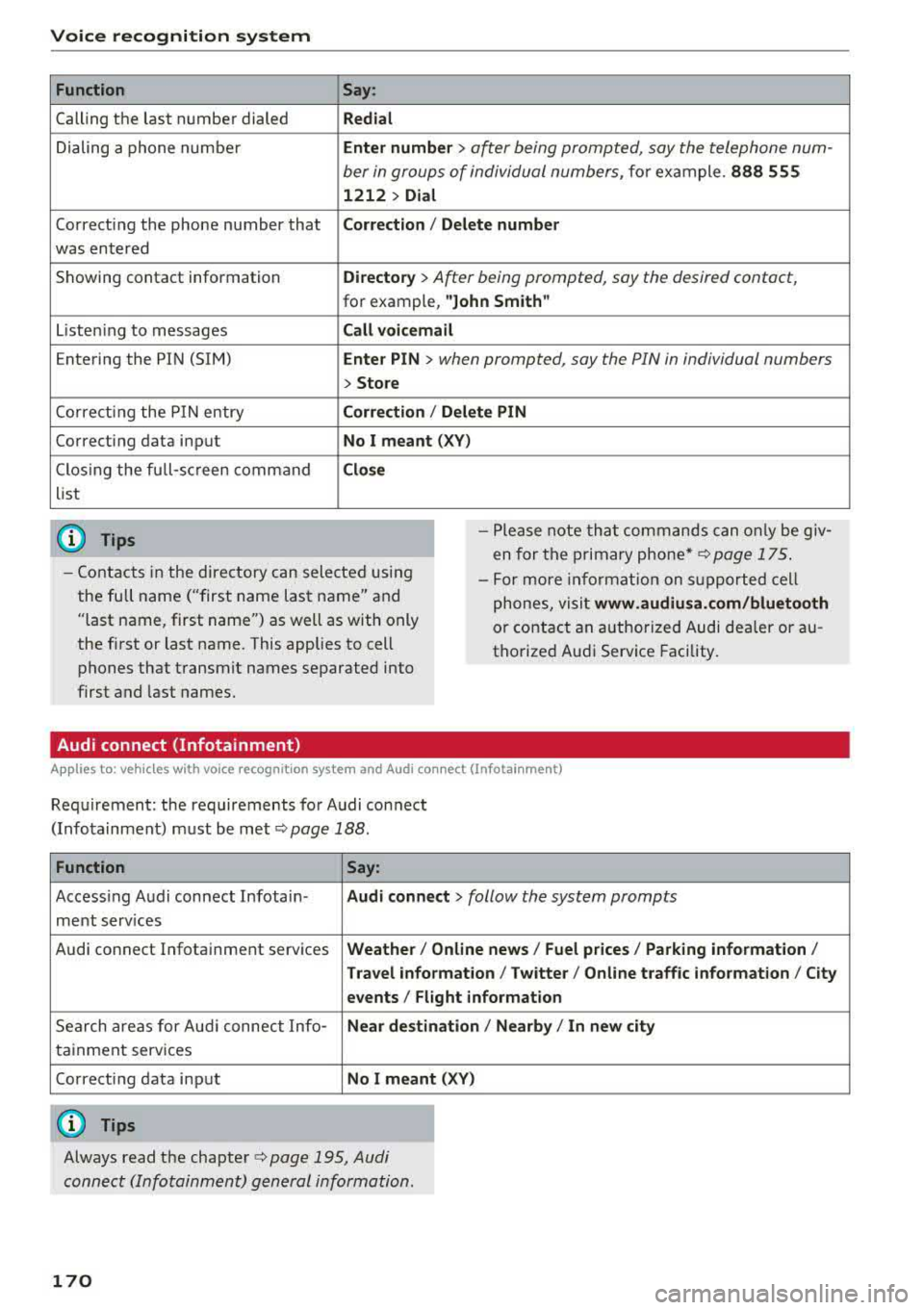
Voice recognition system Function
Calling the last number dialed
Dialing a phone numbe r
Correcti ng the phone number that
was entered
Showing contact information
L iste ning to messages
Entering the PIN (SIM)
Co rrecting the P IN entry
Correcting data input
C los ing the full-sc reen command
list
(D Tips
Say :
Redial
Enter number
> ofter being prompted, soy the telephone num-
ber in groups of individual numbers,
fo r example. 888 555
1212 > Dial
Corr ect ion / Delete numb er
Director y
> After being prompted, soy the desired contact,
for example, "John Smith "
Call voicemai l
Ente r PIN
> when prompted, soy the PIN in individual numbers
> Store
Corr ection / Delete PIN
No I meant ( XV)
Clos e
-Please note th at commands can on ly be giv
en for the primary
phone *¢ page 175 .
-Contacts in the directory can sele cted us ing
the full name ("first name las t name" and
"last name, first name") as well as with only
the fi rst or last name. This applies to cell
phones that transmit names separated into
first and last names. -
For more informat ion on s upported cell
phones, visit
www .audiusa. com /bluetooth
or contact an authorized Audi dealer or au
thorize d Audi Service Facility.
Audi connect (Infotainment)
A ppl ies to: ve hicles w ith vo ice recognition system and Audi co nnect (Infota inment)
Req uirement: the requirements for Audi connect
(Infotainment) must be met
¢page 188.
Function Say:
Accessing Audi connect Infotain-Audi connect > follow the system prompts
ment serv ices
Audi connect Infotainment services
Weather/ On line new s/ Fuel p rice s/ Parking info rmation /
T rav el info rmat ion / Twitter / Online tr affic info rmation / City
e v ents / Fl ight informat ion
Search areas for Aud i connect Info-Near de stination / Nearb y/ In n ew city
ta inment serv ices
Correcting data input
No I meant (XV)
(0 Tips
Always read the chapter ¢ page 195, Audi
connect (Infotainment) general information.
170
Page 173 of 403
a co .... N ,....
N .... 0 0
3 co
Voice recognition system
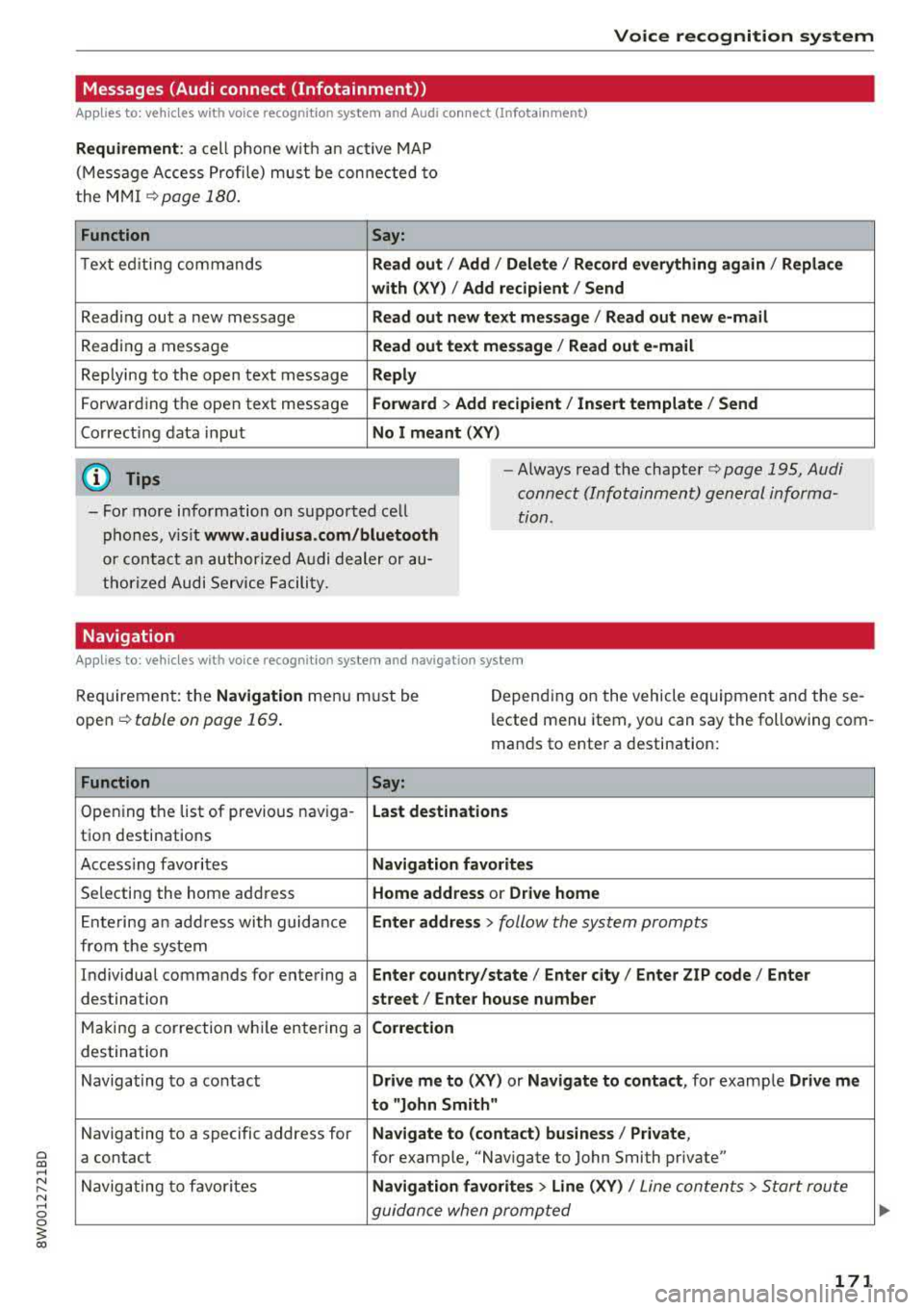
Messages (Audi connect (Infotainment))
Applies to: vehicles with voice recognition system and Audi connect (Infotainment)
Requirement : a cell phone w it h an ac tiv e MAP
( M essage Access Profi le) must be con nected to
the M MI
¢page 18 0 .
Function Say:
Text ed it ing com mands Read out / Add / Delete / Record everything again / Replace
with (XV) / Add recipient / Send
Read ing out a new message Read out new text message / Read out new e-mail
Reading a message Read out text mes sage / Read out e-mail
Replying to the open text message Reply
Forward ing the open text message Forward > Add recipient / Insert template / Send
Correct ing data in put No I meant (XV)
(D Tips
-For more information on sup ported cell
phones, v is it
www.audiusa.com /bluetooth
or contact an author ized A udi dealer or au
t hori zed Audi Service Facili ty.
-Always read the chapter¢ page 195 , Audi
connect (Infotainment) general informa
tion.
Navigation
Applies to: vehicles with voice recognitio n system and navigation system
Req uireme nt: the Navigation men u m ust be
ope n
¢table on page 169 .
Depend ing on the vehicle equipmen t an d these
l ected menu item, you can say the following com
man ds to enter a destination:
Function
Say:
Open ing the list of previous nav iga -Last destinations
tio n destinations
Acc ess ing favo rites
Navigation favorites
Se lecting the home add ress Home address or Drive home
Ente ring a n add ress with guida nce Enter address > follow the system prompts
from the system
Individual comma nds for entering a
Enter country/state / Enter city / Enter ZIP code / Enter
destination street / Enter house number
Ma king a co rrection wh ile entering a Correction
destination
N avigating to a co ntact
Drive me to (XV ) or Navigate to contact , for example Drive me
to "John Smith"
N avigating to a specific address for Navigate to (contact) business / Private ,
a contact for example, "Navigate to John Smith private"
N avig ating to f avorites
Navigation favorites > Line (XV) / Line con tents> S tart route
guidan ce when promp te d
171
Page 175 of 403
a co .... N ,....
N .... 0 0
3 co
Voice recognition system
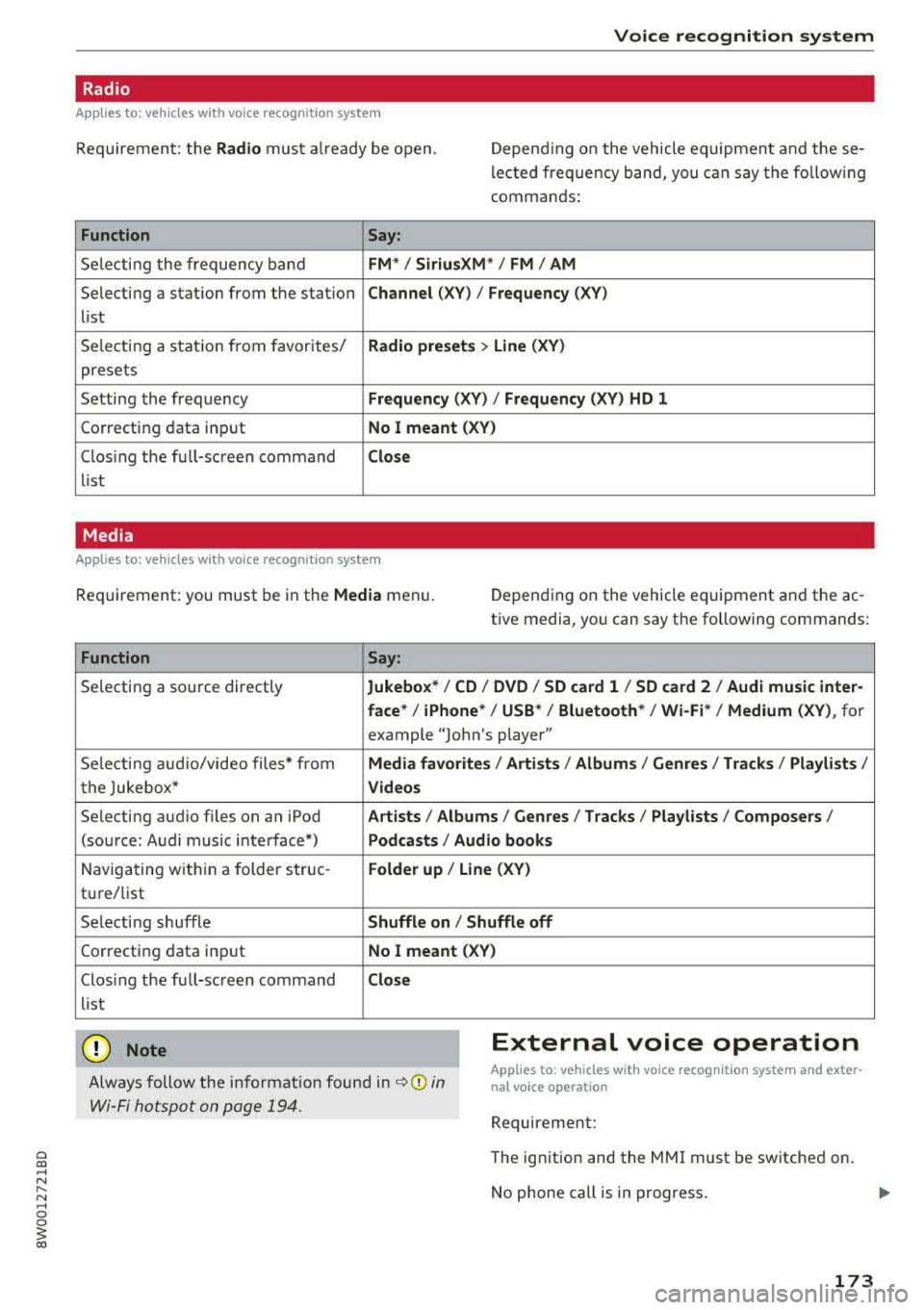
Radio
Applies to: vehicles with voice recognition system
Req uirement: the Radio must a lready be open. Depend ing on the vehicle equipmen t and these
lected frequency band, you can say the fo llow ing
commands :
Function
Say:
Selecting the frequency band FM*/ Siriu sXM * / FM / AM
Selecting a station from the station Channe l (XY) / Frequency (XV)
list
Selecting a stat ion from favorites/
Rad io prese ts > Line (XV )
presets
Setting the frequency
Frequency (XV) I Frequency (XV ) HD 1
Correcting data input No I mea nt ( XV)
Clos ing the full-sc reen command Clo se
list
Media
Applies to: vehicles with voice recognitio n system
Req uirement: you must be in the Media menu. Depending on the vehicle equipment and the ac
t ive media, yo u can say the following commands:
Function
Say:
Selecting a so urce directly Jukebox */ CO / DVD / SO card l / SO card 2 / Aud i music inte r-
face *
I iPhone* /USS */ Bluetooth* / Wi-Fi * / Medium (X V ), for
example "Jolhn's player"
Selecting aud io/video files* from
Media fav orites / Arti sts/ Album s/ Genr es / Track s/ Playli st s /
the Jukebox* V id eos
Selecting aud io files on an iPod Art ists I Albums / Genre s I Tracks / Pla ylists /Composer s/
(source: Audi music interface*) Podcast s / Audio books
Navigating w ith in a folder struc-Fo lde r up / Line (XV )
tu re/list
Selecting shuffle
Shuffle on / Shuffle off
Correcting data input No I meant (XV)
Clos ing the full-screen command Clos e
list
(D Note External voice operation
Always follow the i nformat io n found in ~0 in
Wi-Fi hotspot on page 194.
Applies to: vehicles with voice recognition system and exter
nal voice operation
Requirement:
The ignition and the MMI must be switched on.
No phone call is in progress.
173