warning AUDI A4 2019 Owners Manual
[x] Cancel search | Manufacturer: AUDI, Model Year: 2019, Model line: A4, Model: AUDI A4 2019Pages: 392, PDF Size: 99.53 MB
Page 145 of 392
8W0012721BG
IntelligentTechnology
—Foradditionalinformationondynamic
steering,see>page126.
Allwheeldrive(quattro)
Appliesto:vehicleswithallwheeldrive
Theall-wheeldrivesystemdistributesthedriving
powervariablytothefrontandrear axle toim-
provethedrivingcharacteristics.Itworkstogeth-
erwithselectivewheeltorquecontrol,whichcan
activatewhendrivingthroughcurves
=>page138.
Appliesto:vehicleswithquattroultra:Ifthedriv-
ingsituationdoesnotrequireallwheeldrive,
thentherearsectionofthedrivetrainwilldecou-
pletosavefuel.Thesystemconstantlydeter-
minesandanticipatesifallwheeldriveisneeded.
Thisallowsthereardrivetraintorecoupleshortly
beforeitisneeded.
Theallwheeldriveconceptisdesignedforhigh
enginepower.Yourvehicleisexceptionallypow-
erfulandhasexcellentdrivingcharacteristics
bothundernormaldrivingconditionsandon
snowandice.Alwaysreadandfollowsafetypre-
cautions>A\.
ZAWARNING
—Eveninvehicleswithallwheeldrive,you
shouldadaptyourdrivingstyletothecur-
rentroadandtrafficconditionstoreduce
theriskofanaccident.
— Thebrakingabilityofyourvehicleislimited
tothetractionofthewheels.Inthisway,it
isnotdifferentfromatwowheeldrivevehi-
cle.Donotdrivetoofastbecausethisin-
creasestheriskofanaccident.
—Notethatonwetstreets,thefrontwheels
can“hydroplane’”ifdrivingatspeedsthat
aretoohigh.Unlikefrontwheeldrivevehi-
cles,theengineRPMdoesnotincreasesud-
denlywhenthevehiclebeginshydroplaning.
Adaptyourspeedtotheroadconditionsto
reducetheriskofanaccident.
Sportdifferential
Appliesto:vehicleswithsportdifferential
Thesportdifferentialdistributesthedrivepower
totherearaxlebasedonthesituation.Thegoal
isahighlevelofagilityandabilitytoaccelerate
oncurves.Thevehicleisveryresponsivetosteer-
ing.ThesettingsdependontheselectedAudi
driveselect*mode.
Energymanagement
Yourvehicleisequippedwithanintelligentener-
gymanagementsystemfordistributingelectrici-
ty.Thissignificantlyimprovesthestartingability
andincreasesthevehiclebatterylife.
@)Tips
—Ifyoudriveshortdistancesfrequently,the
vehiclebatterymaynotchargeenough
whiledriving.Asaresult,conveniencefunc-
tionsforelectricalequipmentmaybetem-
porarilyunavailable.
—Thevehiclebatterywillgraduallydrainif
the
vehicleisnotdrivenforlongperiodsof
time,orifelectricalequipmentisused
whentheengineisnotrunning.Toensure
thatthevehiclecanstillbestarted,the
electricalequipmentwillbelimitedor
switchedoff.
Noticeaboutdata
recordedbytheEvent
DataRecorderand
vehiclecontrolmodules
EventDataRecorder
Thisvehicleisequippedwithan Event DataRe-
corder(EDR).ThemainpurposeofanEDRisto
record,incertaincrashornearcrash-likesitua-
tions,suchasanairbagdeploymentorhittinga
roadobstacle,datathatwillassistinunderstand-
inghowavehicle'ssystemsperformed.TheEDR
isdesignedto recorddatarelatedtovehicledy-
namics andsafetysystemsforashortperiodof
time,typically30secondsorless.TheEDRinthis
vehicleisdesignedtorecordsuchdataas:>
143
Page 147 of 392
8W0012721BG
MultiMediaInterface
MultiMediaInterface
Trafficsafety
information
AudirecommendsperformingcertainInfotain-
mentsystemfunctions,suchasenteringa desti-
nation,onlywhenthevehicleisstationary.Al-
waysbepreparedtostopoperating theInfotain-
mentsystemintheinterestofyoursafetyand
thesafety ofotherroadusers.
Z\WARNING
Onlyuse theInfotainmentsystemwhentraf-
ficconditionspermitandalwaysinawaythat
allows
youtomaintaincompletecontrolover
yourvehicle.
G@)Tips
Certainfunctionsarenotavailablewhiledriv-
ing.
Introduction
TheMultiMediaInterface,orMMIforshort,
combinesvarioussystemsforcommunication,
navigation*andentertainmentinyourAudi.You
canoperatetheMMIusingtheMMIcontrolpan-
el,themultifunctionsteeringwheelorthevoice
recognitionsystem*.
[RAH-8534)
-Appliesto:vehicleswithautomatictransmission:-MMI
controlpanel-integratedshortcutkeys
RAH-8845|
Fig.148-Appliesto:vehicleswithmanualtransmission:-
MMIcontrolpanel-separateshortcutkeysonthecenter
console
MMIcontrolpaneloverview
@Controlknob,ifneededwithjoy-
StiCKTURCKION®cieseaeaswareswex147,150
@MMItouchcontrolpad*.........148
@®Leftcontrolbutton.............147
@®Rightcontrolbutton............147
©Buttonsforopeningmenusdirectly.147
©[MENU]button...............2.147
@[BACK]button............0....147
Shortcutkeys.............0000.152
@Tips
Theshortcutkeys@)©fig.148fortheMMI
controlpanel(manualtransmission)areon
the centerconsole.
MMIOn/Offknobwith
joystickfunction
tome|
[RAH-8536)
ee|7
a
Fig.149MMIOn/Offknobwithjoystickfunction
145
Page 148 of 392
![AUDI A4 2019 Owners Manual MultiMediaInterface
SwitchingtheMMIon/off:theMMIcanbe
switched
on/offmanually.
—Switchingonmanually:presstheOn/Offknob
@briefly>fig.149.Or:pressthe[MENU]but-
ton©>page145,fig.147or>page145,
fig.1](/img/6/57555/w960_57555-147.png "AUDI A4 2019 Owners Manual MultiMediaInterface
SwitchingtheMMIon/off:theMMIcanbe
switched
on/offmanually.
—Switchingonmanually:presstheOn/Offknob
@briefly>fig.149.Or:pressthe[MENU]but-
ton©>page145,fig.147or>page145,
fig.1")
MultiMediaInterface
SwitchingtheMMIon/off:theMMIcanbe
switched
on/offmanually.
—Switchingonmanually:presstheOn/Offknob
@briefly>fig.149.Or:pressthe[MENU]but-
ton©>page145,fig.147or>page145,
fig.148,oroneofthebuttonstoopentheme-
nusdirectly©).
—Switchingoffmanually:pressandholdthe
On/Offknob@)>fig.149untiltheMMI
switchesoff.IftheMMIhasbeenswitchedoff
manually,itdoesnotswitchonagainautomati-
callythenexttimetheignitionisswitchedon.
Additionalfunctions:
—Adjustingthevolume:turntheOn/Offknob@
>fig.149.
—Muting:presstheOn/Offknob@)©fig.149
briefly.
—Selectingtheprevious/nextfunction(forex-
ample,aradiostation/track):presstheOn/Off
knob@)°fig.149brieflytowardtheleftKKor
rightDDI.
—Fastforwarding/rewinding(forexample
songs):pressandholdtheOn/Offknob@)
=>fig.149towardtheleftKdorrightPPI.
ZA\WARNING
Adjustthevolumeoftheaudiosystemsothat
signalsfromoutsidethevehicle,suchas po-
liceandfiresirens,canbeheardeasilyatall
times.
@Tips
TheMMIswitchesoffautomaticallyiftheen-
gineisnotrunningandthevehiclebatteryis
low.
Infotainmentsystem
display
Switchingon/off
>Pressthe[olbuttontoswitchtheInfotainment
systemonandoff.
WhentheMMIisswitchedonandthedisplayis
switchedoff,youcanoperatecertainfunctions
146
usingtheOn/OffknobwiththeMMIjoystick
function>page145.
Gi)Tips
Theremaybedelayswhenswitchingonthe
display.
Informationondisplayimages
Thedisplayversiondependsonvehicleequip-
ment.
Fig.150Display versionA
Fig.151Display versionB
Additionalcontent(such asalbumcoverandmap
material)isshownondisplayversionB,ifappli-
cable@)©fig.151.Becausetheothercontent
shownonthedisplaysisnearlyidenticalbetween
thetwoversions,thismanualwillprimarilyde-
scribedisplayversionA.
Page 159 of 392
8W0012721BG
Multifunctionsteeringwheel
Multifunctionsteering
wheel
Introduction
Appliesto:vehicleswith multifunctionsteeringwheel
Inthedriverinformationsystemdisplay,youcan
controlnumerousInfotainmentfunctionsusing
themultifunctionsteeringwheelplus*>page 15
orthemultifunctionsteeringwheel*>page18.
Youcancontrol additionalInfotainmentfunc-
tionsusingtheMMIcontrolpanel>page145in
theInfotainmentsystemdisplay.
ZAWARNING
Directyourfullattentiontodriving.Asthe
driver,youhavecompleteresponsibilityfor
safetyintraffic.Only use thefunctionsinsuch
awaythatyoualwaysmaintaincompletecon-
troloveryourvehicleinalltrafficsituations.
Radio
Appliesto:vehicleswith multifunctionsteeringwheelandra-
dio
Appliesto:vehicleswith multifunctionsteeringwheel
>Pressthe[MODE]buttononthemultifunction
steeringwheelrepeatedlyuntiltheRadio/
Mediatabisdisplayed.
Appliesto:vehicleswith multifunctionsteeringwheelplus
>Pressthe|< >|buttononthemultifunction
steeringwheelrepeatedlyuntiltheRadio/
Mediatabisdisplayed.
>Presstheleftcontrolbutton>page16.
Dependingonvehicleequipment,thefollowing
functions
maybeavailableinthedriverinforma-
tionsystem.
—Selectingthefrequencyband:selectandcon-
firmafrequencyband.
—Selectingastationfromthestationlist:select
andconfirmaradiostation.
—Selectingastationfromthepresetslist:select
andconfirmPresetsandthenaradiostation.
—Openingamediasource:selectandconfirmTo
media.
Additionalsettings
—Select:rightcontrolbutton>desiredentry.
See>page218.
G)Tips
PayattentiontotheInfotainmentsystemdis-
playifnecessary.Dependingontheselected
function,itmaybenecessarytousetheMMI
control panel.
Media
Appliesto:vehicleswithmultifunctionsteeringwheeland
media
Requirement:amediadrivemustcontainaudio/
videofiles>page221.
Appliesto:vehicleswithmultifunctionsteeringwheel
>Pressthe[MODE]buttononthemultifunction
steeringwheelrepeatedlyuntiltheRadio/
Mediatabisdisplayed.
Appliesto:vehicleswithmultifunctionsteeringwheelplus
>»Pressthe[<>]buttononthemultifunction
steeringwheelrepeatedlyuntiltheRadio/
Mediatabisdisplayed.
>Presstheleftcontrolbutton>page16.
Depending onvehicleequipment,thefollowing
functionsmaybeavailableinthedriverinforma-
tionsystem.
—Selectingamediasource:selectandconfirma
sourcesuchastheSDcard.
—Switchingtotheradio:selectandconfirm
Switchtoradio.
—Playinganaudio/videofile:selectandconfirm
afile.
—Pausing/resumingplayback:presstheright
thumbwheel@)>page17,fig.11.Toresume
playback,presstherightthumbwheelagain.
—Openingadditionaltrackinformation:select:
rightcontrolbutton>Show"NowPlaying"
screen.
Foradditionalinformation, see>page232.>
157
Page 163 of 392
8W0012721BG
Multifunctionsteeringwheel
Requirement:adestinationmustbeentered
=>page198,routeguidancemustbestartedand
thenavigationtabmustbedisplayed.
Dependingonvehicleequipment,thefollowing
informationmaybeshowninthedriverinforma-
tionsystem>fig.168:
Distancetothedestinationorstopover
©oDisplayinganexpressway,highwayormain
roadaspreparationforanupcomingchange
indirection
Lanerecommendation
Calculatedarrivaltime
Distancetothenextmaneuver
Display oftheexpressway,highwayormain
roadontowhichyouwillbeturning
Directionarrowfortheupcomingmaneuver
©
O80
Abargraphappearswhenadirectionarrowis
displayed.Thefewerthebars thatareshown,
theshorterthedistanceisuntiltheturn.
Currentvehicleposition©
Additionalinformation(on-boardcomputer)
Thefollowingfunctionsarealsoavailablewhen
routeguidanceisactive:
—Adjustingthevoiceguidancevolume:turnthe
rightthumbwheelupordownwhileavoice
guidancemessageisplaying.
ZA\WARNING
Theroutecalculatedby thenavigationsystem
isarecommendationforreachingyourdesti-
nation.Obeytrafficlights,stoppingrestric-
tions,one-waystreets,lanechangerestric-
tions,etc.
(i)Tips
—Alsoseethechapter>page8,Cockpitover-
view.
— Anexclamationpoint“!”infront ofthe
streetnameindicatesthattheinformation
aboutthisstreetorthissectionoftheroute
isnotcompleteinthenavigationdatacon-
tainedintheMMI.Obeytrafficlawsinone-
waystreetsandpedestrianzones.
TAUAmelhmeereeitanle)
Appliesto:vehicleswithnavigationsystemandarrowview
Dependingonthevehicleequipment,theactiverouteguidancewillbedisplayedinthearrowview*in
thedriverinformationsystem.
om:
Fig.169Example:arrowview(monochromeinstrumentcluster)
Requirement:adestinationmustbeentered
=page198,routeguidancemustbestartedand
thenavigationtabmustbedisplayed.
Dependingonvehicleequipment,thefollowing
informationmaybeshowninthedriverinforma-
tionsystem>fig.169:
@Distancetothedestinationorstopover
161
Page 164 of 392
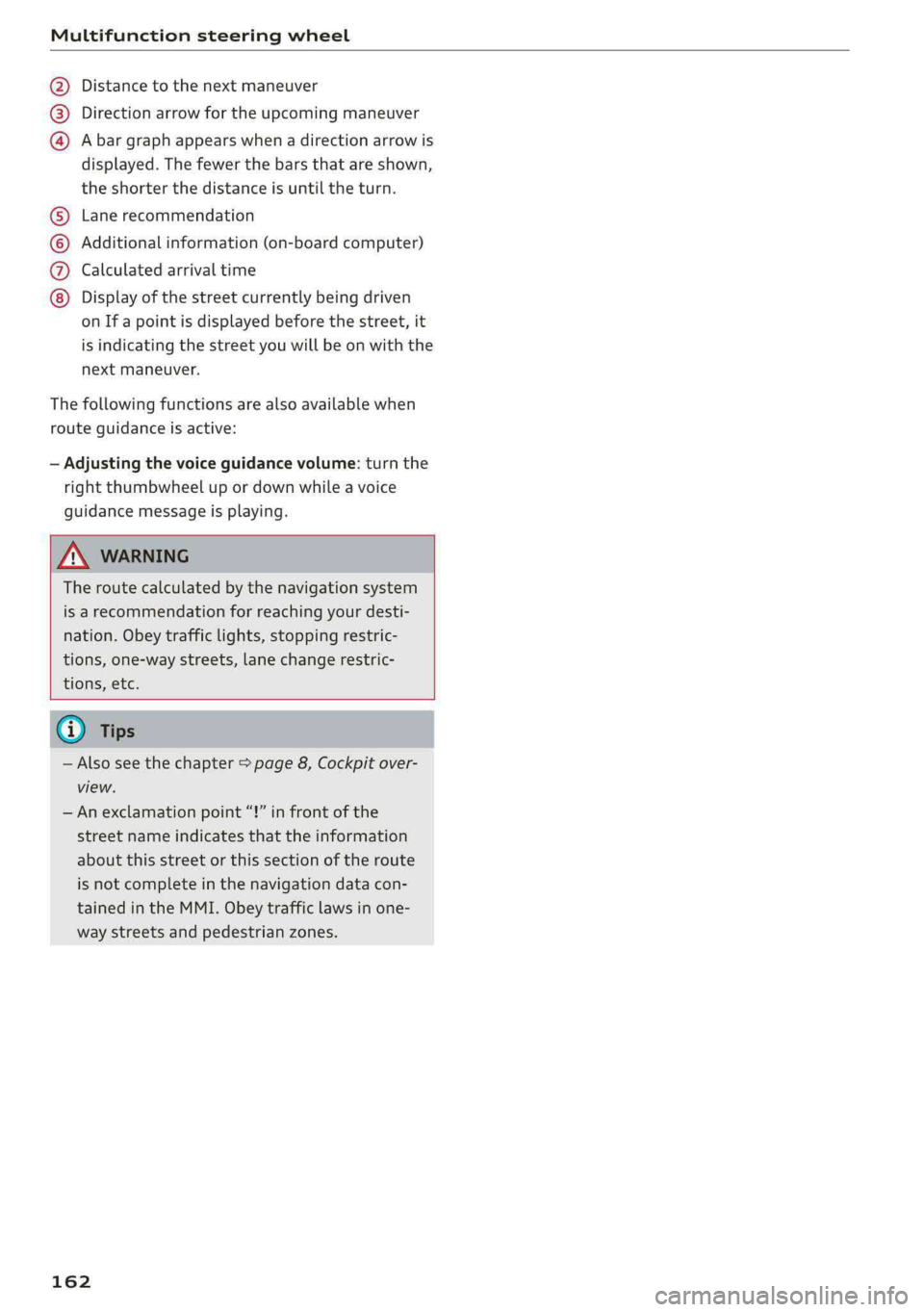
Multifunctionsteeringwheel
Distancetothenextmaneuver
Directionarrowfortheupcomingmaneuver
Abargraphappearswhen adirectionarrowis
displayed.Thefewerthebars thatareshown,
theshorterthedistanceisuntiltheturn.
®O®
Lanerecommendation
Additionalinformation(on-boardcomputer)
Calculatedarrivaltime
©0G®@Displayofthestreetcurrentlybeingdriven
onIfapointisdisplayedbeforethestreet,it
isindicatingthestreetyouwillbe onwiththe
nextmaneuver.
Thefollowingfunctionsarealsoavailablewhen
routeguidanceisactive:
—Adjustingthevoiceguidancevolume:turnthe
rightthumbwheelupordownwhileavoice
guidancemessageisplaying.
ZXWARNING
Theroutecalculatedby thenavigationsystem
isarecommendationforreachingyourdesti-
nation.Obeytrafficlights,stoppingrestric-
tions,one-waystreets,lanechangerestric-
tions,etc.
@Tips
—Alsosee thechapter>page8,Cockpitover-
view.
—Anexclamationpoint“!”infront ofthe
streetnameindicatesthattheinformation
aboutthisstreetorthissectionoftheroute
isnotcompleteinthenavigationdatacon-
tainedintheMMI.Obeytrafficlawsinone-
waystreetsandpedestrianzones.
162
Page 166 of 392
Voicerecognitionsystem
Voicerecognitionsystem
Operating
Appliesto:vehicleswithvoicerecognitionsystem
YoucanoperatemanyInfotainmentfunctions
convenientlybyspeaking.
Requirement:theignitionandtheMMImustbe
switched
on>page145.Asystemlanguagesup-
portedbythevoicerecognitionsystemmustbe
set.Theremustbenophonecallsinprogressand
theparkingaidmustnotbeactive.
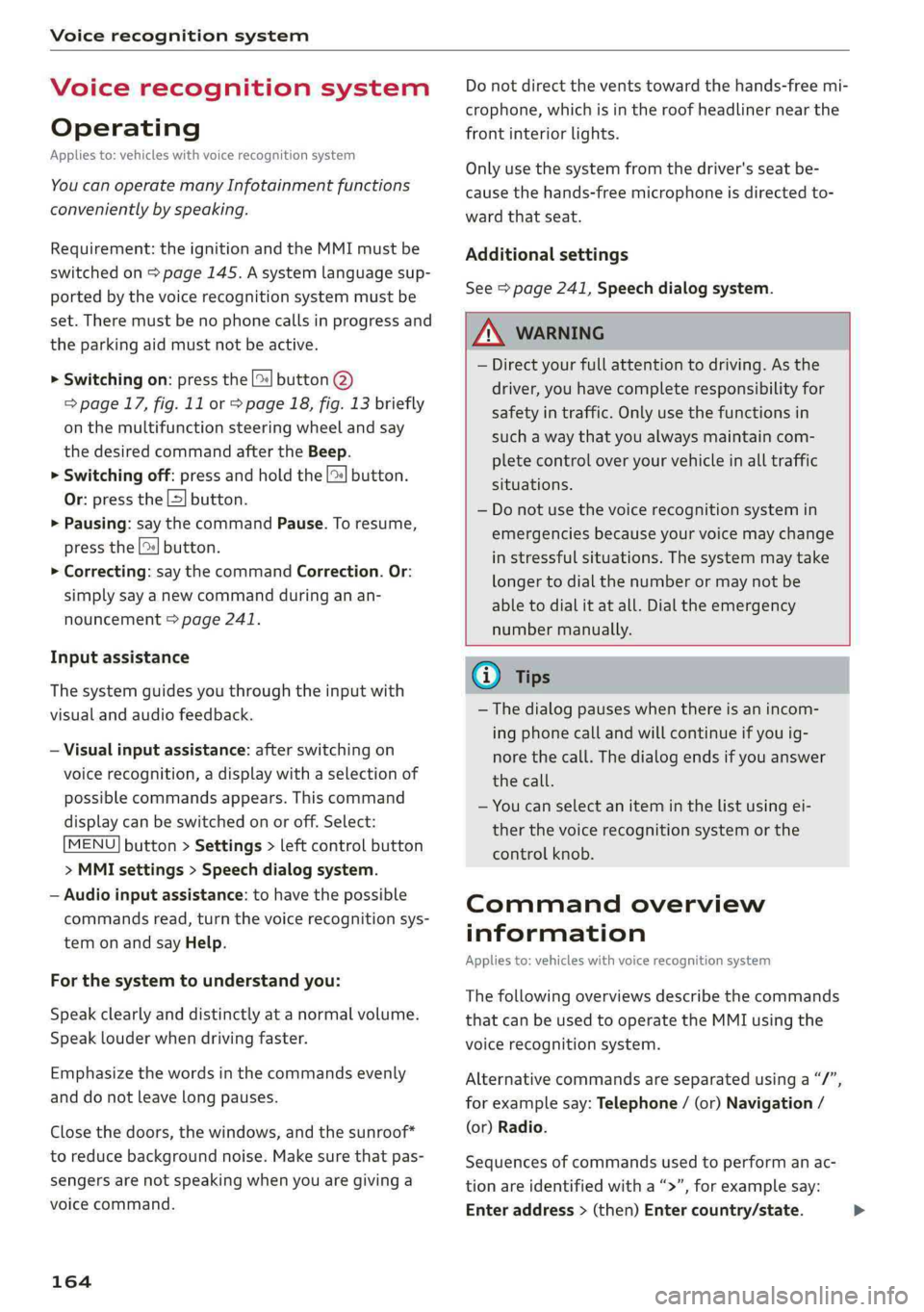
>Switchingon:pressthe[%]button@
=>page17,fig.11or>page18,fig.13briefly
onthemultifunctionsteeringwheelandsay
thedesiredcommandaftertheBeep.
>Switchingoff:pressandholdthe|™]button.
Or:pressthe|5|button.
>Pausing:saythecommandPause.Toresume,
pressthe|]button.
>Correcting:saythecommandCorrection.Or:
simplysayanewcommandduringanan-
nouncement>page241.
Inputassistance
Thesystemguidesyouthroughtheinputwith
visualandaudiofeedback.
—Visualinputassistance:afterswitchingon
voicerecognition,adisplaywithaselectionof
possiblecommandsappears.Thiscommand
displaycanbe switchedonoroff.Select:
MENU]button>Settings>leftcontrolbutton
>MMIsettings>Speechdialogsystem.
—Audioinputassistance: tohavethepossible
commandsread,turnthevoicerecognitionsys-
temonandsayHelp.
Forthesystemtounderstandyou:
Speakclearlyanddistinctly atanormalvolume.
Speaklouderwhendrivingfaster.
Emphasizethewordsinthecommandsevenly
anddonotleavelongpauses.
Closethedoors,thewindows,andthesunroof*
toreducebackgroundnoise.Makesurethatpas-
sengersarenotspeakingwhenyouaregivinga
voicecommand.
164
Donotdirecttheventstowardthehands-freemi-
crophone,whichisintheroofheadlinernearthe
frontinteriorlights.
Onlyusethesystemfromthedriver'sseatbe-
causethehands-freemicrophoneisdirectedto-
wardthatseat.
Additionalsettings
See>page241,Speechdialogsystem.
ZAWARNING
—Directyourfullattentiontodriving.Asthe
driver,youhavecompleteresponsibilityfor
safetyintraffic.Onlyusethefunctionsin
suchawaythatyoualwaysmaintaincom-
pletecontroloveryourvehicleinalltraffic
situations.
—Donotuse thevoicerecognitionsystemin
emergenciesbecauseyourvoicemaychange
instressfulsituations.Thesystemmaytake
longertodialthenumberormaynotbe
abletodialitatall.Dialtheemergency
numbermanually.
Gi)Tips
— Thedialogpauseswhenthereisanincom-
ingphonecallandwillcontinueifyouig-
norethecall.Thedialogendsifyouanswer
thecall.
—Youcanselectan iteminthelistusingei-
therthevoicerecognitionsystemorthe
controlknob.
Commandoverview
information
Appliesto:vehicleswithvoicerecognitionsystem
Thefollowingoverviewsdescribethecommands
thatcan beusedtooperatetheMMIusingthe
voicerecognitionsystem.
Alternativecommandsareseparatedusinga“/”,
forexamplesay:Telephone/(or)Navigation/
(or)Radio.
Sequencesofcommandsusedtoperformanac-
tionareidentifiedwitha “>”,forexamplesay:
Enteraddress>(then)Entercountry/state.>
Page 173 of 392

8W0012721BG
Telephone
Telephone
Introduction
Appliesto:vehicleswithtelephone
Tomakephonecallsinyourvehicleusingthe
MMI,connectyourcellphonetotheMMIvia
Bluetooth.
Handsfree
Afteryouhaveconnectedyourmobiledevice to
theMMIviaBluetooth,youcan use thehandsfree
systemandoperatetelephonefunctionsthrough
yourMMI.Youcanmakecallsusingtheantenna
onyourmobiledevice.
Withthe Audiphonebox’,callsaremadeusing
theexteriorantennaonthevehicle.Usingtheex-
ternalantennahelpswhenthereisalowsignal
andalsoprovidesbetterreceptionquality
=>page174.
ZAWARNING
—Medicalexpertswarnthatmobiledevices
caninterferewiththefunctionofpacemak-
ers.Alwaysmaintainaminimumdistanceof
about8inches(20cm)betweenthecell
phoneantennaandthepacemaker.
—Donotcarrythemobiledeviceinapocket
directlyoverthepacemakerwhenthe
phoneisswitchedon.
—Switchthemobiledeviceoffimmediately
ifyoususpectitmaybeinterferingwith
thepacemaker.
—Donotuse thevoicerecognitionsystem*
=>page164inemergenciesbecauseyour
voicemaychangeinstressfulsituations.The
systemmaytakelongertodialthenumber
ormaynotbeabletodialitatall.Dialthe
emergencynumbermanually.
—Switchyourmobiledeviceoffinareaswhere
thereisariskofanexplosion.Theseloca-
tionsarenotalwaysclearlymarked.This
mayincludegasstations,fuelandchemical
storagefacilitiesortransportvehicles,orlo-
cationswherefuelvapors(such aspropane
orgasolinevaporinvehiclesorbuildings),
chemicalsorlargequantitiesofdustparti-
cles(suchasflour,sawdustormetal)may
bepresentintheair.Thisalsoapplies toall
otherlocationswhereyouwouldnormally
turnyourvehicleengineoff.
— Thedemandsoftrafficrequireyourfullat-
tention.Alwaysreadthechapter
=>page145,Trafficsafetyinformation.
@)Note
Alwaysfollowtheinformationfoundin>@in
Wi-Fisettingsonpage193.
@)Tips
—TheBluetoothconnectionrangeislimited
toinsidethevehicle.Itcanalsobeaffected
bylocalconditionsandinterferencewith
otherdevices.
—TolearnwhichBluetoothconnectionsand
whichofthefunctionsinyourmobiledevice
aresupported,checkwithyourmobilede-
viceserviceproviderorthedatabaseformo-
biledevicesatwww.audiusa.com/
bluetooth.
Setup
ConnectingacellphoneusingBluetooth
Appliesto:vehicleswithtelephone
Naonro)ated
DoesthisPINmatchtheoneon your
Bluetoothdevice?PIN:967536
Fig.171DisplayingthePINforenteringinthecellphone
Requirement
Thevehiclemustbestationaryandtheignition
mustbe switchedon.
TheBluetoothsettingsmustbeopenonyour
mobiledeviceduringtheconnectionsetup.
TheBluetoothfunctionandvisibilityoftheMMI
=page243andmobiledevicemustbe switched
on.
171
Page 176 of 392
Telephone
UsingtheAudiphone
box
Appliesto:vehicleswithAudiphonebox
Youcanchargeyourmobiledevicebatteryusing
theAudiphonebox.Youcanmakecallsthrough
theexteriorantenna*onthevehicle.Usingthe
externalantenna*helpswhenthereisalowsig-
nalandalsoprovidesbetterreceptionquality.
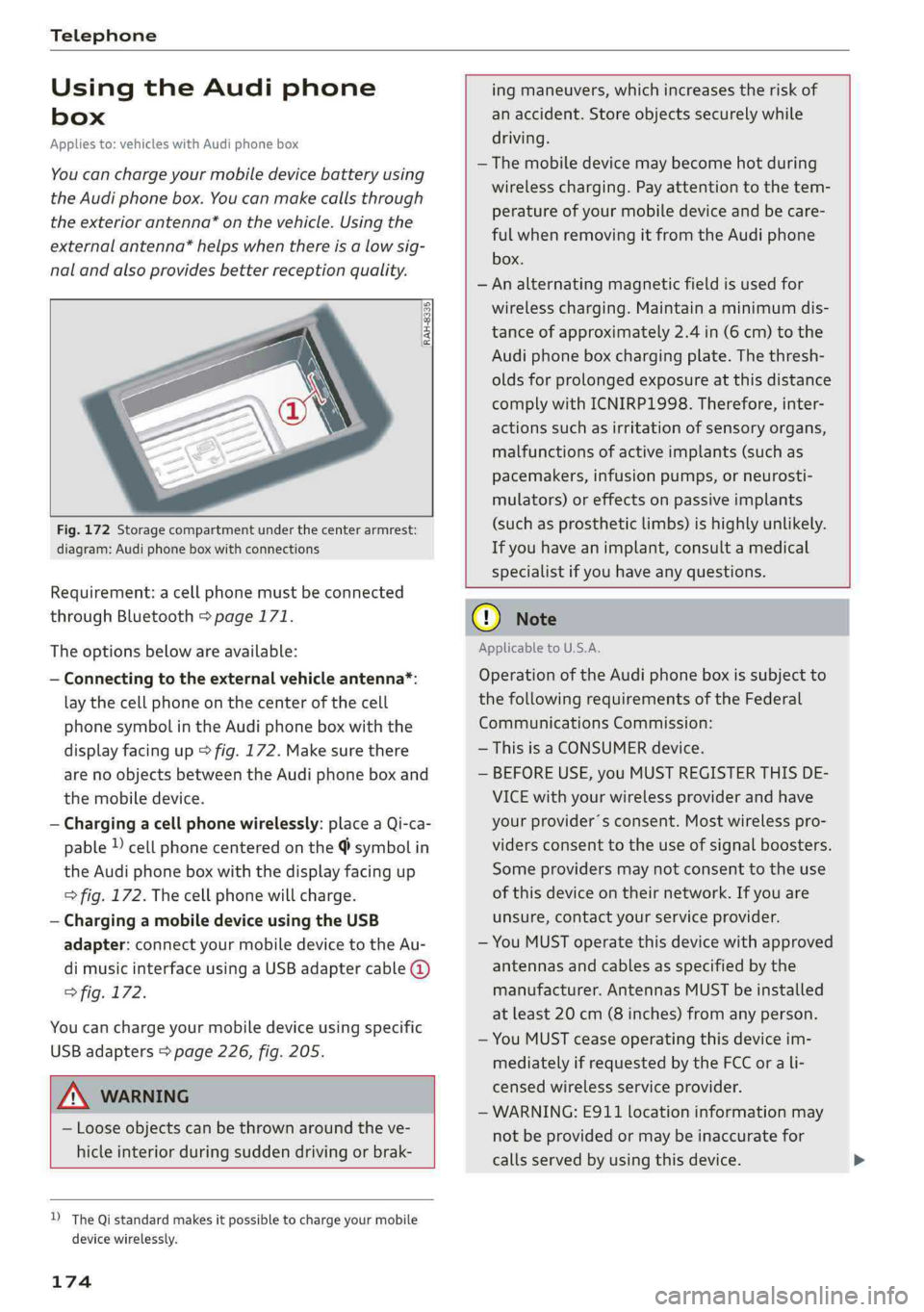
RAH-8335|
Fig.172Storagecompartmentunderthecenterarmrest:
diagram: Audiphoneboxwithconnections
Requirement:acellphonemustbeconnected
throughBluetooth>page171.
Theoptionsbelowareavailable:
—Connectingtotheexternalvehicleantenna*:
laythecellphoneonthecenterofthecell
phonesymbolintheAudiphoneboxwiththe
displayfacingup>fig.172.Makesurethere
arenoobjectsbetweenthe Audiphoneboxand
themobiledevice.
—Chargingacellphonewirelessly:placeaQi-ca-
pable»)cellphonecenteredonthe@symbolin
the Audiphoneboxwiththedisplayfacingup
>fig.172.Thecellphonewillcharge.
—ChargingamobiledeviceusingtheUSB
adapter:connectyourmobiledevicetotheAu-
dimusicinterfaceusingaUSBadaptercable(@)
>fig.172.
Youcanchargeyourmobiledeviceusingspecific
USBadapters>page226,fig.205.
ingmaneuvers,whichincreasestheriskof
anaccident.Storeobjectssecurelywhile
driving.
— Themobiledevicemaybecomehotduring
wirelesscharging.Payattentiontothetem-
perature ofyourmobiledeviceandbecare-
fulwhenremovingitfromthe Audiphone
box.
—Analternatingmagneticfieldisusedfor
wirelesscharging.Maintainaminimumdis-
tanceofapproximately2.4in(6cm)tothe
Audi
phoneboxchargingplate.Thethresh-
oldsforprolongedexposureat thisdistance
complywithICNIRP1998.Therefore,inter-
actionssuchasirritationofsensoryorgans,
malfunctionsofactiveimplants(suchas
pacemakers,infusionpumps,orneurosti-
mulators)oreffectsonpassiveimplants
(suchas prostheticlimbs)ishighlyunlikely.
Ifyouhaveanimplant,consultamedical
specialistifyouhaveanyquestions.
ZA\WARNING
—Looseobjectscanbethrownaroundtheve-
hicleinteriorduringsuddendrivingorbrak-
D_TheQistandardmakesitpossibletocharge yourmobile
devicewirelessly.
174
C)Note
ApplicabletoU.S.A.
Operationofthe Audiphoneboxissubjectto
thefollowingrequirementsoftheFederal
CommunicationsCommission:
—ThisisaCONSUMERdevice.
—BEFOREUSE,youMUSTREGISTERTHISDE-
VICEwithyourwirelessproviderandhave
yourprovider’sconsent.Mostwirelesspro-
vidersconsenttotheuseofsignalboosters.
Someprovidersmaynotconsenttothe use
ofthisdeviceontheirnetwork.Ifyouare
unsure,contactyourserviceprovider.
—YouMUSToperatethisdevicewithapproved
antennasandcablesasspecifiedby the
manufacturer.AntennasMUSTbeinstalled
atleast20cm(8inches)fromanyperson.
—YouMUSTceaseoperatingthisdeviceim-
mediatelyifrequestedbytheFCCorali-
censedwirelessserviceprovider.
—WARNING:E911locationinformationmay
notbeprovidedormaybeinaccuratefor
callsservedbyusingthisdevice.
Page 177 of 392
8W0012721BG
Telephone
@)Note
ApplicabletoCanada
InCanada,operationofaZoneEnhancer,
suchasan AudiPhoneBox,issubjecttothe
followingrequirementsoftheInnovation,
ScienceandEconomicDevelopmentCanada
(ISED):
—ThisisaCONSUMERdevice.
—BEFOREUSE,youMUSTmeetallrequire-
mentssetoutinCPC-2-1-05.
—YouMUSToperatethisdevicewithapproved
antennas
andcablesasspecifiedbythe
manufacturer.AntennasMUSTNOTbein-
stalledwithin20cmofanyperson.
—YouMUSTceaseoperatingthisdeviceim-
mediatelyifrequestedbyISEDoralicensed
wirelessserviceprovider.
—WARNING:£911locationinformationmay
notbeprovidedormaybeinaccuratefor
callsservedbyusingthisdevice.
G)Tips
— TheAudiphoneboxisnotavailableinall
countries.Foradditionalinformation,con-
tactanauthorizedAudidealership.
—Placingthemobiledeviceinabagorprotec-
tivesleeveinsidetheAudiphoneboxcanin-
terferewiththeconnectiontotheexternal
antenna®*.
—Metallicobjectsinthe Audiphoneboxblock
thewirelesschargingofyourmobiledevice
andcallsmadeusingtheexteriorantenna’*.
— Thechargingtimeandtemperaturewillvary
dependingonthemobiledevicebeingused.
—Yourmobiledevicecanonlybechargedin
theAudiphoneboxwhentheignitionis
switchedon.
—Toreducetheriskofmalfunctions,make
surethemobiledeviceispositionedcorrect-
ly inthe Audiphonebox.
— Themaximumchargingoutputis5watts.
—Strongtransmissionqualitycannotbeguar-
anteedifmorethanonemobiledeviceisin
thebox.”
—Onlyonemobiledeviceatatimecanbe
chargedwirelesslyintheAudiphonebox.
—AudirecommendsusingAudiGenuineAc-
cessories.Audihasverifiedtheirreliability,
safety,andsuitability.
—YoucanpurchaseaUSBadapterfromanau-
thorizedAudidealerorauthorizedAudi
ServiceFacility,oratspecialtystores.
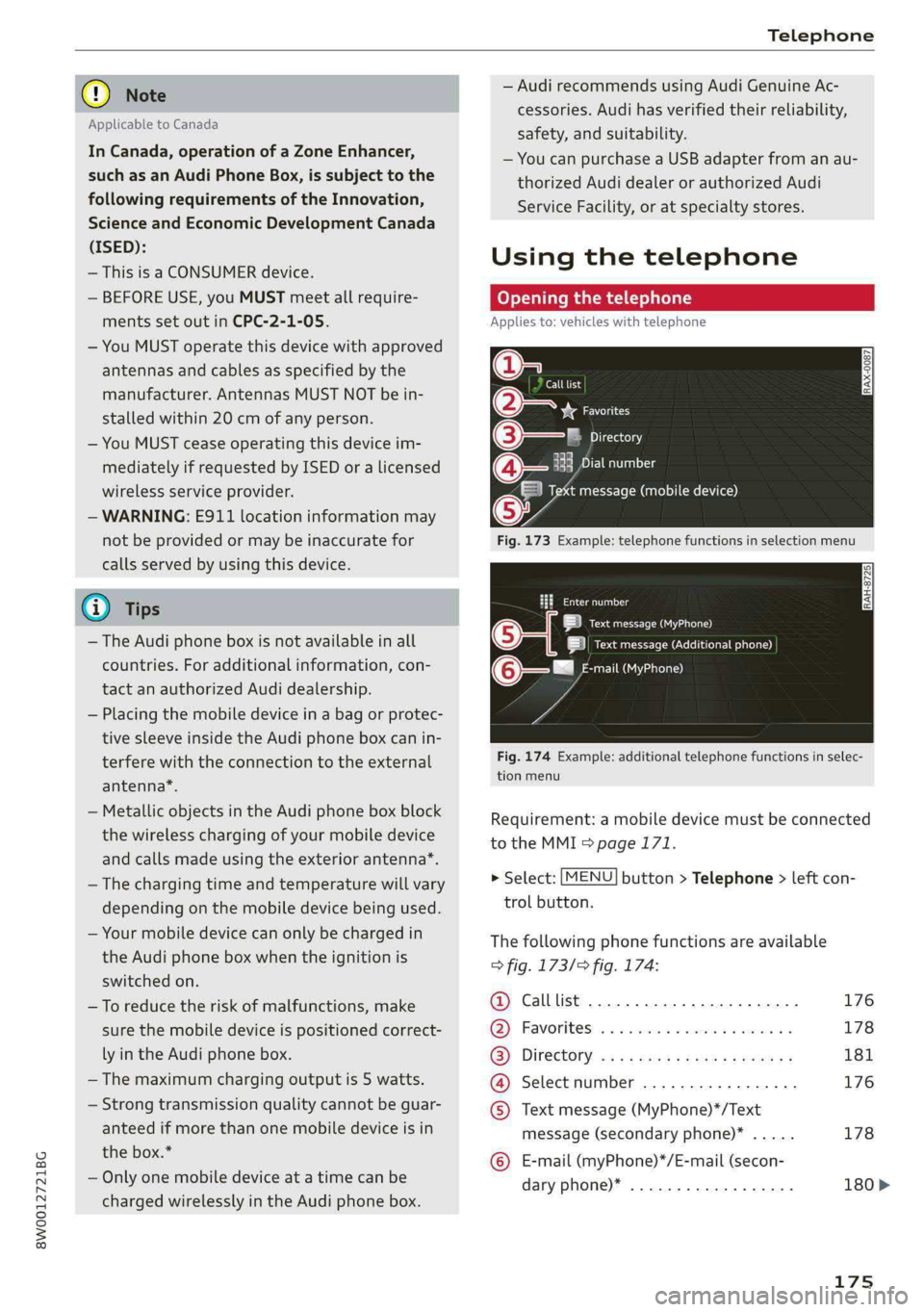
Usingthetelephone
Openingthetelephone
Appliesto:vehicleswithtelephone
Calllist
(2yeFavorites
©—PTicraxelay
EePrelia)1g
Taimessage(mobiledevice)
Fig.173Example:telephonefunctionsinselectionmenu
taeeal
LaueOa)
|ieectursecreueenen)
mail(MyPhone)@-—"
Fig.174Example:additionaltelephonefunctionsinselec-
tionmenu
Requirement:amobiledevicemustbeconnected
totheMMI>page171.
>Select:[MENU]button>Telephone>leftcon-
trolbutton.
Thefollowingphonefunctionsareavailable
>fig.173/>fig.174:
@Calllist.............0ceceee176
@®Favorites.........0.ceeeeeee178
(3)DIFECUOTYwcx xcaysxaessypeness181
@Selectnumber.................176
©Textmessage(MyPhone)*/Text
message(secondaryphone)*.....178
©E-mail(myPhone)*/E-mail(secon-
daryphone)*..................180>
175