battery AUDI A4 2019 User Guide
[x] Cancel search | Manufacturer: AUDI, Model Year: 2019, Model line: A4, Model: AUDI A4 2019Pages: 392, PDF Size: 99.53 MB
Page 128 of 392

Assistsystems
@Tips
—Youcancanceltheautomaticbrakeactiva-
tionwithincreasingbrakingforceifyouap-
plythe brakesyourselforaccelerateconsid-
erably.
—Insomesituations,rearcross-trafficassist
maywarnyouevenifthereisnocrosstraffic
ina criticalarea,forexamplewhenbacking
into aparkingspaceormaneuvering.
—Therearcross-trafficassistalsoswitchesoff
whenyouswitchofftheESC.
—Foranexplanationonconformitywiththe
FCCregulationsinthe UnitedStatesandthe
IndustryCanadaregulations,see
=>page370.
Appliesto:vehicleswithAudisideassist
Amessageappearsintheinstrumentclusterdis-
playifthesideassistswitchesoffautomatically.
8Audisideassist:malfunction!Pleasecontact
Service
8Audisideassistandexitwarning:malfunc-
tion!PleasecontactService
Thesystemcannotguaranteethatitwilldetect
vehiclescorrectlyandithasswitchedoff.The
sensorshavebeenmovedorarefaulty.Havethe
systemcheckedbyanauthorizedAudidealeror
authorizedAudiServiceFacilitysoon.
Audisideassist:currentlyunavailable.Sen-
sorvisionrestrictedduetosurroundings.See
owner'smanual
Audisideassistandexitwarning:currently
unavailable.Sensorvisionrestrictedduetosur-
roundings
Theradarsensorvisionisimpaired.Theareain
frontofthesensorsmustnot becoveredbybike
racks,stickers,leaves,snoworanyotherobjects.
Cleantheareacoveringthesensors,ifnecessary
=>page122,fig.122.
Audisideassist:currentlyunavailable.See
owner'smanual
126
Audisideassistandexitwarning:currently
unavailable.Seeowner'smanual
Sideassistcannotbe switchedonatthistimebe-
causethereisamalfunction(forexample,the
batterychargelevelmaybetoolow).
Rearparkingaid:obstacledetectionrestrict-
ed
Therearcross-trafficassistisnotavailable.Ei-
thertheESCisswitchedoff,ortheradarsensors
maybecoveredbyabikerack,stickers,leaves,
snoworotherobjects.SwitchtheESCon,or
cleantheareainfrontofthesensorsifnecessary
=>page122,fig.122.Ifthismessagecontinues
tobedisplayed,driveimmediatelytoanauthor-
izedAudidealerorauthorizedAudiServiceFacili-
tytohave themalfunctionrepaired.
Audidriveselect
Introduction
Appliesto:vehicleswithAudidriveselect
Driveselectmakesitpossibletoexperiencedif-
ferenttypesofvehiclecharacteristicsinonevehi-
cle.ThedrivercanselectOffroad*,Comfort,Au-
toandDynamicmodesintheInfotainmentsys-
temtoswitchbetweenasportyandacomforta-
bledrivingmode,forexample.IntheIndividual
mode,thesettingscan beadjustedtoyourper-
sonalpreferences.Thismakesitpossibletocom-
bine settingssuchasasportyenginesettingwith
lightsteering.
Appliesto:vehicleswithAudidriveselect
Thefollowingsystems,amongotherthings,are
influencedbydriveselect:
Engineandautomatictransmission*
Dependingonthemode,theengineandauto-
matictransmission*respondmorequicklyorina
morebalancedmannertoacceleratorpedal
movements.InthesportyDynamicmode,the
transmissionshiftsathigherspeedranges.
Page 145 of 392
8W0012721BG
IntelligentTechnology
—Foradditionalinformationondynamic
steering,see>page126.
Allwheeldrive(quattro)
Appliesto:vehicleswithallwheeldrive
Theall-wheeldrivesystemdistributesthedriving
powervariablytothefrontandrear axle toim-
provethedrivingcharacteristics.Itworkstogeth-
erwithselectivewheeltorquecontrol,whichcan
activatewhendrivingthroughcurves
=>page138.
Appliesto:vehicleswithquattroultra:Ifthedriv-
ingsituationdoesnotrequireallwheeldrive,
thentherearsectionofthedrivetrainwilldecou-
pletosavefuel.Thesystemconstantlydeter-
minesandanticipatesifallwheeldriveisneeded.
Thisallowsthereardrivetraintorecoupleshortly
beforeitisneeded.
Theallwheeldriveconceptisdesignedforhigh
enginepower.Yourvehicleisexceptionallypow-
erfulandhasexcellentdrivingcharacteristics
bothundernormaldrivingconditionsandon
snowandice.Alwaysreadandfollowsafetypre-
cautions>A\.
ZAWARNING
—Eveninvehicleswithallwheeldrive,you
shouldadaptyourdrivingstyletothecur-
rentroadandtrafficconditionstoreduce
theriskofanaccident.
— Thebrakingabilityofyourvehicleislimited
tothetractionofthewheels.Inthisway,it
isnotdifferentfromatwowheeldrivevehi-
cle.Donotdrivetoofastbecausethisin-
creasestheriskofanaccident.
—Notethatonwetstreets,thefrontwheels
can“hydroplane’”ifdrivingatspeedsthat
aretoohigh.Unlikefrontwheeldrivevehi-
cles,theengineRPMdoesnotincreasesud-
denlywhenthevehiclebeginshydroplaning.
Adaptyourspeedtotheroadconditionsto
reducetheriskofanaccident.
Sportdifferential
Appliesto:vehicleswithsportdifferential
Thesportdifferentialdistributesthedrivepower
totherearaxlebasedonthesituation.Thegoal
isahighlevelofagilityandabilitytoaccelerate
oncurves.Thevehicleisveryresponsivetosteer-
ing.ThesettingsdependontheselectedAudi
driveselect*mode.
Energymanagement
Yourvehicleisequippedwithanintelligentener-
gymanagementsystemfordistributingelectrici-
ty.Thissignificantlyimprovesthestartingability
andincreasesthevehiclebatterylife.
@)Tips
—Ifyoudriveshortdistancesfrequently,the
vehiclebatterymaynotchargeenough
whiledriving.Asaresult,conveniencefunc-
tionsforelectricalequipmentmaybetem-
porarilyunavailable.
—Thevehiclebatterywillgraduallydrainif
the
vehicleisnotdrivenforlongperiodsof
time,orifelectricalequipmentisused
whentheengineisnotrunning.Toensure
thatthevehiclecanstillbestarted,the
electricalequipmentwillbelimitedor
switchedoff.
Noticeaboutdata
recordedbytheEvent
DataRecorderand
vehiclecontrolmodules
EventDataRecorder
Thisvehicleisequippedwithan Event DataRe-
corder(EDR).ThemainpurposeofanEDRisto
record,incertaincrashornearcrash-likesitua-
tions,suchasanairbagdeploymentorhittinga
roadobstacle,datathatwillassistinunderstand-
inghowavehicle'ssystemsperformed.TheEDR
isdesignedto recorddatarelatedtovehicledy-
namics andsafetysystemsforashortperiodof
time,typically30secondsorless.TheEDRinthis
vehicleisdesignedtorecordsuchdataas:>
143
Page 148 of 392
![AUDI A4 2019 User Guide MultiMediaInterface
SwitchingtheMMIon/off:theMMIcanbe
switched
on/offmanually.
—Switchingonmanually:presstheOn/Offknob
@briefly>fig.149.Or:pressthe[MENU]but-
ton©>page145,fig.147or>page145,
fig.1](/img/6/57555/w960_57555-147.png "AUDI A4 2019 User Guide MultiMediaInterface
SwitchingtheMMIon/off:theMMIcanbe
switched
on/offmanually.
—Switchingonmanually:presstheOn/Offknob
@briefly>fig.149.Or:pressthe[MENU]but-
ton©>page145,fig.147or>page145,
fig.1")
MultiMediaInterface
SwitchingtheMMIon/off:theMMIcanbe
switched
on/offmanually.
—Switchingonmanually:presstheOn/Offknob
@briefly>fig.149.Or:pressthe[MENU]but-
ton©>page145,fig.147or>page145,
fig.148,oroneofthebuttonstoopentheme-
nusdirectly©).
—Switchingoffmanually:pressandholdthe
On/Offknob@)>fig.149untiltheMMI
switchesoff.IftheMMIhasbeenswitchedoff
manually,itdoesnotswitchonagainautomati-
callythenexttimetheignitionisswitchedon.
Additionalfunctions:
—Adjustingthevolume:turntheOn/Offknob@
>fig.149.
—Muting:presstheOn/Offknob@)©fig.149
briefly.
—Selectingtheprevious/nextfunction(forex-
ample,aradiostation/track):presstheOn/Off
knob@)°fig.149brieflytowardtheleftKKor
rightDDI.
—Fastforwarding/rewinding(forexample
songs):pressandholdtheOn/Offknob@)
=>fig.149towardtheleftKdorrightPPI.
ZA\WARNING
Adjustthevolumeoftheaudiosystemsothat
signalsfromoutsidethevehicle,suchas po-
liceandfiresirens,canbeheardeasilyatall
times.
@Tips
TheMMIswitchesoffautomaticallyiftheen-
gineisnotrunningandthevehiclebatteryis
low.
Infotainmentsystem
display
Switchingon/off
>Pressthe[olbuttontoswitchtheInfotainment
systemonandoff.
WhentheMMIisswitchedonandthedisplayis
switchedoff,youcanoperatecertainfunctions
146
usingtheOn/OffknobwiththeMMIjoystick
function>page145.
Gi)Tips
Theremaybedelayswhenswitchingonthe
display.
Informationondisplayimages
Thedisplayversiondependsonvehicleequip-
ment.
Fig.150Display versionA
Fig.151Display versionB
Additionalcontent(such asalbumcoverandmap
material)isshownondisplayversionB,ifappli-
cable@)©fig.151.Becausetheothercontent
shownonthedisplaysisnearlyidenticalbetween
thetwoversions,thismanualwillprimarilyde-
scribedisplayversionA.
Page 176 of 392
Telephone
UsingtheAudiphone
box
Appliesto:vehicleswithAudiphonebox
Youcanchargeyourmobiledevicebatteryusing
theAudiphonebox.Youcanmakecallsthrough
theexteriorantenna*onthevehicle.Usingthe
externalantenna*helpswhenthereisalowsig-
nalandalsoprovidesbetterreceptionquality.
RAH-8335|
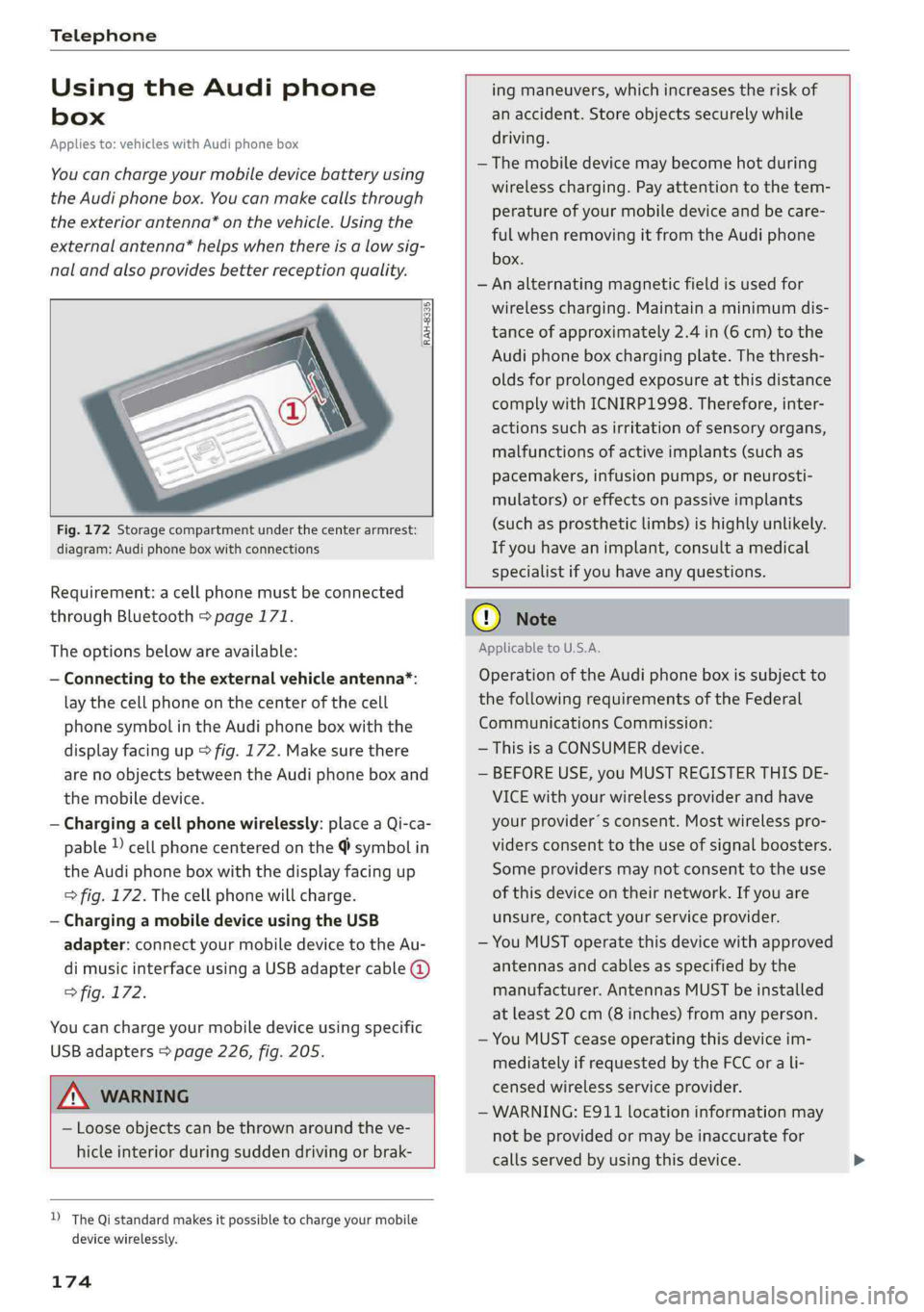
Fig.172Storagecompartmentunderthecenterarmrest:
diagram: Audiphoneboxwithconnections
Requirement:acellphonemustbeconnected
throughBluetooth>page171.
Theoptionsbelowareavailable:
—Connectingtotheexternalvehicleantenna*:
laythecellphoneonthecenterofthecell
phonesymbolintheAudiphoneboxwiththe
displayfacingup>fig.172.Makesurethere
arenoobjectsbetweenthe Audiphoneboxand
themobiledevice.
—Chargingacellphonewirelessly:placeaQi-ca-
pable»)cellphonecenteredonthe@symbolin
the Audiphoneboxwiththedisplayfacingup
>fig.172.Thecellphonewillcharge.
—ChargingamobiledeviceusingtheUSB
adapter:connectyourmobiledevicetotheAu-
dimusicinterfaceusingaUSBadaptercable(@)
>fig.172.
Youcanchargeyourmobiledeviceusingspecific
USBadapters>page226,fig.205.
ingmaneuvers,whichincreasestheriskof
anaccident.Storeobjectssecurelywhile
driving.
— Themobiledevicemaybecomehotduring
wirelesscharging.Payattentiontothetem-
perature ofyourmobiledeviceandbecare-
fulwhenremovingitfromthe Audiphone
box.
—Analternatingmagneticfieldisusedfor
wirelesscharging.Maintainaminimumdis-
tanceofapproximately2.4in(6cm)tothe
Audi
phoneboxchargingplate.Thethresh-
oldsforprolongedexposureat thisdistance
complywithICNIRP1998.Therefore,inter-
actionssuchasirritationofsensoryorgans,
malfunctionsofactiveimplants(suchas
pacemakers,infusionpumps,orneurosti-
mulators)oreffectsonpassiveimplants
(suchas prostheticlimbs)ishighlyunlikely.
Ifyouhaveanimplant,consultamedical
specialistifyouhaveanyquestions.
ZA\WARNING
—Looseobjectscanbethrownaroundtheve-
hicleinteriorduringsuddendrivingorbrak-
D_TheQistandardmakesitpossibletocharge yourmobile
devicewirelessly.
174
C)Note
ApplicabletoU.S.A.
Operationofthe Audiphoneboxissubjectto
thefollowingrequirementsoftheFederal
CommunicationsCommission:
—ThisisaCONSUMERdevice.
—BEFOREUSE,youMUSTREGISTERTHISDE-
VICEwithyourwirelessproviderandhave
yourprovider’sconsent.Mostwirelesspro-
vidersconsenttotheuseofsignalboosters.
Someprovidersmaynotconsenttothe use
ofthisdeviceontheirnetwork.Ifyouare
unsure,contactyourserviceprovider.
—YouMUSToperatethisdevicewithapproved
antennasandcablesasspecifiedby the
manufacturer.AntennasMUSTbeinstalled
atleast20cm(8inches)fromanyperson.
—YouMUSTceaseoperatingthisdeviceim-
mediatelyifrequestedbytheFCCorali-
censedwirelessserviceprovider.
—WARNING:E911locationinformationmay
notbeprovidedormaybeinaccuratefor
callsservedbyusingthisdevice.
Page 192 of 392
Audiconnect
AboutAudiconnect
Hereyouwillfindlegalinformationregarding
AudiconnectInfotainmentusage.
Login
See>page187.
Connectionmanager
See>page241.
Licensesubscription
Thevalidityandexpirationdateofyourlicenses
aredisplayed.
Refresh
ThecontentoftheselectedAudiconnectInfo-
tainmentserviceortheentireAudiconnectInfo-
tainmentlistisupdated.
Dataprivacy
Requirement:theignitionmustbe switchedon.
Location,vehicle,andpersonaldataaretransmit-
tedwhenusingAudiconnectservices.
Allowingsendingofdata
—SelectandconfirmActivatedataconnection.
Thedatamoduleforthe useofallAudiconnect
serviceswillbeactive.
Restrictingsendingofdata
—SelectandconfirmActivateprivacy.Thedata
connectionislimitedordeactivateddepending
ontheequipment.ThemajorityofAudiconnect
serviceswillnotbeavailable.
Thefollowinginterfacesarenotaffectedbythis
setting:Bluetooth,BluetoothLowEnergy(BLE),
Wi-Ficonnection,Audismartphoneinterface
(ASI),NearFieldCommunication(NFC),charging
communication(e-tron),ElectronicTollCollect
(ETC),ifequipped.
@)Note
Youareresponsibleforallprecautionstaken
fordataprotection,anti-virusprotection,and
protectionagainstlossofdataon mobilede-
))Dependsonthecountryand equipment. Theseservices
are availableforalimitedtime.
190
vicesthatareusedtoaccesstheInternet
throughtheWi-Fihotspot.
(i)Tips
—Ifthetransmissionofdataislimited,data
willstillbetransmittedtoverifysubscrip-
tions.
—Ifthetransmissionofdataislimited,itwill
havethefollowingeffectsontheexchange
ofdataforAudiconnectservicesandemer-
gencycalls,ifequipped:
—Theemergencycallfunctionwillremain
availablewithoutrestrictionsandwillcon-
tinuetotransmitdata.
—Ifanonlineroadsideassistancecallisini-
tiated,nodatawillbetransmitted,buta
callwillbemade.
—IftheGeofencingAlert,SpeedAlert,
and/orValetAlertserviceshavebeenacti-
vatedbythekeyuser,thentheywillre-
mainavailablewithoutrestrictionsand
continuetotransmitdata.
Audiconnectvehicle
controlservices
Appliesto:vehicleswithAudiconnectvehiclecontrol
WithAudiconnectvehiclecontrolservices)),you
canutilizevariousservicesusingthemyAudiapp
oronlineatwww.audiusa.com/myaudi.
(i)Tips
—Accessingspecificdataorcontrollingfunc-
tionsremotelydependsonthechargelevel
ofthevehiclebattery.Therefore,these
functionsonlyhavelimitedavailabilityafter
switchingofftheignition.
—AneSIMcardestablishestheInternetcon-
nectionforAudiconnectvehiclecontrol
services.Thecostsforthisareincludedin
thepriceofAudiconnectvehiclecontrol
services.Thecellphonenetwork,forexam-
ple,mustbeavailabletousetheseservices.
Page 225 of 392
8W0012721BG
Media
—Thestatusofthedeletingprocessisshownin
theMMI.Jukeboxplaybackstopsduringthede-
letingprocessandstartsagainautomatically
oncethedeletioniscomplete.
@)Note
Donotimportaudio/videofileswhentheen-
gineisturnedoffbecausethiswilldrainthe
vehiclebattery.
@)Tips
—TracksfromaudioCDscannotbeimported
totheJukeboxforlegalreasons.
—Filesthathavealreadybeenimportedare
automaticallyrecognizedandcannotbe
copiedtotheJukeboxagain.
—Itisnotpossibletoplay audio/video*files
intheCD/DVD*drivewhileimportingthem.
— TheJukeboxdoesnotprovideanexport
functionduetolegalreasons.
—Filesortrackswithoutadditionalstoredin-
formationarelistedasUnknown.Audirec-
ommendsaddingadditionalinformation
(such asID3tags)toaudiofiles.
—ResettheJukeboxtothefactorydefaultset-
tingswhensellingyourvehicle>page241.
Bluetoothaudioplayer
Appliesto:vehicleswithBluetoothaudioplayer
WiththeBluetoothaudioplayer,youcanplay
musicwirelesslyfromyourBluetooth-capable
device(suchasacellphone)throughtheMMI.
Requirement:thevehiclemustbestationaryand
theignitionmustbe switchedon.TheBluetooth
settingswillopenonyourmobiledeviceduring
theconnectionsetup.TheBluetoothfunctionand
visibilityoftheMMI>page243andmobilede-
vicemustbe switchedon.TheBluetoothaudio
player>page243mustbe switchedoninthe
MMI.
—ConnectingaBluetoothplayer:pressthe
MEDIA]button.Presstheleftcontrolbutton
untilthesourcesoverviewisdisplayed.Select
andconfirmBluetoothaudioplayer©)
>page229,fig.207.
—Ifnecessary,selectandconfirm:Notconnected
>ConnectBluetoothaudioplayer.TheBlue-
toothdevicesearchstarts.Followtheinstruc-
tionsintheMMI.
—
SelectandconfirmthedesiredBluetoothdevice
fromthelist.TheMMIgeneratesaPINforthe
connection.
—SelectandconfirmYes.
—EnterthePINforconnectingonyourBluetooth
device.Or:ifthePINisalreadydisplayedon
yourBluetoothdevice,confirmitintheBlue-
toothdeviceandintheMMI.Thetimeallowed
forenteringthePINislimitedtoapproximately
30seconds.
Themediaisstartedandoperatedthroughthe
mobiledeviceortheMMI,dependingonthede-
vicebeingused.
Gi)Tips
—Checkforanyconnectionrequestsonyour
Bluetoothdevice.
—MultipleBluetooth audioplayerscan be
connectedtotheMMI,butonlyonemobile
devicecanbeactive.
—BluetoothprotocolsAVRCP(1.0/1.3/1.4)
andA2DParesupported.
—NotethevolumesettingonyourBluetooth
device.Audirecommendssettingyourmo-
biledevicetothemaximumvolumewhen
usingitasaBluetooth audioplayer.
—Thesupportedmediafunctions(such as
shuffle)dependontheBluetoothdevicebe-
ingused.
—Formoreinformationonsupporteddevices,
visitwww.audiusa.com/bluetoothorcon-
tactanauthorizedAudidealerorauthorized
AudiServiceFacility.
223
Page 228 of 392
— Depending ontheInternetconnectionand
networktraffic,theconnectionmaydiscon-
nectedwhenonlinemediasourcesareplay-
ing.
—OnlinemediaandInternetradiousagede-
pendsontheserviceavailabilityofthethird
partyprovider.
—AudiAGsimplymakestheaccesstoonline
mediaservicespossiblethroughtheMMI
anddoesnottakeanyresponsibilityforthe
contentsoftheonlinemediaservices.
—Alwaysreadthe chapter>page186,Audi
connect.
— Depending onthemobiledevicebeingused,
theremaybeinterruptionsduringmedia
playbackandwhenusingthemyAudiapp.
Topreventinterruptionswhenusingamo-
biledevice,donotlockthescreenonyour
mobiledeviceandkeepthemyAudiappin
theforeground.
—ContactanauthorizedAudidealeror au-
thorizedAudiServiceFacilityforadditional
informationaboutonlinemedia.
Multimediaconnections
USBadapterforAudimusicinterfaceor
USBchargingport
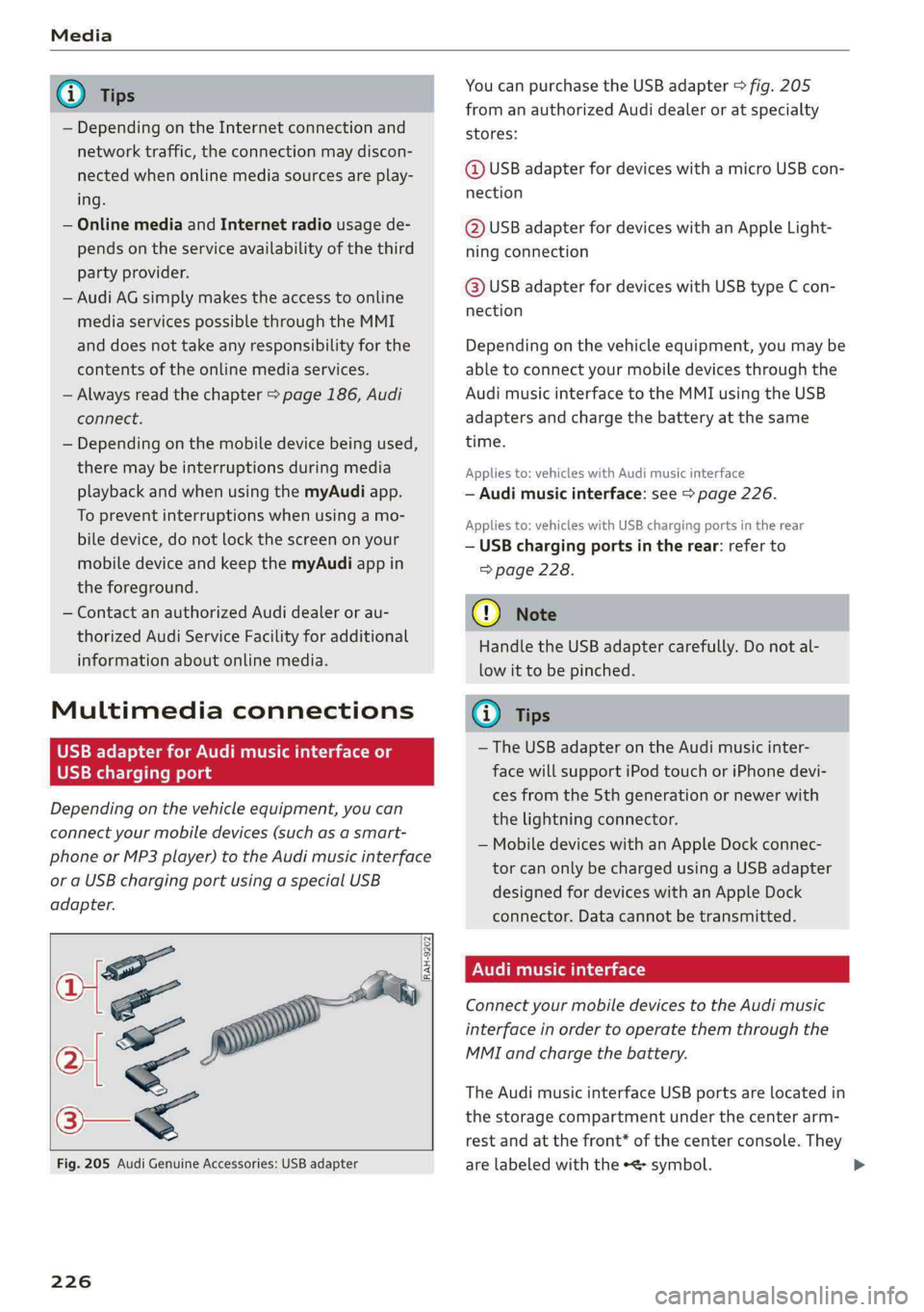
Dependingonthevehicleequipment,youcan
connectyourmobiledevices(suchas asmart-
phoneorMP3player)totheAudimusicinterface
oraUSBchargingportusingaspecialUSB
adapter.
ao
ee
alS
_<
Fig.205AudiGenuineAccessories:USBadapter
[RAH-9202
ae
\
226
YoucanpurchasetheUSBadapter>fig.205
fromanauthorizedAudidealeroratspecialty
stores:
@USBadapterfordeviceswithamicroUSBcon-
nection
@USBadapterfordeviceswithanAppleLight-
ningconnection
@USBadapterfordeviceswithUSBtypeCcon-
nection
Dependingonthevehicleequipment,youmaybe
abletoconnectyourmobiledevicesthroughthe
Audi
musicinterfacetotheMMIusingtheUSB
adaptersandchargethebatteryatthesame
time.
Appliesto:vehicleswithAudimusicinterface
—Audimusicinterface:see>page226.
Appliesto:vehicleswithUSBchargingportsintherear
—USBchargingportsintherear:referto
=>page228.
@)Note
HandletheUSBadaptercarefully.Donotal-
lowittobepinched.
(i)Tips
— TheUSBadapteronthe Audimusicinter-
facewillsupportiPodtouchoriPhonedevi-
cesfromthe5thgenerationornewerwith
thelightningconnector.
—MobiledeviceswithanAppleDockconnec-
torcanonlybechargedusingaUSBadapter
designedfordeviceswithanAppleDock
connector.Datacannotbetransmitted.
NUTTae)
ConnectyourmobiledevicestotheAudimusic
interfaceinordertooperatethemthroughthe
MMIandchargethebattery.
TheAudimusicinterfaceUSBportsarelocatedin
thestoragecompartmentunderthecenterarm-
restandatthefront*ofthecenterconsole.They
arelabeledwiththe«<>symbol.
Page 229 of 392
8W0012721BG
Media
TheAudimusicinterfaceAUXinputislocatedin
thestoragecompartmentunderthecenter
armrestandislabeledwithAUX.
USBInput
—Connectingorchargingamobiledeviceusing
theUSBadapter:connectthematchingUSB
adaptertotheAudimusicinterfaceUSBport
andthenconnectittothemobiledevice,such
asaniPhone.Thebatterywillchargeautomati-
cally.
—DisconnectingamobiledevicefromtheAudi
musicinterface::removetheUSBadapterfrom
the AudimusicinterfaceUSBport.
Themediaarestartedandoperatedthroughthe
mobiledeviceortheMMI,dependingonthede-
vicebeingused>page229.
Connectingmultiplemobiledevices:ifamobile
device(suchasasmartphone)isconnectedatthe
respectiveUSBportonthe Audimusicinterface,
thenalldevicescan beusedasa playbacksource.
AUXInput
—Connectingamobiledevice totheAUXinput:
connecttheAUXcabletotheAUXinputonthe
Audimusicinterfaceandthentothemobilede-
vice(suchasanMP3player orsmartphone).
—DisconnectingamobiledevicefromtheAUX
input:removetheAUXcablefromtheAUXin-
putontheAudimusicinterface.
—Operation:selectandconfirm theExternalau-
dio playersourceG)>page229,fig.206.Me-
diaisstartedandoperatedonthemobilede-
VICE.
ZAWARNING
Drivingrequiresyourcompleteandundivided
attention.Asthedriver,youhavecompletere-
sponsibilityforsafetyintraffic.Neveroperate
mobiledeviceswhiledriving,becausethisin-
creasestheriskofanaccident.
@)Note
—UseaUSBextensioncabletoconnectdevi-
cesthathaveanintegratedUSBconnector
))Applies onlytoMTPdevices.DoesnotapplytoAppledevi-
cesandUSBmassstoragedevices.
(suchasaUSBstick)topreventdamageto
yourUSBdeviceandthe Audimusicinter-
face.
—Extremelyhighorlow temperaturesthat
canoccurinsidevehiclescandamagemobile
devicesand/orimpairtheirperformance.
Neverleavemobiledevicesinthevehiclein
extremelyhighorlowtemperatures.
Gi)Tips
—Alwaysfollowtheinformationfoundin
=>page62.
—Whenyouswitchtheignitionoff,theUSB
portsarestillsuppliedwithpoweruntilthe
energymanagementintervenes.
—DonotuseanadditionaladapterorUSBex-
tensioncabletoconnectmobiledevicesto
the Audimusicinterfacethatalreadyhavea
cableorthatmustbeconnectedwithaUSB
adapter(>page226).Usinganadditional
adapterorUSextensioncablemayimpair
functionality.
—YoucanpurchasetheAUXconnectorcable
fromanauthorizedAudidealeror atspe-
cialtystores.
—Audirecommendssettingthevolumeofa
mobiledeviceconnectedtotheAUXinputto
approximately70%ofthemaximumvol-
ume.
—Functionalityisnotguaranteedformobile
devicesthatdonotconformtotheUSB2.0
specification.
— USBhubsarenotsupported.
—SomeversionsoftheiPodsuchastheiPod
shufflecannotbeconnectedtotheUSB
adapterfordeviceswithAppleDockconnec-
tor.ConnectthesedevicesusingaAUXcon-
nectorcable.
—Changedcontentonamobiledevicethat
isconnectedtotheAudimusicinterface
maynotbedisplayedinthemediacenter.In
this
case,resettheMediasettingsbackto
Factorysettings>page241.
—Videoplaybackthroughthe Audimusicin-
terfaceisonlysupportediftheconnected
227
>
Page 230 of 392

Media
deviceisrecognizedasaUSBstoragedevice
(forexampleaUSBstick).Appledevicesand
MTPdevices(suchassmartphones)arenot
recognizedasUSBstoragedevices.
—iPodoriPhonemalfunctionsalsoaffectthe
operationoftheMMI.ResetyouriPod or
iPhoneifthishappens.
—AudirecommendsupdatingtheiPodor
iPhonesoftwaretothelatestversion.For
importantinformationonoperatingyour
iPod oriPhone,refertotheuserguidefor
thedevice.
— TheUSBadapterontheAudimusicinter-
facewillsupportiPodtouchoriPhonedevi-
cesfromthe5thgenerationornewerwith
thelightningconnector.
—Formoreinformationaboutthe Audimusic
interfaceandsupporteddevices,checkthe
Audidatabaseformobiledevicesatwww.
audiusa.com/mp3orcontactanauthorized
AudidealerorauthorizedAudiServiceFa-
cility.
USBchargingportsintherear
Appliesto:vehicleswithUSBchargingportsintherear
Youcanchargethebatteryon yourmobiledevice
throughaUSBchargingport.
Two USBchargingportsarelocatedatthebackof
the centerconsole.
—USBadapter:referto>page226,USBadapter
forAudi musicinterfaceorUSBchargingport.
—ChargingamobiledeviceusingtheUSB
adapter:connectyourmobiledevice toaUSB
chargingportusingasuitableUSBadapter.
—Disconnectingamobiledevicefromthecharg-
ingport:removetheUSBadapterfromtheUSB
chargingport.
—DisconnectingmobiledeviceswithanApple
Dockconnector:removetheAppleDockcon-
nectorfromtheAppledevicewiththerelease
tabspressedin.
Z\WARNING
Drivingrequiresyourcomplete andundivided
attention.Asthedriver,youhavecompletere-
sponsibilityforsafetyintraffic.Neveroperate
228
yourmobiledeviceswhiledriving,because
thisincreasestheriskofanaccident.
()Note
Extremelyhighorlowtemperaturesthatcan
occurinsidevehiclescandamagemobiledevi-
cesand/orimpairtheirperformance.Never
leavemobiledevicesinthevehicleinex-
tremelyhighorlowtemperatures.
G)Tips
—Inpreparationatthetimeofprinting.
—Alwaysfollowtheinformationfoundin
=>page62.
—Whenyouswitchtheignitionoff,theUSB
portsarestillsuppliedwithpoweruntilthe
energymanagementintervenes.
—DonotuseanyadditionalUSBextensionca-
blesoradapterstoconnectmobiledevices
totheUSBchargingport thathavealready
beenconnectedbyaUSBadapter.Usingan
additionaladapterorUSextensioncable
mayimpairfunctionality.
—USBhubsarenotsupported.
—Refertothemanufacturer'soperatingman-
ualforimportantinformationregardingthe
operationofyourmobiledevice.
—Correctfunctionofallmobiledevicescan-
notbeguaranteed.
— Thevehiclebatterydrainswhenmobilede-
vicesareturnedonbuttheengineisoff.
Rear SeatEntertainmentpreparation
Appliesto:vehicleswith Rear SeatEntertainmentpreparation
TheRear SeatEntertainmentpreparationin-
cludescablesandamountforAudiEntertain-
mentmobileinthedriver'sandfrontpassenger's
seatbackrests.
ThesuitableAudiEntertainmentmobileRear
SeatEntertainmentpackageisavailablethrough
AudiGenuineAccessories.
UsingAudiGenuineAccessoriesisrecommended.
Audihasverifiedtheirreliability,safety,andsuit-
ability.
Page 239 of 392
8W0012721BG
Media
ProblemSolution
Audimusicinterface:themobile
deviceisnotrecognizedasa
source.
Formanycellphonesormobiledevices,playbackisnotpossible
when
thebatterylevelistoolow(lessthan5%ofitscapacity).
ThemobiledevicewillonlyberecognizedasasourceintheMMI
afterconnectingifthebatterychargeissufficient.
Audimusicinterface:malfunc-
tionsduringaudioplayback
throughaniPod/iPhone.
TheBluetoothaudioplayerfunctionisswitchedon.Switchthis
functionoff>page243whenyouarenotusingtheBluetoothau-
dioplayer.
Audimusicinterface:contents
thatarechangedonamobilede-
viceconnectedtotheAudimusic
interface®)arenotdisplayedin
themediacenter.
Reset theMediasettingstothefactorydefaultsettings
>page241.
AUXinput:thereisstaticwhen
connectinganddisconnectingthe
AUXconnectioncable.
Whenconnectinganddisconnecting,theExternalaudioplayer
sourceisalreadyselected.Beforeconnectingordisconnectingthe
mobiledevice,eithermutethedevice(see>page245)orswitch
toadifferentaudiosource(forexample>page215,Openingthe
radio).
Bluetoothaudioplayer*/Wi-Fi
audioplayer*:audioplaybackin-
terference.
Onlyoneinterfaceshouldbeactivelyusedatatimetoensure
problem-freeplayback.
Jukebox®*:tracks ontheimported
playlistaregrayedout.
Whenimportingplaylists,allofthefilesthemselvesmustbeim-
ported.
Jukebox*:importedtrackscannot
beplayedorfound.
Ifyoucannotfindimportedtracksinthemediacenter,theymay
notbesupported.Onlycopysupportedfiles>page235tothe
Jukebox.
Onlinemedia*:connectionfailed
betweentheMMIandthemyAudi
app.
ToestablishaconnectiontotheMMI,theMMIconnectionswitch
mustbe switchedoninthemyAudiappstatusscreen.
Bluetoothaudioplayer*:interfer-
encewithtrackdisplayandaudio
playback.
PlaybackinterferencecanoccurwhenusingtheBluetoothaudio
playerifamusicplayerappfromathirdpartyproviderisopen.
Audi
recommendsusingtheintegratedmediaplayeronyourBlue-
toothdevice(suchasasmartphone).
Wi-Fihotspot*:yourWi-Fidevice
isdisconnectedfromtheWi-Fi
hotspot.
Makesurethenetworkoptimizationfunctionsareswitchedoffin
theWi-FisettingsorinthenetworksettingsforyourWi-Fidevice.
ForadditionalinformationrefertotheuserguideforyourWi-Fi
device.
Audimusicinterface:audioplay-
backthroughtheconnectedmo-
biledeviceisnotpossible.
MakesuretheUSBmodeMTPisselectedinthesettingsonyour
mobiledevice.
2)Applies onlytoMTPdevices.DoesnotapplytoAppledevicesandUSBmassstoragedevices.
237