center console AUDI A4 2019 User Guide
[x] Cancel search | Manufacturer: AUDI, Model Year: 2019, Model line: A4, Model: AUDI A4 2019Pages: 392, PDF Size: 99.53 MB
Page 135 of 392
8W0012721BG
Parkingaid
@)Note
—Alwaysreadandfollowtheapplicablewarn-
ings>@inGeneralinformationon
page129.
— Theorange-coloredorientationlinesinthe
Infotainmentdisplayshowthevehiclepath
basedonthesteeringwheelangle.The
frontofthevehicleswings outmorethan
therearofthevehicle.Maintainplentyof
distanceso thatanexteriormirrororacor-
nerofthevehicledoesnotcollidewithany
obstacles.
SicRiemela
Appliesto:vehicleswith rearviewcamera
Switchingonandoff
Requirement:thevehiclespeedmustbeunder
approximately6mph(10km/h).
>PressthePbuttoninthe centerconsole
=>page131,fig.130.Ashortconfirmation
tonesoundsandtheLEDinthe buttonturns
on.
Switchingonautomatically
Thesystemswitchesonautomaticallywhenre-
versegearisengagedwhiletheengineisrun-
ning.Abrieftonewillsound.
Switchingoffautomatically
Thesystemswitchesoffautomaticallywhendriv-
ingforwardfasterthan6mph(10km/h).
Perpendicularparking
Appliesto:vehicleswith rearviewcamera
Thisviewmaybe usedwhenparkinginagarage
orinaparkingspace.
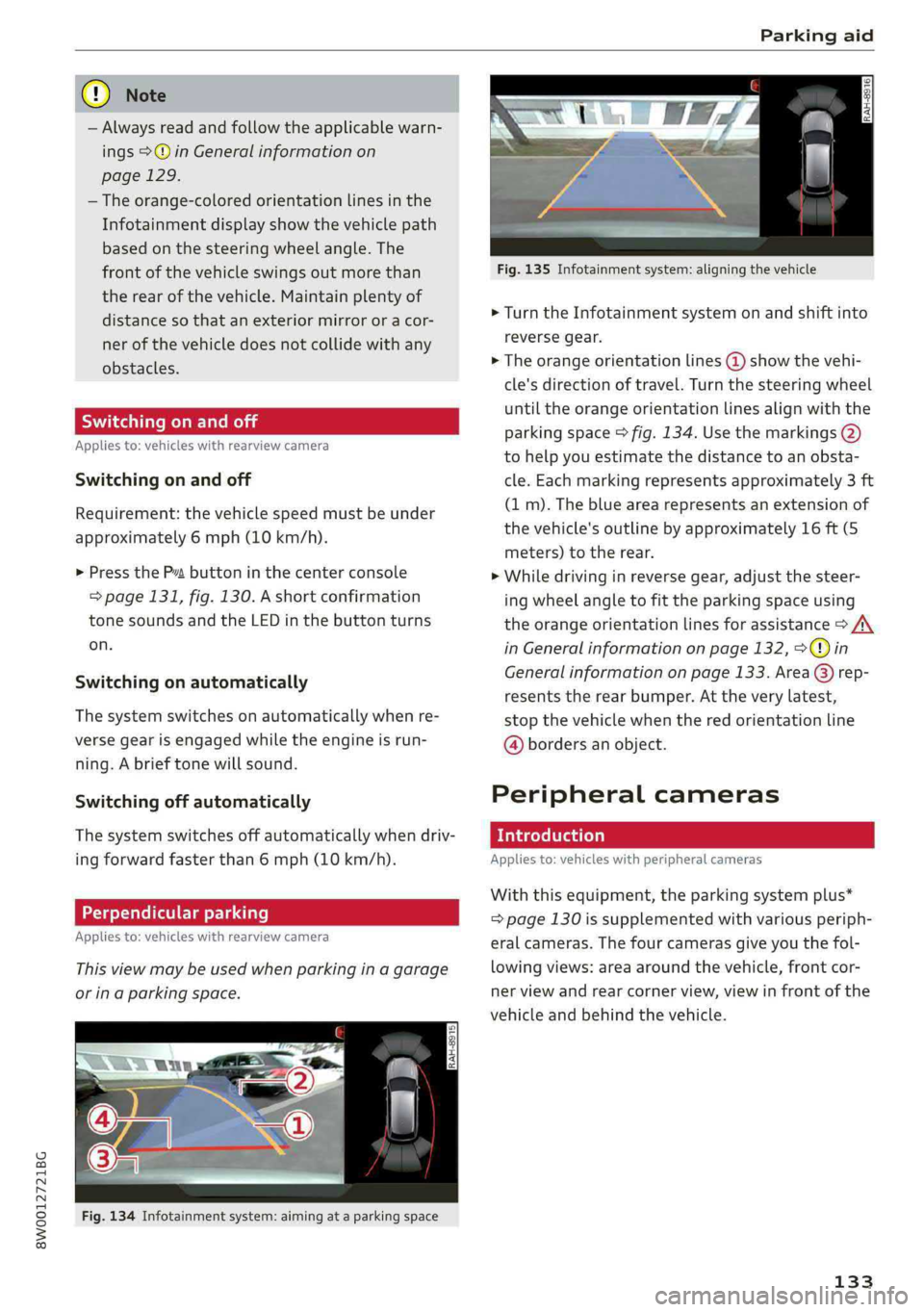
Fig.134Infotainmentsystem:aimingat aparkingspace
Fig.135Infotainmentsystem:aligningthevehicle
>Turn theInfotainmentsystemonandshiftinto
reversegear.
>Theorangeorientationlines@)showthevehi-
cle'sdirectionoftravel.Turnthesteeringwheel
untiltheorangeorientationlinesalignwiththe
parkingspace>fig.134.Usethemarkings@)
tohelpyouestimatethedistancetoanobsta-
cle.Eachmarkingrepresentsapproximately3ft
(1m).Thebluearearepresentsanextensionof
thevehicle'soutlinebyapproximately16ft(5
meters)totherear.
>Whiledrivinginreversegear,adjustthesteer-
ing
wheelangletofittheparkingspaceusing
theorangeorientationlinesforassistance>/\
inGeneralinformationonpage132,>@)in
Generalinformationonpage133. Area@)rep-
resentstherearbumper.Attheverylatest,
stopthevehiclewhentheredorientationline
@bordersanobject.
Peripheralcameras
Introduction
Appliesto:vehicleswithperipheralcameras
Withthisequipment,theparkingsystemplus*
=page130issupplementedwithvariousperiph-
eralcameras.Thefourcamerasgiveyouthefol-
lowingviews:areaaroundthevehicle,frontcor-
nerviewandrearcornerview,viewinfrontofthe
vehicleandbehindthevehicle.
133
Page 136 of 392
Parkingaid
Generalinformation
Appliesto:vehicleswithperipheralcameras
B8W-0108
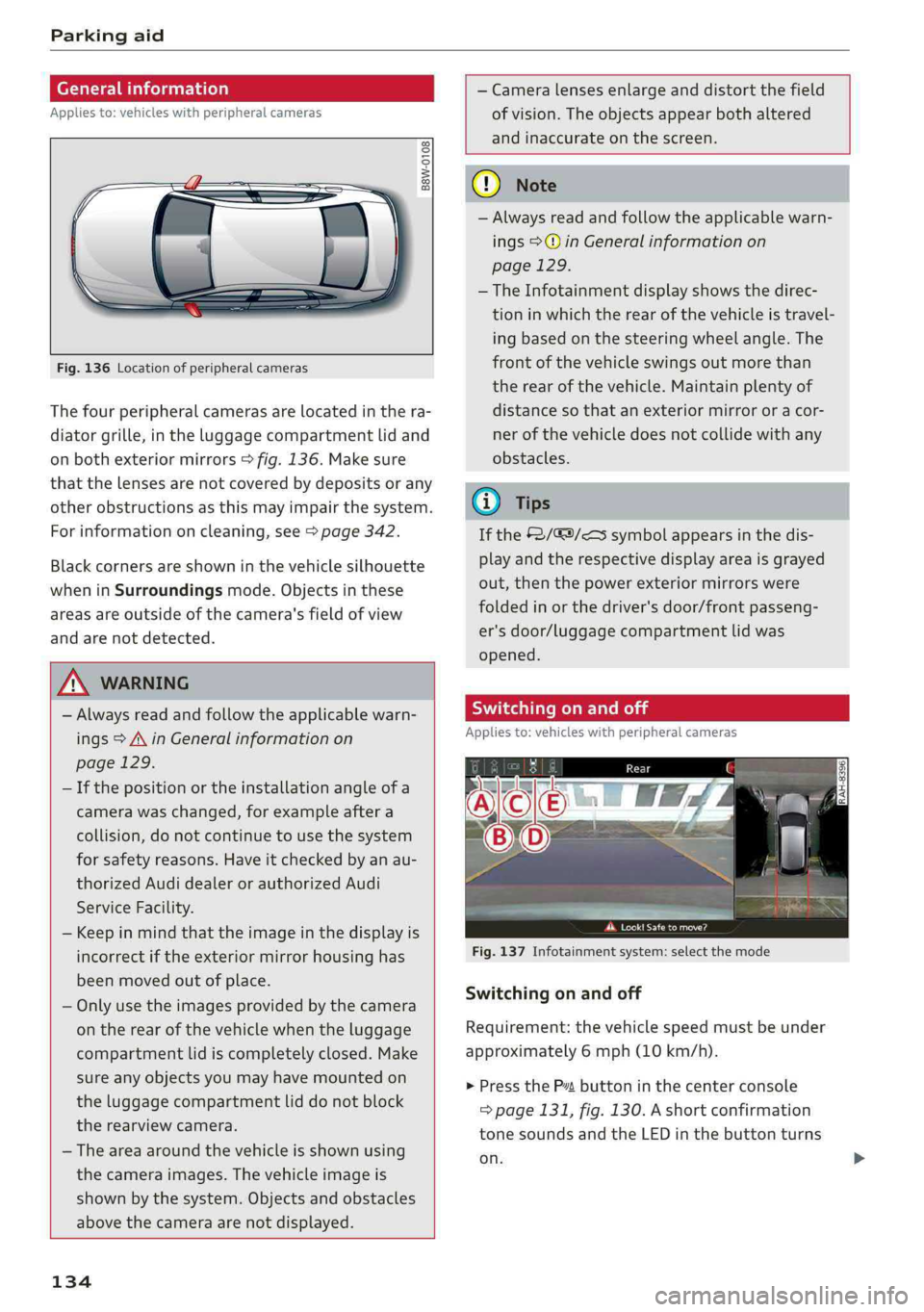
Fig.136Locationofperipheralcameras
Thefourperipheralcamerasarelocatedinthera-
diatorgrille,intheluggagecompartmentlidand
onbothexteriormirrors>fig.136.Makesure
thatthelensesarenotcoveredbydepositsorany
otherobstructionsasthismayimpairthesystem.
Forinformationoncleaning,see>page342.
Blackcornersareshowninthevehiclesilhouette
wheninSurroundingsmode.Objectsinthese
areasareoutsideofthecamera'sfieldofview
andarenotdetected.
ZA\WARNING
—Alwaysreadandfollowtheapplicablewarn-
ings>A\inGeneralinformationon
page129.
—Ifthepositionortheinstallationangleofa
camerawaschanged,forexampleaftera
collision,donotcontinuetousethesystem
forsafetyreasons.Haveitcheckedbyanau-
thorizedAudidealerorauthorizedAudi
ServiceFacility.
—Keepinmindthattheimageinthedisplayis
incorrectiftheexteriormirrorhousinghas
beenmovedoutofplace.
—Onlyuse theimagesprovidedby thecamera
ontherearofthevehiclewhentheluggage
compartmentlidiscompletelyclosed.Make
sureanyobjectsyoumayhavemountedon
theluggagecompartmentliddonotblock
therearviewcamera.
— Theareaaroundthevehicleisshownusing
thecameraimages.Thevehicleimageis
shownbythesystem.Objectsandobstacles
abovethecameraarenotdisplayed.
134
—Cameralensesenlargeanddistortthefield
ofvision.Theobjectsappearbothaltered
andinaccurateonthescreen.
@)Note
—Alwaysreadandfollowtheapplicablewarn-
ings>@inGeneralinformationon
page129.
— TheInfotainmentdisplayshowsthedirec-
tioninwhichtherearofthevehicleistravel-
ing
basedonthesteeringwheelangle.The
frontofthevehicleswingsoutmorethan
therearofthevehicle.Maintainplentyof
distanceso thatanexteriormirrororacor-
nerofthevehicledoesnotcollidewithany
obstacles.
@Tips
Ifthe2/&9/
out,thenthepowerexteriormirrorswere
foldedinorthedriver'sdoor/frontpasseng-
er'sdoor/luggagecompartmentlid was
opened.
Switchingonandoff
Appliesto:vehicleswithperipheralcameras
Pcaa
Fig.137Infotainmentsystem:selectthemode
Switchingonandoff
Requirement:thevehiclespeedmustbeunder
approximately6mph(10km/h).
>PresstheP”buttoninthecenterconsole
=>page131,fig.130.Ashortconfirmation
tonesoundsandtheLEDinthebuttonturns
on.
Page 141 of 392
8W0012721BG
IntelligentTechnology
—Presstheacceleratorpedalcarefullywhen
acceleratingonsmooth,slipperysurfaces
suchasiceandsnow.Thedrivewheelscan
spinevenwhenthesecontrolsystemsarein-
stalledandthiscanaffectdrivingstability
andincreasetheriskofacollision.
@)Tips
— TheABSandASRonlyfunctioncorrectly
whenallfourwheelshaveasimilarwear
condition.Differenttiresizescanleadtoa
reductioninenginepower.
—Youmayhearnoiseswhenthesystemsde-
scribedareworking.
Switchingon/off
ESCturnsonautomaticallywhenyoustarttheengine.
2
gz
=& a
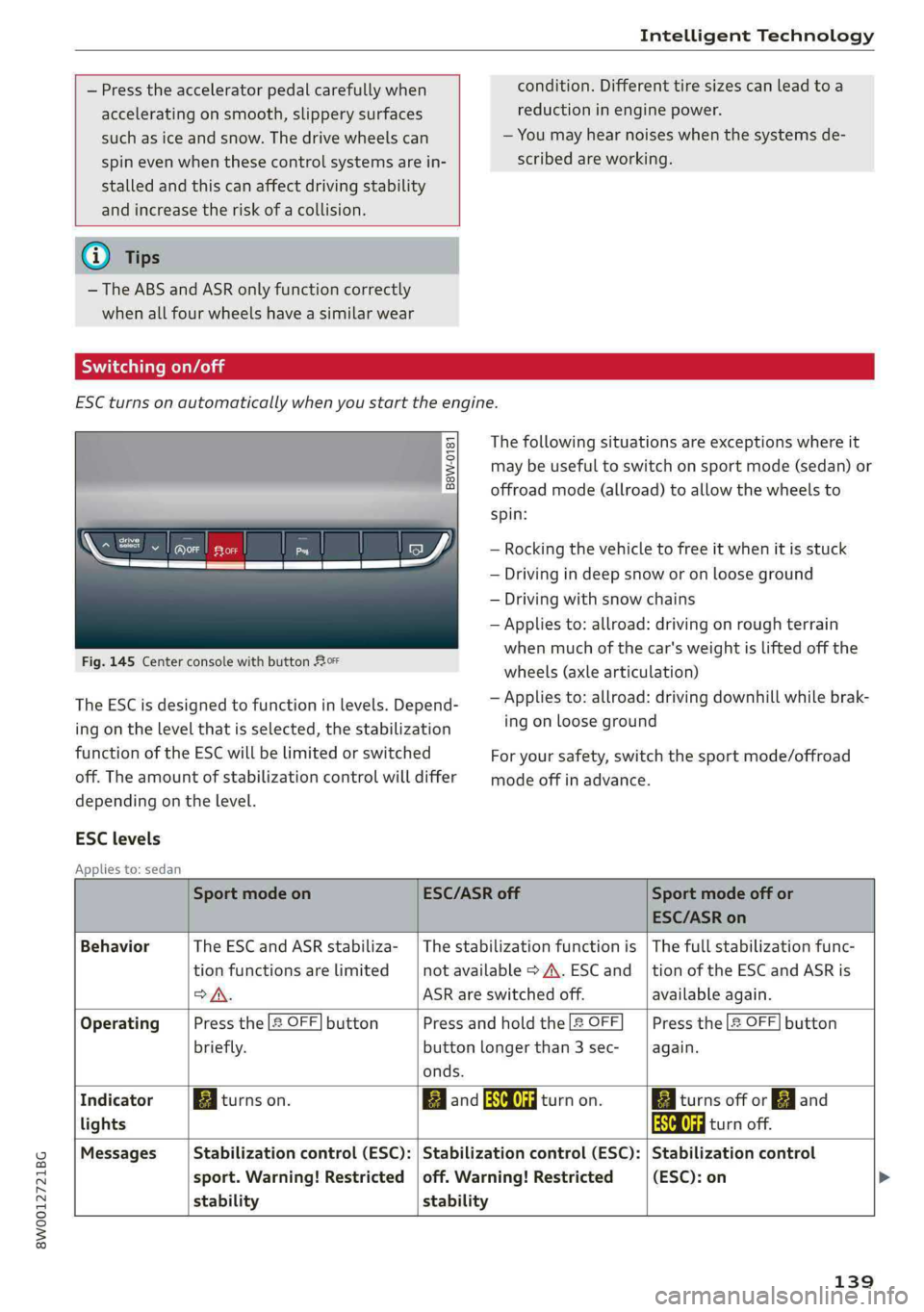
Fig.145CenterconsolewithbuttonRor
TheESCisdesignedtofunctioninlevels.Depend-
ingonthelevelthatisselected,thestabilization
functionoftheESCwillbelimitedorswitched
off.Theamountofstabilizationcontrolwilldiffer
dependingonthelevel.
Thefollowingsituationsareexceptionswhereit
maybeuseful toswitchonsportmode(sedan)or
offroadmode(allroad)toallowthewheelsto
spin:
—Rocking thevehicletofreeitwhenitisstuck
—Drivingindeepsnoworonlooseground
—Drivingwithsnowchains
—Appliesto:allroad:drivingonroughterrain
whenmuchofthecar'sweightisliftedoffthe
wheels(axlearticulation)
—Appliesto:allroad:drivingdownhillwhilebrak-
ingonlooseground
Foryoursafety,switchthesportmode/offroad
modeoffinadvance.
ESClevels
Appliesto:sedan
SportmodeonESC/ASRoffSportmodeoffor
ESC/ASRon
BehaviorThe ESC andASRstabiliza-|Thestabilizationfunctionis|Thefullstabilizationfunc-
tionfunctionsarelimitednotavailable>A\.ESCand_|tionoftheESC andASRis
oA.ASRareswitchedoff.availableagain.
OperatingPressthe[2OFF]buttonPressandholdthe|&OFFPressthe[2OFF]button
briefly.buttonlongerthan3sec-again.
onds.
IndicatorBiturnson.BancRdturnon.BaiturnsofforEJand
lightsaaturnoff.
MessagesStabilizationcontrol(ESC):|Stabilizationcontrol(ESC):|Stabilizationcontrol
sport.Warning!Restricted|off.Warning!Restricted(ESC):on
stability stability
139
Page 142 of 392
IntelligentTechnology
Appliesto:allroad
Youshouldonlyswitchsportmode/offroad
modeonorswitchESC/ASRoffifyourdriving
abilitiesandroadconditionspermit.
—Thestabilizationfunctionislimitedwhen
sportmode/offroadmodeisswitchedon.
Thedrivingwheelscouldspinandthevehi-
clecouldswerve,especiallyonslickorslip-
peryroadsurfaces.
—Thereisnovehiclestabilizationwhen
ESC/ASRareswitchedoff.
Hilldescentassist
Appliesto:allroad
Hilldescentassistmakesitpossibletodrive
downahillataconstantspeed.
a
Q
gz
=& a
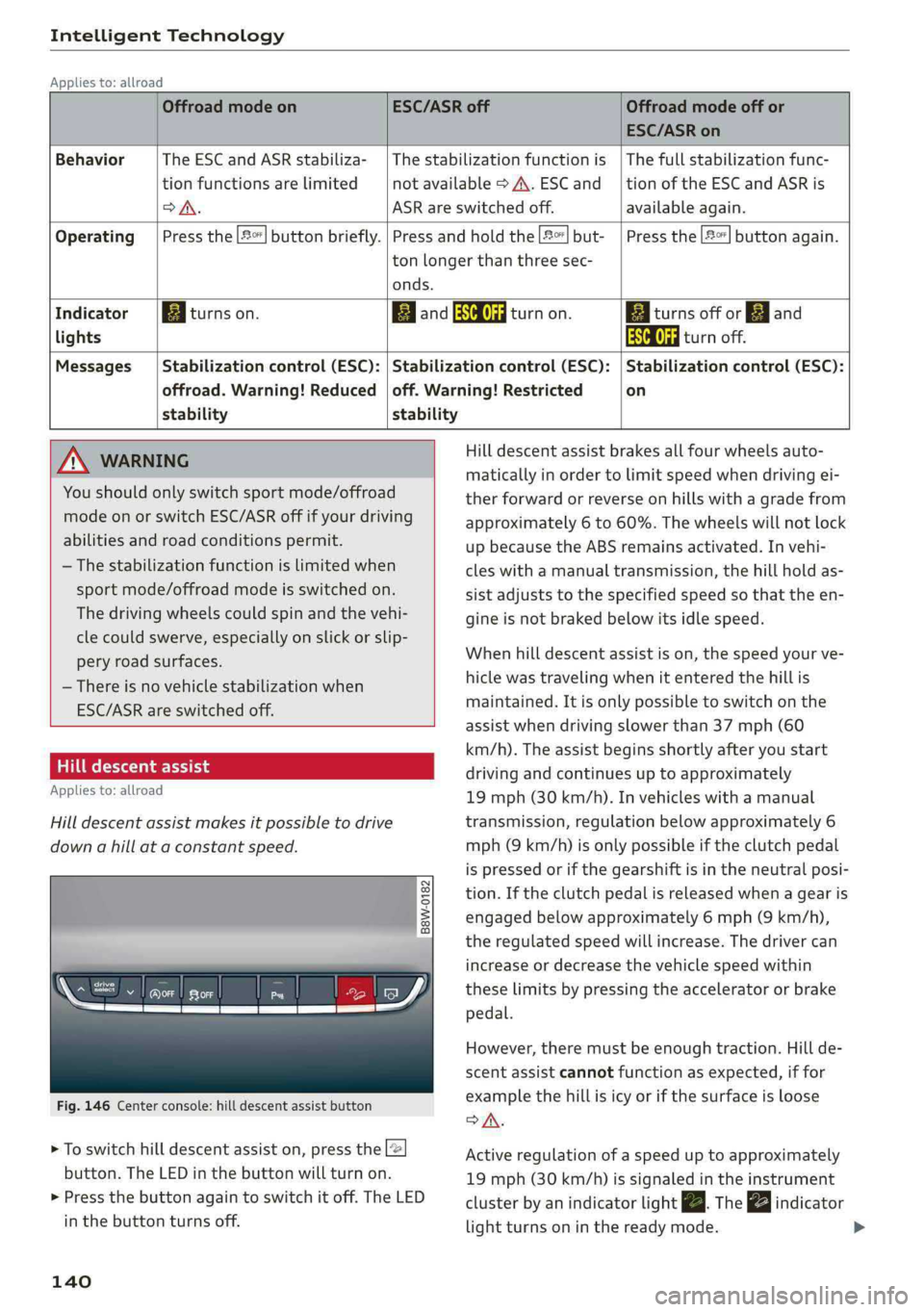
Fig.146Centerconsole:hilldescentassistbutton
>Toswitchhilldescentassiston,presstheL@
button.TheLEDinthebuttonwillturnon.
>»Pressthebuttonagaintoswitchitoff.The LED
inthe buttonturnsoff.
140
OffroadmodeonESC/ASRoffOffroadmodeoffor
ESC/ASRon
BehaviorThe ESC andASRstabiliza-|Thestabilizationfunctionis|Thefullstabilizationfunc-
tionfunctionsarelimitednotavailable>A\.ESCand__|tionoftheESCandASRis
DSA.ASRareswitchedoff.available again.
Operating|Pressthe|#°*]buttonbriefly.|Pressandholdthe||but-|Pressthe|#°"|buttonagain.
tonlongerthanthreesec-
onds.
IndicatorEgiturnson.ElandSaturnon.Eaiturnsoffor[gjand
lightsEaturnoff.
Messages|Stabilizationcontrol(ESC):|Stabilizationcontrol(ESC):|Stabilizationcontrol(ESC):
offroad.Warning!Reduced|off.Warning!Restrictedon
stability stability
AWARNINGHilldescentassistbrakesallfourwheelsauto-
maticallyinordertolimitspeedwhendrivingei-
therforwardorreverseonhillswithagradefrom
approximately6to60%.Thewheelswillnotlock
upbecausetheABSremainsactivated.Invehi-
cleswithamanualtransmission,thehillholdas-
sistadjuststothespecifiedspeedso thattheen-
gineisnot brakedbelowitsidlespeed.
Whenhilldescentassistison,thespeedyourve-
hiclewastravelingwhenitentered thehillis
maintained.Itisonlypossible toswitchonthe
assistwhendrivingslowerthan37mph(60
km/h).Theassistbeginsshortlyafteryoustart
drivingandcontinuesuptoapproximately
19mph(30km/h).Invehicleswithamanual
transmission,regulationbelowapproximately6
mph(9km/h)isonlypossibleiftheclutchpedal
ispressedorifthegearshiftisintheneutralposi-
tion.Iftheclutchpedalisreleasedwhenagearis
engagedbelowapproximately6mph(9km/h),
the regulatedspeedwillincrease.Thedrivercan
increaseordecreasethevehiclespeedwithin
theselimitsbypressingtheacceleratororbrake
pedal.
However,theremustbeenoughtraction.Hillde-
scentassistcannotfunctionasexpected,iffor
examplethehillisicyorifthesurfaceisloose
SA.
Activeregulationofaspeeduptoapproximately
19mph(30km/h)issignaledintheinstrument
clusterby anindicatorlightZBTheindicator
lightturnsoninthereadymode.
Page 147 of 392
8W0012721BG
MultiMediaInterface
MultiMediaInterface
Trafficsafety
information
AudirecommendsperformingcertainInfotain-
mentsystemfunctions,suchasenteringa desti-
nation,onlywhenthevehicleisstationary.Al-
waysbepreparedtostopoperating theInfotain-
mentsystemintheinterestofyoursafetyand
thesafety ofotherroadusers.
Z\WARNING
Onlyuse theInfotainmentsystemwhentraf-
ficconditionspermitandalwaysinawaythat
allows
youtomaintaincompletecontrolover
yourvehicle.
G@)Tips
Certainfunctionsarenotavailablewhiledriv-
ing.
Introduction
TheMultiMediaInterface,orMMIforshort,
combinesvarioussystemsforcommunication,
navigation*andentertainmentinyourAudi.You
canoperatetheMMIusingtheMMIcontrolpan-
el,themultifunctionsteeringwheelorthevoice
recognitionsystem*.
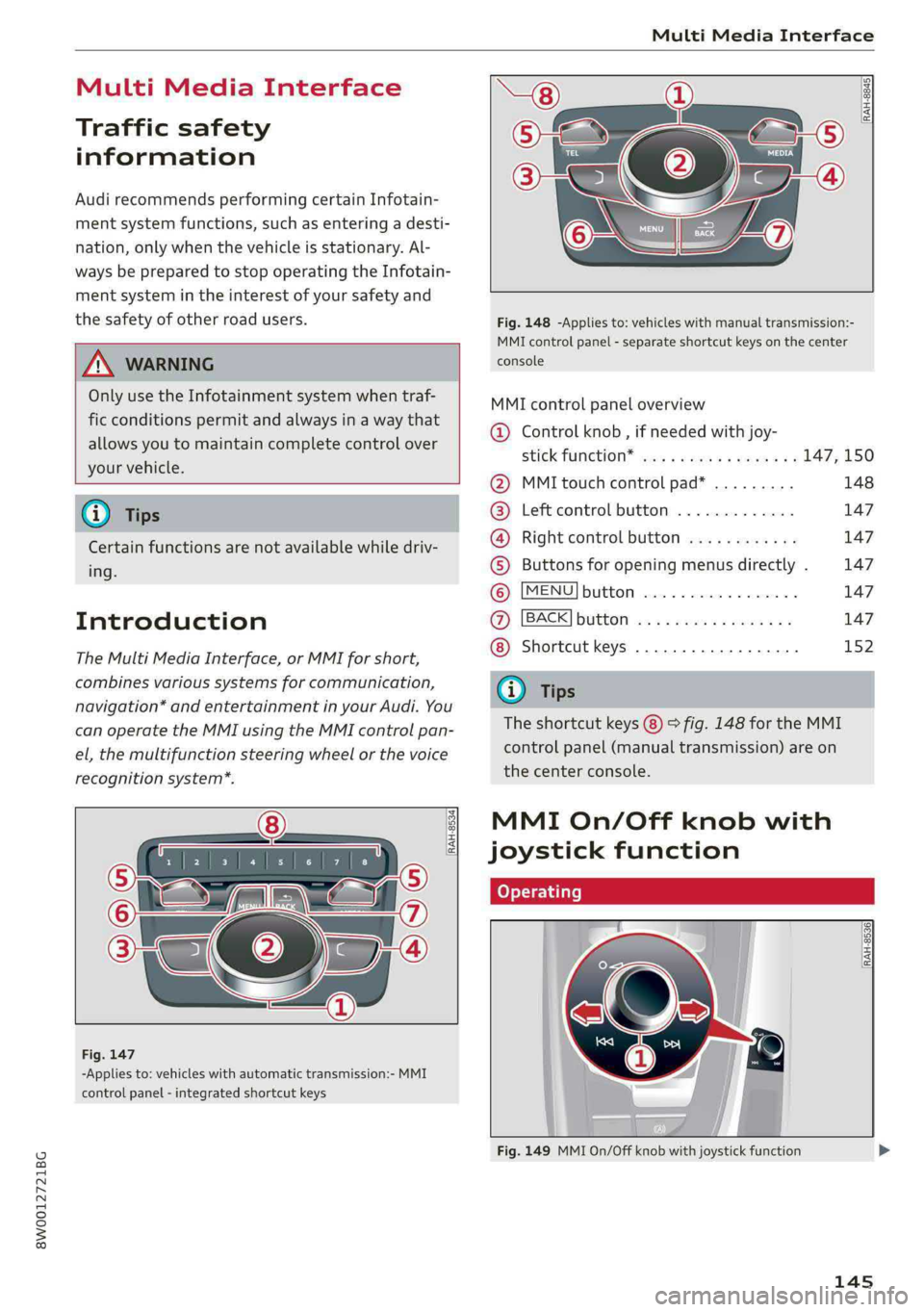
[RAH-8534)
-Appliesto:vehicleswithautomatictransmission:-MMI
controlpanel-integratedshortcutkeys
RAH-8845|
Fig.148-Appliesto:vehicleswithmanualtransmission:-
MMIcontrolpanel-separateshortcutkeysonthecenter
console
MMIcontrolpaneloverview
@Controlknob,ifneededwithjoy-
StiCKTURCKION®cieseaeaswareswex147,150
@MMItouchcontrolpad*.........148
@®Leftcontrolbutton.............147
@®Rightcontrolbutton............147
©Buttonsforopeningmenusdirectly.147
©[MENU]button...............2.147
@[BACK]button............0....147
Shortcutkeys.............0000.152
@Tips
Theshortcutkeys@)©fig.148fortheMMI
controlpanel(manualtransmission)areon
the centerconsole.
MMIOn/Offknobwith
joystickfunction
tome|
[RAH-8536)
ee|7
a
Fig.149MMIOn/Offknobwithjoystickfunction
145
Page 228 of 392
— Depending ontheInternetconnectionand
networktraffic,theconnectionmaydiscon-
nectedwhenonlinemediasourcesareplay-
ing.
—OnlinemediaandInternetradiousagede-
pendsontheserviceavailabilityofthethird
partyprovider.
—AudiAGsimplymakestheaccesstoonline
mediaservicespossiblethroughtheMMI
anddoesnottakeanyresponsibilityforthe
contentsoftheonlinemediaservices.
—Alwaysreadthe chapter>page186,Audi
connect.
— Depending onthemobiledevicebeingused,
theremaybeinterruptionsduringmedia
playbackandwhenusingthemyAudiapp.
Topreventinterruptionswhenusingamo-
biledevice,donotlockthescreenonyour
mobiledeviceandkeepthemyAudiappin
theforeground.
—ContactanauthorizedAudidealeror au-
thorizedAudiServiceFacilityforadditional
informationaboutonlinemedia.
Multimediaconnections
USBadapterforAudimusicinterfaceor
USBchargingport
Dependingonthevehicleequipment,youcan
connectyourmobiledevices(suchas asmart-
phoneorMP3player)totheAudimusicinterface
oraUSBchargingportusingaspecialUSB
adapter.
ao
ee
alS
_<
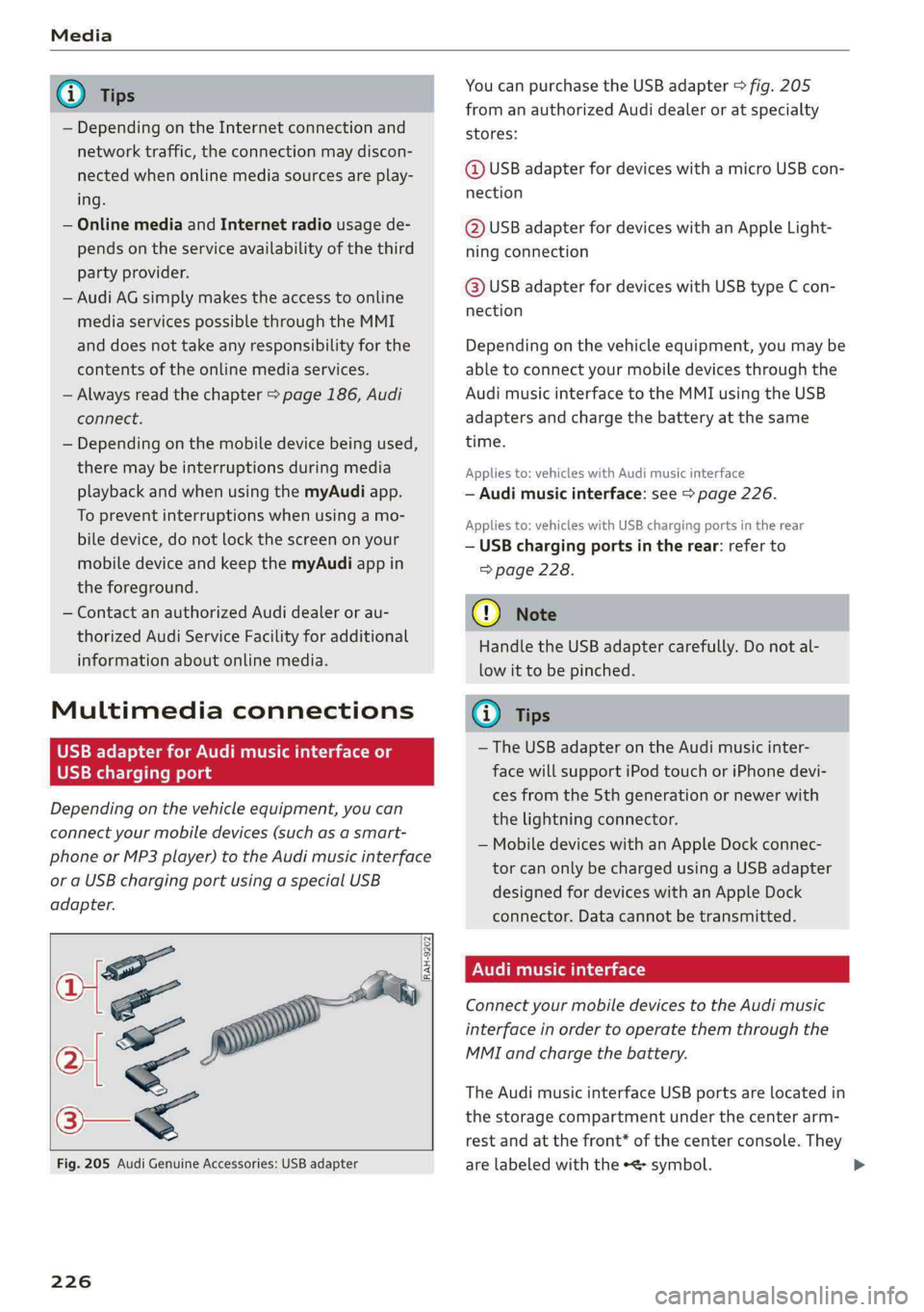
Fig.205AudiGenuineAccessories:USBadapter
[RAH-9202
ae
\
226
YoucanpurchasetheUSBadapter>fig.205
fromanauthorizedAudidealeroratspecialty
stores:
@USBadapterfordeviceswithamicroUSBcon-
nection
@USBadapterfordeviceswithanAppleLight-
ningconnection
@USBadapterfordeviceswithUSBtypeCcon-
nection
Dependingonthevehicleequipment,youmaybe
abletoconnectyourmobiledevicesthroughthe
Audi
musicinterfacetotheMMIusingtheUSB
adaptersandchargethebatteryatthesame
time.
Appliesto:vehicleswithAudimusicinterface
—Audimusicinterface:see>page226.
Appliesto:vehicleswithUSBchargingportsintherear
—USBchargingportsintherear:referto
=>page228.
@)Note
HandletheUSBadaptercarefully.Donotal-
lowittobepinched.
(i)Tips
— TheUSBadapteronthe Audimusicinter-
facewillsupportiPodtouchoriPhonedevi-
cesfromthe5thgenerationornewerwith
thelightningconnector.
—MobiledeviceswithanAppleDockconnec-
torcanonlybechargedusingaUSBadapter
designedfordeviceswithanAppleDock
connector.Datacannotbetransmitted.
NUTTae)
ConnectyourmobiledevicestotheAudimusic
interfaceinordertooperatethemthroughthe
MMIandchargethebattery.
TheAudimusicinterfaceUSBportsarelocatedin
thestoragecompartmentunderthecenterarm-
restandatthefront*ofthecenterconsole.They
arelabeledwiththe«<>symbol.
Page 230 of 392

Media
deviceisrecognizedasaUSBstoragedevice
(forexampleaUSBstick).Appledevicesand
MTPdevices(suchassmartphones)arenot
recognizedasUSBstoragedevices.
—iPodoriPhonemalfunctionsalsoaffectthe
operationoftheMMI.ResetyouriPod or
iPhoneifthishappens.
—AudirecommendsupdatingtheiPodor
iPhonesoftwaretothelatestversion.For
importantinformationonoperatingyour
iPod oriPhone,refertotheuserguidefor
thedevice.
— TheUSBadapterontheAudimusicinter-
facewillsupportiPodtouchoriPhonedevi-
cesfromthe5thgenerationornewerwith
thelightningconnector.
—Formoreinformationaboutthe Audimusic
interfaceandsupporteddevices,checkthe
Audidatabaseformobiledevicesatwww.
audiusa.com/mp3orcontactanauthorized
AudidealerorauthorizedAudiServiceFa-
cility.
USBchargingportsintherear
Appliesto:vehicleswithUSBchargingportsintherear
Youcanchargethebatteryon yourmobiledevice
throughaUSBchargingport.
Two USBchargingportsarelocatedatthebackof
the centerconsole.
—USBadapter:referto>page226,USBadapter
forAudi musicinterfaceorUSBchargingport.
—ChargingamobiledeviceusingtheUSB
adapter:connectyourmobiledevice toaUSB
chargingportusingasuitableUSBadapter.
—Disconnectingamobiledevicefromthecharg-
ingport:removetheUSBadapterfromtheUSB
chargingport.
—DisconnectingmobiledeviceswithanApple
Dockconnector:removetheAppleDockcon-
nectorfromtheAppledevicewiththerelease
tabspressedin.
Z\WARNING
Drivingrequiresyourcomplete andundivided
attention.Asthedriver,youhavecompletere-
sponsibilityforsafetyintraffic.Neveroperate
228
yourmobiledeviceswhiledriving,because
thisincreasestheriskofanaccident.
()Note
Extremelyhighorlowtemperaturesthatcan
occurinsidevehiclescandamagemobiledevi-
cesand/orimpairtheirperformance.Never
leavemobiledevicesinthevehicleinex-
tremelyhighorlowtemperatures.
G)Tips
—Inpreparationatthetimeofprinting.
—Alwaysfollowtheinformationfoundin
=>page62.
—Whenyouswitchtheignitionoff,theUSB
portsarestillsuppliedwithpoweruntilthe
energymanagementintervenes.
—DonotuseanyadditionalUSBextensionca-
blesoradapterstoconnectmobiledevices
totheUSBchargingport thathavealready
beenconnectedbyaUSBadapter.Usingan
additionaladapterorUSextensioncable
mayimpairfunctionality.
—USBhubsarenotsupported.
—Refertothemanufacturer'soperatingman-
ualforimportantinformationregardingthe
operationofyourmobiledevice.
—Correctfunctionofallmobiledevicescan-
notbeguaranteed.
— Thevehiclebatterydrainswhenmobilede-
vicesareturnedonbuttheengineisoff.
Rear SeatEntertainmentpreparation
Appliesto:vehicleswith Rear SeatEntertainmentpreparation
TheRear SeatEntertainmentpreparationin-
cludescablesandamountforAudiEntertain-
mentmobileinthedriver'sandfrontpassenger's
seatbackrests.
ThesuitableAudiEntertainmentmobileRear
SeatEntertainmentpackageisavailablethrough
AudiGenuineAccessories.
UsingAudiGenuineAccessoriesisrecommended.
Audihasverifiedtheirreliability,safety,andsuit-
ability.