display AUDI A4 2019 User Guide
[x] Cancel search | Manufacturer: AUDI, Model Year: 2019, Model line: A4, Model: AUDI A4 2019Pages: 392, PDF Size: 99.53 MB
Page 20 of 392
![AUDI A4 2019 User Guide Instrumentcluster
—Endingacall:pressthe|¢]buttonduringa
phonecalltoendthecall.
—Openingthecalllist:ifnophonecallisinprog-
ressandtherearenoincomingcalls,pressthe
[-]button.
@Butto](/img/6/57555/w960_57555-19.png "AUDI A4 2019 User Guide Instrumentcluster
—Endingacall:pressthe|¢]buttonduringa
phonecalltoendthecall.
—Openingthecalllist:ifnophonecallisinprog-
ressandtherearenoincomingcalls,pressthe
[-]button.
@Butto")
Instrumentcluster
—Endingacall:pressthe|¢]buttonduringa
phonecalltoendthecall.
—Openingthecalllist:ifnophonecallisinprog-
ressandtherearenoincomingcalls,pressthe
[-]button.
@Button[2»
—Switchingthevoicerecognitionsystemon:
brieflypressthe[2+]button.Saythedesired
commandaftertheBeep.
—Switchingthevoicerecognitionsystemoff:
pressandholdthe|]button.Or:saythecom-
mandCancel.
Formoreinformationaboutthevoicerecognition
system,see>page164,Voicerecognitionsys-
temor>page241.
@Rightthumbwheel
Youcanadjustthevolumeofan audiosourceora
systemmessage(forexample,fromthevoice
recognitionsystem)whenthesoundisplaying.
—Increasingordecreasingthevolume:turnthe
rightthumbwheelupordown.
—Mutingorpausing:turntherightthumbwheel
down.Or:presstherightthumbwheel.
—Unmutingorresuming:turntherightthumb-
wheelup.Or:presstherightthumbwheel.
@kil
—Selectingtheprevious/nexttrackorstation:
pressthebutton.
—Fastforwarding/rewindingaudiofiles:press
andholdthebuttonuntilthedesired
locationinthefileisreached.
®k
—Steeringwheelheating*:youcanfindaddition-
alinformationin>page74.
—Programmablesteeringwheelbutton-open-
ing afunction:pressthe[|buttononthemul-
tifunctionsteeringwheel.
—Programmablesteeringwheelbutton-re-
questingafunction:pressandholdthe[+]but-
ton.
/ Button[>>!
Kid]or[DDI
Kl]or[bo
Button/steeringwheelheating@
—Programmablesteeringwheelbutton-chang-
ing afunction:pressandholdthe[*]button.
Selectandconfirmanentry.Or
18
—SelectintheInfotainmentsystem:[MENU]but-
ton>Vehicle>leftcontrolbutton>Vehicle
settings>Steeringwheelbuttonassignment.
©Button[
—Repeatingthelastnavigationprompt:press
the[s]buttonwhenrouteguidanceisactive.
—Changingthevoiceguidancevolume:when
routeguidanceisactive,turntherightthumb-
wheelupwardordownwardduringanavigation
prompt.
Multifunctionsteering
wheel
Appliesto:vehicleswithmultifunctionsteeringwheel
Withthemultifunctionsteeringwheel,youcan
operatethedriverinformationsystemaswellas
theMMIfunctionsandyoucanalsoadjust the
volume.
44,COE
N
Fig.13Rightsideofthemultifunctionsteeringwheel
Requirement:theignitionmustbeswitchedon.>
Page 21 of 392
8W0012721BG
Instrumentcluster
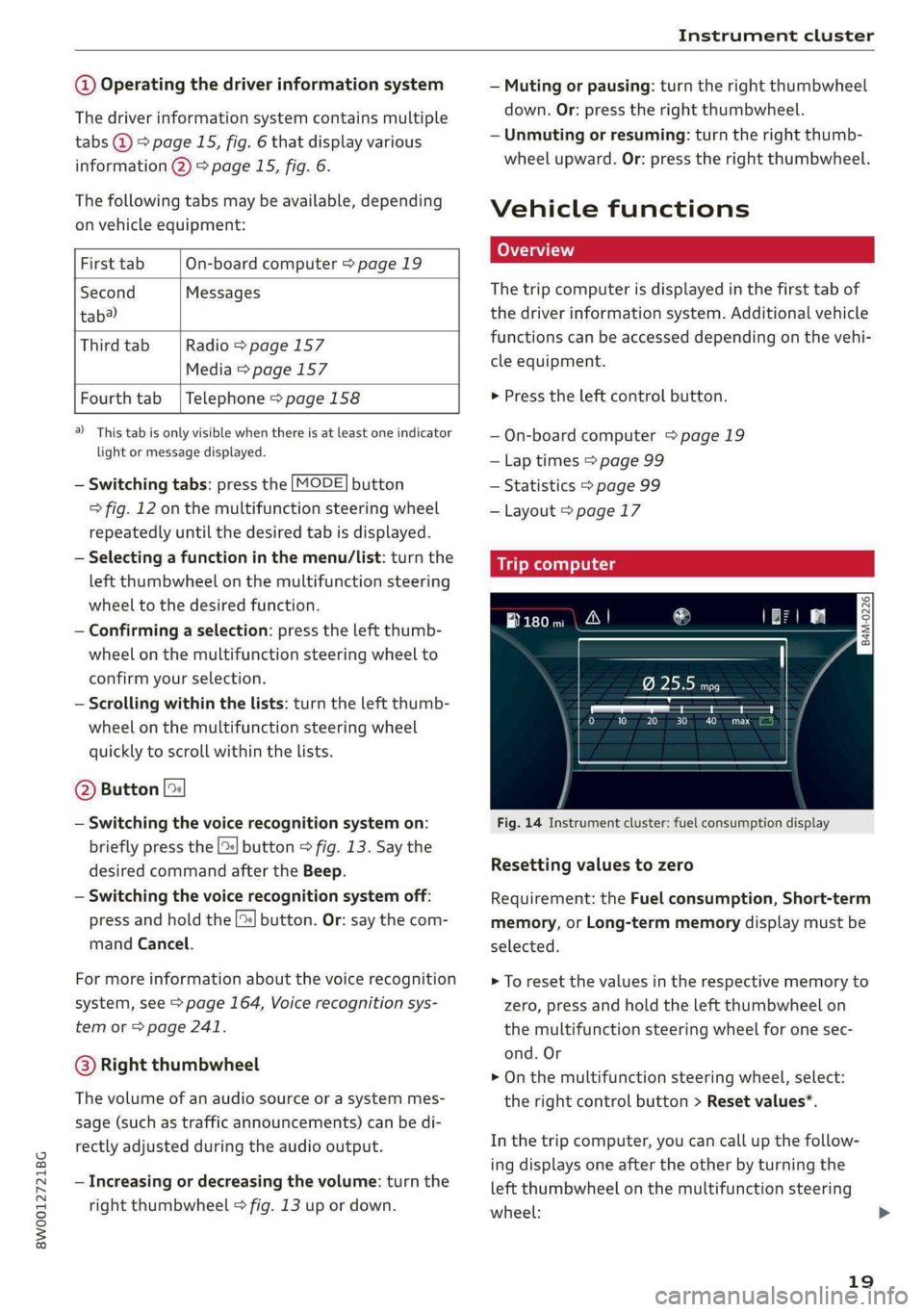
@Operatingthedriverinformationsystem
Thedriverinformationsystemcontainsmultiple
tabs@>page15,fig.6thatdisplayvarious
information@)>page15,fig.6.
Thefollowingtabsmaybeavailable,depending
onvehicleequipment:
FirsttabOn-boardcomputer>page19
SecondMessages
tab?)
ThirdtabRadio>page157
Media>page157
Fourthtab|Telephone>page158
a)Thistabisonlyvisiblewhenthereisat leastoneindicator
lightormessagedisplayed.
—Switchingtabs:pressthe[MODE]button
>fig.12onthemultifunctionsteeringwheel
repeatedlyuntilthedesiredtabisdisplayed.
—Selectingafunctioninthemenu/list:turnthe
leftthumbwheelonthemultifunctionsteering
wheeltothedesiredfunction.
—Confirmingaselection:presstheleftthumb-
wheelonthemultifunctionsteeringwheelto
confirmyourselection.
—Scrollingwithinthelists:turntheleftthumb-
wheelonthemultifunctionsteeringwheel
quicklytoscrollwithinthelists.
@Button[»
—Switchingthevoicerecognitionsystemon:
brieflypressthe[2]button>fig.13.Saythe
desiredcommandaftertheBeep.
—Switchingthevoicerecognitionsystemoff:
pressandholdthe|]button.Or:saythecom-
mandCancel.
Formoreinformationaboutthevoicerecognition
system,see>page164,Voicerecognitionsys-
temor=page241.
@®Rightthumbwheel
The
volumeofanaudiosourceorasystemmes-
sage(suchastrafficannouncements)canbedi-
rectlyadjustedduringtheaudiooutput.
—Increasingordecreasingthevolume:turnthe
rightthumbwheel>fig.13upordown.
—Mutingorpausing:turntherightthumbwheel
down.Or:presstherightthumbwheel.
—Unmutingorresuming:turntherightthumb-
wheelupward.Or:presstherightthumbwheel.
Vehiclefunctions
LOTati
Thetripcomputerisdisplayedinthefirsttabof
thedriverinformationsystem.Additionalvehicle
functionscan beaccesseddependingonthevehi-
cleequipment.
>Presstheleftcontrolbutton.
—On-boardcomputer>page 19
—Laptimes>page99
—Statistics>page99
—Layout>page17
Mit)meeyuayLele
Fig.14Instrumentcluster:fuelconsumptiondisplay
Resettingvaluesto zero
Requirement:theFuelconsumption,Short-term
memory,orLong-termmemorydisplaymustbe
selected.
>Toresetthevaluesintherespectivememoryto
zero,pressandholdtheleftthumbwheelon
themultifunctionsteeringwheelforonesec-
ond.Or
>Onthemultifunctionsteeringwheel,select:
therightcontrolbutton>Resetvalues*.
Inthetripcomputer,youcancallupthefollow-
ingdisplaysoneaftertheotherbyturningthe
leftthumbwheelonthemultifunctionsteering
wheel:
19
Page 22 of 392
Instrumentcluster
—Timeanddate>page240
—Digitalspeedometer*
—Averageconsumption
—Remainingrange*
—Short-termmemoryoverview
—Long-termmemoryoverview
—Energyconsumers*=page20
—Driverassistance*>page102
—Trafficsignrecognition*>page97
Theshort-termmemorycollectsdrivinginforma-
tionfromthetimetheignitionisswitchedonun-
tilitisswitchedoff.Ifyoucontinuedrivingwithin
twohoursafterswitchingtheignitionoff,the
newvaluesareincludedwhencalculatingthecur-
renttripinformation.
Unliketheshort-termmemory,thelong-term
memoryisnoterasedautomatically.Youcanse-
lectthetimeperiodforevaluatingtripinforma-
tionyourself.
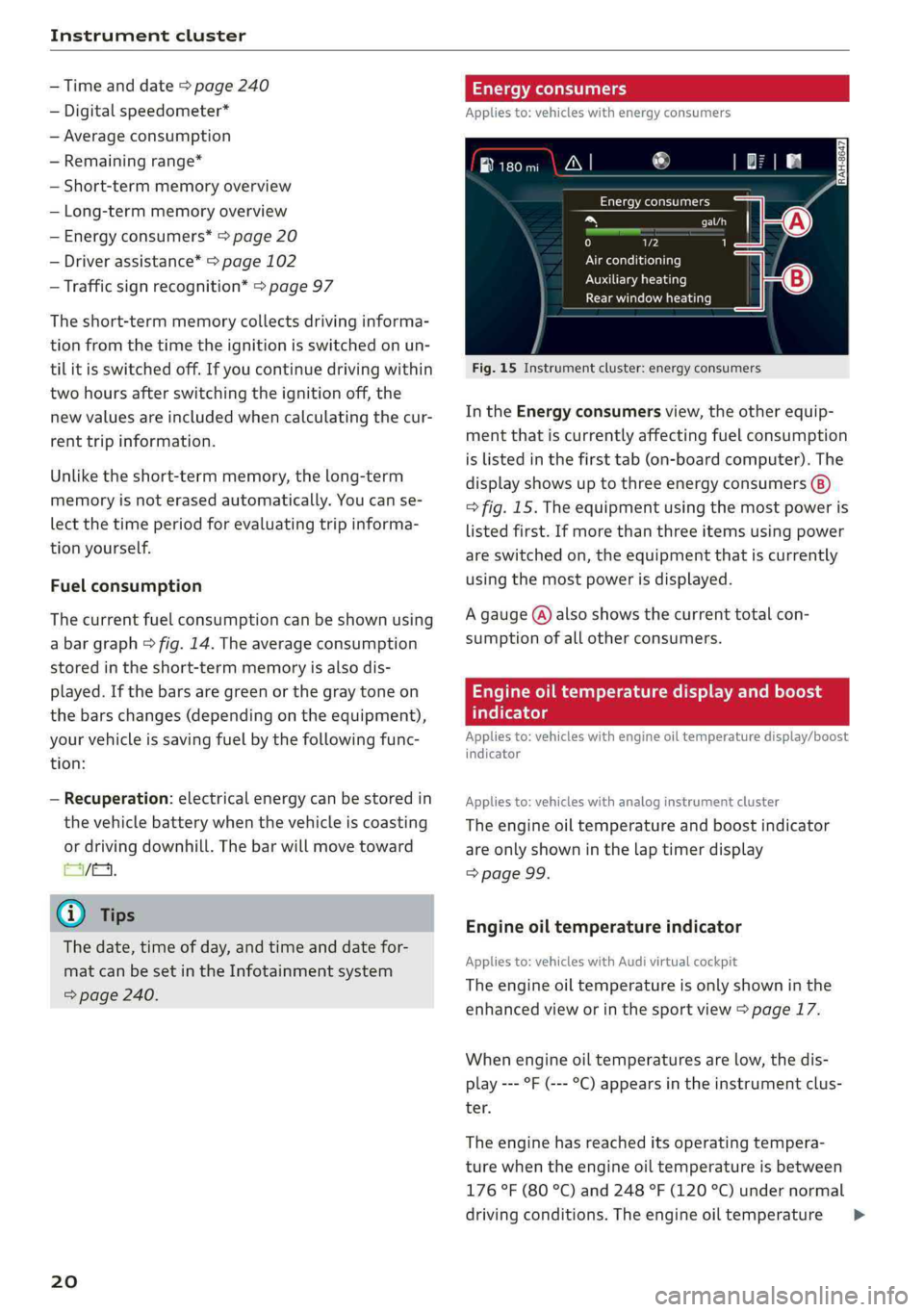
Fuelconsumption
Thecurrentfuelconsumptioncan beshownusing
abargraph&fig.14.Theaverageconsumption
storedintheshort-termmemoryisalsodis-
played.Ifthebarsaregreenorthegraytone on
thebarschanges(dependingontheequipment),
yourvehicleissavingfuelbythefollowingfunc-
tion:
—Recuperation:electricalenergycanbestoredin
thevehiclebatterywhenthevehicleiscoasting
ordrivingdownhill.Thebarwillmovetoward
EVE.
G)Tips
Thedate,timeofday,andtimeanddatefor-
matcanbesetintheInfotainmentsystem
=>page240.
20
Energyconsumers
Appliesto:vehicleswithenergyconsumers
aN}®ao
Energyconsumers
taeri
0)2
Airconditioning
Auxiliaryheating
Rearwindowheating
Fig.15Instrumentcluster:energyconsumers
IntheEnergyconsumersview,theotherequip-
mentthatiscurrentlyaffectingfuelconsumption
islistedinthefirsttab(on-boardcomputer).The
displayshowsuptothreeenergyconsumers
>fig.15.Theequipmentusingthemostpoweris
listedfirst.Ifmorethanthreeitemsusingpower
areswitchedon,theequipmentthatiscurrently
usingthemostpowerisdisplayed.
Agauge(@)alsoshowsthecurrenttotalcon-
sumptionofallotherconsumers.
Engineoiltemperaturedisplayandboost
atelte-hels
Appliesto:vehicleswithengineoiltemperaturedisplay/boost
indicator
Appliesto:vehicleswithanaloginstrumentcluster
Theengineoiltemperatureandboostindicator
areonlyshowninthelaptimerdisplay
=>page99.
Engineoiltemperatureindicator
Appliesto:vehicleswith Audivirtualcockpit
Theengineoiltemperatureisonlyshowninthe
enhancedvieworinthesportview>page17.
Whenengineoiltemperaturesarelow,thedis-
play---°F(---°C)appearsintheinstrumentclus-
ter.
Theenginehasreacheditsoperatingtempera-
turewhentheengineoiltemperatureisbetween
176°F(80°C)and248°F(120°C)undernormal
drivingconditions.Theengineoiltemperature>
Page 23 of 392
8W0012721BG
Instrumentcluster
maybehigherifthereisheavyengineloadand
hightemperaturesoutside.Thisisnotacausefor
concernaslongasthe|=>page312or=
=>page312indicatorlightsdonotturnon.
Boostindicator
Appliesto:vehicleswithAudivirtualcockpit
Theboostindicatorisonlydisplayedinthesport
view>page17.
Thecurrentengineload(meaningthecurrent
boostpressure)isindicatedbyabar.
Messages
BRAKE/@)/‘C:/®Brakesystem
Ifthisindicatorlightturnson,thereisamalfunc-
tioninthebrakesystem.
HiT)Brakes:stopvehicleandcheckbrake
fluid level
Stopthevehicleandcheckthebrakefluidlevel.
SeeanauthorizedAudidealerorauthorizedAudi
ServiceFacilityforassistance.
GGit@Brakes:malfunction!Stopvehicle
safely
Iftheindicatorlightturnsonandthismessage
appears,thereisamalfunctioninthebrake brake
system.
1fBES/GJandBialsoturnon,thereisamal-
functionintheABS,ESC,andbrakingdistribu-
tion.
Donotcontinuedriving.SeeanauthorizedAudi
dealerorauthorizedAudiServiceFacilityforas-
sistance>A\.
EG/@Parkingbrake:malfunction!Safely
stopvehicle.Seeowner'smanual
—Iftheindicatorlightandthemessageappear
whenthevehicleisstationary orafterswitch-
ingtheignitionon,checkifyoucanreleasethe
parkingbrake.Ifyoucannotreleasetheparking
brake,seeanauthorizedAudidealerorauthor-
izedAudiServiceFacility.Ifyoucanreleasethe
parkingbrakeandthemessagestillappears,
seeanauthorizedAudidealerorauthorizedAu-
diServiceFacilityimmediatelytohavethe mal-
functioncorrected.
—Iftheindicatorlightandmessageappearwhile
driving,thehillstartassistoremergencybrak-
ingfunctionmaybemalfunctioning.Itmaynot
bepossibletosettheparkingbrakeorrelease
itonceithasbeenset.Donotparkyourvehicle
onhills.SeeanauthorizedAudidealerorau-
thorizedAudiServiceFacilityforassistance.
fieifeBrakepads:wearlimitreached.You
cancontinuedriving.PleasecontactService
Thebrakepadsareworn.Drivetoanauthorized
AudidealerorauthorizedAudiServiceFacilityas
soonas possible tohavethemalfunctioncorrect-
ed.
©Brakesoverheating.PleaseshifttoD
@Brakesoverheating.Pleaseselectagearand
followgearrecommendation
Therewasaheavyloadonthebrakes.Engagea
suitablegear(manualtransmission)or placethe
selectorleverinthe"D/S"position(automatic
transmission)touse theenginebrakingeffect
andreduce theloadonthebrakes.
Brakebooster:limitedfunctionality.Youcan
continuedriving.PleasecontactService
Thereisamalfunctioninthebrakebooster.The
brakeboosterisavailable,butitseffectivenessis
reduced.Brakingbehaviormaybedifferentfrom
howitnormallyfunctionsandthebrakepedal
mayvibrate.DrivetoanauthorizedAudidealeror
authorizedAudiServiceFacilityimmediatelyto
havethemalfunctioncorrected.
Z\WARNING
—Readandfollowthewarningsin
=page309,Workingintheenginecom-
partmentbeforeopeningthehood and
checkingthebrakefluidlevel.
—Ifthebrakesystemindicatorlightdoesnot
turnofforitturnsonwhiledriving,the
brakefluid levelinthereservoiristoolow,
andthisincreasestheriskofanaccident.
Stopthevehicleanddonotcontinuedriv-
ing.SeeanauthorizedAudidealeror
21
Page 26 of 392
Instrumentcluster
Thereisamalfunctionintheclutch.Theengine
torque
thatcan betransferredisreduced.You
maycontinuedriving.Avoidusingtheclutchin
thefutureinanywaythatwillplaceaheavyload
onit.Forexample,donotlettheclutchrubwhen
startingonhillsorwhenmaneuveringthevehi-
cle.Theindicatorlightturnsoffoncetheclutchis
fullyoperableagain.
Ifthe|indicatorlightturnson,thehoodlock
isnotlatchedcorrectly.
Stopimmediatelyandclosethehood
=>page310.
ElectronicStabilizationControl(ESC)
IftheBindicatorlightblinkswhiledriving,the
ESCorASR(Anti-SlipRegulation)isactivelyregu-
lating.
IftheBindicatorlightturnson,thesystemhas
switched
theESCoff.Inthiscase,youcanswitch
theignitionoffandthenontoswitchtheESCon
again.Theindicatorlightturnsoffwhenthesys-
temisfullyfunctional.
IftheBindicatorlightturnson,ESCwas
switchedoffusingthe[2]button>page139.
Stabilizationcontrol(ESC/ABS):malfunction!
Seeowner'smanual
IftheBindicatorlampandtheES/assin-
dicatorlampturnonandthismessageappears,
theABSorelectronicdifferentiallockismalfunc-
tioning.ThisalsocausestheESCtomalfunction.
Thebrakesstillfunctionwiththeirnormalpower,
butABSisnotactive.
DrivetoanauthorizedAudidealerorauthorized
AudiServiceFacilityimmediatelytohavethe
malfunctioncorrected.
@Tips
ForadditionalinformationonESCandABS,
see>page138.
24
BDrivesystem:malfunction!Safelystopvehi-
cle
Thereisamalfunctioninthedrivesystem.The
brakeboosterandthepowersteeringmaystop
working.
Stopthevehicleimmediatelyor assoon
aspossibleand donotcontinuedriving.Havethe
problemcorrectedbyanauthorizedAudidealer
orauthorizedAudiServiceFacility.
BDrivesystem:malfunction!Pleasecontact
Service
Thereisamalfunctioninthedrivesystem.Drive
slowlytoanauthorizedAudidealerorauthorized
AudiServiceFacilitytohavethemalfunctioncor-
rected.
nginespeedlimitation
IftheBiindicatorlightturnson,theenginewill
beautomaticallylimitedtotheRPMdisplayedin
theinstrumentcluster.Thisprotectstheengine
fromoverheating.
Theenginespeedlimitationdeactivatesoncethe
engineisnolongerinthecriticaltemperature
rangeandyouhavereleasedtheacceleratorped-
alonce.
Iftheenginespeedlimitationwasactivatedby
anenginecontrolmalfunction,theBgindicator
lightalsoturnson.Makesuretheenginespeed
doesnotgoabovethespeeddisplayed,forexam-
plewhendownshifting.Drivetoanauthorized
AudidealerorauthorizedAudiServiceFacilityim-
mediatelytohavethemalfunctioncorrected.
fTanksystem
lyPleaserefuel
Iftheindicatorlightturnsonforthefirsttime
andthemessageappears,thereareabout2.1
gallons(8liters)offuelleftinthetank.
lyPleaserefuelimmediately
Iftheindicatorlightturnsonandthismessage
appears,thefueltankisalmostempty.Refuel
thevehicleimmediately.
Page 29 of 392
8W0012721BG
Head-updisplay
Head-updisplay
Description
Appliesto:vehicleswithhead-updisplay
0 as
ge32%oS
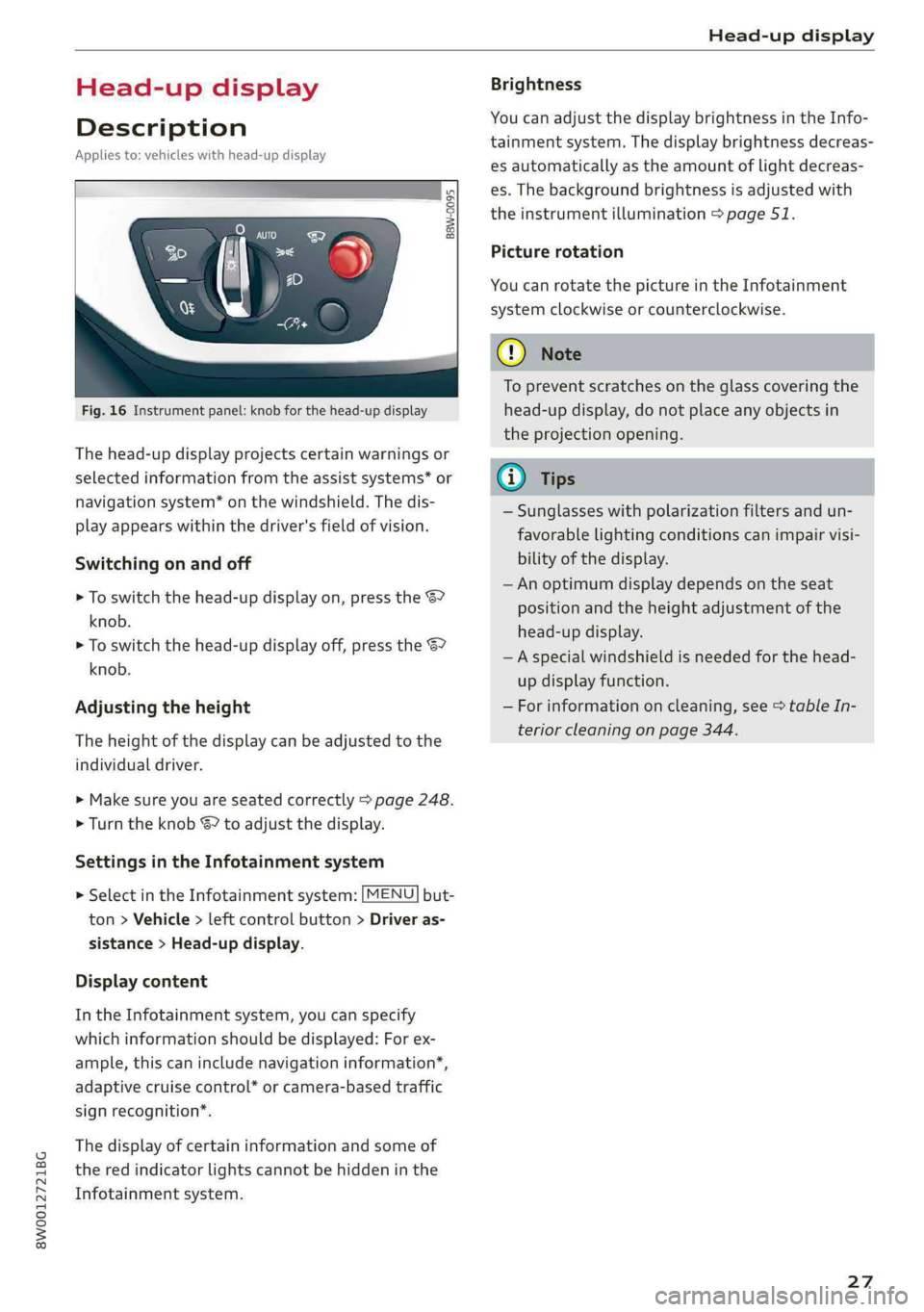
Fig.16Instrumentpanel:knobforthehead-updisplay
Thehead-updisplayprojectscertainwarningsor
selectedinformationfromtheassistsystems*or
navigationsystem*onthewindshield.Thedis-
playappearswithinthedriver'sfieldofvision.
Switchingonandoff
>Toswitchthehead-updisplayon,pressthe67
knob.
>Toswitchthehead-updisplayoff,presstheS7
knob.
Adjustingtheheight
Theheightofthedisplaycan beadjustedtothe
individualdriver.
>Makesureyouareseatedcorrectly>page248.
>Turn theknobS?toadjustthedisplay.
SettingsintheInfotainmentsystem
>SelectintheInfotainmentsystem:[MENU]but-
ton>Vehicle> leftcontrolbutton>Driveras-
sistance>Head-updisplay.
Displaycontent
IntheInfotainmentsystem,youcanspecify
whichinformationshould bedisplayed:Forex-
ample,thiscanincludenavigationinformation”,
adaptivecruisecontrol*orcamera-basedtraffic
signrecognition*.
Thedisplay ofcertaininformationandsomeof
thered indicatorlightscannotbehiddeninthe
Infotainmentsystem.
Brightness
YoucanadjustthedisplaybrightnessintheInfo-
tainmentsystem.Thedisplaybrightnessdecreas-
esautomaticallyastheamountoflightdecreas-
es.Thebackgroundbrightnessisadjusted with
theinstrumentillumination>page51.
Picturerotation
YoucanrotatethepictureintheInfotainment
systemclockwiseorcounterclockwise.
CG)Note
Topreventscratchesontheglasscoveringthe
head-updisplay,donotplaceanyobjectsin
theprojectionopening.
@)Tips
—Sunglasseswithpolarizationfiltersandun-
favorable
lightingconditionscanimpairvisi-
bilityofthedisplay.
— Anoptimumdisplaydependsontheseat
positionandthe heightadjustmentofthe
head-updisplay.
—Aspecialwindshieldisneededforthe head-
updisplayfunction.
—Forinformationoncleaning,see>tableIn-
teriorcleaningonpage344.
27
Page 42 of 392
Openingandclosing
Childsafetylock
Thechildsafetylockpreventsthereardoors
frombeingopenedfromtheinsideandtherear
powerwindowsfrombeingoperated.
B8U-0321
B8W-0085
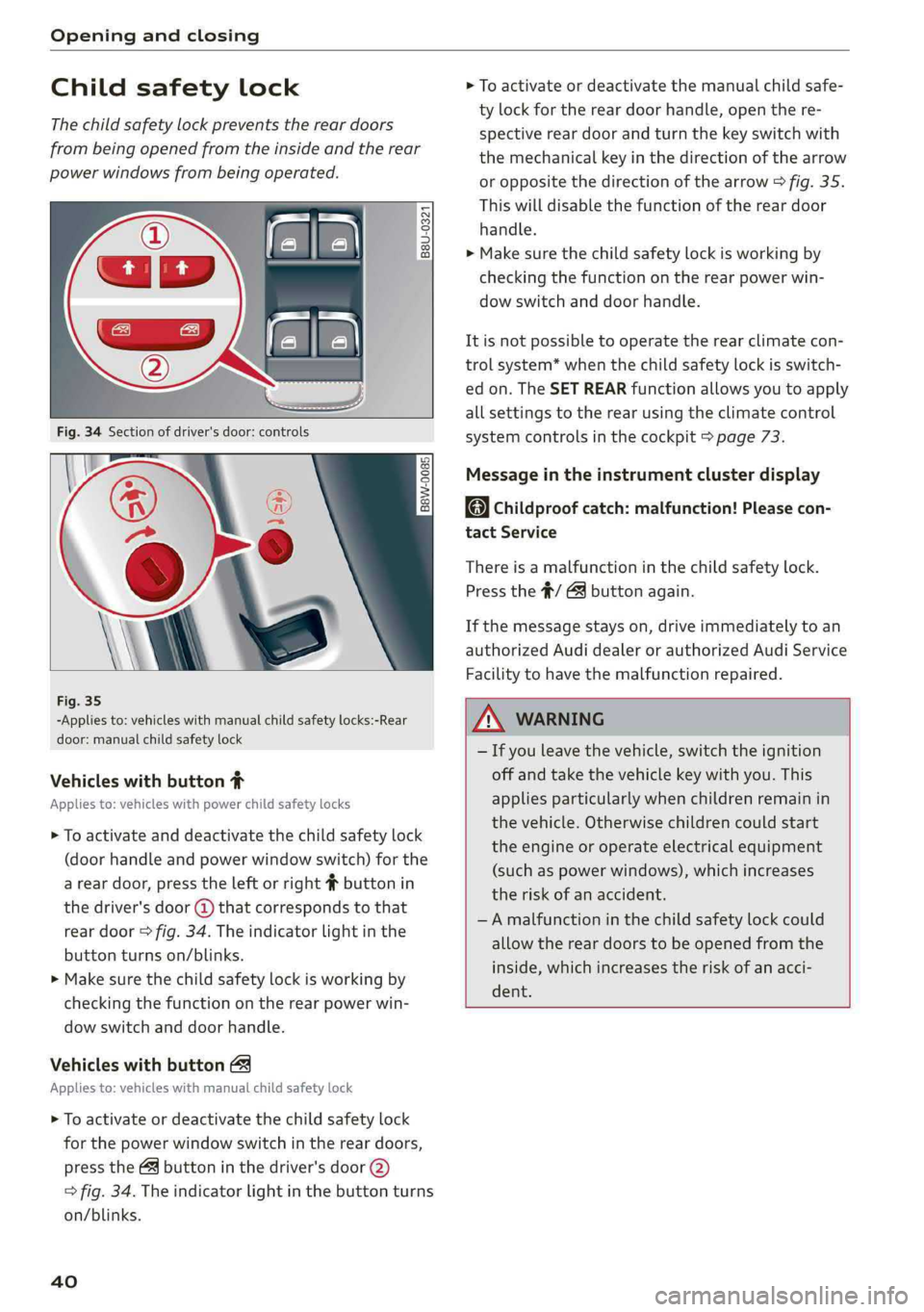
Fig.35
-Appliesto:vehicleswithmanualchildsafetylocks:-Rear
door:manualchildsafetylock
Vehicleswithbutton#
Appliesto:vehicleswithpowerchildsafetylocks
>Toactivateanddeactivatethechildsafetylock
(doorhandleandpowerwindowswitch)forthe
areardoor,presstheleftorright#buttonin
thedriver'sdoor(@)thatcorrespondstothat
reardoor>fig.34.Theindicatorlightinthe
buttonturnson/blinks.
>Makesurethechildsafetylockisworkingby
checkingthefunctionontherearpowerwin-
dowswitchanddoorhandle.
Vehicleswithbutton
Appliesto:vehicleswithmanualchildsafetylock
>
Toactivateordeactivatethechildsafetylock
forthepowerwindowswitchinthereardoors,
pressthe&buttoninthedriver'sdoor(2)
>fig.34.Theindicatorlightinthe buttonturns
on/blinks.
40
>Toactivateordeactivatethemanualchildsafe-
ty lockforthereardoorhandle,openthere-
spectivereardoorandturnthekeyswitchwith
themechanicalkeyinthedirectionofthearrow
oroppositethedirectionofthearrow>fig.35.
Thiswilldisablethefunctionofthereardoor
handle.
> Makesurethechildsafetylockisworkingby
checkingthefunctionontherearpowerwin-
dowswitchanddoorhandle.
Itisnotpossibletooperate therearclimatecon-
trolsystem*whenthechildsafetylockisswitch-
edon.TheSETREARfunctionallowsyoutoapply
allsettingstotherearusingtheclimatecontrol
systemcontrolsinthecockpit>page73.
Messageintheinstrumentclusterdisplay
Childproofcatch:malfunction!Pleasecon-
tactService
Thereisamalfunctioninthechildsafetylock.
Pressthe#/Gbuttonagain.
Ifthemessagestayson,driveimmediatelytoan
authorizedAudidealerorauthorizedAudiService
Facilitytohavethemalfunctionrepaired.
ZAWARNING
—Ifyouleavethevehicle,switchtheignition
offandtakethevehiclekeywithyou.This
appliesparticularlywhenchildrenremainin
thevehicle.Otherwisechildrencouldstart
theengineoroperateelectricalequipment
(suchaspowerwindows),whichincreases
theriskofanaccident.
—Amalfunctioninthechildsafetylockcould
allow
thereardoorstobeopenedfromthe
inside,whichincreasestheriskofanacci-
dent.
Page 47 of 392
8W0012721BG
Openingandclosing
Operating
Appliesto:vehicleswithgaragedooropener
Requirements:thebuttonintheheadlinermust
beprogrammed=page45andthevehicle
mustbewithinrangeofthesystem, suchasthe
garagedoor.
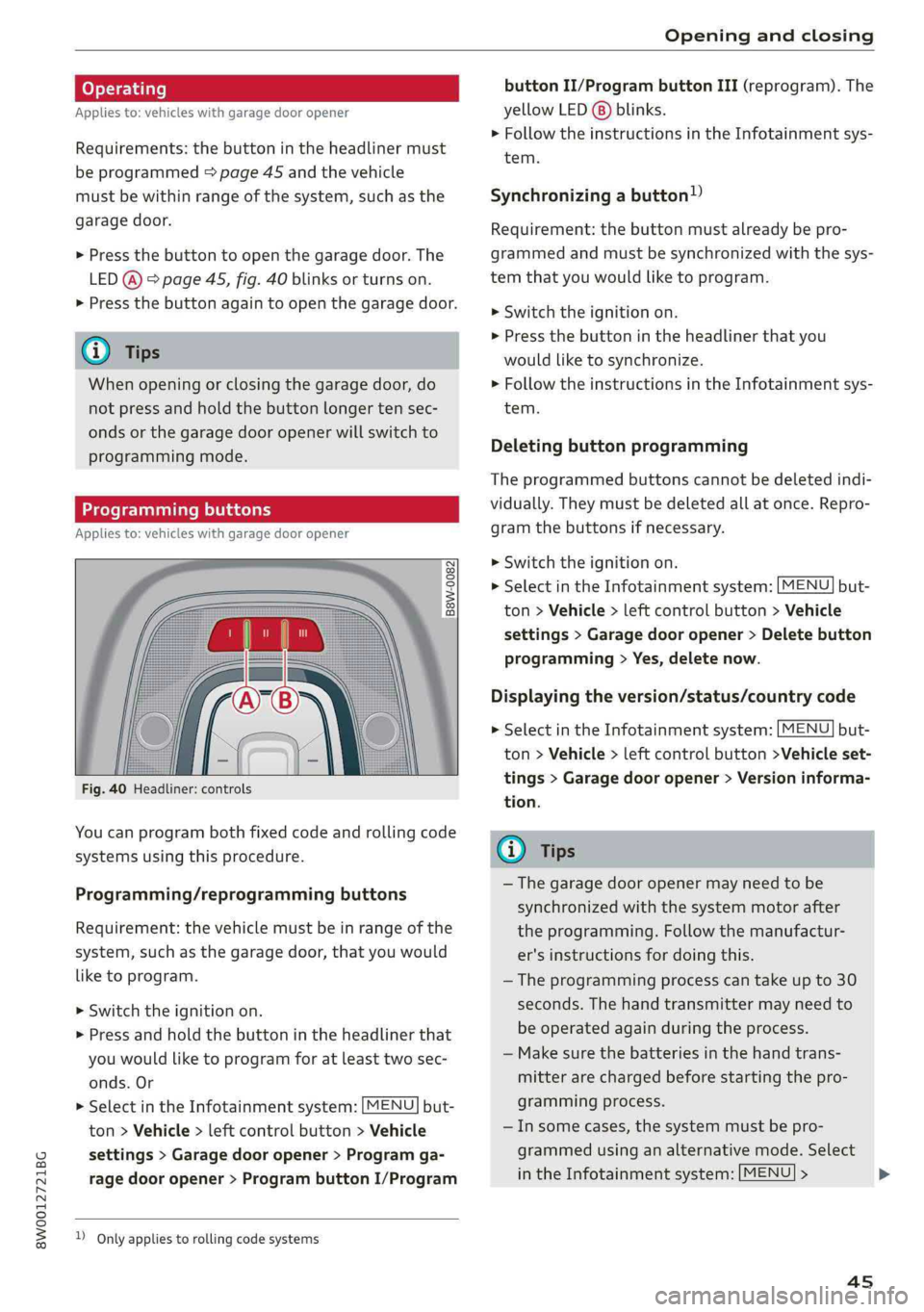
>Pressthebuttontoopenthegaragedoor.The
LED@)°page45,fig.40blinksorturnson.
>Pressthebuttonagaintoopenthegaragedoor.
G)Tips
Whenopeningorclosingthegaragedoor,do
notpressandholdthebuttonlongertensec-
ondsorthegaragedooropenerwillswitchto
programmingmode.
Programmingbuttons
Appliesto:vehicleswithgaragedooropener
Fig.40Headliner:controls
Youcanprogrambothfixedcodeandrollingcode
systemsusingthisprocedure.
Programming/reprogrammingbuttons
Requirement:thevehiclemustbeinrangeofthe
system, such
asthegaragedoor,thatyouwould
liketoprogram.
>Switchtheignitionon.
>Pressandholdthebuttonintheheadlinerthat
youwouldliketoprogramforatleasttwosec-
onds.Or
>SelectintheInfotainmentsystem:[MENU]but-
ton>Vehicle> leftcontrolbutton>Vehicle
settings>Garagedoor opener>Programga-
ragedooropener>ProgrambuttonI/Program
)Onlyappliestorollingcode systems
buttonII/ProgrambuttonIII(reprogram).The
yellowLED(8)blinks.
>FollowtheinstructionsintheInfotainmentsys-
tem.
Synchronizingabutton!)
Requirement:thebuttonmustalreadybepro-
grammedandmustbesynchronizedwiththesys-
temthatyouwouldliketoprogram.
>Switchtheignitionon.
>Pressthebuttonintheheadlinerthatyou
wouldliketosynchronize.
>FollowtheinstructionsintheInfotainmentsys-
tem.
Deletingbuttonprogramming
Theprogrammedbuttonscannotbedeletedindi-
vidually.Theymustbedeletedallatonce.Repro-
gramthebuttonsifnecessary.
>Switchtheignitionon.
>SelectintheInfotainmentsystem:but-
ton>Vehicle> leftcontrolbutton>Vehicle
settings>Garagedooropener>Deletebutton
programming>Yes,deletenow.
MENU
Displayingtheversion/status/countrycode
MENU >SelectintheInfotainmentsystem:but-
ton>Vehicle> leftcontrolbutton>Vehicleset-
tings>Garagedooropener>Versioninforma-
tion.
@Tips
—Thegaragedooropenermayneedtobe
synchronizedwiththesystemmotorafter
theprogramming.Followthemanufactur-
er'sinstructionsfordoingthis.
—Theprogrammingprocesscantakeupto30
seconds.The handtransmittermayneedto
beoperatedagainduring theprocess.
—Makesurethebatteriesinthehandtrans-
mitterarechargedbeforestartingthepro-
grammingprocess.
—Insomecases,thesystemmustbepro-
grammedusinganalternativemode.Select
intheInfotainmentsystem:[MENU]>
45
>
Page 50 of 392
LightsandVision
Turnsignalandhighbeamlever
Theleveroperatestheturnsignals,thehigh
beamsandtheheadlightflasher.
©
»
©
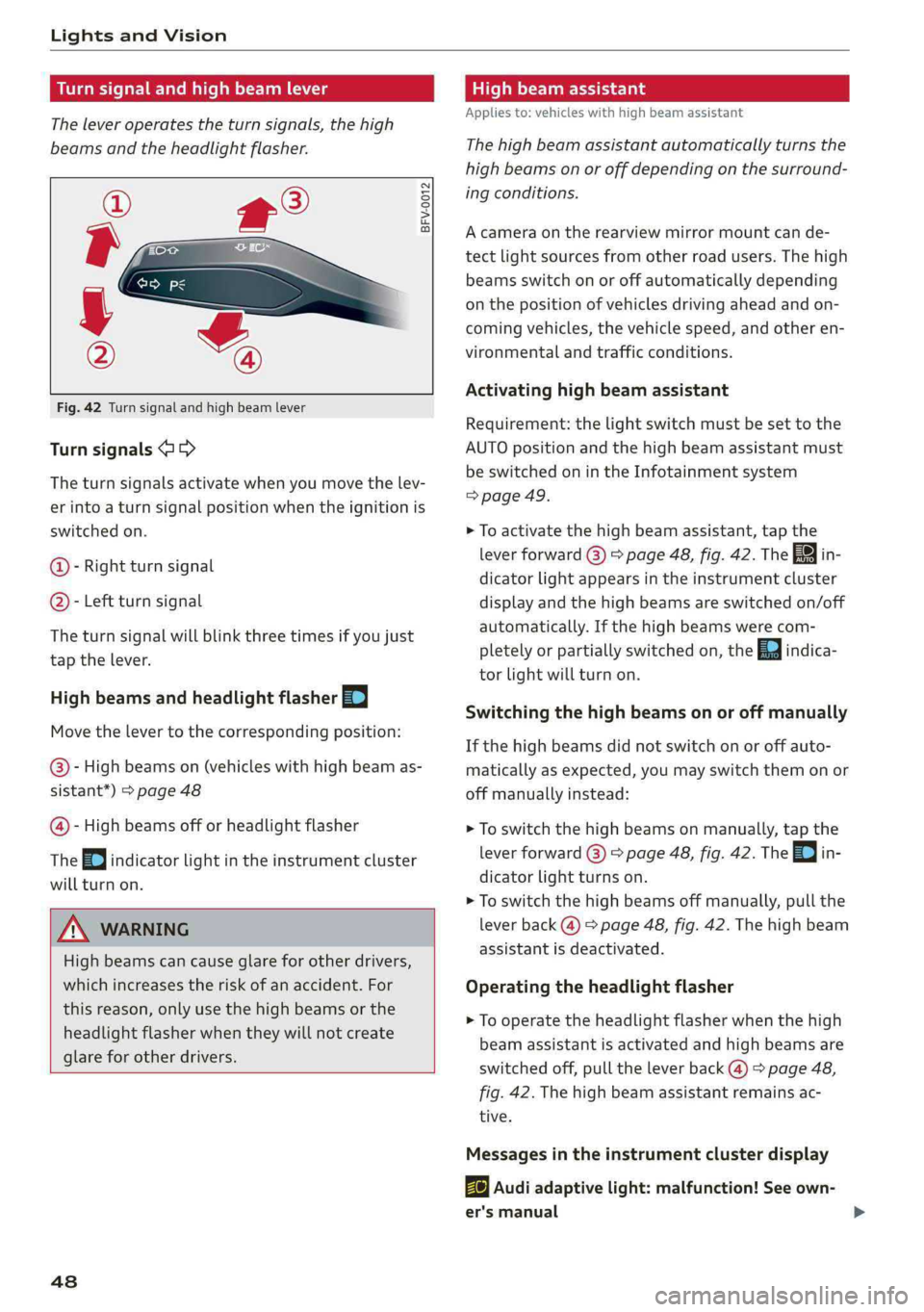
Fig.42Turnsignalandhighbeamlever
Turnsignals@>
Theturnsignalsactivatewhenyoumovethelev-
erintoaturnsignalpositionwhentheignitionis
switchedon.
@-Rightturnsignal
@- Leftturnsignal
Theturnsignalwillblinkthreetimesifyoujust
tap thelever.
HighbeamsandheadlightflasherEI
Movethelevertothecorrespondingposition:
@-Highbeamson(vehicleswithhighbeamas-
sistant*)>page48
@-Highbeamsofforheadlightflasher
The=oindicatorlightintheinstrumentcluster
willturnon.
Z\WARNING
Highbeamscancauseglareforotherdrivers,
whichincreasestheriskofanaccident.For
thisreason,onlyuse thehighbeamsorthe
headlight
flasher whentheywillnotcreate
glareforotherdrivers.
48
Highbeamassistant
Appliesto:vehicleswithhighbeamassistant
Thehighbeamassistantautomaticallyturnsthe
highbeamsonoroffdepending onthesurround-
ingconditions.
Acameraontherearview mirrormountcande-
tectlightsourcesfromotherroadusers.Thehigh
beamsswitchonoroffautomaticallydepending
onthepositionofvehiclesdrivingaheadandon-
comingvehicles,thevehiclespeed,andotheren-
vironmentalandtrafficconditions.
Activatinghighbeamassistant
Requirement:thelightswitchmustbesettothe
AUTOpositionandthehighbeamassistantmust
be switchedonintheInfotainmentsystem
=>page49.
>Toactivatethehighbeamassistant,tapthe
leverforward@)>page48,fig. 42.Thefain-
dicatorlightappearsintheinstrumentcluster
displayandthehighbeamsareswitchedon/off
automatically.Ifthehighbeamswerecom-
pletelyorpartiallyswitchedon,theEaindica-
torlightwillturnon.
Switchingthe high beamsonoroffmanually
Ifthehighbeamsdidnotswitchonoroffauto-
matically asexpected,youmayswitchthemonor
offmanuallyinstead:
>Toswitchthehighbeamsonmanually, tap the
leverforward@)>page48,fig. 42.The=0|in-
dicatorlightturnson.
>Toswitchthehighbeamsoffmanually,pullthe
leverback@)>page48,fig. 42.Thehighbeam
assistantisdeactivated.
Operatingtheheadlightflasher
>To operatethe headlightflasherwhenthehigh
beamassistantisactivatedandhighbeamsare
switchedoff,pulltheleverback@)>page48,
fig.42.Thehighbeamassistantremainsac-
tive.
Messagesintheinstrumentclusterdisplay
ByAudiadaptivelight:malfunction!Seeown-
er'smanual
Page 52 of 392
LightsandVision
Theemergencyflashersalsoworkwhentheigni-
tionisturnedoff.
)Tips
Youshouldswitchtheemergencyflasherson
if:
—youarethelastcarinatrafficjamsothat
allothervehiclesapproachingfrombehind
can seeyourvehicle
—yourvehiclehasbrokendownoryouare
havinganemergency
—yourvehicleisbeingtowedorifyouaretow-
inganothervehicle
Interiorlighting
Frontinteriorlighting
B8W-0112
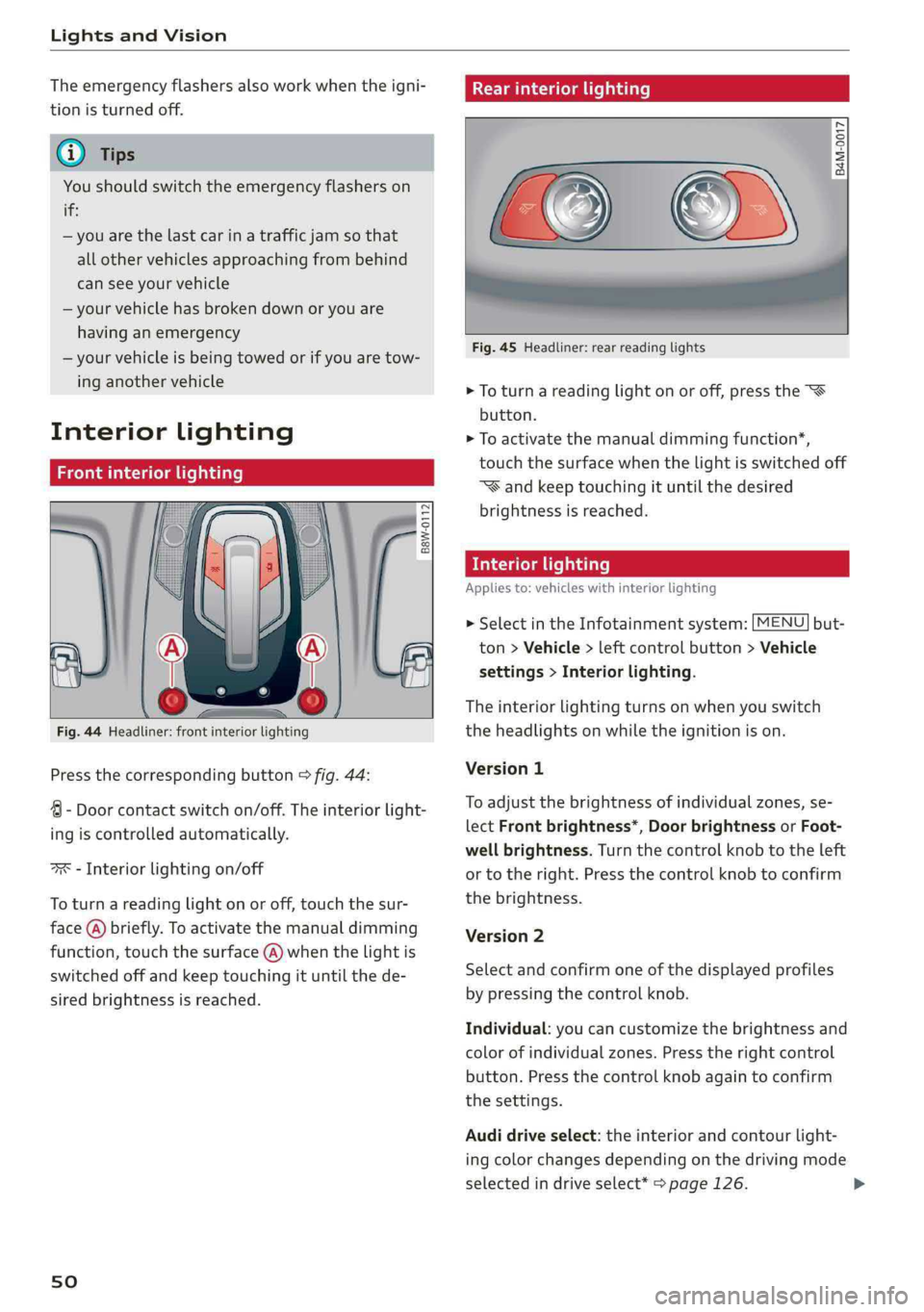
Fig.44Headliner:frontinteriorlighting
Pressthecorrespondingbutton>fig.44:
4-Doorcontactswitchon/off.Theinteriorlight-
ingiscontrolledautomatically.
ax-Interiorlightingon/off
Toturnareadinglightonoroff,touchthesur-
face(@)briefly.Toactivatethemanualdimming
function,touchthesurface(@)whenthelightis
switchedoffandkeeptouchingituntilthede-
siredbrightnessisreached.
sO
Rearinteriorlighting
=
8 2 3
Fig.45Headliner:rearreadinglights
>Toturnareadinglightonoroff,pressthe
button.
>Toactivatethemanualdimmingfunction*,
touchthesurfacewhenthelightisswitchedoff
“Wandkeeptouchingituntilthedesired
brightnessisreached.
Interiorlighting
Appliesto:vehicleswithinteriorlighting
>SelectintheInfotainmentsystem:[MENU]but-
ton>Vehicle>leftcontrolbutton>Vehicle
settings>Interiorlighting.
Theinteriorlightingturnsonwhenyouswitch
theheadlightsonwhiletheignitionison.
Version1
To
adjustthebrightnessofindividualzones,se-
lectFrontbrightness*,DoorbrightnessorFoot-
wellbrightness.Turnthecontrolknobtotheleft
ortotheright.Pressthecontrolknobtoconfirm
thebrightness.
Version2
Selectandconfirmoneofthedisplayedprofiles
bypressingthecontrolknob.
Individual:youcancustomizethebrightnessand
colorofindividualzones.Presstherightcontrol
button.Pressthecontrolknobagaintoconfirm
thesettings.
Audidriveselect:theinteriorandcontourlight-
ingcolorchangesdependingonthedrivingmode
selectedindriveselect*>page126.