radio AUDI A4 2019 User Guide
[x] Cancel search | Manufacturer: AUDI, Model Year: 2019, Model line: A4, Model: AUDI A4 2019Pages: 392, PDF Size: 99.53 MB
Page 159 of 392
8W0012721BG
Multifunctionsteeringwheel
Multifunctionsteering
wheel
Introduction
Appliesto:vehicleswith multifunctionsteeringwheel
Inthedriverinformationsystemdisplay,youcan
controlnumerousInfotainmentfunctionsusing
themultifunctionsteeringwheelplus*>page 15
orthemultifunctionsteeringwheel*>page18.
Youcancontrol additionalInfotainmentfunc-
tionsusingtheMMIcontrolpanel>page145in
theInfotainmentsystemdisplay.
ZAWARNING
Directyourfullattentiontodriving.Asthe
driver,youhavecompleteresponsibilityfor
safetyintraffic.Only use thefunctionsinsuch
awaythatyoualwaysmaintaincompletecon-
troloveryourvehicleinalltrafficsituations.
Radio
Appliesto:vehicleswith multifunctionsteeringwheelandra-
dio
Appliesto:vehicleswith multifunctionsteeringwheel
>Pressthe[MODE]buttononthemultifunction
steeringwheelrepeatedlyuntiltheRadio/
Mediatabisdisplayed.
Appliesto:vehicleswith multifunctionsteeringwheelplus
>Pressthe|< >|buttononthemultifunction
steeringwheelrepeatedlyuntiltheRadio/
Mediatabisdisplayed.
>Presstheleftcontrolbutton>page16.
Dependingonvehicleequipment,thefollowing
functions
maybeavailableinthedriverinforma-
tionsystem.
—Selectingthefrequencyband:selectandcon-
firmafrequencyband.
—Selectingastationfromthestationlist:select
andconfirmaradiostation.
—Selectingastationfromthepresetslist:select
andconfirmPresetsandthenaradiostation.
—Openingamediasource:selectandconfirmTo
media.
Additionalsettings
—Select:rightcontrolbutton>desiredentry.
See>page218.
G)Tips
PayattentiontotheInfotainmentsystemdis-
playifnecessary.Dependingontheselected
function,itmaybenecessarytousetheMMI
control panel.
Media
Appliesto:vehicleswithmultifunctionsteeringwheeland
media
Requirement:amediadrivemustcontainaudio/
videofiles>page221.
Appliesto:vehicleswithmultifunctionsteeringwheel
>Pressthe[MODE]buttononthemultifunction
steeringwheelrepeatedlyuntiltheRadio/
Mediatabisdisplayed.
Appliesto:vehicleswithmultifunctionsteeringwheelplus
>»Pressthe[<>]buttononthemultifunction
steeringwheelrepeatedlyuntiltheRadio/
Mediatabisdisplayed.
>Presstheleftcontrolbutton>page16.
Depending onvehicleequipment,thefollowing
functionsmaybeavailableinthedriverinforma-
tionsystem.
—Selectingamediasource:selectandconfirma
sourcesuchastheSDcard.
—Switchingtotheradio:selectandconfirm
Switchtoradio.
—Playinganaudio/videofile:selectandconfirm
afile.
—Pausing/resumingplayback:presstheright
thumbwheel@)>page17,fig.11.Toresume
playback,presstherightthumbwheelagain.
—Openingadditionaltrackinformation:select:
rightcontrolbutton>Show"NowPlaying"
screen.
Foradditionalinformation, see>page232.>
157
Page 165 of 392
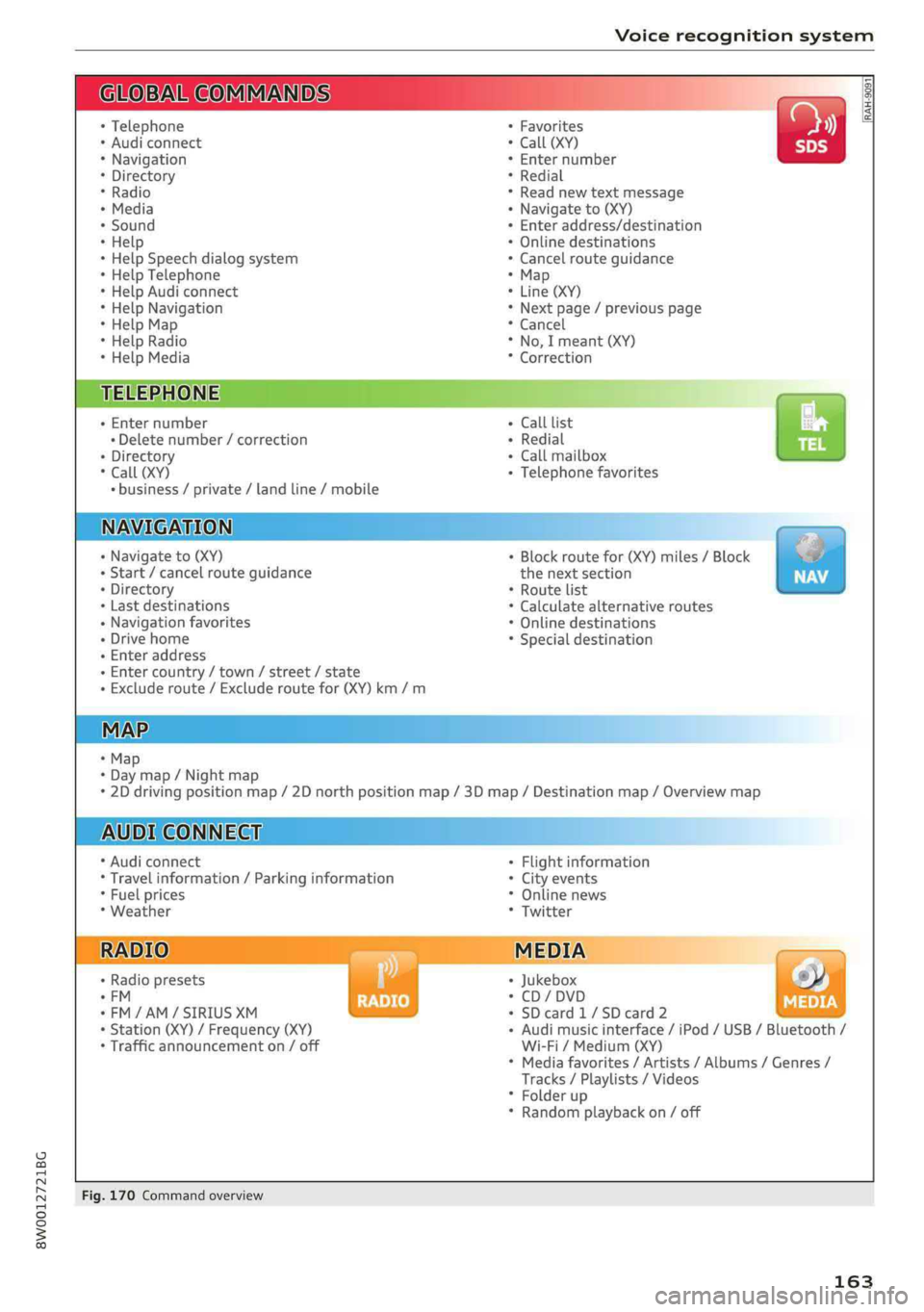
8W0012721BG
Voicerecognitionsystem
OBARECOMMANDS
RAH-9091
*Telephone+Favorites
+Audiconnect*Call(XY)
*Navigation*Enternumber
*Directory*Redial
*Radio*Readnewtextmessage
*Media+Navigateto(XY)
+Sound+Enteraddress/destination
*Help+Onlinedestinations
+HelpSpeechdialogsystem*Cancelrouteguidance
*HelpTelephone*Map
*HelpAudiconnect+Line(XY)
*HelpNavigation*Next page/previouspage
*HelpMap*Cancel
*HelpRadio*No,Imeant(XY)
*HelpMedia*Correction
TELEPHONE:
+Enternumber+CalllistCs
+Deletenumber/correction+Redialsie
+Directory+Callmailbox
*Call(XY)+Telephonefavorites
*business/private/landline/mobile
NAVIGATION;
+Navigateto(XY)+Block routefor(XY)miles/Block
+Start/cancelrouteguidancethenextsection
+Directory*Routelist
+Lastdestinations*Calculatealternativeroutes
+Navigationfavorites*Onlinedestinations
+Drivehome*Specialdestination
-Enteraddress
+Entercountry/town/street/state
+Excluderoute/Excluderoutefor(XY)km/m
+Map
*Daymap/Nightmap
*2Ddrivingpositionmap/2Dnorthpositionmap/3Dmap/Destinationmap/Overviewmap
AUDICONNECT
*AudiconnectFlightinformation
*Travelinformation/Parkinginformation*Cityevents
*Fuelprices*Onlinenews
*Weather*Twitter
RADIO)MEDIA
+Radiopresets|*Jukeboxs))
°FM*CD/DVD
*FM/AM/SIRIUSXM seedy+SDcard1/SDcard2BRS
+Station(XY)/Frequency(XY)-Audimusicinterface/iPod/USB/Bluetooth/
*Trafficannouncementon/offWi-Fi/Medium(XY)
*Mediafavorites/Artists/Albums/Genres/
Tracks/Playlists/Videos
*Folderup
*Randomplaybackon/off
Fig.170Commandoverview
163
Page 166 of 392
Voicerecognitionsystem
Voicerecognitionsystem
Operating
Appliesto:vehicleswithvoicerecognitionsystem
YoucanoperatemanyInfotainmentfunctions
convenientlybyspeaking.
Requirement:theignitionandtheMMImustbe
switched
on>page145.Asystemlanguagesup-
portedbythevoicerecognitionsystemmustbe
set.Theremustbenophonecallsinprogressand
theparkingaidmustnotbeactive.
>Switchingon:pressthe[%]button@
=>page17,fig.11or>page18,fig.13briefly
onthemultifunctionsteeringwheelandsay
thedesiredcommandaftertheBeep.
>Switchingoff:pressandholdthe|™]button.
Or:pressthe|5|button.
>Pausing:saythecommandPause.Toresume,
pressthe|]button.
>Correcting:saythecommandCorrection.Or:
simplysayanewcommandduringanan-
nouncement>page241.
Inputassistance
Thesystemguidesyouthroughtheinputwith
visualandaudiofeedback.
—Visualinputassistance:afterswitchingon
voicerecognition,adisplaywithaselectionof
possiblecommandsappears.Thiscommand
displaycanbe switchedonoroff.Select:
MENU]button>Settings>leftcontrolbutton
>MMIsettings>Speechdialogsystem.
—Audioinputassistance: tohavethepossible
commandsread,turnthevoicerecognitionsys-
temonandsayHelp.
Forthesystemtounderstandyou:
Speakclearlyanddistinctly atanormalvolume.
Speaklouderwhendrivingfaster.
Emphasizethewordsinthecommandsevenly
anddonotleavelongpauses.
Closethedoors,thewindows,andthesunroof*
toreducebackgroundnoise.Makesurethatpas-
sengersarenotspeakingwhenyouaregivinga
voicecommand.
164
Donotdirecttheventstowardthehands-freemi-
crophone,whichisintheroofheadlinernearthe
frontinteriorlights.
Onlyusethesystemfromthedriver'sseatbe-
causethehands-freemicrophoneisdirectedto-
wardthatseat.
Additionalsettings
See>page241,Speechdialogsystem.
ZAWARNING
—Directyourfullattentiontodriving.Asthe
driver,youhavecompleteresponsibilityfor
safetyintraffic.Onlyusethefunctionsin
suchawaythatyoualwaysmaintaincom-
pletecontroloveryourvehicleinalltraffic
situations.
—Donotuse thevoicerecognitionsystemin
emergenciesbecauseyourvoicemaychange
instressfulsituations.Thesystemmaytake
longertodialthenumberormaynotbe
abletodialitatall.Dialtheemergency
numbermanually.
Gi)Tips
— Thedialogpauseswhenthereisanincom-
ingphonecallandwillcontinueifyouig-
norethecall.Thedialogendsifyouanswer
thecall.
—Youcanselectan iteminthelistusingei-
therthevoicerecognitionsystemorthe
controlknob.
Commandoverview
information
Appliesto:vehicleswithvoicerecognitionsystem
Thefollowingoverviewsdescribethecommands
thatcan beusedtooperatetheMMIusingthe
voicerecognitionsystem.
Alternativecommandsareseparatedusinga“/”,
forexamplesay:Telephone/(or)Navigation/
(or)Radio.
Sequencesofcommandsusedtoperformanac-
tionareidentifiedwitha “>”,forexamplesay:
Enteraddress>(then)Entercountry/state.>
Page 167 of 392
8W0012721BG
Voicerecognitionsystem
Themajorityshownaremaincommands.Thises.ForaBusinessaddress,youcanalsosaybusi-
systemalsorecognizessynonymsincertaincas-ness,work,officeor attheoffice.
Commands
Globalcommands
Appliesto:vehicleswithvoicerecognitionsystem
Youcanalwaysusetheglobalcommands,re-
gardlessofthemenuselected.
FunctionSay:
OpeningamenuTelephone/Directory/Navigation/Radio/Media/Audicon-
nect*/Car/Tone
HavingthepossiblecommandsHelp/Helpspeechdialogsystem/HelpTelephone/
readaloudHelpNavigation/HelpMap/HelpRadio/HelpMedia/Help
Audi
connect*
TelephonefunctionsCall(XY),forexample,Call"JohnSmith"/
Enternumber/Redial/Directory/Readoutnewtextmes-
sage/Readoutnewe-mail
Navigationfunctions*Drivemeto(XY)orNavigateto(XY),forexampleNavigateto
JohnSmith/
Enteraddress/Cancelrouteguidance/Map/Onlinedestina-
tions*/Onlinedestination(XY)*
AccessingfavoritesFavorites>followthesystemprompts
SelectinganentryfromalistLine(XY)
ScrollingthroughalistNextpage/Previouspage
CorrectingthecommandgivenCorrection
Switchingthevoicerecognitionsys-|Cancel
temoff
Telephone
Appliesto:vehicleswithvoicerecognitionsystemandtelephone
Requirement:acellphonemustbeconnectedtoDepending onthevehicleequipmentandthese-
theMMI>page172andtheTelephonemenulectedmenuitem,youcansaythefollowingcom-
mustbeopen>tableonpage165.mands:
FunctionSay:
CallcontactfromdirectoryCall(XY),forexampleCall"JohnSmith"
Selectinga specificcontactnumber|Call(XY)business/private/landline/cellphone,
forexample,Call"JohnSmith"private
Selectingaphonenumberwithan_|Call/Callwork/Callprivate/Calllandline/Callcellphone
addresscardopenwork
Callingacontactfromyourfavor-|Telephonefavorites>afterbeingprompted,saythedesired
iteslistcontact>Dial
DisplayingthecalllistCalllist>
165
Page 171 of 392
8W0012721BG
Voicerecognitionsystem
Appliesto:vehicleswithvoicerecognitionsystem
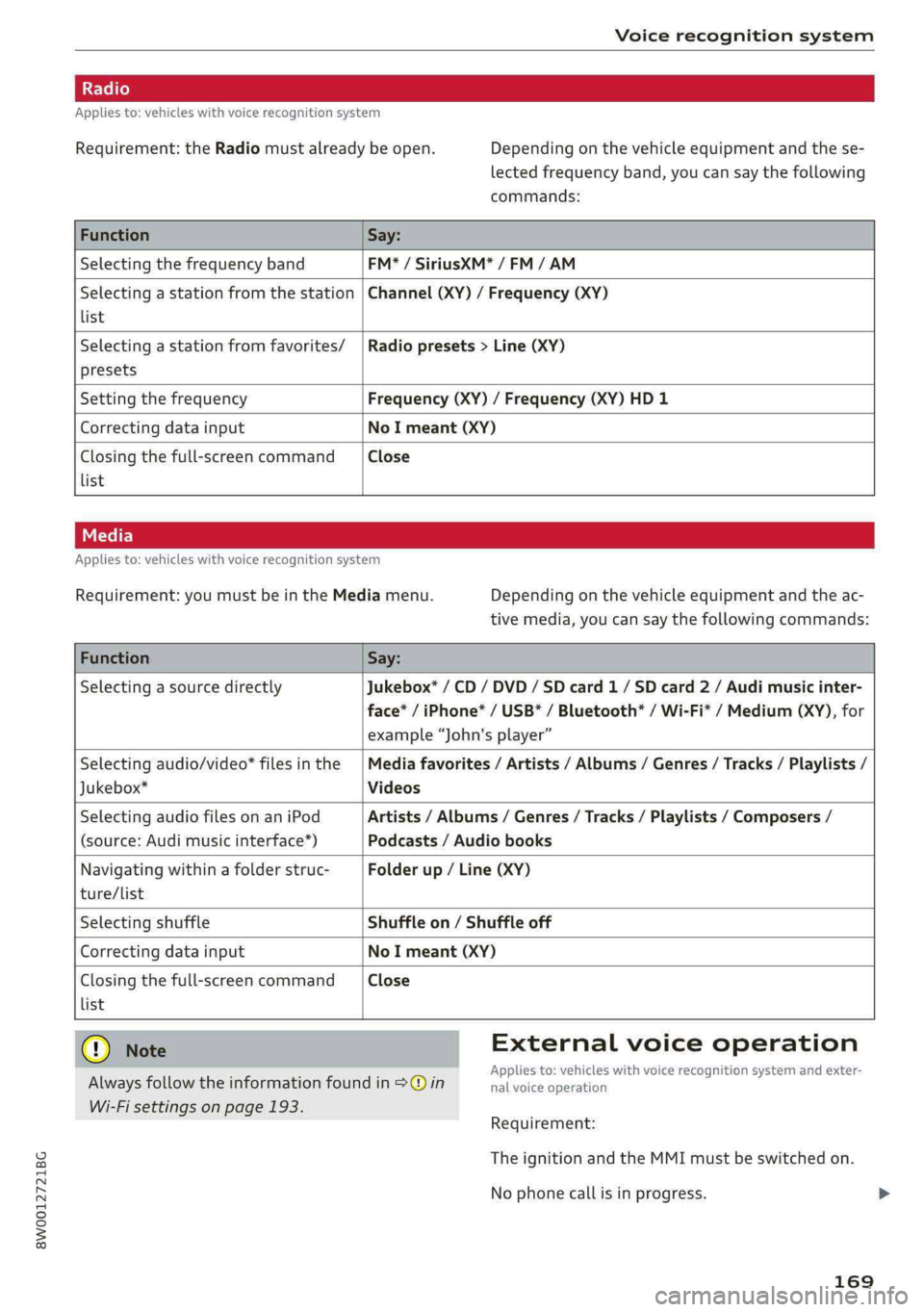
Requirement:theRadiomustalreadybeopen.Depending onthevehicleequipmentandthese-
lectedfrequencyband,youcansaythefollowing
commands:
FunctionSay:
SelectingthefrequencybandFM*/SiriusXM*/FM/AM
Selectingastationfromthestation|Channel(XY)/Frequency(XY)
list
Selectingastationfromfavorites/|Radiopresets>Line(XY)
presets
SettingthefrequencyFrequency(XY)/Frequency(XY)HD1
CorrectingdatainputNoImeant(XY)
Closingthefull-screencommandClose
list
Appliesto:vehicleswithvoicerecognitionsystem
Requirement:youmustbeintheMediamenu.Depending onthevehicleequipmentandtheac-
tivemedia,youcansaythefollowingcommands:
FunctionSay:
SelectingasourcedirectlyJukebox*/CD/DVD/SDcard1/ SDcard2/Audimusicinter-
face*/iPhone*/USB*/Bluetooth®/Wi-Fi*/Medium(XY),for
example“John'splayer”
Selectingaudio/video*filesinthe|Mediafavorites/Artists/Albums/Genres/Tracks/Playlists/
Jukebox*Videos
SelectingaudiofilesonaniPodArtists/Albums/Genres/Tracks/Playlists/Composers/
(source:Audimusicinterface*)Podcasts/Audiobooks
Navigatingwithinafolderstruc-Folderup/Line(XY)
ture/list
SelectingshuffleShuffleon/Shuffleoff
CorrectingdatainputNoImeant(XY)
Closingthefull-screencommandClose
list
Q)NoteExternalvoiceoperation
Alwaysfollowtheinformationfoundin>@inieacaeiskINNBICETSCagnHGnSySternarilexter>
Wi-Fisettingsonpage193.
Requirement:
TheignitionandtheMMImustbeswitchedon.
Nophonecallisinprogress.
169
Page 179 of 392
8W0012721BG
Telephone
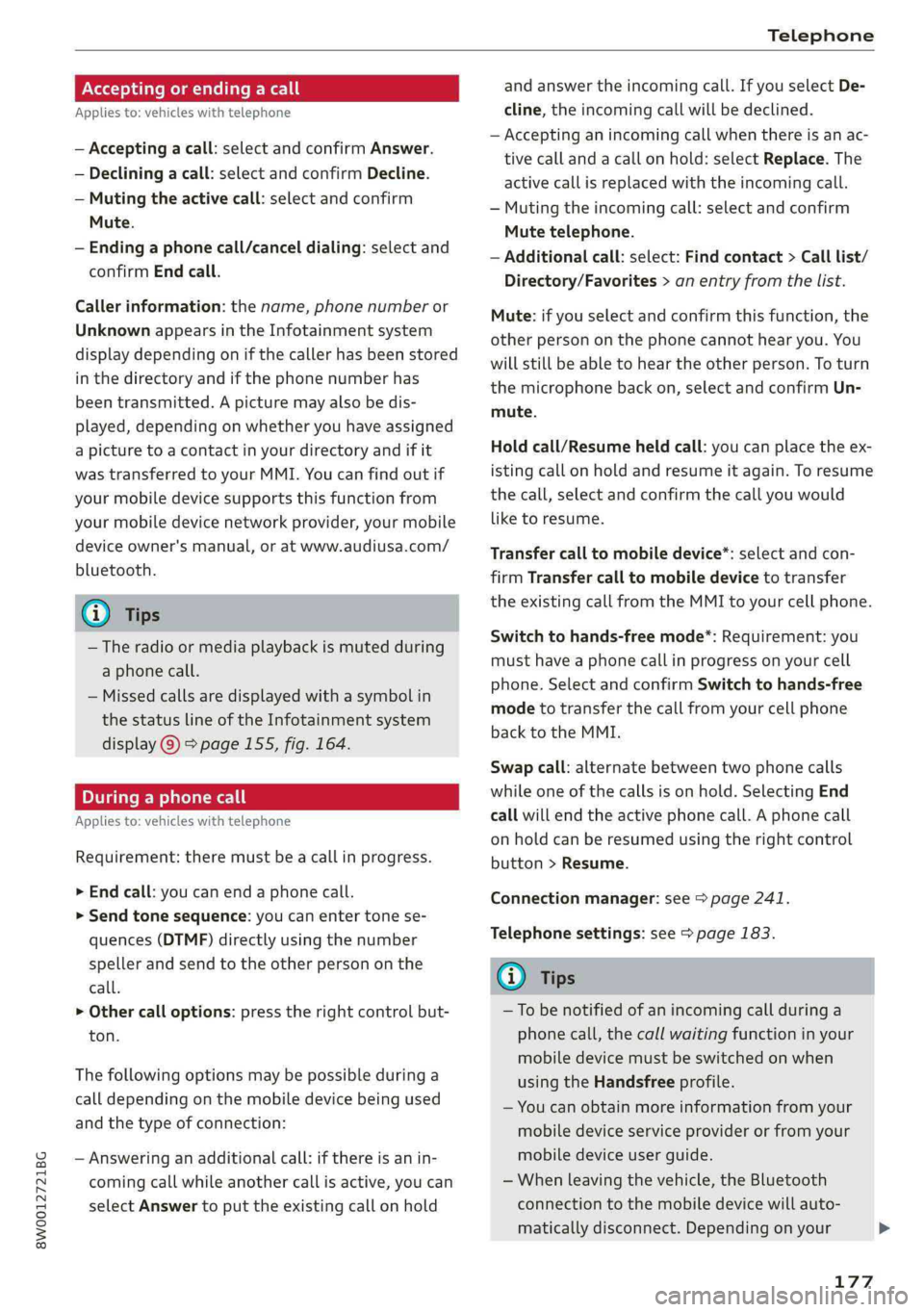
Acceptingorendingacall
Appliesto:vehicleswithtelephone
—Acceptingacall:selectandconfirmAnswer.
—Decliningacall:selectandconfirmDecline.
—Mutingtheactivecall:selectandconfirm
Mute.
—Endinga phonecall/canceldialing:selectand
confirmEndcall.
Callerinformation:thename, phonenumberor
UnknownappearsintheInfotainmentsystem
displaydependingonifthecallerhasbeenstored
inthedirectoryandifthephonenumberhas
beentransmitted.Apicturemayalsobedis-
played,dependingonwhetheryouhaveassigned
apicturetoacontactinyourdirectoryandifit
wastransferredtoyourMMI.Youcanfindoutif
yourmobiledevicesupportsthisfunctionfrom
yourmobiledevicenetworkprovider,yourmobile
deviceowner'smanual,or atwww.audiusa.com/
bluetooth.
@)Tips
—Theradioormediaplaybackismutedduring
aphonecall.
—Missedcallsaredisplayedwithasymbolin
thestatuslineoftheInfotainmentsystem
display@)>page155,fig. 164.
Duringaphonecall
Appliesto:vehicleswithtelephone
Requirement:
theremustbeacallinprogress.
>Endcall:youcanendaphonecall.
>Sendtonesequence:youcanentertonese-
quences(DTMF)directlyusingthenumber
spellerandsendtotheotherpersononthe
call.
>Othercalloptions:presstherightcontrolbut-
ton.
Thefollowingoptionsmaybepossibleduringa
call
dependingonthemobiledevicebeingused
andthetypeofconnection:
—Answeringanadditionalcall:ifthereisanin-
comingcallwhileanothercallisactive,youcan
selectAnswertoput theexistingcallonhold
andanswertheincomingcall.IfyouselectDe-
cline,theincomingcallwillbedeclined.
—Acceptinganincomingcallwhenthereisanac-
tivecallandacallonhold:selectReplace.The
activecallisreplacedwiththeincomingcall.
—Mutingtheincomingcall:selectandconfirm
Mutetelephone.
—Additionalcall:select:Findcontact>Calllist/
Directory/Favorites>anentryfromthelist.
Mute:ifyouselectandconfirmthisfunction,the
otherpersononthephonecannothearyou.You
willstillbeabletoheartheotherperson.Toturn
themicrophonebackon,selectandconfirmUn-
mute.
Holdcall/Resumeheldcall:youcanplacetheex-
istingcallonholdandresumeitagain.Toresume
thecall,selectandconfirm thecallyouwould
liketoresume.
Transfercalltomobiledevice*:selectandcon-
firmTransfercalltomobiledevicetotransfer
theexistingcallfromtheMMItoyourcellphone.
Switchtohands-freemode*:Requirement:you
musthaveaphonecallinprogressonyourcell
phone.SelectandconfirmSwitchtohands-free
modetotransferthecallfromyourcellphone
backtotheMMI.
Swapcall:alternatebetweentwophonecalls
whileoneofthecallsisonhold.SelectingEnd
call willendtheactivephonecall.Aphonecall
onholdcanberesumedusingtherightcontrol
button>Resume.
Connectionmanager:see>page241.
Telephonesettings:see>page183.
@)Tips
—Tobenotifiedofan incomingcallduringa
phonecall,thecallwaitingfunctioninyour
mobiledevicemustbe switchedonwhen
usingtheHandsfreeprofile.
—Youcanobtainmoreinformationfromyour
mobiledeviceserviceproviderorfromyour
mobiledeviceuserguide.
—Whenleavingthevehicle,theBluetooth
connectiontothemobiledevicewillauto-
maticallydisconnect.Depending onyour
177
>
Page 180 of 392
Telephone
mobiledevice,phonecallsinprogressmay
beautomaticallyredirectedfromtheMMI
toyourmobiledeviceso thatyoucancon-
tinuethecallonyourphone.
— Thedisplayofan incomingphonecallinthe
Infotainmentsystemdisplaymaystillbe
visibleforafewsecondsafteracallisan-
sweredorignoreddependingonthecell
phoneinuse.
Makinganemergencycall
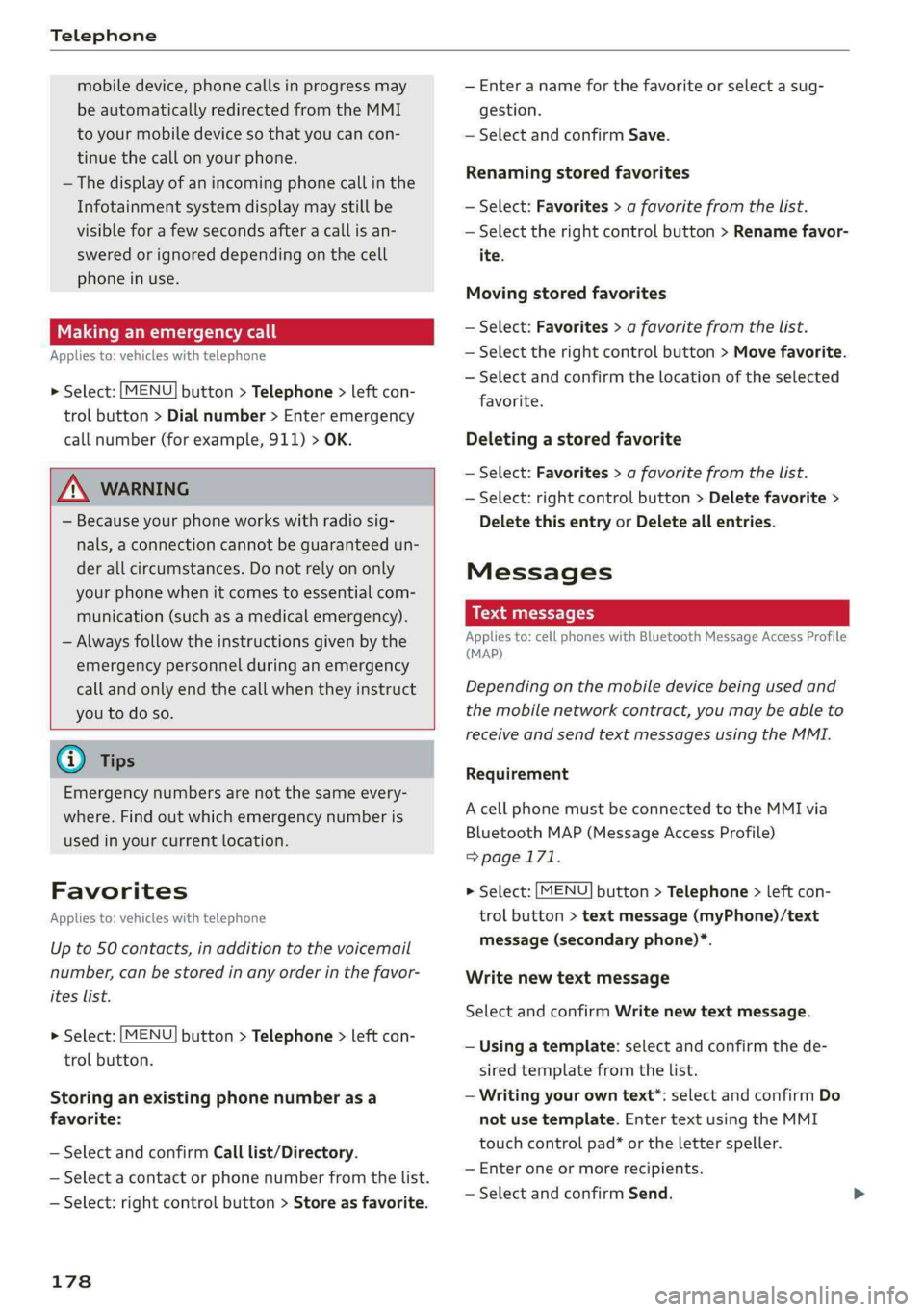
Appliesto:vehicleswithtelephone
>Select:[MENU]button>Telephone>leftcon-
trolbutton>Dialnumber>Enteremergency
callnumber(forexample,911)>OK.
ZAWARNING
—Becauseyourphoneworkswithradiosig-
nals,aconnectioncannotbeguaranteedun-
derallcircumstances.Donotrelyononly
yourphonewhenitcomestoessentialcom-
munication(suchasamedicalemergency).
—Alwaysfollowtheinstructionsgivenbythe
emergencypersonnelduringanemergency
callandonlyendthecallwhentheyinstruct
youtodoso.
G)Tips
Emergencynumbersarenotthesameevery-
where.Findoutwhichemergencynumberis
usedinyourcurrentlocation.
Favorites
Appliesto:vehicleswithtelephone
Upto50contacts,inadditiontothe voicemail
number,canbestoredinanyorderinthefavor-
iteslist.
>Select:[MENU]button>Telephone>leftcon-
trolbutton.
Storinganexistingphonenumberasa
favorite:
—SelectandconfirmCalllist/Directory.
—Selectacontactorphonenumberfromthelist.
—Select:rightcontrolbutton>Storeasfavorite.
178
—Enteranameforthefavoriteorselectasug-
gestion.
—SelectandconfirmSave.
Renamingstoredfavorites
—Select:Favorites>afavoritefromthelist.
—Selecttherightcontrolbutton>Renamefavor-
ite.
Movingstoredfavorites
—Select:Favorites>afavoritefromthelist.
—Selecttherightcontrolbutton>Movefavorite.
—Selectandconfirmthelocationoftheselected
favorite.
Deletingastoredfavorite
—Select:Favorites>afavoritefromthelist.
—Select:rightcontrolbutton>Deletefavorite>
DeletethisentryorDeleteallentries.
Messages
Meetlst
Appliesto: cellphoneswithBluetoothMessageAccessProfile
(MAP)
Dependingonthemobiledevicebeingusedand
themobilenetworkcontract,youmaybeableto
receiveandsendtextmessagesusingtheMMI.
Requirement
AcellphonemustbeconnectedtotheMMIvia
BluetoothMAP(MessageAccessProfile)
>page171.
>Select:[MENU]button>Telephone>leftcon-
trolbutton>textmessage(myPhone)/text
message(secondaryphone)*.
Writenewtextmessage
SelectandconfirmWritenewtextmessage.
—Usingatemplate:selectandconfirmthede-
siredtemplatefromthelist.
—Writingyourowntext*:selectandconfirmDo
not usetemplate.EntertextusingtheMMI
touchcontrolpad*ortheletterspeller.
—Enteroneormorerecipients.
—SelectandconfirmSend.
Page 188 of 392
Audiconnect
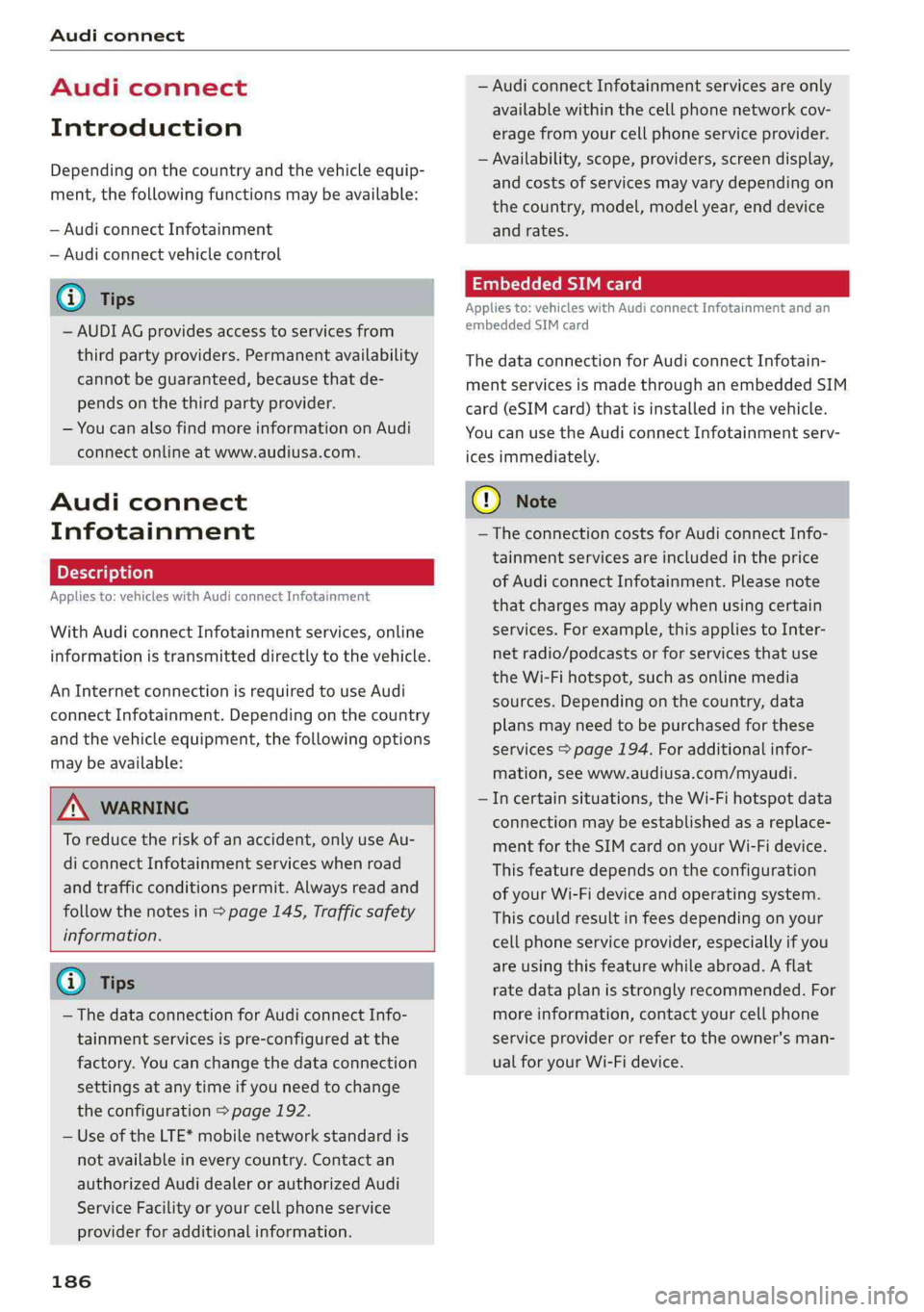
Audiconnect
Introduction
Dependingonthecountryandthevehicleequip-
ment,thefollowing functionsmaybeavailable:
—AudiconnectInfotainment
—Audiconnectvehiclecontrol
@)Tips
—AUDIAGprovidesaccesstoservicesfrom
thirdpartyproviders.Permanentavailability
cannotbeguaranteed,becausethatde-
pendsonthethirdpartyprovider.
—Youcanalso findmoreinformationonAudi
connectonlineatwww.audiusa.com.
Audiconnect
Infotainment
Appliesto:vehicleswithAudiconnectInfotainment
WithAudiconnectInfotainmentservices,online
informationistransmitteddirectlytothevehicle.
AnInternetconnectionisrequiredtouseAudi
connectInfotainment.Dependingonthe country
andthevehicleequipment,thefollowingoptions
maybeavailable:
ZAWARNING
To reducetheriskofanaccident,onlyuseAu-
diconnectInfotainmentserviceswhenroad
andtrafficconditionspermit.Alwaysreadand
followthenotesin>page145,Trafficsafety
information.
G)Tips
— ThedataconnectionforAudiconnectInfo-
tainmentservicesispre-configuredatthe
factory.Youcanchangethedataconnection
settingsatanytimeifyouneedtochange
theconfiguration>page192.
—UseoftheLTE*mobilenetworkstandardis
notavailableineverycountry.Contactan
authorizedAudidealerorauthorizedAudi
ServiceFacilityoryourcellphoneservice
providerforadditionalinformation.
186
—AudiconnectInfotainmentservicesareonly
availablewithinthecellphonenetworkcov-
eragefromyourcellphoneserviceprovider.
—Availability,scope,providers,screendisplay,
andcostsofservicesmayvarydependingon
thecountry,model,modelyear,enddevice
andrates.
EmbeddedSIMcard
Appliesto:vehicleswithAudiconnectInfotainmentandan
embeddedSIMcard
ThedataconnectionforAudiconnectInfotain-
mentservicesismadethroughanembeddedSIM
card(eSIMcard)thatisinstalledinthevehicle.
Youcan usetheAudiconnectInfotainmentserv-
icesimmediately.
()Note
—TheconnectioncostsforAudiconnectInfo-
tainmentservicesareincludedintheprice
ofAudiconnectInfotainment.Pleasenote
thatchargesmayapplywhenusingcertain
services.Forexample,thisappliestoInter-
netradio/podcastsorforservicesthatuse
theWi-Fihotspot,suchasonlinemedia
sources.Dependingonthecountry,data
plansmayneedtobepurchasedforthese
services>page194.Foradditionalinfor-
mation,seewww.audiusa.com/myaudi.
—Incertainsituations,theWi-Fihotspotdata
connectionmaybeestablishedasareplace-
mentfortheSIMcardonyourWi-Fidevice.
Thisfeature dependsontheconfiguration
ofyourWi-Fideviceandoperatingsystem.
Thiscouldresultinfeesdepending onyour
cellphoneserviceprovider,especiallyifyou
areusingthisfeaturewhileabroad.Aflat
ratedataplanisstronglyrecommended.For
moreinformation,contactyourcellphone
serviceproviderorrefertotheowner'sman-
ualforyourWi-Fidevice.
Page 196 of 392
Audiconnect
—Appliesto:embeddedSIMcardusage:The
connectioncostsforAudiconnectInfotain-
mentservicesareincludedinthepriceof
AudiconnectInfotainment.Pleasenote
thatchargesmayapplywhenusingcertain
services.Forexample,thisapplies toInter-
netradio/podcastsorforservicesthatuse
theWi-Fihotspot,suchasonlinemedia
sources.Depending onthecountry,data
plansmayneedtobepurchasedforthese
services>page194.Foradditionalinfor-
mation,seewww.audiusa.com/myaudi.
—Youareresponsibleforallprecautionstaken
fordataprotection,anti-virusprotection,
andprotectionagainstlossofdataonmo-
biledevicesthatareusedtoaccesstheIn-
ternetthroughtheWi-Fihotspot.
@Tips
InvehicleswithoutAudiconnectInfotain-
ment,theuseoftheWi-Fihotspotisonly
possiblefortheWi-Fiaudioplayer*.Adata
connectiontotheInternetcannot beestab-
lished.
Dataplans)
Appliesto:vehicleswith dataplans
Requirement: youmusthavecreatedamyAudi
accountatwww.audiusa.com/myaudi.Yourvehi-
clemustberegisteredinyourmyAudiaccount.
Youcanpurchasedataplansatwww.audiusa.
com/myaudi.
Z\WARNING
—Asthedriver,donotallowusageoftheWi-
Fihotspottodistractyoufromdriving,as
thiscouldincreasetheriskofanaccident.
—Itisonlysafe tousetablets,laptops,mobile
devices,andothersimilardeviceswhenthe
vehicleisstationarybecause,likeallloose
objects,theycouldbethrownaroundthein-
sideofthevehicleinacrashandcauseseri-
ousinjuries.Storethesetypesofdevicesse-
curelywhiledriving.
))_Notavailableineverymarket.
194
—Donotuseanywirelessdevicesonthefront
seatswithinrangeoftheairbagswhiledriv-
ing.Also readthewarningsinthechapter
=page265,Frontairbags.
@)Note
ReadtheinformationaboutAudiconnect,and
besuretonotetheconnectivitycostssection
=>)inWi-Fisettingsonpage193.
G)Tips
—Pleasenotethatanyvehiclepassengercan
deletetheSIMowner.
— Theassociatedvehicleisnotautomatically
deletedfromthecustomerportalforthe
cellphoneserviceproviderwhenyoudelete
theSIMownerinthevehicle.Ifsellingyour
vehicle,youshoulddeletethevehiclefrom
thecustomerportalforthecellphoneserv-
iceprovidertoavoidbeingchargedforaddi-
tionalpurchases.
DataPrivacy
Appliesto:vehicleswith AudiconnectInfotainment
AUDIAGcollects,uses,storesandsharesyour
personalinformation,suchascontactdata,vehi-
cledata,usagedata,drivingdataandprecisege-
olocation,inordertoprovideyouwiththeprod-
uctsandservicesyouhavepurchasedorrequest-
ed,andforanumberofotherpurposes,forex-
ample,totrackqualityissues,toperformance
andsafety,tomeetourinternalcomplianceorle-
galrequirementsandtomarkettocustomers
andpotentialcustomers.Foramorecomplete
listofthedatawecollect,howweuseitandwith
whomweshareit,pleasevisityourAudination-
al/salesregionwebsiteatwww.audi.com.
Thecollection,useandsharingmayvarydepend-
ingonyourmodelandmodelyear,yoursubscrip-
tionstatus,ortheserviceoffering.Forexample,
collection,useandsharingmayvarybetweenAu-
diconnectservices,ifyouhavedesignatedakey
user,orifyouaredrivingamodelequippedwith
persistentdatalogging.Please reviewthe>
Page 217 of 392
8W0012721BG
Radio
Radio
Openingtheradio
TheradiosupportstheFM,AMandSiriusXM*
(satelliteradio)bands.UsingtheHDRadiore-
ceiveralsoallowsyoutoreceiveradiostationson
theFMandAMbandsindigitalformat.
noePea)
aaa
Saale
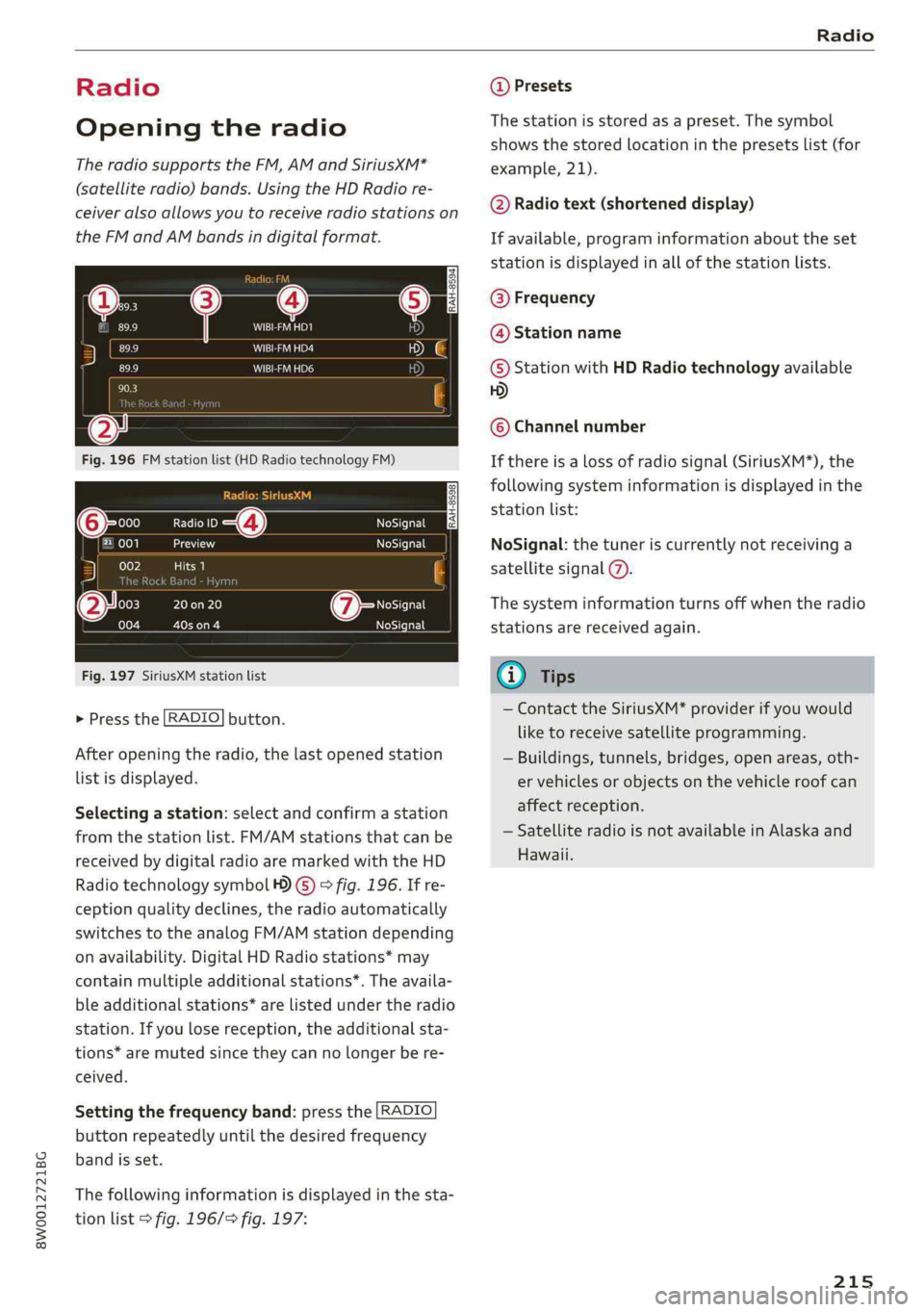
Fig.196FMstationlist(HDRadiotechnologyFM)
(6Sc4NoSignal
ely)reaNoSignal
RAH-8598
002la)
00320on20
coloZ3Cees
NoSignal
Iessfefie19
Fig.197SiriusXMstationlist
>Pressthe[RADIO]button.
Afteropeningtheradio,thelastopenedstation
listisdisplayed.
Selectingastation:selectandconfirmastation
fromthestationlist.FM/AMstationsthatcan be
receivedbydigitalradioaremarkedwiththeHD
Radiotechnologysymbol4)©)>fig.196.Ifre-
ceptionqualitydeclines,theradioautomatically
switchestotheanalogFM/AMstationdepending
onavailability.DigitalHDRadiostations*may
containmultipleadditionalstations*.Theavaila-
bleadditionalstations*arelistedundertheradio
station.Ifyoulosereception,theadditionalsta-
tions*aremutedsincetheycannolongerbere-
ceived.
Settingthefrequencyband:pressthe [RADIO
button
repeatedlyuntilthedesiredfrequency
bandisset.
Thefollowinginformationisdisplayedinthesta-
tionlist>fig.196/>fig.197:
@Presets
Thestationisstoredasapreset.The symbol
showsthestoredlocationinthepresetslist(for
example,21).
@Radiotext(shorteneddisplay)
Ifavailable,programinformationabouttheset
stationisdisplayedinallofthestationlists.
@Frequency
@Stationname
©StationwithHDRadiotechnologyavailable
HD)
©Channelnumber
Ifthereisalossofradiosignal(SiriusXM*),the
followingsysteminformationisdisplayedinthe
stationlist:
NoSignal:thetuneriscurrentlynotreceivinga
satellitesignal@.
Thesysteminformationturnsoffwhentheradio
stationsarereceivedagain.
@Tips
—ContacttheSiriusXM*providerifyouwould
liketoreceivesatelliteprogramming.
—Buildings,tunnels,bridges,openareas,oth-
ervehiclesorobjectsonthevehicleroofcan
affectreception.
—SatelliteradioisnotavailableinAlaskaand
Hawaii.
215