turn signal AUDI A4 2019 User Guide
[x] Cancel search | Manufacturer: AUDI, Model Year: 2019, Model line: A4, Model: AUDI A4 2019Pages: 392, PDF Size: 99.53 MB
Page 51 of 392

8W0012721BG
LightsandVision
Headlightassistant:malfunction!Seeown-
er'smanual
DrivetoanauthorizedAudidealerorauthorized
AudiServiceFacilityimmediatelytohavethe
malfunctioncorrected.Youcanstillswitchthe
highbeamsonoroffmanually.
Headlightassistant:currentlyunavailable.
Cameraviewrestrictedduetosurroundings.
Seeowner'smanual
Thecameraviewisblocked,forexamplebya
stickerordebris.
Thesensorislocated betweentheinteriorrear-
viewmirrorandthewindshield.Donotplaceany
stickersinthisareaonthewindshield.
ZAWARNING
Highbeamassistantisonlyintendedtoassist
thedriver.Thedriverisstillresponsiblefor
controllingtheheadlightsandmayneedto
switchthemonandoffmanuallydepending
onlightandvisibilityconditions.Itmaybe
necessarytooperatethemmanuallyinsitua-
tionssuchas:
—Inadverseweatherconditionssuchasfog,
heavyrain,blowingsnoworsprayingwater.
—Onroadswhereoncomingtrafficmaybe
partiallyobscured,suchasexpressways.
—Whenthereareroadusersthatdonot have
sufficientlighting,suchasbicyclersorvehi-
cleswithdirtytaillamps.
—Intightcurvesandonsteephills.
—Inpoorlylitareas.
—Withstrongreflectors,suchassigns.
—Iftheareaofthewindshieldnearthesensor
isfoggedover,dirty,icyorcoveredwitha
sticker.
Adjustingtheexterior lighting
ThefunctionsareadjustedintheInfotainment
system.
> SelectintheInfotainmentsystem:[MENU]but-
ton>Vehicle> leftcontrolbutton>Vehicle
settings>Exteriorlighting.
Automaticheadlights
YoucanadjustthefollowingsettingsintheAuto-
matic
headlightsmenu:
Activationtime-youcanadjustiftheheadlights
switchonEarly,MediumorLateaccordingtothe
sensitivityofthelightsensor.
Headlightassistant*-youcanswitchthehigh
beamassistant*onandoff.
Entry/exitlighting
Whenitisdark,theEntry/exitlightingillumi-
natestheareaaroundthevehiclewhenunlocking
the
vehicleandafterswitchingofftheignition
andopeningthedriver'sdoor.
TheEntry/exitlightingonlyworkswhenitisdark
andthelightswitchisintheAUTOposition.
Daytimerunninglights
USAmodels:thedaytimerunninglightscanbe
switchedon/off.SelectOnorOff.
Canadamodels:thisfunctioncannotbe switched
off.Theyactivateautomaticallyeachtimetheig-
nitionisswitchedon.
Emergencyflashers
Fig.43Centerconsole:emergencyflasherbutton
Theemergencyflashersmakesotherdrivers
awareofyourvehicleindangeroussituations.
»PresstheAbuttontoswitchtheemergency
flashersonoroff.
Youcanindicatealanechangeoraturnwhenthe
emergencyflashersareswitchedonbyusingthe
turnsignallever.Theemergencyflashersstop
temporarily.
49
Page 63 of 392
8W0012721BG
Seats
settings>Seats>Driver'sseat>Storeset-
tingsonremotecontrolkey.
@Tips
Ifyoudonotwishtohavetheseatprofilefor
anotherdriverassignedtothevehiclekey,
switchthememoryfunctionoffintheInfo-
tainmentsystem.
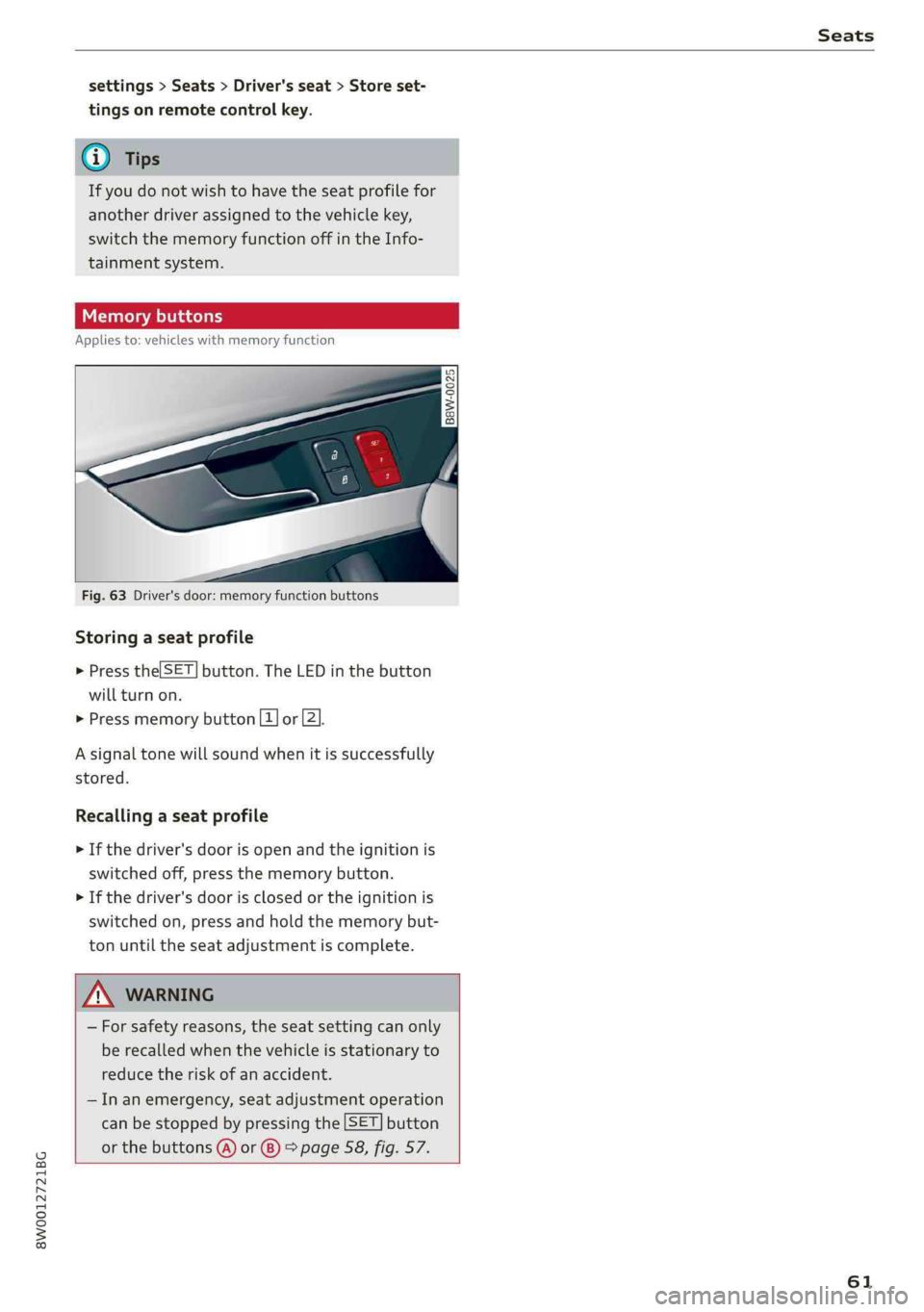
Memorybuttons
Appliesto:vehicleswithmemoryfunction
B8W-0025
Fig.63Driver'sdoor:memoryfunctionbuttons
Storingaseatprofile
>Pressthe|SET]button.TheLEDinthebutton
willturnon.
>Pressmemorybutton[1]or[2].
Asignaltonewillsoundwhenitissuccessfully
stored.
Recallingaseatprofile
>Ifthedriver'sdoorisopenandtheignitionis
switchedoff,pressthememorybutton.
>Ifthedriver's doorisclosedortheignitionis
switchedon,pressandholdthememorybut-
tonuntiltheseatadjustmentiscomplete.
ZA\WARNING
—Forsafetyreasons,theseatsettingcanonly
berecalledwhenthevehicleisstationaryto
reducetheriskofanaccident.
—Inanemergency,seatadjustmentoperation
canbestoppedbypressingthe[SET]button
orthebuttons@)or@)>page58,fig.57.
61
Page 111 of 392
8W0012721BG
Assistsystems
stored,Distance3isautomaticallyseteverytime
theignitionisswitchedon.
Drivingprogram
Appliesto:vehicleswithoutAudidriveselect
Dependingontheselecteddrivingprogramand
distance,drivingbehaviorwhenacceleratingwill
varyfromdynamictocomfortable.
Selectingthedrivingmode
Appliesto:vehicleswith Audidriveselect
DependingontheselectedAudidriveselect
modeandthedistancethatisset,thedrivingbe-
haviorwillvaryfromdynamictocomfortable
whenaccelerating>page127.
@)Tips
Yoursettings areautomaticallystoredandas-
signedtothevehiclekeybeingused.
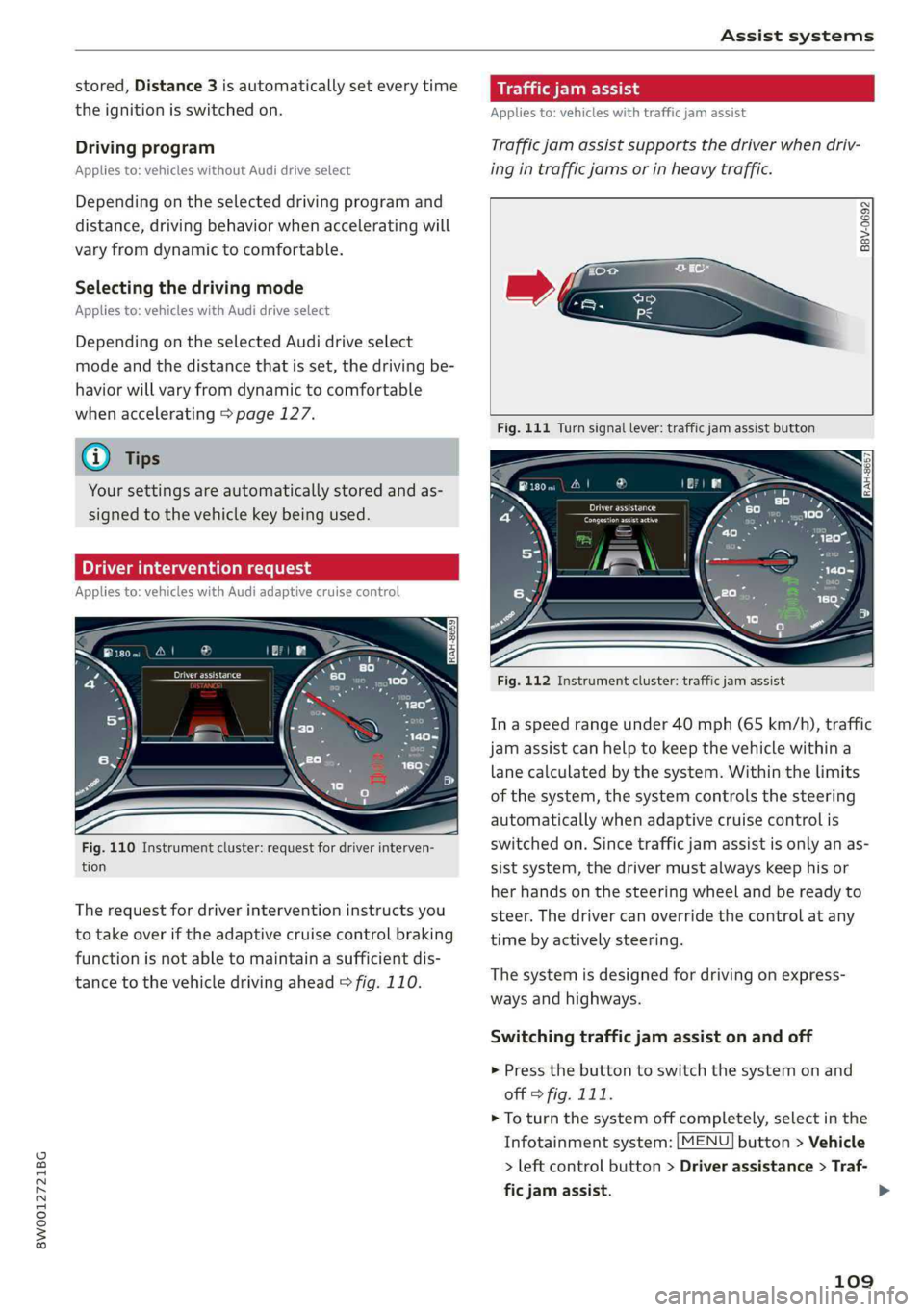
riverinterventionrequest
Appliesto:vehicleswithAudiadaptivecruisecontrol
Fig.110Instrumentcluster:requestfordriverinterven-
tion
Therequestfor driverinterventioninstructsyou
totakeoveriftheadaptivecruisecontrolbraking
functionisnotabletomaintainasufficientdis-
tancetothevehicledrivingahead>fig.110.
Appliesto:vehicleswithtrafficjamassist
Trafficjamassistsupportsthedriverwhendriv-
ingintrafficjamsorinheavytraffic.
B8V-0692
Fig.111Turnsignallever:trafficjamassistbutton
ooa
RAH-8657
Fig.112Instrumentcluster:trafficjamassist
In aspeedrangeunder40mph(65km/h),traffic
jamassistcanhelptokeepthevehiclewithina
lanecalculatedbythesystem.Withinthelimits
ofthesystem,thesystemcontrolsthesteering
automaticallywhenadaptivecruisecontrolis
switchedon.Sincetrafficjamassistisonlyanas-
sistsystem,thedrivermustalwayskeephisor
herhandsonthesteeringwheelandbereadyto
steer.Thedrivercanoverridethecontrolatany
timebyactivelysteering.
Thesystemisdesignedfordrivingonexpress-
waysandhighways.
Switchingtrafficjamassistonandoff
>Pressthebuttontoswitchthesystemonand
off>fig.111.
>Toturnthesystemoffcompletely,selectinthe
Infotainmentsystem:[MENU]button>Vehicle
>leftcontrolbutton>Driverassistance>Traf-
ficjamassist.
109
>
Page 119 of 392
![AUDI A4 2019 User Guide 8W0012721BG
Assistsystems
SettingsintheInfotainmentsystem
Appliesto:vehicleswithAudipresense
>SelectintheInfotainmentsystem:[MENU]but-
ton>Vehicle> leftcontrolbutton>Driver
assistance>Audipre](/img/6/57555/w960_57555-118.png "AUDI A4 2019 User Guide 8W0012721BG
Assistsystems
SettingsintheInfotainmentsystem
Appliesto:vehicleswithAudipresense
>SelectintheInfotainmentsystem:[MENU]but-
ton>Vehicle> leftcontrolbutton>Driver
assistance>Audipre")
8W0012721BG
Assistsystems
SettingsintheInfotainmentsystem
Appliesto:vehicleswithAudipresense
>SelectintheInfotainmentsystem:[MENU]but-
ton>Vehicle> leftcontrolbutton>Driver
assistance>Audipre sense.
TurnAudipresenseon/off-thepresensefunc-
tionscanbe turnedonandoff.
Ifthesystemisswitchedoff,itswitchesonagain
automaticallyoncetheignitionisswitchedon
again.
Prewarning-theearlywarningcan be switched
offorthepresensecity/frontwarningpointcan
be
set(Early/Medium/Late).
Setthewarningtimefortheearlywarningto
Earlyatfirst.Ifthiscausesundesiredearlywarn-
ingstoappear,thensetthewarningtimetoMe-
dium. TheLatewarningtimeshouldonlybeset
inspecialcircumstances.
@Tips
Yoursettings areautomaticallystoredandas-
signedtothevehiclekeybeingused.
Messages
Appliesto:vehicleswithAudipresense
Bhaudipresense:malfunction!Pleasecontact
Service
Thismessageappearswhenthepresensefunc-
tionisaffected.Forexample,thiscouldbe
causedbyafaultysensor.Drivetoanauthorized
AudidealerorauthorizedAudiServiceFacilityim-
mediatelytohavethemalfunctioncorrected.
Audipresense:currentlylimited.Sensor
viewlimitedduetosurroundings.Seeowner's
manual
Thismessageappearsiftheradarsensorand
cameraviewisobstructed,forexamplebyleaves,
snow,heavysprayordirt.Ifnecessary, cleanthe
sensorsandtheareaaroundthecamera
=>page103,fig.101or>page122,fig.122.
Audipresense:currentlylimited
ThismessageappearsiftheESCisrestrictedor
switchedoff,forexample.
Audipresense:currentlylimited.Seeown-
er'smanual
Thismessageappearswhenthereisatemporary
failureinasubsystem,suchastheESC.Ifthis
messageappearsrepeatedly,drivetoanauthor-
izedAudidealerorauthorizedAudiServiceFacili-
tytohave themalfunctioncorrected.
Audipresense:emergencybrakingsystem
off This
messageappearsifthepresensefunctions
areswitchedoffthroughtheInfotainmentsys-
temorifthesystemisnotready.
Audiactivelaneassist
Appliesto:vehicleswithAudiactivelaneassist
Active laneassist(lanedeparturewarning)de-
tectslanemarkerlineswithinthelimitsofthe
systemusingacamerainthewindshield.Ifyou
areapproachingadetectedlanemarkerlineand
itappearslikelythatyouwillleavethelane,the
systemwillwarnyouwithcorrectivesteering.
Youcanoverridethissteeringatanytime.Ifyou
passoveraline,thesteeringwheelwillvibrate
lightly.Inorderforthiswarningvibrationtooc-
cur,itmustfirstbeswitchedonintheInfotain-
mentsystem.Activelaneassistisreadyforoper-
ationwhenthelane markerlineisdetectedonat
leastonesideofthevehicle.
Thesystemisdesignedfordrivingonexpress-
waysandhighwaysandthereforeonlyactivates
atspeedsaboveapproximately40mph(65
km/h).
Appliesto:vehicleswithsideassist:ifyouacti-
vateaturnsignalwhenactivelaneassistisready
anditclassifiesalanechangeascriticalbecause
ofvehiclestravelingalongsideyouorapproach-
ingyou,therewillbenoticeablecorrectivesteer-
ingshortlybeforeyouleavethelane.Thiswillat-
tempttokeepyourvehicleinthelane.
Appliesto:vehicleswithoutsideassist:Whenthe
systemisready,itwillnotwarnyouifyouacti-
vateaturnsignalbeforecrossingthelanemarker>
117
Page 120 of 392
Assistsystems
line.Inthiscase,itassumesthatyouarechang-
inglanesintentionally.
Appliesto:vehicleswithadaptivecruisecontrol:
Thereisnocorrectivesteering or warningsifthe
systemdetectsadistinctpassingmaneuver.If
theconditionsaremet,trafficjamassistswitches
onatspeedsunderapproximately40mph
(65km/h)>page109.
ZAWARNING
— Thesystemwarnsthedriverthatthevehicle
isleavingthelaneusingcorrectivesteering.
Thedriverisalwaysresponsibleforkeeping
thevehiclewithinthelane.
— Thesystemcanhelpyoukeepthevehiclein
thelane,butitdoesnotdrivebyitself.Al-
wayskeep yourhandsonthesteeringwheel.
—Correctivesteeringmaynotoccurincertain
situations,suchasduringheavybraking.
—Theremaybecaseswherethecameradoes
notrecognizealllanemarkerlines.Correc-
tivesteeringcanonly takeplaceontheside
ofthevehiclewherelanemarkerlinesare
detected.
—Otherroadstructuresorobjectscouldpossi-
blybeidentifiedunintentionallyaslane
markerlines.Asaresult,correctivesteering
maybeunexpectedormaynotoccur.
— Thecameraviewcanberestricted,forexam-
plebyvehiclesdrivingaheadorbyrain,
snow,heavysprayorlightshiningintothe
camera.Thiscanresultinactivelaneassist
notdetectingthelanemarkerlinesorde-
tectingthemincorrectly.
—Incertainsituations wherevisibilityislow,
thevehiclemayswitchfroman“early”to
“late”steeringcorrection.
—Undercertainconditionssuchasrutsinthe
road,aninclinedroadwayorcrosswinds,the
correctivesteeringalonemaynot beenough
tokeepthevehicleinthemiddleofthelane.
—Forsafetyreasons,activelaneassistmust
not beusedwhentherearepoorroadand/or
weatherconditionssuchasslipperyroads,
fog,gravel,heavyrain,snowandthepoten-
tialforhydroplaning.Usingactivelaneas-
118
sistundertheseconditionsmayincreasethe
riskofacrash.
Sicameal
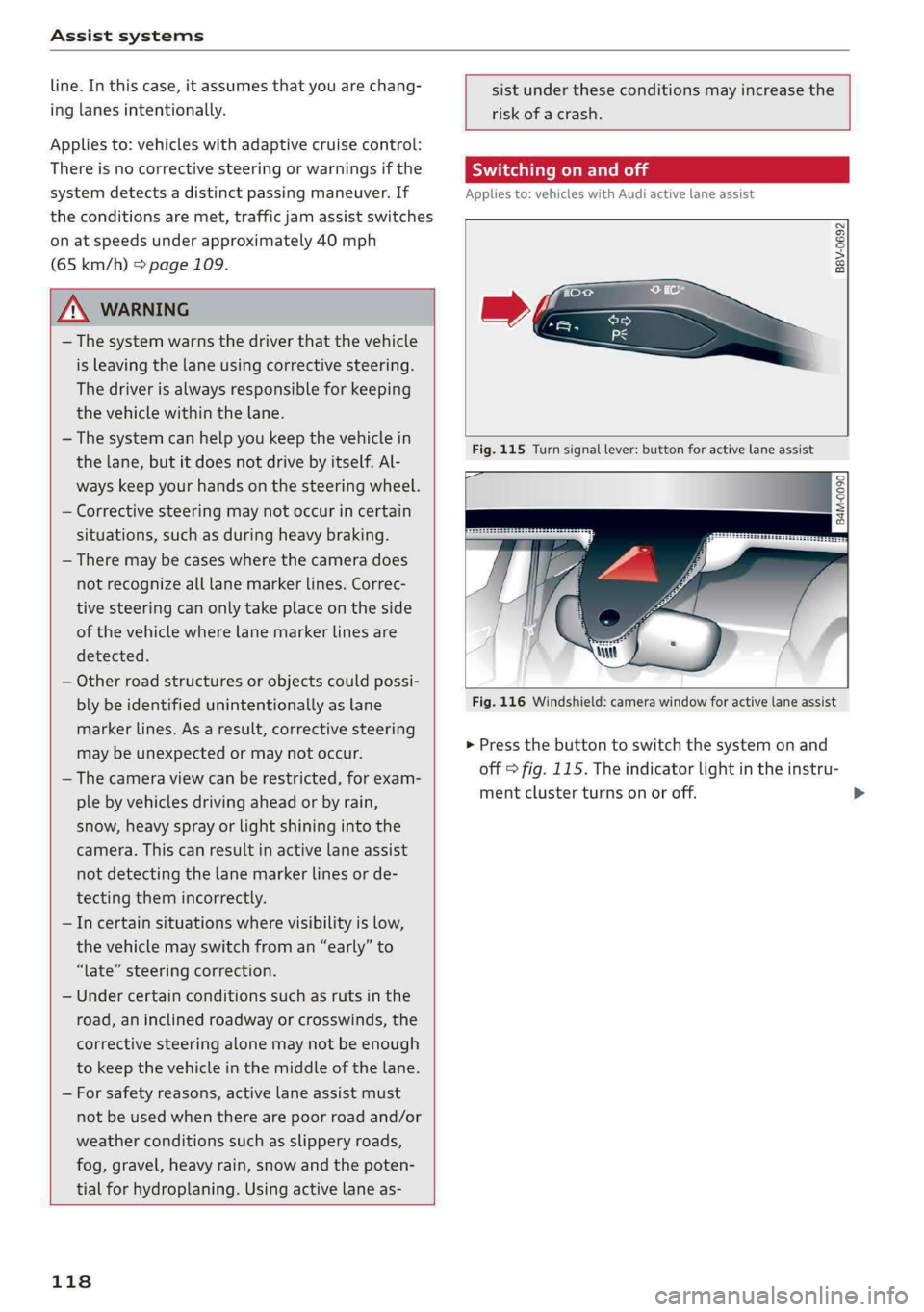
Appliesto:vehicleswith Audiactivelaneassist
B8V-0692
Fig.115Turnsignallever:buttonforactivelaneassist
B4M-0090
Fig.116Windshield:camerawindowforactivelaneassist
>Pressthebuttontoswitchthesystemonand
off>fig.115.Theindicatorlightintheinstru-
mentclusterturnsonoroff.
Page 123 of 392

8W0012721BG
Assistsystems
Late:inthissetting,thesystemprovidescorrec-
tivesteeringjustbeforeawheelgoesoverade-
tectedlanemarkerline.
Vibrationwarning
Youcanswitchtheadditionalvibrationwarning
inthesteeringwheelonoroff.
ZAWARNING
Withthevibrationwarningswitchedoff,there
willalsobenovisualwarningintheinstru-
mentclusterdisplaywhencrossingalane
markerline.
@)Tips
Certain settings areautomaticallystoredand
assignedtothevehiclekeybeingused).
Audisideassist
Appliesto:vehicleswith Audisideassist
B4M-0099}
B8W-0100
Fig.120Displayontheexteriormirror
Sideassist(lanechangeassist)helpsyoumonitor
yourblindspotandtrafficbehindyourvehicle.
DIncertaincountries
Withinthelimitsofthesystem,itwarnsyou
aboutvehiclesthatarecomingcloserorthatare
traveling
withyouwithinsensorrange@)
>fig.119.If alanechangeisclassifiedascriti-
cal,thedisplay@)intheexteriormirrorturnson
fig.120.
Thedisplayintheleftexteriormirrorprovidesas-
sistancewhenmakingalanechangetotheleft,
whilethedisplayintherightexteriormirrorpro-
videsassistancewhenmakingalanechangeto
theright.
Informationstage
Aslongasyoudonotactivatetheturnsignal,
sideassistinformsyouaboutvehiclesthatare
detectedandclassifiedascritical.Thedisplayin
themirrorturnson,butisdim.
Thedisplayremainsdimintheinformationstage
sothatyour viewtowardthefrontisnotdistur-
bed.
Warningstage
Ifthedisplayinamirrorblinksbrightlywhenyou
activateaturnsignal,sideassistiswarningyou
aboutdetectedvehiclesthatithasclassifiedas
critical.Ifthishappens,checktrafficby glancing
intheexteriormirrorsandoveryourshoulder
=>A\inGeneralinformationonpage122.
Appliesto:vehicleswithactivelaneassist:the
displayinthemirrorcanalsoblinkifyouhavenot
activatedaturnsignal:ifyouareapproachinga
detectedlanemarkerlineanditappearsyouwill
beleavingthelane,sideassistwillwarnyou
aboutdetectedvehiclesthatithasclassifiedas
critical.
@Tips
Youcanadjustthebrightnessonofthedis-
playontherearview mirror>page123.
121
Page 127 of 392
8W0012721BG
Assistsystems
meritia
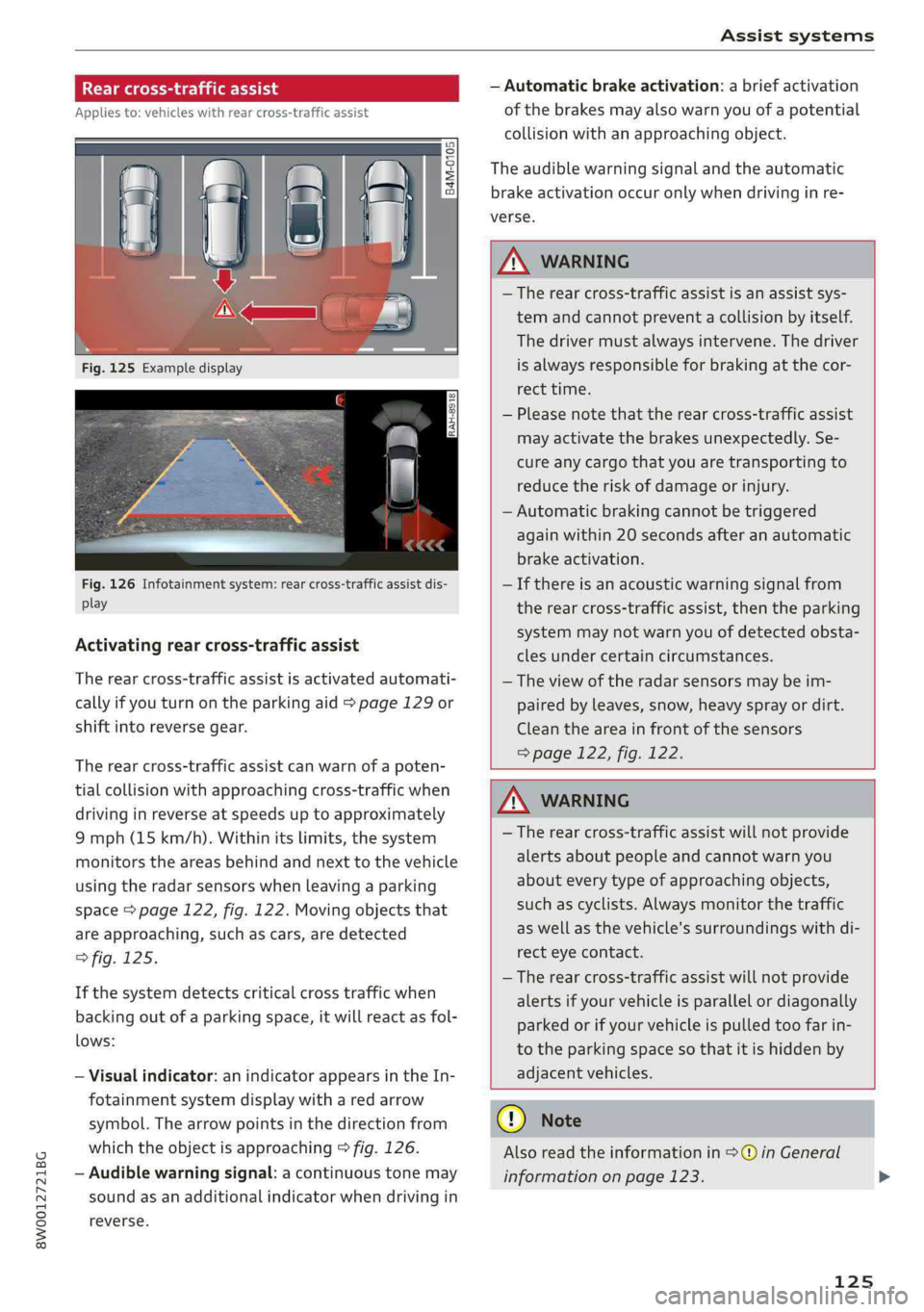
Appliesto:vehicleswithrearcross-trafficassist
RAH-8918
Fig.126Infotainmentsystem:rearcross-trafficassistdis-
play
Activatingrearcross-trafficassist
Therearcross-trafficassistisactivatedautomati-
callyifyouturnontheparkingaid>page129or
shiftintoreversegear.
Therearcross-trafficassistcanwarnofapoten-
tialcollisionwithapproachingcross-trafficwhen
drivinginreverseatspeedsuptoapproximately
9mph(15km/h).Withinitslimits,thesystem
monitorstheareasbehindandnexttothevehicle
usingtheradarsensorswhenleavingaparking
space>page122,fig.122.Movingobjectsthat
areapproaching,suchascars,aredetected
>fig.125.
Ifthesystemdetectscriticalcrosstrafficwhen
backingoutofaparkingspace,itwillreactasfol-
lows:
—Visualindicator: anindicatorappearsintheIn-
fotainmentsystemdisplaywitharedarrow
symbol.Thearrowpointsinthedirectionfrom
whichtheobjectisapproaching>fig.126.
—Audiblewarningsignal:acontinuoustonemay
soundasanadditionalindicatorwhendrivingin
reverse.
—Automaticbrakeactivation:abriefactivation
ofthe brakesmayalsowarnyouofapotential
collisionwithanapproachingobject.
Theaudiblewarningsignalandtheautomatic
brakeactivationoccuronlywhendrivinginre-
verse.
ZAWARNING
—Therearcross-trafficassistisanassistsys-
temandcannotpreventacollisionbyitself.
Thedrivermustalwaysintervene.Thedriver
isalwaysresponsibleforbrakingatthecor-
recttime.
—Pleasenotethattherearcross-trafficassist
mayactivatethebrakesunexpectedly.Se-
cureanycargothatyouaretransportingto
reducetheriskofdamageorinjury.
—Automaticbrakingcannotbetriggered
againwithin20secondsafteranautomatic
brakeactivation.
—Ifthereisanacousticwarningsignalfrom
therearcross-trafficassist,thentheparking
systemmaynotwarnyouofdetectedobsta-
clesundercertaincircumstances.
— Theviewoftheradarsensorsmaybeim-
pairedbyleaves,snow, heavysprayordirt.
Cleantheareainfrontofthesensors
>page122,fig. 122.
Z\WARNING
—Therearcross-trafficassistwillnotprovide
alertsaboutpeopleandcannotwarnyou
abouteverytypeofapproachingobjects,
suchascyclists.Alwaysmonitorthetraffic
aswellasthevehicle'ssurroundingswithdi-
recteyecontact.
—Therearcross-trafficassistwillnotprovide
alertsifyourvehicleisparallelordiagonally
parkedorifyourvehicleispulledtoofarin-
totheparkingspaceso thatitishiddenby
adjacentvehicles.
@)Note
Alsoreadtheinformationin©inGeneral
informationonpage123.>
125
Page 133 of 392
8W0012721BG
Parkingaid
=>A\inGeneralinformationonpage129,>@in
Generalinformationonpage129!
Visualwarnings
ThevisualwarningsintheInfotainmentsystem
displayhelpyoutodetectthecriticalvehiclearea
andtoestimatethedistancetoanobstacle
>fig.129.
Redsegmentsshowidentifiedobstaclesthatare
inyourvehicle'spath.Theredlinesmarktheex-
pecteddirectionoftravelaccordingtothesteer-
ing
angle.Awhitesegmentindicatesanidenti-
fiedobstaclethatisoutsideofthevehicle'spath.
Asyourvehiclecomesclosertotheobstacle,the
segmentsmoveclosertothevehicle.Thecolli-
sionareahasbeenreachedwhenthenexttolast
segmentisdisplayed.Obstaclesinthecollision
area,includingthoseoutsideofthevehicle's
path, areshowninred.Donotcontinuedriving
forwardorinreverse>A\inGeneralinformation
onpage129,>@inGeneralinformationon
page129!
@Tips
Ifthedistancetoanobstacleremainscon-
stant,thevolumeofthedistancewarning
graduallylowersafterafewsecondsuntilitis
muted(thisdoesnot applytothecontinuous
tone).Iftheobstaclecomescloserthanitwas
beforethesoundwasmuted,thetonewill
soundagain.Iftheobstaclebecomesfarther
awaythanitwasbeforethesoundwasmut-
ed,notonewillsound.Payattentiontothe
vehicle'ssurroundingswhenyoustartto
drive.
SyicealiaremliieRela
Appliesto:vehicleswithparkingsystemplus
z
s
S|
=aEs
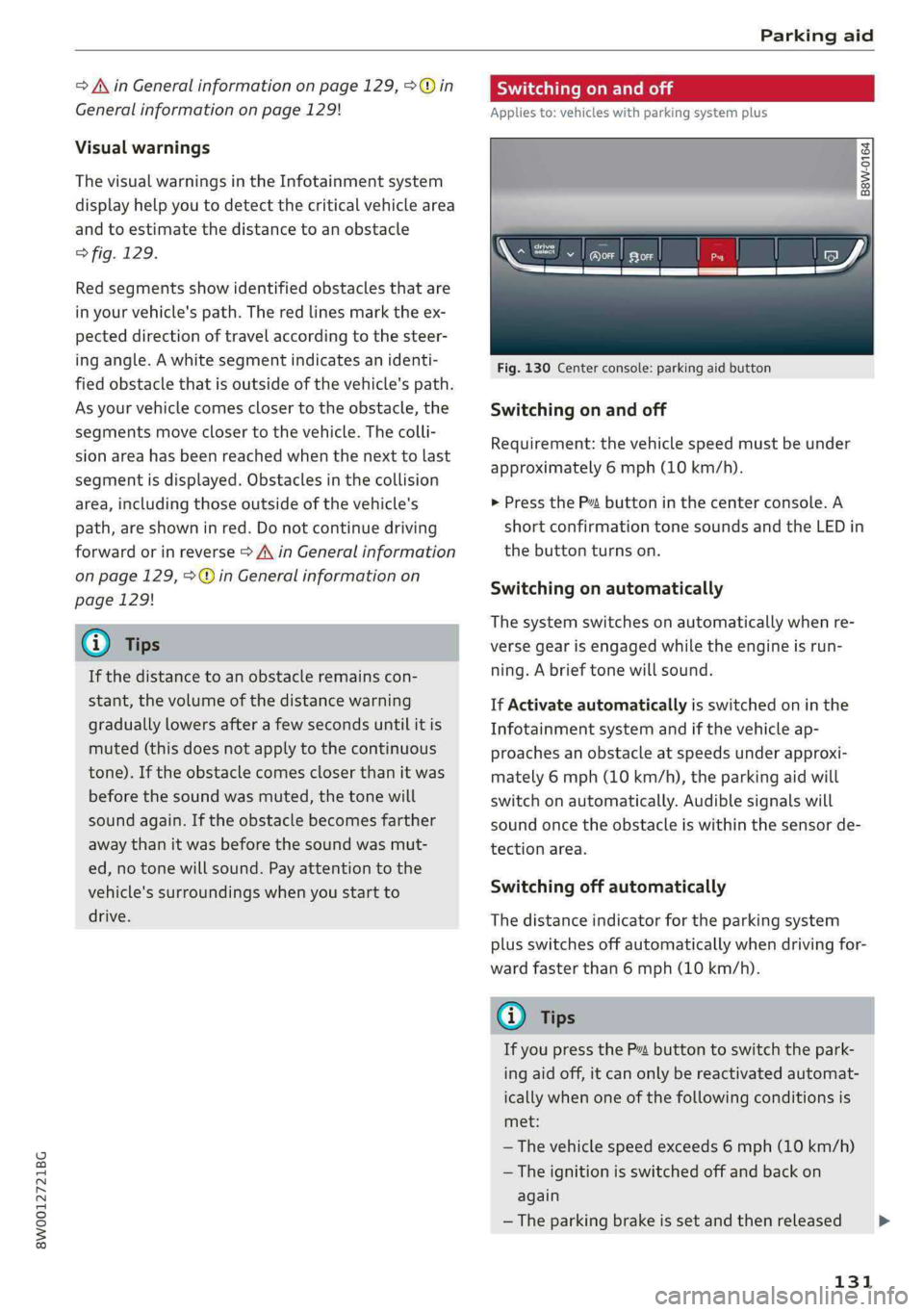
Fig.130Centerconsole:parkingaidbutton
Switchingonandoff
Requirement:thevehiclespeedmustbeunder
approximately6mph(10km/h).
>PresstheP™buttoninthecenterconsole.A
shortconfirmationtonesoundsandtheLEDin
thebuttonturnson.
Switchingonautomatically
The
systemswitchesonautomaticallywhenre-
versegearisengagedwhiletheengineisrun-
ning.Abrieftonewillsound.
IfActivateautomaticallyisswitchedoninthe
Infotainmentsystemandifthevehicleap-
proachesanobstacleatspeedsunderapproxi-
mately6mph(10km/h),theparkingaidwill
switchonautomatically.Audiblesignalswill
soundoncetheobstacleiswithinthesensorde-
tectionarea.
Switchingoffautomatically
Thedistanceindicatorfortheparkingsystem
plusswitchesoffautomaticallywhendrivingfor-
wardfasterthan6mph(10km/h).
(@)Tips
IfyoupressthePvbuttonto switchthepark-
ingaidoff,itcanonlybereactivatedautomat-
icallywhenoneofthefollowingconditionsis
met:
—Thevehiclespeedexceeds6mph(10km/h)
—Theignitionisswitchedoffandbackon
again
—Theparkingbrakeissetandthenreleased
131
>
Page 142 of 392
IntelligentTechnology
Appliesto:allroad
Youshouldonlyswitchsportmode/offroad
modeonorswitchESC/ASRoffifyourdriving
abilitiesandroadconditionspermit.
—Thestabilizationfunctionislimitedwhen
sportmode/offroadmodeisswitchedon.
Thedrivingwheelscouldspinandthevehi-
clecouldswerve,especiallyonslickorslip-
peryroadsurfaces.
—Thereisnovehiclestabilizationwhen
ESC/ASRareswitchedoff.
Hilldescentassist
Appliesto:allroad
Hilldescentassistmakesitpossibletodrive
downahillataconstantspeed.
a
Q
gz
=& a
Fig.146Centerconsole:hilldescentassistbutton
>Toswitchhilldescentassiston,presstheL@
button.TheLEDinthebuttonwillturnon.
>»Pressthebuttonagaintoswitchitoff.The LED
inthe buttonturnsoff.
140
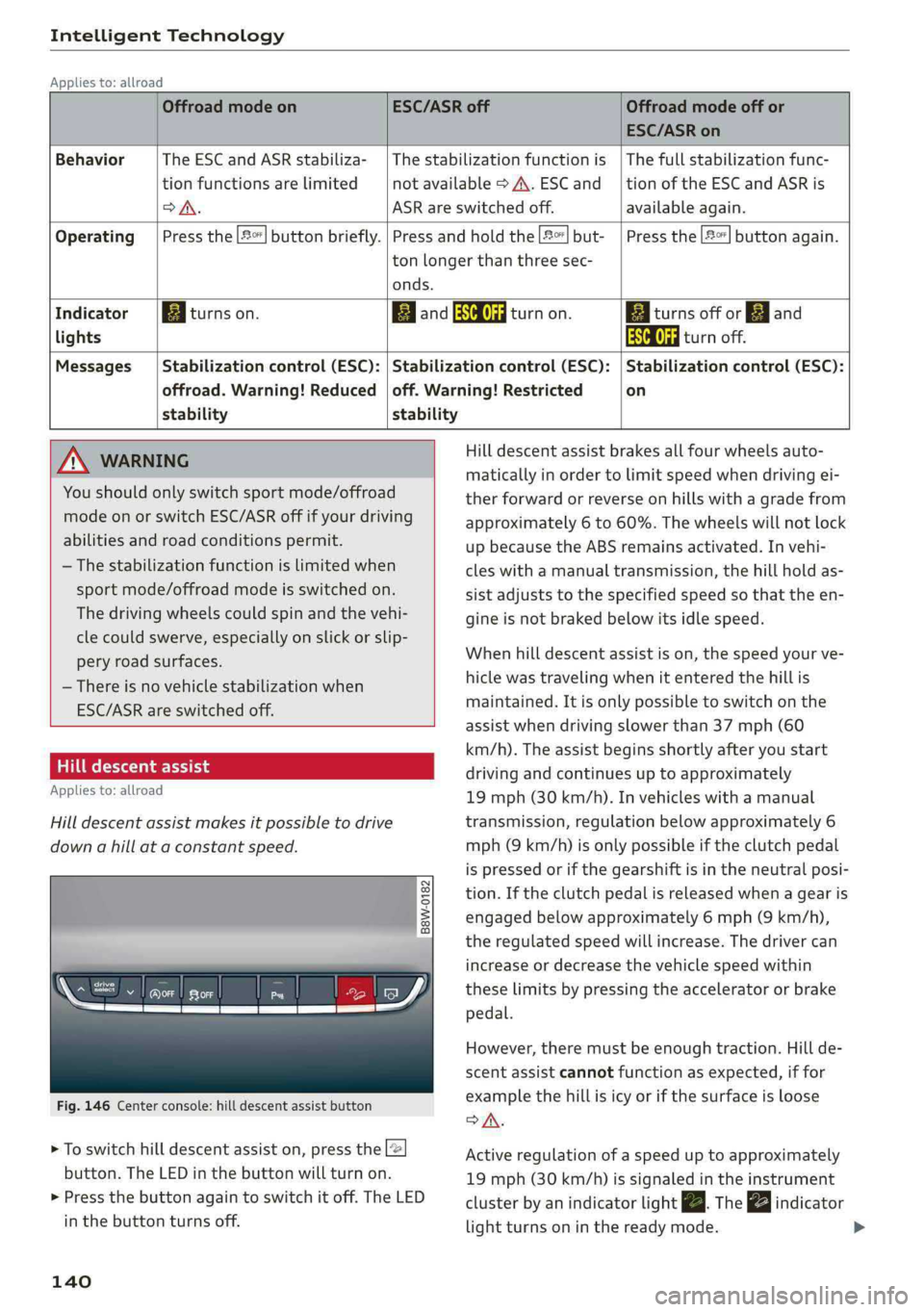
OffroadmodeonESC/ASRoffOffroadmodeoffor
ESC/ASRon
BehaviorThe ESC andASRstabiliza-|Thestabilizationfunctionis|Thefullstabilizationfunc-
tionfunctionsarelimitednotavailable>A\.ESCand__|tionoftheESCandASRis
DSA.ASRareswitchedoff.available again.
Operating|Pressthe|#°*]buttonbriefly.|Pressandholdthe||but-|Pressthe|#°"|buttonagain.
tonlongerthanthreesec-
onds.
IndicatorEgiturnson.ElandSaturnon.Eaiturnsoffor[gjand
lightsEaturnoff.
Messages|Stabilizationcontrol(ESC):|Stabilizationcontrol(ESC):|Stabilizationcontrol(ESC):
offroad.Warning!Reduced|off.Warning!Restrictedon
stability stability
AWARNINGHilldescentassistbrakesallfourwheelsauto-
maticallyinordertolimitspeedwhendrivingei-
therforwardorreverseonhillswithagradefrom
approximately6to60%.Thewheelswillnotlock
upbecausetheABSremainsactivated.Invehi-
cleswithamanualtransmission,thehillholdas-
sistadjuststothespecifiedspeedso thattheen-
gineisnot brakedbelowitsidlespeed.
Whenhilldescentassistison,thespeedyourve-
hiclewastravelingwhenitentered thehillis
maintained.Itisonlypossible toswitchonthe
assistwhendrivingslowerthan37mph(60
km/h).Theassistbeginsshortlyafteryoustart
drivingandcontinuesuptoapproximately
19mph(30km/h).Invehicleswithamanual
transmission,regulationbelowapproximately6
mph(9km/h)isonlypossibleiftheclutchpedal
ispressedorifthegearshiftisintheneutralposi-
tion.Iftheclutchpedalisreleasedwhenagearis
engagedbelowapproximately6mph(9km/h),
the regulatedspeedwillincrease.Thedrivercan
increaseordecreasethevehiclespeedwithin
theselimitsbypressingtheacceleratororbrake
pedal.
However,theremustbeenoughtraction.Hillde-
scentassistcannotfunctionasexpected,iffor
examplethehillisicyorifthesurfaceisloose
SA.
Activeregulationofaspeeduptoapproximately
19mph(30km/h)issignaledintheinstrument
clusterby anindicatorlightZBTheindicator
lightturnsoninthereadymode.
Page 148 of 392
![AUDI A4 2019 User Guide MultiMediaInterface
SwitchingtheMMIon/off:theMMIcanbe
switched
on/offmanually.
—Switchingonmanually:presstheOn/Offknob
@briefly>fig.149.Or:pressthe[MENU]but-
ton©>page145,fig.147or>page145,
fig.1](/img/6/57555/w960_57555-147.png "AUDI A4 2019 User Guide MultiMediaInterface
SwitchingtheMMIon/off:theMMIcanbe
switched
on/offmanually.
—Switchingonmanually:presstheOn/Offknob
@briefly>fig.149.Or:pressthe[MENU]but-
ton©>page145,fig.147or>page145,
fig.1")
MultiMediaInterface
SwitchingtheMMIon/off:theMMIcanbe
switched
on/offmanually.
—Switchingonmanually:presstheOn/Offknob
@briefly>fig.149.Or:pressthe[MENU]but-
ton©>page145,fig.147or>page145,
fig.148,oroneofthebuttonstoopentheme-
nusdirectly©).
—Switchingoffmanually:pressandholdthe
On/Offknob@)>fig.149untiltheMMI
switchesoff.IftheMMIhasbeenswitchedoff
manually,itdoesnotswitchonagainautomati-
callythenexttimetheignitionisswitchedon.
Additionalfunctions:
—Adjustingthevolume:turntheOn/Offknob@
>fig.149.
—Muting:presstheOn/Offknob@)©fig.149
briefly.
—Selectingtheprevious/nextfunction(forex-
ample,aradiostation/track):presstheOn/Off
knob@)°fig.149brieflytowardtheleftKKor
rightDDI.
—Fastforwarding/rewinding(forexample
songs):pressandholdtheOn/Offknob@)
=>fig.149towardtheleftKdorrightPPI.
ZA\WARNING
Adjustthevolumeoftheaudiosystemsothat
signalsfromoutsidethevehicle,suchas po-
liceandfiresirens,canbeheardeasilyatall
times.
@Tips
TheMMIswitchesoffautomaticallyiftheen-
gineisnotrunningandthevehiclebatteryis
low.
Infotainmentsystem
display
Switchingon/off
>Pressthe[olbuttontoswitchtheInfotainment
systemonandoff.
WhentheMMIisswitchedonandthedisplayis
switchedoff,youcanoperatecertainfunctions
146
usingtheOn/OffknobwiththeMMIjoystick
function>page145.
Gi)Tips
Theremaybedelayswhenswitchingonthe
display.
Informationondisplayimages
Thedisplayversiondependsonvehicleequip-
ment.
Fig.150Display versionA
Fig.151Display versionB
Additionalcontent(such asalbumcoverandmap
material)isshownondisplayversionB,ifappli-
cable@)©fig.151.Becausetheothercontent
shownonthedisplaysisnearlyidenticalbetween
thetwoversions,thismanualwillprimarilyde-
scribedisplayversionA.