manual transmission AUDI A4 2019 Owner's Manual
[x] Cancel search | Manufacturer: AUDI, Model Year: 2019, Model line: A4, Model: AUDI A4 2019Pages: 392, PDF Size: 99.53 MB
Page 90 of 392
Driving
muchstressfrombeingplacedonthelocking
mechanism.
Z\WARNING
—Thevehiclecanrollevenwhentheengineis
switchedoff.
—Unintendedvehiclemovementcanlead to
seriousinjuries.
—Toreducetheriskofanaccident,donot
presstheacceleratorpedalwhenchanging
theselectorleverpositionwhilethevehicle
isstationaryandtheengineisrunning.
—Toreducetheriskofanaccident,neverse-
lectthe"R"or"P"positionswhiledriving.
—Donotinadvertentlypresstheaccelerator
pedalwhenthevehicleisstationary.Press-
ingthepedalincreasesriskofaccidentbe-
causethevehiclewillmove,evenifparking
brakeisset.
Hilldescentcontrol
Appliesto:vehicleswithautomatictransmission
Thehilldescentcontrolsystemassiststhedriver
whendrivingdownhills.
Hilldescentcontrolactivateswhenthetransmis-
sionisinthe"D"or"S"positionand youpressthe
brakepedal.Thetransmissionautomaticallyse-
lects
agearthatissuitableforthehill.Hillde-
scentcontroltriestomaintainthespeedthat
wasselectedatthetimeof braking,withinphysi-
calandtechnicallimitations.Ifmaystill benec-
essarytoadjustthespeedwiththebrakepedal.
Hilldescentcontrolswitchesoffoncethehilllev-
elsoutorifyoupresstheacceleratorpedal.
Whenoperatingthecruisecontrolsystem*
=>page95,hilldescentcontrolisalsoactivated
when
thespeedisset.
Z\WARNING
Hilldescentcontrolmaynotbeabletomain-
tainaconstantspeedunderallconditions.Al-
waysbereadytoapplythebrakes.
838
Shiftingmanually(tiptronicmode)
Appliesto:vehicleswithautomatictransmission
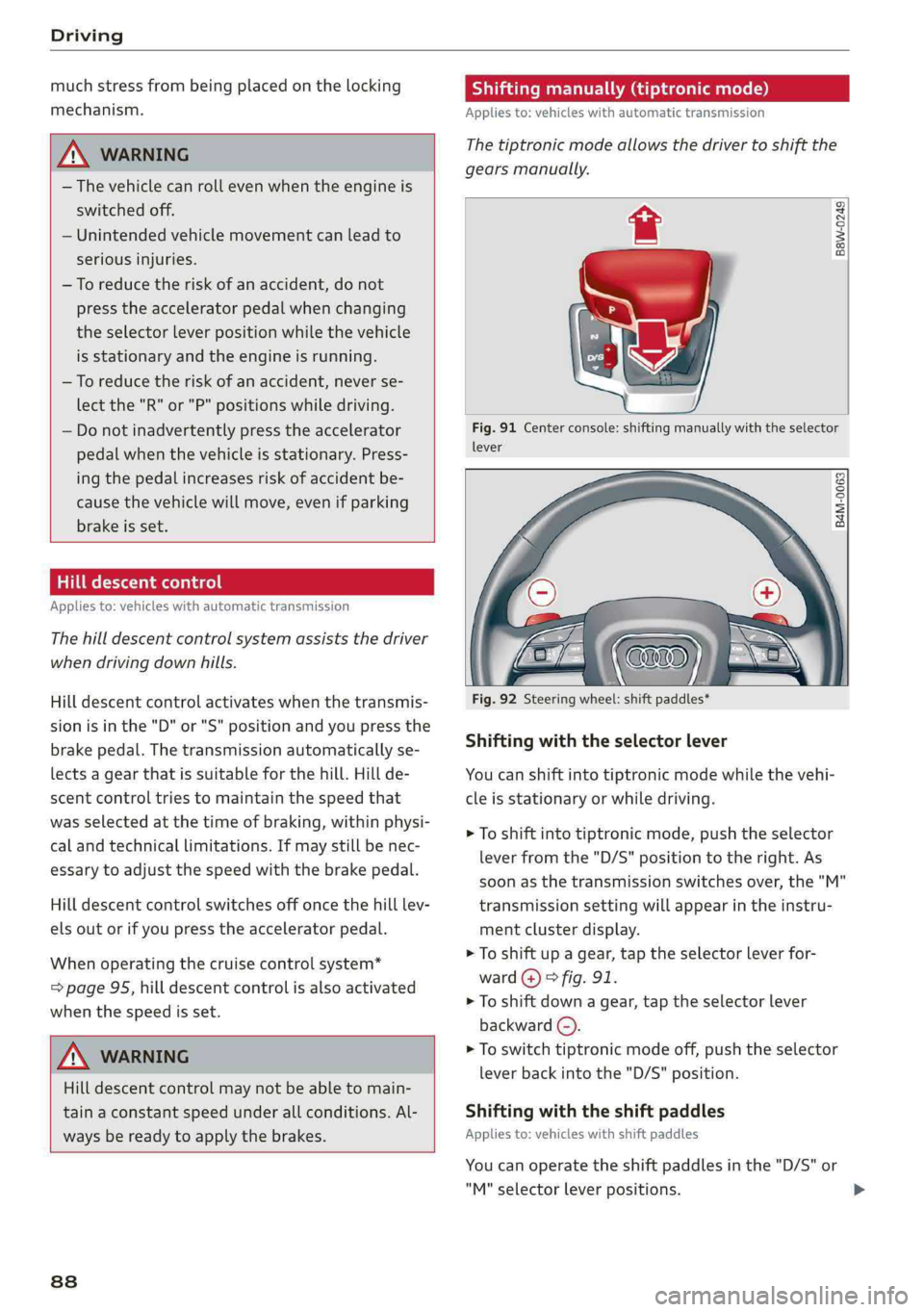
Thetiptronicmodeallowsthedrivertoshiftthe
gearsmanually.
B8w-0249
Fig.91Centerconsole:shiftingmanuallywiththeselector
lever
B4M-0063
Fig.92Steeringwheel:shiftpaddles*
Shiftingwiththeselectorlever
Youcanshiftintotiptronicmodewhilethevehi-
cleisstationaryorwhiledriving.
>Toshiftintotiptronicmode,pushtheselector
leverfromthe"D/S"positiontotheright.As
soonasthetransmission switchesover,the"M"
transmissionsettingwillappearintheinstru-
mentclusterdisplay.
>Toshiftupagear,tap theselectorleverfor-
ward@)>fig.91.
>Toshiftdownagear,taptheselectorlever
backward(©).
>Toswitchtiptronicmodeoff,pushtheselector
leverbackintothe"D/S"position.
Shiftingwiththeshiftpaddles
Appliesto:vehicleswithshiftpaddles
Youcanoperatetheshiftpaddlesinthe"D/S"or
"M"selectorleverpositions.
Page 91 of 392
8W0012721BG
Driving
>Toshiftupagear,tap theshiftpaddle@)
>fig.92.
>Toshiftdownagear,tapthe©)shiftpaddle.
>Toshiftintothelowestgear,holdthe©shift
paddle.
>Ifyoudonotpressashiftbuttonwithinashort
timewhileinthe"D/S"position,thetransmis-
sionwillreturn toautomaticmode.Tokeep
shiftingusingtheshiftpaddles,movethese-
lectorlevertotherightoutofthe"D/S"posi-
tion.
>Whenyouwanttoshiftoutoftiptronicmode,
pressandholdtheG)shiftpaddleforalonger
periodoftimeormovetheselectorleverback
andreleaseit.
The
transmissionautomaticallyshiftsupordown
beforecriticalenginespeedisreached.
Thetransmissiononly allowsmanualshifting
whentheenginespeediswithinthepermitted
range.
G)Tips
—Ifyoushifttothenextlowestgear,the
transmissionwillonlyshiftiftheenginewill
notbeover-rewved.
—Withkick-down,thetransmissionshiftstoa
lowergear,dependingonvehiclespeedand
enginespeed.
—tiptronicdoesnotworkifthetransmission
isrunninginemergencymode.
Appliesto:vehicleswithautomatictransmission
Kick-downenablesmaximumacceleration.
Whenyoupresstheacceleratorpedaldownbe-
yondtheresistancepoint,theautomatictrans-
missiondownshiftsintoalower gearandtheen-
gineutilizesitsfullpower,ifthevehiclespeed
andengineRPMpermit.Itshiftsupintothenext
highergearoncethemaximumpermittedengine
RPMisreached.
Z\WARNING
Pleasenotethatthewheelscouldspinon
slickorslipperyroadswhenkick-downisac-
tive.
Launchcontrolprogram
Appliesto:vehicleswithS tronictransmission
Thelaunchcontrolprogramprovidesthebest
possibleaccelerationwhenstartingfromastop.
Requirement:theenginemustbeatoperating
temperatureandthesteeringwheelmustnotbe
turned.
>DeactivatetheStart/Stopsystem*>page81.
TheLEDinthe||buttonturnson.
>Appliesto:sedan:whentheengineisrunning,
pressthe|&OFF]buttonbriefly>page139.
Theindicatorlightturnsonandthemes-
sageStabilizationcontrol(ESC):sport.Warn-
ing!Restrictedstabilityappearsintheinstru-
mentclusterdisplay.
>Appliesto:allroad:whentheengineisrunning,
pressthe2OFF]buttonbriefly>page139.
TheEjindicatorlightturnsonandthemes-
sageStabilizationcontrol(ESC):offroad.
Warning!Reducedstabilityappearsinthein-
strumentclusterdisplay.
> Pulltheselectorleverback outofthe"D/S"po-
sitionbrieflytoselectthe"S"positionorselect
theDynamicdrivingmodeindrivese-
lect*>page127.
>Pressthebrakepedalfirmlywithyourleftfoot
andholditallthewaydownforatleastone
second.
>Atthesametime,pressthegaspedalallthe
waydownwithyourrightfootuntiltheengine
reachesandstaysatahighRPMlevel.
>Removeyourfootfromthebrake pedalwithin
fiveseconds>A\.
AWARNING
—Alwaysadaptyourdrivingtothetrafficflow.
—OnlyusetheLaunchcontrolprogramwhen
roadandtrafficconditionsallowitandother
driverswillnot beendangeredorbothered
byyourdrivingandthevehicle'saccelera-
tion.
—Pleasenotethatthedrivewheelscanspin
andthevehiclecanbreakawaywhensport
mode/offroadmodeisswitchedon,espe-
ciallywhentheroadisslippery.>
89
Page 92 of 392
![AUDI A4 2019 Owners Manual Driving
—Oncethevehiclehasstartedmoving,press
the|&OFF]buttonbrieflytoturnthesport
mode/offroadmodeoff.
@Tips
—After acceleratingusingtheLaunchControl,
thetemperatureofsomevehiclecompo-
nentsm](/img/6/57555/w960_57555-91.png "AUDI A4 2019 Owners Manual Driving
—Oncethevehiclehasstartedmoving,press
the|&OFF]buttonbrieflytoturnthesport
mode/offroadmodeoff.
@Tips
—After acceleratingusingtheLaunchControl,
thetemperatureofsomevehiclecompo-
nentsm")
Driving
—Oncethevehiclehasstartedmoving,press
the|&OFF]buttonbrieflytoturnthesport
mode/offroadmodeoff.
@Tips
—After acceleratingusingtheLaunchControl,
thetemperatureofsomevehiclecompo-
nentsmayincreasegreatly.Ifthathappens,
thefunctionwillnot beavailable forafew
minutestoreducetheriskofdamage.After
acool-downperiod,LaunchControlwillbe
availableagain.
—Whenacceleratingusingthelaunchcontrol
program,allvehicleparts aresubjectto
heavyloads.Thiscanlead toincreasedwear.
Messages
Appliesto:vehicleswithautomatictransmission
fs}Transmission:toohot.Pleasestopvehicle
Donotcontinuedriving.Selectthe"P"selector
leverpositionandcontactanauthorizedAudi
dealerorauthorizedAudiServiceFacilityforas-
sistance.
fs}Transmission:malfunction!Safelystopvehi-
cle
Donotcontinuedriving.Stopthevehicleassoon
aspossibleinasafe locationandsecureitsoit
doesnotroll.SeeanauthorizedAudidealeror
authorizedAudiServiceFacilityforassistance.
fs}Selectorlever:malfunction!Youcancontin-
uedriving.PleasecontactService
Thereisasystemmalfunctioninthetransmis-
sion.DrivetoanauthorizedAudidealeror au-
thorizedAudiServiceFacilityimmediatelytohave
themalfunctioncorrected.
fs}Pbutton:malfunction!AutoPwhenengine
off.PleasecontactService
Thereisamalfunctioninthe"P"buttononthe
selectorlever.Thetransmissionautomatically
engages"P"whenyouswitchofftheengine.
DrivetoanauthorizedAudidealerorauthorized
AudiServiceFacilityimmediatelytohavethe
malfunctioncorrected.
90
flSelectorlever:malfunction!Gearchangeon-
lypossibleusingbothpaddlelevers.Pleasecon-
tactService
Thereisasystemmalfunctioninthe transmis-
sion.Youcancontinuedrivingwithrestricted
function.Theselectorleverisnotworking.Gears
canonlybeselectedbytappingbothshiftpad-
dlesatthesametimewhenthevehicleisstation-
ary>page88,fig.92.Payattentiontothese-
lectedtransmissionpositionintheinstrument
clusterdisplay.Theparkinglockengagesauto-
maticallywhenyouturnofftheengine.Driveto
anauthorizedAudidealerorauthorizedAudi
ServiceFacilityimmediatelytohavethemalfunc-
tioncorrected.
iTransmission:pleasepressbrake pedaland
selectgearagain
Pressthebrakepedalandselectthedesiredse-
lectorleverpositionagain.Youcanthencontinue
driving.
flTransmission:toohot.Pleaseadaptdriving
style
Thetransmissiontemperaturehasincreasedsig-
nificantly.Driveverycautiouslyortakeabreak
fromdrivinguntilthetemperaturereturnstothe
normalrangeandtheindicatorlightturnsoff.
flTransmission:malfunction!Youcancontin-
uedriving.Seeowner'smanual
Thereisasystemmalfunctioninthe transmis-
sion.Youmaycontinuedriving.Drivetoanau-
thorizedAudidealerorauthorizedAudiService
Facilitysoontohavethe malfunctioncorrected.
iTransmission:malfunction!Youcancontin-
uedrivinginDuntilengineisoff
Thereisasystemmalfunctioninthe transmis-
sion.Thetransmissionisswitchingtoemergency
mode.Ifyouturntheengineoff,youwillnotbe
abletoselectanyotherselectorleverpositions
afterstartingtheengineagain.Drivetoanau-
thorizedAudidealerorauthorizedAudiService
Facilityimmediatelytohave the malfunctioncor-
rected.
Page 106 of 392
Assistsystems
avoidacollision.Thedriverisalwaysresponsi-
bleforbrakingatthecorrecttime.
—Forsafetyreasons,donotuseadaptive
cruisecontrol whentheroadsurfaceisin
poorconditionand/orinbadweathercondi-
tions(suchasice,fog,gravel,heavyrainand
hydroplaning).Usingthesystemunder
theseconditionsincreasestheriskofanac-
cident.
—Switchadaptivecruisecontrolofftemporari-
lywhendrivinginturninglanes,onexpress-
wayexits(exceptifpredictivecontrolis
switchedon)orinconstructionzones.This
preventsthevehiclefromaccelerating to
thestoredspeedwheninthesesituations.
—Theadaptivecruisecontrolsystemwillnot
brakebyitselfifyouputyourfootontheac-
celeratorpedal.Doingsocanoverridethe
speedanddistanceregulation.
—Whenapproachingstationaryobstacles
suchasstoppedtraffic,adaptivecruisecon-
trol willrespondwithlimitedfunction.
—Adaptivecruisecontroldoesnotrespondto
people,animals,orcrossingoroncoming
objects.
—Thefunction oftheradarsensorscanbeaf-
fectedbyreflectiveobjectssuchasguard
rails,theentrancetoatunnel,heavyrainor
ice
1)Note
Thesensorscanbedisplacedbyimpactsor
damagetothebumper,wheelhousingand
underbody.Thiscanimpair theadaptive
cruisecontrol.HaveanauthorizedAudidealer
orauthorizedAudiServiceFacilitychecktheir
function.
G)Tips
Foranexplanationonconformitywiththe
FCCregulationsintheUnitedStatesandthe
IndustryCanadaregulations,see>page370.
104
Incurves
Appliesto:vehicleswithAudiadaptivecruisecontrol
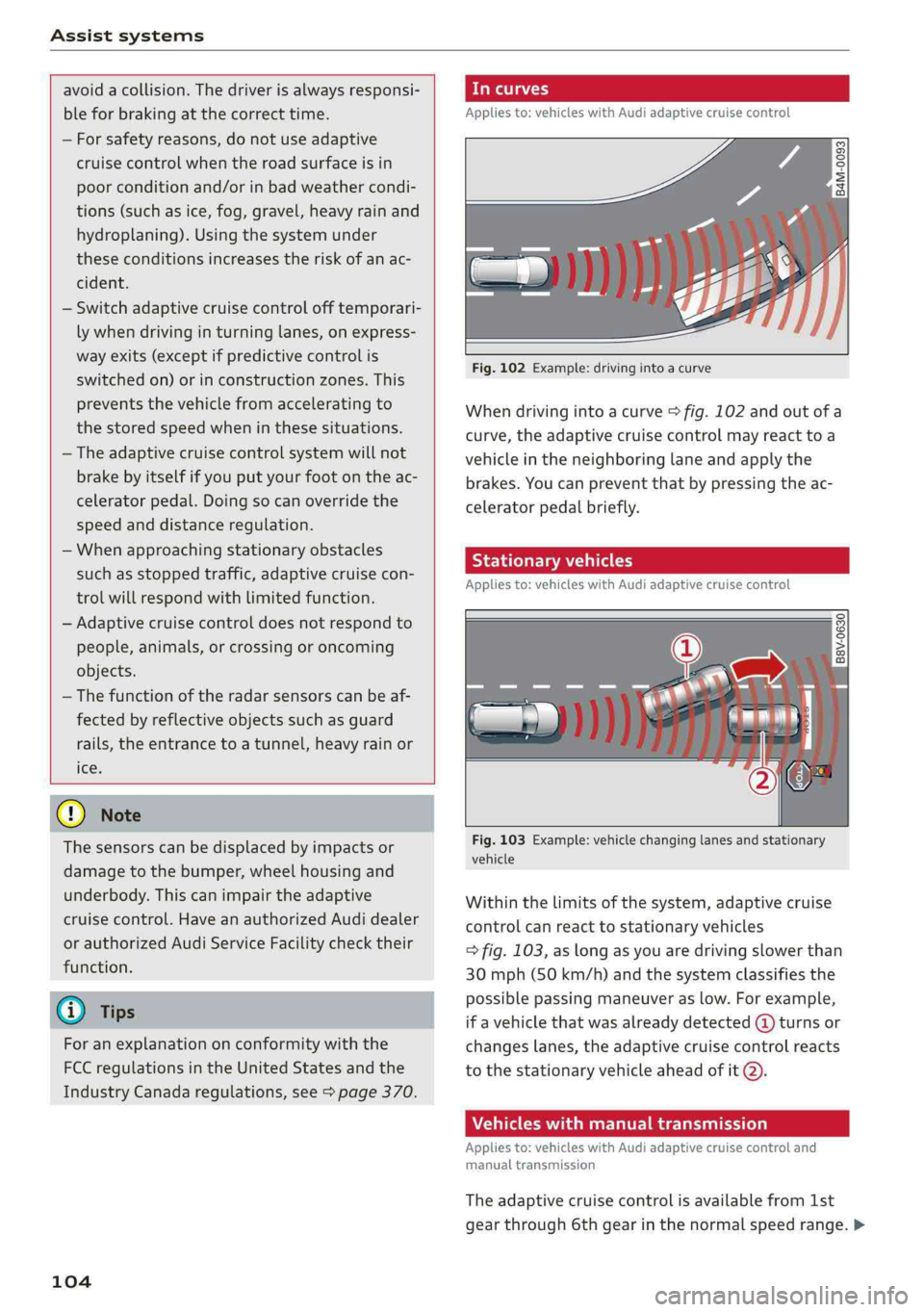
Fig.102Example:drivinginto acurve
Whendrivingintoacurve>fig.102andoutofa
curve,theadaptivecruisecontrolmayreacttoa
vehicleintheneighboringlaneandapplythe
brakes.Youcanpreventthatbypressingtheac-
celeratorpedalbriefly.
Stationaryvehicles
Appliesto:vehicleswithAudiadaptivecruisecontrol
B8V-0630
Fig.103Example:vehiclechanginglanesandstationary
vehicle
Withinthelimitsofthesystem,adaptivecruise
controlcanreacttostationaryvehicles
=>fig.103,aslongasyouaredrivingslowerthan
30mph(50km/h) andthesystemclassifiesthe
possiblepassingmaneuveraslow.Forexample,
ifavehiclethatwasalreadydetected(@turnsor
changeslanes,theadaptivecruisecontrolreacts
tothestationaryvehicleaheadofit@).
Vehicleswithmanualtransmission
Appliesto:vehicleswithAudiadaptivecruisecontroland
manualtransmission
Theadaptivecruisecontrolisavailablefrom1st
gearthrough6thgearinthenormalspeedrange.>
Page 109 of 392
8W0012721BG
Assistsystems
>Toincrease ordecrease thedistanceinincre-
ments,tap theswitchagaintoward@)or ©).
Thedistancebetweenthetwovehicleswill
changeintheinstrumentclusterdisplay.
Whenapproachingavehicledrivingahead,the
adaptivecruisecontrolsystembrakestomatch
thatvehicle'sspeedandthenadjuststotheset
distance.Ifthevehicledrivingaheadaccelerates,
thentheadaptivecruisecontrolwillalsoacceler-
ateuptothespeedthatyouhaveset.
Thehigherthespeed,thegreaterthedistance
=>A\.TheDistance3settingisrecommended.
Thatisequaltothegeneralrecommendationof
“halfthespeedshownonthespeedometer”.
Thedistancesprovidedare specifiedvalues.De-
pendingonthedrivingsituationandhowtheve-
hicleaheadisdriving,theactualdistancemaybe
moreorlessthanthesetargetdistances.
Ifyouchangethetimegaps,thevalueyouhave
justsetappearsbrieflyintheinstrumentcluster
display,forexampleBiforDistance3.Thisonly
occursiftheDriverassistancedisplayisnotcur-
rentlyshowninthedisplay>page105,fig.105.
Distance1:thissettingcorrespondstoadistance
of92ft(28m)whentravelingat62mph(100
km/h),oratimedistanceof1second.
Distance2: thissettingcorrespondstoadistance
of118ft(36m)whentravelingat62mph(100
km/h),oratimedistanceof1.3seconds.
Distance3:thissettingcorrespondstoadistance
of164ft(SOm)whentravelingat62mph(100
km/h),oratimedistanceof 1.8seconds.
Distance4:thissettingcorrespondstoadistance
of219ft(67m)whentravelingat62mph(100
km/h),oratimedistanceof2.4seconds.
Distance5:thissettingcorrespondstoadistance
of328ft(100m)whentravelingat62mph(100
km/h),oratimedistanceof3.6seconds.
D_Thisisnotavailableinsomecountries.
ZAWARNING
Whensettingthedistance,thedriverisre-
sponsibleforadheringtoanyapplicablelegal
regulations.
@Tips
Dependingontheselecteddrivingprogram
anddistance,drivingbehaviorwhenacceler-
atingwillvaryfromdynamictocomfortable
=>page108.
Drivinginstop-and-gotraffic
Appliesto:vehicleswith Audiadaptivecruisecontrolandau-
tomatictransmission
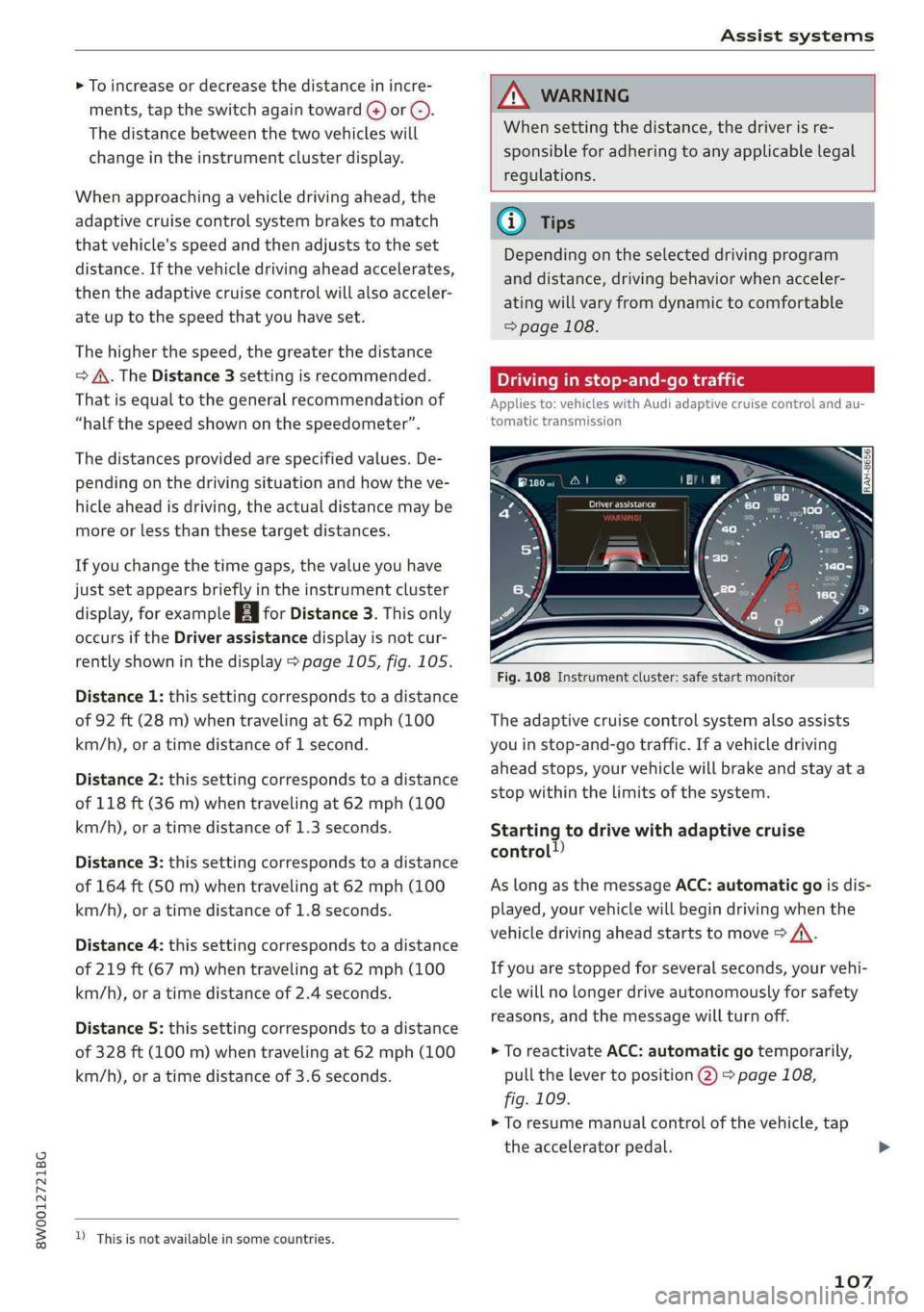
Fig.108Instrumentcluster:safestartmonitor
Theadaptivecruisecontrolsystemalsoassists
youinstop-and-gotraffic.Ifavehicledriving
aheadstops,yourvehiclewillbrakeandstayata
stopwithinthelimitsofthesystem.
Startingtodrivewithadaptivecruise
control!)
AslongasthemessageACC:automaticgoisdis-
played,yourvehiclewillbegindrivingwhenthe
vehicledrivingaheadstartstomove>A\.
Ifyouarestoppedforseveralseconds,yourvehi-
clewillnolongerdriveautonomouslyforsafety
reasons,
andthemessagewillturnoff.
>ToreactivateACC:automaticgotemporarily,
pullthelevertoposition@)>page108,
fig.109.
>Toresumemanualcontrolofthevehicle,tap
theacceleratorpedal.
107
Page 110 of 392
Assistsystems
Safestartmonitor
Ifanobstacleisdetectedwhenyoustartdriving,
youwillbealerted tothedangerbytheBAindi-
catorlightandtheimageintheinstrumentclus-
terdisplay>fig.108>A\.Anaudiosignalwill
alsosound.Yourvehiclewilldrivemoreslowly
whenstarting.Thismayalsooccurinsomesitua-
tionswhenthereisno apparentobstacle.
—Pressthebrakepedaltoslowyourvehicle
down.
Z\WARNING
IfthemessageACC:automaticgo”appears,
yourvehiclewillstartdrivingevenifthereis
anobstaclebetweenyourvehicleandtheve-
hicledrivingahead.Thisincreasestheriskof
anaccident.
G@)Tips
—Forsafetyreasons,yourvehiclewillonly
starttodriveautomaticallyif:
—Thedriver'ssafetybeltisfastened
—Alldoorsandthehoodareclosed
—Yourvehicleisnotstoppedforalongperi-
odoftime
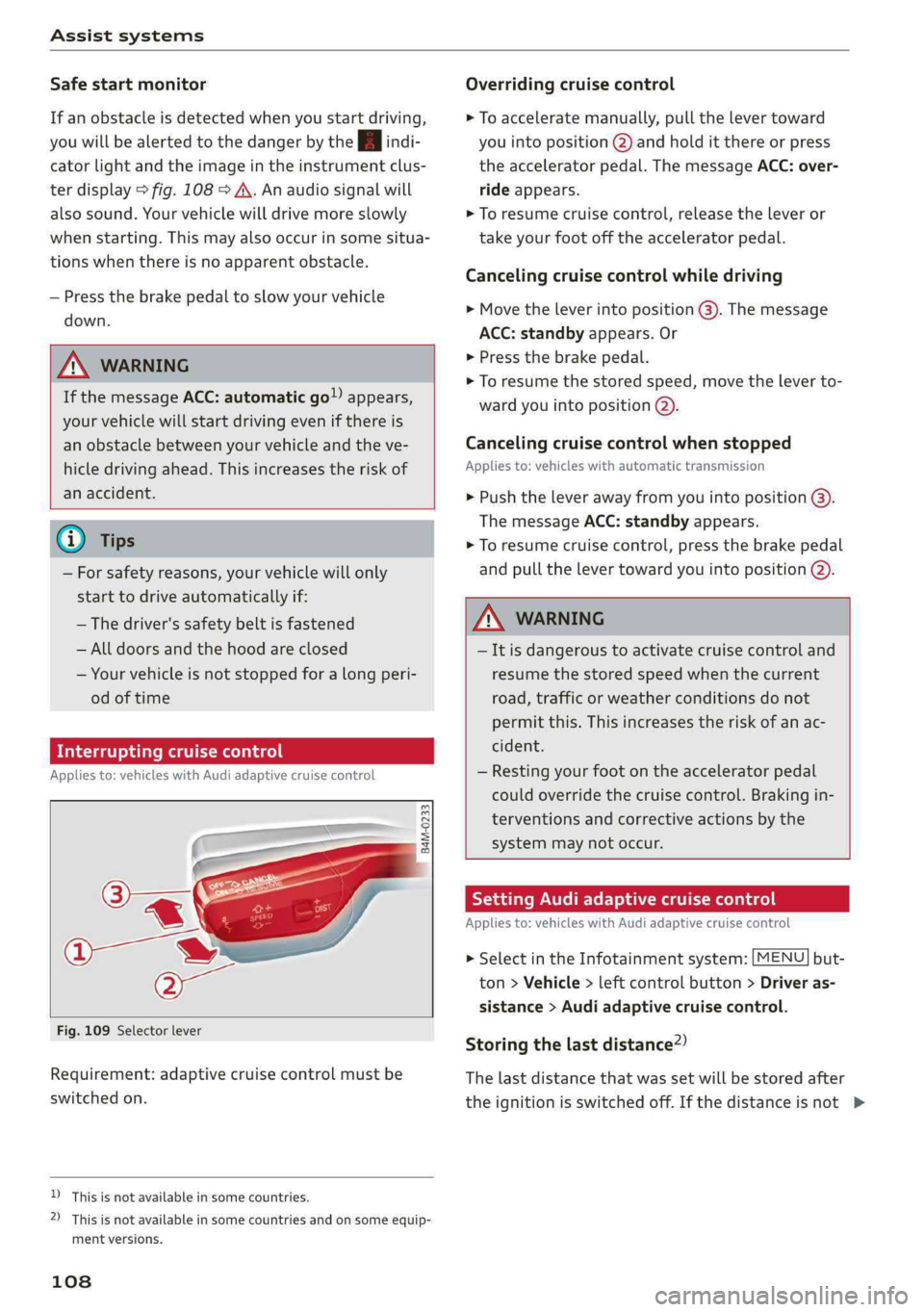
Interruptingcruisecontrol
Appliesto:vehicleswithAudiadaptivecruisecontrol
B4M-0233
Fig.109Selectorlever
Requirement:adaptivecruisecontrolmustbe
switched
on.
D_Thisisnotavailableinsomecountries.
2)Thisisnotavailableinsomecountriesand onsomeequip-
mentversions.
108
Overridingcruisecontrol
>Toacceleratemanually,pullthelevertoward
youintoposition@)andholditthereorpress
theacceleratorpedal.ThemessageACC:over-
rideappears.
>Toresumecruisecontrol,releasetheleveror
takeyourfootofftheacceleratorpedal.
Cancelingcruisecontrolwhiledriving
>Movetheleverintoposition@).Themessage
ACC:standbyappears.Or
>Pressthebrakepedal.
>Toresumethestoredspeed,movetheleverto-
wardyouintoposition@).
Cancelingcruisecontrolwhenstopped
Appliesto:vehicleswithautomatictransmission
>Pushtheleverawayfromyouintoposition@).
ThemessageACC:standbyappears.
>Toresumecruisecontrol,pressthebrakepedal
andpullthelevertowardyouintoposition@).
Z\WARNING
—Itisdangeroustoactivatecruisecontroland
resumethestoredspeedwhenthecurrent
road,trafficorweatherconditionsdonot
permitthis.Thisincreasestheriskofanac-
cident.
—Restingyourfootontheacceleratorpedal
couldoverridethecruisecontrol.Brakingin-
terventionsandcorrectiveactionsbythe
systemmaynotoccur.
SettingAudiadaptivecruisecontrol
Appliesto:vehicleswith Audiadaptivecruisecontrol
>SelectintheInfotainmentsystem:[MENU]but-
ton>Vehicle>leftcontrolbutton>Driveras-
sistance>Audiadaptivecruisecontrol.
Storingthelastdistance?)
Thelastdistancethatwassetwillbestoredafter
theignitionisswitchedoff.Ifthedistanceisnot>
Page 113 of 392
8W0012721BG
Assistsystems
>IntheInfotainmentsystem,select:[MENU
button>Vehicle>leftcontrolbutton>Driver
assistance>Distancewarning.
Z\WARNING
—Readandfollowthewarningson>Ain
Generalinformationonpage103.
—Thedriverisalwaysresponsibleforadhering
totheregulationsapplicableinthe country
wherethevehicleisbeingoperated.
@Tips
Youmayfallbelowhewarningthreshold
brieflywhenpassingorwhenquicklyap-
proachingaslowvehicle.Thereisnowarning
inthisscenario.Awarningisgivenonlyifyou
fallbelowthewarningthresholdforanex-
tendedperiodoftime.
Appliesto:vehicleswithAudiadaptivecruisecontrol
ACCwithtrafficjamassist:unavailable.See
owner'smanual
Thesystemcannotguaranteethatitwilldetect
vehiclescorrectlyandithasswitchedoff.Thera-
darsensorshaveshiftedorarefaulty.Drivetoan
authorizedAudidealerorauthorizedAudiService
Facilityimmediatelytohavethe malfunctioncor-
rected.
ACCwithtrafficjamassist:currentlyun-
available.Seeowner'smanual
Thismessageappearsiftheadaptivecruisecon-
trolcannotbeactivated,forexampleifthehood
isopen.
ACCw.trafficjamassist:currentlyunavaila-
ble.Sensorvisionrestrictedduetosurround-
ings.Seeowner'smanual
Thismessageappearsiftheradarsensorviewis
obstructed,forexamplebyleaves,snow,heavy
sprayordirt.Cleanthesensors>page103,
fig.101.
ACCwithtrafficjamassist:currentlyun-
available.Gradetoosteep
Theroadexceedsthemaximumpossiblegrade
forsafeoperation.Thesystemscannotbeswitch-
edon.
ACCwithtrafficjamassist:onlyavailablein
D,SorM
Selectthe"D/S"or"M"selectorleverposition.
ACC:availablefrom1stgearup
Manualtransmission:adaptivecruisecontrol
worksin1stgearandhigher.
ACC:clutchpedalpressed
Manualtransmission:pressingtheclutchpedal
longerinterruptsthecontrol.
ACC:noteenginespeed
Manualtransmission:thismessageappearsifthe
driverhasnotshiftedupordownintimewhen
theadaptivecruisecontrolisbrakingoracceler-
ating,causingthevehicletoexceedortonot
reachthepermittedenginespeed.Theadaptive
cruisecontrolswitchesoffautomaticallyandcan-
notbe switched backon.
ACCwithtrafficjamassist:currentlyun-
available.Parkingbrakeapplied
Thesystemsswitchoffifyousettheparking
brake.Thesystemsareavailableagainafteryou
releasetheparkingbrake.
ACCwithtrafficjamassist:currentlyun-
available.Stabilizationcontrol(ESC)input
ThismessageappearsiftheElectronicStabiliza-
tionControl(ESC)istakingaction tostabilizethe
vehicle.Thesystemsswitchoffinthisscenario.
ACCwithtrafficjamassist:manualcontrol!
Thismessageappearsifthevehiclerollsback
whenstartingonaslightincline,eventhoughthe
systemsareactive.Pressthebrakepedaltopre-
ventthevehiclefromrollingorstartingtomove.
ACCwithtrafficjamassist:currentlyun-
available.Downhillassistactivated
Youcannotactivatethesystemwhenhillholdas-
sistisactive.
ACCwithtrafficjamassist:manualcontrol!>
111
Page 128 of 392

Assistsystems
@Tips
—Youcancanceltheautomaticbrakeactiva-
tionwithincreasingbrakingforceifyouap-
plythe brakesyourselforaccelerateconsid-
erably.
—Insomesituations,rearcross-trafficassist
maywarnyouevenifthereisnocrosstraffic
ina criticalarea,forexamplewhenbacking
into aparkingspaceormaneuvering.
—Therearcross-trafficassistalsoswitchesoff
whenyouswitchofftheESC.
—Foranexplanationonconformitywiththe
FCCregulationsinthe UnitedStatesandthe
IndustryCanadaregulations,see
=>page370.
Appliesto:vehicleswithAudisideassist
Amessageappearsintheinstrumentclusterdis-
playifthesideassistswitchesoffautomatically.
8Audisideassist:malfunction!Pleasecontact
Service
8Audisideassistandexitwarning:malfunc-
tion!PleasecontactService
Thesystemcannotguaranteethatitwilldetect
vehiclescorrectlyandithasswitchedoff.The
sensorshavebeenmovedorarefaulty.Havethe
systemcheckedbyanauthorizedAudidealeror
authorizedAudiServiceFacilitysoon.
Audisideassist:currentlyunavailable.Sen-
sorvisionrestrictedduetosurroundings.See
owner'smanual
Audisideassistandexitwarning:currently
unavailable.Sensorvisionrestrictedduetosur-
roundings
Theradarsensorvisionisimpaired.Theareain
frontofthesensorsmustnot becoveredbybike
racks,stickers,leaves,snoworanyotherobjects.
Cleantheareacoveringthesensors,ifnecessary
=>page122,fig.122.
Audisideassist:currentlyunavailable.See
owner'smanual
126
Audisideassistandexitwarning:currently
unavailable.Seeowner'smanual
Sideassistcannotbe switchedonatthistimebe-
causethereisamalfunction(forexample,the
batterychargelevelmaybetoolow).
Rearparkingaid:obstacledetectionrestrict-
ed
Therearcross-trafficassistisnotavailable.Ei-
thertheESCisswitchedoff,ortheradarsensors
maybecoveredbyabikerack,stickers,leaves,
snoworotherobjects.SwitchtheESCon,or
cleantheareainfrontofthesensorsifnecessary
=>page122,fig.122.Ifthismessagecontinues
tobedisplayed,driveimmediatelytoanauthor-
izedAudidealerorauthorizedAudiServiceFacili-
tytohave themalfunctionrepaired.
Audidriveselect
Introduction
Appliesto:vehicleswithAudidriveselect
Driveselectmakesitpossibletoexperiencedif-
ferenttypesofvehiclecharacteristicsinonevehi-
cle.ThedrivercanselectOffroad*,Comfort,Au-
toandDynamicmodesintheInfotainmentsys-
temtoswitchbetweenasportyandacomforta-
bledrivingmode,forexample.IntheIndividual
mode,thesettingscan beadjustedtoyourper-
sonalpreferences.Thismakesitpossibletocom-
bine settingssuchasasportyenginesettingwith
lightsteering.
Appliesto:vehicleswithAudidriveselect
Thefollowingsystems,amongotherthings,are
influencedbydriveselect:
Engineandautomatictransmission*
Dependingonthemode,theengineandauto-
matictransmission*respondmorequicklyorina
morebalancedmannertoacceleratorpedal
movements.InthesportyDynamicmode,the
transmissionshiftsathigherspeedranges.
Page 142 of 392
IntelligentTechnology
Appliesto:allroad
Youshouldonlyswitchsportmode/offroad
modeonorswitchESC/ASRoffifyourdriving
abilitiesandroadconditionspermit.
—Thestabilizationfunctionislimitedwhen
sportmode/offroadmodeisswitchedon.
Thedrivingwheelscouldspinandthevehi-
clecouldswerve,especiallyonslickorslip-
peryroadsurfaces.
—Thereisnovehiclestabilizationwhen
ESC/ASRareswitchedoff.
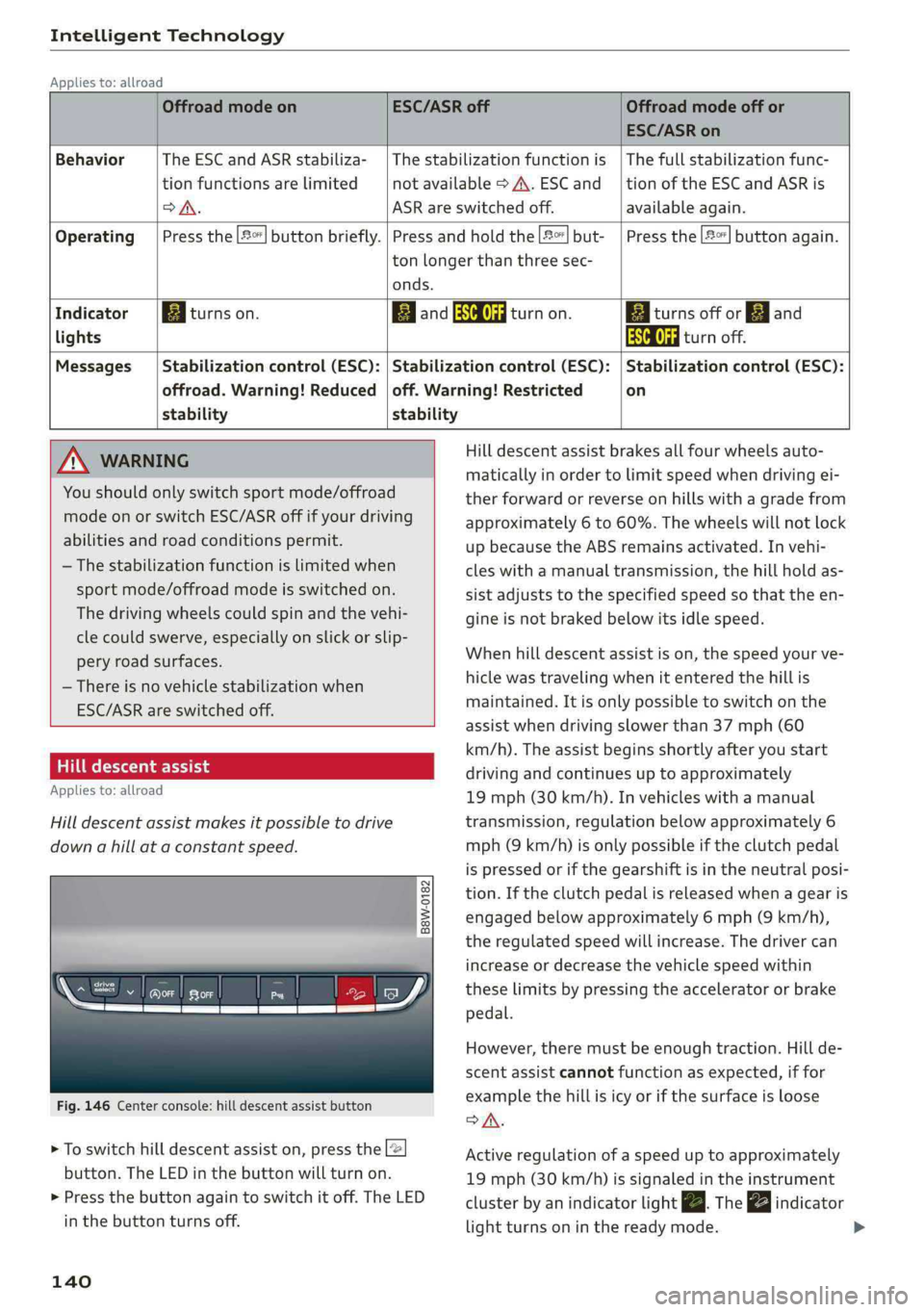
Hilldescentassist
Appliesto:allroad
Hilldescentassistmakesitpossibletodrive
downahillataconstantspeed.
a
Q
gz
=& a
Fig.146Centerconsole:hilldescentassistbutton
>Toswitchhilldescentassiston,presstheL@
button.TheLEDinthebuttonwillturnon.
>»Pressthebuttonagaintoswitchitoff.The LED
inthe buttonturnsoff.
140
OffroadmodeonESC/ASRoffOffroadmodeoffor
ESC/ASRon
BehaviorThe ESC andASRstabiliza-|Thestabilizationfunctionis|Thefullstabilizationfunc-
tionfunctionsarelimitednotavailable>A\.ESCand__|tionoftheESCandASRis
DSA.ASRareswitchedoff.available again.
Operating|Pressthe|#°*]buttonbriefly.|Pressandholdthe||but-|Pressthe|#°"|buttonagain.
tonlongerthanthreesec-
onds.
IndicatorEgiturnson.ElandSaturnon.Eaiturnsoffor[gjand
lightsEaturnoff.
Messages|Stabilizationcontrol(ESC):|Stabilizationcontrol(ESC):|Stabilizationcontrol(ESC):
offroad.Warning!Reduced|off.Warning!Restrictedon
stability stability
AWARNINGHilldescentassistbrakesallfourwheelsauto-
maticallyinordertolimitspeedwhendrivingei-
therforwardorreverseonhillswithagradefrom
approximately6to60%.Thewheelswillnotlock
upbecausetheABSremainsactivated.Invehi-
cleswithamanualtransmission,thehillholdas-
sistadjuststothespecifiedspeedso thattheen-
gineisnot brakedbelowitsidlespeed.
Whenhilldescentassistison,thespeedyourve-
hiclewastravelingwhenitentered thehillis
maintained.Itisonlypossible toswitchonthe
assistwhendrivingslowerthan37mph(60
km/h).Theassistbeginsshortlyafteryoustart
drivingandcontinuesuptoapproximately
19mph(30km/h).Invehicleswithamanual
transmission,regulationbelowapproximately6
mph(9km/h)isonlypossibleiftheclutchpedal
ispressedorifthegearshiftisintheneutralposi-
tion.Iftheclutchpedalisreleasedwhenagearis
engagedbelowapproximately6mph(9km/h),
the regulatedspeedwillincrease.Thedrivercan
increaseordecreasethevehiclespeedwithin
theselimitsbypressingtheacceleratororbrake
pedal.
However,theremustbeenoughtraction.Hillde-
scentassistcannotfunctionasexpected,iffor
examplethehillisicyorifthesurfaceisloose
SA.
Activeregulationofaspeeduptoapproximately
19mph(30km/h)issignaledintheinstrument
clusterby anindicatorlightZBTheindicator
lightturnsoninthereadymode.
Page 147 of 392
8W0012721BG
MultiMediaInterface
MultiMediaInterface
Trafficsafety
information
AudirecommendsperformingcertainInfotain-
mentsystemfunctions,suchasenteringa desti-
nation,onlywhenthevehicleisstationary.Al-
waysbepreparedtostopoperating theInfotain-
mentsystemintheinterestofyoursafetyand
thesafety ofotherroadusers.
Z\WARNING
Onlyuse theInfotainmentsystemwhentraf-
ficconditionspermitandalwaysinawaythat
allows
youtomaintaincompletecontrolover
yourvehicle.
G@)Tips
Certainfunctionsarenotavailablewhiledriv-
ing.
Introduction
TheMultiMediaInterface,orMMIforshort,
combinesvarioussystemsforcommunication,
navigation*andentertainmentinyourAudi.You
canoperatetheMMIusingtheMMIcontrolpan-
el,themultifunctionsteeringwheelorthevoice
recognitionsystem*.
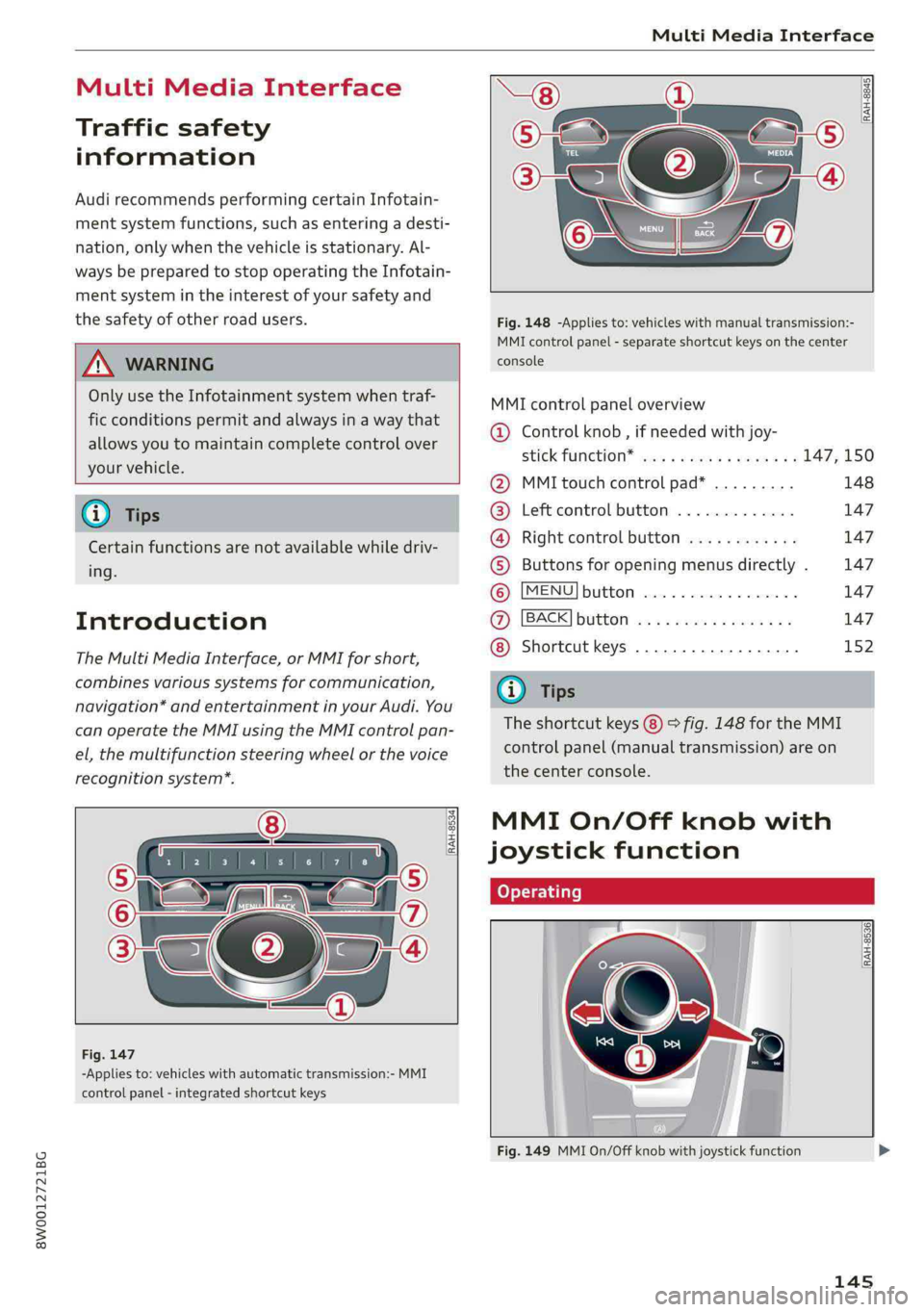
[RAH-8534)
-Appliesto:vehicleswithautomatictransmission:-MMI
controlpanel-integratedshortcutkeys
RAH-8845|
Fig.148-Appliesto:vehicleswithmanualtransmission:-
MMIcontrolpanel-separateshortcutkeysonthecenter
console
MMIcontrolpaneloverview
@Controlknob,ifneededwithjoy-
StiCKTURCKION®cieseaeaswareswex147,150
@MMItouchcontrolpad*.........148
@®Leftcontrolbutton.............147
@®Rightcontrolbutton............147
©Buttonsforopeningmenusdirectly.147
©[MENU]button...............2.147
@[BACK]button............0....147
Shortcutkeys.............0000.152
@Tips
Theshortcutkeys@)©fig.148fortheMMI
controlpanel(manualtransmission)areon
the centerconsole.
MMIOn/Offknobwith
joystickfunction
tome|
[RAH-8536)
ee|7
a
Fig.149MMIOn/Offknobwithjoystickfunction
145