length AUDI A4 2019 Owners Manual
[x] Cancel search | Manufacturer: AUDI, Model Year: 2019, Model line: A4, Model: AUDI A4 2019Pages: 392, PDF Size: 99.53 MB
Page 55 of 392

8W0012721BG
LightsandVision
— TheautomaticdimmingmirrorsdonotdimWindshieldwipers
whentheinteriorlightingisturnedonor
thereversegearisselected.Switchingthewiperson
:
a
2
\s
Fig.48Sunvisor=
a
Sunvisor
Thesunvisorsforthedriverandfrontpassenger
canbereleasedfromtheirmountsandturnedto-
wardthedoors©fig.48@.
Theycanalsobemovedbackandforthlength-
wiseinthisposition.-;;:
Fig.51allroad:rearwindowwiperoperation
Vanitymirror
Movethewindshieldwiperlevertothecorre-
Themirrorlighting*switchesonwhenthecoverspondingposition:
overthevanitymirror@)opens.
@-Windshieldwipersoff
@-Rainsensormode.Thewindshieldwipers
Appliesto:vehicleswithsunshadeswitchononcethevehiclespeedexceedsapprox-
imately2mph(4km/h)anditisraining.The
higherthesensitivityoftherainsensorthatisset
(switch@)totheright),theearlierthewind-
shieldwipersreacttomoistureonthewind-
shield.Youcandeactivatetherainsensormode
intheInfotainmentsystem,whichswitchesthe
intermittentmodeon.Todothis,select:[MENU
button>Vehicle>leftcontrolbutton>Driveras-
sistance>Rainsensor.Inintermittentmode,
youcanadjusttheintervaltimeusingtheswitch
<=
B4M-0166|
Fig.49Reardoor:sunshade®
Reardoorsunshade @-Slowwiping
>Pullthesunshadeoutandattachittothere-@-Fastwiping
tainerontheupperdoorframe>fig.49.
[email protected]
tionlonger,thewipersswitchfromslowwiping
tofastwiping.>
53
Page 60 of 392
Seats
Seats
Generalinformation
ZAWARNING
See>page247,Drivingsafetyforimportant
information,tips,suggestionsandwarnings
thatyoushouldreadandfollowforyourown
safetyandthesafetyofyourpassengers.
Frontseats
Powerseatadjustment
&
Ee
,
BFY-0014
Fig.57Frontseat:adjustingtheseat(versionB)
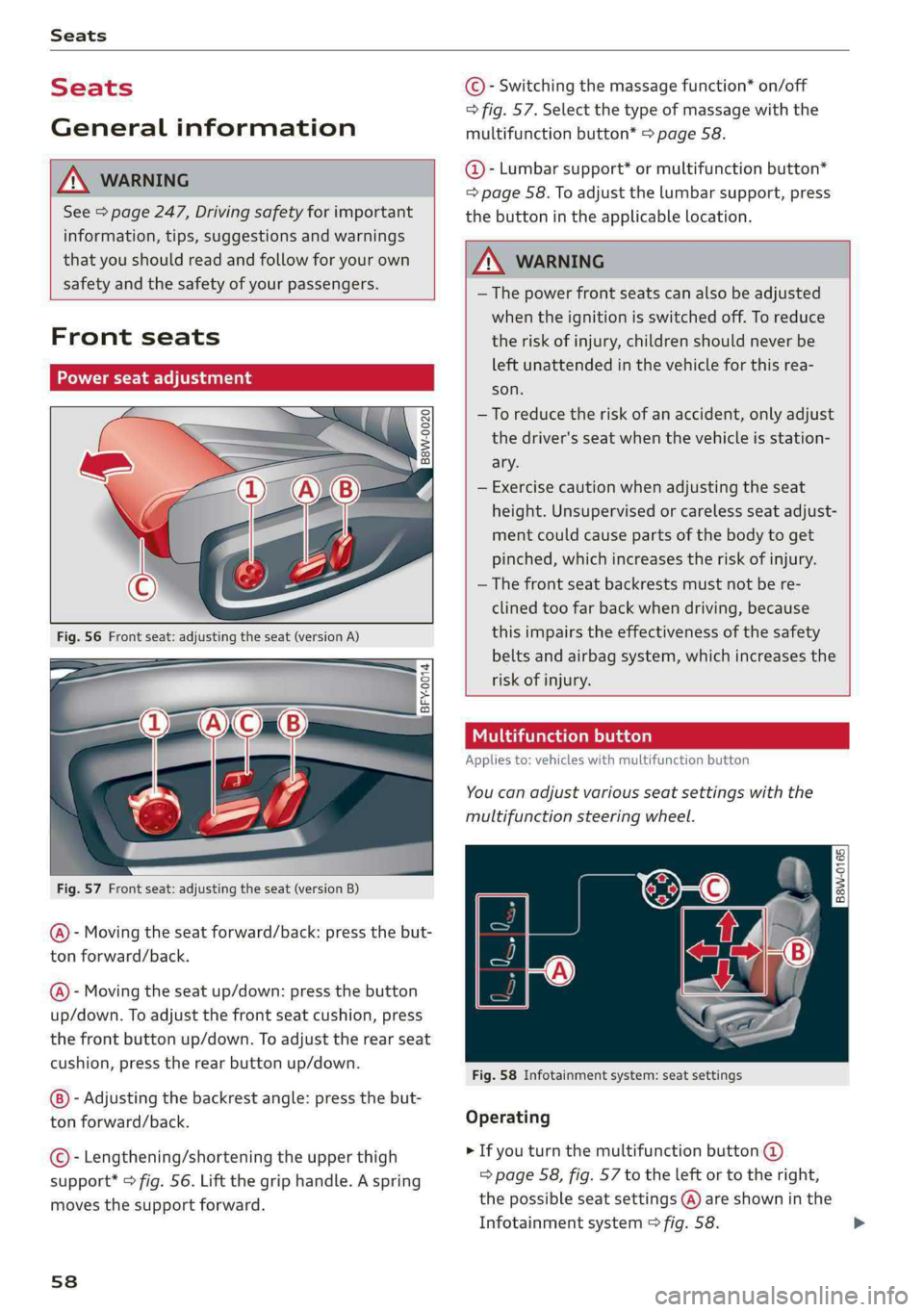
@-Movingtheseatforward/back:pressthebut-
ton forward/back.
@-Movingtheseatup/down:pressthe button
up/down.Toadjustthefrontseatcushion,press
thefrontbuttonup/down.Toadjusttherearseat
cushion,presstherearbuttonup/down.
-Adjustingthebackrestangle:pressthebut-
tonforward/back.
©-Lengthening/shorteningtheupperthigh
support*>fig.56.Liftthegriphandle.Aspring
movesthesupportforward.
58
©-Switchingthemassagefunction*on/off
>fig.57.Selectthetypeofmassagewiththe
multifunctionbutton*>page58.
@-Lumbarsupport*ormultifunctionbutton*
=page58.Toadjustthelumbarsupport,press
thebuttonintheapplicablelocation.
ZAWARNING
— Thepowerfrontseatscanalsobeadjusted
whentheignitionisswitchedoff.To reduce
theriskofinjury,childrenshouldneverbe
leftunattendedinthevehicleforthisrea-
son.
—Toreducetheriskofanaccident,onlyadjust
thedriver'sseatwhenthevehicleisstation-
ary.
—Exercisecautionwhenadjustingtheseat
height.Unsupervisedorcarelessseatadjust-
mentcouldcausepartsofthebodytoget
pinched,whichincreasestheriskofinjury.
—Thefrontseatbackrestsmustnotbere-
clinedtoofarbackwhendriving,because
thisimpairstheeffectivenessofthesafety
beltsandairbagsystem,whichincreasesthe
riskofinjury.
tttlameleiacela)
Appliesto:vehicleswithmultifunctionbutton
You canadjustvariousseatsettingswiththe
multifunctionsteeringwheel.
|
BaW-0165)
Fig.58Infotainmentsystem:seatsettings
Operating
>Ifyouturnthemultifunctionbutton@
=>page58,fig.57totheleftortotheright,
thepossibleseatsettings(A)areshowninthe
Infotainmentsystem>fig.58.
Page 203 of 392
8W0012721BG
Navigation
—ThenselectandconfirmStartrouteguidance.
Additionaldirectoryfunctionsinthenavigation
systemcanbefoundunder>page206.
@)Tips
—Addressesthathavebeenimportedfrom
yourmobiledeviceintotheMMIcanalsobe
usedasadestination.
—If acontactisgrayed outinthedirectory,
thiscontacthasneitheradestinationnoran
addressassignedtoit.
elelm11a)
Appliesto:vehicleswithnavigationsystem
>Pressthe [NAV/MAP|buttonrepeatedlyuntil
the Enterdestinationmenuisdisplayed
=>page198,fig. 183.
>Select:leftcontrolbutton>POIs.
—Changingthesearcharea:selectandconfirm
Searcharea>asearchareafromthelist.
Thefollowingsearchcategoriesareavailable:
Nearby:pointsofinterestcanbeselectedfrom
differentcategories.Thepointsofinterestare
listedstartingfromtheimmediatevicinityofthe
vehicleuptoaradiusofapproximately124miles
(200km).
Alongtheroute:points ofinterestalongthe
routecanonlybeselectedduringactiveroute
guidance.Thepointsofinterestarelocateddi-
rectlyalongorintheimmediatevicinityofthe
calculatedroute.Thepointsofinterestcanlike-
wise beselectedfromvariouscategories.Forex-
ample,youcansearchforahotelorparkinglot
atthedestination.
Neardestination/Nearstopover:pointsofinter-
estnearadestinationorastopover canonlybe
selectedduringactiverouteguidance.Thepoints
ofinterestcanlikewisebeselectedfromvarious
categories.Forexample,youcan searchforaho-
telorparkinglotatthedestination.
In anewcity:selectacountry/stateorsearchin
anewcity.Enterthenameofthedesiredcity.
Points ofinterestcanbeselectedfromvarious
categories.Thisfunctionallowsyoutosearchfor
points ofinterestinanycityregardlessoftheac-
tiverouteguidanceorthevehicleposition.
—Searchingforapointofinterestnameinthe
selectedsearcharea:selectFindentry>Enter
pointofinterest.Enterthenameofthepoint
ofinterest.
—Searchingforapointofinterestinaspecific
category:selectSelectcategory.Selectand
confirmacategorysuchasRestaurants.
(i)Tips
—Distancestopointsofinterestaredisplayed
asastraight-linedistancefromyourcurrent
location.Theactualdistancefromyourcur-
rent locationtothepointofinterestisup-
datedautomatically.Thelistofpointsofin-
terestthatwerefoundisnotresortedwhen
thishappens.
—Theremaybeentriesinthelistthatcannot
bedisplayedcompletelyduetotheirlength.
Selectthecorrespondingentryfromthelist.
Select:rightcontrolbutton>Showdestina-
tiondetails.Detailedinformationforthese-
lectedentryinthelististhendisplayed.
pointofinterestsearch(online
Appliesto:vehicleswithanavigationsystem andAudicon-
nectInfotainment
You cansearchforpointsofinterestontheInter-
net.
Requirement:therequirementsforAudiconnect
Infotainmentmustbemet>page186.
>Pressthe [NAV/MAP]buttonrepeatedlyuntil
theEnterdestinationmenuisdisplayed
=>page198,fig.183.
>Select:leftcontrolbutton>Onlinesearch.The
searcharealastsetisdisplayedintheinput
field.
—Changingthesearcharea:select:rightcontrol
button>Selectsearcharea.
—Searchingforonlinedestinationsinthese-
lectedsearcharea:enteranewcity/stateif
necessary.Enterthesearchterm,suchashotel.
Pressthecontrolknob.Selectandconfirm an
onlinedestinationfromthelist.
201
Page 211 of 392
8W0012721BG
Navigation
Routelist
Theroutelistcanonlybedisplayedwhenroute
guidanceisactiveandcontainsinformationre-
gardingtheroute,thenamesofthestreetsand
the lengthoftheroutesections.Whentraveling
onhighways,possibleparkinglotsandrestareas
areshown,whichyoucanselectasastopover.
POIsalongtheroute
Requirement:routeguidancemustbeactive.
Searchingforpointsofinterestalongyourcur-
rentrouteForadditionalinformation,see
=>page201.
Additionaloptionsonthemap
Appliesto:vehicleswithnavigationsystem
>Pressthe [NAV/MAP|buttonrepeatedlyuntil
themapisdisplayed>page207,fig.190.
>Presstherightcontrolbutton.
Dependingonthefunctionselected,thefollow-
ingoptionscanalsobeselectedundertheMap
menu:
Cancelrouteguidance:see>page203.
Mapsettings:see>page209.
Routecriteria:see>page207.
Voiceguidance:see>page207.
Navigationsettings:see>page206.
Showalternativeroutes:see>page205.
Parkingalongtheroute”:parkingoptionsnear
thevehiclearedisplayed.
Savecurrentposition:youcansaveyourcurrent
vehiclepositionasafavorite>page206orsave
itasacontactinthedirectory>page206.
Audiconnectatthislocation*:allowsyouto
searchforTravelinformationattheenteredlo-
cation(events,weatheratthedestination,etc.).
Onlinetrafficdata*:youcanswitchtheonline
trafficdataonoroff(M).
2)AUDIAGprovidesaccesstoservicesfromthirdpartypro-
viders.Permanentavailabilitycannotbeguaranteed,be-
causethatdependsonthethirdpartyprovider.
Countryinformation:see>page203.
Avoidroute*:whenrouteguidanceisactive,the
calculatedroutewillavoidtheareayouhave
specified(maximum:12mi(20km)),ifpossible.
Thenavigationsystemcalculatesanalternative
route.Theroutetobeavoidedthatyouhaveen-
teredappliesonlytothecurrentrouteandmust
beset again,ifneeded.Theareasyouhavese-
lectedtoavoidwillappearwithredandwhite
shadingonthemap.
Moveroute”:moveyourfingerovertheMMI
touchcontrolpad*orusethecontrolknobto ad-
justtherouteonthe overviewmap.
Mapsettings
Appliesto:vehicleswithnavigationsystem
>Pressthe [NAV/MAP]buttonrepeatedlyuntil
themapisdisplayed.
>Select:rightcontrolbutton>Mapsettings.
Dependingontheselectedfunction,thefollow-
ingsettingscan beselected:
Mapcolors
Day/Night:themapisdisplayedwitha light/
darkbackground.
Automatic:themapdisplayadaptstothelight-
ingconditions(forexample,changingfromDay
toNightwhendrivingthroughatunnel).
Mapdisplay
Standard:see>page207,fig.191.
Satellitemap”):see>page210,fig.192.
Maporientation
Destinationmap:themapindicatesthedestina-
tionandisorientedtothenorth.
2Dheading-upmap/2Dnorth-upmap:thecur-
rentvehiclepositionisdisplayed.Themapisori-
entedinthedirectionoftravelor tothenorth.
3Dheading-upmap”:thecurrentvehicleposi-
tionisshownonathree-dimensionalmapandis>
209
Page 212 of 392
Navigation
alignedtothedirectionoftravel.Atascaleof62
mi(100km)andlarger,themaporientationisto
thenorth.
Overviewmap:theentireroutefromthevehicle
positiontothedestinationorthenextstopoveris
displayedonthemap.Themapscaledependson
the lengthoftherouteandadaptsautomatically.
Themapisorientedtothenorth.
Routeinformation
Thedisplayofrouteinformation,suchasthecur-
rentstreetbeingdrivenonorpointsofinterest
alongthecurrentroute>page207,fig.190,can
be switchedon/offorcanbeminimizedonthe
displayofupcomingmaneuvers.
Automaticzoom
On:themapscaleisadaptedautomaticallyde-
pendingonthetypeof roadbeingtraveled(ex-
pressway,highway,otherroads)sothatyoual-
wayshaveanoptimaloverviewoftheroadahead.
Thescalewillalsobeautomaticallyadapted
whenthereareupcomingmaneuverstoprovidea
betterdetailedview.
Intersection:whenrouteguidanceisactive,the
maptemporarilyzoomsintoadetailedscale
whenthereareupcomingmaneuverssothatyou
can see thestreetorturnbetter.
Off:themapscaleyouhavechosenismain-
tained.
MMImapcontents
Youcanswitchthedisplayofadditionalinforma-
tiononthemapintheInfotainmentsystemdis-
playonoroff.
Theweatherforecastisdisplayedona3mi(5
km)scaleonthemap.
Instrumentclustermapcontents
Youcanalsosetwhichmapcontentdisplaysin
theinstrumentcluster>page160.
2)AUDIAGprovidesaccesstoservicesfromthirdpartypro-
viders.Permanentavailabilitycannotbeguaranteed,be-
causethatdependsonthethirdpartyprovider.
210
Satellitemap
Appliesto:vehicleswithanavigationsystem andAudicon-
nectInfotainment
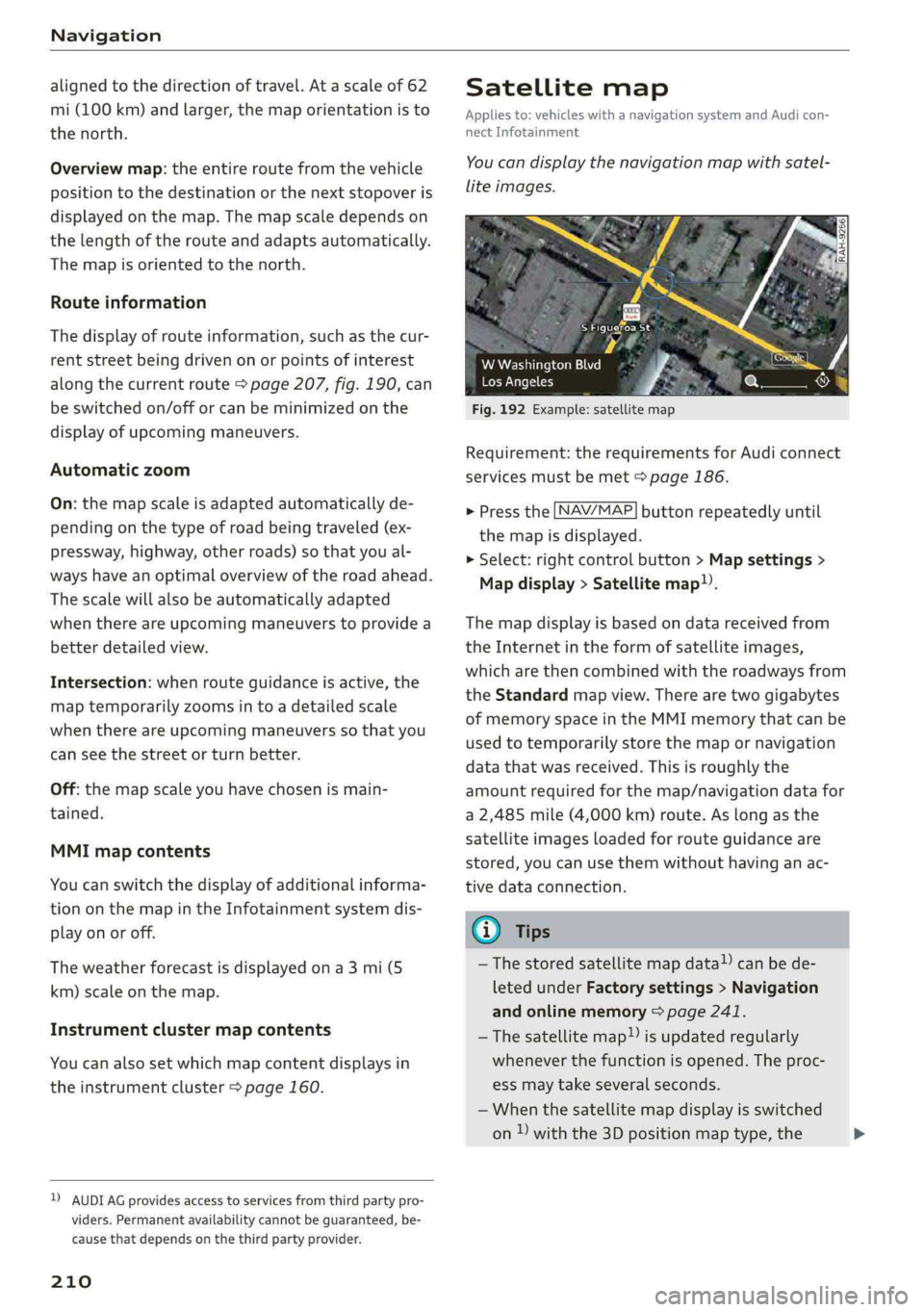
You candisplaythenavigationmapwithsatel-
liteimages.
Sitters
Fig.192Example:satellitemap
WWashingtonBlvd
LosAngeles
Requirement:therequirementsforAudiconnect
servicesmustbemet>page186.
>Pressthe[NAV/MAP
themapisdisplayed.
>Select:rightcontrolbutton>Mapsettings>
Mapdisplay>Satellitemap).
buttonrepeatedlyuntil
Themapdisplayisbasedondatareceivedfrom
theInternetintheformofsatelliteimages,
whicharethencombinedwiththeroadwaysfrom
theStandardmapview.Therearetwogigabytes
ofmemoryspaceintheMMImemorythatcanbe
usedtotemporarilystorethemapornavigation
datathatwasreceived.Thisisroughlythe
amountrequiredforthemap/navigationdatafor
a2,485mile(4,000km)route.Aslongasthe
satelliteimagesloadedforrouteguidanceare
stored,youcanusethemwithouthavinganac-
tivedataconnection.
G)Tips
—Thestoredsatellitemapdata!)canbede-
letedunderFactorysettings>Navigation
andonlinememory>page241.
—Thesatellitemap)isupdatedregularly
wheneverthefunctionisopened.Theproc-
essmaytakeseveralseconds.
—Whenthesatellitemapdisplayisswitched
on)withthe3Dpositionmaptype,the>
Page 214 of 392
Navigation
@Tips
—Alwaysreadthechapter>page186.
— Theamountofavailableonlinemapupdates
inthevehicleislimited.Toupdatemorere-
gions,usethemapupdateviaSDcardat
www.audiusa.com/myaudi.
—Alwaysreadthechapter>page186,Audi
connect.
Trafficinformation
Introduction
Appliesto:vehicleswithnavigationsystem
(5of
yee@wee
=
@Westbound#Eastbound
t4
Northbound
f
©-Northbound
o—
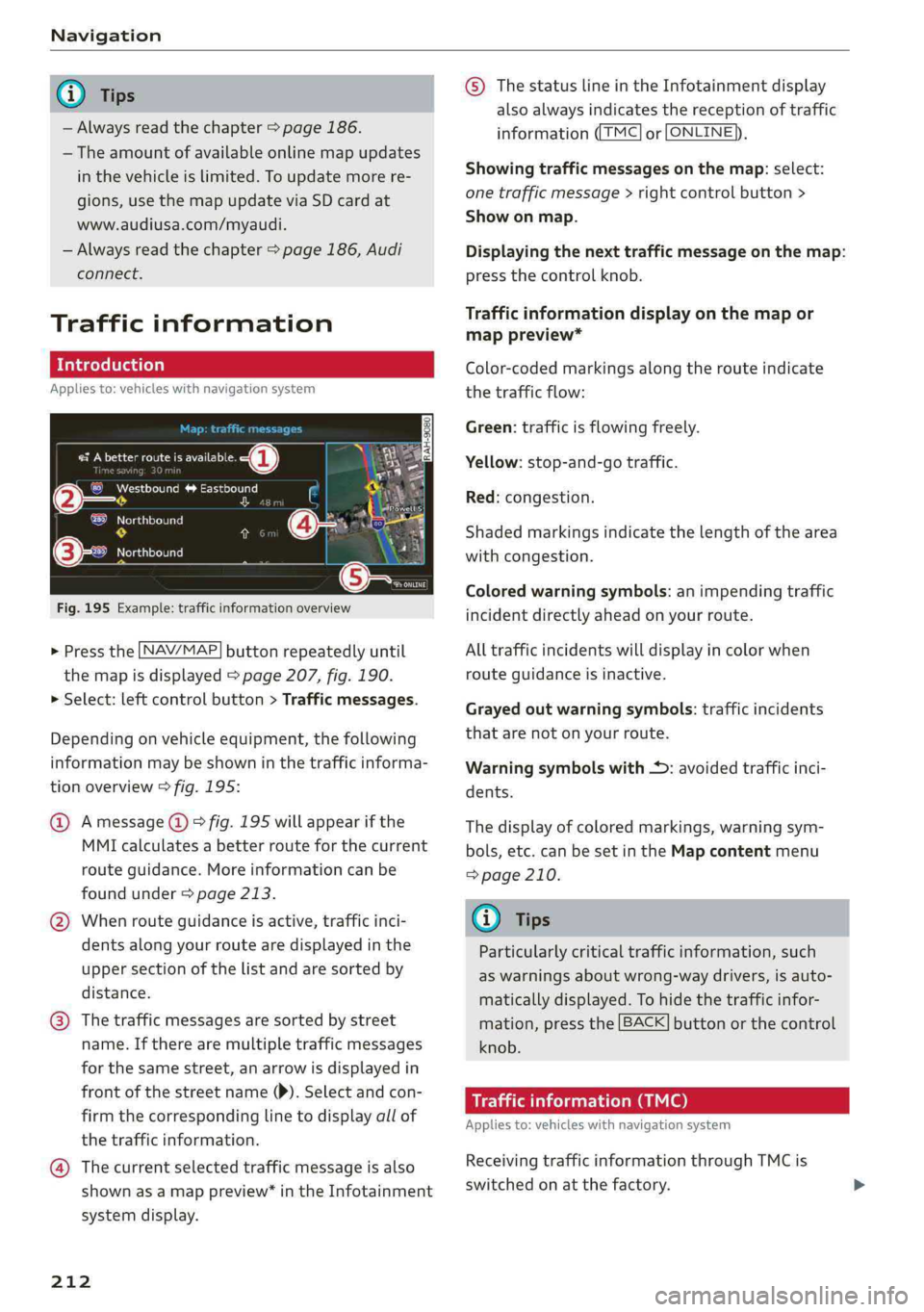
Fig.195Example:trafficinformationoverview
> Pressthe [NAV/MAP]buttonrepeatedlyuntil
themapisdisplayed>page207,fig.190.
>Select:leftcontrolbutton>Trafficmessages.
Dependingonvehicleequipment,thefollowing
informationmaybeshowninthetrafficinforma-
tionoverview>fig.195:
@Amessage@)>fig.195willappearifthe
MMIcalculatesabetterrouteforthecurrent
routeguidance.Moreinformationcanbe
foundunder>page213.
@Whenrouteguidanceisactive,trafficinci-
dentsalongyourroutearedisplayedinthe
uppersectionofthelistandaresortedby
distance.
@®Thetrafficmessagesaresorted bystreet
name.Iftherearemultipletrafficmessages
forthesamestreet,anarrowisdisplayedin
frontofthestreetname()).Selectandcon-
firmthecorrespondinglinetodisplayallof
thetrafficinformation.
@Thecurrentselectedtrafficmessageisalso
shownasamappreview*intheInfotainment
systemdisplay.
212
©ThestatuslineintheInfotainmentdisplay
alsoalwaysindicatesthereceptionoftraffic
information((TMC]or[ONLINE)),
Showingtrafficmessagesonthemap:select:
onetrafficmessage>rightcontrolbutton>
Showonmap.
Displayingthenexttrafficmessageonthemap:
pressthecontrolknob.
Trafficinformationdisplayonthemapor
mappreview*
Color-codedmarkingsalongtherouteindicate
thetrafficflow:
Green:trafficisflowingfreely.
Yellow:stop-and-gotraffic.
Red:congestion.
Shadedmarkingsindicatethelength ofthearea
withcongestion.
Coloredwarningsymbols:animpendingtraffic
incidentdirectlyaheadonyourroute.
Alltrafficincidentswilldisplayincolorwhen
routeguidanceisinactive.
Grayedoutwarningsymbols:trafficincidents
thatarenotonyourroute.
Warningsymbolswith+:avoidedtrafficinci-
dents.
Thedisplay ofcoloredmarkings,warningsym-
bols,etc.canbesetintheMapcontentmenu
=>page210.
@)Tips
Particularlycriticaltrafficinformation,such
aswarningsaboutwrong-waydrivers,isauto-
maticallydisplayed.Tohidethetrafficinfor-
mation,pressthe[BACK]buttonorthecontrol
knob.
Trafficinformation(TMC)
Appliesto:vehicleswithnavigationsystem
ReceivingtrafficinformationthroughTMCis
switchedonatthefactory.
Page 246 of 392
Systemsettings
Select:Audismartphone>adevicefromthelist
>rightcontrolbutton.
Toremoveyourmobiledevicefromthelist,select
andconfirm DeleteAppleCarPlaydeviceorDe-
leteAndroidAutodevice.
Systemupdate
>Select:[MENU]button>Settings>leftcontrol
button>Systemmaintenance.
—Systemupdate:insertthestoragedevicewith
theupdatedataintotheappropriatedrive
=page221.Selectandconfirm thedrive>
Startupdate.Thelengthoftheprocessde-
pendsonthesizeoftheupdate.
—Resetdriverinstallation:theselectedmedia
driverpackageisresettothesettingsatthe
timeofdelivery.
—Versioninformation:informationontheMMI
softwareversionandthenavigationdatabase*
softwareversionisdisplayed.TheSoftwarein-
formationfunctionalsoprovidesinformation
onthesoftwarecontainedintheMMIandthe
licensingagreement.
Soundsettings
ThesounddistributionandvolumeoftheMMI
canbeadjustedindividually.Thesettingsdepend
onthevehicleequipment.
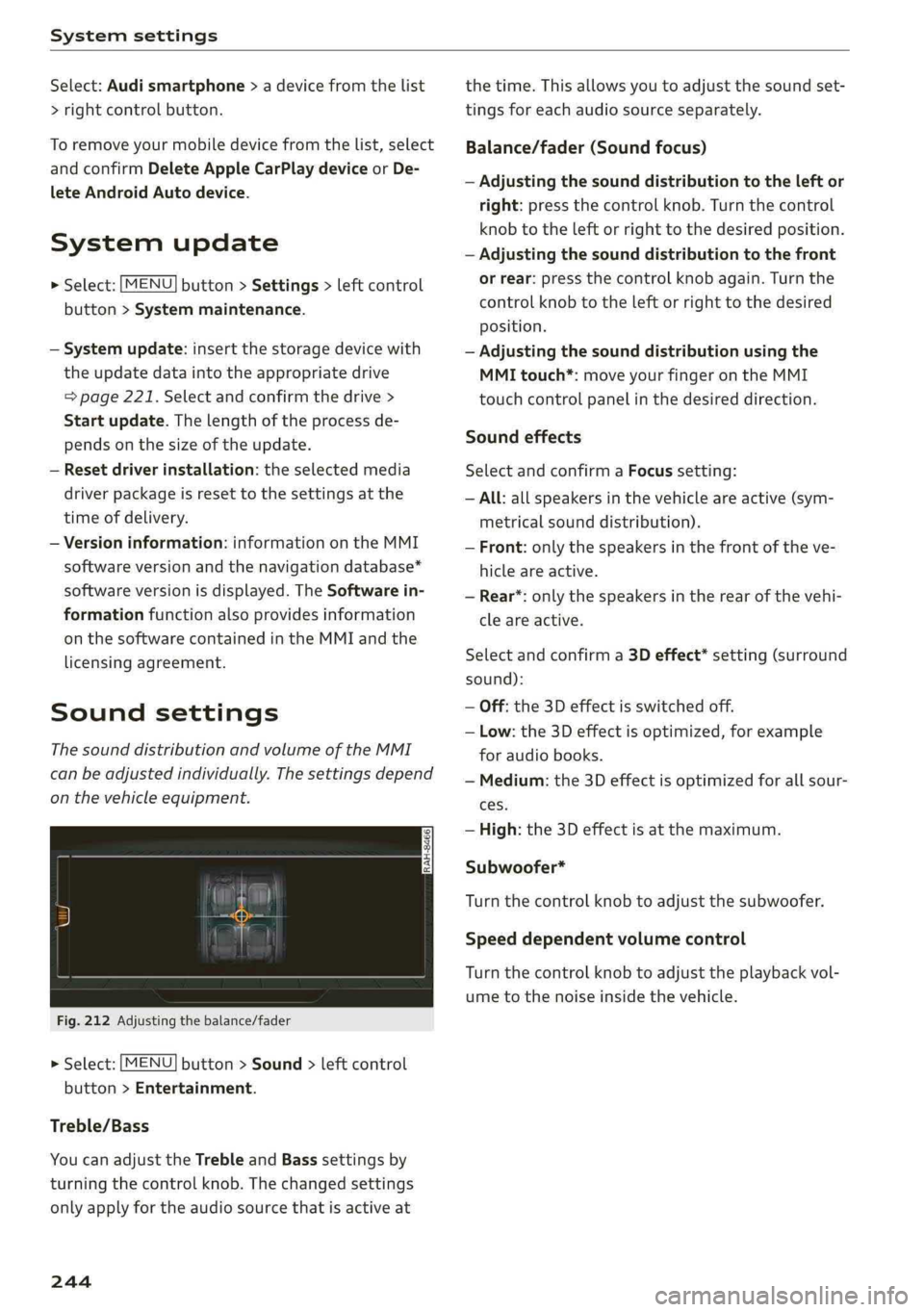
Fig.212Adjusting thebalance/fader
>Select:[MENU]button>Sound>leftcontrol
button>Entertainment.
Treble/Bass
YoucanadjusttheTrebleandBasssettingsby
turningthecontrolknob.Thechangedsettings
onlyapplyfortheaudiosourcethatisactiveat
244
thetime.Thisallowsyoutoadjustthesoundset-
tingsforeachaudiosourceseparately.
Balance/fader(Soundfocus)
—Adjustingthesounddistributiontotheleftor
right:pressthecontrolknob.Turn thecontrol
knobtotheleftorrighttothedesiredposition.
—Adjustingthesounddistributiontothefront
orrear:pressthecontrolknobagain.Turnthe
controlknobtotheleftorrighttothedesired
Position.
—Adjustingthesounddistributionusingthe
MMItouch*:moveyourfingerontheMMI
touchcontrolpanelinthedesireddirection.
Soundeffects
SelectandconfirmaFocussetting:
—All:allspeakersinthevehicleareactive(sym-
metricalsounddistribution).
—Front:onlythespeakersinthefrontoftheve-
hicleareactive.
—Rear*:onlythespeakersintherearofthevehi-
cleareactive.
Selectandconfirma3Deffect*setting(surround
sound):
—Off:the3Deffectisswitchedoff.
—Low:the3Deffectisoptimized,forexample
foraudiobooks.
—Medium:the3Deffectisoptimizedforallsour-
ces.
—High:the3Deffectisatthemaximum.
Subwoofer*
Turnthecontrolknobtoadjustthesubwoofer.
Speeddependentvolumecontrol
Turnthecontrolknobtoadjusttheplaybackvol-
umetothenoiseinsidethevehicle.
Page 334 of 392
Wheels
haveworndowntothetreadwear
indicators.Replacethetireswith
newones>A.
Tirerotation
Rotatingthetiresregularlyisrec-
ommendedtoensurethetires
wearevenly.Torotatethetires,
installthetiresfromtherearaxle
onthefrontaxleandviceversa.
Thiswillallowthetirestohave
approximatelythesamelengthof
servicelife.
Forunidirectionaltires,makesure
thetiresareinstalledaccordingto
therunningdirectionindicatedon
thetiresidewall>page354.
Hiddendamage
Damagetotiresandrimscanof-
tenoccurinlocationsthatarehid-
den.Unusualvibrationsintheve-
hicleorpullingtoonesidemay
indicatethatthereistiredamage.
Reduceyourspeedimmediately.
Checkthetiresfordamage.Ifno
damageisvisiblefromtheout-
side,driveslowlyandcarefullyto
thenearestauthorizedAudideal-
erorauthorizedAudiServiceFa-
cilitytohavethevehicleinspect-
ed.
332
Z\WARNING
Treadthathasworntoolowor
uneventreaddepthsonthe
tirescanreducedrivingsafety.
Thiscanincreasetheriskofan
accidentbecauseithasanega-
tiveeffectonhandling,driving
throughcurves,andbraking,
andbecauseitincreasesthe
riskofhydroplaningwhendriv-
ingthroughdeeppuddles.
SUTcwyee)
ef)
B8W-0152
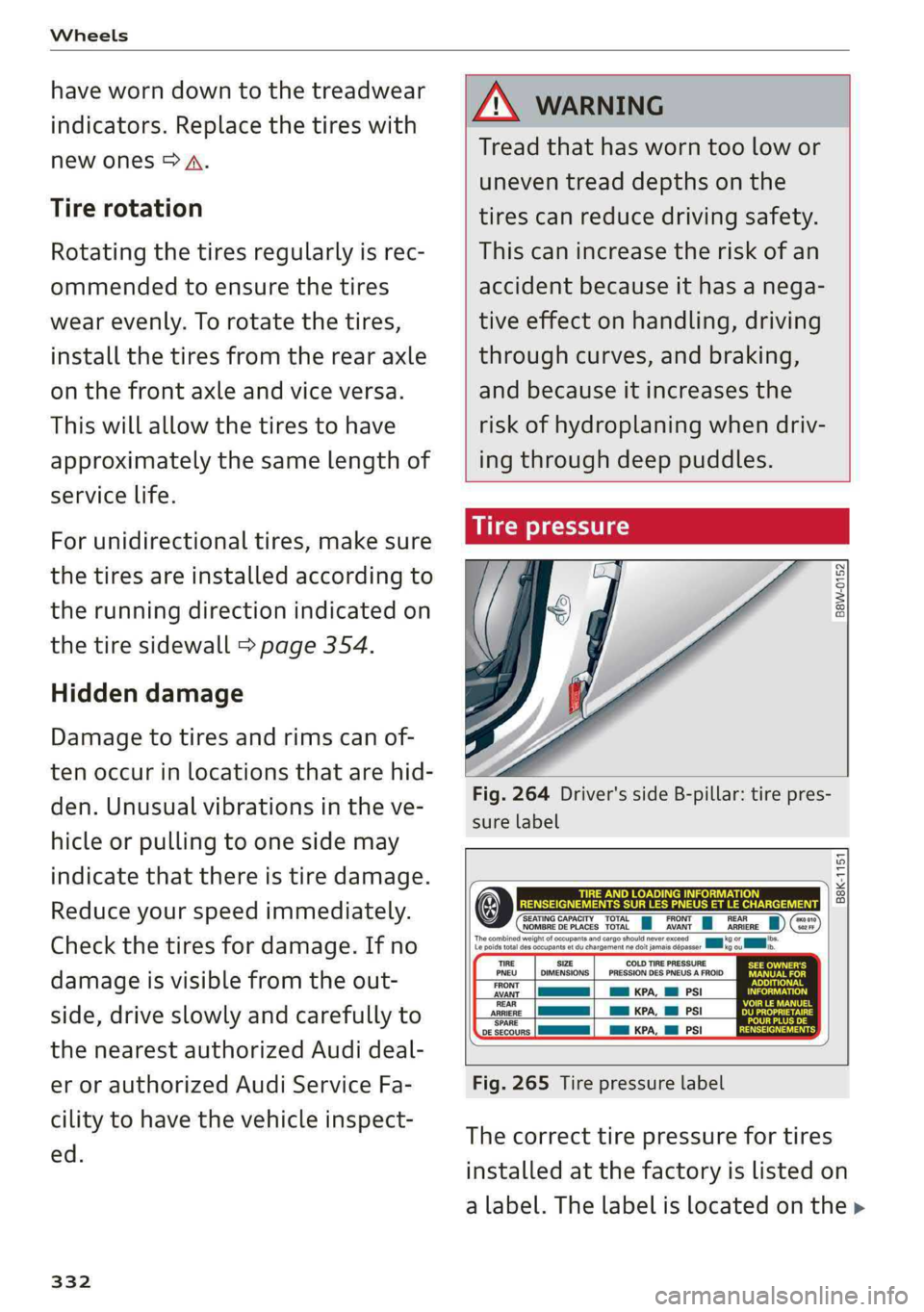
Fig.264Driver'ssideB-pillar:tirepres-
surelabel
B8K-1151
SEATINGCAPACITYTOTALpyFRONTa)0NOMBREDEPLACESTOTALAVANTARRIEREa2Fr
19OFpmbs.xoou
TIRESIZE
PNEU_|DIMENSIONS
FRONT
AVANT,MaKPA,MMPSI
REAR
ARRIEREaKPA,MlPSI
‘SPARE
DESECOURSllKPA,MlPSI
COLDTIREPRESSURE
PRESSIONDESPNEUSAFROID
Fig.265Tirepressurelabel
Thecorrecttirepressurefortires
installedatthefactoryislistedon
alabel.Thelabelislocatedonthe>
Page 374 of 392

Technicaldata
Technicaldata
Identificationdata
Vehicleidentificationlabel
XXXXXXX-X-XXXXXXXXX
WOMEEMTnt,XXXXXXXXXXxXXXXXXKX
XXX XXX
B4H-0800
[Tye/TyPE
XXXXXXXXXXX.X.XXX
XXXKWXXX.
XXX.XXX
‘MOTORKB./GETR.KB.
ENG.CODE/TRANS. CODE
LACKNR.
/INNENAUSST.
XXXX
ranriasieata”—XXXX/XXXXXXX/XX
M,-AUSST./OPTIONS
EOA 7D5
2EHJOZ
3FC
FOA
TL63KA
1xw
716CV7
3L4
1SA
4UB6XM
1LB 5SG1AS
5MU7X1
OG7 OYH
U1AX9B
908
824
4X3 2K2 3Y0
413
QiA
5RW
1BA
9G3
8EH 803
7KO
4KC
7GB
OJF
QZz7
D2Da
a
5D2
46Q
XX.XXX.XXK.X_—XXXK
rr
Fig.289Vehicleidentificationlabel
Thevehicleidentificationlabel>fig.289islocat-
edintheluggagecompartmentunderthecargo
floorcover.
Thevehicleidentificationlabelinformationcan
alsobefoundintheWarranty andMaintenance
booklet.
Vehicledata
Thestickercontainsthefollowingvehicledata:
@®VehicleIdentificationNumber(VIN)
@Vehicletype,engineoutput,transmission
®Engineandtransmissioncodes
@Paintandinteriorcodes
©Optionalequipmentnumbers
Vehicleidentificationnumber(VIN)
TheVINislocatedinthefollowingareas:
MENU —Select:thebutton>Vehicle>leftcon-
trolbutton>Service&checks>Vehicleinfor-
mation.
—Onthevehicleidentificationlabel
—Atthefrontbehindthewindshield*
—intheenginecompartmentontherightside
Notesabouttechnicaldata
The
valuesmayvarybasedonspecialequipment
aswellasmarket-specificequipmentandmeas-
uringmethods.
Pleasenotethatthespecificationslistedinthe
vehicledocumentationalwaystakeprecedence.
G)Tips
Anytechnicaldatathatismissingwasnot
availableatthetimeofprinting.
Length(in(mm))|Width(in(mm))|Widthacrossthe|Heightatcurb
mirrors(in(mm))|weight(in(mm))
A4sedan186.1(4,726)72.5(1,842)79.6(2,022)56.2(1,427)
S4sedan186.8(4,745)72.5(1,842)79.6(2,022)55.3(1,404)
allroad187.0(4,750)72.5(1,842)79.6(2,022)58.8(1,493)
372