towing AUDI A4 2020 User Guide
[x] Cancel search | Manufacturer: AUDI, Model Year: 2020, Model line: A4, Model: AUDI A4 2020Pages: 296, PDF Size: 80.45 MB
Page 85 of 296
8W1012721BB
Stowing and using
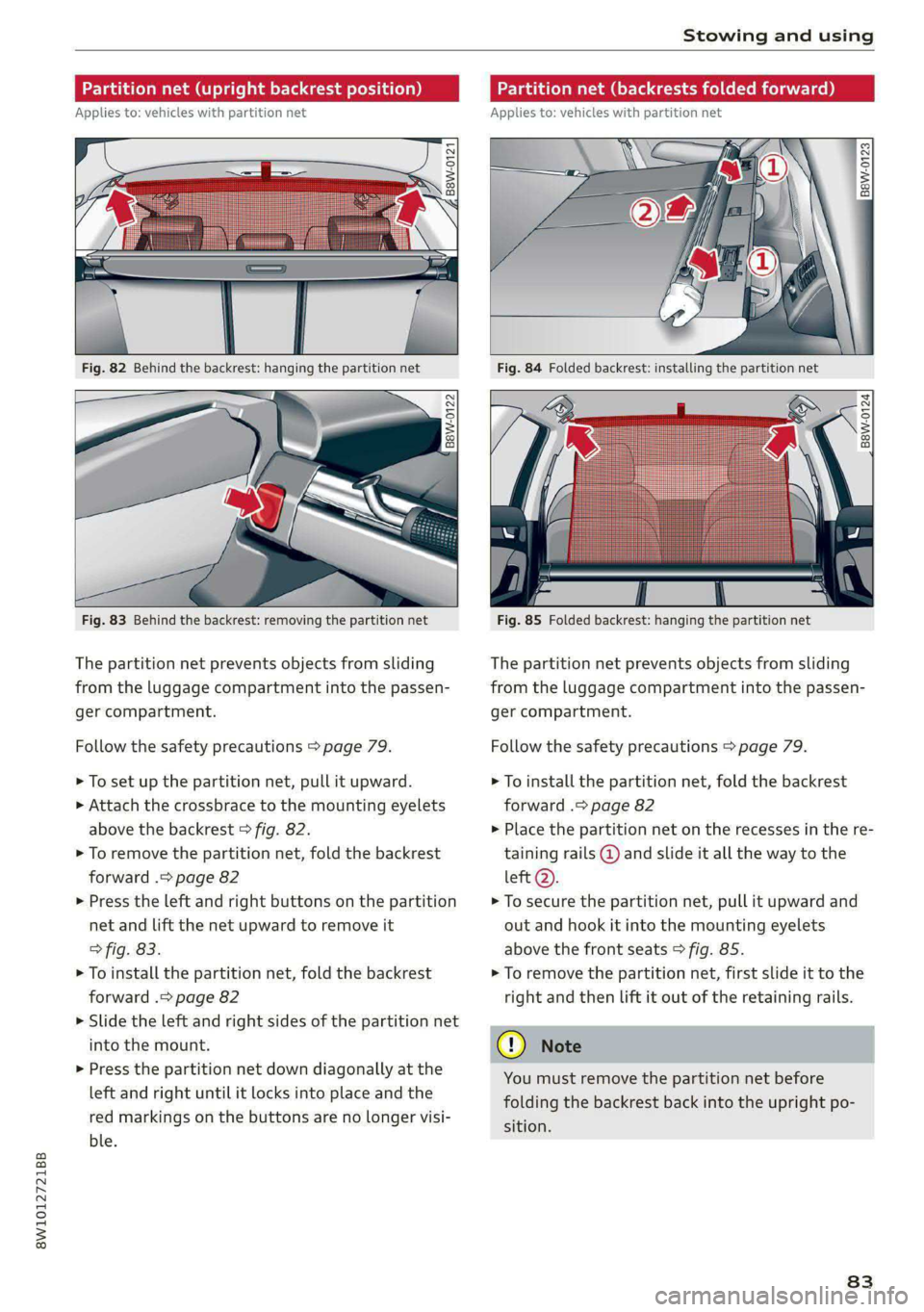
Partition net (upright backrest position)
Applies to: vehicles with partition net
B8W-0121
‘ 2
Fig. 82 Behind the backrest: hanging the partition net
B8W-0122
Fig. 83 Behind the backrest: removing the partition net
The partition net prevents objects from sliding
from the luggage compartment into the passen-
ger compartment.
Follow the safety precautions > page 79.
> To set up the partition net, pull it upward.
> Attach the crossbrace to the mounting eyelets
above the backrest > fig. 82.
> To remove the partition net, fold the backrest
forward .> page 82
> Press the left and right buttons on the partition
net and lift the net upward to remove it
> fig. 83.
> To install the partition net, fold the backrest
forward .> page 82
> Slide the left and right sides of the partition net
into the mount.
> Press the partition net down diagonally at the
left and right until it locks into place and the
red markings on the buttons are no longer visi-
ble.
Partition net (backrests folded forward)
Applies to: vehicles with partition net
B8W-0123
Fig. 84 Folded backrest: installing the partition net
. %
B8W-0124
Fig. 85 Folded backrest: hanging the partition net
The partition net prevents objects from sliding
from the luggage compartment into the passen-
ger compartment.
Follow the safety precautions > page 79.
> To install the partition net, fold the backrest
forward .> page 82
> Place the partition net on the recesses in the re-
taining rails @ and slide it all the way to the
left Q).
> To secure the partition net, pull it upward and
out and hook it into the mounting eyelets
above the front seats > fig. 85.
> To remove the partition net, first slide it to the
right and then lift it out of the retaining rails.
You must remove the partition net before
folding the backrest back into the upright po-
sition.
83
Page 86 of 296
Stowing and using
ie-downs and luggage compartment net
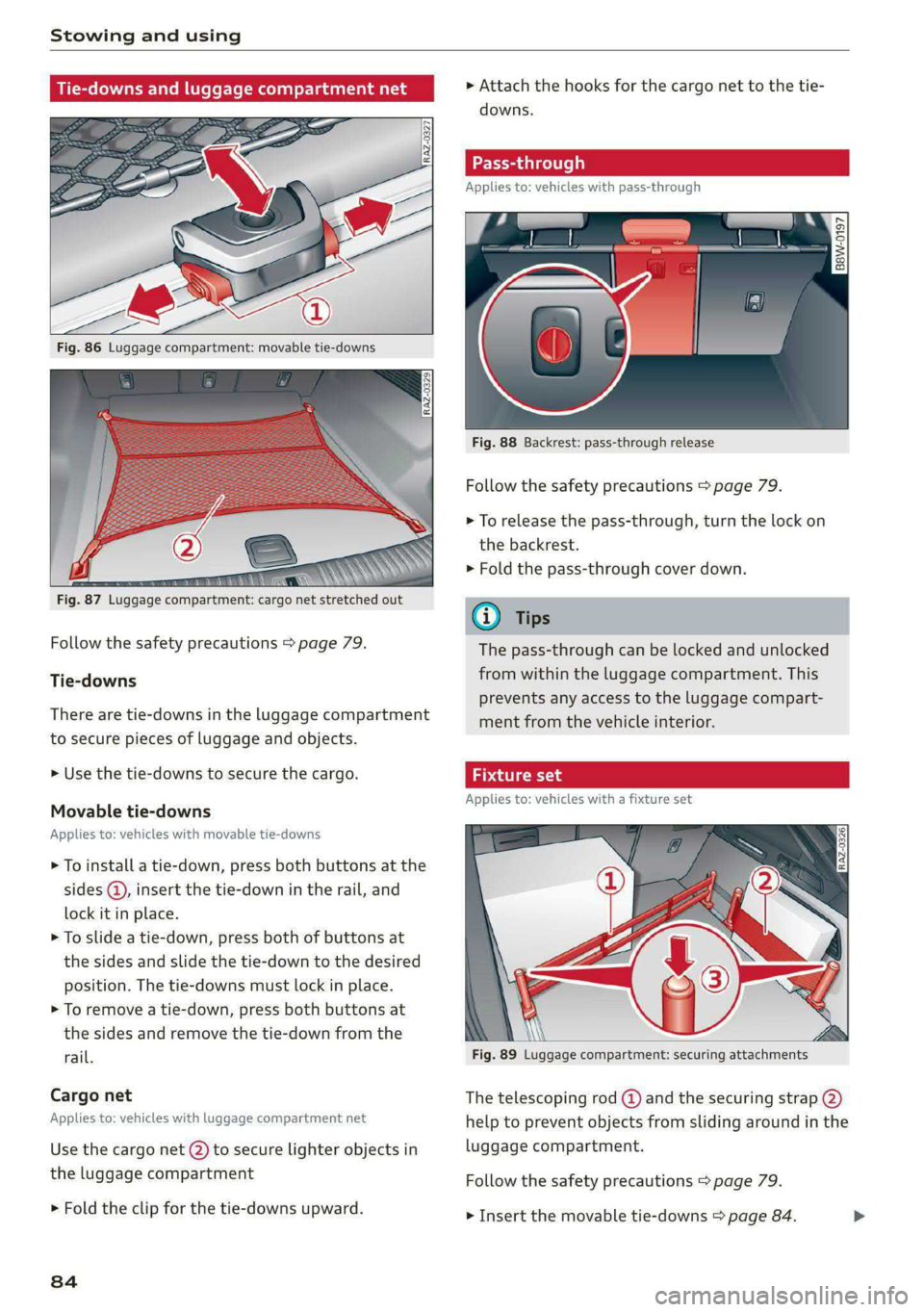
Fig. 86 Luggage compartment: movable tie-downs
mere NNN
Fig. 87 Luggage compartment: cargo net stretched out
Follow the safety precautions > page 79.
Tie-downs
There are tie-downs in the luggage compartment
to secure pieces of luggage and objects.
> Use the tie-downs to secure the cargo.
Movable tie-downs
Applies to: vehicles with movable tie-downs
> To install a tie-down, press both buttons at the
sides ® insert the tie-down in the rail, and
lock it in place.
> To slide a tie-down, press both of buttons at
the sides and slide the tie-down to the desired
position. The tie-downs must lock in place.
> To remove a tie-down, press both buttons at
the sides and remove the tie-down from the
rail.
Cargo net
Applies to: vehicles with luggage compartment net
Use the cargo net (2) to secure lighter objects in
the luggage compartment
> Fold the clip for the tie-downs upward.
84
» Attach the hooks for the cargo net to the tie-
downs.
Pas: rough
Applies to: vehicles with pass-through
B8W-0197
Fig. 88 Backrest: pass-through release
Follow the safety precautions > page 79.
> To release the pass-through, turn the lock on
the backrest.
> Fold the pass-through cover down.
7 ) Tips
The pass-through can be locked and unlocked
from within the luggage compartment. This
prevents any access to the luggage compart-
ment from the vehicle interior.
att IT 9
Applies to: vehicles with a fixture set
Fig. 89 Luggage compartment: securing attachments
The telescoping rod @) and the securing strap (2)
help to prevent objects from sliding around in the
luggage compartment.
Follow the safety precautions > page 79.
> Insert the movable tie-downs > page 84.
Page 87 of 296

8W1012721BB
Stowing and using
> Press the button (8) on the retainers and place
them on the tie-downs. Make sure the brackets
are locked into place.
> Slide the tie-downs into the desired position.
> Press the button to tighten the securing strap.
@ Tips
Store the movable tie-downs and the fixture
set in the openings under the front cargo
floor, if necessary.
2 q 3 5
s a
co
Fig. 90 Luggage compartment: cargo mat spread out
lengthwise
Fig. 91 Luggage compartment: (@) crosswise cargo mat /
@ lengthwise cargo mat
The cargo mat protects the luggage compart-
ment and bumper from dirt and scratches. You
can use both sides of the cargo mat.
Follow the safety precautions > page 79.
> To protect the luggage compartment and
bumper when loading and unloading objects,
lay the cargo mat out lengthwise with the
backrests folded down or upright > fig. 90.
> After loading or unloading, fold up the cargo
mat and close the luggage compartment lid.
> To also protect the side trim panels, lay the car-
go mat out widthwise.
> To divide the loading surfaces into separate sec-
tions > fig. 91, fold the cargo mat.
> Only store the cargo mat if it is dry.
You can save room by storing the cargo mat at
the sides of the luggage compartment.
q 8
&
= @ a
Fig. 92 Luggage compartment: cargo area floor
BEW-0128
(a
Fig. 93 Luggage compartment: cargo area floor reversed
You can transport dirty and damp objects in the
reversible cargo area floor.
8s
>
Page 88 of 296
Stowing and using
Reversing the cargo floor
> Lift up the cargo floor using the handle
> fig. 92.
> Flip the cargo floor over and install it > fig. 93.
Roof rack
General information
Applies to: vehicles with roof rack mount
= © S$
: = o a
Applies to: sedan
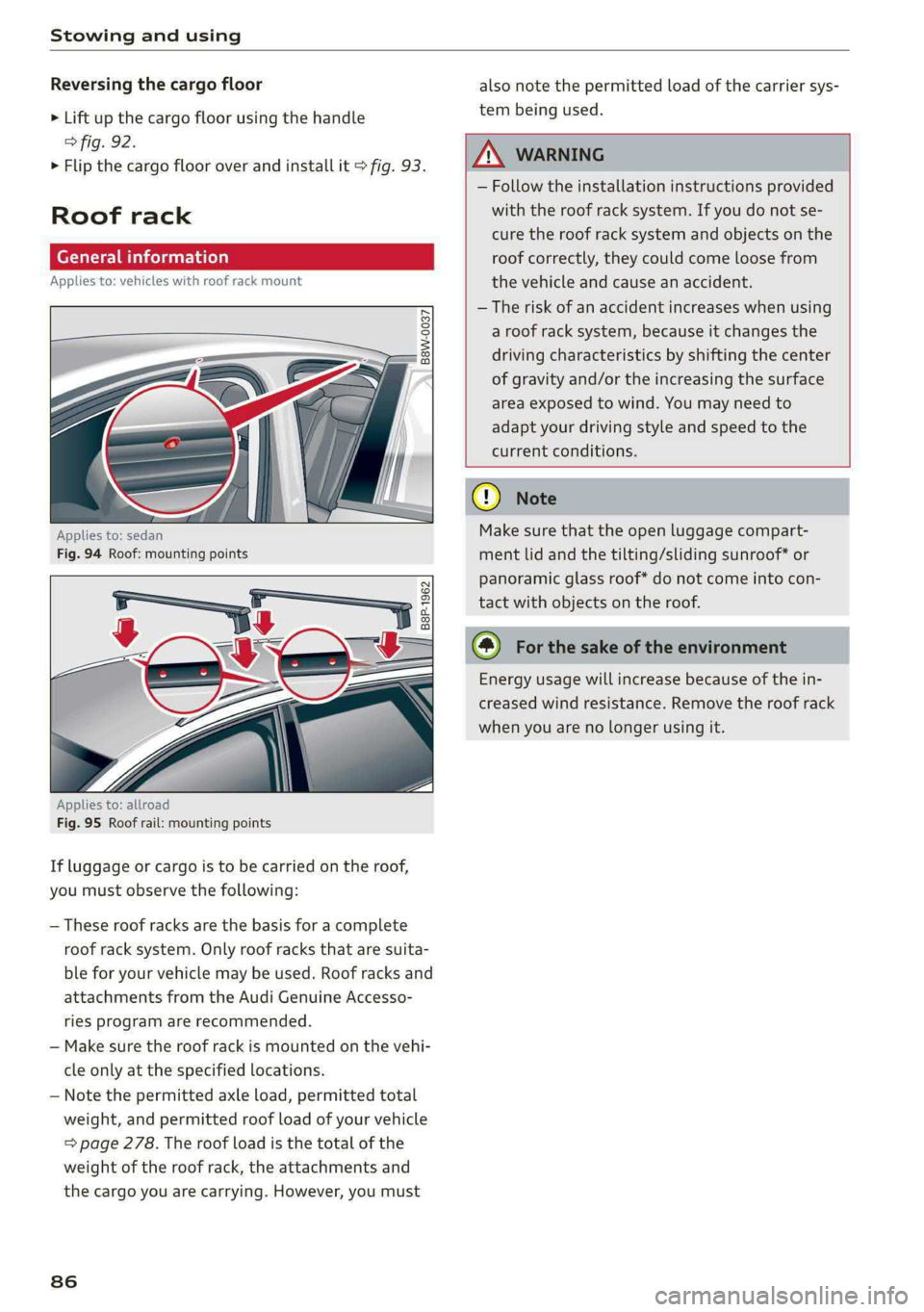
Fig. 94 Roof: mounting points
Applies to: allroad
Fig. 95 Roof rail: mounting points
If luggage or cargo is to be carried on the roof,
you must observe the following:
— These roof racks are the basis for a complete
roof rack system. Only roof racks that are suita-
ble for your vehicle may be used. Roof racks and
attachments from the Audi Genuine Accesso-
ries program are recommended.
— Make sure the roof rack is mounted on the vehi-
cle only at the specified locations.
— Note the permitted axle load, permitted total
weight, and permitted roof load of your vehicle
=> page 278. The roof load is the total of the
weight of the roof rack, the attachments and
the cargo you are carrying. However, you must
86
also note the permitted load of the carrier sys-
tem being used.
ZX WARNING
— Follow the installation instructions provided
with the roof rack system. If you do not se-
cure the roof rack system and objects on the
roof correctly, they could come loose from
the vehicle and cause an accident.
— The risk of an accident increases when using
a roof rack system, because it changes the
driving characteristics by shifting the center
of gravity and/or the increasing the surface
area exposed to wind. You may need to
adapt your driving style and speed to the
current conditions.
@) Note
Make sure that the open luggage compart-
ment lid and the tilting/sliding sunroof* or
panoramic glass roof* do not come into con-
tact with objects on the roof.
@) For the sake of the environment
Energy usage will increase because of the in-
creased wind resistance. Remove the roof rack
when you are no longer using it.
Page 104 of 296
Driving
@) Note
— Never let the brakes “rub” by pressing the
pedal lightly when braking is not actually
necessary. This can cause the brakes to over-
heat and increases braking distance and
causes wear.
— Observe the important information for driv-
ing downhill > page 104. This especially ap-
plies when towing a trailer.
@ Tips
— If you retrofit your vehicle with a front spoil-
er, wheel covers or similar items, make sure
that the air flow to the brakes is not ob-
structed. Otherwise the brake system can
overheat.
— Also refer to the information about brake
fluid > page 222.
WEEE Tel
GG 7 @ Brakes: malfunction! Safely stop ve-
hicle
There is a malfunction in the brake system. If
fs) and also turn on, there is a malfunc-
tion in the ABS, ESC, and braking distribution.
Do not continue driving. See an authorized Audi
dealer or authorized Audi Service Facility for as-
sistance. Read and follow the other safety pre-
cautions > A.
Gia / © Warning! No brake booster function
If the brake booster is not working, you have to
use much more force when braking the vehicle.
See an authorized Audi dealer or authorized Audi
Service Facility for assistance.
fia i 1] Brake pads: wear limit reached. You
can continue driving. Please contact Service
The brake pads are worn. Drive to an authorized
Audi dealer or authorized Audi Service Facility as
soon as possible to have the malfunction correct-
ed.
Brake booster: limited functionality.You can
continue driving. Please contact Service
102
There is a brake booster malfunction. The brake
booster is available, but its effectiveness is re-
duced. The braking performance may be different
compared to the usual performance. Drive to an
authorized Audi dealer or authorized Audi Service
Facility immediately to have the malfunction cor-
rected.
Brake booster: deactivated. See owner's manual
The brake booster remains active for a brief peri-
od of time after switching off the ignition. Secure
the vehicle from rolling by selecting “P” and set-
ting the parking brake.
Other indicator lights
When you switch the ignition on, the indicator
light EG if @® turns on briefly to check the
function. If the indicator light does not turn on,
there is a system malfunction.
iff / stays on, there is a malfunction in
the brake system.
@® - There was a heavy load on the brakes. Fol-
low the instructions in the message to utilize the
engine braking effect and to relieve the brakes.
ZA, WARNING
If a malfunction occurs in the ABS, ESC, and
braking distribution, interventions that stabi-
lize the vehicle will no longer be available.
This could cause the vehicle to swerve, which
increases the risk that the vehicle will slide.
Do not continue driving. See an authorized
Audi dealer or authorized Audi Service Facility
for assistance.
Electromechanical
parking brake
Operating the parking brake
The electromechanical parking brake is used to
secure the vehicle from rolling away unintention-
ally.
The ©) switch is located under the selector lever
in the center console. It turns on when the park-
ing brake is set. You can release the parking brake >
Page 106 of 296
Driving
If the message continues to appear, if the park-
ing brake cannot be released, or if the message
appears while driving, then stop the vehicle on
level ground and shift to “P”. Do not continue
driving. See an authorized Audi dealer or author-
ized Audi Service Facility for assistance.
ew Parking brake: malfunction! Please contact
Service
There is a malfunction in the parking brake. Drive
to an authorized Audi dealer or authorized Audi
Service Facility immediately to have the malfunc-
tion corrected. Do not park the vehicle on inclines
and shift to “P”.
f/f) Parking brake: warning! Vehicle parked
too steep
The braking force may not be enough to secure
the vehicle from rolling away. Park the vehicle in
a place with less of an incline.
| / Parking brake: applied
The parking brake is set. Press and hold the brake
pedal to release the parking brake.
Take over!
The vehicle cannot be held in place automatically.
Press the brake pedal to secure the vehicle from
rolling away unintentionally.
Special driving situations
Driving uphill and downhill
When driving uphill, downhill, or at high alti-
tudes, note the following information:
— Drive slowly and carefully.
— Do not try to turn around if you cannot safely
drive on an incline or hill. Instead, drive in re-
verse.
— When driving down hills, you can activate the
hill descent control if you press the brake pedal
while driving in “D” gear. The automatic trans-
mission will select a gear suitable for driving
down the hill and will attempt to maintain the
speed at which the vehicle was traveling at the
time the brake pedal was pressed. Press the
brake pedal if necessary. The hill descent con-
104
trol will switch off once the hill levels out or
you press the accelerator pedal.
— Utilize the engine braking effect when driving
downhill by selecting the “S” driving program
=> page 95. This especially applies when towing
a trailer. This reduces the load on the brakes.
— Brake in intervals and do not press the brake
pedal continuously.
— Use the hill hold assist > page 105.
A WARNING
— Only drive on inclines that your vehicle is de-
signed to handle. Do not exceed the hill
climbing ability of your vehicle. Your vehicle
could tip or slide.
— Do not drive at an angle on steep inclines
and hills. If your vehicle is about to tip, you
must immediately start steering in the di-
rection of the downward slope to reduce the
risk of an accident.
— Always be ready to brake when using the hill
descent control function.
Ooi LEAT)
Applies to: allroad
Your vehicle is not an offroad vehicle. Note the
following points when driving offroad:
— Drive slowly and carefully.
—To reduce the risk of underbody damage, pay
attention to the vehicle's ground clearance and
drive across raised areas of the ground with the
wheels on one side of the vehicle, instead of al-
lowing the center of the vehicle to pass over the
raised areas.
—To reduce the risk of becoming stuck, drive
through sandy or swampy areas at a steady
speed and without stopping, if possible.
If necessary, use the following functions:
— Audi drive select* mode offroad > page 106
— Hill descent assist* > page 105
— Limit ESC > page 110
ZX WARNING
Only drive in terrain that is suitable for the ve-
hicle and your driving ability. >
Page 114 of 296
Trailer towing
Trailer towing
Driving with a trailer
ere eleurl lela)
Your vehicle is primarily intended for transport-
ing people and luggage. However, if you drive
with a trailer, follow the technical requirements,
the operation and driving tips, and the legal reg-
ulations.
Driving with a trailer affects the vehicle's energy
usage, performance, and wear. It also requires
higher concentration from the driver.
Z\ WARNING
Do not transport any people in a trailer due to
the risk of fatal injury.
Technical requirements
Certain requirements must be met when towing
a trailer.
Trailer hitch
Only use a trailer hitch with a removable ball
hitch mount and ball hitch. The trailer hitch must
be permitted for the vehicle, the trailer and the
permitted total weight of the trailer being
pulled. Above all, it must be securely and safely
attached to the vehicle trailer.
Never mount a trailer hitch on the bumper. The
trailer hitch must be mounted in a way that does
not impair the function of the bumper. Do not
make any changes to the exhaust system and the
brake system.
Check regularly if the trailer hitch is securely
mounted. Always follow the instructions given by
the trailer hitch manufacturer.
Trailer brakes
If the trailer has its own brake system, then fol-
low the manufacturer specifications. However,
the brake system on the trailer must never be
connected to the vehicle brake system.
112
Engine cooling system
Driving with a trailer means a higher load on the
engine and the cooling system. The cooling sys-
tem must be designed for additional load and
contain enough coolant > ©.
() Note
Longer inclines cannot be driven without a
suitable cooling system, especially if the out-
side temperatures are high. Otherwise, this
increases the risk of engine damage.
Operating instructions
Towing capacity
Your vehicle can only be operated with class 1 or
class 2 trailers.
Load distribution
Poor cargo load and distribution can negatively
impact vehicle handling. Load the trailer based
on the following criteria as much as possible:
— Store objects in the vehicle luggage compart-
ment, if possible. The vehicle should always
carry the heaviest possible load and the trailer
should have the lightest possible load.
— Distribute the load in the trailer so that the
heavy objects are as close to the axle as possi-
ble.
— Secure objects so that they do not slide.
— Utilize the maximum permitted tongue weight
if possible.
Tires
Set the tire pressure on your vehicle for a “full
load”; see the tire pressure sticker > page 237. If
necessary, also adjust the tire pressure on the
trailer according to the manufacturer's specifica-
tions.
The trailer and the vehicle should be equipped
with winter tires when driving in winter tempera-
tures.
Outside mirrors
If you cannot see the traffic behind the trailer
with the standard exterior mirrors, then you
must attach additional exterior mirrors. Adjust >
Page 115 of 296
8W1012721BB
Trailer towing
them so you have a sufficient visibility behind
you.
Exterior lighting
Follow the legal regulations for lighting on your
trailer that are applicable in the country where
you are operating the vehicle. Contact an author-
ized Audi dealer or authorized Audi Service Facili-
ty for more information.
Before you start driving, check all lighting equip-
ment on the trailer while it is hitched to the vehi-
cle.
The headlight range control automatically ad-
justs the light range of the headlights.
Safety chains
Make sure the safety chains are correctly applied
when pulling a trailer. The chains should hang
enough so that the trailer can drive around
curves. However, they must not touch the
ground.
@) Note
Attachments retrofitted on the vehicle may
cause damage, especially on the trailer hitch
ball head. In cases of damage, have the func-
tion checked by an authorized Audi dealer or
authorized Audi Service Facility.
@) Tips
— Block the wheels with chocks when parking
on inclines if the trailer is loaded.
— Having the vehicle inspected between the
inspection intervals is recommended if you
tow a trailer frequently.
— Avoid driving with a trailer during the vehi-
cle break-in period.
Driving with a trailer
Driving with a trailer requires extra caution.
Speed
Adhere to the legal speed limits. Follow the legal
regulations that are applicable in the country
where you are operating the vehicle.
As the speed increases, the driving stability of
the trailer decreases. Therefore you should not
exceed the maximum legal speed limit when
there are unfavorable road, weather, and/or wind
conditions. This especially applies when driving
downhill.
Hill
When you start driving uphill or downhill, trailers
may tilt or sway sooner than when driving ona
level surface. If small swaying movements have
already occurred, you can stabilize the trailer by
firmly braking immediately. Never attempt to
“straighten out” the trailer by accelerating.
Downshift before driving on hills to utilize the en-
gine braking effect > A\.
Brakes
When using a trailer with overrun brakes, first
brake gently then quickly. This reduces the risk of
jerking while braking if the trailer wheels lock up.
Engine coolant temperature
Pay attention specifically to the coolant tempera-
ture display when there are high outside temper-
atures, and when driving on long inclines
=> page 13. Shift to a higher gear in a timely man-
ner.
Z\ WARNING
Constant braking causes the brakes to over-
heat and can substantially reduce braking per-
formance, increase braking distance, or cause
complete failure of the brake system.
113
Page 145 of 296

8W1012721BB
Driver assistance
Set the warning time for the early warning to
Early at first. If this causes undesired early warn-
ings to appear, then set the warning time to Me-
dium. The Late warning time should only be set
in special circumstances.
Tips
— If Audi pre sense is switched off, it switches
on again automatically once the ignition is
switched on again.)
— Switch Audi pre sense off when you are not
using public streets, when loading the vehi-
cle onto a vehicle carrier, train, ship, or oth-
er type of transportation, or when towing
the vehicle. This can help to prevent an un-
desired intervention from the Audi pre
sense system.
— Certain settings are automatically stored
and assigned to the remote control key be-
ing used.
Messages
Applies to: vehicles with Audi pre sense
re ° is displayed when there is a malfunc-
tion, the Audi pre sense functions may be un-
available or may be limited.
A message that indicates the cause and possible
solution may appear with some displays. The
weather conditions may be too poor or a sensor
may be covered. Clean the area in front of the
sensors © page 116 and try to turn on the sys-
tems again later.
If the malfunction remains, drive to an author-
ized Audi dealer or authorized Audi Service Facili-
ty immediately to have the malfunction correct-
ed.
D_Incertain countries
Side assist
Cette) aCoy a)
Applies to: vehicles with side assist
al 3 a z
e|
Fig. 126 Examples: driving situations and exterior mirror
display
General information
Side assist monitors the blind spot and traffic be-
hind your vehicle and provides assistance when
you are changing lanes. If the system detects an
object approaching and classifies it as critical, the
display @ in the exterior mirror on that side of
the vehicle will turn on,
Driving situations
The side assist warning is active at speeds above
approximately 9 mph (15 km/h) and can help in
situations such as the following:
@ Your vehicle is being passed. The faster an-
other vehicle approaches from behind, the
sooner the display in the outside mirror will
turn on.
@® There are vehicles traveling in the same direc-
tion as you ina lane adjacent to yours. The
display in the exterior mirror will turn on
143
>
Page 244 of 296
Wheels
be five 150 lbs. passengers in
your vehicle, the amount of
available cargo and luggage
load capacity is 650 lbs.
(1400-750 (5 x 150) = 650
lbs.)
5. Determine the combined
weight of luggage and cargo
being loaded on the vehicle.
That weight may not safely ex-
ceed the available cargo and
luggage load capacity calculat-
ed in Step 4.
6. If your vehicle will be towing a
trailer, load from your trailer
will be transferred to your vehi-
cle. Consult this manual to de-
termine how this reduces the
available cargo and luggage
load capacity of your vehicle.
>Check the tire sidewall
(=> page 228, fig. 168) to deter-
mine the designated load rating
for a specific tire.
Wheel bolts and rims
Wheel bolts
Wheel bolts must be clean and loosen/tighten
easily.
Rims
Rims with a bolted rim ring* or with bolted wheel
covers* consist of multiple pieces. These compo-
nents were bolted together using special bolts
and a special procedure. You must not repair or
disassemble them > A\.
242
Z\ WARNING
Wheel bolts that are tightened or repaired in-
correctly can become loose and result in loss
of vehicle control, which increases the risk of
an accident. For the correct tightening specifi-
cation, see > page 258, Finishing.
— Always keep the wheel bolts and the threads
in the wheel hub clean and free of grease.
— Only use wheel bolts that fit the rim.
— Always have damaged rims repaired by an
authorized Audi dealer or authorized Audi
Service Facility. Never repair or disassemble
rims yourself, because this increases the risk
of an accident.
Winter tires significantly improve the vehicle's
handling when driving in winter conditions. Be-
cause of their construction (width, compound,
tread pattern), summer tires provide less traction
on ice and snow.
» Use winter tires on all four wheels.
> Only use winter tires that are approved for your
vehicle.
> Please note that the maximum permitted
speed may be lower with winter tires > A\ in
General information on page 227. An author-
ized Audi dealer or authorized Audi Service Fa-
cility can inform you about the maximum per-
mitted speed for your tires.
> Check the tire pressure after installing wheels
=> page 237.
The effectiveness of winter tires is reduced great-
ly when the tread is worn down to a depth of
0.16 in (4 mm). The characteristics of winter tires
also decrease greatly as the tire ages, regardless
of the remaining tread.
@) For the sake of the environment
Reinstall summer tires at the appropriate
time, because they provide better handling
when roads are free of snow and ice. Summer
tires cause less road noise, tire wear, and fuel
consumption.