audio AUDI A4 2020 Owner's Manual
[x] Cancel search | Manufacturer: AUDI, Model Year: 2020, Model line: A4, Model: AUDI A4 2020Pages: 296, PDF Size: 80.45 MB
Page 204 of 296
Media
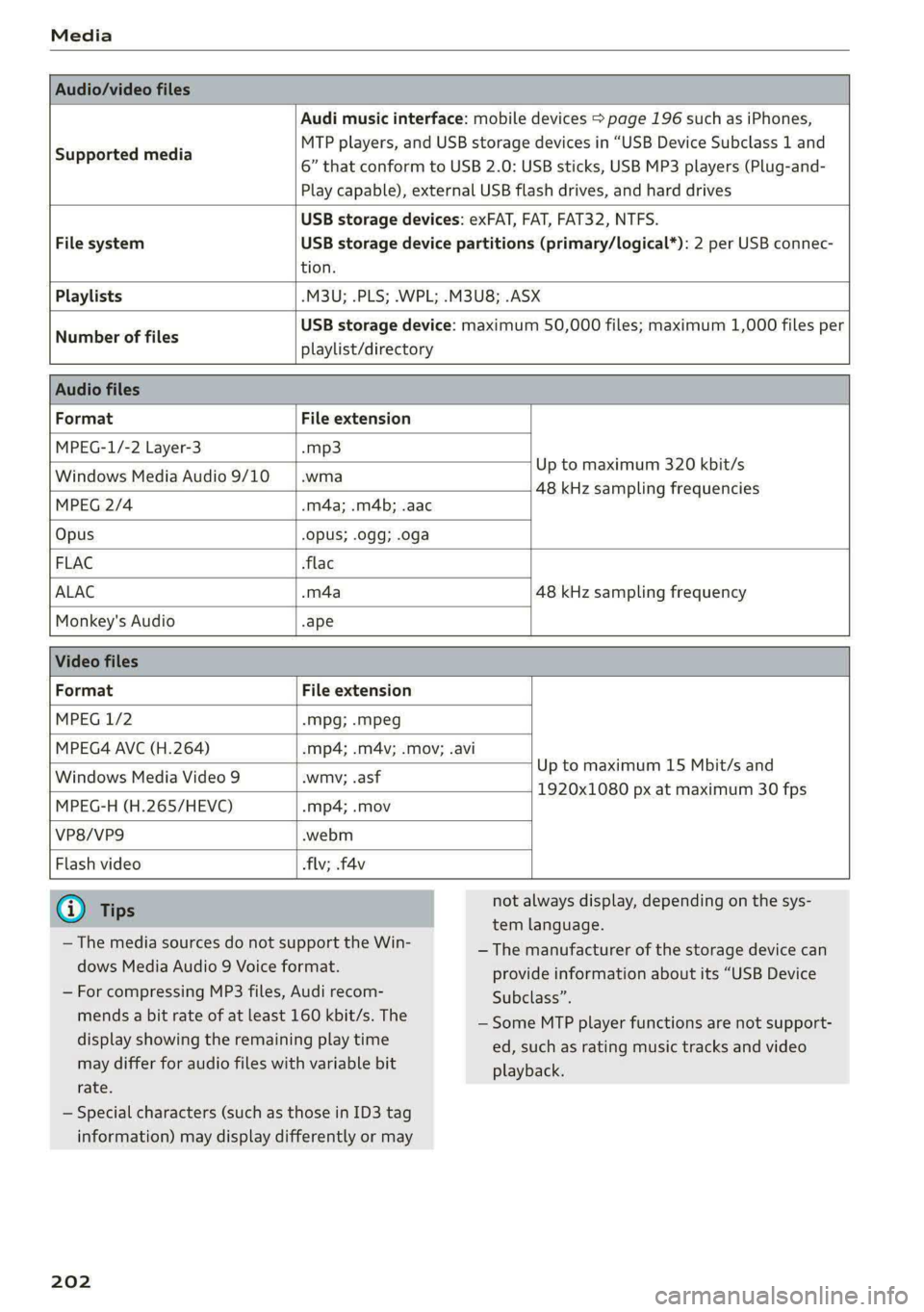
Audio/video files
Supported media
Audi music interface: mobile devices > page 196 such as iPhones,
MTP players, and USB storage devices in “USB Device Subclass 1 and
6” that conform to USB 2.0: USB sticks, USB MP3 players (Plug-and-
Play capable), external USB flash drives, and hard drives
USB storage devices: exFAT, FAT, FAT32, NTFS.
File system USB storage device partitions (primary/logical*): 2 per USB connec-
tion.
Playlists -M3U; .PLS; .WPL; .M3U8; .ASX
Number of files
USB storage device: maximum 50,000 files; maximum 1,000 files per
playlist/directory
Audio files
Format File extension
MPEG-1/-2 Layer-3 -mp3
Windows Media Audio 9/10 |.wma Up to maximum 320 kbit/s
48 kHz sampling frequencies
MPEG 2/4 .m4a; .m4b; .aac
Opus Opus; .0gg; .oga
FLAC flac
ALAC .m4a 48 kHz sampling frequency
Monkey's Audio -ape
Video files
Format File extension
MPEG 1/2 -Mpg; .mpeg
MPEG4 AVC (H.264) -mp4; .m4v; .mov; .avi
Up to maximum 15 Mbit/s and
1920x1080 px at maximum 30 fps
Windows Media Video 9 .wmv; .asf
MPEG-H (H.265/HEVC) -mp4; .mov
VP8/VP9 .webm
Flash video flv; fav
iG) Tips
— The media sources do not support the Win-
dows Media Audio 9 Voice format.
— For compressing MP3 files, Audi recom-
mends a bit rate of at least 160 kbit/s. The
display showing the remaining play time
may differ for audio files with variable bit
rate.
— Special characters (such as those in ID3 tag
information) may display differently or may
202
not always display, depending on the sys-
tem language.
— The manufacturer of the storage device can
provide information about its “USB Device
Subclass”.
— Some MTP player functions are not support-
ed, such as rating music tracks and video
playback.
Page 205 of 296
8W1012721BB
Media
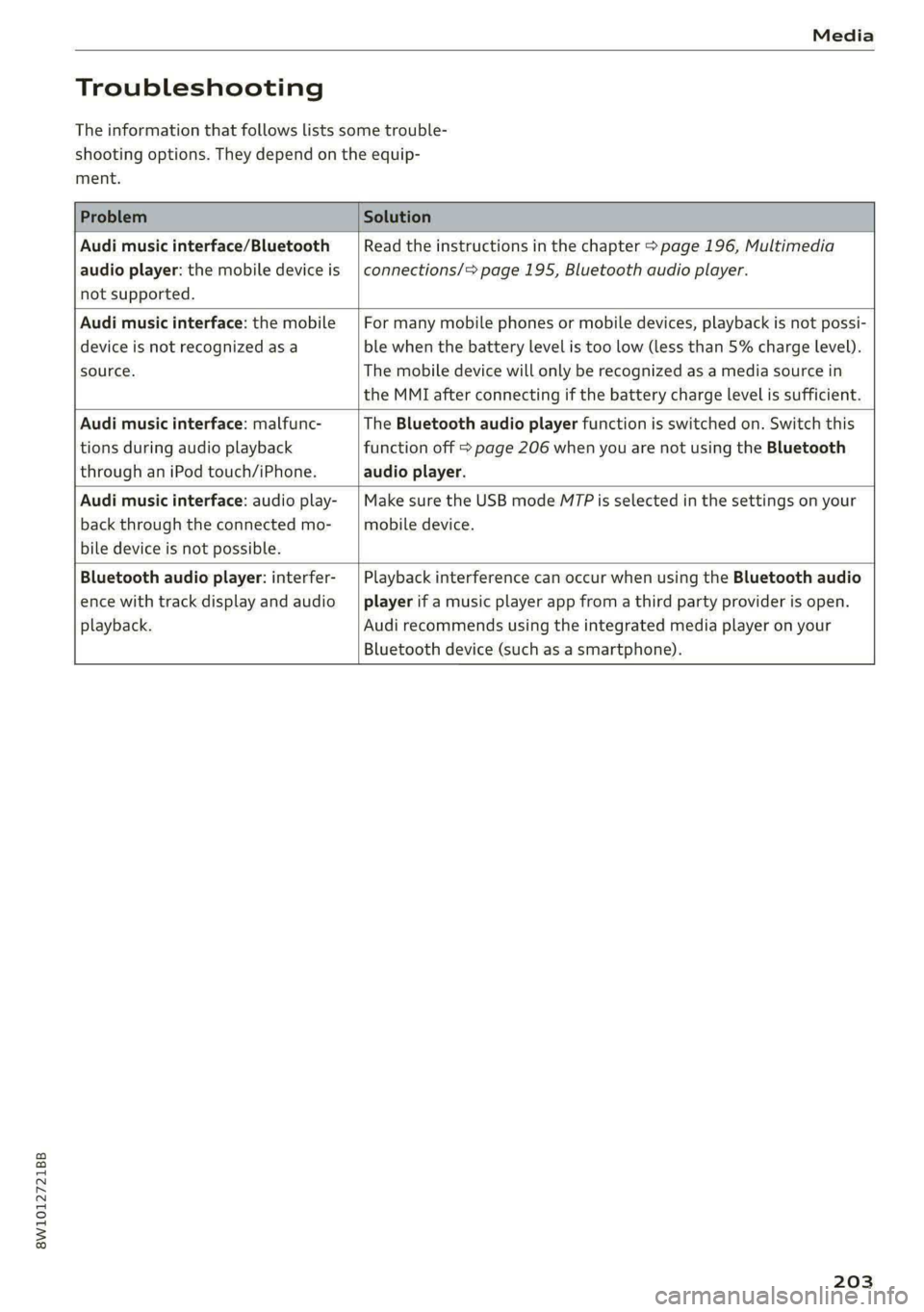
Troubleshooting
The information that follows lists some trouble-
shooting options. They depend on the equip-
ment.
Problem Solution
Audi music interface/Bluetooth
audio player: the mobile device is
not supported.
Read the instructions in the chapter > page 196, Multimedia
connections/> page 195, Bluetooth audio player.
Audi music interface: the mobile
device is not recognized asa
source.
For many mobile phones or mobile devices, playback is not possi-
ble when the battery level is too low (less than 5% charge level).
The mobile device will only be recognized as a media source in
the MMI after connecting if the battery charge level is sufficient.
Audi music interface: malfunc-
tions during audio playback
through an iPod touch/iPhone.
The Bluetooth audio player function is switched on. Switch this
function off > page 206 when you are not using the Bluetooth
audio player.
Audi music interface: audio play-
back through the connected mo-
bile device is not possible.
Make sure the USB mode M7P is selected in the settings on your
mobile device.
Bluetooth audio player: interfer-
ence with track display and audio
playback.
Playback interference can occur when using the Bluetooth audio
player if a music player app from a third party provider is open.
Audi recommends using the integrated media player on your
Bluetooth device (such as a smartphone).
203
Page 208 of 296
Additional settings
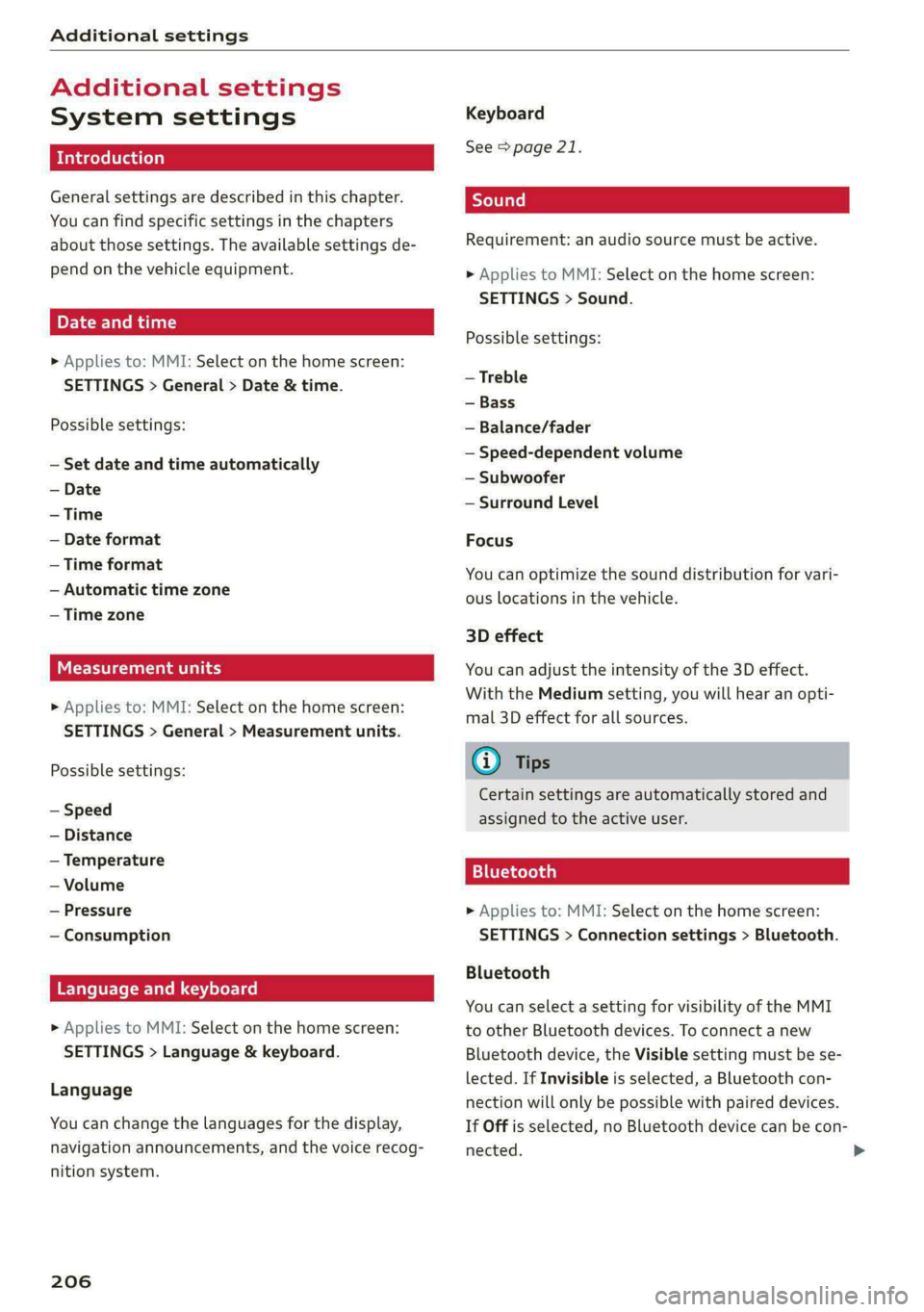
Additional settings
System settings
Introduction
General settings are described in this chapter.
You can find specific settings in the chapters
about those settings. The available settings de-
pend on the vehicle equipment.
Date and time
> Applies to: MMI: Select on the home screen:
SETTINGS > General > Date & time.
Possible settings:
— Set date and time automatically
— Date format
— Time format
— Automatic time zone
— Time zone
een tate ah ey
» Applies to: MMI: Select on the home screen:
SETTINGS > General > Measurement units.
Possible settings:
— Speed
— Distance
— Temperature
— Volume
— Pressure
— Consumption
Language and keyboard
» Applies to MMI: Select on the home screen:
SETTINGS > Language & keyboard.
Language
You can change the languages for the display,
navigation announcements, and the voice recog-
nition system.
206
Keyboard
See > page 21.
Requirement: an audio source must be active.
» Applies to MMI: Select on the home screen:
SETTINGS > Sound.
Possible settings:
— Treble
— Bass
— Balance/fader
— Speed-dependent volume
— Subwoofer
— Surround Level
Focus
You can optimize the sound distribution for vari-
ous locations in the vehicle.
3D effect
You can adjust the intensity of the 3D effect.
With the Medium setting, you will hear an opti-
mal 3D effect for all sources.
@ Tips
Certain settings are automatically stored and
assigned to the active user.
11 elo) aa}
> Applies to: MMI: Select on the home screen:
SETTINGS > Connection settings > Bluetooth.
Bluetooth
You can select a setting for visibility of the MMI
to other Bluetooth devices. To connect a new
Bluetooth device, the Visible setting must be se-
lected. If Invisible is selected, a Bluetooth con-
nection will only be possible with paired devices.
If Off is selected, no Bluetooth device can be con-
nected.
Page 209 of 296
8W1012721BB
Additional settings
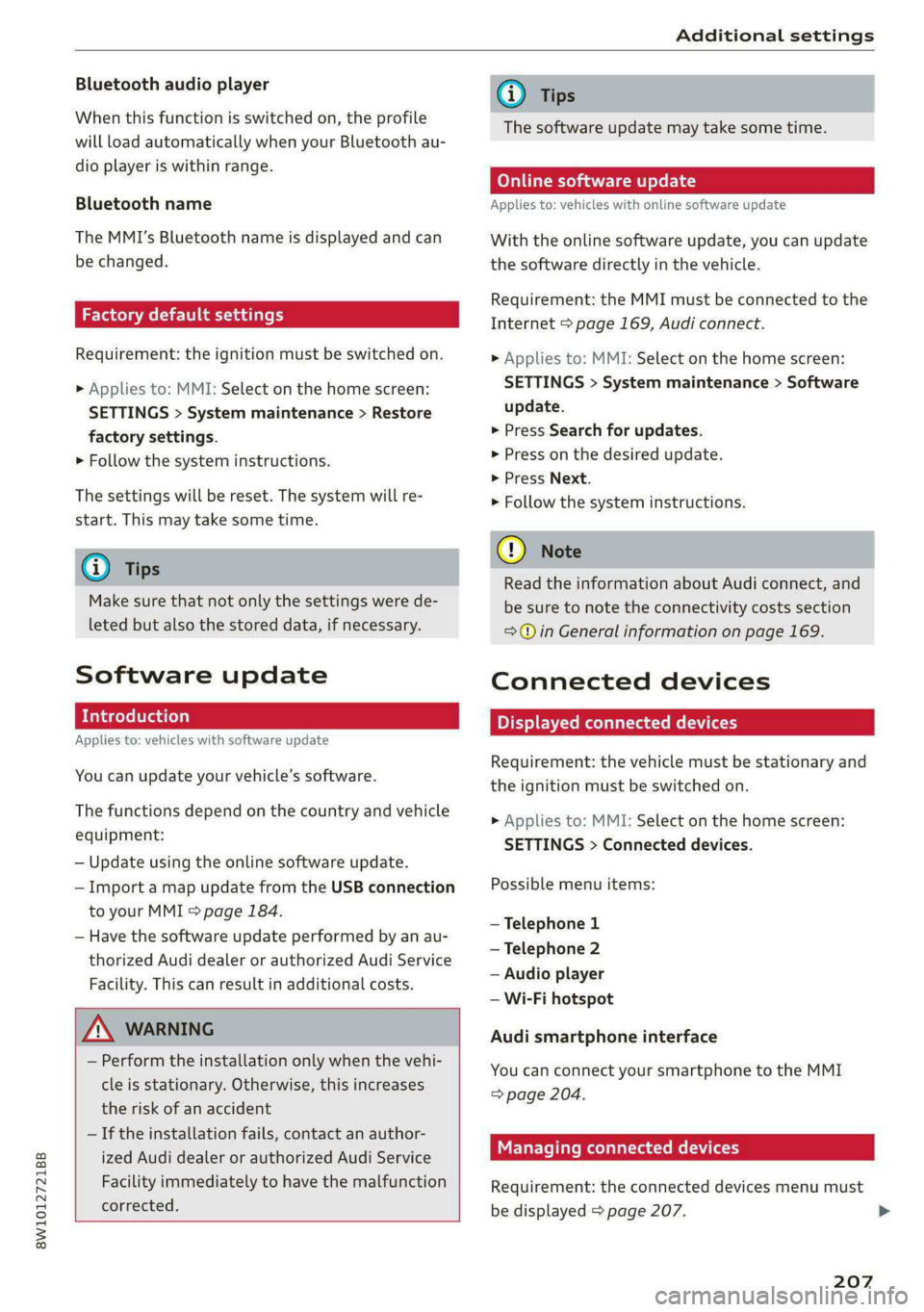
Bluetooth audio player
When this function is switched on, the profile
will load automatically when your Bluetooth au-
dio player is within range.
Bluetooth name
The MMI’s Bluetooth name is displayed and can
be changed.
Factory default settings
Requirement: the ignition must be switched on.
> Applies to: MMI: Select on the home screen:
SETTINGS > System maintenance > Restore
factory settings.
> Follow the system instructions.
The
settings will be reset. The system will re-
start. This may take some time.
@ Tips
Make sure that not only the settings were de-
leted but also the stored data, if necessary.
Software update
Applies to: vehicles with software update
You can update your vehicle’s software.
The functions depend on the country and vehicle
equipment:
— Update using the online software update.
— Import a map update from the USB connection
to your MMI & page 184.
— Have the software update performed by an au-
thorized Audi dealer or authorized Audi Service
Facility. This can result in additional costs.
ZA\ WARNING
— Perform the installation only when the vehi-
cle is stationary. Otherwise, this increases
the risk of an accident
— If the installation fails, contact an author-
ized Audi dealer or authorized Audi Service
Facility immediately to have the malfunction
corrected.
@) Tips
The software update may take some time.
Online software update
Applies to: vehicles with online software update
With the online software update, you can update
the software directly in the vehicle.
Requirement: the MMI must be connected to the
Internet > page 169, Audi connect.
> Applies to: MMI: Select on the home screen:
SETTINGS > System maintenance > Software
update.
> Press Search for updates.
> Press on the desired update.
> Press Next.
> Follow the system instructions.
(1) Note
Read the information about Audi connect, and
be sure to note the connectivity costs section
=@ in General information on page 169.
Connected devices
Displayed connected devices
Requirement: the vehicle must be stationary and
the ignition must be switched on.
> Applies to: MMI: Select on the home screen:
SETTINGS > Connected devices.
Possible menu items:
— Telephone 1
— Telephone 2
— Audio player
— Wi-Fi hotspot
Audi smartphone interface
You can connect your smartphone to the MMI
=> page 204.
Managing connected devices
Requirement: the connected devices menu must
be displayed > page 207.
207
>
Page 281 of 296
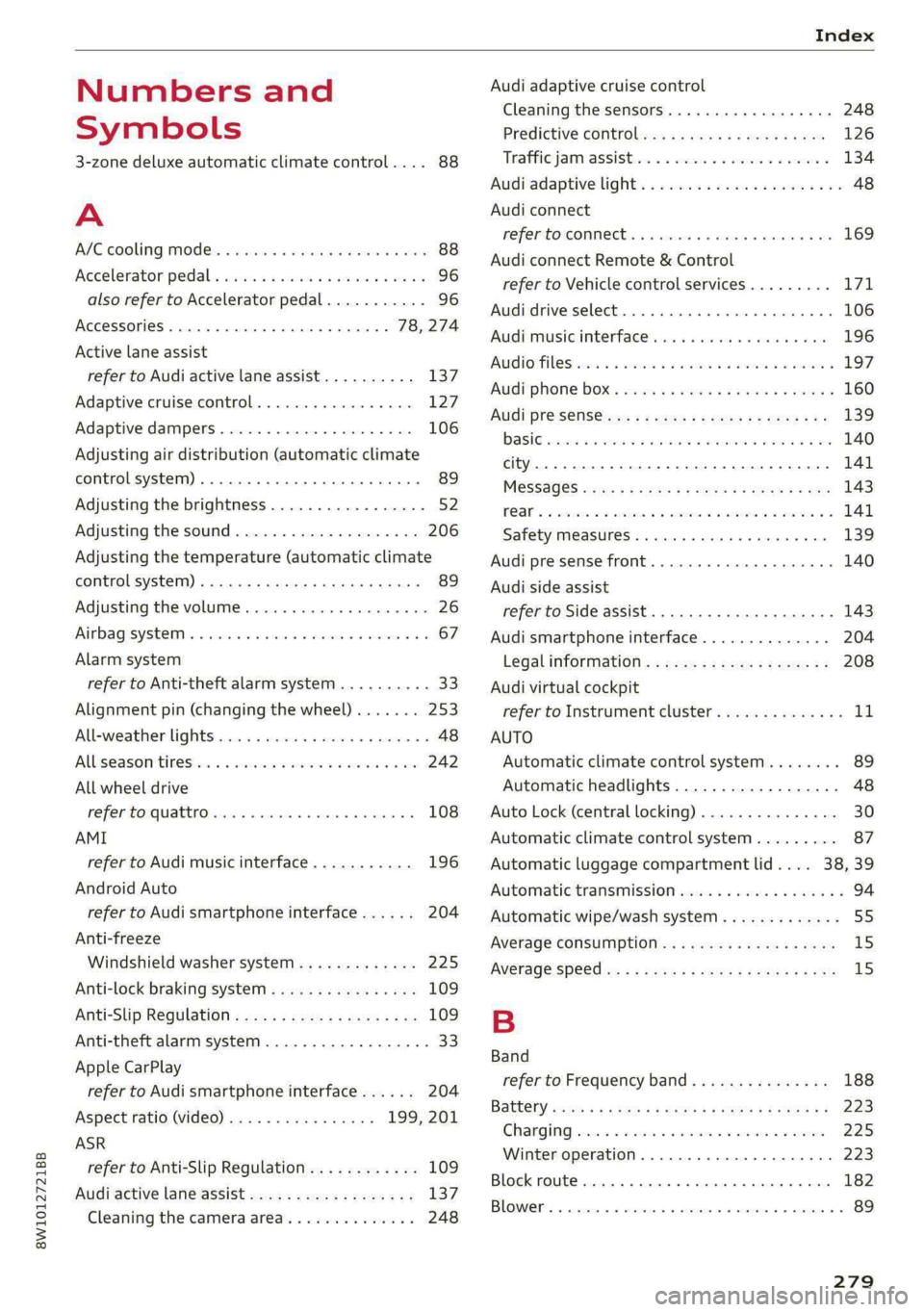
8W1012721BB
Index
Numbers and
Symbols
3-zone deluxe automatic climate control.... 88
A
ALC cooling MOde ss « « vesiev «sass w © wernin eon 88
Accelerator pedals sais se cai sv aac oe ews 96
also refer to Accelerator pedal........... 96
AGCOSSONIES «vce. «0 cesses « wesese ao nreree © 5 78,274
Active lane assist
refer to Audi active lane assist.......... 137
Adaptive cruise control................. 127
Adaptive dampers............-.0000005 106
Adjusting air distribution (automatic climate
control system) ......... 0.0.00. e eee ee 89
Adjusting the brightness................. 52
Adjusting the sound..............-...0- 206
Adjusting the temperature (automatic climate
control system) ...... 0.0 e cee eee eee 89
Adjusting the volume..............000005 26
Aitbagsystemn « «: swersve « sxaneus + cuneons wx anecome o 67
Alarm system
refer to Anti-theft alarm system.......... 33
Alignment pin (changing the wheel)....... 253
Alleweatherlightscses ws ances © sonasie » i axssane a 48
All Season tireSiens ss emans e e emie eo enews oo 242
All wheel drive
refer to quattro... . 2... eee eee ee eae 108
AMI
refer to Audi music interface........... 196
Android Auto
refer to Audi smartphone interface...... 204
Anti-freeze
Windshield washer system............. 225
Anti-lock braking system............00-5 109
Anti-Slip Regulation.................05. 109
Anti-theft alarm system..............000 33
Apple CarPlay
refer to Audi smartphone interface...... 204
Aspect ratio (video) ................ 199, 201
ASR
refer to Anti-Slip Regulation............ 109
Audi active lane assist..............0005 137
Cleaning the camera area.............. 248
Audi adaptive cruise control
Cleaning the sensors..............
Predictive control.............05.
Traffic jam assist.............00-.
Audi adaptive light.................
Audi connect
refer to connect...........eee eee
Audi connect Remote & Control
refer to Vehicle control services.....
Audi drive select...............0005
Audi music interface............00.
AudiosFileSviccs «x eon 2 wwe « o emcee 9 8 5
Safety measures..............005
Audi pre sense front..............0-
Audi side assist
refer to Side assist................
Audi smartphone interface..........
Legalinformation................
Audi virtual cockpit
refer to Instrument cluster.........
AUTO
Automatic climate control system...
Automatic headlights.............
Auto Lock (central locking) ..........
Automatic climate control system... .
Automatic luggage compartment lid....
Automatic transmission............
Automatic wipe/wash system........
Average consumption..............
AVETAGE SPEEd ss 5s aean sy ows Bee
B
Band
279
Page 282 of 296
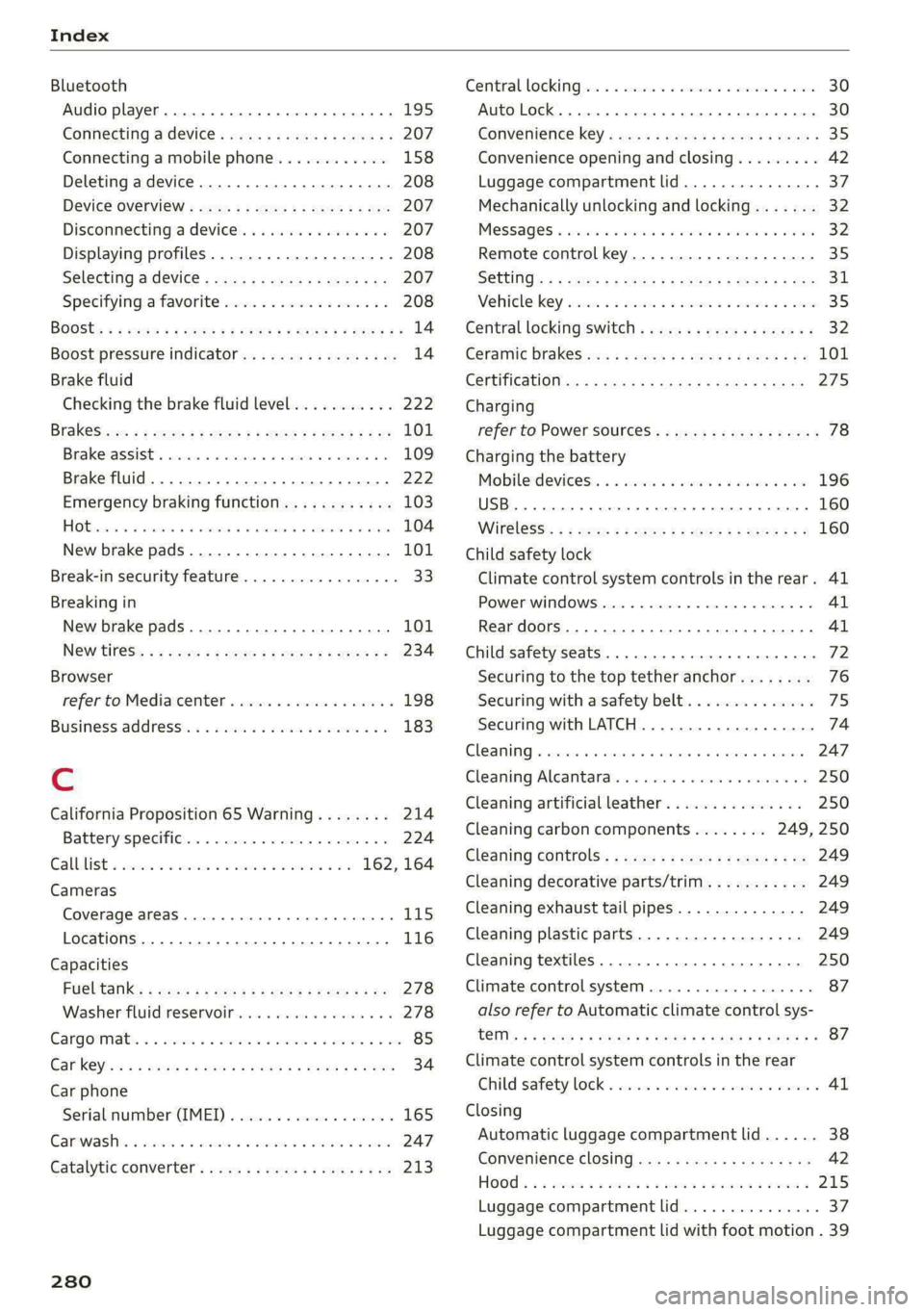
Index
Bluetooth
Audio player... . 2... cece eee eee eee eee 195
Connecting a device. .......00. eee eeee 207
Connecting a mobile phone............ 158
Deleting
adevice................00 00 208
Device OVervieW secs s «sees 3 + eawe ss eee 207
Disconnecting a device.............00. 207
Displaying profiles..................0. 208
Selecting a device s seas ss seg ts ees 2 3 207
Specifying a favorite.................. 208
BoOStss « « cosy: ¢ ¢ eyes 5 © sees § o Rewn ¢ a ees ¢ e 14
Boost pressure indicator................. 14
Brake fluid
New brake pads..............---000-- 101
Break-in security feature..............0.. 33
Breaking in
New brake pads..............-..00005 101
N@W tiCGSs « s eaves = ¢ says + © eure 2s eee Ge 234
Browser
refer to Mediacenter................0. 198
Business address.............--000000- 183
Cc
California Proposition 65 Warning........ 214
Battery specifiers « a sno 2 wrens © somnne wo 9 224
CALLLISE o ssc x = vmaaie 2% swavese vx wena eae 162, 164
Cameras
Coverage areaS... 1.2... . eee eee eee 115
Locations...................0.000005 116
Capacities
FUeL TANK: » sew ss ewe 2 9 aes 2 dame Be Be 278
Washer fluid reservoir..............--. 278
Cargoimatis « « wseon «x sows ee ies 4 o sonne & o oe 85
Car kiss ¢ s anon oo ese y 2 ease oo oo oe ees 34
Car phone
Serial number (IMED) .............00005 165
GCarwashiis ¢ savin se essa se ewe a cme v6 ores 247
Catalytic converter. .... 06s. cse eee ee eee 213
280
Central locking:ers « «comes + + seca sa emai eo ae 30
Auto Lock... 2. eects 30
Convenience-key « ess: ¢ wucwu s eewn ss rows e 35
Convenience opening and closing......... 42
Luggage compartment lid............... 37
Mechanically unlocking and locking....... 32
MeSSAGES « scsi «onesie so eae » oem av wee 32
Remote control key..............-.000- 35
SECUMG’ s 2 wars 5 x saaw £ HEME FE HOR F 5 oe 31
Vehicle key cies so essen 6 o enone so cxere & & sree 35
Central locking switch.............000005 32
Ceramic brakeSica: 2 snau so gem < o meme 2 101
Certificationies + s saws 4 s sane x x eae ge RoR 275
Charging
refer to Power sourceS...........-22+--- 78
Charging the battery
Mobilerdevicests « « isseve +o scaueue + x ssc > oo 196
USB... eens 160
WI£CLESS': « sues 5 5 semen 5 2 een ce oe ose 160
Child safety lock
Climate control system controls inthe rear. 41
PoweriwindOwSvernce « «sos + sown ow anacmn 8 41
Rear doors... 2... eee ee eee 41
Child safety seats..... 0.0... cee ee eee eee 72
Securing to the top tether anchor........ 76
Securing with a safety belt.............. 75
Securing with LATCH...........-.000005 74
Cleaning... .. ccc cece eee eee eee 247
Cleaning Alcantara’. «cscs cows cee ee 250
Cleaning artificial leather............0.. 250
Cleaning carbon components........ 249, 250
Cleaning controls’: » sees ss sees y es eeen sees 249
Cleaning decorative parts/trim........... 249
Cleaning exhaust tail pipes.............. 249
Cleaning plastic parts.................. 249
Cleaning textiles................000005 250
Climate control system..............0005 87
also refer to Automatic climate control sys-
OTs: © = wteung o & seyem u 2 eens & Y eeu «2 oe x 87
Climate control system controls in the rear
Child safety lock = cscs «2 wane » wane » eusven 41
Closing
Automatic luggage compartment lid...... 38
Convenience closing..............+505% 42
HOOG sx o sees 2s semi oo wen 6 Basa v oreo 215
Luggage compartment lid.............0. 37
Luggage compartment lid with foot motion . 39